09/20/20
24
Mr.S.B.Karthikeyan,Assistant Professor/Kongu Engineering College,Perundurai,Erode-6
38060.
1
Introducing Windows
Workflow
Foundation 4.0
09/20/20
24
Mr.S.B.Karthikeyan,Assistant Professor/Kongu Engineering College,Perundurai,Erode-6
38060.
2
Introduction
 A few years back, Microsoft
shipped an API named Windows
Workflow Foundation (WF) with
the release of NET 3.0.
 This API allowed you to model,
configure, monitor, and execute
the workflows used internally by a
given .NET program.
09/20/20
24
Mr.S.B.Karthikeyan,Assistant Professor/Kongu Engineering College,Perundurai,Erode-6
38060.
3
 We were no longer required to manually
develop complex infrastructure to support
workflow-enabled applications.
 .NET 4.0 gives us a complete reboot of the
entire WF API
 workflows are modeled using a declarative
XML-based grammar named XAML
09/20/20
24
Mr.S.B.Karthikeyan,Assistant Professor/Kongu Engineering College,Perundurai,Erode-6
38060.
4
 Visual Studio 2010 WF designers have
been completely overhauled and
rewritten using Windows Presentation
Foundation (WPF) technologies.
 WF programming model to establish
business processes that execute under the
watchful eye of the WF runtime engine.
09/20/20
24
Mr.S.B.Karthikeyan,Assistant Professor/Kongu Engineering College,Perundurai,Erode-6
38060.
5
Defining a Business Process
 Things to be considered While building an
application that allows a user to purchase an
automobile online.
 Once the user submits the order, a large
number of activities are set in motion.
 Credit check
 start a database transaction in order to remove
the entry from an Inventory table
 add a new entry to an Orders table
09/20/20
24
Mr.S.B.Karthikeyan,Assistant Professor/Kongu Engineering College,Perundurai,Erode-6
38060.
6
 update the customer account Information
 send a confirmation e-mail to the buyer
 place the order at the car dealership
 modeling a business process was yet
another detail that programmers had to
account for.
 code base has very little trace of the
internal “flow” of the application
 The development team may build
external documentation and workflow
charts, again
09/20/20
24
Mr.S.B.Karthikeyan,Assistant Professor/Kongu Engineering College,Perundurai,Erode-6
38060.
7
The Role of WF 4.0
 It allows programmers to declaratively
design business processes using a
prefabricated set of activities.
 WF designers of Visual Studio 2010 to
create our business process at design
time.
 WF allows us to build the skeleton of a
business process
09/20/20
24
Mr.S.B.Karthikeyan,Assistant Professor/Kongu Engineering College,Perundurai,Erode-6
38060.
8
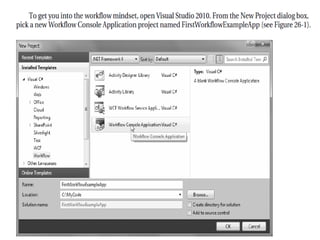
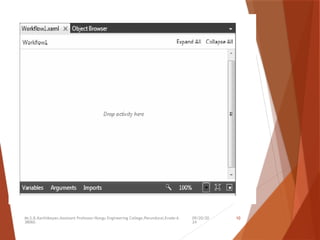
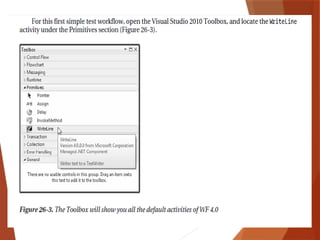
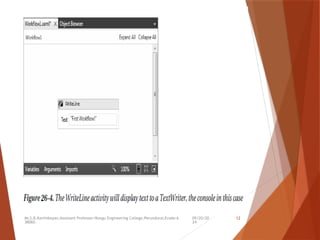
Building a (Painfully) Simple
Workflow
 workflow-enabled application gives
“different feel ” from building a
typical .NET application.
 A WF application also consists of custom
code
 you are building directly into the
assembly a model of the business process
itself
09/20/20
24
Mr.S.B.Karthikeyan,Assistant Professor/Kongu Engineering College,Perundurai,Erode-6
38060.
9
09/20/20
24
Mr.S.B.Karthikeyan,Assistant Professor/Kongu Engineering College,Perundurai,Erode-6
38060.
10
09/20/20
24
Mr.S.B.Karthikeyan,Assistant Professor/Kongu Engineering College,Perundurai,Erode-6
38060.
11
09/20/20
24
Mr.S.B.Karthikeyan,Assistant Professor/Kongu Engineering College,Perundurai,Erode-6
38060.
12
09/20/20
24
Mr.S.B.Karthikeyan,Assistant Professor/Kongu Engineering College,Perundurai,Erode-6
38060.
13
Viewing the Underlying XAML
09/20/20
24
Mr.S.B.Karthikeyan,Assistant Professor/Kongu Engineering College,Perundurai,Erode-6
38060.
14
The WF 4.0 Runtime
 WF API also consists of a runtime engine
to load, execute, unload, and in other
ways manipulate a workflow which you
have defined.
 The WF runtime engine can be hosted
within any .NET application domain
 a single application domain can only have
one running instance of the WF engine.
09/20/20
24
Mr.S.B.Karthikeyan,Assistant Professor/Kongu Engineering College,Perundurai,Erode-6
38060.
15
Hosting a Workflow using
WorkflowInvoker
static void Main(string[] args)
{
WorkflowInvoker.Invoke(new Workflow1());
}
----------------------------------------------------------------------------
static void Main(string[] args)
{
WorkflowInvoker.Invoke(new Workflow1());
Console.WriteLine("Thanks for playing");
}
09/20/20
24
Mr.S.B.Karthikeyan,Assistant Professor/Kongu Engineering College,Perundurai,Erode-6
38060.
16
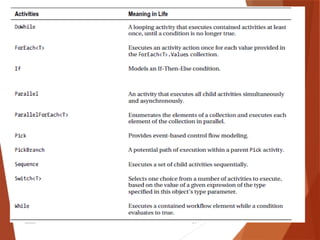
Examining the Workflow 4.0
Activities
 Control Flow Activities
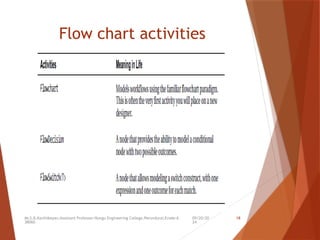
 Flowchart Activities
09/20/20
24
Mr.S.B.Karthikeyan,Assistant Professor/Kongu Engineering College,Perundurai,Erode-6
38060.
17
09/20/20
24
Mr.S.B.Karthikeyan,Assistant Professor/Kongu Engineering College,Perundurai,Erode-6
38060.
18
Flow chart activities
09/20/20
24
Mr.S.B.Karthikeyan,Assistant Professor/Kongu Engineering College,Perundurai,Erode-6
38060.
19
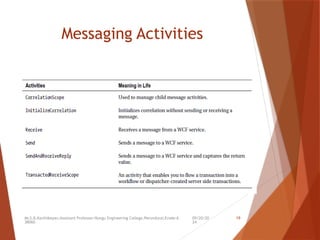
Messaging Activities
09/20/20
24
Mr.S.B.Karthikeyan,Assistant Professor/Kongu Engineering College,Perundurai,Erode-6
38060.
20
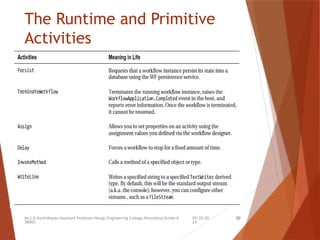
The Runtime and Primitive
Activities
09/20/20
24
Mr.S.B.Karthikeyan,Assistant Professor/Kongu Engineering College,Perundurai,Erode-6
38060.
21
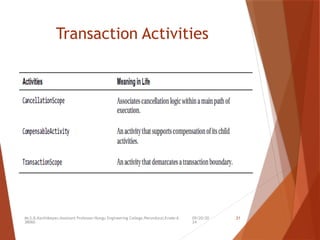
Transaction Activities
09/20/20
24
Mr.S.B.Karthikeyan,Assistant Professor/Kongu Engineering College,Perundurai,Erode-6
38060.
22
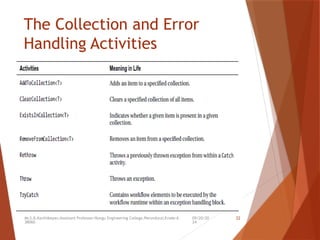
The Collection and Error
Handling Activities
09/20/20
24
Mr.S.B.Karthikeyan,Assistant Professor/Kongu Engineering College,Perundurai,Erode-6
38060.
23
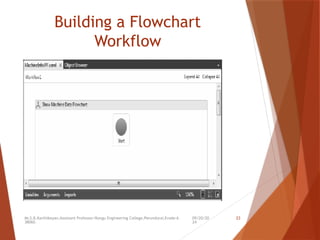
Building a Flowchart
Workflow
09/20/20
24
Mr.S.B.Karthikeyan,Assistant Professor/Kongu Engineering College,Perundurai,Erode-6
38060.
24
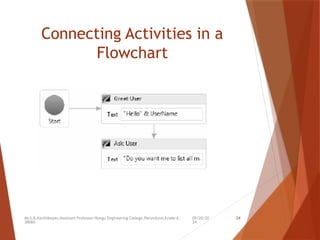
Connecting Activities in a
Flowchart
09/20/20
24
Mr.S.B.Karthikeyan,Assistant Professor/Kongu Engineering College,Perundurai,Erode-6
38060.
25
Passing Arguments to your
Workflow using WorkflowInvoker
 The Invoke() method has been overloaded
multiple times for arguments.
 These arguments are represented using a
Dictionary<string, object> variable that
contains a set of name/value pairs that
will be used to set identically named (and
typed) argument variables in the
workflow itself.
09/20/20
24
Mr.S.B.Karthikeyan,Assistant Professor/Kongu Engineering College,Perundurai,Erode-6
38060.
26
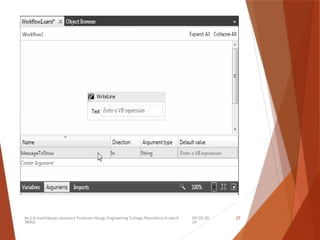
Defining Arguments using the
Workflow Designer
 In Solution Explorer, right-click
Workflow1.xaml and select View Designer.
 Bottom of the designer there is a button
named Arguments
 Click this button now, and from the
resulting UI, add an input argument of
type String named MessageToShow(no
need to assign a default value for this new
argument).
09/20/20
24
Mr.S.B.Karthikeyan,Assistant Professor/Kongu Engineering College,Perundurai,Erode-6
38060.
27
09/20/20
24
Mr.S.B.Karthikeyan,Assistant Professor/Kongu Engineering College,Perundurai,Erode-6
38060.
28
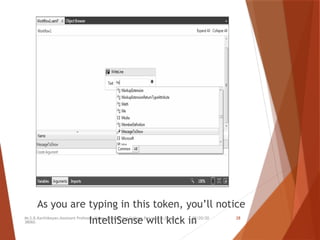
As you are typing in this token, you’ll notice
IntelliSense will kick in
09/20/20
24
Mr.S.B.Karthikeyan,Assistant Professor/Kongu Engineering College,Perundurai,Erode-6
38060.
29
 import System.Collections.Generic namespace into your
file to declare the Dictionary<> variable.
static void Main(string[] args)
{
Console.WriteLine(" *Welcome to this amazing WF application
*");
Console.Write("Please enter the data to pass the workflow: ");
string wfData = Console.ReadLine();
Dictionary<string, object> wfArgs = new
Dictionary<string,object>();
wfArgs.Add("MessageToShow", wfData);
WorkflowInvoker.Invoke(new Workflow1(), wfArgs);
Console.WriteLine("Thanks for playing");
}
09/20/20
24
Mr.S.B.Karthikeyan,Assistant Professor/Kongu Engineering College,Perundurai,Erode-6
38060.
30
 Beyond the Invoke() method,
the only other really interesting members of
WorkflowInvoker
would be
BeginInvoke() and
EndInvoke(),
which allow you to start up the workflow on a
secondary thread using the .NET asynchronous
delegate pattern
09/20/20
24
Mr.S.B.Karthikeyan,Assistant Professor/Kongu Engineering College,Perundurai,Erode-6
38060.
31
Hosting a Workflow using
WorkflowApplication
 Call run() method which will create new
thread will be plucked from the CLR
thread pool.
 One way to make sure the calling thread
waits long enough for the background
thread to finish its work is to use an
AutoResetEvent object of the
System.Threading namespace.
09/20/20
24
Mr.S.B.Karthikeyan,Assistant Professor/Kongu Engineering College,Perundurai,Erode-6
38060.
32
static void Main(string[] args)
{
Console.WriteLine("***** Welcome to this amazing WF application
*****");
// Get data from user, to pass to workflow.
Console.Write("Please enter the data to pass the workflow: ");
string wfData = Console.ReadLine();
// Package up the data as a dictionary.
Dictionary<string, object> wfArgs = new Dictionary<string,object>();
wfArgs.Add("MessageToShow", wfData);
// Used to inform primary thread to wait!
AutoResetEvent waitHandle = new AutoResetEvent(false);
09/20/20
24
Mr.S.B.Karthikeyan,Assistant Professor/Kongu Engineering College,Perundurai,Erode-6
38060.
33
// Pass to the workflow.
WorkflowApplication app = new WorkflowApplication(new Workflow1(), wfArgs);
// Hook up an event with this app.
// When I’m done, notifiy other thread I’m done,
// and print a message.
app.Completed = (completedArgs) => {
waitHandle.Set();
Console.WriteLine("The workflow is done!");
};
// Start the workflow!
app.Run();
// Wait until I am notified the workflow is done.
waitHandle.WaitOne();
Console.WriteLine("Thanks for playing");
}
09/20/20
24
Mr.S.B.Karthikeyan,Assistant Professor/Kongu Engineering College,Perundurai,Erode-6
38060.
34
Building a Flowchart
Workflow
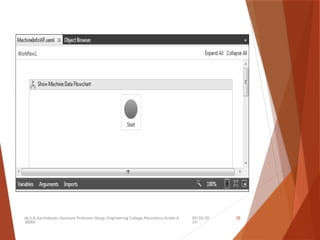
 Under the Flowchart section of your
Toolbox, drag a Flowchart activity onto
the designer.
 Next, using the Properties window, change
the DisplayName property to something a
tad more catchy,
 such as Show Machine Data Flowchart
09/20/20
24
Mr.S.B.Karthikeyan,Assistant Professor/Kongu Engineering College,Perundurai,Erode-6
38060.
35
09/20/20
24
Mr.S.B.Karthikeyan,Assistant Professor/Kongu Engineering College,Perundurai,Erode-6
38060.
36
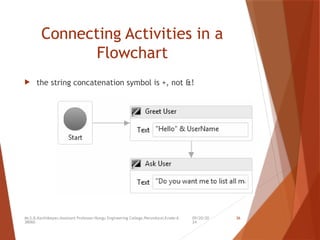
Connecting Activities in a
Flowchart
 the string concatenation symbol is +, not &!
09/20/20
24
Mr.S.B.Karthikeyan,Assistant Professor/Kongu Engineering College,Perundurai,Erode-6
38060.
37
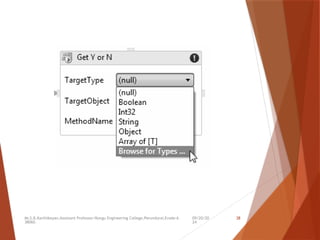
Working with the
InvokeMethod Activity
 Majority of a workflow is defined in a declarative
manner using XAML
 Use of the InvokeMethod activity, which allows you to
invoke methods of real objects at various points in your
workflow.
09/20/20
24
Mr.S.B.Karthikeyan,Assistant Professor/Kongu Engineering College,Perundurai,Erode-6
38060.
38
09/20/20
24
Mr.S.B.Karthikeyan,Assistant Professor/Kongu Engineering College,Perundurai,Erode-6
38060.
39
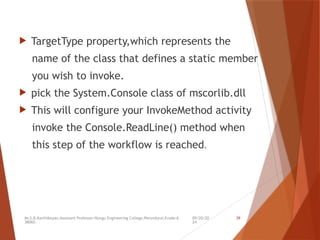
 TargetType property,which represents the
name of the class that defines a static member
you wish to invoke.
 pick the System.Console class of mscorlib.dll
 This will configure your InvokeMethod activity
invoke the Console.ReadLine() method when
this step of the workflow is reached.
09/20/20
24
Mr.S.B.Karthikeyan,Assistant Professor/Kongu Engineering College,Perundurai,Erode-6
38060.
40
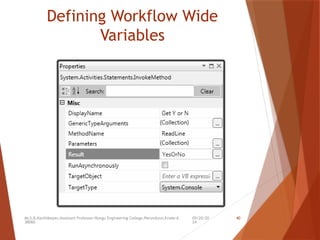
Defining Workflow Wide
Variables
09/20/20
24
Mr.S.B.Karthikeyan,Assistant Professor/Kongu Engineering College,Perundurai,Erode-6
38060.
41
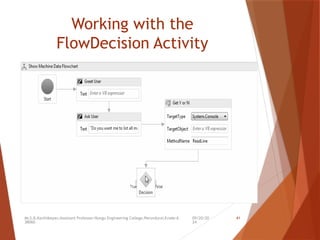
Working with the
FlowDecision Activity
09/20/20
24
Mr.S.B.Karthikeyan,Assistant Professor/Kongu Engineering College,Perundurai,Erode-6
38060.
42
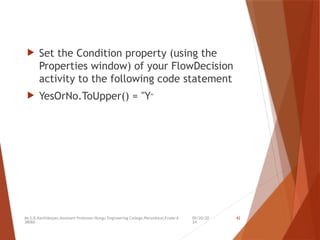
 Set the Condition property (using the
Properties window) of your FlowDecision
activity to the following code statement
 YesOrNo.ToUpper() = "Y"
09/20/20
24
Mr.S.B.Karthikeyan,Assistant Professor/Kongu Engineering College,Perundurai,Erode-6
38060.
43
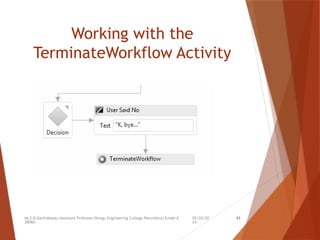
Working with the
TerminateWorkflow Activity
09/20/20
24
Mr.S.B.Karthikeyan,Assistant Professor/Kongu Engineering College,Perundurai,Erode-6
38060.
44
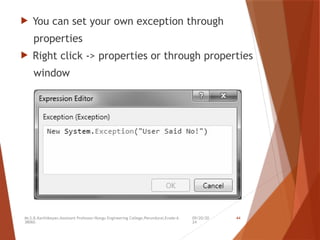
 You can set your own exception through
properties
 Right click -> properties or through properties
window
09/20/20
24
Mr.S.B.Karthikeyan,Assistant Professor/Kongu Engineering College,Perundurai,Erode-6
38060.
45
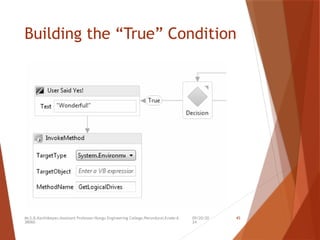
Building the “True” Condition
09/20/20
24
46
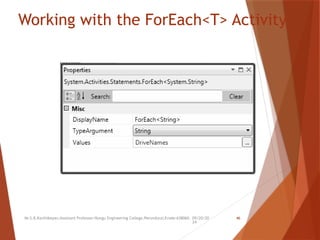
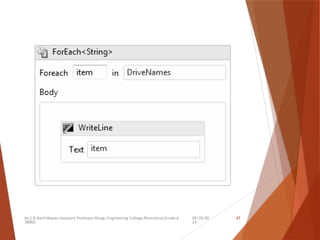
Working with the ForEach<T> Activity
Mr.S.B.Karthikeyan,Assistant Professor/Kongu Engineering College,Perundurai,Erode-638060.
09/20/20
24
Mr.S.B.Karthikeyan,Assistant Professor/Kongu Engineering College,Perundurai,Erode-6
38060.
47
09/20/20
24
Mr.S.B.Karthikeyan,Assistant Professor/Kongu Engineering College,Perundurai,Erode-6
38060.
48
Completing the Application
static void Main(string[] args)
{ try {
Dictionary<string, object> wfArgs = new
Dictionary<string, object>();
wfArgs.Add("UserName", "Andrew");
WorkflowInvoker.Invoke(new Workflow1(), wfArgs);
}
catch (Exception ex)
{
Console.WriteLine(ex.Message);
Console.WriteLine(ex.Data["Reason"]);
} }
09/20/20
24
Mr.S.B.Karthikeyan,Assistant Professor/Kongu Engineering College,Perundurai,Erode-6
38060.
49
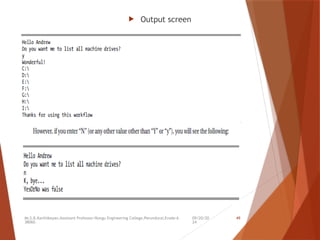
 Output screen

Windows workflow foundation in .Net Framework