SIMATIC HMI
WinCC flexible 2008 SP4
Smart Panels
System Manual
06/2012
Readme 1
Performance features 2
Legal information
Warning notice system
This manual contains notices you have to observe in order to ensure your personal safety, as well as to prevent
damage to property. The notices referring to your personal safety are highlighted in the manual by a safety alert
symbol, notices referring only to property damage have no safety alert symbol. These notices shown below are
graded according to the degree of danger.
DANGER
indicates that death or severe personal injury will result if proper precautions are not taken.
WARNING
indicates that death or severe personal injury may result if proper precautions are not taken.
CAUTION
with a safety alert symbol, indicates that minor personal injury can result if proper precautions are not taken.
CAUTION
without a safety alert symbol, indicates that property damage can result if proper precautions are not taken.
NOTICE
indicates that an unintended result or situation can occur if the relevant information is not taken into account.
If more than one degree of danger is present, the warning notice representing the highest degree of danger will be
used. A notice warning of injury to persons with a safety alert symbol may also include a warning relating to property
damage.
Qualified Personnel
The product/system described in this documentation may be operated only by personnel qualified for the specific
task in accordance with the relevant documentation, in particular its warning notices and safety instructions. Qualified
personnel are those who, based on their training and experience, are capable of identifying risks and avoiding
potential hazards when working with these products/systems.
Proper use of Siemens products
Note the following:
WARNING
Siemens products may only be used for the applications described in the catalog and in the relevant technical
documentation. If products and components from other manufacturers are used, these must be recommended or
approved by Siemens. Proper transport, storage, installation, assembly, commissioning, operation and
maintenance are required to ensure that the products operate safely and without any problems. The permissible
ambient conditions must be complied with. The information in the relevant documentation must be observed.
Trademarks
All names identified by ® are registered trademarks of Siemens AG. The remaining trademarks in this publication
may be trademarks whose use by third parties for their own purposes could violate the rights of the owner.
Disclaimer of Liability
We have reviewed the contents of this publication to ensure consistency with the hardware and software described.
Since variance cannot be precluded entirely, we cannot guarantee full consistency. However, the information in
this publication is reviewed regularly and any necessary corrections are included in subsequent editions.
Siemens AG
Industry Sector
Postfach 48 48
90026 NÜRNBERG
GERMANY
Ⓟ 08/2012 Technical data subject to change
Copyright © Siemens AG 2012.
All rights reserved
Table of contents
1 Readme........................................................................................................................................................5
1.1 Security note..................................................................................................................................5
1.2 General Notes...............................................................................................................................6
2 Performance features.................................................................................................................................11
2.1 Smart Panels...............................................................................................................................11
Index...........................................................................................................................................................13
Smart Panels
System Manual, 06/2012, 3
Readme 1
1.1 Security note
Security information
Siemens offers IT security mechanisms for its portfolio of automation and drive products in
order to support secure operation of the plant/machine. Our products are also continuously
developed further with regard to IT security. We therefore recommend that you keep yourself
informed about updates and upgrades for our products and always use the latest version of
each product. For information on this topic, refer to: http://support.automation.siemens.com
(http://www.siemens.de/automation/csi_en_WW) You can register for a product-specific
newsletter here.
For the safe operation of a plant/machine, however, it is also necessary to integrate the
automation components into an overall IT security concept for the entire plant/machine which
corresponds to the state-of-the-art IT technology. You can find information on this under:
http://www.siemens.com/industrialsecurity. (http://www.siemens.com/industrialsecurity)
Products used from other manufacturers should also be taken into account here.
Smart Panels
System Manual, 06/2012, 5
1.2 General Notes
Contents
General information on WinCC flexible that could not be included in the manual or Online Help.
"Date/time" area pointer
Note that when you enter the year, values 90-99 result in years 1990 through 1999 and the
values 0-89 result in the years 2000 through 2089.
Copying HMI devices with system functions
If you copy, delete and reinsert an HMI device that contains system functions, it is possible
that the system functions are no longer available.
Support for new HMI devices
Two new HMI devices are available to you in WinCC flexible 2008 SP4:
1. Smart 700 IE
2. Smart 1000 IE
Color depth
The Smart 700 IE and Smart 1000 IE HMI devices have a color depth of 16 bits. This means
that objects can be displayed with a higher quality in the graphic view.
Dynamic control of the operability of objects.
The "Operability" animation is available to you for the following objects:
● User view
● Date/time field
● I/O field
● Graphic I/O field
● Alarm view
● Switch
● Button
Readme
1.2 General Notes
Smart Panels
6 System Manual, 06/2012,
● Symbolic I/O field
● Recipe view
Example at "Button" object:
Depending on the value of a tag, the user may or may not be able to operate the button in
Runtime. You use this dynamic control so that the user can operate the button only in certain
situations, for example, during maintenance work.
HMI devices concerned:
1. Smart 700 IE
2. Smart 1000 IE
Alarm indicator with advanced properties
The alarm indicator offers two new properties:
Readme
1.2 General Notes
Smart Panels
System Manual, 06/2012, 7
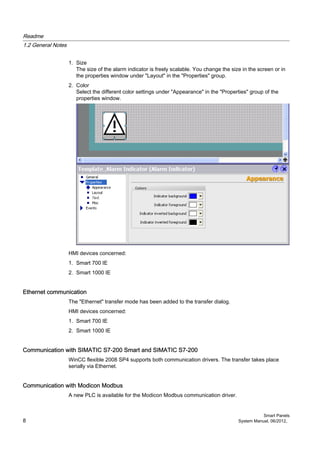
1. Size
The size of the alarm indicator is freely scalable. You change the size in the screen or in
the properties window under "Layout" in the "Properties" group.
2. Color
Select the different color settings under "Appearance" in the "Properties" group of the
properties window.
HMI devices concerned:
1. Smart 700 IE
2. Smart 1000 IE
Ethernet communication
The "Ethernet" transfer mode has been added to the transfer dialog.
HMI devices concerned:
1. Smart 700 IE
2. Smart 1000 IE
Communication with SIMATIC S7-200 Smart and SIMATIC S7-200
WinCC flexible 2008 SP4 supports both communication drivers. The transfer takes place
serially via Ethernet.
Communication with Modicon Modbus
A new PLC is available for the Modicon Modbus communication driver.
Readme
1.2 General Notes
Smart Panels
8 System Manual, 06/2012,
Select the "Modicon Modbus" communication driver in the working area of the "Connections"
editor. Select the CPU type "Delta" on the "Parameters" tab.
HMI devices concerned:
1. Smart 700 IE
2. Smart 1000 IE
Communication with LOGO! (0BA7)
WinCC flexible 2008 SP4 supports the LOGO! communication driver. The transfer takes place
via Ethernet.
HMI devices concerned:
1. Smart 700 IE
2. Smart 1000 IE
Extended address area for OMRON communication driver
The address area for the "DM" user data type has been extended. The address range is
between "0" and "32767".
HMI devices concerned:
1. Smart 700 IE
2. Smart 1000 IE
Address area for 3rd party controllers
Check the address area that is valid or usable for communication with 3rd party HMI Panel
and controllers.
Validity of documents in the online help
The documents specified in the WinCC flexible SP2 or SP3 online help are also valid for WinCC
flexible SP4 without limitation.
Readme
1.2 General Notes
Smart Panels
System Manual, 06/2012, 9
Performance features 2
2.1 Smart Panels
Introduction
The following table provides assistance in estimating whether a specific project is still within
the performance features of the HMI device.
The stated maximum values are not additive. We cannot guarantee proper functioning of
configurations that make full use of all system limits on the HMI devices.
In addition to the specified limits, the transfer time of process values must be observed during
serial communication. A low baud rate may have the result that process values are not updated.
Smart Panels
Smart 700
Smart 1000
Smart 700 IE
Smart 1000 IE
Variables
Number of variables in the project 500 800
Number of PowerTags -- --
Number of elements per array 100 100
Number of local variables -- --
Alarms
Number of alarm classes 32 32
Number of discrete alarms 200 200
Number of analog alarms 15 15
Character length of an alarm 80 80
Number of process values per alarm 8 8
Size of the alarm buffer 256 256
Number of queued alarm events 64 64
Images
Number of screens 50 100
Number of variables per screen 30 100
Number of complex objects per screen 5 5
Recipes
Number of recipes 5 5
Number of elements per recipe 20 20
User data length in bytes per data record -- --
Smart Panels
System Manual, 06/2012, 11
Smart 700
Smart 1000
Smart 700 IE
Smart 1000 IE
Number of data records per recipe 20 20
Number of recipe elements in the project -- --
Reserved memory for data records in the
internal Flash
40 KB 40 KB
Logs
Number of logs -- --
Trends
Number of trends 25 25
Text lists and graphics lists
Number of graphic lists 100 100
Number of text lists 150 150
Total number of lists 150 150
Number of entries per text or graphic list 30 30
Number of graphic objects 500 500
Number of text elements 500 500
Scripts
Number of scripts -- --
Communication
Number of serial connections 4 4 *)
Number of Ethernet connections -- 3
Number of connections based on the
"SIMATIC HMI http Protocol"
-- --
Help system
Number of characters in a help text 320 320
Languages
Number of runtime languages 5 5
Scheduler
Tasks -- --
User administration
User groups 50 50
Permissions 32 32
Passwords 50 50
Project
Size of the project file "*.srt" 1024 KB 2048 KB
*) For the following communication types, only a serial connection is possible: Mitsubishi FX,
S7 200 Smart, S7 200 and Modbus RTU (CPU type: "Delta CPU").
Performance features
2.1 Smart Panels
Smart Panels
12 System Manual, 06/2012,
Index
H
HMI device
Performance features, 11
System limits, 11
P
Performance features
HMI device, 11
S
System limits
HMI device, 11
Smart Panels
System Manual, 06/2012, 13
wincc_flexible_2008_sp4_smart_panels_enus.pdf

wincc_flexible_2008_sp4_smart_panels_enus.pdf

  • 1.
    SIMATIC HMI WinCC flexible2008 SP4 Smart Panels System Manual 06/2012 Readme 1 Performance features 2
  • 2.
    Legal information Warning noticesystem This manual contains notices you have to observe in order to ensure your personal safety, as well as to prevent damage to property. The notices referring to your personal safety are highlighted in the manual by a safety alert symbol, notices referring only to property damage have no safety alert symbol. These notices shown below are graded according to the degree of danger. DANGER indicates that death or severe personal injury will result if proper precautions are not taken. WARNING indicates that death or severe personal injury may result if proper precautions are not taken. CAUTION with a safety alert symbol, indicates that minor personal injury can result if proper precautions are not taken. CAUTION without a safety alert symbol, indicates that property damage can result if proper precautions are not taken. NOTICE indicates that an unintended result or situation can occur if the relevant information is not taken into account. If more than one degree of danger is present, the warning notice representing the highest degree of danger will be used. A notice warning of injury to persons with a safety alert symbol may also include a warning relating to property damage. Qualified Personnel The product/system described in this documentation may be operated only by personnel qualified for the specific task in accordance with the relevant documentation, in particular its warning notices and safety instructions. Qualified personnel are those who, based on their training and experience, are capable of identifying risks and avoiding potential hazards when working with these products/systems. Proper use of Siemens products Note the following: WARNING Siemens products may only be used for the applications described in the catalog and in the relevant technical documentation. If products and components from other manufacturers are used, these must be recommended or approved by Siemens. Proper transport, storage, installation, assembly, commissioning, operation and maintenance are required to ensure that the products operate safely and without any problems. The permissible ambient conditions must be complied with. The information in the relevant documentation must be observed. Trademarks All names identified by ® are registered trademarks of Siemens AG. The remaining trademarks in this publication may be trademarks whose use by third parties for their own purposes could violate the rights of the owner. Disclaimer of Liability We have reviewed the contents of this publication to ensure consistency with the hardware and software described. Since variance cannot be precluded entirely, we cannot guarantee full consistency. However, the information in this publication is reviewed regularly and any necessary corrections are included in subsequent editions. Siemens AG Industry Sector Postfach 48 48 90026 NÜRNBERG GERMANY Ⓟ 08/2012 Technical data subject to change Copyright © Siemens AG 2012. All rights reserved
  • 3.
    Table of contents 1Readme........................................................................................................................................................5 1.1 Security note..................................................................................................................................5 1.2 General Notes...............................................................................................................................6 2 Performance features.................................................................................................................................11 2.1 Smart Panels...............................................................................................................................11 Index...........................................................................................................................................................13 Smart Panels System Manual, 06/2012, 3
  • 5.
    Readme 1 1.1 Securitynote Security information Siemens offers IT security mechanisms for its portfolio of automation and drive products in order to support secure operation of the plant/machine. Our products are also continuously developed further with regard to IT security. We therefore recommend that you keep yourself informed about updates and upgrades for our products and always use the latest version of each product. For information on this topic, refer to: http://support.automation.siemens.com (http://www.siemens.de/automation/csi_en_WW) You can register for a product-specific newsletter here. For the safe operation of a plant/machine, however, it is also necessary to integrate the automation components into an overall IT security concept for the entire plant/machine which corresponds to the state-of-the-art IT technology. You can find information on this under: http://www.siemens.com/industrialsecurity. (http://www.siemens.com/industrialsecurity) Products used from other manufacturers should also be taken into account here. Smart Panels System Manual, 06/2012, 5
  • 6.
    1.2 General Notes Contents Generalinformation on WinCC flexible that could not be included in the manual or Online Help. "Date/time" area pointer Note that when you enter the year, values 90-99 result in years 1990 through 1999 and the values 0-89 result in the years 2000 through 2089. Copying HMI devices with system functions If you copy, delete and reinsert an HMI device that contains system functions, it is possible that the system functions are no longer available. Support for new HMI devices Two new HMI devices are available to you in WinCC flexible 2008 SP4: 1. Smart 700 IE 2. Smart 1000 IE Color depth The Smart 700 IE and Smart 1000 IE HMI devices have a color depth of 16 bits. This means that objects can be displayed with a higher quality in the graphic view. Dynamic control of the operability of objects. The "Operability" animation is available to you for the following objects: ● User view ● Date/time field ● I/O field ● Graphic I/O field ● Alarm view ● Switch ● Button Readme 1.2 General Notes Smart Panels 6 System Manual, 06/2012,
  • 7.
    ● Symbolic I/Ofield ● Recipe view Example at "Button" object: Depending on the value of a tag, the user may or may not be able to operate the button in Runtime. You use this dynamic control so that the user can operate the button only in certain situations, for example, during maintenance work. HMI devices concerned: 1. Smart 700 IE 2. Smart 1000 IE Alarm indicator with advanced properties The alarm indicator offers two new properties: Readme 1.2 General Notes Smart Panels System Manual, 06/2012, 7
  • 8.
    1. Size The sizeof the alarm indicator is freely scalable. You change the size in the screen or in the properties window under "Layout" in the "Properties" group. 2. Color Select the different color settings under "Appearance" in the "Properties" group of the properties window. HMI devices concerned: 1. Smart 700 IE 2. Smart 1000 IE Ethernet communication The "Ethernet" transfer mode has been added to the transfer dialog. HMI devices concerned: 1. Smart 700 IE 2. Smart 1000 IE Communication with SIMATIC S7-200 Smart and SIMATIC S7-200 WinCC flexible 2008 SP4 supports both communication drivers. The transfer takes place serially via Ethernet. Communication with Modicon Modbus A new PLC is available for the Modicon Modbus communication driver. Readme 1.2 General Notes Smart Panels 8 System Manual, 06/2012,
  • 9.
    Select the "ModiconModbus" communication driver in the working area of the "Connections" editor. Select the CPU type "Delta" on the "Parameters" tab. HMI devices concerned: 1. Smart 700 IE 2. Smart 1000 IE Communication with LOGO! (0BA7) WinCC flexible 2008 SP4 supports the LOGO! communication driver. The transfer takes place via Ethernet. HMI devices concerned: 1. Smart 700 IE 2. Smart 1000 IE Extended address area for OMRON communication driver The address area for the "DM" user data type has been extended. The address range is between "0" and "32767". HMI devices concerned: 1. Smart 700 IE 2. Smart 1000 IE Address area for 3rd party controllers Check the address area that is valid or usable for communication with 3rd party HMI Panel and controllers. Validity of documents in the online help The documents specified in the WinCC flexible SP2 or SP3 online help are also valid for WinCC flexible SP4 without limitation. Readme 1.2 General Notes Smart Panels System Manual, 06/2012, 9
  • 11.
    Performance features 2 2.1Smart Panels Introduction The following table provides assistance in estimating whether a specific project is still within the performance features of the HMI device. The stated maximum values are not additive. We cannot guarantee proper functioning of configurations that make full use of all system limits on the HMI devices. In addition to the specified limits, the transfer time of process values must be observed during serial communication. A low baud rate may have the result that process values are not updated. Smart Panels Smart 700 Smart 1000 Smart 700 IE Smart 1000 IE Variables Number of variables in the project 500 800 Number of PowerTags -- -- Number of elements per array 100 100 Number of local variables -- -- Alarms Number of alarm classes 32 32 Number of discrete alarms 200 200 Number of analog alarms 15 15 Character length of an alarm 80 80 Number of process values per alarm 8 8 Size of the alarm buffer 256 256 Number of queued alarm events 64 64 Images Number of screens 50 100 Number of variables per screen 30 100 Number of complex objects per screen 5 5 Recipes Number of recipes 5 5 Number of elements per recipe 20 20 User data length in bytes per data record -- -- Smart Panels System Manual, 06/2012, 11
  • 12.
    Smart 700 Smart 1000 Smart700 IE Smart 1000 IE Number of data records per recipe 20 20 Number of recipe elements in the project -- -- Reserved memory for data records in the internal Flash 40 KB 40 KB Logs Number of logs -- -- Trends Number of trends 25 25 Text lists and graphics lists Number of graphic lists 100 100 Number of text lists 150 150 Total number of lists 150 150 Number of entries per text or graphic list 30 30 Number of graphic objects 500 500 Number of text elements 500 500 Scripts Number of scripts -- -- Communication Number of serial connections 4 4 *) Number of Ethernet connections -- 3 Number of connections based on the "SIMATIC HMI http Protocol" -- -- Help system Number of characters in a help text 320 320 Languages Number of runtime languages 5 5 Scheduler Tasks -- -- User administration User groups 50 50 Permissions 32 32 Passwords 50 50 Project Size of the project file "*.srt" 1024 KB 2048 KB *) For the following communication types, only a serial connection is possible: Mitsubishi FX, S7 200 Smart, S7 200 and Modbus RTU (CPU type: "Delta CPU"). Performance features 2.1 Smart Panels Smart Panels 12 System Manual, 06/2012,
  • 13.
    Index H HMI device Performance features,11 System limits, 11 P Performance features HMI device, 11 S System limits HMI device, 11 Smart Panels System Manual, 06/2012, 13