


Wikis in EFL: unrealised potential Richard S. Lavin, FESSPUK Joseph Tomei, Kumamoto Gakuen University PacCALL 2005, Kunming, Yunnan, PRC
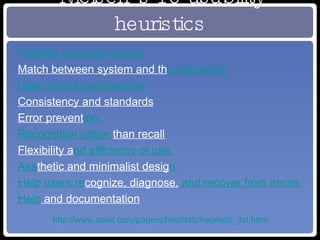
Nielsen’s 10 usability heuristics Visibility of system status   Match between system and th e real world   User control and freedom   Consistency and standards   Error prevent ion   Recognition rather  than recall   Flexibility a nd efficiency of use   Aes thetic and minimalist desig n   Help users re cognize, diagnose,  and recover from errors   Help  and documentation http://www.useit.com/papers/heuristic/heuristic_list.html
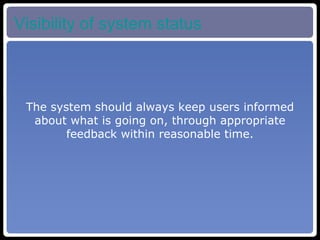
Visibility of system status The system should always keep users informed about what is going on, through appropriate feedback within reasonable time.
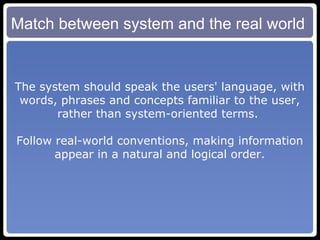
Match between system and the real world The system should speak the users' language, with words, phrases and concepts familiar to the user, rather than system-oriented terms.  Follow real-world conventions, making information appear in a natural and logical order.
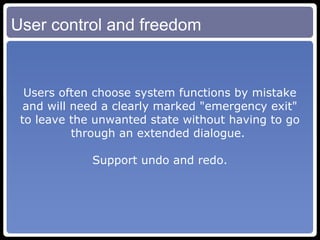
User control and freedom Users often choose system functions by mistake and will need a clearly marked "emergency exit" to leave the unwanted state without having to go through an extended dialogue.  Support undo and redo.
Consistency and standards Users should not have to wonder whether different words, situations, or actions mean the same thing.  Follow platform conventions.
Error prevention Even better than good error messages is a careful design which prevents a problem from occurring in the first place.  Either eliminate error-prone conditions or check for them and present users with a confirmation option before they commit to the action.
Recognition rather than recall Minimize the user's memory load by making objects, actions, and options visible.  The user should not have to remember information from one part of the dialogue to another.  Instructions for use of the system should be visible or easily retrievable whenever appropriate.
Flexibility and efficiency of use Accelerators -- unseen by the novice user -- may often speed up the interaction for the expert user such that the system can cater to both inexperienced and experienced users.  Allow users to tailor frequent actions.
Aesthetic and minimalist design Dialogues should not contain information which is irrelevant or rarely needed.  Every extra unit of information in a dialogue competes with the relevant units of information and diminishes their relative visibility.
Help users recognize, diagnose, and recover from errors Error messages should be expressed in plain language (no codes),  precisely indicate the problem,  and constructively suggest a solution.
Help and documentation Even though it is better if the system can be used without documentation, it may be necessary to provide help and documentation.  Any such information should be easy to search, focused on the user's task, list concrete steps to be carried out, and not be too large.
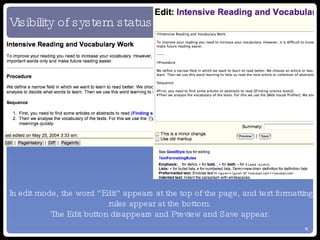
Visibility of system status In edit mode, the word “Edit” appears at the top of the page, and text formatting rules appear at the bottom. The Edit button disappears and Preview and Save appear.
Difficult to know what this should entail in a wiki. No obvious attempt to attain this goal, viz. very few graphics. Match between system & real world
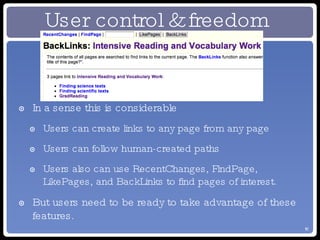
In a sense this is considerable Users can create links to any page from any page Users can follow human-created paths Users also can use RecentChanges, FindPage, LikePages, and BackLinks to find pages of interest. But users need to be ready to take advantage of these features. User control & freedom
Consistency & Standards Applicability doubtful By nature, a wiki is a tool with limited functionality. Limited scope for variation within one wiki engine.
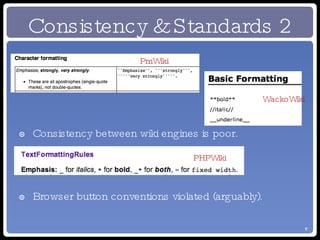
Consistency & Standards 2 Consistency between wiki engines is poor. Browser button conventions violated (arguably). WackoWiki PHPWiki PmWiki
Error Prevention No mechanisms apparent. Naive users could lose all changes by going to a new page without saving.
Recognition rather than Recall Need to remember how to make links (CamelCase) (but maybe this is trivial?) Need to remember formatting commands, or foster the habit of opening formatting guide in another window for quick reference (Should not have to remember what to do)
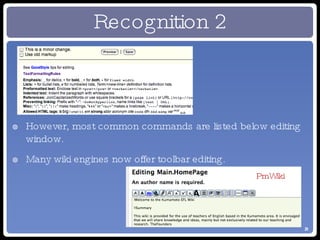
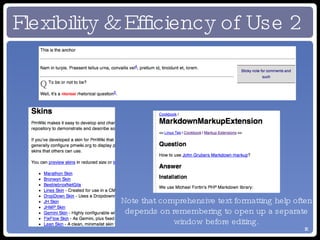
Recognition 2 However, most common commands are listed below editing window. Many wiki engines now offer toolbar editing. PmWiki
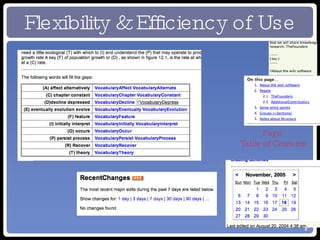
Flexibility & Efficiency of Use Page  Table of Contents
Flexibility & Efficiency of Use 2 Note that comprehensive text formatting help often depends on remembering to open up a separate window before editing.
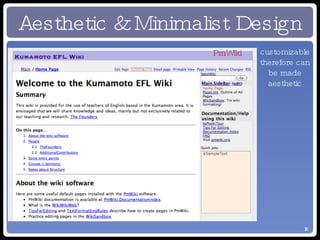
Aesthetic & Minimalist Design A matter of taste PHPWiki: minimalist customizable therefore can be made aesthetic PmWiki
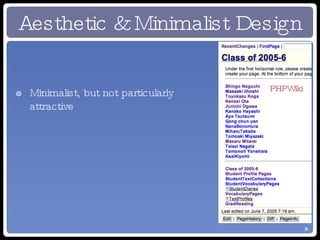
Minimalist, but not particularly attractive Aesthetic & Minimalist Design PHPWiki
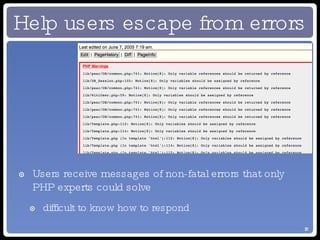
Help users escape from errors Users receive messages of non-fatal errors that only PHP experts could solve difficult to know how to respond
Help users escape from errors Inappropriate use of back button can result in loss of edits. No warning given.
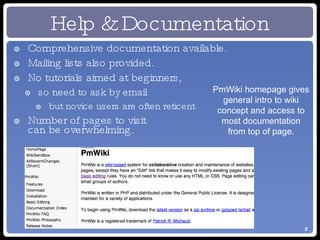
Help & Documentation Comprehensive documentation available. Mailing lists also provided. No tutorials aimed at beginners, so need to ask by email but novice users are often reticent Number of pages to visit  can be overwhelming. PmWiki homepage gives general intro to wiki concept and access to most documentation from top of page.
Alternative Heuristics The interface and terminology are consistent from screen to screen. The layout of each screen makes good use of space. Legibility and readability are high. The software makes good use of contrast, repetition, alignment, and proximity. Serious navigational errors are prevented. Undesired actions are easily reversed. Audio and video playback (where applicable) are of good quality. Boling & Soo (1999)
Boling & Soo Recognition that each programme or type of tool may have its own set of metaphors. Similar preoccupation with avoidance and/or recovery from error. More explicit guidance on aesthetics difficult to interpet may be culture-specific
UID Guidelines Equitable use appealing/motivating to all learners User control choices in control and pace Simple and intuitive consistency, predictability Perceptible information/information access in multiple settings essential information pointed out Tolerance for error easy to navigate Physical access tools accessible for all learners
How to meet guidelines Meeting guidelines is shared responsibility: software design curriculum task design teacher behavior
Egbert, Chao & Hanson-Smith (1999) Learners have opportunities to interact and negotiate meaning. Learners interact in the target language with an authentic audience. Learners are involved in authentic tasks. Learners are exposed to and encouraged to produce varied and creative language. Learners have enough time and feedback. Learners are guided to attend mindfully to the learning process. Learners work in an atmosphere with an ideal stress/anxiety level. Learner autonomy is supported. Another set of guidelines that may be more important
Experiments AIM: Isolate wiki basics from writing in English Wiki basics: hypertextual structure & centrality of links basic markup at least CamelCase Provided all the necessary information (single source) Students were not required to write any original paragraphs or even complete sentences
Summary of Experiments Used pairs throughout to encourage talking 1 student (self-selected) was responsible for working at the keyboard throughout; the other was there to act as a sounding board and to give opinions alleviate nervousness at artificial experimental situation
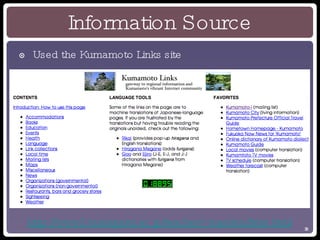
Information Source Used the Kumamoto Links site http://www2.kumagaku.ac.jp/teacher/~masden/links.html
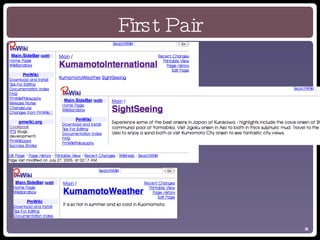
First Pair
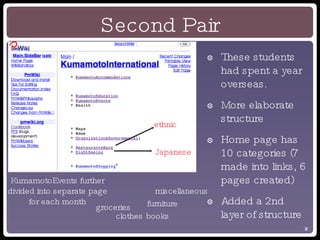
Second Pair These students had spent a year overseas. More elaborate structure Home page has 10 categories (7 made into links, 6 pages created) Added a 2nd layer of structure KumamotoEvents further divided into separate page for each month Japanese ethnic groceries clothes books furniture miscellaneous
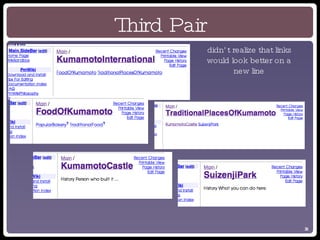
Third Pair didn’t realize that links would look better on a new line
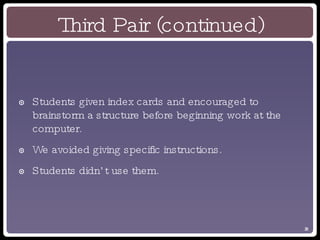
Third Pair (continued) Students given index cards and encouraged to brainstorm a structure before beginning work at the computer. We avoided giving specific instructions. Students didn’t use them.
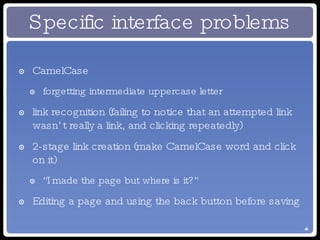
Specific interface problems CamelCase forgetting intermediate uppercase letter link recognition (failing to notice that an attempted link wasn’t really a link, and clicking repeatedly) 2-stage link creation (make CamelCase word and click on it) “I made the page but where is it?” Editing a page and using the back button before saving
Difficulties General lack of computer skills Unease when faced with lack of structure Lack of experience with hypertext
General lack of computer skills Teach discrete skills as needed in language classes Time-consuming and insufficiently thorough Hope and agitate for better ICT training and/or more self-directed use of computers
Unease when faced with lack of structure Japanese students’ favourite writing activity has been found to be writing a curriculum vitae, with all fields provided by the teacher. Simplified solo website creation may help (using e.g. VoodooPad). Encourage frequent linking when writing weblogs.
Nature of Tasks To focus on “micro” level, tasks were trivialised. removes “authentic audience” condition also removes structure Using (e.g.) WikiTravel provides both. Problems: WikiTravel facilitators resented abuse of public wiki for pedagogical purposes. Solution student contributions should be kept off main pages until checked students need detailed guidance
Conclusions Wikis are a valuable (and relatively neglected) tool collaborative knowledge building good fit with constructivist ideals usually free Originally a “geek’s tool” naturally a little difficult for average users Teachers need to be aware of potential difficulties and be prepared to pay the price, helping students with: structuring information negotiating the interface
Conclusions 2 Alternative wiki engines Super wikis
Wikis in EFL: unrealised potential

Wikis in EFL: unrealised potential

  • 1.
    Wikis in EFL:unrealised potential Richard S. Lavin, FESSPUK Joseph Tomei, Kumamoto Gakuen University PacCALL 2005, Kunming, Yunnan, PRC
  • 2.
    Nielsen’s 10 usabilityheuristics Visibility of system status Match between system and th e real world User control and freedom Consistency and standards Error prevent ion Recognition rather than recall Flexibility a nd efficiency of use Aes thetic and minimalist desig n Help users re cognize, diagnose, and recover from errors Help and documentation http://www.useit.com/papers/heuristic/heuristic_list.html
  • 3.
    Visibility of systemstatus The system should always keep users informed about what is going on, through appropriate feedback within reasonable time.
  • 4.
    Match between systemand the real world The system should speak the users' language, with words, phrases and concepts familiar to the user, rather than system-oriented terms. Follow real-world conventions, making information appear in a natural and logical order.
  • 5.
    User control andfreedom Users often choose system functions by mistake and will need a clearly marked "emergency exit" to leave the unwanted state without having to go through an extended dialogue. Support undo and redo.
  • 6.
    Consistency and standardsUsers should not have to wonder whether different words, situations, or actions mean the same thing. Follow platform conventions.
  • 7.
    Error prevention Evenbetter than good error messages is a careful design which prevents a problem from occurring in the first place. Either eliminate error-prone conditions or check for them and present users with a confirmation option before they commit to the action.
  • 8.
    Recognition rather thanrecall Minimize the user's memory load by making objects, actions, and options visible. The user should not have to remember information from one part of the dialogue to another. Instructions for use of the system should be visible or easily retrievable whenever appropriate.
  • 9.
    Flexibility and efficiencyof use Accelerators -- unseen by the novice user -- may often speed up the interaction for the expert user such that the system can cater to both inexperienced and experienced users. Allow users to tailor frequent actions.
  • 10.
    Aesthetic and minimalistdesign Dialogues should not contain information which is irrelevant or rarely needed. Every extra unit of information in a dialogue competes with the relevant units of information and diminishes their relative visibility.
  • 11.
    Help users recognize,diagnose, and recover from errors Error messages should be expressed in plain language (no codes), precisely indicate the problem, and constructively suggest a solution.
  • 12.
    Help and documentationEven though it is better if the system can be used without documentation, it may be necessary to provide help and documentation. Any such information should be easy to search, focused on the user's task, list concrete steps to be carried out, and not be too large.
  • 13.
    Visibility of systemstatus In edit mode, the word “Edit” appears at the top of the page, and text formatting rules appear at the bottom. The Edit button disappears and Preview and Save appear.
  • 14.
    Difficult to knowwhat this should entail in a wiki. No obvious attempt to attain this goal, viz. very few graphics. Match between system & real world
  • 15.
    In a sensethis is considerable Users can create links to any page from any page Users can follow human-created paths Users also can use RecentChanges, FindPage, LikePages, and BackLinks to find pages of interest. But users need to be ready to take advantage of these features. User control & freedom
  • 16.
    Consistency & StandardsApplicability doubtful By nature, a wiki is a tool with limited functionality. Limited scope for variation within one wiki engine.
  • 17.
    Consistency & Standards2 Consistency between wiki engines is poor. Browser button conventions violated (arguably). WackoWiki PHPWiki PmWiki
  • 18.
    Error Prevention Nomechanisms apparent. Naive users could lose all changes by going to a new page without saving.
  • 19.
    Recognition rather thanRecall Need to remember how to make links (CamelCase) (but maybe this is trivial?) Need to remember formatting commands, or foster the habit of opening formatting guide in another window for quick reference (Should not have to remember what to do)
  • 20.
    Recognition 2 However,most common commands are listed below editing window. Many wiki engines now offer toolbar editing. PmWiki
  • 21.
    Flexibility & Efficiencyof Use Page Table of Contents
  • 22.
    Flexibility & Efficiencyof Use 2 Note that comprehensive text formatting help often depends on remembering to open up a separate window before editing.
  • 23.
    Aesthetic & MinimalistDesign A matter of taste PHPWiki: minimalist customizable therefore can be made aesthetic PmWiki
  • 24.
    Minimalist, but notparticularly attractive Aesthetic & Minimalist Design PHPWiki
  • 25.
    Help users escapefrom errors Users receive messages of non-fatal errors that only PHP experts could solve difficult to know how to respond
  • 26.
    Help users escapefrom errors Inappropriate use of back button can result in loss of edits. No warning given.
  • 27.
    Help & DocumentationComprehensive documentation available. Mailing lists also provided. No tutorials aimed at beginners, so need to ask by email but novice users are often reticent Number of pages to visit can be overwhelming. PmWiki homepage gives general intro to wiki concept and access to most documentation from top of page.
  • 28.
    Alternative Heuristics Theinterface and terminology are consistent from screen to screen. The layout of each screen makes good use of space. Legibility and readability are high. The software makes good use of contrast, repetition, alignment, and proximity. Serious navigational errors are prevented. Undesired actions are easily reversed. Audio and video playback (where applicable) are of good quality. Boling & Soo (1999)
  • 29.
    Boling & SooRecognition that each programme or type of tool may have its own set of metaphors. Similar preoccupation with avoidance and/or recovery from error. More explicit guidance on aesthetics difficult to interpet may be culture-specific
  • 30.
    UID Guidelines Equitableuse appealing/motivating to all learners User control choices in control and pace Simple and intuitive consistency, predictability Perceptible information/information access in multiple settings essential information pointed out Tolerance for error easy to navigate Physical access tools accessible for all learners
  • 31.
    How to meetguidelines Meeting guidelines is shared responsibility: software design curriculum task design teacher behavior
  • 32.
    Egbert, Chao &Hanson-Smith (1999) Learners have opportunities to interact and negotiate meaning. Learners interact in the target language with an authentic audience. Learners are involved in authentic tasks. Learners are exposed to and encouraged to produce varied and creative language. Learners have enough time and feedback. Learners are guided to attend mindfully to the learning process. Learners work in an atmosphere with an ideal stress/anxiety level. Learner autonomy is supported. Another set of guidelines that may be more important
  • 33.
    Experiments AIM: Isolatewiki basics from writing in English Wiki basics: hypertextual structure & centrality of links basic markup at least CamelCase Provided all the necessary information (single source) Students were not required to write any original paragraphs or even complete sentences
  • 34.
    Summary of ExperimentsUsed pairs throughout to encourage talking 1 student (self-selected) was responsible for working at the keyboard throughout; the other was there to act as a sounding board and to give opinions alleviate nervousness at artificial experimental situation
  • 35.
    Information Source Usedthe Kumamoto Links site http://www2.kumagaku.ac.jp/teacher/~masden/links.html
  • 36.
  • 37.
    Second Pair Thesestudents had spent a year overseas. More elaborate structure Home page has 10 categories (7 made into links, 6 pages created) Added a 2nd layer of structure KumamotoEvents further divided into separate page for each month Japanese ethnic groceries clothes books furniture miscellaneous
  • 38.
    Third Pair didn’trealize that links would look better on a new line
  • 39.
    Third Pair (continued)Students given index cards and encouraged to brainstorm a structure before beginning work at the computer. We avoided giving specific instructions. Students didn’t use them.
  • 40.
    Specific interface problemsCamelCase forgetting intermediate uppercase letter link recognition (failing to notice that an attempted link wasn’t really a link, and clicking repeatedly) 2-stage link creation (make CamelCase word and click on it) “I made the page but where is it?” Editing a page and using the back button before saving
  • 41.
    Difficulties General lackof computer skills Unease when faced with lack of structure Lack of experience with hypertext
  • 42.
    General lack ofcomputer skills Teach discrete skills as needed in language classes Time-consuming and insufficiently thorough Hope and agitate for better ICT training and/or more self-directed use of computers
  • 43.
    Unease when facedwith lack of structure Japanese students’ favourite writing activity has been found to be writing a curriculum vitae, with all fields provided by the teacher. Simplified solo website creation may help (using e.g. VoodooPad). Encourage frequent linking when writing weblogs.
  • 44.
    Nature of TasksTo focus on “micro” level, tasks were trivialised. removes “authentic audience” condition also removes structure Using (e.g.) WikiTravel provides both. Problems: WikiTravel facilitators resented abuse of public wiki for pedagogical purposes. Solution student contributions should be kept off main pages until checked students need detailed guidance
  • 45.
    Conclusions Wikis area valuable (and relatively neglected) tool collaborative knowledge building good fit with constructivist ideals usually free Originally a “geek’s tool” naturally a little difficult for average users Teachers need to be aware of potential difficulties and be prepared to pay the price, helping students with: structuring information negotiating the interface
  • 46.
    Conclusions 2 Alternativewiki engines Super wikis