Spring 2017 with Mrs. Strickland
Mrs. Strickland
 Married 2 years; no human kids yet but have 4 cats & 1 dog
 Live in Pendleton, SC
 Newberry College ’11 – B.S. Mathematics Education
 USC Aiken- Masters in Educational Technology
 VirtualSC instructor for over 4 years
 Taught at Seneca High School for 2 years
 HUGE Tigers fan!
2016 NATIONAL CHAMPIONS!!!!!!!
 Love Math!
 Love teaching!
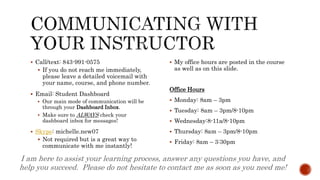
 Call/text: 843-991-0575
 If you do not reach me immediately,
please leave a detailed voicemail with
your name, course, and phone number.
 Email: Student Dashboard
 Our main mode of communication will be
through your Dashboard Inbox.
 Make sure to ALWAYS check your
dashboard inbox for messages!
 Skype: michelle.new07
 Not required but is a great way to
communicate with me instantly!
 My office hours are posted in the course
as well as on this slide.
Office Hours
 Monday: 8am – 3pm
 Tuesday: 8am – 3pm/8-10pm
 Wednesday:8-11a/8-10pm
 Thursday: 8am – 3pm/8-10pm
 Friday: 8am – 3:30pm
I am here to assist your learning process, answer any questions you have, and
help you succeed. Please do not hesitate to contact me as soon as you need me!
Find important information on program policies and procedures on the
next few slides.
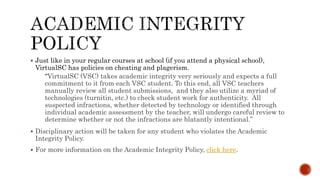
 Just like in your regular courses at school (if you attend a physical school),
VirtualSC has policies on cheating and plagerism.
“VirtualSC (VSC) takes academic integrity very seriously and expects a full
commitment to it from each VSC student. To this end, all VSC teachers
manually review all student submissions, and they also utilize a myriad of
technologies (turnitin, etc.) to check student work for authenticity. All
suspected infractions, whether detected by technology or identified through
individual academic assessment by the teacher, will undergo careful review to
determine whether or not the infractions are blatantly intentional.”
 Disciplinary action will be taken for any student who violates the Academic
Integrity Policy.
 For more information on the Academic Integrity Policy, click here.
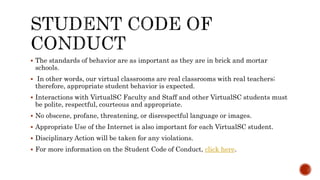
 The standards of behavior are as important as they are in brick and mortar
schools.
 In other words, our virtual classrooms are real classrooms with real teachers;
therefore, appropriate student behavior is expected.
 Interactions with VirtualSC Faculty and Staff and other VirtualSC students must
be polite, respectful, courteous and appropriate.
 No obscene, profane, threatening, or disrespectful language or images.
 Appropriate Use of the Internet is also important for each VirtualSC student.
 Disciplinary Action will be taken for any violations.
 For more information on the Student Code of Conduct, click here.
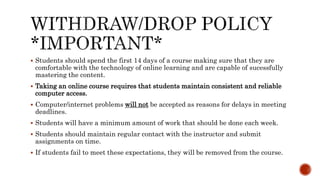
 Students should spend the first 14 days of a course making sure that they are
comfortable with the technology of online learning and are capable of sucessfully
mastering the content.
 Taking an online course requires that students maintain consistent and reliable
computer access.
 Computer/internet problems will not be accepted as reasons for delays in meeting
deadlines.
 Students will have a minimum amount of work that should be done each week.
 Students should maintain regular contact with the instructor and submit
assignments on time.
 If students fail to meet these expectations, they will be removed from the course.
 A student will be dropped from a course if:
 The student fails to submit assignments within the first 14 calendar days of the
course.
 The student requests withdrawl from their course for any reason within the
first 14 calendar days of the course.
 Reinstatement into an Initial Credit Course:
 Only one reinstatement allowed per course per term
 Can be reinstated within 7 calendar days from the date of withdrawl
 Students must contact school counselor to ask for reinstatement
 To learn more about the withdrawl policy, click here.
 Similar to brick and mortar schools, VirtualSC has an attendance policy.
 Regularly submitting work constitutes attendance in a VirtualSC course.
 Students who fail, at any time, to submit work for a consecutive 14 calendar day
period will be withdrawn from the course.
 Students will only be allowed reinstatement into the course once per term.
 If withdrawn, students have 7 calendar days to ask for reinstatement.
 For more information on the attendance policy, click here.
Now that you know all about VirtualSC, now we will talk about your
Geometry Course that you will be taking this semester. Pay close attention
because this information should be very helpful in making your start of the
course as smooth and successful as possible!
 Access to a working/reliable computer
 Reliable internet
 A backup plan – if your
computer/internet should become
unreliable
 A calculator
 Geogebra – we will be using this in some of
the assignments in the course. It is a free
application that can be downloaded to a
computer or tablet. You MUST have this to
complete assignments in the course.
 I suggest downloading Geogebra now
and begin playing around with it and
getting to know it. You will be given
detailed instructions later on how to use
it for specific assignments.
 Java- you need to update or upload the free
Java software to your computer. This is
required to complete your course successfully.
 Google Chrome no longer supports Java
which means there may be some things you
will not be able to see or access. I suggest
using Mozilla Firefox when this happens.
 Pop-up blockers need to be turned off so that
you will be able to open all assignments. Here
are videos on how to do this for each browser:
 Firefox - http://screencast-o-
matic.com/watch/c2htb3nAUn
 Internet Explorer - http://screencast-o-
matic.com/watch/c2htbOnAUj
 Google Chrome - http://screencast-o-
matic.com/watch/c2htbZnAU1
Technologies Issues? Check
out the Troubleshooting Guide
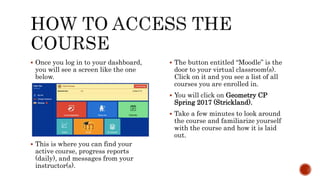
 Once you log in to your dashboard,
you will see a screen like the one
below.
 This is where you can find your
active course, progress reports
(daily), and messages from your
instructor(s).
 The button entitled “Moodle” is the
door to your virtual classroom(s).
Click on it and you see a list of all
courses you are enrolled in.
 You will click on Geometry CP
Spring 2017 (Strickland).
 Take a few minutes to look around
the course and familiarize yourself
with the course and how it is laid
out.
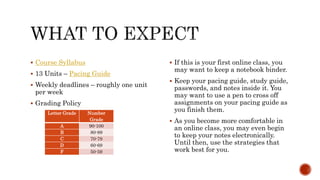
 Course Syllabus
 13 Units – Pacing Guide
 Weekly deadlines – roughly one unit
per week
 Grading Policy
 If this is your first online class, you
may want to keep a notebook binder.
 Keep your pacing guide, study guide,
passwords, and notes inside it. You
may want to use a pen to cross off
assignments on your pacing guide as
you finish them.
 As you become more comfortable in
an online class, you may even begin
to keep your notes electronically.
Until then, use the strategies that
work best for you.
Letter Grade Number
Grade
A 90-100
B 80-89
C 70-79
D 60-69
F 50-59
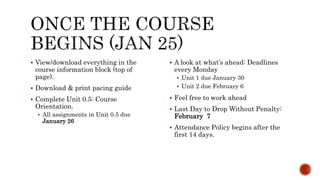
 View/download everything in the
course information block (top of
page).
 Download & print pacing guide
 Complete Unit 0.5: Course
Orientation.
 All assignments in Unit 0.5 due
January 26
 A look at what’s ahead: Deadlines
every Monday
 Unit 1 due January 30
 Unit 2 due February 6
 Feel free to work ahead
 Last Day to Drop Without Penalty:
February 7
 Attendance Policy begins after the
first 14 days.
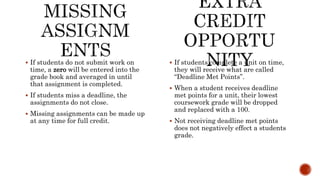
 If students complete a unit on time,
they will receive what are called
“Deadline Met Points”.
 When a student receives deadline
met points for a unit, their lowest
coursework grade will be dropped
and replaced with a 100.
 Not receiving deadline met points
does not negatively effect a students
grade.
 If students do not submit work on
time, a zero will be entered into the
grade book and averaged in until
that assignment is completed.
 If students miss a deadline, the
assignments do not close.
 Missing assignments can be made up
at any time for full credit.
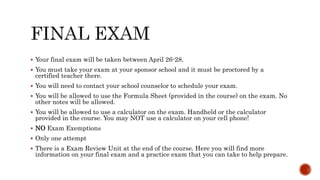
 Your final exam will be taken between April 26-28.
 You must take your exam at your sponsor school and it must be proctored by a
certified teacher there.
 You will need to contact your school counselor to schedule your exam.
 You will be allowed to use the Formula Sheet (provided in the course) on the exam. No
other notes will be allowed.
 You will be allowed to use a calculator on the exam. Handheld or the calculator
provided in the course. You may NOT use a calculator on your cell phone!
 NO Exam Exemptions
 Only one attempt
 There is a Exam Review Unit at the end of the course. Here you will find more
information on your final exam and a practice exam that you can take to help prepare.
Remember that I’m always here to help in any way way
that I can!

Welcome letter

  • 1.
    Spring 2017 withMrs. Strickland
  • 2.
  • 3.
     Married 2years; no human kids yet but have 4 cats & 1 dog  Live in Pendleton, SC  Newberry College ’11 – B.S. Mathematics Education  USC Aiken- Masters in Educational Technology  VirtualSC instructor for over 4 years  Taught at Seneca High School for 2 years  HUGE Tigers fan! 2016 NATIONAL CHAMPIONS!!!!!!!  Love Math!  Love teaching!
  • 4.
     Call/text: 843-991-0575 If you do not reach me immediately, please leave a detailed voicemail with your name, course, and phone number.  Email: Student Dashboard  Our main mode of communication will be through your Dashboard Inbox.  Make sure to ALWAYS check your dashboard inbox for messages!  Skype: michelle.new07  Not required but is a great way to communicate with me instantly!  My office hours are posted in the course as well as on this slide. Office Hours  Monday: 8am – 3pm  Tuesday: 8am – 3pm/8-10pm  Wednesday:8-11a/8-10pm  Thursday: 8am – 3pm/8-10pm  Friday: 8am – 3:30pm I am here to assist your learning process, answer any questions you have, and help you succeed. Please do not hesitate to contact me as soon as you need me!
  • 5.
    Find important informationon program policies and procedures on the next few slides.
  • 6.
     Just likein your regular courses at school (if you attend a physical school), VirtualSC has policies on cheating and plagerism. “VirtualSC (VSC) takes academic integrity very seriously and expects a full commitment to it from each VSC student. To this end, all VSC teachers manually review all student submissions, and they also utilize a myriad of technologies (turnitin, etc.) to check student work for authenticity. All suspected infractions, whether detected by technology or identified through individual academic assessment by the teacher, will undergo careful review to determine whether or not the infractions are blatantly intentional.”  Disciplinary action will be taken for any student who violates the Academic Integrity Policy.  For more information on the Academic Integrity Policy, click here.
  • 7.
     The standardsof behavior are as important as they are in brick and mortar schools.  In other words, our virtual classrooms are real classrooms with real teachers; therefore, appropriate student behavior is expected.  Interactions with VirtualSC Faculty and Staff and other VirtualSC students must be polite, respectful, courteous and appropriate.  No obscene, profane, threatening, or disrespectful language or images.  Appropriate Use of the Internet is also important for each VirtualSC student.  Disciplinary Action will be taken for any violations.  For more information on the Student Code of Conduct, click here.
  • 8.
     Students shouldspend the first 14 days of a course making sure that they are comfortable with the technology of online learning and are capable of sucessfully mastering the content.  Taking an online course requires that students maintain consistent and reliable computer access.  Computer/internet problems will not be accepted as reasons for delays in meeting deadlines.  Students will have a minimum amount of work that should be done each week.  Students should maintain regular contact with the instructor and submit assignments on time.  If students fail to meet these expectations, they will be removed from the course.
  • 9.
     A studentwill be dropped from a course if:  The student fails to submit assignments within the first 14 calendar days of the course.  The student requests withdrawl from their course for any reason within the first 14 calendar days of the course.  Reinstatement into an Initial Credit Course:  Only one reinstatement allowed per course per term  Can be reinstated within 7 calendar days from the date of withdrawl  Students must contact school counselor to ask for reinstatement  To learn more about the withdrawl policy, click here.
  • 10.
     Similar tobrick and mortar schools, VirtualSC has an attendance policy.  Regularly submitting work constitutes attendance in a VirtualSC course.  Students who fail, at any time, to submit work for a consecutive 14 calendar day period will be withdrawn from the course.  Students will only be allowed reinstatement into the course once per term.  If withdrawn, students have 7 calendar days to ask for reinstatement.  For more information on the attendance policy, click here.
  • 11.
    Now that youknow all about VirtualSC, now we will talk about your Geometry Course that you will be taking this semester. Pay close attention because this information should be very helpful in making your start of the course as smooth and successful as possible!
  • 12.
     Access toa working/reliable computer  Reliable internet  A backup plan – if your computer/internet should become unreliable  A calculator  Geogebra – we will be using this in some of the assignments in the course. It is a free application that can be downloaded to a computer or tablet. You MUST have this to complete assignments in the course.  I suggest downloading Geogebra now and begin playing around with it and getting to know it. You will be given detailed instructions later on how to use it for specific assignments.  Java- you need to update or upload the free Java software to your computer. This is required to complete your course successfully.  Google Chrome no longer supports Java which means there may be some things you will not be able to see or access. I suggest using Mozilla Firefox when this happens.  Pop-up blockers need to be turned off so that you will be able to open all assignments. Here are videos on how to do this for each browser:  Firefox - http://screencast-o- matic.com/watch/c2htb3nAUn  Internet Explorer - http://screencast-o- matic.com/watch/c2htbOnAUj  Google Chrome - http://screencast-o- matic.com/watch/c2htbZnAU1 Technologies Issues? Check out the Troubleshooting Guide
  • 13.
     Once youlog in to your dashboard, you will see a screen like the one below.  This is where you can find your active course, progress reports (daily), and messages from your instructor(s).  The button entitled “Moodle” is the door to your virtual classroom(s). Click on it and you see a list of all courses you are enrolled in.  You will click on Geometry CP Spring 2017 (Strickland).  Take a few minutes to look around the course and familiarize yourself with the course and how it is laid out.
  • 14.
     Course Syllabus 13 Units – Pacing Guide  Weekly deadlines – roughly one unit per week  Grading Policy  If this is your first online class, you may want to keep a notebook binder.  Keep your pacing guide, study guide, passwords, and notes inside it. You may want to use a pen to cross off assignments on your pacing guide as you finish them.  As you become more comfortable in an online class, you may even begin to keep your notes electronically. Until then, use the strategies that work best for you. Letter Grade Number Grade A 90-100 B 80-89 C 70-79 D 60-69 F 50-59
  • 15.
     View/download everythingin the course information block (top of page).  Download & print pacing guide  Complete Unit 0.5: Course Orientation.  All assignments in Unit 0.5 due January 26  A look at what’s ahead: Deadlines every Monday  Unit 1 due January 30  Unit 2 due February 6  Feel free to work ahead  Last Day to Drop Without Penalty: February 7  Attendance Policy begins after the first 14 days.
  • 16.
     If studentscomplete a unit on time, they will receive what are called “Deadline Met Points”.  When a student receives deadline met points for a unit, their lowest coursework grade will be dropped and replaced with a 100.  Not receiving deadline met points does not negatively effect a students grade.  If students do not submit work on time, a zero will be entered into the grade book and averaged in until that assignment is completed.  If students miss a deadline, the assignments do not close.  Missing assignments can be made up at any time for full credit.
  • 17.
     Your finalexam will be taken between April 26-28.  You must take your exam at your sponsor school and it must be proctored by a certified teacher there.  You will need to contact your school counselor to schedule your exam.  You will be allowed to use the Formula Sheet (provided in the course) on the exam. No other notes will be allowed.  You will be allowed to use a calculator on the exam. Handheld or the calculator provided in the course. You may NOT use a calculator on your cell phone!  NO Exam Exemptions  Only one attempt  There is a Exam Review Unit at the end of the course. Here you will find more information on your final exam and a practice exam that you can take to help prepare.
  • 18.
    Remember that I’malways here to help in any way way that I can!