UX WEEK 2 Business Requirements
WHERE TO BEGIN
WHERE TO BEGIN
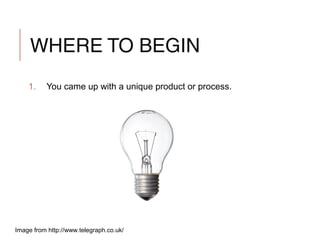
1. You came up with a unique product or process.
Image from http://www.telegraph.co.uk/
WHERE TO BEGIN
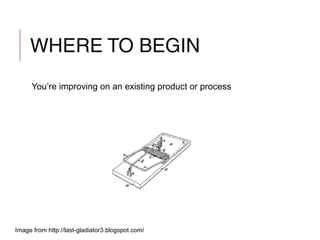
You’re improving on an existing product or process
Image from http://last-gladiator3.blogspot.com/
WHERE TO BEGIN
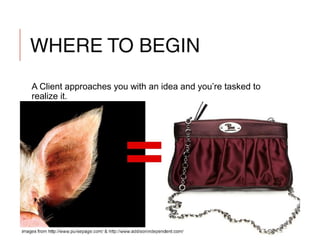
A Client approaches you with an idea and you’re tasked to
realize it.
WHERE TO BEGIN
1. You came up with a unique product or process.
2. You’re improving on an existing product or process.
3. A Client approaches you with an idea and you’re tasked to
realize it.
CLIENT WORK First Steps
CLIENT WORK
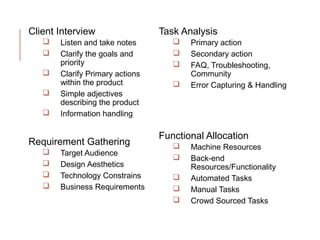
Client Interview
 Listen and take notes
CLIENT WORK
Client Interview
 Listen and take notes
 Clarify the goals and priority
CLIENT WORK
Client Interview
 Listen and take notes
 Clarify the goals and priority
 Clarify Primary actions within the product
CLIENT WORK
Client Interview
 Listen and take notes
 Clarify the goals and priority
 Clarify Primary actions within the product
 Simple adjectives describing the product
 smart, fun, serious, heavy, vicious, soft, technology
CLIENT WORK
Client Interview
 Listen and take notes
 Clarify the goals and priority
 Clarify Primary actions within the product
 Simple adjectives describing the product
 smart, fun, serious, heavy, vicious, soft, technology
 Information handling
CLIENT WORK
Requirement Gathering
 Target Audience
 Key Descriptions: young, politically active, loaners
CLIENT WORK
Requirement Gathering
 Target Audience
 Key Descriptions: young, politically active, loaners
 Design Aesthetics
 Site, programs, businesses, atmosphere
CLIENT WORK
Requirement Gathering
 Target Audience
 Key Descriptions: young, politically active, loaners
 Design Aesthetics
 Site, programs, businesses, atmosphere
 Technology Constrains
 OS, Device, Bandwidth, Storage, etc.
CLIENT WORK
Requirement Gathering
 Target Audience
 Key Descriptions: young, politically active, loaners
 Design Aesthetics
 Site, programs, businesses, atmosphere
 Technology Constrains
 OS, Device, Bandwidth, Storage, etc.
 Business Requirements
 Must have name with email, etc.
CLIENT WORK
Task Analysis
 Primary action
 The base metric for success
CLIENT WORK
Task Analysis
 Primary action
 The base metric for success
 Secondary action
 Adding value to the interaction
CLIENT WORK
Task Analysis
 Primary action
 The base metric for success
 Secondary action
 Adding value to the interaction
 FAQ, Troubleshooting, Community
 How to facilitate communication / off reviews and twitter
CLIENT WORK
Task Analysis
 Primary action
 The base metric for success
 Secondary action
 Adding value to the interaction
 FAQ, Troubleshooting, Community
 How to facilitate communication / off reviews and twitter
 Error Capturing & Handling
 Getting users back on track
CLIENT WORK
Functional Allocation
 Machine Resources
 DB, CDN, Networks, Storage, Client Specification
CLIENT WORK
Functional Allocation
 Machine Resources
 DB, CDN, Networks, Storage, Client Specification
 Back-end Resources/Functionality
 This might be the bulk of the project overhead
CLIENT WORK
Functional Allocation
 Machine Resources
 DB, CDN, Networks, Storage, Client Specification
 Back-end Resources/Functionality
 This might be the bulk of the project overhead
 Automated Tasks
CLIENT WORK
Functional Allocation
 Machine Resources
 DB, CDN, Networks, Storage, Client Specification
 Back-end Resources/Functionality
 This might be the bulk of the project overhead
 Automated Tasks
 Manual Tasks
CLIENT WORK
Functional Allocation
 Machine Resources
 DB, CDN, Networks, Storage, Client Specification
 Back-end Resources/Functionality
 This might be the bulk of the project overhead
 Automated Tasks
 Manual Tasks
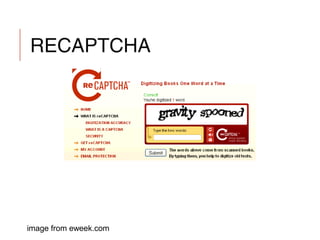
 Crowd Sourced Tasks
RECAPTCHA
image from eweek.com
CLASS WORK
1. Split the class in two one client one designer
2. Fifteen minute interviews
3. Switch
Client Interview
 Listen and take notes
 Clarify the goals and
priority
 Clarify Primary actions
within the product
 Simple adjectives
describing the product
 Information handling
Requirement Gathering
 Target Audience
 Design Aesthetics
 Technology Constrains
 Business Requirements
Task Analysis
 Primary action
 Secondary action
 FAQ, Troubleshooting,
Community
 Error Capturing & Handling
Functional Allocation
 Machine Resources
 Back-end
Resources/Functionality
 Automated Tasks
 Manual Tasks
 Crowd Sourced Tasks
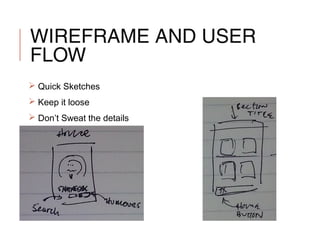
WIREFRAME AND USER
FLOW
 Quick Sketches
 Keep it loose
 Don’t Sweat the details
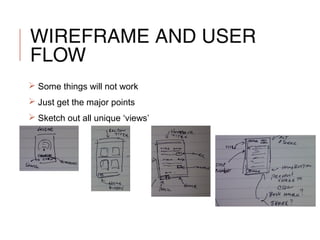
WIREFRAME AND USER
FLOW
 Some things will not work
 Just get the major points
 Sketch out all unique ‘views’
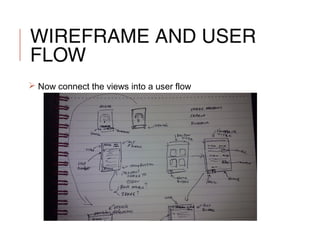
WIREFRAME AND USER
FLOW
 Now connect the views into a user flow
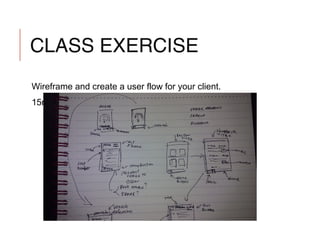
CLASS EXERCISE
Wireframe and create a user flow for your client.
15min
HOMEWORK
Write Creative Brief for your project
Create wireframe sketches for your project
Show all the main views (3)
Must include the primary action(s)
Post to Canvas

Week2 - IDX 200 Aesthetic Interactions

  • 1.
    UX WEEK 2Business Requirements
  • 2.
  • 3.
    WHERE TO BEGIN 1.You came up with a unique product or process. Image from http://www.telegraph.co.uk/
  • 4.
    WHERE TO BEGIN You’reimproving on an existing product or process Image from http://last-gladiator3.blogspot.com/
  • 5.
    WHERE TO BEGIN AClient approaches you with an idea and you’re tasked to realize it.
  • 6.
    WHERE TO BEGIN 1.You came up with a unique product or process. 2. You’re improving on an existing product or process. 3. A Client approaches you with an idea and you’re tasked to realize it.
  • 7.
  • 8.
    CLIENT WORK Client Interview Listen and take notes
  • 9.
    CLIENT WORK Client Interview Listen and take notes  Clarify the goals and priority
  • 10.
    CLIENT WORK Client Interview Listen and take notes  Clarify the goals and priority  Clarify Primary actions within the product
  • 11.
    CLIENT WORK Client Interview Listen and take notes  Clarify the goals and priority  Clarify Primary actions within the product  Simple adjectives describing the product  smart, fun, serious, heavy, vicious, soft, technology
  • 12.
    CLIENT WORK Client Interview Listen and take notes  Clarify the goals and priority  Clarify Primary actions within the product  Simple adjectives describing the product  smart, fun, serious, heavy, vicious, soft, technology  Information handling
  • 13.
    CLIENT WORK Requirement Gathering Target Audience  Key Descriptions: young, politically active, loaners
  • 14.
    CLIENT WORK Requirement Gathering Target Audience  Key Descriptions: young, politically active, loaners  Design Aesthetics  Site, programs, businesses, atmosphere
  • 15.
    CLIENT WORK Requirement Gathering Target Audience  Key Descriptions: young, politically active, loaners  Design Aesthetics  Site, programs, businesses, atmosphere  Technology Constrains  OS, Device, Bandwidth, Storage, etc.
  • 16.
    CLIENT WORK Requirement Gathering Target Audience  Key Descriptions: young, politically active, loaners  Design Aesthetics  Site, programs, businesses, atmosphere  Technology Constrains  OS, Device, Bandwidth, Storage, etc.  Business Requirements  Must have name with email, etc.
  • 17.
    CLIENT WORK Task Analysis Primary action  The base metric for success
  • 18.
    CLIENT WORK Task Analysis Primary action  The base metric for success  Secondary action  Adding value to the interaction
  • 19.
    CLIENT WORK Task Analysis Primary action  The base metric for success  Secondary action  Adding value to the interaction  FAQ, Troubleshooting, Community  How to facilitate communication / off reviews and twitter
  • 20.
    CLIENT WORK Task Analysis Primary action  The base metric for success  Secondary action  Adding value to the interaction  FAQ, Troubleshooting, Community  How to facilitate communication / off reviews and twitter  Error Capturing & Handling  Getting users back on track
  • 21.
    CLIENT WORK Functional Allocation Machine Resources  DB, CDN, Networks, Storage, Client Specification
  • 22.
    CLIENT WORK Functional Allocation Machine Resources  DB, CDN, Networks, Storage, Client Specification  Back-end Resources/Functionality  This might be the bulk of the project overhead
  • 23.
    CLIENT WORK Functional Allocation Machine Resources  DB, CDN, Networks, Storage, Client Specification  Back-end Resources/Functionality  This might be the bulk of the project overhead  Automated Tasks
  • 24.
    CLIENT WORK Functional Allocation Machine Resources  DB, CDN, Networks, Storage, Client Specification  Back-end Resources/Functionality  This might be the bulk of the project overhead  Automated Tasks  Manual Tasks
  • 25.
    CLIENT WORK Functional Allocation Machine Resources  DB, CDN, Networks, Storage, Client Specification  Back-end Resources/Functionality  This might be the bulk of the project overhead  Automated Tasks  Manual Tasks  Crowd Sourced Tasks
  • 26.
  • 27.
    CLASS WORK 1. Splitthe class in two one client one designer 2. Fifteen minute interviews 3. Switch
  • 28.
    Client Interview  Listenand take notes  Clarify the goals and priority  Clarify Primary actions within the product  Simple adjectives describing the product  Information handling Requirement Gathering  Target Audience  Design Aesthetics  Technology Constrains  Business Requirements Task Analysis  Primary action  Secondary action  FAQ, Troubleshooting, Community  Error Capturing & Handling Functional Allocation  Machine Resources  Back-end Resources/Functionality  Automated Tasks  Manual Tasks  Crowd Sourced Tasks
  • 29.
    WIREFRAME AND USER FLOW Quick Sketches  Keep it loose  Don’t Sweat the details
  • 30.
    WIREFRAME AND USER FLOW Some things will not work  Just get the major points  Sketch out all unique ‘views’
  • 31.
    WIREFRAME AND USER FLOW Now connect the views into a user flow
  • 32.
    CLASS EXERCISE Wireframe andcreate a user flow for your client. 15min
  • 33.
    HOMEWORK Write Creative Brieffor your project Create wireframe sketches for your project Show all the main views (3) Must include the primary action(s) Post to Canvas