SQL Functions
DATE, STRING. . .
1
SQL – Functions – CAST
● CAST is used to convert an expression of one data type to another
● Syntax
◦ CAST ( expression AS data_type [ ( length ) ] )
● Arguments
◦ expression
◦ Any valid expression.
2
-- change a value to text
CAST(count(actorID) AS varchar(50))
-- change a number to text
CAST(5 AS varchar(50))
◦ data_type
◦ Is the target data type (INT, VARCHAR, BIT etc)
◦ length
◦ Is an optional integer that specifies the length of the target data type. The default value is 30.
In SQL if you want to combine numbers and text, you must CAST the number as text first!
SQL – Functions – STRING
● Functions are calculations performed by the DBMS
● Common functions include:
Function Example Output
UPPER(col) UPPER(Name) Sam  SAM
LOWER(col) LOWER(Name) Sam  sam
RTRIM(col) RTRIM(Name) [Sam ]  [Sam]
LTRIM(col) LTRIM(Name) [ Sam]  [Sam]
LEN(col) LEN(Name) Returns int length of string
REVERSE(col) REVERSE(Name) Sam  maS
SELECT UPPER('Woodville') AS Suburb
32
SQL – Functions – STRING
● Functions are calculations performed by the DBMS
● Common functions include:
Function Example Output
LEFT(string, length) LEFT(‘Sam’, 2) Sam  Sa
RIGHT(string, length) Right(‘Sam’, 2) Sam  am
CHARINDEX(string1, string2) CHARINDEX('Fun', 'DBFundamentals') 3
SUBSTRING(col, start, length) SUBSTRING(Name, 1, 1) Returns char(s) at start position
CHARINDEX starts from 0 and counts to the length
33
SELECT SUBSTRING(FirstName, 1, 1) AS Initial
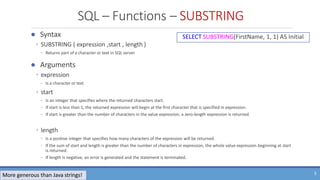
SQL – Functions – SUBSTRING
● Syntax
◦ SUBSTRING ( expression ,start , length )
◦ Returns part of a character or text in SQL server
● Arguments
◦ expression
◦ Is a character or text
◦ start
◦ Is an integer that specifies where the returned characters start.
◦ If start is less than 1, the returned expression will begin at the first character that is specified in expression.
◦ If start is greater than the number of characters in the value expression, a zero-length expression is returned.
◦ length
◦ Is a positive integer that specifies how many characters of the expression will be returned.
◦ If the sum of start and length is greater than the number of characters in expression, the whole value expression beginning at start
is returned.
◦ If length is negative, an error is generated and the statement is terminated.
SELECT SUBSTRING(FirstName, 1, 1) AS Initial
5
More generous than Java strings!
SQL – Functions – CHARINDEX
● Syntax
◦ CHARINDEX ( expressionToFind ,expressionToSearch [ , start_location ] )
◦ Searches an expression for another expression and returns its starting position if found
● Arguments
◦ expressionToFind
◦ Is a character expression that contains the sequence to be found.
◦ expressionToFind is limited to 8000 characters.
◦ expressionToSearch
◦ Is a character expression to be searched.
◦ start_location
◦ Is an integer at which the search starts.
◦ If start_location is not specified, is a negative number, or is 0, the search starts at the beginning of expressionToSearch.
6
More generous than Java strings!
SQL – Functions – STRING
● Working with Strings in SQL is not easy:
DECLARE @address varchar(100) = '13 Wayville road, Woodville, SA 5000'
SELECT
LEFT(@address, CHARINDEX(',', @address) - 1) AS streetAddress,
LEFT(secondPart, LEN(secondPart) - CHARINDEX(' ', REVERSE(secondPart)) -1) AS suburb,
RIGHT(secondPart, CHARINDEX(' ', REVERSE(secondPart))) AS state,
REVERSE(SUBSTRING(REVERSE(@address), 1, 4)) AS postcode
FROM (
SELECT
RTRIM(
REVERSE(
SUBSTRING(
REVERSE(@address), 6, LEN(@address) - CHARINDEX(',', @address) – 5
)
)
) AS secondPart
) AS t1
7
SQL – Functions – DATE
● Functions are calculations performed by the DBMS
● Common functions include:
◦ Dateparts:
◦ d | m | yy/yyyy => day | month | year number of the calander date
◦ y |dy => day of year (note the difference from yy/yyyy!!!)
◦ dw returns the day of the week number except when used with DATENAME where it returns the name of the day!
◦ m will return the name of the month when used with DATENAME
◦ Test it out for yourself by placing SELECT before the function
◦ SELECT DATENAME(m, '31/Dec/2015')
Function Example Output
GETDATE() 01/09/2015
DATEPART(datepart, date) DATEPART(d, GetDate()) 3
DATENAME(datepart, date) DATENAME(dw, GetDate()) Wednesday
DATENAME(m, GetDate()) September
DATEADD(datepart, number, date) DATEADD(d, 7, GetDate()) Date 7 days from today!
37
SQL – Functions – CAST
● CAST is used to convert an expression of one data type to another
● Syntax
◦ CAST ( expression AS data_type [ ( length ) ] )
● Arguments
◦ expression
◦ Any valid expression.
-- change a value to text
CAST(count(actorID) AS varchar(50))
-- change a number to text
CAST(5 AS varchar(50))
◦ data_type
◦ Is the target data type (INT, VARCHAR, BIT etc)
◦ length
◦ Is an optional integer that specifies the length of the target data type. The default value is 30.
In SQL if you want to combine numbers and text, you must CAST the number as text first!
9
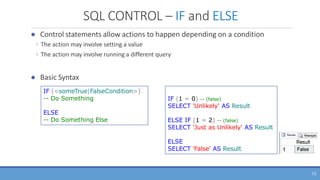
SQL CONTROL – IF and ELSE
● Control statements allow actions to happen depending on a condition
◦ The action may involve setting a value
◦ The action may involve running a different query
● Basic Syntax
IF (<someTrue|FalseCondition>)
-- Do Something
ELSE
-- Do Something Else
IF (1 = 0)
SELECT 'True' AS Result
ELSE
SELECT 'False' AS Result
10
SQL CONTROL – IF and ELSE
● Control statements allow actions to happen depending on a condition
◦ The action may involve setting a value
◦ The action may involve running a different query
● Basic Syntax
IF (<someTrue|FalseCondition>)
-- Do Something
ELSE
-- Do Something Else
IF (1 = 0) -- (false)
SELECT 'Unlikely' AS Result
ELSE IF (1 = 2) -- (false)
SELECT 'Just as Unlikely' AS Result
ELSE
SELECT 'False' AS Result
11
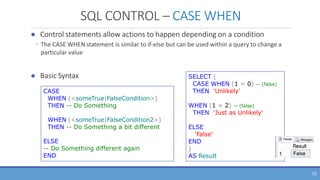
SQL CONTROL – CASE WHEN
● Control statements allow actions to happen depending on a condition
◦ The CASE WHEN statement is similar to if-else but can be used within a query to change a
particular value
● Basic Syntax
CASE
WHEN (<someTrue|FalseCondition>)
THEN -- Do Something
WHEN (<someTrue|FalseCondition2>)
THEN -- Do Something a bit different
ELSE
-- Do Something different again
END
SELECT (
CASE WHEN (1 = 0) -- (false)
THEN 'Unlikely'
WHEN (1 = 2) -- (false)
THEN 'Just as Unlikely'
ELSE
'False'
END
)
AS Result
12
SQL CONTROL – CASE WHEN
13
● Control statements allow actions to happen depending on a condition
◦ The CASE WHEN statement is similar to if-else but can be used within a query to change a
particular value
◦ Example
SELECT FirstName, Surname, Salary,
(
CASE WHEN (E.Salary > 75)
THEN 'Over Paid'
WHEN (E.Salary <= 40)
THEN 'Under Paid'
ELSE
'Adequately Paid'
END
) AS PayConclusion
FROM Employees AS E
Departments(DeptName, Address, City)
Employee(FirstName, Surname, Dept, Office, Salary, City)
FK(Dept) -> Departments(DeptName)
Single column
result called
“PayConclusion”
with value that
depends on the
employee salary
SQL – NULL replacement Value
● ISNULL is a function that can be used to provide a value when an unknown or
NULL value is returned
◦ ISNULL(expressionORattribute, replacementValue)
◦ Find ALL Simpsons characters and where available their first aired episode else show ‘TBA’
SELECT CharacterName,
ISNULL(EpisodeName, 'TBA') AS FirstEpisode
FROM Characters C LEFT OUTER JOIN Episodes E
ON C.EpisodeID = E.EpisodeID
14
SQL – Functions
● Functions are calculations performed by the DBMS
Remember NULL + string = NULL 
SELECT SUBSTRING(FirstName, 1, 1) AS Initial
FROM Employees Is this safe?
SELECT
CASE WHEN LEN(FirstName) > 0 THEN SUBSTRING(FirstName, 1, 1)
ELSE ''
END AS Initial
FROM Employees This will work even if FirstName is Empty/NULL
LEN(NULL) will return Unknown which is not >0 (it is unknown)
Therefore the ELSE will be used and ‘’ will be the initial.
39
SQL CONTROL – IF and ELSE
● Control statements allow actions to happen depending on a condition
◦ The action may involve setting a value
◦ The action may involve running a different query
● Basic Syntax
IF (<someTrue|FalseCondition>)
-- Do Something
ELSE
-- Do Something Else
IF (1 = 0)
SELECT 'True' AS Result
ELSE
SELECT 'False' AS Result
16
SQL CONTROL – IF and ELSE
● Control statements allow actions to happen depending on a condition
◦ The action may involve setting a value
◦ The action may involve running a different query
● Basic Syntax
IF (<someTrue|FalseCondition>)
-- Do Something
ELSE
-- Do Something Else
IF (1 = 0) -- (false)
SELECT 'Unlikely' AS Result
ELSE IF (1 = 2) -- (false)
SELECT 'Just as Unlikely' AS Result
ELSE
SELECT 'False' AS Result
17
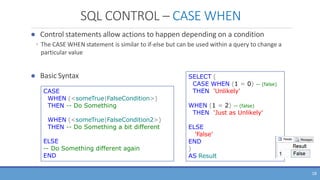
SQL CONTROL – CASE WHEN
● Control statements allow actions to happen depending on a condition
◦ The CASE WHEN statement is similar to if-else but can be used within a query to change a
particular value
● Basic Syntax
CASE
WHEN (<someTrue|FalseCondition>)
THEN -- Do Something
WHEN (<someTrue|FalseCondition2>)
THEN -- Do Something a bit different
ELSE
-- Do Something different again
END
SELECT (
CASE WHEN (1 = 0) -- (false)
THEN 'Unlikely'
WHEN (1 = 2) -- (false)
THEN 'Just as Unlikely'
ELSE
'False'
END
)
AS Result
18
SQL CONTROL – CASE WHEN
19
● Control statements allow actions to happen depending on a condition
◦ The CASE WHEN statement is similar to if-else but can be used within a query to change a
particular value
◦ Example
SELECT FirstName, Surname, Salary,
(
CASE WHEN (E.Salary > 75)
THEN 'Over Paid'
WHEN (E.Salary <= 40)
THEN 'Under Paid'
ELSE
'Adequately Paid'
END
) AS PayConclusion
FROM Employees AS E
Departments(DeptName, Address, City)
Employee(FirstName, Surname, Dept, Office, Salary, City)
FK(Dept) -> Departments(DeptName)
Single column
result called
“PayConclusion”
with value that
depends on the
employee salary
SQL – NULL replacement Value
● ISNULL is a function that can be used to provide a value when an unknown or
NULL value is returned
◦ ISNULL(expressionORattribute, replacementValue)
◦ Find ALL Simpsons characters and where available their first aired episode else show ‘TBA’
20
SELECT CharacterName,
ISNULL(EpisodeName, 'TBA') AS FirstEpisode
FROM Characters C LEFT OUTER JOIN Episodes E
ON C.EpisodeID = E.EpisodeID

Week 7 Slides - Advanced Queries - SQL Functions (1).pptx

  • 1.
  • 2.
    SQL – Functions– CAST ● CAST is used to convert an expression of one data type to another ● Syntax ◦ CAST ( expression AS data_type [ ( length ) ] ) ● Arguments ◦ expression ◦ Any valid expression. 2 -- change a value to text CAST(count(actorID) AS varchar(50)) -- change a number to text CAST(5 AS varchar(50)) ◦ data_type ◦ Is the target data type (INT, VARCHAR, BIT etc) ◦ length ◦ Is an optional integer that specifies the length of the target data type. The default value is 30. In SQL if you want to combine numbers and text, you must CAST the number as text first!
  • 3.
    SQL – Functions– STRING ● Functions are calculations performed by the DBMS ● Common functions include: Function Example Output UPPER(col) UPPER(Name) Sam  SAM LOWER(col) LOWER(Name) Sam  sam RTRIM(col) RTRIM(Name) [Sam ]  [Sam] LTRIM(col) LTRIM(Name) [ Sam]  [Sam] LEN(col) LEN(Name) Returns int length of string REVERSE(col) REVERSE(Name) Sam  maS SELECT UPPER('Woodville') AS Suburb 32
  • 4.
    SQL – Functions– STRING ● Functions are calculations performed by the DBMS ● Common functions include: Function Example Output LEFT(string, length) LEFT(‘Sam’, 2) Sam  Sa RIGHT(string, length) Right(‘Sam’, 2) Sam  am CHARINDEX(string1, string2) CHARINDEX('Fun', 'DBFundamentals') 3 SUBSTRING(col, start, length) SUBSTRING(Name, 1, 1) Returns char(s) at start position CHARINDEX starts from 0 and counts to the length 33 SELECT SUBSTRING(FirstName, 1, 1) AS Initial
  • 5.
    SQL – Functions– SUBSTRING ● Syntax ◦ SUBSTRING ( expression ,start , length ) ◦ Returns part of a character or text in SQL server ● Arguments ◦ expression ◦ Is a character or text ◦ start ◦ Is an integer that specifies where the returned characters start. ◦ If start is less than 1, the returned expression will begin at the first character that is specified in expression. ◦ If start is greater than the number of characters in the value expression, a zero-length expression is returned. ◦ length ◦ Is a positive integer that specifies how many characters of the expression will be returned. ◦ If the sum of start and length is greater than the number of characters in expression, the whole value expression beginning at start is returned. ◦ If length is negative, an error is generated and the statement is terminated. SELECT SUBSTRING(FirstName, 1, 1) AS Initial 5 More generous than Java strings!
  • 6.
    SQL – Functions– CHARINDEX ● Syntax ◦ CHARINDEX ( expressionToFind ,expressionToSearch [ , start_location ] ) ◦ Searches an expression for another expression and returns its starting position if found ● Arguments ◦ expressionToFind ◦ Is a character expression that contains the sequence to be found. ◦ expressionToFind is limited to 8000 characters. ◦ expressionToSearch ◦ Is a character expression to be searched. ◦ start_location ◦ Is an integer at which the search starts. ◦ If start_location is not specified, is a negative number, or is 0, the search starts at the beginning of expressionToSearch. 6 More generous than Java strings!
  • 7.
    SQL – Functions– STRING ● Working with Strings in SQL is not easy: DECLARE @address varchar(100) = '13 Wayville road, Woodville, SA 5000' SELECT LEFT(@address, CHARINDEX(',', @address) - 1) AS streetAddress, LEFT(secondPart, LEN(secondPart) - CHARINDEX(' ', REVERSE(secondPart)) -1) AS suburb, RIGHT(secondPart, CHARINDEX(' ', REVERSE(secondPart))) AS state, REVERSE(SUBSTRING(REVERSE(@address), 1, 4)) AS postcode FROM ( SELECT RTRIM( REVERSE( SUBSTRING( REVERSE(@address), 6, LEN(@address) - CHARINDEX(',', @address) – 5 ) ) ) AS secondPart ) AS t1 7
  • 8.
    SQL – Functions– DATE ● Functions are calculations performed by the DBMS ● Common functions include: ◦ Dateparts: ◦ d | m | yy/yyyy => day | month | year number of the calander date ◦ y |dy => day of year (note the difference from yy/yyyy!!!) ◦ dw returns the day of the week number except when used with DATENAME where it returns the name of the day! ◦ m will return the name of the month when used with DATENAME ◦ Test it out for yourself by placing SELECT before the function ◦ SELECT DATENAME(m, '31/Dec/2015') Function Example Output GETDATE() 01/09/2015 DATEPART(datepart, date) DATEPART(d, GetDate()) 3 DATENAME(datepart, date) DATENAME(dw, GetDate()) Wednesday DATENAME(m, GetDate()) September DATEADD(datepart, number, date) DATEADD(d, 7, GetDate()) Date 7 days from today! 37
  • 9.
    SQL – Functions– CAST ● CAST is used to convert an expression of one data type to another ● Syntax ◦ CAST ( expression AS data_type [ ( length ) ] ) ● Arguments ◦ expression ◦ Any valid expression. -- change a value to text CAST(count(actorID) AS varchar(50)) -- change a number to text CAST(5 AS varchar(50)) ◦ data_type ◦ Is the target data type (INT, VARCHAR, BIT etc) ◦ length ◦ Is an optional integer that specifies the length of the target data type. The default value is 30. In SQL if you want to combine numbers and text, you must CAST the number as text first! 9
  • 10.
    SQL CONTROL –IF and ELSE ● Control statements allow actions to happen depending on a condition ◦ The action may involve setting a value ◦ The action may involve running a different query ● Basic Syntax IF (<someTrue|FalseCondition>) -- Do Something ELSE -- Do Something Else IF (1 = 0) SELECT 'True' AS Result ELSE SELECT 'False' AS Result 10
  • 11.
    SQL CONTROL –IF and ELSE ● Control statements allow actions to happen depending on a condition ◦ The action may involve setting a value ◦ The action may involve running a different query ● Basic Syntax IF (<someTrue|FalseCondition>) -- Do Something ELSE -- Do Something Else IF (1 = 0) -- (false) SELECT 'Unlikely' AS Result ELSE IF (1 = 2) -- (false) SELECT 'Just as Unlikely' AS Result ELSE SELECT 'False' AS Result 11
  • 12.
    SQL CONTROL –CASE WHEN ● Control statements allow actions to happen depending on a condition ◦ The CASE WHEN statement is similar to if-else but can be used within a query to change a particular value ● Basic Syntax CASE WHEN (<someTrue|FalseCondition>) THEN -- Do Something WHEN (<someTrue|FalseCondition2>) THEN -- Do Something a bit different ELSE -- Do Something different again END SELECT ( CASE WHEN (1 = 0) -- (false) THEN 'Unlikely' WHEN (1 = 2) -- (false) THEN 'Just as Unlikely' ELSE 'False' END ) AS Result 12
  • 13.
    SQL CONTROL –CASE WHEN 13 ● Control statements allow actions to happen depending on a condition ◦ The CASE WHEN statement is similar to if-else but can be used within a query to change a particular value ◦ Example SELECT FirstName, Surname, Salary, ( CASE WHEN (E.Salary > 75) THEN 'Over Paid' WHEN (E.Salary <= 40) THEN 'Under Paid' ELSE 'Adequately Paid' END ) AS PayConclusion FROM Employees AS E Departments(DeptName, Address, City) Employee(FirstName, Surname, Dept, Office, Salary, City) FK(Dept) -> Departments(DeptName) Single column result called “PayConclusion” with value that depends on the employee salary
  • 14.
    SQL – NULLreplacement Value ● ISNULL is a function that can be used to provide a value when an unknown or NULL value is returned ◦ ISNULL(expressionORattribute, replacementValue) ◦ Find ALL Simpsons characters and where available their first aired episode else show ‘TBA’ SELECT CharacterName, ISNULL(EpisodeName, 'TBA') AS FirstEpisode FROM Characters C LEFT OUTER JOIN Episodes E ON C.EpisodeID = E.EpisodeID 14
  • 15.
    SQL – Functions ●Functions are calculations performed by the DBMS Remember NULL + string = NULL  SELECT SUBSTRING(FirstName, 1, 1) AS Initial FROM Employees Is this safe? SELECT CASE WHEN LEN(FirstName) > 0 THEN SUBSTRING(FirstName, 1, 1) ELSE '' END AS Initial FROM Employees This will work even if FirstName is Empty/NULL LEN(NULL) will return Unknown which is not >0 (it is unknown) Therefore the ELSE will be used and ‘’ will be the initial. 39
  • 16.
    SQL CONTROL –IF and ELSE ● Control statements allow actions to happen depending on a condition ◦ The action may involve setting a value ◦ The action may involve running a different query ● Basic Syntax IF (<someTrue|FalseCondition>) -- Do Something ELSE -- Do Something Else IF (1 = 0) SELECT 'True' AS Result ELSE SELECT 'False' AS Result 16
  • 17.
    SQL CONTROL –IF and ELSE ● Control statements allow actions to happen depending on a condition ◦ The action may involve setting a value ◦ The action may involve running a different query ● Basic Syntax IF (<someTrue|FalseCondition>) -- Do Something ELSE -- Do Something Else IF (1 = 0) -- (false) SELECT 'Unlikely' AS Result ELSE IF (1 = 2) -- (false) SELECT 'Just as Unlikely' AS Result ELSE SELECT 'False' AS Result 17
  • 18.
    SQL CONTROL –CASE WHEN ● Control statements allow actions to happen depending on a condition ◦ The CASE WHEN statement is similar to if-else but can be used within a query to change a particular value ● Basic Syntax CASE WHEN (<someTrue|FalseCondition>) THEN -- Do Something WHEN (<someTrue|FalseCondition2>) THEN -- Do Something a bit different ELSE -- Do Something different again END SELECT ( CASE WHEN (1 = 0) -- (false) THEN 'Unlikely' WHEN (1 = 2) -- (false) THEN 'Just as Unlikely' ELSE 'False' END ) AS Result 18
  • 19.
    SQL CONTROL –CASE WHEN 19 ● Control statements allow actions to happen depending on a condition ◦ The CASE WHEN statement is similar to if-else but can be used within a query to change a particular value ◦ Example SELECT FirstName, Surname, Salary, ( CASE WHEN (E.Salary > 75) THEN 'Over Paid' WHEN (E.Salary <= 40) THEN 'Under Paid' ELSE 'Adequately Paid' END ) AS PayConclusion FROM Employees AS E Departments(DeptName, Address, City) Employee(FirstName, Surname, Dept, Office, Salary, City) FK(Dept) -> Departments(DeptName) Single column result called “PayConclusion” with value that depends on the employee salary
  • 20.
    SQL – NULLreplacement Value ● ISNULL is a function that can be used to provide a value when an unknown or NULL value is returned ◦ ISNULL(expressionORattribute, replacementValue) ◦ Find ALL Simpsons characters and where available their first aired episode else show ‘TBA’ 20 SELECT CharacterName, ISNULL(EpisodeName, 'TBA') AS FirstEpisode FROM Characters C LEFT OUTER JOIN Episodes E ON C.EpisodeID = E.EpisodeID