OpManager 7 Cheryl Brown
OpManager Network Monitoring Software
 
OpManager OpManager is a network monitoring software that can automatically discover your network, group your devices into intuitive maps, monitor devices in real-time and alert instantaneously on failure. It serves as a complete network monitoring solution by providing complete fault and performance functionality across your WAN and LAN infrastructure.
Auto Discovery OpManager automatically discovers your Routers, Switches, Servers, Printers and other networked devices. OpManager speeds up the discovery process by building up a list of possibly active devices by reading ARP tables, but at the same time does a complete ping sweep to ensure that none of the devices are left undetected. OpManager also discovers services (like HTTP etc.) running on a device. It normally takes under 2 minutes for OpManager to discover a Class C network.
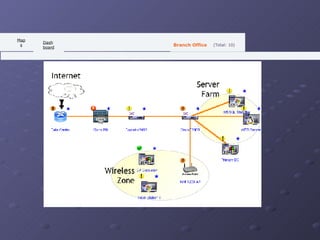
Maps Devices OpManager automatically creates infrastructure maps for your Servers, Routers, Printers, Switches and Firewalls. It also enables users to create business views to group devices as per business needs.
    (Total: 10) Branch Office   Maps   Dashboard                                                                                                                                                                                                                                                                                                                 
Applications Monitoring OpManager has built-in support to monitor the following applications  Microsoft Exchange  Lotus Notes  MySQL  Oracle  MSSQL  Also, OpManager's Application Monitoring functionality is customizable and you can monitor any application that supports SNMP.
Real-time Network Monitoring OpManager performs network monitoring in 3 different ways Continuous status polling of devices and services to check for availability  Continuous monitoring of critical device health parameters using SNMP, WMI or Telnet / SSH with support for thresholds  Listening of SNMP traps from devices
Instantaneous Alerts As soon as OpManager detects a problem it can notify administrators via email or SMS. OpManager's network monitoring functionality also includes running of external programs, system commands or playing an audio file. More on  Alerting & Fault Monitoring
Comprehensive Reporting Using OpManager you can generate device level or network level reports to analyze availability, response times, network traffic, interface utilization or application response time.
THE   END

Week 7 Cheryl Brown

  • 1.
  • 2.
  • 3.
  • 4.
    OpManager OpManager isa network monitoring software that can automatically discover your network, group your devices into intuitive maps, monitor devices in real-time and alert instantaneously on failure. It serves as a complete network monitoring solution by providing complete fault and performance functionality across your WAN and LAN infrastructure.
  • 5.
    Auto Discovery OpManagerautomatically discovers your Routers, Switches, Servers, Printers and other networked devices. OpManager speeds up the discovery process by building up a list of possibly active devices by reading ARP tables, but at the same time does a complete ping sweep to ensure that none of the devices are left undetected. OpManager also discovers services (like HTTP etc.) running on a device. It normally takes under 2 minutes for OpManager to discover a Class C network.
  • 6.
    Maps Devices OpManagerautomatically creates infrastructure maps for your Servers, Routers, Printers, Switches and Firewalls. It also enables users to create business views to group devices as per business needs.
  • 7.
      (Total: 10) Branch Office   Maps   Dashboard                                                                                                                                                                                                                                                                                                                 
  • 8.
    Applications Monitoring OpManagerhas built-in support to monitor the following applications Microsoft Exchange Lotus Notes MySQL Oracle MSSQL Also, OpManager's Application Monitoring functionality is customizable and you can monitor any application that supports SNMP.
  • 9.
    Real-time Network MonitoringOpManager performs network monitoring in 3 different ways Continuous status polling of devices and services to check for availability Continuous monitoring of critical device health parameters using SNMP, WMI or Telnet / SSH with support for thresholds Listening of SNMP traps from devices
  • 10.
    Instantaneous Alerts Assoon as OpManager detects a problem it can notify administrators via email or SMS. OpManager's network monitoring functionality also includes running of external programs, system commands or playing an audio file. More on Alerting & Fault Monitoring
  • 11.
    Comprehensive Reporting UsingOpManager you can generate device level or network level reports to analyze availability, response times, network traffic, interface utilization or application response time.
  • 12.
    THE END