SearchingMy BorrowingBPL Catalogue Staff Training 2BPL Apr. 18 2011
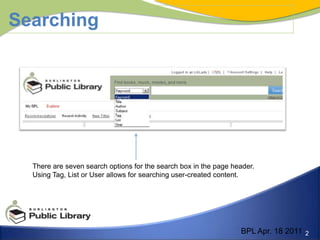
SearchingThere are seven search options for the search box in the page header. Using Tag, List or User allows for searching user-created content.BPL Apr. 18 2011
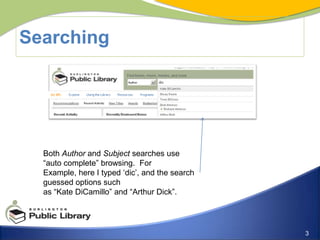
SearchingBoth Author and Subject searches use “auto complete” browsing.  For Example, here I typed ‘dic’, and the search guessed options such as “Kate DiCamillo” and “Arthur Dick”.
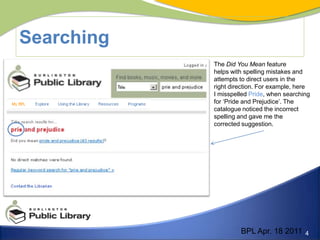
SearchingThe Did You Mean feature helps with spelling mistakes and attempts to direct users in the right direction. For example, here I misspelled Pride, when searching for ‘Pride and Prejudice’. The catalogue noticed the incorrect spelling and gave me the corrected suggestion. BPL Apr. 18 2011
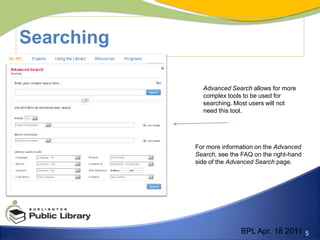
SearchingAdvanced Search allows for more complex tools to be used for searching. Most users will not need this tool.For more information on the Advanced Search, see the FAQ on the right-hand side of the Advanced Search page.BPL Apr. 18 2011
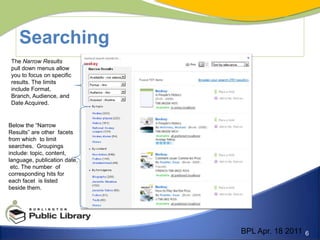
SearchingThe Narrow Results pull down menus allow you to focus on specific results. The limits include Format, Branch, Audience, and Date Acquired.Below the “Narrow Results” are other  facets from which  to limit searches.  Groupings include: topic, content, language, publication date, etc. The number  of corresponding hits for each facet  is listed beside them. BPL Apr. 18 2011
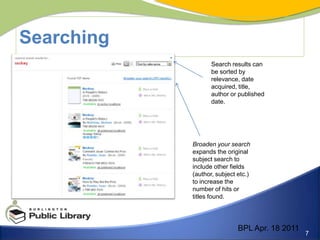
SearchingSearch results can be sorted by relevance, date acquired, title, author or published date. Broaden your search expands the original subject search to include other fields  (author, subject etc.) to increase the number of hits or titles found. BPL Apr. 18 2011
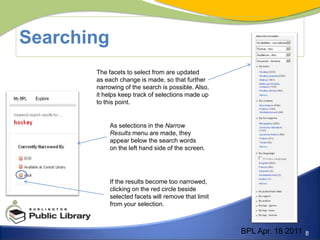
SearchingThe facets to select from are updated as each change is made, so that further narrowing of the search is possible. Also, it helps keep track of selections made up to this point. As selections in the Narrow Results menu are made, theyappear below the search words on the left hand side of the screen.If the results become too narrowed, clicking on the red circle beside selected facets will remove that limit from your selection. BPL Apr. 18 2011
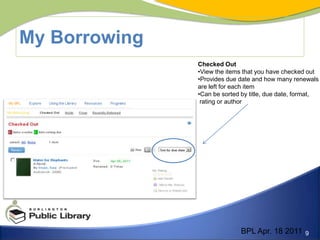
My BorrowingChecked OutView the items that you have checked out
Provides due date and how many renewals are left for each itemCan be sorted by title, due date, format,  rating or authorBPL Apr. 18 2011
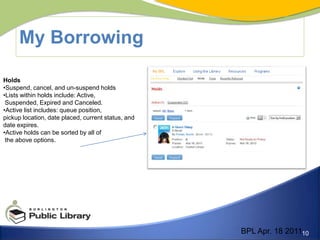
My BorrowingHoldsSuspend, cancel, and un-suspend holds
Lists within holds include: Active,  Suspended, Expired and Canceled.Active list includes: queue position, pickup location, date placed, current status, and date expires.Active holds can be sorted by all of the above options.BPL Apr. 18 2011
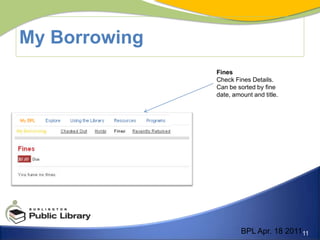
My BorrowingFinesCheck Fines Details. Can be sorted by fine date, amount and title.BPL Apr. 18 2011

Week 2

  • 1.
    SearchingMy BorrowingBPL CatalogueStaff Training 2BPL Apr. 18 2011
  • 2.
    SearchingThere are sevensearch options for the search box in the page header. Using Tag, List or User allows for searching user-created content.BPL Apr. 18 2011
  • 3.
    SearchingBoth Author andSubject searches use “auto complete” browsing. For Example, here I typed ‘dic’, and the search guessed options such as “Kate DiCamillo” and “Arthur Dick”.
  • 4.
    SearchingThe Did YouMean feature helps with spelling mistakes and attempts to direct users in the right direction. For example, here I misspelled Pride, when searching for ‘Pride and Prejudice’. The catalogue noticed the incorrect spelling and gave me the corrected suggestion. BPL Apr. 18 2011
  • 5.
    SearchingAdvanced Search allowsfor more complex tools to be used for searching. Most users will not need this tool.For more information on the Advanced Search, see the FAQ on the right-hand side of the Advanced Search page.BPL Apr. 18 2011
  • 6.
    SearchingThe Narrow Resultspull down menus allow you to focus on specific results. The limits include Format, Branch, Audience, and Date Acquired.Below the “Narrow Results” are other facets from which to limit searches. Groupings include: topic, content, language, publication date, etc. The number of corresponding hits for each facet is listed beside them. BPL Apr. 18 2011
  • 7.
    SearchingSearch results canbe sorted by relevance, date acquired, title, author or published date. Broaden your search expands the original subject search to include other fields (author, subject etc.) to increase the number of hits or titles found. BPL Apr. 18 2011
  • 8.
    SearchingThe facets toselect from are updated as each change is made, so that further narrowing of the search is possible. Also, it helps keep track of selections made up to this point. As selections in the Narrow Results menu are made, theyappear below the search words on the left hand side of the screen.If the results become too narrowed, clicking on the red circle beside selected facets will remove that limit from your selection. BPL Apr. 18 2011
  • 9.
    My BorrowingChecked OutViewthe items that you have checked out
  • 10.
    Provides due dateand how many renewals are left for each itemCan be sorted by title, due date, format, rating or authorBPL Apr. 18 2011
  • 11.
  • 12.
    Lists within holdsinclude: Active, Suspended, Expired and Canceled.Active list includes: queue position, pickup location, date placed, current status, and date expires.Active holds can be sorted by all of the above options.BPL Apr. 18 2011
  • 13.
    My BorrowingFinesCheck FinesDetails. Can be sorted by fine date, amount and title.BPL Apr. 18 2011