Multidimensional data representation
and manipulation
Data Cube Concepts
2
3
5
6
7
8
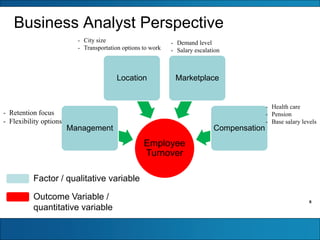
Business Analyst Perspective
Employee
Turnover
Management
Location Marketplace
Compensation
Factor / qualitative variable
Outcome Variable /
quantitative variable
- Retention focus
- Flexibility options
- City size
- Transportation options to work
- Demand level
- Salary escalation
- Health care
- Pension
- Base salary levels
9
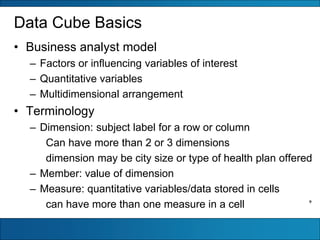
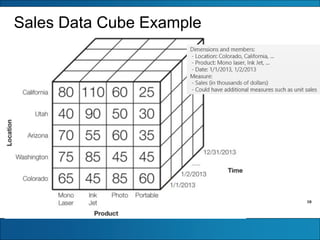
Data Cube Basics
• Business analyst model
– Factors or influencing variables of interest
– Quantitative variables
– Multidimensional arrangement
• Terminology
– Dimension: subject label for a row or column
Can have more than 2 or 3 dimensions
dimension may be city size or type of health plan offered
– Member: value of dimension
– Measure: quantitative variables/data stored in cells
can have more than one measure in a cell
10
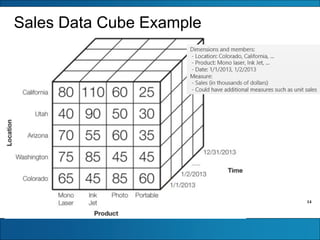
Sales Data Cube Example
11
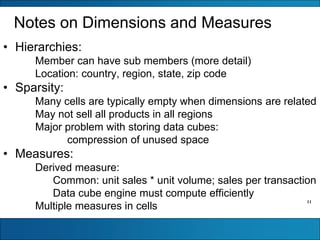
Notes on Dimensions and Measures
• Hierarchies:
Member can have sub members (more detail)
Location: country, region, state, zip code
• Sparsity:
Many cells are typically empty when dimensions are related
May not sell all products in all regions
Major problem with storing data cubes:
compression of unused space
• Measures:
Derived measure:
Common: unit sales * unit volume; sales per transaction
Data cube engine must compute efficiently
Multiple measures in cells
12
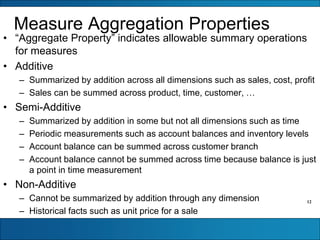
Measure Aggregation Properties
• “Aggregate Property” indicates allowable summary operations
for measures
• Additive
– Summarized by addition across all dimensions such as sales, cost, profit
– Sales can be summed across product, time, customer, …
• Semi-Additive
– Summarized by addition in some but not all dimensions such as time
– Periodic measurements such as account balances and inventory levels
– Account balance can be summed across customer branch
– Account balance cannot be summed across time because balance is just
a point in time measurement
• Non-Additive
– Cannot be summarized by addition through any dimension
– Historical facts such as unit price for a sale
13
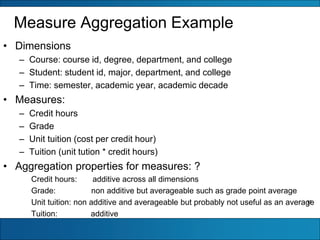
Measure Aggregation Example
• Dimensions
– Course: course id, degree, department, and college
– Student: student id, major, department, and college
– Time: semester, academic year, academic decade
• Measures:
– Credit hours
– Grade
– Unit tuition (cost per credit hour)
– Tuition (unit tution * credit hours)
• Aggregation properties for measures: ?
Credit hours: additive across all dimensions
Grade: non additive but averageable such as grade point average
Unit tuition: non additive and averageable but probably not useful as an average
Tuition: additive
14
Sales Data Cube Example
15
16
17
18
19
20
21
22
23
24
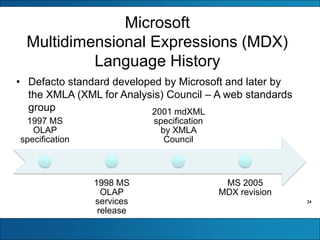
Microsoft
Multidimensional Expressions (MDX)
Language History
1997 MS
OLAP
specification
1998 MS
OLAP
services
release
2001 mdXML
specification
by XMLA
Council
MS 2005
MDX revision
• Defacto standard developed by Microsoft and later by
the XMLA (XML for Analysis) Council – A web standards
group
25
MDX Usage
• Foundation for Microsoft products and open source
analytics software
• SQL Server Analysis Services and Excel Pivot
Tables
• Hyperion, IBM, SAP (Systems Applications and
Products), and other vendors
• Foundation for open source projects: JPivot,
Pivot4J, and Pentaho Business Analytics Platform
26
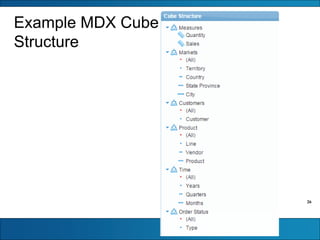
Example MDX Cube
Structure
27
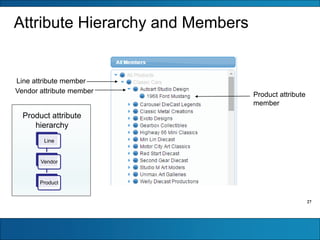
Attribute Hierarchy and Members
Line attribute member
Vendor attribute member
Product attribute
member
Line
Vendor
Product
Product attribute
hierarchy
28
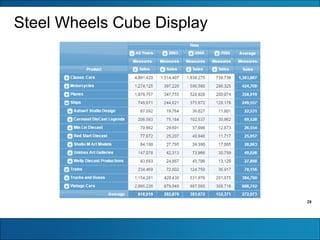
Steel Wheels Cube Display
29
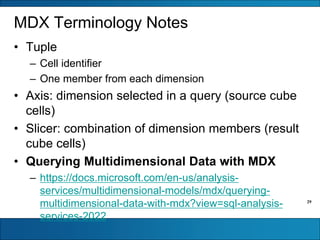
MDX Terminology Notes
• Tuple
– Cell identifier
– One member from each dimension
• Axis: dimension selected in a query (source cube
cells)
• Slicer: combination of dimension members (result
cube cells)
• Querying Multidimensional Data with MDX
– https://docs.microsoft.com/en-us/analysis-
services/multidimensional-models/mdx/querying-
multidimensional-data-with-mdx?view=sql-analysis-
services-2022
30
SQL Versus MDX
• Table result for SQL SELECT statement
• Data cube result for MDX SELECT statement
• Different mathematical approaches for
manipulating tables (e.g. relational algebra) and
data cubes (e.g. matrix algebra)
31
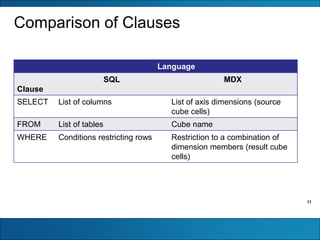
Comparison of Clauses
Language
Clause
SQL MDX
SELECT List of columns List of axis dimensions (source
cube cells)
FROM List of tables Cube name
WHERE Conditions restricting rows Restriction to a combination of
dimension members (result cube
cells)
32
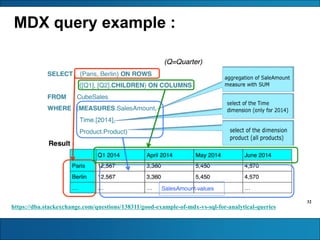
MDX query example :
https://dba.stackexchange.com/questions/138311/good-example-of-mdx-vs-sql-for-analytical-queries
33
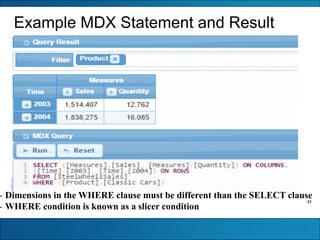
Example MDX Statement and Result
- Dimensions in the WHERE clause must be different than the SELECT clause
- WHERE condition is known as a slicer condition
34
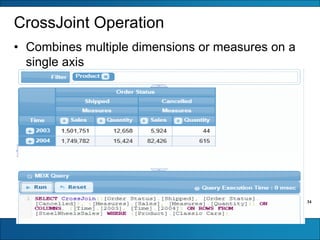
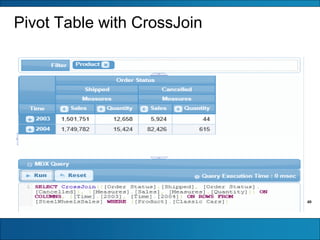
CrossJoint Operation
• Combines multiple dimensions or measures on a
single axis
35
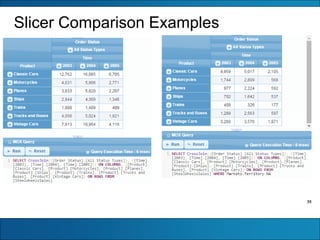
Slicer Comparison Examples
36
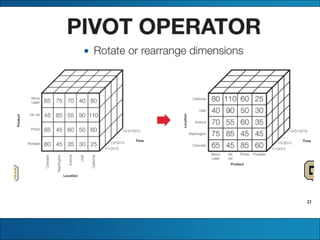
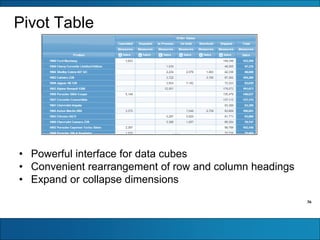
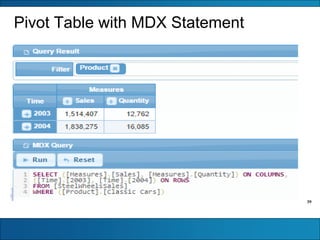
Pivot Table
• Powerful interface for data cubes
• Convenient rearrangement of row and column headings
• Expand or collapse dimensions
37
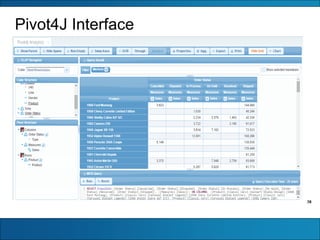
Pivot4J
• Allows cube representation similar to pivot table
in Microsoft Excel
• Works with Pentaho Business Analytics
• Separate add-on
• Graphical implementation of the MDX language
38
Pivot4J Interface
39
Pivot Table with MDX Statement
40
Pivot Table with CrossJoin

Week 02.pdf

  • 1.
    Multidimensional data representation andmanipulation Data Cube Concepts
  • 2.
  • 3.
  • 4.
  • 5.
  • 6.
  • 7.
    8 Business Analyst Perspective Employee Turnover Management LocationMarketplace Compensation Factor / qualitative variable Outcome Variable / quantitative variable - Retention focus - Flexibility options - City size - Transportation options to work - Demand level - Salary escalation - Health care - Pension - Base salary levels
  • 8.
    9 Data Cube Basics •Business analyst model – Factors or influencing variables of interest – Quantitative variables – Multidimensional arrangement • Terminology – Dimension: subject label for a row or column Can have more than 2 or 3 dimensions dimension may be city size or type of health plan offered – Member: value of dimension – Measure: quantitative variables/data stored in cells can have more than one measure in a cell
  • 9.
  • 10.
    11 Notes on Dimensionsand Measures • Hierarchies: Member can have sub members (more detail) Location: country, region, state, zip code • Sparsity: Many cells are typically empty when dimensions are related May not sell all products in all regions Major problem with storing data cubes: compression of unused space • Measures: Derived measure: Common: unit sales * unit volume; sales per transaction Data cube engine must compute efficiently Multiple measures in cells
  • 11.
    12 Measure Aggregation Properties •“Aggregate Property” indicates allowable summary operations for measures • Additive – Summarized by addition across all dimensions such as sales, cost, profit – Sales can be summed across product, time, customer, … • Semi-Additive – Summarized by addition in some but not all dimensions such as time – Periodic measurements such as account balances and inventory levels – Account balance can be summed across customer branch – Account balance cannot be summed across time because balance is just a point in time measurement • Non-Additive – Cannot be summarized by addition through any dimension – Historical facts such as unit price for a sale
  • 12.
    13 Measure Aggregation Example •Dimensions – Course: course id, degree, department, and college – Student: student id, major, department, and college – Time: semester, academic year, academic decade • Measures: – Credit hours – Grade – Unit tuition (cost per credit hour) – Tuition (unit tution * credit hours) • Aggregation properties for measures: ? Credit hours: additive across all dimensions Grade: non additive but averageable such as grade point average Unit tuition: non additive and averageable but probably not useful as an average Tuition: additive
  • 13.
  • 14.
  • 15.
  • 16.
  • 17.
  • 18.
  • 19.
  • 20.
  • 21.
  • 22.
  • 23.
    24 Microsoft Multidimensional Expressions (MDX) LanguageHistory 1997 MS OLAP specification 1998 MS OLAP services release 2001 mdXML specification by XMLA Council MS 2005 MDX revision • Defacto standard developed by Microsoft and later by the XMLA (XML for Analysis) Council – A web standards group
  • 24.
    25 MDX Usage • Foundationfor Microsoft products and open source analytics software • SQL Server Analysis Services and Excel Pivot Tables • Hyperion, IBM, SAP (Systems Applications and Products), and other vendors • Foundation for open source projects: JPivot, Pivot4J, and Pentaho Business Analytics Platform
  • 25.
  • 26.
    27 Attribute Hierarchy andMembers Line attribute member Vendor attribute member Product attribute member Line Vendor Product Product attribute hierarchy
  • 27.
  • 28.
    29 MDX Terminology Notes •Tuple – Cell identifier – One member from each dimension • Axis: dimension selected in a query (source cube cells) • Slicer: combination of dimension members (result cube cells) • Querying Multidimensional Data with MDX – https://docs.microsoft.com/en-us/analysis- services/multidimensional-models/mdx/querying- multidimensional-data-with-mdx?view=sql-analysis- services-2022
  • 29.
    30 SQL Versus MDX •Table result for SQL SELECT statement • Data cube result for MDX SELECT statement • Different mathematical approaches for manipulating tables (e.g. relational algebra) and data cubes (e.g. matrix algebra)
  • 30.
    31 Comparison of Clauses Language Clause SQLMDX SELECT List of columns List of axis dimensions (source cube cells) FROM List of tables Cube name WHERE Conditions restricting rows Restriction to a combination of dimension members (result cube cells)
  • 31.
    32 MDX query example: https://dba.stackexchange.com/questions/138311/good-example-of-mdx-vs-sql-for-analytical-queries
  • 32.
    33 Example MDX Statementand Result - Dimensions in the WHERE clause must be different than the SELECT clause - WHERE condition is known as a slicer condition
  • 33.
    34 CrossJoint Operation • Combinesmultiple dimensions or measures on a single axis
  • 34.
  • 35.
    36 Pivot Table • Powerfulinterface for data cubes • Convenient rearrangement of row and column headings • Expand or collapse dimensions
  • 36.
    37 Pivot4J • Allows cuberepresentation similar to pivot table in Microsoft Excel • Works with Pentaho Business Analytics • Separate add-on • Graphical implementation of the MDX language
  • 37.
  • 38.
    39 Pivot Table withMDX Statement
  • 39.