Copyright © 2015 | Northern Initiatives
WEBSITE DEVELOPMENT
Deciding which tools to use from do-it-yourself to robust hosted
solutions. Build your website with the right tool for the job.
CREATING A WEBSITE
Copyright © 2015 | Northern Initiatives
Ask Yourself…
Who is the audience you are trying to reach?
What are the objectives of your website?
What is your budget?
Where are your customers located?
Why is your website important?
When would you like to launch the site?
Have a clear understanding of your websites’ needs before deciding
which tools should be used to bring your business website online.
Copyright © 2015 | Northern Initiatives
Learning Objectives
• Identify the various forms of website delivery.
• Isolate key features of each delivery method.
• Estimate website pricing.
• Become familiar with various front-end interfaces (editors).
• Review pros and cons.
Copyright © 2015 | Northern Initiatives
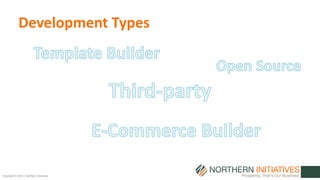
Development Types
Copyright © 2015 | Northern Initiatives
Template Builder
• The most user friendly avenue for creating a website. Usually
requires no knowledge of coding language.
• Template sites can be created and live within 24 hours.
• For cell phone users a template builder site provides a sleek mobile
design which may be entirely different from the full resolution site.
Examples:
– Weebly
– Squarespace
– Wix
Copyright © 2015 | Northern Initiatives
Template Builder
Estimated Pricing
Approx. $10 a month.
Includes: Hosting, Domain Name, Site Builder, Basic Themes.
• E-Commerce features cost extra. What you see is what you get,
pre-built themes are often limited in customization.
Copyright © 2015 | Northern Initiatives
Template Builder
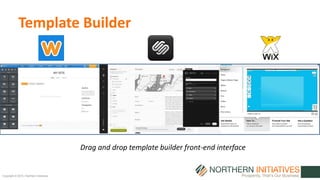
Drag and drop template builder front-end interface
Copyright © 2015 | Northern Initiatives
Template Builder
• Many pre-built themes
• Mobile friendly (responsive)
• Drag and drop setup
• Live in 24 hours
• In house hosting
Pros Cons
• Themes can be expensive
• Less customizable
• Less suited for blogs
• Low sales volume
E-Commerce, costs more to
implement many products
Copyright © 2015 | Northern Initiatives
Open Source
• Open source can be setup by a web hosting service. Select a
theme for your open source setup and begin editing your site.
• The most cost effective solution for creating a website.
Requires the most knowledge of web design and coding.
• Many free plugins are available.
Examples:
– WordPress
– Joomla
– ExpressionEngine
Copyright © 2015 | Northern Initiatives
Open Source
Estimated Pricing
Approx. $5 a month.
Includes: Website Manager (CMS).
• Hosting included in pricing. Professional pre-built themes cost
extra. Free plugins allow for inexpensive E-Commerce solutions
and many features that are included in more expensive web
builders.
Copyright © 2015 | Northern Initiatives
Open Source
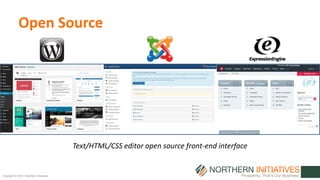
Text/HTML/CSS editor open source front-end interface
Copyright © 2015 | Northern Initiatives
Open Source
• Extremely customizable
• Mobile design for each device
resolution
• Cost effective
• Useful for any website, blog,
or E-Commerce solution
Pros Cons
• Knowledge of code required
• Lengthy design process
• Lack of support
• SSL and PCI Compliance
fees for E-Commerce.
Copyright © 2015 | Northern Initiatives
Third-party
• Cloud designed infrastructure gives companies access to auto
scaling servers. Pay only for the amount of traffic generated.
• Requires dedicated staff to manage and operate the site.
• Eliminates the need for in house servers.
Examples:
– Amazon Web Services
– VoltDB
– Microsoft Azure
Copyright © 2015 | Northern Initiatives
Third-party
Estimated Pricing
Approx. $50 to $120 a month.
Includes: Cloud based dedicated server. Ability to host multiple
websites for larger companies.
• Access company files from anywhere through a fully cloud
based infrastructure. Great for highly mobile employees.
Copyright © 2015 | Northern Initiatives
Third-party
• No server down time
• Scalable to meet any business
demand
• Access company files
anywhere through the cloud
• No in house server needed
Pros Cons
• Dedicated database IT staff
required
• Lengthy design process
• Mobile design not standard
• SSL and PCI compliance fees
for E-Commerce
Copyright © 2015 | Northern Initiatives
E-Commerce Builder
• Easily connect web based sales with store sales.
• All website and hosting costs under one pricing plan.
• Provides a sleek all-in-one setup for any E-Commerce solution.
Examples:
– Shopify
– Big Commerce
– Magento Go
Copyright © 2015 | Northern Initiatives
E-Commerce Builder
Estimated Pricing
Approx. $30 a month.
Includes: Hosting, Domain Name, Site Builder, Basic Themes,
Shopping Cart, SSL, PCI Compliance.
• Many E-Commerce Builders offer custom POS systems and
support in store sales.
Copyright © 2015 | Northern Initiatives
E-Commerce Builder
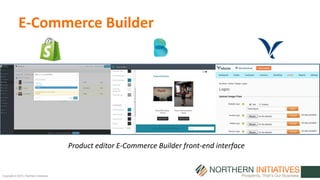
Product editor E-Commerce Builder front-end interface
Copyright © 2015 | Northern Initiatives
E-Commerce Builder
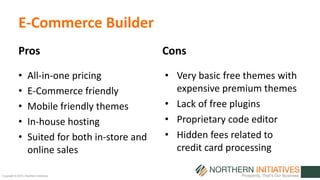
• All-in-one pricing
• E-Commerce friendly
• Mobile friendly themes
• In-house hosting
• Suited for both in-store and
online sales
Pros Cons
• Very basic free themes with
expensive premium themes
• Lack of free plugins
• Proprietary code editor
• Hidden fees related to
credit card processing
Copyright © 2015 | Northern Initiatives
Comparison Table
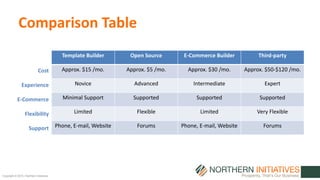
Template Builder Open Source E-Commerce Builder Third-party
Approx. $15 /mo. Approx. $5 /mo. Approx. $30 /mo. Approx. $50-$120 /mo.
Novice Advanced Intermediate Expert
Minimal Support Supported Supported Supported
Limited Flexible Limited Very Flexible
Phone, E-mail, Website Forums Phone, E-mail, Website Forums
Cost
Experience
E-Commerce
Flexibility
Support
Copyright © 2015 | Northern Initiatives
Takeaway
• There are many different options for building a website.
• First identify the type of website required by your business.
• Create a budget and decide how quickly you would like your
website to be published.
• Review the Pros and Cons of each website solution and choose
the delivery method which suits your needs.

Website Development

  • 1.
    Copyright © 2015| Northern Initiatives WEBSITE DEVELOPMENT Deciding which tools to use from do-it-yourself to robust hosted solutions. Build your website with the right tool for the job. CREATING A WEBSITE
  • 2.
    Copyright © 2015| Northern Initiatives Ask Yourself… Who is the audience you are trying to reach? What are the objectives of your website? What is your budget? Where are your customers located? Why is your website important? When would you like to launch the site? Have a clear understanding of your websites’ needs before deciding which tools should be used to bring your business website online.
  • 3.
    Copyright © 2015| Northern Initiatives Learning Objectives • Identify the various forms of website delivery. • Isolate key features of each delivery method. • Estimate website pricing. • Become familiar with various front-end interfaces (editors). • Review pros and cons.
  • 4.
    Copyright © 2015| Northern Initiatives Development Types
  • 5.
    Copyright © 2015| Northern Initiatives Template Builder • The most user friendly avenue for creating a website. Usually requires no knowledge of coding language. • Template sites can be created and live within 24 hours. • For cell phone users a template builder site provides a sleek mobile design which may be entirely different from the full resolution site. Examples: – Weebly – Squarespace – Wix
  • 6.
    Copyright © 2015| Northern Initiatives Template Builder Estimated Pricing Approx. $10 a month. Includes: Hosting, Domain Name, Site Builder, Basic Themes. • E-Commerce features cost extra. What you see is what you get, pre-built themes are often limited in customization.
  • 7.
    Copyright © 2015| Northern Initiatives Template Builder Drag and drop template builder front-end interface
  • 8.
    Copyright © 2015| Northern Initiatives Template Builder • Many pre-built themes • Mobile friendly (responsive) • Drag and drop setup • Live in 24 hours • In house hosting Pros Cons • Themes can be expensive • Less customizable • Less suited for blogs • Low sales volume E-Commerce, costs more to implement many products
  • 9.
    Copyright © 2015| Northern Initiatives Open Source • Open source can be setup by a web hosting service. Select a theme for your open source setup and begin editing your site. • The most cost effective solution for creating a website. Requires the most knowledge of web design and coding. • Many free plugins are available. Examples: – WordPress – Joomla – ExpressionEngine
  • 10.
    Copyright © 2015| Northern Initiatives Open Source Estimated Pricing Approx. $5 a month. Includes: Website Manager (CMS). • Hosting included in pricing. Professional pre-built themes cost extra. Free plugins allow for inexpensive E-Commerce solutions and many features that are included in more expensive web builders.
  • 11.
    Copyright © 2015| Northern Initiatives Open Source Text/HTML/CSS editor open source front-end interface
  • 12.
    Copyright © 2015| Northern Initiatives Open Source • Extremely customizable • Mobile design for each device resolution • Cost effective • Useful for any website, blog, or E-Commerce solution Pros Cons • Knowledge of code required • Lengthy design process • Lack of support • SSL and PCI Compliance fees for E-Commerce.
  • 13.
    Copyright © 2015| Northern Initiatives Third-party • Cloud designed infrastructure gives companies access to auto scaling servers. Pay only for the amount of traffic generated. • Requires dedicated staff to manage and operate the site. • Eliminates the need for in house servers. Examples: – Amazon Web Services – VoltDB – Microsoft Azure
  • 14.
    Copyright © 2015| Northern Initiatives Third-party Estimated Pricing Approx. $50 to $120 a month. Includes: Cloud based dedicated server. Ability to host multiple websites for larger companies. • Access company files from anywhere through a fully cloud based infrastructure. Great for highly mobile employees.
  • 15.
    Copyright © 2015| Northern Initiatives Third-party • No server down time • Scalable to meet any business demand • Access company files anywhere through the cloud • No in house server needed Pros Cons • Dedicated database IT staff required • Lengthy design process • Mobile design not standard • SSL and PCI compliance fees for E-Commerce
  • 16.
    Copyright © 2015| Northern Initiatives E-Commerce Builder • Easily connect web based sales with store sales. • All website and hosting costs under one pricing plan. • Provides a sleek all-in-one setup for any E-Commerce solution. Examples: – Shopify – Big Commerce – Magento Go
  • 17.
    Copyright © 2015| Northern Initiatives E-Commerce Builder Estimated Pricing Approx. $30 a month. Includes: Hosting, Domain Name, Site Builder, Basic Themes, Shopping Cart, SSL, PCI Compliance. • Many E-Commerce Builders offer custom POS systems and support in store sales.
  • 18.
    Copyright © 2015| Northern Initiatives E-Commerce Builder Product editor E-Commerce Builder front-end interface
  • 19.
    Copyright © 2015| Northern Initiatives E-Commerce Builder • All-in-one pricing • E-Commerce friendly • Mobile friendly themes • In-house hosting • Suited for both in-store and online sales Pros Cons • Very basic free themes with expensive premium themes • Lack of free plugins • Proprietary code editor • Hidden fees related to credit card processing
  • 20.
    Copyright © 2015| Northern Initiatives Comparison Table Template Builder Open Source E-Commerce Builder Third-party Approx. $15 /mo. Approx. $5 /mo. Approx. $30 /mo. Approx. $50-$120 /mo. Novice Advanced Intermediate Expert Minimal Support Supported Supported Supported Limited Flexible Limited Very Flexible Phone, E-mail, Website Forums Phone, E-mail, Website Forums Cost Experience E-Commerce Flexibility Support
  • 21.
    Copyright © 2015| Northern Initiatives Takeaway • There are many different options for building a website. • First identify the type of website required by your business. • Create a budget and decide how quickly you would like your website to be published. • Review the Pros and Cons of each website solution and choose the delivery method which suits your needs.