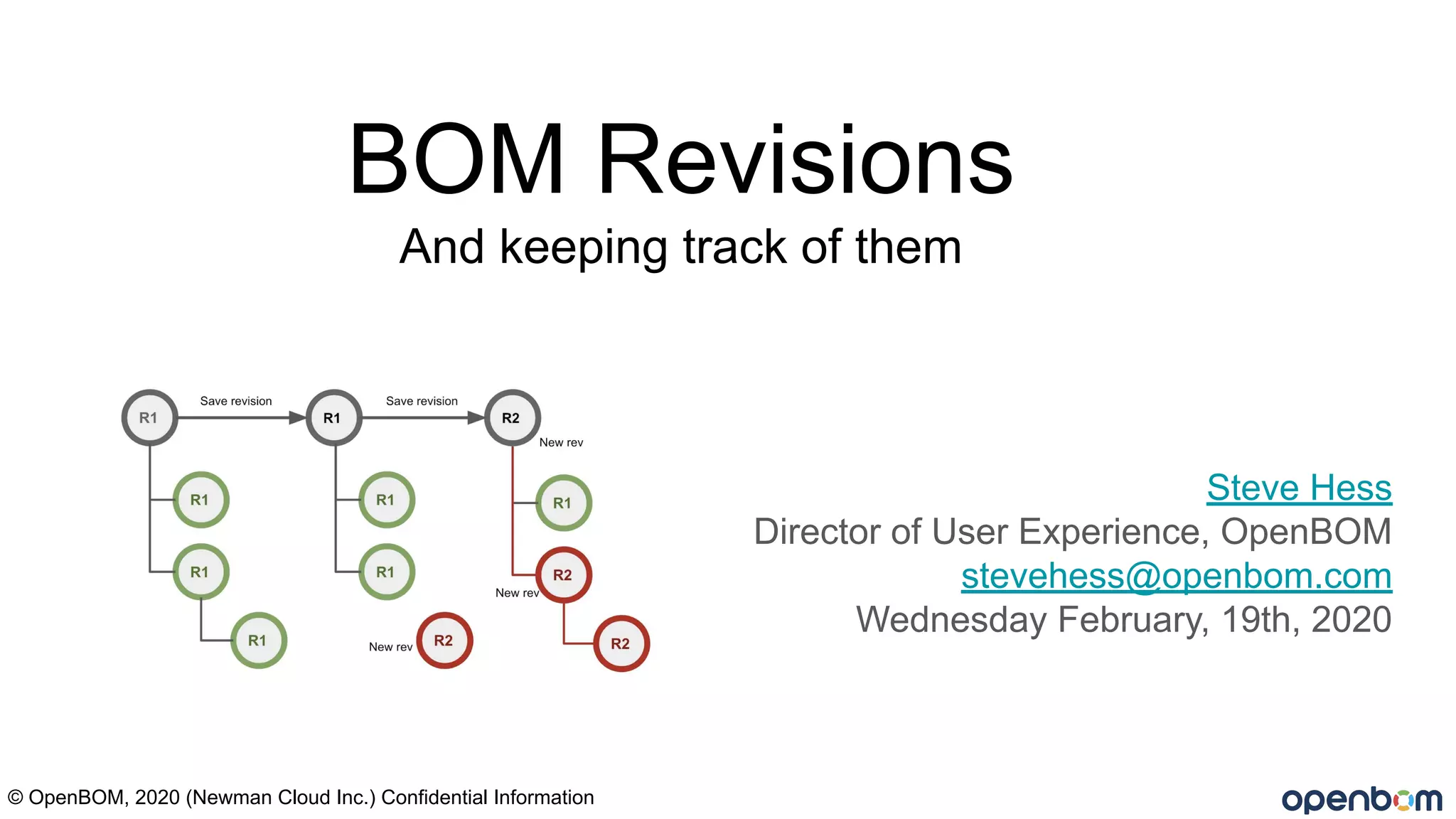
BOM Revisions
And keeping track of them
Steve Hess
Director of User Experience, OpenBOM
stevehess@openbom.com
Wednesday February, 19th, 2020
© OpenBOM, 2020 (Newman Cloud Inc.) Confidential Information
This webinar is a bit deeper of a dive into the
mechanics of BOM revisions. I will try to keep it
interesting!
This is a “Marketing Free” event!
This webinar is 20 minute or less discussion of Bill of
Materials revisions and one or more methods for managing
BOM revisions.
We may do a live demo….. There will be Q&A
© OpenBOM, 2019 (Newman Cloud Inc.)
Definitions: (typical)
A Bill of Materials is a list of the raw materials, sub-assemblies, intermediate assemblies,
sub-components, parts, and the quantities of each needed to manufacture an end product.
A Part Number is an unambiguous identifier of a particular part design. Its purpose is to simplify reference
to that part. Sometimes called an Item, usually an Item can be a part or assembly.
An Assembly refers to a collection of parts or sub-assemblies generally created in CAD.
A Multi Level BOM is often called an indented BOM or structured BOM. It has assemblies (as BOMs)
represented as sub-levels.
Excel - refers to any spreadsheet program ex. Google sheets or similar.
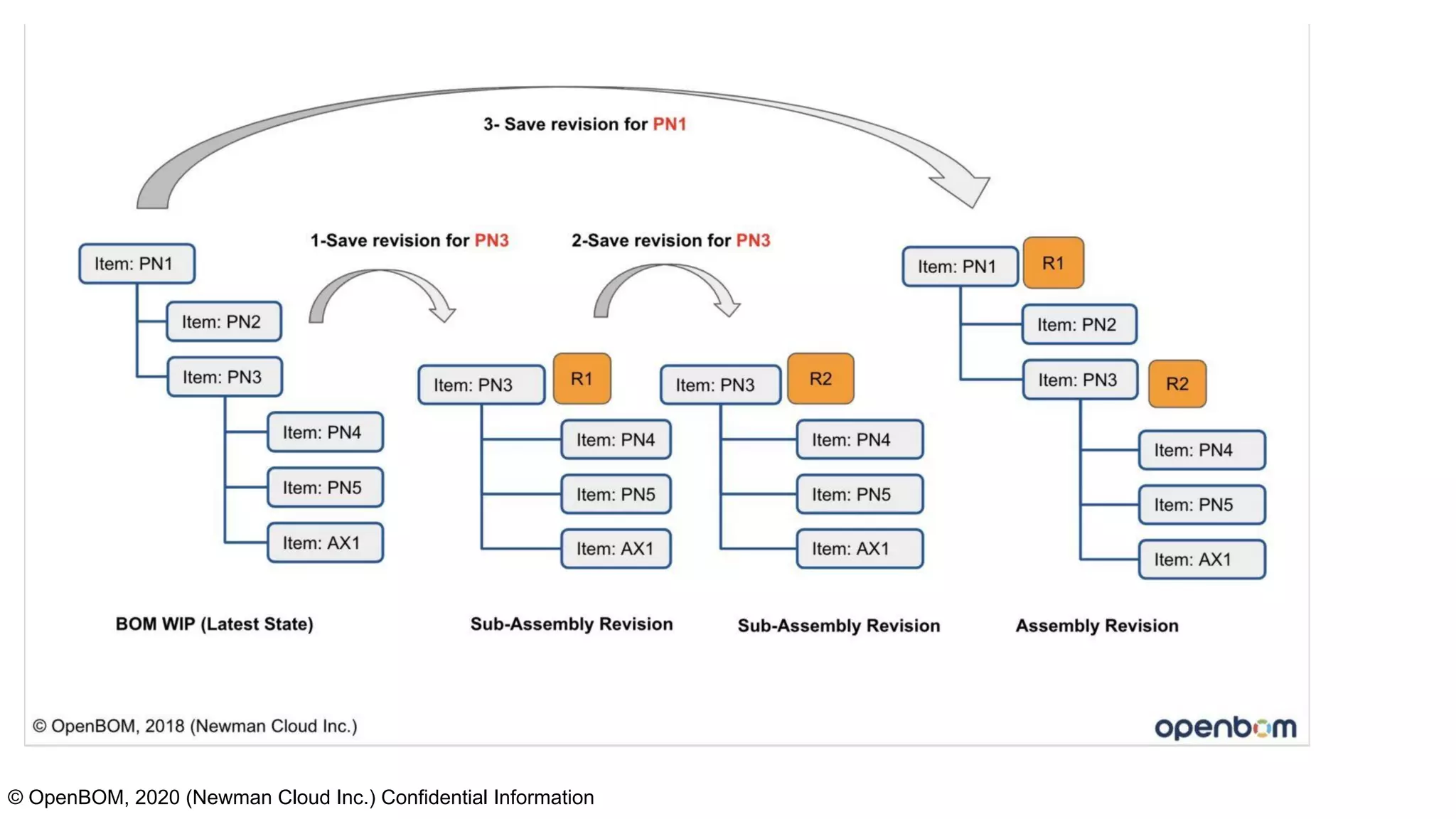
A Revision is a particular immutable rendition of a single level (usually the top) of a BOM, usually given a
number or letter.
Work In Progress (WIP) an area where all work is in the “latest” state. Revisions are not considered.
© OpenBOM, 2020 (Newman Cloud Inc.) Confidential Information
Assumptions:
● You have some method for creating revisions of parts. That is, we will not dive into how a part
revision is created here. You may have CAD, or a change control board (CCB), a paper form, or a
simple spreadsheet for assigning Rev….. in this webinar we assume a part revision happens.
● You have a revision scheme… A,B,C… 1,2,3….. Whatever works for you. We use 1,2,3 in this
webinar.
● That “Excel” is any type spreadsheet
© OpenBOM, 2020 (Newman Cloud Inc.) Confidential Information
© OpenBOM, 2019 (Newman Cloud Inc.)
What we will cover in this webinar?
1) Basic principles of Revisions?
2) How Revisions appear in the structure?
3) What does a revision process look like?
4) A live demo of managing BOM revisions for top
level and sub-level assemblies.
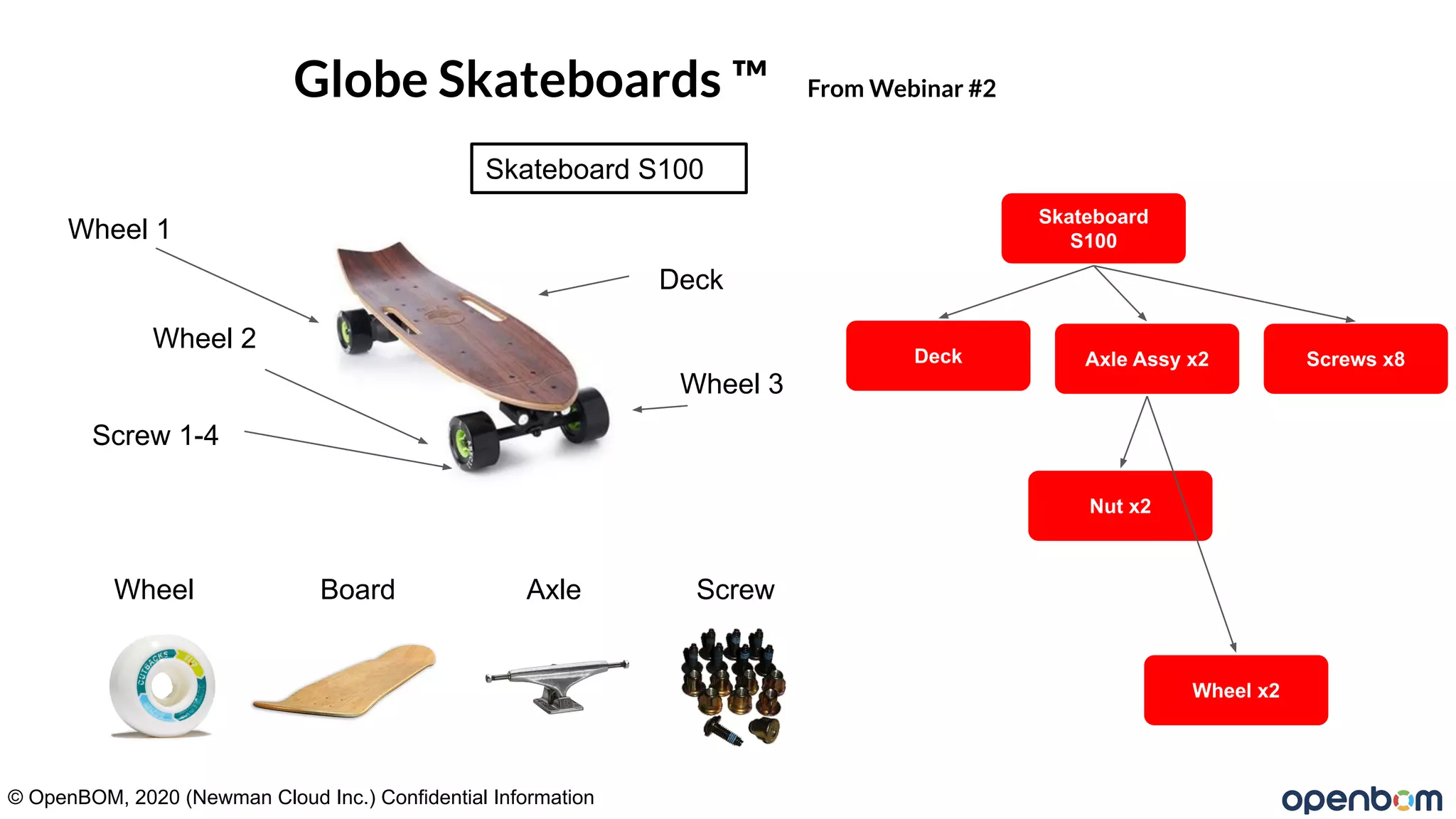
Globe Skateboards ™ From Webinar #2
Wheel 1
Wheel 2
Wheel 3
Skateboard S100
Screw 1-4
Skateboard
S100
Deck Axle Assy x2
Nut x2
Wheel x2
Wheel Board Axle Screw
Screws x8
Deck
© OpenBOM, 2020 (Newman Cloud Inc.) Confidential Information
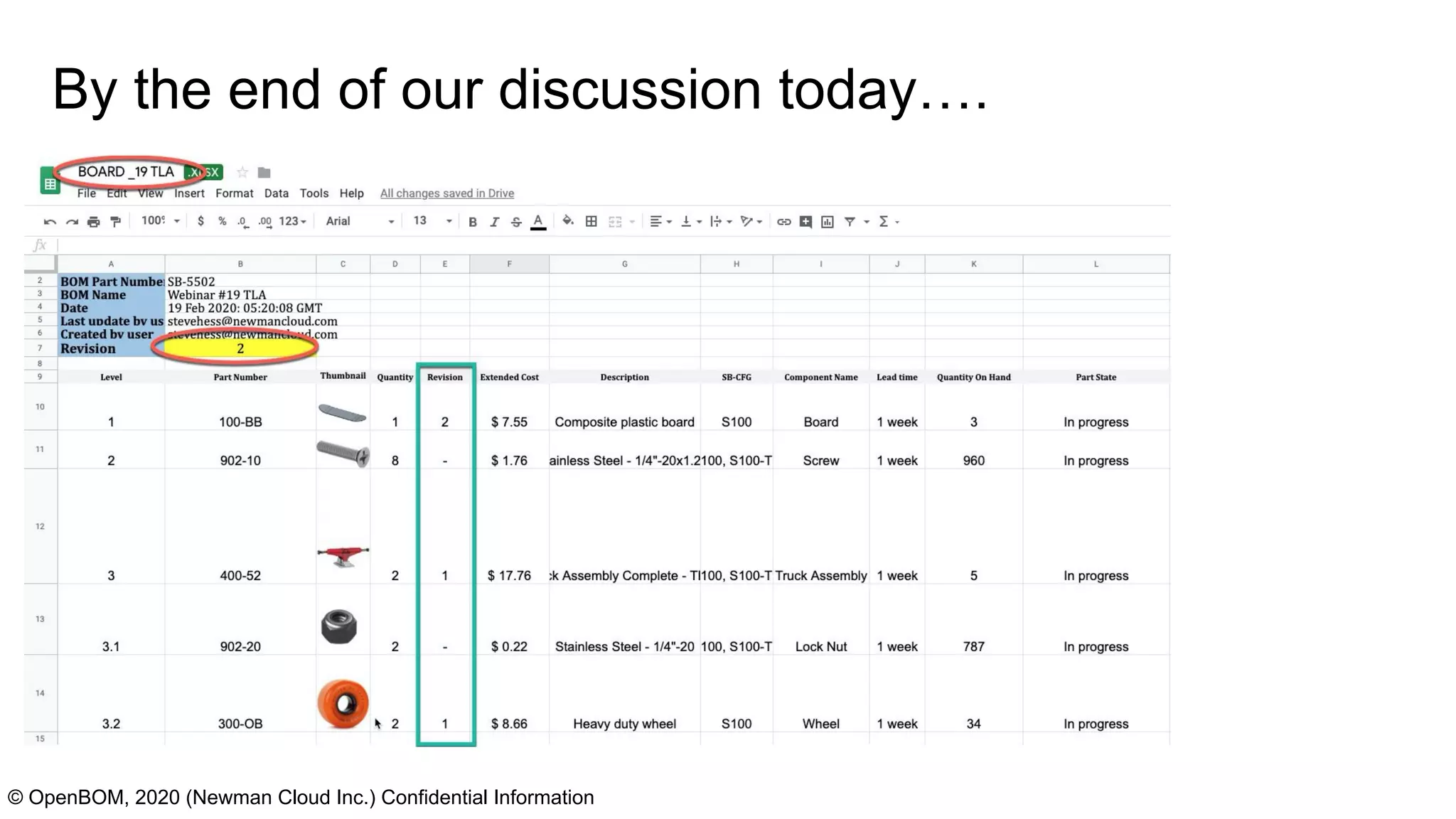
By the end of our discussion today….
© OpenBOM, 2020 (Newman Cloud Inc.) Confidential Information
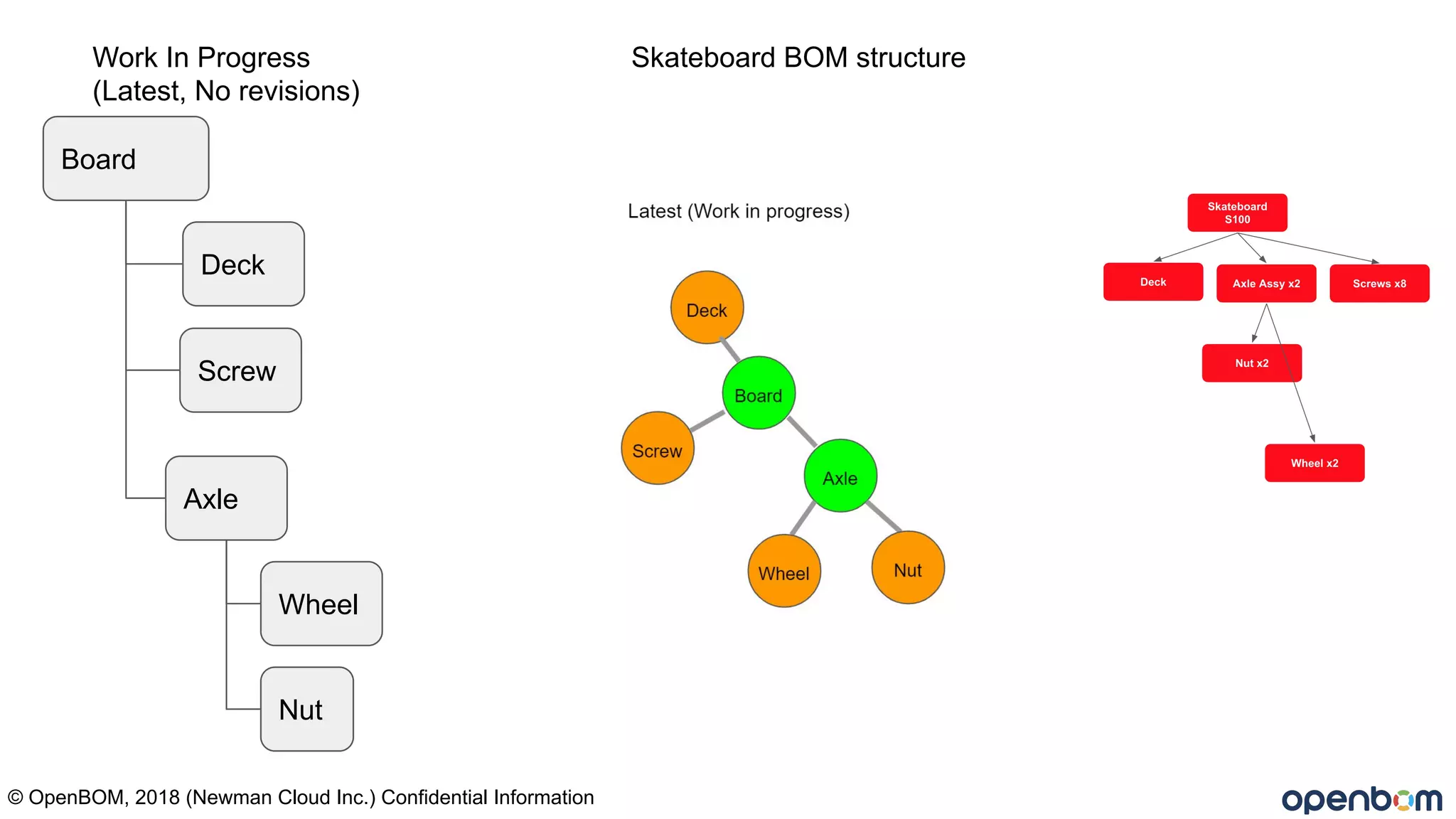
Board
Deck
Screw
Axle
Wheel
Nut
© OpenBOM, 2018 (Newman Cloud Inc.) Confidential Information
Skateboard BOM structureWork In Progress
(Latest, No revisions)
Board
Screw
WIP
Axle
Wheel
Nut
© OpenBOM, 2018 (Newman Cloud Inc.) Confidential Information
Board
R1
Screw (-)
Rev 1
Axle (NR)
Save Rev
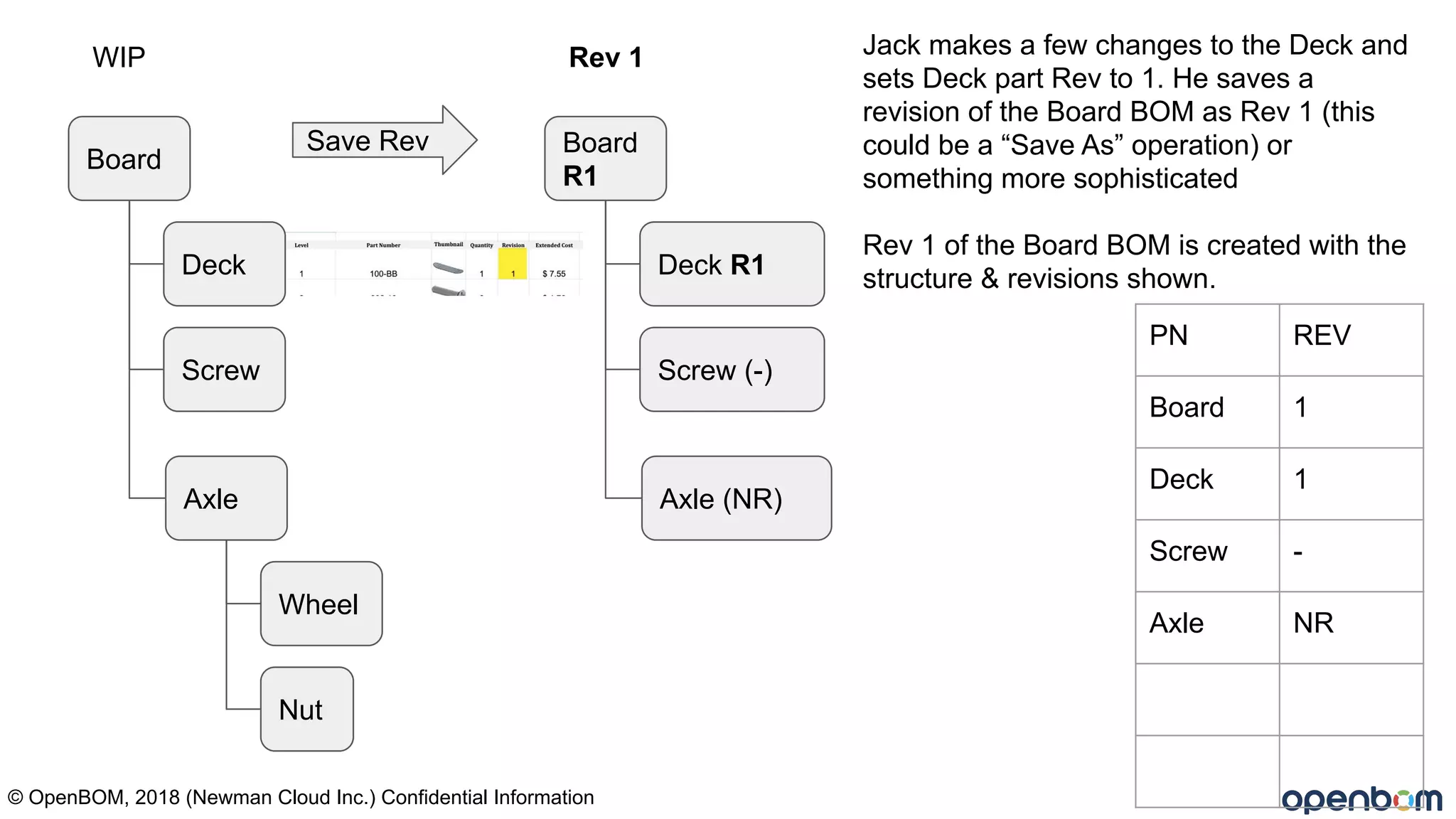
Jack makes a few changes to the Deck and
sets Deck part Rev to 1. He saves a
revision of the Board BOM as Rev 1 (this
could be a “Save As” operation) or
something more sophisticated
Rev 1 of the Board BOM is created with the
structure & revisions shown.
PN REV
Board 1
Deck 1
Screw -
Axle NR
Deck R1Deck
© OpenBOM, 2020 (Newman Cloud Inc.) Confidential Information
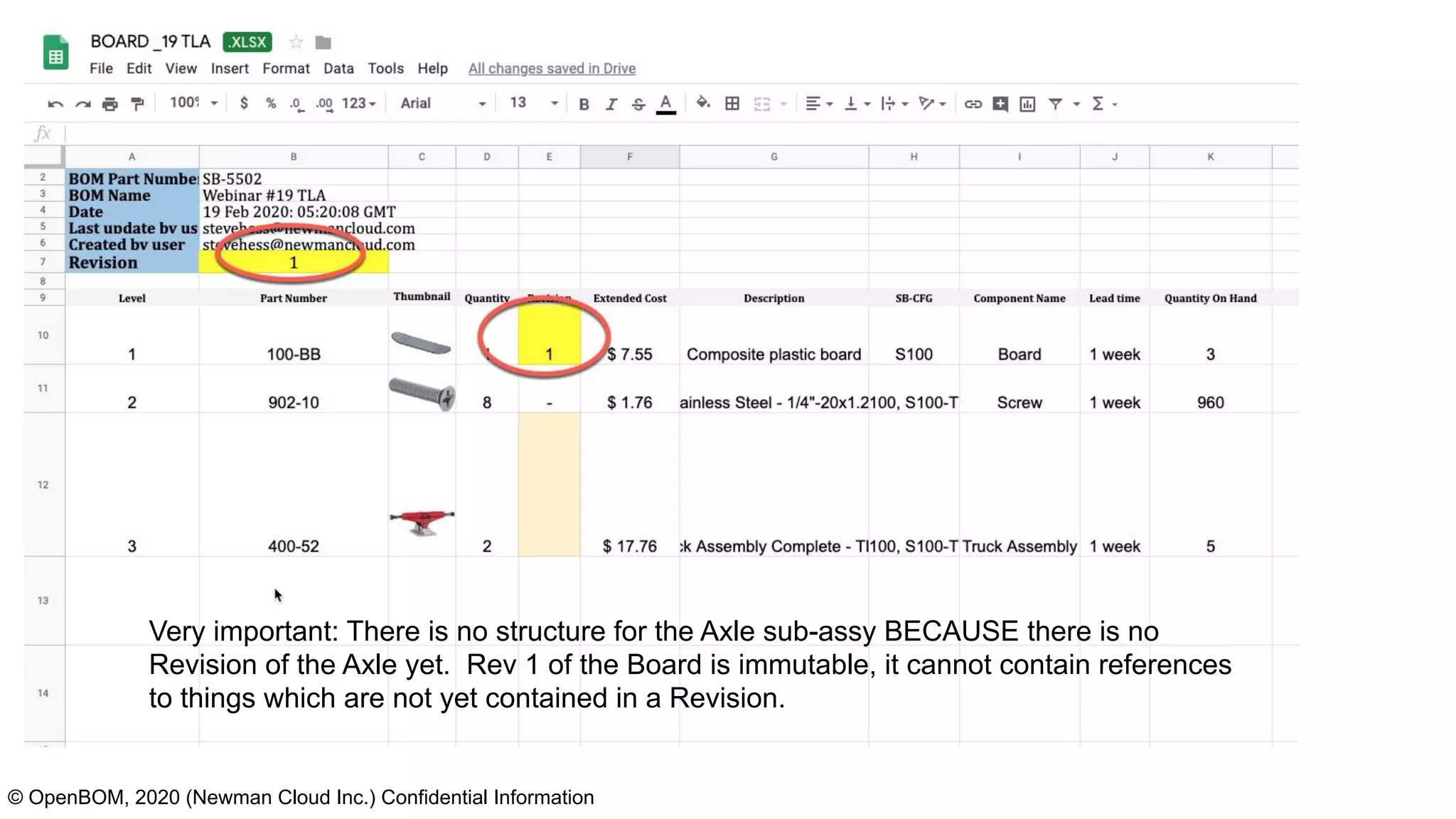
Very important: There is no structure for the Axle sub-assy BECAUSE there is no
Revision of the Axle yet. Rev 1 of the Board is immutable, it cannot contain references
to things which are not yet contained in a Revision.
Board
Deck
Screw
WIP
Axle
Wheel
Nut
© OpenBOM, 2018 (Newman Cloud Inc.) Confidential Information
Rev 1
Axle R1
Wheel R1
Nut -
Save Rev
PN REV
Board 1
Deck 1
Screw -
Axle 1
Wheel 1
Nut -
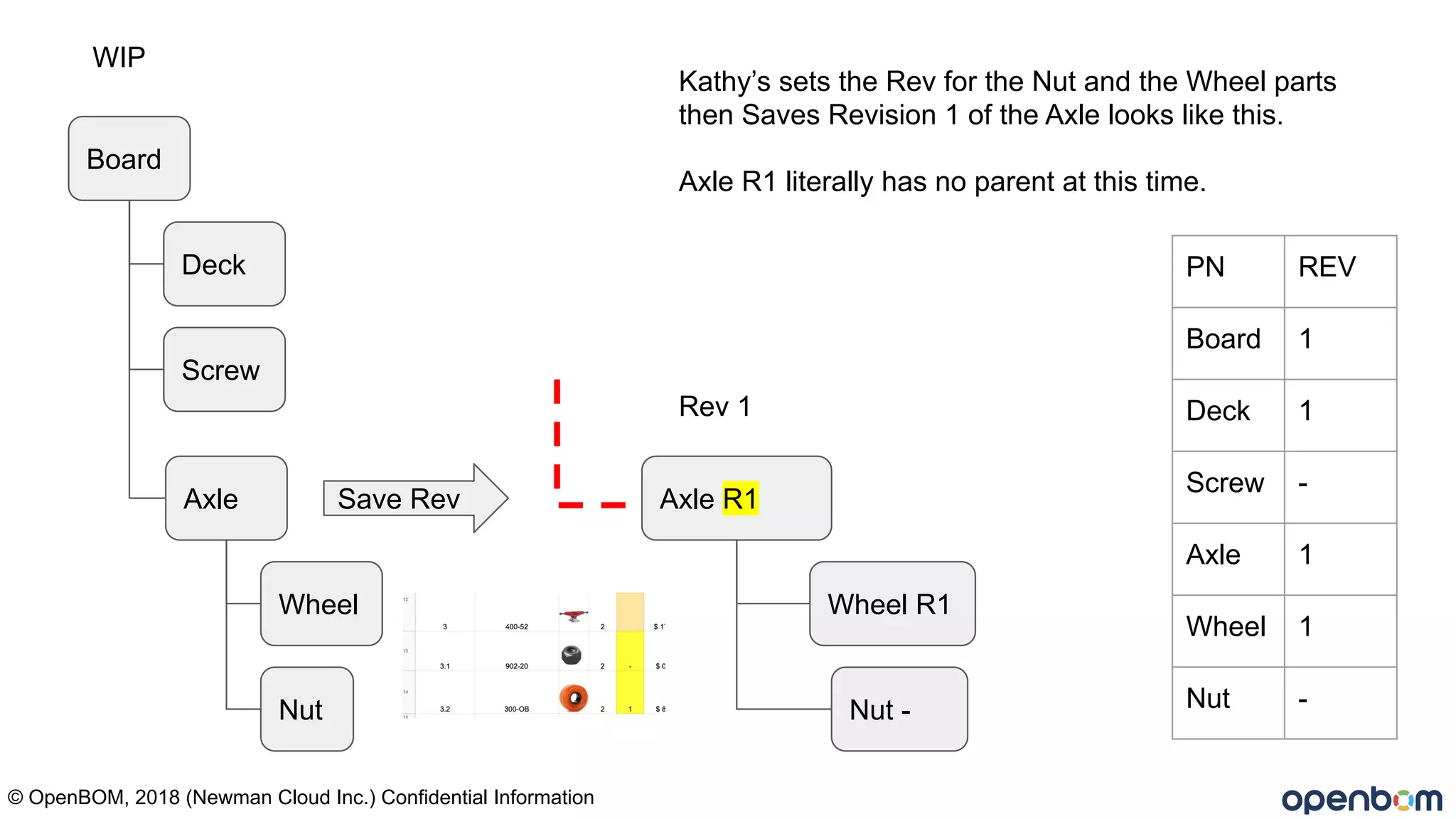
Kathy’s sets the Rev for the Nut and the Wheel parts
then Saves Revision 1 of the Axle looks like this.
Axle R1 literally has no parent at this time.
© OpenBOM, 2020 (Newman Cloud Inc.) Confidential Information
Board
Deck
Screw
BOM
WIP
Axle
Wheel
Nut
© OpenBOM, 2018 (Newman Cloud Inc.) Confidential Information
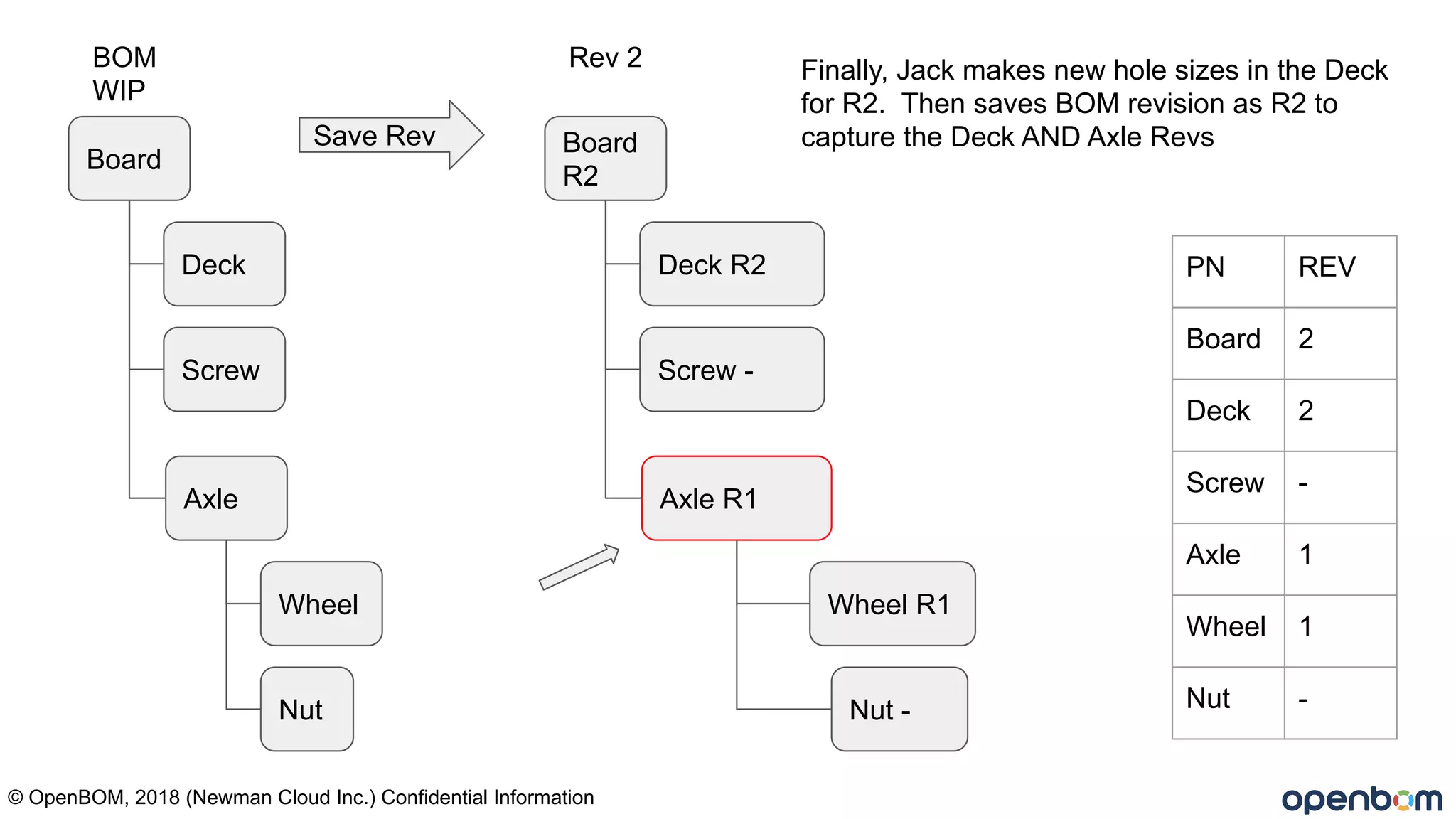
Board
R2
Deck R2
Screw -
Rev 2
Axle R1
Wheel R1
Nut -
Save Rev
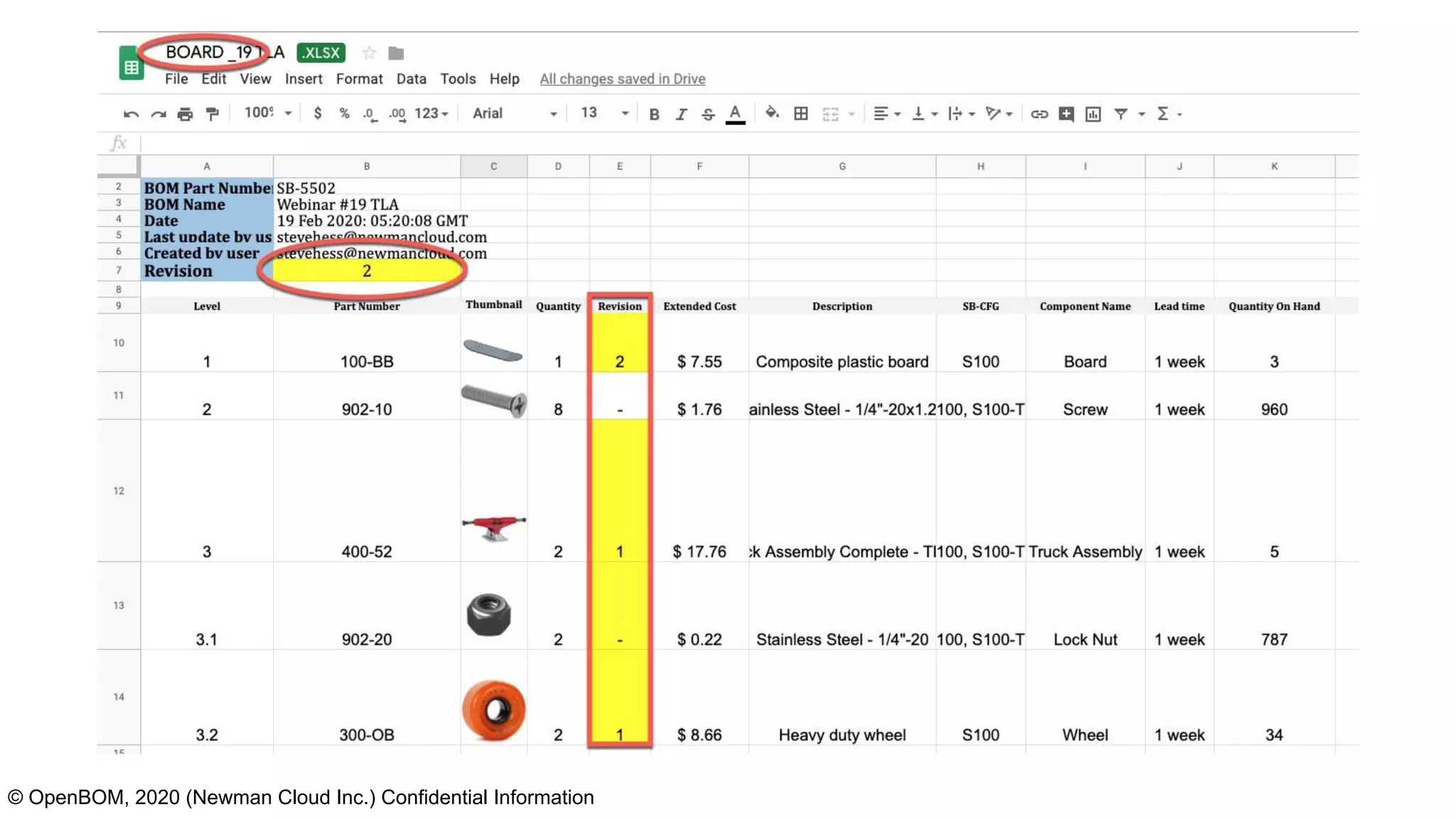
PN REV
Board 2
Deck 2
Screw -
Axle 1
Wheel 1
Nut -
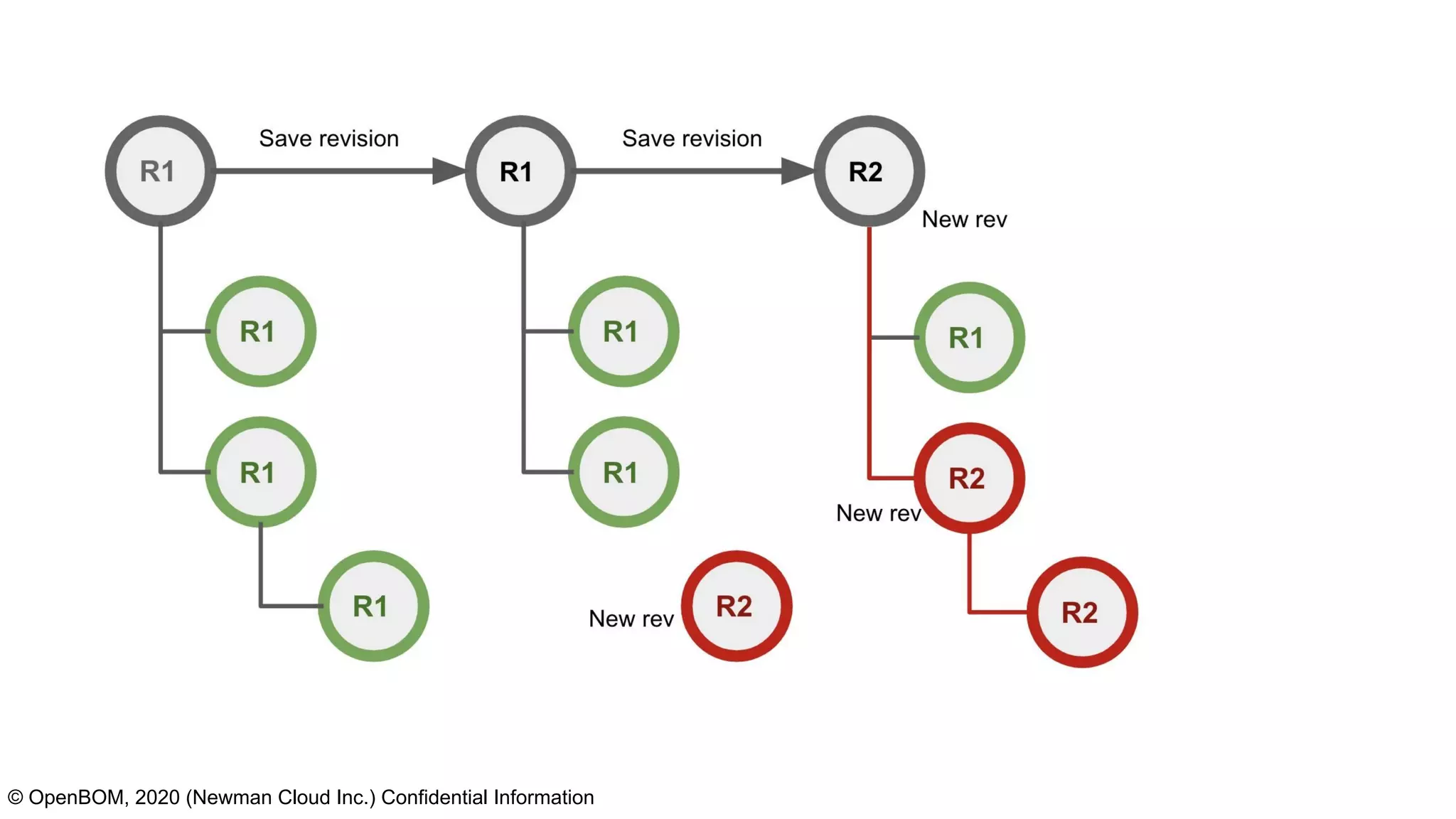
Finally, Jack makes new hole sizes in the Deck
for R2. Then saves BOM revision as R2 to
capture the Deck AND Axle Revs
© OpenBOM, 2020 (Newman Cloud Inc.) Confidential Information
Live demo…
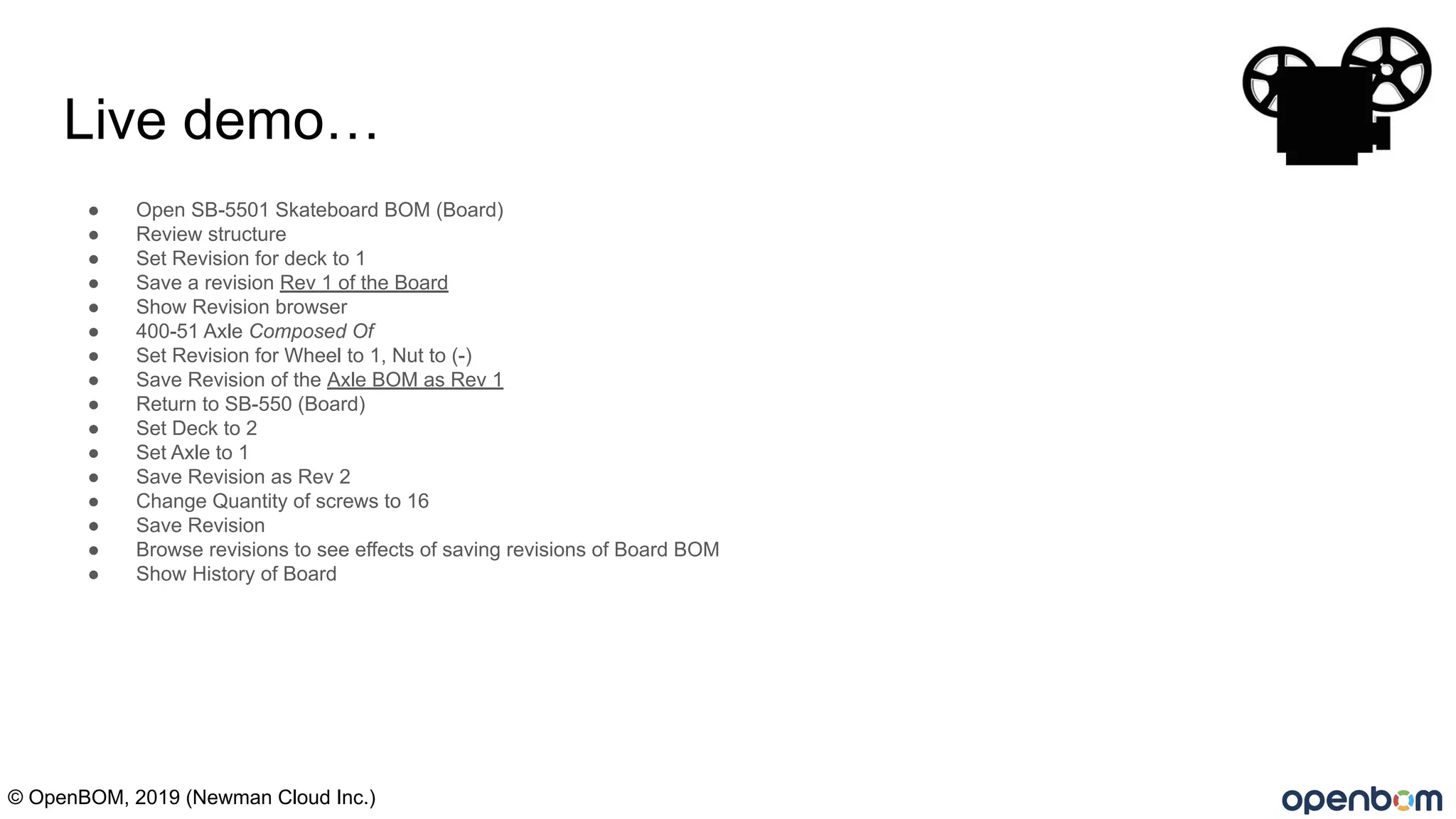
● Open SB-5501 Skateboard BOM (Board)
● Review structure
● Set Revision for deck to 1
● Save a revision Rev 1 of the Board
● Show Revision browser
● 400-51 Axle Composed Of
● Set Revision for Wheel to 1, Nut to (-)
● Save Revision of the Axle BOM as Rev 1
● Return to SB-550 (Board)
● Set Deck to 2
● Set Axle to 1
● Save Revision as Rev 2
● Change Quantity of screws to 16
● Save Revision
● Browse revisions to see effects of saving revisions of Board BOM
● Show History of Board
© OpenBOM, 2019 (Newman Cloud Inc.)
BOM revisions continued reading?
● Watch Webinars #2 and #13, #14 - essentials to an effective BOM (playlist link below)
● 6 Points to consider before managing your next BOM in Excel
https://www.fuseplm.com/6-points-to-consider-before-managing-your-next-bom-in-excel/
● OpenBOM blog http://www.openbom.com/blog
● OpenBOM Key Concepts https://www.youtube.com/watch?v=TQqjjM0x70E
● My Webinar Playlist:
https://www.youtube.com/playlist?list=PL6nXtFuNki7nSNXmw_fWGTFeKo8Y3EPJ3
● Nice video by @olegshilovitsky on revisions https://www.youtube.com/watch?v=Gu9X7lWR8fk
Questions?
Please type into the webinar panel or send to support@openbom.com
More information at www.openbom.com
© OpenBOM, 2019 (Newman Cloud Inc.)
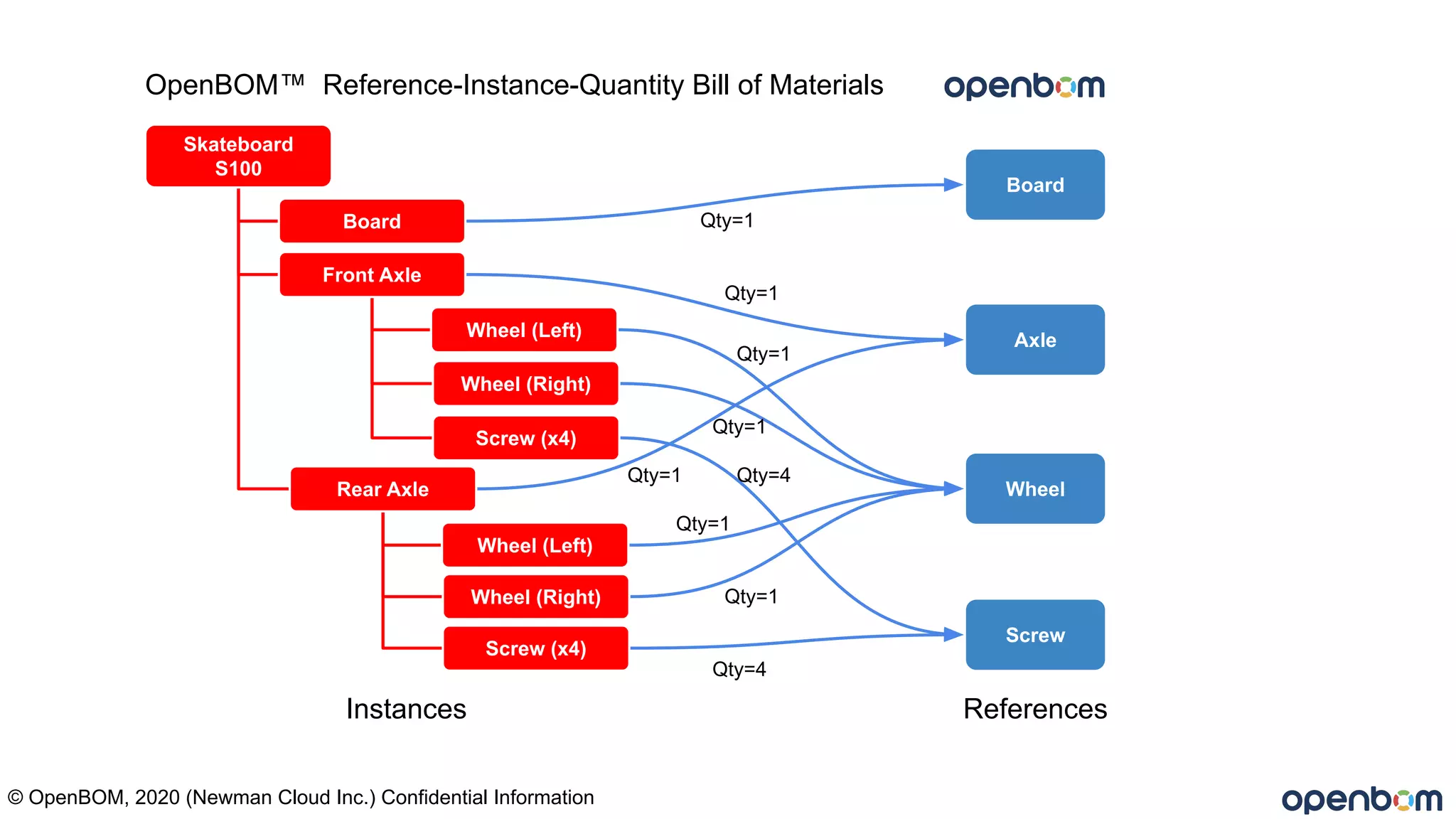
Axle
Screw
Board
Skateboard
S100
Board
Front Axle
Wheel (Left)
Wheel (Right)
Rear Axle
Wheel (Left)
Wheel (Right)
Screw (x4)
Screw (x4)
Wheel
OpenBOM™ Reference-Instance-Quantity Bill of Materials
Qty=4
Qty=1
Qty=1
Qty=1
Qty=1
Qty=1
Qty=1 Qty=4
Qty=1
Instances References
© OpenBOM, 2020 (Newman Cloud Inc.) Confidential Information
© OpenBOM, 2019 (Newman Cloud Inc.)
Questions:
1.

Webinar #19 - BOM revision basics

  • 1.
    BOM Revisions And keepingtrack of them Steve Hess Director of User Experience, OpenBOM stevehess@openbom.com Wednesday February, 19th, 2020 © OpenBOM, 2020 (Newman Cloud Inc.) Confidential Information
  • 2.
    This webinar isa bit deeper of a dive into the mechanics of BOM revisions. I will try to keep it interesting! This is a “Marketing Free” event! This webinar is 20 minute or less discussion of Bill of Materials revisions and one or more methods for managing BOM revisions. We may do a live demo….. There will be Q&A © OpenBOM, 2019 (Newman Cloud Inc.)
  • 3.
    Definitions: (typical) A Billof Materials is a list of the raw materials, sub-assemblies, intermediate assemblies, sub-components, parts, and the quantities of each needed to manufacture an end product. A Part Number is an unambiguous identifier of a particular part design. Its purpose is to simplify reference to that part. Sometimes called an Item, usually an Item can be a part or assembly. An Assembly refers to a collection of parts or sub-assemblies generally created in CAD. A Multi Level BOM is often called an indented BOM or structured BOM. It has assemblies (as BOMs) represented as sub-levels. Excel - refers to any spreadsheet program ex. Google sheets or similar. A Revision is a particular immutable rendition of a single level (usually the top) of a BOM, usually given a number or letter. Work In Progress (WIP) an area where all work is in the “latest” state. Revisions are not considered. © OpenBOM, 2020 (Newman Cloud Inc.) Confidential Information
  • 4.
    Assumptions: ● You havesome method for creating revisions of parts. That is, we will not dive into how a part revision is created here. You may have CAD, or a change control board (CCB), a paper form, or a simple spreadsheet for assigning Rev….. in this webinar we assume a part revision happens. ● You have a revision scheme… A,B,C… 1,2,3….. Whatever works for you. We use 1,2,3 in this webinar. ● That “Excel” is any type spreadsheet © OpenBOM, 2020 (Newman Cloud Inc.) Confidential Information
  • 5.
    © OpenBOM, 2019(Newman Cloud Inc.) What we will cover in this webinar? 1) Basic principles of Revisions? 2) How Revisions appear in the structure? 3) What does a revision process look like? 4) A live demo of managing BOM revisions for top level and sub-level assemblies.
  • 6.
    Globe Skateboards ™From Webinar #2 Wheel 1 Wheel 2 Wheel 3 Skateboard S100 Screw 1-4 Skateboard S100 Deck Axle Assy x2 Nut x2 Wheel x2 Wheel Board Axle Screw Screws x8 Deck © OpenBOM, 2020 (Newman Cloud Inc.) Confidential Information
  • 7.
    By the endof our discussion today…. © OpenBOM, 2020 (Newman Cloud Inc.) Confidential Information
  • 8.
    Board Deck Screw Axle Wheel Nut © OpenBOM, 2018(Newman Cloud Inc.) Confidential Information Skateboard BOM structureWork In Progress (Latest, No revisions)
  • 9.
    Board Screw WIP Axle Wheel Nut © OpenBOM, 2018(Newman Cloud Inc.) Confidential Information Board R1 Screw (-) Rev 1 Axle (NR) Save Rev Jack makes a few changes to the Deck and sets Deck part Rev to 1. He saves a revision of the Board BOM as Rev 1 (this could be a “Save As” operation) or something more sophisticated Rev 1 of the Board BOM is created with the structure & revisions shown. PN REV Board 1 Deck 1 Screw - Axle NR Deck R1Deck
  • 10.
    © OpenBOM, 2020(Newman Cloud Inc.) Confidential Information Very important: There is no structure for the Axle sub-assy BECAUSE there is no Revision of the Axle yet. Rev 1 of the Board is immutable, it cannot contain references to things which are not yet contained in a Revision.
  • 11.
    Board Deck Screw WIP Axle Wheel Nut © OpenBOM, 2018(Newman Cloud Inc.) Confidential Information Rev 1 Axle R1 Wheel R1 Nut - Save Rev PN REV Board 1 Deck 1 Screw - Axle 1 Wheel 1 Nut - Kathy’s sets the Rev for the Nut and the Wheel parts then Saves Revision 1 of the Axle looks like this. Axle R1 literally has no parent at this time.
  • 12.
    © OpenBOM, 2020(Newman Cloud Inc.) Confidential Information
  • 13.
    Board Deck Screw BOM WIP Axle Wheel Nut © OpenBOM, 2018(Newman Cloud Inc.) Confidential Information Board R2 Deck R2 Screw - Rev 2 Axle R1 Wheel R1 Nut - Save Rev PN REV Board 2 Deck 2 Screw - Axle 1 Wheel 1 Nut - Finally, Jack makes new hole sizes in the Deck for R2. Then saves BOM revision as R2 to capture the Deck AND Axle Revs
  • 14.
    © OpenBOM, 2020(Newman Cloud Inc.) Confidential Information
  • 15.
    Live demo… ● OpenSB-5501 Skateboard BOM (Board) ● Review structure ● Set Revision for deck to 1 ● Save a revision Rev 1 of the Board ● Show Revision browser ● 400-51 Axle Composed Of ● Set Revision for Wheel to 1, Nut to (-) ● Save Revision of the Axle BOM as Rev 1 ● Return to SB-550 (Board) ● Set Deck to 2 ● Set Axle to 1 ● Save Revision as Rev 2 ● Change Quantity of screws to 16 ● Save Revision ● Browse revisions to see effects of saving revisions of Board BOM ● Show History of Board © OpenBOM, 2019 (Newman Cloud Inc.)
  • 16.
    © OpenBOM, 2019(Newman Cloud Inc.) BOM revisions continued reading? ● Watch Webinars #2 and #13, #14 - essentials to an effective BOM (playlist link below) ● 6 Points to consider before managing your next BOM in Excel https://www.fuseplm.com/6-points-to-consider-before-managing-your-next-bom-in-excel/ ● OpenBOM blog http://www.openbom.com/blog ● OpenBOM Key Concepts https://www.youtube.com/watch?v=TQqjjM0x70E ● My Webinar Playlist: https://www.youtube.com/playlist?list=PL6nXtFuNki7nSNXmw_fWGTFeKo8Y3EPJ3 ● Nice video by @olegshilovitsky on revisions https://www.youtube.com/watch?v=Gu9X7lWR8fk
  • 17.
    Questions? Please type intothe webinar panel or send to support@openbom.com More information at www.openbom.com © OpenBOM, 2019 (Newman Cloud Inc.)
  • 18.
    Axle Screw Board Skateboard S100 Board Front Axle Wheel (Left) Wheel(Right) Rear Axle Wheel (Left) Wheel (Right) Screw (x4) Screw (x4) Wheel OpenBOM™ Reference-Instance-Quantity Bill of Materials Qty=4 Qty=1 Qty=1 Qty=1 Qty=1 Qty=1 Qty=1 Qty=4 Qty=1 Instances References © OpenBOM, 2020 (Newman Cloud Inc.) Confidential Information
  • 19.
    © OpenBOM, 2020(Newman Cloud Inc.) Confidential Information
  • 20.
    © OpenBOM, 2019(Newman Cloud Inc.) Questions: 1.