WebSphere
Liberty
Agenda
Introduction
Architecture
Installation
Program
Introduction
IBM WebSphere Liberty is a Java EE application server.
Designed for cloud-native applications and microservices.
Liberty Server (WAS) performs the role of a web
application server.
It is the flagship product within IBM's WebSphere software
suite.
Liberty profile is a dynamic profile of WAS which enables
the WAS server to deploy only required custom features
Developers can choose required features based on business
requirement and push it to the server.
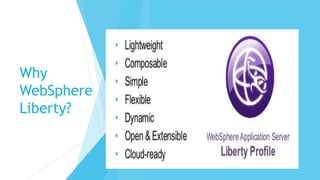
Why
WebSphere
Liberty?
ARCHITECTURE
 WebSphere Liberty is a fast, dynamic, and easy-to-use Java application
server, built on the open source Open Liberty project.
 WebSphere Liberty is a highly composable and dynamic runtime environment.
OSGi services are used to manage component lifecycles, and the injection of
dependencies and configuration.
 The server process contains a single JVM, the Liberty kernel, and any number
of optional features. The feature code and most of the kernel code runs as
OSGi bundles within an OSGi framework.
 Features provide the programming models and services that are required by
applications.
Architecture
THE KERNEL LAUNCHER
BOOTSTRAPS THE SYSTEM
AND STARTS THE OSGI
FRAMEWORK.
THE CONFIGURATION IS
PARSED, AND THEN THE
CONFIGURED FEATURES ARE
LOADED BY THE FEATURE
MANAGER.
THE KERNEL EXTENSIVELY
USES OSGI SERVICES TO
PROVIDE A HIGHLY DYNAMIC
RUNTIME ENVIRONMENT.
THE FILE MONITOR SERVICE
DETECTS APPLICATION AND
CONFIGURATION FILE
CHANGES, AND THE
LOGGING SERVICE WRITES
MESSAGES AND DEBUG
INFORMATION TO THE
LOCAL FILE SYSTEM.
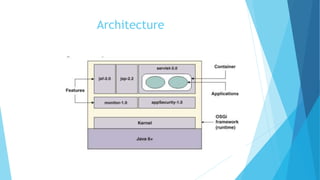
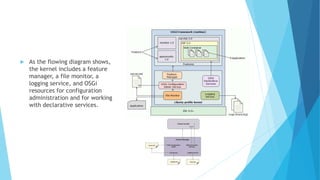
 As the flowing diagram shows,
the kernel includes a feature
manager, a file monitor, a
logging service, and OSGi
resources for configuration
administration and for working
with declarative services.
 Features are specified in the system configuration files that are the
server.xml file and any other included files.
 The server configuration files populate the OSGi Configuration Admin
service, which injects the feature configuration into the feature manager
service.
 The feature manager maps each feature name to a list of bundles that
provide the feature.
 The bundles are installed into the OSGi framework and started.
 The feature manager responds to configuration changes by dynamically
adding and removing features while the server is running.
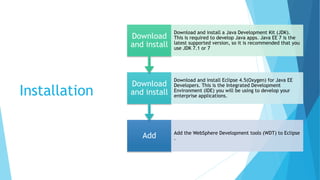
Installation
Add Add the WebSphere Development tools (WDT) to Eclipse
.
Download
and install
Download and install Eclipse 4.5(Oxygen) for Java EE
Developers. This is the Integrated Development
Environment (IDE) you will be using to develop your
enterprise applications.
Download
and install
Download and install a Java Development Kit (JDK).
This is required to develop Java apps. Java EE 7 is the
latest supported version, so it is recommended that you
use JDK 7.1 or 7
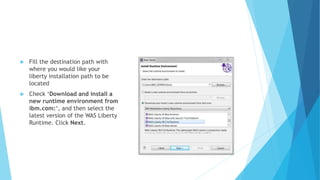
 Fill the destination path with
where you would like your
liberty installation path to be
located
 Check ‘Download and install a
new runtime environment from
ibm.com:‘, and then select the
latest version of the WAS Liberty
Runtime. Click Next.
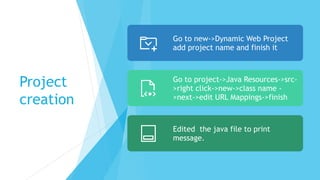
Project
creation
Go to new->Dynamic Web Project
add project name and finish it
Go to project->Java Resources->src-
>right click->new->class name -
>next->edit URL Mappings->finish
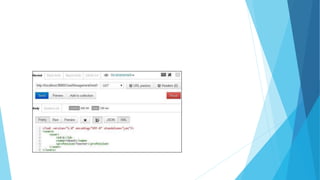
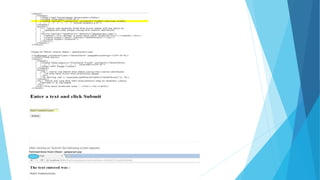
Edited the java file to print
message.
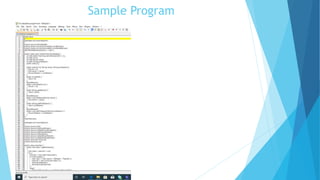
Sample Program
Reasons to Choose Liberty
•Smaller, simpler, faster to set up
•Effortless to have common development and production
runtimes
•More accommodating and adjustable to install, update
and manage
•packaged server ‘master image’ deployments are popular
•Composable, right-sized runtimes
•More choice of deployment environments
•Bluemix, other PaaS, containers
•Liberty on z/OS has higher throughput, lower resource
use
•Servers (all editions) can be centrally handled (albeit not
clustered)
•Earlier support of new technology through continuous
delivery
•Easier version to version migration once using Liberty
•Greater management scale with collectives than cells
Thank You

Web sphere liberty2

  • 1.
  • 2.
  • 3.
    Introduction IBM WebSphere Libertyis a Java EE application server. Designed for cloud-native applications and microservices. Liberty Server (WAS) performs the role of a web application server. It is the flagship product within IBM's WebSphere software suite. Liberty profile is a dynamic profile of WAS which enables the WAS server to deploy only required custom features Developers can choose required features based on business requirement and push it to the server.
  • 4.
  • 5.
    ARCHITECTURE  WebSphere Libertyis a fast, dynamic, and easy-to-use Java application server, built on the open source Open Liberty project.  WebSphere Liberty is a highly composable and dynamic runtime environment. OSGi services are used to manage component lifecycles, and the injection of dependencies and configuration.  The server process contains a single JVM, the Liberty kernel, and any number of optional features. The feature code and most of the kernel code runs as OSGi bundles within an OSGi framework.  Features provide the programming models and services that are required by applications.
  • 6.
  • 7.
    THE KERNEL LAUNCHER BOOTSTRAPSTHE SYSTEM AND STARTS THE OSGI FRAMEWORK. THE CONFIGURATION IS PARSED, AND THEN THE CONFIGURED FEATURES ARE LOADED BY THE FEATURE MANAGER. THE KERNEL EXTENSIVELY USES OSGI SERVICES TO PROVIDE A HIGHLY DYNAMIC RUNTIME ENVIRONMENT. THE FILE MONITOR SERVICE DETECTS APPLICATION AND CONFIGURATION FILE CHANGES, AND THE LOGGING SERVICE WRITES MESSAGES AND DEBUG INFORMATION TO THE LOCAL FILE SYSTEM.
  • 8.
     As theflowing diagram shows, the kernel includes a feature manager, a file monitor, a logging service, and OSGi resources for configuration administration and for working with declarative services.
  • 9.
     Features arespecified in the system configuration files that are the server.xml file and any other included files.  The server configuration files populate the OSGi Configuration Admin service, which injects the feature configuration into the feature manager service.  The feature manager maps each feature name to a list of bundles that provide the feature.  The bundles are installed into the OSGi framework and started.  The feature manager responds to configuration changes by dynamically adding and removing features while the server is running.
  • 10.
    Installation Add Add theWebSphere Development tools (WDT) to Eclipse . Download and install Download and install Eclipse 4.5(Oxygen) for Java EE Developers. This is the Integrated Development Environment (IDE) you will be using to develop your enterprise applications. Download and install Download and install a Java Development Kit (JDK). This is required to develop Java apps. Java EE 7 is the latest supported version, so it is recommended that you use JDK 7.1 or 7
  • 11.
     Fill thedestination path with where you would like your liberty installation path to be located  Check ‘Download and install a new runtime environment from ibm.com:‘, and then select the latest version of the WAS Liberty Runtime. Click Next.
  • 12.
    Project creation Go to new->DynamicWeb Project add project name and finish it Go to project->Java Resources->src- >right click->new->class name - >next->edit URL Mappings->finish Edited the java file to print message.
  • 13.
  • 16.
    Reasons to ChooseLiberty •Smaller, simpler, faster to set up •Effortless to have common development and production runtimes •More accommodating and adjustable to install, update and manage •packaged server ‘master image’ deployments are popular •Composable, right-sized runtimes •More choice of deployment environments •Bluemix, other PaaS, containers •Liberty on z/OS has higher throughput, lower resource use •Servers (all editions) can be centrally handled (albeit not clustered) •Earlier support of new technology through continuous delivery •Easier version to version migration once using Liberty •Greater management scale with collectives than cells
  • 20.

Editor's Notes

  • #7 OSGi is a Java framework for developing and deploying modular software programs and libraries. Each bundle is a tightly coupled, dynamically loadable collection of classes, jars, and configuration files that explicitly declare their external dependencies (if any).
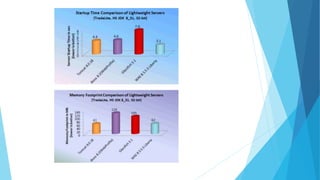
  • #18 Startup time, Memory ,Throughput ,performance