1
Querying Multiple Tables
Database
by: Rosni Lumbantoruan
Querying Multiple TablesRSL 2
Contents
Introduction to Joins
Using Inner Joins
Using Outer Joins
Using Cross Joins
Joining More Than Two Tables
Joining a Table to Itself
Natural Joins
Union
Querying Multiple TablesRSL 3
Contents
Introduction to Joins
Using Inner Joins
Using Outer Joins
Using Cross Joins
Joining More Than
Two Tables
Joining a Table to
Itself
Using Natural Joins
Union
Querying multiple tables
SQL provides a method of retrieving data from two or more tables based on
logical relationship between the tables.
The method used is JOIN.
Column used in a join condition are not required to have same name or to be
the same data type. However, they must be compatible or be the type that
SQL server can implicitly convert.
Querying Multiple TablesRSL 4
Contents
Introduction to Joins
Using Inner Joins
Using Outer Joins
Using Cross Joins
Joining More Than
Two Tables
Joining a Table to
Itself
Using Natural Joins
Union
Introduction to Joins
A join is an operation that allows to query two or more tables to produce a
result set. That Incorporates rows and columns from each table.
The process of forming pairs of rows by matching the contents of related
columns is called joining the Tables.
Querying Multiple TablesRSL 5
Contents
Introduction to Joins
Using Inner Joins
Using Outer Joins
Using Cross Joins
Joining More Than
Two Tables
Joining a Table to
Itself
Using Natural Joins
Union
Purpose of Joins
A Join:
 Selects Specific Columns from Multiple Tables
 JOIN keyword specifies that tables are joined and how to join
them
 ON keyword specifies join condition
 Queries Two or More Tables to Produce a Result Set
 Use Primary and Foreign keys as join conditions
 Use columns common to the specified tables to the join tables
Querying Multiple TablesRSL 6
Contents
Introduction to Joins
Using Inner Joins
Using Outer Joins
Using Cross Joins
Joining More Than
Two Tables
Joining a Table to
Itself
Using Natural Joins
Union
Syntax & Type of Joins
SELECT column_name,column-name[,column_name]
FROM table_name1 [CROSS |INNER| [LEFT | RIGHT] OUTER] JOIN
table_name2
ON table_name1.ref_colum_name JOIN_OPERATOR
table_name2.ref_column_name
 Inner Join
 Outer Join
 LEFT JOIN or LEFT OUTER JOIN
 RIGHT JOIN or RIGHT OUTER JOIN
 FULL JOIN or FULL OUTER JOIN
 Cross Join (Cartesian Product)
Querying Multiple TablesRSL 7
Contents
Introduction to Joins
Using Inner Joins
Using Outer Joins
Using Cross Joins
Joining More Than
Two Tables
Joining a Table to
Itself
Using Natural Joins
Union
Using Inner Joins
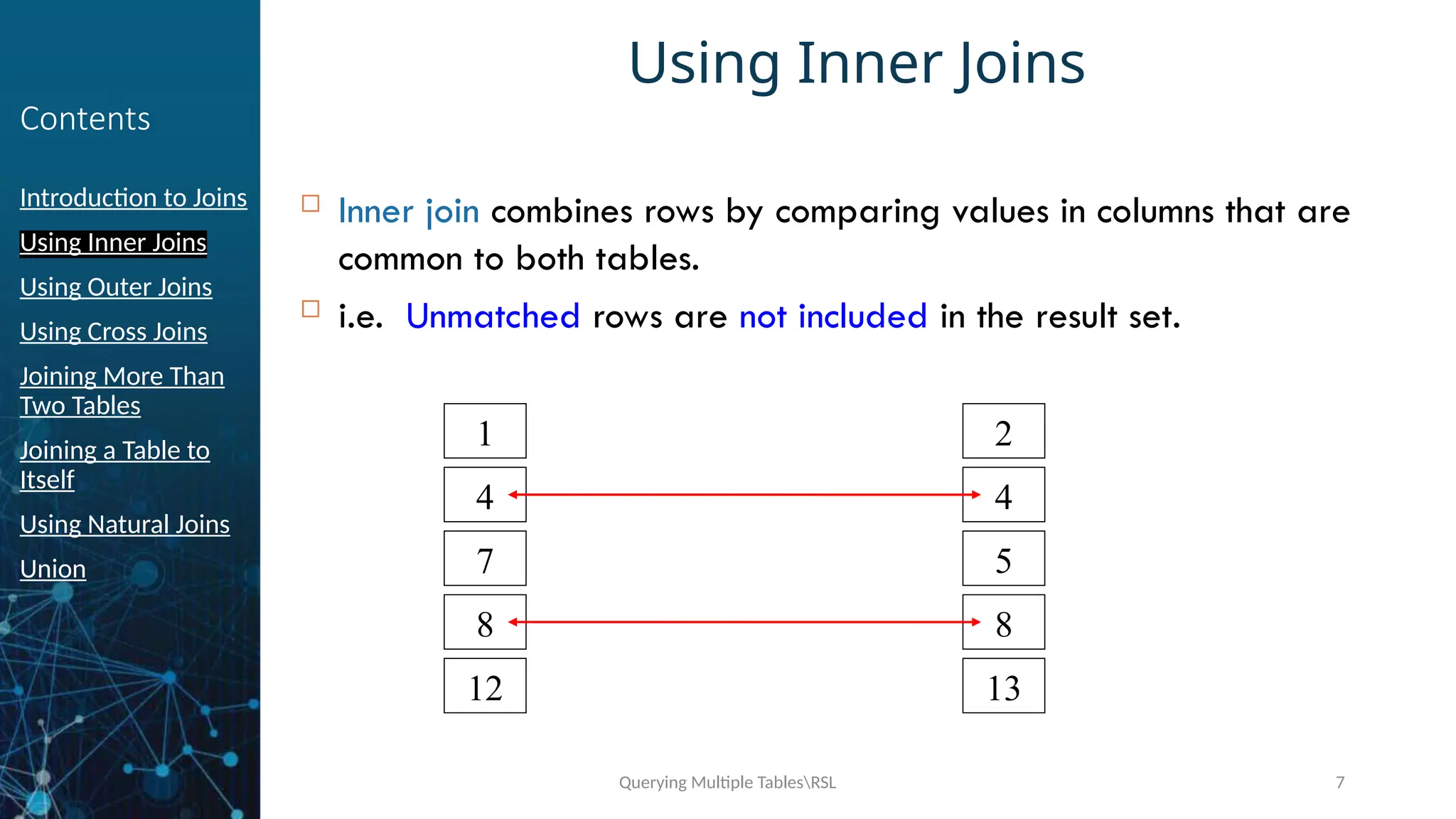
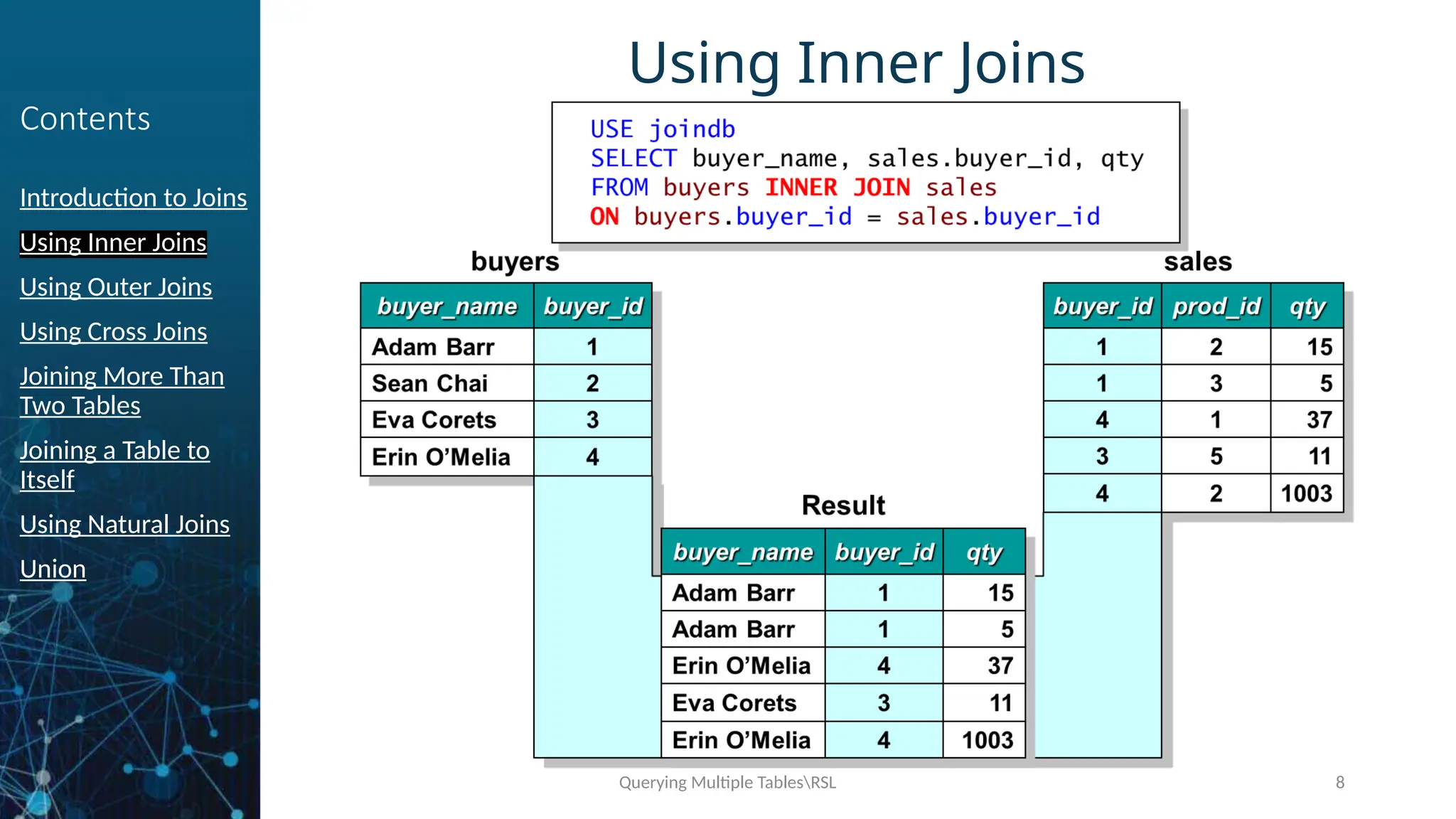
 Inner join combines rows by comparing values in columns that are
common to both tables.
 i.e. Unmatched rows are not included in the result set.
1
4
7
8
12
2
4
5
8
13
Querying Multiple TablesRSL 8
Contents
Introduction to Joins
Using Inner Joins
Using Outer Joins
Using Cross Joins
Joining More Than
Two Tables
Joining a Table to
Itself
Using Natural Joins
Union
Using Inner Joins
Querying Multiple TablesRSL 9
Contents
Introduction to Joins
Using Inner Joins
Using Outer Joins
Using Cross Joins
Joining More Than
Two Tables
Joining a Table to
Itself
Using Natural Joins
Union
Using Outer Joins
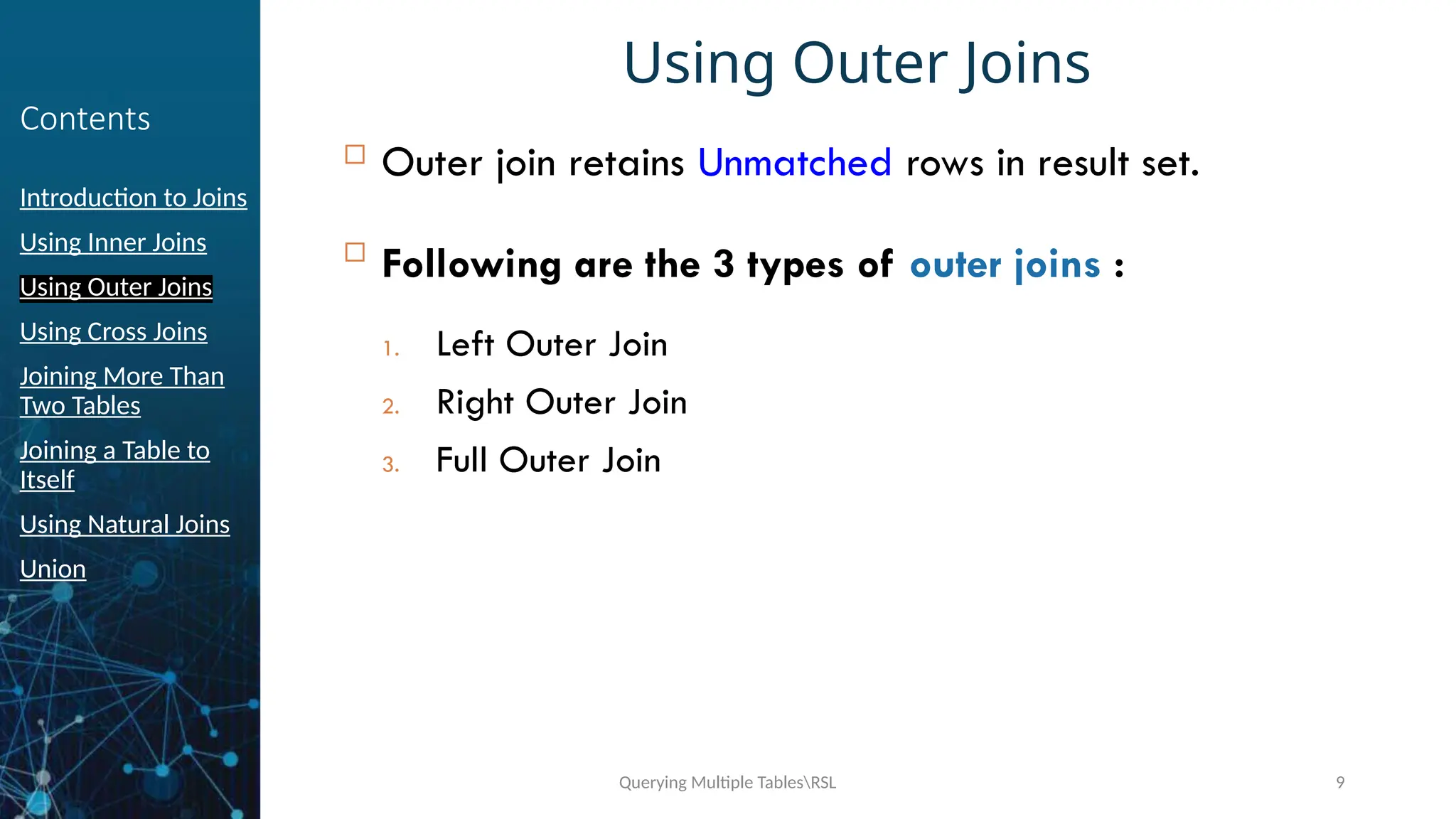
 Outer join retains Unmatched rows in result set.

Following are the 3 types of outer joins :
1. Left Outer Join
2. Right Outer Join
3. Full Outer Join
Querying Multiple TablesRSL 10
Contents
Introduction to Joins
Using Inner Joins
Using Outer Joins
Using Cross Joins
Joining More Than
Two Tables
Joining a Table to
Itself
Using Natural Joins
Union
Left and Right Outer Joins
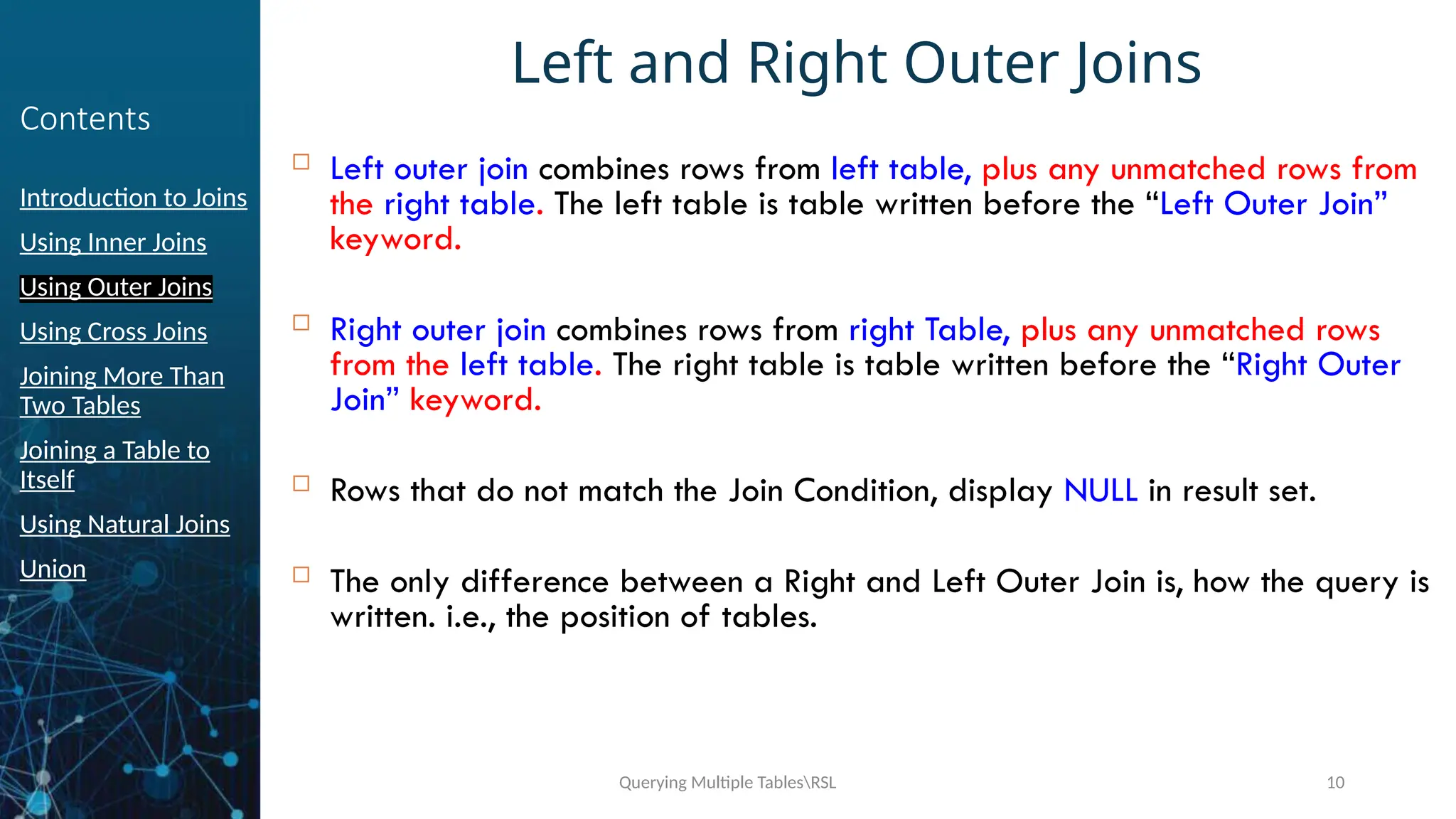
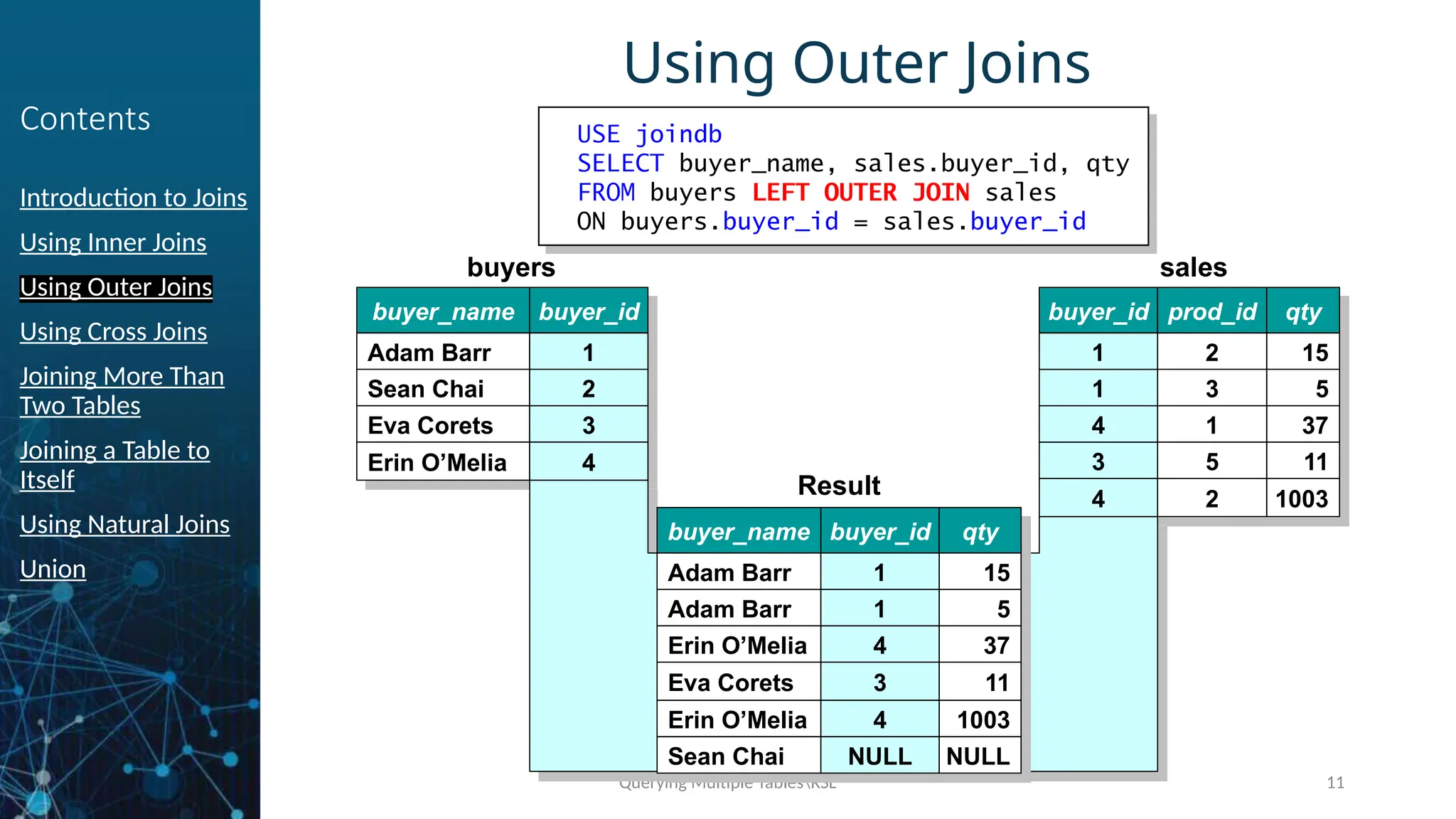
 Left outer join combines rows from left table, plus any unmatched rows from
the right table. The left table is table written before the “Left Outer Join”
keyword.
 Right outer join combines rows from right Table, plus any unmatched rows
from the left table. The right table is table written before the “Right Outer
Join” keyword.
 Rows that do not match the Join Condition, display NULL in result set.
 The only difference between a Right and Left Outer Join is, how the query is
written. i.e., the position of tables.
Querying Multiple TablesRSL 11
Contents
Introduction to Joins
Using Inner Joins
Using Outer Joins
Using Cross Joins
Joining More Than
Two Tables
Joining a Table to
Itself
Using Natural Joins
Union
Using Outer Joins
USE joindb
SELECT buyer_name, sales.buyer_id, qty
FROM buyers LEFT OUTER JOIN sales
ON buyers.buyer_id = sales.buyer_id
sales
buyer_id prod_id qty
1
1
4
3
2
3
1
5
15
5
37
11
4 2 1003
buyers
buyer_name
Adam Barr
Sean Chai
Eva Corets
Erin O’Melia
buyer_id
1
2
3
4 3
4
1
1
4
1
2
3
4
Result
buyer_name
Adam Barr
Adam Barr
Erin O’Melia
Eva Corets
buyer_id qty
1
1
4
3
15
5
37
11
Erin O’Melia 4 1003
Sean Chai NULL NULL
1
1
4
3
4
NULL
Querying Multiple TablesRSL 12
Contents
Introduction to Joins
Using Inner Joins
Using Outer Joins
Using Cross Joins
Joining More Than
Two Tables
Joining a Table to
Itself
Using Natural Joins
Union
Full Outer Joins
 A Full Outer Join statement retrieves all records from both sides of
the relationship.
 For any record on either side that has no matching record NULL is
displayed.
Querying Multiple TablesRSL 13
Contents
Introduction to Joins
Using Inner Joins
Using Outer Joins
Using Cross Joins
Joining More Than
Two Tables
Joining a Table to
Itself
Using Natural Joins
Union
Cross Join
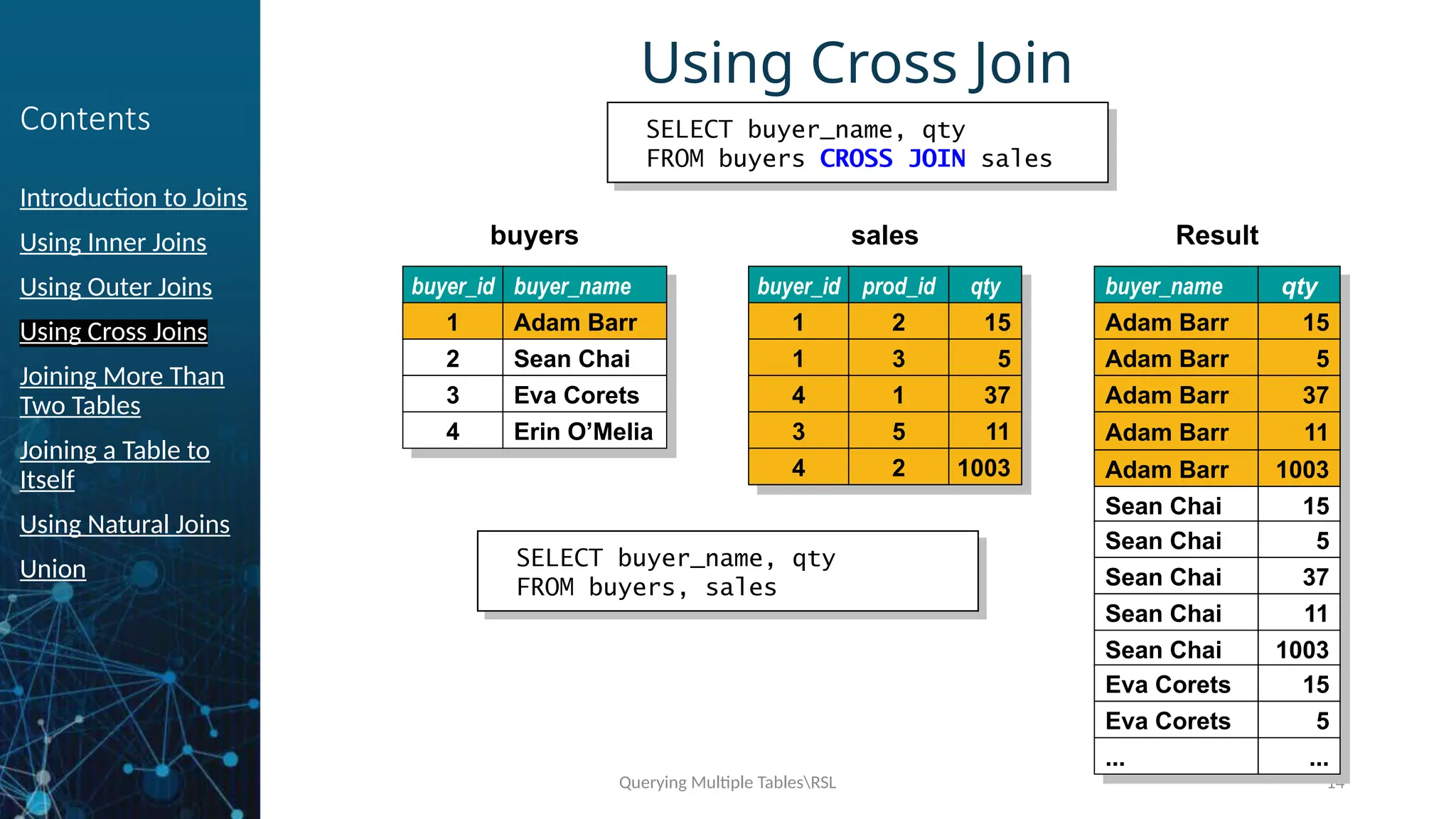
 A Cross Join produces the combination of all rows in the joined tables.
 When this occurs, every possible relationship between the two table is
executed.
 The output of such join is called a Cartesian Product.
 Cross Join can be successfully used for generating large amounts of sample
data for testing database performance.
Querying Multiple TablesRSL 14
Contents
Introduction to Joins
Using Inner Joins
Using Outer Joins
Using Cross Joins
Joining More Than
Two Tables
Joining a Table to
Itself
Using Natural Joins
Union
Using Cross Join
SELECT buyer_name, qty
FROM buyers CROSS JOIN sales
Result
buyer_name
Adam Barr
Adam Barr
Adam Barr
Adam Barr
qty
15
5
37
11
Adam Barr 1003
Sean Chai 15
Sean Chai 5
Sean Chai 37
Sean Chai 11
Sean Chai 1003
Eva Corets 15
Eva Corets 5
... ...
Adam Barr
Adam Barr
Adam Barr
Adam Barr
15
5
37
11
Adam Barr 1003
sales
buyer_id prod_id qty
1
1
4
3
2
3
1
5
15
5
37
11
4 2 1003
1
1
4
3
2
3
1
5
15
5
37
11
4 2 1003
1
1
4
3
2
3
1
5
15
5
37
11
4 2 1003
buyers
buyer_id
1
2
3
4
buyer_name
Adam Barr
Sean Chai
Eva Corets
Erin O’Melia
1 Adam Barr
SELECT buyer_name, qty
FROM buyers, sales
Querying Multiple TablesRSL 15
Contents
Introduction to Joins
Using Inner Joins
Using Outer Joins
Using Cross Joins
Joining More Than
Two Tables
Joining a Table to
Itself
Using Natural Joins
Union
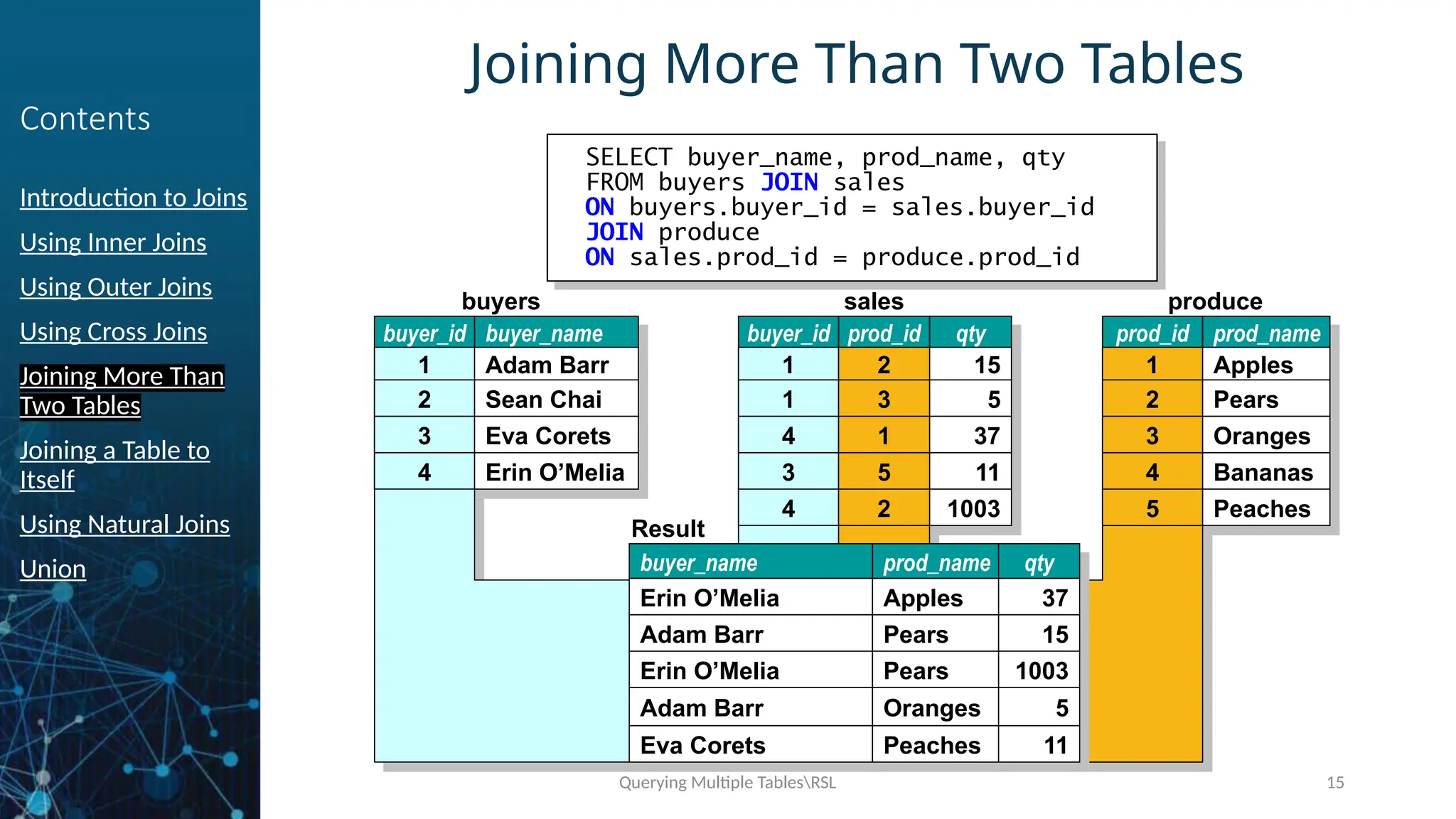
Joining More Than Two Tables
SELECT buyer_name, prod_name, qty
FROM buyers JOIN sales
ON buyers.buyer_id = sales.buyer_id
JOIN produce
ON sales.prod_id = produce.prod_id
produce
prod_id prod_name
1
2
3
4
Apples
Pears
Oranges
Bananas
5 Peaches
buyers
buyer_id
1
2
3
4
buyer_name
Adam Barr
Sean Chai
Eva Corets
Erin O’Melia
sales
buyer_id
1
1
3
4
prod_id
2
3
1
5
2 2
qty
15
5
37
11
1003
1
2
3
4
1
1
4
3
4
2
3
1
5
2
1
2
3
4
5
Result
buyer_name
Erin O’Melia
Adam Barr
Erin O’Melia
Adam Barr
Eva Corets
prod_name
Apples
Pears
Pears
Oranges
Peaches
qty
37
15
1003
5
11
Querying Multiple TablesRSL 16
Contents
Introduction to Joins
Using Inner Joins
Using Outer Joins
Using Cross Joins
Joining More Than
Two Tables
Joining a Table to
Itself
Using Natural Joins
Union
Joining a Table to Itself
 If a Table is joined to itself, is called as self join.
 It compares values with a column of a single table.
 The following could be the situations for self joins :
 Find out the employees who have the same joining date.
 Find the largest or smallest value available.
Querying Multiple TablesRSL 17
Contents
Introduction to Joins
Using Inner Joins
Using Outer Joins
Using Cross Joins
Joining More Than
Two Tables
Joining a Table to
Itself
Using Natural Joins
Union
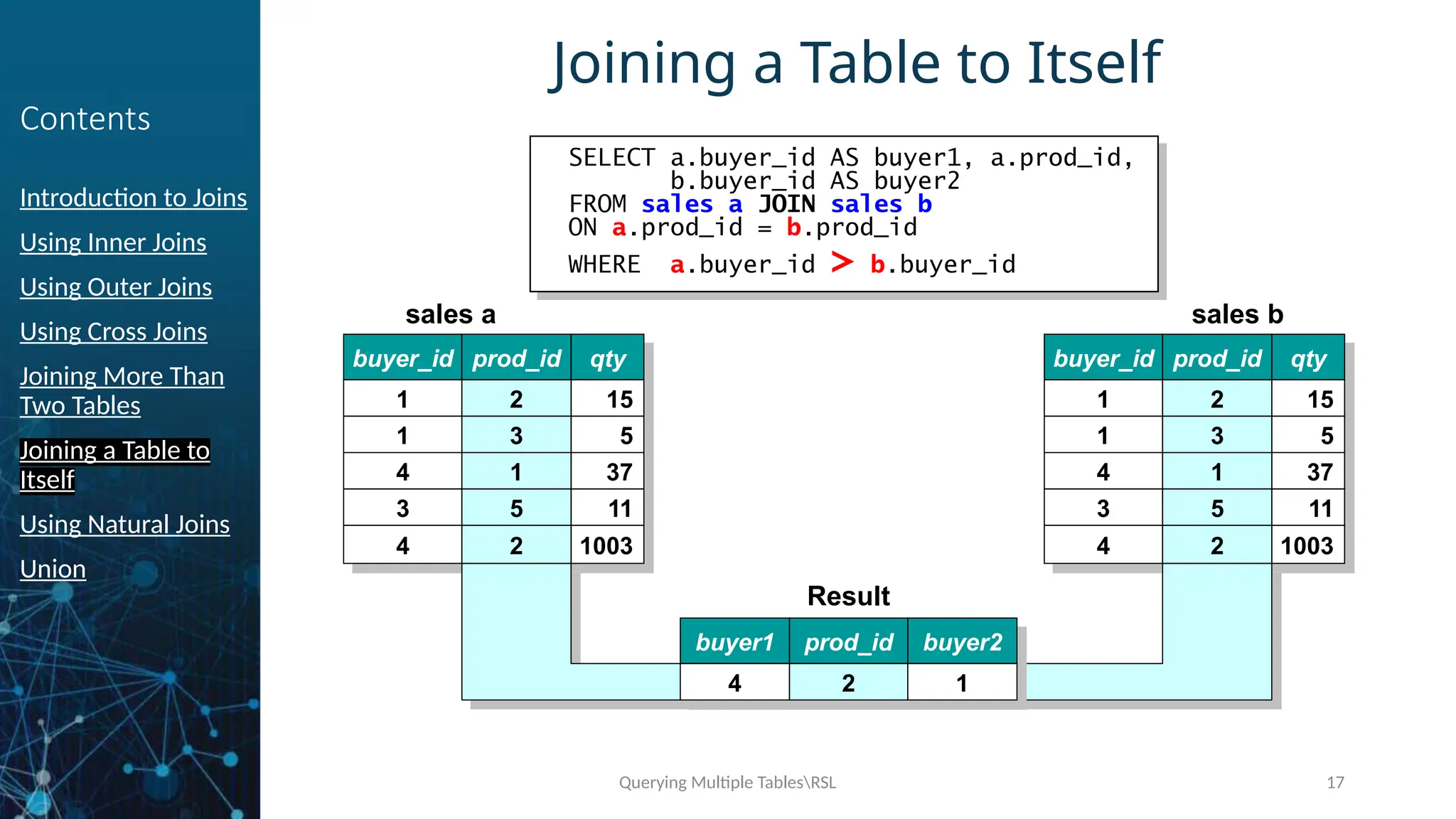
Joining a Table to Itself
SELECT a.buyer_id AS buyer1, a.prod_id,
b.buyer_id AS buyer2
FROM sales a JOIN sales b
ON a.prod_id = b.prod_id
WHERE a.buyer_id > b.buyer_id
sales b
buyer_id prod_id qty
1
1
4
3
2
3
1
5
15
5
37
11
4 2 1003
sales a
buyer_id prod_id qty
1
1
4
3
2
3
1
5
15
5
37
11
4 2 1003
2
3
1
5
2
2
3
1
5
2
Result
buyer1
4
prod_id buyer2
2 1
Querying Multiple TablesRSL 18
Contents
Introduction to Joins
Using Inner Joins
Using Outer Joins
Using Cross Joins
Joining More Than
Two Tables
Joining a Table to
Itself
Using Natural Joins
Union
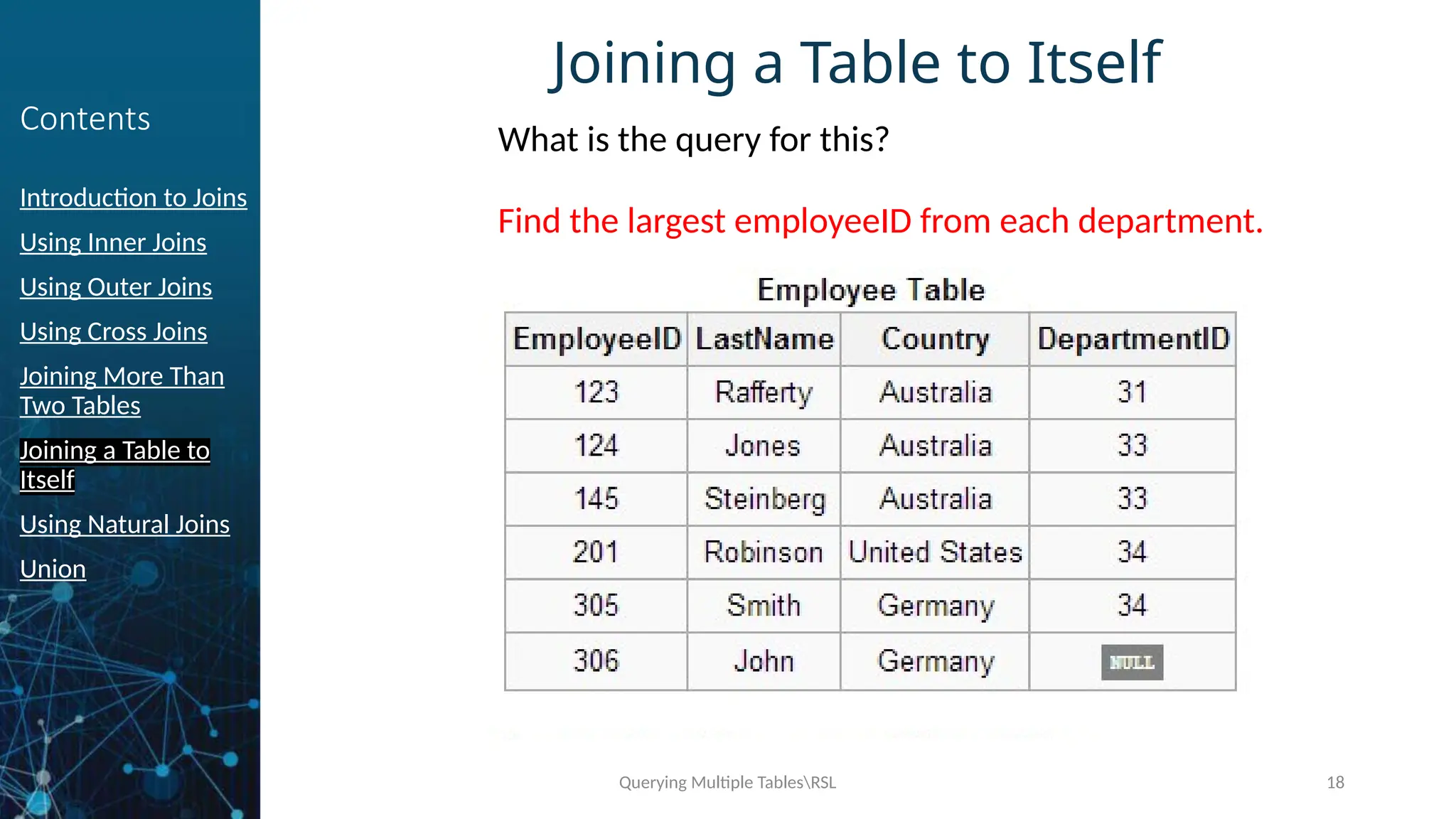
Joining a Table to Itself
Find the largest employeeID from each department.
What is the query for this?
Querying Multiple TablesRSL 19
Contents
Introduction to Joins
Using Inner Joins
Using Outer Joins
Using Cross Joins
Joining More Than
Two Tables
Joining a Table to
Itself
Using Natural Joins
Union
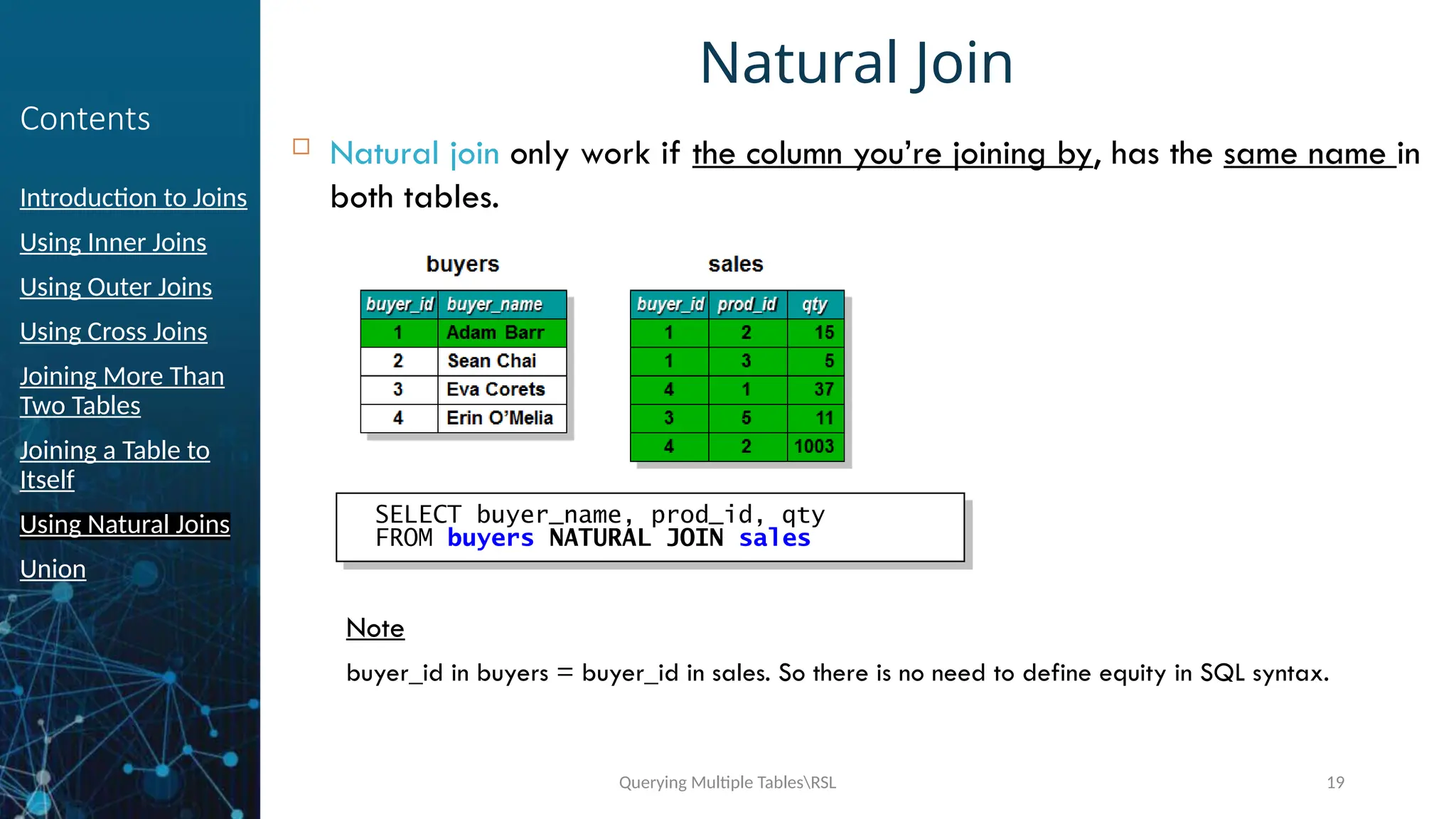
Natural Join
 Natural join only work if the column you’re joining by, has the same name in
both tables.
Note
buyer_id in buyers = buyer_id in sales. So there is no need to define equity in SQL syntax.
SELECT buyer_name, prod_id, qty
FROM buyers NATURAL JOIN sales
Querying Multiple TablesRSL 20
Contents
Introduction to Joins
Using Inner Joins
Using Outer Joins
Using Cross Joins
Joining More Than
Two Tables
Joining a Table to
Itself
Union
Union
 The UNION operator allows you to combine the results of two or more set
of rows into a single result set.
 Whereas a join combines two sets of columns into a single result set.
 Example
SELECT * FROM Table1
UNION [ALL]
SELECT * FROM Table2
Example :
select pub_name, city, state from
publishers
union
select au_lname, city, state from
authors
Querying Multiple TablesRSL 21
Summary
Introduction to Joins
Using Inner Joins
Using Outer Joins
Using Cross Joins
Joining More Than Two Tables
Joining a Table to Itself
Using Natural Joins
Union
Querying Multiple TablesRSL 22

w5s1_QueryingMultipleTables in relational database
  • 1.
  • 2.
    Querying Multiple TablesRSL2 Contents Introduction to Joins Using Inner Joins Using Outer Joins Using Cross Joins Joining More Than Two Tables Joining a Table to Itself Natural Joins Union
  • 3.
    Querying Multiple TablesRSL3 Contents Introduction to Joins Using Inner Joins Using Outer Joins Using Cross Joins Joining More Than Two Tables Joining a Table to Itself Using Natural Joins Union Querying multiple tables SQL provides a method of retrieving data from two or more tables based on logical relationship between the tables. The method used is JOIN. Column used in a join condition are not required to have same name or to be the same data type. However, they must be compatible or be the type that SQL server can implicitly convert.
  • 4.
    Querying Multiple TablesRSL4 Contents Introduction to Joins Using Inner Joins Using Outer Joins Using Cross Joins Joining More Than Two Tables Joining a Table to Itself Using Natural Joins Union Introduction to Joins A join is an operation that allows to query two or more tables to produce a result set. That Incorporates rows and columns from each table. The process of forming pairs of rows by matching the contents of related columns is called joining the Tables.
  • 5.
    Querying Multiple TablesRSL5 Contents Introduction to Joins Using Inner Joins Using Outer Joins Using Cross Joins Joining More Than Two Tables Joining a Table to Itself Using Natural Joins Union Purpose of Joins A Join:  Selects Specific Columns from Multiple Tables  JOIN keyword specifies that tables are joined and how to join them  ON keyword specifies join condition  Queries Two or More Tables to Produce a Result Set  Use Primary and Foreign keys as join conditions  Use columns common to the specified tables to the join tables
  • 6.
    Querying Multiple TablesRSL6 Contents Introduction to Joins Using Inner Joins Using Outer Joins Using Cross Joins Joining More Than Two Tables Joining a Table to Itself Using Natural Joins Union Syntax & Type of Joins SELECT column_name,column-name[,column_name] FROM table_name1 [CROSS |INNER| [LEFT | RIGHT] OUTER] JOIN table_name2 ON table_name1.ref_colum_name JOIN_OPERATOR table_name2.ref_column_name  Inner Join  Outer Join  LEFT JOIN or LEFT OUTER JOIN  RIGHT JOIN or RIGHT OUTER JOIN  FULL JOIN or FULL OUTER JOIN  Cross Join (Cartesian Product)
  • 7.
    Querying Multiple TablesRSL7 Contents Introduction to Joins Using Inner Joins Using Outer Joins Using Cross Joins Joining More Than Two Tables Joining a Table to Itself Using Natural Joins Union Using Inner Joins  Inner join combines rows by comparing values in columns that are common to both tables.  i.e. Unmatched rows are not included in the result set. 1 4 7 8 12 2 4 5 8 13
  • 8.
    Querying Multiple TablesRSL8 Contents Introduction to Joins Using Inner Joins Using Outer Joins Using Cross Joins Joining More Than Two Tables Joining a Table to Itself Using Natural Joins Union Using Inner Joins
  • 9.
    Querying Multiple TablesRSL9 Contents Introduction to Joins Using Inner Joins Using Outer Joins Using Cross Joins Joining More Than Two Tables Joining a Table to Itself Using Natural Joins Union Using Outer Joins  Outer join retains Unmatched rows in result set.  Following are the 3 types of outer joins : 1. Left Outer Join 2. Right Outer Join 3. Full Outer Join
  • 10.
    Querying Multiple TablesRSL10 Contents Introduction to Joins Using Inner Joins Using Outer Joins Using Cross Joins Joining More Than Two Tables Joining a Table to Itself Using Natural Joins Union Left and Right Outer Joins  Left outer join combines rows from left table, plus any unmatched rows from the right table. The left table is table written before the “Left Outer Join” keyword.  Right outer join combines rows from right Table, plus any unmatched rows from the left table. The right table is table written before the “Right Outer Join” keyword.  Rows that do not match the Join Condition, display NULL in result set.  The only difference between a Right and Left Outer Join is, how the query is written. i.e., the position of tables.
  • 11.
    Querying Multiple TablesRSL11 Contents Introduction to Joins Using Inner Joins Using Outer Joins Using Cross Joins Joining More Than Two Tables Joining a Table to Itself Using Natural Joins Union Using Outer Joins USE joindb SELECT buyer_name, sales.buyer_id, qty FROM buyers LEFT OUTER JOIN sales ON buyers.buyer_id = sales.buyer_id sales buyer_id prod_id qty 1 1 4 3 2 3 1 5 15 5 37 11 4 2 1003 buyers buyer_name Adam Barr Sean Chai Eva Corets Erin O’Melia buyer_id 1 2 3 4 3 4 1 1 4 1 2 3 4 Result buyer_name Adam Barr Adam Barr Erin O’Melia Eva Corets buyer_id qty 1 1 4 3 15 5 37 11 Erin O’Melia 4 1003 Sean Chai NULL NULL 1 1 4 3 4 NULL
  • 12.
    Querying Multiple TablesRSL12 Contents Introduction to Joins Using Inner Joins Using Outer Joins Using Cross Joins Joining More Than Two Tables Joining a Table to Itself Using Natural Joins Union Full Outer Joins  A Full Outer Join statement retrieves all records from both sides of the relationship.  For any record on either side that has no matching record NULL is displayed.
  • 13.
    Querying Multiple TablesRSL13 Contents Introduction to Joins Using Inner Joins Using Outer Joins Using Cross Joins Joining More Than Two Tables Joining a Table to Itself Using Natural Joins Union Cross Join  A Cross Join produces the combination of all rows in the joined tables.  When this occurs, every possible relationship between the two table is executed.  The output of such join is called a Cartesian Product.  Cross Join can be successfully used for generating large amounts of sample data for testing database performance.
  • 14.
    Querying Multiple TablesRSL14 Contents Introduction to Joins Using Inner Joins Using Outer Joins Using Cross Joins Joining More Than Two Tables Joining a Table to Itself Using Natural Joins Union Using Cross Join SELECT buyer_name, qty FROM buyers CROSS JOIN sales Result buyer_name Adam Barr Adam Barr Adam Barr Adam Barr qty 15 5 37 11 Adam Barr 1003 Sean Chai 15 Sean Chai 5 Sean Chai 37 Sean Chai 11 Sean Chai 1003 Eva Corets 15 Eva Corets 5 ... ... Adam Barr Adam Barr Adam Barr Adam Barr 15 5 37 11 Adam Barr 1003 sales buyer_id prod_id qty 1 1 4 3 2 3 1 5 15 5 37 11 4 2 1003 1 1 4 3 2 3 1 5 15 5 37 11 4 2 1003 1 1 4 3 2 3 1 5 15 5 37 11 4 2 1003 buyers buyer_id 1 2 3 4 buyer_name Adam Barr Sean Chai Eva Corets Erin O’Melia 1 Adam Barr SELECT buyer_name, qty FROM buyers, sales
  • 15.
    Querying Multiple TablesRSL15 Contents Introduction to Joins Using Inner Joins Using Outer Joins Using Cross Joins Joining More Than Two Tables Joining a Table to Itself Using Natural Joins Union Joining More Than Two Tables SELECT buyer_name, prod_name, qty FROM buyers JOIN sales ON buyers.buyer_id = sales.buyer_id JOIN produce ON sales.prod_id = produce.prod_id produce prod_id prod_name 1 2 3 4 Apples Pears Oranges Bananas 5 Peaches buyers buyer_id 1 2 3 4 buyer_name Adam Barr Sean Chai Eva Corets Erin O’Melia sales buyer_id 1 1 3 4 prod_id 2 3 1 5 2 2 qty 15 5 37 11 1003 1 2 3 4 1 1 4 3 4 2 3 1 5 2 1 2 3 4 5 Result buyer_name Erin O’Melia Adam Barr Erin O’Melia Adam Barr Eva Corets prod_name Apples Pears Pears Oranges Peaches qty 37 15 1003 5 11
  • 16.
    Querying Multiple TablesRSL16 Contents Introduction to Joins Using Inner Joins Using Outer Joins Using Cross Joins Joining More Than Two Tables Joining a Table to Itself Using Natural Joins Union Joining a Table to Itself  If a Table is joined to itself, is called as self join.  It compares values with a column of a single table.  The following could be the situations for self joins :  Find out the employees who have the same joining date.  Find the largest or smallest value available.
  • 17.
    Querying Multiple TablesRSL17 Contents Introduction to Joins Using Inner Joins Using Outer Joins Using Cross Joins Joining More Than Two Tables Joining a Table to Itself Using Natural Joins Union Joining a Table to Itself SELECT a.buyer_id AS buyer1, a.prod_id, b.buyer_id AS buyer2 FROM sales a JOIN sales b ON a.prod_id = b.prod_id WHERE a.buyer_id > b.buyer_id sales b buyer_id prod_id qty 1 1 4 3 2 3 1 5 15 5 37 11 4 2 1003 sales a buyer_id prod_id qty 1 1 4 3 2 3 1 5 15 5 37 11 4 2 1003 2 3 1 5 2 2 3 1 5 2 Result buyer1 4 prod_id buyer2 2 1
  • 18.
    Querying Multiple TablesRSL18 Contents Introduction to Joins Using Inner Joins Using Outer Joins Using Cross Joins Joining More Than Two Tables Joining a Table to Itself Using Natural Joins Union Joining a Table to Itself Find the largest employeeID from each department. What is the query for this?
  • 19.
    Querying Multiple TablesRSL19 Contents Introduction to Joins Using Inner Joins Using Outer Joins Using Cross Joins Joining More Than Two Tables Joining a Table to Itself Using Natural Joins Union Natural Join  Natural join only work if the column you’re joining by, has the same name in both tables. Note buyer_id in buyers = buyer_id in sales. So there is no need to define equity in SQL syntax. SELECT buyer_name, prod_id, qty FROM buyers NATURAL JOIN sales
  • 20.
    Querying Multiple TablesRSL20 Contents Introduction to Joins Using Inner Joins Using Outer Joins Using Cross Joins Joining More Than Two Tables Joining a Table to Itself Union Union  The UNION operator allows you to combine the results of two or more set of rows into a single result set.  Whereas a join combines two sets of columns into a single result set.  Example SELECT * FROM Table1 UNION [ALL] SELECT * FROM Table2 Example : select pub_name, city, state from publishers union select au_lname, city, state from authors
  • 21.
    Querying Multiple TablesRSL21 Summary Introduction to Joins Using Inner Joins Using Outer Joins Using Cross Joins Joining More Than Two Tables Joining a Table to Itself Using Natural Joins Union
  • 22.