Instantly Intuitive
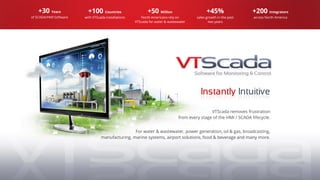
VTScada removes frustration
from every stage of the HMI / SCADA lifecycle.
For water & wastewater, power generation, oil & gas, broadcasting,
manufacturing, marine systems, airport solutions, food & beverage and many more.
+30 Years
of SCADA/HMI Software
+100 Countries
with VTScada installations
+50 Million
North Americans rely on
VTScada for water & wastewater
+45%
sales growth in the past
two years
+200 Integrators
across North America
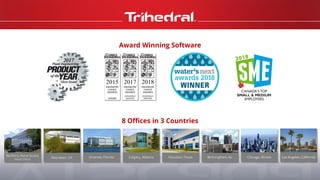
Bedford, Nova Scotia
(Head Office)
Aberdeen, UK Orlando, Florida Calgary, Alberta Houston, Texas Birmingham, AL Chicago, Illinois Los Angeles, California
Award Winning Software
8 Offices in 3 Countries
A Fast and Flexible Platform
▪ Easily build rock solid applications of any size.
▪ Create outstanding looking displays with built-ingraphics.
▪ Configure redundant servers and networks in seconds.
▪ Connect to hardware you have and hardware you want.
▪ Easily deploy new and updated applications.
▪ Develop applications without process interruption.
▪ Instantly roll back any change made by anyone.
Core Technologies
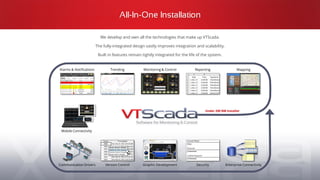
All-In-One Installation
We develop and own all the technologies that make up VTScada.
The fully-integrated design vastly improves integration and scalability.
Built in features remain tightly integrated for the life of the system.
Trending
Version Control Enterprise ConnectivitySecurity
Monitoring & Control
Mobile Connectivity
Communication Drivers
Mapping
Graphic Development
Under 200 MB Installer
ReportingAlarms & Notifications
Software Version Upgrades
We never discontinue software versions
forcing customers to start over.
▪ Integrated features simplify the upgrade process.
▪ Install new version directly over old.
▪ Licensing and options remain unchanged.
▪ No changes required for applications built on standard features.
▪ Alteration and testing may be required for custom features.
▪ Upgrade to the latest version anytime so long as support is current.
▪ Over 20% of revenue re-invested each year in R&D.
Open Connectivity
ODBC ServerOPC Client and ServerWeb Services
Enterprise Connectivity Package
Part of every Development Runtime License
Thin
Client
Server
Thin Clients
Network Connectivity
PCs and Mobile Devices
Open Architecture
Standard and Proprietary Device Drivers
Advanced Polling
Fast/normal poll mode switching
On-line poll rate tuning
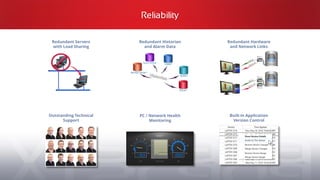
Reliability
Redundant Historian
and Alarm Data
PC / Network Health
Monitoring
Outstanding Technical
Support
Redundant Servers
with Load Sharing
Built-in Application
Version Control
Redundant Hardware
and Network Links
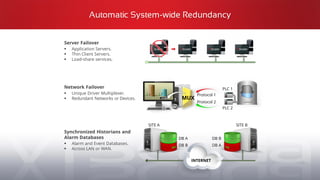
Automatic System-wide Redundancy
MUX
Server Failover
▪ Application Servers.
▪ Thin Client Servers.
▪ Load-share services.
Network Failover
▪ Unique Driver Multiplexer.
▪ Redundant Networks or Devices.
Synchronized Historians and
Alarm Databases
▪ Alarm and Event Databases.
▪ Across LAN or WAN.
INTERNET
Protocol 1
Protocol 2
PLC 1
PLC 2
DB A
DB B
DB B
DB A
SITE A SITE B
Built-in Historian - No Cost or Configuration
MS SQL
Server®
Oracle®
Native SCADA
Historian
MySQL®
SQLite®
VTScada Historian
Standard Component *
▪ A native database in every application.
▪ Configure synchronized redundant
databases in seconds.**
▪ Configure additional database formats
as needed.**
SQL Server, Oracle, MySQL and SQLite are trademarks of their respective owners.
Unlimited Scalability
2.5 Million tag capacity tested.
No limit to the number of displays.
Hierarchical tag data structures:
▪ Unlimited levels.
▪ Indirect parameterization.
▪ Nested and reusable.
▪ Match with graphic templates.
Simplified multi-plant deployment.
Complete single-server
SCADA applications.
Multi-million I/O applications
with synchronized servers
distributed across multiple sites.
Build Applications of Any Size
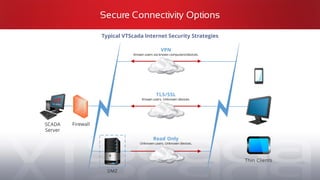
Secure Connectivity Options
SCADA
Server
Firewall
Thin Clients
DMZ
VPN
Known users via known computers/devices.
TLS/SSL
Known users. Unknown devices.
Read Only
Unknown users. Unknown devices.
Typical VTScada Internet Security Strategies
Security and Reliability Advantages
Security Compliance
Implementations compliant with
▪ NERC/CIP (North American Electric Reliability Corporation)
▪ DFARS 252 (Defense Federal Acquisition Regulations Supplement)
▪ NIST 800 (National Institute of Standards and Technology)
▪ Marine reliability standards ABS, Lloyds Bureau, DNV, BV
High Reliability Systems
▪ Multi-level fault tolerance
Data Protection
▪ Multi-level (and geo-separation) data backup methods
Threat Prevention Methodologies
▪ Ransomware
▪ Hacking
Days to Patch Security Issues Following
Application Level User Accounts
Standard Component
▪ Centralized account management.
▪ Windows active directory support.
▪ Immediate and application wide.
change deployment.
▪ Military-grade encryption.
▪ Card-reader support.
Privileges, Rules and Roles
▪ Tune what users can do and where.
▪ Reduce time to configure accounts.
Enhanced Anywhere Client Security
with OpenID Connect® - New in 11.3
▪ Permits integration of VTScada Security
with third-party authentication servers.
▪ Single sign-in (one Password access to many systems).
▪ Two-factor authentication (e.g., Google Authenticator or Apple Touch sensor).
Security Accounts
VTScada Idea Studio
Create professionaldisplays with simple drag-and-droptools.
Configuredisplays,menus, and tags from one interface.
▪ Familiar ribbon toolbar.
▪ 200+ widgets, 4000+ graphics, 3D pipes.
▪ Pre-built high impact display pages.
▪ Easily align graphical elements.
▪ Add graphics from anywhere.
Intuitive Display Development
VTScada Scripting Language
Unlimited
Customization
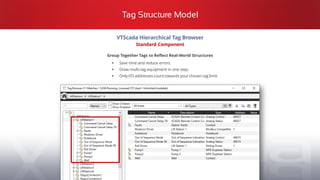
Tag Structure Model
VTScada Hierarchical Tag Browser
Standard Component
Group Together Tags to Reflect Real-World Structures
▪ Save time and reduce errors.
▪ Draw multi-tag equipment in one step.
▪ Only I/O addresses count towards your chosen tag limit.
User A User B
Easy Application Deployment
1
User A User B
User A User B
2
3
Online Deployment
Standard With Development Runtime Licenses
▪ Concurrent multi-user development.
▪ No configuration server required.
▪ Instant network deployment after changes validated.
Single-file Deployment
Standard Components
▪ Simple to create, distribute, and import.
▪ Easy to share applications with support teams.
▪ Backup or clone applications in seconds.
Bridge1.changeset
@
Easy to distribute.
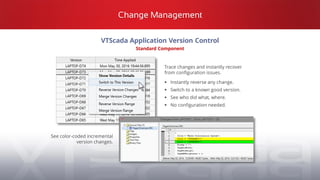
VTScada Application Version Control
Standard Component
Change Management
Trace changes and instantly recover
from configuration issues.
▪ Instantly reverse any change.
▪ Switch to a known good version.
▪ See who did what, where.
▪ No configuration needed.
See color-coded incremental
version changes.
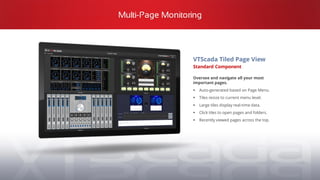
Multi-Page Monitoring
VTScada Tiled Page View
Standard Component
Oversee and navigate all your most
important pages.
▪ Auto-generated based on Page Menu.
▪ Tiles resize to current menu level.
▪ Large tiles display real-time data.
▪ Click tiles to open pages and folders.
▪ Recently viewed pages across the top.
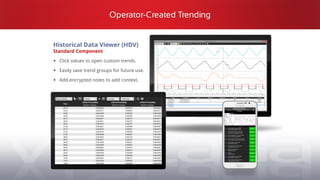
Operator-Created Trending
Historical Data Viewer (HDV)
Standard Component
▪ Click values to open custom trends.
▪ Easily save trend groups for future use.
▪ Add encrypted notes to add context.
Reporting
Enterprise Support
Standard in Development Runtime Licenses
Share data with Enterprise systems.
▪ ODBC Server. *
▪ OPC Client / Server. *
▪ Web Services. *
▪ SNMP Agent.
VTScada Reports Page
Standard Component
▪ Ad-hoc or scheduled reports.
▪ Simple built-in report generator.
▪ Custom Excel® Report Templates.
New Tools Based on ISA 18.2 Alarms Management Standard
Standard Component
Alarm Management and Action Logging
Separate encrypted
databases for all Alarms
and Events.
Use colour, symbols, and
sound to meet the visual
needs of your operators.
Shelved Alarms won’t
distract operators but
are recorded in the
Events database.
Easily filter down to only
the Alarms you need.
Bad Actors Report
Summary of alarm occurrences within a specific period,
sorted by the number of activations.
Alarms Tuning Reports
Alarm Flood Report
Count of alarms tripped within equal time slices.
Click a bar to zoom into that period.
History Report
All active and trip alarm events within a specific period.
Priority Distribution Report
Compares priority of configured alarms and actual alarm
occurrences against ISA’s recommended best practices.
Quickly identify and eliminate nuisance alarms.
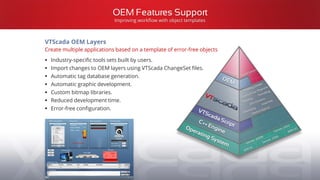
OEM Features Support
Improving workflow with object templates
VTScada OEM Layers
Create multiple applications based on a template of error-free objects
▪ Industry-specific tools sets built by users.
▪ Import changes to OEM layers using VTScada ChangeSet files.
▪ Automatic tag database generation.
▪ Automatic graphic development.
▪ Custom bitmap libraries.
▪ Reduced development time.
▪ Error-free configuration.
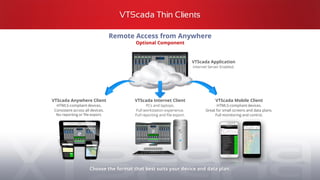
VTScada Thin Clients
VTScada Internet Client
PCs and laptops.
Full workstation experience.
Full reporting and file export.
Remote Access from Anywhere
Optional Component
VTScada Application
Internet Server Enabled.
VTScada Anywhere Client
HTML5-compliant devices.
Consistent across all devices.
No reporting or file export.
Choose the format that best suits your device and data plan.
VTScada Mobile Client
HTML5-compliant devices.
Great for small screens and data plans.
Full monitoring and control.
Integrated Alarm Notification System
Critical Alarms Find You Anywhere
▪ Tightly integrated for the life of our system.
▪ Create rosters of up to 30 contacts.
▪ Configure any number of rosters.
▪ Enable rosters by date and time.
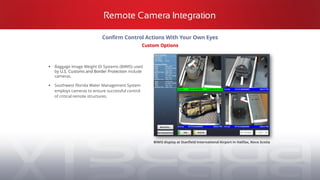
Confirm Control Actions With Your Own Eyes
Custom Options
▪ Baggage Image Weight ID Systems (BIWIS) used
by U.S. Customs and Border Protection include
cameras.
▪ Southwest Florida Water Management System
employs cameras to ensure successful control
of critical remote structures.
Remote Camera Integration
BIWIS display at Stanfield International Airport in Halifax, Nova Scotia
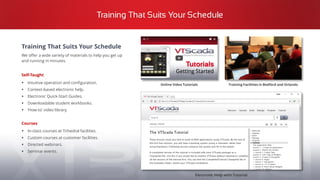
Training That Suits Your Schedule
Training Facilities in Bedford and Orlando
Electronic Help with Tutorial
Online Video Tutorials
Training That Suits Your Schedule
We offer a wide variety of materials to help you get up
and running in minutes.
Self-Taught
▪ Intuitive operation and configuration.
▪ Context-based electronic help.
▪ Electronic Quick-Start Guides.
▪ Downloadable student workbooks.
▪ ‘How-to’ video library.
Courses
▪ In-class courses at Trihedral facilities.
▪ Custom courses at customer facilities.
▪ Directed webinars.
▪ Seminar events.
Our customers are our best spokespeople.
“What impressedme most about Trihedral and VTScada is not simply the incredible designof the softwareand smooth transitionfrom our previousHMI package, but the
accessibilityof staff and theirpride in their product.” - Jay Nicholson- Joint MunicipalWaterand Sewer Commission - Lexington, SC
“I can state unequivocallythat 'providingquality productswith exceptionalservices'is not only part of [Trihedral’s]mission statement,but that it really is part of your
businessculture.”- Craig Corzine - President - CSE EngineeringInc.,CA
New licenses include 90 days of SupportPlus.
▪ Renewals are 15% of the original software price per year while you remain current.
▪ Includes 9-5 AST phone/email support and software version upgrades.
▪ 24/7, VTScada only or application-specific options available.
The Best Technical Support in the Business
The VTScada
Support Team
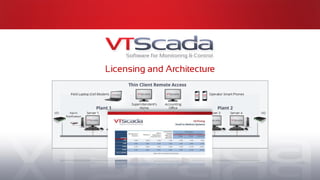
Licensing and Architecture
Full Installation License – Windows® Operating Systems
▪ Full operator interface + optional application development.
▪ SCADA services (I/O drivers, historian, alarm server, thin client server).
▪ Optional components (alarm notification, OPC server, etc.).
▪ Automatically redundant SCADA node.
▪ Licensed per software installation on a standard or virtual PC.
- Licensing and Architecture -
Software License Categories
Thin Client License - Tablets, Phones, PCs, MACs
▪ A flexible operator interface to central HMI/SCADA.
▪ For remote use or just within your firewall.
▪ VTScada is not installed. Cannot act as a redundant server.
▪ Licensed by concurrent users (single user, 5-pack, or unlimited).
▪ Concurrent connections can be pooled across application thin-client servers.
Runtime License
Any situation where development is not required. Includes:
Development Runtime License
Includes Runtime License features above.
Used where application development tasks will be performed.
Graphic Terminal License
Also, includes Runtime License features.
Intended for use as an Operator Interface Terminal (OIT) for HMI applications.
Feature Feature Feature
Monitoring Control Alarms
Reporting Security I/O Drivers
Historian Trending Data export
Polling management Operator logbook Mapping
- Licensing and Architecture -
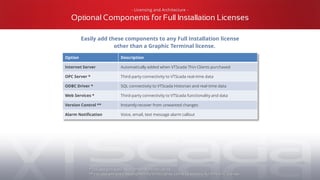
Full Installation Licenses
Easily add these components to any Full Installation license
other than a Graphic Terminal license.
Option Description
Internet Server Automatically added when VTScada Thin Clients purchased
OPC Server * Third-party connectivity to VTScada real-time data
ODBC Driver * SQL connectivity to VTScada Historian and real-time data
Web Services * Third-party connectivity to VTScada functionality and data
Version Control ** Instantly recover from unwanted changes
Alarm Notification Voice, email, text message alarm callout
* Included with every Development Runtime License
** Included with every Development Runtime License, cannot be added to Runtime only Licenses
- Licensing and Architecture -
Optional Components for Full Installation Licenses
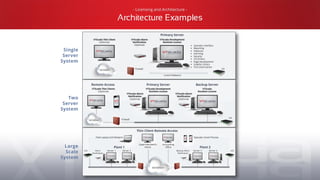
Single
Server
System
Two
Server
System
Large
Scale
System
- Licensing and Architecture -
Architecture Examples
Advantages
▪ Graphics and tags can be created once.
▪ All HMI use the same displays.
▪ Train users on a single software platform.
▪ Integrates with plant-wide security accounts.
▪ Synchronized alarms management.
▪ Operator actions on the plant floor are visible from the control room events log.
▪ Centralized change management with deployment to all affected interfaces.
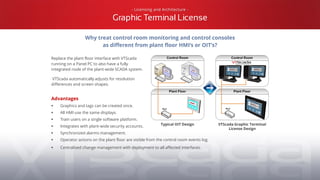
- Licensing and Architecture -
Graphic Terminal License
Replace the plant floor interface with VTScada
running on a Panel PC to also have a fully
integrated node of the plant-wide SCADA system.
VTScada automatically adjusts for resolution
differences and screen shapes.
Typical OIT Design VTScada Graphic Terminal
License Design
Why treat control room monitoring and control consoles
as different from plant floor HMI’s or OIT’s?
- Licensing and Architecture -
Hosted Applications
Cloud Based SCADA Model
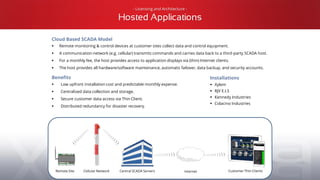
▪ Remote monitoring & control devices at customer sites collect data and control equipment.
▪ A communication network (e.g. cellular) transmits commands and carries data back to a third-party SCADA host.
▪ For a monthly fee, the host provides access to application displays via (thin) Internet clients.
▪ The host provides all hardware/software maintenance, automatic failover, data backup, and security accounts.
Benefits
▪ Low upfront installation cost and predictable monthly expense.
▪ Centralized data collection and storage.
▪ Secure customer data access via Thin Client.
▪ Distributed redundancy for disaster recovery.
Remote Site Cellular Network Central SCADA Servers Internet Customer Thin Clients
Installations
▪ Xylem
▪ RJV E.I.S
▪ Kennedy Industries
▪ Colacino Industries
A single installation installs all basic SCADA features
The VTScada License is a 25 character software key that defines:
▪ Tag limit
▪ Runtime or Full Development
▪ All options the customer has purchased
▪ The pool of Thin Clients
Adding new options and Thin Clients or increasing
the tag limit is as easy as installing a new key.
- Licensing and Architecture -
Installation
Customer Testimonials
"I can’t find anything wrong with your product and I find that really annoying.”
Patrick Dorsey - Senior Programming Engineer, ARCADIS, New York
“Knowing that support is there makes me more comfortable about using new features and adding new things. It would be so simple to just buy it and forget about it for five or ten years. I
like those feature updates.”
Chris Drey - former Water Superintendent - Village of Romeoville, IL
“VTScada has definitely exceeded our expectations;” “You cannot get good support from most software companies but that was definitely not the case here. Trihedral is very service driven.”
Jessica Spindler - Sales Manager - State Electronics Company, Inc.
“As long as Trihedral keeps offering this level of customer support, there will always be VTScada at Gainesville.”
Tom Wallace - Gainesville Regional Utilities, FL
“I can state unequivocally that 'providing quality products with exceptional services' is not only part of [Trihedral’s] mission statement, but that it really is part of their business culture.”
Craig Corzine - President - CSE Engineering Inc., CA
“Absolutely, Trihedral is the way to go. I tell everybody that. The support that I receive and the functionality I get from the system are more than I could have asked for.”
Mark Utesch - SCADA Instrumentation - City of Altamonte Springs, FL
“What impressed me most about Trihedral and VTScada is not simply the incredible design of the software and smooth transition from our previous HMI package, but the accessibility of
staff and their pride in their product.”
Jay Nicholson - Joint Municipal Water and Sewer Commission - Lexington, SC
New Features in 11.3
History Data Import from CSV Files
▪ Import historical data from applications based on other brands of SCADA software.
▪ Migrate to VTScada while retaining a complete view of your process history.
▪ Consult VTScada Help for information on formatting files for import.
Enhanced Security with OpenID Connect®
▪ Permits integration of VTScada Security with third-party authentication servers on Anywhere Clients.
▪ Single sign-in (one Password access to many systems).
▪ Two-factor authentication (e.g., Google Authenticator or Apple Touch sensor).
Unlimited Addressing with IPv6 Support
▪ IPv4 addresses are running out. IPv6 is the next standard.
▪ Affects cell modems and connected devices that use public IP’s.
▪ Supports IPv4 and IPV6 together. Users are unaware of the change.
Twilio® – An optional alternative to Voice Modem Hardware
▪ Twilio is a 3rd party web-based communications platform.
▪ Alarm Notification System now supports Twilio for voice telephony (and SMS as of 11.3.08).
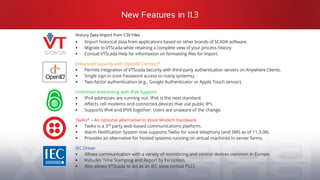
▪ Provides an alternative for hosted systems running on virtual machines in server farms.
IEC Driver
▪ Allows communication with a variety of monitoring and control devices common in Europe.
▪ Includes Time Stamping and Report by Exception.
▪ Also allows VTScada to act as an IEC slave (virtual PLC).
Free 50 I/O License
We are sharing our passion for instantly intuitive SCADA with the world.
To try VTScadaLIGHT, select this checkbox during installation.
A free development/runtime suite.
▪ One mobile connection.
▪ No expiration or runtime limits.
▪ Perfect for small industrial and
personal applications.
VTScada Offices Worldwide
Copyright © Trihedral Engineering Limited 2018 - VTScada and Trihedral are registered trademarks of Trihedral Engineering Limited
www.trihedral.com
info@trihedral.com
1.800.463.2783
(Toll-Free in North America)
▪ Canadian Headquarters Bedford, Nova Scotia 1.902.835.1575
▪ South Western USA Office Houston, Texas 1.281.719.1451
▪ Midwestern USA Office Chicago, Illinois 1.224.409.8221
▪ Western USA Office Los Angeles, California 1.562.708.0928
▪ Western Canadian Office Calgary, Alberta 1.403.921.5199
▪ South Eastern USA Office Orlando, Florida 1.407.888.8203
▪ European Office Aberdeen, Scotland +44 (0) 1224 258910

VTScada Instantly Intuitive SCADA Software

  • 1.
    Instantly Intuitive VTScada removesfrustration from every stage of the HMI / SCADA lifecycle. For water & wastewater, power generation, oil & gas, broadcasting, manufacturing, marine systems, airport solutions, food & beverage and many more. +30 Years of SCADA/HMI Software +100 Countries with VTScada installations +50 Million North Americans rely on VTScada for water & wastewater +45% sales growth in the past two years +200 Integrators across North America
  • 2.
    Bedford, Nova Scotia (HeadOffice) Aberdeen, UK Orlando, Florida Calgary, Alberta Houston, Texas Birmingham, AL Chicago, Illinois Los Angeles, California Award Winning Software 8 Offices in 3 Countries
  • 3.
    A Fast andFlexible Platform ▪ Easily build rock solid applications of any size. ▪ Create outstanding looking displays with built-ingraphics. ▪ Configure redundant servers and networks in seconds. ▪ Connect to hardware you have and hardware you want. ▪ Easily deploy new and updated applications. ▪ Develop applications without process interruption. ▪ Instantly roll back any change made by anyone. Core Technologies
  • 4.
    All-In-One Installation We developand own all the technologies that make up VTScada. The fully-integrated design vastly improves integration and scalability. Built in features remain tightly integrated for the life of the system. Trending Version Control Enterprise ConnectivitySecurity Monitoring & Control Mobile Connectivity Communication Drivers Mapping Graphic Development Under 200 MB Installer ReportingAlarms & Notifications
  • 5.
    Software Version Upgrades Wenever discontinue software versions forcing customers to start over. ▪ Integrated features simplify the upgrade process. ▪ Install new version directly over old. ▪ Licensing and options remain unchanged. ▪ No changes required for applications built on standard features. ▪ Alteration and testing may be required for custom features. ▪ Upgrade to the latest version anytime so long as support is current. ▪ Over 20% of revenue re-invested each year in R&D.
  • 6.
    Open Connectivity ODBC ServerOPCClient and ServerWeb Services Enterprise Connectivity Package Part of every Development Runtime License Thin Client Server Thin Clients Network Connectivity PCs and Mobile Devices Open Architecture Standard and Proprietary Device Drivers Advanced Polling Fast/normal poll mode switching On-line poll rate tuning
  • 7.
    Reliability Redundant Historian and AlarmData PC / Network Health Monitoring Outstanding Technical Support Redundant Servers with Load Sharing Built-in Application Version Control Redundant Hardware and Network Links
  • 8.
    Automatic System-wide Redundancy MUX ServerFailover ▪ Application Servers. ▪ Thin Client Servers. ▪ Load-share services. Network Failover ▪ Unique Driver Multiplexer. ▪ Redundant Networks or Devices. Synchronized Historians and Alarm Databases ▪ Alarm and Event Databases. ▪ Across LAN or WAN. INTERNET Protocol 1 Protocol 2 PLC 1 PLC 2 DB A DB B DB B DB A SITE A SITE B
  • 9.
    Built-in Historian -No Cost or Configuration MS SQL Server® Oracle® Native SCADA Historian MySQL® SQLite® VTScada Historian Standard Component * ▪ A native database in every application. ▪ Configure synchronized redundant databases in seconds.** ▪ Configure additional database formats as needed.** SQL Server, Oracle, MySQL and SQLite are trademarks of their respective owners.
  • 10.
    Unlimited Scalability 2.5 Milliontag capacity tested. No limit to the number of displays. Hierarchical tag data structures: ▪ Unlimited levels. ▪ Indirect parameterization. ▪ Nested and reusable. ▪ Match with graphic templates. Simplified multi-plant deployment. Complete single-server SCADA applications. Multi-million I/O applications with synchronized servers distributed across multiple sites. Build Applications of Any Size
  • 11.
    Secure Connectivity Options SCADA Server Firewall ThinClients DMZ VPN Known users via known computers/devices. TLS/SSL Known users. Unknown devices. Read Only Unknown users. Unknown devices. Typical VTScada Internet Security Strategies
  • 12.
    Security and ReliabilityAdvantages Security Compliance Implementations compliant with ▪ NERC/CIP (North American Electric Reliability Corporation) ▪ DFARS 252 (Defense Federal Acquisition Regulations Supplement) ▪ NIST 800 (National Institute of Standards and Technology) ▪ Marine reliability standards ABS, Lloyds Bureau, DNV, BV High Reliability Systems ▪ Multi-level fault tolerance Data Protection ▪ Multi-level (and geo-separation) data backup methods Threat Prevention Methodologies ▪ Ransomware ▪ Hacking Days to Patch Security Issues Following
  • 13.
    Application Level UserAccounts Standard Component ▪ Centralized account management. ▪ Windows active directory support. ▪ Immediate and application wide. change deployment. ▪ Military-grade encryption. ▪ Card-reader support. Privileges, Rules and Roles ▪ Tune what users can do and where. ▪ Reduce time to configure accounts. Enhanced Anywhere Client Security with OpenID Connect® - New in 11.3 ▪ Permits integration of VTScada Security with third-party authentication servers. ▪ Single sign-in (one Password access to many systems). ▪ Two-factor authentication (e.g., Google Authenticator or Apple Touch sensor). Security Accounts
  • 14.
    VTScada Idea Studio Createprofessionaldisplays with simple drag-and-droptools. Configuredisplays,menus, and tags from one interface. ▪ Familiar ribbon toolbar. ▪ 200+ widgets, 4000+ graphics, 3D pipes. ▪ Pre-built high impact display pages. ▪ Easily align graphical elements. ▪ Add graphics from anywhere. Intuitive Display Development VTScada Scripting Language Unlimited Customization
  • 15.
    Tag Structure Model VTScadaHierarchical Tag Browser Standard Component Group Together Tags to Reflect Real-World Structures ▪ Save time and reduce errors. ▪ Draw multi-tag equipment in one step. ▪ Only I/O addresses count towards your chosen tag limit.
  • 16.
    User A UserB Easy Application Deployment 1 User A User B User A User B 2 3 Online Deployment Standard With Development Runtime Licenses ▪ Concurrent multi-user development. ▪ No configuration server required. ▪ Instant network deployment after changes validated. Single-file Deployment Standard Components ▪ Simple to create, distribute, and import. ▪ Easy to share applications with support teams. ▪ Backup or clone applications in seconds. Bridge1.changeset @ Easy to distribute.
  • 17.
    VTScada Application VersionControl Standard Component Change Management Trace changes and instantly recover from configuration issues. ▪ Instantly reverse any change. ▪ Switch to a known good version. ▪ See who did what, where. ▪ No configuration needed. See color-coded incremental version changes.
  • 18.
    Multi-Page Monitoring VTScada TiledPage View Standard Component Oversee and navigate all your most important pages. ▪ Auto-generated based on Page Menu. ▪ Tiles resize to current menu level. ▪ Large tiles display real-time data. ▪ Click tiles to open pages and folders. ▪ Recently viewed pages across the top.
  • 19.
    Operator-Created Trending Historical DataViewer (HDV) Standard Component ▪ Click values to open custom trends. ▪ Easily save trend groups for future use. ▪ Add encrypted notes to add context.
  • 20.
    Reporting Enterprise Support Standard inDevelopment Runtime Licenses Share data with Enterprise systems. ▪ ODBC Server. * ▪ OPC Client / Server. * ▪ Web Services. * ▪ SNMP Agent. VTScada Reports Page Standard Component ▪ Ad-hoc or scheduled reports. ▪ Simple built-in report generator. ▪ Custom Excel® Report Templates.
  • 21.
    New Tools Basedon ISA 18.2 Alarms Management Standard Standard Component Alarm Management and Action Logging Separate encrypted databases for all Alarms and Events. Use colour, symbols, and sound to meet the visual needs of your operators. Shelved Alarms won’t distract operators but are recorded in the Events database. Easily filter down to only the Alarms you need.
  • 22.
    Bad Actors Report Summaryof alarm occurrences within a specific period, sorted by the number of activations. Alarms Tuning Reports Alarm Flood Report Count of alarms tripped within equal time slices. Click a bar to zoom into that period. History Report All active and trip alarm events within a specific period. Priority Distribution Report Compares priority of configured alarms and actual alarm occurrences against ISA’s recommended best practices. Quickly identify and eliminate nuisance alarms.
  • 23.
    OEM Features Support Improvingworkflow with object templates VTScada OEM Layers Create multiple applications based on a template of error-free objects ▪ Industry-specific tools sets built by users. ▪ Import changes to OEM layers using VTScada ChangeSet files. ▪ Automatic tag database generation. ▪ Automatic graphic development. ▪ Custom bitmap libraries. ▪ Reduced development time. ▪ Error-free configuration.
  • 24.
    VTScada Thin Clients VTScadaInternet Client PCs and laptops. Full workstation experience. Full reporting and file export. Remote Access from Anywhere Optional Component VTScada Application Internet Server Enabled. VTScada Anywhere Client HTML5-compliant devices. Consistent across all devices. No reporting or file export. Choose the format that best suits your device and data plan. VTScada Mobile Client HTML5-compliant devices. Great for small screens and data plans. Full monitoring and control.
  • 25.
    Integrated Alarm NotificationSystem Critical Alarms Find You Anywhere ▪ Tightly integrated for the life of our system. ▪ Create rosters of up to 30 contacts. ▪ Configure any number of rosters. ▪ Enable rosters by date and time.
  • 26.
    Confirm Control ActionsWith Your Own Eyes Custom Options ▪ Baggage Image Weight ID Systems (BIWIS) used by U.S. Customs and Border Protection include cameras. ▪ Southwest Florida Water Management System employs cameras to ensure successful control of critical remote structures. Remote Camera Integration BIWIS display at Stanfield International Airport in Halifax, Nova Scotia
  • 27.
    Training That SuitsYour Schedule Training Facilities in Bedford and Orlando Electronic Help with Tutorial Online Video Tutorials Training That Suits Your Schedule We offer a wide variety of materials to help you get up and running in minutes. Self-Taught ▪ Intuitive operation and configuration. ▪ Context-based electronic help. ▪ Electronic Quick-Start Guides. ▪ Downloadable student workbooks. ▪ ‘How-to’ video library. Courses ▪ In-class courses at Trihedral facilities. ▪ Custom courses at customer facilities. ▪ Directed webinars. ▪ Seminar events.
  • 28.
    Our customers areour best spokespeople. “What impressedme most about Trihedral and VTScada is not simply the incredible designof the softwareand smooth transitionfrom our previousHMI package, but the accessibilityof staff and theirpride in their product.” - Jay Nicholson- Joint MunicipalWaterand Sewer Commission - Lexington, SC “I can state unequivocallythat 'providingquality productswith exceptionalservices'is not only part of [Trihedral’s]mission statement,but that it really is part of your businessculture.”- Craig Corzine - President - CSE EngineeringInc.,CA New licenses include 90 days of SupportPlus. ▪ Renewals are 15% of the original software price per year while you remain current. ▪ Includes 9-5 AST phone/email support and software version upgrades. ▪ 24/7, VTScada only or application-specific options available. The Best Technical Support in the Business The VTScada Support Team
  • 29.
  • 30.
    Full Installation License– Windows® Operating Systems ▪ Full operator interface + optional application development. ▪ SCADA services (I/O drivers, historian, alarm server, thin client server). ▪ Optional components (alarm notification, OPC server, etc.). ▪ Automatically redundant SCADA node. ▪ Licensed per software installation on a standard or virtual PC. - Licensing and Architecture - Software License Categories Thin Client License - Tablets, Phones, PCs, MACs ▪ A flexible operator interface to central HMI/SCADA. ▪ For remote use or just within your firewall. ▪ VTScada is not installed. Cannot act as a redundant server. ▪ Licensed by concurrent users (single user, 5-pack, or unlimited). ▪ Concurrent connections can be pooled across application thin-client servers.
  • 31.
    Runtime License Any situationwhere development is not required. Includes: Development Runtime License Includes Runtime License features above. Used where application development tasks will be performed. Graphic Terminal License Also, includes Runtime License features. Intended for use as an Operator Interface Terminal (OIT) for HMI applications. Feature Feature Feature Monitoring Control Alarms Reporting Security I/O Drivers Historian Trending Data export Polling management Operator logbook Mapping - Licensing and Architecture - Full Installation Licenses
  • 32.
    Easily add thesecomponents to any Full Installation license other than a Graphic Terminal license. Option Description Internet Server Automatically added when VTScada Thin Clients purchased OPC Server * Third-party connectivity to VTScada real-time data ODBC Driver * SQL connectivity to VTScada Historian and real-time data Web Services * Third-party connectivity to VTScada functionality and data Version Control ** Instantly recover from unwanted changes Alarm Notification Voice, email, text message alarm callout * Included with every Development Runtime License ** Included with every Development Runtime License, cannot be added to Runtime only Licenses - Licensing and Architecture - Optional Components for Full Installation Licenses
  • 33.
  • 34.
    Advantages ▪ Graphics andtags can be created once. ▪ All HMI use the same displays. ▪ Train users on a single software platform. ▪ Integrates with plant-wide security accounts. ▪ Synchronized alarms management. ▪ Operator actions on the plant floor are visible from the control room events log. ▪ Centralized change management with deployment to all affected interfaces. - Licensing and Architecture - Graphic Terminal License Replace the plant floor interface with VTScada running on a Panel PC to also have a fully integrated node of the plant-wide SCADA system. VTScada automatically adjusts for resolution differences and screen shapes. Typical OIT Design VTScada Graphic Terminal License Design Why treat control room monitoring and control consoles as different from plant floor HMI’s or OIT’s?
  • 35.
    - Licensing andArchitecture - Hosted Applications Cloud Based SCADA Model ▪ Remote monitoring & control devices at customer sites collect data and control equipment. ▪ A communication network (e.g. cellular) transmits commands and carries data back to a third-party SCADA host. ▪ For a monthly fee, the host provides access to application displays via (thin) Internet clients. ▪ The host provides all hardware/software maintenance, automatic failover, data backup, and security accounts. Benefits ▪ Low upfront installation cost and predictable monthly expense. ▪ Centralized data collection and storage. ▪ Secure customer data access via Thin Client. ▪ Distributed redundancy for disaster recovery. Remote Site Cellular Network Central SCADA Servers Internet Customer Thin Clients Installations ▪ Xylem ▪ RJV E.I.S ▪ Kennedy Industries ▪ Colacino Industries
  • 36.
    A single installationinstalls all basic SCADA features The VTScada License is a 25 character software key that defines: ▪ Tag limit ▪ Runtime or Full Development ▪ All options the customer has purchased ▪ The pool of Thin Clients Adding new options and Thin Clients or increasing the tag limit is as easy as installing a new key. - Licensing and Architecture - Installation
  • 37.
    Customer Testimonials "I can’tfind anything wrong with your product and I find that really annoying.” Patrick Dorsey - Senior Programming Engineer, ARCADIS, New York “Knowing that support is there makes me more comfortable about using new features and adding new things. It would be so simple to just buy it and forget about it for five or ten years. I like those feature updates.” Chris Drey - former Water Superintendent - Village of Romeoville, IL “VTScada has definitely exceeded our expectations;” “You cannot get good support from most software companies but that was definitely not the case here. Trihedral is very service driven.” Jessica Spindler - Sales Manager - State Electronics Company, Inc. “As long as Trihedral keeps offering this level of customer support, there will always be VTScada at Gainesville.” Tom Wallace - Gainesville Regional Utilities, FL “I can state unequivocally that 'providing quality products with exceptional services' is not only part of [Trihedral’s] mission statement, but that it really is part of their business culture.” Craig Corzine - President - CSE Engineering Inc., CA “Absolutely, Trihedral is the way to go. I tell everybody that. The support that I receive and the functionality I get from the system are more than I could have asked for.” Mark Utesch - SCADA Instrumentation - City of Altamonte Springs, FL “What impressed me most about Trihedral and VTScada is not simply the incredible design of the software and smooth transition from our previous HMI package, but the accessibility of staff and their pride in their product.” Jay Nicholson - Joint Municipal Water and Sewer Commission - Lexington, SC
  • 38.
    New Features in11.3 History Data Import from CSV Files ▪ Import historical data from applications based on other brands of SCADA software. ▪ Migrate to VTScada while retaining a complete view of your process history. ▪ Consult VTScada Help for information on formatting files for import. Enhanced Security with OpenID Connect® ▪ Permits integration of VTScada Security with third-party authentication servers on Anywhere Clients. ▪ Single sign-in (one Password access to many systems). ▪ Two-factor authentication (e.g., Google Authenticator or Apple Touch sensor). Unlimited Addressing with IPv6 Support ▪ IPv4 addresses are running out. IPv6 is the next standard. ▪ Affects cell modems and connected devices that use public IP’s. ▪ Supports IPv4 and IPV6 together. Users are unaware of the change. Twilio® – An optional alternative to Voice Modem Hardware ▪ Twilio is a 3rd party web-based communications platform. ▪ Alarm Notification System now supports Twilio for voice telephony (and SMS as of 11.3.08). ▪ Provides an alternative for hosted systems running on virtual machines in server farms. IEC Driver ▪ Allows communication with a variety of monitoring and control devices common in Europe. ▪ Includes Time Stamping and Report by Exception. ▪ Also allows VTScada to act as an IEC slave (virtual PLC).
  • 39.
    Free 50 I/OLicense We are sharing our passion for instantly intuitive SCADA with the world. To try VTScadaLIGHT, select this checkbox during installation. A free development/runtime suite. ▪ One mobile connection. ▪ No expiration or runtime limits. ▪ Perfect for small industrial and personal applications.
  • 40.
    VTScada Offices Worldwide Copyright© Trihedral Engineering Limited 2018 - VTScada and Trihedral are registered trademarks of Trihedral Engineering Limited www.trihedral.com info@trihedral.com 1.800.463.2783 (Toll-Free in North America) ▪ Canadian Headquarters Bedford, Nova Scotia 1.902.835.1575 ▪ South Western USA Office Houston, Texas 1.281.719.1451 ▪ Midwestern USA Office Chicago, Illinois 1.224.409.8221 ▪ Western USA Office Los Angeles, California 1.562.708.0928 ▪ Western Canadian Office Calgary, Alberta 1.403.921.5199 ▪ South Eastern USA Office Orlando, Florida 1.407.888.8203 ▪ European Office Aberdeen, Scotland +44 (0) 1224 258910