VOIP, SSH & TELNET
configuration in Cisco
Packet Tracer
PRIYANSHU (2128876)
APEEJAY INSTITUTE OF MANAGEMENT & ENGINEERING
TECHNICAL CAMPUS, JALANDHAR
Topics
 What is VOIP?
 User Advantages of VOIP
 Standard Features of VOIP
 IP telephony basic configuration
What is VOIP?
Voice Over Internet Protocol
◦ A telephone system which takes advantage of the existing data network
combining elements of current telephone and data technologies
Voice over Internet Protocol (VoIP), is a technology that allows you to make
voice calls using a broadband Internet connection instead of a regular (or
analog) phone line.
User Advantages of VOIP
VoiceMail messages can be ported to your email client (must be an Exchange client)
◦ You can receive your VoiceMail messages anywhere by simply logging into your email either at the
office or from a remote location (home, hotel, etc.)
◦ *OR* by calling the College’s phone number (814-865-4900) and entering your security ID # to
gain access to your Voicemail, as well as your email messages
Use Directory Services through your phone to search for PSU phone numbers
◦ University will make information available from the Penn State LDAP server
◦ You can search for phone numbers directly from your VOIP phone
No monthly equipment maintenance
Standard Features of VOIP
• Call forward busy
• Call forward not answered
• Call forward programmable
• Call routing
• Five digit dialing on campus
• Caller ID display
• Hold
• Message waiting indicator
• Recall
• Three-way calling
• Touch-tone dialing
• On-hook dialing
• Call pick-up groups
• Transfer
• Volume control for station and ringing
• Call park
• Call status
• Call waiting
• Distinctive ring for on-campus vs. off-campus
• Various ring settings
• Last number redial
• Meet-me conferencing
• Conference calling
• Speed dial
• Utilize system-wide authorization codes
IP telephony basic configuration
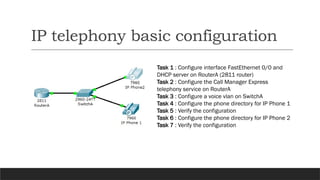
Task 1 : Configure interface FastEthernet 0/0 and
DHCP server on RouterA (2811 router)
Task 2 : Configure the Call Manager Express
telephony service on RouterA
Task 3 : Configure a voice vlan on SwitchA
Task 4 : Configure the phone directory for IP Phone 1
Task 5 : Verify the configuration
Task 6 : Configure the phone directory for IP Phone 2
Task 7 : Verify the configuration
END OF PRESENTATION
ANY QUERIES ?
THANK YOU

VOIP voice over internet protocol presentation

  • 1.
    VOIP, SSH &TELNET configuration in Cisco Packet Tracer PRIYANSHU (2128876) APEEJAY INSTITUTE OF MANAGEMENT & ENGINEERING TECHNICAL CAMPUS, JALANDHAR
  • 2.
    Topics  What isVOIP?  User Advantages of VOIP  Standard Features of VOIP  IP telephony basic configuration
  • 3.
    What is VOIP? VoiceOver Internet Protocol ◦ A telephone system which takes advantage of the existing data network combining elements of current telephone and data technologies Voice over Internet Protocol (VoIP), is a technology that allows you to make voice calls using a broadband Internet connection instead of a regular (or analog) phone line.
  • 4.
    User Advantages ofVOIP VoiceMail messages can be ported to your email client (must be an Exchange client) ◦ You can receive your VoiceMail messages anywhere by simply logging into your email either at the office or from a remote location (home, hotel, etc.) ◦ *OR* by calling the College’s phone number (814-865-4900) and entering your security ID # to gain access to your Voicemail, as well as your email messages Use Directory Services through your phone to search for PSU phone numbers ◦ University will make information available from the Penn State LDAP server ◦ You can search for phone numbers directly from your VOIP phone No monthly equipment maintenance
  • 5.
    Standard Features ofVOIP • Call forward busy • Call forward not answered • Call forward programmable • Call routing • Five digit dialing on campus • Caller ID display • Hold • Message waiting indicator • Recall • Three-way calling • Touch-tone dialing • On-hook dialing • Call pick-up groups • Transfer • Volume control for station and ringing • Call park • Call status • Call waiting • Distinctive ring for on-campus vs. off-campus • Various ring settings • Last number redial • Meet-me conferencing • Conference calling • Speed dial • Utilize system-wide authorization codes
  • 6.
    IP telephony basicconfiguration Task 1 : Configure interface FastEthernet 0/0 and DHCP server on RouterA (2811 router) Task 2 : Configure the Call Manager Express telephony service on RouterA Task 3 : Configure a voice vlan on SwitchA Task 4 : Configure the phone directory for IP Phone 1 Task 5 : Verify the configuration Task 6 : Configure the phone directory for IP Phone 2 Task 7 : Verify the configuration
  • 8.
    END OF PRESENTATION ANYQUERIES ? THANK YOU