“VOICE OVER IP”
BY-
Akash Sharma
7ECE-3
A2305112197
ABSTRACT
Voice over Internet Protocol (VoIP) is a technology that allows you to make
voice calls using a broadband Internet connection instead of a regular (or
analog) phone line. Some VoIP services may only allow you to call other people
using the same service, but others may allow you to call anyone who has a
telephone number - including local, long distance, mobile, and international
numbers. Also, while some VoIP services only work over your computer or a
special VoIP phone, other services allow you to use a traditional phone
connected to a VoIP adapter.
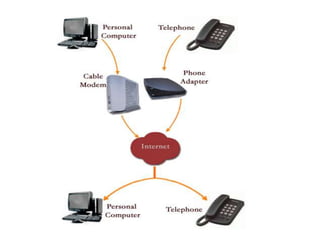
VoIP services convert your voice into a digital signal that travels over the
Internet. If you are calling a regular phone number, the signal is converted to a
regular telephone signal before it reaches the destination. VoIP can allow you to
make a call directly from a computer, a special VoIP phone, or a traditional
phone connected to a special adapter. In addition, wireless "hot spots" in
locations such as airports, parks, and cafes allow you to connect to the Internet
and may enable you to use VoIP service wirelessly.
Advantages-
Low Taxes:
Since the calls are being carried over the Internet, governments do not tax VoIP
phone services heavily. Compare that to your local telephone bill and you will see
you are spending quite a bit on taxes each month.
Portability:
You can make and receive phone calls wherever there is a broadband connection
simply by signing in to your VoIP account. This makes VoIP as convenient as e-
mail – if you are traveling, simply pack a headset or Internet phone and you can
talk to your family or business associates for almost nothing.
No extra cables, no extra cost:
A VoIP phone number, unlike your regular phone number, is completely portable.
Most commonly referred to as a virtual number, you can take it with you
anywhere you go.
Features:
Unlike regular phone service which usually charges more for extra features, VOIP
comes with a host of advanced communication features. Call forwarding, call
waiting, voicemail, caller ID etc at no extra charge.
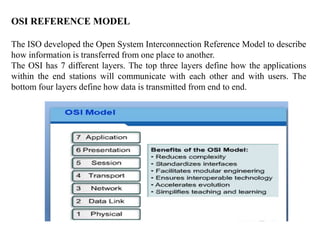
OSI REFERENCE MODEL
The ISO developed the Open System Interconnection Reference Model to describe
how information is transferred from one place to another.
The OSI has 7 different layers. The top three layers define how the applications
within the end stations will communicate with each other and with users. The
bottom four layers define how data is transmitted from end to end.
IPAddressing
An IP address is a numeric identifier assigned to each host on an IP network. It
designates the specific location of a device on the network.
IP Addresses are:
32 bit address represented as 8 bit dotted decimals.
Different class addresses reserve different amounts of bits for the Network and
Host portions of the address
CLASSES:
If the first octet is between:
0 –127 it is a class A address
128-191 it is a class B address
192 – 223 it is a class C address
SUBNETTING:
• Sub-networks are smaller divisions of networks.
• A.K.A. subnets
•Reduce network traffic
•Most of the traffic will stay on local n/w ,only packets destined for other
network pass through the router.
•Simplified Management – it is easier to identify and isolate network
problems in a group of smaller connected n/w than within 1 large
network
•network performance is better- due to reduced network traffic
IP ROUTING
The term routing is used for taking a packet from one device and sending it
through the network to another device on a different network.
A routing protocol is used by routers to dynamically find all the networks in the
internetwork. Basically, a routing protocol determines the path of a packet
through an internetwork. Examples of routing protocols are static, default
routing, RIP,etc.
Static Routing- In this, routes are added manually by the user in the
routing table. In this cheap or economical router can be used.
Security is possible as administrator permits access to limited n/w only.
But, this routing is not simple and feasible in huge n/w as it’s difficult to
determine each route differently.
Default Routing- This routing is used where we have stub n/w i.e. -
having only 1 exit path. This is used when we don’t know the next hop
address.
Distance vector The distance-vector protocols find the best path to a remote
network by judging distance. Each time a packet goes through a router, that’s
called a hop. The route with the least number of hops to the network is
determined to be the best route.
ROUTING INFORMATION PROTOCOL (RIP)
RIP is a true distance vector routing protocol.RIP sends the complete routing table
out to all active interfaces every 30 sec.RIP only uses hop count to determine the
best way to a remote network but it has a maximum allowable hop count of 15 by
default.
RIP version 1 uses only classful routing .
RIP version 2 provides something called prefix routing .This is called classless
routing.
NETWORK AND WEB APPLICATIONS
File Transfer Protocol (FTP)
File Transfer Protocol (FTP) is the protocol that actually lets us transfer files,
and it can accomplish this between any two machines using it. But FTP isn’t just
a protocol; it’s also a program.
Domain Name Service (DNS)
Domain Name Service (DNS) resolves hostnames—specifically, Internet names,
such as www.lammle.com. You don’t have to use DNS; you can just type in the
IP address of any device you want to communicate with.
Dynamic Host Configuration Protocol (DHCP)
Dynamic Host Configuration Protocol (DHCP) assigns IP addresses to hosts. It
allows easier administration and works well in small to even very large network
environments. All types of hardware can be used as a DHCP server, including a
Cisco router.
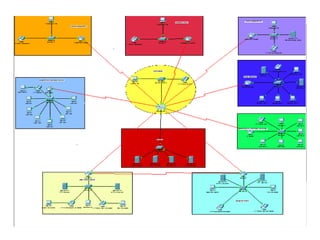
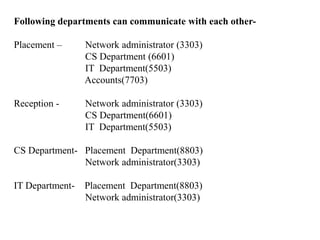
Following departments can communicate with each other-
Placement – Network administrator (3303)
CS Department (6601)
IT Department(5503)
Accounts(7703)
Reception - Network administrator (3303)
CS Department(6601)
IT Department(5503)
CS Department- Placement Department(8803)
Network administrator(3303)
IT Department- Placement Department(8803)
Network administrator(3303)
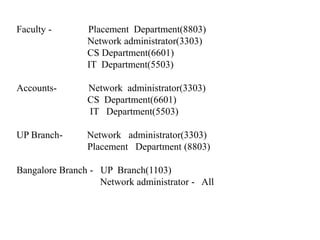
Faculty - Placement Department(8803)
Network administrator(3303)
CS Department(6601)
IT Department(5503)
Accounts- Network administrator(3303)
CS Department(6601)
IT Department(5503)
UP Branch- Network administrator(3303)
Placement Department (8803)
Bangalore Branch - UP Branch(1103)
Network administrator - All
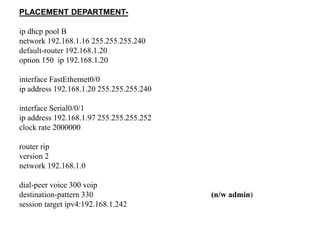
PLACEMENT DEPARTMENT-
ip dhcp pool B
network 192.168.1.16 255.255.255.240
default-router 192.168.1.20
option 150 ip 192.168.1.20
interface FastEthernet0/0
ip address 192.168.1.20 255.255.255.240
interface Serial0/0/1
ip address 192.168.1.97 255.255.255.252
clock rate 2000000
router rip
version 2
network 192.168.1.0
dial-peer voice 300 voip
destination-pattern 330 (n/w admin)
session target ipv4:192.168.1.242
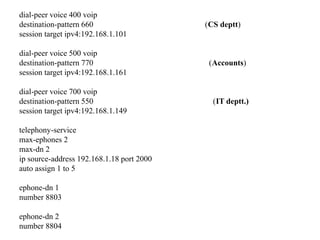
dial-peer voice 400 voip
destination-pattern 660 (CS deptt)
session target ipv4:192.168.1.101
dial-peer voice 500 voip
destination-pattern 770 (Accounts)
session target ipv4:192.168.1.161
dial-peer voice 700 voip
destination-pattern 550 (IT deptt.)
session target ipv4:192.168.1.149
telephony-service
max-ephones 2
max-dn 2
ip source-address 192.168.1.18 port 2000
auto assign 1 to 5
ephone-dn 1
number 8803
ephone-dn 2
number 8804
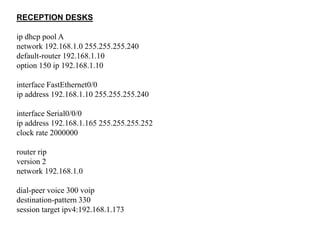
RECEPTION DESKS
ip dhcp pool A
network 192.168.1.0 255.255.255.240
default-router 192.168.1.10
option 150 ip 192.168.1.10
interface FastEthernet0/0
ip address 192.168.1.10 255.255.255.240
interface Serial0/0/0
ip address 192.168.1.165 255.255.255.252
clock rate 2000000
router rip
version 2
network 192.168.1.0
dial-peer voice 300 voip
destination-pattern 330
session target ipv4:192.168.1.173
dial-peer voice 400 voip
destination-pattern 660
session target ipv4:192.168.1.149
dial-peer voice 600 voip
destination-pattern 440
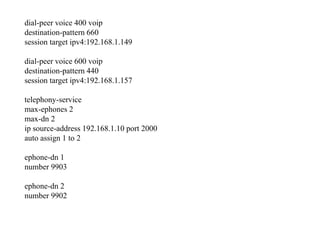
session target ipv4:192.168.1.157
telephony-service
max-ephones 2
max-dn 2
ip source-address 192.168.1.10 port 2000
auto assign 1 to 2
ephone-dn 1
number 9903
ephone-dn 2
number 9902
Voice over IP ppt

Voice over IP ppt

  • 1.
    “VOICE OVER IP” BY- AkashSharma 7ECE-3 A2305112197
  • 2.
    ABSTRACT Voice over InternetProtocol (VoIP) is a technology that allows you to make voice calls using a broadband Internet connection instead of a regular (or analog) phone line. Some VoIP services may only allow you to call other people using the same service, but others may allow you to call anyone who has a telephone number - including local, long distance, mobile, and international numbers. Also, while some VoIP services only work over your computer or a special VoIP phone, other services allow you to use a traditional phone connected to a VoIP adapter. VoIP services convert your voice into a digital signal that travels over the Internet. If you are calling a regular phone number, the signal is converted to a regular telephone signal before it reaches the destination. VoIP can allow you to make a call directly from a computer, a special VoIP phone, or a traditional phone connected to a special adapter. In addition, wireless "hot spots" in locations such as airports, parks, and cafes allow you to connect to the Internet and may enable you to use VoIP service wirelessly.
  • 4.
    Advantages- Low Taxes: Since thecalls are being carried over the Internet, governments do not tax VoIP phone services heavily. Compare that to your local telephone bill and you will see you are spending quite a bit on taxes each month. Portability: You can make and receive phone calls wherever there is a broadband connection simply by signing in to your VoIP account. This makes VoIP as convenient as e- mail – if you are traveling, simply pack a headset or Internet phone and you can talk to your family or business associates for almost nothing. No extra cables, no extra cost: A VoIP phone number, unlike your regular phone number, is completely portable. Most commonly referred to as a virtual number, you can take it with you anywhere you go. Features: Unlike regular phone service which usually charges more for extra features, VOIP comes with a host of advanced communication features. Call forwarding, call waiting, voicemail, caller ID etc at no extra charge.
  • 5.
    OSI REFERENCE MODEL TheISO developed the Open System Interconnection Reference Model to describe how information is transferred from one place to another. The OSI has 7 different layers. The top three layers define how the applications within the end stations will communicate with each other and with users. The bottom four layers define how data is transmitted from end to end.
  • 6.
    IPAddressing An IP addressis a numeric identifier assigned to each host on an IP network. It designates the specific location of a device on the network. IP Addresses are: 32 bit address represented as 8 bit dotted decimals. Different class addresses reserve different amounts of bits for the Network and Host portions of the address CLASSES: If the first octet is between: 0 –127 it is a class A address 128-191 it is a class B address 192 – 223 it is a class C address
  • 7.
    SUBNETTING: • Sub-networks aresmaller divisions of networks. • A.K.A. subnets •Reduce network traffic •Most of the traffic will stay on local n/w ,only packets destined for other network pass through the router. •Simplified Management – it is easier to identify and isolate network problems in a group of smaller connected n/w than within 1 large network •network performance is better- due to reduced network traffic
  • 8.
    IP ROUTING The termrouting is used for taking a packet from one device and sending it through the network to another device on a different network. A routing protocol is used by routers to dynamically find all the networks in the internetwork. Basically, a routing protocol determines the path of a packet through an internetwork. Examples of routing protocols are static, default routing, RIP,etc. Static Routing- In this, routes are added manually by the user in the routing table. In this cheap or economical router can be used. Security is possible as administrator permits access to limited n/w only. But, this routing is not simple and feasible in huge n/w as it’s difficult to determine each route differently. Default Routing- This routing is used where we have stub n/w i.e. - having only 1 exit path. This is used when we don’t know the next hop address.
  • 9.
    Distance vector Thedistance-vector protocols find the best path to a remote network by judging distance. Each time a packet goes through a router, that’s called a hop. The route with the least number of hops to the network is determined to be the best route. ROUTING INFORMATION PROTOCOL (RIP) RIP is a true distance vector routing protocol.RIP sends the complete routing table out to all active interfaces every 30 sec.RIP only uses hop count to determine the best way to a remote network but it has a maximum allowable hop count of 15 by default. RIP version 1 uses only classful routing . RIP version 2 provides something called prefix routing .This is called classless routing.
  • 10.
    NETWORK AND WEBAPPLICATIONS File Transfer Protocol (FTP) File Transfer Protocol (FTP) is the protocol that actually lets us transfer files, and it can accomplish this between any two machines using it. But FTP isn’t just a protocol; it’s also a program. Domain Name Service (DNS) Domain Name Service (DNS) resolves hostnames—specifically, Internet names, such as www.lammle.com. You don’t have to use DNS; you can just type in the IP address of any device you want to communicate with. Dynamic Host Configuration Protocol (DHCP) Dynamic Host Configuration Protocol (DHCP) assigns IP addresses to hosts. It allows easier administration and works well in small to even very large network environments. All types of hardware can be used as a DHCP server, including a Cisco router.
  • 12.
    Following departments cancommunicate with each other- Placement – Network administrator (3303) CS Department (6601) IT Department(5503) Accounts(7703) Reception - Network administrator (3303) CS Department(6601) IT Department(5503) CS Department- Placement Department(8803) Network administrator(3303) IT Department- Placement Department(8803) Network administrator(3303)
  • 13.
    Faculty - PlacementDepartment(8803) Network administrator(3303) CS Department(6601) IT Department(5503) Accounts- Network administrator(3303) CS Department(6601) IT Department(5503) UP Branch- Network administrator(3303) Placement Department (8803) Bangalore Branch - UP Branch(1103) Network administrator - All
  • 14.
    PLACEMENT DEPARTMENT- ip dhcppool B network 192.168.1.16 255.255.255.240 default-router 192.168.1.20 option 150 ip 192.168.1.20 interface FastEthernet0/0 ip address 192.168.1.20 255.255.255.240 interface Serial0/0/1 ip address 192.168.1.97 255.255.255.252 clock rate 2000000 router rip version 2 network 192.168.1.0 dial-peer voice 300 voip destination-pattern 330 (n/w admin) session target ipv4:192.168.1.242
  • 15.
    dial-peer voice 400voip destination-pattern 660 (CS deptt) session target ipv4:192.168.1.101 dial-peer voice 500 voip destination-pattern 770 (Accounts) session target ipv4:192.168.1.161 dial-peer voice 700 voip destination-pattern 550 (IT deptt.) session target ipv4:192.168.1.149 telephony-service max-ephones 2 max-dn 2 ip source-address 192.168.1.18 port 2000 auto assign 1 to 5 ephone-dn 1 number 8803 ephone-dn 2 number 8804
  • 16.
    RECEPTION DESKS ip dhcppool A network 192.168.1.0 255.255.255.240 default-router 192.168.1.10 option 150 ip 192.168.1.10 interface FastEthernet0/0 ip address 192.168.1.10 255.255.255.240 interface Serial0/0/0 ip address 192.168.1.165 255.255.255.252 clock rate 2000000 router rip version 2 network 192.168.1.0 dial-peer voice 300 voip destination-pattern 330 session target ipv4:192.168.1.173
  • 17.
    dial-peer voice 400voip destination-pattern 660 session target ipv4:192.168.1.149 dial-peer voice 600 voip destination-pattern 440 session target ipv4:192.168.1.157 telephony-service max-ephones 2 max-dn 2 ip source-address 192.168.1.10 port 2000 auto assign 1 to 2 ephone-dn 1 number 9903 ephone-dn 2 number 9902