Remote Access
Connection
Ah. Fawad ‘Saiq’
E-mail: ah.fawad.saiq@gmail.com
Cell : 0793026501
Remote and Dial-up Connections
 Remote Access connections
 Virtual Private Networks
 Authentication Protocols and encryption
 Inbound Connections
We have two method for establish of remote access connection
Remote Access connections:
Dial-up PPP
Broadband TCP/IP
Remote and Dial-up Connections
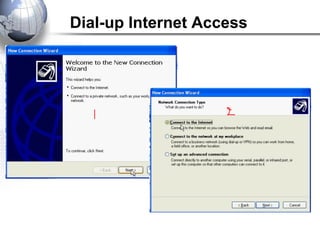
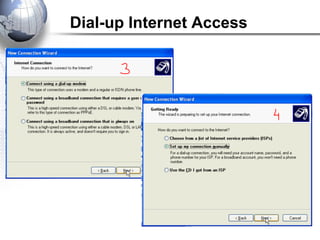
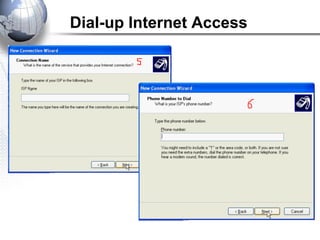
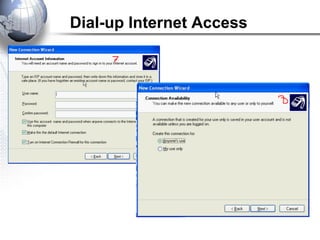
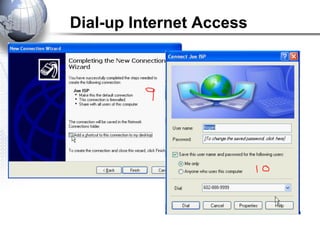
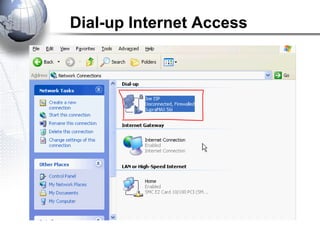
is a form of Internet access that uses the facilities of the public
switched telephone network (PSTN) to establish a dialed connection
to an Internet service provider (ISP) via telephone lines. The user's
computer or router uses an attached modem to encode and decode
Internet Protocol packets and control information into and from
analogue audio frequency signals, respectively.
Dial-up Internet Access
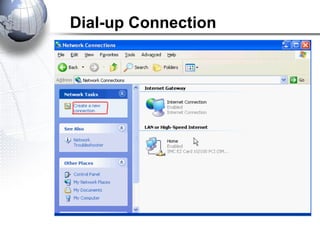
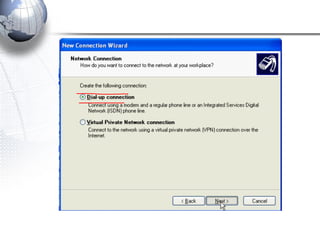
Dial-up Connection
Dial-up Internet Access
Broadband Internet Access
Broadband Internet service truly is the most used form of Internet access
because of its high access speeds; it is offered in four different forms, DSL
(or Digital Subscriber Line), also fiber-optic, cable, and satellite.
The old dial-up connection is the only non-broadband internet service available,
and even though it is cheaper, most Internet users are moving towards the
faster broadband Internet connection.
Categories of Unshielded Twisted Pair
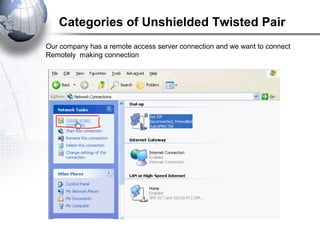
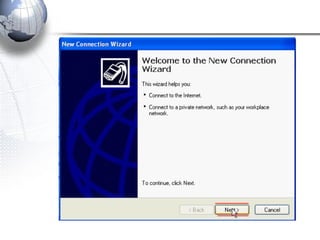
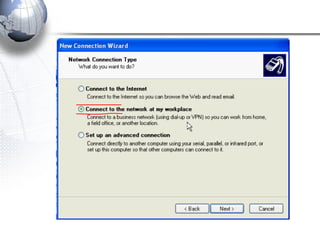
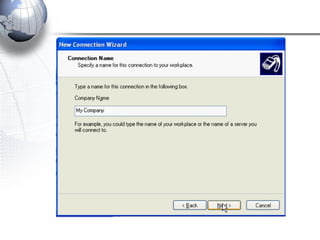
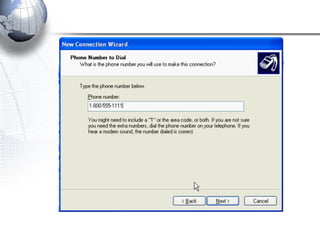
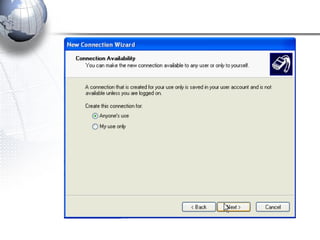
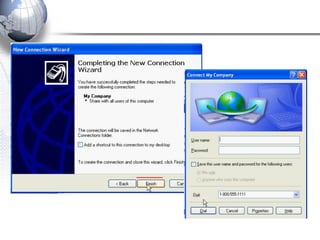
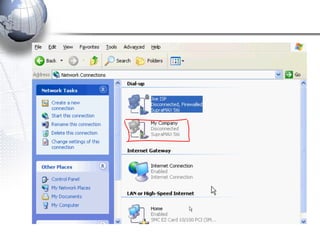
Our company has a remote access server connection and we want to connect
Remotely making connection
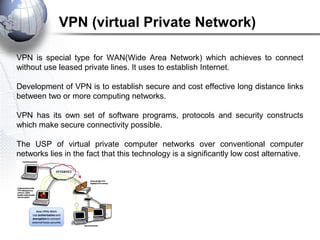
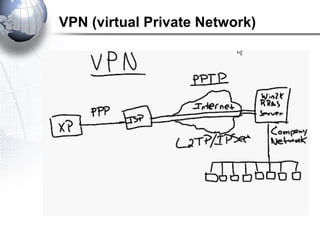
VPN is special type for WAN(Wide Area Network) which achieves to connect
without use leased private lines. It uses to establish Internet.
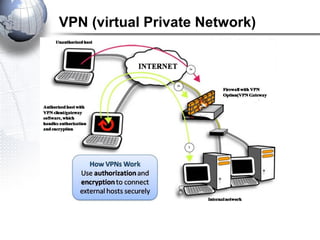
Development of VPN is to establish secure and cost effective long distance links
between two or more computing networks.
VPN has its own set of software programs, protocols and security constructs
which make secure connectivity possible.
The USP of virtual private computer networks over conventional computer
networks lies in the fact that this technology is a significantly low cost alternative.
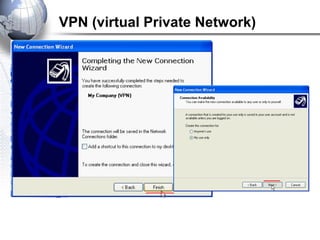
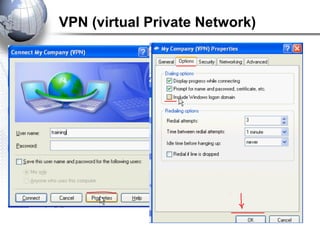
VPN (virtual Private Network)
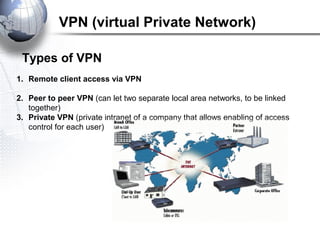
1. Remote client access via VPN
2. Peer to peer VPN (can let two separate local area networks, to be linked
together)
3. Private VPN (private intranet of a company that allows enabling of access
control for each user)
VPN (virtual Private Network)
Types of VPN
How VPN Works
Install VPN client programs on the machines which need remote access
Enable Internet connectivity provided by an ISP, after verification of user name
and password.
Access the private network easily use client remote computer.
VPN (virtual Private Network)
Benefit of VPN
Substantially easy and inexpensive to set it up
Can provide long distance connectivity, between multiple branches of a company
office, by providing secure data transfer and encryption, to enable video
conferencing, as well as data transfer.
Reduces the costs involved in maintaining long distance networks and costs of
operation.
VPN is a technology that are really cost effectiveness, efficiency and security
features of virtual private networks make them attractive and preferred choices
over conventional leased line based networks. Because of that, most industry
Intranets use VPN technology to establish internal connectivity.
VPN (virtual Private Network)
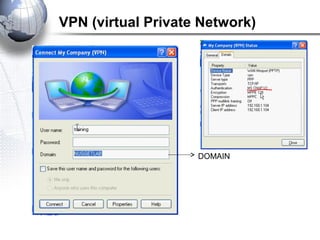
DOMAIN
VPN (virtual Private Network)
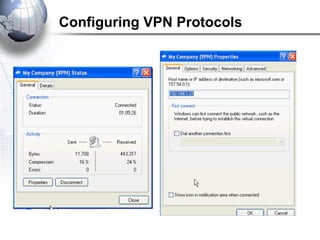
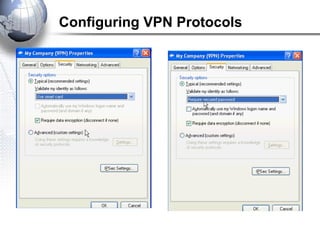
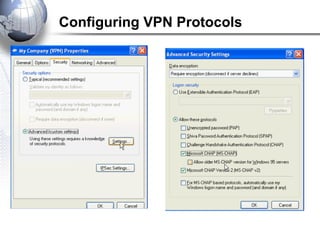
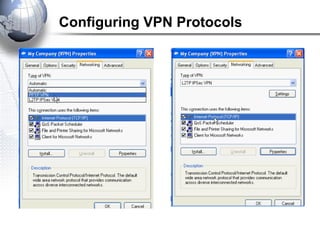
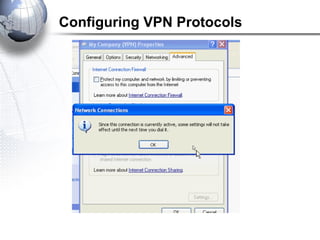
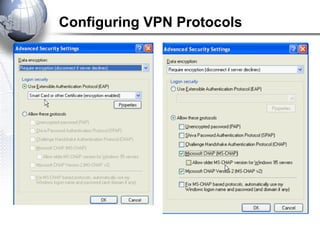
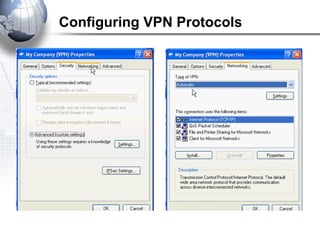
Configuring VPN Protocols
Authentication Protocols
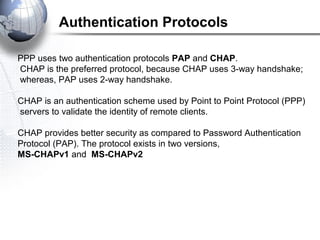
PPP uses two authentication protocols PAP and CHAP.
CHAP is the preferred protocol, because CHAP uses 3-way handshake;
whereas, PAP uses 2-way handshake.
CHAP is an authentication scheme used by Point to Point Protocol (PPP)
servers to validate the identity of remote clients.
CHAP provides better security as compared to Password Authentication
Protocol (PAP). The protocol exists in two versions,
MS-CHAPv1 and MS-CHAPv2
Authentication Protocols
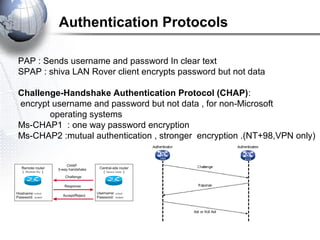
PAP : Sends username and password In clear text
SPAP : shiva LAN Rover client encrypts password but not data
Challenge-Handshake Authentication Protocol (CHAP):
encrypt username and password but not data , for non-Microsoft
operating systems
Ms-CHAP1 : one way password encryption
Ms-CHAP2 :mutual authentication , stronger encryption .(NT+98,VPN only)
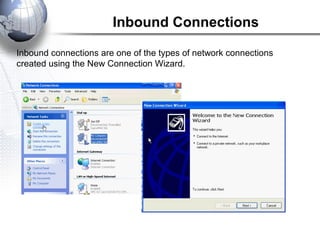
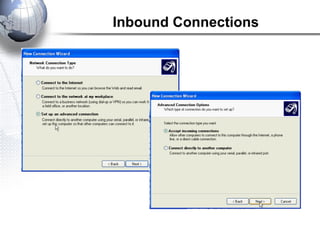
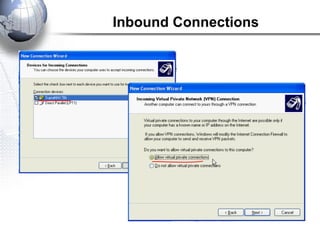
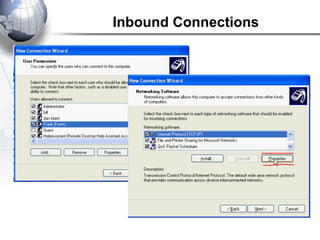
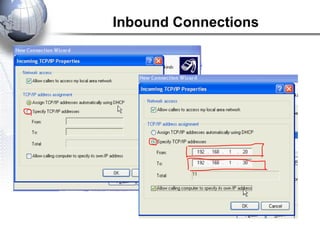
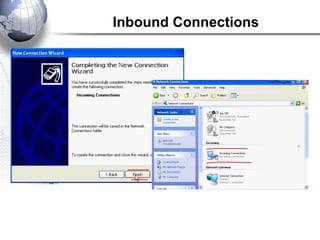
Inbound Connections
Inbound connections are one of the types of network connections
created using the New Connection Wizard.
Inbound Connections
Inbound Connections
Inbound Connections
Inbound Connections
Inbound Connections
Remote access connection

Remote access connection

  • 1.
    Remote Access Connection Ah. Fawad‘Saiq’ E-mail: ah.fawad.saiq@gmail.com Cell : 0793026501
  • 2.
    Remote and Dial-upConnections  Remote Access connections  Virtual Private Networks  Authentication Protocols and encryption  Inbound Connections
  • 3.
    We have twomethod for establish of remote access connection Remote Access connections: Dial-up PPP Broadband TCP/IP Remote and Dial-up Connections
  • 4.
    is a formof Internet access that uses the facilities of the public switched telephone network (PSTN) to establish a dialed connection to an Internet service provider (ISP) via telephone lines. The user's computer or router uses an attached modem to encode and decode Internet Protocol packets and control information into and from analogue audio frequency signals, respectively. Dial-up Internet Access
  • 5.
  • 6.
  • 7.
  • 8.
  • 9.
  • 10.
  • 11.
  • 12.
    Broadband Internet Access BroadbandInternet service truly is the most used form of Internet access because of its high access speeds; it is offered in four different forms, DSL (or Digital Subscriber Line), also fiber-optic, cable, and satellite. The old dial-up connection is the only non-broadband internet service available, and even though it is cheaper, most Internet users are moving towards the faster broadband Internet connection.
  • 13.
    Categories of UnshieldedTwisted Pair Our company has a remote access server connection and we want to connect Remotely making connection
  • 22.
    VPN is specialtype for WAN(Wide Area Network) which achieves to connect without use leased private lines. It uses to establish Internet. Development of VPN is to establish secure and cost effective long distance links between two or more computing networks. VPN has its own set of software programs, protocols and security constructs which make secure connectivity possible. The USP of virtual private computer networks over conventional computer networks lies in the fact that this technology is a significantly low cost alternative. VPN (virtual Private Network)
  • 23.
  • 24.
    1. Remote clientaccess via VPN 2. Peer to peer VPN (can let two separate local area networks, to be linked together) 3. Private VPN (private intranet of a company that allows enabling of access control for each user) VPN (virtual Private Network) Types of VPN
  • 25.
    How VPN Works InstallVPN client programs on the machines which need remote access Enable Internet connectivity provided by an ISP, after verification of user name and password. Access the private network easily use client remote computer. VPN (virtual Private Network)
  • 26.
    Benefit of VPN Substantiallyeasy and inexpensive to set it up Can provide long distance connectivity, between multiple branches of a company office, by providing secure data transfer and encryption, to enable video conferencing, as well as data transfer. Reduces the costs involved in maintaining long distance networks and costs of operation. VPN is a technology that are really cost effectiveness, efficiency and security features of virtual private networks make them attractive and preferred choices over conventional leased line based networks. Because of that, most industry Intranets use VPN technology to establish internal connectivity. VPN (virtual Private Network)
  • 27.
  • 28.
  • 29.
  • 30.
  • 31.
  • 32.
    VPN (virtual PrivateNetwork) DOMAIN
  • 33.
  • 34.
  • 35.
  • 36.
  • 37.
  • 38.
  • 39.
  • 40.
  • 41.
    Authentication Protocols PPP usestwo authentication protocols PAP and CHAP. CHAP is the preferred protocol, because CHAP uses 3-way handshake; whereas, PAP uses 2-way handshake. CHAP is an authentication scheme used by Point to Point Protocol (PPP) servers to validate the identity of remote clients. CHAP provides better security as compared to Password Authentication Protocol (PAP). The protocol exists in two versions, MS-CHAPv1 and MS-CHAPv2
  • 42.
    Authentication Protocols PAP :Sends username and password In clear text SPAP : shiva LAN Rover client encrypts password but not data Challenge-Handshake Authentication Protocol (CHAP): encrypt username and password but not data , for non-Microsoft operating systems Ms-CHAP1 : one way password encryption Ms-CHAP2 :mutual authentication , stronger encryption .(NT+98,VPN only)
  • 43.
    Inbound Connections Inbound connectionsare one of the types of network connections created using the New Connection Wizard.
  • 44.
  • 45.
  • 46.
  • 47.
  • 48.

Editor's Notes

  • #3 <Read the slide.>
  • #4 <Read the slide.>
  • #5 <Read the slide.>
  • #6 <Read the slide.>
  • #7 <Read the slide.>
  • #8 <Read the slide.>
  • #9 <Read the slide.>
  • #10 <Read the slide.>
  • #11 <Read the slide.>
  • #12 <Read the slide.>
  • #13 <Read the slide.>
  • #14 <Read the slide.>
  • #15 <Read the slide.>
  • #16 <Read the slide.>
  • #17 <Read the slide.>
  • #18 <Read the slide.>
  • #19 <Read the slide.>
  • #20 <Read the slide.>
  • #21 <Read the slide.>
  • #22 <Read the slide.>
  • #23 <Read the slide.>
  • #24 <Read the slide.>
  • #25 <Read the slide.>
  • #26 <Read the slide.>
  • #27 <Read the slide.>
  • #28 <Read the slide.>
  • #29 <Read the slide.>
  • #30 <Read the slide.>
  • #31 <Read the slide.>
  • #32 <Read the slide.>
  • #33 <Read the slide.>
  • #34 <Read the slide.>
  • #35 <Read the slide.>
  • #36 <Read the slide.>
  • #37 <Read the slide.>
  • #38 <Read the slide.>
  • #39 <Read the slide.>
  • #40 <Read the slide.>
  • #41 <Read the slide.>
  • #42 <Read the slide.>
  • #43 <Read the slide.>
  • #44 <Read the slide.>
  • #45 <Read the slide.>
  • #46 <Read the slide.>
  • #47 <Read the slide.>
  • #48 <Read the slide.>
  • #49 <Read the slide.>