1
EDITION COMPARISON |
EDITION COMPARISON
VMware vSphere®
Edition Comparison
The leader in virtualized infrastructure and your first step to
application modernization
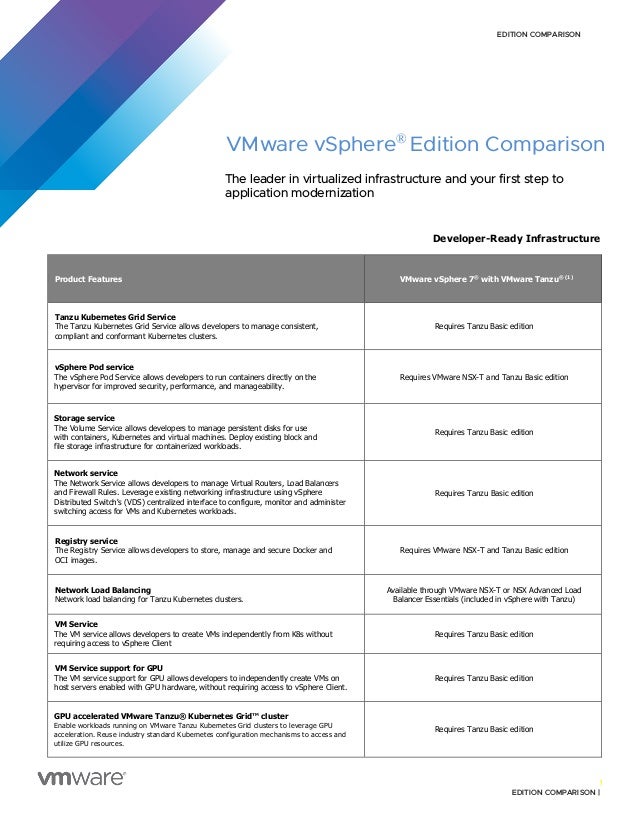
Developer-Ready Infrastructure
Product Features VMware vSphere 7®
with VMware Tanzu® (1)
Tanzu Kubernetes Grid Service
The Tanzu Kubernetes Grid Service allows developers to manage consistent,
compliant and conformant Kubernetes clusters.
Requires Tanzu Basic edition
vSphere Pod service
The vSphere Pod Service allows developers to run containers directly on the
hypervisor for improved security, performance, and manageability.
Requires VMware NSX-T and Tanzu Basic edition
Storage service
The Volume Service allows developers to manage persistent disks for use
with containers, Kubernetes and virtual machines. Deploy existing block and
file storage infrastructure for containerized workloads.
Requires Tanzu Basic edition
Network service
The Network Service allows developers to manage Virtual Routers, Load Balancers
and Firewall Rules. Leverage existing networking infrastructure using vSphere
Distributed Switch's (VDS) centralized interface to configure, monitor and administer
switching access for VMs and Kubernetes workloads.
Requires Tanzu Basic edition
Registry service
The Registry Service allows developers to store, manage and secure Docker and
OCI images.
Requires VMware NSX-T and Tanzu Basic edition
Network Load Balancing
Network load balancing for Tanzu Kubernetes clusters.
Available through VMware NSX-T or NSX Advanced Load
Balancer Essentials (included in vSphere with Tanzu)
VM Service
The VM service allows developers to create VMs independently from K8s without
requiring access to vSphere Client
Requires Tanzu Basic edition
VM Service support for GPU
The VM service support for GPU allows developers to independently create VMs on
host servers enabled with GPU hardware, without requiring access to vSphere Client.
Requires Tanzu Basic edition
GPU accelerated VMware Tanzu® Kubernetes Grid™ cluster
Enable workloads running on VMware Tanzu Kubernetes Grid clusters to leverage GPU
acceleration. Reuse industry standard Kubernetes configuration mechanisms to access and
utilize GPU resources.
Requires Tanzu Basic edition
VMware vSphere Edition Comparison
EDITION COMPARISON |
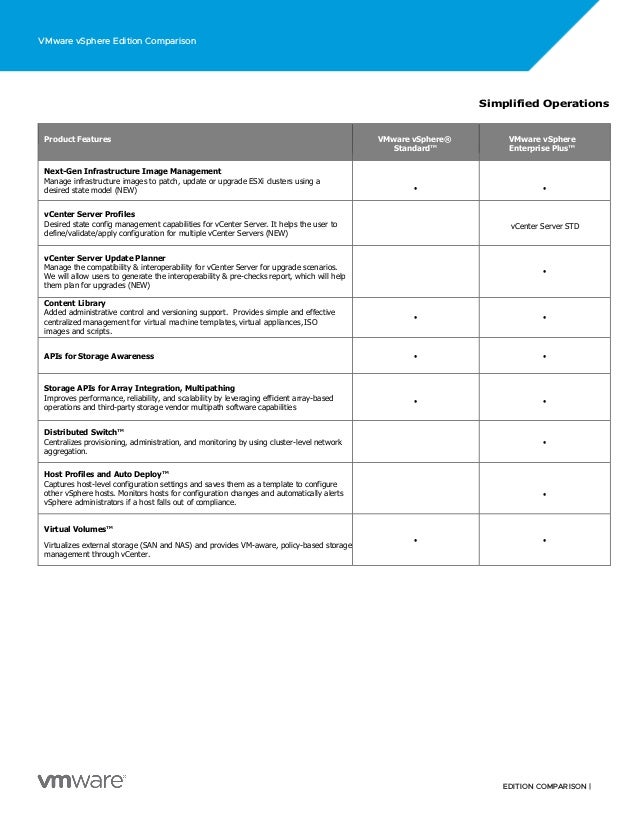
Simplified Operations
Product Features VMware vSphere®
Standard™
VMware vSphere
Enterprise Plus™
Next-Gen Infrastructure Image Management
Manage infrastructure images to patch, update or upgrade ESXi clusters using a
desired state model (NEW) • •
vCenter Server Profiles
Desired state config management capabilities for vCenter Server. It helps the user to
define/validate/apply configuration for multiple vCenter Servers (NEW)
vCenter Server STD
vCenter Server Update Planner
Manage the compatibility & interoperability for vCenter Server for upgrade scenarios.
We will allow users to generate the interoperability & pre-checks report, which will help
them plan for upgrades (NEW)
•
Content Library
Added administrative control and versioning support. Provides simple and effective
centralized management for virtual machine templates, virtual appliances, ISO
images and scripts.
• •
APIs for Storage Awareness • •
Storage APIs for Array Integration, Multipathing
Improves performance, reliability, and scalability by leveraging efficient array-based
operations and third-party storage vendor multipath software capabilities
• •
Distributed Switch™
Centralizes provisioning, administration, and monitoring by using cluster-level network
aggregation.
•
Host Profiles and Auto Deploy™
Captures host-level configuration settings and saves them as a template to configure
other vSphere hosts. Monitors hosts for configuration changes and automatically alerts
vSphere administrators if a host falls out of compliance.
•
Virtual Volumes™
Virtualizes external storage (SAN and NAS) and provides VM-aware, policy-based storage
management through vCenter.
• •
VMware vSphere Edition Comparison
EDITION COMPARISON |
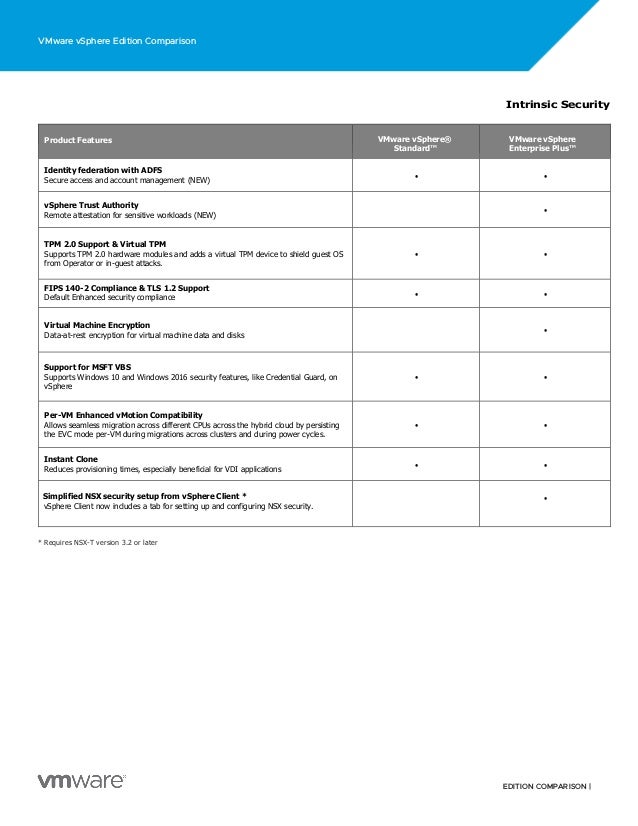
* Requires NSX-T version 3.2 or later
Intrinsic Security
Product Features VMware vSphere®
Standard™
VMware vSphere
Enterprise Plus™
Identity federation with ADFS
Secure access and account management (NEW)
• •
vSphere Trust Authority
Remote attestation for sensitive workloads (NEW)
•
TPM 2.0 Support & Virtual TPM
Supports TPM 2.0 hardware modules and adds a virtual TPM device to shield guest OS
from Operator or in-guest attacks.
• •
FIPS 140-2 Compliance & TLS 1.2 Support
Default Enhanced security compliance • •
Virtual Machine Encryption
Data-at-rest encryption for virtual machine data and disks
•
Support for MSFT VBS
Supports Windows 10 and Windows 2016 security features, like Credential Guard, on
vSphere
• •
Per-VM Enhanced vMotion Compatibility
Allows seamless migration across different CPUs across the hybrid cloud by persisting
the EVC mode per-VM during migrations across clusters and during power cycles.
• •
Instant Clone
Reduces provisioning times, especially beneficial for VDI applications
• •
Simplified NSX security setup from vSphere Client *
vSphere Client now includes a tab for setting up and configuring NSX security.
•
VMware vSphere Edition Comparison
EDITION COMPARISON |
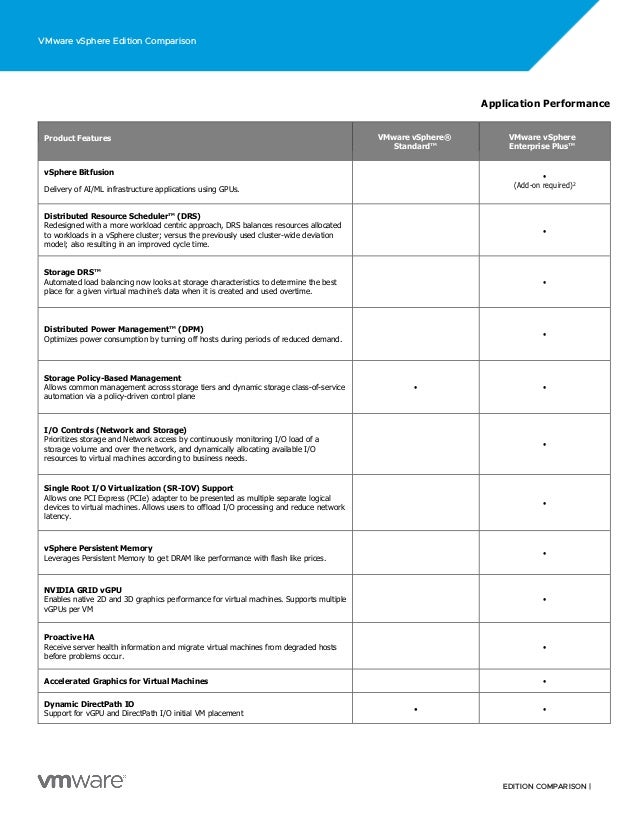
Application Performance
Product Features VMware vSphere®
Standard™
VMware vSphere
Enterprise Plus™
vSphere Bitfusion
Delivery of AI/ML infrastructure applications using GPUs.
•
(Add-on required)2
Distributed Resource Scheduler™ (DRS)
Redesigned with a more workload centric approach, DRS balances resources allocated
to workloads in a vSphere cluster; versus the previously used cluster-wide deviation
model; also resulting in an improved cycle time.
•
Storage DRS™
Automated load balancing now looks at storage characteristics to determine the best
place for a given virtual machine’s data when it is created and used overtime.
•
Distributed Power Management™ (DPM)
Optimizes power consumption by turning off hosts during periods of reduced demand.
•
Storage Policy-Based Management
Allows common management across storage tiers and dynamic storage class-of-service
automation via a policy-driven control plane
• •
I/O Controls (Network and Storage)
Prioritizes storage and Network access by continuously monitoring I/O load of a
storage volume and over the network, and dynamically allocating available I/O
resources to virtual machines according to business needs.
•
Single Root I/O Virtualization (SR-IOV) Support
Allows one PCI Express (PCIe) adapter to be presented as multiple separate logical
devices to virtual machines. Allows users to offload I/O processing and reduce network
latency.
•
vSphere Persistent Memory
Leverages Persistent Memory to get DRAM like performance with flash like prices.
•
NVIDIA GRID vGPU
Enables native 2D and 3D graphics performance for virtual machines. Supports multiple
vGPUs per VM
•
Proactive HA
Receive server health information and migrate virtual machines from degraded hosts
before problems occur.
•
Accelerated Graphics for Virtual Machines •
Dynamic DirectPath IO
Support for vGPU and DirectPath I/O initial VM placement
• •
VMware vSphere Edition Comparison
EDITION COMPARISON |
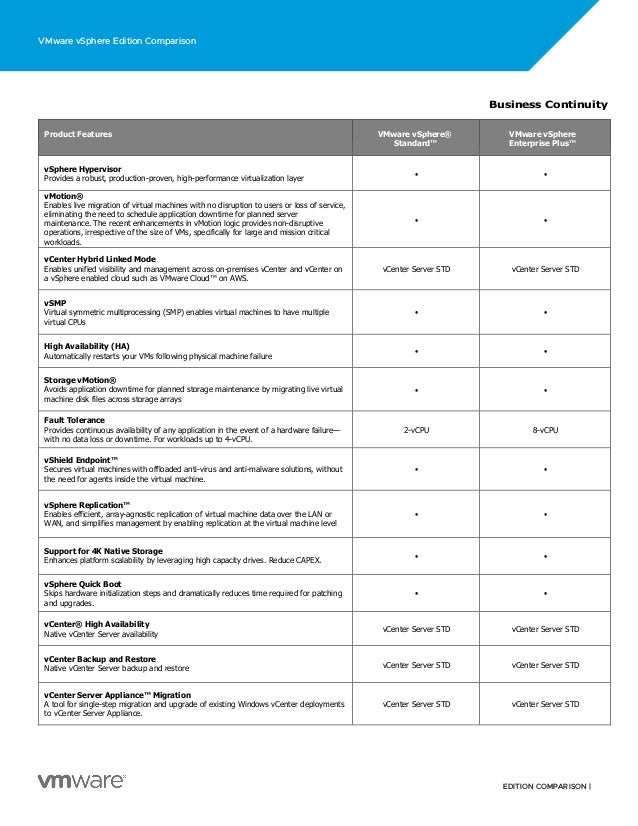
Business Continuity
Product Features VMware vSphere®
Standard™
VMware vSphere
Enterprise Plus™
vSphere Hypervisor
Provides a robust, production-proven, high-performance virtualization layer
• •
vMotion®
Enables live migration of virtual machines with no disruption to users or loss of service,
eliminating the need to schedule application downtime for planned server
maintenance. The recent enhancements in vMotion logic provides non-disruptive
operations, irrespective of the size of VMs, specifically for large and mission critical
workloads.
• •
vCenter Hybrid Linked Mode
Enables unified visibility and management across on-premises vCenter and vCenter on
a vSphere enabled cloud such as VMware Cloud™ on AWS.
vCenter Server STD vCenter Server STD
vSMP
Virtual symmetric multiprocessing (SMP) enables virtual machines to have multiple
virtual CPUs
• •
High Availability (HA)
Automatically restarts your VMs following physical machine failure
• •
Storage vMotion®
Avoids application downtime for planned storage maintenance by migrating live virtual
machine disk files across storage arrays
• •
Fault Tolerance
Provides continuous availability of any application in the event of a hardware failure—
with no data loss or downtime. For workloads up to 4-vCPU.
2-vCPU 8-vCPU
vShield Endpoint™
Secures virtual machines with offloaded anti-virus and anti-malware solutions, without
the need for agents inside the virtual machine.
• •
vSphere Replication™
Enables efficient, array-agnostic replication of virtual machine data over the LAN or
WAN, and simplifies management by enabling replication at the virtual machine level
• •
Support for 4K Native Storage
Enhances platform scalability by leveraging high capacity drives. Reduce CAPEX.
• •
vSphere Quick Boot
Skips hardware initialization steps and dramatically reduces time required for patching
and upgrades.
• •
vCenter® High Availability
Native vCenter Server availability
vCenter Server STD vCenter Server STD
vCenter Backup and Restore
Native vCenter Server backup and restore vCenter Server STD vCenter Server STD
vCenter Server Appliance™ Migration
A tool for single-step migration and upgrade of existing Windows vCenter deployments
to vCenter Server Appliance.
vCenter Server STD vCenter Server STD
VMware vSphere Edition Comparison
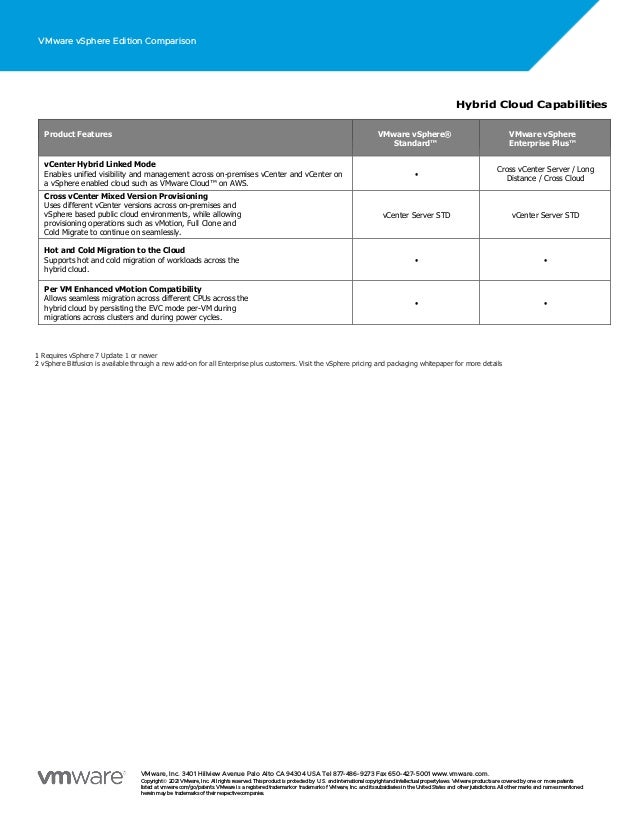
Hybrid Cloud Capabilities
Product Features VMware vSphere®
Standard™
VMware vSphere
Enterprise Plus™
vCenter Hybrid Linked Mode
Enables unified visibility and management across on-premises vCenter and vCenter on
a vSphere enabled cloud such as VMware Cloud™ on AWS.
•
Cross vCenter Server / Long
Distance / Cross Cloud
Cross vCenter Mixed Version Provisioning
Uses different vCenter versions across on-premises and
vSphere based public cloud environments, while allowing
provisioning operations such as vMotion, Full Clone and
Cold Migrate to continue on seamlessly.
vCenter Server STD vCenter Server STD
Hot and Cold Migration to the Cloud
Supports hot and cold migration of workloads across the
hybrid cloud.
• •
Per VM Enhanced vMotion Compatibility
Allows seamless migration across different CPUs across the
hybrid cloud by persisting the EVC mode per-VM during
migrations across clusters and during power cycles.
• •
1 Requires vSphere 7 Update 1 or newer
2 vSphere Bitfusion is available through a new add-on for all Enterprise plus customers. Visit the vSphere pricing and packaging whitepaper for more details
VMware, Inc. 3401 Hillview Avenue Palo Alto CA 94304 USA Tel 877-486-9273 Fax 650-427-5001 www.vmware.com.
Copyright© 2021 VMware, Inc. All rights reserved. This productis protectedby U.S. and international copyrightand intellectual propertylaws. VMware productsare coveredby one or more patents
listed at vmware.com/go/patents. VMware is a registeredtrademarkor trademarkof VMware, Inc. and its subsidiariesin the United States and other jurisdictions. All other marks and names mentioned
hereinmaybe trademarksof their respectivecompanies.

Vmw edition-comparison

  • 1.
    1 EDITION COMPARISON | EDITIONCOMPARISON VMware vSphere® Edition Comparison The leader in virtualized infrastructure and your first step to application modernization Developer-Ready Infrastructure Product Features VMware vSphere 7® with VMware Tanzu® (1) Tanzu Kubernetes Grid Service The Tanzu Kubernetes Grid Service allows developers to manage consistent, compliant and conformant Kubernetes clusters. Requires Tanzu Basic edition vSphere Pod service The vSphere Pod Service allows developers to run containers directly on the hypervisor for improved security, performance, and manageability. Requires VMware NSX-T and Tanzu Basic edition Storage service The Volume Service allows developers to manage persistent disks for use with containers, Kubernetes and virtual machines. Deploy existing block and file storage infrastructure for containerized workloads. Requires Tanzu Basic edition Network service The Network Service allows developers to manage Virtual Routers, Load Balancers and Firewall Rules. Leverage existing networking infrastructure using vSphere Distributed Switch's (VDS) centralized interface to configure, monitor and administer switching access for VMs and Kubernetes workloads. Requires Tanzu Basic edition Registry service The Registry Service allows developers to store, manage and secure Docker and OCI images. Requires VMware NSX-T and Tanzu Basic edition Network Load Balancing Network load balancing for Tanzu Kubernetes clusters. Available through VMware NSX-T or NSX Advanced Load Balancer Essentials (included in vSphere with Tanzu) VM Service The VM service allows developers to create VMs independently from K8s without requiring access to vSphere Client Requires Tanzu Basic edition VM Service support for GPU The VM service support for GPU allows developers to independently create VMs on host servers enabled with GPU hardware, without requiring access to vSphere Client. Requires Tanzu Basic edition GPU accelerated VMware Tanzu® Kubernetes Grid™ cluster Enable workloads running on VMware Tanzu Kubernetes Grid clusters to leverage GPU acceleration. Reuse industry standard Kubernetes configuration mechanisms to access and utilize GPU resources. Requires Tanzu Basic edition
  • 2.
    VMware vSphere EditionComparison EDITION COMPARISON | Simplified Operations Product Features VMware vSphere® Standard™ VMware vSphere Enterprise Plus™ Next-Gen Infrastructure Image Management Manage infrastructure images to patch, update or upgrade ESXi clusters using a desired state model (NEW) • • vCenter Server Profiles Desired state config management capabilities for vCenter Server. It helps the user to define/validate/apply configuration for multiple vCenter Servers (NEW) vCenter Server STD vCenter Server Update Planner Manage the compatibility & interoperability for vCenter Server for upgrade scenarios. We will allow users to generate the interoperability & pre-checks report, which will help them plan for upgrades (NEW) • Content Library Added administrative control and versioning support. Provides simple and effective centralized management for virtual machine templates, virtual appliances, ISO images and scripts. • • APIs for Storage Awareness • • Storage APIs for Array Integration, Multipathing Improves performance, reliability, and scalability by leveraging efficient array-based operations and third-party storage vendor multipath software capabilities • • Distributed Switch™ Centralizes provisioning, administration, and monitoring by using cluster-level network aggregation. • Host Profiles and Auto Deploy™ Captures host-level configuration settings and saves them as a template to configure other vSphere hosts. Monitors hosts for configuration changes and automatically alerts vSphere administrators if a host falls out of compliance. • Virtual Volumes™ Virtualizes external storage (SAN and NAS) and provides VM-aware, policy-based storage management through vCenter. • •
  • 3.
    VMware vSphere EditionComparison EDITION COMPARISON | * Requires NSX-T version 3.2 or later Intrinsic Security Product Features VMware vSphere® Standard™ VMware vSphere Enterprise Plus™ Identity federation with ADFS Secure access and account management (NEW) • • vSphere Trust Authority Remote attestation for sensitive workloads (NEW) • TPM 2.0 Support & Virtual TPM Supports TPM 2.0 hardware modules and adds a virtual TPM device to shield guest OS from Operator or in-guest attacks. • • FIPS 140-2 Compliance & TLS 1.2 Support Default Enhanced security compliance • • Virtual Machine Encryption Data-at-rest encryption for virtual machine data and disks • Support for MSFT VBS Supports Windows 10 and Windows 2016 security features, like Credential Guard, on vSphere • • Per-VM Enhanced vMotion Compatibility Allows seamless migration across different CPUs across the hybrid cloud by persisting the EVC mode per-VM during migrations across clusters and during power cycles. • • Instant Clone Reduces provisioning times, especially beneficial for VDI applications • • Simplified NSX security setup from vSphere Client * vSphere Client now includes a tab for setting up and configuring NSX security. •
  • 4.
    VMware vSphere EditionComparison EDITION COMPARISON | Application Performance Product Features VMware vSphere® Standard™ VMware vSphere Enterprise Plus™ vSphere Bitfusion Delivery of AI/ML infrastructure applications using GPUs. • (Add-on required)2 Distributed Resource Scheduler™ (DRS) Redesigned with a more workload centric approach, DRS balances resources allocated to workloads in a vSphere cluster; versus the previously used cluster-wide deviation model; also resulting in an improved cycle time. • Storage DRS™ Automated load balancing now looks at storage characteristics to determine the best place for a given virtual machine’s data when it is created and used overtime. • Distributed Power Management™ (DPM) Optimizes power consumption by turning off hosts during periods of reduced demand. • Storage Policy-Based Management Allows common management across storage tiers and dynamic storage class-of-service automation via a policy-driven control plane • • I/O Controls (Network and Storage) Prioritizes storage and Network access by continuously monitoring I/O load of a storage volume and over the network, and dynamically allocating available I/O resources to virtual machines according to business needs. • Single Root I/O Virtualization (SR-IOV) Support Allows one PCI Express (PCIe) adapter to be presented as multiple separate logical devices to virtual machines. Allows users to offload I/O processing and reduce network latency. • vSphere Persistent Memory Leverages Persistent Memory to get DRAM like performance with flash like prices. • NVIDIA GRID vGPU Enables native 2D and 3D graphics performance for virtual machines. Supports multiple vGPUs per VM • Proactive HA Receive server health information and migrate virtual machines from degraded hosts before problems occur. • Accelerated Graphics for Virtual Machines • Dynamic DirectPath IO Support for vGPU and DirectPath I/O initial VM placement • •
  • 5.
    VMware vSphere EditionComparison EDITION COMPARISON | Business Continuity Product Features VMware vSphere® Standard™ VMware vSphere Enterprise Plus™ vSphere Hypervisor Provides a robust, production-proven, high-performance virtualization layer • • vMotion® Enables live migration of virtual machines with no disruption to users or loss of service, eliminating the need to schedule application downtime for planned server maintenance. The recent enhancements in vMotion logic provides non-disruptive operations, irrespective of the size of VMs, specifically for large and mission critical workloads. • • vCenter Hybrid Linked Mode Enables unified visibility and management across on-premises vCenter and vCenter on a vSphere enabled cloud such as VMware Cloud™ on AWS. vCenter Server STD vCenter Server STD vSMP Virtual symmetric multiprocessing (SMP) enables virtual machines to have multiple virtual CPUs • • High Availability (HA) Automatically restarts your VMs following physical machine failure • • Storage vMotion® Avoids application downtime for planned storage maintenance by migrating live virtual machine disk files across storage arrays • • Fault Tolerance Provides continuous availability of any application in the event of a hardware failure— with no data loss or downtime. For workloads up to 4-vCPU. 2-vCPU 8-vCPU vShield Endpoint™ Secures virtual machines with offloaded anti-virus and anti-malware solutions, without the need for agents inside the virtual machine. • • vSphere Replication™ Enables efficient, array-agnostic replication of virtual machine data over the LAN or WAN, and simplifies management by enabling replication at the virtual machine level • • Support for 4K Native Storage Enhances platform scalability by leveraging high capacity drives. Reduce CAPEX. • • vSphere Quick Boot Skips hardware initialization steps and dramatically reduces time required for patching and upgrades. • • vCenter® High Availability Native vCenter Server availability vCenter Server STD vCenter Server STD vCenter Backup and Restore Native vCenter Server backup and restore vCenter Server STD vCenter Server STD vCenter Server Appliance™ Migration A tool for single-step migration and upgrade of existing Windows vCenter deployments to vCenter Server Appliance. vCenter Server STD vCenter Server STD
  • 6.
    VMware vSphere EditionComparison Hybrid Cloud Capabilities Product Features VMware vSphere® Standard™ VMware vSphere Enterprise Plus™ vCenter Hybrid Linked Mode Enables unified visibility and management across on-premises vCenter and vCenter on a vSphere enabled cloud such as VMware Cloud™ on AWS. • Cross vCenter Server / Long Distance / Cross Cloud Cross vCenter Mixed Version Provisioning Uses different vCenter versions across on-premises and vSphere based public cloud environments, while allowing provisioning operations such as vMotion, Full Clone and Cold Migrate to continue on seamlessly. vCenter Server STD vCenter Server STD Hot and Cold Migration to the Cloud Supports hot and cold migration of workloads across the hybrid cloud. • • Per VM Enhanced vMotion Compatibility Allows seamless migration across different CPUs across the hybrid cloud by persisting the EVC mode per-VM during migrations across clusters and during power cycles. • • 1 Requires vSphere 7 Update 1 or newer 2 vSphere Bitfusion is available through a new add-on for all Enterprise plus customers. Visit the vSphere pricing and packaging whitepaper for more details VMware, Inc. 3401 Hillview Avenue Palo Alto CA 94304 USA Tel 877-486-9273 Fax 650-427-5001 www.vmware.com. Copyright© 2021 VMware, Inc. All rights reserved. This productis protectedby U.S. and international copyrightand intellectual propertylaws. VMware productsare coveredby one or more patents listed at vmware.com/go/patents. VMware is a registeredtrademarkor trademarkof VMware, Inc. and its subsidiariesin the United States and other jurisdictions. All other marks and names mentioned hereinmaybe trademarksof their respectivecompanies.