HOSTED BY
VMs Performance: Static Partitioning
or Automatic Tuning
Dario Faggioli
Virtualization Software Engineer, SUSE
Dario Faggioli (he/him)
Virtualization Software Engineer at SUSE
■ Ph.D @ ReTiS Lab; soft real-time systems, co-authored
SCHED_DEADLINE
■ I’m interested in “all things performance”, exp. About
Virtualization (both evaluation & tuning)
■ @ SUSE: work on KVM & QEMU (downstream & upstream)
■ Travelling, playing with the kids, RPGs, reading
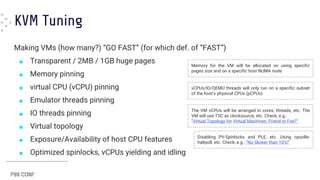
KVM Tuning
Making VMs (how many?) “GO FAST” (for which def. of “FAST”)
■ Transparent / 2MB / 1GB huge pages
■ Memory pinning
■ virtual CPU (vCPU) pinning
■ Emulator threads pinning
■ IO threads pinning
■ Virtual topology
■ Exposure/Availability of host CPU features
■ Optimized spinlocks, vCPUs yielding and idling
Memory for the VM will be allocated on using specific
pages size and on a specific host NUMA node
vCPUs/IO/QEMU threads will only run on a specific subset
of the host’s physical CPUs (pCPUs)
Disabling PV-Spinlocks and PLE, etc. Using cpuidle-
haltpoll, etc. Check, e.g.: “No Slower than 10%!”
The VM vCPUs will be arranged in cores, threads, etc. The
VM will use TSC as clocksource, etc. Check, e.g.:
“Virtual Topology for Virtual Machines: Friend or Foe?”
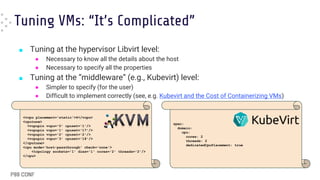
Tuning VMs: “It’s Complicated”
■ Tuning at the hypervisor Libvirt level:
● Necessary to know all the details about the host
● Necessary to specify all the properties
■ Tuning at the “middleware” (e.g., Kubevirt) level:
● Simpler to specify (for the user)
● Difficult to implement correctly (see, e.g. Kubevirt and the Cost of Containerizing VMs)
p0 p1 p2 p3 p4
v0 v1 v2 v3
p5 p0 p1 p2 p3 p4 p5
v0 v1 v2 v3
<vcpu placement='static'>4</vcpu>
<cputune>
<vcpupin vcpu='0' cpuset='1'/>
<vcpupin vcpu='1' cpuset='17'/>
<vcpupin vcpu='2' cpuset='2'/>
<vcpupin vcpu='3' cpuset='18'/>
</cputune>
<cpu mode='host-passthrough' check='none'>
<topology sockets='1' dies='1' cores='2' threads='2'/>
</cpu>
spec:
domain:
cpu:
cores: 2
threads: 2
dedicatedCpuPlacement: true
Tuning VMs is complex.
Is it worth it?
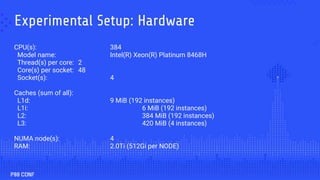
Experimental Setup: Hardware
CPU(s): 384
Model name: Intel(R) Xeon(R) Platinum 8468H
Thread(s) per core: 2
Core(s) per socket: 48
Socket(s): 4
Caches (sum of all):
L1d: 9 MiB (192 instances)
L1i: 6 MiB (192 instances)
L2: 384 MiB (192 instances)
L3: 420 MiB (4 instances)
NUMA node(s): 4
RAM: 2.0Ti (512Gi per NODE)
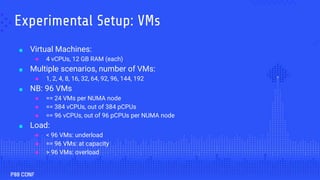
Experimental Setup: VMs
■ Virtual Machines:
● 4 vCPUs, 12 GB RAM (each)
■ Multiple scenarios, number of VMs:
● 1, 2, 4, 8, 16, 32, 64, 92, 96, 144, 192
■ NB: 96 VMs
● == 24 VMs per NUMA node
● == 384 vCPUs, out of 384 pCPUs
● == 96 vCPUs, out of 96 pCPUs per NUMA node
■ Load:
● < 96 VMs: underload
● == 96 VMs: at capacity
● > 96 VMs: overload
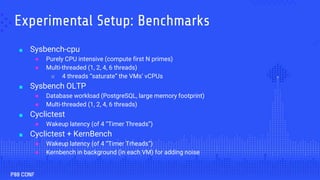
Experimental Setup: Benchmarks
■ Sysbench-cpu
● Purely CPU intensive (compute first N primes)
● Multi-threaded (1, 2, 4, 6 threads)
■ 4 threads “saturate” the VMs’ vCPUs
■ Sysbench OLTP
● Database workload (PostgreSQL, large memory footprint)
● Multi-threaded (1, 2, 4, 6 threads)
■ Cyclictest
● Wakeup latency (of 4 “Timer Threads”)
■ Cyclictest + KernBench
● Wakeup latency (of 4 “Timer Trheads”)
● Kernbench in background (in each VM) for adding noise
Tuning: Evaluated
Configurations
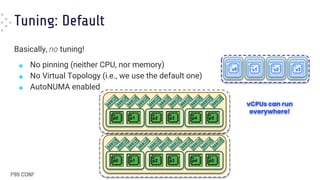
Tuning: Default
Basically, no tuning!
■ No pinning (neither CPU, nor memory)
■ No Virtual Topology (i.e., we use the default one)
■ AutoNUMA enabled
v0 v1 v2 v3
p0 p1 p2 p3 p4 p5
p0 p1 p2 p3 p4 p5
vCPUs can run
everywhere!
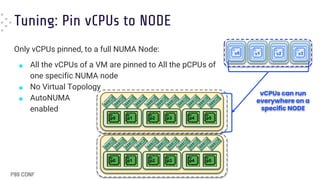
Tuning: Pin vCPUs to NODE
Only vCPUs pinned, to a full NUMA Node:
■ All the vCPUs of a VM are pinned to All the pCPUs of
one specific NUMA node
■ No Virtual Topology
■ AutoNUMA
enabled
v0 v1 v2 v3
p0 p1 p2 p3 p4 p5
p0 p1 p2 p3 p4 p5
vCPUs can run
everywhere on a
specific NODE
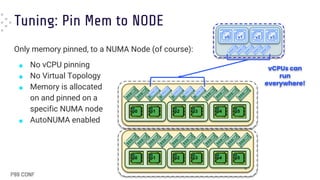
Tuning: Pin Mem to NODE
Only memory pinned, to a NUMA Node (of course):
■ No vCPU pinning
■ No Virtual Topology
■ Memory is allocated
on and pinned on a
specific NUMA node
■ AutoNUMA enabled
p0 p1 p2 p3 p4 p5
p0 p1 p2 p3 p4 p5
v0 v1 v2 v3
12
vCPUs can
run
everywhere!
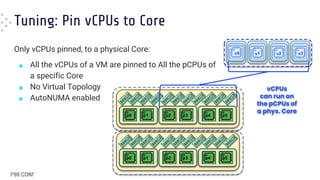
Tuning: Pin vCPUs to Core
Only vCPUs pinned, to a physical Core:
■ All the vCPUs of a VM are pinned to All the pCPUs of
a specific Core
■ No Virtual Topology
■ AutoNUMA enabled
v0 v1 v2 v3
p0 p1 p2 p3 p4 p5
p0 p1 p2 p3 p4 p5
vCPUs
can run on
the pCPUs of
a phys. Core
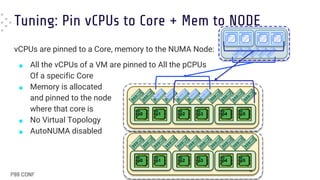
Tuning: Pin vCPUs to Core + Mem to NODE
vCPUs are pinned to a Core, memory to the NUMA Node:
■ All the vCPUs of a VM are pinned to All the pCPUs
Of a specific Core
■ Memory is allocated
and pinned to the node
where that core is
■ No Virtual Topology
■ AutoNUMA disabled
p0 p1 p2 p3 p4 p5
p0 p1 p2 p3 p4 p5
14
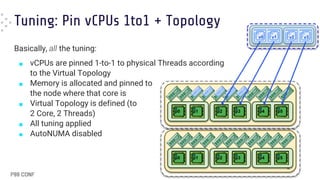
Tuning: Pin vCPUs 1to1 + Topology
Basically, all the tuning:
■ vCPUs are pinned 1-to-1 to physical Threads according
to the Virtual Topology
■ Memory is allocated and pinned to
the node where that core is
■ Virtual Topology is defined (to
2 Core, 2 Threads)
■ All tuning applied
■ AutoNUMA disabled
p0 p1 p2 p3 p4 p5
p0 p1 p2 p3 p4 p5
15
v0 v1 v2 v3
Experimental Results
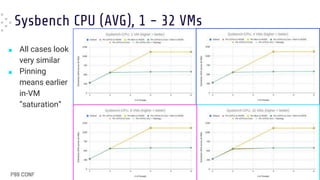
Sysbench CPU (AVG), 1 - 32 VMs
■ All cases look
very similar
■ Pinning
means earlier
in-VM
“saturation”
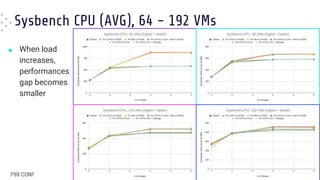
Sysbench CPU (AVG), 64 - 192 VMs
■ When load
increases,
performances
gap becomes
smaller
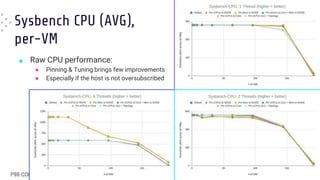
Sysbench CPU (AVG),
per-VM
■ Raw CPU performance:
● Pinning & Tuning brings few improvements
● Especially if the host is not oversubscribed
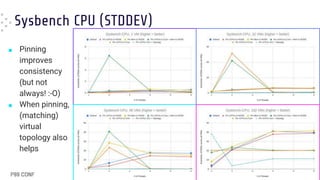
Sysbench CPU (STDDEV)
■ Pinning
improves
consistency
(but not
always! :-O)
■ When pinning,
(matching)
virtual
topology also
helps
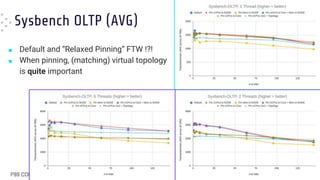
Sysbench OLTP (AVG)
■ Default and “Relaxed Pinning” FTW !?!
■ When pinning, (matching) virtual topology
is quite important
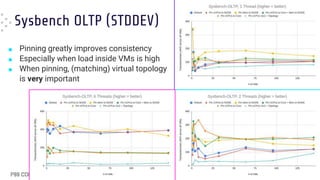
Sysbench OLTP (STDDEV)
■ Pinning greatly improves consistency
■ Especially when load inside VMs is high
■ When pinning, (matching) virtual topology
is very important
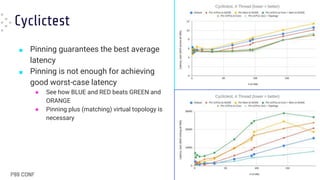
Cyclictest
■ Pinning guarantees the best average
latency
■ Pinning is not enough for achieving
good worst-case latency
● See how BLUE and RED beats GREEN and
ORANGE
● Pinning plus (matching) virtual topology is
necessary
Cyclictest +
KernelBench (noise)
■ When in [over]load pinning results in
worse average latency
● “Default” (BLUE) FTW !!
■ Pinning still gives the best worst-case
latencies
● Especially with matching topology
● “Default” (BLUE) and “Relaxed Pinning”
(RED), in this case, are both worse
(although not that far from GREEN and
ORANGE)
HOSTED BY
Conclusions
■ Tuning VMs is complex. Is it worth it?
● Depends :-|
■ Load, workload(s), metrics, …
● Check with benchmarks!
■ Keep digging:
● More combinations of
Virtual Topologies &
(Relaxed) Pinning
● Mixed Pinned/Unpinned
configurations
p0 p1 p2 p3 p4 p5
p0 p1 p2 p3 p4 p5
25
v0 v1 v2 v3
Pinned &
Dedicated
Pinned out
Of Dedicated
pCPUs
v4 v5
Dario Faggioli
dfaggioli@suse.com
@DarioFaggioli
about.me
Thank you! Let’s connect.

VM Performance: The Differences Between Static Partitioning or Automatic Tuning

  • 1.
    HOSTED BY VMs Performance:Static Partitioning or Automatic Tuning Dario Faggioli Virtualization Software Engineer, SUSE
  • 2.
    Dario Faggioli (he/him) VirtualizationSoftware Engineer at SUSE ■ Ph.D @ ReTiS Lab; soft real-time systems, co-authored SCHED_DEADLINE ■ I’m interested in “all things performance”, exp. About Virtualization (both evaluation & tuning) ■ @ SUSE: work on KVM & QEMU (downstream & upstream) ■ Travelling, playing with the kids, RPGs, reading
  • 3.
    KVM Tuning Making VMs(how many?) “GO FAST” (for which def. of “FAST”) ■ Transparent / 2MB / 1GB huge pages ■ Memory pinning ■ virtual CPU (vCPU) pinning ■ Emulator threads pinning ■ IO threads pinning ■ Virtual topology ■ Exposure/Availability of host CPU features ■ Optimized spinlocks, vCPUs yielding and idling Memory for the VM will be allocated on using specific pages size and on a specific host NUMA node vCPUs/IO/QEMU threads will only run on a specific subset of the host’s physical CPUs (pCPUs) Disabling PV-Spinlocks and PLE, etc. Using cpuidle- haltpoll, etc. Check, e.g.: “No Slower than 10%!” The VM vCPUs will be arranged in cores, threads, etc. The VM will use TSC as clocksource, etc. Check, e.g.: “Virtual Topology for Virtual Machines: Friend or Foe?”
  • 4.
    Tuning VMs: “It’sComplicated” ■ Tuning at the hypervisor Libvirt level: ● Necessary to know all the details about the host ● Necessary to specify all the properties ■ Tuning at the “middleware” (e.g., Kubevirt) level: ● Simpler to specify (for the user) ● Difficult to implement correctly (see, e.g. Kubevirt and the Cost of Containerizing VMs) p0 p1 p2 p3 p4 v0 v1 v2 v3 p5 p0 p1 p2 p3 p4 p5 v0 v1 v2 v3 <vcpu placement='static'>4</vcpu> <cputune> <vcpupin vcpu='0' cpuset='1'/> <vcpupin vcpu='1' cpuset='17'/> <vcpupin vcpu='2' cpuset='2'/> <vcpupin vcpu='3' cpuset='18'/> </cputune> <cpu mode='host-passthrough' check='none'> <topology sockets='1' dies='1' cores='2' threads='2'/> </cpu> spec: domain: cpu: cores: 2 threads: 2 dedicatedCpuPlacement: true
  • 5.
    Tuning VMs iscomplex. Is it worth it?
  • 6.
    Experimental Setup: Hardware CPU(s):384 Model name: Intel(R) Xeon(R) Platinum 8468H Thread(s) per core: 2 Core(s) per socket: 48 Socket(s): 4 Caches (sum of all): L1d: 9 MiB (192 instances) L1i: 6 MiB (192 instances) L2: 384 MiB (192 instances) L3: 420 MiB (4 instances) NUMA node(s): 4 RAM: 2.0Ti (512Gi per NODE)
  • 7.
    Experimental Setup: VMs ■Virtual Machines: ● 4 vCPUs, 12 GB RAM (each) ■ Multiple scenarios, number of VMs: ● 1, 2, 4, 8, 16, 32, 64, 92, 96, 144, 192 ■ NB: 96 VMs ● == 24 VMs per NUMA node ● == 384 vCPUs, out of 384 pCPUs ● == 96 vCPUs, out of 96 pCPUs per NUMA node ■ Load: ● < 96 VMs: underload ● == 96 VMs: at capacity ● > 96 VMs: overload
  • 8.
    Experimental Setup: Benchmarks ■Sysbench-cpu ● Purely CPU intensive (compute first N primes) ● Multi-threaded (1, 2, 4, 6 threads) ■ 4 threads “saturate” the VMs’ vCPUs ■ Sysbench OLTP ● Database workload (PostgreSQL, large memory footprint) ● Multi-threaded (1, 2, 4, 6 threads) ■ Cyclictest ● Wakeup latency (of 4 “Timer Threads”) ■ Cyclictest + KernBench ● Wakeup latency (of 4 “Timer Trheads”) ● Kernbench in background (in each VM) for adding noise
  • 9.
  • 10.
    Tuning: Default Basically, notuning! ■ No pinning (neither CPU, nor memory) ■ No Virtual Topology (i.e., we use the default one) ■ AutoNUMA enabled v0 v1 v2 v3 p0 p1 p2 p3 p4 p5 p0 p1 p2 p3 p4 p5 vCPUs can run everywhere!
  • 11.
    Tuning: Pin vCPUsto NODE Only vCPUs pinned, to a full NUMA Node: ■ All the vCPUs of a VM are pinned to All the pCPUs of one specific NUMA node ■ No Virtual Topology ■ AutoNUMA enabled v0 v1 v2 v3 p0 p1 p2 p3 p4 p5 p0 p1 p2 p3 p4 p5 vCPUs can run everywhere on a specific NODE
  • 12.
    Tuning: Pin Memto NODE Only memory pinned, to a NUMA Node (of course): ■ No vCPU pinning ■ No Virtual Topology ■ Memory is allocated on and pinned on a specific NUMA node ■ AutoNUMA enabled p0 p1 p2 p3 p4 p5 p0 p1 p2 p3 p4 p5 v0 v1 v2 v3 12 vCPUs can run everywhere!
  • 13.
    Tuning: Pin vCPUsto Core Only vCPUs pinned, to a physical Core: ■ All the vCPUs of a VM are pinned to All the pCPUs of a specific Core ■ No Virtual Topology ■ AutoNUMA enabled v0 v1 v2 v3 p0 p1 p2 p3 p4 p5 p0 p1 p2 p3 p4 p5 vCPUs can run on the pCPUs of a phys. Core
  • 14.
    Tuning: Pin vCPUsto Core + Mem to NODE vCPUs are pinned to a Core, memory to the NUMA Node: ■ All the vCPUs of a VM are pinned to All the pCPUs Of a specific Core ■ Memory is allocated and pinned to the node where that core is ■ No Virtual Topology ■ AutoNUMA disabled p0 p1 p2 p3 p4 p5 p0 p1 p2 p3 p4 p5 14
  • 15.
    Tuning: Pin vCPUs1to1 + Topology Basically, all the tuning: ■ vCPUs are pinned 1-to-1 to physical Threads according to the Virtual Topology ■ Memory is allocated and pinned to the node where that core is ■ Virtual Topology is defined (to 2 Core, 2 Threads) ■ All tuning applied ■ AutoNUMA disabled p0 p1 p2 p3 p4 p5 p0 p1 p2 p3 p4 p5 15 v0 v1 v2 v3
  • 16.
  • 17.
    Sysbench CPU (AVG),1 - 32 VMs ■ All cases look very similar ■ Pinning means earlier in-VM “saturation”
  • 18.
    Sysbench CPU (AVG),64 - 192 VMs ■ When load increases, performances gap becomes smaller
  • 19.
    Sysbench CPU (AVG), per-VM ■Raw CPU performance: ● Pinning & Tuning brings few improvements ● Especially if the host is not oversubscribed
  • 20.
    Sysbench CPU (STDDEV) ■Pinning improves consistency (but not always! :-O) ■ When pinning, (matching) virtual topology also helps
  • 21.
    Sysbench OLTP (AVG) ■Default and “Relaxed Pinning” FTW !?! ■ When pinning, (matching) virtual topology is quite important
  • 22.
    Sysbench OLTP (STDDEV) ■Pinning greatly improves consistency ■ Especially when load inside VMs is high ■ When pinning, (matching) virtual topology is very important
  • 23.
    Cyclictest ■ Pinning guaranteesthe best average latency ■ Pinning is not enough for achieving good worst-case latency ● See how BLUE and RED beats GREEN and ORANGE ● Pinning plus (matching) virtual topology is necessary
  • 24.
    Cyclictest + KernelBench (noise) ■When in [over]load pinning results in worse average latency ● “Default” (BLUE) FTW !! ■ Pinning still gives the best worst-case latencies ● Especially with matching topology ● “Default” (BLUE) and “Relaxed Pinning” (RED), in this case, are both worse (although not that far from GREEN and ORANGE)
  • 25.
    HOSTED BY Conclusions ■ TuningVMs is complex. Is it worth it? ● Depends :-| ■ Load, workload(s), metrics, … ● Check with benchmarks! ■ Keep digging: ● More combinations of Virtual Topologies & (Relaxed) Pinning ● Mixed Pinned/Unpinned configurations p0 p1 p2 p3 p4 p5 p0 p1 p2 p3 p4 p5 25 v0 v1 v2 v3 Pinned & Dedicated Pinned out Of Dedicated pCPUs v4 v5
  • 26.