Visualization of Enrollment
Data using Chord Diagrams
L. Blasco-Soplon, J. Grau-Valldosera, J. Minguillón
Universitat Oberta de Catalunya
Barcelona, Spain
Context
● UOC: fully online open university
– Learners with very diverse backgrounds
– No enrollment requirements
● How many subjects?
● Which ones?
– Recommendations from
● Subject / course / degree planning (text / table based)
● Mentor
● “Common sense”
● First enrollment is known to be “critical”
Visualization of Enrollment Data using Chord Diagrams – GRAPP 2015, Berlin, Germany
Learning Analytics
● Plenty of available data
– Since 1994 (EHEA / Bologna degrees since 2008)
– Thousands of students each semester
● Hundreds per degree
– Tens of thousands of subject combinations
– Academic performance
● Subject level (PASS / FAIL)
● Semester level (dropout)
● Can we do it better?
Visualization of Enrollment Data using Chord Diagrams – GRAPP 2015, Berlin, Germany
Our proposal
● Analyze subject combinations
– 2 x 2 contingency tables (PASS / FAIL)
● Visualize enrollment data
– Intra-semester
– Inter-semester
●
Provide better support (esp. 1st
semester)
– Learners: adjust enrollment
– Mentors: improve recommendations
– Degree managers: reduce dropout
Visualization of Enrollment Data using Chord Diagrams – GRAPP 2015, Berlin, Germany
Available data (I)
● Paper: Business and Economics degree
– From Spring 1999 to Spring 2011 (25 semesters)
– 21792 learners
– 501 different subjects
– 328467 subject enrollments
● New data from EHEA B&E degree (10 sems.)
– 5930 learners
– 64 different subjects (59 in the 1st
semester)
– 63460 subject enrollments (17610 in the 1st
sem.)
Visualization of Enrollment Data using Chord Diagrams – GRAPP 2015, Berlin, Germany
Available data (II)
● First semester only:
– High dropout rates
– Are learners following institutional advice?
● 5698 learners take 2 or more subjects
– 17378 subject enrollments
– 59 different subjects
● 13 subjects: 90.6% of learners, 20 subjects: 95.5%
– 764 different subject combinations
● 129 combinations: 90.0% of learners
Visualization of Enrollment Data using Chord Diagrams – GRAPP 2015, Berlin, Germany
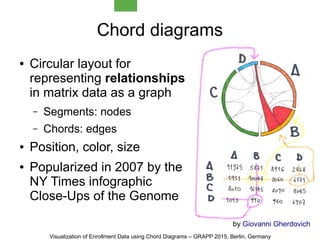
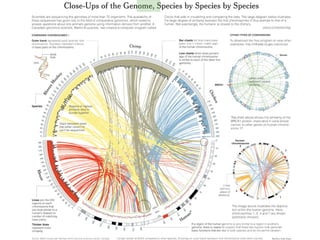
Chord diagrams
● Circular layout for
representing relationships
in matrix data as a graph
– Segments: nodes
– Chords: edges
● Position, color, size
● Popularized in 2007 by the
NY Times infographic
Close-Ups of the Genome
by Giovanni Gherdovich
Visualization of Enrollment Data using Chord Diagrams – GRAPP 2015, Berlin, Germany
Why chords?
● Explore new ways to provide support
● Subjects can be sorted clockwise
– From most to least popular subject (size)
– Each subject can be independently colored
according to its own PASS / FAIL ratio
● Subject combinations
– Popularity + % of learners passing / failing one / two
subjects
● Available in D3.js
– Interactivity “included” as part of the visualization
Visualization of Enrollment Data using Chord Diagrams – GRAPP 2015, Berlin, Germany
Chord parametrization
● Number of segments
– Number of chords grows quadratically
– Up to 10 segments looks fine, 6-8 seems optimal
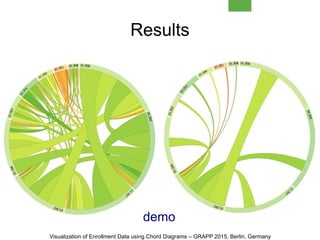
● Segment colors
– From red (FAIL) to green (PASS) through yellow
– Other thresholds can be used: [0, 0.4, 0.6, 1]
● Chord colors
– Percentage of learners passing the two subjects
– Same red-yellow-green coloring
Visualization of Enrollment Data using Chord Diagrams – GRAPP 2015, Berlin, Germany
Interactivity
● By default, show
– Subjects
● Size: Importance (number of learners)
● Color: Perfomance (PASS / FAIL ratio)
– Chords
● Size: Number of learners taking such combination
● Color: Number of learners passing the two subjects
● Interaction
– On a segment: info about that subject and its
combinations with other subjects
– On a chord: info about that combination
Visualization of Enrollment Data using Chord Diagrams – GRAPP 2015, Berlin, Germany
Results
demo
Visualization of Enrollment Data using Chord Diagrams – GRAPP 2015, Berlin, Germany
Conclusions
● Pros:
– Compact visualization, nice aesthetics
● Easy to understand (green: OK, red: KO)
– Interactivity reduces data overload
– Easy integration into any web based system
● Cons:
– 13 subjects generate 13*12/2=78 chords!
● Lack of data for non-common subjects / combinations
– Even the simplest visualization needs explanation
– What about blind / colorblind learners?
Visualization of Enrollment Data using Chord Diagrams – GRAPP 2015, Berlin, Germany
Current and future work
● Evaluate the visualization compared to tables
● Explore other visualization types
– Concentric chord diagrams (inter-semester)
– D3.js: parallel sets, ...
● Include other parameters
– Learners' satisfaction
– Total time spent in the subject
– Weight as a inter-semester dropout factor
● Integrate it into the UOC enrollment process
Visualization of Enrollment Data using Chord Diagrams – GRAPP 2015, Berlin, Germany
Thank you!
jminguillona[at]uoc[dot]edu
twitter/@jminguillona
http://bit.ly/1wcZCBk
Visualization of Enrollment Data using Chord Diagrams – GRAPP 2015, Berlin, Germany

Visualization of Enrollment data using Chord Diagrams - GRAPP 2015

  • 1.
    Visualization of Enrollment Datausing Chord Diagrams L. Blasco-Soplon, J. Grau-Valldosera, J. Minguillón Universitat Oberta de Catalunya Barcelona, Spain
  • 2.
    Context ● UOC: fullyonline open university – Learners with very diverse backgrounds – No enrollment requirements ● How many subjects? ● Which ones? – Recommendations from ● Subject / course / degree planning (text / table based) ● Mentor ● “Common sense” ● First enrollment is known to be “critical” Visualization of Enrollment Data using Chord Diagrams – GRAPP 2015, Berlin, Germany
  • 3.
    Learning Analytics ● Plentyof available data – Since 1994 (EHEA / Bologna degrees since 2008) – Thousands of students each semester ● Hundreds per degree – Tens of thousands of subject combinations – Academic performance ● Subject level (PASS / FAIL) ● Semester level (dropout) ● Can we do it better? Visualization of Enrollment Data using Chord Diagrams – GRAPP 2015, Berlin, Germany
  • 4.
    Our proposal ● Analyzesubject combinations – 2 x 2 contingency tables (PASS / FAIL) ● Visualize enrollment data – Intra-semester – Inter-semester ● Provide better support (esp. 1st semester) – Learners: adjust enrollment – Mentors: improve recommendations – Degree managers: reduce dropout Visualization of Enrollment Data using Chord Diagrams – GRAPP 2015, Berlin, Germany
  • 5.
    Available data (I) ●Paper: Business and Economics degree – From Spring 1999 to Spring 2011 (25 semesters) – 21792 learners – 501 different subjects – 328467 subject enrollments ● New data from EHEA B&E degree (10 sems.) – 5930 learners – 64 different subjects (59 in the 1st semester) – 63460 subject enrollments (17610 in the 1st sem.) Visualization of Enrollment Data using Chord Diagrams – GRAPP 2015, Berlin, Germany
  • 6.
    Available data (II) ●First semester only: – High dropout rates – Are learners following institutional advice? ● 5698 learners take 2 or more subjects – 17378 subject enrollments – 59 different subjects ● 13 subjects: 90.6% of learners, 20 subjects: 95.5% – 764 different subject combinations ● 129 combinations: 90.0% of learners Visualization of Enrollment Data using Chord Diagrams – GRAPP 2015, Berlin, Germany
  • 7.
    Chord diagrams ● Circularlayout for representing relationships in matrix data as a graph – Segments: nodes – Chords: edges ● Position, color, size ● Popularized in 2007 by the NY Times infographic Close-Ups of the Genome by Giovanni Gherdovich Visualization of Enrollment Data using Chord Diagrams – GRAPP 2015, Berlin, Germany
  • 9.
    Why chords? ● Explorenew ways to provide support ● Subjects can be sorted clockwise – From most to least popular subject (size) – Each subject can be independently colored according to its own PASS / FAIL ratio ● Subject combinations – Popularity + % of learners passing / failing one / two subjects ● Available in D3.js – Interactivity “included” as part of the visualization Visualization of Enrollment Data using Chord Diagrams – GRAPP 2015, Berlin, Germany
  • 10.
    Chord parametrization ● Numberof segments – Number of chords grows quadratically – Up to 10 segments looks fine, 6-8 seems optimal ● Segment colors – From red (FAIL) to green (PASS) through yellow – Other thresholds can be used: [0, 0.4, 0.6, 1] ● Chord colors – Percentage of learners passing the two subjects – Same red-yellow-green coloring Visualization of Enrollment Data using Chord Diagrams – GRAPP 2015, Berlin, Germany
  • 11.
    Interactivity ● By default,show – Subjects ● Size: Importance (number of learners) ● Color: Perfomance (PASS / FAIL ratio) – Chords ● Size: Number of learners taking such combination ● Color: Number of learners passing the two subjects ● Interaction – On a segment: info about that subject and its combinations with other subjects – On a chord: info about that combination Visualization of Enrollment Data using Chord Diagrams – GRAPP 2015, Berlin, Germany
  • 12.
    Results demo Visualization of EnrollmentData using Chord Diagrams – GRAPP 2015, Berlin, Germany
  • 13.
    Conclusions ● Pros: – Compactvisualization, nice aesthetics ● Easy to understand (green: OK, red: KO) – Interactivity reduces data overload – Easy integration into any web based system ● Cons: – 13 subjects generate 13*12/2=78 chords! ● Lack of data for non-common subjects / combinations – Even the simplest visualization needs explanation – What about blind / colorblind learners? Visualization of Enrollment Data using Chord Diagrams – GRAPP 2015, Berlin, Germany
  • 14.
    Current and futurework ● Evaluate the visualization compared to tables ● Explore other visualization types – Concentric chord diagrams (inter-semester) – D3.js: parallel sets, ... ● Include other parameters – Learners' satisfaction – Total time spent in the subject – Weight as a inter-semester dropout factor ● Integrate it into the UOC enrollment process Visualization of Enrollment Data using Chord Diagrams – GRAPP 2015, Berlin, Germany
  • 15.
    Thank you! jminguillona[at]uoc[dot]edu twitter/@jminguillona http://bit.ly/1wcZCBk Visualization ofEnrollment Data using Chord Diagrams – GRAPP 2015, Berlin, Germany