
Visual Search A behind-the-scenes look at image retrieval Amit Prabhudesai SAIT-India
Outline What  is  Visual search? Use-cases & applications Basics of a Image Retrieval system Descriptors Similarity measures Indexing schemes How do you measure performance?
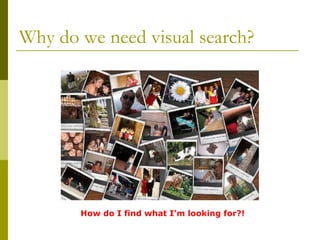
Why do we need visual search? How do I find what I’m looking for?!
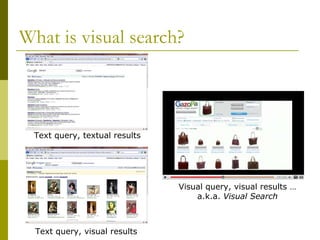
What is visual search? Text query, textual results Text query, visual results Visual query, visual results … a.k.a.  Visual Search
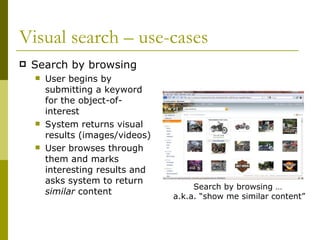
Visual search – use-cases Search by browsing User begins by submitting a keyword for the object-of-interest System returns visual results (images/videos) User browses through them and marks interesting results and asks system to return  similar  content Search by browsing …  a.k.a. “show me similar content”
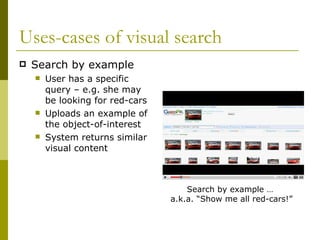
Uses-cases of visual search Search by example User has a specific query – e.g. she may be looking for red-cars Uploads an example of the object-of-interest System returns similar visual content Search by example …  a.k.a. “Show me all red-cars!”
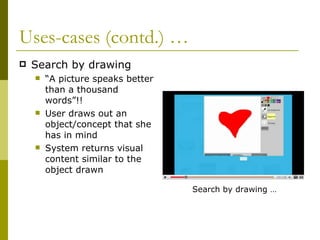
Uses-cases (contd.) …  Search by drawing “ A picture speaks better than a thousand words”!!  User draws out an object/concept that she has in mind System returns visual content similar to the object drawn Search by drawing …
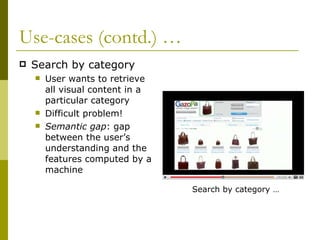
Use-cases (contd.) … Search by category User wants to retrieve all visual content in a particular category Difficult problem!  Semantic gap : gap between the user’s understanding and the features computed by a machine Search by category …
Applications of visual search Art galleries & museum management  Searching product catalogs Architectural & engineering design Geographical information systems  Picture archiving Law-enforcement & criminal investigations
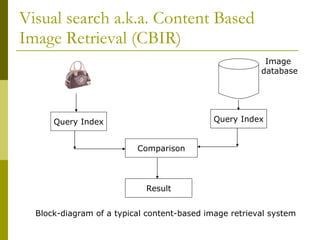
Visual search a.k.a. Content Based Image Retrieval (CBIR) Block-diagram of a typical content-based image retrieval system Comparison Query Index Query Index Result Image  database
Components of a CBIR system Image content descriptor  Compute machine-understandable attributes Similarity/distance metrics Measure the similarity (or lack thereof) between query and database sample Indexing schemes  How do you efficiently search the image/visual content database Relevance feedback Use the users’ choices to improve retrieval Performance measurement Metrics to measure effectiveness
Image content descriptors Different attributes are used Color  Shape Texture  Spatial layout
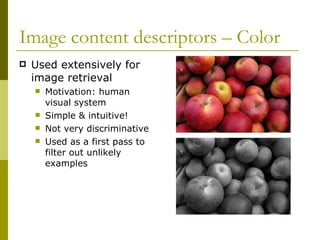
Image content descriptors – Color  Used extensively for image retrieval  Motivation: human visual system  Simple & intuitive! Not very discriminative Used as a first pass to filter out unlikely examples
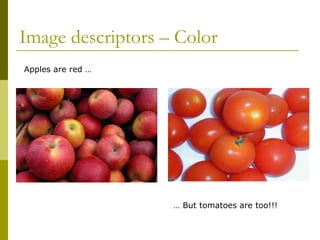
Image descriptors – Color  Apples are red …  …  But tomatoes are too!!!
Image descriptors – Color  Color descriptors Color histograms – local/global Color moments Color coherence vector Color correlogram
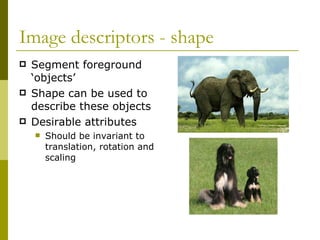
Image descriptors - shape Segment foreground ‘objects’  Shape can be used to describe these objects Desirable attributes Should be invariant to translation, rotation and scaling
Image descriptors – shape  Classical shape representation uses moment variants Boundary based methods Turning function or Turning angle Geometrical attributes Aspect ratios, (relative) dimensions
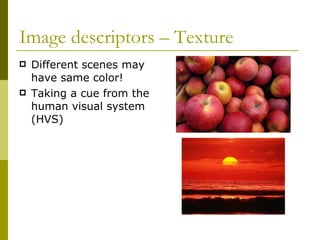
Image descriptors – Texture Different scenes may have same color! Taking a cue from the human visual system (HVS)
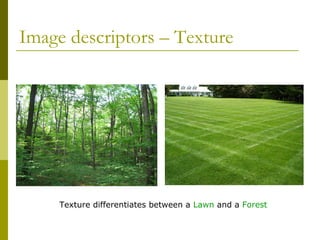
Image descriptors – Texture  Texture differentiates between a  Lawn  and a  Forest
Image descriptors – Texture  Wavelet transform features Multi-resolution approach to texture analysis Texture described at various scales Gabor filter features Orientation and scale-tunable line (bar) detector Tamura features & Wold features Based on characteristics like coarseness, contrast, directionality, regularity (or lack thereof)
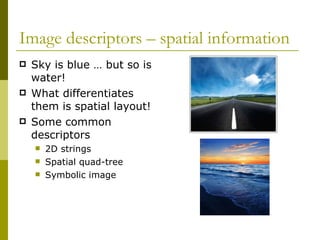
Image descriptors – spatial information Sky is blue … but so is water!  What differentiates them is spatial layout! Some common descriptors 2D strings Spatial quad-tree Symbolic image
The whole is greater than the sum of the parts!!  Any one simple descriptor cannot give results required in ‘usable’ systems! State-of-the-art systems use combination of descriptors
Similarity/distance measures Exact match cannot be found! Similarity/distance measured by Quadratic-form distance Mahalanobis distance Minkowski-form distance Histogram intersection Kullback-Leibler divergence Target application decides which distance measure is used
Indexing scheme Features typically have high dimensionality Efficient indexing becomes a critical performance issue Dimensionality reduction (e.g., PCA) R-tree, linear quad-trees, K-d-B-Tree, grid files
Performance Evaluation Precision Precision is the fraction of retrieved images that are indeed relevant to the query Recall Recall is the fraction of relevant images returned by the query Trade-off between precision and recall Recall tends to increase as # retrieved items increases; precision decreases
What is out there? Some Web Resources http://labs.ideeinc.com/multicolr/   http://www.gazopa.com/ http:// www.bing.com /images
Thank You

Visual Search

  • 1.
    Visual Search Abehind-the-scenes look at image retrieval Amit Prabhudesai SAIT-India
  • 2.
    Outline What is Visual search? Use-cases & applications Basics of a Image Retrieval system Descriptors Similarity measures Indexing schemes How do you measure performance?
  • 3.
    Why do weneed visual search? How do I find what I’m looking for?!
  • 4.
    What is visualsearch? Text query, textual results Text query, visual results Visual query, visual results … a.k.a. Visual Search
  • 5.
    Visual search –use-cases Search by browsing User begins by submitting a keyword for the object-of-interest System returns visual results (images/videos) User browses through them and marks interesting results and asks system to return similar content Search by browsing … a.k.a. “show me similar content”
  • 6.
    Uses-cases of visualsearch Search by example User has a specific query – e.g. she may be looking for red-cars Uploads an example of the object-of-interest System returns similar visual content Search by example … a.k.a. “Show me all red-cars!”
  • 7.
    Uses-cases (contd.) … Search by drawing “ A picture speaks better than a thousand words”!! User draws out an object/concept that she has in mind System returns visual content similar to the object drawn Search by drawing …
  • 8.
    Use-cases (contd.) …Search by category User wants to retrieve all visual content in a particular category Difficult problem! Semantic gap : gap between the user’s understanding and the features computed by a machine Search by category …
  • 9.
    Applications of visualsearch Art galleries & museum management Searching product catalogs Architectural & engineering design Geographical information systems Picture archiving Law-enforcement & criminal investigations
  • 10.
    Visual search a.k.a.Content Based Image Retrieval (CBIR) Block-diagram of a typical content-based image retrieval system Comparison Query Index Query Index Result Image database
  • 11.
    Components of aCBIR system Image content descriptor Compute machine-understandable attributes Similarity/distance metrics Measure the similarity (or lack thereof) between query and database sample Indexing schemes How do you efficiently search the image/visual content database Relevance feedback Use the users’ choices to improve retrieval Performance measurement Metrics to measure effectiveness
  • 12.
    Image content descriptorsDifferent attributes are used Color Shape Texture Spatial layout
  • 13.
    Image content descriptors– Color Used extensively for image retrieval Motivation: human visual system Simple & intuitive! Not very discriminative Used as a first pass to filter out unlikely examples
  • 14.
    Image descriptors –Color Apples are red … … But tomatoes are too!!!
  • 15.
    Image descriptors –Color Color descriptors Color histograms – local/global Color moments Color coherence vector Color correlogram
  • 16.
    Image descriptors -shape Segment foreground ‘objects’ Shape can be used to describe these objects Desirable attributes Should be invariant to translation, rotation and scaling
  • 17.
    Image descriptors –shape Classical shape representation uses moment variants Boundary based methods Turning function or Turning angle Geometrical attributes Aspect ratios, (relative) dimensions
  • 18.
    Image descriptors –Texture Different scenes may have same color! Taking a cue from the human visual system (HVS)
  • 19.
    Image descriptors –Texture Texture differentiates between a Lawn and a Forest
  • 20.
    Image descriptors –Texture Wavelet transform features Multi-resolution approach to texture analysis Texture described at various scales Gabor filter features Orientation and scale-tunable line (bar) detector Tamura features & Wold features Based on characteristics like coarseness, contrast, directionality, regularity (or lack thereof)
  • 21.
    Image descriptors –spatial information Sky is blue … but so is water! What differentiates them is spatial layout! Some common descriptors 2D strings Spatial quad-tree Symbolic image
  • 22.
    The whole isgreater than the sum of the parts!! Any one simple descriptor cannot give results required in ‘usable’ systems! State-of-the-art systems use combination of descriptors
  • 23.
    Similarity/distance measures Exactmatch cannot be found! Similarity/distance measured by Quadratic-form distance Mahalanobis distance Minkowski-form distance Histogram intersection Kullback-Leibler divergence Target application decides which distance measure is used
  • 24.
    Indexing scheme Featurestypically have high dimensionality Efficient indexing becomes a critical performance issue Dimensionality reduction (e.g., PCA) R-tree, linear quad-trees, K-d-B-Tree, grid files
  • 25.
    Performance Evaluation PrecisionPrecision is the fraction of retrieved images that are indeed relevant to the query Recall Recall is the fraction of relevant images returned by the query Trade-off between precision and recall Recall tends to increase as # retrieved items increases; precision decreases
  • 26.
    What is outthere? Some Web Resources http://labs.ideeinc.com/multicolr/ http://www.gazopa.com/ http:// www.bing.com /images
  • 27.