VISUAL DESIGN SPM 4342: Pembangunan Multimedia Berasaskan Web
What is visual design ? What exactly constitutes  good  visual design (aka interface design or presentation design). Introduction
Visual Design: Planning how your web site will look. What  colours  will look good together on your site? What  fonts or styles  you will use for the written part of your web pages? What  graphics and multimedia  effects are needed? How will all of these elements be combined or  arrange  into an attractive  layout ? Visualizing Your Web Site
A background that reflects the theme. Colours or Images Foreground elements that reflect the theme. Content and Links (title, headings, sub headings, body text, illustrations, captions) Other elements that support the theme. Text, images, buttons, navigation bars, animation, video, etc. Elements of User Interface
Choose a visual theme –connected to your content. Use template concepts– consistent Use table or division (div) or frame  for layout/arranging your visual elements. General Issues
Typography Keep it simple Limit number of fonts per page and per site Use the same fonts consistently throughout the site Make good font choices Sans serif vs. serif ? Commonly installed fonts Mood Readability Will be discuss in details at later lessons… General Issues
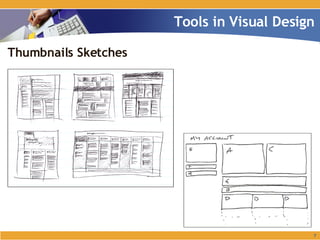
Thumbnails Sketches Tools in Visual Design
Thumbnails Sketches Help designer think about the visual aspects of the web pages they are designing. To help make choices about web site’s presentation design. Storyboard vs Thumbnails Sketches? Storyboard – helps on web site’s interaction. Thumbnails – help to focus on how web pages will look. Tools in Visual Design
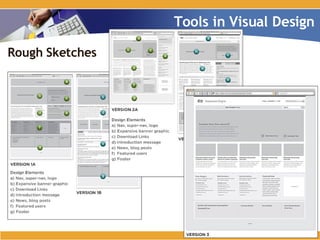
Rough Sketches Tools in Visual Design
Rough Sketches Usually choose 2 or 3 of the thumbnails to develop further. This more developed sketch is called rough sketches. More carefully drawn – proportions are more accurate. Tools in Visual Design
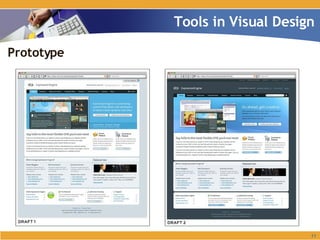
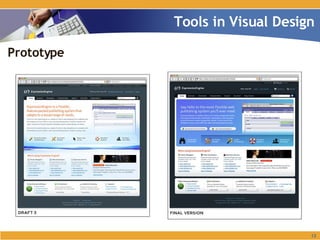
Prototype Tools in Visual Design
Thank You ! www.jz-media.com

Visual Design

  • 1.
    VISUAL DESIGN SPM4342: Pembangunan Multimedia Berasaskan Web
  • 2.
    What is visualdesign ? What exactly constitutes good visual design (aka interface design or presentation design). Introduction
  • 3.
    Visual Design: Planninghow your web site will look. What colours will look good together on your site? What fonts or styles you will use for the written part of your web pages? What graphics and multimedia effects are needed? How will all of these elements be combined or arrange into an attractive layout ? Visualizing Your Web Site
  • 4.
    A background thatreflects the theme. Colours or Images Foreground elements that reflect the theme. Content and Links (title, headings, sub headings, body text, illustrations, captions) Other elements that support the theme. Text, images, buttons, navigation bars, animation, video, etc. Elements of User Interface
  • 5.
    Choose a visualtheme –connected to your content. Use template concepts– consistent Use table or division (div) or frame for layout/arranging your visual elements. General Issues
  • 6.
    Typography Keep itsimple Limit number of fonts per page and per site Use the same fonts consistently throughout the site Make good font choices Sans serif vs. serif ? Commonly installed fonts Mood Readability Will be discuss in details at later lessons… General Issues
  • 7.
    Thumbnails Sketches Toolsin Visual Design
  • 8.
    Thumbnails Sketches Helpdesigner think about the visual aspects of the web pages they are designing. To help make choices about web site’s presentation design. Storyboard vs Thumbnails Sketches? Storyboard – helps on web site’s interaction. Thumbnails – help to focus on how web pages will look. Tools in Visual Design
  • 9.
    Rough Sketches Toolsin Visual Design
  • 10.
    Rough Sketches Usuallychoose 2 or 3 of the thumbnails to develop further. This more developed sketch is called rough sketches. More carefully drawn – proportions are more accurate. Tools in Visual Design
  • 11.
    Prototype Tools inVisual Design
  • 12.
    Prototype Tools inVisual Design
  • 13.
    Thank You !www.jz-media.com