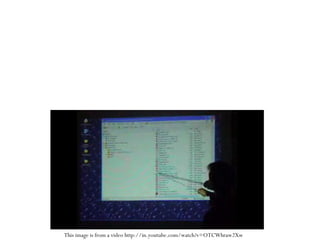
Virtual Touch Screen This image is from a video http://in.youtube.com/watch?v=OTCWhraw2Xw
Team Members K.JAGADEESH  - 660752022 V.PRASANTHI  - 660752044 K.SUPRIYA  - 660752025 K.CHANDRASEKHAR  - 660752020 M.CHAKRADHAR  - 660752037  Team Guide :  Mercy Vinolia  (Asst.Professor) CSE Department
Objective Objective of our project is to develop an application that provides a means of accessing the control of basic computer operations using a laser light and a webcam. User normally handles his operations using mouse and keyboard. These may not be easiest way at every time.  Programming Language : C# in .NET Framework
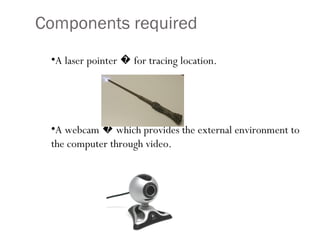
Components required A laser pointer � for tracing location. A webcam � which provides the external environment to the computer through video.
Analysis Webcam is located so that it exactly captures  the projected area. A red color laser light is preferred and external light effects should be minimum. A webcam is installed with its driver.
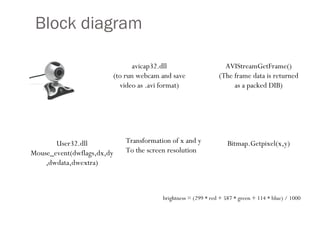
Block diagram avicap32.dll (to run webcam and save video as .avi format) AVIStreamGetFrame() (The frame data is returned as a packed DIB) Bitmap.Getpixel(x,y) brightness = (299 * red + 587 * green + 114 * blue) / 1000 User32.dll Mouse_event(dwflags,dx,dy,dwdata,dwextra) Transformation of x and y To the screen resolution
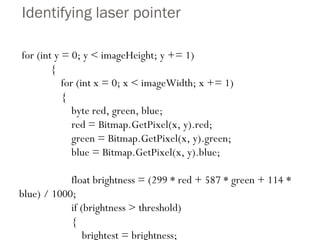
Identifying laser pointer for (int y = 0; y < imageHeight; y += 1) { for (int x = 0; x < imageWidth; x += 1) { byte red, green, blue; red = Bitmap.GetPixel(x, y).red; green = Bitmap.GetPixel(x, y).green; blue = Bitmap.GetPixel(x, y).blue; float brightness = (299 * red + 587 * green + 114 * blue) / 1000; if (brightness > threshold) { brightest = brightness; xPos = x; yPos = y; brightnessFound = true; } // x loop }}
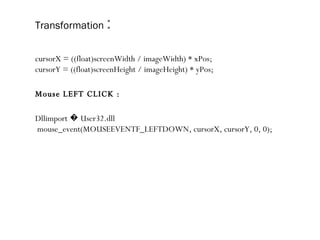
Transformation   : cursorX = ((float)screenWidth / imageWidth) * xPos; cursorY = ((float)screenHeight / imageHeight) * yPos; Mouse LEFT CLICK : Dllimport � User32.dll mouse_event(MOUSEEVENTF_LEFTDOWN, cursorX, cursorY, 0, 0);

virtualtouchscreen

  • 1.
    Virtual Touch ScreenThis image is from a video http://in.youtube.com/watch?v=OTCWhraw2Xw
  • 2.
    Team Members K.JAGADEESH - 660752022 V.PRASANTHI - 660752044 K.SUPRIYA - 660752025 K.CHANDRASEKHAR - 660752020 M.CHAKRADHAR - 660752037 Team Guide : Mercy Vinolia (Asst.Professor) CSE Department
  • 3.
    Objective Objective ofour project is to develop an application that provides a means of accessing the control of basic computer operations using a laser light and a webcam. User normally handles his operations using mouse and keyboard. These may not be easiest way at every time. Programming Language : C# in .NET Framework
  • 4.
    Components required Alaser pointer � for tracing location. A webcam � which provides the external environment to the computer through video.
  • 5.
    Analysis Webcam islocated so that it exactly captures the projected area. A red color laser light is preferred and external light effects should be minimum. A webcam is installed with its driver.
  • 6.
    Block diagram avicap32.dll(to run webcam and save video as .avi format) AVIStreamGetFrame() (The frame data is returned as a packed DIB) Bitmap.Getpixel(x,y) brightness = (299 * red + 587 * green + 114 * blue) / 1000 User32.dll Mouse_event(dwflags,dx,dy,dwdata,dwextra) Transformation of x and y To the screen resolution
  • 7.
    Identifying laser pointerfor (int y = 0; y < imageHeight; y += 1) { for (int x = 0; x < imageWidth; x += 1) { byte red, green, blue; red = Bitmap.GetPixel(x, y).red; green = Bitmap.GetPixel(x, y).green; blue = Bitmap.GetPixel(x, y).blue; float brightness = (299 * red + 587 * green + 114 * blue) / 1000; if (brightness > threshold) { brightest = brightness; xPos = x; yPos = y; brightnessFound = true; } // x loop }}
  • 8.
    Transformation : cursorX = ((float)screenWidth / imageWidth) * xPos; cursorY = ((float)screenHeight / imageHeight) * yPos; Mouse LEFT CLICK : Dllimport � User32.dll mouse_event(MOUSEEVENTF_LEFTDOWN, cursorX, cursorY, 0, 0);