DATA TYPES & VARIABLES
Introduction to Programming
with Python
CS 1213
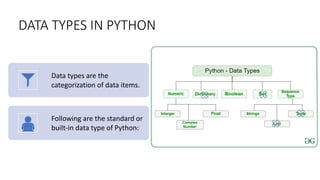
DATA TYPES IN PYTHON
Data types are the
categorization of data items.
Following are the standard or
built-in data type of Python:
Numeric Data Types
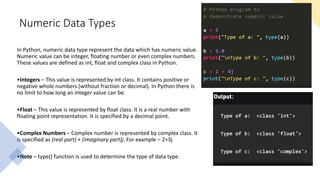
In Python, numeric data type represent the data which has numeric value.
Numeric value can be integer, floating number or even complex numbers.
These values are defined as int, float and complex class in Python.
•Integers – This value is represented by int class. It contains positive or
negative whole numbers (without fraction or decimal). In Python there is
no limit to how long an integer value can be.
•Float – This value is represented by float class. It is a real number with
floating point representation. It is specified by a decimal point.
•Complex Numbers – Complex number is represented by complex class. It
is specified as (real part) + (imaginary part)j. For example – 2+3j
•Note – type() function is used to determine the type of data type.
Boolean Data Type
• Data type with one of the two
built-in values, True or False.
• Note – True and False with capital
‘T’ and ‘F’ are valid booleans
otherwise python will throw an
error.
Sequence Data Type
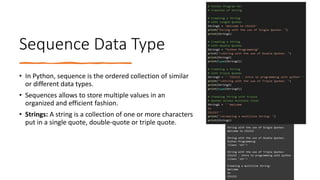
• In Python, sequence is the ordered collection of similar
or different data types.
• Sequences allows to store multiple values in an
organized and efficient fashion.
• Strings: A string is a collection of one or more characters
put in a single quote, double-quote or triple quote.
What is a Variable?
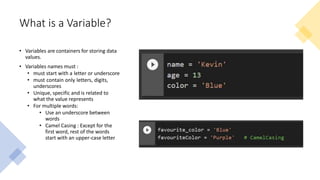
• Variables are containers for storing data
values.
• Variables names must :
• must start with a letter or underscore
• must contain only letters, digits,
underscores
• Unique, specific and is related to
what the value represents
• For multiple words:
• Use an underscore between
words
• Camel Casing : Except for the
first word, rest of the words
start with an upper-case letter
Print a Variable
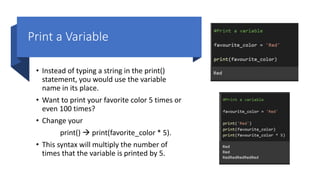
• Instead of typing a string in the print()
statement, you would use the variable
name in its place.
• Want to print your favorite color 5 times or
even 100 times?
• Change your
print()  print(favorite_color * 5).
• This syntax will multiply the number of
times that the variable is printed by 5.
Update a Variable
• Variables can be used however many times
you’d like throughout your code.
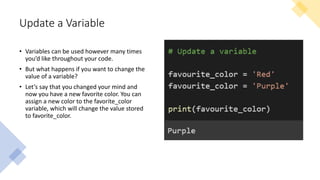
• But what happens if you want to change the
value of a variable?
• Let’s say that you changed your mind and
now you have a new favorite color. You can
assign a new color to the favorite_color
variable, which will change the value stored
to favorite_color.
Quiz Time!!!!
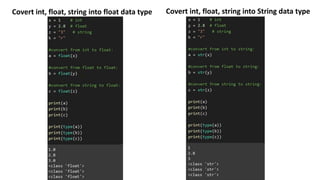
Data Type Casting
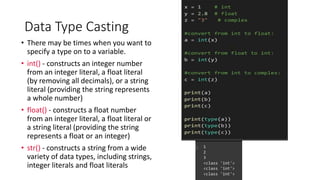
• There may be times when you want to
specify a type on to a variable.
• int() - constructs an integer number
from an integer literal, a float literal
(by removing all decimals), or a string
literal (providing the string represents
a whole number)
• float() - constructs a float number
from an integer literal, a float literal or
a string literal (providing the string
represents a float or an integer)
• str() - constructs a string from a wide
variety of data types, including strings,
integer literals and float literals
Covert int, float, string into float data type Covert int, float, string into String data type
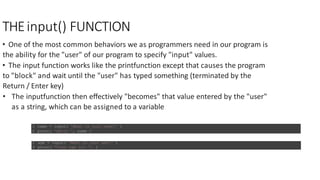
THEinput() FUNCTION
• One of the most common behaviors we as programmers need in our program is
the ability for the "user" of our program to specify "input" values.
• The input function works like the printfunction except that causes the program
to "block" and wait until the "user" has typed something (terminated by the
Return / Enter key)
• The inputfunction then effectively "becomes" that value entered by the "user"
as a string, which can be assigned to a variable
1 name = input( 'What is your name?' )
2 print( 'Hello ', name )
1 age = input( 'What is your age?' )
2 print( “Your age is: ”, )

Variables&DataTypes.pptx

  • 1.
    DATA TYPES &VARIABLES Introduction to Programming with Python CS 1213
  • 2.
    DATA TYPES INPYTHON Data types are the categorization of data items. Following are the standard or built-in data type of Python:
  • 3.
    Numeric Data Types InPython, numeric data type represent the data which has numeric value. Numeric value can be integer, floating number or even complex numbers. These values are defined as int, float and complex class in Python. •Integers – This value is represented by int class. It contains positive or negative whole numbers (without fraction or decimal). In Python there is no limit to how long an integer value can be. •Float – This value is represented by float class. It is a real number with floating point representation. It is specified by a decimal point. •Complex Numbers – Complex number is represented by complex class. It is specified as (real part) + (imaginary part)j. For example – 2+3j •Note – type() function is used to determine the type of data type.
  • 4.
    Boolean Data Type •Data type with one of the two built-in values, True or False. • Note – True and False with capital ‘T’ and ‘F’ are valid booleans otherwise python will throw an error.
  • 5.
    Sequence Data Type •In Python, sequence is the ordered collection of similar or different data types. • Sequences allows to store multiple values in an organized and efficient fashion. • Strings: A string is a collection of one or more characters put in a single quote, double-quote or triple quote.
  • 6.
    What is aVariable? • Variables are containers for storing data values. • Variables names must : • must start with a letter or underscore • must contain only letters, digits, underscores • Unique, specific and is related to what the value represents • For multiple words: • Use an underscore between words • Camel Casing : Except for the first word, rest of the words start with an upper-case letter
  • 7.
    Print a Variable •Instead of typing a string in the print() statement, you would use the variable name in its place. • Want to print your favorite color 5 times or even 100 times? • Change your print()  print(favorite_color * 5). • This syntax will multiply the number of times that the variable is printed by 5.
  • 8.
    Update a Variable •Variables can be used however many times you’d like throughout your code. • But what happens if you want to change the value of a variable? • Let’s say that you changed your mind and now you have a new favorite color. You can assign a new color to the favorite_color variable, which will change the value stored to favorite_color.
  • 9.
  • 10.
    Data Type Casting •There may be times when you want to specify a type on to a variable. • int() - constructs an integer number from an integer literal, a float literal (by removing all decimals), or a string literal (providing the string represents a whole number) • float() - constructs a float number from an integer literal, a float literal or a string literal (providing the string represents a float or an integer) • str() - constructs a string from a wide variety of data types, including strings, integer literals and float literals
  • 11.
    Covert int, float,string into float data type Covert int, float, string into String data type
  • 12.
    THEinput() FUNCTION • Oneof the most common behaviors we as programmers need in our program is the ability for the "user" of our program to specify "input" values. • The input function works like the printfunction except that causes the program to "block" and wait until the "user" has typed something (terminated by the Return / Enter key) • The inputfunction then effectively "becomes" that value entered by the "user" as a string, which can be assigned to a variable 1 name = input( 'What is your name?' ) 2 print( 'Hello ', name ) 1 age = input( 'What is your age?' ) 2 print( “Your age is: ”, )