2013/07/06 shin1x1
第2回 JAWS-UG神戸
もう XAMPP / MAMP はいらない!
Vagrant を
Web開発環境に使う
@shin1x1
(c) 2013 Masashi Shinbara @shin1x1
Shin x blog
http://www.1x1.jp/blog/
PHP / DevOps / AWS /
Varnish / Fabric / Chef
開発環境
(c) 2013 Masashi Shinbara @shin1x1
Web開発あるある
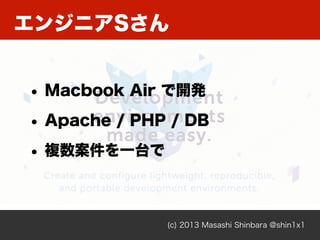
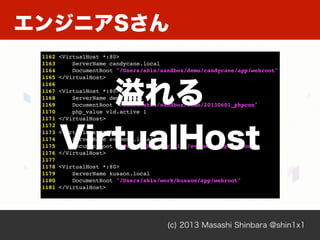
エンジニアSさん
(c) 2013 Masashi Shinbara @shin1x1
• Macbook Air で開発
• Apache / PHP / DB
• 複数案件を一台で
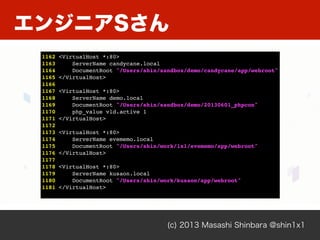
エンジニアSさん
(c) 2013 Masashi Shinbara @shin1x1
1162 <VirtualHost *:80>
1163 ServerName candycane.local
1164 DocumentRoot "/Users/shin/sandbox/demo/candycane/app/webroot"
1165 </VirtualHost>
1166
1167 <VirtualHost *:80>
1168 ServerName demo.local
1169 DocumentRoot "/Users/shin/sandbox/demo/20130601_phpcon"
1170 php_value vld.active 1
1171 </VirtualHost>
1172
1173 <VirtualHost *:80>
1174 ServerName project1.local
1175 DocumentRoot "/Users/shin/project1/app/webroot"
1176 </VirtualHost>
1177
1178 <VirtualHost *:80>
1179 ServerName project2.local
1180 DocumentRoot "/Users/shin/project2/app/webroot"
1181 </VirtualHost>
エンジニアSさん
(c) 2013 Masashi Shinbara @shin1x1
1162 <VirtualHost *:80>
1163 ServerName candycane.local
1164 DocumentRoot "/Users/shin/sandbox/demo/candycane/app/webroot"
1165 </VirtualHost>
1166
1167 <VirtualHost *:80>
1168 ServerName demo.local
1169 DocumentRoot "/Users/shin/sandbox/demo/20130601_phpcon"
1170 php_value vld.active 1
1171 </VirtualHost>
1172
1173 <VirtualHost *:80>
1174 ServerName project1.local
1175 DocumentRoot "/Users/shin/project1/app/webroot"
1176 </VirtualHost>
1177
1178 <VirtualHost *:80>
1179 ServerName project2.local
1180 DocumentRoot "/Users/shin/project2/app/webroot"
1181 </VirtualHost>
溢れる
VirtualHost
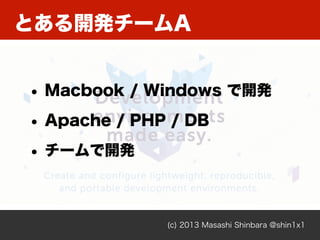
とある開発チームA
(c) 2013 Masashi Shinbara @shin1x1
• Macbook / Windows で開発
• Apache / PHP / DB
• チームで開発
とある開発チームA
(c) 2013 Masashi Shinbara @shin1x1
あれ?動かない。
何か変なコード書いた?
こっちは動いてるよ。
モジュール入れないとダメだよ。
とある開発チームA
(c) 2013 Masashi Shinbara @shin1x1
あれ?動かない。
何か変なコード書いた?
こっちは動いてるよ。
モジュール入れないとダメだよ。
俺の環境では動く
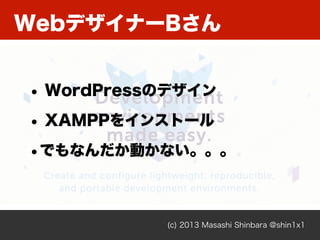
WebデザイナーBさん
(c) 2013 Masashi Shinbara @shin1x1
• WordPressのデザイン
• XAMPPをインストール
•でもなんだか動かない。。。
(c) 2013 Masashi Shinbara @shin1x1
WebデザイナーBさん
(c) 2013 Masashi Shinbara @shin1x1
WebデザイナーBさん
Port 80 は
俺のモノ
そんなあなたに
(c) 2013 Masashi Shinbara @shin1x1
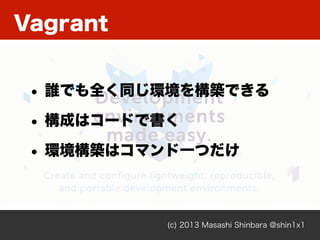
Vagrant
(c) 2013 Masashi Shinbara @shin1x1
• 誰でも全く同じ環境を構築できる
• 構成はコードで書く
• 環境構築はコマンド一つだけ
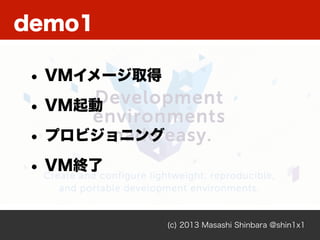
demo1
(c) 2013 Masashi Shinbara @shin1x1
httpd サーバ
demo1
(c) 2013 Masashi Shinbara @shin1x1
• VMイメージ取得
• VM起動
• プロビジョニング
• VM終了
demo1
(c) 2013 Masashi Shinbara @shin1x1
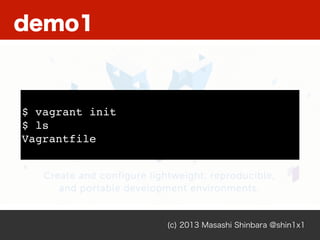
$ vagrant init
$ ls
Vagrantfile
(c) 2013 Masashi Shinbara @shin1x1
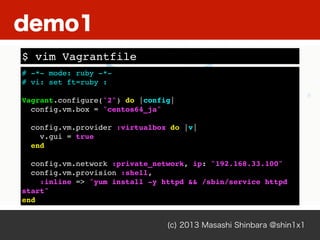
# -*- mode: ruby -*-
# vi: set ft=ruby :
Vagrant.configure("2") do |config|
config.vm.box = "centos64_ja"
config.vm.provider :virtualbox do |v|
v.gui = true
end
config.vm.network :private_network, ip: "192.168.33.100"
config.vm.provision :shell,
:inline => "yum install -y httpd && /sbin/service httpd
start"
end
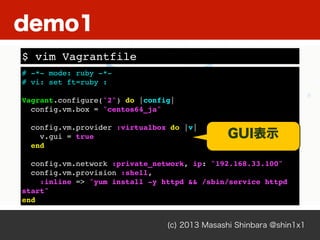
$ vim Vagrantfile
demo1
(c) 2013 Masashi Shinbara @shin1x1
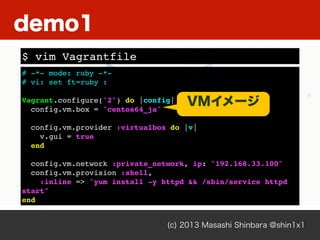
# -*- mode: ruby -*-
# vi: set ft=ruby :
Vagrant.configure("2") do |config|
config.vm.box = "centos64_ja"
config.vm.provider :virtualbox do |v|
v.gui = true
end
config.vm.network :private_network, ip: "192.168.33.100"
config.vm.provision :shell,
:inline => "yum install -y httpd && /sbin/service httpd
start"
end
$ vim Vagrantfile
demo1
VMイメージ
(c) 2013 Masashi Shinbara @shin1x1
# -*- mode: ruby -*-
# vi: set ft=ruby :
Vagrant.configure("2") do |config|
config.vm.box = "centos64_ja"
config.vm.provider :virtualbox do |v|
v.gui = true
end
config.vm.network :private_network, ip: "192.168.33.100"
config.vm.provision :shell,
:inline => "yum install -y httpd && /sbin/service httpd
start"
end
$ vim Vagrantfile
demo1
GUI表示
(c) 2013 Masashi Shinbara @shin1x1
# -*- mode: ruby -*-
# vi: set ft=ruby :
Vagrant.configure("2") do |config|
config.vm.box = "centos64_ja"
config.vm.provider :virtualbox do |v|
v.gui = true
end
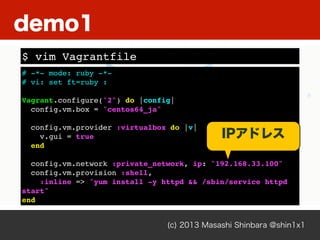
config.vm.network :private_network, ip: "192.168.33.100"
config.vm.provision :shell,
:inline => "yum install -y httpd && /sbin/service httpd
start"
end
$ vim Vagrantfile
demo1
IPアドレス
(c) 2013 Masashi Shinbara @shin1x1
# -*- mode: ruby -*-
# vi: set ft=ruby :
Vagrant.configure("2") do |config|
config.vm.box = "centos64_ja"
config.vm.provider :virtualbox do |v|
v.gui = true
end
config.vm.network :private_network, ip: "192.168.33.100"
config.vm.provision :shell,
:inline => "yum install -y httpd && /sbin/service httpd
start"
end
$ vim Vagrantfile
demo1
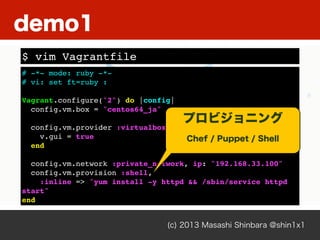
プロビジョニング
Chef / Puppet / Shell
(c) 2013 Masashi Shinbara @shin1x1
$ vagrant up
Bringing machine 'default' up with 'virtualbox' provider...
[default] Importing base box 'centos64_ja'...
demo1
(c) 2013 Masashi Shinbara @shin1x1
[default] Running provisioner: shell...
[default] Running: inline script
Loaded plugins: fastestmirror
Determining fastest mirrors
* base: ftp.iij.ad.jp
* extras: ftp.iij.ad.jp
* updates: ftp.iij.ad.jp
Setting up Install Process
Resolving Dependencies
--> Running transaction check
---> Package httpd.x86_64 0:2.2.15-28.el6.centos will be
installed
demo1
(c) 2013 Masashi Shinbara @shin1x1
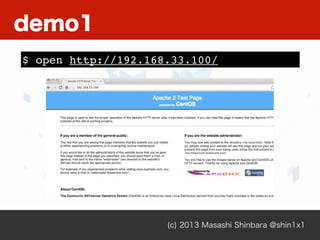
$ open http://192.168.33.100/
demo1
(c) 2013 Masashi Shinbara @shin1x1
$ vagrant ssh
Welcome to your Vagrant-built virtual machine.
[vagrant@localhost ~]$
$ vagrant destory
Are you sure you want to destroy the 'default' VM? [y/N] y
[default] Forcing shutdown of VM...
Connection to 127.0.0.1 closed by remote host.
[default] Destroying VM and associated drives...
demo1
demo2
(c) 2013 Masashi Shinbara @shin1x1
Wordpress
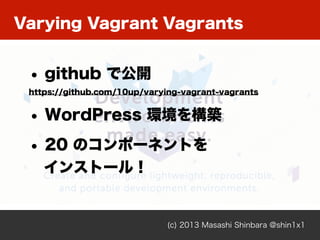
Varying Vagrant Vagrants
(c) 2013 Masashi Shinbara @shin1x1
• github で公開
https://github.com/10up/varying-vagrant-vagrants
• WordPress 環境を構築
• 20 のコンポーネントを
インストール!
Varying Vagrant Vagrants
(c) 2013 Masashi Shinbara @shin1x1
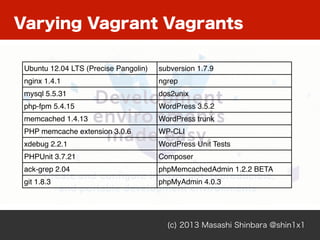
Ubuntu 12.04 LTS (Precise Pangolin) subversion 1.7.9
nginx 1.4.1 ngrep
mysql 5.5.31 dos2unix
php-fpm 5.4.15 WordPress 3.5.2
memcached 1.4.13 WordPress trunk
PHP memcache extension 3.0.6 WP-CLI
xdebug 2.2.1 WordPress Unit Tests
PHPUnit 3.7.21 Composer
ack-grep 2.04 phpMemcachedAdmin 1.2.2 BETA
git 1.8.3 phpMyAdmin 4.0.3
(c) 2013 Masashi Shinbara @shin1x1
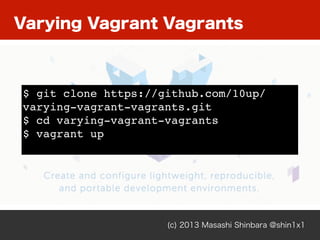
$ git clone https://github.com/10up/
varying-vagrant-vagrants.git
$ cd varying-vagrant-vagrants
$ vagrant up
Varying Vagrant Vagrants
(c) 2013 Masashi Shinbara @shin1x1
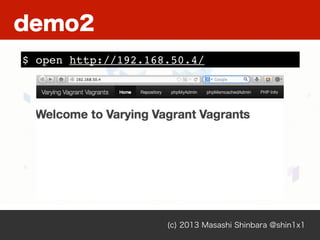
$ open http://192.168.50.4/
demo2
(c) 2013 Masashi Shinbara @shin1x1
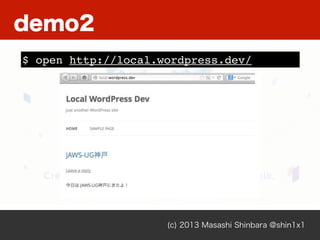
$ open http://local.wordpress.dev/
demo2
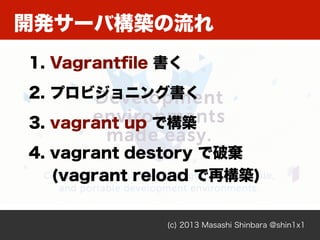
開発サーバ構築の流れ
(c) 2013 Masashi Shinbara @shin1x1
1. Vagrantfile 書く
2. プロビジョニング書く
3. vagrant up で構築
4. vagrant destory で破棄
(vagrant reload で再構築)
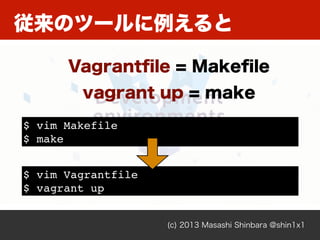
従来のツールに例えると
(c) 2013 Masashi Shinbara @shin1x1
Vagrantfile = Makefile
vagrant up = make
$ vim Makefile
$ make
$ vim Vagrantfile
$ vagrant up
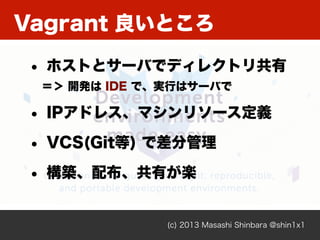
Vagrant 良いところ
(c) 2013 Masashi Shinbara @shin1x1
• ホストとサーバでディレクトリ共有
=> 開発は IDE で、実行はサーバで
• IPアドレス、マシンリソース定義
• VCS(Git等) で差分管理
• 構築、配布、共有が楽
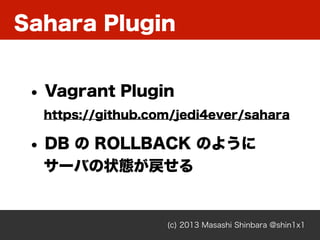
Sahara Plugin
(c) 2013 Masashi Shinbara @shin1x1
• Vagrant Plugin
https://github.com/jedi4ever/sahara
• DB の ROLLBACK のように
サーバの状態が戻せる
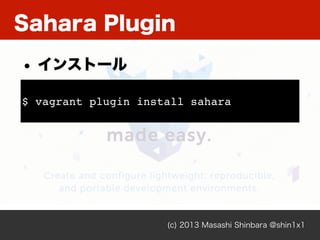
Sahara Plugin
(c) 2013 Masashi Shinbara @shin1x1
$ vagrant plugin install sahara
• インストール
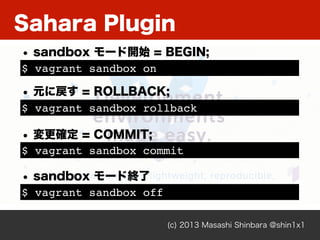
Sahara Plugin
(c) 2013 Masashi Shinbara @shin1x1
$ vagrant sandbox on
• sandbox モード開始 = BEGIN;
$ vagrant sandbox rollback
• 元に戻す = ROLLBACK;
$ vagrant sandbox commit
• 変更確定 = COMMIT;
$ vagrant sandbox off
• sandbox モード終了
Sahara Plugin
(c) 2013 Masashi Shinbara @shin1x1
$ vagrant sandbox on
vagrant sandbox on
0%...10%...20%...30%...40%...50%...60%...70%...80%...90%...
100%
$ vagrant ssh
[vagrant@localhost ~]$ sudo rm -rf /bin
[vagrant@localhost ~]$ ls
-bash: ls: コマンドが見つかりません
[vagrant@localhost ~]$ exit
Sahara Plugin
(c) 2013 Masashi Shinbara @shin1x1
$ vagrant sandbox rollback
0%...10%...20%...30%...40%...50%...60%...70%...80%...90%...
100%
0%...10%...20%...30%...40%...50%...60%...70%...80%...90%...
100%
$ vagrant ssh
[vagrant@localhost ~]$ ls
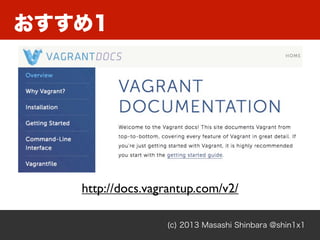
おすすめ1
(c) 2013 Masashi Shinbara @shin1x1
http://docs.vagrantup.com/v2/
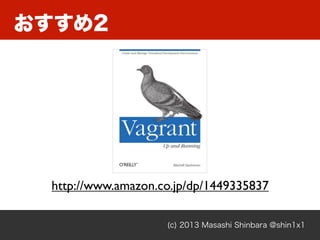
おすすめ2
(c) 2013 Masashi Shinbara @shin1x1
http://www.amazon.co.jp/dp/1449335837
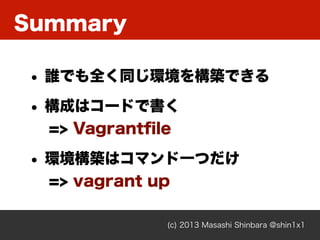
Summary
(c) 2013 Masashi Shinbara @shin1x1
• 誰でも全く同じ環境を構築できる
• 構成はコードで書く
=> Vagrantfile
• 環境構築はコマンド一つだけ
=> vagrant up
@shin1x1
(c) 2013 Masashi Shinbara @shin1x1

Vagrant を Web開発環境に使う

  • 1.
    2013/07/06 shin1x1 第2回 JAWS-UG神戸 もう XAMPP/ MAMP はいらない! Vagrant を Web開発環境に使う
  • 2.
    @shin1x1 (c) 2013 MasashiShinbara @shin1x1 Shin x blog http://www.1x1.jp/blog/ PHP / DevOps / AWS / Varnish / Fabric / Chef
  • 3.
    開発環境 (c) 2013 MasashiShinbara @shin1x1 Web開発あるある
  • 4.
    エンジニアSさん (c) 2013 MasashiShinbara @shin1x1 • Macbook Air で開発 • Apache / PHP / DB • 複数案件を一台で
  • 5.
    エンジニアSさん (c) 2013 MasashiShinbara @shin1x1 1162 <VirtualHost *:80> 1163 ServerName candycane.local 1164 DocumentRoot "/Users/shin/sandbox/demo/candycane/app/webroot" 1165 </VirtualHost> 1166 1167 <VirtualHost *:80> 1168 ServerName demo.local 1169 DocumentRoot "/Users/shin/sandbox/demo/20130601_phpcon" 1170 php_value vld.active 1 1171 </VirtualHost> 1172 1173 <VirtualHost *:80> 1174 ServerName project1.local 1175 DocumentRoot "/Users/shin/project1/app/webroot" 1176 </VirtualHost> 1177 1178 <VirtualHost *:80> 1179 ServerName project2.local 1180 DocumentRoot "/Users/shin/project2/app/webroot" 1181 </VirtualHost>
  • 6.
    エンジニアSさん (c) 2013 MasashiShinbara @shin1x1 1162 <VirtualHost *:80> 1163 ServerName candycane.local 1164 DocumentRoot "/Users/shin/sandbox/demo/candycane/app/webroot" 1165 </VirtualHost> 1166 1167 <VirtualHost *:80> 1168 ServerName demo.local 1169 DocumentRoot "/Users/shin/sandbox/demo/20130601_phpcon" 1170 php_value vld.active 1 1171 </VirtualHost> 1172 1173 <VirtualHost *:80> 1174 ServerName project1.local 1175 DocumentRoot "/Users/shin/project1/app/webroot" 1176 </VirtualHost> 1177 1178 <VirtualHost *:80> 1179 ServerName project2.local 1180 DocumentRoot "/Users/shin/project2/app/webroot" 1181 </VirtualHost> 溢れる VirtualHost
  • 7.
    とある開発チームA (c) 2013 MasashiShinbara @shin1x1 • Macbook / Windows で開発 • Apache / PHP / DB • チームで開発
  • 8.
    とある開発チームA (c) 2013 MasashiShinbara @shin1x1 あれ?動かない。 何か変なコード書いた? こっちは動いてるよ。 モジュール入れないとダメだよ。
  • 9.
    とある開発チームA (c) 2013 MasashiShinbara @shin1x1 あれ?動かない。 何か変なコード書いた? こっちは動いてるよ。 モジュール入れないとダメだよ。 俺の環境では動く
  • 10.
    WebデザイナーBさん (c) 2013 MasashiShinbara @shin1x1 • WordPressのデザイン • XAMPPをインストール •でもなんだか動かない。。。
  • 11.
    (c) 2013 MasashiShinbara @shin1x1 WebデザイナーBさん
  • 12.
    (c) 2013 MasashiShinbara @shin1x1 WebデザイナーBさん Port 80 は 俺のモノ
  • 13.
  • 14.
    Vagrant (c) 2013 MasashiShinbara @shin1x1 • 誰でも全く同じ環境を構築できる • 構成はコードで書く • 環境構築はコマンド一つだけ
  • 15.
    demo1 (c) 2013 MasashiShinbara @shin1x1 httpd サーバ
  • 16.
    demo1 (c) 2013 MasashiShinbara @shin1x1 • VMイメージ取得 • VM起動 • プロビジョニング • VM終了
  • 17.
    demo1 (c) 2013 MasashiShinbara @shin1x1 $ vagrant init $ ls Vagrantfile
  • 18.
    (c) 2013 MasashiShinbara @shin1x1 # -*- mode: ruby -*- # vi: set ft=ruby : Vagrant.configure("2") do |config| config.vm.box = "centos64_ja" config.vm.provider :virtualbox do |v| v.gui = true end config.vm.network :private_network, ip: "192.168.33.100" config.vm.provision :shell, :inline => "yum install -y httpd && /sbin/service httpd start" end $ vim Vagrantfile demo1
  • 19.
    (c) 2013 MasashiShinbara @shin1x1 # -*- mode: ruby -*- # vi: set ft=ruby : Vagrant.configure("2") do |config| config.vm.box = "centos64_ja" config.vm.provider :virtualbox do |v| v.gui = true end config.vm.network :private_network, ip: "192.168.33.100" config.vm.provision :shell, :inline => "yum install -y httpd && /sbin/service httpd start" end $ vim Vagrantfile demo1 VMイメージ
  • 20.
    (c) 2013 MasashiShinbara @shin1x1 # -*- mode: ruby -*- # vi: set ft=ruby : Vagrant.configure("2") do |config| config.vm.box = "centos64_ja" config.vm.provider :virtualbox do |v| v.gui = true end config.vm.network :private_network, ip: "192.168.33.100" config.vm.provision :shell, :inline => "yum install -y httpd && /sbin/service httpd start" end $ vim Vagrantfile demo1 GUI表示
  • 21.
    (c) 2013 MasashiShinbara @shin1x1 # -*- mode: ruby -*- # vi: set ft=ruby : Vagrant.configure("2") do |config| config.vm.box = "centos64_ja" config.vm.provider :virtualbox do |v| v.gui = true end config.vm.network :private_network, ip: "192.168.33.100" config.vm.provision :shell, :inline => "yum install -y httpd && /sbin/service httpd start" end $ vim Vagrantfile demo1 IPアドレス
  • 22.
    (c) 2013 MasashiShinbara @shin1x1 # -*- mode: ruby -*- # vi: set ft=ruby : Vagrant.configure("2") do |config| config.vm.box = "centos64_ja" config.vm.provider :virtualbox do |v| v.gui = true end config.vm.network :private_network, ip: "192.168.33.100" config.vm.provision :shell, :inline => "yum install -y httpd && /sbin/service httpd start" end $ vim Vagrantfile demo1 プロビジョニング Chef / Puppet / Shell
  • 23.
    (c) 2013 MasashiShinbara @shin1x1 $ vagrant up Bringing machine 'default' up with 'virtualbox' provider... [default] Importing base box 'centos64_ja'... demo1
  • 24.
    (c) 2013 MasashiShinbara @shin1x1 [default] Running provisioner: shell... [default] Running: inline script Loaded plugins: fastestmirror Determining fastest mirrors * base: ftp.iij.ad.jp * extras: ftp.iij.ad.jp * updates: ftp.iij.ad.jp Setting up Install Process Resolving Dependencies --> Running transaction check ---> Package httpd.x86_64 0:2.2.15-28.el6.centos will be installed demo1
  • 25.
    (c) 2013 MasashiShinbara @shin1x1 $ open http://192.168.33.100/ demo1
  • 26.
    (c) 2013 MasashiShinbara @shin1x1 $ vagrant ssh Welcome to your Vagrant-built virtual machine. [vagrant@localhost ~]$ $ vagrant destory Are you sure you want to destroy the 'default' VM? [y/N] y [default] Forcing shutdown of VM... Connection to 127.0.0.1 closed by remote host. [default] Destroying VM and associated drives... demo1

  • 27.
    demo2 (c) 2013 MasashiShinbara @shin1x1 Wordpress
  • 28.
    Varying Vagrant Vagrants (c)2013 Masashi Shinbara @shin1x1 • github で公開 https://github.com/10up/varying-vagrant-vagrants • WordPress 環境を構築 • 20 のコンポーネントを インストール!
  • 29.
    Varying Vagrant Vagrants (c)2013 Masashi Shinbara @shin1x1 Ubuntu 12.04 LTS (Precise Pangolin) subversion 1.7.9 nginx 1.4.1 ngrep mysql 5.5.31 dos2unix php-fpm 5.4.15 WordPress 3.5.2 memcached 1.4.13 WordPress trunk PHP memcache extension 3.0.6 WP-CLI xdebug 2.2.1 WordPress Unit Tests PHPUnit 3.7.21 Composer ack-grep 2.04 phpMemcachedAdmin 1.2.2 BETA git 1.8.3 phpMyAdmin 4.0.3
  • 30.
    (c) 2013 MasashiShinbara @shin1x1 $ git clone https://github.com/10up/ varying-vagrant-vagrants.git $ cd varying-vagrant-vagrants $ vagrant up Varying Vagrant Vagrants
  • 31.
    (c) 2013 MasashiShinbara @shin1x1 $ open http://192.168.50.4/ demo2
  • 32.
    (c) 2013 MasashiShinbara @shin1x1 $ open http://local.wordpress.dev/ demo2
  • 33.
    開発サーバ構築の流れ (c) 2013 MasashiShinbara @shin1x1 1. Vagrantfile 書く 2. プロビジョニング書く 3. vagrant up で構築 4. vagrant destory で破棄 (vagrant reload で再構築)
  • 34.
    従来のツールに例えると (c) 2013 MasashiShinbara @shin1x1 Vagrantfile = Makefile vagrant up = make $ vim Makefile $ make $ vim Vagrantfile $ vagrant up
  • 35.
    Vagrant 良いところ (c) 2013Masashi Shinbara @shin1x1 • ホストとサーバでディレクトリ共有 => 開発は IDE で、実行はサーバで • IPアドレス、マシンリソース定義 • VCS(Git等) で差分管理 • 構築、配布、共有が楽
  • 36.
    Sahara Plugin (c) 2013Masashi Shinbara @shin1x1 • Vagrant Plugin https://github.com/jedi4ever/sahara • DB の ROLLBACK のように サーバの状態が戻せる
  • 37.
    Sahara Plugin (c) 2013Masashi Shinbara @shin1x1 $ vagrant plugin install sahara • インストール
  • 38.
    Sahara Plugin (c) 2013Masashi Shinbara @shin1x1 $ vagrant sandbox on • sandbox モード開始 = BEGIN; $ vagrant sandbox rollback • 元に戻す = ROLLBACK; $ vagrant sandbox commit • 変更確定 = COMMIT; $ vagrant sandbox off • sandbox モード終了
  • 39.
    Sahara Plugin (c) 2013Masashi Shinbara @shin1x1 $ vagrant sandbox on vagrant sandbox on 0%...10%...20%...30%...40%...50%...60%...70%...80%...90%... 100% $ vagrant ssh [vagrant@localhost ~]$ sudo rm -rf /bin [vagrant@localhost ~]$ ls -bash: ls: コマンドが見つかりません [vagrant@localhost ~]$ exit
  • 40.
    Sahara Plugin (c) 2013Masashi Shinbara @shin1x1 $ vagrant sandbox rollback 0%...10%...20%...30%...40%...50%...60%...70%...80%...90%... 100% 0%...10%...20%...30%...40%...50%...60%...70%...80%...90%... 100% $ vagrant ssh [vagrant@localhost ~]$ ls
  • 41.
    おすすめ1 (c) 2013 MasashiShinbara @shin1x1 http://docs.vagrantup.com/v2/
  • 42.
    おすすめ2 (c) 2013 MasashiShinbara @shin1x1 http://www.amazon.co.jp/dp/1449335837
  • 43.
    Summary (c) 2013 MasashiShinbara @shin1x1 • 誰でも全く同じ環境を構築できる • 構成はコードで書く => Vagrantfile • 環境構築はコマンド一つだけ => vagrant up
  • 44.
    @shin1x1 (c) 2013 MasashiShinbara @shin1x1