UX during module installation
and configuration
Artem Dmitriiev
DrupalCampKyiv 2019
Who am I?
Drupal webdeveloper at
1xINTERNET
2
Module maintainer:
● Styled Google Map
● Advanced Insert View
● Group Media
● Commerce Recurring Shipping
My goal - Make Drupal more user friendly
and easy to use for end users.
https://www.drupal.org/u/admitriiev
3
About 1xINTERNET
3 offices:
● Frankfurt am Main
● Berlin
● Conil de la Frontera (Spain)
> 25 employees
~ 10 languages spoken and
nationalities
About us
How to make Drupal
more user friendly?
5
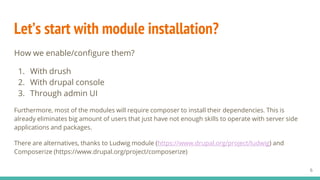
Let’s start with module installation?
How we enable/configure them?
1. With drush
2. With drupal console
3. Through admin UI
Furthermore, most of the modules will require composer to install their dependencies. This is
already eliminates big amount of users that just have not enough skills to operate with server side
applications and packages.
There are alternatives, thanks to Ludwig module (https://www.drupal.org/project/ludwig) and
Composerize (https://www.drupal.org/project/composerize)
6
But what is missing in all these methods?
There is no interaction,
the only action available is
to confirm the installation
of the module and its
dependencies.
7
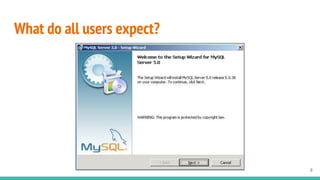
What do all users expect?
8
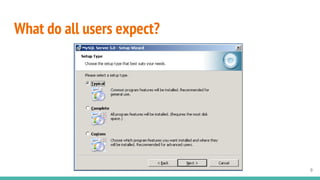
What do all users expect?
9
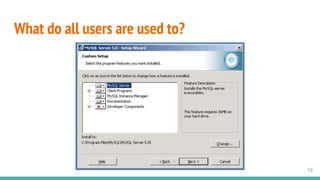
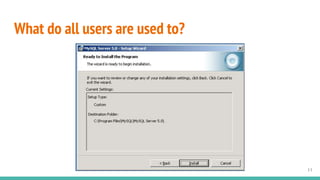
What do all users are used to?
10
What do all users are used to?
11
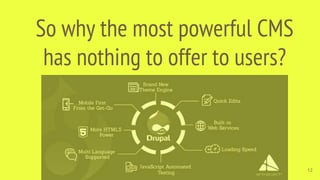
So why the most powerful CMS
has nothing to offer to users?
12
What are the obstacles?
13
● Intention to offer the same UX for web interface and CLI
● Complexity of the modules and solutions built with a lot of dependencies
and interactions with other modules
● A lot of opportunities to alter implementations and non-strict standards
of usage (the same solution can be achieved in multiple ways)
● No decision and no initiative to implement installation wizard
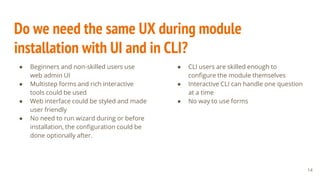
Do we need the same UX during module
installation with UI and in CLI?
● Beginners and non-skilled users use
web admin UI
● Multistep forms and rich interactive
tools could be used
● Web interface could be styled and made
user friendly
● No need to run wizard during or before
installation, the configuration could be
done optionally after.
14
● CLI users are skilled enough to
configure the module themselves
● Interactive CLI can handle one question
at a time
● No way to use forms
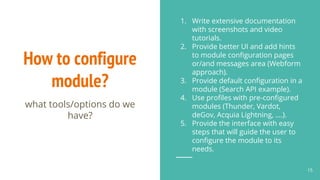
How to configure
module?
1. Write extensive documentation
with screenshots and video
tutorials.
2. Provide better UI and add hints
to module configuration pages
or/and messages area (Webform
approach).
3. Provide default configuration in a
module (Search API example).
4. Use profiles with pre-configured
modules (Thunder, Vardot,
deGov, Acquia Lightning, ….).
5. Provide the interface with easy
steps that will guide the user to
configure the module to its
needs.
15
what tools/options do we
have?
What are the
pros and cons of
each method?
16
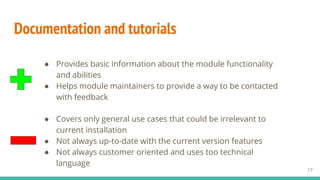
Documentation and tutorials
17
● Covers only general use cases that could be irrelevant to
current installation
● Not always up-to-date with the current version features
● Not always customer oriented and uses too technical
language
● Provides basic information about the module functionality
and abilities
● Helps module maintainers to provide a way to be contacted
with feedback
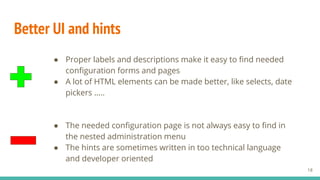
Better UI and hints
● Proper labels and descriptions make it easy to find needed
configuration forms and pages
● A lot of HTML elements can be made better, like selects, date
pickers …..
18
● The needed configuration page is not always easy to find in
the nested administration menu
● The hints are sometimes written in too technical language
and developer oriented
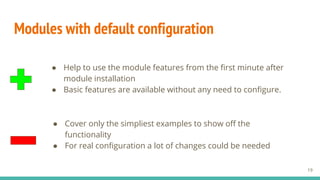
Modules with default configuration
● Cover only the simpliest examples to show off the
functionality
● For real configuration a lot of changes could be needed
19
● Help to use the module features from the first minute after
module installation
● Basic features are available without any need to configure.
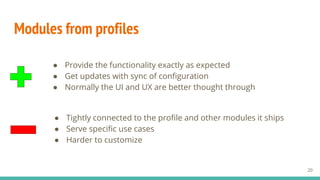
Modules from profiles
● Provide the functionality exactly as expected
● Get updates with sync of configuration
● Normally the UI and UX are better thought through
20
● Tightly connected to the profile and other modules it ships
● Serve specific use cases
● Harder to customize
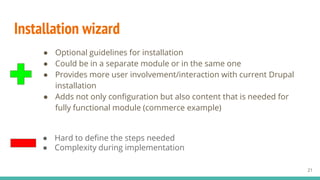
Installation wizard
● Optional guidelines for installation
● Could be in a separate module or in the same one
● Provides more user involvement/interaction with current Drupal
installation
● Adds not only configuration but also content that is needed for
fully functional module (commerce example)
21
● Hard to define the steps needed
● Complexity during implementation
What do competitors have?
Wordpress WooCommerce example
Next slide pictures are taken from official WooCommerce documentation at
https://docs.woocommerce.com/document/woocommerce-setup-wizard
22
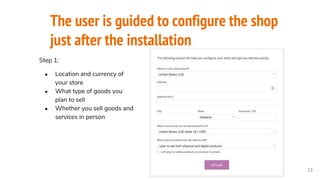
The user is guided to configure the shop
just after the installation
23
Step 1:
● Location and currency of
your store
● What type of goods you
plan to sell
● Whether you sell goods and
services in person
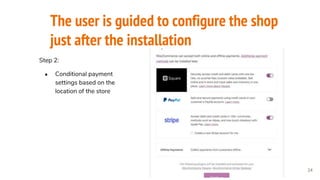
The user is guided to configure the shop
just after the installation
24
Step 2:
● Conditional payment
settings based on the
location of the store
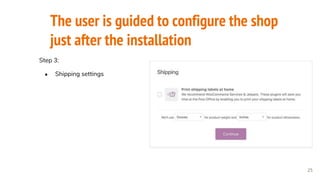
The user is guided to configure the shop
just after the installation
25
Step 3:
● Shipping settings
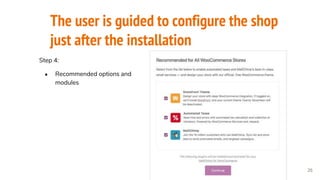
The user is guided to configure the shop
just after the installation
26
Step 4:
● Recommended options and
modules
The user is guided to configure the shop
just after the installation
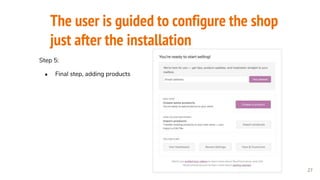
27
Step 5:
● Final step, adding products
What modules might need wizards?
28
● Complex modules like: Commerce, metatags, group, content translation
and many others …
● Modules that provide SEO integration or unique field types (metatags,
scheduled updates, sitemap and others)
● Editor filters and plugins
● Many others to make Drupal more user friendly
What tools and instruments do we have to achieve
this?
29
Module installation Wizard Candidates:
30
1. Form API multistep
2. CTools with its Wizard form.
3. Forms Steps module https://www.drupal.org/project/forms_steps .
4. Workflow based solutions like checkout in Commerce 2
5. Tour module, why not?
6. Others ...
Multistep Form API
There are couple of good examples on how to handle this:
https://www.sitepoint.com/how-to-build-multi-step-forms-in-drupal-8/
https://www.drupal.org/project/ms_ajax_form_example
31
CTools wizard
Allows to split the form elements into configurable steps. Provides 2 main
classes: EntityFormWizardBase and FormWizardBase.
Unites forms using getOperations() method and share the same storage for all
of them, so each can populate its own fields of the shared storage.
The steps can not be populated dynamically.
Used by entity browser till version 1.2.
32
Form steps
Has easy and understandable UI to add the steps for the ContentEntity forms.
Could be nice in after configuration period, e.g. creating store and products
for Commerce Module.
Doesn’t support ConfigEntities and custom forms yet.
33
Inline entity forms
Widely used in Commerce both in D7 and D8.
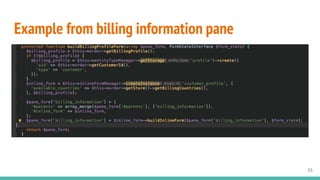
Checkout form uses steps and configurable subforms (panes) that use any
form inside and also recently introduced InlineFormManager.
Each form should be wrapped in inline form plugin that has its own validation
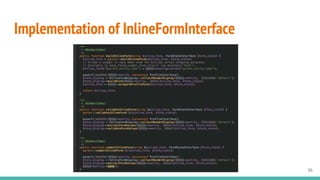
and submit handlers.
There is an issue https://www.drupal.org/project/commerce/issues/3057037
with feature request to move this functionality to separate contrib module, so
other contrib modules can benefit from that.
34
Example from billing information pane
35
Implementation of InlineFormInterface
36
Custom solution, what do we need?
● Any form could be used: ContentEntity, ConfigEntity, Custom form
● Ability to skip the step
● Pass arguments
● Provide next and previous steps linkage
● Track the wizard progress
● Confirmation/Success page
● Conditional skipping and “jumping over” the steps
37
Example: Advanced Insert View module
Module provides CKEditor plugin and filter.
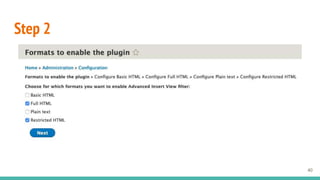
What should be in the wizard?
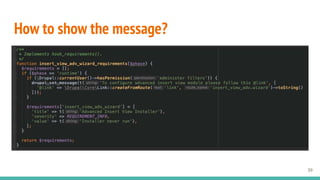
1. Show the message after module installation that wizard is available.
2. Ask to what text formats this filter and plugin should be added.
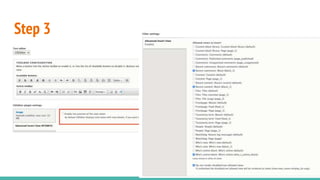
3. Depending on the selected values, open in the loop each checked filter
edit page with already enabled plugin and filter, so that user can do fine
tuning.
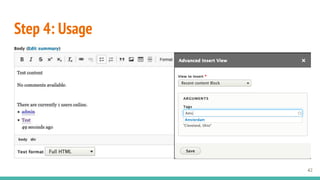
4. Finish installation wizard, set flag, so it is not shown again.
38
How to show the message?
39
Step 2
40
Step 3
41
Step 4: Usage
42
Questions?
ask Alex
43

UX DURING MODULE INSTALLATION AND CONFIGURATION

  • 1.
    UX during moduleinstallation and configuration Artem Dmitriiev DrupalCampKyiv 2019
  • 2.
    Who am I? Drupalwebdeveloper at 1xINTERNET 2 Module maintainer: ● Styled Google Map ● Advanced Insert View ● Group Media ● Commerce Recurring Shipping My goal - Make Drupal more user friendly and easy to use for end users. https://www.drupal.org/u/admitriiev
  • 3.
    3 About 1xINTERNET 3 offices: ●Frankfurt am Main ● Berlin ● Conil de la Frontera (Spain) > 25 employees ~ 10 languages spoken and nationalities
  • 4.
  • 5.
    How to makeDrupal more user friendly? 5
  • 6.
    Let’s start withmodule installation? How we enable/configure them? 1. With drush 2. With drupal console 3. Through admin UI Furthermore, most of the modules will require composer to install their dependencies. This is already eliminates big amount of users that just have not enough skills to operate with server side applications and packages. There are alternatives, thanks to Ludwig module (https://www.drupal.org/project/ludwig) and Composerize (https://www.drupal.org/project/composerize) 6
  • 7.
    But what ismissing in all these methods? There is no interaction, the only action available is to confirm the installation of the module and its dependencies. 7
  • 8.
    What do allusers expect? 8
  • 9.
    What do allusers expect? 9
  • 10.
    What do allusers are used to? 10
  • 11.
    What do allusers are used to? 11
  • 12.
    So why themost powerful CMS has nothing to offer to users? 12
  • 13.
    What are theobstacles? 13 ● Intention to offer the same UX for web interface and CLI ● Complexity of the modules and solutions built with a lot of dependencies and interactions with other modules ● A lot of opportunities to alter implementations and non-strict standards of usage (the same solution can be achieved in multiple ways) ● No decision and no initiative to implement installation wizard
  • 14.
    Do we needthe same UX during module installation with UI and in CLI? ● Beginners and non-skilled users use web admin UI ● Multistep forms and rich interactive tools could be used ● Web interface could be styled and made user friendly ● No need to run wizard during or before installation, the configuration could be done optionally after. 14 ● CLI users are skilled enough to configure the module themselves ● Interactive CLI can handle one question at a time ● No way to use forms
  • 15.
    How to configure module? 1.Write extensive documentation with screenshots and video tutorials. 2. Provide better UI and add hints to module configuration pages or/and messages area (Webform approach). 3. Provide default configuration in a module (Search API example). 4. Use profiles with pre-configured modules (Thunder, Vardot, deGov, Acquia Lightning, ….). 5. Provide the interface with easy steps that will guide the user to configure the module to its needs. 15 what tools/options do we have?
  • 16.
    What are the prosand cons of each method? 16
  • 17.
    Documentation and tutorials 17 ●Covers only general use cases that could be irrelevant to current installation ● Not always up-to-date with the current version features ● Not always customer oriented and uses too technical language ● Provides basic information about the module functionality and abilities ● Helps module maintainers to provide a way to be contacted with feedback
  • 18.
    Better UI andhints ● Proper labels and descriptions make it easy to find needed configuration forms and pages ● A lot of HTML elements can be made better, like selects, date pickers ….. 18 ● The needed configuration page is not always easy to find in the nested administration menu ● The hints are sometimes written in too technical language and developer oriented
  • 19.
    Modules with defaultconfiguration ● Cover only the simpliest examples to show off the functionality ● For real configuration a lot of changes could be needed 19 ● Help to use the module features from the first minute after module installation ● Basic features are available without any need to configure.
  • 20.
    Modules from profiles ●Provide the functionality exactly as expected ● Get updates with sync of configuration ● Normally the UI and UX are better thought through 20 ● Tightly connected to the profile and other modules it ships ● Serve specific use cases ● Harder to customize
  • 21.
    Installation wizard ● Optionalguidelines for installation ● Could be in a separate module or in the same one ● Provides more user involvement/interaction with current Drupal installation ● Adds not only configuration but also content that is needed for fully functional module (commerce example) 21 ● Hard to define the steps needed ● Complexity during implementation
  • 22.
    What do competitorshave? Wordpress WooCommerce example Next slide pictures are taken from official WooCommerce documentation at https://docs.woocommerce.com/document/woocommerce-setup-wizard 22
  • 23.
    The user isguided to configure the shop just after the installation 23 Step 1: ● Location and currency of your store ● What type of goods you plan to sell ● Whether you sell goods and services in person
  • 24.
    The user isguided to configure the shop just after the installation 24 Step 2: ● Conditional payment settings based on the location of the store
  • 25.
    The user isguided to configure the shop just after the installation 25 Step 3: ● Shipping settings
  • 26.
    The user isguided to configure the shop just after the installation 26 Step 4: ● Recommended options and modules
  • 27.
    The user isguided to configure the shop just after the installation 27 Step 5: ● Final step, adding products
  • 28.
    What modules mightneed wizards? 28 ● Complex modules like: Commerce, metatags, group, content translation and many others … ● Modules that provide SEO integration or unique field types (metatags, scheduled updates, sitemap and others) ● Editor filters and plugins ● Many others to make Drupal more user friendly
  • 29.
    What tools andinstruments do we have to achieve this? 29
  • 30.
    Module installation WizardCandidates: 30 1. Form API multistep 2. CTools with its Wizard form. 3. Forms Steps module https://www.drupal.org/project/forms_steps . 4. Workflow based solutions like checkout in Commerce 2 5. Tour module, why not? 6. Others ...
  • 31.
    Multistep Form API Thereare couple of good examples on how to handle this: https://www.sitepoint.com/how-to-build-multi-step-forms-in-drupal-8/ https://www.drupal.org/project/ms_ajax_form_example 31
  • 32.
    CTools wizard Allows tosplit the form elements into configurable steps. Provides 2 main classes: EntityFormWizardBase and FormWizardBase. Unites forms using getOperations() method and share the same storage for all of them, so each can populate its own fields of the shared storage. The steps can not be populated dynamically. Used by entity browser till version 1.2. 32
  • 33.
    Form steps Has easyand understandable UI to add the steps for the ContentEntity forms. Could be nice in after configuration period, e.g. creating store and products for Commerce Module. Doesn’t support ConfigEntities and custom forms yet. 33
  • 34.
    Inline entity forms Widelyused in Commerce both in D7 and D8. Checkout form uses steps and configurable subforms (panes) that use any form inside and also recently introduced InlineFormManager. Each form should be wrapped in inline form plugin that has its own validation and submit handlers. There is an issue https://www.drupal.org/project/commerce/issues/3057037 with feature request to move this functionality to separate contrib module, so other contrib modules can benefit from that. 34
  • 35.
    Example from billinginformation pane 35
  • 36.
  • 37.
    Custom solution, whatdo we need? ● Any form could be used: ContentEntity, ConfigEntity, Custom form ● Ability to skip the step ● Pass arguments ● Provide next and previous steps linkage ● Track the wizard progress ● Confirmation/Success page ● Conditional skipping and “jumping over” the steps 37
  • 38.
    Example: Advanced InsertView module Module provides CKEditor plugin and filter. What should be in the wizard? 1. Show the message after module installation that wizard is available. 2. Ask to what text formats this filter and plugin should be added. 3. Depending on the selected values, open in the loop each checked filter edit page with already enabled plugin and filter, so that user can do fine tuning. 4. Finish installation wizard, set flag, so it is not shown again. 38
  • 39.
    How to showthe message? 39
  • 40.
  • 41.
  • 42.
  • 43.