Table space considerations
© 2015 IBM Corporation
DB2 for z/OS: Conversion from index-
controlled partitioning to Universal Table
Space (UTS)
1 Summary
The following document is based on IBM DB2 11 for z/OS. It outlines a conversion path from traditional
classic partitioned table spaces to partitioned-by-range universal table spaces (PBR UTS). A robust
procedure to do this is important and useful, because some new functions and features are available only
with the UTS table space type. With the release of DB2 10 for z/OS, IBM announced the traditional table
space structures as “deprecated”. So users of DB2 for z/OS should be encouraged to convert their
traditional classic partitioned table spaces to PBR UTS. New table spaces should be created as PBG or
PBR UTS.
1.1 History
Partitioned table spaces allow separation of data by predefined keys, also called partitioning keys.
Earlier these partitioning keys were defined by the CREATE INDEX statement. Such table spaces are
called index-controlled partitioned table spaces. These traditional partitioned table spaces are limited by 2
design points:
1. The limit key of the last partition is not enforced (see also below for further aspects like LARGE) or
in other words: The high limit key is not enforced.
2. The record ID (RID) is only 4 bytes. This only allows 64 partitions maximum due to the space limit
of 1GB per partition.
DB2 V5 for z/OS introduces the concept of “LARGE” table spaces, which have a RID of 5 bytes. DB2 V5
for z/OS allows the creation of 254 partitions with larger space per partition. Refer to the following tables in
SQL Reference for details: “Table space size given page size and partitions”, “Maximum partition size
depending on value of NUMPARTS” and “Maximum partition size depending on page size”. In addition the
high limit key is enforced if the table space is defined with “LARGE” or later with “DSSIZE”.
DB2 V8 for z/OS allows the definition of partitioning keys by CREATE TABLE. Such table spaces are called
table-controlled partitioned table spaces. The table spaces could be defined with “LARGE” or “DSSIZE” or
without. The high limit keys are enforced if the partitioning keys are defined on the table level, aka table-
controlled partitioning.
DB2 V9 for z/OS implements UTS to combine the advantages of segmented and partitioned table spaces
in one base table space type with two flavours: partitioned by range (PBR) and Partitioned by Growth
(PBG). Such a universal table space is implicitly a large table space and (for PBR) partitioning keys must
be defined through the table definition (i.e. table-controlled partitioning).
The following table summarizes the different options in regards to controlling partitioning:
Table space considerations
© 2015 IBM Corporation 2
Partitioned
table space
type
partitioning control LARGE DSSIZE Enforce high limit key
Classic index No No No
Classic index Yes No Yes
Classic index Yes Yes Yes
Classic table No No Yes
Classic table Yes No Yes
Classic table Yes Yes Yes
UTS-PBR table Yes Yes Yes
Table 1: Controlling partitioning
1.2 Current direction
The long term strategy is that only universal table spaces should be used in the future. So new table spaces
should be created as UTS and old ones should be migrated. The benefit of UTS is summarized by the
usage of the following new features and functions:
• Since V9:
o Clone Table
• Since V10:
o Currently Committed
o Hash Table
o Inline LOB
o Complete range of deferred ALTER support
• Since V11:
o Drop column
o Deferred alter support of the limit keys
o RECOVER to PIT after materializing of deferred ALTER
And the list of functions are extended in V12, e.g. Column Level Deferred Alter, Insert Partition, Relative
Page Number, …
This document gives the background about the different table space types: The combination of large, non-
large, index-controlled partitioning and table-controlled partitioning are described and how these objects
can be migrated to UTS PBR without an outage. It gives hints and tips to avoid REORP, DROP and
CREATE or object unavailability.
This is a best practice document. It is not intended to be exhaustive and is provided as-is.
1.3 Authors
This document has been created by: Christian Michel, Christoph Theisen, David Kuang, Haakon Roberts,
Ka-Chun Ng, Patrick Bossman, Peter Hartmann, Qinglong (Peter) Hu, Terry Purcell
Table space considerations
© 2015 IBM Corporation 3
Document owners are Christoph Theisen and Peter Hartmann, IBM Germany. Email addresses are
ctheisen@de.ibm.com and peterhar@de.ibm.com. Any comments or corrections should be forwarded to
their attention.
Company: IBM
Status: 20 September 2017
Table space considerations
© 2015 IBM Corporation 4
2 Table of Contents
1 Summary ..........................................................................................................................................1
1.1 History...............................................................................................................................................1
1.2 Current direction...............................................................................................................................2
1.3 Authors .............................................................................................................................................2
2 Table of Contents .............................................................................................................................4
3 Conversion from index-controlled partitioning to table-controlled partitioning .................................6
3.1 What is index-controlled partitioning and table-controlled partitioning.............................................6
3.1.1 Index-controlled Partitioning .................................................................................................................. 6
3.1.2 Key enforcement with index-controlled partitioning................................................................................ 7
3.1.3 Table-controlled partitioning .................................................................................................................. 8
3.1.4 Key enforcement with table-controlled partitioning ................................................................................ 8
3.2 Identification in the DB2 catalog.......................................................................................................8
3.3 Prevent new index-controlled partitioned tables ..............................................................................9
3.4 The conversion process to table-controlled partitioning...................................................................9
3.5 Considerations on Limit Keys.........................................................................................................11
3.6 Considerations for significant index columns .................................................................................13
3.6.1 Significant Columns............................................................................................................................. 13
3.6.2 The effect of ZPARM IX_TB_PART_CONV_EXCLUDE...................................................................... 14
3.6.3 The DPSI effect ................................................................................................................................... 15
3.6.4 Considerations on partition rebalancing............................................................................................... 16
3.7 Other conversion options ...............................................................................................................18
3.7.1 DROP partitioning INDEX.................................................................................................................... 18
3.7.2 ALTER TABLE ADD PARTITION ........................................................................................................ 18
3.7.3 ALTER TABLE ROTATE PARTITION ................................................................................................. 19
3.7.4 ALTER TABLE ALTER PARTITION .................................................................................................... 19
3.7.5 CREATE INDEX PARTITIONED ......................................................................................................... 21
3.7.6 ALTER INDEX ALTER PARTITION..................................................................................................... 22
3.7.7 ALTER TABLE ADD PARTITION BY .................................................................................................. 22
3.8 Conversion for tables with XML or LOB columns...........................................................................22
3.8.1 LOB ..................................................................................................................................................... 22
3.8.2 XML ..................................................................................................................................................... 23
3.9 Additional considerations ...............................................................................................................24
3.9.1 Timeout during conversion .................................................................................................................. 24
3.9.2 Not populated table spaces ................................................................................................................. 25
3.9.3 Table-controlled (converted from index-controlled) versus table-controlled (native created) partitioning
25
4 Conversion from table-controlled partitioning to UTS ....................................................................28
4.1 The deferred ALTER ......................................................................................................................28
4.2 The materializing REORG..............................................................................................................29
4.2.1 Partition size constraints...................................................................................................................... 29
4.2.2 REORG preparation ............................................................................................................................ 30
4.2.3 Package invalidation............................................................................................................................ 30
5 Check Lists .....................................................................................................................................32
6 Appendixes.....................................................................................................................................33
6.1 Recommended APARs...................................................................................................................33
6.2 DSNZPARM settings......................................................................................................................34
Table space considerations
© 2015 IBM Corporation 5
6.3 Update of the partitioning key.........................................................................................................34
6.4 Limit key 40 byte truncation............................................................................................................35
6.5 Procedure for inline statistics in REORG .......................................................................................37
6.6 Index Classification and Partitioning at a glance............................................................................39
7 References .....................................................................................................................................43
7.1 Documentation ...............................................................................................................................43
7.2 List of Tables ..................................................................................................................................43
7.3 List of Figures .................................................................................................................................43
8 Copyright ........................................................................................................................................44
Table space considerations
© 2015 IBM Corporation 6
3 Conversion from index-controlled partitioning to table-controlled partitioning
3.1 What is index-controlled partitioning and table-controlled partitioning
3.1.1 Index-controlled Partitioning
Partitioning tables is a very common technique in DB2 z/OS in order to break down large amount of data
into smaller pieces. These smaller pieces (partitions) allow more parallelism for DB2 utility processing and
queries. They also help to increase the maximum capacity of a DB2 for z/OS table.
For approximately two decades, there was one (and only one) way of getting DB2 z/OS tables split up into
several partitions. This approach is named “index-controlled partitioning”.
Database administrators needed to
• define a partitioned tablespace and indicate the number of partitions by specifying the NUMPARTS
keyword
• create a table within that partitioned tablespace
• define a clustering index on that table and partition boundaries for each partition as part of the index
creation
The following picture illustrates these steps:
Figure 1: Create an index-controlled partitioned table space
The tablespace PARTTS1 is made up of four partitions (NUMPARTS 4).
Note:
In DB2 10 for z/OS or later, you have to explicitely specify SEGSIZE 0 together with the NUMPARTS
keyword if a classic partitioned table space should be created, otherwise a UTS will be created.
As the CREATE TABLE statement contains no information on partitioning keys or partition boundaries, the
table definition remains “incomplete” until a partitioning index is created. This index (IXPSALES in our
Table space considerations
© 2015 IBM Corporation 7
example) needs to be the clustering index – either by explicitly specifying the CLUSTER keyword or by
creating this index as the first index on that table.
3.1.2 Key enforcement with index-controlled partitioning
Our example shows that DB2 tolerates a partitioning clause within CREATE INDEX which leaves a gap
between the partitioning key (limit key) for the highest partition and the highest value which may occur for
the partitioning column based on its data type.
It depends on the table space definition whether DB2 will enforce the limit key for the highest partition in an
INSERT, UPDATE, MERGE or LOAD operation. In our example, table space PARTTS1 is defined without
DSSIZE or LARGE specification. In this case, the limit key of the last partition is not enforced and
REGION_CODEs higher than 49 will be placed into the last partition.
Note:
This also applies to descending indexes where the limit key of the highest partition may be lower than
the MINVALUE for the respective data type. The following examples in the rest of that document however
will focus on ascending indexes.
As soon as the LARGE keyword or its successor DSSIZE is specified with CREATE TABLESPACE, any
attempts to store a value in the table higher (or lower) than the highest (or lowest) limit key will end up in
an error.
No Key Enforcement With Key Enforcement
CREATE TABLESPACE PARTTS1 IN DBPARTS
NUMPARTS 4 SEGSIZE 0 ;
CREATE TABLESPACE PARTTS1 IN DBPARTS
NUMPARTS 4 SEGSIZE 0 DSSIZE 4 G;
CREATE TABLE SALES (PRODUCT_ID SMALLINT NOT NULL, SALES_AMOUNT DECIMAL(5,2)
NOT NULL, REGION_CODE SMALLINT NOT NULL) IN DBPARTS.PARTTS1;
CREATE INDEX IXPSALES ON SALES (REGION_CODE ASC) CLUSTER
(PART 1 VALUES (19), PART 2 VALUES (29), PART 3 VALUES (39), PART 4 VALUES
(49));
INSERT INTO SALES (PRODUCT_ID, SALES_AMOUNT, REGION_CODE) VALUES (1, 127,
49);
STATEMENT EXECUTION WAS SUCCESSFUL,
SQLCODE IS 0
STATEMENT EXECUTION WAS SUCCESSFUL,
SQLCODE IS 0
INSERT INTO SALES (PRODUCT_ID, SALES_AMOUNT, REGION_CODE) VALUES (2, 85,
59);
STATEMENT EXECUTION WAS SUCCESSFUL,
SQLCODE IS 0
SQLCODE = -327, ERROR: THE ROW
CANNOT BE INSERTED BECAUSE IT IS
OUTSIDE THE BOUND OF THE PARTITION
RANGE FOR THE LAST PARTITION
Table 2: Key limit enforcement
The differentation between these two scenarios becomes more important when a conversion to table-
controlled partitioning is planned. Once a table has been converted to table-controlled partitioning, DB2 will
Table space considerations
© 2015 IBM Corporation 8
always enforce the limit key of the highest partition. This may have implications on existing applications so
DBAs and application programmers should be aware of it.
3.1.3 Table-controlled partitioning
Up to DB2 Version 7, index-controlled partitioning used to be the only way to partition tables in DB2 for
z/OS. Version 8, generally available in 2004, made a major step forward and introduced a much more
flexible partitioning scheme. Now the partitioning scheme could be defined along with the table definition
and it was not needed anymore to tie a clustering index to a table definition.
The following picture shows an example for table-controlled partitioning. No index is necessary to complete
the table definition.
Figure 2: Create a table-controlled partitioned table space
Table-controlled partitioning provides more options and flexibility particularly in index design. Now, any
index can be defined as clustering index. On the other hand, indexes that had to be created simply to
support partitioning before DB2 Version 8 are now no longer needed. In addition, Version 8 introduced the
concept of data-partitioned secondary indexes (DPSIs) which gives an additional option for improved SQL
access to partitioned tables.
For a subsequent conversion to Universal Table Spaces, index-controlled partitioned tables need to be
converted to table-controlled partitioned tables first.
3.1.4 Key enforcement with table-controlled partitioning
Table-controlled partitioning always enforces the limit key of the highest partition. In our example, the last
partition (P4) ends with REGION_CODE 49. Every attempt to insert a row with a higher REGION_CODE
will fail, regardless whether the underlying table space has been defined with any DSSIZE keyword, LARGE
or no such keyword. DB2 returns SQLCODE -327 for such cases.
In order to get this problem resolved, the limit key of the highest partition needs to be increased. This can
be achieved with an ALTER TABLE … ALTER PARTITION command and does not require any interruption.
Remember, in cases of index-controlled partitioning, DB2 may accept such inserts if the underlying table
space is defined neither with LARGE nor with DSSIZE.
3.2 Identification in the DB2 catalog
In order to plan your conversion to table-controlled partitioning, you need to identify the index-controlled
candidate tables and their current limit key enforcement.
Your first place to visit is SYSIBM.SYSTABLEPART. It contains rows for every table space partition in the
subsystem, however, columns IXCREATOR and IXNAME are only filled for table spaces with index-
controlled partitioning.
Table space considerations
© 2015 IBM Corporation 9
SELECT DISTINCT DBNAME, TSNAME, IXCREATOR, IXNAME
FROM SYSIBM.SYSTABLEPART
WHERE IXNAME <> ' '
ORDER BY DBNAME, TSNAME
returns a list of all table spaces under index-controlled partitioning. For conversion, it is particularly
interesting whether there exist tables with no limit key enforcement so far.
Column TYPE in SYSIBM.SYSTABLESPACE provides additional information. It indicates whether the
tablespace has been created with the LARGE or DSSIZE keyword (TYPE=’L’).
So
SELECT DISTINCT TP.DBNAME, TP.TSNAME, TP.IXCREATOR, TP.IXNAME, S.TYPE, S.DSSIZE
FROM SYSIBM.SYSTABLEPART TP
JOIN SYSIBM.SYSTABLESPACE S ON S.DBNAME=TP.DBNAME AND S.NAME=TP.TSNAME
WHERE TP.IXNAME <> ' '
AND S.TYPE='L'
ORDER BY DBNAME, TSNAME
returns all index-controlled partitioned tables created in table spaces created with DSSIZE or LARGE.
Table spaces with TYPE=’ ‘ (blank) may require special attention as the limit key for the highest partition is
not enforced.
3.3 Prevent new index-controlled partitioned tables
It is advisable to prevent DB2 from creating new tables with index-controlled partitioning.
With APAR PM89655, DB2 added a new ZPARM for Versions 10 and 11,
PREVENT_NEW_IXCTRL_PART. By setting this ZPARM to YES, DB2 disallows creation of new index-
controlled partitioned tables. In these cases, SQLCODE -876 with reason code 6 is returned when trying to
create a table inside a partitioned table space without specifying a partitioning clause.
For both versions, DB2 10 and 11, “NO” is the default setting for this parameter.
Recommendation :
Set PREVENT_NEW_IXCTRL_PART to “YES” unless you know that some applications still need to
create tables with index-controlled partitioning.
3.4 The conversion process to table-controlled partitioning
The conversion process to table-controlled partitioning does not require the table to be dropped and re-
created. Several DDL commands trigger a conversion in the background:
• ALTER INDEX … NOT CLUSTER
• ALTER INDEX … CLUSTER
• DROP INDEX (the partitioning one)
• ALTER TABLE … ADD PARTITION
• ALTER TABLE … ROTATE PARTITION
• ALTER TABLE … ALTER PARTITION …
• CREATE INDEX … PARTITIONED
• CREATE INDEX … ENDING AT…
Note that conversion to table-controlled partitioning is always a one-way step. Once a table space has been
converted there is no way back to index-controlled partitioning.
Table space considerations
© 2015 IBM Corporation 10
It is recommended to use the least disruptive approach which consists of two steps:
First step: ALTER INDEX <partitioning index> NOT CLUSTER
This will convert the table to table-controlled partitioning immediately. DB2 issues a warning message to
indicate that conversion has been performed.
---------+---------+---------+---------+---------+---------+---------+------
ALTER INDEX IXPSALES2 NOT CLUSTER;
---------+---------+---------+---------+---------+---------+---------+------
DSNT404I SQLCODE = 20272, WARNING: TABLE SPACE PARTTS2 HAS BEEN CONVERTED TO
USE TABLE-CONTROLLED PARTITIONING INSTEAD OF INDEX-CONTROLLED
PARTITIONING, ADDITIONAL INFORMATION: *N
DSNT418I SQLSTATE = 01666 SQLSTATE RETURN CODE
DSNT415I SQLERRP = DSNXISB6 SQL PROCEDURE DETECTING ERROR
DSNT416I SQLERRD = 42 0 0 -1 0 0 SQL DIAGNOSTIC INFORMATION
DSNT416I SQLERRD = X'0000002A' X'00000000' X'00000000' X'FFFFFFFF'
X'00000000' X'00000000' SQL DIAGNOSTIC INFORMATION
Note that this message provides additional information (*N in this example) which we will discuss later.
Optionally (as a second step), you may redefine the same index as clustering index again to re-establish
the same environment as before:
ALTER INDEX <partitioning-index> CLUSTER
You may also choose any other index as clustering index as the conversion to table-controlled partitioned
has been completed with the first step.
This approach does not cause any outages and does not require any REORGs. Packages will be
invalidated (after PI36213).
The DB2 objects remain physically unchanged but the DB2 catalog reflects the changes. Both SQL ALTERs
can be even combined in one Unit of Work to avoid any side effects.
SYSIBM.SYSINDEXES:
Column CLUSTERING will change from ‘Y’ to ‘N’ if you omit the second step as mentioned above.
Column INDEXTYPE will change from ‘2’ to ‘P’. This indicates that the index which was used for index-
controlled partitioning is now a partitioned and partitioning index.
Note:
Beginning with Version 8, DB2 differs between partitioned and partitioning indexes. An index is
partitioned if it is made up of partitions or page sets. An index is named a partitioning index if its key
columns are identical with the columns which partition the underlying table or form a super set of these
columns.
SYSIBM.SYSTABLEPART:
Table space considerations
© 2015 IBM Corporation 11
Columns IXCREATOR and IXNAME will contain blanks instead of the creator and name of the partitioning
index.
Column LIMITKEY may change. If the partitioned table space has been created neither with the DSSIZE
nor with the LARGE keyword, DB2 will replace the current limit key for the highest partition with MAXVALUE
(or MINVALUE for descending indexes). Otherwise, DB2 will keep the current limit key for the highest
partition.
Column LIMITKEY_INTERNAL will contain the limit key for each partition in a VARCHAR FOR BIT DATA
format. This column contains blanks for table spaces still under index-controlled partitioning (and non-
partitioned table spaces).
SYSIBM.SYSTABLESPACE:
No changes will be recorded in this catalog table during the conversion.
SYSIBM.SYSTABLES:
Column PARTKEYCOLNUM will be changed from 0 to the number of columns which now partition the
table.
SYSIBM.SYSINDEXPART:
Column LIMITKEY will change. For indexes enabling index-controlled partitioning, this column contains the
limit keys for every partition in a VARCHAR FOR BIT DATA format. It will contain blanks after conversion.
SYSIBM.SYSCOLUMNS:
Column PARTKEY_COLSEQ is initially 0 for all columns of a table under index-controlled partitioning. After
conversion to table-controlled partitioning, all columns of the partitioning key will have a value greater than
0.
3.5 Considerations on Limit Keys
As mentioned earlier, limit keys in the highest partition will always be enforced once a table is converted to
table-controlled partitioning. This is particularly relevant for table spaces created without the DSSIZE or
LARGE keyword. When converting to table-controlled partitioning, DB2 will automatically adjust the highest
partition’s limit key to MAXVALUE (or MINVALUE) if it detects such a situation.
Table space considerations
© 2015 IBM Corporation 12
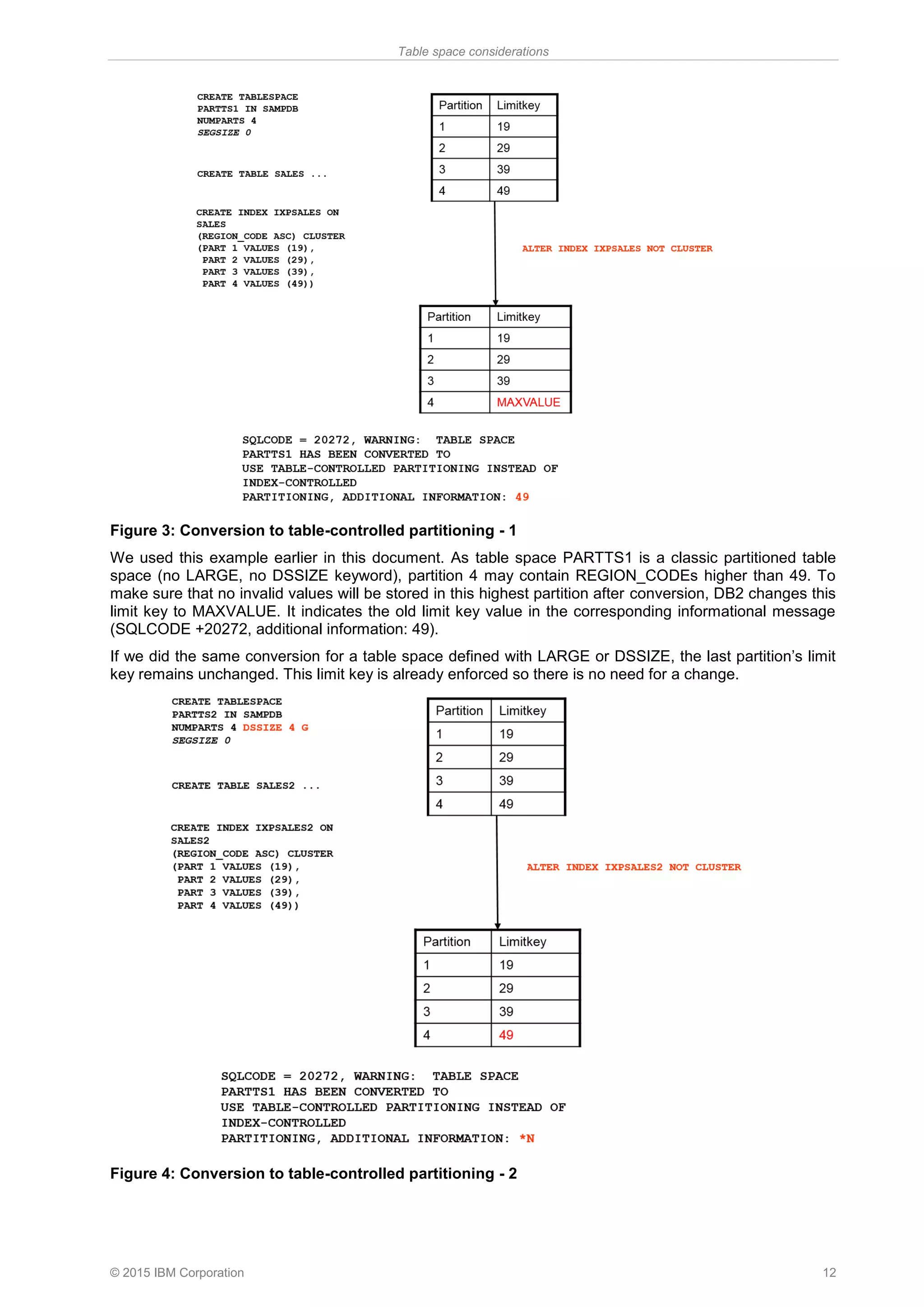
Figure 3: Conversion to table-controlled partitioning - 1
We used this example earlier in this document. As table space PARTTS1 is a classic partitioned table
space (no LARGE, no DSSIZE keyword), partition 4 may contain REGION_CODEs higher than 49. To
make sure that no invalid values will be stored in this highest partition after conversion, DB2 changes this
limit key to MAXVALUE. It indicates the old limit key value in the corresponding informational message
(SQLCODE +20272, additional information: 49).
If we did the same conversion for a table space defined with LARGE or DSSIZE, the last partition’s limit
key remains unchanged. This limit key is already enforced so there is no need for a change.
Figure 4: Conversion to table-controlled partitioning - 2
Table space considerations
© 2015 IBM Corporation 13
Note that the additional information in the DB2 message is slightly different: *N indicates that DB2 made no
changes to the last partition’s limit key.
3.6 Considerations for significant index columns
3.6.1 Significant Columns
When defining an index for index-controlled partitioning, it is possible to specify the partition limit keys for
less columns than this index contains. See the following example:
CREATE TABLESPACE PARTTS1A IN DBPARTS NUMPARTS 4 SEGSIZE 0 ;
CREATE TABLE SALES1A (PRODUCT_ID SMALLINT NOT NULL,
SALES_AMOUNT DECIMAL(5,2) NOT NULL,
REGION_CODE SMALLINT NOT NULL,
PRODUCT_CODE SMALLINT NOT NULL) IN DBPARTS.PARTTS1A;
CREATE INDEX IXPSALES1A ON SALES1A
(REGION_CODE ASC, PRODUCT_CODE ASC) CLUSTER
(PART 1 VALUES (19),
PART 2 VALUES (29),
PART 3 VALUES (39),
PART 4 VALUES (49));
Note that the values for column REGION_CODE still dictate the partitioning for table SALES1A. But now
we have an additional column, PRODUCT_CODE, as part of the partitioning index. PRODUCT_CODEs
values do not matter for partitioning so we did not specify any values for PRODUCT_CODE in the
partitioning clause. For DB2, REGION_CODE is the only significant column for partitioning.
In the past, the non-significant columns were often added to the partitioning index to support index-only
access paths or access paths with more matching columns.
Specifying MAXVALUE (or MINVALUE for descending indexes) as limit key has the same meaning and the
same effect after conversion:
CREATE TABLESPACE PARTTS1B IN DBPARTS NUMPARTS 4 SEGSIZE 0 ;
CREATE TABLE SALES1B (PRODUCT_ID SMALLINT NOT NULL,
SALES_AMOUNT DECIMAL(5,2) NOT NULL,
REGION_CODE SMALLINT NOT NULL,
PRODUCT_CODE SMALLINT NOT NULL) IN DBPARTS.PARTTS1B;
CREATE INDEX IXPSALES1B ON SALES1B
(REGION_CODE ASC, PRODUCT_CODE ASC) CLUSTER
(PART 1 VALUES (19, MAXVALUE),
PART 2 VALUES (29, MAXVALUE),
PART 3 VALUES (39, MAXVALUE),
PART 4 VALUES (49, MAXVALUE));
In this case, PRODUCT_CODE is also regarded as non-significant column.
Table space considerations
© 2015 IBM Corporation 14
3.6.2 The effect of ZPARM IX_TB_PART_CONV_EXCLUDE
APAR PM45829 added a new ZPARM, IX_TB_PART_CONV_EXCLUDE to DB2 z/OS. This ZPARM
influences how DB2 migrates an object to table-controlled partitioning if the number of significant columns
in the partitioning index is smaller than the number of index columns.
When setting this parameter to “NO”, DB2 will ensure that all columns of the partitioning index will become
part of the partitioning key of the table after conversion.
In our example, table SALES1A will be partitioned by REGION_CODE and PRODUCT_CODE after
conversion (as it was before). Index IXPSALES1A will remain a partitioned and partitioning index.
Figure 5: Significant columns – conversion with ZPARM set to NO
Note how SYSIBM.SYSTABLEPART reflects the conversion to table-controlled partitioning in columns
LIMITKEY and LIMITKEY_INTERNAL. With the exception of the last partition, LIMITKEY still contains the
values for the significant partitioning column (REGION_CODE) only. This column is usually taken by DB2
tools (e.g. IBM DB2 Administration Tool) to regenerate the DDL for a table. In contrast,
LIMITKEY_INTERNAL contains the limit keys for all partitioning columns.
“NO” used to be the default value for IX_TB_PART_CONV_EXCLUDE when it was introduced at the end
of 2011. However, this default value was changed to “YES” by APAR PM90893, available for DB2 9, 10
and 11 in October 2013. With that value, DB2 will make significant changes in the conversion process. You
can achieve that these non-significant columns will be removed from the partitioning scheme along with the
conversion. However, the partitioning index does not change and the non-significant columns remain still
part of the index keys.
Table space considerations
© 2015 IBM Corporation 15
Figure 6: Significant columns – conversion with ZPARM set to YES
If you do reverse engineering the DDL for the table from the DB2 catalog now, you would only get one
column as partitioning key.
Similar to the previous example, index IXPSALES1A is classified as a partitioning and partitioned index
after conversion. This is reflected as INDEXTYPE=’P’ in SYSIBM.SYSINDEXES.
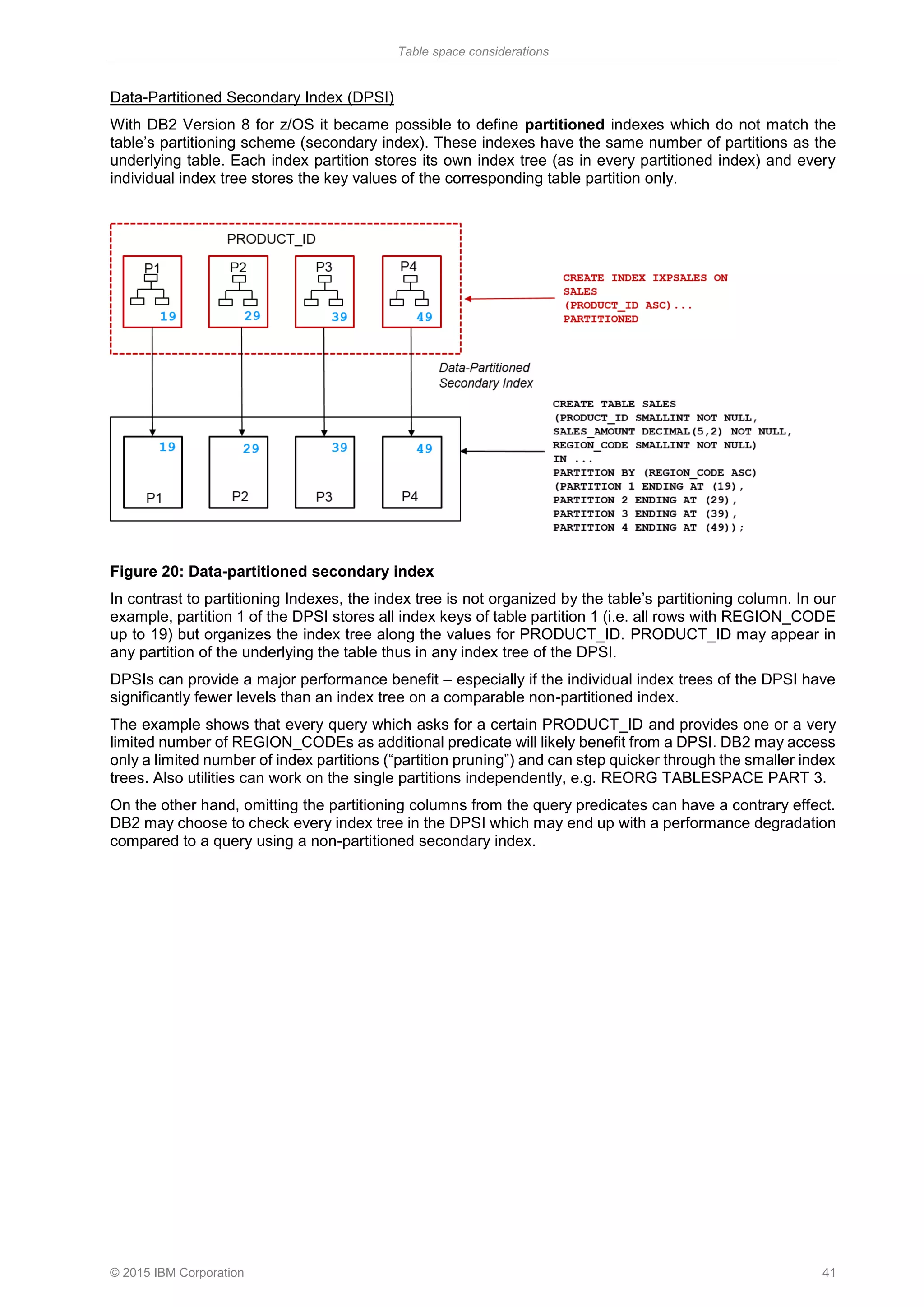
3.6.3 The DPSI effect
For a description of DPSI refer to chapter 6.6 in the appendix.
The setting of ZPARM IX_TB_PART_CONV_EXCLUDE does not only influence the contents of the DB2
catalog. It also has implications on further indexes you might create after conversion to table-controlled
partitioning.
Assume you converted your table SALES1A to table-controlled partitioning and you want to add another
partitioned index. The following picture shows that, depending on the ZPARM setting, the partitioning is
determined by one (REGION_CODE only) or two columns (REGION_CODE plus PRODUCT_CODE).
Table space considerations
© 2015 IBM Corporation 16
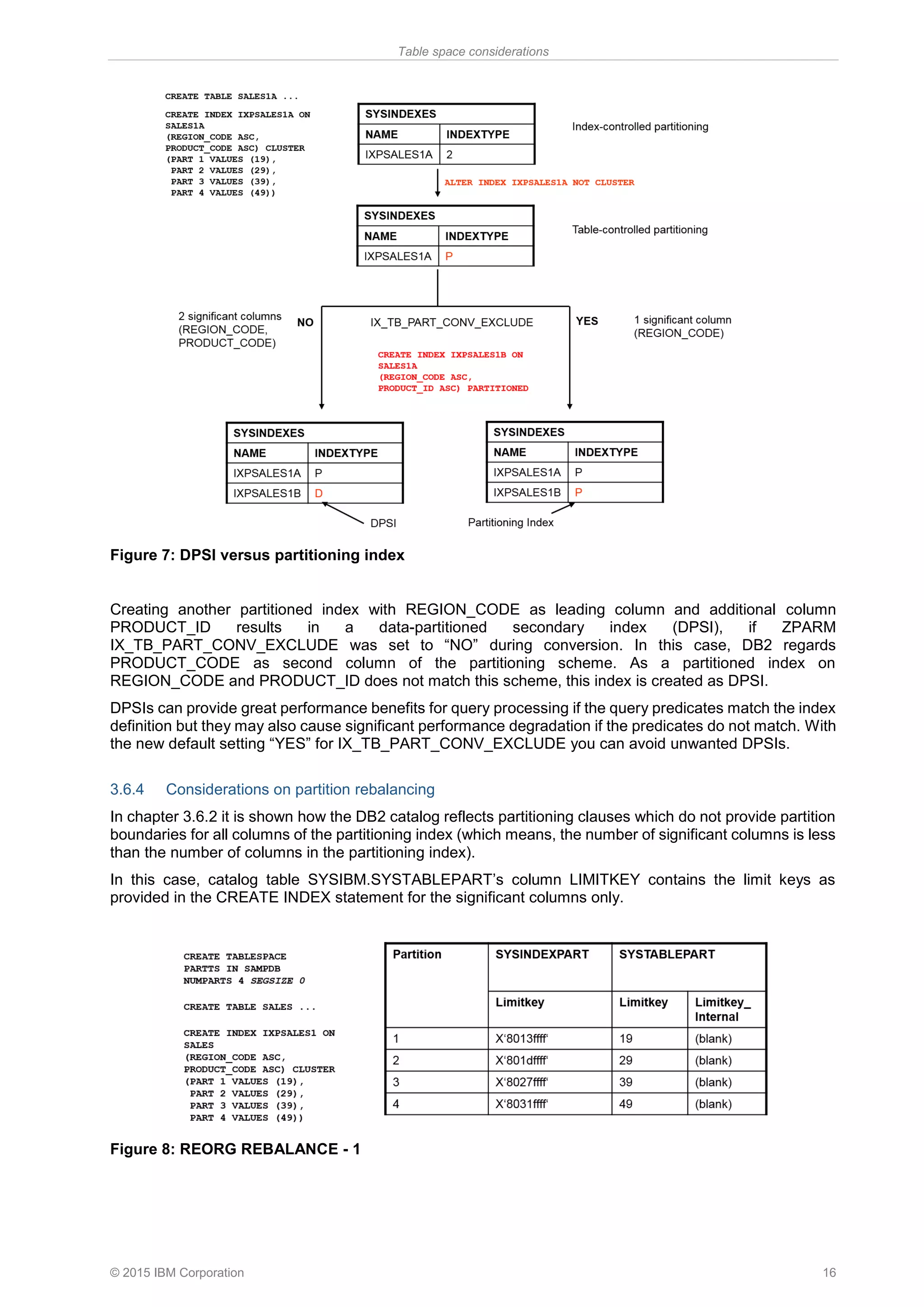
Figure 7: DPSI versus partitioning index
Creating another partitioned index with REGION_CODE as leading column and additional column
PRODUCT_ID results in a data-partitioned secondary index (DPSI), if ZPARM
IX_TB_PART_CONV_EXCLUDE was set to “NO” during conversion. In this case, DB2 regards
PRODUCT_CODE as second column of the partitioning scheme. As a partitioned index on
REGION_CODE and PRODUCT_ID does not match this scheme, this index is created as DPSI.
DPSIs can provide great performance benefits for query processing if the query predicates match the index
definition but they may also cause significant performance degradation if the predicates do not match. With
the new default setting “YES” for IX_TB_PART_CONV_EXCLUDE you can avoid unwanted DPSIs.
3.6.4 Considerations on partition rebalancing
In chapter 3.6.2 it is shown how the DB2 catalog reflects partitioning clauses which do not provide partition
boundaries for all columns of the partitioning index (which means, the number of significant columns is less
than the number of columns in the partitioning index).
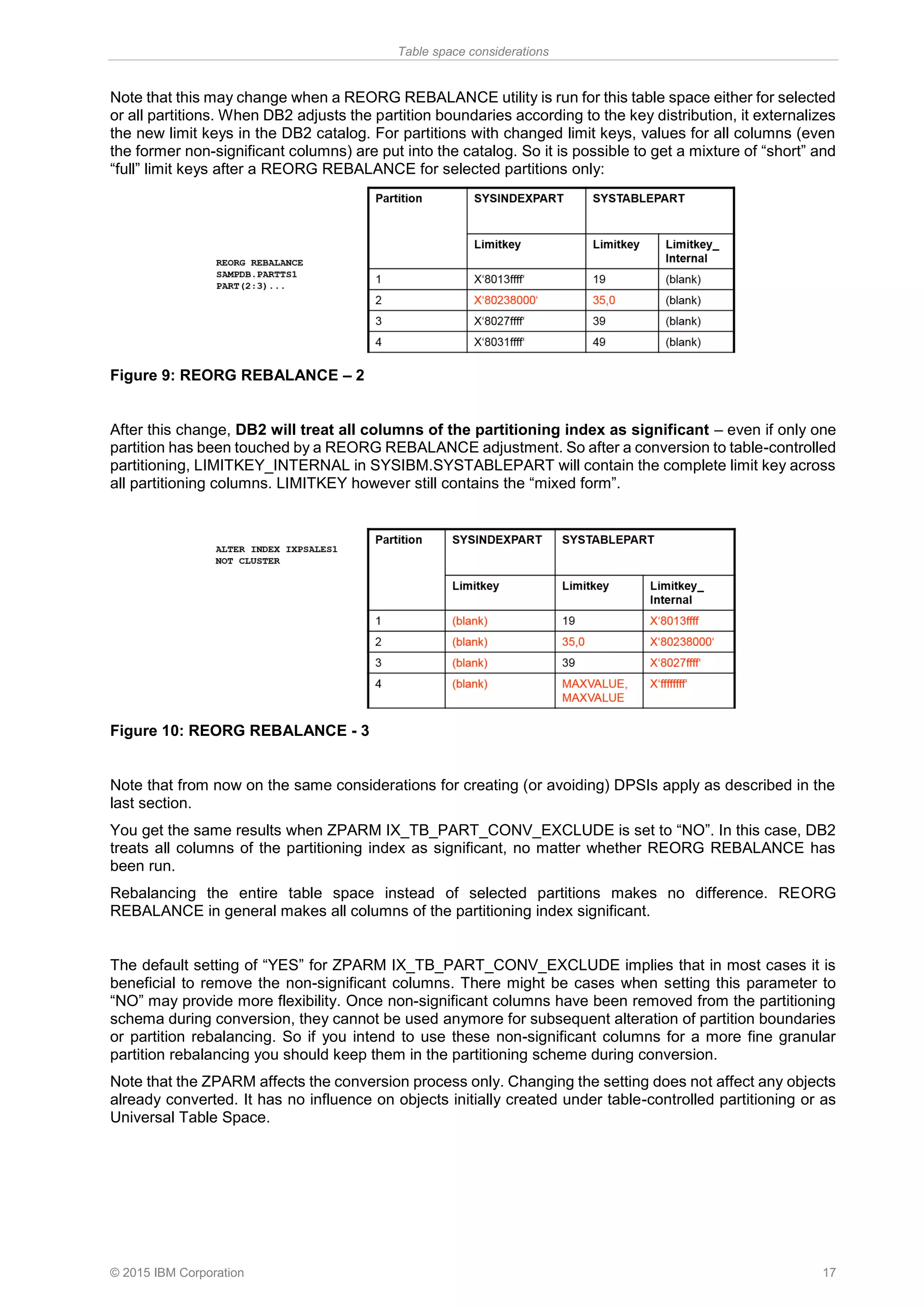
In this case, catalog table SYSIBM.SYSTABLEPART’s column LIMITKEY contains the limit keys as
provided in the CREATE INDEX statement for the significant columns only.
Figure 8: REORG REBALANCE - 1
Table space considerations
© 2015 IBM Corporation 17
Note that this may change when a REORG REBALANCE utility is run for this table space either for selected
or all partitions. When DB2 adjusts the partition boundaries according to the key distribution, it externalizes
the new limit keys in the DB2 catalog. For partitions with changed limit keys, values for all columns (even
the former non-significant columns) are put into the catalog. So it is possible to get a mixture of “short” and
“full” limit keys after a REORG REBALANCE for selected partitions only:
Figure 9: REORG REBALANCE – 2
After this change, DB2 will treat all columns of the partitioning index as significant – even if only one
partition has been touched by a REORG REBALANCE adjustment. So after a conversion to table-controlled
partitioning, LIMITKEY_INTERNAL in SYSIBM.SYSTABLEPART will contain the complete limit key across
all partitioning columns. LIMITKEY however still contains the “mixed form”.
Figure 10: REORG REBALANCE - 3
Note that from now on the same considerations for creating (or avoiding) DPSIs apply as described in the
last section.
You get the same results when ZPARM IX_TB_PART_CONV_EXCLUDE is set to “NO”. In this case, DB2
treats all columns of the partitioning index as significant, no matter whether REORG REBALANCE has
been run.
Rebalancing the entire table space instead of selected partitions makes no difference. REORG
REBALANCE in general makes all columns of the partitioning index significant.
The default setting of “YES” for ZPARM IX_TB_PART_CONV_EXCLUDE implies that in most cases it is
beneficial to remove the non-significant columns. There might be cases when setting this parameter to
“NO” may provide more flexibility. Once non-significant columns have been removed from the partitioning
schema during conversion, they cannot be used anymore for subsequent alteration of partition boundaries
or partition rebalancing. So if you intend to use these non-significant columns for a more fine granular
partition rebalancing you should keep them in the partitioning scheme during conversion.
Note that the ZPARM affects the conversion process only. Changing the setting does not affect any objects
already converted. It has no influence on objects initially created under table-controlled partitioning or as
Universal Table Space.
Table space considerations
© 2015 IBM Corporation 18
3.7 Other conversion options
It is recommended to convert from index-controlled to table-controlled partitioning by changing the
partitioning index to “NOT CLUSTER” and change it back to “CLUSTER”. However, certain other schema
changes also cause a conversion “under the covers”. Under certain circumstances it is also possible to
cause a “REORG pending” state which prevents applications from accessing the table space.
It is recommended to become familiar with these options in order to avoid any outage situation caused by
conversion to table-controlled partitioning.
3.7.1 DROP partitioning INDEX
Dropping the partitioning index converts the table to table-controlled partitioning. This was disallowed in
DB2 prior to version 8. The same rules for significant columns and for the related ZPARM
IX_TB_PART_CONV_EXCLUDE apply as in the last chapter.
3.7.2 ALTER TABLE ADD PARTITION
Adding partitions to tables currently under index-controlled partitioning will convert them to table-controlled
partitioning. We have to differentiate between two scenarios: enforcement or no enforcement of the limit
key of the highest partition.
As mentioned in chapter 3.1.2, table spaces neither created with LARGE nor with DSSIZE keyword allow
values for the partitioning key beyond the highest partition’s limit key. No keys are enforced in this case.
DB2 allows adding a partition after the last partition but it will convert the table to table-controlled partitioning
and it will place the new partition and the former highest partition into “REORG pending” immediately. It
does not matter whether there really exist rows which need to be moved into the new partition as this is not
known by the DDL process.
Note:
DB2 11 provides several new capabilities for online schema changes and materialization of these
changes with online REORG. However, you will face “REORG pending” for this case even in DB2 11.
Figure 11: Adding a partition (no limit key enforcement)
Table space considerations
© 2015 IBM Corporation 19
There is no risk of getting a “REORG pending” state if the table space has been created with LARGE or
DSSIZE key word. In this case, the limit key of the highest partition is enforced by DB2 as soon as the table
is created and there is no need of setting the restrictive state.
This state prevents applications from using the partitions in “REORG pending” for read and write access.
So this is one more reason to pay special attention to all these tables with no limit key enforcement in the
highest partition.
Remark: To add a partition the high limit key of the last partition must be lower than the highest possible
value of the appropriate data type. Consider also APAR PI42999.
3.7.3 ALTER TABLE ROTATE PARTITION
Rotating partitions is another way of converting tables to table-controlled partitioning. When a partition
rotation is specified for an index-controlled table, the conversion to table-controlled partitioning is always
performed – there is no way of staying in the old partitioning pattern.
Similar to “ALTER TABLE ADD PARTITION”, the limit key of the new logically last partition will be enforced
after conversion. For tables with no key enforcement so far, the former and the new last partition will be
placed in “REORG pending” state, no matter whether there really exist rows which need to be moved to
another partition.
Figure 12: Rotating a partition
Note, like in the previous example, the DB2 message indicates the conversion to table-controlled
partitioning only. It gives no hint that partitions have been placed into “REORG Pending”.
This restriction does not apply to table spaces with enforced limit keys (created with LARGE or DSSIZE
key word). These can be converted to table-controlled partitioning by partition rotation without pending
state.
3.7.4 ALTER TABLE ALTER PARTITION
Starting with Version 8, DB2 allows altering the partition boundaries of tables under table-controlled
partitioning with the ALTER TABLE…ALTER PARTITION statement. This statement can also be applied
to tables still under index-controlled partitioning. The statement implicitly converts the table to table-
controlled partitioning and will subsequently apply the partition alteration.
Note that this may place the affected partitions into “REORG pending” as long as at least one of the affected
partitions contains data.
Remark: the conversion also takes place if you specify the current value for a partition. “REORG pending”
is not set in such a case.
Table space considerations
© 2015 IBM Corporation 20
Figure 13: Altering the partition limits – 1
The example shows that you get two messages if an index-controlled table is altered by changing the
partition boundaries. The first message (SQLCODE +610) is issued when the table space is placed into
“REORG pending”. The second one indicates the conversion to table-controlled partitioning.
The additional information depends whether the limit key was enforced before conversion. If there was no
key enforcement so far, DB2 displays the limit key of the highest partition. Otherwise, it will display *N.
The example applies to tables with key enforcement as well as to tables without key enforcement. The only
difference appears when the limit key of the highest partition is altered. In this case, DB2 will put the partition
into “REORG pending” if there was no key enforcement. For tables with limit key enforcement, the highest
partition will only be placed in “REORG pending” if it contains data and the limit key is decreased.
Figure 14: Altering the partition limits – 2
Table space considerations
© 2015 IBM Corporation 21
DB2 11 added a new ZPARM (see APAR PM89655) which helps preventing undesired “REORG pending”
situations. Once this ZPARM (PREVENT_ALTERTB_LIMITKEY) is set to “YES”, no more ALTER TABLE
… ALTER PARTITION operations against an index-controlled partitioned table are allowed and the SQL
statement will fail with an SQLCODE -876 and reason code 6.
Note that “NO” is the default value. Tables already migrated to table-controlled partitioning are not affected.
Beginning with DB2 11 an ALTER TABLE … ALTER PARTITION against a table-controlled partitioning
object is a deferred alter, except for the case that the last partition has MAXVALUE. In such a case the
ALTER is an immediate ALTER and the last partition is left in REORP (changed by PI42999).
3.7.5 CREATE INDEX PARTITIONED
Beginning with DB2 Version 8 it is possible to specify the “PARTITIONED” keyword when creating indexes.
This creates either partitioning or data-partitioned secondary indexes (DPSIs). The latter applies to tables
under table-controlled partitioning only. If you specify “PARTITIONED” explicitly for an index on table
currently under index-controlled partitioning, DB2 will convert the table to table-controlled partitioning
automatically.
As a result, the newly created index will be a DPSI if its leftmost columns and their collating sequence do
not match the partitioning columns of the table. Otherwise, it will be created as partitioning and partitioned
index.
The existing index which was necessary to enforce index-controlled partitioning remains unchanged.
Regardless on which columns the new index was created, it will continue as partitioning and partitioned
index.
The following picture illustrates the conversion process.
Figure 15: Creating an additional partitioning index
We add index IXSALES2 to table SALES which is under index-controlled partitioning. As its leftmost column
(REGION_CODE) matches the partitioning scheme of the existing partitioning index IXPSALES, the new
index becomes partitioning and partitioned after conversion.
If we create for example a partitioned index on SALES_AMOUNT, DB2 will do the conversion and create
the new index as DPSI because the index columns do not match the columns of the partitioning index of
IXPSALES (which become now the partitioning columns of the table).
Note: this example shows a table space without LARGE or DSSIZE keyword. So DB2 will enforce the limit
key in the highest partition after conversion and will change the highest limit key to “MAXVALUE”.
You should also pay attention to all cases where the mentioned ZPARM IX_TB_PART_CONV_EXCLUDE
becomes relevant (see also chapter 3.6 of this document). DB2 will first convert the table to table-controlled
Table space considerations
© 2015 IBM Corporation 22
partitioning and decide which columns become significant for the partitioning based on the ZPARM setting.
Then it will create the new index and classify it as partitioning index or DPSI.
3.7.6 ALTER INDEX ALTER PARTITION
This statement allows to change the partition boundaries of a table under index-controlled partitioning. It
does not trigger any conversion to table-controlled partitioning nor can it be applied to table already under
table-controlled partitioning. ZPARM PREVENT_ALTERTB_LIMITKEY is not relevant here.
Similar to ALTER TABLE ALTER PARTITION, individual partitions are placed into “REORG pending” when
a boundary between two partitions is moved. The usual rules for limit key enforcement of the highest
partition apply here as for index-controlled tables in general.
3.7.7 ALTER TABLE ADD PARTITION BY
This statement is used to add a partitioning scheme to an existing table. It completes the definition of table-
controlled partitioning and cannot be applied to index-controlled tables which already have a “complete”
status.
3.8 Conversion for tables with XML or LOB columns
3.8.1 LOB
Partitioned tables (no matter whether index- or table-controlled) containing LOB columns require a
dedicated LOB table space for every LOB column and every partition. Creation of the required objects (i.e.
LOB table spaces, auxiliary tables and auxiliary indexes) can be simplified by setting the special register
CURRENT RULES to ‘STD’ when creating the DB2 tables.
For the conversion process to table-controlled partitioning, basically the same rules apply as for tables
without LOB columns. It is recommended to practice the least interruptive approach which means
converting by altering the partitioning index to a non-clustering index and then altering back to the clustering
index.
As for tables without LOB columns, conversion to table-controlled partitioning may also be achieved by
adding partitions. If there is no enforcement of the limit key in the highest partition, the ALTER TABLE ADD
PARTITION will cause the former highest partition and the newly added partition to be placed into “REORG
pending” (see also chapter 3.7.2). This requires a REORG of the base table spaces and the related LOB
table spaces (AUX YES).
Note:
It is highly recommended to set the special register CURRENT RULES to ‘STD’ before adding partitions
to the LOB-table if you created the initial table with CURRENT RULES=’STD’.
Be aware that the REORG which resolves the “REORG pending” situation will discard records from the
table if their partitioning keys are higher than the highest partition’s limit key. This may happen with non-
LOB tables as well.
Table space considerations
© 2015 IBM Corporation 23
Figure 16: Discarding a LOB
Table SALES is created with index-controlled partitioning and no limit key enforcement for the highest
partition. So rows with REGION_CODE 56 and 87 can be inserted successfully.
Adding a new partition with limit key 69 will trigger a conversion to table-controlled partitioning and enforce
the limit keys. Partitions 4 and 5 are placed into “REORG pending”. A subsequent REORG will move the
row for REGION_CODE into the correct partition (5), remove the row with REGION_CODE 87 from the
table and put it into a discard data set.
For LOB-tables, this is basically the same procedure. But you should keep in mind, that REORG will not
preserve the LOB-data of the rows in the discard data set. REORG will only keep the contents of the
non-LOB columns in the discard data set. There is no support for file-reference variables or spanned
records in REORG utility discard processing as it is in the LOAD and UNLOAD utilities. If you want these
contents to be preserved, you need to unload them before adding the new partition or specify a limit key
for the new partition which allows all rows to be kept.
Recommendation:
Check your LOB-tables carefully before converting them to table-controlled partitioning. If you convert
LOB-tables with no limit key enforcement, be sure to convert them by ALTER INDEX NOT CLUSTER or
make sure that there are no limit key violations if you plan to convert them by ALTER TABLE ADD
PARTITION.
3.8.2 XML
Although XML columns are relatively new to DB2 (introduced in version 9) they can be used in tables with
index-controlled partitioning. For base tables with index-controlled, table-controlled or UTS PBR
partitioning, DB2 creates a UTS PBR table space to contain the XML table.
Basically, a conversion to table-controlled partitioning has no influence on the underlying XML table space.
Similar to non-LOB and LOB tables, the recommended way for conversion is by altering the partitioning
index to NOT CLUSTER and back to CLUSTER.
As in the other cases, special attention is required for table spaces with no limit key enforcement in the
highest partition. If a conversion is done by adding a new partition to the table space, the last partition and
the new partition are put into “REORG pending”. A new partition is also added to the underlying XML table
space.
Table space considerations
© 2015 IBM Corporation 24
Unlike for LOBs, a REORG of the base table space does not trigger a reorganization of the related XML
table space. In fact neither REORG of the base table space nor REORG of the XML table space moves
XML rows from the former highest partition to the new highest partition. See the following example:
Figure 17: Rearranging an XML
Like in previous examples limit keys are not enforced for index-controlled partitioned table space PARTTS.
Table SALES contains one record for (PRODUCT_ID = 176) of which REGION_CODE is beyond the limit
of the highest partition (part 4). The underlying XML table tolerates this and stores the XML data related to
PRODUCT_ID 176 also in partition 4. Adding a new partition with limit key 99 to the base table adds a
partition to the XML table space as well, converts the table to table-controlled partitioning and places
partition 4 and 5 of base table space PARTTS into “REORG pending”.
A subsequent REORG will move the row for PRODUCT_ID=176 to partition 5 in the base table but the
corresponding row in the XML table space will remain in partition 4. You can verify this with DSN1PRNT or
by reorganizing the base and XML table spaces separately and comparing the row counts for the individual
partitions in the job protocol.
Despite this inconsistency, the relationship between the base table’s rows and its XML rows remain intact.
Recommendation:
If you have index-controlled partitioned tables with XML columns and no limit key enforcement, do not
try to convert them by adding partitions to the base table. Use ALTER INDEX NOT CLUSTER instead to
avoid any inconsistencies between base and XML table.
The good news is that altering the limit key of an index-controlled table is not allowed once it contains at
least one XML column.
3.9 Additional considerations
3.9.1 Timeout during conversion
As the conversion to table-controlled partitioning is triggered by a common DDL operation such as ALTER
INDEX it may be subject to a timeout against other processes on the database objects or the DB2 catalog.
Table space considerations
© 2015 IBM Corporation 25
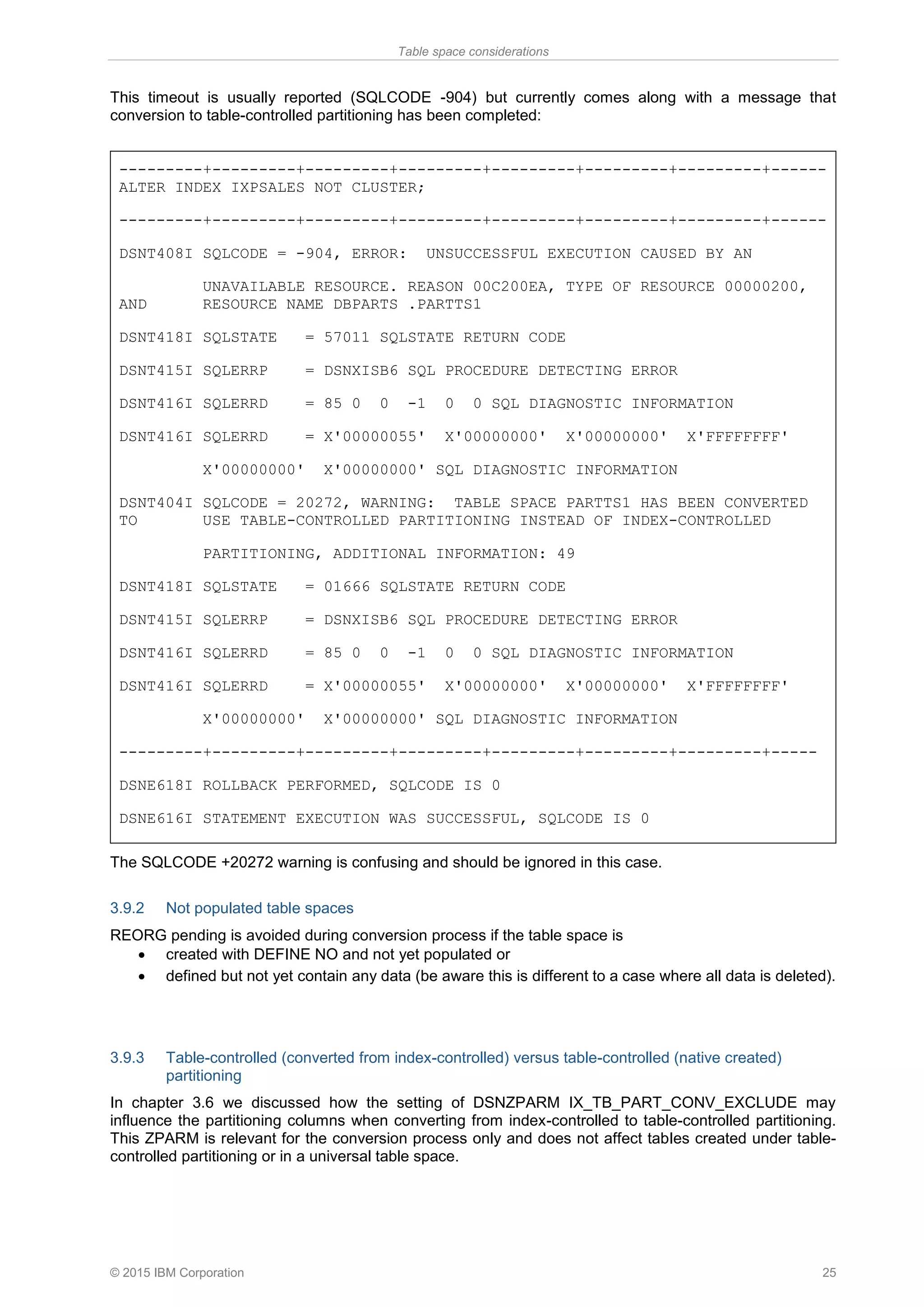
This timeout is usually reported (SQLCODE -904) but currently comes along with a message that
conversion to table-controlled partitioning has been completed:
---------+---------+---------+---------+---------+---------+---------+------
ALTER INDEX IXPSALES NOT CLUSTER;
---------+---------+---------+---------+---------+---------+---------+------
DSNT408I SQLCODE = -904, ERROR: UNSUCCESSFUL EXECUTION CAUSED BY AN
UNAVAILABLE RESOURCE. REASON 00C200EA, TYPE OF RESOURCE 00000200,
AND RESOURCE NAME DBPARTS .PARTTS1
DSNT418I SQLSTATE = 57011 SQLSTATE RETURN CODE
DSNT415I SQLERRP = DSNXISB6 SQL PROCEDURE DETECTING ERROR
DSNT416I SQLERRD = 85 0 0 -1 0 0 SQL DIAGNOSTIC INFORMATION
DSNT416I SQLERRD = X'00000055' X'00000000' X'00000000' X'FFFFFFFF'
X'00000000' X'00000000' SQL DIAGNOSTIC INFORMATION
DSNT404I SQLCODE = 20272, WARNING: TABLE SPACE PARTTS1 HAS BEEN CONVERTED
TO USE TABLE-CONTROLLED PARTITIONING INSTEAD OF INDEX-CONTROLLED
PARTITIONING, ADDITIONAL INFORMATION: 49
DSNT418I SQLSTATE = 01666 SQLSTATE RETURN CODE
DSNT415I SQLERRP = DSNXISB6 SQL PROCEDURE DETECTING ERROR
DSNT416I SQLERRD = 85 0 0 -1 0 0 SQL DIAGNOSTIC INFORMATION
DSNT416I SQLERRD = X'00000055' X'00000000' X'00000000' X'FFFFFFFF'
X'00000000' X'00000000' SQL DIAGNOSTIC INFORMATION
---------+---------+---------+---------+---------+---------+---------+-----
DSNE618I ROLLBACK PERFORMED, SQLCODE IS 0
DSNE616I STATEMENT EXECUTION WAS SUCCESSFUL, SQLCODE IS 0
The SQLCODE +20272 warning is confusing and should be ignored in this case.
3.9.2 Not populated table spaces
REORG pending is avoided during conversion process if the table space is
• created with DEFINE NO and not yet populated or
• defined but not yet contain any data (be aware this is different to a case where all data is deleted).
3.9.3 Table-controlled (converted from index-controlled) versus table-controlled (native created)
partitioning
In chapter 3.6 we discussed how the setting of DSNZPARM IX_TB_PART_CONV_EXCLUDE may
influence the partitioning columns when converting from index-controlled to table-controlled partitioning.
This ZPARM is relevant for the conversion process only and does not affect tables created under table-
controlled partitioning or in a universal table space.
Table space considerations
© 2015 IBM Corporation 26
The following table shows that some administrative actions on a table (table space) may have different
results depending whether
• the table was converted from index- to table-controlled partitioning
• the table was natively created under table-controlled partitioning
Scenario : A B C D
Starting point : table created under Index-
controlled
Part.
Index-
controlled
Part.
Table-
controlled
Part.
Table-
controlled
Part.
Number of columns specified for partitioning
(“PARTITION BY”)
2 2 2 2
Significant columns (“ENDING AT…”) 1 1 2 1
Conversion done with DSNZPARM
IX_TB_PART_CONV_EXCLUDE=
NO YES not
relevant
not
relevant
Significant columns after conversion 2 1 2 1
Task before conversion : ALTER TABLE
ALTER PARTITION with 1 column specified
Triggers
conversion
(REORGP
possible)
Triggers
conversion
(REORGP
possible)
not
relevant
not
relevant
Task after conversion : ALTER TABLE
ALTER PARTITION with 1 column specified
AREOR AREOR AREOR AREOR
Task before conversion : ALTER TABLE
ALTER PARTITION with 2 columns specified
Triggers
conversion
(REORGP
possible)
Triggers
conversion
(REORGP
possible)
2 columns
significant
not
relevant
not
relevant
Task after conversion : ALTER TABLE
ALTER PARTITION with 2 columns specified
AREOR SQLCODE
-663
AREOR AREOR
Task before conversion : REORG
REBALANCE
2 columns
are used
2 columns
are used
2 columns
are used
2 columns
are used
Task after conversion : REORG
REBALANCE (DSNU2906I)
2 columns
are used
1 column
is used
2 columns
are used
2 columns
are used
Task before conversion : CREATE INDEX
PARTITIONED with 1 significant column
Triggers
conversion
and new
index is
DPSI
Triggers
conversion
and new
index is PI
not
relevant
not
relevant
Table space considerations
© 2015 IBM Corporation 27
Task after conversion : CREATE INDEX
PARTITIONED with 1 significant column
New index
is DPSI
New index
is PI
New index
is DPSI
New index
is DPSI
Task before conversion : CREATE INDEX
PARTITIONED with 2 significant columns
Triggers
conversion
and new
index is PI
Triggers
conversion
and new
index is PI
not
relevant
not
relevant
Task after conversion : CREATE INDEX
PARTITIONED with 2 significant columns
New index
is PI
New index
is PI
New index
is PI
New index
is PI
These scenarios anticipate that the “ENDING AT …” clause contains less columns than the “PARTITION
BY” clause. Thus for index-controlled partitioning the setting of IX_TB_PART_CONV_EXCLUDE
determines how many columns will be considered as significant (2 columns in scenario A, 1 column in
scenario B).
Note that there is a different concept for tables initially created under table-controlled partitioning
(scenarios C and D). In this case, DB2 will always treat all columns specified in the “PARTITION BY” clause
as significant, regardless whether the “ENDING AT …” clauses contains values for all partitions of the
partitioning key.
Table space considerations
© 2015 IBM Corporation 28
4 Conversion from table-controlled partitioning to UTS
4.1 The deferred ALTER
A base requirement for the conversion to UTS is the fact that the table space must be table-controlled
partitioned. If it is still index-controlled partitioned, then the conversion to UTS is not allowed:
Classic partitioned table spaces have a SEGSIZE of zero. Whereas UTS PBR have a SEGSIZE between
4 and 64 (inclusive). The value must be a multiplier of 4. Otherwise SQLCODE-644 is issued:
Since DB2 V10 it is possible to trigger this change of the SEGSIZE and hence the change to UTS PBR by
a deferred ALTER statement on the SEGSIZE:
E.g ALTER TABLESPACE db.ts SEGSIZE 32.
This deferred ALTER resulted in AREOR setting on the table space.
SQLCODE = -650, ERROR: THE ALTER STATEMENT CANNOT BE EXECUTED, REASON 8
SQLSTATE = 56090 SQLSTATE RETURN CODE
SQLERRP = DSNXIATS SQL PROCEDURE DETECTING ERROR
SQLCODE = -644, ERROR: INVALID VALUE SPECIFIED FOR KEYWORD OR CLAUSE
SEGSIZE IN STATEMENT CREATE OR ALTER
SQLSTATE = 42615 SQLSTATE RETURN CODE
SQLERRP = DSNHSM4A SQL PROCEDURE DETECTING ERROR
SQLCODE = 610, WARNING: A CREATE/ALTER ON OBJECT SZI10D.SZI10S HAS PLACED
OBJECT IN ADVISORY REORG PENDING
SQLSTATE = 01566 SQLSTATE RETURN CODE
SQLERRP = DSNXI14 SQL PROCEDURE DETECTING ERROR
-DIS DB(SZI10D) SP(*) LIMIT(*)
DSNT360I -DB2A ***********************************
DSNT361I -DB2A * DISPLAY DATABASE SUMMARY
* GLOBAL
DSNT360I -DB2A ***********************************
DSNT362I -DB2A DATABASE = SZI10D STATUS = RW
DBD LENGTH = 8066
DSNT397I -DB2A
NAME TYPE PART STATUS
-------- ---- ----- -----------------
SZI10S TS 0001 RW,AREOR
-THRU 0020
SZI10S TS
SZI10X IX 0001 RW
Table space considerations
© 2015 IBM Corporation 29
The selected SEGSIZE parameter is a trade-off between contention on the space map page (SEGSIZE
should be low) and an efficient space search algorithm (SEGSIZE should be large). The current default of
32 aims to balance both aspects.
4.2 The materializing REORG
The real conversion is done by the next REORG with SHRLEVEL CHANGE or REFERENCE on the
complete partitioned table space. A part level REORG on a subset of the table space’s partitions does not
materialize this change:
A successful conversion is indicated by the following REORG message:
Also the fields TYPE=R and DSSIZE in SYSIBM.SYSTABLESPACE are populated to indicate this
conversion.
4.2.1 Partition size constraints
Before the REORG on the complete object is run, it should be ensured that no physical space constraints
can occur. The following reasons can influence that one target partition, e.g. dataset with suffix A002 is
larger than the source partition (also suffix A002):
• A space map page of a classic partitioned table space covers 10.760 pages whereas a space map
page of an UTS PBR covers 1.712. Assumed is a 4K page size. UTS has space map design as
segmented tablespaces and therefore one space map page covers less pages.
• The source is probably not in extended RBA/LRSN format, but the target might be. This is
dependent on the setting of the keyword RBALRSN_CONVERSION (or the appropriate
DSNZPARM setting for UTILITY_OBJECT_CONVERSION).
• Conversion from basic row format (BRF) to reordered row format (RRF) and the influence on a
dictionary can have an impact if the table space is defined with COMPRESS YES. Of course the
keywords ROWFORMAT and KEEPDICTIONARY (consider also DSNZPARM
HONOR_KEEPDICTIONARY) play a decisive role.
In case you run out of space it is recommended that the ALTER db.ts SEGSIZE nn is accompanied by a
subsequent ALTER db.ts DSSIZE mmG to raise the DSSIZE. Refer to the following tables in Diagnosis
Guide and Reference for possible settings:
• Maximum partition size when LARGE and DSSIZE is not specified and the number of partitions
is less than or equal to 254.
• Maximum partition size when LARGE and DSSIZE is not specified and the number of partitions
is greater than 254.
If the REORG fails due to the above mentioned space problems, messages like the following can be
expected:
DSNU1164I -DB2A 056 05:01:50.55 DSNURFIT - PENDING DEFINITION CHANGES WERE
NOT APPLIED FOR SZI10D.SZI10S BECAUSE THE ENTIRE OBJECT WAS NOT SPECIFIED
DSNU1163I -DB2A 056 07:58:48.04 DSNUGPAM - APPLYING PENDING DEFINITION
CHANGES COMPLETE FOR SZI10D.SZI10S
Table space considerations
© 2015 IBM Corporation 30
Of course the REORG should be well-prepared, but if it fails, it can be terminated without any impact.
4.2.2 REORG preparation
Since PM58177 the REORG utility accepts a Partition by Growth table space for the mapping table. It is
recommended to use this feature otherwise the REORG may fail due to a space limitation of the mapping
table index. For the traditional segmented table spaces the space limit of the index is 64GB. Consider also
that the REORG only uses the mapping table index for storing information. The mapping table itself is not
populated or in other words it remains empty.
A materializing REORG will generate some default RUNSTATS statements if no explicit inline statistics
options are specified. The default is TABLE(table_name) INDEX(ALL) UPDATE(ALL). This is indicated by
the following messages:
However these default statistics may conflict with statistics that were collected through established
procedures. Therefore it is recommended to explicitly specify the established statistics statements on the
materializing REORG or to run a separate RUNSTATS with the appropriate options afterwards. The latest
used RUNSTATS statements can be generated and included in the REORG by the procedure attached in
the Appendix. Only the major steps are mentioned here:
• Generate the latest RUNSTATS statements by SET PROFILE FROM EXISTING STATS.
• Afterwards the PROFILE_TEXT column from SYSIBM.SYSTABLES_PROFILES contains the
statements to include into the REORG.
• Unload the RUNSTATS statements with a special SQL and concatenate the unload dataset in the
REORG SYSIN statement.
In addition the REORG should be coded with SORTDEVT your_installation_esoteric_name (e.g. SYSDA),
because the utility will check the presence of this option to allow full parallelism.
Also the region size of the job should be as large as possible to provide sufficient storage to multiple parallel
sort tasks and to avoid intermediate merges of temporary sort areas (e.g. an indication can be ICE247I)
Consider also to use:
• ROWFORMAT RRF (BRF may be deprecated in the future)
• RBALRSN_CONVERSION EXTENDED in V11 NFM and beyond
4.2.3 Package invalidation
Another fact which must be taken into account is that packages which refer the converted table space will
be invalidated during the conversion to UTS.
DSNU398I -DB2A 056 07:13:38.65 DSNURWBR - UNEXPECTED PROCESSING ERROR,
REASON=X'00E40318' ON TABLE - SYSADM.SZI10T
DSNT500I 056 07:13:41.96 DSNUGBAC - RESOURCE UNAVAILABLE
REASON 00C90099
TYPE 00000200
NAME SZI10D .SZI10S
DSNU017I 056 07:13:41.96 DSNUGBAC - UTILITY DATA BASE SERVICES MEMORY
EXECUTION ABENDED, REASON=X'00E40318' CAUSE=X'00C90099'
DSNU610I -DB2A 102 04:25:44.40 DSNUSUTP - SYSTABLEPART CATALOG UPDATE
FOR SZI10D.SZI10S SUCCESSFUL
DSNU610I -DB2A 102 04:25:44.41 DSNUSUPT - SYSTABSTATS CATALOG UPDATE
FOR SYSADM.SZI10T SUCCESSFUL
DSNU610I -DB2A 102 04:25:44.42 DSNUSUPC - SYSCOLSTATS CATALOG UPDATE
FOR SYSADM.SZI10T SUCCESSFUL
...
Table space considerations
© 2015 IBM Corporation 31
Here is a list of the terms which invalidate a package:
• The SBCS CCSID attribute of the table space is changed.
• When increasing the MAXPARTITIONS attribute of a table space.
• The SEGSIZE attribute of a partitioned table spaced is changed to convert the table space to a
range-partitioned universal table space.
• When the page size is changed. (BUFFERPOOL)
• When the DSSIZE attribute is changed.
Two options exist to provide relief for this situation:
1. Setting DSNZPARM ABIND=YES and rely on the AUTOBIND feature.
2. Checking the VALID column in SYSIBM.SYSPACKAGE, generating explicit REBIND statements
and executing these statements.
AUTOBIND is not sensitive to APREUSE, therefore it is recommended that the required REBIND
statements are generated after the REORG and submitted manually.
The following query might help to identify such packages:
SELECT DISTINCT
'REBIND PACKAGE (' !! PK.COLLID !!'.' !! PK.NAME !! '.(*))'
FROM SYSIBM.SYSPACKAGE PK,SYSIBM.SYSPACKDEP PD
WHERE PK.NAME = PD.DNAME
AND PK.COLLID = PD.DCOLLID
AND PK.CONTOKEN = PD.DCONTOKEN
AND PK.LOCATION = PD.DLOCATION
AND PD.BNAME = 'SZI10T'
AND PD.BQUALIFIER = 'SYSADM'
AND PD.BTYPE = 'T'
AND PK.VALID = 'N'
;
Table space considerations
© 2015 IBM Corporation 32
5 Check Lists
Conversion from index-controlled partitioned to table-controlled partitioned table space:
1. Check PTF-Level of DB2 subsystems and install required PTFs (see list of APARs).
2. Prevent new creation of index-controlled tables: Set DSNZPARM
PREVENT_NEW_IXCTRL_PART to YES.
3. Prevent limit key alteration of index-controlled tables which may cause conversion to table-
controlled: Set DSNZPARM PREVENT_ALTERTB_LIMITKEY to YES.
4. Allow DB2 to exclude non-significant columns from partitioning during conversion: Set ZPARM
IX_TB_PART_CONV_EXCLUDE to YES.
5. Generate a list of tables under index-controlled partitioning with no limit key enforcement: This
may require special attention during conversion to table-controlled partitioning and may cause
“REORG pending”.
6. Generate a list of tables under index-controlled partitioning with a mixture of significant and non-
significant columns caused by REORG REBALANCE: In these situations, columns may become
significant during conversion to table-controlled partition though this might not be desired.
7. Generate a list of tables under index-controlled partitioning with LOB and XML columns and no
high limit key enforcement: These tables should be converted to table-controlled partitioning by
altering the clustering only.
8. Use ALTER INDEX NOT CLUSTER for conversion to table-controlled partitioning whenever
possible.
9. Change applications which access LIMITKEY in SYSIBM.SYSINDEXPART to access the
appropriate column in SYSIBM.SYSTABLEPART.
• For static applications querying SYSIBM.SYSTABAUTH can be used to identify static
programs using SYSIBM.SYSINDEXPART.LIMITKEY for process control. Those programs
must be updated to use SYSIBM.SYSTABLEPART.LIMITKEY when table is converted to
table-controlled.
• Consider in this context also the different format of values in LIMITKEY column beginning
with V11: http://www-
01.ibm.com/support/docview.wss?uid=swg21999051&myns=swgimgmt&mynp=OCSSEPEK
&mync=E&cm_sp=swgimgmt-_-OCSSEPEK-_-E
Conversion from table-controlled partitioned table space to universal table space:
1. Use ALTER TABLESPACE SEGSIZE nn for conversion to UTS. Consider that this ALTER is
treated as a deferred ALTER.
2. Before running the materialization REORG ensure that the space of the single partitions is large
enough to cover the data and the administration overhead, which is a little bit more than before.
Consider to use ALTER TABLESPACE DSSIZE if there are doubts about the space.
3. Generate the correct statistics values by explicitly running the appropriate RUNSTATS after or as
inline statistics with the materializing REORG.
4. Re-Bind the packages, which are set to INVALID by the materializing REORG.
Table space considerations
© 2015 IBM Corporation 33
6 Appendixes
6.1 Recommended APARs
The following is a list of recommended APARs associated with the processes described in this document.
It is provided strictly for informational purposes and is not a substitute for a comprehensive maintenance
strategy, nor intended to be exhaustive.
#APAR Description
PM89655 RESTRICTIONS FOR INDEX-CONTROLLED PARTITIONED TABLE SPACES
PM90893 CHANGE DEFAULT VALUE OF ZPARM IX_TB_PART_CONV_EXCLUDE FROM NO
TO YES
PM93231 AFTER REORG REBALANCE, LIMITKEY IN CATALOG SYSTABLEPART IS
CORRUPTED
PM98424 DSNTEJ1 TERMINATES IN JOB STEP PH01S02 WITH RC=12 DUE TO SQLCODE -
876 REASON 6 WHEN DSN6SPRM.PREVENT_NEW_IXCTRL_PART=YES
PI15667 ABEND04E RC00C90110 DSNIPTYM ERQUAL5005 RUNNING ALTER
PI32868 LOAD FAILED AFTER CONVERT FROM INDEX CONTROLLED PARTITIONING TO
TABLE CONTROLLED WITH IDENTITY COLUMN
PI33532 REORP COULD BE SET INCORRECTLY WHEN OBJECTS ARE CONVERTED FROM
IX CONTROLLED TO TB CONTROLLED
PI36213 INCORRECT VALUE INSERTED WITH USER DEFAULT VALUE AFTER ALTER
TABLE FROM INDEX TO TABLE CONTROLLED PARTITIONING
PI39264 AFTER PI15667 CONVERSION TO TABLE-CONTROLLED PARTITIONING BROKE
THE ROWS IN SYSTABLEPART AND CAUSED OVERLAYS TO CRASH DB2
PI42999 IMMEDIATE ALTER WITH RESTRICTIVE HARD REORG PENDING FOR ALTER OF
THE LAST LOGICAL PARTITION WITH LIMIT KEY VALUE IS ALL MAXVALUE
PI43934 REORG TABLESPACE REBALANCE SHRLEVEL CHANGE ON INDEX CONTROLLED
PARTITIONING TABLE SPACE GENERATES INCORRECT PARTITIONING KEY
PI36213 INCORRECT VALUE INSERTED WITH USER DEFAULT VALUE AFTER
CONVERSION FROM INDEX TO TABLE CONTROLLED PARTITIONING
PI83456 SET PARTITIONING KEY COLUMNS FOR TABLE CREATED PRIOR TO V5 CAN NOT
BE UPDATED
Table 3: Recommended APARs
Table space considerations
© 2015 IBM Corporation 34
6.2 DSNZPARM settings
The following table summarize the decisive parameters and their recommended settings. Consider that
DB2 V11 for z/OS is the base:
Parameter Values Default Recommended
setting
IX_TB_PART_CONV_EXCLUDE YES
NO
YES YES
PREVENT_ALTERTB_LIMITKEY YES
NO
NO YES
PREVENT_NEW_IXCTRL_PART YES
NO
NO YES
Table 4: DSNZPARM settings
6.3 Update of the partitioning key
A number of years ago updates of the partitioning key were not allowed by DB2. This restriction was
removed by PQ16946. Also a new DSNZPARM PARTKEYU was introduced to switch this functionality on
or off. This was done in V5 by PQ22653. But independent of this DSNZPARM switch and the PQ16946
APAR, table spaces which were created before PQ16946 must be re-created to enable this functionality.
Otherwise a SQLCODE-151 is issued.
The following query helps to discover objects which have this problem. Note that objects are excluded for
which updates on certain columns are generally disallowed (e.g. ROWID columns or columns being part of
a hash key).
Table space considerations
© 2015 IBM Corporation 35
The reason for this is, that the UPDATES column in SYSIBM.SYSCOLUMNS has “N” for such old
partitioned table spaces. Hence the column cannot be updated. Currently two solutions exist:
1. DROP and CREATE the partitioned table space.
2. Update the UPDATES column in SYSIBM.SYSCOLUMNS and run REPAIR DBD REBUILD
DATABASE abc. Please contact IBM support for advice before doing so.
Consider also PI83456, which changes the UPDATES column of SYSIBM.SYSCOLUMNS to “Y” in case
of conversion to
• table-controlled
• universal table space
6.4 Limit key 40 byte truncation
If an index-controlled partitioned table space was created before Version 6 of DB2 for z/OS and had a limit
key larger than 40 bytes, the bytes over 40 are lost. This is due to the fact that before Version 6 the field
LIMITKEY in SYSIBM.SYSINDEXPART was limited to 40 bytes. These lost bytes are not corrected during
conversion to table-controlled partitioning – the DB2 catalog still contains the truncated key. For all
subsequent actions after conversion (e.g. alteration of partition boundaries or rebalancing of partitions) DB2
will continue working with the truncated limit keys. See the description of APAR PK15225 for more details.
The following queries should help to identify the affected partitioned table spaces. They select all partitioned
tables (table spaces) for which the combined length of the partitioning key columns is greater than the
length of the limit key in SYSINDEXPART or SYSTABLEPART. Limit keys no longer than 40 bytes are not
critical and thus excluded from the selection.
For index-controlled partitioning:
SELECT DISTINCT TB.CREATOR, TB.NAME, TB.DBNAME, TB.TSNAME
FROM SYSIBM.SYSCOLUMNS C, SYSIBM.SYSTABLES TB
WHERE C.TBCREATOR = TB.CREATOR
AND C.TBNAME = TB.NAME
AND TB.TYPE = 'T' -- ONLY REAL TABLES
AND TB.DBNAME NOT IN ('DSNDB01' , 'DSNDB06' ) -- NO CAT/DIR
AND C.UPDATES = 'N'
AND C.COLTYPE <> 'DISTINCT'
AND C.HASHKEY_COLSEQ = 0 -- NO PART OF HASHKEY
AND C.DEFAULT NOT IN (
'A', -- ROWID + GENERATED ALWAYS
'D', -- ROWID + GENERATED BY DEFAULT
'E', -- FOR EACH ROW ... + GENERATED ALWAYS
'I', -- IDENTITY + GENERATED ALWAYS
'K', -- XML DOCID
'Q', -- ROW BEGIN
'R', -- ROW END
'X' -- TRANSACTION START ID
)
WITH UR
Table space considerations
© 2015 IBM Corporation 36
WITH X (DBNAME, TSNAME, TABLE_CREATOR, TABLE_NAME,
IX_CREATOR, IX_NAME, COLNAME, COL_LEN, NULL_LEN, LIMITKEY_LEN)
AS (
-- Get actual length of indexkeys
select distinct
TP.DBNAME AS DBNAME, TP.TSNAME AS TSNAME, TB.CREATOR AS TABLE_CREATOR,
TB.NAME AS TABLENAME, TP.IXCREATOR AS IX_CREATOR, TP.IXNAME AS IX_NAME,
C.NAME,
-- special case for decimal
CASE C.COLTYPE
WHEN 'DECIMAL' THEN ( FLOOR(C.LENGTH / 2) + 1)
-- special case for graphic
WHEN 'GRAPHIC' THEN C.LENGTH * 2
WHEN 'VARG' THEN C.LENGTH * 2
WHEN 'LONGVARG' THEN C.LENGTH * 2
ELSE C.LENGTH
END AS COL_LEN,
-- add 1 for each nullable field
CASE WHEN NULLS='N' THEN 0
ELSE 1 END AS NULL_LEN,
LENGTH(IP.LIMITKEY) AS LIMITKEY_LEN
FROM SYSIBM.SYSTABLEPART TP JOIN SYSIBM.SYSTABLES TB
ON TP.DBNAME = TB.DBNAME AND TP.TSNAME = TB.TSNAME
JOIN SYSIBM.SYSKEYS K
ON TP.IXNAME=K.IXNAME AND TP.IXCREATOR=K.IXCREATOR
JOIN SYSIBM.SYSCOLUMNS C
ON TB.NAME=C.TBNAME AND TB.CREATOR=C.TBCREATOR AND K.COLNAME=C.NAME
JOIN SYSIBM.SYSINDEXPART IP
ON TP.IXNAME = IP.IXNAME AND TP.IXCREATOR = IP.IXCREATOR
AND TP.PARTITION = IP.PARTITION
-- Index Controlled
WHERE TP.IXNAME <> ' ' AND TP.IXCREATOR <> ' ' AND TB.TYPE=’T’ )
SELECT DBNAME, TSNAME, TABLE_CREATOR, TABLE_NAME, (SUM_COL_LEN +
SUM_NULL_LEN) AS SUM_KEY_LEN, MAX_LIMITKEY_LEN FROM (
SELECT DBNAME, TSNAME, TABLE_CREATOR, TABLE_NAME,
IX_CREATOR, IX_NAME, SUM(COL_LEN) AS SUM_COL_LEN, SUM(NULL_LEN) AS
SUM_NULL_LEN, MAX(LIMITKEY_LEN) AS MAX_LIMITKEY_LEN
FROM X
GROUP BY
DBNAME, TSNAME, TABLE_CREATOR, TABLE_NAME, IX_CREATOR, IX_NAME) Y
WHERE (Y.SUM_COL_LEN + Y.SUM_NULL_LEN) > Y.MAX_LIMITKEY_LEN
AND (Y.SUM_COL_LEN + Y.SUM_NULL_LEN) > 40
WITH UR
Table space considerations
© 2015 IBM Corporation 37
For table-controlled partitioning:
Note that these queries do not apply for the special case that a field procedure is defined on a column of
the partitioning key. DB2 catalog does not reflect the return length of a field procedure.
6.5 Procedure for inline statistics in REORG
Generate the RUNSTATS statement by:
Create a temporary table and insert the statements in 72 column format:
WITH X (DBNAME, TSNAME, TABLE_CREATOR, TABLE_NAME,
COLNAME, COL_LEN, NULL_LEN, LIMITKEY_LEN) AS (
-- Get actual length of indexkeys
select distinct
TP.DBNAME AS DBNAME, TP.TSNAME AS TSNAME, TB.CREATOR AS TABLE_CREATOR,
TB.NAME AS TABLE_NAME, C.NAME,
-- special case for decimal
CASE C.COLTYPE
WHEN 'DECIMAL' THEN ( FLOOR(C.LENGTH / 2) + 1)
-- special case for graphic
WHEN 'GRAPHIC' THEN C.LENGTH * 2
WHEN 'VARG' THEN C.LENGTH * 2
WHEN 'LONGVARG' THEN C.LENGTH * 2
ELSE C.LENGTH
END AS COL_LEN,
-- add 1 for each nullable field
CASE WHEN NULLS='N' THEN 0
ELSE 1 END AS NULL_LEN,
LENGTH(TP.LIMITKEY_INTERNAL) AS LIMITKEY_LEN
FROM
SYSIBM.SYSTABLES TB JOIN SYSIBM.SYSTABLEPART TP
ON TP.DBNAME = TB.DBNAME AND TP.TSNAME = TB.TSNAME
JOIN SYSIBM.SYSCOLUMNS C
ON TB.NAME=C.TBNAME AND TB.CREATOR=C.TBCREATOR
AND C.PARTKEY_COLSEQ <> 0
-- Table Controlled
WHERE TB.PARTKEYCOLNUM <> 0 AND TB.TYPE=’T’
)
SELECT DBNAME, TSNAME, TABLE_CREATOR, TABLE_NAME, (SUM_COL_LEN +
SUM_NULL_LEN) AS SUM_KEY_LEN, MAX_LIMITKEY_LEN
FROM ( SELECT DBNAME, TSNAME, TABLE_CREATOR, TABLE_NAME,
SUM(COL_LEN) AS SUM_COL_LEN, SUM(NULL_LEN) AS SUM_NULL_LEN,
MAX(LIMITKEY_LEN) AS MAX_LIMITKEY_LEN
FROM X
GROUP BY
DBNAME, TSNAME, TABLE_CREATOR, TABLE_NAME) Y
WHERE (Y.SUM_COL_LEN + Y.SUM_NULL_LEN) > Y.MAX_LIMITKEY_LEN
AND (Y.SUM_COL_LEN + Y.SUM_NULL_LEN) > 40
WITH UR
RUNSTATS TABLESPACE SZI10D.SZI10S TABLE(SZI10T)
SET PROFILE FROM EXISTING STATS
Table space considerations
© 2015 IBM Corporation 38
Unload the rows of the temporary table TEMPRPOFILE by DSNTIAUL:
Drop the temporary table and run the REORG with a statement like the following:
CREATE TABLE TEMPPROFILE
(TEXT CHAR(72) NOT NULL)
;
INSERT INTO TEMPPROFILE
WITH F(TEXT) AS (
SELECT PROFILE_TEXT AS TEXT
FROM SYSIBM.SYSTABLES_PROFILES
WHERE TBNAME = 'SZI10T'
AND SCHEMA = 'SYSADM'
),
S (I, SS) AS (
SELECT 1, SUBSTR(TEXT, 1, 72) FROM F
UNION ALL
SELECT I + 72, SUBSTR(TEXT, I + 72, 72) FROM F, S
WHERE I < LENGTH(TEXT)
)
SELECT SS FROM S
;
//SYSREC00 DD DSN=unload-dataset
//SYSTSIN DD *
DSN SYSTEM(DB2A)
RUN PROGRAM(DSNTIAUL) PLAN(DSNTIAUL) -
PARMS('SQL,TOLWARN(YES)') -
LIB('SYSADM.SOURCE.LOAD')
//SYSIN DD *
SELECT CAST(CONCAT(TEXT, REPEAT(' ',8)) AS CHAR(80) )
FROM TEMPPROFILE
;
Table space considerations
© 2015 IBM Corporation 39
6.6 Index Classification and Partitioning at a glance
Starting with DB2 Version 8 for z/OS, index partitioning was decoupled from table partitioning. As a
consequence DB2 introduced a couple of new terms for indexes on partitioned tables which are recapped
in this section.
Partitioning Index versus Secondary Index
An index is classified as partitioning index if its columns have the same order and collating sequence as
the partitioning columns of the underlying partitioned table. A partitioned index may have more columns
than the PARTITION BY-clause of the table. As soon as the definitions do not match, the index is regarded
as a secondary index.
Note that the terms “Partitioning” and “Secondary” index are not tied to table-controlled partitioning. They
can also be used for index-controlled partitioning.
The simple example shows the difference between partitioning and secondary indexes. Index IXPSALES
is on column REGION_CODE which is the same column the table is partitioned by. It may have additional
columns but would still remain a partitioning index. Index IXPSALES_2 is on column SALES_AMOUNT.
This does not match the partitioning scheme of the table so this index is a secondary index.
Figure 18: Partitioning versus Secondary Indexes
Clustering versus Non-Clustering Indexes
An index can be explicitly defined as clustering index and so determine the order in which DB2 should store
the rows in the underlying table. Only one clustering index is allowed per table. With index-controlled
partitioning, the partitioning index has to be the clustering index. With table-controlled partitioning (or UTS
PBG / PBR) any index is allowed to be the clustering index.
//SYSIN DD *
REORG TABLESPACE SZI10D.SZI10S
SHRLEVEL CHANGE SORTDEVT SYSDA
...
STATISTICS TABLE(SZI10T)
// DD DSN=unload-dataset
// DD *
REPORT YES
Table space considerations
© 2015 IBM Corporation 40
For our example, index IXPSALES_2 may be defined as clustering index. In this case, DB2 would store the
rows within each partition in the order of SALES_AMOUNT.
Partitioned versus Non-Partitioned Indexes
An index is called “partitioned” if it is made up of physical partitions, otherwise it is a non-partitioned index.
The number of partitions for an index cannot be specified explicitly. It is always determined by the number
of partitions of the underlying table.
Beginning with DB2 Version 8 for z/OS, the keyword “PARTITIONED” was introduced for the CREATE
INDEX statement. It allows any index defined on a partitioned table to be partitioned. Before that (with
index-controlled partitioning) only the partitioning index was allowed to be partitioned.
Every index is classified by a combination of these three characteristics. Common examples are:
Partitioned and Partitioning Index
In this case the order of the index columns matches the order of table partitioning and the index itself is
partitioned. This was the only allowed combination for index-controlled partitioning. The conversion to table-
controlled partitioning with the least disruptive approach (see chapter 3.4) will preserve the index as
partitioned and partitioning.
Non-Partitioned Secondary Index (NPSI)
This kind of index is neither partitioning nor partitioned. Its columns do not match the table’s partitioning
scheme and the index itself is not partitioned.
The illustration shows that index IXPSALES_3 on column PRODUCT_ID is a non-partitioned secondary
index whereas IXPSALES is a partitioned and partitioning index. With table-controlled partitioning any of
these indexes could be defined as clustering index.
Figure 19: Partitioned & Partitioning Indexes versus NPSIs
Non-Partitioned Partitioning Index
In contrast to the previous examples this type of index is not partitioned but the order of the index columns
matches the table’s partitioning scheme (so it is a partitioning index). If we did not specify the keyword
“PARTITIONED” in the example shown in “Figure 19: Partitioned & Partitioning Indexes versus NPSIs”,
index IXPSALES would have been created as non-partitioned and partitioning index.
Table space considerations
© 2015 IBM Corporation 41
Data-Partitioned Secondary Index (DPSI)
With DB2 Version 8 for z/OS it became possible to define partitioned indexes which do not match the
table’s partitioning scheme (secondary index). These indexes have the same number of partitions as the
underlying table. Each index partition stores its own index tree (as in every partitioned index) and every
individual index tree stores the key values of the corresponding table partition only.
Figure 20: Data-partitioned secondary index
In contrast to partitioning Indexes, the index tree is not organized by the table’s partitioning column. In our
example, partition 1 of the DPSI stores all index keys of table partition 1 (i.e. all rows with REGION_CODE
up to 19) but organizes the index tree along the values for PRODUCT_ID. PRODUCT_ID may appear in
any partition of the underlying the table thus in any index tree of the DPSI.
DPSIs can provide a major performance benefit – especially if the individual index trees of the DPSI have
significantly fewer levels than an index tree on a comparable non-partitioned index.
The example shows that every query which asks for a certain PRODUCT_ID and provides one or a very
limited number of REGION_CODEs as additional predicate will likely benefit from a DPSI. DB2 may access
only a limited number of index partitions (“partition pruning”) and can step quicker through the smaller index
trees. Also utilities can work on the single partitions independently, e.g. REORG TABLESPACE PART 3.
On the other hand, omitting the partitioning columns from the query predicates can have a contrary effect.
DB2 may choose to check every index tree in the DPSI which may end up with a performance degradation
compared to a query using a non-partitioned secondary index.
Table space considerations
© 2015 IBM Corporation 42
Figure 21: DPSI versus NPSI
DPSIs may be created unintentionally after the conversion to table-controlled partitioning and so database
administrators and application programmers should be aware of its benefits and drawbacks.
Table space considerations
© 2015 IBM Corporation 43
7 References
7.1 Documentation
▪ GC19-4053: DB2 11 for z/OS Codes
▪ LY37-3222: DB2 11 for z/OS Diagnosis Guide
▪ GC19-4056: DB2 11 for z/OS Installation and Migration Guide
▪ GC19-4062: DB2 11 for z/OS Messages
▪ SC19-4066: DB2 11 for z/OS SQL Reference
▪ SC19-4067: DB2 11 for z/OS Utility Guide and Reference
7.2 List of Tables
Table 1: Controlling partitioning.................................................................................................................... 2
Table 2: Key limit enforcement..................................................................................................................... 7
Table 3: Recommended APARs ................................................................................................................ 33
Table 4: DSNZPARM settings.................................................................................................................... 34
7.3 List of Figures
Figure 1: Create an index-controlled partitioned table space....................................................................... 6
Figure 2: Create a table-controlled partitioned table space ......................................................................... 8
Figure 3: Conversion to table-controlled partitioning - 1 ............................................................................ 12
Figure 4: Conversion to table-controlled partitioning - 2 ............................................................................ 12
Figure 5: Significant columns – conversion with ZPARM set to NO .......................................................... 14
Figure 6: Significant columns – conversion with ZPARM set to YES......................................................... 15
Figure 7: DPSI versus partitioning index .................................................................................................... 16
Figure 8: REORG REBALANCE - 1 ........................................................................................................... 16
Figure 9: REORG REBALANCE – 2 .......................................................................................................... 17
Figure 10: REORG REBALANCE - 3 ......................................................................................................... 17
Figure 11: Adding a partition (no limit key enforcement)............................................................................ 18
Figure 12: Rotating a partition .................................................................................................................... 19
Figure 13: Altering the partition limits – 1................................................................................................... 20
Figure 14: Altering the partition limits – 2................................................................................................... 20
Figure 15: Creating an additional partitioning index................................................................................... 21
Figure 16: Discarding a LOB ...................................................................................................................... 23
Figure 17: Rearranging an XML ................................................................................................................. 24
Figure 18: Partitioning versus Secondary Indexes..................................................................................... 39
Figure 19: Partitioned & Partitioning Indexes versus NPSIs...................................................................... 40
Figure 20: Data-partitioned secondary index ............................................................................................. 41
Figure 21: DPSI versus NPSI..................................................................................................................... 42
Table space considerations
© 2015 IBM Corporation 44
8 Copyright
© Copyright 2017 IBM. All rights reserved.
No part of this publication may be reproduced or transmitted in any form or for any purpose without the express permission of IBM.
These materials are subject to change without any notice.

UTS CONVERSION

  • 1.
    Table space considerations ©2015 IBM Corporation DB2 for z/OS: Conversion from index- controlled partitioning to Universal Table Space (UTS) 1 Summary The following document is based on IBM DB2 11 for z/OS. It outlines a conversion path from traditional classic partitioned table spaces to partitioned-by-range universal table spaces (PBR UTS). A robust procedure to do this is important and useful, because some new functions and features are available only with the UTS table space type. With the release of DB2 10 for z/OS, IBM announced the traditional table space structures as “deprecated”. So users of DB2 for z/OS should be encouraged to convert their traditional classic partitioned table spaces to PBR UTS. New table spaces should be created as PBG or PBR UTS. 1.1 History Partitioned table spaces allow separation of data by predefined keys, also called partitioning keys. Earlier these partitioning keys were defined by the CREATE INDEX statement. Such table spaces are called index-controlled partitioned table spaces. These traditional partitioned table spaces are limited by 2 design points: 1. The limit key of the last partition is not enforced (see also below for further aspects like LARGE) or in other words: The high limit key is not enforced. 2. The record ID (RID) is only 4 bytes. This only allows 64 partitions maximum due to the space limit of 1GB per partition. DB2 V5 for z/OS introduces the concept of “LARGE” table spaces, which have a RID of 5 bytes. DB2 V5 for z/OS allows the creation of 254 partitions with larger space per partition. Refer to the following tables in SQL Reference for details: “Table space size given page size and partitions”, “Maximum partition size depending on value of NUMPARTS” and “Maximum partition size depending on page size”. In addition the high limit key is enforced if the table space is defined with “LARGE” or later with “DSSIZE”. DB2 V8 for z/OS allows the definition of partitioning keys by CREATE TABLE. Such table spaces are called table-controlled partitioned table spaces. The table spaces could be defined with “LARGE” or “DSSIZE” or without. The high limit keys are enforced if the partitioning keys are defined on the table level, aka table- controlled partitioning. DB2 V9 for z/OS implements UTS to combine the advantages of segmented and partitioned table spaces in one base table space type with two flavours: partitioned by range (PBR) and Partitioned by Growth (PBG). Such a universal table space is implicitly a large table space and (for PBR) partitioning keys must be defined through the table definition (i.e. table-controlled partitioning). The following table summarizes the different options in regards to controlling partitioning:
  • 2.
    Table space considerations ©2015 IBM Corporation 2 Partitioned table space type partitioning control LARGE DSSIZE Enforce high limit key Classic index No No No Classic index Yes No Yes Classic index Yes Yes Yes Classic table No No Yes Classic table Yes No Yes Classic table Yes Yes Yes UTS-PBR table Yes Yes Yes Table 1: Controlling partitioning 1.2 Current direction The long term strategy is that only universal table spaces should be used in the future. So new table spaces should be created as UTS and old ones should be migrated. The benefit of UTS is summarized by the usage of the following new features and functions: • Since V9: o Clone Table • Since V10: o Currently Committed o Hash Table o Inline LOB o Complete range of deferred ALTER support • Since V11: o Drop column o Deferred alter support of the limit keys o RECOVER to PIT after materializing of deferred ALTER And the list of functions are extended in V12, e.g. Column Level Deferred Alter, Insert Partition, Relative Page Number, … This document gives the background about the different table space types: The combination of large, non- large, index-controlled partitioning and table-controlled partitioning are described and how these objects can be migrated to UTS PBR without an outage. It gives hints and tips to avoid REORP, DROP and CREATE or object unavailability. This is a best practice document. It is not intended to be exhaustive and is provided as-is. 1.3 Authors This document has been created by: Christian Michel, Christoph Theisen, David Kuang, Haakon Roberts, Ka-Chun Ng, Patrick Bossman, Peter Hartmann, Qinglong (Peter) Hu, Terry Purcell
  • 3.
    Table space considerations ©2015 IBM Corporation 3 Document owners are Christoph Theisen and Peter Hartmann, IBM Germany. Email addresses are ctheisen@de.ibm.com and peterhar@de.ibm.com. Any comments or corrections should be forwarded to their attention. Company: IBM Status: 20 September 2017
  • 4.
    Table space considerations ©2015 IBM Corporation 4 2 Table of Contents 1 Summary ..........................................................................................................................................1 1.1 History...............................................................................................................................................1 1.2 Current direction...............................................................................................................................2 1.3 Authors .............................................................................................................................................2 2 Table of Contents .............................................................................................................................4 3 Conversion from index-controlled partitioning to table-controlled partitioning .................................6 3.1 What is index-controlled partitioning and table-controlled partitioning.............................................6 3.1.1 Index-controlled Partitioning .................................................................................................................. 6 3.1.2 Key enforcement with index-controlled partitioning................................................................................ 7 3.1.3 Table-controlled partitioning .................................................................................................................. 8 3.1.4 Key enforcement with table-controlled partitioning ................................................................................ 8 3.2 Identification in the DB2 catalog.......................................................................................................8 3.3 Prevent new index-controlled partitioned tables ..............................................................................9 3.4 The conversion process to table-controlled partitioning...................................................................9 3.5 Considerations on Limit Keys.........................................................................................................11 3.6 Considerations for significant index columns .................................................................................13 3.6.1 Significant Columns............................................................................................................................. 13 3.6.2 The effect of ZPARM IX_TB_PART_CONV_EXCLUDE...................................................................... 14 3.6.3 The DPSI effect ................................................................................................................................... 15 3.6.4 Considerations on partition rebalancing............................................................................................... 16 3.7 Other conversion options ...............................................................................................................18 3.7.1 DROP partitioning INDEX.................................................................................................................... 18 3.7.2 ALTER TABLE ADD PARTITION ........................................................................................................ 18 3.7.3 ALTER TABLE ROTATE PARTITION ................................................................................................. 19 3.7.4 ALTER TABLE ALTER PARTITION .................................................................................................... 19 3.7.5 CREATE INDEX PARTITIONED ......................................................................................................... 21 3.7.6 ALTER INDEX ALTER PARTITION..................................................................................................... 22 3.7.7 ALTER TABLE ADD PARTITION BY .................................................................................................. 22 3.8 Conversion for tables with XML or LOB columns...........................................................................22 3.8.1 LOB ..................................................................................................................................................... 22 3.8.2 XML ..................................................................................................................................................... 23 3.9 Additional considerations ...............................................................................................................24 3.9.1 Timeout during conversion .................................................................................................................. 24 3.9.2 Not populated table spaces ................................................................................................................. 25 3.9.3 Table-controlled (converted from index-controlled) versus table-controlled (native created) partitioning 25 4 Conversion from table-controlled partitioning to UTS ....................................................................28 4.1 The deferred ALTER ......................................................................................................................28 4.2 The materializing REORG..............................................................................................................29 4.2.1 Partition size constraints...................................................................................................................... 29 4.2.2 REORG preparation ............................................................................................................................ 30 4.2.3 Package invalidation............................................................................................................................ 30 5 Check Lists .....................................................................................................................................32 6 Appendixes.....................................................................................................................................33 6.1 Recommended APARs...................................................................................................................33 6.2 DSNZPARM settings......................................................................................................................34
  • 5.
    Table space considerations ©2015 IBM Corporation 5 6.3 Update of the partitioning key.........................................................................................................34 6.4 Limit key 40 byte truncation............................................................................................................35 6.5 Procedure for inline statistics in REORG .......................................................................................37 6.6 Index Classification and Partitioning at a glance............................................................................39 7 References .....................................................................................................................................43 7.1 Documentation ...............................................................................................................................43 7.2 List of Tables ..................................................................................................................................43 7.3 List of Figures .................................................................................................................................43 8 Copyright ........................................................................................................................................44
  • 6.
    Table space considerations ©2015 IBM Corporation 6 3 Conversion from index-controlled partitioning to table-controlled partitioning 3.1 What is index-controlled partitioning and table-controlled partitioning 3.1.1 Index-controlled Partitioning Partitioning tables is a very common technique in DB2 z/OS in order to break down large amount of data into smaller pieces. These smaller pieces (partitions) allow more parallelism for DB2 utility processing and queries. They also help to increase the maximum capacity of a DB2 for z/OS table. For approximately two decades, there was one (and only one) way of getting DB2 z/OS tables split up into several partitions. This approach is named “index-controlled partitioning”. Database administrators needed to • define a partitioned tablespace and indicate the number of partitions by specifying the NUMPARTS keyword • create a table within that partitioned tablespace • define a clustering index on that table and partition boundaries for each partition as part of the index creation The following picture illustrates these steps: Figure 1: Create an index-controlled partitioned table space The tablespace PARTTS1 is made up of four partitions (NUMPARTS 4). Note: In DB2 10 for z/OS or later, you have to explicitely specify SEGSIZE 0 together with the NUMPARTS keyword if a classic partitioned table space should be created, otherwise a UTS will be created. As the CREATE TABLE statement contains no information on partitioning keys or partition boundaries, the table definition remains “incomplete” until a partitioning index is created. This index (IXPSALES in our
  • 7.
    Table space considerations ©2015 IBM Corporation 7 example) needs to be the clustering index – either by explicitly specifying the CLUSTER keyword or by creating this index as the first index on that table. 3.1.2 Key enforcement with index-controlled partitioning Our example shows that DB2 tolerates a partitioning clause within CREATE INDEX which leaves a gap between the partitioning key (limit key) for the highest partition and the highest value which may occur for the partitioning column based on its data type. It depends on the table space definition whether DB2 will enforce the limit key for the highest partition in an INSERT, UPDATE, MERGE or LOAD operation. In our example, table space PARTTS1 is defined without DSSIZE or LARGE specification. In this case, the limit key of the last partition is not enforced and REGION_CODEs higher than 49 will be placed into the last partition. Note: This also applies to descending indexes where the limit key of the highest partition may be lower than the MINVALUE for the respective data type. The following examples in the rest of that document however will focus on ascending indexes. As soon as the LARGE keyword or its successor DSSIZE is specified with CREATE TABLESPACE, any attempts to store a value in the table higher (or lower) than the highest (or lowest) limit key will end up in an error. No Key Enforcement With Key Enforcement CREATE TABLESPACE PARTTS1 IN DBPARTS NUMPARTS 4 SEGSIZE 0 ; CREATE TABLESPACE PARTTS1 IN DBPARTS NUMPARTS 4 SEGSIZE 0 DSSIZE 4 G; CREATE TABLE SALES (PRODUCT_ID SMALLINT NOT NULL, SALES_AMOUNT DECIMAL(5,2) NOT NULL, REGION_CODE SMALLINT NOT NULL) IN DBPARTS.PARTTS1; CREATE INDEX IXPSALES ON SALES (REGION_CODE ASC) CLUSTER (PART 1 VALUES (19), PART 2 VALUES (29), PART 3 VALUES (39), PART 4 VALUES (49)); INSERT INTO SALES (PRODUCT_ID, SALES_AMOUNT, REGION_CODE) VALUES (1, 127, 49); STATEMENT EXECUTION WAS SUCCESSFUL, SQLCODE IS 0 STATEMENT EXECUTION WAS SUCCESSFUL, SQLCODE IS 0 INSERT INTO SALES (PRODUCT_ID, SALES_AMOUNT, REGION_CODE) VALUES (2, 85, 59); STATEMENT EXECUTION WAS SUCCESSFUL, SQLCODE IS 0 SQLCODE = -327, ERROR: THE ROW CANNOT BE INSERTED BECAUSE IT IS OUTSIDE THE BOUND OF THE PARTITION RANGE FOR THE LAST PARTITION Table 2: Key limit enforcement The differentation between these two scenarios becomes more important when a conversion to table- controlled partitioning is planned. Once a table has been converted to table-controlled partitioning, DB2 will
  • 8.
    Table space considerations ©2015 IBM Corporation 8 always enforce the limit key of the highest partition. This may have implications on existing applications so DBAs and application programmers should be aware of it. 3.1.3 Table-controlled partitioning Up to DB2 Version 7, index-controlled partitioning used to be the only way to partition tables in DB2 for z/OS. Version 8, generally available in 2004, made a major step forward and introduced a much more flexible partitioning scheme. Now the partitioning scheme could be defined along with the table definition and it was not needed anymore to tie a clustering index to a table definition. The following picture shows an example for table-controlled partitioning. No index is necessary to complete the table definition. Figure 2: Create a table-controlled partitioned table space Table-controlled partitioning provides more options and flexibility particularly in index design. Now, any index can be defined as clustering index. On the other hand, indexes that had to be created simply to support partitioning before DB2 Version 8 are now no longer needed. In addition, Version 8 introduced the concept of data-partitioned secondary indexes (DPSIs) which gives an additional option for improved SQL access to partitioned tables. For a subsequent conversion to Universal Table Spaces, index-controlled partitioned tables need to be converted to table-controlled partitioned tables first. 3.1.4 Key enforcement with table-controlled partitioning Table-controlled partitioning always enforces the limit key of the highest partition. In our example, the last partition (P4) ends with REGION_CODE 49. Every attempt to insert a row with a higher REGION_CODE will fail, regardless whether the underlying table space has been defined with any DSSIZE keyword, LARGE or no such keyword. DB2 returns SQLCODE -327 for such cases. In order to get this problem resolved, the limit key of the highest partition needs to be increased. This can be achieved with an ALTER TABLE … ALTER PARTITION command and does not require any interruption. Remember, in cases of index-controlled partitioning, DB2 may accept such inserts if the underlying table space is defined neither with LARGE nor with DSSIZE. 3.2 Identification in the DB2 catalog In order to plan your conversion to table-controlled partitioning, you need to identify the index-controlled candidate tables and their current limit key enforcement. Your first place to visit is SYSIBM.SYSTABLEPART. It contains rows for every table space partition in the subsystem, however, columns IXCREATOR and IXNAME are only filled for table spaces with index- controlled partitioning.
  • 9.
    Table space considerations ©2015 IBM Corporation 9 SELECT DISTINCT DBNAME, TSNAME, IXCREATOR, IXNAME FROM SYSIBM.SYSTABLEPART WHERE IXNAME <> ' ' ORDER BY DBNAME, TSNAME returns a list of all table spaces under index-controlled partitioning. For conversion, it is particularly interesting whether there exist tables with no limit key enforcement so far. Column TYPE in SYSIBM.SYSTABLESPACE provides additional information. It indicates whether the tablespace has been created with the LARGE or DSSIZE keyword (TYPE=’L’). So SELECT DISTINCT TP.DBNAME, TP.TSNAME, TP.IXCREATOR, TP.IXNAME, S.TYPE, S.DSSIZE FROM SYSIBM.SYSTABLEPART TP JOIN SYSIBM.SYSTABLESPACE S ON S.DBNAME=TP.DBNAME AND S.NAME=TP.TSNAME WHERE TP.IXNAME <> ' ' AND S.TYPE='L' ORDER BY DBNAME, TSNAME returns all index-controlled partitioned tables created in table spaces created with DSSIZE or LARGE. Table spaces with TYPE=’ ‘ (blank) may require special attention as the limit key for the highest partition is not enforced. 3.3 Prevent new index-controlled partitioned tables It is advisable to prevent DB2 from creating new tables with index-controlled partitioning. With APAR PM89655, DB2 added a new ZPARM for Versions 10 and 11, PREVENT_NEW_IXCTRL_PART. By setting this ZPARM to YES, DB2 disallows creation of new index- controlled partitioned tables. In these cases, SQLCODE -876 with reason code 6 is returned when trying to create a table inside a partitioned table space without specifying a partitioning clause. For both versions, DB2 10 and 11, “NO” is the default setting for this parameter. Recommendation : Set PREVENT_NEW_IXCTRL_PART to “YES” unless you know that some applications still need to create tables with index-controlled partitioning. 3.4 The conversion process to table-controlled partitioning The conversion process to table-controlled partitioning does not require the table to be dropped and re- created. Several DDL commands trigger a conversion in the background: • ALTER INDEX … NOT CLUSTER • ALTER INDEX … CLUSTER • DROP INDEX (the partitioning one) • ALTER TABLE … ADD PARTITION • ALTER TABLE … ROTATE PARTITION • ALTER TABLE … ALTER PARTITION … • CREATE INDEX … PARTITIONED • CREATE INDEX … ENDING AT… Note that conversion to table-controlled partitioning is always a one-way step. Once a table space has been converted there is no way back to index-controlled partitioning.
  • 10.
    Table space considerations ©2015 IBM Corporation 10 It is recommended to use the least disruptive approach which consists of two steps: First step: ALTER INDEX <partitioning index> NOT CLUSTER This will convert the table to table-controlled partitioning immediately. DB2 issues a warning message to indicate that conversion has been performed. ---------+---------+---------+---------+---------+---------+---------+------ ALTER INDEX IXPSALES2 NOT CLUSTER; ---------+---------+---------+---------+---------+---------+---------+------ DSNT404I SQLCODE = 20272, WARNING: TABLE SPACE PARTTS2 HAS BEEN CONVERTED TO USE TABLE-CONTROLLED PARTITIONING INSTEAD OF INDEX-CONTROLLED PARTITIONING, ADDITIONAL INFORMATION: *N DSNT418I SQLSTATE = 01666 SQLSTATE RETURN CODE DSNT415I SQLERRP = DSNXISB6 SQL PROCEDURE DETECTING ERROR DSNT416I SQLERRD = 42 0 0 -1 0 0 SQL DIAGNOSTIC INFORMATION DSNT416I SQLERRD = X'0000002A' X'00000000' X'00000000' X'FFFFFFFF' X'00000000' X'00000000' SQL DIAGNOSTIC INFORMATION Note that this message provides additional information (*N in this example) which we will discuss later. Optionally (as a second step), you may redefine the same index as clustering index again to re-establish the same environment as before: ALTER INDEX <partitioning-index> CLUSTER You may also choose any other index as clustering index as the conversion to table-controlled partitioned has been completed with the first step. This approach does not cause any outages and does not require any REORGs. Packages will be invalidated (after PI36213). The DB2 objects remain physically unchanged but the DB2 catalog reflects the changes. Both SQL ALTERs can be even combined in one Unit of Work to avoid any side effects. SYSIBM.SYSINDEXES: Column CLUSTERING will change from ‘Y’ to ‘N’ if you omit the second step as mentioned above. Column INDEXTYPE will change from ‘2’ to ‘P’. This indicates that the index which was used for index- controlled partitioning is now a partitioned and partitioning index. Note: Beginning with Version 8, DB2 differs between partitioned and partitioning indexes. An index is partitioned if it is made up of partitions or page sets. An index is named a partitioning index if its key columns are identical with the columns which partition the underlying table or form a super set of these columns. SYSIBM.SYSTABLEPART:
  • 11.
    Table space considerations ©2015 IBM Corporation 11 Columns IXCREATOR and IXNAME will contain blanks instead of the creator and name of the partitioning index. Column LIMITKEY may change. If the partitioned table space has been created neither with the DSSIZE nor with the LARGE keyword, DB2 will replace the current limit key for the highest partition with MAXVALUE (or MINVALUE for descending indexes). Otherwise, DB2 will keep the current limit key for the highest partition. Column LIMITKEY_INTERNAL will contain the limit key for each partition in a VARCHAR FOR BIT DATA format. This column contains blanks for table spaces still under index-controlled partitioning (and non- partitioned table spaces). SYSIBM.SYSTABLESPACE: No changes will be recorded in this catalog table during the conversion. SYSIBM.SYSTABLES: Column PARTKEYCOLNUM will be changed from 0 to the number of columns which now partition the table. SYSIBM.SYSINDEXPART: Column LIMITKEY will change. For indexes enabling index-controlled partitioning, this column contains the limit keys for every partition in a VARCHAR FOR BIT DATA format. It will contain blanks after conversion. SYSIBM.SYSCOLUMNS: Column PARTKEY_COLSEQ is initially 0 for all columns of a table under index-controlled partitioning. After conversion to table-controlled partitioning, all columns of the partitioning key will have a value greater than 0. 3.5 Considerations on Limit Keys As mentioned earlier, limit keys in the highest partition will always be enforced once a table is converted to table-controlled partitioning. This is particularly relevant for table spaces created without the DSSIZE or LARGE keyword. When converting to table-controlled partitioning, DB2 will automatically adjust the highest partition’s limit key to MAXVALUE (or MINVALUE) if it detects such a situation.
  • 12.
    Table space considerations ©2015 IBM Corporation 12 Figure 3: Conversion to table-controlled partitioning - 1 We used this example earlier in this document. As table space PARTTS1 is a classic partitioned table space (no LARGE, no DSSIZE keyword), partition 4 may contain REGION_CODEs higher than 49. To make sure that no invalid values will be stored in this highest partition after conversion, DB2 changes this limit key to MAXVALUE. It indicates the old limit key value in the corresponding informational message (SQLCODE +20272, additional information: 49). If we did the same conversion for a table space defined with LARGE or DSSIZE, the last partition’s limit key remains unchanged. This limit key is already enforced so there is no need for a change. Figure 4: Conversion to table-controlled partitioning - 2
  • 13.
    Table space considerations ©2015 IBM Corporation 13 Note that the additional information in the DB2 message is slightly different: *N indicates that DB2 made no changes to the last partition’s limit key. 3.6 Considerations for significant index columns 3.6.1 Significant Columns When defining an index for index-controlled partitioning, it is possible to specify the partition limit keys for less columns than this index contains. See the following example: CREATE TABLESPACE PARTTS1A IN DBPARTS NUMPARTS 4 SEGSIZE 0 ; CREATE TABLE SALES1A (PRODUCT_ID SMALLINT NOT NULL, SALES_AMOUNT DECIMAL(5,2) NOT NULL, REGION_CODE SMALLINT NOT NULL, PRODUCT_CODE SMALLINT NOT NULL) IN DBPARTS.PARTTS1A; CREATE INDEX IXPSALES1A ON SALES1A (REGION_CODE ASC, PRODUCT_CODE ASC) CLUSTER (PART 1 VALUES (19), PART 2 VALUES (29), PART 3 VALUES (39), PART 4 VALUES (49)); Note that the values for column REGION_CODE still dictate the partitioning for table SALES1A. But now we have an additional column, PRODUCT_CODE, as part of the partitioning index. PRODUCT_CODEs values do not matter for partitioning so we did not specify any values for PRODUCT_CODE in the partitioning clause. For DB2, REGION_CODE is the only significant column for partitioning. In the past, the non-significant columns were often added to the partitioning index to support index-only access paths or access paths with more matching columns. Specifying MAXVALUE (or MINVALUE for descending indexes) as limit key has the same meaning and the same effect after conversion: CREATE TABLESPACE PARTTS1B IN DBPARTS NUMPARTS 4 SEGSIZE 0 ; CREATE TABLE SALES1B (PRODUCT_ID SMALLINT NOT NULL, SALES_AMOUNT DECIMAL(5,2) NOT NULL, REGION_CODE SMALLINT NOT NULL, PRODUCT_CODE SMALLINT NOT NULL) IN DBPARTS.PARTTS1B; CREATE INDEX IXPSALES1B ON SALES1B (REGION_CODE ASC, PRODUCT_CODE ASC) CLUSTER (PART 1 VALUES (19, MAXVALUE), PART 2 VALUES (29, MAXVALUE), PART 3 VALUES (39, MAXVALUE), PART 4 VALUES (49, MAXVALUE)); In this case, PRODUCT_CODE is also regarded as non-significant column.
  • 14.
    Table space considerations ©2015 IBM Corporation 14 3.6.2 The effect of ZPARM IX_TB_PART_CONV_EXCLUDE APAR PM45829 added a new ZPARM, IX_TB_PART_CONV_EXCLUDE to DB2 z/OS. This ZPARM influences how DB2 migrates an object to table-controlled partitioning if the number of significant columns in the partitioning index is smaller than the number of index columns. When setting this parameter to “NO”, DB2 will ensure that all columns of the partitioning index will become part of the partitioning key of the table after conversion. In our example, table SALES1A will be partitioned by REGION_CODE and PRODUCT_CODE after conversion (as it was before). Index IXPSALES1A will remain a partitioned and partitioning index. Figure 5: Significant columns – conversion with ZPARM set to NO Note how SYSIBM.SYSTABLEPART reflects the conversion to table-controlled partitioning in columns LIMITKEY and LIMITKEY_INTERNAL. With the exception of the last partition, LIMITKEY still contains the values for the significant partitioning column (REGION_CODE) only. This column is usually taken by DB2 tools (e.g. IBM DB2 Administration Tool) to regenerate the DDL for a table. In contrast, LIMITKEY_INTERNAL contains the limit keys for all partitioning columns. “NO” used to be the default value for IX_TB_PART_CONV_EXCLUDE when it was introduced at the end of 2011. However, this default value was changed to “YES” by APAR PM90893, available for DB2 9, 10 and 11 in October 2013. With that value, DB2 will make significant changes in the conversion process. You can achieve that these non-significant columns will be removed from the partitioning scheme along with the conversion. However, the partitioning index does not change and the non-significant columns remain still part of the index keys.
  • 15.
    Table space considerations ©2015 IBM Corporation 15 Figure 6: Significant columns – conversion with ZPARM set to YES If you do reverse engineering the DDL for the table from the DB2 catalog now, you would only get one column as partitioning key. Similar to the previous example, index IXPSALES1A is classified as a partitioning and partitioned index after conversion. This is reflected as INDEXTYPE=’P’ in SYSIBM.SYSINDEXES. 3.6.3 The DPSI effect For a description of DPSI refer to chapter 6.6 in the appendix. The setting of ZPARM IX_TB_PART_CONV_EXCLUDE does not only influence the contents of the DB2 catalog. It also has implications on further indexes you might create after conversion to table-controlled partitioning. Assume you converted your table SALES1A to table-controlled partitioning and you want to add another partitioned index. The following picture shows that, depending on the ZPARM setting, the partitioning is determined by one (REGION_CODE only) or two columns (REGION_CODE plus PRODUCT_CODE).
  • 16.
    Table space considerations ©2015 IBM Corporation 16 Figure 7: DPSI versus partitioning index Creating another partitioned index with REGION_CODE as leading column and additional column PRODUCT_ID results in a data-partitioned secondary index (DPSI), if ZPARM IX_TB_PART_CONV_EXCLUDE was set to “NO” during conversion. In this case, DB2 regards PRODUCT_CODE as second column of the partitioning scheme. As a partitioned index on REGION_CODE and PRODUCT_ID does not match this scheme, this index is created as DPSI. DPSIs can provide great performance benefits for query processing if the query predicates match the index definition but they may also cause significant performance degradation if the predicates do not match. With the new default setting “YES” for IX_TB_PART_CONV_EXCLUDE you can avoid unwanted DPSIs. 3.6.4 Considerations on partition rebalancing In chapter 3.6.2 it is shown how the DB2 catalog reflects partitioning clauses which do not provide partition boundaries for all columns of the partitioning index (which means, the number of significant columns is less than the number of columns in the partitioning index). In this case, catalog table SYSIBM.SYSTABLEPART’s column LIMITKEY contains the limit keys as provided in the CREATE INDEX statement for the significant columns only. Figure 8: REORG REBALANCE - 1
  • 17.
    Table space considerations ©2015 IBM Corporation 17 Note that this may change when a REORG REBALANCE utility is run for this table space either for selected or all partitions. When DB2 adjusts the partition boundaries according to the key distribution, it externalizes the new limit keys in the DB2 catalog. For partitions with changed limit keys, values for all columns (even the former non-significant columns) are put into the catalog. So it is possible to get a mixture of “short” and “full” limit keys after a REORG REBALANCE for selected partitions only: Figure 9: REORG REBALANCE – 2 After this change, DB2 will treat all columns of the partitioning index as significant – even if only one partition has been touched by a REORG REBALANCE adjustment. So after a conversion to table-controlled partitioning, LIMITKEY_INTERNAL in SYSIBM.SYSTABLEPART will contain the complete limit key across all partitioning columns. LIMITKEY however still contains the “mixed form”. Figure 10: REORG REBALANCE - 3 Note that from now on the same considerations for creating (or avoiding) DPSIs apply as described in the last section. You get the same results when ZPARM IX_TB_PART_CONV_EXCLUDE is set to “NO”. In this case, DB2 treats all columns of the partitioning index as significant, no matter whether REORG REBALANCE has been run. Rebalancing the entire table space instead of selected partitions makes no difference. REORG REBALANCE in general makes all columns of the partitioning index significant. The default setting of “YES” for ZPARM IX_TB_PART_CONV_EXCLUDE implies that in most cases it is beneficial to remove the non-significant columns. There might be cases when setting this parameter to “NO” may provide more flexibility. Once non-significant columns have been removed from the partitioning schema during conversion, they cannot be used anymore for subsequent alteration of partition boundaries or partition rebalancing. So if you intend to use these non-significant columns for a more fine granular partition rebalancing you should keep them in the partitioning scheme during conversion. Note that the ZPARM affects the conversion process only. Changing the setting does not affect any objects already converted. It has no influence on objects initially created under table-controlled partitioning or as Universal Table Space.
  • 18.
    Table space considerations ©2015 IBM Corporation 18 3.7 Other conversion options It is recommended to convert from index-controlled to table-controlled partitioning by changing the partitioning index to “NOT CLUSTER” and change it back to “CLUSTER”. However, certain other schema changes also cause a conversion “under the covers”. Under certain circumstances it is also possible to cause a “REORG pending” state which prevents applications from accessing the table space. It is recommended to become familiar with these options in order to avoid any outage situation caused by conversion to table-controlled partitioning. 3.7.1 DROP partitioning INDEX Dropping the partitioning index converts the table to table-controlled partitioning. This was disallowed in DB2 prior to version 8. The same rules for significant columns and for the related ZPARM IX_TB_PART_CONV_EXCLUDE apply as in the last chapter. 3.7.2 ALTER TABLE ADD PARTITION Adding partitions to tables currently under index-controlled partitioning will convert them to table-controlled partitioning. We have to differentiate between two scenarios: enforcement or no enforcement of the limit key of the highest partition. As mentioned in chapter 3.1.2, table spaces neither created with LARGE nor with DSSIZE keyword allow values for the partitioning key beyond the highest partition’s limit key. No keys are enforced in this case. DB2 allows adding a partition after the last partition but it will convert the table to table-controlled partitioning and it will place the new partition and the former highest partition into “REORG pending” immediately. It does not matter whether there really exist rows which need to be moved into the new partition as this is not known by the DDL process. Note: DB2 11 provides several new capabilities for online schema changes and materialization of these changes with online REORG. However, you will face “REORG pending” for this case even in DB2 11. Figure 11: Adding a partition (no limit key enforcement)
  • 19.
    Table space considerations ©2015 IBM Corporation 19 There is no risk of getting a “REORG pending” state if the table space has been created with LARGE or DSSIZE key word. In this case, the limit key of the highest partition is enforced by DB2 as soon as the table is created and there is no need of setting the restrictive state. This state prevents applications from using the partitions in “REORG pending” for read and write access. So this is one more reason to pay special attention to all these tables with no limit key enforcement in the highest partition. Remark: To add a partition the high limit key of the last partition must be lower than the highest possible value of the appropriate data type. Consider also APAR PI42999. 3.7.3 ALTER TABLE ROTATE PARTITION Rotating partitions is another way of converting tables to table-controlled partitioning. When a partition rotation is specified for an index-controlled table, the conversion to table-controlled partitioning is always performed – there is no way of staying in the old partitioning pattern. Similar to “ALTER TABLE ADD PARTITION”, the limit key of the new logically last partition will be enforced after conversion. For tables with no key enforcement so far, the former and the new last partition will be placed in “REORG pending” state, no matter whether there really exist rows which need to be moved to another partition. Figure 12: Rotating a partition Note, like in the previous example, the DB2 message indicates the conversion to table-controlled partitioning only. It gives no hint that partitions have been placed into “REORG Pending”. This restriction does not apply to table spaces with enforced limit keys (created with LARGE or DSSIZE key word). These can be converted to table-controlled partitioning by partition rotation without pending state. 3.7.4 ALTER TABLE ALTER PARTITION Starting with Version 8, DB2 allows altering the partition boundaries of tables under table-controlled partitioning with the ALTER TABLE…ALTER PARTITION statement. This statement can also be applied to tables still under index-controlled partitioning. The statement implicitly converts the table to table- controlled partitioning and will subsequently apply the partition alteration. Note that this may place the affected partitions into “REORG pending” as long as at least one of the affected partitions contains data. Remark: the conversion also takes place if you specify the current value for a partition. “REORG pending” is not set in such a case.
  • 20.
    Table space considerations ©2015 IBM Corporation 20 Figure 13: Altering the partition limits – 1 The example shows that you get two messages if an index-controlled table is altered by changing the partition boundaries. The first message (SQLCODE +610) is issued when the table space is placed into “REORG pending”. The second one indicates the conversion to table-controlled partitioning. The additional information depends whether the limit key was enforced before conversion. If there was no key enforcement so far, DB2 displays the limit key of the highest partition. Otherwise, it will display *N. The example applies to tables with key enforcement as well as to tables without key enforcement. The only difference appears when the limit key of the highest partition is altered. In this case, DB2 will put the partition into “REORG pending” if there was no key enforcement. For tables with limit key enforcement, the highest partition will only be placed in “REORG pending” if it contains data and the limit key is decreased. Figure 14: Altering the partition limits – 2
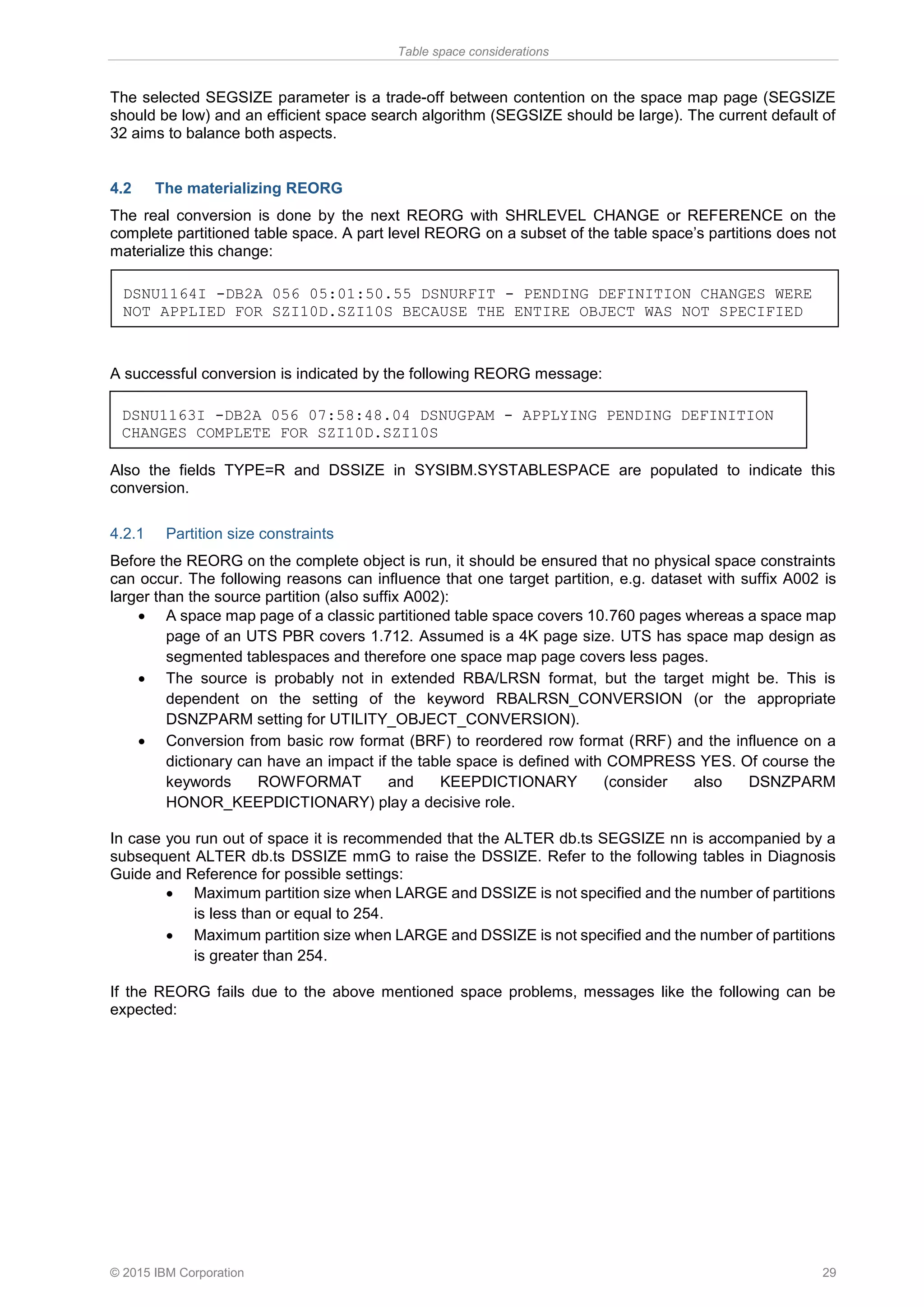
  • 21.
    Table space considerations ©2015 IBM Corporation 21 DB2 11 added a new ZPARM (see APAR PM89655) which helps preventing undesired “REORG pending” situations. Once this ZPARM (PREVENT_ALTERTB_LIMITKEY) is set to “YES”, no more ALTER TABLE … ALTER PARTITION operations against an index-controlled partitioned table are allowed and the SQL statement will fail with an SQLCODE -876 and reason code 6. Note that “NO” is the default value. Tables already migrated to table-controlled partitioning are not affected. Beginning with DB2 11 an ALTER TABLE … ALTER PARTITION against a table-controlled partitioning object is a deferred alter, except for the case that the last partition has MAXVALUE. In such a case the ALTER is an immediate ALTER and the last partition is left in REORP (changed by PI42999). 3.7.5 CREATE INDEX PARTITIONED Beginning with DB2 Version 8 it is possible to specify the “PARTITIONED” keyword when creating indexes. This creates either partitioning or data-partitioned secondary indexes (DPSIs). The latter applies to tables under table-controlled partitioning only. If you specify “PARTITIONED” explicitly for an index on table currently under index-controlled partitioning, DB2 will convert the table to table-controlled partitioning automatically. As a result, the newly created index will be a DPSI if its leftmost columns and their collating sequence do not match the partitioning columns of the table. Otherwise, it will be created as partitioning and partitioned index. The existing index which was necessary to enforce index-controlled partitioning remains unchanged. Regardless on which columns the new index was created, it will continue as partitioning and partitioned index. The following picture illustrates the conversion process. Figure 15: Creating an additional partitioning index We add index IXSALES2 to table SALES which is under index-controlled partitioning. As its leftmost column (REGION_CODE) matches the partitioning scheme of the existing partitioning index IXPSALES, the new index becomes partitioning and partitioned after conversion. If we create for example a partitioned index on SALES_AMOUNT, DB2 will do the conversion and create the new index as DPSI because the index columns do not match the columns of the partitioning index of IXPSALES (which become now the partitioning columns of the table). Note: this example shows a table space without LARGE or DSSIZE keyword. So DB2 will enforce the limit key in the highest partition after conversion and will change the highest limit key to “MAXVALUE”. You should also pay attention to all cases where the mentioned ZPARM IX_TB_PART_CONV_EXCLUDE becomes relevant (see also chapter 3.6 of this document). DB2 will first convert the table to table-controlled
  • 22.
    Table space considerations ©2015 IBM Corporation 22 partitioning and decide which columns become significant for the partitioning based on the ZPARM setting. Then it will create the new index and classify it as partitioning index or DPSI. 3.7.6 ALTER INDEX ALTER PARTITION This statement allows to change the partition boundaries of a table under index-controlled partitioning. It does not trigger any conversion to table-controlled partitioning nor can it be applied to table already under table-controlled partitioning. ZPARM PREVENT_ALTERTB_LIMITKEY is not relevant here. Similar to ALTER TABLE ALTER PARTITION, individual partitions are placed into “REORG pending” when a boundary between two partitions is moved. The usual rules for limit key enforcement of the highest partition apply here as for index-controlled tables in general. 3.7.7 ALTER TABLE ADD PARTITION BY This statement is used to add a partitioning scheme to an existing table. It completes the definition of table- controlled partitioning and cannot be applied to index-controlled tables which already have a “complete” status. 3.8 Conversion for tables with XML or LOB columns 3.8.1 LOB Partitioned tables (no matter whether index- or table-controlled) containing LOB columns require a dedicated LOB table space for every LOB column and every partition. Creation of the required objects (i.e. LOB table spaces, auxiliary tables and auxiliary indexes) can be simplified by setting the special register CURRENT RULES to ‘STD’ when creating the DB2 tables. For the conversion process to table-controlled partitioning, basically the same rules apply as for tables without LOB columns. It is recommended to practice the least interruptive approach which means converting by altering the partitioning index to a non-clustering index and then altering back to the clustering index. As for tables without LOB columns, conversion to table-controlled partitioning may also be achieved by adding partitions. If there is no enforcement of the limit key in the highest partition, the ALTER TABLE ADD PARTITION will cause the former highest partition and the newly added partition to be placed into “REORG pending” (see also chapter 3.7.2). This requires a REORG of the base table spaces and the related LOB table spaces (AUX YES). Note: It is highly recommended to set the special register CURRENT RULES to ‘STD’ before adding partitions to the LOB-table if you created the initial table with CURRENT RULES=’STD’. Be aware that the REORG which resolves the “REORG pending” situation will discard records from the table if their partitioning keys are higher than the highest partition’s limit key. This may happen with non- LOB tables as well.
  • 23.
    Table space considerations ©2015 IBM Corporation 23 Figure 16: Discarding a LOB Table SALES is created with index-controlled partitioning and no limit key enforcement for the highest partition. So rows with REGION_CODE 56 and 87 can be inserted successfully. Adding a new partition with limit key 69 will trigger a conversion to table-controlled partitioning and enforce the limit keys. Partitions 4 and 5 are placed into “REORG pending”. A subsequent REORG will move the row for REGION_CODE into the correct partition (5), remove the row with REGION_CODE 87 from the table and put it into a discard data set. For LOB-tables, this is basically the same procedure. But you should keep in mind, that REORG will not preserve the LOB-data of the rows in the discard data set. REORG will only keep the contents of the non-LOB columns in the discard data set. There is no support for file-reference variables or spanned records in REORG utility discard processing as it is in the LOAD and UNLOAD utilities. If you want these contents to be preserved, you need to unload them before adding the new partition or specify a limit key for the new partition which allows all rows to be kept. Recommendation: Check your LOB-tables carefully before converting them to table-controlled partitioning. If you convert LOB-tables with no limit key enforcement, be sure to convert them by ALTER INDEX NOT CLUSTER or make sure that there are no limit key violations if you plan to convert them by ALTER TABLE ADD PARTITION. 3.8.2 XML Although XML columns are relatively new to DB2 (introduced in version 9) they can be used in tables with index-controlled partitioning. For base tables with index-controlled, table-controlled or UTS PBR partitioning, DB2 creates a UTS PBR table space to contain the XML table. Basically, a conversion to table-controlled partitioning has no influence on the underlying XML table space. Similar to non-LOB and LOB tables, the recommended way for conversion is by altering the partitioning index to NOT CLUSTER and back to CLUSTER. As in the other cases, special attention is required for table spaces with no limit key enforcement in the highest partition. If a conversion is done by adding a new partition to the table space, the last partition and the new partition are put into “REORG pending”. A new partition is also added to the underlying XML table space.
  • 24.
    Table space considerations ©2015 IBM Corporation 24 Unlike for LOBs, a REORG of the base table space does not trigger a reorganization of the related XML table space. In fact neither REORG of the base table space nor REORG of the XML table space moves XML rows from the former highest partition to the new highest partition. See the following example: Figure 17: Rearranging an XML Like in previous examples limit keys are not enforced for index-controlled partitioned table space PARTTS. Table SALES contains one record for (PRODUCT_ID = 176) of which REGION_CODE is beyond the limit of the highest partition (part 4). The underlying XML table tolerates this and stores the XML data related to PRODUCT_ID 176 also in partition 4. Adding a new partition with limit key 99 to the base table adds a partition to the XML table space as well, converts the table to table-controlled partitioning and places partition 4 and 5 of base table space PARTTS into “REORG pending”. A subsequent REORG will move the row for PRODUCT_ID=176 to partition 5 in the base table but the corresponding row in the XML table space will remain in partition 4. You can verify this with DSN1PRNT or by reorganizing the base and XML table spaces separately and comparing the row counts for the individual partitions in the job protocol. Despite this inconsistency, the relationship between the base table’s rows and its XML rows remain intact. Recommendation: If you have index-controlled partitioned tables with XML columns and no limit key enforcement, do not try to convert them by adding partitions to the base table. Use ALTER INDEX NOT CLUSTER instead to avoid any inconsistencies between base and XML table. The good news is that altering the limit key of an index-controlled table is not allowed once it contains at least one XML column. 3.9 Additional considerations 3.9.1 Timeout during conversion As the conversion to table-controlled partitioning is triggered by a common DDL operation such as ALTER INDEX it may be subject to a timeout against other processes on the database objects or the DB2 catalog.
  • 25.
    Table space considerations ©2015 IBM Corporation 25 This timeout is usually reported (SQLCODE -904) but currently comes along with a message that conversion to table-controlled partitioning has been completed: ---------+---------+---------+---------+---------+---------+---------+------ ALTER INDEX IXPSALES NOT CLUSTER; ---------+---------+---------+---------+---------+---------+---------+------ DSNT408I SQLCODE = -904, ERROR: UNSUCCESSFUL EXECUTION CAUSED BY AN UNAVAILABLE RESOURCE. REASON 00C200EA, TYPE OF RESOURCE 00000200, AND RESOURCE NAME DBPARTS .PARTTS1 DSNT418I SQLSTATE = 57011 SQLSTATE RETURN CODE DSNT415I SQLERRP = DSNXISB6 SQL PROCEDURE DETECTING ERROR DSNT416I SQLERRD = 85 0 0 -1 0 0 SQL DIAGNOSTIC INFORMATION DSNT416I SQLERRD = X'00000055' X'00000000' X'00000000' X'FFFFFFFF' X'00000000' X'00000000' SQL DIAGNOSTIC INFORMATION DSNT404I SQLCODE = 20272, WARNING: TABLE SPACE PARTTS1 HAS BEEN CONVERTED TO USE TABLE-CONTROLLED PARTITIONING INSTEAD OF INDEX-CONTROLLED PARTITIONING, ADDITIONAL INFORMATION: 49 DSNT418I SQLSTATE = 01666 SQLSTATE RETURN CODE DSNT415I SQLERRP = DSNXISB6 SQL PROCEDURE DETECTING ERROR DSNT416I SQLERRD = 85 0 0 -1 0 0 SQL DIAGNOSTIC INFORMATION DSNT416I SQLERRD = X'00000055' X'00000000' X'00000000' X'FFFFFFFF' X'00000000' X'00000000' SQL DIAGNOSTIC INFORMATION ---------+---------+---------+---------+---------+---------+---------+----- DSNE618I ROLLBACK PERFORMED, SQLCODE IS 0 DSNE616I STATEMENT EXECUTION WAS SUCCESSFUL, SQLCODE IS 0 The SQLCODE +20272 warning is confusing and should be ignored in this case. 3.9.2 Not populated table spaces REORG pending is avoided during conversion process if the table space is • created with DEFINE NO and not yet populated or • defined but not yet contain any data (be aware this is different to a case where all data is deleted). 3.9.3 Table-controlled (converted from index-controlled) versus table-controlled (native created) partitioning In chapter 3.6 we discussed how the setting of DSNZPARM IX_TB_PART_CONV_EXCLUDE may influence the partitioning columns when converting from index-controlled to table-controlled partitioning. This ZPARM is relevant for the conversion process only and does not affect tables created under table- controlled partitioning or in a universal table space.
  • 26.
    Table space considerations ©2015 IBM Corporation 26 The following table shows that some administrative actions on a table (table space) may have different results depending whether • the table was converted from index- to table-controlled partitioning • the table was natively created under table-controlled partitioning Scenario : A B C D Starting point : table created under Index- controlled Part. Index- controlled Part. Table- controlled Part. Table- controlled Part. Number of columns specified for partitioning (“PARTITION BY”) 2 2 2 2 Significant columns (“ENDING AT…”) 1 1 2 1 Conversion done with DSNZPARM IX_TB_PART_CONV_EXCLUDE= NO YES not relevant not relevant Significant columns after conversion 2 1 2 1 Task before conversion : ALTER TABLE ALTER PARTITION with 1 column specified Triggers conversion (REORGP possible) Triggers conversion (REORGP possible) not relevant not relevant Task after conversion : ALTER TABLE ALTER PARTITION with 1 column specified AREOR AREOR AREOR AREOR Task before conversion : ALTER TABLE ALTER PARTITION with 2 columns specified Triggers conversion (REORGP possible) Triggers conversion (REORGP possible) 2 columns significant not relevant not relevant Task after conversion : ALTER TABLE ALTER PARTITION with 2 columns specified AREOR SQLCODE -663 AREOR AREOR Task before conversion : REORG REBALANCE 2 columns are used 2 columns are used 2 columns are used 2 columns are used Task after conversion : REORG REBALANCE (DSNU2906I) 2 columns are used 1 column is used 2 columns are used 2 columns are used Task before conversion : CREATE INDEX PARTITIONED with 1 significant column Triggers conversion and new index is DPSI Triggers conversion and new index is PI not relevant not relevant
  • 27.
    Table space considerations ©2015 IBM Corporation 27 Task after conversion : CREATE INDEX PARTITIONED with 1 significant column New index is DPSI New index is PI New index is DPSI New index is DPSI Task before conversion : CREATE INDEX PARTITIONED with 2 significant columns Triggers conversion and new index is PI Triggers conversion and new index is PI not relevant not relevant Task after conversion : CREATE INDEX PARTITIONED with 2 significant columns New index is PI New index is PI New index is PI New index is PI These scenarios anticipate that the “ENDING AT …” clause contains less columns than the “PARTITION BY” clause. Thus for index-controlled partitioning the setting of IX_TB_PART_CONV_EXCLUDE determines how many columns will be considered as significant (2 columns in scenario A, 1 column in scenario B). Note that there is a different concept for tables initially created under table-controlled partitioning (scenarios C and D). In this case, DB2 will always treat all columns specified in the “PARTITION BY” clause as significant, regardless whether the “ENDING AT …” clauses contains values for all partitions of the partitioning key.
  • 28.
    Table space considerations ©2015 IBM Corporation 28 4 Conversion from table-controlled partitioning to UTS 4.1 The deferred ALTER A base requirement for the conversion to UTS is the fact that the table space must be table-controlled partitioned. If it is still index-controlled partitioned, then the conversion to UTS is not allowed: Classic partitioned table spaces have a SEGSIZE of zero. Whereas UTS PBR have a SEGSIZE between 4 and 64 (inclusive). The value must be a multiplier of 4. Otherwise SQLCODE-644 is issued: Since DB2 V10 it is possible to trigger this change of the SEGSIZE and hence the change to UTS PBR by a deferred ALTER statement on the SEGSIZE: E.g ALTER TABLESPACE db.ts SEGSIZE 32. This deferred ALTER resulted in AREOR setting on the table space. SQLCODE = -650, ERROR: THE ALTER STATEMENT CANNOT BE EXECUTED, REASON 8 SQLSTATE = 56090 SQLSTATE RETURN CODE SQLERRP = DSNXIATS SQL PROCEDURE DETECTING ERROR SQLCODE = -644, ERROR: INVALID VALUE SPECIFIED FOR KEYWORD OR CLAUSE SEGSIZE IN STATEMENT CREATE OR ALTER SQLSTATE = 42615 SQLSTATE RETURN CODE SQLERRP = DSNHSM4A SQL PROCEDURE DETECTING ERROR SQLCODE = 610, WARNING: A CREATE/ALTER ON OBJECT SZI10D.SZI10S HAS PLACED OBJECT IN ADVISORY REORG PENDING SQLSTATE = 01566 SQLSTATE RETURN CODE SQLERRP = DSNXI14 SQL PROCEDURE DETECTING ERROR -DIS DB(SZI10D) SP(*) LIMIT(*) DSNT360I -DB2A *********************************** DSNT361I -DB2A * DISPLAY DATABASE SUMMARY * GLOBAL DSNT360I -DB2A *********************************** DSNT362I -DB2A DATABASE = SZI10D STATUS = RW DBD LENGTH = 8066 DSNT397I -DB2A NAME TYPE PART STATUS -------- ---- ----- ----------------- SZI10S TS 0001 RW,AREOR -THRU 0020 SZI10S TS SZI10X IX 0001 RW
  • 29.
    Table space considerations ©2015 IBM Corporation 29 The selected SEGSIZE parameter is a trade-off between contention on the space map page (SEGSIZE should be low) and an efficient space search algorithm (SEGSIZE should be large). The current default of 32 aims to balance both aspects. 4.2 The materializing REORG The real conversion is done by the next REORG with SHRLEVEL CHANGE or REFERENCE on the complete partitioned table space. A part level REORG on a subset of the table space’s partitions does not materialize this change: A successful conversion is indicated by the following REORG message: Also the fields TYPE=R and DSSIZE in SYSIBM.SYSTABLESPACE are populated to indicate this conversion. 4.2.1 Partition size constraints Before the REORG on the complete object is run, it should be ensured that no physical space constraints can occur. The following reasons can influence that one target partition, e.g. dataset with suffix A002 is larger than the source partition (also suffix A002): • A space map page of a classic partitioned table space covers 10.760 pages whereas a space map page of an UTS PBR covers 1.712. Assumed is a 4K page size. UTS has space map design as segmented tablespaces and therefore one space map page covers less pages. • The source is probably not in extended RBA/LRSN format, but the target might be. This is dependent on the setting of the keyword RBALRSN_CONVERSION (or the appropriate DSNZPARM setting for UTILITY_OBJECT_CONVERSION). • Conversion from basic row format (BRF) to reordered row format (RRF) and the influence on a dictionary can have an impact if the table space is defined with COMPRESS YES. Of course the keywords ROWFORMAT and KEEPDICTIONARY (consider also DSNZPARM HONOR_KEEPDICTIONARY) play a decisive role. In case you run out of space it is recommended that the ALTER db.ts SEGSIZE nn is accompanied by a subsequent ALTER db.ts DSSIZE mmG to raise the DSSIZE. Refer to the following tables in Diagnosis Guide and Reference for possible settings: • Maximum partition size when LARGE and DSSIZE is not specified and the number of partitions is less than or equal to 254. • Maximum partition size when LARGE and DSSIZE is not specified and the number of partitions is greater than 254. If the REORG fails due to the above mentioned space problems, messages like the following can be expected: DSNU1164I -DB2A 056 05:01:50.55 DSNURFIT - PENDING DEFINITION CHANGES WERE NOT APPLIED FOR SZI10D.SZI10S BECAUSE THE ENTIRE OBJECT WAS NOT SPECIFIED DSNU1163I -DB2A 056 07:58:48.04 DSNUGPAM - APPLYING PENDING DEFINITION CHANGES COMPLETE FOR SZI10D.SZI10S
  • 30.
    Table space considerations ©2015 IBM Corporation 30 Of course the REORG should be well-prepared, but if it fails, it can be terminated without any impact. 4.2.2 REORG preparation Since PM58177 the REORG utility accepts a Partition by Growth table space for the mapping table. It is recommended to use this feature otherwise the REORG may fail due to a space limitation of the mapping table index. For the traditional segmented table spaces the space limit of the index is 64GB. Consider also that the REORG only uses the mapping table index for storing information. The mapping table itself is not populated or in other words it remains empty. A materializing REORG will generate some default RUNSTATS statements if no explicit inline statistics options are specified. The default is TABLE(table_name) INDEX(ALL) UPDATE(ALL). This is indicated by the following messages: However these default statistics may conflict with statistics that were collected through established procedures. Therefore it is recommended to explicitly specify the established statistics statements on the materializing REORG or to run a separate RUNSTATS with the appropriate options afterwards. The latest used RUNSTATS statements can be generated and included in the REORG by the procedure attached in the Appendix. Only the major steps are mentioned here: • Generate the latest RUNSTATS statements by SET PROFILE FROM EXISTING STATS. • Afterwards the PROFILE_TEXT column from SYSIBM.SYSTABLES_PROFILES contains the statements to include into the REORG. • Unload the RUNSTATS statements with a special SQL and concatenate the unload dataset in the REORG SYSIN statement. In addition the REORG should be coded with SORTDEVT your_installation_esoteric_name (e.g. SYSDA), because the utility will check the presence of this option to allow full parallelism. Also the region size of the job should be as large as possible to provide sufficient storage to multiple parallel sort tasks and to avoid intermediate merges of temporary sort areas (e.g. an indication can be ICE247I) Consider also to use: • ROWFORMAT RRF (BRF may be deprecated in the future) • RBALRSN_CONVERSION EXTENDED in V11 NFM and beyond 4.2.3 Package invalidation Another fact which must be taken into account is that packages which refer the converted table space will be invalidated during the conversion to UTS. DSNU398I -DB2A 056 07:13:38.65 DSNURWBR - UNEXPECTED PROCESSING ERROR, REASON=X'00E40318' ON TABLE - SYSADM.SZI10T DSNT500I 056 07:13:41.96 DSNUGBAC - RESOURCE UNAVAILABLE REASON 00C90099 TYPE 00000200 NAME SZI10D .SZI10S DSNU017I 056 07:13:41.96 DSNUGBAC - UTILITY DATA BASE SERVICES MEMORY EXECUTION ABENDED, REASON=X'00E40318' CAUSE=X'00C90099' DSNU610I -DB2A 102 04:25:44.40 DSNUSUTP - SYSTABLEPART CATALOG UPDATE FOR SZI10D.SZI10S SUCCESSFUL DSNU610I -DB2A 102 04:25:44.41 DSNUSUPT - SYSTABSTATS CATALOG UPDATE FOR SYSADM.SZI10T SUCCESSFUL DSNU610I -DB2A 102 04:25:44.42 DSNUSUPC - SYSCOLSTATS CATALOG UPDATE FOR SYSADM.SZI10T SUCCESSFUL ...
  • 31.
    Table space considerations ©2015 IBM Corporation 31 Here is a list of the terms which invalidate a package: • The SBCS CCSID attribute of the table space is changed. • When increasing the MAXPARTITIONS attribute of a table space. • The SEGSIZE attribute of a partitioned table spaced is changed to convert the table space to a range-partitioned universal table space. • When the page size is changed. (BUFFERPOOL) • When the DSSIZE attribute is changed. Two options exist to provide relief for this situation: 1. Setting DSNZPARM ABIND=YES and rely on the AUTOBIND feature. 2. Checking the VALID column in SYSIBM.SYSPACKAGE, generating explicit REBIND statements and executing these statements. AUTOBIND is not sensitive to APREUSE, therefore it is recommended that the required REBIND statements are generated after the REORG and submitted manually. The following query might help to identify such packages: SELECT DISTINCT 'REBIND PACKAGE (' !! PK.COLLID !!'.' !! PK.NAME !! '.(*))' FROM SYSIBM.SYSPACKAGE PK,SYSIBM.SYSPACKDEP PD WHERE PK.NAME = PD.DNAME AND PK.COLLID = PD.DCOLLID AND PK.CONTOKEN = PD.DCONTOKEN AND PK.LOCATION = PD.DLOCATION AND PD.BNAME = 'SZI10T' AND PD.BQUALIFIER = 'SYSADM' AND PD.BTYPE = 'T' AND PK.VALID = 'N' ;
  • 32.
    Table space considerations ©2015 IBM Corporation 32 5 Check Lists Conversion from index-controlled partitioned to table-controlled partitioned table space: 1. Check PTF-Level of DB2 subsystems and install required PTFs (see list of APARs). 2. Prevent new creation of index-controlled tables: Set DSNZPARM PREVENT_NEW_IXCTRL_PART to YES. 3. Prevent limit key alteration of index-controlled tables which may cause conversion to table- controlled: Set DSNZPARM PREVENT_ALTERTB_LIMITKEY to YES. 4. Allow DB2 to exclude non-significant columns from partitioning during conversion: Set ZPARM IX_TB_PART_CONV_EXCLUDE to YES. 5. Generate a list of tables under index-controlled partitioning with no limit key enforcement: This may require special attention during conversion to table-controlled partitioning and may cause “REORG pending”. 6. Generate a list of tables under index-controlled partitioning with a mixture of significant and non- significant columns caused by REORG REBALANCE: In these situations, columns may become significant during conversion to table-controlled partition though this might not be desired. 7. Generate a list of tables under index-controlled partitioning with LOB and XML columns and no high limit key enforcement: These tables should be converted to table-controlled partitioning by altering the clustering only. 8. Use ALTER INDEX NOT CLUSTER for conversion to table-controlled partitioning whenever possible. 9. Change applications which access LIMITKEY in SYSIBM.SYSINDEXPART to access the appropriate column in SYSIBM.SYSTABLEPART. • For static applications querying SYSIBM.SYSTABAUTH can be used to identify static programs using SYSIBM.SYSINDEXPART.LIMITKEY for process control. Those programs must be updated to use SYSIBM.SYSTABLEPART.LIMITKEY when table is converted to table-controlled. • Consider in this context also the different format of values in LIMITKEY column beginning with V11: http://www- 01.ibm.com/support/docview.wss?uid=swg21999051&myns=swgimgmt&mynp=OCSSEPEK &mync=E&cm_sp=swgimgmt-_-OCSSEPEK-_-E Conversion from table-controlled partitioned table space to universal table space: 1. Use ALTER TABLESPACE SEGSIZE nn for conversion to UTS. Consider that this ALTER is treated as a deferred ALTER. 2. Before running the materialization REORG ensure that the space of the single partitions is large enough to cover the data and the administration overhead, which is a little bit more than before. Consider to use ALTER TABLESPACE DSSIZE if there are doubts about the space. 3. Generate the correct statistics values by explicitly running the appropriate RUNSTATS after or as inline statistics with the materializing REORG. 4. Re-Bind the packages, which are set to INVALID by the materializing REORG.
  • 33.
    Table space considerations ©2015 IBM Corporation 33 6 Appendixes 6.1 Recommended APARs The following is a list of recommended APARs associated with the processes described in this document. It is provided strictly for informational purposes and is not a substitute for a comprehensive maintenance strategy, nor intended to be exhaustive. #APAR Description PM89655 RESTRICTIONS FOR INDEX-CONTROLLED PARTITIONED TABLE SPACES PM90893 CHANGE DEFAULT VALUE OF ZPARM IX_TB_PART_CONV_EXCLUDE FROM NO TO YES PM93231 AFTER REORG REBALANCE, LIMITKEY IN CATALOG SYSTABLEPART IS CORRUPTED PM98424 DSNTEJ1 TERMINATES IN JOB STEP PH01S02 WITH RC=12 DUE TO SQLCODE - 876 REASON 6 WHEN DSN6SPRM.PREVENT_NEW_IXCTRL_PART=YES PI15667 ABEND04E RC00C90110 DSNIPTYM ERQUAL5005 RUNNING ALTER PI32868 LOAD FAILED AFTER CONVERT FROM INDEX CONTROLLED PARTITIONING TO TABLE CONTROLLED WITH IDENTITY COLUMN PI33532 REORP COULD BE SET INCORRECTLY WHEN OBJECTS ARE CONVERTED FROM IX CONTROLLED TO TB CONTROLLED PI36213 INCORRECT VALUE INSERTED WITH USER DEFAULT VALUE AFTER ALTER TABLE FROM INDEX TO TABLE CONTROLLED PARTITIONING PI39264 AFTER PI15667 CONVERSION TO TABLE-CONTROLLED PARTITIONING BROKE THE ROWS IN SYSTABLEPART AND CAUSED OVERLAYS TO CRASH DB2 PI42999 IMMEDIATE ALTER WITH RESTRICTIVE HARD REORG PENDING FOR ALTER OF THE LAST LOGICAL PARTITION WITH LIMIT KEY VALUE IS ALL MAXVALUE PI43934 REORG TABLESPACE REBALANCE SHRLEVEL CHANGE ON INDEX CONTROLLED PARTITIONING TABLE SPACE GENERATES INCORRECT PARTITIONING KEY PI36213 INCORRECT VALUE INSERTED WITH USER DEFAULT VALUE AFTER CONVERSION FROM INDEX TO TABLE CONTROLLED PARTITIONING PI83456 SET PARTITIONING KEY COLUMNS FOR TABLE CREATED PRIOR TO V5 CAN NOT BE UPDATED Table 3: Recommended APARs
  • 34.
    Table space considerations ©2015 IBM Corporation 34 6.2 DSNZPARM settings The following table summarize the decisive parameters and their recommended settings. Consider that DB2 V11 for z/OS is the base: Parameter Values Default Recommended setting IX_TB_PART_CONV_EXCLUDE YES NO YES YES PREVENT_ALTERTB_LIMITKEY YES NO NO YES PREVENT_NEW_IXCTRL_PART YES NO NO YES Table 4: DSNZPARM settings 6.3 Update of the partitioning key A number of years ago updates of the partitioning key were not allowed by DB2. This restriction was removed by PQ16946. Also a new DSNZPARM PARTKEYU was introduced to switch this functionality on or off. This was done in V5 by PQ22653. But independent of this DSNZPARM switch and the PQ16946 APAR, table spaces which were created before PQ16946 must be re-created to enable this functionality. Otherwise a SQLCODE-151 is issued. The following query helps to discover objects which have this problem. Note that objects are excluded for which updates on certain columns are generally disallowed (e.g. ROWID columns or columns being part of a hash key).
  • 35.
    Table space considerations ©2015 IBM Corporation 35 The reason for this is, that the UPDATES column in SYSIBM.SYSCOLUMNS has “N” for such old partitioned table spaces. Hence the column cannot be updated. Currently two solutions exist: 1. DROP and CREATE the partitioned table space. 2. Update the UPDATES column in SYSIBM.SYSCOLUMNS and run REPAIR DBD REBUILD DATABASE abc. Please contact IBM support for advice before doing so. Consider also PI83456, which changes the UPDATES column of SYSIBM.SYSCOLUMNS to “Y” in case of conversion to • table-controlled • universal table space 6.4 Limit key 40 byte truncation If an index-controlled partitioned table space was created before Version 6 of DB2 for z/OS and had a limit key larger than 40 bytes, the bytes over 40 are lost. This is due to the fact that before Version 6 the field LIMITKEY in SYSIBM.SYSINDEXPART was limited to 40 bytes. These lost bytes are not corrected during conversion to table-controlled partitioning – the DB2 catalog still contains the truncated key. For all subsequent actions after conversion (e.g. alteration of partition boundaries or rebalancing of partitions) DB2 will continue working with the truncated limit keys. See the description of APAR PK15225 for more details. The following queries should help to identify the affected partitioned table spaces. They select all partitioned tables (table spaces) for which the combined length of the partitioning key columns is greater than the length of the limit key in SYSINDEXPART or SYSTABLEPART. Limit keys no longer than 40 bytes are not critical and thus excluded from the selection. For index-controlled partitioning: SELECT DISTINCT TB.CREATOR, TB.NAME, TB.DBNAME, TB.TSNAME FROM SYSIBM.SYSCOLUMNS C, SYSIBM.SYSTABLES TB WHERE C.TBCREATOR = TB.CREATOR AND C.TBNAME = TB.NAME AND TB.TYPE = 'T' -- ONLY REAL TABLES AND TB.DBNAME NOT IN ('DSNDB01' , 'DSNDB06' ) -- NO CAT/DIR AND C.UPDATES = 'N' AND C.COLTYPE <> 'DISTINCT' AND C.HASHKEY_COLSEQ = 0 -- NO PART OF HASHKEY AND C.DEFAULT NOT IN ( 'A', -- ROWID + GENERATED ALWAYS 'D', -- ROWID + GENERATED BY DEFAULT 'E', -- FOR EACH ROW ... + GENERATED ALWAYS 'I', -- IDENTITY + GENERATED ALWAYS 'K', -- XML DOCID 'Q', -- ROW BEGIN 'R', -- ROW END 'X' -- TRANSACTION START ID ) WITH UR
  • 36.
    Table space considerations ©2015 IBM Corporation 36 WITH X (DBNAME, TSNAME, TABLE_CREATOR, TABLE_NAME, IX_CREATOR, IX_NAME, COLNAME, COL_LEN, NULL_LEN, LIMITKEY_LEN) AS ( -- Get actual length of indexkeys select distinct TP.DBNAME AS DBNAME, TP.TSNAME AS TSNAME, TB.CREATOR AS TABLE_CREATOR, TB.NAME AS TABLENAME, TP.IXCREATOR AS IX_CREATOR, TP.IXNAME AS IX_NAME, C.NAME, -- special case for decimal CASE C.COLTYPE WHEN 'DECIMAL' THEN ( FLOOR(C.LENGTH / 2) + 1) -- special case for graphic WHEN 'GRAPHIC' THEN C.LENGTH * 2 WHEN 'VARG' THEN C.LENGTH * 2 WHEN 'LONGVARG' THEN C.LENGTH * 2 ELSE C.LENGTH END AS COL_LEN, -- add 1 for each nullable field CASE WHEN NULLS='N' THEN 0 ELSE 1 END AS NULL_LEN, LENGTH(IP.LIMITKEY) AS LIMITKEY_LEN FROM SYSIBM.SYSTABLEPART TP JOIN SYSIBM.SYSTABLES TB ON TP.DBNAME = TB.DBNAME AND TP.TSNAME = TB.TSNAME JOIN SYSIBM.SYSKEYS K ON TP.IXNAME=K.IXNAME AND TP.IXCREATOR=K.IXCREATOR JOIN SYSIBM.SYSCOLUMNS C ON TB.NAME=C.TBNAME AND TB.CREATOR=C.TBCREATOR AND K.COLNAME=C.NAME JOIN SYSIBM.SYSINDEXPART IP ON TP.IXNAME = IP.IXNAME AND TP.IXCREATOR = IP.IXCREATOR AND TP.PARTITION = IP.PARTITION -- Index Controlled WHERE TP.IXNAME <> ' ' AND TP.IXCREATOR <> ' ' AND TB.TYPE=’T’ ) SELECT DBNAME, TSNAME, TABLE_CREATOR, TABLE_NAME, (SUM_COL_LEN + SUM_NULL_LEN) AS SUM_KEY_LEN, MAX_LIMITKEY_LEN FROM ( SELECT DBNAME, TSNAME, TABLE_CREATOR, TABLE_NAME, IX_CREATOR, IX_NAME, SUM(COL_LEN) AS SUM_COL_LEN, SUM(NULL_LEN) AS SUM_NULL_LEN, MAX(LIMITKEY_LEN) AS MAX_LIMITKEY_LEN FROM X GROUP BY DBNAME, TSNAME, TABLE_CREATOR, TABLE_NAME, IX_CREATOR, IX_NAME) Y WHERE (Y.SUM_COL_LEN + Y.SUM_NULL_LEN) > Y.MAX_LIMITKEY_LEN AND (Y.SUM_COL_LEN + Y.SUM_NULL_LEN) > 40 WITH UR
  • 37.
    Table space considerations ©2015 IBM Corporation 37 For table-controlled partitioning: Note that these queries do not apply for the special case that a field procedure is defined on a column of the partitioning key. DB2 catalog does not reflect the return length of a field procedure. 6.5 Procedure for inline statistics in REORG Generate the RUNSTATS statement by: Create a temporary table and insert the statements in 72 column format: WITH X (DBNAME, TSNAME, TABLE_CREATOR, TABLE_NAME, COLNAME, COL_LEN, NULL_LEN, LIMITKEY_LEN) AS ( -- Get actual length of indexkeys select distinct TP.DBNAME AS DBNAME, TP.TSNAME AS TSNAME, TB.CREATOR AS TABLE_CREATOR, TB.NAME AS TABLE_NAME, C.NAME, -- special case for decimal CASE C.COLTYPE WHEN 'DECIMAL' THEN ( FLOOR(C.LENGTH / 2) + 1) -- special case for graphic WHEN 'GRAPHIC' THEN C.LENGTH * 2 WHEN 'VARG' THEN C.LENGTH * 2 WHEN 'LONGVARG' THEN C.LENGTH * 2 ELSE C.LENGTH END AS COL_LEN, -- add 1 for each nullable field CASE WHEN NULLS='N' THEN 0 ELSE 1 END AS NULL_LEN, LENGTH(TP.LIMITKEY_INTERNAL) AS LIMITKEY_LEN FROM SYSIBM.SYSTABLES TB JOIN SYSIBM.SYSTABLEPART TP ON TP.DBNAME = TB.DBNAME AND TP.TSNAME = TB.TSNAME JOIN SYSIBM.SYSCOLUMNS C ON TB.NAME=C.TBNAME AND TB.CREATOR=C.TBCREATOR AND C.PARTKEY_COLSEQ <> 0 -- Table Controlled WHERE TB.PARTKEYCOLNUM <> 0 AND TB.TYPE=’T’ ) SELECT DBNAME, TSNAME, TABLE_CREATOR, TABLE_NAME, (SUM_COL_LEN + SUM_NULL_LEN) AS SUM_KEY_LEN, MAX_LIMITKEY_LEN FROM ( SELECT DBNAME, TSNAME, TABLE_CREATOR, TABLE_NAME, SUM(COL_LEN) AS SUM_COL_LEN, SUM(NULL_LEN) AS SUM_NULL_LEN, MAX(LIMITKEY_LEN) AS MAX_LIMITKEY_LEN FROM X GROUP BY DBNAME, TSNAME, TABLE_CREATOR, TABLE_NAME) Y WHERE (Y.SUM_COL_LEN + Y.SUM_NULL_LEN) > Y.MAX_LIMITKEY_LEN AND (Y.SUM_COL_LEN + Y.SUM_NULL_LEN) > 40 WITH UR RUNSTATS TABLESPACE SZI10D.SZI10S TABLE(SZI10T) SET PROFILE FROM EXISTING STATS
  • 38.
    Table space considerations ©2015 IBM Corporation 38 Unload the rows of the temporary table TEMPRPOFILE by DSNTIAUL: Drop the temporary table and run the REORG with a statement like the following: CREATE TABLE TEMPPROFILE (TEXT CHAR(72) NOT NULL) ; INSERT INTO TEMPPROFILE WITH F(TEXT) AS ( SELECT PROFILE_TEXT AS TEXT FROM SYSIBM.SYSTABLES_PROFILES WHERE TBNAME = 'SZI10T' AND SCHEMA = 'SYSADM' ), S (I, SS) AS ( SELECT 1, SUBSTR(TEXT, 1, 72) FROM F UNION ALL SELECT I + 72, SUBSTR(TEXT, I + 72, 72) FROM F, S WHERE I < LENGTH(TEXT) ) SELECT SS FROM S ; //SYSREC00 DD DSN=unload-dataset //SYSTSIN DD * DSN SYSTEM(DB2A) RUN PROGRAM(DSNTIAUL) PLAN(DSNTIAUL) - PARMS('SQL,TOLWARN(YES)') - LIB('SYSADM.SOURCE.LOAD') //SYSIN DD * SELECT CAST(CONCAT(TEXT, REPEAT(' ',8)) AS CHAR(80) ) FROM TEMPPROFILE ;
  • 39.
    Table space considerations ©2015 IBM Corporation 39 6.6 Index Classification and Partitioning at a glance Starting with DB2 Version 8 for z/OS, index partitioning was decoupled from table partitioning. As a consequence DB2 introduced a couple of new terms for indexes on partitioned tables which are recapped in this section. Partitioning Index versus Secondary Index An index is classified as partitioning index if its columns have the same order and collating sequence as the partitioning columns of the underlying partitioned table. A partitioned index may have more columns than the PARTITION BY-clause of the table. As soon as the definitions do not match, the index is regarded as a secondary index. Note that the terms “Partitioning” and “Secondary” index are not tied to table-controlled partitioning. They can also be used for index-controlled partitioning. The simple example shows the difference between partitioning and secondary indexes. Index IXPSALES is on column REGION_CODE which is the same column the table is partitioned by. It may have additional columns but would still remain a partitioning index. Index IXPSALES_2 is on column SALES_AMOUNT. This does not match the partitioning scheme of the table so this index is a secondary index. Figure 18: Partitioning versus Secondary Indexes Clustering versus Non-Clustering Indexes An index can be explicitly defined as clustering index and so determine the order in which DB2 should store the rows in the underlying table. Only one clustering index is allowed per table. With index-controlled partitioning, the partitioning index has to be the clustering index. With table-controlled partitioning (or UTS PBG / PBR) any index is allowed to be the clustering index. //SYSIN DD * REORG TABLESPACE SZI10D.SZI10S SHRLEVEL CHANGE SORTDEVT SYSDA ... STATISTICS TABLE(SZI10T) // DD DSN=unload-dataset // DD * REPORT YES
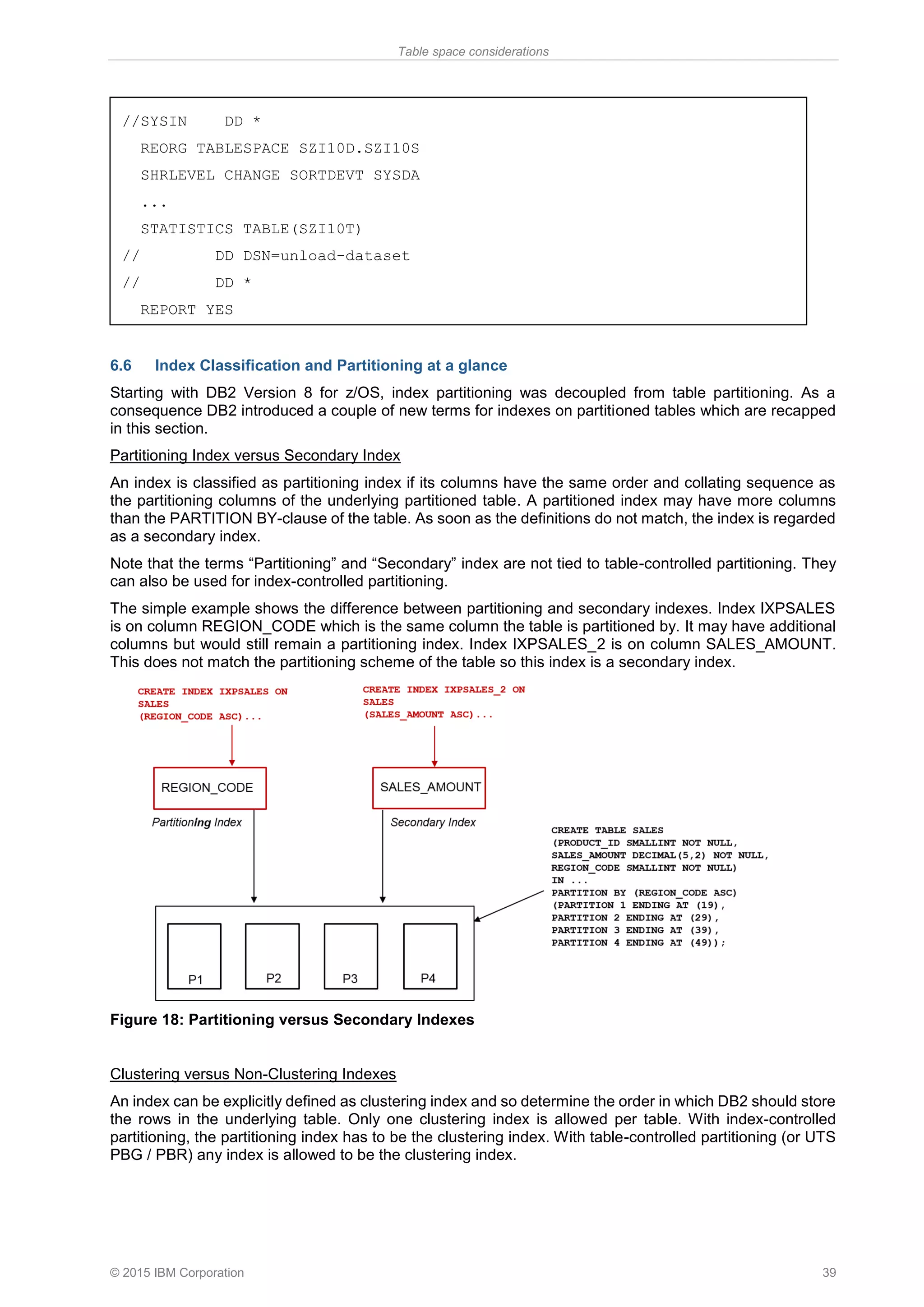
  • 40.
    Table space considerations ©2015 IBM Corporation 40 For our example, index IXPSALES_2 may be defined as clustering index. In this case, DB2 would store the rows within each partition in the order of SALES_AMOUNT. Partitioned versus Non-Partitioned Indexes An index is called “partitioned” if it is made up of physical partitions, otherwise it is a non-partitioned index. The number of partitions for an index cannot be specified explicitly. It is always determined by the number of partitions of the underlying table. Beginning with DB2 Version 8 for z/OS, the keyword “PARTITIONED” was introduced for the CREATE INDEX statement. It allows any index defined on a partitioned table to be partitioned. Before that (with index-controlled partitioning) only the partitioning index was allowed to be partitioned. Every index is classified by a combination of these three characteristics. Common examples are: Partitioned and Partitioning Index In this case the order of the index columns matches the order of table partitioning and the index itself is partitioned. This was the only allowed combination for index-controlled partitioning. The conversion to table- controlled partitioning with the least disruptive approach (see chapter 3.4) will preserve the index as partitioned and partitioning. Non-Partitioned Secondary Index (NPSI) This kind of index is neither partitioning nor partitioned. Its columns do not match the table’s partitioning scheme and the index itself is not partitioned. The illustration shows that index IXPSALES_3 on column PRODUCT_ID is a non-partitioned secondary index whereas IXPSALES is a partitioned and partitioning index. With table-controlled partitioning any of these indexes could be defined as clustering index. Figure 19: Partitioned & Partitioning Indexes versus NPSIs Non-Partitioned Partitioning Index In contrast to the previous examples this type of index is not partitioned but the order of the index columns matches the table’s partitioning scheme (so it is a partitioning index). If we did not specify the keyword “PARTITIONED” in the example shown in “Figure 19: Partitioned & Partitioning Indexes versus NPSIs”, index IXPSALES would have been created as non-partitioned and partitioning index.
  • 41.
    Table space considerations ©2015 IBM Corporation 41 Data-Partitioned Secondary Index (DPSI) With DB2 Version 8 for z/OS it became possible to define partitioned indexes which do not match the table’s partitioning scheme (secondary index). These indexes have the same number of partitions as the underlying table. Each index partition stores its own index tree (as in every partitioned index) and every individual index tree stores the key values of the corresponding table partition only. Figure 20: Data-partitioned secondary index In contrast to partitioning Indexes, the index tree is not organized by the table’s partitioning column. In our example, partition 1 of the DPSI stores all index keys of table partition 1 (i.e. all rows with REGION_CODE up to 19) but organizes the index tree along the values for PRODUCT_ID. PRODUCT_ID may appear in any partition of the underlying the table thus in any index tree of the DPSI. DPSIs can provide a major performance benefit – especially if the individual index trees of the DPSI have significantly fewer levels than an index tree on a comparable non-partitioned index. The example shows that every query which asks for a certain PRODUCT_ID and provides one or a very limited number of REGION_CODEs as additional predicate will likely benefit from a DPSI. DB2 may access only a limited number of index partitions (“partition pruning”) and can step quicker through the smaller index trees. Also utilities can work on the single partitions independently, e.g. REORG TABLESPACE PART 3. On the other hand, omitting the partitioning columns from the query predicates can have a contrary effect. DB2 may choose to check every index tree in the DPSI which may end up with a performance degradation compared to a query using a non-partitioned secondary index.
  • 42.
    Table space considerations ©2015 IBM Corporation 42 Figure 21: DPSI versus NPSI DPSIs may be created unintentionally after the conversion to table-controlled partitioning and so database administrators and application programmers should be aware of its benefits and drawbacks.
  • 43.
    Table space considerations ©2015 IBM Corporation 43 7 References 7.1 Documentation ▪ GC19-4053: DB2 11 for z/OS Codes ▪ LY37-3222: DB2 11 for z/OS Diagnosis Guide ▪ GC19-4056: DB2 11 for z/OS Installation and Migration Guide ▪ GC19-4062: DB2 11 for z/OS Messages ▪ SC19-4066: DB2 11 for z/OS SQL Reference ▪ SC19-4067: DB2 11 for z/OS Utility Guide and Reference 7.2 List of Tables Table 1: Controlling partitioning.................................................................................................................... 2 Table 2: Key limit enforcement..................................................................................................................... 7 Table 3: Recommended APARs ................................................................................................................ 33 Table 4: DSNZPARM settings.................................................................................................................... 34 7.3 List of Figures Figure 1: Create an index-controlled partitioned table space....................................................................... 6 Figure 2: Create a table-controlled partitioned table space ......................................................................... 8 Figure 3: Conversion to table-controlled partitioning - 1 ............................................................................ 12 Figure 4: Conversion to table-controlled partitioning - 2 ............................................................................ 12 Figure 5: Significant columns – conversion with ZPARM set to NO .......................................................... 14 Figure 6: Significant columns – conversion with ZPARM set to YES......................................................... 15 Figure 7: DPSI versus partitioning index .................................................................................................... 16 Figure 8: REORG REBALANCE - 1 ........................................................................................................... 16 Figure 9: REORG REBALANCE – 2 .......................................................................................................... 17 Figure 10: REORG REBALANCE - 3 ......................................................................................................... 17 Figure 11: Adding a partition (no limit key enforcement)............................................................................ 18 Figure 12: Rotating a partition .................................................................................................................... 19 Figure 13: Altering the partition limits – 1................................................................................................... 20 Figure 14: Altering the partition limits – 2................................................................................................... 20 Figure 15: Creating an additional partitioning index................................................................................... 21 Figure 16: Discarding a LOB ...................................................................................................................... 23 Figure 17: Rearranging an XML ................................................................................................................. 24 Figure 18: Partitioning versus Secondary Indexes..................................................................................... 39 Figure 19: Partitioned & Partitioning Indexes versus NPSIs...................................................................... 40 Figure 20: Data-partitioned secondary index ............................................................................................. 41 Figure 21: DPSI versus NPSI..................................................................................................................... 42
  • 44.
    Table space considerations ©2015 IBM Corporation 44 8 Copyright © Copyright 2017 IBM. All rights reserved. No part of this publication may be reproduced or transmitted in any form or for any purpose without the express permission of IBM. These materials are subject to change without any notice.