Using technology to
help students learn.
Terry E. Mullin
MS Accounting, MBA, MS Information Systems, EdD-ABD
Click to the next slide and read the text while the Beatles entertain you.
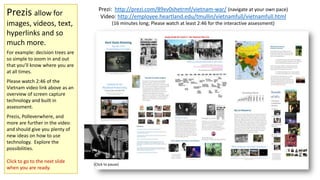
Prezis allow for
images, videos, text,
hyperlinks and so
much more.

Prezi: http://prezi.com/89xv0shetrmf/vietnam-war/ (navigate at your own pace)
Video: http://employee.heartland.edu/tmullin/vietnamfull/vietnamfull.html
(16 minutes long; Please watch at least 2:46 for the interactive assessment)

For example: decision trees are
so simple to zoom in and out
that you’ll know where you are
at all times.
Please watch 2:46 of the
Vietnam video link above as an
overview of screen capture
technology and built in
assessment.
Prezis, Polleverwhere, and
more are further in the video
and should give you plenty of
new ideas on how to use
technology. Explore the
possibilities.
Click to go to the next slide
when you are ready.

(Click to pause)
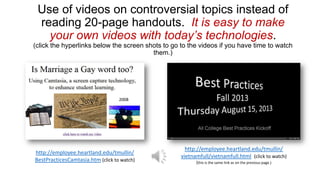
Use of videos on controversial topics instead of
reading 20-page handouts. It is easy to make
your own videos with today’s technologies.
(click the hyperlinks below the screen shots to go to the videos if you have time to watch
them.)

2008

http://employee.heartland.edu/tmullin/
BestPracticesCamtasia.htm (click to watch)

http://employee.heartland.edu/tmullin/
vietnamfull/vietnamfull.html (click to watch)
(this is the same link as on the previous page.)
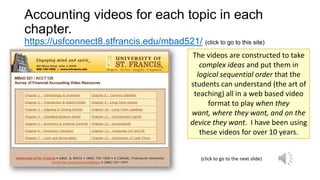
Accounting videos for each topic in each
chapter.
https://usfconnect8.stfrancis.edu/mbad521/ (click to go to this site)
The videos are constructed to take
complex ideas and put them in
logical sequential order that the
students can understand (the art of
teaching) all in a web based video
format to play when they
want, where they want, and on the
device they want. I have been using
these videos for over 10 years.
(click to go to the next slide)
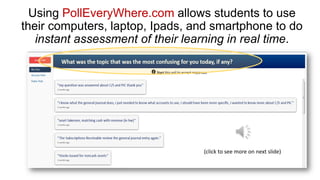
Using PollEveryWhere.com allows students to use
their computers, laptop, Ipads, and smartphone to do
instant assessment of their learning in real time.

(click to see more on next slide)
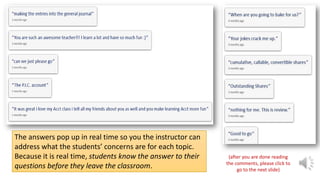
The answers pop up in real time so you the instructor can
address what the students’ concerns are for each topic.
Because it is real time, students know the answer to their
questions before they leave the classroom.

(after you are done reading
the comments, please click to
go to the next slide)
Reviewing
exams and
quizzes
http://employee.heartland.edu/tmullin/
StFrancis/quizSCF.html
(click to go to this video website)

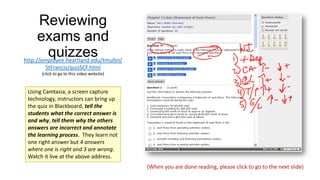
Using Camtasia, a screen capture
technology, instructors can bring up
the quiz in Blackboard, tell the
students what the correct answer is
and why, tell them why the others
answers are incorrect and annotate
the learning process. They learn not
one right answer but 4 answers
where one is right and 3 are wrong.
Watch it live at the above address.
(When you are done reading, please click to go to the next slide)
Time Value of Money
Tutorials
in English and Spanish!

http://employee.heartland.edu/tmullin/PellGrant/TimeValueOfMoney/Examples.htm
(click to go to this video website)

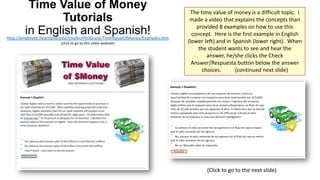
The time value of money is a difficult topic. I
made a video that explains the concepts than
provided 8 examples on how to use this
concept. Here is the first example in English
(lower left) and in Spanish (lower right). When
the student wants to see and hear the
answer, he/she clicks the Check
Answer/Respuesta button below the answer
choices.
(continued next slide)

(Click to go to the next slide)
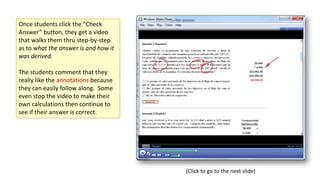
Once students click the “Check
Answer” button, they get a video
that walks them thru step-by-step
as to what the answer is and how it
was derived.
The students comment that they
really like the annotations because
they can easily follow along. Some
even stop the video to make their
own calculations then continue to
see if their answer is correct.

(Click to go to the next slide)
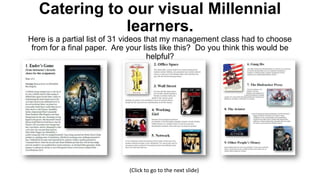
Catering to our visual Millennial
learners.
Here is a partial list of 31 videos that my management class had to choose
from for a final paper. Are your lists like this? Do you think this would be
helpful?

(Click to go to the next slide)
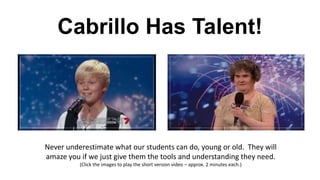
Cabrillo Has Talent!

Never underestimate what our students can do, young or old. They will
amaze you if we just give them the tools and understanding they need.
(Click the images to play the short version video – approx. 2 minutes each.)
Thank you for
watching, reading, listening
and enjoying this
PowerPoint presentation.
The race to give our students the best learning
experience that we can is on…

Using technology to help students learn

  • 1.
    Using technology to helpstudents learn. Terry E. Mullin MS Accounting, MBA, MS Information Systems, EdD-ABD Click to the next slide and read the text while the Beatles entertain you.
  • 2.
    Prezis allow for images,videos, text, hyperlinks and so much more. Prezi: http://prezi.com/89xv0shetrmf/vietnam-war/ (navigate at your own pace) Video: http://employee.heartland.edu/tmullin/vietnamfull/vietnamfull.html (16 minutes long; Please watch at least 2:46 for the interactive assessment) For example: decision trees are so simple to zoom in and out that you’ll know where you are at all times. Please watch 2:46 of the Vietnam video link above as an overview of screen capture technology and built in assessment. Prezis, Polleverwhere, and more are further in the video and should give you plenty of new ideas on how to use technology. Explore the possibilities. Click to go to the next slide when you are ready. (Click to pause)
  • 3.
    Use of videoson controversial topics instead of reading 20-page handouts. It is easy to make your own videos with today’s technologies. (click the hyperlinks below the screen shots to go to the videos if you have time to watch them.) 2008 http://employee.heartland.edu/tmullin/ BestPracticesCamtasia.htm (click to watch) http://employee.heartland.edu/tmullin/ vietnamfull/vietnamfull.html (click to watch) (this is the same link as on the previous page.)
  • 4.
    Accounting videos foreach topic in each chapter. https://usfconnect8.stfrancis.edu/mbad521/ (click to go to this site) The videos are constructed to take complex ideas and put them in logical sequential order that the students can understand (the art of teaching) all in a web based video format to play when they want, where they want, and on the device they want. I have been using these videos for over 10 years. (click to go to the next slide)
  • 5.
    Using PollEveryWhere.com allowsstudents to use their computers, laptop, Ipads, and smartphone to do instant assessment of their learning in real time. (click to see more on next slide)
  • 6.
    The answers popup in real time so you the instructor can address what the students’ concerns are for each topic. Because it is real time, students know the answer to their questions before they leave the classroom. (after you are done reading the comments, please click to go to the next slide)
  • 7.
    Reviewing exams and quizzes http://employee.heartland.edu/tmullin/ StFrancis/quizSCF.html (click togo to this video website) Using Camtasia, a screen capture technology, instructors can bring up the quiz in Blackboard, tell the students what the correct answer is and why, tell them why the others answers are incorrect and annotate the learning process. They learn not one right answer but 4 answers where one is right and 3 are wrong. Watch it live at the above address. (When you are done reading, please click to go to the next slide)
  • 8.
    Time Value ofMoney Tutorials in English and Spanish! http://employee.heartland.edu/tmullin/PellGrant/TimeValueOfMoney/Examples.htm (click to go to this video website) The time value of money is a difficult topic. I made a video that explains the concepts than provided 8 examples on how to use this concept. Here is the first example in English (lower left) and in Spanish (lower right). When the student wants to see and hear the answer, he/she clicks the Check Answer/Respuesta button below the answer choices. (continued next slide) (Click to go to the next slide)
  • 9.
    Once students clickthe “Check Answer” button, they get a video that walks them thru step-by-step as to what the answer is and how it was derived. The students comment that they really like the annotations because they can easily follow along. Some even stop the video to make their own calculations then continue to see if their answer is correct. (Click to go to the next slide)
  • 10.
    Catering to ourvisual Millennial learners. Here is a partial list of 31 videos that my management class had to choose from for a final paper. Are your lists like this? Do you think this would be helpful? (Click to go to the next slide)
  • 11.
    Cabrillo Has Talent! Neverunderestimate what our students can do, young or old. They will amaze you if we just give them the tools and understanding they need. (Click the images to play the short version video – approx. 2 minutes each.)
  • 12.
    Thank you for watching,reading, listening and enjoying this PowerPoint presentation.
  • 13.
    The race togive our students the best learning experience that we can is on…