














Construction Tech Tips
How to use existing technology to be more
productive in construction.
……………………………………………………
……………………………………………………
LAUREN HASEGAWA
Co-Founder, Bridgit
Lauren is a Structural Engineering
graduate with a background in
concrete restoration. As a young
engineer, Lauren has always had an
interest in how new technologies can
improve efficiency and productivity on
construction projects. With this
passion, she founded Bridgit, a
mobile and web communication
platform for the construction industry
in 2012. Bridgit focuses on developing
mobile-first solutions that can help
relieve on-site pain points, such as
deficiency management. Lauren is an
active mentor to young women in
engineering and a frequent speaker at
local and national industry events
focused on construction innovation.
Technology is evolving at an
exponential rate
It took less than 40 years
to go from the first PC
to the first iPad
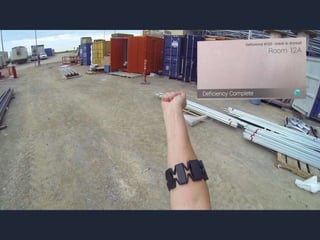
… and just 4 years to go
from the first iPad to
Google Glass
We need to pay attention
to emerging trends in
technology
Today, we’re talking about…
• Going paperless in construction
• Drones & UAVs for on-site photography
and video
• Efficiency through automation
• Personalized tech tips
Going paperless in
construction
Paperless construction is finally an attainable
reality. Increase mobility, productivity and
data collection using the cloud.
……………………………………………………
……………………………………………………
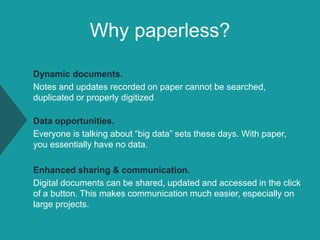
Why paperless?
Dynamic documents.
Notes and updates recorded on paper cannot be searched,
duplicated or properly digitized
Data opportunities.
Everyone is talking about “big data” sets these days. With paper,
you essentially have no data.
Enhanced sharing & communication.
Digital documents can be shared, updated and accessed in the click
of a button. This makes communication much easier, especially on
large projects.
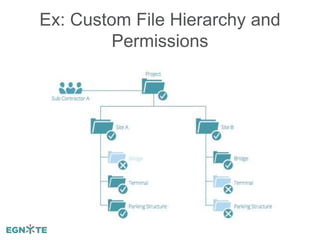
Ex: Custom File Hierarchy and
Permissions
Storing documents, photos and files in the cloud can
be done using an enterprise system like Egnyte,
SharePoint, Box or simpler solutions such as
Google Drive and Dropbox.
Using the Cloud – Storage Options
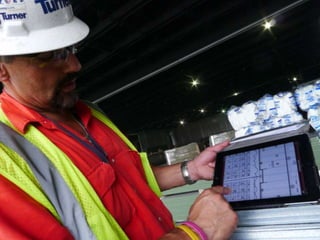
When you’re working towards going
paperless, the hardware you have available
on-site is key.
• Rugged and durable
• Large screen sizes
• Enough hardware to go around
The Proper Hardware is Key
Going Paperless: Where to Start?
Going paperless is best done as a gradual process.
You can start small and still see big results!
Use the cloud to share.
Start by analyzing everything that gets printed and identifying if
there are any opportunities to share this information over email or
as a file stored in the could instead of printing
Invest in proper hardware.
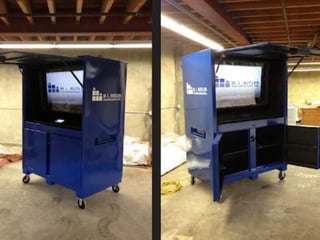
Often times, screen size is the biggest reason that documents need
to exist as a hard copy instead of digital. Better hardware such as
TV screens or tablets can help here
Research the software options / mobile apps.
Identify opportunities to use software instead of manual processes
and begin investigating effective solutions
Drones & UAVs for on-site
photography and video
Drones and UAVs (unmanned aerial
vehicles) are making site photography in
remote areas easier than ever.
……………………………………………………
……………………………………………………
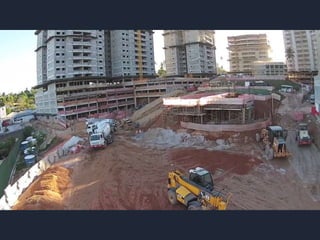
How would you
take this photo?
Site photography is used in three basic
situations:
1. Pre-construction for surveying of terrain,
environmental issues, etc.
2. Construction progress photography
3. Maintenance management
The Current State of Site
Photography
The options for high quality aerial images have
been historically expensive and cumbersome.
• Satellites
• Helicopters
• LiDar Maps
The Current State of Site
Photography
The photos are then
manually reviewed by field
engineers and compared
with separate models /
specifications
While helpful for the time being, field engineers
agree that these processes are:
• Highly subjective as they are based on one
field engineer’s judgment or experience
• Tedious as they require manual effort
• Difficult to scale, again, due to their manual
nature
How Current Photography is
Failing Us
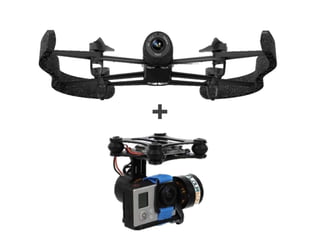
+
Drone / UAV Photography
Some companies in the civil construction space
have already begun to experiment with drone
enabled photography
• Taking aerial imagery of a site prior to
construction and integrating the model over top
• Digitizing graphical terrain of an area for
construction and bringing that into the model
• Surveying areas, quantity takeoffs and
analyzing environmental issues
In addition to simple photography or video, imaging
technology is advancing at a rapid pace.
We will soon have
commercial access to
options like 360
degree video.
Taking Drone Photography a Step
Further
How would you
take this photo?
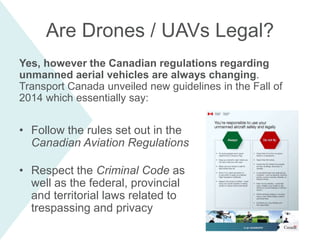
Yes, however the Canadian regulations regarding
unmanned aerial vehicles are always changing.
Transport Canada unveiled new guidelines in the Fall of
2014 which essentially say:
• Follow the rules set out in the
Canadian Aviation Regulations
• Respect the Criminal Code as
well as the federal, provincial
and territorial laws related to
trespassing and privacy
Are Drones / UAVs Legal?
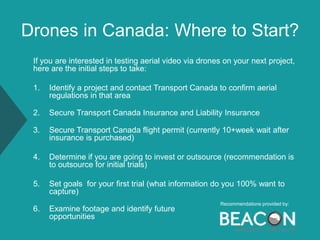
Drones in Canada: Where to Start?
If you are interested in testing aerial video via drones on your next project,
here are the initial steps to take:
1. Identify a project and contact Transport Canada to confirm aerial
regulations in that area
2. Secure Transport Canada Insurance and Liability Insurance
3. Secure Transport Canada flight permit (currently 10+week wait after
insurance is purchased)
4. Determine if you are going to invest or outsource (recommendation is
to outsource for initial trials)
5. Set goals for your first trial (what information do you 100% want to
capture)
6. Examine footage and identify future
opportunities
Recommendations provided by:
Efficiency through
automation
Ever heard of “work smarter not harder”?
That’s what automation is all about.
……………………………………………………
……………………………………………………
What can we automate?
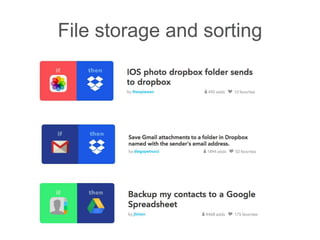
• File storage and sorting
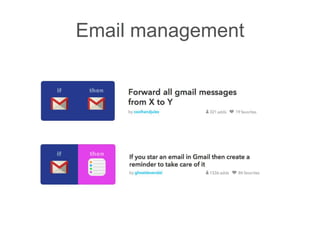
• Email management
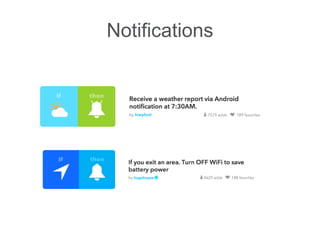
• Notifications
• …and more!
File storage and sorting
Email management
Notifications
Why automation?
Testing out workflow automations is a great way to:
1. Decrease re-work and speed up processes (e.g.
transferring site photos onto the computer)
2. Get comfortable using technology in smaller steps
3. Better understand the capabilities of software to
increase efficiency in construction project
management
4. Brainstorm ways that more sophisticated (and
custom) automations can help your team be more
productive
Solutions are all around us.
It’s time to start the
conversation.
• Stay informed
• Encourage discussion
• Identify problems and seek
solutions
• Be open-minded, but stay critical
• Support evolving industry initiatives
related to technology
What seems like a stretch of
the imagination today, may
well be the reality of
tomorrow.
Lauren Hasegawa
Co-Founder, Bridgit
lauren@gobridgit.com
www.gobridgit.com
Thank you.

Using Existing Technology to be More Productive in Construction

  • 1.
    Construction Tech Tips Howto use existing technology to be more productive in construction. …………………………………………………… ……………………………………………………
  • 2.
    LAUREN HASEGAWA Co-Founder, Bridgit Laurenis a Structural Engineering graduate with a background in concrete restoration. As a young engineer, Lauren has always had an interest in how new technologies can improve efficiency and productivity on construction projects. With this passion, she founded Bridgit, a mobile and web communication platform for the construction industry in 2012. Bridgit focuses on developing mobile-first solutions that can help relieve on-site pain points, such as deficiency management. Lauren is an active mentor to young women in engineering and a frequent speaker at local and national industry events focused on construction innovation.
  • 4.
    Technology is evolvingat an exponential rate
  • 5.
    It took lessthan 40 years to go from the first PC to the first iPad
  • 6.
    … and just4 years to go from the first iPad to Google Glass
  • 7.
    We need topay attention to emerging trends in technology
  • 9.
    Today, we’re talkingabout… • Going paperless in construction • Drones & UAVs for on-site photography and video • Efficiency through automation • Personalized tech tips
  • 10.
    Going paperless in construction Paperlessconstruction is finally an attainable reality. Increase mobility, productivity and data collection using the cloud. …………………………………………………… ……………………………………………………
  • 12.
    Why paperless? Dynamic documents. Notesand updates recorded on paper cannot be searched, duplicated or properly digitized Data opportunities. Everyone is talking about “big data” sets these days. With paper, you essentially have no data. Enhanced sharing & communication. Digital documents can be shared, updated and accessed in the click of a button. This makes communication much easier, especially on large projects.
  • 13.
    Ex: Custom FileHierarchy and Permissions
  • 14.
    Storing documents, photosand files in the cloud can be done using an enterprise system like Egnyte, SharePoint, Box or simpler solutions such as Google Drive and Dropbox. Using the Cloud – Storage Options
  • 15.
    When you’re workingtowards going paperless, the hardware you have available on-site is key. • Rugged and durable • Large screen sizes • Enough hardware to go around The Proper Hardware is Key
  • 18.
    Going Paperless: Whereto Start? Going paperless is best done as a gradual process. You can start small and still see big results! Use the cloud to share. Start by analyzing everything that gets printed and identifying if there are any opportunities to share this information over email or as a file stored in the could instead of printing Invest in proper hardware. Often times, screen size is the biggest reason that documents need to exist as a hard copy instead of digital. Better hardware such as TV screens or tablets can help here Research the software options / mobile apps. Identify opportunities to use software instead of manual processes and begin investigating effective solutions
  • 19.
    Drones & UAVsfor on-site photography and video Drones and UAVs (unmanned aerial vehicles) are making site photography in remote areas easier than ever. …………………………………………………… ……………………………………………………
  • 20.
    How would you takethis photo?
  • 21.
    Site photography isused in three basic situations: 1. Pre-construction for surveying of terrain, environmental issues, etc. 2. Construction progress photography 3. Maintenance management The Current State of Site Photography
  • 22.
    The options forhigh quality aerial images have been historically expensive and cumbersome. • Satellites • Helicopters • LiDar Maps The Current State of Site Photography The photos are then manually reviewed by field engineers and compared with separate models / specifications
  • 23.
    While helpful forthe time being, field engineers agree that these processes are: • Highly subjective as they are based on one field engineer’s judgment or experience • Tedious as they require manual effort • Difficult to scale, again, due to their manual nature How Current Photography is Failing Us
  • 24.
  • 26.
    Drone / UAVPhotography Some companies in the civil construction space have already begun to experiment with drone enabled photography • Taking aerial imagery of a site prior to construction and integrating the model over top • Digitizing graphical terrain of an area for construction and bringing that into the model • Surveying areas, quantity takeoffs and analyzing environmental issues
  • 27.
    In addition tosimple photography or video, imaging technology is advancing at a rapid pace. We will soon have commercial access to options like 360 degree video. Taking Drone Photography a Step Further
  • 28.
    How would you takethis photo?
  • 30.
    Yes, however theCanadian regulations regarding unmanned aerial vehicles are always changing. Transport Canada unveiled new guidelines in the Fall of 2014 which essentially say: • Follow the rules set out in the Canadian Aviation Regulations • Respect the Criminal Code as well as the federal, provincial and territorial laws related to trespassing and privacy Are Drones / UAVs Legal?
  • 31.
    Drones in Canada:Where to Start? If you are interested in testing aerial video via drones on your next project, here are the initial steps to take: 1. Identify a project and contact Transport Canada to confirm aerial regulations in that area 2. Secure Transport Canada Insurance and Liability Insurance 3. Secure Transport Canada flight permit (currently 10+week wait after insurance is purchased) 4. Determine if you are going to invest or outsource (recommendation is to outsource for initial trials) 5. Set goals for your first trial (what information do you 100% want to capture) 6. Examine footage and identify future opportunities Recommendations provided by:
  • 32.
    Efficiency through automation Ever heardof “work smarter not harder”? That’s what automation is all about. …………………………………………………… ……………………………………………………
  • 35.
    What can weautomate? • File storage and sorting • Email management • Notifications • …and more!
  • 36.
  • 37.
  • 38.
  • 39.
    Why automation? Testing outworkflow automations is a great way to: 1. Decrease re-work and speed up processes (e.g. transferring site photos onto the computer) 2. Get comfortable using technology in smaller steps 3. Better understand the capabilities of software to increase efficiency in construction project management 4. Brainstorm ways that more sophisticated (and custom) automations can help your team be more productive
  • 40.
    Solutions are allaround us. It’s time to start the conversation.
  • 41.
    • Stay informed •Encourage discussion • Identify problems and seek solutions • Be open-minded, but stay critical • Support evolving industry initiatives related to technology
  • 42.
    What seems likea stretch of the imagination today, may well be the reality of tomorrow.
  • 43.

Editor's Notes

  • #9 This is better
  • #12 When we take the functionality of a phone, and basically make it the size of a small tablet, we get a…
  • #16 Tablets or phablets for larger screen sizes
  • #17 Tablets or Phablets
  • #18 On-site TVs in the trailer – this was done by a Plangrid customer
  • #21 When we take the functionality of a phone, and basically make it the size of a small tablet, we get a…
  • #24 http://kevinkarsch.com/publications/sa14-constructaide-hires.pdf
  • #42 (newsletters, articles, ask questions) (at work, with industry peers, networking)