User Manual
       Ā·
Coupon Promotion
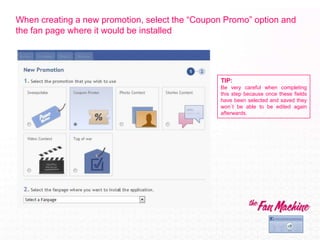
When creating a new promotion, select the ā€œCoupon Promoā€ option and
the fan page where it would be installed


                                                 TIP:
                                                 Be very careful when completing
                                                 this step because once these fields
                                                 have been selected and saved they
                                                 won“t be able to be edited again
                                                 afterwards.
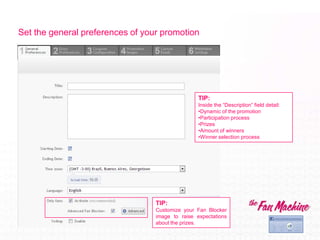
Set the general preferences of your promotion


                                                  TIP:
                                                  Inside the ā€œDescriptionā€ field detail:
                                                  •Dynamic of the promotion
                                                  •Participation process
                                                  •Prizes
                                                  •Amount of winners
                                                  •Winner selection process


                                  TIP:
                                  Customize your Fan Blocker
                                  image to raise expectations
                                  about the prizes.
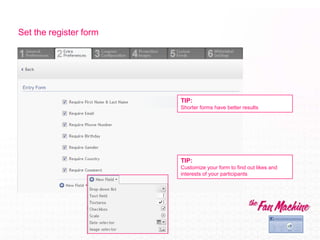
Set the register form


                        TIP:
                        Shorter forms have better results


                        TIP:
                        Customize your form to find out likes and
                        interests of your participants
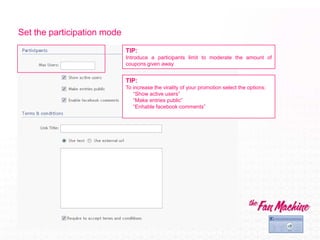
Set the participation mode
                             TIP:
                             Introduce a participants limit to moderate the amount of
                             coupons given away


                             TIP:
                             To increase the virality of your promotion select the options:
                                ā€œShow active usersā€
                                ā€œMake entries publicā€
                                ā€œEnhable facebook commentsā€
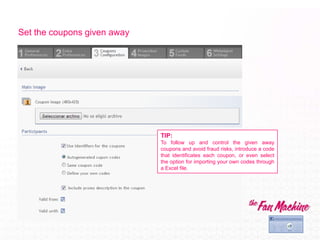
Set the coupons given away


                             TIP:
                             To follow up and control the given away
                             coupons and avoid fraud risks, introduce a code
                             that identificates each coupon, or even select
                             the option for importing your own codes through
                             a Excel file.
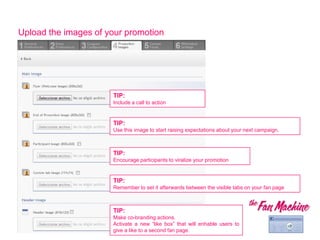
Upload the images of your promotion


                      TIP:
                      Include a call to action


                      TIP:
                      Use this image to start raising expectations about your next campaign.


                      TIP:
                      Encourage participants to viralize your promotion


                      TIP:
                      Remember to set it afterwards between the visible tabs on your fan page


                      TIP:
                      Make co-branding actions.
                      Activate a new ā€œlike boxā€ that will enhable users to
                      give a like to a second fan page.
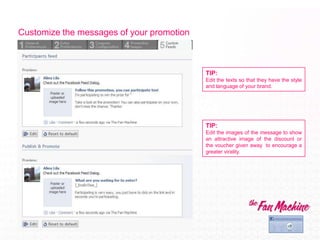
Customize the messages of your promotion


                                           TIP:
                                           Edit the texts so that they have the style
                                           and language of your brand.


                                           TIP:
                                           Edit the images of the message to show
                                           an attractive image of the discount or
                                           the voucher given away to encourage a
                                           greater virality.
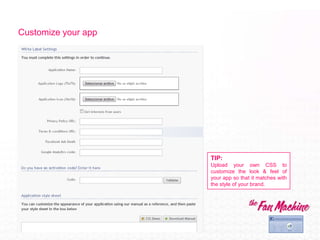
Customize your app


                     TIP:
                     Upload your own CSS to
                     customize the look & feel of
                     your app so that it matches with
                     the style of your brand.
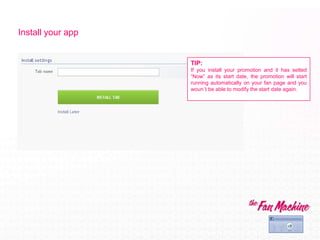
Install your app


                   TIP:
                   If you install your promotion and it has setted
                   ā€œNowā€ as its start date, the promotion will start
                   running automatically on your fan page and you
                   woun“t be able to modify the start date again.
All done!

User Manual - Coupon Promotion - EN

  • 1.
    User Manual Ā· Coupon Promotion
  • 2.
    When creating anew promotion, select the ā€œCoupon Promoā€ option and the fan page where it would be installed TIP: Be very careful when completing this step because once these fields have been selected and saved they wonĀ“t be able to be edited again afterwards.
  • 3.
    Set the generalpreferences of your promotion TIP: Inside the ā€œDescriptionā€ field detail: •Dynamic of the promotion •Participation process •Prizes •Amount of winners •Winner selection process TIP: Customize your Fan Blocker image to raise expectations about the prizes.
  • 4.
    Set the registerform TIP: Shorter forms have better results TIP: Customize your form to find out likes and interests of your participants
  • 5.
    Set the participationmode TIP: Introduce a participants limit to moderate the amount of coupons given away TIP: To increase the virality of your promotion select the options: ā€œShow active usersā€ ā€œMake entries publicā€ ā€œEnhable facebook commentsā€
  • 6.
    Set the couponsgiven away TIP: To follow up and control the given away coupons and avoid fraud risks, introduce a code that identificates each coupon, or even select the option for importing your own codes through a Excel file.
  • 7.
    Upload the imagesof your promotion TIP: Include a call to action TIP: Use this image to start raising expectations about your next campaign. TIP: Encourage participants to viralize your promotion TIP: Remember to set it afterwards between the visible tabs on your fan page TIP: Make co-branding actions. Activate a new ā€œlike boxā€ that will enhable users to give a like to a second fan page.
  • 8.
    Customize the messagesof your promotion TIP: Edit the texts so that they have the style and language of your brand. TIP: Edit the images of the message to show an attractive image of the discount or the voucher given away to encourage a greater virality.
  • 9.
    Customize your app TIP: Upload your own CSS to customize the look & feel of your app so that it matches with the style of your brand.
  • 10.
    Install your app TIP: If you install your promotion and it has setted ā€œNowā€ as its start date, the promotion will start running automatically on your fan page and you wounĀ“t be able to modify the start date again.
  • 11.