Useful Salesforce.com Chrome
extensions & Snapshots
ü  Salesforce API Fieldnames
ü  Salesforce Apex Class Links
ü  Salesforce advanced Code searcher
ü  Salesforce Searchbox
ü  Snapshot
ü  DEMO
USEFUL SALESFORCE.COM CHROME EXTENSION
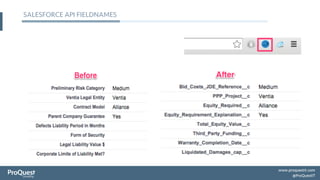
SALESFORCE API FIELDNAMES
ü  To toggle between API field names and labels on
salesforce.com detail pages
ü  Uses REST api.
ü  Supports Managed package as well.
	
  
Url:	
  
h'ps://chrome.google.com/webstore/detail/salesforce-­‐api-­‐
fieldnames/oghajcjpbolpfoikoccffglngkphjgbo	
  
SALESFORCE API FIELDNAMES
SALESFORCE APEX CLASS LINKS
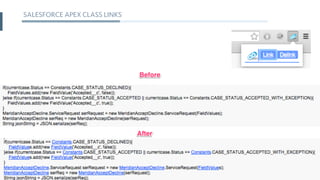
ü  Creates link reference to apex class keywords in the present
class/trigger/vf page/vf component/debug log.
	
  
Url:	
  
h'ps://chrome.google.com/webstore/detail/salesforce-­‐apex-­‐
class-­‐lin/npimdbnidomdihoabmgfpbkkilihddhd	
  	
  
SALESFORCE APEX CLASS LINKS
SALESFORCE ADVANCED CODE SEARCHER
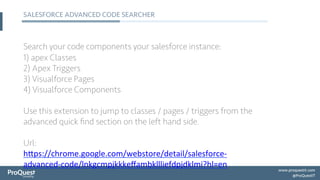
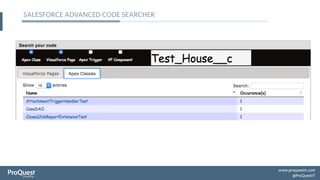
Search your code components your salesforce instance:
1) apex Classes
2) Apex Triggers
3) Visualforce Pages
4) Visualforce Components
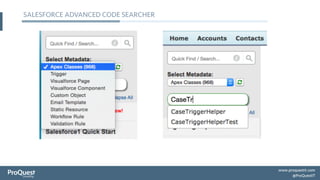
Use this extension to jump to classes / pages / triggers from the
advanced quick find section on the left hand side.
	
  
Url:
h'ps://chrome.google.com/webstore/detail/salesforce-­‐
advanced-­‐code/lnkgcmpjkkkeffambkllliefdpjdklmi?hl=en	
  	
  
SALESFORCE ADVANCED CODE SEARCHER
SALESFORCE SEARCHBOX
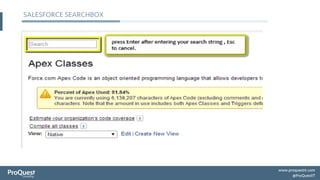
A simple search box on top of all configuration items of
salesforce.com setup items.
	
  
Url:
h'ps://chrome.google.com/webstore/detail/salesforce-­‐
searchbox/moaokcjghnjifeeahifofckbmhoBdbi?hl=en	
  	
  
SALESFORCE SEARCHBOX
SNAPSHOT
SnapShot is the ultimate tool for org cleanup, reporting, auditing,
comparison and lifecycle management. Metadata migration from
sandbox to production with code, profiles, objects, and more. Org
backup and recovery.
SNAPSHOT FEATURES
ü  Metadata Comparison
ü  Metadata Migrations
ü  Relationship Reporting
ü  Disaster Recovery
ü  Scheduled Migrations
ü  Compliance and Governance
ü  Bulk Profile Editing
ü  Metadata Reporting
CUSTOMER SUCCESS STORY 1
Customer: MERCK
Problem: Share management of a build. Need deploy metadata
changes on fly and schedule them. Manage multiple sandboxes.
Solution:
1.  Centralized standard solution to manage builds for
Salesforce.com applications
2.  Retain the build and leverage version repositories
3.  Solution is standardized and provides robust build
management solution
4.  A worldwide set of resources across different timezones to
share in the responsibility of releasing builds
CUSTOMER SUCCESS STORY 2
Customer: Constant Contact
Problem: Clean up both the data and metadata.
Solution:
1.  Identify the delta between Orgs and easily package and
migrate them
2.  Difference between Profiles and changes over time can be
visualized
3.  Continuously identify unused fields and maintain a leaner
environment
SALESFORCE SEARCHBOX
Demo

Useful Salesforce.com chrome extensions & Snapshots

  • 1.
  • 2.
    ü  Salesforce APIFieldnames ü  Salesforce Apex Class Links ü  Salesforce advanced Code searcher ü  Salesforce Searchbox ü  Snapshot ü  DEMO USEFUL SALESFORCE.COM CHROME EXTENSION
  • 3.
    SALESFORCE API FIELDNAMES ü To toggle between API field names and labels on salesforce.com detail pages ü  Uses REST api. ü  Supports Managed package as well.   Url:   h'ps://chrome.google.com/webstore/detail/salesforce-­‐api-­‐ fieldnames/oghajcjpbolpfoikoccffglngkphjgbo  
  • 4.
  • 5.
    SALESFORCE APEX CLASSLINKS ü  Creates link reference to apex class keywords in the present class/trigger/vf page/vf component/debug log.   Url:   h'ps://chrome.google.com/webstore/detail/salesforce-­‐apex-­‐ class-­‐lin/npimdbnidomdihoabmgfpbkkilihddhd    
  • 6.
  • 7.
    SALESFORCE ADVANCED CODESEARCHER Search your code components your salesforce instance: 1) apex Classes 2) Apex Triggers 3) Visualforce Pages 4) Visualforce Components Use this extension to jump to classes / pages / triggers from the advanced quick find section on the left hand side.   Url: h'ps://chrome.google.com/webstore/detail/salesforce-­‐ advanced-­‐code/lnkgcmpjkkkeffambkllliefdpjdklmi?hl=en    
  • 8.
  • 9.
  • 10.
    SALESFORCE SEARCHBOX A simplesearch box on top of all configuration items of salesforce.com setup items.   Url: h'ps://chrome.google.com/webstore/detail/salesforce-­‐ searchbox/moaokcjghnjifeeahifofckbmhoBdbi?hl=en    
  • 11.
  • 12.
    SNAPSHOT SnapShot is theultimate tool for org cleanup, reporting, auditing, comparison and lifecycle management. Metadata migration from sandbox to production with code, profiles, objects, and more. Org backup and recovery.
  • 13.
    SNAPSHOT FEATURES ü  MetadataComparison ü  Metadata Migrations ü  Relationship Reporting ü  Disaster Recovery ü  Scheduled Migrations ü  Compliance and Governance ü  Bulk Profile Editing ü  Metadata Reporting
  • 14.
    CUSTOMER SUCCESS STORY1 Customer: MERCK Problem: Share management of a build. Need deploy metadata changes on fly and schedule them. Manage multiple sandboxes. Solution: 1.  Centralized standard solution to manage builds for Salesforce.com applications 2.  Retain the build and leverage version repositories 3.  Solution is standardized and provides robust build management solution 4.  A worldwide set of resources across different timezones to share in the responsibility of releasing builds
  • 15.
    CUSTOMER SUCCESS STORY2 Customer: Constant Contact Problem: Clean up both the data and metadata. Solution: 1.  Identify the delta between Orgs and easily package and migrate them 2.  Difference between Profiles and changes over time can be visualized 3.  Continuously identify unused fields and maintain a leaner environment
  • 16.