1
USABILITY TESTING OF MEDICAL
DEVICES AND SOFTWARE
Boston UXPA 2017
2
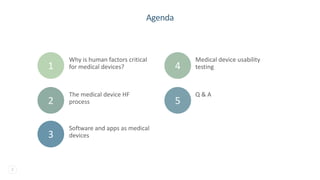
Agenda
Medical device usability
testing
Why is human factors critical
for medical devices?
Q & A
Software and apps as medical
devices
The medical device HF
process
1 4
2
3
5
3
Why is HF critical for
medical devices?
4
Because it’s required!
5
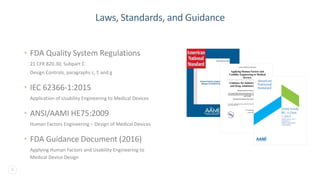
Laws, Standards, and Guidance
• FDA Quality System Regulations
21 CFR 820.30, Subpart C
Design Controls, paragraphs c, f, and g
• IEC 62366-1:2015
Application of Usability Engineering to Medical Devices
• ANSI/AAMI HE75:2009
Human Factors Engineering – Design of Medical Devices
• FDA Guidance Document (2016)
Applying Human Factors and Usability Engineering to
Medical Device Design
6
The Medical Device
HF Process
7
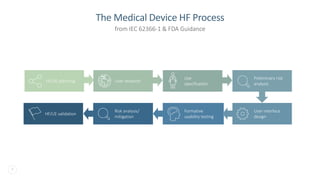
The Medical Device HF Process
from IEC 62366-1 & FDA Guidance
HF/UE planning User research
Use
specification
Preliminary risk
analysis
User interface
design
Formative
usability testing
Risk analysis/
mitigation
HF/UE validation
8
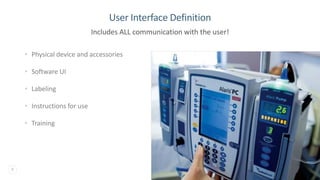
User Interface Definition
• Physical device and accessories
• Software UI
• Labeling
• Instructions for use
• Training
Includes ALL communication with the user!
9
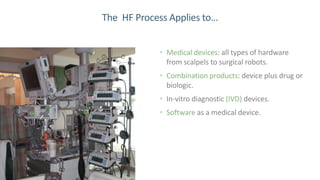
The HF Process Applies to…
• Medical devices: all types of hardware
from scalpels to surgical robots.
• Combination products: device plus drug or
biologic.
• In-vitro diagnostic (IVD) devices.
• Software as a medical device.
10
Software and Apps as
Medical Devices
11
Definition of a Medical Device
• A medical device is "an instrument, apparatus, implement,
machine, contrivance, implant, in vitro reagent, or other similar or
related article, including a component part, or accessory which is:
– …intended for use in the diagnosis of disease or other conditions, or in the
cure, mitigation, treatment, or prevention of disease, in man or other
animals, or
– intended to affect the structure or any function of the body of man or other
animals…”
12
• Software in a medical device (“embedded”)
• Software as a medical device (SaMD) (“stand alone”)
➢ Definition of SaMD is irrespective of software technology
and/or platform (e.g., mobile app, cloud).1
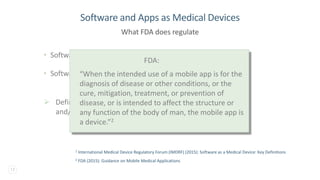
Software and Apps as Medical Devices
What FDA does regulate
2 FDA (2015): Guidance on Mobile Medical Applications
1 International Medical Device Regulatory Forum (IMDRF) (2015): Software as a Medical Device: Key Definitions
13
• Software in a medical device (“embedded”)
• Software as a medical device (SaMD) (“stand alone”)
➢ Definition of SaMD is irrespective of software technology
and/or platform (e.g., mobile app, cloud).1
Software and Apps as Medical Devices
What FDA does regulate
2 FDA (2015): Guidance on Mobile Medical Applications
1 International Medical Device Regulatory Forum (IMDRF) (2015): Software as a Medical Device: Key Definitions
FDA:
“When the intended use of a mobile app is for the
diagnosis of disease or other conditions, or the
cure, mitigation, treatment, or prevention of
disease, or is intended to affect the structure or
any function of the body of man, the mobile app is
a device.”2
14
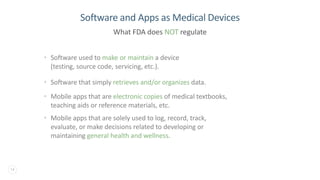
• Software used to make or maintain a device
(testing, source code, servicing, etc.).
• Software that simply retrieves and/or organizes data.
• Mobile apps that are electronic copies of medical textbooks,
teaching aids or reference materials, etc.
• Mobile apps that are solely used to log, record, track,
evaluate, or make decisions related to developing or
maintaining general health and wellness.
Software and Apps as Medical Devices
What FDA does NOT regulate
15
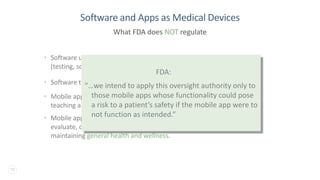
• Software used to make or maintain a device
(testing, source code, servicing, etc.).
• Software that simply retrieves and/or organizes data.
• Mobile apps that are electronic copies of medical textbooks,
teaching aids or reference materials, etc.
• Mobile apps that are solely used to log, record, track,
evaluate, or make decisions related to developing or
maintaining general health and wellness.
Software and Apps as Medical Devices
What FDA does NOT regulate
FDA:
“…we intend to apply this oversight authority only to
those mobile apps whose functionality could pose
a risk to a patient’s safety if the mobile app were to
not function as intended.”
16
Medical Device
Usability Testing
17
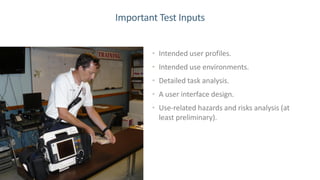
Important Test Inputs
• Intended user profiles.
• Intended use environments.
• Detailed task analysis.
• A user interface design.
• Use-related hazards and risks analysis (at
least preliminary).
18
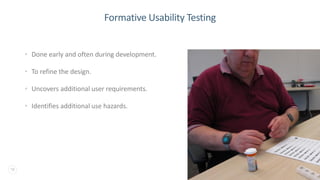
Formative Usability Testing
• Done early and often during development.
• To refine the design.
• Uncovers additional user requirements.
• Identifies additional use hazards.
19
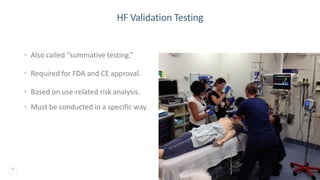
HF Validation Testing
• Also called “summative testing.”
• Required for FDA and CE approval.
• Based on use-related risk analysis.
• Must be conducted in a specific way.
20
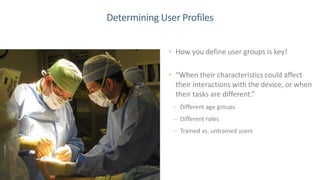
Determining User Profiles
• How you define user groups is key!
• “When their characteristics could affect
their interactions with the device, or when
their tasks are different.”
– Different age groups
– Different roles
– Trained vs. untrained users
21
Sample Sizes for Validation
3 Loring & Wan (2017): Recruiting Patients with Rare Diseases and Their Caregivers
• Minimum of 15 participants per user profile.
• Sometimes means huge sample sizes – 60, 90, 120.
• Especially challenging for hard-to-find users.3
22
Select Tasks Based on Risks
• Ensure the tasks tested include critical tasks (at a minimum).
• Define success and failure at the task level.
• Tasks that require the user to respond to alerts/alarms are considered
critical tasks and should be tested.
• Warnings and cautions in the product labeling imply critical tasks and
should be assessed through ‘knowledge questions.’
23
Actual or Simulated Environment
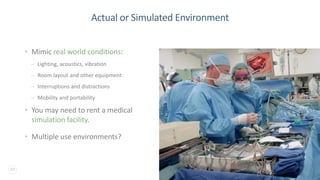
• Mimic real world conditions:
– Lighting, acoustics, vibration
– Room layout and other equipment
– Interruptions and distractions
– Mobility and portability
• You may need to rent a medical
simulation facility.
• Multiple use environments?
24
Simulating Emergency Use Conditions
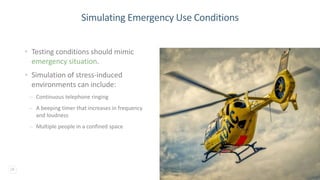
• Testing conditions should mimic
emergency situation.
• Simulation of stress-induced
environments can include:
– Continuous telephone ringing
– A beeping timer that increases in frequency
and loudness
– Multiple people in a confined space
25
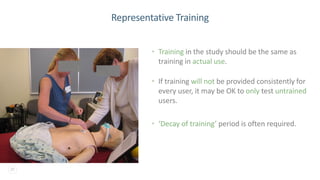
Representative Training
• Training in the study should be the same as
training in actual use.
• If training will not be provided consistently for
every user, it may be OK to only test untrained
users.
• ‘Decay of training’ period is often required.
26
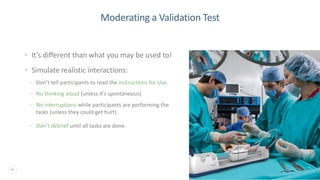
Moderating a Validation Test
• It’s different than what you may be used to!
• Simulate realistic interactions:
– Don’t tell participants to read the Instructions for Use.
– No thinking aloud (unless it’s spontaneous).
– No interruptions while participants are performing the
tasks (unless they could get hurt).
– Don’t debrief until all tasks are done.
27
Analyzing the Data
• Observational data (pass/fail, close calls,
operational difficulties, and
unanticipated/unknown problems).
• Interview data or subjective assessment
from study participants.
• Answers to knowledge questions.
• Perform a root cause analysis.4
4 Wiklund, et al (2015): Medical Device Use Error: Root Cause Analysis
28
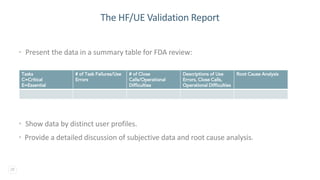
The HF/UE Validation Report
• Present the data in a summary table for FDA review:
• Show data by distinct user profiles.
• Provide a detailed discussion of subjective data and root cause analysis.
Tasks
C=Critical
E=Essential
# of Task Failures/Use
Errors
# of Close
Calls/Operational
Difficulties
Descriptions of Use
Errors, Close Calls,
Operational Difficulties
Root Cause Analysis
29
Do You Need to Re-test?
• Evaluate what aspects of the UI may have caused or
contributed to the issues seen in the study.
• Determine options to further optimize the user interface.
• Implement additional UI improvements.
• Update the use-related risk analysis….then
• Decide whether to perform additional HF studies to
demonstrate that the mitigations addressed the errors and
no new risks were introduced.
30
Final Conclusion
“The <Product> has been found to be reasonably safe and
effective for the intended users, uses and use environments.
And…
Any residual risk that remains after the validation testing
would not be further reduced by modifications of design of
the user interface (including any accessories and the IFU), is
not needed, and is outweighed by the benefits that may be
derived from the device’s use.”
31
Q & A Beth Loring
beth@loring-hf.com
(978) 799-9359
W W W . L O R I N G - H F . C O M

Usability Validation Testing of Medical Devices and Software

  • 1.
    1 USABILITY TESTING OFMEDICAL DEVICES AND SOFTWARE Boston UXPA 2017
  • 2.
    2 Agenda Medical device usability testing Whyis human factors critical for medical devices? Q & A Software and apps as medical devices The medical device HF process 1 4 2 3 5
  • 3.
    3 Why is HFcritical for medical devices?
  • 4.
  • 5.
    5 Laws, Standards, andGuidance • FDA Quality System Regulations 21 CFR 820.30, Subpart C Design Controls, paragraphs c, f, and g • IEC 62366-1:2015 Application of Usability Engineering to Medical Devices • ANSI/AAMI HE75:2009 Human Factors Engineering – Design of Medical Devices • FDA Guidance Document (2016) Applying Human Factors and Usability Engineering to Medical Device Design
  • 6.
  • 7.
    7 The Medical DeviceHF Process from IEC 62366-1 & FDA Guidance HF/UE planning User research Use specification Preliminary risk analysis User interface design Formative usability testing Risk analysis/ mitigation HF/UE validation
  • 8.
    8 User Interface Definition •Physical device and accessories • Software UI • Labeling • Instructions for use • Training Includes ALL communication with the user!
  • 9.
    9 The HF ProcessApplies to… • Medical devices: all types of hardware from scalpels to surgical robots. • Combination products: device plus drug or biologic. • In-vitro diagnostic (IVD) devices. • Software as a medical device.
  • 10.
    10 Software and Appsas Medical Devices
  • 11.
    11 Definition of aMedical Device • A medical device is "an instrument, apparatus, implement, machine, contrivance, implant, in vitro reagent, or other similar or related article, including a component part, or accessory which is: – …intended for use in the diagnosis of disease or other conditions, or in the cure, mitigation, treatment, or prevention of disease, in man or other animals, or – intended to affect the structure or any function of the body of man or other animals…”
  • 12.
    12 • Software ina medical device (“embedded”) • Software as a medical device (SaMD) (“stand alone”) ➢ Definition of SaMD is irrespective of software technology and/or platform (e.g., mobile app, cloud).1 Software and Apps as Medical Devices What FDA does regulate 2 FDA (2015): Guidance on Mobile Medical Applications 1 International Medical Device Regulatory Forum (IMDRF) (2015): Software as a Medical Device: Key Definitions
  • 13.
    13 • Software ina medical device (“embedded”) • Software as a medical device (SaMD) (“stand alone”) ➢ Definition of SaMD is irrespective of software technology and/or platform (e.g., mobile app, cloud).1 Software and Apps as Medical Devices What FDA does regulate 2 FDA (2015): Guidance on Mobile Medical Applications 1 International Medical Device Regulatory Forum (IMDRF) (2015): Software as a Medical Device: Key Definitions FDA: “When the intended use of a mobile app is for the diagnosis of disease or other conditions, or the cure, mitigation, treatment, or prevention of disease, or is intended to affect the structure or any function of the body of man, the mobile app is a device.”2
  • 14.
    14 • Software usedto make or maintain a device (testing, source code, servicing, etc.). • Software that simply retrieves and/or organizes data. • Mobile apps that are electronic copies of medical textbooks, teaching aids or reference materials, etc. • Mobile apps that are solely used to log, record, track, evaluate, or make decisions related to developing or maintaining general health and wellness. Software and Apps as Medical Devices What FDA does NOT regulate
  • 15.
    15 • Software usedto make or maintain a device (testing, source code, servicing, etc.). • Software that simply retrieves and/or organizes data. • Mobile apps that are electronic copies of medical textbooks, teaching aids or reference materials, etc. • Mobile apps that are solely used to log, record, track, evaluate, or make decisions related to developing or maintaining general health and wellness. Software and Apps as Medical Devices What FDA does NOT regulate FDA: “…we intend to apply this oversight authority only to those mobile apps whose functionality could pose a risk to a patient’s safety if the mobile app were to not function as intended.”
  • 16.
  • 17.
    17 Important Test Inputs •Intended user profiles. • Intended use environments. • Detailed task analysis. • A user interface design. • Use-related hazards and risks analysis (at least preliminary).
  • 18.
    18 Formative Usability Testing •Done early and often during development. • To refine the design. • Uncovers additional user requirements. • Identifies additional use hazards.
  • 19.
    19 HF Validation Testing •Also called “summative testing.” • Required for FDA and CE approval. • Based on use-related risk analysis. • Must be conducted in a specific way.
  • 20.
    20 Determining User Profiles •How you define user groups is key! • “When their characteristics could affect their interactions with the device, or when their tasks are different.” – Different age groups – Different roles – Trained vs. untrained users
  • 21.
    21 Sample Sizes forValidation 3 Loring & Wan (2017): Recruiting Patients with Rare Diseases and Their Caregivers • Minimum of 15 participants per user profile. • Sometimes means huge sample sizes – 60, 90, 120. • Especially challenging for hard-to-find users.3
  • 22.
    22 Select Tasks Basedon Risks • Ensure the tasks tested include critical tasks (at a minimum). • Define success and failure at the task level. • Tasks that require the user to respond to alerts/alarms are considered critical tasks and should be tested. • Warnings and cautions in the product labeling imply critical tasks and should be assessed through ‘knowledge questions.’
  • 23.
    23 Actual or SimulatedEnvironment • Mimic real world conditions: – Lighting, acoustics, vibration – Room layout and other equipment – Interruptions and distractions – Mobility and portability • You may need to rent a medical simulation facility. • Multiple use environments?
  • 24.
    24 Simulating Emergency UseConditions • Testing conditions should mimic emergency situation. • Simulation of stress-induced environments can include: – Continuous telephone ringing – A beeping timer that increases in frequency and loudness – Multiple people in a confined space
  • 25.
    25 Representative Training • Trainingin the study should be the same as training in actual use. • If training will not be provided consistently for every user, it may be OK to only test untrained users. • ‘Decay of training’ period is often required.
  • 26.
    26 Moderating a ValidationTest • It’s different than what you may be used to! • Simulate realistic interactions: – Don’t tell participants to read the Instructions for Use. – No thinking aloud (unless it’s spontaneous). – No interruptions while participants are performing the tasks (unless they could get hurt). – Don’t debrief until all tasks are done.
  • 27.
    27 Analyzing the Data •Observational data (pass/fail, close calls, operational difficulties, and unanticipated/unknown problems). • Interview data or subjective assessment from study participants. • Answers to knowledge questions. • Perform a root cause analysis.4 4 Wiklund, et al (2015): Medical Device Use Error: Root Cause Analysis
  • 28.
    28 The HF/UE ValidationReport • Present the data in a summary table for FDA review: • Show data by distinct user profiles. • Provide a detailed discussion of subjective data and root cause analysis. Tasks C=Critical E=Essential # of Task Failures/Use Errors # of Close Calls/Operational Difficulties Descriptions of Use Errors, Close Calls, Operational Difficulties Root Cause Analysis
  • 29.
    29 Do You Needto Re-test? • Evaluate what aspects of the UI may have caused or contributed to the issues seen in the study. • Determine options to further optimize the user interface. • Implement additional UI improvements. • Update the use-related risk analysis….then • Decide whether to perform additional HF studies to demonstrate that the mitigations addressed the errors and no new risks were introduced.
  • 30.
    30 Final Conclusion “The <Product>has been found to be reasonably safe and effective for the intended users, uses and use environments. And… Any residual risk that remains after the validation testing would not be further reduced by modifications of design of the user interface (including any accessories and the IFU), is not needed, and is outweighed by the benefits that may be derived from the device’s use.”
  • 31.
    31 Q & ABeth Loring beth@loring-hf.com (978) 799-9359 W W W . L O R I N G - H F . C O M