Upholding
Confidentiality
It is your ethical responsibility
Javeria Azmat
HoD L&D
Objectives
 Understanding of HIPAA
 Ethical Responsibility to keep each and
every patient’s PHI confidential
 Patient Privacy Rule and Security Rules
 Identification of what PHI is
 Ways to protect PHI
 Tips for electronic confidentiality
protections
 Consequences if confidentiality or PHI
mishandle
What is Health Insurance Portability and
Accountability Act (HIPAA)?
 HIPPA is a federal law that gives an
individual the right of protection of their
personal health information (PHI).
 PHI includes all medical and personal
information and must be protected
whether communication is verbal, written,
or electronic.
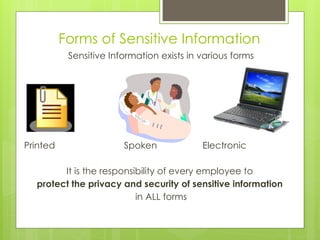
Forms of Sensitive Information
Sensitive Information exists in various forms
Printed Spoken Electronic
It is the responsibility of every employee to
protect the privacy and security of sensitive information
in ALL forms
What Information is Considered Confidential
and must be Protected?
 Personal billing information
 All medical records
 Conversations between
physician and other
medical staff regarding a
patient
 Information about a patient
within their Insurance
carrier’s database
Patient Privacy Rule Rights
 The right to see and obtain a copy of their
health record
 The right to have corrections added to
their personal health record
 The right to receive notice about how their
health information will be used or shared
for certain purposes
 The right to get a report of when and why
their health information was shared
 The right to file a complaint with the
provider or health insurer
 The right to file a complaint with the U. S.
Government
Personal Health Information
How to keep it confidential
 Never leave medical records
where others can gain
access to them
 PHI should be guarded and
kept confidential, shared only
with healthcare providers
involved in their healthcare
 PHI is confidential and should
not be viewed on paper or
on computer by
unauthorized staff
Ways to Protect Confidentiality of PHI
 PHI should only be shared with other healthcare
professionals directly involved in an individual’s care
 Records are kept locked and only people with a
need to see information about patients have
access to them
 Employees who use computerized patient records
to not leave their computers logged in to the
patient information system while they are not at
their workstations. Computer screens containing
patient information are turned away from the view
of the public or people passing by.
More Ways to Protect Confidentiality of PHI
 Posted or written patient information maintained in work
areas such as nurses’ stations or front desk is kept covered
from the public.
 Discussions about patient care are kept private to reduce
the likelihood that those who do not need to know will
overhear.
 Electronic records are kept secure, and the facility monitors
who gains access to records to ensure that they are being
used appropriately.
 Paper records are always shredded or placed in closed
receptacles for delivery to a company that destroys records
for the facility. They must never be left in the garbage.
Understanding the Security Rule
 Specifies a series of administrative, physical, and technical safeguards
for covered entities to use to assure the confidentiality, integrity, and
availability of electronic protected health information
 The Security Rule defines “confidentiality” to mean that e-PHI is not
available or disclosed to unauthorized persons. The Security Rule's
confidentiality requirements support the Privacy Rule's prohibitions
against improper uses and disclosures of PHI
 The Security rule also promotes the two additional goals of maintaining
the integrity and availability of e-PHI
 Designation of a security official who is responsible for developing and
implement its security policies and procedures
Electronic confidentiality protections
 Keep passwords and
other security
features that restrict
access to your
computer private
 Never share password
access or log in to the
health information
system using a
borrowed credential
More steps for protecting
electronic information
 Point computer screen away from the public
 Never walk away from your computer with PHI
up and in view of a passerby
 Never remove computer equipment, disks, or
software unless instructed to do so by your
supervisor
 Never send confidential patient information in an
e-mail unless it is encrypted
 Always double-check the address line of an
email before you send it.
Best Practice Reminders
 DO keep computer sign-on codes and passwords secret, and DO NOT allow unauthorized
 persons access to your computer.Also, use locked screensavers for added privacy.
 DO keep notes, files, memory sticks, and computers in a secure place, and be careful to NOT
 leave them in open areas outside your workplace, such as a library, cafeteria, or airport.
 DO NOT place PHI or PII on a mobile device without required approval. DO encrypt mobile
 devices that contain PHI or PII.
 DO hold discussions of PHI in private areas and for job-related reasons only.Also, be aware of
 places where others might overhear conversations, such as in reception areas.
 DO make certain when mailing documents that no sensitive information is shown on postcards or
 through envelope windows, and that envelopes are closed securely.
 DO NOT use unsealed campus mail envelopes when sending sensitive information to another
 employee.
 DO follow procedures for the proper disposal of sensitive information, such as shredding
 documents or using locked recycling drop boxes.
 When sending an e-mail, DO NOT include PHI or other sensitive information such as Social
 Security numbers, unless you have the proper written approval to store the information and
 encrypted your computer or e-mail.
(UNC, 2013)
References
HIPAA (n.d.) HIPAA training handbook for the healthcare staff: An
introduction to confidentiality and privacy under HIPAA. Retrieved
from website: http://www.regalmed.com/pdfs/HIPAA_Handbook.pdf
Kongstvedt, P.R. (2007). Essentials of managed health care (5th ed.). MA:
Jones and Bartlett Publishers.
U.S. Department of Health & Human Services (2012). Health Information
Privacy. Retrieved form U.S. Department of Health and Human Services
website:
http://www.hhs.gov/ocr/privacy/hipaa/understanding/consumers/ind
ex.html
University of North Carolina (UNC) (2013). HIPAA, privacy, & security.
Retrieved from website: http://www.unc.edu/hipaa/Annual%20HIPAA
%20Training%20current.pdf

upholdingconfidentiality-130423175025-phpapp01.pptx

  • 1.
    Upholding Confidentiality It is yourethical responsibility Javeria Azmat HoD L&D
  • 2.
    Objectives  Understanding ofHIPAA  Ethical Responsibility to keep each and every patient’s PHI confidential  Patient Privacy Rule and Security Rules  Identification of what PHI is  Ways to protect PHI  Tips for electronic confidentiality protections  Consequences if confidentiality or PHI mishandle
  • 3.
    What is HealthInsurance Portability and Accountability Act (HIPAA)?  HIPPA is a federal law that gives an individual the right of protection of their personal health information (PHI).  PHI includes all medical and personal information and must be protected whether communication is verbal, written, or electronic.
  • 4.
    Forms of SensitiveInformation Sensitive Information exists in various forms Printed Spoken Electronic It is the responsibility of every employee to protect the privacy and security of sensitive information in ALL forms
  • 5.
    What Information isConsidered Confidential and must be Protected?  Personal billing information  All medical records  Conversations between physician and other medical staff regarding a patient  Information about a patient within their Insurance carrier’s database
  • 6.
    Patient Privacy RuleRights  The right to see and obtain a copy of their health record  The right to have corrections added to their personal health record  The right to receive notice about how their health information will be used or shared for certain purposes  The right to get a report of when and why their health information was shared  The right to file a complaint with the provider or health insurer  The right to file a complaint with the U. S. Government
  • 7.
    Personal Health Information Howto keep it confidential  Never leave medical records where others can gain access to them  PHI should be guarded and kept confidential, shared only with healthcare providers involved in their healthcare  PHI is confidential and should not be viewed on paper or on computer by unauthorized staff
  • 8.
    Ways to ProtectConfidentiality of PHI  PHI should only be shared with other healthcare professionals directly involved in an individual’s care  Records are kept locked and only people with a need to see information about patients have access to them  Employees who use computerized patient records to not leave their computers logged in to the patient information system while they are not at their workstations. Computer screens containing patient information are turned away from the view of the public or people passing by.
  • 9.
    More Ways toProtect Confidentiality of PHI  Posted or written patient information maintained in work areas such as nurses’ stations or front desk is kept covered from the public.  Discussions about patient care are kept private to reduce the likelihood that those who do not need to know will overhear.  Electronic records are kept secure, and the facility monitors who gains access to records to ensure that they are being used appropriately.  Paper records are always shredded or placed in closed receptacles for delivery to a company that destroys records for the facility. They must never be left in the garbage.
  • 10.
    Understanding the SecurityRule  Specifies a series of administrative, physical, and technical safeguards for covered entities to use to assure the confidentiality, integrity, and availability of electronic protected health information  The Security Rule defines “confidentiality” to mean that e-PHI is not available or disclosed to unauthorized persons. The Security Rule's confidentiality requirements support the Privacy Rule's prohibitions against improper uses and disclosures of PHI  The Security rule also promotes the two additional goals of maintaining the integrity and availability of e-PHI  Designation of a security official who is responsible for developing and implement its security policies and procedures
  • 11.
    Electronic confidentiality protections Keep passwords and other security features that restrict access to your computer private  Never share password access or log in to the health information system using a borrowed credential
  • 12.
    More steps forprotecting electronic information  Point computer screen away from the public  Never walk away from your computer with PHI up and in view of a passerby  Never remove computer equipment, disks, or software unless instructed to do so by your supervisor  Never send confidential patient information in an e-mail unless it is encrypted  Always double-check the address line of an email before you send it.
  • 13.
    Best Practice Reminders DO keep computer sign-on codes and passwords secret, and DO NOT allow unauthorized  persons access to your computer.Also, use locked screensavers for added privacy.  DO keep notes, files, memory sticks, and computers in a secure place, and be careful to NOT  leave them in open areas outside your workplace, such as a library, cafeteria, or airport.  DO NOT place PHI or PII on a mobile device without required approval. DO encrypt mobile  devices that contain PHI or PII.  DO hold discussions of PHI in private areas and for job-related reasons only.Also, be aware of  places where others might overhear conversations, such as in reception areas.  DO make certain when mailing documents that no sensitive information is shown on postcards or  through envelope windows, and that envelopes are closed securely.  DO NOT use unsealed campus mail envelopes when sending sensitive information to another  employee.  DO follow procedures for the proper disposal of sensitive information, such as shredding  documents or using locked recycling drop boxes.  When sending an e-mail, DO NOT include PHI or other sensitive information such as Social  Security numbers, unless you have the proper written approval to store the information and  encrypted your computer or e-mail. (UNC, 2013)
  • 14.
    References HIPAA (n.d.) HIPAAtraining handbook for the healthcare staff: An introduction to confidentiality and privacy under HIPAA. Retrieved from website: http://www.regalmed.com/pdfs/HIPAA_Handbook.pdf Kongstvedt, P.R. (2007). Essentials of managed health care (5th ed.). MA: Jones and Bartlett Publishers. U.S. Department of Health & Human Services (2012). Health Information Privacy. Retrieved form U.S. Department of Health and Human Services website: http://www.hhs.gov/ocr/privacy/hipaa/understanding/consumers/ind ex.html University of North Carolina (UNC) (2013). HIPAA, privacy, & security. Retrieved from website: http://www.unc.edu/hipaa/Annual%20HIPAA %20Training%20current.pdf