Low Bandwidth
Communication
LoRa Modulation
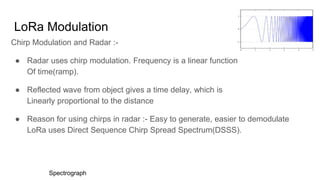
Chirp Modulation and Radar :-
● Radar uses chirp modulation. Frequency is a linear function
Of time(ramp).
● Reflected wave from object gives a time delay, which is
Linearly proportional to the distance
● Reason for using chirps in radar :- Easy to generate, easier to demodulate
LoRa uses Direct Sequence Chirp Spread Spectrum(DSSS).
Spectrograph
LoRa Modulation
● Reason for using DSSS :- Cheap to modulate and demodulate
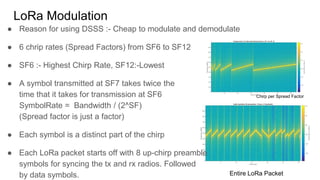
● 6 chrip rates (Spread Factors) from SF6 to SF12
● SF6 :- Highest Chirp Rate, SF12:-Lowest
● A symbol transmitted at SF7 takes twice the
time that it takes for transmission at SF6
SymbolRate = Bandwidth / (2^SF)
(Spread factor is just a factor)
● Each symbol is a distinct part of the chirp
● Each LoRa packet starts off with 8 up-chirp preamble
symbols for syncing the tx and rx radios. Followed
by data symbols.
Chirp per Spread Factor
Entire LoRa Packet
Low bandwidth communication for sensors
Why? :-
● High bandwidth corresponds to higher power. Sensors are usually deployed
as battery operated devices
● Sensor data is low in size anyway
● High bandwidth communication is usually short ranged (WiFi-10meters max)
LoRa(10km max)
Low bandwidth communication for sensors
What does the market have ?
● SigFox - TI subGhz :- Uses FSK, cell tower centric approach, only public
networks for sensors. Works on unlicensed 868Mhz band
● LoRa - Uses DSSS, enables private networks to be deployed. Works on
868Mhz unlicensed band
● 6LoPAN :- Uses mesh centric approach. Offered by TI and ZigBee
Sensor connectivity architecture
Star Topology Mesh Topology
Devices connect to gateway which
connects to cloud
Devices connect to each other. Eventually
one device connects to a device which
pushes data to the cloud
Important terminologies
Cloud :- A powerful computer sitting somewhere on the internet.
Fog :- A computer that manages networks (Usually a router)
Edge :- A sensor device. Or a device that uses the fog to reach the edge to avail certain services
Uplink :- Data that is sent from the device to the gateway and cloud
Downlink :- Data that is sent from the cloud to the device
LoRaWAN basics
● Higher the spread factor, longer the range
Because :- range is directly proportional to
chirp width
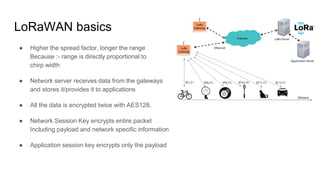
● Network server receives data from the gateways
and stores it/provides it to applications
● All the data is encrypted twice with AES128.
● Network Session Key encrypts entire packet
Including payload and network specific information
● Application session key encrypts only the payload
LoRaWAN Deep Dive
3 classes of devices depending on the type of connection :-
1. Class A devices :- Sleeps for most of the time. Wakes up in a scheduled
manner (via the real time clock) to send data. Goes back to sleep after
sending. Device can receive data twice, once after 1 second from
transmission and again after 2 seconds. Most power efficient. Used in water
level sensors
LoRaWAN Deep Dive
2. Class C devices :- Always awake. Can always receive data. Hence these
devices consume a lot of battery. Any downlink message is always received. Used
in streetlighting
LoRaWAN Deep Dive
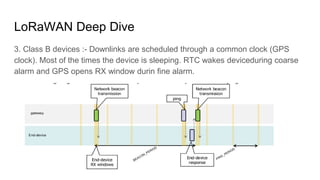
3. Class B devices :- Downlinks are scheduled through a common clock (GPS
clock). Most of the times the device is sleeping. RTC wakes deviceduring coarse
alarm and GPS opens RX window durin fine alarm.
LoRa Device Activation
Activation and registration are different things. Registration is analogous to saving
the WiFi username and password on first time connection. Activation is analogous
to connecting to your home WiFi when you get back from college.
Activation :-
● Generates a new session for the device with context relevant information like
the frame counter(the packet number)
● Conveys other meta information like what spread factor to choose, and what
power to transmit at
LoRa Device Activation
1. ABP :- Activation by personalization
Store the Network Session Key and the Application session key in the ROM
of the device. Use the same key on every activation. This is not very secure
and prone to DOS(Denial of service) attacks where the RF packet can be
captured and resent multiple times thereby jamming the server
2. OTAA :- Over the air activation
Everytime the device joins the network, a pre shared key (App Key) is used to
mutually exchange the Application Session and the Network Session Keys in
a secure manner

Unit-3 -Low Bandwidth Communication.pdf

  • 1.
  • 2.
    LoRa Modulation Chirp Modulationand Radar :- ● Radar uses chirp modulation. Frequency is a linear function Of time(ramp). ● Reflected wave from object gives a time delay, which is Linearly proportional to the distance ● Reason for using chirps in radar :- Easy to generate, easier to demodulate LoRa uses Direct Sequence Chirp Spread Spectrum(DSSS). Spectrograph
  • 3.
    LoRa Modulation ● Reasonfor using DSSS :- Cheap to modulate and demodulate ● 6 chrip rates (Spread Factors) from SF6 to SF12 ● SF6 :- Highest Chirp Rate, SF12:-Lowest ● A symbol transmitted at SF7 takes twice the time that it takes for transmission at SF6 SymbolRate = Bandwidth / (2^SF) (Spread factor is just a factor) ● Each symbol is a distinct part of the chirp ● Each LoRa packet starts off with 8 up-chirp preamble symbols for syncing the tx and rx radios. Followed by data symbols. Chirp per Spread Factor Entire LoRa Packet
  • 4.
    Low bandwidth communicationfor sensors Why? :- ● High bandwidth corresponds to higher power. Sensors are usually deployed as battery operated devices ● Sensor data is low in size anyway ● High bandwidth communication is usually short ranged (WiFi-10meters max) LoRa(10km max)
  • 5.
    Low bandwidth communicationfor sensors What does the market have ? ● SigFox - TI subGhz :- Uses FSK, cell tower centric approach, only public networks for sensors. Works on unlicensed 868Mhz band ● LoRa - Uses DSSS, enables private networks to be deployed. Works on 868Mhz unlicensed band ● 6LoPAN :- Uses mesh centric approach. Offered by TI and ZigBee
  • 6.
    Sensor connectivity architecture StarTopology Mesh Topology Devices connect to gateway which connects to cloud Devices connect to each other. Eventually one device connects to a device which pushes data to the cloud
  • 7.
    Important terminologies Cloud :-A powerful computer sitting somewhere on the internet. Fog :- A computer that manages networks (Usually a router) Edge :- A sensor device. Or a device that uses the fog to reach the edge to avail certain services Uplink :- Data that is sent from the device to the gateway and cloud Downlink :- Data that is sent from the cloud to the device
  • 8.
    LoRaWAN basics ● Higherthe spread factor, longer the range Because :- range is directly proportional to chirp width ● Network server receives data from the gateways and stores it/provides it to applications ● All the data is encrypted twice with AES128. ● Network Session Key encrypts entire packet Including payload and network specific information ● Application session key encrypts only the payload
  • 9.
    LoRaWAN Deep Dive 3classes of devices depending on the type of connection :- 1. Class A devices :- Sleeps for most of the time. Wakes up in a scheduled manner (via the real time clock) to send data. Goes back to sleep after sending. Device can receive data twice, once after 1 second from transmission and again after 2 seconds. Most power efficient. Used in water level sensors
  • 10.
    LoRaWAN Deep Dive 2.Class C devices :- Always awake. Can always receive data. Hence these devices consume a lot of battery. Any downlink message is always received. Used in streetlighting
  • 11.
    LoRaWAN Deep Dive 3.Class B devices :- Downlinks are scheduled through a common clock (GPS clock). Most of the times the device is sleeping. RTC wakes deviceduring coarse alarm and GPS opens RX window durin fine alarm.
  • 12.
    LoRa Device Activation Activationand registration are different things. Registration is analogous to saving the WiFi username and password on first time connection. Activation is analogous to connecting to your home WiFi when you get back from college. Activation :- ● Generates a new session for the device with context relevant information like the frame counter(the packet number) ● Conveys other meta information like what spread factor to choose, and what power to transmit at
  • 13.
    LoRa Device Activation 1.ABP :- Activation by personalization Store the Network Session Key and the Application session key in the ROM of the device. Use the same key on every activation. This is not very secure and prone to DOS(Denial of service) attacks where the RF packet can be captured and resent multiple times thereby jamming the server 2. OTAA :- Over the air activation Everytime the device joins the network, a pre shared key (App Key) is used to mutually exchange the Application Session and the Network Session Keys in a secure manner