CHAPTER-2
CLOUD ENABLING
TECHNOLOGIES
• SERVICE-ORIENTED ARCHITECTURE (SOA)
• A service-oriented architecture (SOA) is essentially a collection of
services.
• These services communicate with each other.
• The communication can involve either simple data passing or it could
involve two or more services coordinating some activity.
• Some means of connecting services to each other is needed.
• Service-Oriented Architecture (SOA) is a style of software design
where services are provided to the other components by application
components, through a communication protocol over a network.
• Its principles are independent of vendors and other technologies. In
service oriented architecture, a number of services communicate with
each other, in one of two ways: through passing data or through two
or more services coordinating an activity.
• Services
If a service-oriented architecture is to be effective, we need a clear
understanding of the term service.
A service is a function that is well-defined, self-contained, and does not
depend on the context or state of other services. See Service.
• Connections
The technology of Web Services is the most likely connection
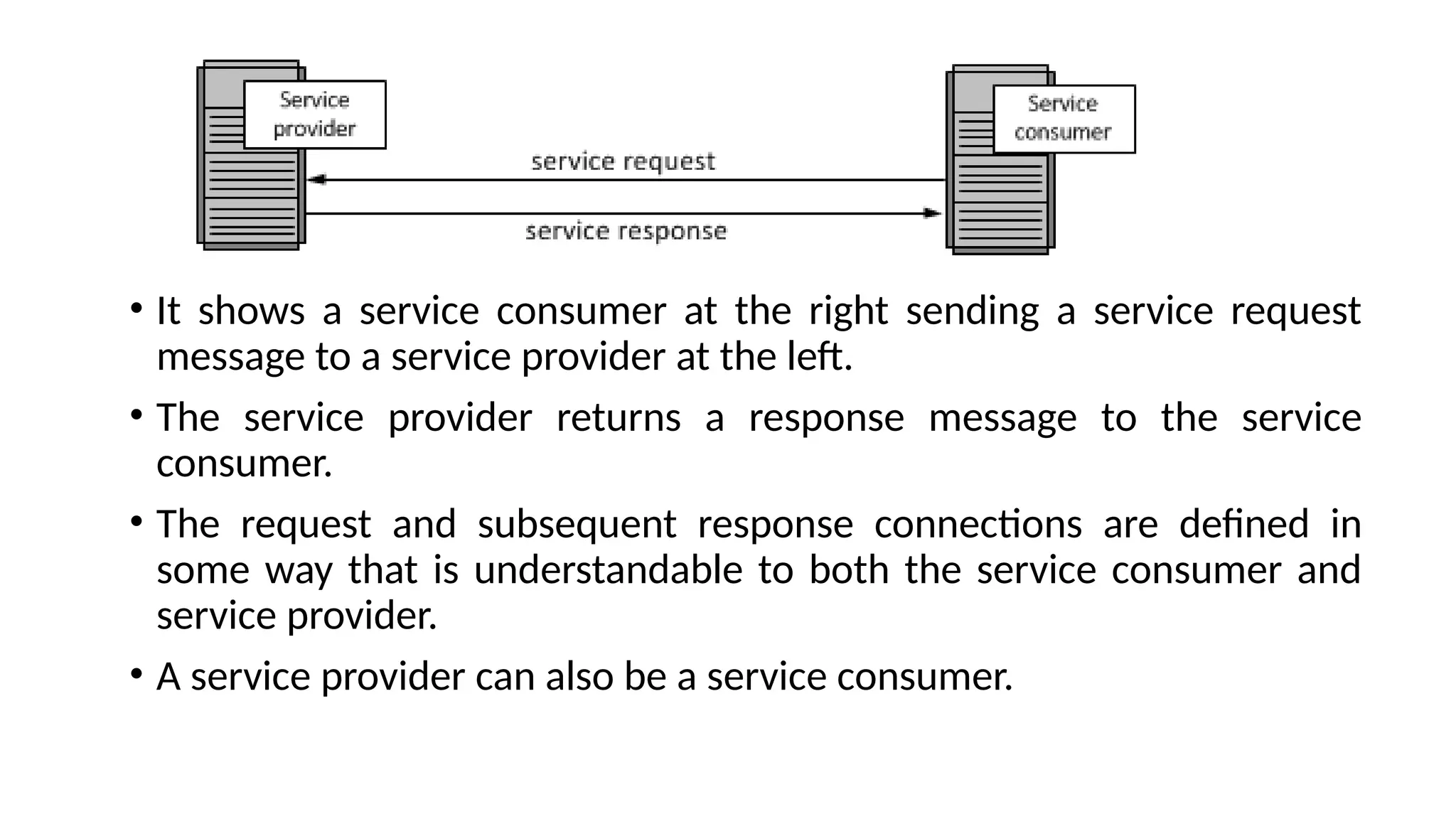
technology of service-oriented architectures. The following figure
illustrates a basic service-oriented architecture.
• It shows a service consumer at the right sending a service request
message to a service provider at the left.
• The service provider returns a response message to the service
consumer.
• The request and subsequent response connections are defined in
some way that is understandable to both the service consumer and
service provider.
• A service provider can also be a service consumer.
• Web services which are built as per the SOA architecture are
more independent.
• The web services themselves can exchange data with each
other and because of the underlying principles on which they
are created, they don't need any sort of human interaction
and also don't need any code modifications.
• It ensures that the web services on a network can interact
with each other.
Benefit of SOA
• Language Neutral Integration: Regardless of the developing
language used, the system offers and invoke services
through a common mechanism. Programming language
neutralization is one of the key benefits of SOA's
integration approach.
• Component Reuse: Once an organization built an
application component, and offered it as a service, the rest
of the organization can utilize that service.
• Organizational Agility: SOA defines building blocks of
capabilities provided by software and it offers some
service(s) that meet some organizational requirement; which
can be recombined and integrated rapidly.
• Leveraging Existing System: This is one of the major use of
SOA which is to classify elements or functions of existing
applications and make them available to the organizations or
enterprise.
SOA Architecture
• SOA architecture is viewed as five horizontal layers. These are
described below:
• Consumer Interface Layer: These are GUI based apps for end users
accessing the applications.
• Business Process Layer: These are business-use cases in terms of
application.
• Services Layer: These are whole-enterprise, in service inventory.
• Service Component Layer: are used to build the services, such as
functional and technical libraries.
• Operational Systems Layer: It contains the data model.
SOA Governance
• SOA governance focuses on managing Business services.
• Furthermore in service oriented organization, everything
should be characterized as a service in an organization.
• Governance becomes clear when we consider the amount of
risk that it eliminates with the good understanding of
service, organizational data and processes in order to choose
approaches and processes for policies for monitoring and
generate performance impact.
SOA Architecture Protocol
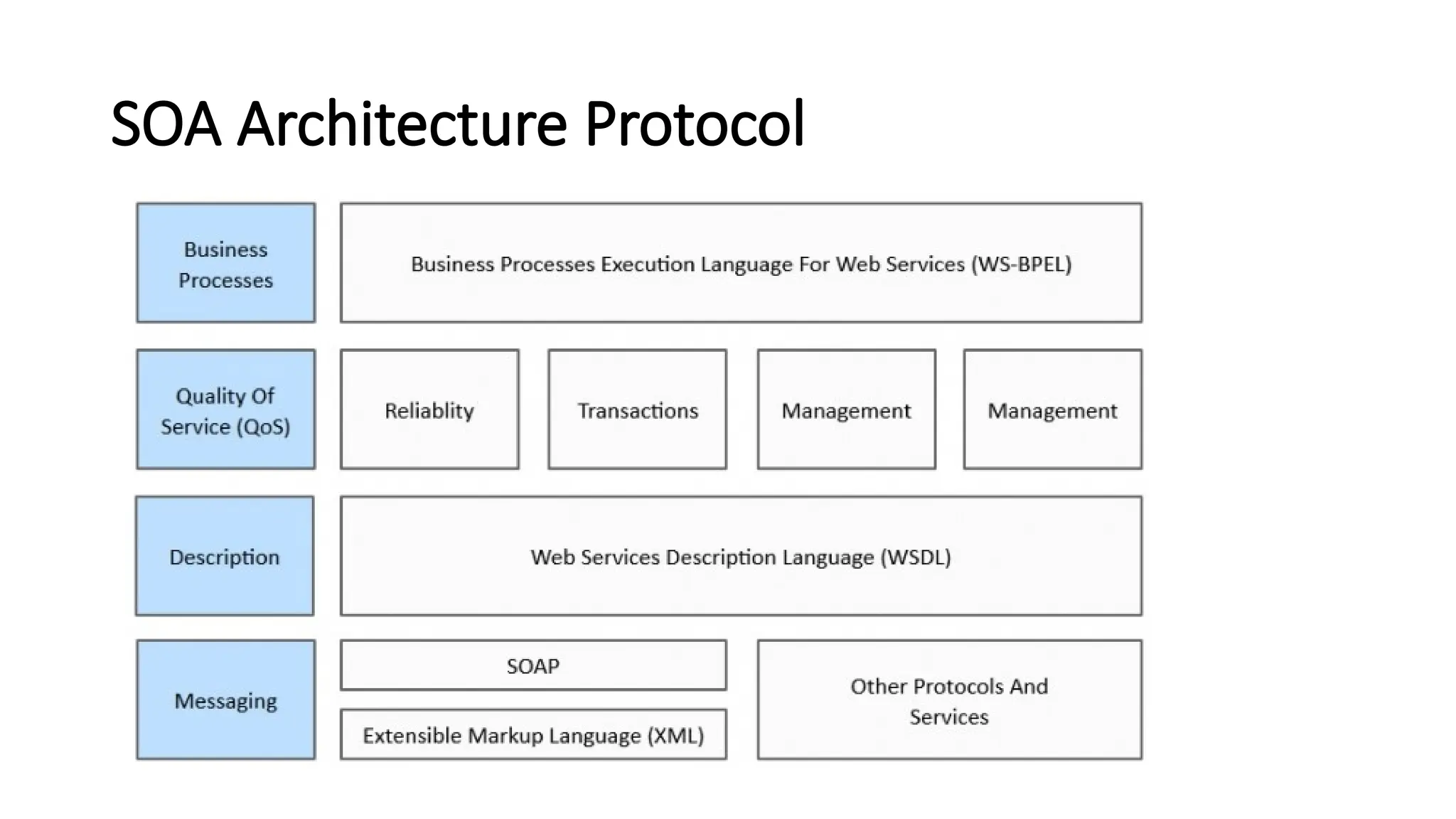
• Here lies the protocol stack of SOA showing each protocol
along with their relationship among each protocol.
• These components are often programmed to comply with
SCA (Service Component Architecture)
• These components are written in BPEL (Business Process
Execution Languages), Java, C#, XML etc and can apply to C++
or FORTRAN or other modern multi-purpose languages such
as Python or Ruby.
SOA Security
• With the vast use of cloud technology and its on-demand
applications, there is a need for well - defined security policies and
access control.
• With the betterment of these issues, the success of SOA architecture
will increase.
• Actions can be taken to ensure security and lessen the risks when
dealing with SOE (Service Oriented Environment).
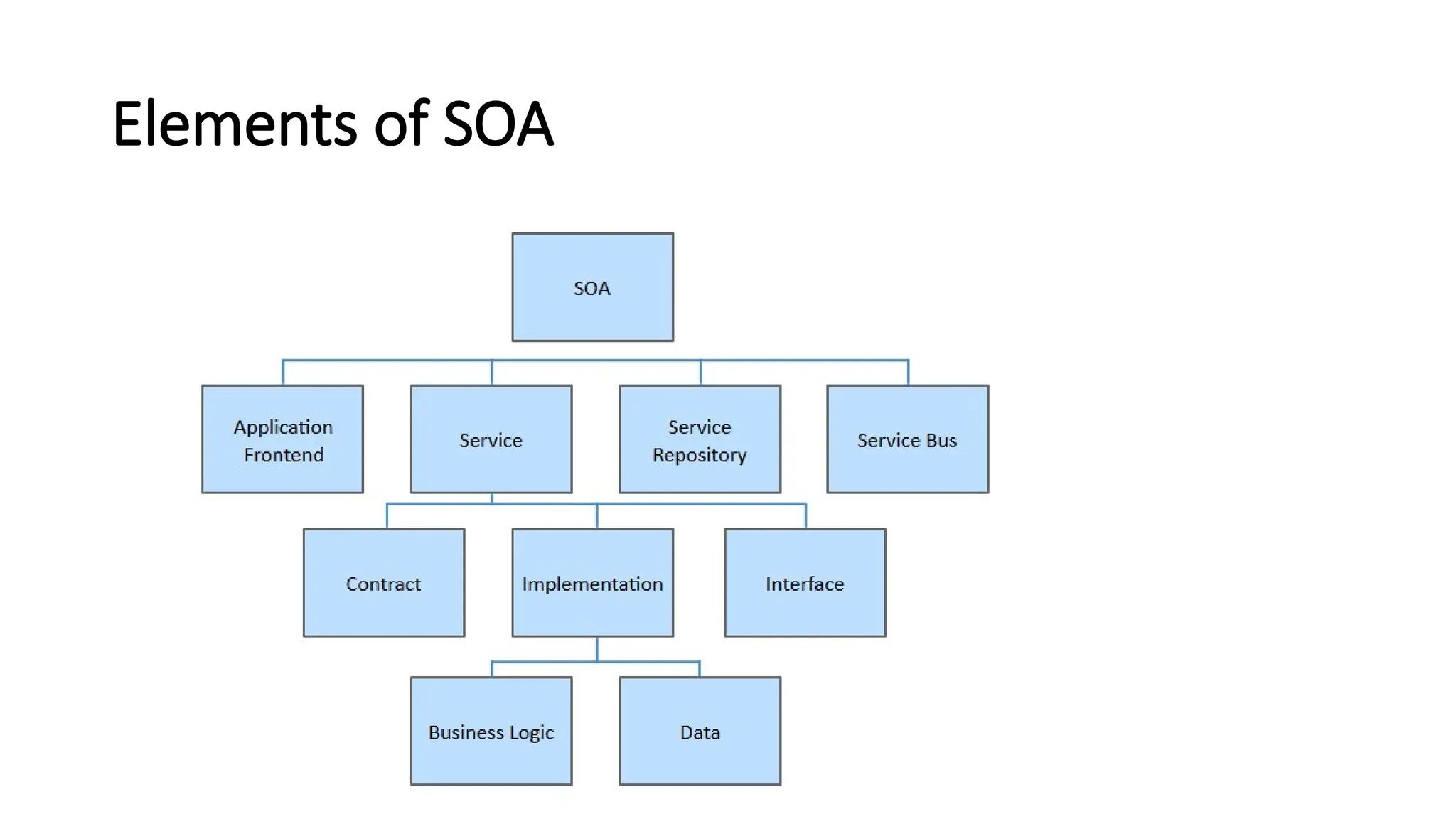
Elements of SOA
• SOA is based on some key principles which are mentioned below
Standardized Service Contract - A service must have some sort of
description which describes what the service is about.
• This makes it easier for client applications to understand what the
service does.
Loose Coupling – Less dependency on each other.
• This is one of the main characteristics of web services which just
states that there should be as less dependency as possible between
the web services and the client invoking the web service.
• So if the service functionality changes at any point in time, it should
not break the client application or stop it from working.
Service Abstraction - Services hide the logic they encapsulate
from the outside world.
• The service should not expose how it executes its
functionality;
• It should just tell the client application on what it does and
not on how it does it.
Service Reusability
• Logic is divided into services with the intent of maximizing
reuse.
• In any development company re-usability is a big topic
because obviously one wouldn't want to spend time and
effort building the same code again and again across multiple
applications which require them.
• Hence, once the code for a web service is written it should
have the ability work with various application types.
• Service Autonomy - Services should have control over the logic they
encapsulate. The service knows everything on what functionality it
offers and hence should also have complete control over the code it
contains.
• Service Statelessness - Ideally, services should be stateless. This
means that services should not withhold information from one state
to the other. This would need to be done from either the client
application.
• Service Discoverability - Services can be discovered (usually in a
service registry). We have already seen this in the concept of the
UDDI(Universal Description Discovery and Integration), which
performs a registry which can hold information about the web
service.
• Service Composability - Services break big problems into little
problems. One should never embed all functionality of an application
into one single service but instead, break the service down into
modules each with a separate business functionality.
• Service Interoperability - Services should use standards that allow
diverse subscribers to use the service. In web services, standards as
XML and communication over HTTP is used to ensure it conforms to
this principle.
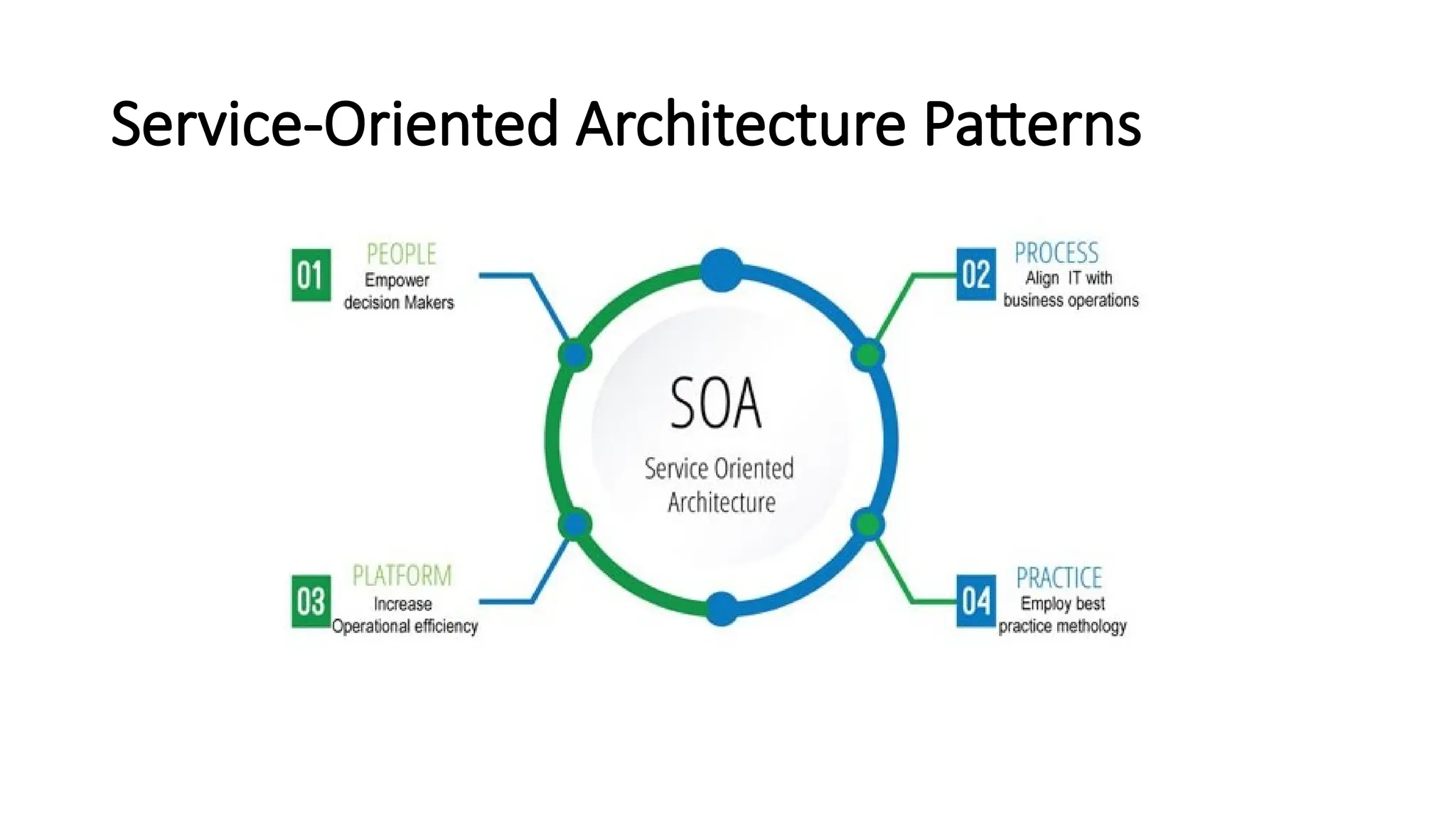
Service-Oriented Architecture Patterns
• There are three roles in each of the Service-Oriented Architecture
building blocks: service provider; service broker and service
requester/consumer.
• The service provider works in conjunction with the service registry,
debating the why and how the services being offered, such as
security, availability, what to charge, and more.
• The service broker makes information regarding the service available
to those requesting it. The scope of the broker is determined by
whoever implements it.
• The service requester locates entries in the broker registry and then
binds them to the service provider. They may or may not be able to
access multiple services; that depends on the capability of the service
requester.
Implementing Service-Oriented Architecture
• There is a wide range of technologies that can be used,
depending on what your end goal is and what you’re trying
to accomplish.
• Typically, Service-Oriented Architecture is implemented with
web services, which makes the “functional building blocks
accessible over standard internet protocols.”
• An example of a web service standard is SOAP, which stands
for Simple Object Access Protocol. SOAP is a messaging
protocol specification for exchanging structured information
in the implementation of web services in computer
networks.
Here are some examples of SOA at work
• To deliver services outside the firewall to new markets:
• First Citizens Bank not only provides services to its own
customers, but also to about 20 other institutions, including
check processing, outsourced customer service, and "bank in
a box" for getting community-sized bank everything they
need to be up and running. Underneath these services is an
SOA-enabled mainframe operation.
To provide real-time analysis of business events:
• Through real-time analysis, OfficeMax is able to order out-of-
stock items from the point of sale, employ predictive
monitoring of core business processes such as order
fulfillment, and conduct real-time analysis of business
transactions, to quickly measure and track product affinity,
hot sellers, proactive inventory response and price error
checks
• To streamline the business: Whitney National Bank built a winning
SOA formula that helped the bank attain measurable results on a
number of fronts, including cost savings, integration, and more
impactful IT operations. Metrics and progress are tracked month to
month.
• To speed time to market: This may be the competitive advantage
available to large enterprises
• To improve federal government operations: The US Government
Accountability Office (GAO) issued guidelines intended to help
government agencies achieve enterprise transformation through
enterprise architecture. The guidelines and conclusions offer a strong
business case for commercial businesses also seeking to achieve
greater agility and market strength through shared IT services.
• Within the federal government, the Office of Management and
Budget (OMB) has encouraged development of centers of excellence
that provide IT services to multiple customers. Among them are four
financial centers of excellence operated by the Bureau of Public Debt,
General Services Administration, Department of the Interior and the
Department of Transportation.
• To improve state and local government operations: The money isn’t
there to advance new initiatives, but state governments may have
other tools at their disposal to drive new innovations — through
shared IT service
Ex:Governments at all levels are increasingly turning to these channels
to improve their communications with and responsiveness to the
public. Government records and data that were previously isolated and
difficult for the public to access are now becoming widely available
through APIs (application programming interfaces).
• To improve healthcare delivery: can improve the delivery of
important information and make the sharing of data across a
community of care practical in cost, security, and risk of deployment.
• Healthcare organizations today are challenged to manage a growing
portfolio of systems.
• The cost of acquiring, integrating, and maintaining these systems is
rising, while end-user demands are increasing.
• In addition to all these factors, there are increased demands for
enabling interoperability between other healthcare organizations to
regionally support care delivery.
• SOA offers system design and management principles in support of
the reuse and sharing of system resources across that are potentially
very valuable to a typical healthcare organization.
• To support online business offerings: Thomson Reuters, a provider of
business intelligence information for businesses and professionals,
maintains a stable of 4,000 services that it makes available to outside
customers.
• For example, one such service, Thomson ONE Analytics, delivers a
broad and deep range of financial content to Thomson Reuters
clientele. Truly an example of SOA supporting the cloud.
• To virtualize history: Colonial Williamsburg, Virginia, implementing a
virtualized, tiered storage pool to manage its information and
content.
• To defend the universe: US Air Force space administrator announced
that new space-based situational awareness systems will be deployed
on service oriented architecture-based infrastructure.
• The importance of Service-Oriented Architecture
• There are a variety of ways that implementing an SOA structure can
benefit a business, particularly, those that are based around web
services. Here are some of the foremost:
• Creates reusable code
• The primary motivator for companies to switch to an SOA is the ability
to reuse code for different applications.
• By reusing code that already exists within a service, enterprises can
significantly reduce the time that is spent during the development
process.
• It also lowers costs that are often incurred during the development of
applications.
• Since SOA allows varying languages to communicate through a central
interface, this means that application engineers do not need to be
concerned with the type of environment in which these services will
be run.
• Promotes interaction
Interoperability refers to the sharing of data.
• The more interoperable software programs are, the easier it is for
them to exchange information.
• Software programs that are not interoperable need to be integrated.
Therefore, SOA integration can be seen as a process that enables
interoperability. A goal of service-orientation is to establish
native interoperability within services in order to reduce the need for
integration
• Allows for scalability
• When developing applications for web services, one issue that is of
concern is the ability to increase the scale of the service to meet the
needs of the client.
• By using an SOA where there is a standard communication protocol in
place, enterprises can drastically reduce the level of interaction that is
required between clients and services
• Reduction means that applications can be scaled without putting
added pressure on the application, as would be the case in a tightly-
coupled environment.
Reduced costs
• This cost reduction is facilitated by the fact that loosely coupled
systems are easier to maintain and do not necessitate the need for
costly development and analysis.
• Furthermore, the increasing popularity in SOA means reusable
business functions are becoming commonplace for web services
which drive costs lower.
REST AND SYSTEMS OF SYSTEMS
• Representational state transfer (REST) is a software
architectural style that defines a set of constraints to be used
for creating Web services.
• Web services that conform to the REST architectural style,
called RESTful Web services, provide interoperability
between computer systems on the internet.
• Representational State Transfer (REST) is an architecture
principle in which the web services are viewed as resources
and can be uniquely identified by their URLs.
• "Web resources" were first defined on the World Wide Web as
documents or files identified by their URLs.
• However, today they have a much more generic and abstract
definition that encompasses every thing, entity, or action that can be
identified, named, addressed, handled, or performed, in any way
whatsoever, on the Web.
• In a RESTful Web service, requests made to a resource's URI will elicit
a response with a payload formatted in HTML, XML, JSON, or some
other format.
• The response can confirm that some alteration has been made to the
resource state, and the response can provide hypertext links to other
related resources.
• When HTTP is used, as is most common, the operations (
HTTP methods) available are GET, HEAD, POST, PUT, DELETE,
CONNECT, OPTIONS and TRACE.
• By using a stateless protocol and standard operations, RESTful
systems aim for fast performance, reliability, and the ability to grow
by reusing components that can be managed and updated without
affecting the system as a whole, even while it is running.
• The key characteristic of a REST Web service is the explicit use of
HTTP methods to denote the invocation of different operations.
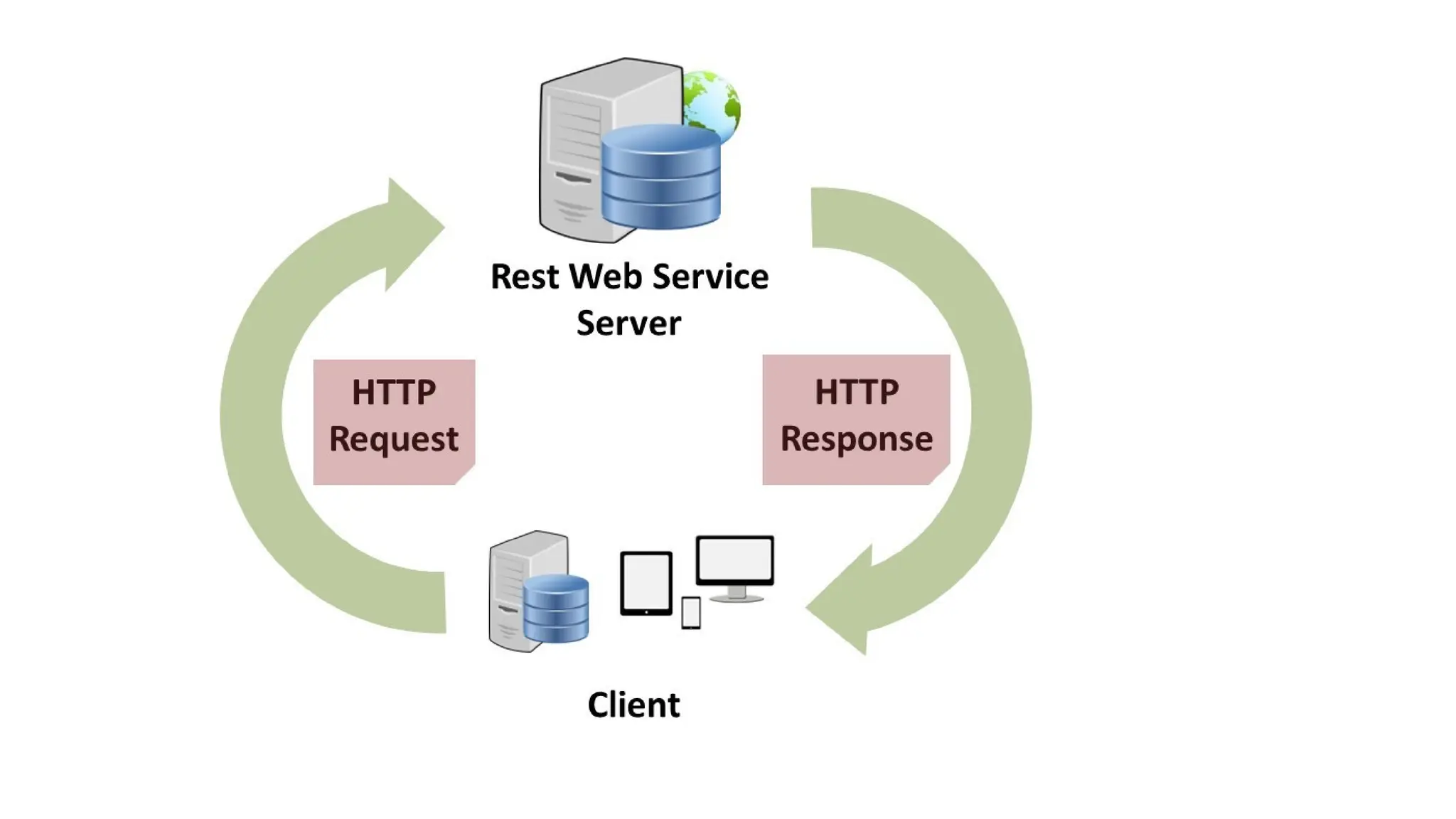
• The REST architecture involves client and server interactions built
around the transfer of resources.
• The Web is the largest REST implementation.
• REST may be used to capture website data through
interpreting extensible markup language (XML) Web page
files with the desired data.
• In addition, online publishers use REST when providing
syndicated content to users.
• Content syndication is when web-based content is re-published by a
third-party website.
Architectural properties
Performance in component interactions, which can be the dominant factor
in user-perceived performance and network efficiency;[9]
• scalability allowing the support of large numbers of components and
interactions among components.
• simplicity of a uniform interface;
• modifiability of components to meet changing needs (even while the
application is running);
• visibility of communication between components by service agents;
• portability of components by moving program code with the data;
• reliability in the resistance to failure at the system level in the presence of
failures within components, connectors, or data
• Basic REST constraints include:
• Client and Server: The client and server are separated through a uniform
interface, which improves client code portability.
• Stateless: Each client request must contain all required data for request
processing without storing client context on the server.
• Cacheable: Responses (such as Web pages) can be cached on a client
computer to speed up Web Browsing. Responses are defined as cacheable
or not cacheable to prevent clients from reusing or inappropriate data
when responding to further requests.
• Layered System: Enables clients to connect to the end server through an
intermediate layer for improved scalability. If a proxy or load balancer is
placed between the client and server, it won't affect their communications
and there won't be a need to update the client or server code.
Uniform Interface: It is a key constraint that differentiate between a REST
API and Non-REST API. It suggests that there should be an uniform way of
interacting with a given server irrespective of device or type of
application (website, mobile app).
There are four guidelines principle of Uniform Interface are:
• Resource-Based: Individual resources are identified in requests. For
example: API/users.
• Manipulation of Resources Through Representations: Client has
representation of resource and it contains enough information to
modify or delete the resource on the server, provided it has permission
to do so.
• Self-descriptive Messages: Each message includes enough information
to describe how to process the message so that server can easily
analyses the request.
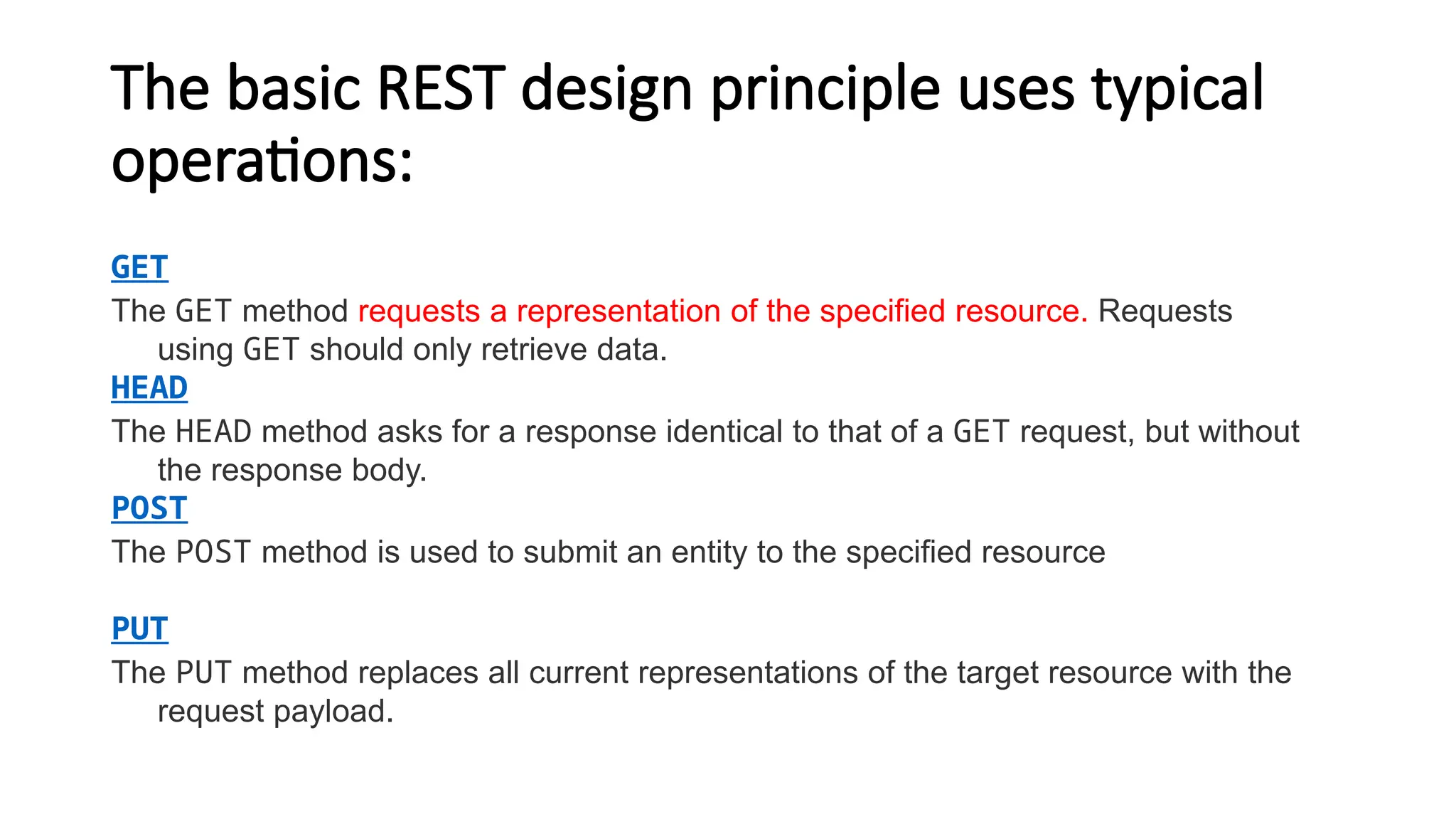
The basic REST design principle uses typical
operations:
GET
The GET method requests a representation of the specified resource. Requests
using GET should only retrieve data.
HEAD
The HEAD method asks for a response identical to that of a GET request, but without
the response body.
POST
The POST method is used to submit an entity to the specified resource
PUT
The PUT method replaces all current representations of the target resource with the
request payload.
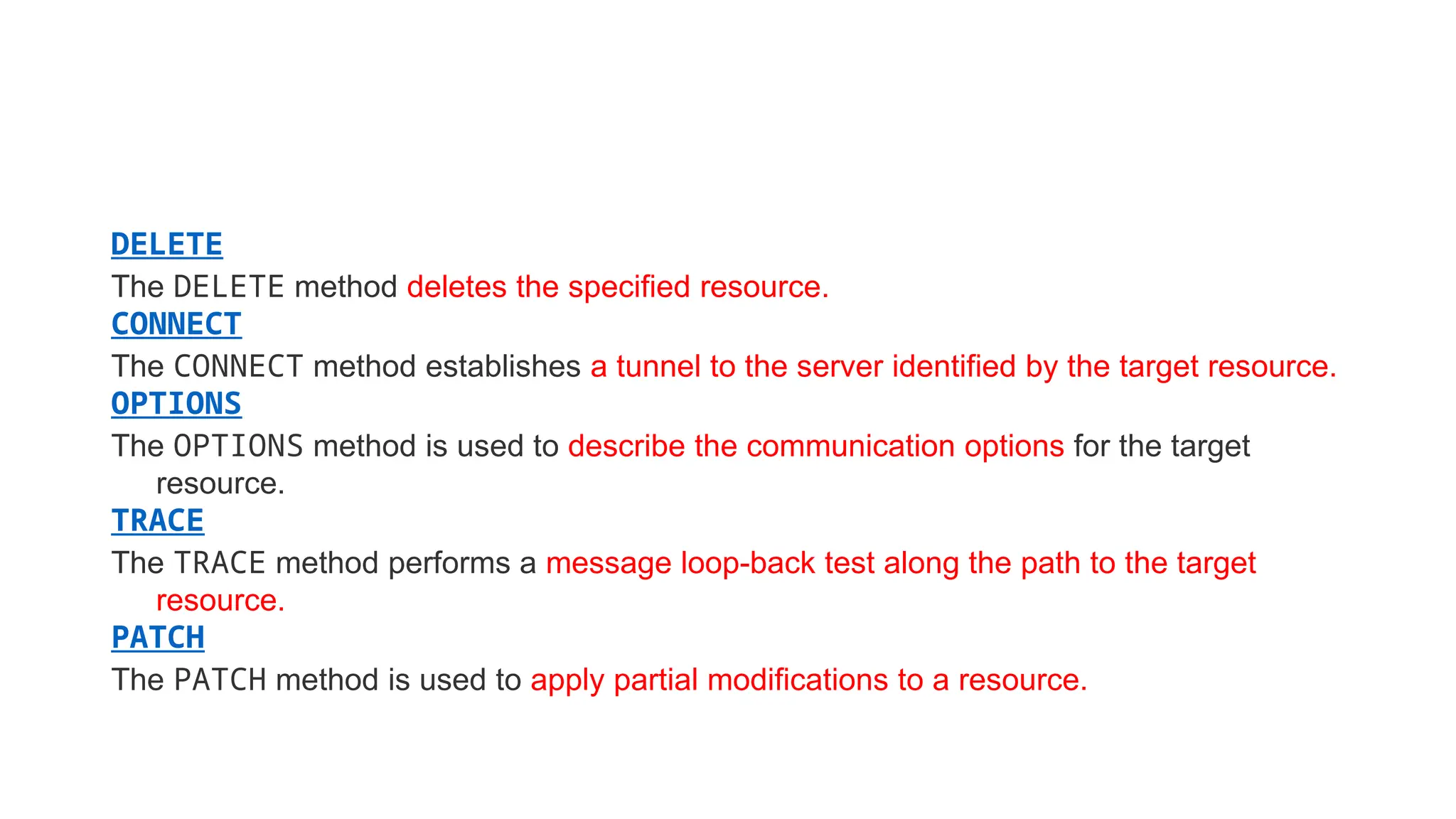
DELETE
The DELETE method deletes the specified resource.
CONNECT
The CONNECT method establishes a tunnel to the server identified by the target resource.
OPTIONS
The OPTIONS method is used to describe the communication options for the target
resource.
TRACE
The TRACE method performs a message loop-back test along the path to the target
resource.
PATCH
The PATCH method is used to apply partial modifications to a resource.
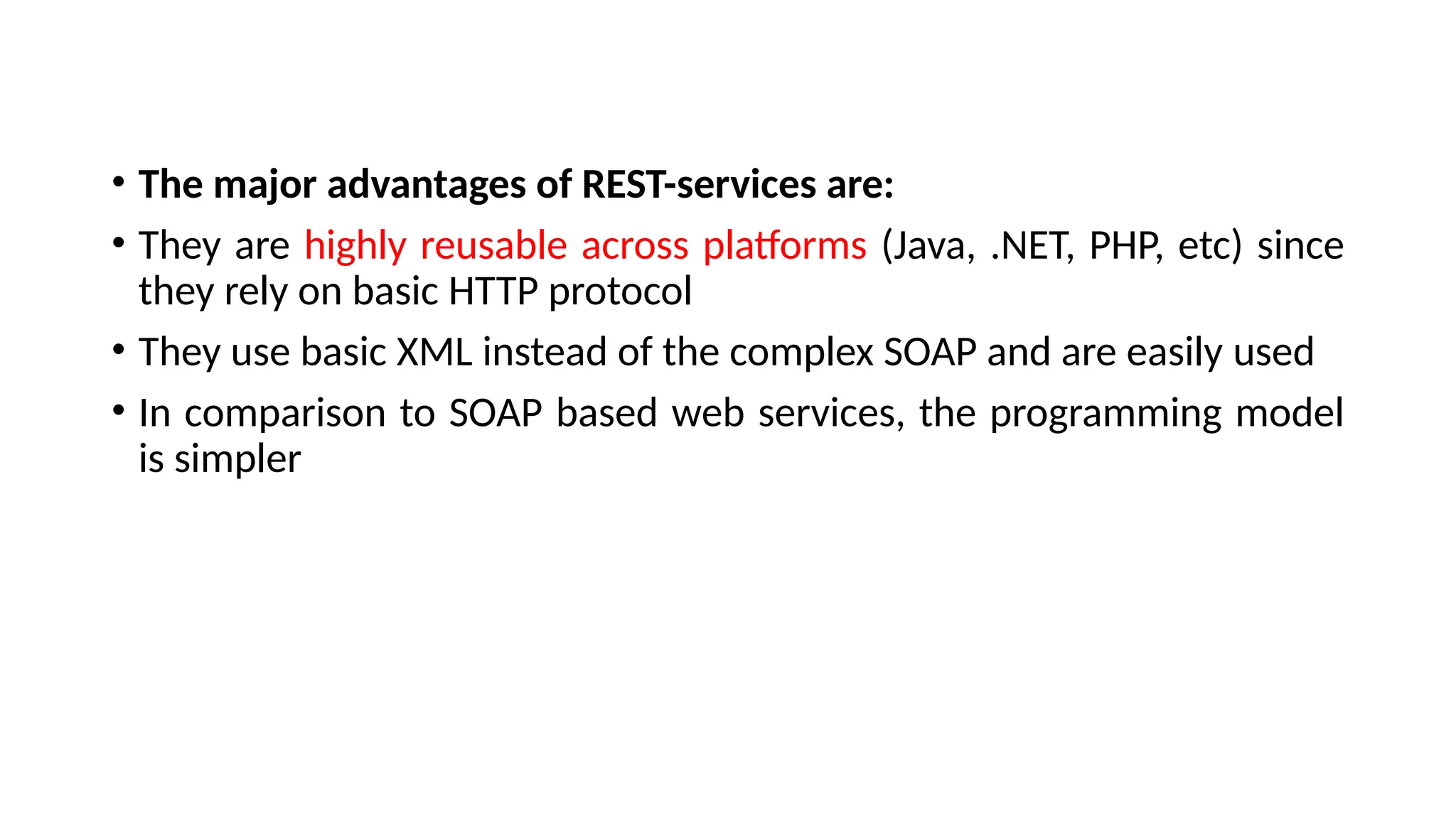
• The major advantages of REST-services are:
• They are highly reusable across platforms (Java, .NET, PHP, etc) since
they rely on basic HTTP protocol
• They use basic XML instead of the complex SOAP and are easily used
• In comparison to SOAP based web services, the programming model
is simpler
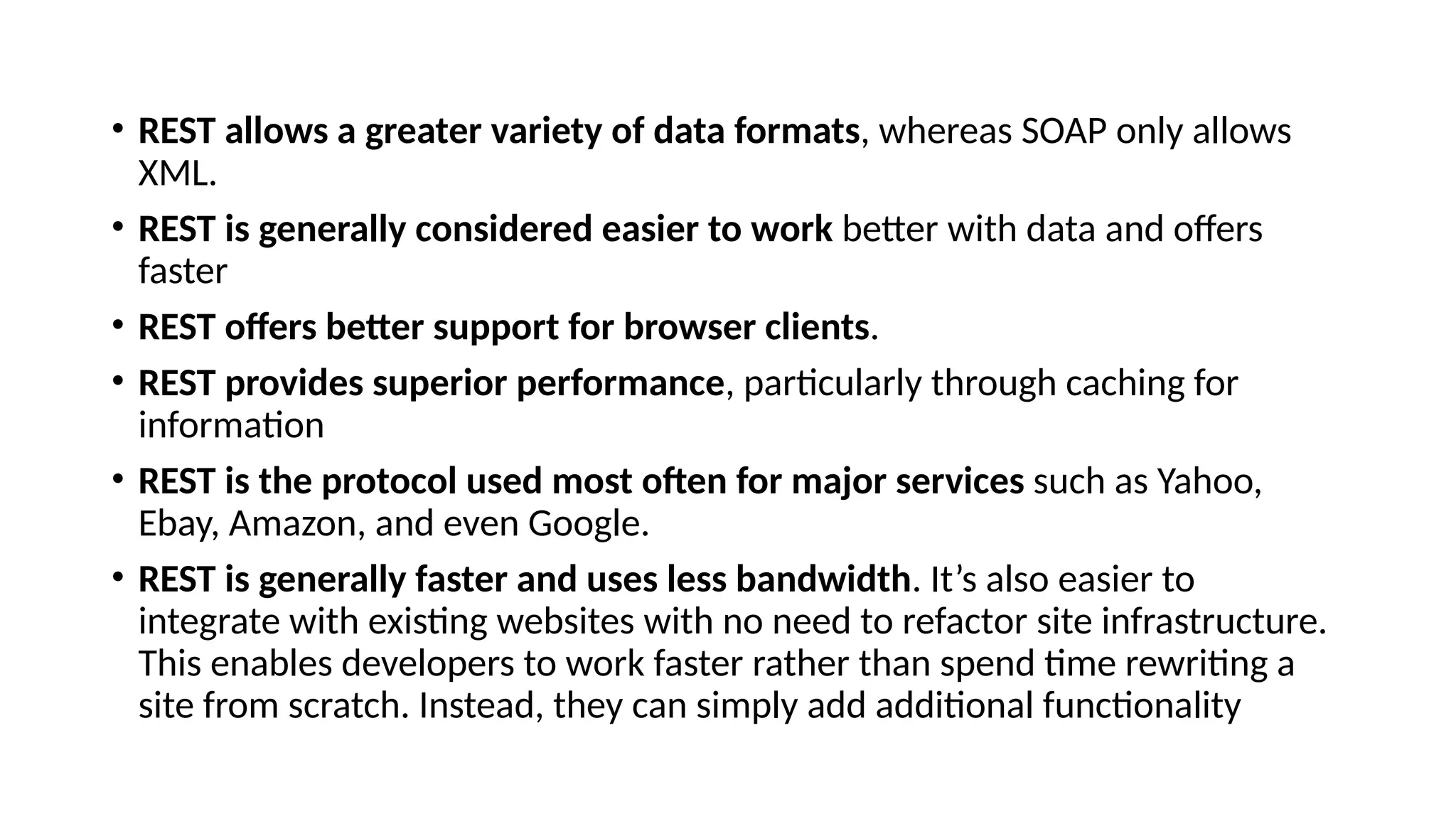
• REST allows a greater variety of data formats, whereas SOAP only allows
XML.
• REST is generally considered easier to work better with data and offers
faster
• REST offers better support for browser clients.
• REST provides superior performance, particularly through caching for
information
• REST is the protocol used most often for major services such as Yahoo,
Ebay, Amazon, and even Google.
• REST is generally faster and uses less bandwidth. It’s also easier to
integrate with existing websites with no need to refactor site infrastructure.
This enables developers to work faster rather than spend time rewriting a
site from scratch. Instead, they can simply add additional functionality
Five key principles are:
• Give every “thing” an ID
• Link things together
• Use standard methods
• Resources with multiple representations
• Communicate statelessly
• Overview of Architecture
• In J2EE applications, the Java API or services are exposed as either
Stateless Session Bean API (Session Façade pattern) or as SOAP web
services.
• In case of integration of these services with client applications using
non-Java technology like .NET or PHP etc, it becomes very
cumbersome to work with SOAP Web Services and also involves
considerable development effort.
• The Enterprise Information Systems Tier
• The enterprise information systems (EIS) tier consists of database servers, enterprise
resource planning systems, and other legacy data sources, like mainframes. These
resources typically are located on a separate machine than the Java EE server, and are
accessed by components on the business tier.
• Java EE Technologies Used in the EIS Tier
• The following Java EE technologies are used to access the EIS tier in Java EE applications:
• The Java Database Connectivity API (JDBCTM
)
• The Java Persistence API
• The Java EE Connector Architecture
• The Java Transaction API (JTA)
• The Business Tier
• The business tier consists of components that provide the business logic for an application.
Business logic is code that provides functionality to a particular business domain, like the
financial industry, or an e-commerce site. In a properly designed enterprise application, the
core functionality exists in the business tier components.
• Java EE Technologies Used in the Business Tier
The following Java EE technologies are used in the business tier in Java EE applications:
• Enterprise JavaBeans (enterprise bean) components
• JAX-RS RESTful web services(JAX-RS is a JAVA based programming language API and
specification to provide support for created RESTful Web Services)
• JAX-WS web service endpoints
• Java Persistence API entities
The Web Tier
The web tier consists of components that handle the interaction between
clients and the business tier. Its primary tasks are the following:
• Dynamically generate content in various formats for the client.
• Collect input from users of the client interface and return appropriate
results from the components in the business tier.
• Control the flow of screens or pages on the client.
• Maintain the state of data for a user's session.
• Perform some basic logic and hold some data temporarily in JavaBeans
components.
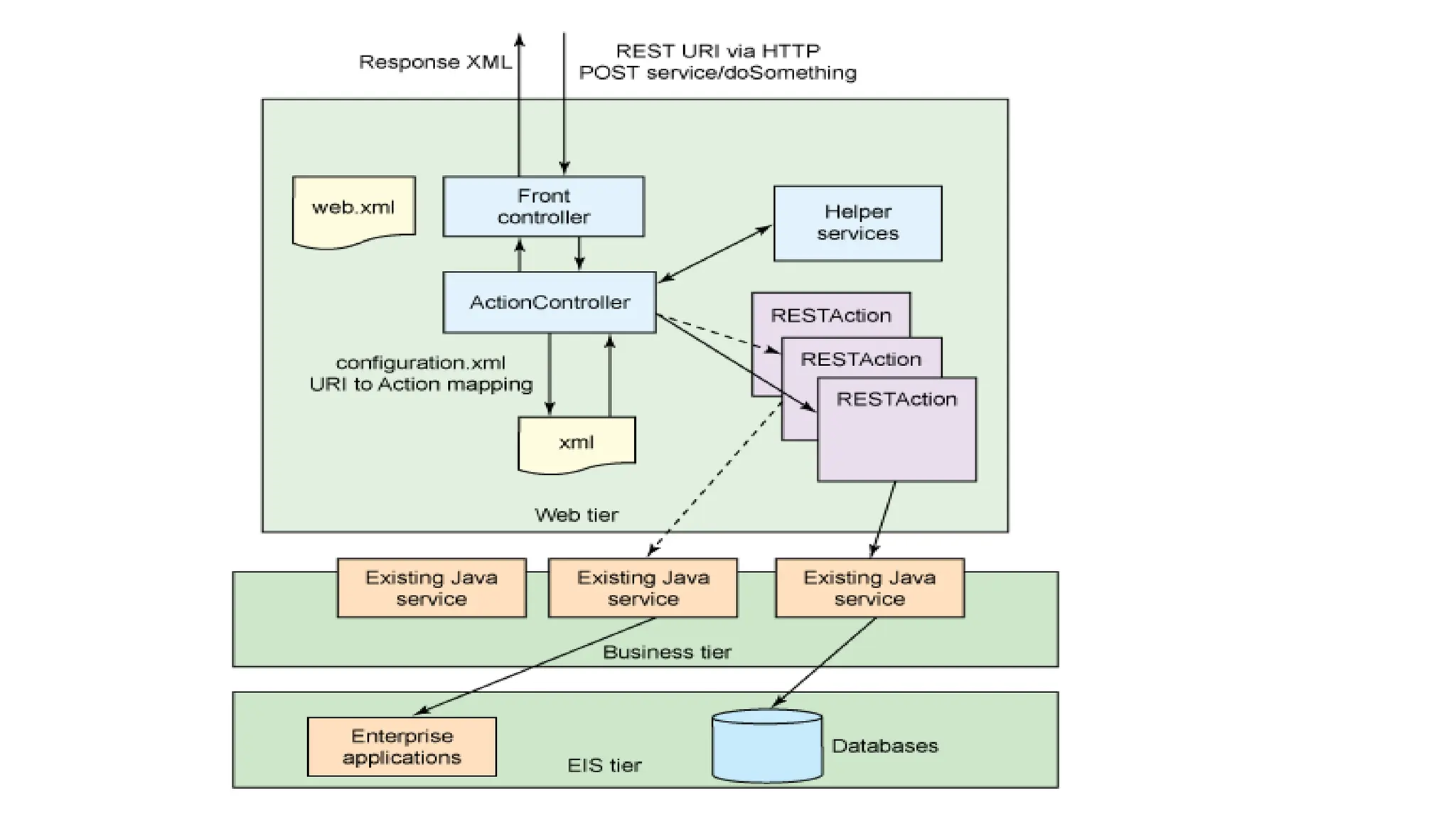
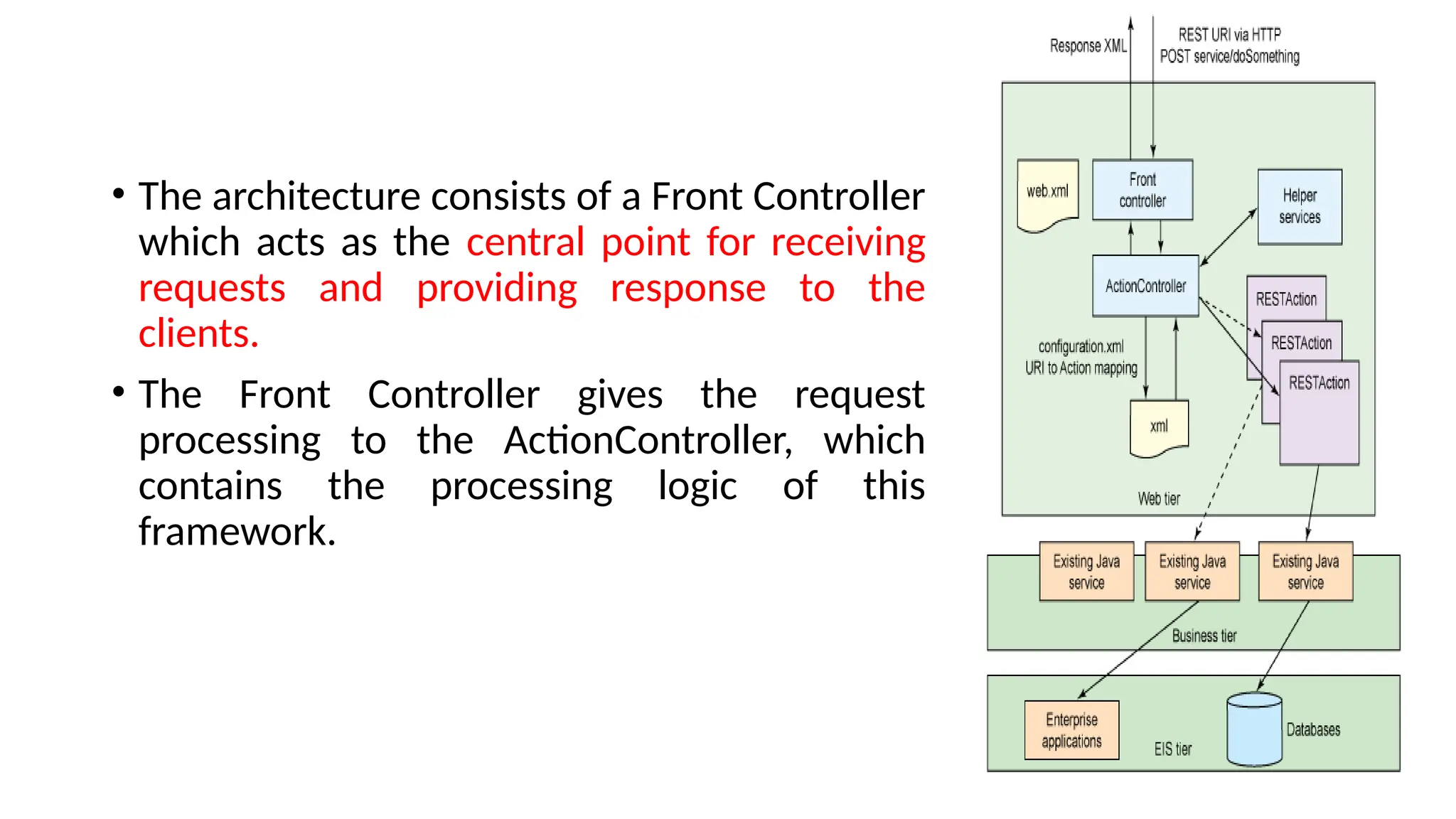
• The architecture consists of a Front Controller
which acts as the central point for receiving
requests and providing response to the
clients.
• The Front Controller gives the request
processing to the ActionController, which
contains the processing logic of this
framework.
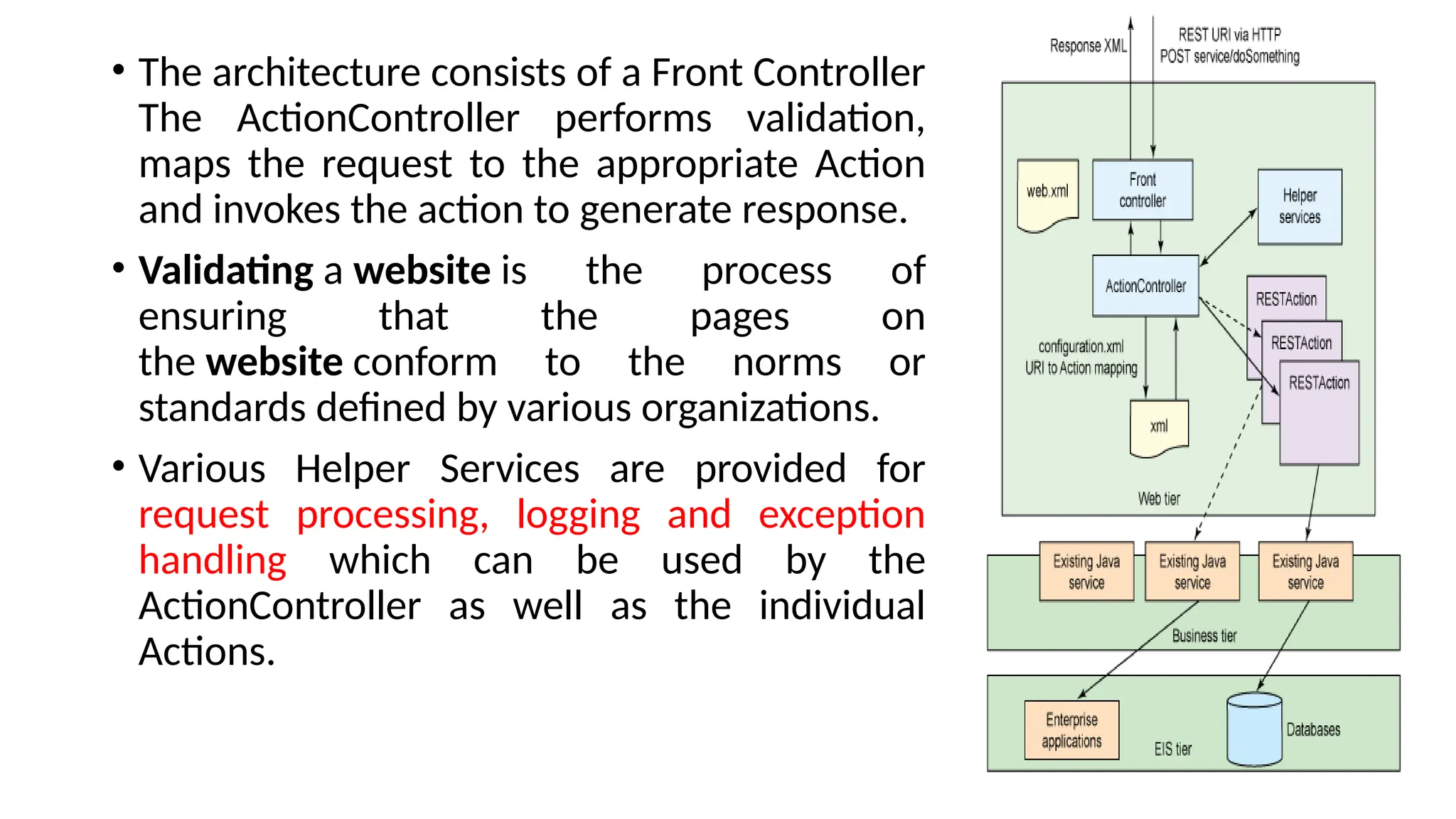
• The architecture consists of a Front Controller
The ActionController performs validation,
maps the request to the appropriate Action
and invokes the action to generate response.
• Validating a website is the process of
ensuring that the pages on
the website conform to the norms or
standards defined by various organizations.
• Various Helper Services are provided for
request processing, logging and exception
handling which can be used by the
ActionController as well as the individual
Actions.
• Service Client
• This is a client application which needs to invoke the service. This
component can be either Java-based or any other client as long as it is
able to support the HTTP methods
• Common Components
• These are the utility services required by the framework like logging,
exception handling and any common functions required for
implementation.
WEB SERVICES
• What is Web Service?
• Type of Web Service
• Web Services Advantages
• Web Service Architecture
• Web Service Characteristics
• What is Web Service?
• Web service is a standardized medium to propagate communication
between the client and server applications on the World Wide Web.
• A web service is a software module which is designed to perform a
certain set of tasks.
• Web service is a service offered by a server running on a computer
device, listening for requests at a particular port over a network,
serving web documents (HTML, JSON, XML, images), and
creating web applications services, which serve in solving specific
domain problems over the Web (WWW, Internet, HTTP)
• In a Web service a Web technology such as HTTP is used for
transferring machine-readable file formats such as XML and JSON.
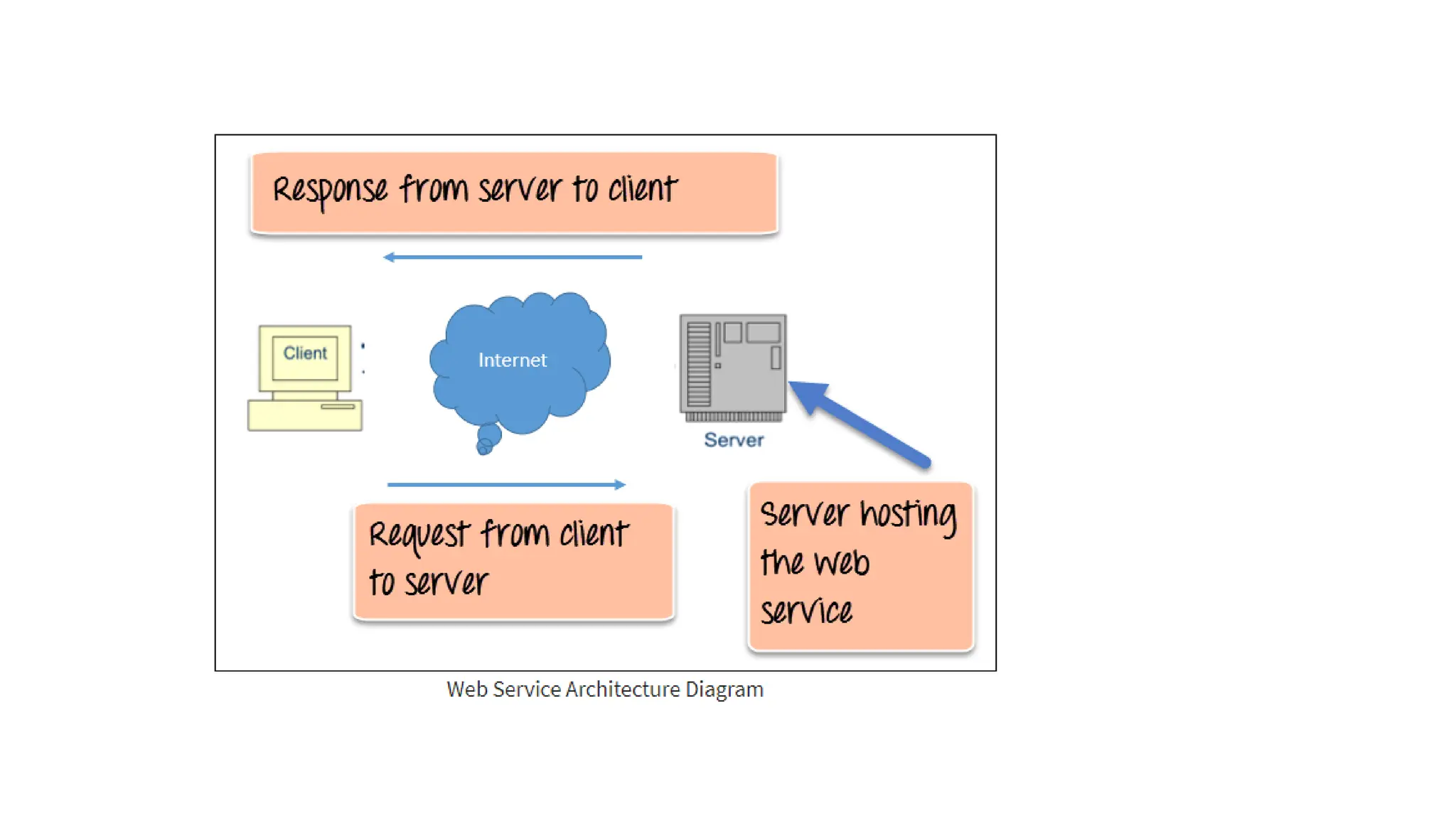
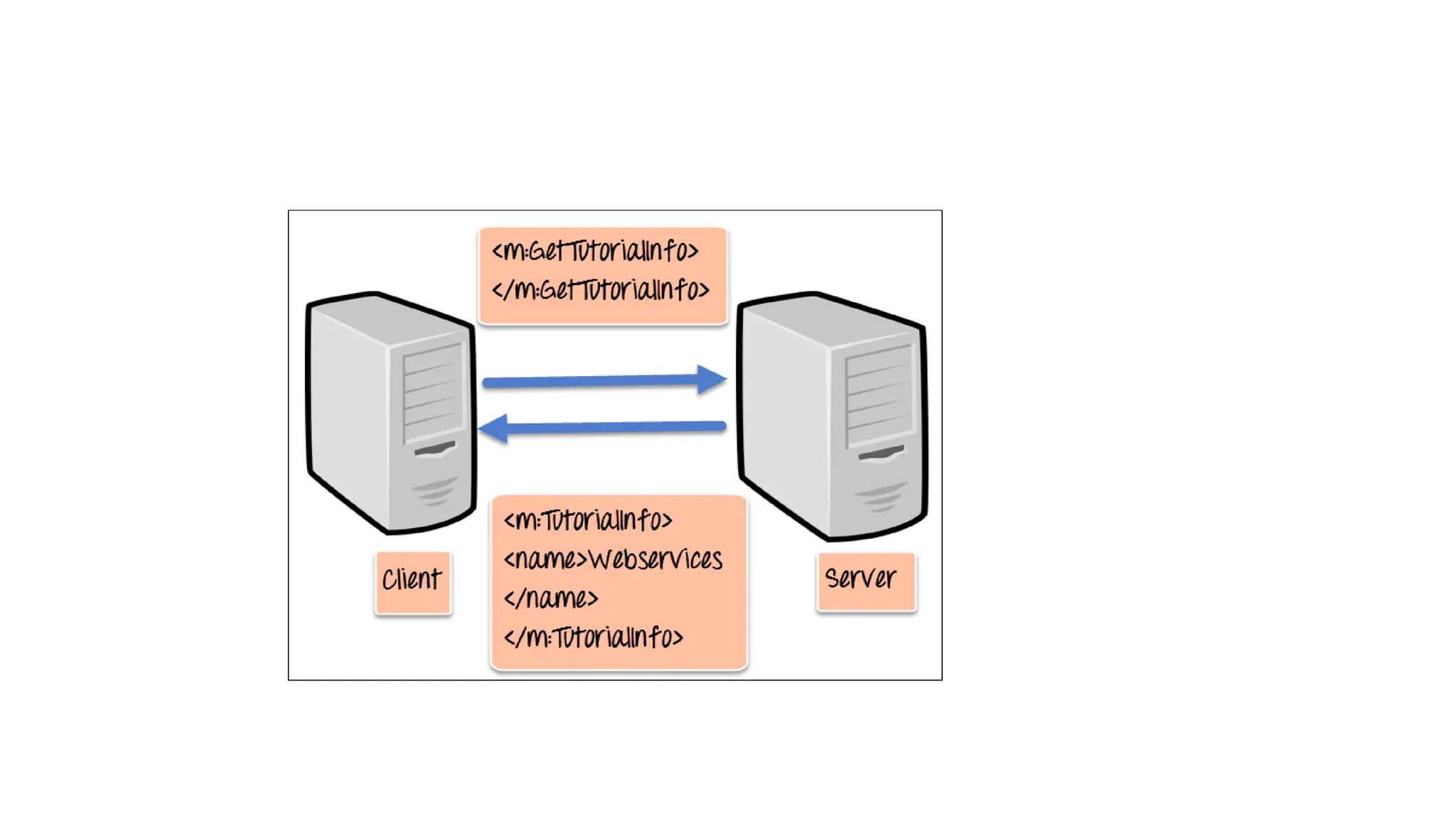
• The above diagram shows a very simplistic view of how a web service
would actually work.
• The client would invoke a series of web service calls via requests to a
server which would host the actual web service.
• These requests are made through what is known as remote procedure
calls. Remote Procedure Calls(RPC) are calls made to methods which
are hosted by the relevant web service.
• The main component of a web service is the data which is transferred
between the client and the server, and that is XML.
• XML stands for eXtensible Markup Language.
• XML was designed to store and transport data.
• XML was designed to be both human- and machine-readable.
• XML (Extensible markup language) is easy to understand the
intermediate language that is understood by many programming
languages.
• Web services use something known as SOAP (Simple Object Access
Protocol) for sending the XML data between applications. The data is
sent over normal HTTP.
• The data which is sent from the web service to the application is
called a SOAP message. The SOAP message is nothing but an XML
document. Since the document is written in XML, the client
application calling the web service can be written in any programming
language.
• Type of Web Service
• There are mainly two types of web services.
• SOAP web services.
• RESTful web services.
• In order for a web service to be fully functional, there are certain
components that need to be in place. These components need to be
present irrespective of whatever development language is used for
programming the web service.
• SOAP (Simple Object Access Protocol)
• SOAP is known as a transport-independent messaging protocol. SOAP
is based on transferring XML data as SOAP Messages. Each message
has something which is known as an XML document.
• Only the structure of the XML document follows a specific pattern,
but not the content. The best part of Web services and SOAP is that
its all sent via HTTP, which is the standard web protocol.
• Each SOAP document needs to have a root element known as the
<Envelope> element. The root element is the first element in an XML
document.
• The "envelope" is in turn divided into 2 parts.
• The first is the header, and the next is the body.
• The header contains the routing data which is basically the
information which tells the XML document to which client it needs to
be sent to.
• The body will contain the actual message.
• WSDL (Web services description language)
• The client invoking the web service should know where the web service
actually resides.
• Secondly, the client application needs to know what the web service actually
does, so that it can invoke the right web service.
• This is done with the help of the WSDL, known as the Web services
description language.
• The WSDL file is again an XML-based file which basically tells the client
application what the web service does. By using the WSDL document, the
client application would be able to understand where the web service is
located and how it can be utilized.
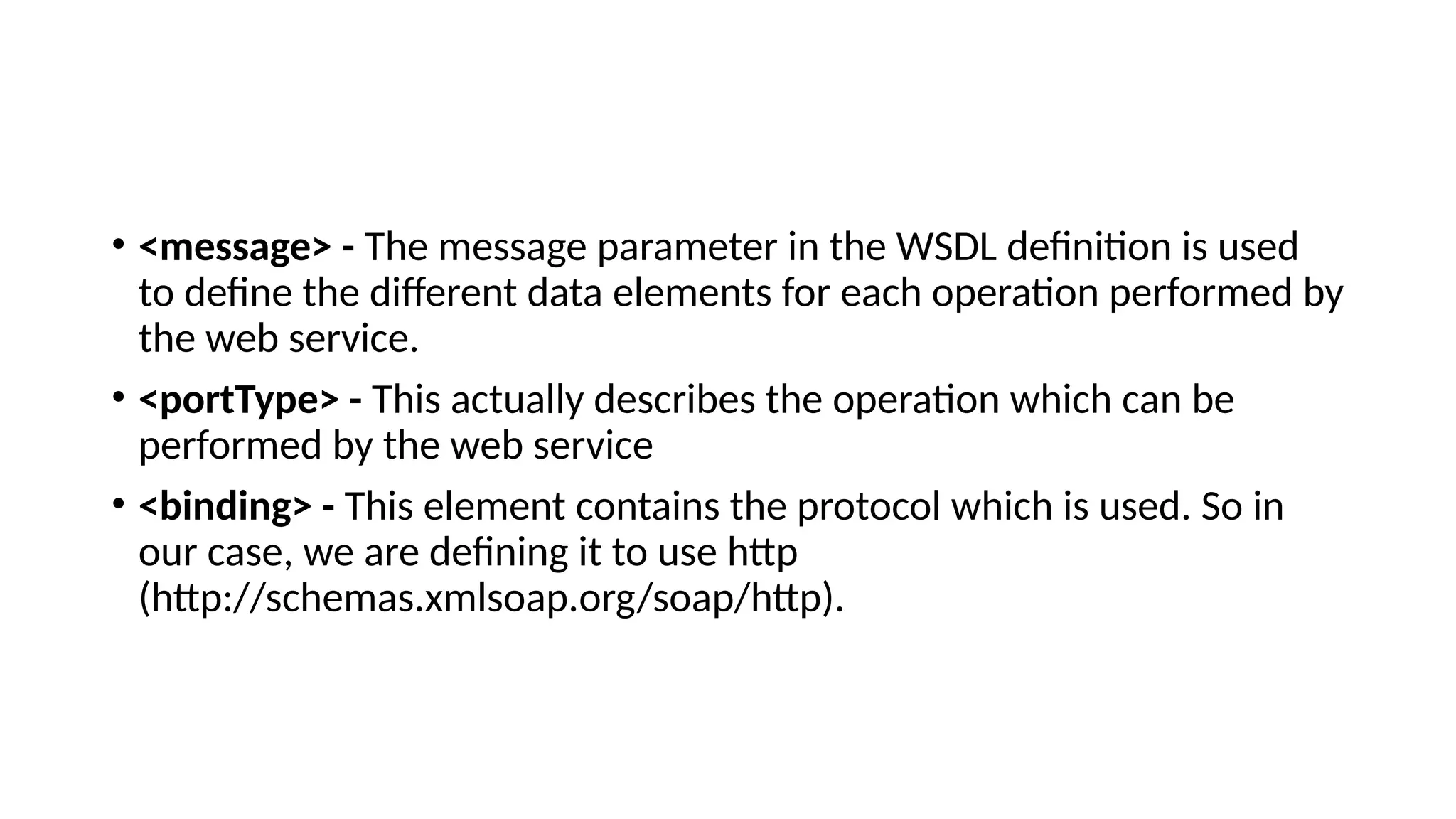
• <message> - The message parameter in the WSDL definition is used
to define the different data elements for each operation performed by
the web service.
• <portType> - This actually describes the operation which can be
performed by the web service
• <binding> - This element contains the protocol which is used. So in
our case, we are defining it to use http
(http://schemas.xmlsoap.org/soap/http).
• Universal Description, Discovery, and Integration (UDDI)
• The Universal Description, Discovery and Integration (UDDI)
specifications define a registry service for Web services and for other
electronic and non-electronic services.
• A UDDI registry service is a Web service that manages information
about service providers, service implementations, and service
metadata.
• Service providers can use UDDI to advertise the services they offer.
• Service consumers can use UDDI to discover services that suit their
requirements and to obtain the service metadata needed to consume
those services.
• The UDDI specifications define:
• SOAP APIs that applications use to query and to publish information
to a UDDI registry
• XML Schema schemata of the registry data model and the SOAP
message formats
• WSDL definitions of the SOAP APIs
• UDDI registry definitions (technical models - tModels) of various
identifier and category systems that may be used to identify and
categorize UDDI registrations
• Web Services Advantages
• We already understand why web services came about in the first place,
which was to provide a platform which could allow different applications
to talk to each other.
• Exposing Business Functionality on the network - A web service is a unit
of managed code that provides some sort of functionality to client
applications or end users. This functionality can be invoked over the HTTP
protocol which means that it can also be invoked over the internet.
Nowadays all applications are on the internet which makes the purpose of
Web services more useful. That means the web service can be anywhere
on the internet and provide the necessary functionality as required.
• Interoperability amongst applications - Web services allow various
applications to talk to each other and share data and services among
themselves. All types of applications can talk to each other. So instead
of writing specific code which can only be understood by specific
applications, you can now write generic code that can be understood
by all applications
• A Standardized Protocol which everybody understands - Web
services use standardized industry protocol for the communication.
All the four layers (Service Transport, XML Messaging, Service
Description, and Service Discovery layers) uses well-defined protocols
in the web services protocol stack.
• Reduction in cost of communication - Web services use SOAP over
HTTP protocol, so you can use your existing low-cost internet for
implementing web services.
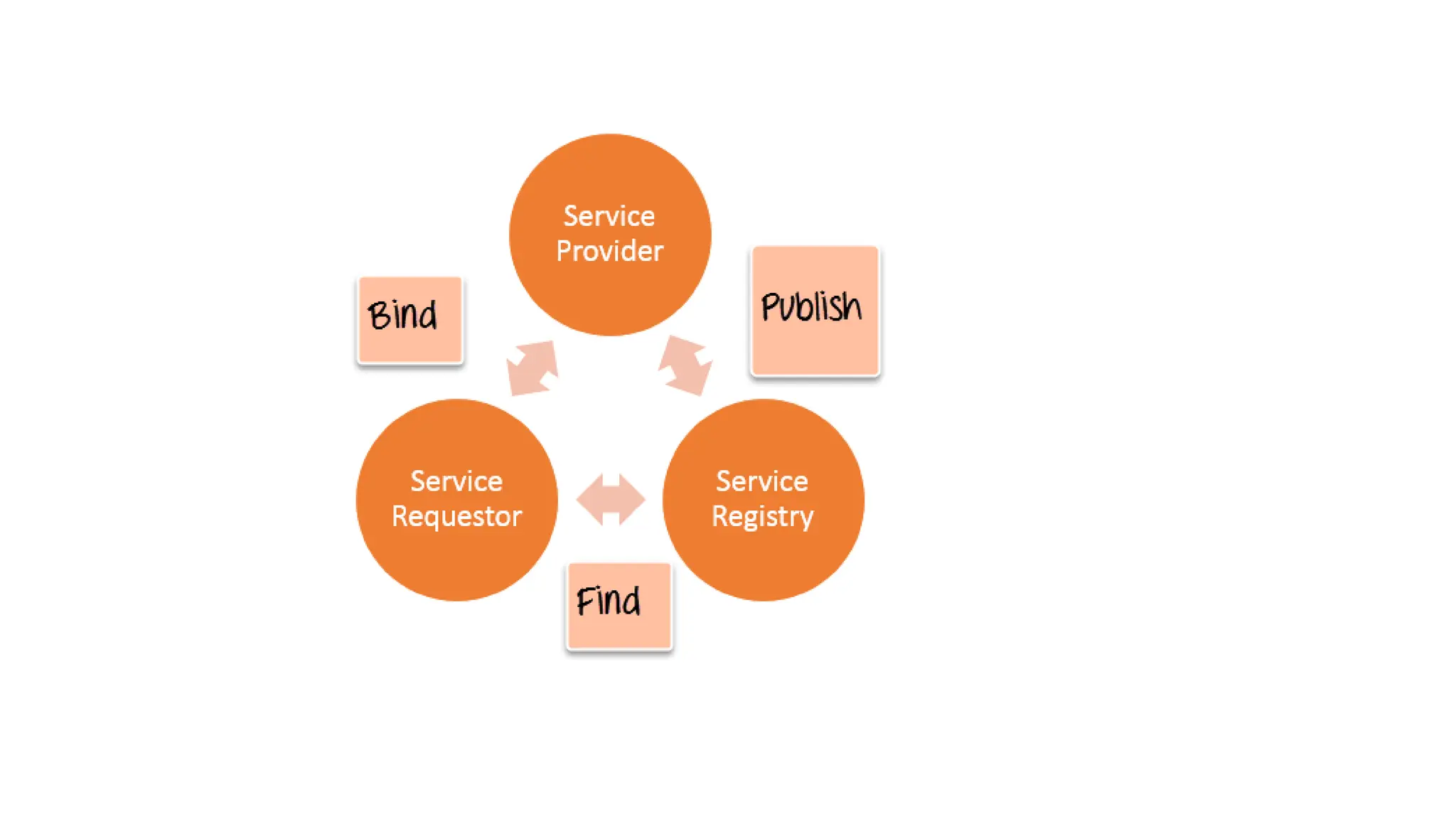
• Web service Architecture
• Every framework needs some sort of architecture to make sure the entire
framework works as desired. Similarly, in web services, there is an architecture
which consists of three distinct roles as given below
• Provider - The provider creates the web service and makes it available to client
application who want to use it.
• Requestor - A requestor is nothing but the client application that needs to contact
a web service. The client application can be a .Net, Java, or any other language
based application which looks for some sort of functionality via a web service.
• Broker - The broker is nothing but the application which provides access to the
UDDI. The UDDI, as discussed in the earlier topic enables the client application to
locate the web service.
• Publish - A provider informs the broker (service registry) about the
existence of the web service by using the broker's publish interface to
make the service accessible to clients
• Find - The requestor consults the broker to locate a published web
service
• Bind - With the information it gained from the broker(service registry)
about the web service, the requestor is able to bind, or invoke, the
web service.
• Web service Characteristics
• Web services have the following special behavioral characteristics:
They are
XML-Based - Web Services uses XML to represent the data at the
representation and data transportation layers. Using XML eliminates
any networking, operating system, or platform sort of dependency
since XML is the common language understood by all.
• Loosely Coupled – Loosely coupled means that the client and the web
service are not bound to each other, which means that even if the
web service changes over time, it should not change the way the
client calls the web service.
• Adopting a loosely coupled architecture tends to make software
systems more manageable and allows simpler integration between
different systems.
• Synchronous or Asynchronous functionality- Synchronicity refers to the
binding of the client to the execution of the service.
• In synchronous operations, the client will actually wait for the web service
to complete an operation. An example of this is probably a scenario
wherein a database read and write operation are being performed. If data
is read from one database and subsequently written to another, then the
operations have to be done in a sequential manner.
• Asynchronous operations allow a client to invoke a service and then
execute other functions in parallel. This is one of the common and
probably the most preferred techniques for ensuring that other services
are not stopped when a particular operation is being carried out.
• Ability to support Remote Procedure Calls (RPCs) - Web services
enable clients to invoke procedures, functions, and methods on
remote objects using an XML-based protocol.
• Supports Document Exchange - One of the key benefits of XML is its
generic way of representing not only data but also complex
documents.
• PUBLISH-SUBSCRIBE MODEL
• Publish-subscribe (pub/sub) is a messaging pattern where publishers
push messages to subscribers.
• In software architecture, pub/sub messaging provides instant event
notifications for distributed applications, especially those that are
decoupled into smaller, independent building blocks.
• In laymen’s terms, pub/sub describes how two different parts of a
messaging pattern connect and communicate with each other.
• Pub/Sub delivers low-latency, durable messaging that helps
developers quickly integrate systems hosted on the Google Cloud
Platform and externally.
• Pub/Sub brings the flexibility and reliability of enterprise message-
oriented middleware to the cloud.
• At the same time, Pub/Sub is a scalable.
• By providing many-to-many, asynchronous messaging that decouples
senders and receivers, it allows for secure and highly available
communication among independently written applications.
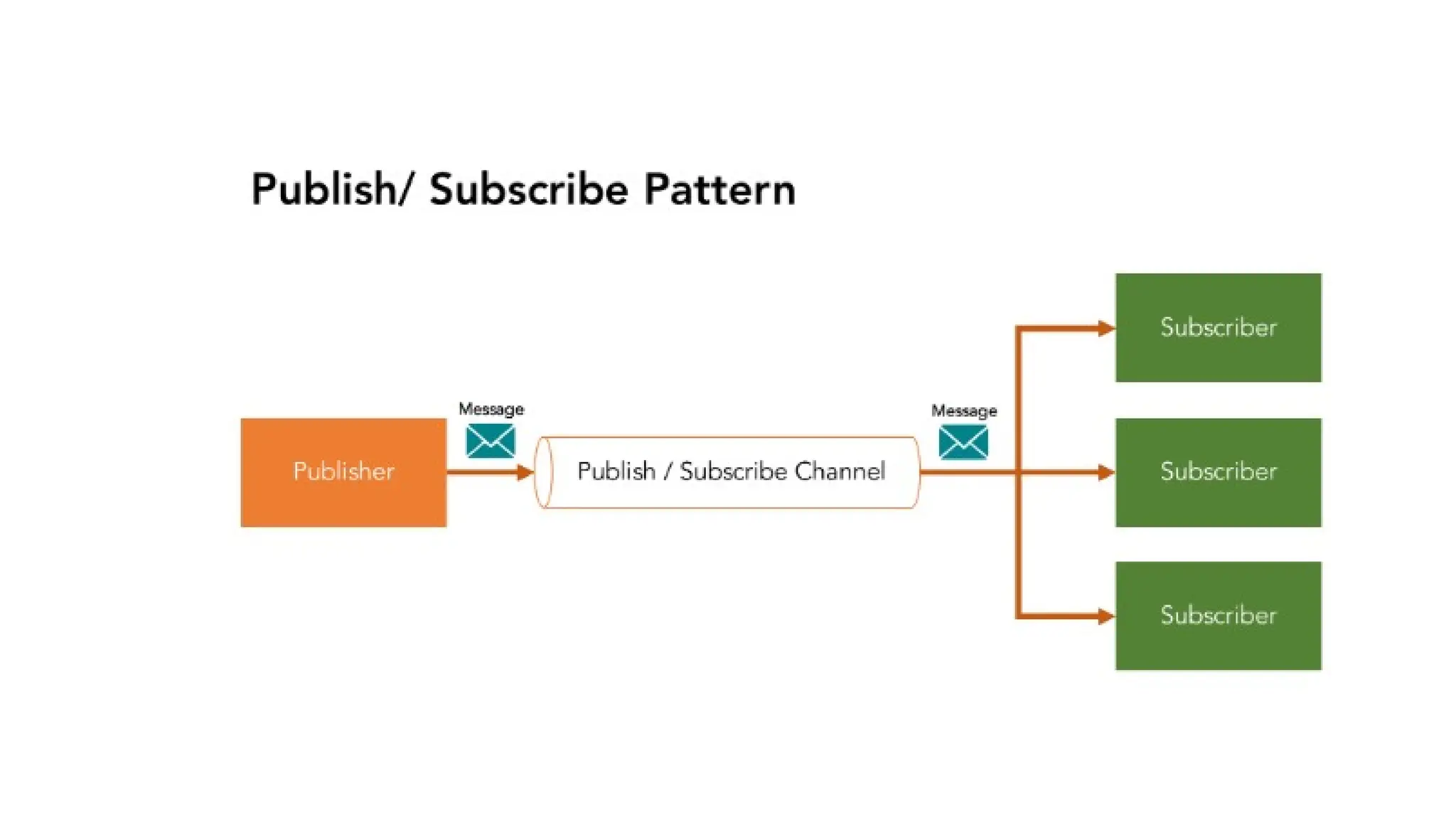
• These are three central components to understanding pub/sub
messaging pattern:
• Publisher: Publishes messages to the communication infrastructure
• Subscriber: Subscribes to a category of messages
• Communication infrastructure (channel, classes): Receives messages
from publishers and maintains subscribers’ subscriptions.
• The publisher will categorize published messages into classes where
subscribers will then receive the message.
• Basically, a publisher has one input channel that splits into multiple
output channels, one for each subscriber. Subscribers can express
interest in one or more classes and only receive messages that are of
interest.
• The thing that makes pub/sub interesting is that the publisher and
subscriber are unaware of each other. The publisher sends messages
to subscribers, without knowing if there are any actually there. And
the subscriber receives messages, without explicit knowledge of the
publishers out there. If there are no subscribers around to receive the
topic-based information, the message is dropped.
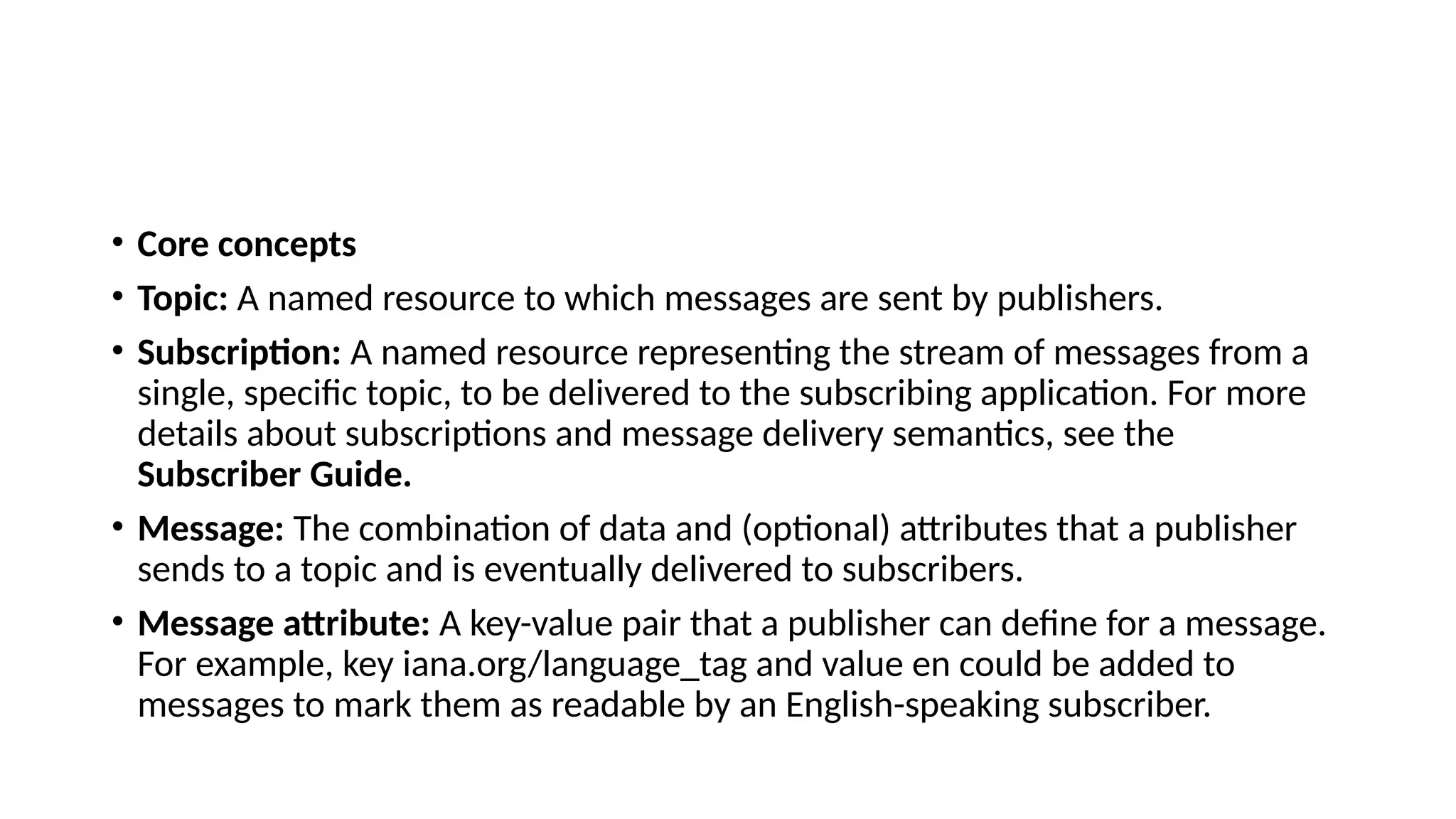
• Core concepts
• Topic: A named resource to which messages are sent by publishers.
• Subscription: A named resource representing the stream of messages from a
single, specific topic, to be delivered to the subscribing application. For more
details about subscriptions and message delivery semantics, see the
Subscriber Guide.
• Message: The combination of data and (optional) attributes that a publisher
sends to a topic and is eventually delivered to subscribers.
• Message attribute: A key-value pair that a publisher can define for a message.
For example, key iana.org/language_tag and value en could be added to
messages to mark them as readable by an English-speaking subscriber.
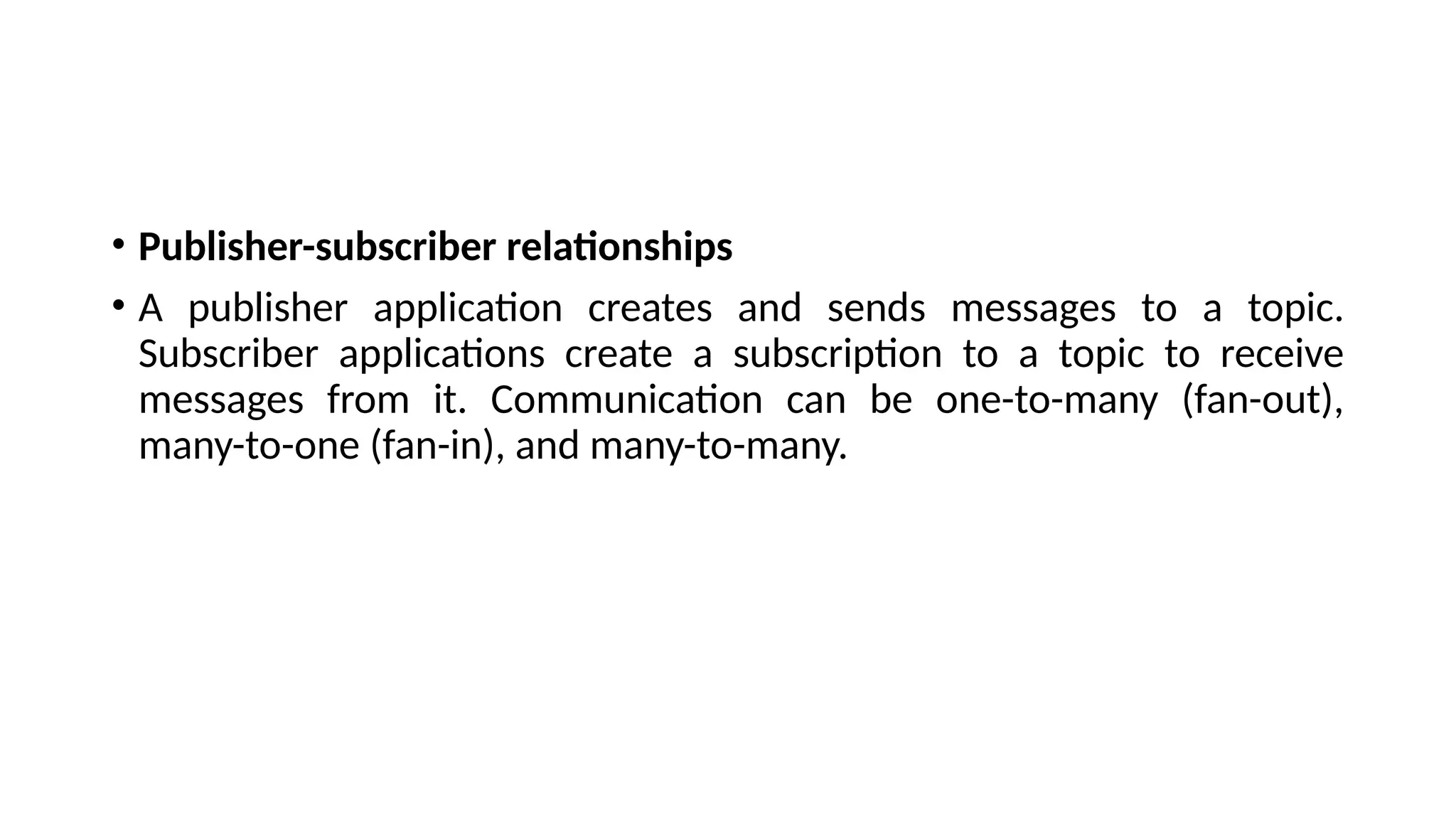
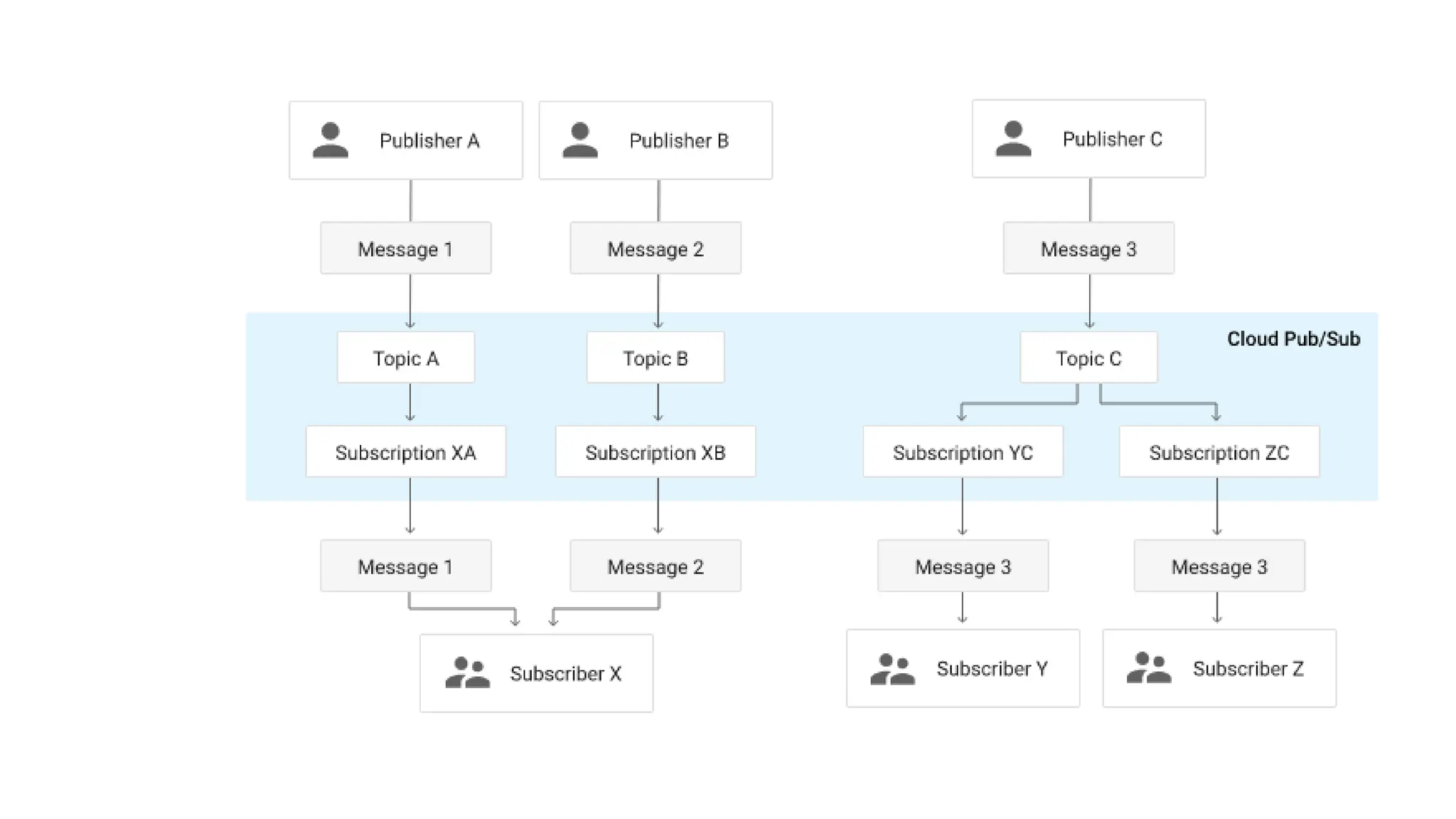
• Publisher-subscriber relationships
• A publisher application creates and sends messages to a topic.
Subscriber applications create a subscription to a topic to receive
messages from it. Communication can be one-to-many (fan-out),
many-to-one (fan-in), and many-to-many.
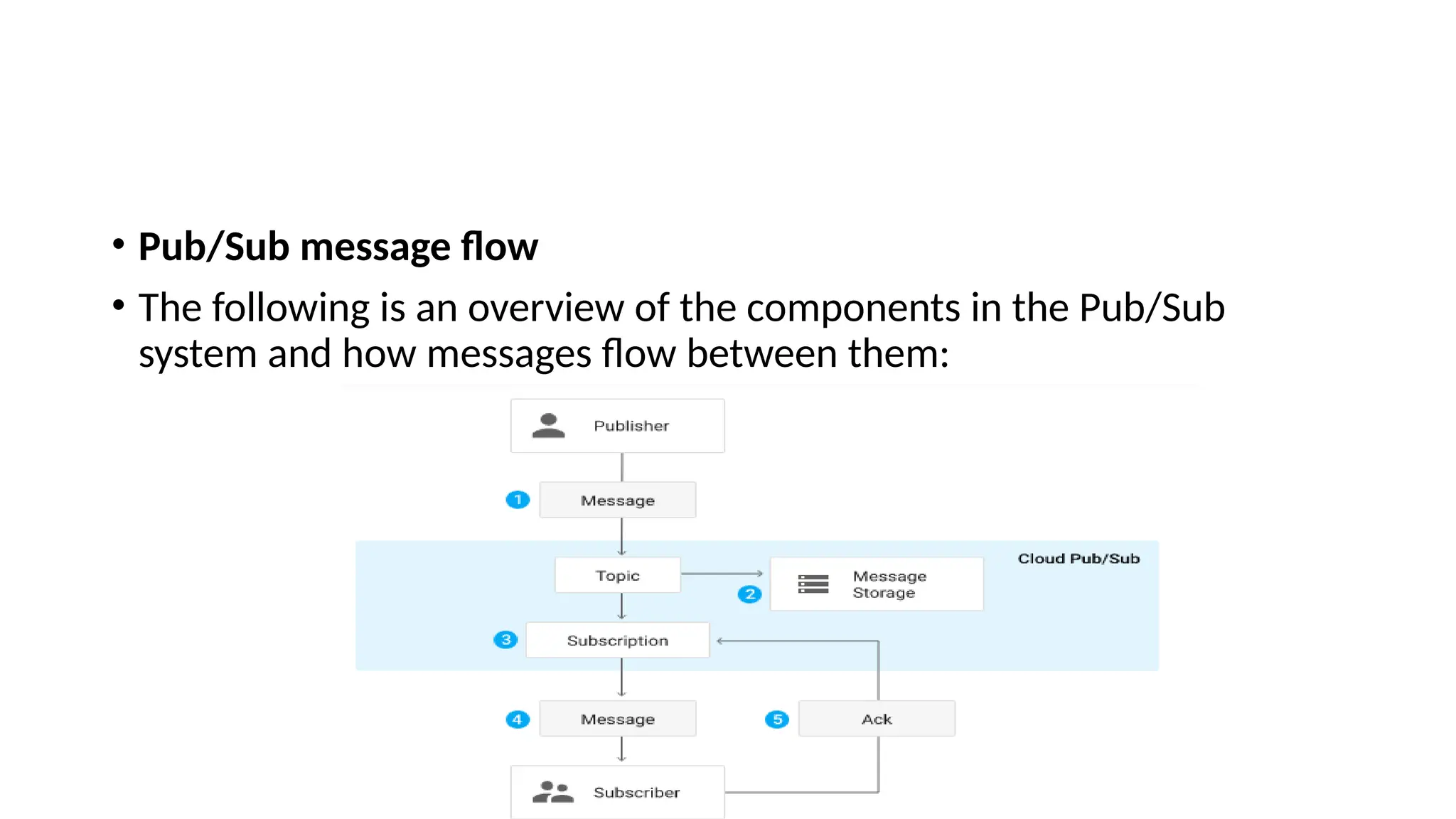
• Pub/Sub message flow
• The following is an overview of the components in the Pub/Sub
system and how messages flow between them:
• A subscriber receives messages either by Pub/Sub pushing them to
the subscriber's chosen endpoint, or by the subscriber pulling them
from the service.
• The subscriber sends an acknowledgement to the Pub/Sub service for
each received message.
• The service removes acknowledged messages from the subscription's
message queue.
• Common use cases
• Balancing workloads in network clusters. For example, a large queue
of tasks can be efficiently distributed among multiple workers, such as
Google Compute Engine instances.
• Implementing asynchronous workflows. For example, an order
processing application can place an order on a topic, from which it
can be processed by one or more workers.
• Distributing event notifications. For example, a service that accepts
user signups can send notifications whenever a new user registers,
and downstream services can subscribe to receive notifications of the
event.
• Refreshing distributed caches. For example, an application can
publish invalidation events to update the IDs of objects that have
changed.
• Logging to multiple systems. For example, a Google Compute Engine
instance can write logs to the monitoring system, to a database for
later querying, and so on.
• Data streaming from various processes or devices. For example, a
residential sensor can stream data to backend servers hosted in the
cloud.
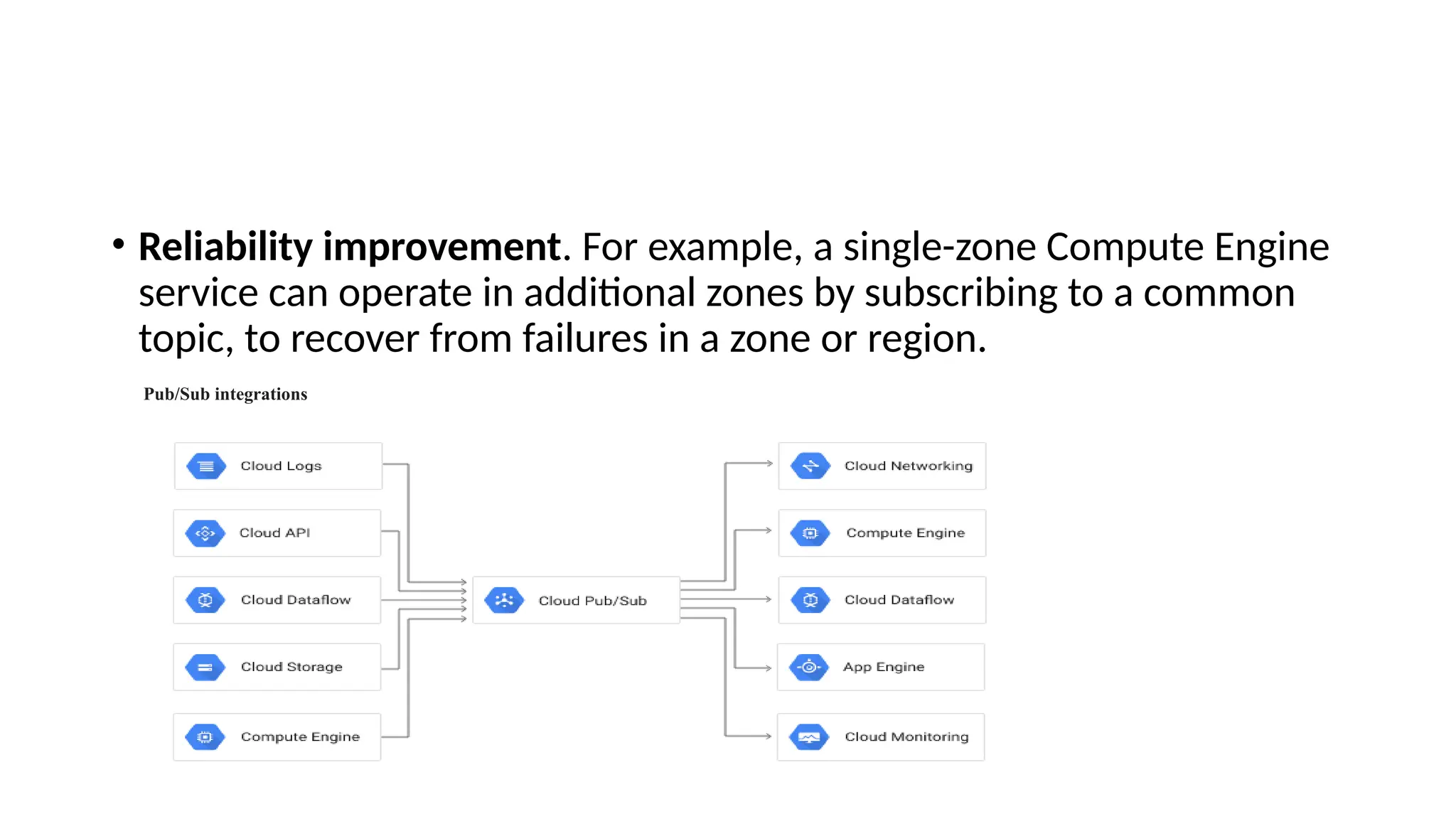
• Reliability improvement. For example, a single-zone Compute Engine
service can operate in additional zones by subscribing to a common
topic, to recover from failures in a zone or region.
Pub/Sub integrations
• Content-Based Pub-Sub Models
• In the publish–subscribe model, filtering is used to process the
selection of messages for reception and processing, with the two
most common being topic-based and content-based.
• In a topic-based system, messages are published to named channels
(topics). The publisher is the one who creates these channels.
Subscribers subscribe to those topics and will receive messages from
them whenever they appear.
• In a content-based system, messages are only delivered if they match
the constraints and criteria that are defined by the subscriber.
• BASICS OF VIRTUALIZATION
• The term 'Virtualization' can be used in many respect of computer.
• It is the process of creating a virtual environment of something which
may include hardware platforms, storage devices, OS, network
resources, etc. The cloud's virtualization mainly deals with the server
virtualization.
• Virtualization is the ability which allows sharing the physical instance
of a single application or resource among multiple organizations or
users.
• This technique is done by assigning a name logically to all those
physical resources & provides a pointer to those physical resources
based on demand.
• Over an existing operating system & hardware, we generally create a
virtual machine which and above it we run other operating systems or
applications.
• This is called Hardware Virtualization.
• The virtual machine provides a separate environment that is logically
distinct from its underlying hardware. Here, the system or the
machine is the host & virtual machine is the guest machine.
• There are several approaches or ways to virtualizes cloud servers.
• These are:
• OS - Level Virtualization: Here, multiple instances of an application
can run in an isolated form on a single OS
• Hypervisor-based Virtualization: which is currently the most
widely used technique With hypervisor's virtualization, there are
various sub-approaches to fulfill the goal to run multiple
applications & other loads on a single physical host.
• A technique is used to allow virtual machines to move from one
host to another without any requirement of shutting down. This
technique is termed as "Live Migration".
• Another technique is used to actively load balance among
multiple hosts to efficiently utilize those resources available in a
virtual machine, and the concept is termed as Distributed
Resource Scheduling or Dynamic Resource Scheduling.
• VIRTUALIZATION
• Virtualization is the process of creating a virtual environment on an
existing server to run your desired program, without interfering with
any of the other services provided by the server or host platform to
other users.
• The Virtual environment can be a single instance or a combination of
many such as operating systems, Network or Application servers,
computing environments, storage devices and other such
environments.
• Virtualization in Cloud Computing is making a virtual platform of
server operating system and storage devices.
• This will help the user by providing multiple machines at the same
time it also allows sharing a single physical instance of resource or an
application to multiple users.
• Cloud Virtualizations also manage the workload by transforming
traditional computing and make it more scalable, economical and
efficient.
TYPES OF VIRTUALIZATION
• Operating System Virtualization
• Hardware Virtualization
• Server Virtualization
• Storage Virtualization
Benefits for Companies
• Removal of special hardware and utility requirements
• Effective management of resources
• Increased employee productivity as a result of better accessibility
• Reduced risk of data loss, as data is backed up across multiple storage
locations
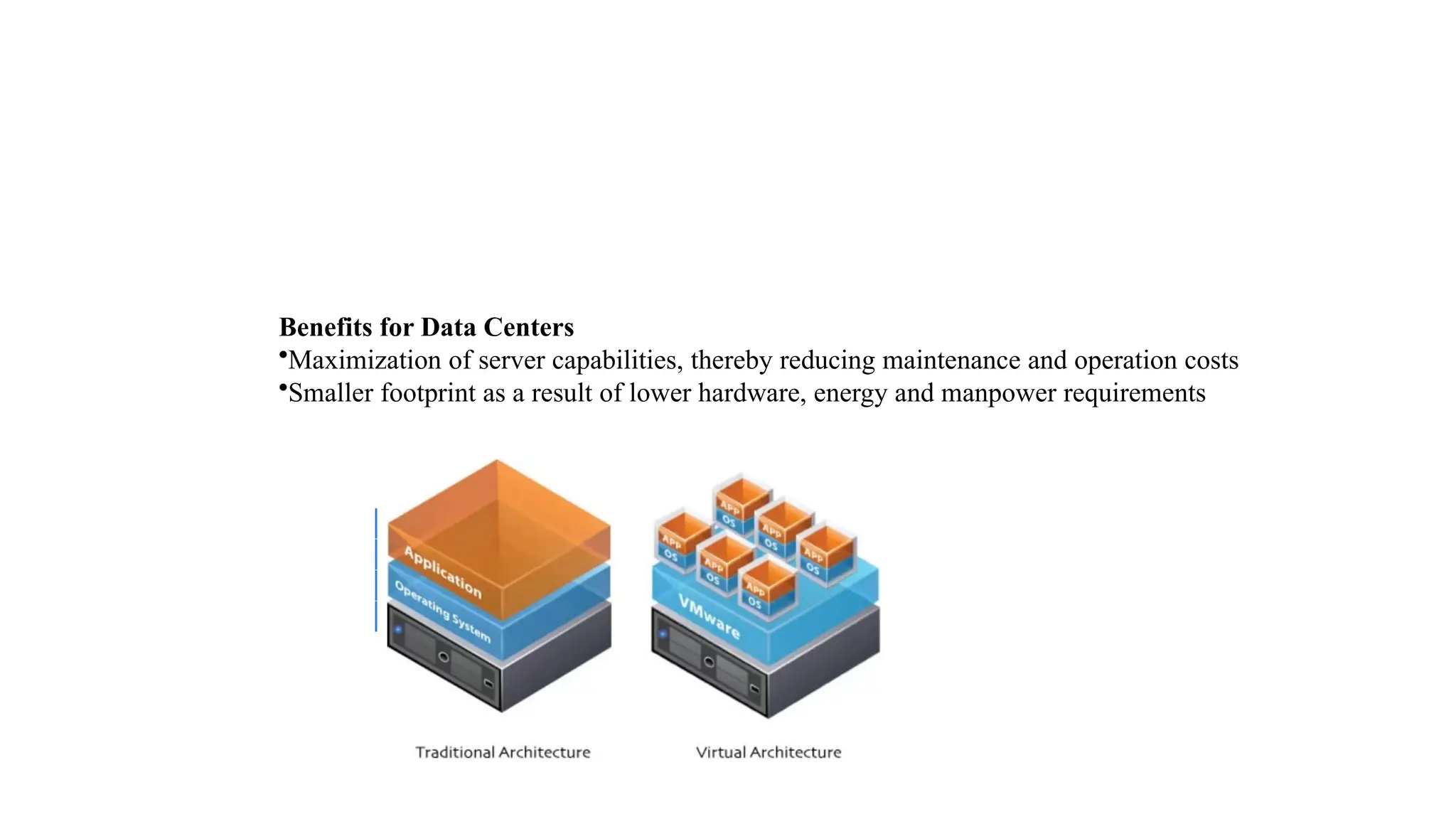
Benefits for Data Centers
•Maximization of server capabilities, thereby reducing maintenance and operation costs
•Smaller footprint as a result of lower hardware, energy and manpower requirements
• Access to the virtual machine and the host machine or server is
facilitated by a software known as Hypervisor.
• Hypervisor acts as a link between the hardware and the virtual
environment and distributes the hardware resources such as CPU
usage, memory allotment between the different virtual environments.
• Hardware Virtualization
• Hardware virtualization also known as hardware-assisted
virtualization or server virtualization runs on the concept that an
individual independent segment of hardware or a physical server,
may be made up of multiple smaller hardware segments or
servers, essentially consolidating multiple physical servers into
virtual servers that run on a single primary physical server.
• Each small server can host a virtual machine, but the entire cluster of
servers is treated as a single device by any process requesting the
hardware.
• The hardware resource allotment is done by the hypervisor.
• The main advantages include increased processing power as a result
of maximized hardware utilization and application uptime.
• Subtypes:
• Full Virtualization
• Emulation Virtualization
• Para virtualization
• Software Virtualization
• Software Virtualization involves the creation of an operation of
multiple virtual environments on the host machine.
• It creates a computer system complete with hardware that lets the
guest operating system to run.
• For example, it lets you run Android OS on a host machine natively
using a Microsoft Windows OS, utilizing the same hardware as the
host machine does.
• Application Virtualization – hosting individual applications in a virtual
environment separate from the native OS.
• Service Virtualization – hosting specific processes and services
related to a particular application.
• Server Virtualization
• In server virtualization in Cloud Computing, the software directly
installs on the server system and use for a single physical server can
divide into many servers on the demand basis and balance the load.
• It can be also stated that the server virtualization is masking of the
server resources which consists of number and identity.
• With the help of software, the server administrator divides one
physical server into multiple servers.
• Memory Virtualization
• Physical memory across different servers is aggregated into a single
virtualized memory pool.
• It provides the benefit of an enlarged contiguous working memory.
• You may already be familiar with this, as some OS such as Microsoft
Windows OS allows a portion of your storage disk to serve as an
extension of your RAM.
• Subtypes:
• Application-level control – Applications access the memory pool
directly
• Operating system level control – Access to the memory pool is
provided through an operating system
• Storage Virtualization
• Multiple physical storage devices are grouped together,
which then appear as a single storage device.
• This provides various advantages such as homogenization of
storage across storage devices of multiple capacity and
speeds, reduced downtime, load balancing and better
optimization of performance and speed.
• Partitioning your hard drive into multiple partitions is an
example of this virtualization.
• Subtypes:
• Block Virtualization – Multiple storage devices are consolidated into
one
• File Virtualization – Storage system grants access to files that are
stored over multiple hosts
• Data Virtualization
• It lets you easily manipulate data, as the data is presented as an
abstract layer completely independent of data structure and database
systems.
• Decreases data input and formatting errors.
• Network Virtualization
• In network virtualization, multiple sub-networks can be created on
the same physical network, which may or may not be authorized to
communicate with each other.
• This enables restriction of file movement across networks and
enhances security, and allows better monitoring and identification of
data usage which lets the network administrator’s scale up the
network appropriately.
• It also increases reliability as a disruption in one network doesn’t
affect other networks, and the diagnosis is easier.
• Internal network: Enables a single system to function like a network
• External network: Consolidation of multiple networks into a single
one, or segregation of a single network into multiple ones.
• Desktop Virtualization
• This is perhaps the most common form of virtualization for any
regular IT employee. The user’s desktop is stored on a remote server,
allowing the user to access his desktop from any device or location.
Employees can work conveniently from the comfort of their home.
Since the data transfer takes place over secure protocols, any risk of
data theft is minimized.
• Benefits of Virtualization
• i. Security
• During the process of virtualization security is one of the important
concerns.
• The security can be provided with the help of firewalls, which will help
to prevent unauthorized access and will keep the data confidential.
• Moreover, with the help of firewall and security, the data can protect
from harmful viruses malware and other cyber threats. Encryption
process also takes place with protocols which will protect the data
from other threads.
• So, the customer can virtualize all the data store and can create a
backup on a server in which the data can store.
• ii. Flexible operations
• With the help of a virtual network, the work of it professional is
becoming more efficient and agile.
• The network switch implement today is very easy to use, flexible and
saves time.
• With the help of virtualization in Cloud Computing, technical
problems can solve in physical systems.
• It eliminates the problem of recovering the data from crashed or
corrupted devices and hence saves time.
• iii. Economical
• Virtualization in Cloud Computing, save the cost for a physical system
such as hardware and servers.
• It stores all the data in the virtual server, which are quite economical.
It reduces the wastage, decreases the electricity bills along with the
maintenance cost.
• Due to this, the business can run multiple operating system and apps
in a particular server.
• iv. Eliminates the risk of system failure
• While performing some task there are chances that the system
might crash down at the wrong time.
• This failure can cause damage to the company but the
virtualizations help you to perform the same task in multiple
devices at the same time.
• The data can store in the cloud it can retrieve anytime and with
the help of any device.
• Moreover, there is two working server side by side which makes
the data accessible every time. Even if a server crashes with the
help of the second server the customer can access the data.
• v. Flexible transfer of data
• The data can transfer to the virtual server and retrieve
anytime. The customers or cloud provider don’t have to
waste time finding out hard drives to find data.
• With the help of virtualization, it will very easy to locate the
required data and transfer them to the allotted authorities.
• This transfer of data has no limit and can transfer to a long
distance with the minimum charge possible. Additional
storage can also provide and the cost will be as low as
possible.
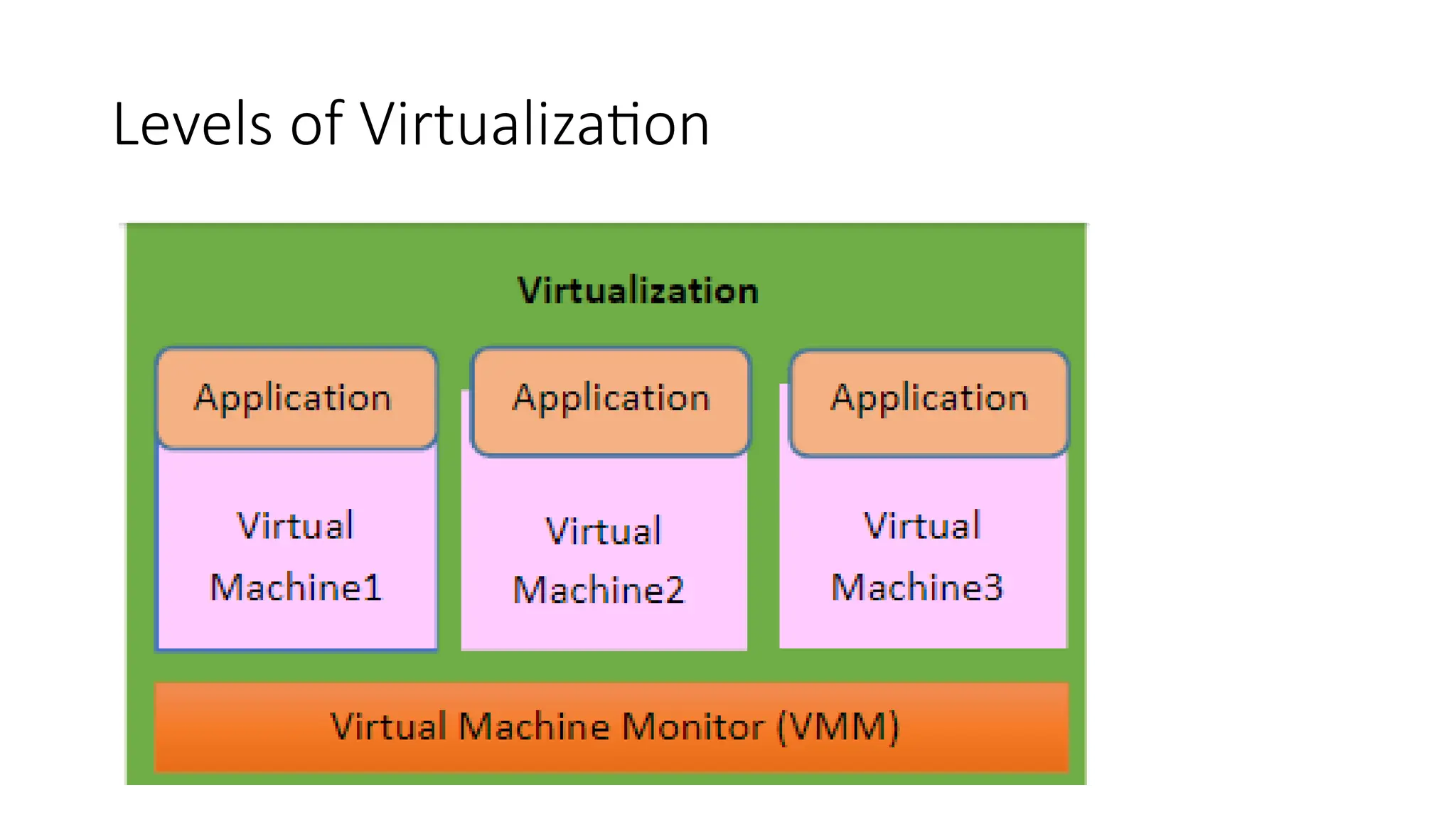
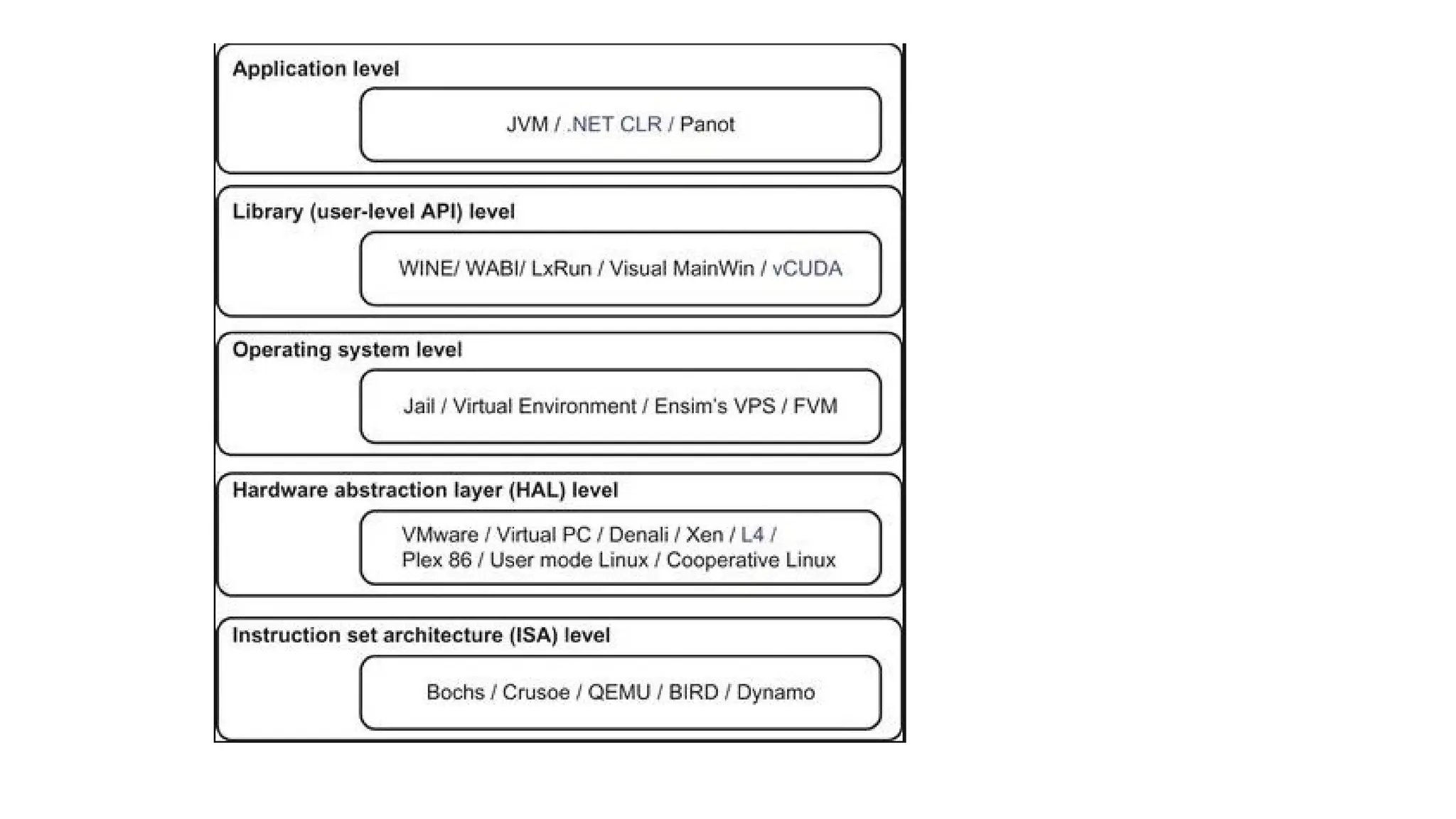
Levels of Virtualization
• Virtualization at ISA (instruction set architecture) level
• Virtualization is implemented at ISA (Instruction Set Architecture)
level by transforming physical architecture of system’s instruction set
into software completely.
• The host machine is a physical platform containing various
components, such as process, memory, Input/output (I/O) devices,
and buses.
• The VMM installs the guest systems on this machine. The emulator
gets the instructions from the guest systems to process and execute.
• The emulator transforms those instructions into native instruction set,
which are run on host machine’s hardware. The instructions include
both the I/O-specific ones and the processor-oriented instructions.
For an
• emulator to be efficacious, it has to imitate all tasks that a real
computer could perform.
• Advantages:
• It is a simple and strong method of conversion into virtual architecture. On
a single physical structure, this architecture makes simple to implement
multiple systems on single physical structure. The instructions given by the
guest system is translated into instructions of the host system .
• This architecture makes the host system to adjust to the changes in
architecture of the guest system.
• The binding between the guest system and the host is not rigid, but
making it very flexible. The infrastructure of this kind could be used for
creating virtual machines on platform, for example: X86 on any platform
such as Sparc, X86, Alpha, etc.
• Disadvantage: The instructions should be interpreted before being
executed. And therefore the system with ISA level of virtualization shows
poor performance.
• Virtualization at HAL (hardware abstraction layer) level
• The virtualization at the HAL (Hardware Abstraction Layer) is the most
common technique, which is used in computers on x86 platforms that
increases the efficiency of virtual machine to handle various tasks.
• This architecture becomes economical and relatively for practical use.
In case, if emulator communication is required to the critical
processes, the simulator undertakes the tasks and it performs the
appropriate multiplexing.
• The working of virtualization technique wants catching the execution
of privileged instructions by virtual machine, which passes these
instructions to VMM to be handled properly.
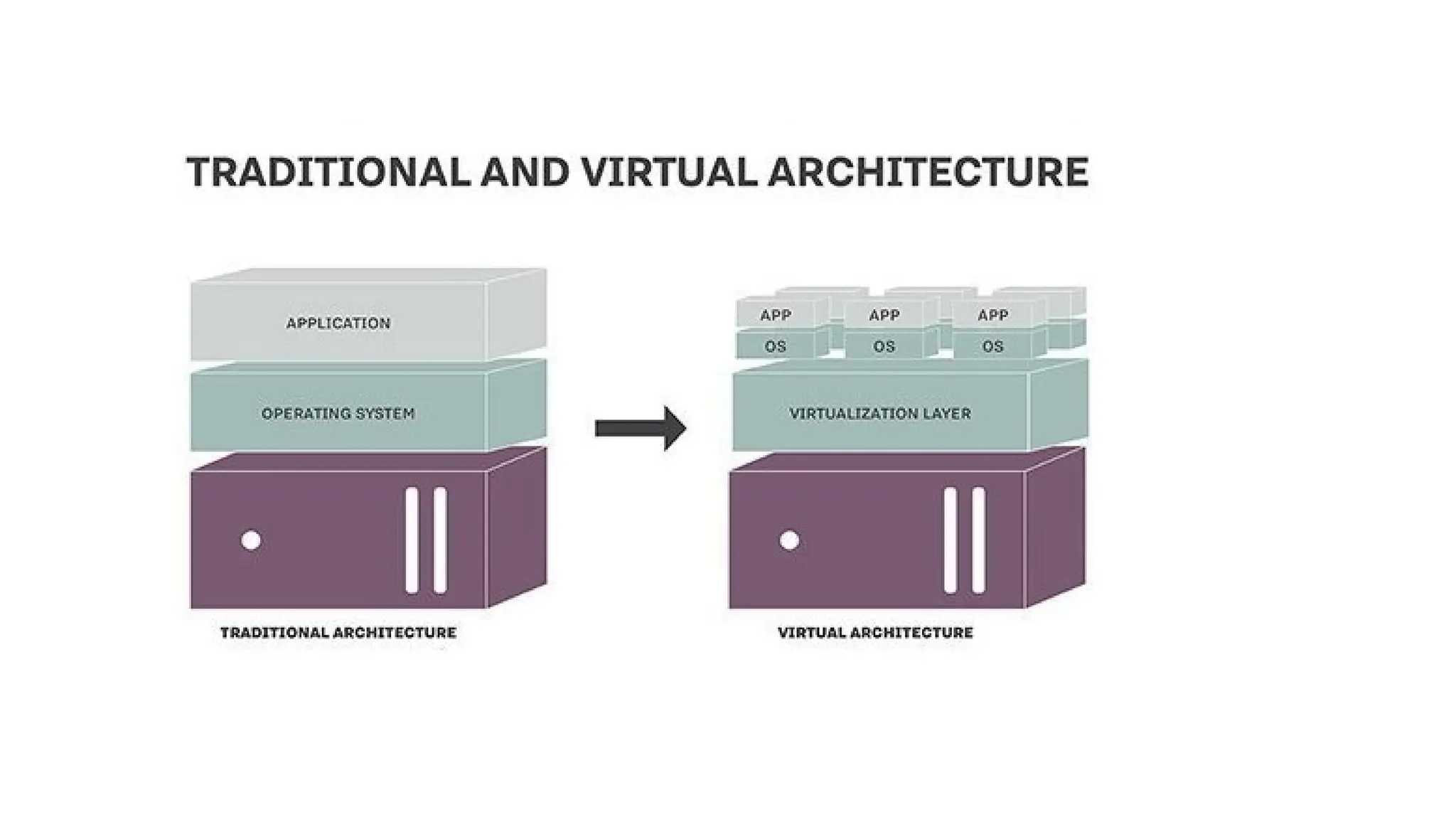
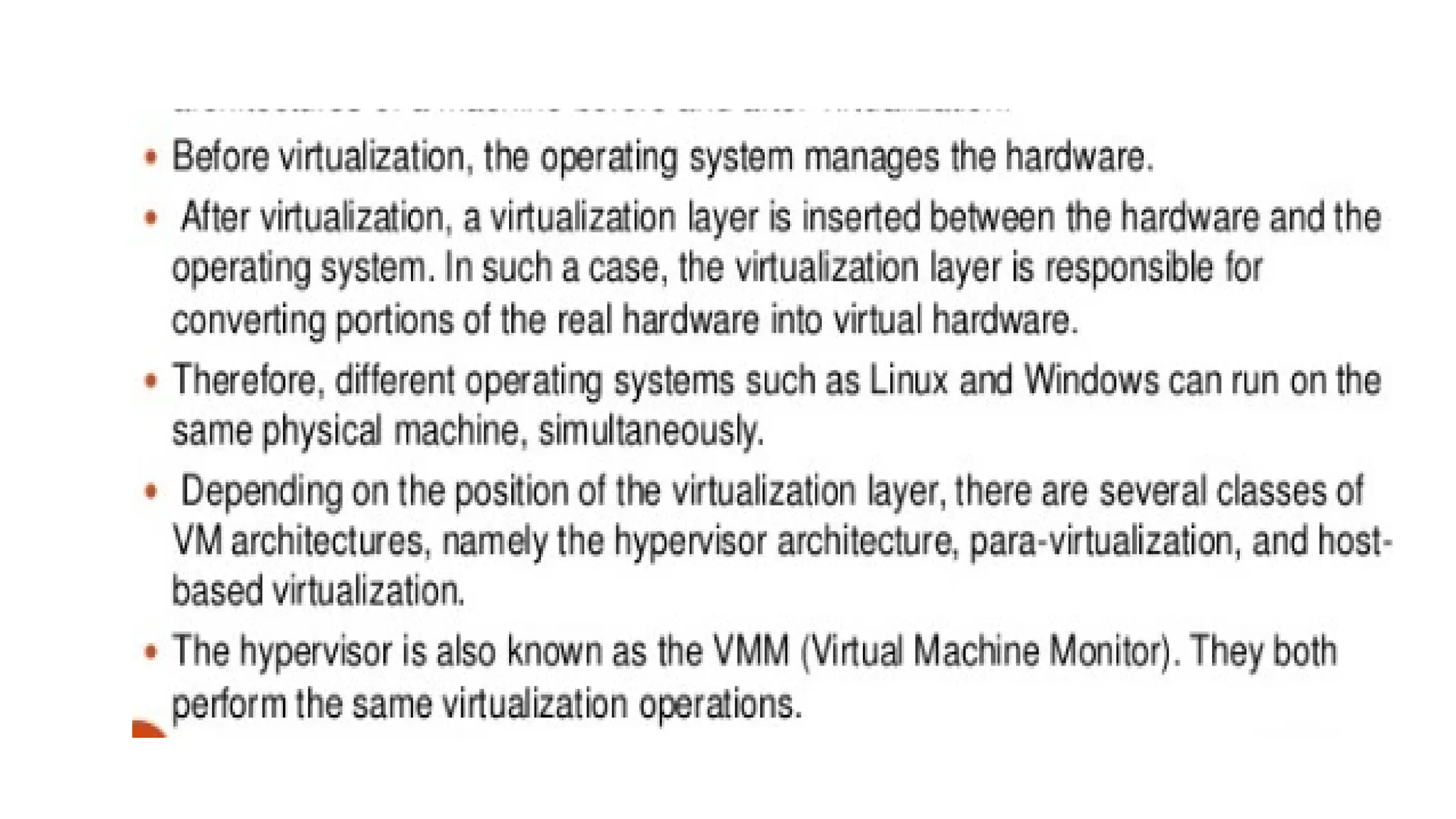
• VIRTUALIZATION STRUCTURES
• A virtualization architecture is a conceptual model specifying the
arrangement and interrelationships of the particular components
involved in delivering a virtual -- rather than physical -- version of
something, such as an operating system (OS), a server, a storage
device or network resources.
• Virtualization is commonly hypervisor-based. The hypervisor isolates
operating systems and applications from the underlying computer
hardware so the host machine can run multiple virtual machines (VM)
as guests that share the system's physical compute resources, such as
processor cycles, memory space, network bandwidth and so on.
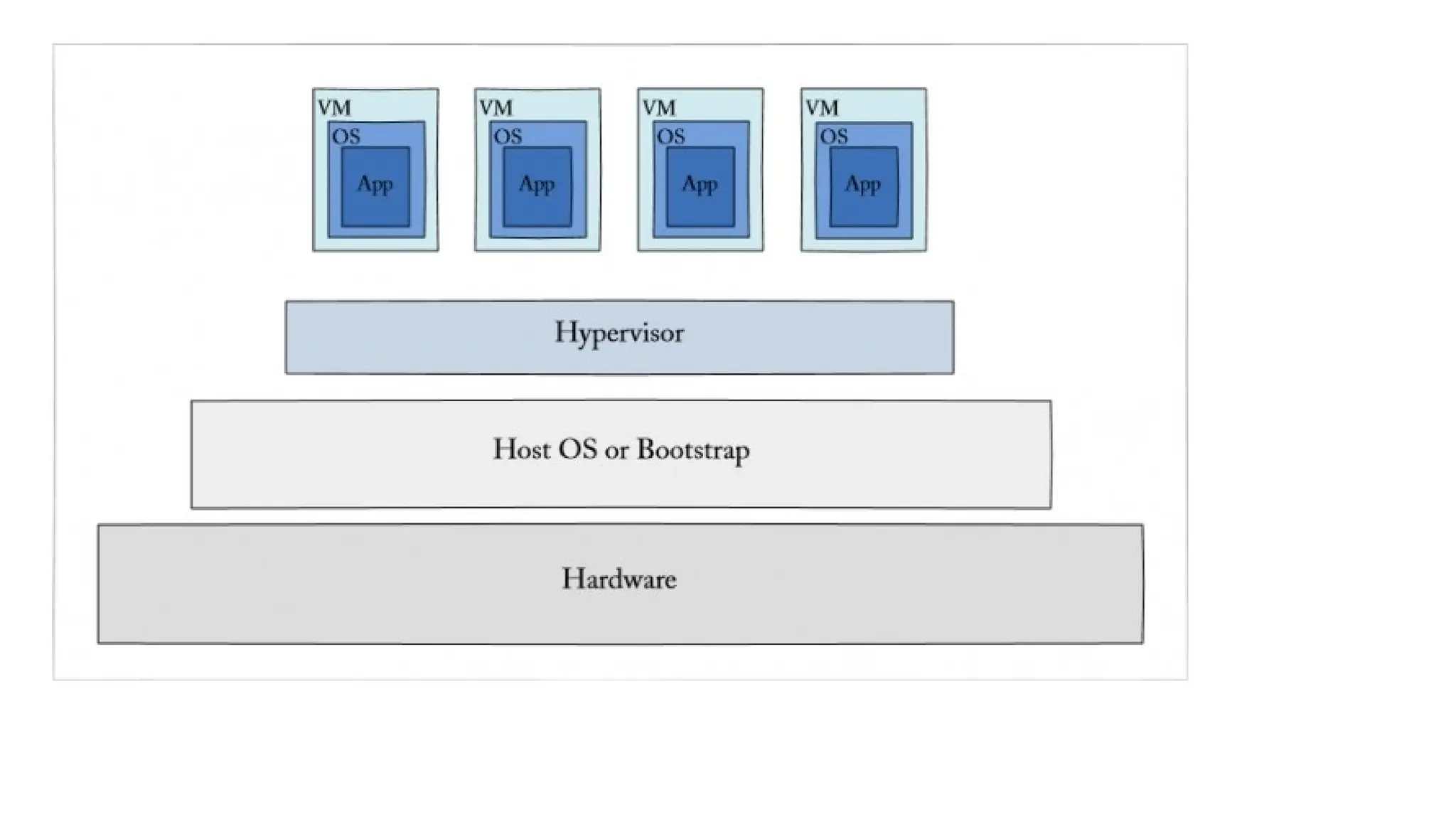
• Type 1 hypervisors, sometimes called bare-metal hypervisors, run
directly on top of the host system hardware. Bare-metal hypervisors
offer high availability and resource management. Their direct access to
system hardware enables better performance, scalability and stability.
Examples of type 1 hypervisors include Microsoft Hyper-V, Citrix
XenServer and VMware ESXi.
• A type 2 hypervisor, also known as a hosted hypervisor, is installed on
top of the host operating system, rather than sitting directly on top of
the hardware as the type 1 hypervisor does.
• Each guest OS or VM runs above the hypervisor.
• The convenience of a known host OS can ease system configuration
and management tasks.
• However, the addition of a host OS layer can potentially limit
performance and expose possible OS security flaws.
Examples of type 2 hypervisors include VMware Workstation, Virtual PC
and Oracle VM VirtualBox.
• The main alternative to hypervisor-based virtualization is
containerization.
• Operating system virtualization, for example, is a container-based
kernel virtualization method.
• OS virtualization is similar to partitioning.
• In this architecture, an operating system is adapted so it functions as
multiple, discrete systems, making it possible to deploy and run
distributed applications without launching an entire VM for each one.
• Instead, multiple isolated systems, called containers, are run on a
single control host and all access a single kernel.
• Lightweight Service Virtualization Tools
• Free or open-source tools are great tools to start with because they
help you get started in a very ad hoc way, so you can quickly learn the
benefits of service virtualization.
• Some examples of lightweight tools include Traffic Parrot, Mockito, or
the free version of Parasoft Virtualize.
• These solutions are usually sought out by individual development
teams to “try out” service virtualization, brought in for a very specific
project or reason.
• Key Capabilities of Service Virtualization
• Ease-Of-Use and Core Capabilities:
• Ability to use the tool without writing scripts
• Ability to rapidly create virtual services before the real service is available
• Intelligent response
• Data-driven responses
• Ability to re-use services
• Support for authentication and security
• Support for clustering/scaling
• Capabilities for optimized workflows:
• Record and playback
• Test data management / generation
• Data re-use
• Message routing
• Stateful behavior emulation
• Automation Capabilities:
• Build system plugins
• Command-line execution
• Open APIs for DevOps integration
• Cloud support (EC2, Azure)
• Management and Maintenance Support:
• Governance
• Environment management
• Monitoring
• A process for managing change
• On-premise and browser-based access
• Supported TecInologies:
• REST API virtualization
• SOAP API virtualization
• IoT and microservice virtualization
• Database virtualization
• Webpage virtualization
• File transfer virtualization
• Mainframe and fixed-length
CPU VIRTUALIZATION
• CPU virtualization involves a single CPU acting as if it were multiple
separate CPUs.
• The most common reason for doing this is to run multiple different
operating systems on one machine.
• CPU virtualization emphasizes performance and runs directly on the
available CPUs whenever possible.
• The underlying physical resources are used whenever possible.
• The virtualization layer runs instructions only as needed to make
virtual machines operate as if they were running directly on a physical
machine.
• When many virtual machines are running, those virtual machines
might compete for CPU resources.
• When CPU contention occurs, the host time-slices the physical
processors across all virtual machines so each virtual machine runs as
if it has its specified number of virtual processors
• To support virtualization, processors employ a special running mode
and instructions, known as hardware-assisted virtualization.
• In this way, the VMM and guest OS run in different modes and all
sensitive instructions of the guest OS and its applications are trapped
in the VMM.
• To save processor states, mode switching is completed by hardware.
For the x86 architecture, Intel and AMD have proprietary technologies
for hardware-assisted virtualization.
• HARDWARE SUPPORT FOR VIRTUALIZATION
• Modern operating systems and processors permit multiple processes
to run simultaneously.
• If there is no protection mechanism in a processor, all instructions
from different processes will access the hardware directly and cause a
system crash.
• Therefore, all processors have at least two modes, user mode and
supervisor mode, to ensure controlled access of critical hardware.
• Instructions running in supervisor mode are called privileged
instructions.
• Other instructions are unprivileged instructions.
• In a virtualized environment, it is more difficult to make OSes and
applications run correctly because there are more layers in the
machine stack.
• At the time of this writing, many hardware virtualization products were
available.
• The VMware Workstation is a VM software suite for x86 and x86-64
computers.
• This software suite allows users to set up multiple x86 and x86-64 virtual
computers and to use one or more of these VMs simultaneously with the
host operating system.
• The VMware Workstation assumes the host-based virtualization. Xen is a
hypervisor for use in IA-32, x86-64, Itanium, and PowerPC 970 hosts.
Actually, Xen modifies Linux as the lowest and most privileged layer, or a
hypervisor.
• One or more guest OS can run on top of the hypervisor. KVM (Kernel-
based Virtual Machine) is a Linux kernel virtualization infrastructure.
• KVM can support hardware-assisted virtualization and
paravirtualization by using the Intel VT-x or AMD-v and VirtIO
framework, respectively.
• HARDWARE-ASSISTED CPU VIRTUALIZATION
• This technique attempts to simplify virtualization because full
or paravirtualization is complicated.
• Intel and AMD add an additional mode called privilege mode
level (some people call it Ring-1) to x86 processors.
• Therefore, operating systems can still run at Ring 0 and the
hypervisor can run at Ring -1.
• All the privileged and sensitive instructions are trapped in the
hypervisor automatically.
• This technique removes the difficulty of implementing binary
translation of full virtualization.
• It also lets the operating system run in VMs without modification.
• MEMORY VIRTUALIZATION
• Virtual memory virtualization is similar to the virtual memory support
provided by modern operating systems.
• In a traditional execution environment, the operating system
maintains mappings of virtual memory to machine memory using
page tables, which is a one-stage mapping from virtual memory to
machine memory.
• All modern x86 CPUs include a memory management unit (MMU) and
a translation lookaside buffer (TLB) to optimize virtual memory
performance.
• However, in a virtual execution environment, virtual memory
virtualization involves sharing the physical system memory in RAM
and dynamically allocating it to the physical memory of the VMs.
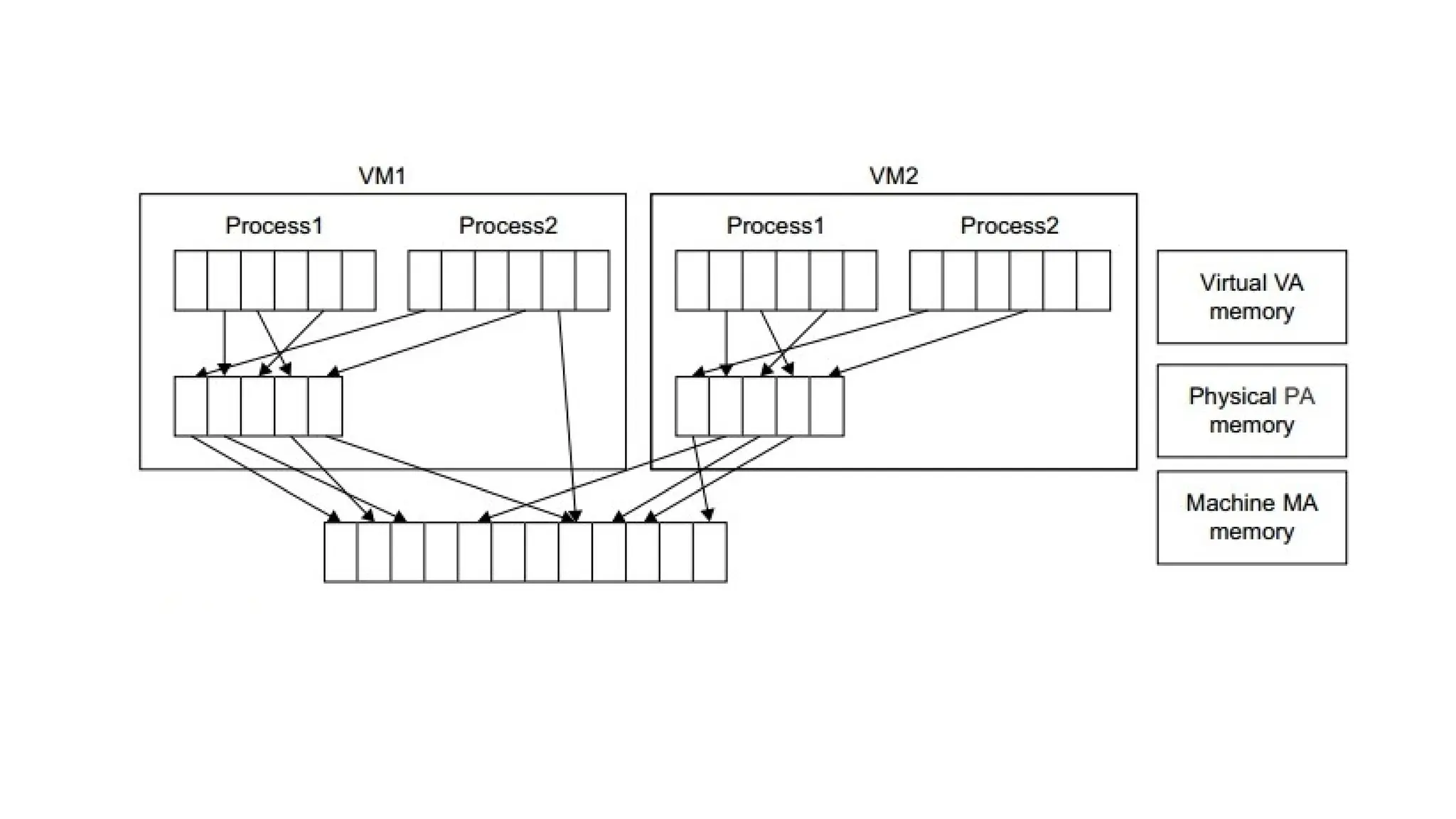
• Two-stage mapping process should be maintained by the guest OS
and the VMM, respectively: virtual memory to physical memory and
physical memory to machine memory.
• Furthermore, MMU virtualization should be supported, which is
transparent to the guest OS.
• The guest OS continues to control the mapping of virtual addresses to
the physical memory addresses of VMs.
• But the guest OS cannot directly access the actual machine memory.
The VMM is responsible for mapping the guest physical memory to
the actual machine memory.
• Figure shows the two-level memory mapping procedure Since each
page table of the guest OSes has a separate page table in the VMM
corresponding to it, the VMM page table is called the shadow page
table.
• Nested page tables add another layer of indirection to virtual
memory.
• The MMU already handles virtual-to-physical translations as defined
by the OS.
• Then the physical memory addresses are translated to machine
addresses using another set of page tables defined by the hypervisor.
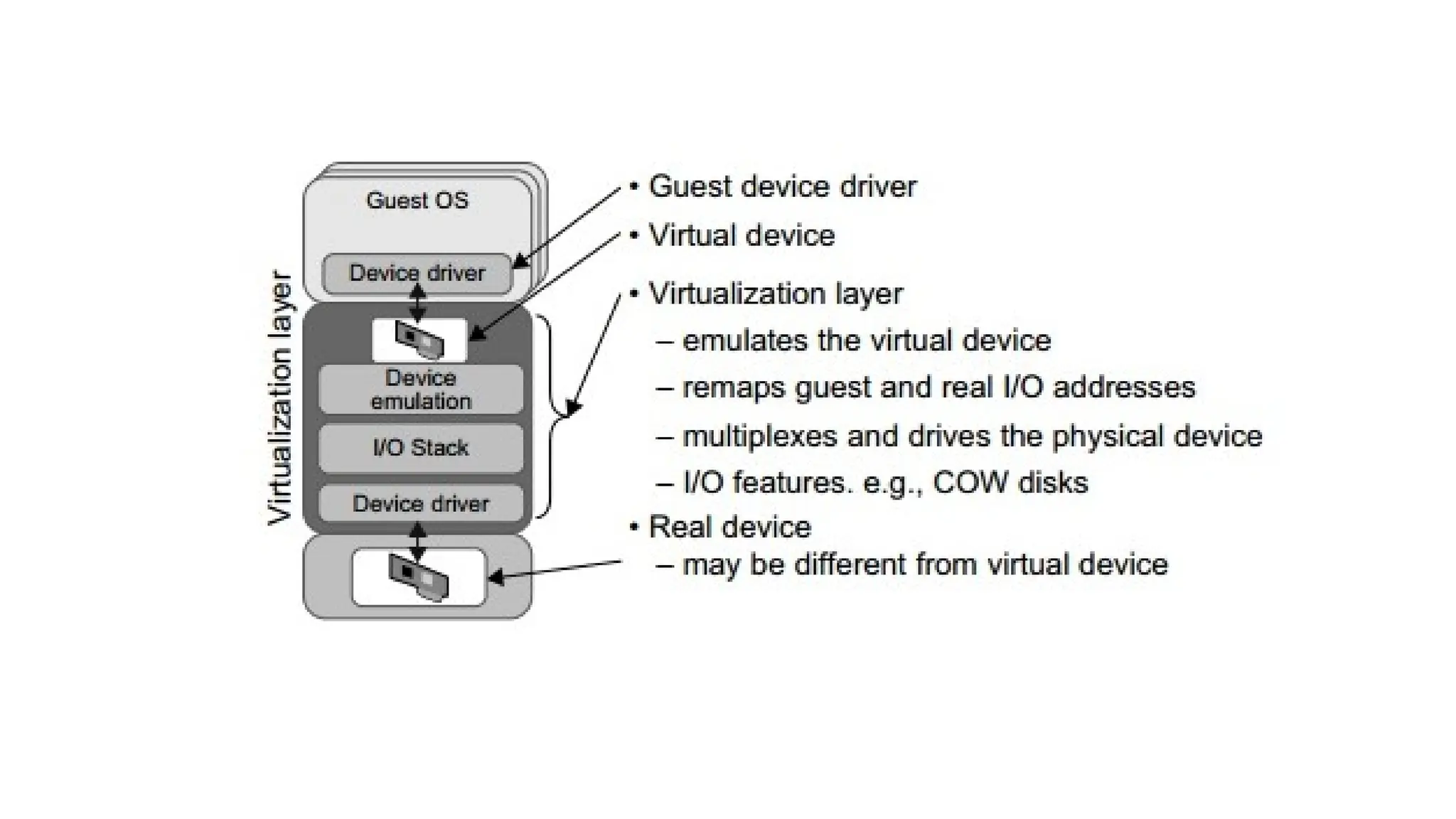
• I/O VIRTUALIZATION
• I/O virtualization involves managing the routing of I/O requests
between virtual devices and the shared physical hardware. At the
time of this writing, there are three ways to implement I/O
virtualization: full device emulation, para-virtualization, and direct I/O.
• All the functions of a device or bus infrastructure, such as device
enumeration, identification, interrupts, and DMA, are replicated in
software.
• This software is located in the VMM and acts as a virtual device. The
I/O access requests of the guest OS are trapped in the VMM which
interacts with the I/O devices.
• A single hardware device can be shared by multiple VMs that run
concurrently.
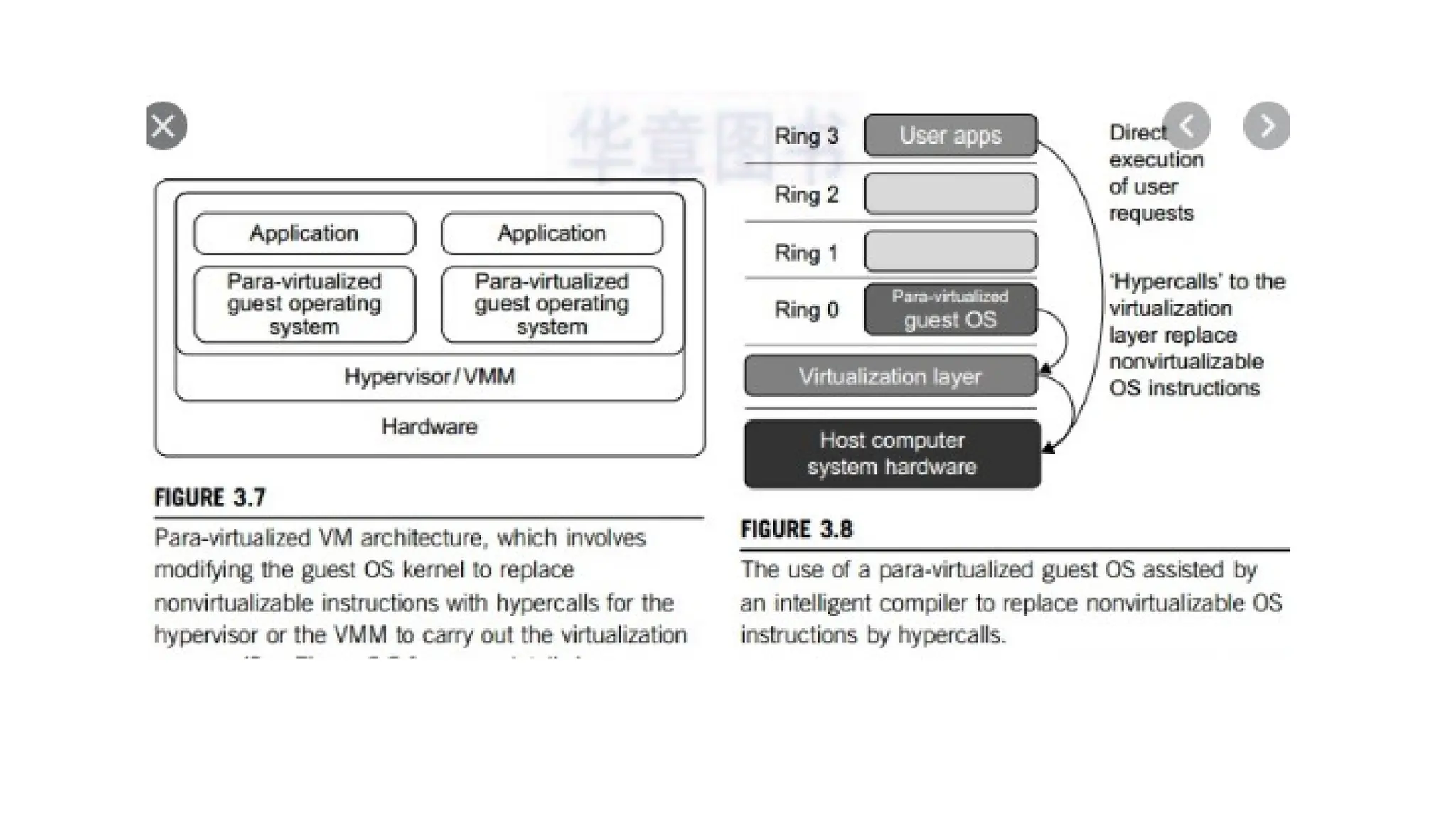
• The para-virtualization method of I/O virtualization is typically used in
Xen. It is also known as the split driver model consisting of a frontend
driver and a backend driver.
• VIRTUALIZATION IN MULTI-CORE PROCESSORS
• Virtualizing a multi-core processor is relatively more complicated than
virtualizing a uni-core processor.
• Though multicore processors are claimed to have higher performance
by integrating multiple processor cores in a single chip, muti-core
virtualiuzation has raised some new challenges to computer
architects, compiler constructors, system designers, and application
programmers.
• There are mainly two difficulties: Application programs must be
parallelized to use all cores fully, and software must explicitly assign
tasks to the cores, which is a very complex problem.
• Concerning the first challenge, new programming models, languages,
and libraries are needed to make parallel programming easier.
• The second challenge has spawned research involving scheduling
algorithms and resource management policies.
• A new challenge called dynamic heterogeneity is emerging to mix the
fat CPU core and thin GPU cores on the same chip, which further
complicates the multi-core or many-core resource management.
• VIRTUALIZATION SUPPORT AND DISASTER RECOVERY.
• Virtualization provides flexibility in disaster recovery. When
servers are virtualized, they are containerized into VMs,
independent from the underlying hardware.
• Therefore, an organization does not need the same physical
servers at the primary site as at its secondary disaster
recovery site.
• Other benefits of virtual disaster recovery include ease,
efficiency and speed. Virtualized platforms typically provide
high availability in the event of a failure.
• Virtualization helps meet recovery time objectives (RTOs) and
recovery point objectives (RPOs), as replication is done as frequently
as needed, especially for critical systems.
• In addition, consolidating physical servers with virtualization saves
money because the virtualized workloads require less power, floor
space and maintenance.
• However, replication can get expensive, depending on how frequently
it's done.
• Adding VMs is an easy task, so organizations need to watch out for
VM sprawl.
• VMs operating without the knowledge of DR staff may fall through
the cracks when it comes time for recovery.
• Sprawl is particularly dangerous at larger companies where
communication may not be as strong as at a smaller organization with
fewer employees.
• All organizations should have strict protocols for deploying virtual
machines.
• Virtual disaster recovery planning and testing
• Virtual infrastructures can be complex. In a recovery situation, that complexity can
be an issue, so it's important to have a comprehensive DR plan.
• A virtual disaster recovery plan has many similarities to a traditional DR plan. An
organization should:
• Decide which systems and data are the most critical for recovery, and document
them.
• Get management support for the DR plan
• Complete a risk assessment and business impact analysis to outline possible risks
and their potential impacts.
• Document steps needed for recovery.
• Define RTOs and RPOs.
• Test the plan.
• As with a traditional DR s
• Virtual disaster recovery vs. physical disaster recovery
• Virtual disaster recovery, though simpler than traditional DR, should
retain the same standard goals of meeting RTOs and RPOs, and
ensuring a business can continue to function in the event of an
unplanned incident.
• The traditional disaster recovery process of duplicating a data center
in another location is often expensive, complicated and time-
consuming.
• While a physical disaster recovery process typically involves multiple
steps, virtual disaster recovery can be as simple as a click of a button
for failover.
• Rebuilding systems in the virtual world is not necessary because they
already exist in another location, thanks to replication. However, it's
important to monitor backup systems. It's easy to "set it and forget it"
in the virtual world, which is not advised and is not as much of a
problem with physical systems.
• Like with physical disaster recovery, the virtual disaster recovery plan
should be tested. Virtual disaster recovery, however, provides testing
capabilities not available in a physical setup. It is easier to do a DR test
in the virtual world without affecting production systems, as
virtualization enables an organization to bring up servers in an
isolated network for testing. In addition, deleting and recreating DR
servers is much simpler than in the physical world.
• Virtual disaster recovery is possible with physical servers through
physical-to-virtual backup. This process creates virtual backups of
physical systems for recovery purposes.
• For the most comprehensive data protection, experts advise having
an offline copy of data. While virtual disaster recovery vendors
provide capabilities to protect against cyberattacks such as
ransomware, physical tape storage is the one true offline option that
guarantees data is safe during an attack.
• Trends and future directions
• With ransom ware now a constant threat to business, virtual disaster
recovery vendors are including capabilities specific to recovering from
an attack. Through point-in-time copies, an organization can roll back
its data recovery to just before the attack hit.
• The convergence of backup and DR is a major trend in data
protection. One example is instant recovery also called recovery in
place -- which allows a backup snapshot of a VM to run temporarily
on secondary storage following a disaster. This process significantly
reduces RTOs.
• Hyper-convergence, which combines storage, compute and
virtualization, is another major trend. As a result, hyper-converged
backup and recovery has taken off, with newer vendors such as
Cohesity and Rubrik leading the charge. Their cloud-based hyper-
converged backup and recovery systems are accessible to smaller
organizations, thanks to lower cost and complexity.
• These newer vendors are pushing the more established players to do
more with their storage and recovery capabilities.
• How Virtualization Benefit Disaster Recovery
• Most of us are aware of the importance of backing up data, but there’s a
lot more to disaster recovery than backup alone. It’s important to
recognize the fact that disaster recovery and backup are not
interchangeable. Rather, backup is a critical element of disaster recovery.
However, when a system failure occurs, it’s not just your files that you
need to recover – you’ll also need to restore a complete working
environment.
• Virtualization technology has come a long way in recent years to
completely change the way organizations implement their disaster-
recovery strategies.
• Consider, for a moment, how you would deal with a system failure in the
old days: You’d have to get a new server or repair the existing one before
manually reinstalling all your software, including the operating system and
any applications you use for work. Unfortunately, disaster recovery didn’t
stop there. Without virtualization, you’d then need to manually restore all
settings and access credentials to what they were before.
• In the old days, a more efficient disaster-recovery strategy would involve
redundant servers that would contain a full system backup that would be
ready to go as soon as you needed it. However, that also meant increased
hardware and maintenance costs from having to double up on everything.
• How Does Virtualization Simplify Disaster Recovery?
• When it comes to backup and disaster recovery, virtualization changes everything by
consolidating the entire server environment, along with all the workstations and other
systems into a single virtual machine. A virtual machine is effectively a single file that
contains everything, including your operating systems, programs, settings, and files. At
the same time, you’ll be able to use your virtual machine the same way you use a local
desktop.
• Virtualization greatly simplifies disaster recovery, since it does not require rebuilding a
physical server environment. Instead, you can move your virtual machines over to
another system and access them as normal. Factor in cloud computing, and you have
the complete flexibility of not having to depend on in-house hardware at all. Instead,
all you’ll need is a device with internet access and a remote desktop application to get
straight back to work as though nothing happened.
• What Is the Best Way to Approach Server Virtualization?
• Almost any kind of computer system can be virtualized, including
workstations, data storage, networks, and even applications. A virtual
machine image defines the hardware and software parameters of the
system, which means you can move it between physical machines
that are powerful enough to run it, including those accessed through
the internet.
• Matters can get more complicated when you have many servers and
other systems to virtualize. For example, you might have different
virtual machines for running your apps and databases, yet they all
depend on one another to function properly. By using a tightly
integrated set of systems, you’ll be able to simplify matters, though
it’s usually better to keep your total number of virtual machines to a
minimum to simplify recovery processes.
• Backup and restore full images
• By having your system completely virtualized each of your server’s
files are encapsulated in a single image file. An image is basically a
single file that contains all of server’s files, including system files,
programs, and data; all in one location. By having these images it
makes managing your systems easy and backups become as simple as
duplicating the image file and restores are simplified to simply
mounting the image on a new server.
• Run other workloads on standby hardware
• A key benefit to virtualization is reducing the hardware needed by
utilizing your existing hardware more efficiently. This frees up systems
that can now be used to run other tasks or be used as a hardware
redundancy. This mixed with features like VMware’s High Availability,
which restarts a virtual machine on a different server when the
original hardware fails, or for a more robust disaster recovery plan
you can use Fault Tolerance, which keeps both servers in sync with
each other leading to zero downtime if a server should fail.
• Easily copy system data to recovery site
• Having an offsite backup is a huge advantage if something were to
happen to your specific location, whether it be a natural disaster, a
power outage, or a water pipe bursting, it is nice to have all your
information at an offsite location. Virtualization makes this easy by
easily copying each virtual machines image to the offsite location and
with the easy customizable automation process, it doesn’t add any
more strain or man hours to the IT department.
Four big benefits to cloud-based disaster recovery:
• Faster recovery
• Financial savings
• Scalability
• Security

UNIT2_Cloud Computing - Cloud Enabling Technologies

  • 1.
  • 2.
    • SERVICE-ORIENTED ARCHITECTURE(SOA) • A service-oriented architecture (SOA) is essentially a collection of services. • These services communicate with each other. • The communication can involve either simple data passing or it could involve two or more services coordinating some activity. • Some means of connecting services to each other is needed.
  • 3.
    • Service-Oriented Architecture(SOA) is a style of software design where services are provided to the other components by application components, through a communication protocol over a network. • Its principles are independent of vendors and other technologies. In service oriented architecture, a number of services communicate with each other, in one of two ways: through passing data or through two or more services coordinating an activity.
  • 4.
    • Services If aservice-oriented architecture is to be effective, we need a clear understanding of the term service. A service is a function that is well-defined, self-contained, and does not depend on the context or state of other services. See Service. • Connections The technology of Web Services is the most likely connection technology of service-oriented architectures. The following figure illustrates a basic service-oriented architecture.
  • 5.
    • It showsa service consumer at the right sending a service request message to a service provider at the left. • The service provider returns a response message to the service consumer. • The request and subsequent response connections are defined in some way that is understandable to both the service consumer and service provider. • A service provider can also be a service consumer.
  • 6.
    • Web serviceswhich are built as per the SOA architecture are more independent. • The web services themselves can exchange data with each other and because of the underlying principles on which they are created, they don't need any sort of human interaction and also don't need any code modifications. • It ensures that the web services on a network can interact with each other.
  • 7.
    Benefit of SOA •Language Neutral Integration: Regardless of the developing language used, the system offers and invoke services through a common mechanism. Programming language neutralization is one of the key benefits of SOA's integration approach. • Component Reuse: Once an organization built an application component, and offered it as a service, the rest of the organization can utilize that service.
  • 8.
    • Organizational Agility:SOA defines building blocks of capabilities provided by software and it offers some service(s) that meet some organizational requirement; which can be recombined and integrated rapidly. • Leveraging Existing System: This is one of the major use of SOA which is to classify elements or functions of existing applications and make them available to the organizations or enterprise.
  • 9.
    SOA Architecture • SOAarchitecture is viewed as five horizontal layers. These are described below: • Consumer Interface Layer: These are GUI based apps for end users accessing the applications. • Business Process Layer: These are business-use cases in terms of application. • Services Layer: These are whole-enterprise, in service inventory. • Service Component Layer: are used to build the services, such as functional and technical libraries. • Operational Systems Layer: It contains the data model.
  • 10.
    SOA Governance • SOAgovernance focuses on managing Business services. • Furthermore in service oriented organization, everything should be characterized as a service in an organization. • Governance becomes clear when we consider the amount of risk that it eliminates with the good understanding of service, organizational data and processes in order to choose approaches and processes for policies for monitoring and generate performance impact.
  • 11.
  • 12.
    • Here liesthe protocol stack of SOA showing each protocol along with their relationship among each protocol. • These components are often programmed to comply with SCA (Service Component Architecture) • These components are written in BPEL (Business Process Execution Languages), Java, C#, XML etc and can apply to C++ or FORTRAN or other modern multi-purpose languages such as Python or Ruby.
  • 13.
    SOA Security • Withthe vast use of cloud technology and its on-demand applications, there is a need for well - defined security policies and access control. • With the betterment of these issues, the success of SOA architecture will increase. • Actions can be taken to ensure security and lessen the risks when dealing with SOE (Service Oriented Environment).
  • 14.
  • 15.
    • SOA isbased on some key principles which are mentioned below Standardized Service Contract - A service must have some sort of description which describes what the service is about. • This makes it easier for client applications to understand what the service does. Loose Coupling – Less dependency on each other. • This is one of the main characteristics of web services which just states that there should be as less dependency as possible between the web services and the client invoking the web service. • So if the service functionality changes at any point in time, it should not break the client application or stop it from working.
  • 16.
    Service Abstraction -Services hide the logic they encapsulate from the outside world. • The service should not expose how it executes its functionality; • It should just tell the client application on what it does and not on how it does it.
  • 17.
    Service Reusability • Logicis divided into services with the intent of maximizing reuse. • In any development company re-usability is a big topic because obviously one wouldn't want to spend time and effort building the same code again and again across multiple applications which require them. • Hence, once the code for a web service is written it should have the ability work with various application types.
  • 18.
    • Service Autonomy- Services should have control over the logic they encapsulate. The service knows everything on what functionality it offers and hence should also have complete control over the code it contains. • Service Statelessness - Ideally, services should be stateless. This means that services should not withhold information from one state to the other. This would need to be done from either the client application.
  • 19.
    • Service Discoverability- Services can be discovered (usually in a service registry). We have already seen this in the concept of the UDDI(Universal Description Discovery and Integration), which performs a registry which can hold information about the web service. • Service Composability - Services break big problems into little problems. One should never embed all functionality of an application into one single service but instead, break the service down into modules each with a separate business functionality. • Service Interoperability - Services should use standards that allow diverse subscribers to use the service. In web services, standards as XML and communication over HTTP is used to ensure it conforms to this principle.
  • 20.
  • 21.
    • There arethree roles in each of the Service-Oriented Architecture building blocks: service provider; service broker and service requester/consumer. • The service provider works in conjunction with the service registry, debating the why and how the services being offered, such as security, availability, what to charge, and more. • The service broker makes information regarding the service available to those requesting it. The scope of the broker is determined by whoever implements it. • The service requester locates entries in the broker registry and then binds them to the service provider. They may or may not be able to access multiple services; that depends on the capability of the service requester.
  • 22.
    Implementing Service-Oriented Architecture •There is a wide range of technologies that can be used, depending on what your end goal is and what you’re trying to accomplish. • Typically, Service-Oriented Architecture is implemented with web services, which makes the “functional building blocks accessible over standard internet protocols.” • An example of a web service standard is SOAP, which stands for Simple Object Access Protocol. SOAP is a messaging protocol specification for exchanging structured information in the implementation of web services in computer networks.
  • 23.
    Here are someexamples of SOA at work • To deliver services outside the firewall to new markets: • First Citizens Bank not only provides services to its own customers, but also to about 20 other institutions, including check processing, outsourced customer service, and "bank in a box" for getting community-sized bank everything they need to be up and running. Underneath these services is an SOA-enabled mainframe operation.
  • 24.
    To provide real-timeanalysis of business events: • Through real-time analysis, OfficeMax is able to order out-of- stock items from the point of sale, employ predictive monitoring of core business processes such as order fulfillment, and conduct real-time analysis of business transactions, to quickly measure and track product affinity, hot sellers, proactive inventory response and price error checks
  • 25.
    • To streamlinethe business: Whitney National Bank built a winning SOA formula that helped the bank attain measurable results on a number of fronts, including cost savings, integration, and more impactful IT operations. Metrics and progress are tracked month to month. • To speed time to market: This may be the competitive advantage available to large enterprises
  • 26.
    • To improvefederal government operations: The US Government Accountability Office (GAO) issued guidelines intended to help government agencies achieve enterprise transformation through enterprise architecture. The guidelines and conclusions offer a strong business case for commercial businesses also seeking to achieve greater agility and market strength through shared IT services. • Within the federal government, the Office of Management and Budget (OMB) has encouraged development of centers of excellence that provide IT services to multiple customers. Among them are four financial centers of excellence operated by the Bureau of Public Debt, General Services Administration, Department of the Interior and the Department of Transportation.
  • 27.
    • To improvestate and local government operations: The money isn’t there to advance new initiatives, but state governments may have other tools at their disposal to drive new innovations — through shared IT service Ex:Governments at all levels are increasingly turning to these channels to improve their communications with and responsiveness to the public. Government records and data that were previously isolated and difficult for the public to access are now becoming widely available through APIs (application programming interfaces).
  • 28.
    • To improvehealthcare delivery: can improve the delivery of important information and make the sharing of data across a community of care practical in cost, security, and risk of deployment. • Healthcare organizations today are challenged to manage a growing portfolio of systems. • The cost of acquiring, integrating, and maintaining these systems is rising, while end-user demands are increasing. • In addition to all these factors, there are increased demands for enabling interoperability between other healthcare organizations to regionally support care delivery. • SOA offers system design and management principles in support of the reuse and sharing of system resources across that are potentially very valuable to a typical healthcare organization.
  • 29.
    • To supportonline business offerings: Thomson Reuters, a provider of business intelligence information for businesses and professionals, maintains a stable of 4,000 services that it makes available to outside customers. • For example, one such service, Thomson ONE Analytics, delivers a broad and deep range of financial content to Thomson Reuters clientele. Truly an example of SOA supporting the cloud. • To virtualize history: Colonial Williamsburg, Virginia, implementing a virtualized, tiered storage pool to manage its information and content.
  • 30.
    • To defendthe universe: US Air Force space administrator announced that new space-based situational awareness systems will be deployed on service oriented architecture-based infrastructure. • The importance of Service-Oriented Architecture • There are a variety of ways that implementing an SOA structure can benefit a business, particularly, those that are based around web services. Here are some of the foremost:
  • 31.
    • Creates reusablecode • The primary motivator for companies to switch to an SOA is the ability to reuse code for different applications. • By reusing code that already exists within a service, enterprises can significantly reduce the time that is spent during the development process. • It also lowers costs that are often incurred during the development of applications. • Since SOA allows varying languages to communicate through a central interface, this means that application engineers do not need to be concerned with the type of environment in which these services will be run.
  • 32.
    • Promotes interaction Interoperabilityrefers to the sharing of data. • The more interoperable software programs are, the easier it is for them to exchange information. • Software programs that are not interoperable need to be integrated. Therefore, SOA integration can be seen as a process that enables interoperability. A goal of service-orientation is to establish native interoperability within services in order to reduce the need for integration
  • 33.
    • Allows forscalability • When developing applications for web services, one issue that is of concern is the ability to increase the scale of the service to meet the needs of the client. • By using an SOA where there is a standard communication protocol in place, enterprises can drastically reduce the level of interaction that is required between clients and services • Reduction means that applications can be scaled without putting added pressure on the application, as would be the case in a tightly- coupled environment.
  • 34.
    Reduced costs • Thiscost reduction is facilitated by the fact that loosely coupled systems are easier to maintain and do not necessitate the need for costly development and analysis. • Furthermore, the increasing popularity in SOA means reusable business functions are becoming commonplace for web services which drive costs lower.
  • 35.
    REST AND SYSTEMSOF SYSTEMS • Representational state transfer (REST) is a software architectural style that defines a set of constraints to be used for creating Web services. • Web services that conform to the REST architectural style, called RESTful Web services, provide interoperability between computer systems on the internet. • Representational State Transfer (REST) is an architecture principle in which the web services are viewed as resources and can be uniquely identified by their URLs.
  • 36.
    • "Web resources"were first defined on the World Wide Web as documents or files identified by their URLs. • However, today they have a much more generic and abstract definition that encompasses every thing, entity, or action that can be identified, named, addressed, handled, or performed, in any way whatsoever, on the Web. • In a RESTful Web service, requests made to a resource's URI will elicit a response with a payload formatted in HTML, XML, JSON, or some other format. • The response can confirm that some alteration has been made to the resource state, and the response can provide hypertext links to other related resources.
  • 37.
    • When HTTPis used, as is most common, the operations ( HTTP methods) available are GET, HEAD, POST, PUT, DELETE, CONNECT, OPTIONS and TRACE. • By using a stateless protocol and standard operations, RESTful systems aim for fast performance, reliability, and the ability to grow by reusing components that can be managed and updated without affecting the system as a whole, even while it is running.
  • 38.
    • The keycharacteristic of a REST Web service is the explicit use of HTTP methods to denote the invocation of different operations. • The REST architecture involves client and server interactions built around the transfer of resources. • The Web is the largest REST implementation.
  • 39.
    • REST maybe used to capture website data through interpreting extensible markup language (XML) Web page files with the desired data. • In addition, online publishers use REST when providing syndicated content to users. • Content syndication is when web-based content is re-published by a third-party website.
  • 40.
    Architectural properties Performance incomponent interactions, which can be the dominant factor in user-perceived performance and network efficiency;[9] • scalability allowing the support of large numbers of components and interactions among components. • simplicity of a uniform interface; • modifiability of components to meet changing needs (even while the application is running); • visibility of communication between components by service agents; • portability of components by moving program code with the data; • reliability in the resistance to failure at the system level in the presence of failures within components, connectors, or data
  • 41.
    • Basic RESTconstraints include: • Client and Server: The client and server are separated through a uniform interface, which improves client code portability. • Stateless: Each client request must contain all required data for request processing without storing client context on the server. • Cacheable: Responses (such as Web pages) can be cached on a client computer to speed up Web Browsing. Responses are defined as cacheable or not cacheable to prevent clients from reusing or inappropriate data when responding to further requests. • Layered System: Enables clients to connect to the end server through an intermediate layer for improved scalability. If a proxy or load balancer is placed between the client and server, it won't affect their communications and there won't be a need to update the client or server code.
  • 42.
    Uniform Interface: Itis a key constraint that differentiate between a REST API and Non-REST API. It suggests that there should be an uniform way of interacting with a given server irrespective of device or type of application (website, mobile app). There are four guidelines principle of Uniform Interface are: • Resource-Based: Individual resources are identified in requests. For example: API/users. • Manipulation of Resources Through Representations: Client has representation of resource and it contains enough information to modify or delete the resource on the server, provided it has permission to do so. • Self-descriptive Messages: Each message includes enough information to describe how to process the message so that server can easily analyses the request.
  • 44.
    The basic RESTdesign principle uses typical operations: GET The GET method requests a representation of the specified resource. Requests using GET should only retrieve data. HEAD The HEAD method asks for a response identical to that of a GET request, but without the response body. POST The POST method is used to submit an entity to the specified resource PUT The PUT method replaces all current representations of the target resource with the request payload.
  • 45.
    DELETE The DELETE methoddeletes the specified resource. CONNECT The CONNECT method establishes a tunnel to the server identified by the target resource. OPTIONS The OPTIONS method is used to describe the communication options for the target resource. TRACE The TRACE method performs a message loop-back test along the path to the target resource. PATCH The PATCH method is used to apply partial modifications to a resource.
  • 46.
    • The majoradvantages of REST-services are: • They are highly reusable across platforms (Java, .NET, PHP, etc) since they rely on basic HTTP protocol • They use basic XML instead of the complex SOAP and are easily used • In comparison to SOAP based web services, the programming model is simpler
  • 47.
    • REST allowsa greater variety of data formats, whereas SOAP only allows XML. • REST is generally considered easier to work better with data and offers faster • REST offers better support for browser clients. • REST provides superior performance, particularly through caching for information • REST is the protocol used most often for major services such as Yahoo, Ebay, Amazon, and even Google. • REST is generally faster and uses less bandwidth. It’s also easier to integrate with existing websites with no need to refactor site infrastructure. This enables developers to work faster rather than spend time rewriting a site from scratch. Instead, they can simply add additional functionality
  • 48.
    Five key principlesare: • Give every “thing” an ID • Link things together • Use standard methods • Resources with multiple representations • Communicate statelessly
  • 49.
    • Overview ofArchitecture • In J2EE applications, the Java API or services are exposed as either Stateless Session Bean API (Session Façade pattern) or as SOAP web services. • In case of integration of these services with client applications using non-Java technology like .NET or PHP etc, it becomes very cumbersome to work with SOAP Web Services and also involves considerable development effort.
  • 51.
    • The EnterpriseInformation Systems Tier • The enterprise information systems (EIS) tier consists of database servers, enterprise resource planning systems, and other legacy data sources, like mainframes. These resources typically are located on a separate machine than the Java EE server, and are accessed by components on the business tier. • Java EE Technologies Used in the EIS Tier • The following Java EE technologies are used to access the EIS tier in Java EE applications: • The Java Database Connectivity API (JDBCTM ) • The Java Persistence API • The Java EE Connector Architecture • The Java Transaction API (JTA)
  • 52.
    • The BusinessTier • The business tier consists of components that provide the business logic for an application. Business logic is code that provides functionality to a particular business domain, like the financial industry, or an e-commerce site. In a properly designed enterprise application, the core functionality exists in the business tier components. • Java EE Technologies Used in the Business Tier The following Java EE technologies are used in the business tier in Java EE applications: • Enterprise JavaBeans (enterprise bean) components • JAX-RS RESTful web services(JAX-RS is a JAVA based programming language API and specification to provide support for created RESTful Web Services) • JAX-WS web service endpoints • Java Persistence API entities
  • 53.
    The Web Tier Theweb tier consists of components that handle the interaction between clients and the business tier. Its primary tasks are the following: • Dynamically generate content in various formats for the client. • Collect input from users of the client interface and return appropriate results from the components in the business tier. • Control the flow of screens or pages on the client. • Maintain the state of data for a user's session. • Perform some basic logic and hold some data temporarily in JavaBeans components.
  • 54.
    • The architectureconsists of a Front Controller which acts as the central point for receiving requests and providing response to the clients. • The Front Controller gives the request processing to the ActionController, which contains the processing logic of this framework.
  • 55.
    • The architectureconsists of a Front Controller The ActionController performs validation, maps the request to the appropriate Action and invokes the action to generate response. • Validating a website is the process of ensuring that the pages on the website conform to the norms or standards defined by various organizations. • Various Helper Services are provided for request processing, logging and exception handling which can be used by the ActionController as well as the individual Actions.
  • 56.
    • Service Client •This is a client application which needs to invoke the service. This component can be either Java-based or any other client as long as it is able to support the HTTP methods • Common Components • These are the utility services required by the framework like logging, exception handling and any common functions required for implementation.
  • 57.
    WEB SERVICES • Whatis Web Service? • Type of Web Service • Web Services Advantages • Web Service Architecture • Web Service Characteristics
  • 58.
    • What isWeb Service? • Web service is a standardized medium to propagate communication between the client and server applications on the World Wide Web. • A web service is a software module which is designed to perform a certain set of tasks. • Web service is a service offered by a server running on a computer device, listening for requests at a particular port over a network, serving web documents (HTML, JSON, XML, images), and creating web applications services, which serve in solving specific domain problems over the Web (WWW, Internet, HTTP) • In a Web service a Web technology such as HTTP is used for transferring machine-readable file formats such as XML and JSON.
  • 60.
    • The abovediagram shows a very simplistic view of how a web service would actually work. • The client would invoke a series of web service calls via requests to a server which would host the actual web service. • These requests are made through what is known as remote procedure calls. Remote Procedure Calls(RPC) are calls made to methods which are hosted by the relevant web service.
  • 61.
    • The maincomponent of a web service is the data which is transferred between the client and the server, and that is XML. • XML stands for eXtensible Markup Language. • XML was designed to store and transport data. • XML was designed to be both human- and machine-readable. • XML (Extensible markup language) is easy to understand the intermediate language that is understood by many programming languages.
  • 62.
    • Web servicesuse something known as SOAP (Simple Object Access Protocol) for sending the XML data between applications. The data is sent over normal HTTP. • The data which is sent from the web service to the application is called a SOAP message. The SOAP message is nothing but an XML document. Since the document is written in XML, the client application calling the web service can be written in any programming language.
  • 63.
    • Type ofWeb Service • There are mainly two types of web services. • SOAP web services. • RESTful web services. • In order for a web service to be fully functional, there are certain components that need to be in place. These components need to be present irrespective of whatever development language is used for programming the web service.
  • 64.
    • SOAP (SimpleObject Access Protocol) • SOAP is known as a transport-independent messaging protocol. SOAP is based on transferring XML data as SOAP Messages. Each message has something which is known as an XML document. • Only the structure of the XML document follows a specific pattern, but not the content. The best part of Web services and SOAP is that its all sent via HTTP, which is the standard web protocol.
  • 65.
    • Each SOAPdocument needs to have a root element known as the <Envelope> element. The root element is the first element in an XML document. • The "envelope" is in turn divided into 2 parts. • The first is the header, and the next is the body. • The header contains the routing data which is basically the information which tells the XML document to which client it needs to be sent to. • The body will contain the actual message.
  • 67.
    • WSDL (Webservices description language) • The client invoking the web service should know where the web service actually resides. • Secondly, the client application needs to know what the web service actually does, so that it can invoke the right web service. • This is done with the help of the WSDL, known as the Web services description language. • The WSDL file is again an XML-based file which basically tells the client application what the web service does. By using the WSDL document, the client application would be able to understand where the web service is located and how it can be utilized.
  • 68.
    • <message> -The message parameter in the WSDL definition is used to define the different data elements for each operation performed by the web service. • <portType> - This actually describes the operation which can be performed by the web service • <binding> - This element contains the protocol which is used. So in our case, we are defining it to use http (http://schemas.xmlsoap.org/soap/http).
  • 69.
    • Universal Description,Discovery, and Integration (UDDI) • The Universal Description, Discovery and Integration (UDDI) specifications define a registry service for Web services and for other electronic and non-electronic services. • A UDDI registry service is a Web service that manages information about service providers, service implementations, and service metadata. • Service providers can use UDDI to advertise the services they offer. • Service consumers can use UDDI to discover services that suit their requirements and to obtain the service metadata needed to consume those services.
  • 70.
    • The UDDIspecifications define: • SOAP APIs that applications use to query and to publish information to a UDDI registry • XML Schema schemata of the registry data model and the SOAP message formats • WSDL definitions of the SOAP APIs • UDDI registry definitions (technical models - tModels) of various identifier and category systems that may be used to identify and categorize UDDI registrations
  • 71.
    • Web ServicesAdvantages • We already understand why web services came about in the first place, which was to provide a platform which could allow different applications to talk to each other. • Exposing Business Functionality on the network - A web service is a unit of managed code that provides some sort of functionality to client applications or end users. This functionality can be invoked over the HTTP protocol which means that it can also be invoked over the internet. Nowadays all applications are on the internet which makes the purpose of Web services more useful. That means the web service can be anywhere on the internet and provide the necessary functionality as required.
  • 72.
    • Interoperability amongstapplications - Web services allow various applications to talk to each other and share data and services among themselves. All types of applications can talk to each other. So instead of writing specific code which can only be understood by specific applications, you can now write generic code that can be understood by all applications
  • 73.
    • A StandardizedProtocol which everybody understands - Web services use standardized industry protocol for the communication. All the four layers (Service Transport, XML Messaging, Service Description, and Service Discovery layers) uses well-defined protocols in the web services protocol stack. • Reduction in cost of communication - Web services use SOAP over HTTP protocol, so you can use your existing low-cost internet for implementing web services.
  • 74.
    • Web serviceArchitecture • Every framework needs some sort of architecture to make sure the entire framework works as desired. Similarly, in web services, there is an architecture which consists of three distinct roles as given below • Provider - The provider creates the web service and makes it available to client application who want to use it. • Requestor - A requestor is nothing but the client application that needs to contact a web service. The client application can be a .Net, Java, or any other language based application which looks for some sort of functionality via a web service. • Broker - The broker is nothing but the application which provides access to the UDDI. The UDDI, as discussed in the earlier topic enables the client application to locate the web service.
  • 76.
    • Publish -A provider informs the broker (service registry) about the existence of the web service by using the broker's publish interface to make the service accessible to clients • Find - The requestor consults the broker to locate a published web service • Bind - With the information it gained from the broker(service registry) about the web service, the requestor is able to bind, or invoke, the web service.
  • 77.
    • Web serviceCharacteristics • Web services have the following special behavioral characteristics: They are XML-Based - Web Services uses XML to represent the data at the representation and data transportation layers. Using XML eliminates any networking, operating system, or platform sort of dependency since XML is the common language understood by all.
  • 78.
    • Loosely Coupled– Loosely coupled means that the client and the web service are not bound to each other, which means that even if the web service changes over time, it should not change the way the client calls the web service. • Adopting a loosely coupled architecture tends to make software systems more manageable and allows simpler integration between different systems.
  • 79.
    • Synchronous orAsynchronous functionality- Synchronicity refers to the binding of the client to the execution of the service. • In synchronous operations, the client will actually wait for the web service to complete an operation. An example of this is probably a scenario wherein a database read and write operation are being performed. If data is read from one database and subsequently written to another, then the operations have to be done in a sequential manner. • Asynchronous operations allow a client to invoke a service and then execute other functions in parallel. This is one of the common and probably the most preferred techniques for ensuring that other services are not stopped when a particular operation is being carried out.
  • 80.
    • Ability tosupport Remote Procedure Calls (RPCs) - Web services enable clients to invoke procedures, functions, and methods on remote objects using an XML-based protocol. • Supports Document Exchange - One of the key benefits of XML is its generic way of representing not only data but also complex documents.
  • 81.
    • PUBLISH-SUBSCRIBE MODEL •Publish-subscribe (pub/sub) is a messaging pattern where publishers push messages to subscribers. • In software architecture, pub/sub messaging provides instant event notifications for distributed applications, especially those that are decoupled into smaller, independent building blocks. • In laymen’s terms, pub/sub describes how two different parts of a messaging pattern connect and communicate with each other. • Pub/Sub delivers low-latency, durable messaging that helps developers quickly integrate systems hosted on the Google Cloud Platform and externally.
  • 82.
    • Pub/Sub bringsthe flexibility and reliability of enterprise message- oriented middleware to the cloud. • At the same time, Pub/Sub is a scalable. • By providing many-to-many, asynchronous messaging that decouples senders and receivers, it allows for secure and highly available communication among independently written applications.
  • 84.
    • These arethree central components to understanding pub/sub messaging pattern: • Publisher: Publishes messages to the communication infrastructure • Subscriber: Subscribes to a category of messages • Communication infrastructure (channel, classes): Receives messages from publishers and maintains subscribers’ subscriptions. • The publisher will categorize published messages into classes where subscribers will then receive the message.
  • 85.
    • Basically, apublisher has one input channel that splits into multiple output channels, one for each subscriber. Subscribers can express interest in one or more classes and only receive messages that are of interest. • The thing that makes pub/sub interesting is that the publisher and subscriber are unaware of each other. The publisher sends messages to subscribers, without knowing if there are any actually there. And the subscriber receives messages, without explicit knowledge of the publishers out there. If there are no subscribers around to receive the topic-based information, the message is dropped.
  • 86.
    • Core concepts •Topic: A named resource to which messages are sent by publishers. • Subscription: A named resource representing the stream of messages from a single, specific topic, to be delivered to the subscribing application. For more details about subscriptions and message delivery semantics, see the Subscriber Guide. • Message: The combination of data and (optional) attributes that a publisher sends to a topic and is eventually delivered to subscribers. • Message attribute: A key-value pair that a publisher can define for a message. For example, key iana.org/language_tag and value en could be added to messages to mark them as readable by an English-speaking subscriber.
  • 87.
    • Publisher-subscriber relationships •A publisher application creates and sends messages to a topic. Subscriber applications create a subscription to a topic to receive messages from it. Communication can be one-to-many (fan-out), many-to-one (fan-in), and many-to-many.
  • 89.
    • Pub/Sub messageflow • The following is an overview of the components in the Pub/Sub system and how messages flow between them:
  • 90.
    • A subscriberreceives messages either by Pub/Sub pushing them to the subscriber's chosen endpoint, or by the subscriber pulling them from the service. • The subscriber sends an acknowledgement to the Pub/Sub service for each received message. • The service removes acknowledged messages from the subscription's message queue.
  • 91.
    • Common usecases • Balancing workloads in network clusters. For example, a large queue of tasks can be efficiently distributed among multiple workers, such as Google Compute Engine instances. • Implementing asynchronous workflows. For example, an order processing application can place an order on a topic, from which it can be processed by one or more workers. • Distributing event notifications. For example, a service that accepts user signups can send notifications whenever a new user registers, and downstream services can subscribe to receive notifications of the event.
  • 92.
    • Refreshing distributedcaches. For example, an application can publish invalidation events to update the IDs of objects that have changed. • Logging to multiple systems. For example, a Google Compute Engine instance can write logs to the monitoring system, to a database for later querying, and so on. • Data streaming from various processes or devices. For example, a residential sensor can stream data to backend servers hosted in the cloud.
  • 93.
    • Reliability improvement.For example, a single-zone Compute Engine service can operate in additional zones by subscribing to a common topic, to recover from failures in a zone or region. Pub/Sub integrations
  • 94.
    • Content-Based Pub-SubModels • In the publish–subscribe model, filtering is used to process the selection of messages for reception and processing, with the two most common being topic-based and content-based. • In a topic-based system, messages are published to named channels (topics). The publisher is the one who creates these channels. Subscribers subscribe to those topics and will receive messages from them whenever they appear. • In a content-based system, messages are only delivered if they match the constraints and criteria that are defined by the subscriber.
  • 95.
    • BASICS OFVIRTUALIZATION • The term 'Virtualization' can be used in many respect of computer. • It is the process of creating a virtual environment of something which may include hardware platforms, storage devices, OS, network resources, etc. The cloud's virtualization mainly deals with the server virtualization. • Virtualization is the ability which allows sharing the physical instance of a single application or resource among multiple organizations or users. • This technique is done by assigning a name logically to all those physical resources & provides a pointer to those physical resources based on demand.
  • 96.
    • Over anexisting operating system & hardware, we generally create a virtual machine which and above it we run other operating systems or applications. • This is called Hardware Virtualization. • The virtual machine provides a separate environment that is logically distinct from its underlying hardware. Here, the system or the machine is the host & virtual machine is the guest machine.
  • 98.
    • There areseveral approaches or ways to virtualizes cloud servers. • These are: • OS - Level Virtualization: Here, multiple instances of an application can run in an isolated form on a single OS
  • 99.
    • Hypervisor-based Virtualization:which is currently the most widely used technique With hypervisor's virtualization, there are various sub-approaches to fulfill the goal to run multiple applications & other loads on a single physical host. • A technique is used to allow virtual machines to move from one host to another without any requirement of shutting down. This technique is termed as "Live Migration". • Another technique is used to actively load balance among multiple hosts to efficiently utilize those resources available in a virtual machine, and the concept is termed as Distributed Resource Scheduling or Dynamic Resource Scheduling.
  • 100.
    • VIRTUALIZATION • Virtualizationis the process of creating a virtual environment on an existing server to run your desired program, without interfering with any of the other services provided by the server or host platform to other users. • The Virtual environment can be a single instance or a combination of many such as operating systems, Network or Application servers, computing environments, storage devices and other such environments.
  • 101.
    • Virtualization inCloud Computing is making a virtual platform of server operating system and storage devices. • This will help the user by providing multiple machines at the same time it also allows sharing a single physical instance of resource or an application to multiple users. • Cloud Virtualizations also manage the workload by transforming traditional computing and make it more scalable, economical and efficient.
  • 102.
    TYPES OF VIRTUALIZATION •Operating System Virtualization • Hardware Virtualization • Server Virtualization • Storage Virtualization
  • 103.
    Benefits for Companies •Removal of special hardware and utility requirements • Effective management of resources • Increased employee productivity as a result of better accessibility • Reduced risk of data loss, as data is backed up across multiple storage locations
  • 104.
    Benefits for DataCenters •Maximization of server capabilities, thereby reducing maintenance and operation costs •Smaller footprint as a result of lower hardware, energy and manpower requirements
  • 105.
    • Access tothe virtual machine and the host machine or server is facilitated by a software known as Hypervisor. • Hypervisor acts as a link between the hardware and the virtual environment and distributes the hardware resources such as CPU usage, memory allotment between the different virtual environments.
  • 106.
    • Hardware Virtualization •Hardware virtualization also known as hardware-assisted virtualization or server virtualization runs on the concept that an individual independent segment of hardware or a physical server, may be made up of multiple smaller hardware segments or servers, essentially consolidating multiple physical servers into virtual servers that run on a single primary physical server.
  • 107.
    • Each smallserver can host a virtual machine, but the entire cluster of servers is treated as a single device by any process requesting the hardware. • The hardware resource allotment is done by the hypervisor. • The main advantages include increased processing power as a result of maximized hardware utilization and application uptime.
  • 108.
    • Subtypes: • FullVirtualization • Emulation Virtualization • Para virtualization
  • 109.
    • Software Virtualization •Software Virtualization involves the creation of an operation of multiple virtual environments on the host machine. • It creates a computer system complete with hardware that lets the guest operating system to run. • For example, it lets you run Android OS on a host machine natively using a Microsoft Windows OS, utilizing the same hardware as the host machine does.
  • 110.
    • Application Virtualization– hosting individual applications in a virtual environment separate from the native OS. • Service Virtualization – hosting specific processes and services related to a particular application.
  • 111.
    • Server Virtualization •In server virtualization in Cloud Computing, the software directly installs on the server system and use for a single physical server can divide into many servers on the demand basis and balance the load. • It can be also stated that the server virtualization is masking of the server resources which consists of number and identity. • With the help of software, the server administrator divides one physical server into multiple servers.
  • 112.
    • Memory Virtualization •Physical memory across different servers is aggregated into a single virtualized memory pool. • It provides the benefit of an enlarged contiguous working memory. • You may already be familiar with this, as some OS such as Microsoft Windows OS allows a portion of your storage disk to serve as an extension of your RAM.
  • 113.
    • Subtypes: • Application-levelcontrol – Applications access the memory pool directly • Operating system level control – Access to the memory pool is provided through an operating system
  • 114.
    • Storage Virtualization •Multiple physical storage devices are grouped together, which then appear as a single storage device. • This provides various advantages such as homogenization of storage across storage devices of multiple capacity and speeds, reduced downtime, load balancing and better optimization of performance and speed. • Partitioning your hard drive into multiple partitions is an example of this virtualization.
  • 115.
    • Subtypes: • BlockVirtualization – Multiple storage devices are consolidated into one • File Virtualization – Storage system grants access to files that are stored over multiple hosts
  • 116.
    • Data Virtualization •It lets you easily manipulate data, as the data is presented as an abstract layer completely independent of data structure and database systems. • Decreases data input and formatting errors.
  • 117.
    • Network Virtualization •In network virtualization, multiple sub-networks can be created on the same physical network, which may or may not be authorized to communicate with each other. • This enables restriction of file movement across networks and enhances security, and allows better monitoring and identification of data usage which lets the network administrator’s scale up the network appropriately. • It also increases reliability as a disruption in one network doesn’t affect other networks, and the diagnosis is easier.
  • 118.
    • Internal network:Enables a single system to function like a network • External network: Consolidation of multiple networks into a single one, or segregation of a single network into multiple ones.
  • 119.
    • Desktop Virtualization •This is perhaps the most common form of virtualization for any regular IT employee. The user’s desktop is stored on a remote server, allowing the user to access his desktop from any device or location. Employees can work conveniently from the comfort of their home. Since the data transfer takes place over secure protocols, any risk of data theft is minimized.
  • 120.
    • Benefits ofVirtualization • i. Security • During the process of virtualization security is one of the important concerns. • The security can be provided with the help of firewalls, which will help to prevent unauthorized access and will keep the data confidential. • Moreover, with the help of firewall and security, the data can protect from harmful viruses malware and other cyber threats. Encryption process also takes place with protocols which will protect the data from other threads. • So, the customer can virtualize all the data store and can create a backup on a server in which the data can store.
  • 121.
    • ii. Flexibleoperations • With the help of a virtual network, the work of it professional is becoming more efficient and agile. • The network switch implement today is very easy to use, flexible and saves time. • With the help of virtualization in Cloud Computing, technical problems can solve in physical systems. • It eliminates the problem of recovering the data from crashed or corrupted devices and hence saves time.
  • 122.
    • iii. Economical •Virtualization in Cloud Computing, save the cost for a physical system such as hardware and servers. • It stores all the data in the virtual server, which are quite economical. It reduces the wastage, decreases the electricity bills along with the maintenance cost. • Due to this, the business can run multiple operating system and apps in a particular server.
  • 123.
    • iv. Eliminatesthe risk of system failure • While performing some task there are chances that the system might crash down at the wrong time. • This failure can cause damage to the company but the virtualizations help you to perform the same task in multiple devices at the same time. • The data can store in the cloud it can retrieve anytime and with the help of any device. • Moreover, there is two working server side by side which makes the data accessible every time. Even if a server crashes with the help of the second server the customer can access the data.
  • 124.
    • v. Flexibletransfer of data • The data can transfer to the virtual server and retrieve anytime. The customers or cloud provider don’t have to waste time finding out hard drives to find data. • With the help of virtualization, it will very easy to locate the required data and transfer them to the allotted authorities. • This transfer of data has no limit and can transfer to a long distance with the minimum charge possible. Additional storage can also provide and the cost will be as low as possible.
  • 125.
  • 127.
    • Virtualization atISA (instruction set architecture) level • Virtualization is implemented at ISA (Instruction Set Architecture) level by transforming physical architecture of system’s instruction set into software completely. • The host machine is a physical platform containing various components, such as process, memory, Input/output (I/O) devices, and buses. • The VMM installs the guest systems on this machine. The emulator gets the instructions from the guest systems to process and execute.
  • 128.
    • The emulatortransforms those instructions into native instruction set, which are run on host machine’s hardware. The instructions include both the I/O-specific ones and the processor-oriented instructions. For an • emulator to be efficacious, it has to imitate all tasks that a real computer could perform.
  • 129.
    • Advantages: • Itis a simple and strong method of conversion into virtual architecture. On a single physical structure, this architecture makes simple to implement multiple systems on single physical structure. The instructions given by the guest system is translated into instructions of the host system . • This architecture makes the host system to adjust to the changes in architecture of the guest system. • The binding between the guest system and the host is not rigid, but making it very flexible. The infrastructure of this kind could be used for creating virtual machines on platform, for example: X86 on any platform such as Sparc, X86, Alpha, etc. • Disadvantage: The instructions should be interpreted before being executed. And therefore the system with ISA level of virtualization shows poor performance.
  • 130.
    • Virtualization atHAL (hardware abstraction layer) level • The virtualization at the HAL (Hardware Abstraction Layer) is the most common technique, which is used in computers on x86 platforms that increases the efficiency of virtual machine to handle various tasks. • This architecture becomes economical and relatively for practical use. In case, if emulator communication is required to the critical processes, the simulator undertakes the tasks and it performs the appropriate multiplexing. • The working of virtualization technique wants catching the execution of privileged instructions by virtual machine, which passes these instructions to VMM to be handled properly.
  • 131.
    • VIRTUALIZATION STRUCTURES •A virtualization architecture is a conceptual model specifying the arrangement and interrelationships of the particular components involved in delivering a virtual -- rather than physical -- version of something, such as an operating system (OS), a server, a storage device or network resources.
  • 133.
    • Virtualization iscommonly hypervisor-based. The hypervisor isolates operating systems and applications from the underlying computer hardware so the host machine can run multiple virtual machines (VM) as guests that share the system's physical compute resources, such as processor cycles, memory space, network bandwidth and so on. • Type 1 hypervisors, sometimes called bare-metal hypervisors, run directly on top of the host system hardware. Bare-metal hypervisors offer high availability and resource management. Their direct access to system hardware enables better performance, scalability and stability. Examples of type 1 hypervisors include Microsoft Hyper-V, Citrix XenServer and VMware ESXi.
  • 134.
    • A type2 hypervisor, also known as a hosted hypervisor, is installed on top of the host operating system, rather than sitting directly on top of the hardware as the type 1 hypervisor does. • Each guest OS or VM runs above the hypervisor. • The convenience of a known host OS can ease system configuration and management tasks. • However, the addition of a host OS layer can potentially limit performance and expose possible OS security flaws. Examples of type 2 hypervisors include VMware Workstation, Virtual PC and Oracle VM VirtualBox.
  • 135.
    • The mainalternative to hypervisor-based virtualization is containerization. • Operating system virtualization, for example, is a container-based kernel virtualization method. • OS virtualization is similar to partitioning. • In this architecture, an operating system is adapted so it functions as multiple, discrete systems, making it possible to deploy and run distributed applications without launching an entire VM for each one. • Instead, multiple isolated systems, called containers, are run on a single control host and all access a single kernel.
  • 138.
    • Lightweight ServiceVirtualization Tools • Free or open-source tools are great tools to start with because they help you get started in a very ad hoc way, so you can quickly learn the benefits of service virtualization. • Some examples of lightweight tools include Traffic Parrot, Mockito, or the free version of Parasoft Virtualize. • These solutions are usually sought out by individual development teams to “try out” service virtualization, brought in for a very specific project or reason.
  • 139.
    • Key Capabilitiesof Service Virtualization • Ease-Of-Use and Core Capabilities: • Ability to use the tool without writing scripts • Ability to rapidly create virtual services before the real service is available • Intelligent response • Data-driven responses • Ability to re-use services • Support for authentication and security • Support for clustering/scaling
  • 140.
    • Capabilities foroptimized workflows: • Record and playback • Test data management / generation • Data re-use • Message routing • Stateful behavior emulation
  • 141.
    • Automation Capabilities: •Build system plugins • Command-line execution • Open APIs for DevOps integration • Cloud support (EC2, Azure)
  • 142.
    • Management andMaintenance Support: • Governance • Environment management • Monitoring • A process for managing change • On-premise and browser-based access
  • 143.
    • Supported TecInologies: •REST API virtualization • SOAP API virtualization • IoT and microservice virtualization • Database virtualization • Webpage virtualization • File transfer virtualization • Mainframe and fixed-length
  • 144.
    CPU VIRTUALIZATION • CPUvirtualization involves a single CPU acting as if it were multiple separate CPUs. • The most common reason for doing this is to run multiple different operating systems on one machine. • CPU virtualization emphasizes performance and runs directly on the available CPUs whenever possible.
  • 145.
    • The underlyingphysical resources are used whenever possible. • The virtualization layer runs instructions only as needed to make virtual machines operate as if they were running directly on a physical machine. • When many virtual machines are running, those virtual machines might compete for CPU resources. • When CPU contention occurs, the host time-slices the physical processors across all virtual machines so each virtual machine runs as if it has its specified number of virtual processors
  • 146.
    • To supportvirtualization, processors employ a special running mode and instructions, known as hardware-assisted virtualization. • In this way, the VMM and guest OS run in different modes and all sensitive instructions of the guest OS and its applications are trapped in the VMM. • To save processor states, mode switching is completed by hardware. For the x86 architecture, Intel and AMD have proprietary technologies for hardware-assisted virtualization.
  • 147.
    • HARDWARE SUPPORTFOR VIRTUALIZATION • Modern operating systems and processors permit multiple processes to run simultaneously. • If there is no protection mechanism in a processor, all instructions from different processes will access the hardware directly and cause a system crash. • Therefore, all processors have at least two modes, user mode and supervisor mode, to ensure controlled access of critical hardware.
  • 148.
    • Instructions runningin supervisor mode are called privileged instructions. • Other instructions are unprivileged instructions. • In a virtualized environment, it is more difficult to make OSes and applications run correctly because there are more layers in the machine stack.
  • 149.
    • At thetime of this writing, many hardware virtualization products were available. • The VMware Workstation is a VM software suite for x86 and x86-64 computers. • This software suite allows users to set up multiple x86 and x86-64 virtual computers and to use one or more of these VMs simultaneously with the host operating system. • The VMware Workstation assumes the host-based virtualization. Xen is a hypervisor for use in IA-32, x86-64, Itanium, and PowerPC 970 hosts. Actually, Xen modifies Linux as the lowest and most privileged layer, or a hypervisor.
  • 150.
    • One ormore guest OS can run on top of the hypervisor. KVM (Kernel- based Virtual Machine) is a Linux kernel virtualization infrastructure. • KVM can support hardware-assisted virtualization and paravirtualization by using the Intel VT-x or AMD-v and VirtIO framework, respectively.
  • 151.
    • HARDWARE-ASSISTED CPUVIRTUALIZATION • This technique attempts to simplify virtualization because full or paravirtualization is complicated. • Intel and AMD add an additional mode called privilege mode level (some people call it Ring-1) to x86 processors. • Therefore, operating systems can still run at Ring 0 and the hypervisor can run at Ring -1.
  • 152.
    • All theprivileged and sensitive instructions are trapped in the hypervisor automatically. • This technique removes the difficulty of implementing binary translation of full virtualization. • It also lets the operating system run in VMs without modification.
  • 153.
    • MEMORY VIRTUALIZATION •Virtual memory virtualization is similar to the virtual memory support provided by modern operating systems. • In a traditional execution environment, the operating system maintains mappings of virtual memory to machine memory using page tables, which is a one-stage mapping from virtual memory to machine memory.
  • 154.
    • All modernx86 CPUs include a memory management unit (MMU) and a translation lookaside buffer (TLB) to optimize virtual memory performance. • However, in a virtual execution environment, virtual memory virtualization involves sharing the physical system memory in RAM and dynamically allocating it to the physical memory of the VMs.
  • 156.
    • Two-stage mappingprocess should be maintained by the guest OS and the VMM, respectively: virtual memory to physical memory and physical memory to machine memory. • Furthermore, MMU virtualization should be supported, which is transparent to the guest OS. • The guest OS continues to control the mapping of virtual addresses to the physical memory addresses of VMs. • But the guest OS cannot directly access the actual machine memory. The VMM is responsible for mapping the guest physical memory to the actual machine memory.
  • 157.
    • Figure showsthe two-level memory mapping procedure Since each page table of the guest OSes has a separate page table in the VMM corresponding to it, the VMM page table is called the shadow page table. • Nested page tables add another layer of indirection to virtual memory. • The MMU already handles virtual-to-physical translations as defined by the OS. • Then the physical memory addresses are translated to machine addresses using another set of page tables defined by the hypervisor.
  • 158.
    • I/O VIRTUALIZATION •I/O virtualization involves managing the routing of I/O requests between virtual devices and the shared physical hardware. At the time of this writing, there are three ways to implement I/O virtualization: full device emulation, para-virtualization, and direct I/O.
  • 160.
    • All thefunctions of a device or bus infrastructure, such as device enumeration, identification, interrupts, and DMA, are replicated in software. • This software is located in the VMM and acts as a virtual device. The I/O access requests of the guest OS are trapped in the VMM which interacts with the I/O devices.
  • 161.
    • A singlehardware device can be shared by multiple VMs that run concurrently. • The para-virtualization method of I/O virtualization is typically used in Xen. It is also known as the split driver model consisting of a frontend driver and a backend driver.
  • 162.
    • VIRTUALIZATION INMULTI-CORE PROCESSORS • Virtualizing a multi-core processor is relatively more complicated than virtualizing a uni-core processor. • Though multicore processors are claimed to have higher performance by integrating multiple processor cores in a single chip, muti-core virtualiuzation has raised some new challenges to computer architects, compiler constructors, system designers, and application programmers. • There are mainly two difficulties: Application programs must be parallelized to use all cores fully, and software must explicitly assign tasks to the cores, which is a very complex problem.
  • 163.
    • Concerning thefirst challenge, new programming models, languages, and libraries are needed to make parallel programming easier. • The second challenge has spawned research involving scheduling algorithms and resource management policies. • A new challenge called dynamic heterogeneity is emerging to mix the fat CPU core and thin GPU cores on the same chip, which further complicates the multi-core or many-core resource management.
  • 164.
    • VIRTUALIZATION SUPPORTAND DISASTER RECOVERY. • Virtualization provides flexibility in disaster recovery. When servers are virtualized, they are containerized into VMs, independent from the underlying hardware. • Therefore, an organization does not need the same physical servers at the primary site as at its secondary disaster recovery site. • Other benefits of virtual disaster recovery include ease, efficiency and speed. Virtualized platforms typically provide high availability in the event of a failure.
  • 165.
    • Virtualization helpsmeet recovery time objectives (RTOs) and recovery point objectives (RPOs), as replication is done as frequently as needed, especially for critical systems. • In addition, consolidating physical servers with virtualization saves money because the virtualized workloads require less power, floor space and maintenance. • However, replication can get expensive, depending on how frequently it's done.
  • 166.
    • Adding VMsis an easy task, so organizations need to watch out for VM sprawl. • VMs operating without the knowledge of DR staff may fall through the cracks when it comes time for recovery. • Sprawl is particularly dangerous at larger companies where communication may not be as strong as at a smaller organization with fewer employees. • All organizations should have strict protocols for deploying virtual machines.
  • 167.
    • Virtual disasterrecovery planning and testing • Virtual infrastructures can be complex. In a recovery situation, that complexity can be an issue, so it's important to have a comprehensive DR plan. • A virtual disaster recovery plan has many similarities to a traditional DR plan. An organization should: • Decide which systems and data are the most critical for recovery, and document them. • Get management support for the DR plan • Complete a risk assessment and business impact analysis to outline possible risks and their potential impacts. • Document steps needed for recovery. • Define RTOs and RPOs. • Test the plan. • As with a traditional DR s
  • 168.
    • Virtual disasterrecovery vs. physical disaster recovery • Virtual disaster recovery, though simpler than traditional DR, should retain the same standard goals of meeting RTOs and RPOs, and ensuring a business can continue to function in the event of an unplanned incident. • The traditional disaster recovery process of duplicating a data center in another location is often expensive, complicated and time- consuming. • While a physical disaster recovery process typically involves multiple steps, virtual disaster recovery can be as simple as a click of a button for failover.
  • 169.
    • Rebuilding systemsin the virtual world is not necessary because they already exist in another location, thanks to replication. However, it's important to monitor backup systems. It's easy to "set it and forget it" in the virtual world, which is not advised and is not as much of a problem with physical systems.
  • 170.
    • Like withphysical disaster recovery, the virtual disaster recovery plan should be tested. Virtual disaster recovery, however, provides testing capabilities not available in a physical setup. It is easier to do a DR test in the virtual world without affecting production systems, as virtualization enables an organization to bring up servers in an isolated network for testing. In addition, deleting and recreating DR servers is much simpler than in the physical world.
  • 171.
    • Virtual disasterrecovery is possible with physical servers through physical-to-virtual backup. This process creates virtual backups of physical systems for recovery purposes. • For the most comprehensive data protection, experts advise having an offline copy of data. While virtual disaster recovery vendors provide capabilities to protect against cyberattacks such as ransomware, physical tape storage is the one true offline option that guarantees data is safe during an attack.
  • 172.
    • Trends andfuture directions • With ransom ware now a constant threat to business, virtual disaster recovery vendors are including capabilities specific to recovering from an attack. Through point-in-time copies, an organization can roll back its data recovery to just before the attack hit. • The convergence of backup and DR is a major trend in data protection. One example is instant recovery also called recovery in place -- which allows a backup snapshot of a VM to run temporarily on secondary storage following a disaster. This process significantly reduces RTOs.
  • 173.
    • Hyper-convergence, whichcombines storage, compute and virtualization, is another major trend. As a result, hyper-converged backup and recovery has taken off, with newer vendors such as Cohesity and Rubrik leading the charge. Their cloud-based hyper- converged backup and recovery systems are accessible to smaller organizations, thanks to lower cost and complexity. • These newer vendors are pushing the more established players to do more with their storage and recovery capabilities.
  • 174.
    • How VirtualizationBenefit Disaster Recovery • Most of us are aware of the importance of backing up data, but there’s a lot more to disaster recovery than backup alone. It’s important to recognize the fact that disaster recovery and backup are not interchangeable. Rather, backup is a critical element of disaster recovery. However, when a system failure occurs, it’s not just your files that you need to recover – you’ll also need to restore a complete working environment. • Virtualization technology has come a long way in recent years to completely change the way organizations implement their disaster- recovery strategies.
  • 175.
    • Consider, fora moment, how you would deal with a system failure in the old days: You’d have to get a new server or repair the existing one before manually reinstalling all your software, including the operating system and any applications you use for work. Unfortunately, disaster recovery didn’t stop there. Without virtualization, you’d then need to manually restore all settings and access credentials to what they were before. • In the old days, a more efficient disaster-recovery strategy would involve redundant servers that would contain a full system backup that would be ready to go as soon as you needed it. However, that also meant increased hardware and maintenance costs from having to double up on everything.
  • 176.
    • How DoesVirtualization Simplify Disaster Recovery? • When it comes to backup and disaster recovery, virtualization changes everything by consolidating the entire server environment, along with all the workstations and other systems into a single virtual machine. A virtual machine is effectively a single file that contains everything, including your operating systems, programs, settings, and files. At the same time, you’ll be able to use your virtual machine the same way you use a local desktop. • Virtualization greatly simplifies disaster recovery, since it does not require rebuilding a physical server environment. Instead, you can move your virtual machines over to another system and access them as normal. Factor in cloud computing, and you have the complete flexibility of not having to depend on in-house hardware at all. Instead, all you’ll need is a device with internet access and a remote desktop application to get straight back to work as though nothing happened.
  • 177.
    • What Isthe Best Way to Approach Server Virtualization? • Almost any kind of computer system can be virtualized, including workstations, data storage, networks, and even applications. A virtual machine image defines the hardware and software parameters of the system, which means you can move it between physical machines that are powerful enough to run it, including those accessed through the internet.
  • 178.
    • Matters canget more complicated when you have many servers and other systems to virtualize. For example, you might have different virtual machines for running your apps and databases, yet they all depend on one another to function properly. By using a tightly integrated set of systems, you’ll be able to simplify matters, though it’s usually better to keep your total number of virtual machines to a minimum to simplify recovery processes.
  • 179.
    • Backup andrestore full images • By having your system completely virtualized each of your server’s files are encapsulated in a single image file. An image is basically a single file that contains all of server’s files, including system files, programs, and data; all in one location. By having these images it makes managing your systems easy and backups become as simple as duplicating the image file and restores are simplified to simply mounting the image on a new server.
  • 180.
    • Run otherworkloads on standby hardware • A key benefit to virtualization is reducing the hardware needed by utilizing your existing hardware more efficiently. This frees up systems that can now be used to run other tasks or be used as a hardware redundancy. This mixed with features like VMware’s High Availability, which restarts a virtual machine on a different server when the original hardware fails, or for a more robust disaster recovery plan you can use Fault Tolerance, which keeps both servers in sync with each other leading to zero downtime if a server should fail.
  • 181.
    • Easily copysystem data to recovery site • Having an offsite backup is a huge advantage if something were to happen to your specific location, whether it be a natural disaster, a power outage, or a water pipe bursting, it is nice to have all your information at an offsite location. Virtualization makes this easy by easily copying each virtual machines image to the offsite location and with the easy customizable automation process, it doesn’t add any more strain or man hours to the IT department.
  • 182.
    Four big benefitsto cloud-based disaster recovery: • Faster recovery • Financial savings • Scalability • Security