UNIT-I NETWORKING
.
Chapter 2
Internet Services and
Mobile Technology
In this Chapter..
Introduction
Information Retrieval
E-Mail (Electronic Mail)
Using Search Engine
FTP Protocol
Remote Login and File
Transfer Protocol
Web Servicing
Social Networking
Mobile Technologies
Introduction
Internet Services are useful because :
It provides access to vast amount of information.
Facilitate Communication
Enable Online Shopping and Banking.
Offers entertainment and educational Opportunity.
Support remote work and social networking.
Information
Retrieval
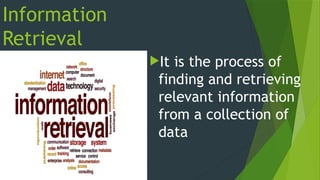
It is the process of
finding and retrieving
relevant information
from a collection of
data
E-Mail (Electronic Mail)
Email, or electronic
mail, is a digital
communication
method that allows
users to send and
receive messages
over computer
networks, primarily
the internet
E-Mail
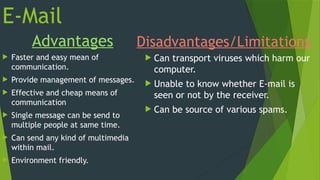
Advantages
 Faster and easy mean of
communication.
 Provide management of messages.
 Effective and cheap means of
communication
 Single message can be send to
multiple people at same time.
 Can send any kind of multimedia
within mail.
 Environment friendly.
Disadvantages/Limitations
 Can transport viruses which harm our
computer.
 Unable to know whether E-mail is
seen or not by the receiver.
 Can be source of various spams.
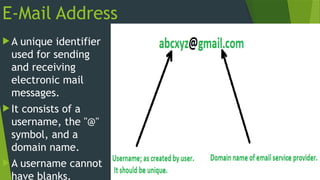
E-Mail Address
 A unique identifier
used for sending
and receiving
electronic mail
messages.
 It consists of a
username, the "@"
symbol, and a
domain name.
 A username cannot
have blanks.
• LAB Exercise
Creating an E-Mail Account
Viewing Received Mails
Replying or Forwarding E-Mail
Compose and Send an E-mail
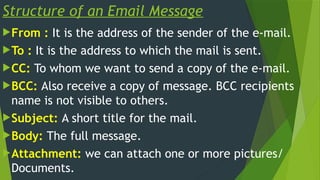
Structure of an Email Message
From : It is the address of the sender of the e-mail.
To : It is the address to which the mail is sent.
CC: To whom we want to send a copy of the e-mail.
BCC: Also receive a copy of message. BCC recipients
name is not visible to others.
Subject: A short title for the mail.
Body: The full message.
Attachment: we can attach one or more pictures/
Documents.
Difference Between CC and BCC
CC (Carbon Copy)
The email
addresses of CC
recipients are
visible to all other
recipients.
BCC (Blind Carbon Copy)
The email addresses
of BCC recipients are
hidden from all other
recipients.
Protect the privacy.
Difference between Spam and Junk
Mails
Spam Mail
unwanted bulk
email.
Often used for
advertising,
marketing
Junk Mail
email that is unwanted.
May include emails you
subscribed to but no
longer read, or
newsletters you no longer
want.
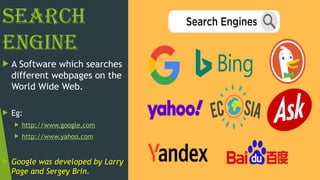
Search
Engine
 A Software which searches
different webpages on the
World Wide Web.
 Eg:
 http://www.google.com
 http://www.yahoo.com
 Google was developed by Larry
Page and Sergey Brin.
How Search Engine Works
 1. Crawling: to scan the internet and discover new and updated web
pages.
 2. Indexing: the search engine creates a database of keywords,
phrases, and other relevant information from the web pages.
 3. Query Processing: uses algorithms to identify the most relevant
results based on the keywords.
 4. Result Ranking: typically displaying the most relevant ones at the
top of the search results page
 5. Displaying Results: typically displays a list of hyperlinks to web
pages, along with textual summaries and other relevant information like
images or videos
FTP Protocol
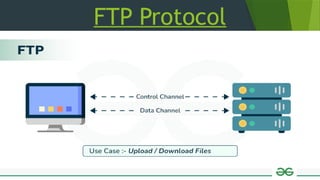
FTP, or File Transfer Protocol, is a
standard network protocol used to
transfer files between a client and a
server.
TCP/IP is called a chief protocol
utilized to communicate over
Internet.
FTP Protocol
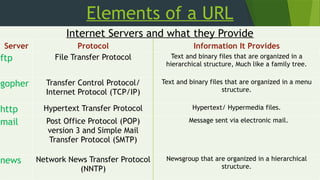
Elements of a URL
Internet Servers and what they Provide
Server Protocol Information It Provides
ftp File Transfer Protocol Text and binary files that are organized in a
hierarchical structure, Much like a family tree.
gopher Transfer Control Protocol/
Internet Protocol (TCP/IP)
Text and binary files that are organized in a menu
structure.
http Hypertext Transfer Protocol Hypertext/ Hypermedia files.
mail Post Office Protocol (POP)
version 3 and Simple Mail
Transfer Protocol (SMTP)
Message sent via electronic mail.
news Network News Transfer Protocol
(NNTP)
Newsgroup that are organized in a hierarchical
structure.
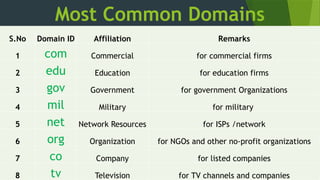
Most Common Domains
S.No Domain ID Affiliation Remarks
1 com Commercial for commercial firms
2 edu Education for education firms
3 gov Government for government Organizations
4 mil Military for military
5 net Network Resources for ISPs /network
6 org Organization for NGOs and other no-profit organizations
7 co Company for listed companies
8 tv Television for TV channels and companies
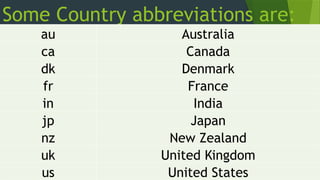
Some Country abbreviations are:
au Australia
ca Canada
dk Denmark
fr France
in India
jp Japan
nz New Zealand
uk United Kingdom
us United States
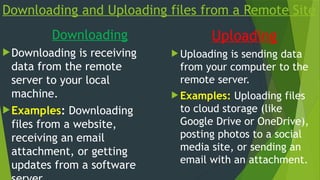
Downloading and Uploading files from a Remote Site
Downloading
Downloading is receiving
data from the remote
server to your local
machine.
Examples: Downloading
files from a website,
receiving an email
attachment, or getting
updates from a software
Uploading
 Uploading is sending data
from your computer to the
remote server.
 Examples: Uploading files
to cloud storage (like
Google Drive or OneDrive),
posting photos to a social
media site, or sending an
email with an attachment.
Remote Login and
File Transfer
Protocols
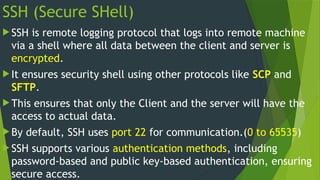
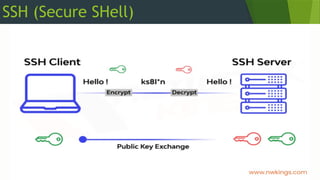
SSH (Secure SHell)
 SSH is remote logging protocol that logs into remote machine
via a shell where all data between the client and server is
encrypted.
 It ensures security shell using other protocols like SCP and
SFTP.
 This ensures that only the Client and the server will have the
access to actual data.
 By default, SSH uses port 22 for communication.(0 to 65535)
 SSH supports various authentication methods, including
password-based and public key-based authentication, ensuring
secure access.
SSH (Secure SHell)
FTP
FTP stands for File transfer protocol.
It is a standard internet protocol provided by
TCP/IP used for transmitting the files from
one host to another.
It is also used for downloading the files to
computer from other servers.
Every computer platform supports FTP.
How does FTP Work ?
There are two computers involved in an FTP
transfer:
FTP Server
FTP Client
Difference Between:-
FTP Server
It is a computer that
is running FTP server
software.
It listens on the
network for
connection requests
from other computers.
FTP Client
It is a computer that is
running FTP client
software.
It initiates a connection to
the server.
 Once connected, the
customer can do a number of
file manipulation operations.
SFTP
It stands for Secure File Transfer Protocol.
It is a protocol for transferring large files over the
web. It is a secure protocol for file transfer and it
ensures security of data based on the Secure Shell
(SSH) protocol.
SFTP as a successor to FTP is used for many
situations where file security is important.
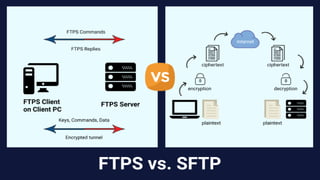
FTP and SFTP
SCP- Secure Copy Protocol
The SCP protocol helps transferring files
from a local to a remote host or between
two remote hosts.
It is a combination of the Remote Copy
Protocol (RCP) and the Secure Shell (SSH)
protocol.
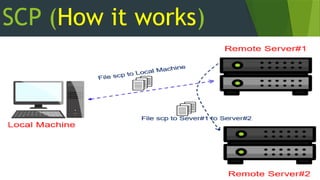
SCP (How it works)
TELNET (TELetype NETwork)
Telnet operates on a client/server principle.
The local computer uses a telnet client program
and the remote computers use a telnet server
program.
The computer which starts the connection is
known as the local computer.
The computer which is being connected to i.e.
which accepts the connection known as the
TELNET- Key Features and Uses
 Allows users to access the command-line interface of a remote computer or device.
 It's often used for managing network devices like routers, switches, and server
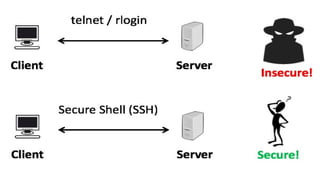
 The data transmitted between the client and server is unencrypted, meaning login credentials and other
sensitive information are sent in plain text.
 Due to security concerns, Telnet has largely been replaced by SSH.
Services
Available
on Internet
Internet Services:-
 Information Retrieval
 Locating Sites Using Search Engine.
 Video Conferencing
 E-Learning
 E-Banking
 E-Shopping
 E-Reservation
 E-Governance
 Exploring the web is known as Net Surfing.
Information Retrieval
Information Retrieval
refers to the process,
methods, and
procedures of
searching, locating, and
retrieving recorded
data and information
from a file or database.
Video Conferencing
Advantages
 Saves travel cost and travel time.
 Allows meeting with people at
different locations.
 It is an excellent way of keeping in
touch with friends and family, even
if they are in a different country.
Disadvantages
 It requires specific hardware and
software.
 Fast data link is needed.
 If hardware/software breaks down,
meeting cannot be attended.
Benefits of E-Learning
 Reduced overall cost
 Self-directed and self-paced
 Easily manageable
 Better Time Management
Features of E-Banking
 Account Management
 Bill Payments
 Security Features
 Remote Deposits
 Online Shopping
E-Shopping
Advantages
 Easy to buy Products.
 Price Comparison
 Online stores never close, they are
open 24 hours a day.
 Access to Product Reviews
 Save Time and Effort
Disadvantages
 Potential for Fraud
 Delay in delivery
 Replacement of products takes
time.
 Technical Difficulties
 Lack of Physical Inspection
E-Reservation
Advantages
 Time-Saving
 Convenience
 Easy Access to Information
 Multiple Payment Options
 Competitive Pricing
Disadvantages
 Dependency on Internet Access
 Security Concerns
 Limited Options and Lack of
Personal Interaction
 Potential for Hidden Fees
E-Governance
 E-governance is the application of information and communication technology
(ICT) to improve government processes, information exchange, and service
delivery.
 It means that we can interact with our government 24x7.
 The National e-governance Plan (NeGP) has been formulated by the
government to promote e-governance on a massive scale.
Major E-Governance Projects in India
 Income Tax Portal
 DRDO
 Supreme Court of India
 RTI Portal
 National Portal of India.
E-Governance
Positive Impact
 Improved the efficiency of
administration and service
delivery.
 Reduced waiting time.
 Reduced cost of availing the
services.
 Keeping a tab on corruption.
 Increased public participation.
Negative Impact
 People living in rural and remote
areas could not benefit from it.
 Lack of awareness about e-
governance programs.
 Slow websites compared to other
websites.
Social Networking
 Social Networking is the use of internet based social media programs to make
connections with friends, family, classmates, customers and clients.
 They are also known as Social Media.
 Facebook, Instagram, LinkedIn, Myspace, Twitter, Youtube, Flickr, Wordpress,
Blogger, Typepad, etc.
Ethics in Social Networking
 Right perspective: Carefully upload the contents, pictures, videos, etc.
 Utilitarian perspective: Keep away from indulging in illegal and unethical
activities.
 Fairness perspective: No discrimination based on the gender, race, age, etc.
 Common good perspective: Our action must not hinder in any way the
betterment of the society.
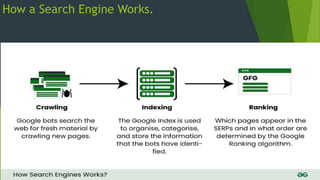
How a Search Engine Works.
 A search engine works with the help of following three elements:
 Spiders or Webcrawler or Bots or Agents
 Indexing software and database
 Search Algorithm
How a Search Engine Works.
SPIDERS OR WEBCRAWLER OR BOTS OR AGENTS
 The Search engine uses these software which comb the Internet looking for
documents and their web addresses.
 The Spiders or web crawlers perform the methodical searches needed to find
information
How a Search Engine Works.
 INDEXING SOFTWARE AND DATABASE
 The indexing software extracts
information from the documents
and web addresses, prepares on
index of it and stores in a
database.
 SEARCH ALGORITHM
 It assembles a web page displaying
the matching results as hyperlinks.
How a Search Engine Works.
Mobile Technologies
 Technology that is portable and can be used in various locations, including
phones, tablets, and other devices that connect wirelessly to the internet.
 It is a kind of technology which is utilized maximum in cellular communication
and other relating facts.
SMS and MMS
 Stands for “Short Messaging
Service”.
 It is commonly referred to as a
“text message”.
 Real SMS messages are limited in
length. A single SMS is 160
characters long.
 Most cell phones support this type
of text messaging.
 It stands for Multimedia Messaging
Service.
 It is a standard way to send
messages that include multimedia
content (pictures,video, audio,
etc) to and from mobilephones.
 MMS messages can be up to 1600
characters in length.
Mobile Communication System
Generations.
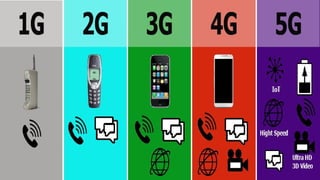
 Every Generation contains different data rates, wireless technologies,
capacities and characteristics better then earlier generations.
 1G- First Generation
 2G- Second Generation
 3G- Third Generation
 4G- Third Generation
 5G-Fifth Generation
Mobile Communication System Generations
 1G- First Generation
 Started in 1980
 Analog Technology
 Voice Calls Only
 Limited Coverage and Sound Quality
 Expensive and Large Devices
 No Roaming Support
 Max Speed was 2.4 Kbps
 2G- Second Generation
 introduced in the 1990s
 Digital Technology
 GSM and Other Standards
 Data Services:
 Improved Voice Quality
 Text Messaging
 Picture Messaging
 Max speed is 64 Kbps
Mobile Communication System
Generations
 3G – Third Generation
 Initiated in 2001
 Multimedia Capabilities
 Smartphone technology
 Max speed of 3G is said to be
2mbps.
 4G – Fourth Generation
 Support for VoLTE
 Wide Range of Applications
 Max speed of 4G is known as 1
Gbps.
Mobile Communication System
Generations
 5G – Fifth Generation
 building upon previous standards to offer significantly faster speeds, lower
latency, and increased capacity. It achieves this by using higher frequencies
and advanced antenna technology, enabling more devices to connect
simultaneously and transmitting data more efficiently.
UNIT-I NETWORKING - II.pptx. For class iX

UNIT-I NETWORKING - II.pptx. For class iX

  • 1.
    UNIT-I NETWORKING . Chapter 2 InternetServices and Mobile Technology
  • 2.
    In this Chapter.. Introduction InformationRetrieval E-Mail (Electronic Mail) Using Search Engine FTP Protocol Remote Login and File Transfer Protocol Web Servicing Social Networking Mobile Technologies
  • 3.
    Introduction Internet Services areuseful because : It provides access to vast amount of information. Facilitate Communication Enable Online Shopping and Banking. Offers entertainment and educational Opportunity. Support remote work and social networking.
  • 4.
    Information Retrieval It is theprocess of finding and retrieving relevant information from a collection of data
  • 5.
    E-Mail (Electronic Mail) Email,or electronic mail, is a digital communication method that allows users to send and receive messages over computer networks, primarily the internet
  • 6.
    E-Mail Advantages  Faster andeasy mean of communication.  Provide management of messages.  Effective and cheap means of communication  Single message can be send to multiple people at same time.  Can send any kind of multimedia within mail.  Environment friendly. Disadvantages/Limitations  Can transport viruses which harm our computer.  Unable to know whether E-mail is seen or not by the receiver.  Can be source of various spams.

  • 7.
    E-Mail Address  Aunique identifier used for sending and receiving electronic mail messages.  It consists of a username, the "@" symbol, and a domain name.  A username cannot have blanks.
  • 8.
    • LAB Exercise Creatingan E-Mail Account Viewing Received Mails Replying or Forwarding E-Mail Compose and Send an E-mail
  • 9.
    Structure of anEmail Message From : It is the address of the sender of the e-mail. To : It is the address to which the mail is sent. CC: To whom we want to send a copy of the e-mail. BCC: Also receive a copy of message. BCC recipients name is not visible to others. Subject: A short title for the mail. Body: The full message. Attachment: we can attach one or more pictures/ Documents.
  • 10.
    Difference Between CCand BCC CC (Carbon Copy) The email addresses of CC recipients are visible to all other recipients. BCC (Blind Carbon Copy) The email addresses of BCC recipients are hidden from all other recipients. Protect the privacy.
  • 11.
    Difference between Spamand Junk Mails Spam Mail unwanted bulk email. Often used for advertising, marketing Junk Mail email that is unwanted. May include emails you subscribed to but no longer read, or newsletters you no longer want.
  • 12.
    Search Engine  A Softwarewhich searches different webpages on the World Wide Web.  Eg:  http://www.google.com  http://www.yahoo.com  Google was developed by Larry Page and Sergey Brin.
  • 13.
    How Search EngineWorks  1. Crawling: to scan the internet and discover new and updated web pages.  2. Indexing: the search engine creates a database of keywords, phrases, and other relevant information from the web pages.  3. Query Processing: uses algorithms to identify the most relevant results based on the keywords.  4. Result Ranking: typically displaying the most relevant ones at the top of the search results page  5. Displaying Results: typically displays a list of hyperlinks to web pages, along with textual summaries and other relevant information like images or videos
  • 14.
    FTP Protocol FTP, orFile Transfer Protocol, is a standard network protocol used to transfer files between a client and a server. TCP/IP is called a chief protocol utilized to communicate over Internet.
  • 15.
  • 16.
    Elements of aURL Internet Servers and what they Provide Server Protocol Information It Provides ftp File Transfer Protocol Text and binary files that are organized in a hierarchical structure, Much like a family tree. gopher Transfer Control Protocol/ Internet Protocol (TCP/IP) Text and binary files that are organized in a menu structure. http Hypertext Transfer Protocol Hypertext/ Hypermedia files. mail Post Office Protocol (POP) version 3 and Simple Mail Transfer Protocol (SMTP) Message sent via electronic mail. news Network News Transfer Protocol (NNTP) Newsgroup that are organized in a hierarchical structure.
  • 17.
    Most Common Domains S.NoDomain ID Affiliation Remarks 1 com Commercial for commercial firms 2 edu Education for education firms 3 gov Government for government Organizations 4 mil Military for military 5 net Network Resources for ISPs /network 6 org Organization for NGOs and other no-profit organizations 7 co Company for listed companies 8 tv Television for TV channels and companies
  • 18.
    Some Country abbreviationsare: au Australia ca Canada dk Denmark fr France in India jp Japan nz New Zealand uk United Kingdom us United States
  • 19.
    Downloading and Uploadingfiles from a Remote Site Downloading Downloading is receiving data from the remote server to your local machine. Examples: Downloading files from a website, receiving an email attachment, or getting updates from a software Uploading  Uploading is sending data from your computer to the remote server.  Examples: Uploading files to cloud storage (like Google Drive or OneDrive), posting photos to a social media site, or sending an email with an attachment.
  • 20.
    Remote Login and FileTransfer Protocols
  • 21.
    SSH (Secure SHell) SSH is remote logging protocol that logs into remote machine via a shell where all data between the client and server is encrypted.  It ensures security shell using other protocols like SCP and SFTP.  This ensures that only the Client and the server will have the access to actual data.  By default, SSH uses port 22 for communication.(0 to 65535)  SSH supports various authentication methods, including password-based and public key-based authentication, ensuring secure access.
  • 22.
  • 23.
    FTP FTP stands forFile transfer protocol. It is a standard internet protocol provided by TCP/IP used for transmitting the files from one host to another. It is also used for downloading the files to computer from other servers. Every computer platform supports FTP.
  • 24.
    How does FTPWork ? There are two computers involved in an FTP transfer: FTP Server FTP Client
  • 25.
    Difference Between:- FTP Server Itis a computer that is running FTP server software. It listens on the network for connection requests from other computers. FTP Client It is a computer that is running FTP client software. It initiates a connection to the server.  Once connected, the customer can do a number of file manipulation operations.
  • 26.
    SFTP It stands forSecure File Transfer Protocol. It is a protocol for transferring large files over the web. It is a secure protocol for file transfer and it ensures security of data based on the Secure Shell (SSH) protocol. SFTP as a successor to FTP is used for many situations where file security is important.
  • 27.
  • 28.
    SCP- Secure CopyProtocol The SCP protocol helps transferring files from a local to a remote host or between two remote hosts. It is a combination of the Remote Copy Protocol (RCP) and the Secure Shell (SSH) protocol.
  • 29.
  • 30.
    TELNET (TELetype NETwork) Telnetoperates on a client/server principle. The local computer uses a telnet client program and the remote computers use a telnet server program. The computer which starts the connection is known as the local computer. The computer which is being connected to i.e. which accepts the connection known as the
  • 31.
    TELNET- Key Featuresand Uses  Allows users to access the command-line interface of a remote computer or device.  It's often used for managing network devices like routers, switches, and server  The data transmitted between the client and server is unencrypted, meaning login credentials and other sensitive information are sent in plain text.  Due to security concerns, Telnet has largely been replaced by SSH.
  • 33.
  • 34.
    Internet Services:-  InformationRetrieval  Locating Sites Using Search Engine.  Video Conferencing  E-Learning  E-Banking  E-Shopping  E-Reservation  E-Governance  Exploring the web is known as Net Surfing.
  • 35.
    Information Retrieval Information Retrieval refersto the process, methods, and procedures of searching, locating, and retrieving recorded data and information from a file or database.
  • 36.
    Video Conferencing Advantages  Savestravel cost and travel time.  Allows meeting with people at different locations.  It is an excellent way of keeping in touch with friends and family, even if they are in a different country. Disadvantages  It requires specific hardware and software.  Fast data link is needed.  If hardware/software breaks down, meeting cannot be attended.
  • 37.
    Benefits of E-Learning Reduced overall cost  Self-directed and self-paced  Easily manageable  Better Time Management
  • 38.
    Features of E-Banking Account Management  Bill Payments  Security Features  Remote Deposits  Online Shopping
  • 39.
    E-Shopping Advantages  Easy tobuy Products.  Price Comparison  Online stores never close, they are open 24 hours a day.  Access to Product Reviews  Save Time and Effort Disadvantages  Potential for Fraud  Delay in delivery  Replacement of products takes time.  Technical Difficulties  Lack of Physical Inspection
  • 40.
    E-Reservation Advantages  Time-Saving  Convenience Easy Access to Information  Multiple Payment Options  Competitive Pricing Disadvantages  Dependency on Internet Access  Security Concerns  Limited Options and Lack of Personal Interaction  Potential for Hidden Fees
  • 41.
    E-Governance  E-governance isthe application of information and communication technology (ICT) to improve government processes, information exchange, and service delivery.  It means that we can interact with our government 24x7.  The National e-governance Plan (NeGP) has been formulated by the government to promote e-governance on a massive scale.
  • 42.
    Major E-Governance Projectsin India  Income Tax Portal  DRDO  Supreme Court of India  RTI Portal  National Portal of India.
  • 43.
    E-Governance Positive Impact  Improvedthe efficiency of administration and service delivery.  Reduced waiting time.  Reduced cost of availing the services.  Keeping a tab on corruption.  Increased public participation. Negative Impact  People living in rural and remote areas could not benefit from it.  Lack of awareness about e- governance programs.  Slow websites compared to other websites.
  • 44.
    Social Networking  SocialNetworking is the use of internet based social media programs to make connections with friends, family, classmates, customers and clients.  They are also known as Social Media.  Facebook, Instagram, LinkedIn, Myspace, Twitter, Youtube, Flickr, Wordpress, Blogger, Typepad, etc.
  • 45.
    Ethics in SocialNetworking  Right perspective: Carefully upload the contents, pictures, videos, etc.  Utilitarian perspective: Keep away from indulging in illegal and unethical activities.  Fairness perspective: No discrimination based on the gender, race, age, etc.  Common good perspective: Our action must not hinder in any way the betterment of the society.
  • 46.
    How a SearchEngine Works.  A search engine works with the help of following three elements:  Spiders or Webcrawler or Bots or Agents  Indexing software and database  Search Algorithm
  • 47.
    How a SearchEngine Works. SPIDERS OR WEBCRAWLER OR BOTS OR AGENTS  The Search engine uses these software which comb the Internet looking for documents and their web addresses.  The Spiders or web crawlers perform the methodical searches needed to find information
  • 48.
    How a SearchEngine Works.  INDEXING SOFTWARE AND DATABASE  The indexing software extracts information from the documents and web addresses, prepares on index of it and stores in a database.  SEARCH ALGORITHM  It assembles a web page displaying the matching results as hyperlinks.
  • 49.
    How a SearchEngine Works.
  • 50.
    Mobile Technologies  Technologythat is portable and can be used in various locations, including phones, tablets, and other devices that connect wirelessly to the internet.  It is a kind of technology which is utilized maximum in cellular communication and other relating facts.
  • 51.
    SMS and MMS Stands for “Short Messaging Service”.  It is commonly referred to as a “text message”.  Real SMS messages are limited in length. A single SMS is 160 characters long.  Most cell phones support this type of text messaging.  It stands for Multimedia Messaging Service.  It is a standard way to send messages that include multimedia content (pictures,video, audio, etc) to and from mobilephones.  MMS messages can be up to 1600 characters in length.
  • 52.
    Mobile Communication System Generations. Every Generation contains different data rates, wireless technologies, capacities and characteristics better then earlier generations.  1G- First Generation  2G- Second Generation  3G- Third Generation  4G- Third Generation  5G-Fifth Generation
  • 53.
    Mobile Communication SystemGenerations  1G- First Generation  Started in 1980  Analog Technology  Voice Calls Only  Limited Coverage and Sound Quality  Expensive and Large Devices  No Roaming Support  Max Speed was 2.4 Kbps  2G- Second Generation  introduced in the 1990s  Digital Technology  GSM and Other Standards  Data Services:  Improved Voice Quality  Text Messaging  Picture Messaging  Max speed is 64 Kbps
  • 54.
    Mobile Communication System Generations 3G – Third Generation  Initiated in 2001  Multimedia Capabilities  Smartphone technology  Max speed of 3G is said to be 2mbps.  4G – Fourth Generation  Support for VoLTE  Wide Range of Applications  Max speed of 4G is known as 1 Gbps.
  • 55.
    Mobile Communication System Generations 5G – Fifth Generation  building upon previous standards to offer significantly faster speeds, lower latency, and increased capacity. It achieves this by using higher frequencies and advanced antenna technology, enabling more devices to connect simultaneously and transmitting data more efficiently.