Unit-6
Linux Fundamentals & Device
Driver Programming
Linux Fundamentals, Linux Commands, VI Editors,
Introduction to Device Driver, The Role of Device Driver,
Kernel Module Vs Application, Types of Device Driver,
Character Driver, Block Driver & network Driver.
1. Write a short note on : i) LINUX Fundamentals ii) Pieces of Linux (any 4) [8]
2. Write any five commands from Linux with description. [10]
3. What is intertask communication? Describe intertask communication in RTOS. [8]
4. Write a short note on : i) Kernel module ii) Advantages and Disadvantages of Linux
[10]
5. What is linux explain architecture of linux in detail. [8]
6. Write short note on: i) System call ii) Network device driver [9]
7. Explain Linux kernel module in detail. [8]
8. Write short note on: i) Character device driver ii) The Role of Device Driver [9]
9. What is device driver? Explain types of device drivers. [8]
10. Write a short note on i) VI Editors ii) Pieces of Linux (any 4) [8]
11. Explain types of device drivers, with its need. [8]
12. Write a short note on i) Kernel Module ii) Use of Linux in embedded system[10]
What is Linux
•Free and Open Source: Linux is a cost-effective operating
system with freely available source code for viewing, modification,
and distribution.
•Created by Linus Torvalds: Developed in 1991 by Linus
Torvalds, Linux has become a widely-used, collaborative platform.
•Collaborative Development: Its open nature allows developers
worldwide to contribute, ensuring continuous improvement and
evolution.
•Versatile Usage: Linux powers a wide range of devices, from
personal computers and smartphones (like Android) to
supercomputers and servers.
•Efficient and Secure: Known for its efficiency, Linux performs
tasks quickly and offers strong security against malware and
unauthorized acces
What is Linux Operating System
•Linux Kernel: The brain of the operating system that manages resources like
CPU, memory, and devices. Example: The Linux Kernel allocates CPU time to
programs and manages memory for tasks like running web browsers or file
managers.
•Linux Distributions: These are complete systems combining the Linux
Kernel with software packages. Example: Ubuntu, a popular Linux
distribution, comes with a graphical user interface, web browser (Firefox),
office suite (LibreOffice), and media player.
•Unix-Like System: Linux is similar to Unix, offering stability and efficiency.
Example: Both Linux and Unix use a hierarchical file system and multitasking
features, allowing programs to run concurrently.
•User Flexibility: Linux distributions are tailored for different use cases.
Example: Debian is often used on servers for stability, while Fedora is geared
towards developers who want the latest software.
•Security and Efficiency: Linux is known for strong security features like user
permissions and minimal system overhead. Example: Linux systems can have
firewalls like iptables to secure a server from unauthorized access, while
efficiently handling background tasks like running a database.
Here are some popular Linux distributions:
•1.Redhat Enterprise Linux
•2.Fedora Linux
•3.Debian Linux
• 4.Suse Enterprise Linux
• 5.Ubuntu Linux
•A Linux distribution is a complete operating system built around the Linux kernel,
combined with various supporting software and libraries.
•Each distribution includes essential system tools, utilities, and sometimes GUIs,
making it ready to use for different devices and purposes.
Why Linux
•Cost-Effective and Flexible: Linux is free and open-source, making it an ideal
choice for personal and enterprise use. Its flexibility allows users to customize the
operating system to meet their specific needs.
•Robust Performance and Support: Linux offers strong security, stability, and
performance, making it popular among servers and developers. It also features a
vast software library and an active community that provides support and regular
updates.
Basic Features of Linux
• Portable: Linux can run on various hardware platforms, allowing
software to work consistently across different systems.
• Open Source: The source code of Linux is freely available, developed
collaboratively by multiple teams, and continuously evolving.
• Multi-User: Multiple users can access system resources simultaneously,
enhancing productivity.
• Multiprogramming: Linux can run multiple applications at the same
time, optimizing resource use.
• Hierarchical File System: Linux uses a standard file structure that
organizes files and directories in a hierarchical manner.
•Shell: Linux features a command-line interpreter (shell) that executes
operating system commands, performs various operations, and calls
application programs.
•Security: Linux ensures user security through authentication methods
such as password protection, controlled access to files, and data
encryption.
• https://www.geeksforgeeks.org/introduction-to-
linux-operating-system/
Linux Commands
• https://www.geeksforgeeks.org/basic-linux-comma
nds
/
 Page 10
•
VI Editor In Linux
 Page 11
Agenda
WHAT IS VI EDITOR?
HISTORY OF VI.
CHARACTERISTIC OF VI.
STARTING VI
MODE IN VI EDITOR.
COMMON VI COMMAND
HOW TO EXIT FROM VI
 Page 12
What is Vi Editor?
• The visual editor on the Linux.
• The vi editor comes with every version of Linux or Unix.
• Using vi is similar to using other editors in that you can see your file on
the screen ..
• The vi editor is the most popular editor in linux. The current version is
really "vim", but to invoke it simply type "vi".
• Before vi the primary editor used on Unix was the line editor
• User was able to see/edit only one line of the text at a time
• The vi editor is not a text formatter (like MS Word, Word Perfect, etc.)
• you cannot set margins
• center headings
• Etc…
•
 Page 13
History of Vi Editor
• Although other stories exist, the true one tells
that vi was originally written by Bill Joy in 1976.
• Who is Bill Joy you ask?
• He co-founded Sun Microsystems in 1982 and served
as chief scientist until 2003.
 Page 14
Characteristics of vi
• The vi editor is:
• A very powerful
• It is hard to learn, specially for windows users
- Move from point to point in the file, and make
changes.
- Available on all UNIX systems
 Page 15
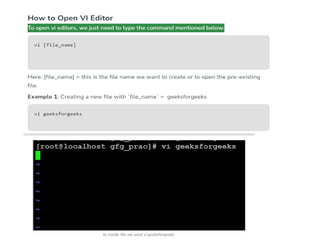
Starting vi
• Type vi <filename> at the shell prompt
• After pressing enter the command prompt
disappears and you see tilde(~) characters on all
the lines
• These tilde characters indicate that the line is
blank
 Page 16
Vi modes
• There are three modes in vi
• Command mode
• Accessed by typing Esc
• In this mode all the keys pressed by the user are interpret to the editor
command.
• Input mode
• Accessed by typing “i”
• This mode permits insertion of new text, editing of existing text or replacement
of existing text.
Ex mode( Last Line Mode)
-The bottom line of the vi screen is called ex mode.
• When you start vi by default it is in command mode
-You exit the input mode by pressing the Esc key to get back
to the command mode.
 Page 17
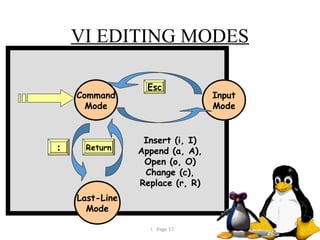
VI EDITING MODES
Command
Mode
Input
Mode
Last-Line
Mode
Insert (i, I)
Append (a, A),
Open (o, O)
Change (c),
Replace (r, R)
Esc
Return
:
 Page 18
Common Vi Commands
• Moving Cursor Position
• You can move around only when you are in the command
mode
• Arrow keys usually works(but may not)
• The standard keys for moving cursor are:
• h - for left
• l - for right
• j - for down
• k - for up
• w - to move one word forward
• b - to move one word backward
• $ - takes you to the end of line
• <enter> takes the cursor the beginning of next line
 Page 19
Conti..
• - - (minus) moves the cursor to the first
character in the current line
• H - takes the cursor to the beginning of the
current screen Home position)
• L - moves to the Lower last line
• M - moves to the middle line on the current
screen
 Page 20
Conti..
• Control-d scrolls the screen down (half screen)
• Control-u scrolls the screen up (half screen)
• Control-f scrolls the screen forward (full screen)
• Control-b scrolls the screen backward (full
screen).
 Page 21
Editing text
• x - deletes the current character
• d - is the delete command but pressing only d will not
delete anything you need to press a second key
• dw - deletes to end of word
• dd - deletes the current line
• d0 - deletes to beginning of line
• There are many more keys to be used with delete
command
• The vi commands can be used followed by a number
such as
n<command key(s)>
• For example dd deletes a line 5dd will delete five lines.
 Page 22
Copy, cut and paste in vi
• yy - (yank) copy current line to buffer
• nyy - Where n is number of lines
• p - Paste the yanked lines from buffer to the line
below
• P - Paste the yanked lines from buffer to the
line above
 Page 23
Undo and repeat command
• u - undo the changes made by editing
commands
• . - (dot or period) repeats the last edit
command
 Page 24
How to exit from vi
(command mode)
• ZZ is for save and Exit (Note this command is
uppercase)
• :q <enter> is to exit, if you have not made any
changes to the file
• https://
www.youtube.com/watch?v=pU2k776i2Zw&t=456s
• https://www.geeksforgeeks.org/vi-editor-unix/
Vi Editor

Unit -6_linux operating system_1234.pptx

  • 1.
    Unit-6 Linux Fundamentals &Device Driver Programming Linux Fundamentals, Linux Commands, VI Editors, Introduction to Device Driver, The Role of Device Driver, Kernel Module Vs Application, Types of Device Driver, Character Driver, Block Driver & network Driver.
  • 2.
    1. Write ashort note on : i) LINUX Fundamentals ii) Pieces of Linux (any 4) [8] 2. Write any five commands from Linux with description. [10] 3. What is intertask communication? Describe intertask communication in RTOS. [8] 4. Write a short note on : i) Kernel module ii) Advantages and Disadvantages of Linux [10] 5. What is linux explain architecture of linux in detail. [8] 6. Write short note on: i) System call ii) Network device driver [9] 7. Explain Linux kernel module in detail. [8] 8. Write short note on: i) Character device driver ii) The Role of Device Driver [9] 9. What is device driver? Explain types of device drivers. [8] 10. Write a short note on i) VI Editors ii) Pieces of Linux (any 4) [8] 11. Explain types of device drivers, with its need. [8] 12. Write a short note on i) Kernel Module ii) Use of Linux in embedded system[10]
  • 3.
    What is Linux •Freeand Open Source: Linux is a cost-effective operating system with freely available source code for viewing, modification, and distribution. •Created by Linus Torvalds: Developed in 1991 by Linus Torvalds, Linux has become a widely-used, collaborative platform. •Collaborative Development: Its open nature allows developers worldwide to contribute, ensuring continuous improvement and evolution. •Versatile Usage: Linux powers a wide range of devices, from personal computers and smartphones (like Android) to supercomputers and servers. •Efficient and Secure: Known for its efficiency, Linux performs tasks quickly and offers strong security against malware and unauthorized acces
  • 4.
    What is LinuxOperating System •Linux Kernel: The brain of the operating system that manages resources like CPU, memory, and devices. Example: The Linux Kernel allocates CPU time to programs and manages memory for tasks like running web browsers or file managers. •Linux Distributions: These are complete systems combining the Linux Kernel with software packages. Example: Ubuntu, a popular Linux distribution, comes with a graphical user interface, web browser (Firefox), office suite (LibreOffice), and media player. •Unix-Like System: Linux is similar to Unix, offering stability and efficiency. Example: Both Linux and Unix use a hierarchical file system and multitasking features, allowing programs to run concurrently. •User Flexibility: Linux distributions are tailored for different use cases. Example: Debian is often used on servers for stability, while Fedora is geared towards developers who want the latest software. •Security and Efficiency: Linux is known for strong security features like user permissions and minimal system overhead. Example: Linux systems can have firewalls like iptables to secure a server from unauthorized access, while efficiently handling background tasks like running a database.
  • 5.
    Here are somepopular Linux distributions: •1.Redhat Enterprise Linux •2.Fedora Linux •3.Debian Linux • 4.Suse Enterprise Linux • 5.Ubuntu Linux •A Linux distribution is a complete operating system built around the Linux kernel, combined with various supporting software and libraries. •Each distribution includes essential system tools, utilities, and sometimes GUIs, making it ready to use for different devices and purposes.
  • 6.
    Why Linux •Cost-Effective andFlexible: Linux is free and open-source, making it an ideal choice for personal and enterprise use. Its flexibility allows users to customize the operating system to meet their specific needs. •Robust Performance and Support: Linux offers strong security, stability, and performance, making it popular among servers and developers. It also features a vast software library and an active community that provides support and regular updates.
  • 7.
    Basic Features ofLinux • Portable: Linux can run on various hardware platforms, allowing software to work consistently across different systems. • Open Source: The source code of Linux is freely available, developed collaboratively by multiple teams, and continuously evolving. • Multi-User: Multiple users can access system resources simultaneously, enhancing productivity. • Multiprogramming: Linux can run multiple applications at the same time, optimizing resource use. • Hierarchical File System: Linux uses a standard file structure that organizes files and directories in a hierarchical manner. •Shell: Linux features a command-line interpreter (shell) that executes operating system commands, performs various operations, and calls application programs. •Security: Linux ensures user security through authentication methods such as password protection, controlled access to files, and data encryption.
  • 8.
  • 9.
  • 10.
     Page 10 • VIEditor In Linux
  • 11.
     Page 11 Agenda WHATIS VI EDITOR? HISTORY OF VI. CHARACTERISTIC OF VI. STARTING VI MODE IN VI EDITOR. COMMON VI COMMAND HOW TO EXIT FROM VI
  • 12.
     Page 12 Whatis Vi Editor? • The visual editor on the Linux. • The vi editor comes with every version of Linux or Unix. • Using vi is similar to using other editors in that you can see your file on the screen .. • The vi editor is the most popular editor in linux. The current version is really "vim", but to invoke it simply type "vi". • Before vi the primary editor used on Unix was the line editor • User was able to see/edit only one line of the text at a time • The vi editor is not a text formatter (like MS Word, Word Perfect, etc.) • you cannot set margins • center headings • Etc… •
  • 13.
     Page 13 Historyof Vi Editor • Although other stories exist, the true one tells that vi was originally written by Bill Joy in 1976. • Who is Bill Joy you ask? • He co-founded Sun Microsystems in 1982 and served as chief scientist until 2003.
  • 14.
     Page 14 Characteristicsof vi • The vi editor is: • A very powerful • It is hard to learn, specially for windows users - Move from point to point in the file, and make changes. - Available on all UNIX systems
  • 15.
     Page 15 Startingvi • Type vi <filename> at the shell prompt • After pressing enter the command prompt disappears and you see tilde(~) characters on all the lines • These tilde characters indicate that the line is blank
  • 16.
     Page 16 Vimodes • There are three modes in vi • Command mode • Accessed by typing Esc • In this mode all the keys pressed by the user are interpret to the editor command. • Input mode • Accessed by typing “i” • This mode permits insertion of new text, editing of existing text or replacement of existing text. Ex mode( Last Line Mode) -The bottom line of the vi screen is called ex mode. • When you start vi by default it is in command mode -You exit the input mode by pressing the Esc key to get back to the command mode.
  • 17.
     Page 17 VIEDITING MODES Command Mode Input Mode Last-Line Mode Insert (i, I) Append (a, A), Open (o, O) Change (c), Replace (r, R) Esc Return :
  • 18.
     Page 18 CommonVi Commands • Moving Cursor Position • You can move around only when you are in the command mode • Arrow keys usually works(but may not) • The standard keys for moving cursor are: • h - for left • l - for right • j - for down • k - for up • w - to move one word forward • b - to move one word backward • $ - takes you to the end of line • <enter> takes the cursor the beginning of next line
  • 19.
     Page 19 Conti.. •- - (minus) moves the cursor to the first character in the current line • H - takes the cursor to the beginning of the current screen Home position) • L - moves to the Lower last line • M - moves to the middle line on the current screen
  • 20.
     Page 20 Conti.. •Control-d scrolls the screen down (half screen) • Control-u scrolls the screen up (half screen) • Control-f scrolls the screen forward (full screen) • Control-b scrolls the screen backward (full screen).
  • 21.
     Page 21 Editingtext • x - deletes the current character • d - is the delete command but pressing only d will not delete anything you need to press a second key • dw - deletes to end of word • dd - deletes the current line • d0 - deletes to beginning of line • There are many more keys to be used with delete command • The vi commands can be used followed by a number such as n<command key(s)> • For example dd deletes a line 5dd will delete five lines.
  • 22.
     Page 22 Copy,cut and paste in vi • yy - (yank) copy current line to buffer • nyy - Where n is number of lines • p - Paste the yanked lines from buffer to the line below • P - Paste the yanked lines from buffer to the line above
  • 23.
     Page 23 Undoand repeat command • u - undo the changes made by editing commands • . - (dot or period) repeats the last edit command
  • 24.
     Page 24 Howto exit from vi (command mode) • ZZ is for save and Exit (Note this command is uppercase) • :q <enter> is to exit, if you have not made any changes to the file
  • 26.