Unit 4- SLOWLY CHANGING DIMENSION
TYPE 2 (SCD2)
Dr.Girija Narasimhan 1
ETL using Pentaho(spoon) - Lecture Notes (PPT)
https://www.oercommons.org/authoring/28693-etl-using-pentaho-spoon-lecture-notes-ppt
It maintains full history in the target. It maintains history by inserting the new record and updating for each
change. It keep version number, date from and date to changes occurred
This type will create a duplicate records with necessary changes without disturbing the history. For
example if you update any record information, it will keep both old record information plus old
record information.
SLOWLY CHANGIN DIMENSION 2
Dr.Girija Narasimhan 2
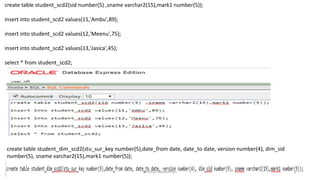
create table student_scd2(sid number(5) ,sname varchar2(15),mark1 number(5));
insert into student_scd2 values(11,'Ambu',89);
insert into student_scd2 values(12,'Meenu',75);
insert into student_scd2 values(13,'Jasica',45);
select * from student_scd2;
create table student_dim_scd2(stu_sur_key number(5),date_from date, date_to date, version number(4), dim_sid
number(5), sname varchar2(15),mark1 number(5));
Dr.Girija Narasimhan 3
Dr.Girija Narasimhan 4
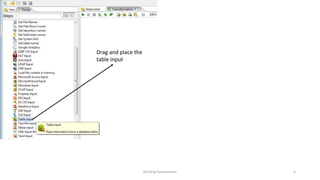
Drag and place the
table input
Dr.Girija Narasimhan 5
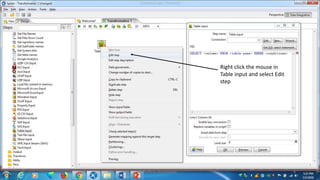
Right click the mouse in
Table input and select Edit
step
Dr.Girija Narasimhan 6
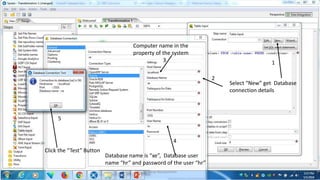
Select “New” get Database
connection details
Computer name in the
property of the system
Click the “Test” Button
Database name is “xe”, Database user
name “hr” and password of the user “hr”
13
4
2
5
Dr.Girija Narasimhan 7
Dr.Girija Narasimhan 8
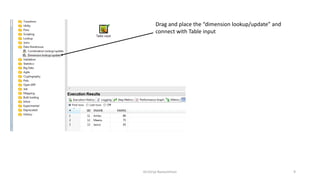
Drag and place the “dimension lookup/update” and
connect with Table input
Dr.Girija Narasimhan 9
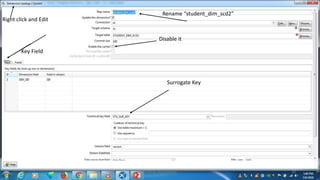
Disable it
Surrogate Key
Key Field
Right click and Edit
Rename “student_dim_scd2”
Dr.Girija Narasimhan 10
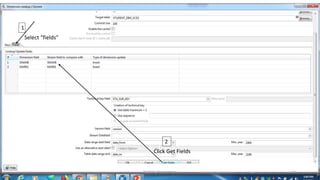
Click Get Fields
1
2
Select “fields”
Dr.Girija Narasimhan 11
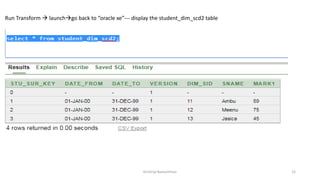
Run Transform  launchgo back to “oracle xe”--- display the student_dim_scd2 table
Dr.Girija Narasimhan 12
Update the sid 11, mark as “95”
Dr.Girija Narasimhan 13
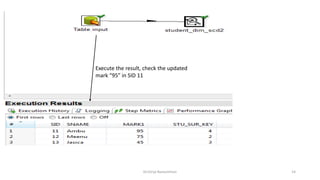
Execute the result, check the updated
mark “95” in SID 11
Dr.Girija Narasimhan 14
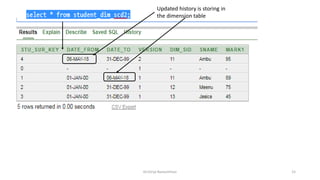
Updated history is storing in
the dimension table
Dr.Girija Narasimhan 15
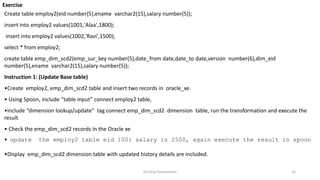
Exercise
Dr.Girija Narasimhan 16
Create table employ2(eid number(5),ename varchar2(15),salary number(5));
insert into employ2 values(1001,'Alaa',1800);
insert into employ2 values(1002,'Ravi',1500);
select * from employ2;
create table emp_dim_scd2(emp_sur_key number(5),date_from date,date_to date,version number(6),dim_eid
number(5),ename varchar2(15),salary number(5));
Instruction 1: (Update Base table)
•Create employ2, emp_dim_scd2 table and insert two records in oracle_xe.
• Using Spoon, include “table input” connect employ2 table,
•include “dimension lookup/update” tag connect emp_dim_scd2 dimension table, run the transformation and execute the
result
• Check the emp_dim_scd2 records in the Oracle xe
• update the employ2 table eid 1001 salary is 2500, again execute the result in spoon
•Display emp_dim_scd2 dimension table with updated history details are included.
Dr.Girija Narasimhan 17
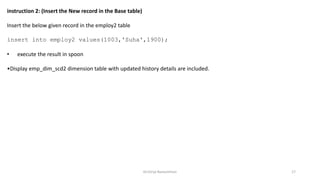
instruction 2: (Insert the New record in the Base table)
Insert the below given record in the employ2 table
insert into employ2 values(1003,'Suha',1900);
• execute the result in spoon
•Display emp_dim_scd2 dimension table with updated history details are included.

Unit 4- Slowly Changing Dimension Type 2 (SCD 2)- OER ETL

  • 1.
    Unit 4- SLOWLYCHANGING DIMENSION TYPE 2 (SCD2) Dr.Girija Narasimhan 1 ETL using Pentaho(spoon) - Lecture Notes (PPT) https://www.oercommons.org/authoring/28693-etl-using-pentaho-spoon-lecture-notes-ppt
  • 2.
    It maintains fullhistory in the target. It maintains history by inserting the new record and updating for each change. It keep version number, date from and date to changes occurred This type will create a duplicate records with necessary changes without disturbing the history. For example if you update any record information, it will keep both old record information plus old record information. SLOWLY CHANGIN DIMENSION 2 Dr.Girija Narasimhan 2
  • 3.
    create table student_scd2(sidnumber(5) ,sname varchar2(15),mark1 number(5)); insert into student_scd2 values(11,'Ambu',89); insert into student_scd2 values(12,'Meenu',75); insert into student_scd2 values(13,'Jasica',45); select * from student_scd2; create table student_dim_scd2(stu_sur_key number(5),date_from date, date_to date, version number(4), dim_sid number(5), sname varchar2(15),mark1 number(5)); Dr.Girija Narasimhan 3
  • 4.
  • 5.
    Drag and placethe table input Dr.Girija Narasimhan 5
  • 6.
    Right click themouse in Table input and select Edit step Dr.Girija Narasimhan 6
  • 7.
    Select “New” getDatabase connection details Computer name in the property of the system Click the “Test” Button Database name is “xe”, Database user name “hr” and password of the user “hr” 13 4 2 5 Dr.Girija Narasimhan 7
  • 8.
  • 9.
    Drag and placethe “dimension lookup/update” and connect with Table input Dr.Girija Narasimhan 9
  • 10.
    Disable it Surrogate Key KeyField Right click and Edit Rename “student_dim_scd2” Dr.Girija Narasimhan 10
  • 11.
    Click Get Fields 1 2 Select“fields” Dr.Girija Narasimhan 11
  • 12.
    Run Transform launchgo back to “oracle xe”--- display the student_dim_scd2 table Dr.Girija Narasimhan 12
  • 13.
    Update the sid11, mark as “95” Dr.Girija Narasimhan 13
  • 14.
    Execute the result,check the updated mark “95” in SID 11 Dr.Girija Narasimhan 14
  • 15.
    Updated history isstoring in the dimension table Dr.Girija Narasimhan 15
  • 16.
    Exercise Dr.Girija Narasimhan 16 Createtable employ2(eid number(5),ename varchar2(15),salary number(5)); insert into employ2 values(1001,'Alaa',1800); insert into employ2 values(1002,'Ravi',1500); select * from employ2; create table emp_dim_scd2(emp_sur_key number(5),date_from date,date_to date,version number(6),dim_eid number(5),ename varchar2(15),salary number(5)); Instruction 1: (Update Base table) •Create employ2, emp_dim_scd2 table and insert two records in oracle_xe. • Using Spoon, include “table input” connect employ2 table, •include “dimension lookup/update” tag connect emp_dim_scd2 dimension table, run the transformation and execute the result • Check the emp_dim_scd2 records in the Oracle xe • update the employ2 table eid 1001 salary is 2500, again execute the result in spoon •Display emp_dim_scd2 dimension table with updated history details are included.
  • 17.
    Dr.Girija Narasimhan 17 instruction2: (Insert the New record in the Base table) Insert the below given record in the employ2 table insert into employ2 values(1003,'Suha',1900); • execute the result in spoon •Display emp_dim_scd2 dimension table with updated history details are included.