SQL
Part 2: Data Definition
Language (DDL)
Chapter 4: Managing
database Objects
DDL
 Commands to create database objects as well
as commands to define access rights to those
database objects
 Database objects:
 Tables
 Views
 Stored procedures
 Constraints
 Triggers
 Functions
 … 2
Data definition commands
3
Introduction
 Data in an DBMS are stored in tables.
 Business rules defined by your business analysts
are implemented through constraints
 A saved selection of table(s) columns are saved
in views
 Instructions frequently executed are saved in
stored procedures
 Instructions which are automatically executed
are saved in triggers
 You can create and manipulate database (or
schema) objects using SQL or through a GUI
provided (SQL sever management studio, for
instance) 4
Objective
 Create and modify tables and constraints
 Create and modify views
 Create trigger
 Create stored procedures
NOTE:
You have to create a database and name it
EMPLOYEE for the practice of this class
5
Database creation
 Before you can use a new RDBMS, you must
complete two tasks:
 first, create the database structure
 second, create the tables that will hold the end-user
data
 To complete the first task, the RDBMS creates
the physical files that will hold the database
 When you create a new database, the RDBMS
automatically creates the data dictionary tables
to store the metadata and creates a default
database administrator
6
Database creation (cont’d)
 Creating the physical files that will hold
the database means interacting with the
operating system and the file systems
supported by the operating system.
 Therefore, creating the database structure is
the one feature that tends to differ
substantially from one RDBMS to another
 The good news is that it is relatively easy
to create a database structure, regardless
of which RDBMS you use
7
Database creation
 Different DMBSs have different ways
 in Oracle you first create a user and grant
him privileges of creating object
 The user created will be associated with what
Oracle calls “SCHEMA” (normally called
“database” in other DMBS)
 All the database objects (tables, view,…) will be
in that schema
 In MS SQL Server you create the database
 Check the coming slides
8
Database creation (cont’d)
 CREATE DATABASE <DatabaseName>;
 E.g.:
 CREATE DATABASE EMPLOYEE;
9
Table
 Tables are the basic unit of data storage in
database.
 They hold all user-accessible data.
 A table is a logical entity that makes the
reading and manipulation of data intuitive
to users.
 Physically we copy the database’s data file not
the table itself
 A table consists of columns and rows, and a
table row corresponds to a single record. 10
Table Creation
 When you create a table, you name it and define the set
of columns that belong to it.
 Each column has a name, and a specific data type (such
as NVARCHAR or DATE).
 Data types specify the category of values which will be
hold in record’s cell
 Data type depend on the DBMS you are using
 They are in categories: numeric, characters, date,
images,…
 It is also possible to specify constraints when creating a
table;
 alternatively, constraints can be added later. 11
Table Creation –syntax
CREATE TABLE tableName
(column1 datatype [constraint],column2
datatype [constraint], column3 datatype
[constraint]),
PRIMARY KEY (column1),
FOREIN KEY (column2) REFERENCES tableName
[constraint];
12
13
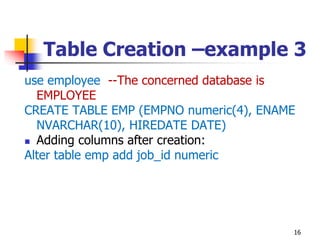
Table Creation –example 3
use employee --The concerned database is
EMPLOYEE
CREATE TABLE EMP (EMPNO numeric(4), ENAME
NVARCHAR(10), HIREDATE DATE)
 Adding columns after creation:
Alter table emp add job_id numeric
16
Viewing the structure of a table
 SQL Server
 EXEC SP_COLUMNS tablename
 or use: SELECT * FROM
INFORMATION_SCHEMA.COLUMNS WHERE
TABLE_NAME = ‘tablename’
 E.g.:
 EXEC SP_COLUMNS EMP
 SELECT * FROM INFORMATION_SCHEMA.COLUMNS
WHERE TABLE_NAME = 'EMP'
 ORACLE
 DESCRIBE tablename
 E.g.: DESCRIBE EMP 17
Altering Table Definitions after
Creation
 Let’s first create a new table and name it EMPS
 EMPS is a copy of EMP (for keeping the EMP data
intact)
 use Employee;
 select * into EMPS from EMP; --MS SQL SERVER
 Create table EMPS as select * from EMP; --ORACLE
 Adding columns:
ALTER TABLE emps ADD (job_id number);
 Modifying columns:
ALTER TABLE emps MODIFY (job_id number(4,2)
default 0.05);
 Dropping columns:
ALTER TABLE emps DROP COLUMN job_id; 18
Dropping and Truncating Tables
 The TRUNCATE TABLE has the effect of
removing every row from a table,
 But leaves the table definition intact.
TRUNCATE TABLE [schema.]tablename;
 DROP TABLE is more drastic in that the
table definition is removed as well.
DROP TABLE [schema.]tablename ;
19
Dropping and Truncating
Tables -Examples
use employee
TRUNCATE TABLE emps
 Data will be deleted but the structure will remain
DROP table EMPS
 data and structure are deleted i.e. the table
EMPS no longer exists
20
DDL effects
 As with a TRUNCATE, SQL will not produce a
warning before the table is dropped, and
furthermore, as with any DDL command
 A DROP is therefore absolutely nonreversible.
 If any session (even your own) has a transaction
in progress that includes a row in the table, DROP
will fail,
 it is also impossible to drop a table that is
referred to in a foreign key constraint defined for
a another table.
 The referenced table (or the constraint) must
be dropped first. 21
Table Constraints
 To impose restrictions on the input of
column values:
 Table constraints are a means by which
the database can
 enforce business rules, and
 guarantee that the data conforms to the
entity-relationship model that defines the
application data structures.
22
Business rules
 A business rule is a brief and precise description of
a policy, procedure, or principle within a specific
organization’s environment
 Using simple language, business rules describe the
main and distinguishing characteristics of the data
as viewed by the company
 Business rules, derived from a detailed description
of an organization’s operations, help to create and
enforce actions within that organization’s
environment.
 When business rules are written properly, they
define entities, attributes, relationships, and
constraints. 23
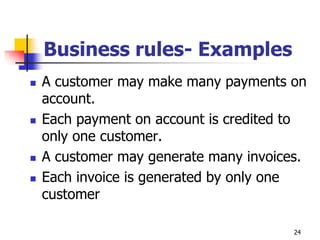
Business rules- Examples
 A customer may make many payments on
account.
 Each payment on account is credited to
only one customer.
 A customer may generate many invoices.
 Each invoice is generated by only one
customer
24
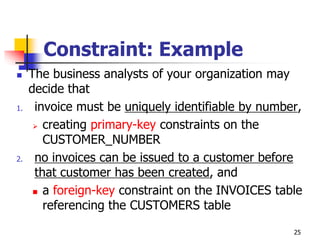
Constraint: Example
 The business analysts of your organization may
decide that
1. invoice must be uniquely identifiable by number,
 creating primary-key constraints on the
CUSTOMER_NUMBER
2. no invoices can be issued to a customer before
that customer has been created, and
 a foreign-key constraint on the INVOICES table
referencing the CUSTOMERS table
25
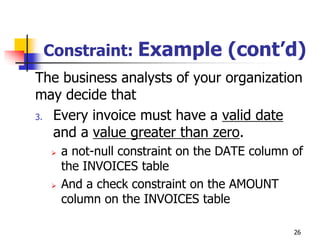
Constraint: Example (cont’d)
The business analysts of your organization
may decide that
3. Every invoice must have a valid date
and a value greater than zero.
 a not-null constraint on the DATE column of
the INVOICES table
 And a check constraint on the AMOUNT
column on the INVOICES table
26
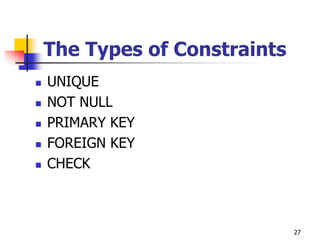
The Types of Constraints
 UNIQUE
 NOT NULL
 PRIMARY KEY
 FOREIGN KEY
 CHECK
27
The Types of Constraints
 NOT NULL: By default, all columns in a
table allow null values.
 Null means the absence of a value.
 A NOT NULL constraint requires that a
column of a table contains no null values.
 For example, you can define a NOT NULL
constraint to require that a value be input in
the last_name column for every row of the
employees table.
28
Constraints (cont’d)
 UNIQUE Key: requires that every value in
a column or set of columns (key) be
unique—that is, no two rows of a table
have duplicate values in a specified column
or set of columns.
 For example, a UNIQUE key constraint is
defined on the idCard column of the Emp
table to disallow rows with duplicate IDs.
29
Constraints (cont’d)
 PRIMARY KEY: Each table in the
database can have at most one PRIMARY
KEY constraint.
 The values in the group of one or more
columns subject to this constraint constitute
the unique identifier of the row.
 In effect, each row is named by its primary key
values.
 Primary key columns do not allow nulls
30
Constraints (cont’d)
 Referential integrity constraints (or
foreign key constraint):
 requires that for each row of a table, the
value in the foreign key matches a value in
a parent key.
31
Constraints (cont’d)
 Check constraints: requires that a
specified condition be true or unknown
for every row of the table.
 If a DML statement results in the
condition of the CHECK constraint
evaluating to false, then the statement is
rolled back
32
Constraints (cont’d)
 When?
 Can be created during table creation or after
 To apply constraints
1. Use SQL command
2. Using DBMS’s GUI
 Right click the field name and set the constraint
 More examples in coming slides
33
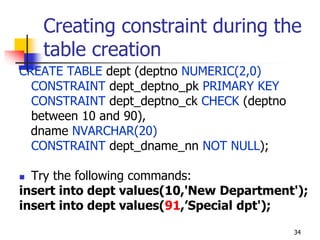
Creating constraint during the
table creation
CREATE TABLE dept (deptno NUMERIC(2,0)
CONSTRAINT dept_deptno_pk PRIMARY KEY
CONSTRAINT dept_deptno_ck CHECK (deptno
between 10 and 90),
dname NVARCHAR(20)
CONSTRAINT dept_dname_nn NOT NULL);
 Try the following commands:
insert into dept values(10,'New Department');
insert into dept values(91,’Special dpt');
34
Creating constraint after
creating the table
ALTER TABLE emp ADD CONSTRAINT
dept_fk FOREIGN KEY (deptno)
REFERENCES dept ON DELETE SET NULL;
 Applied on one column
ALTER TABLE emp ADD CONSTRAINT
chk_JobEmpID CHECK (EMPNO BETWEEN
1 AND 100 AND JOB_ID BETWEEN 1 AND
10);
 Applied on 2 columns (EMPNO and JOB_ID)
35
Applying CHECK Constraint
36
Constraints- Assignment 2
 Write constraints for
 Preventing the user to recruit employees
before 2004 and after the current day
 Prevent the user to recruit employees who
are below 18
 To do not allow some terms to be
considered as employee’s name.
 E.g.: Hitler, Satan,…
37
Adding UNIQUE constraint
38
View (also called Query)
 Views are customized representations of data in
one or more tables or other views.
 In order to show meaningful data
 They can be thought of as stored queries
 They are saved and used when needed
 The query can contain columns, computed
columns, aliases, and aggregate functions from
one or more tables.
 Views do not actually contain data, but instead
they derive their data from the tables upon which
they are based.
 These tables are referred to as the base tables
of the view.
VIEW (cont’d)
 You can use the name of a view anywhere a
table name is expected in a SQL statement
 Views are dynamically updated.
 The view is re-created on demand each time it is
invoked.
 Views provide a level of security in the database
because the view can restrict users to only
specified columns and specified rows in a table.
 For example, you can give the department mgrs a
view of only certain attributes and for the employees
that belong only to their respective departments
 Views may also be used as the basis for reports
40
VIEW (cont’d)
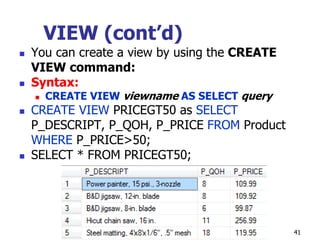
 You can create a view by using the CREATE
VIEW command:
 Syntax:
 CREATE VIEW viewname AS SELECT query
 CREATE VIEW PRICEGT50 as SELECT
P_DESCRIPT, P_QOH, P_PRICE FROM Product
WHERE P_PRICE>50;
 SELECT * FROM PRICEGT50;
41
VIEW (cont’d)
 View with computed columns, aliases, and
aggregate functions
 Use Ch07_SaleCo;
 CREATE VIEW PROD_STATS AS
SELECT V_CODE, SUM(P_QOH*P_PRICE) AS
TOTCOST, MAX (P_QOH) AS MAXQTY, MIN
(P_QOH) AS MINQTY, AVG (P_QOH) AS
AVGQTY
FROM PRODUCT
GROUP BY V_CODE;
42
43
Creating view with GUI
44
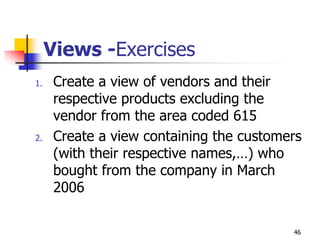
Views -Exercises
1. Create a view of vendors and their
respective products excluding the
vendor from the area coded 615
2. Create a view containing the customers
(with their respective names,…) who
bought from the company in March
2006
46
Stored Procedures
 When you create an application with a DBMS, the
Transact-SQL programming language is the primary
programming interface between your applications and the
database.
 When you use Transact-SQL programs, two methods are
available for storing and executing the programs.
1. You can store the programs locally and create applications that
send the commands to SQL Server and process the results, or
2. you can store the programs as stored procedures in SQL Server
and create applications that execute the stored procedures and
process the results.
47
Stored Procedures (cont’d)
 Stored procedures are similar to procedures in
other programming languages.
 i.e. they do:
 Accept input parameters and return multiple values
in the form of output parameters to the calling
procedure or batch.
 Contain programming statements that perform
operations in the database, including calling other
procedures.
 Return a status value to a calling procedure or batch
to indicate success or failure (and the reason for
failure). 48
Stored Procedures (cont’d)
 Stored Procedures are used to perform a
specific action.
 E.g.: calculating the total of all salary
deductions,
 The salary net will be the salary allowed minus
the total of money took by the employee
during the month.
49
Stored Procedures (cont’d)
 Transfer values in and out through an
argument list
 Are called with the CALL command (even
in applications [java, C#, Visual basic,…])
 procedures can accept input values and
perform conditional statements such as IF
THEN, CASE, and LOOP.
50
Procedures
 Procedures are sets of codes used to
perform a specific action.
 Thus, you write a procedure once and you call
it many times,
 You don’t need to write the procedure’s codes
again, they are saved in database
 Depending to the situation, a procedure may
have more than 100 hundreds lines
 Procedures are called for their execution
 They may receive parameters
51
Example
 Objectives:
 Write a procedure
 Call (execute) a procedure
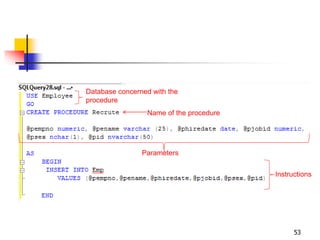
 Writing a procedure for inserting values
into a table
 Whenever we want to insert a record, we no
longer need to type the same instructions for
inserting values
 The next slide explains the procedure and
concerned tables 52
53
Database concerned with the
procedure
Name of the procedure
Parameters
Instructions
 You will find the
created procedure in
the database
objects.
54
Calling a procedure
 In DBMS command editor (where you normally
write INSERT, UPDATE,…)
 You just type:
 EXEC Procedure_name Values
 (Check the example in the next slide)
 In code (visual studio .net, for instance)
 You execute the stored procedure as you do
for DML
55
Calling a procedure in SQL
56
Calling a procedure in .Net
57
Triggers
 A trigger is a set of instructions executed automatically
when a particular event happens in the database.
 These events can be based on a table, such as when a row
is inserted into the table.
 They can also be database events, such as when a user
logs in to the database.
 There are many different events that can be used to fire a
trigger.
 Most can fire the trigger either before the event is allowed
to occur or for the DML triggers (INSERT, UPDATE,
DELETE),
58
Specifying When a Trigger
Fires
 AFTER triggers fire after the triggering action
(INSERT, UPDATE, or DELETE) and after any
constraints are processed.
 You can request AFTER triggers by specifying either
the AFTER or FOR keywords.
 Because the FOR keyword has the same effect as
AFTER, triggers with the FOR keyword are also
classified as AFTER triggers.
60
Syntax
CREATE TRIGGER [ owner.] trigger_name
ON [ owner.] table_name
[WITH ENCRYPTION]
AFTER {INSERT, UPDATE, DELETE}
AS
sql_statements
62
Trigger example
 Create two tables: PRODUCT and
PRODUCT_DETAILS
 The table PRODUCT contains the total
number of each specific product while the
PRODUCT_DETAILS records all purchases,
made in different periods, of a product
 Create a trigger that will automatically
calculate the quantity of a specific product
when it is purchased.
63
Trigger example (cont’d)
 Table PRUDUCT
64
PRODUCTID PRODUCTNA
ME
TOTALQUANTITY
PO1 Computer 10
P02 Printer 6
P03 Speakers 25
Trigger example (cont’d)
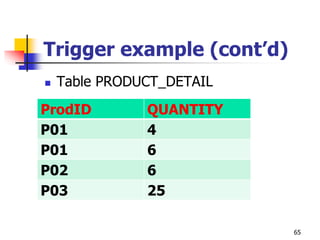
 Table PRODUCT_DETAIL
65
ProdID QUANTITY
P01 4
P01 6
P02 6
P03 25
66
ProdID QUANTITY
P01 4
P01 6
P02 6
P03 25
Example
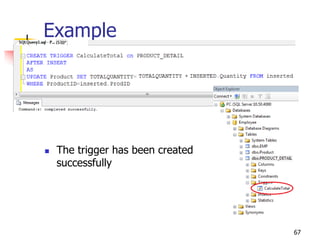
 The trigger has been created
successfully
67
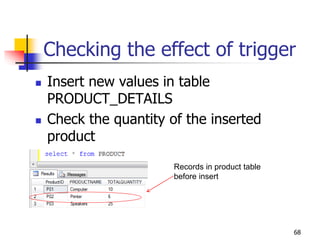
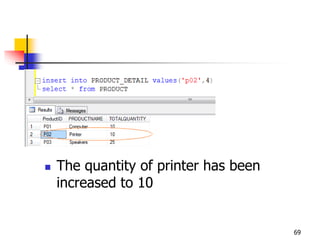
Checking the effect of trigger
 Insert new values in table
PRODUCT_DETAILS
 Check the quantity of the inserted
product
68
Records in product table
before insert
 The quantity of printer has been
increased to 10
69
Logical tables in MSSQL

There are Inserted and Deleted logical tables in SQL
Server.

These tables are automatically created and managed by
SQL Server internally to hold recently inserted, deleted and
updated values during DML operations (Insert, Update,
Delete) on a database table.

Basically, logical tables are used by triggers for the
following purpose:

To test data manipulation errors and take suitable actions based
on the errors.

To find the difference between the state of a table before and after
the data modification and take actions based on that difference.
70
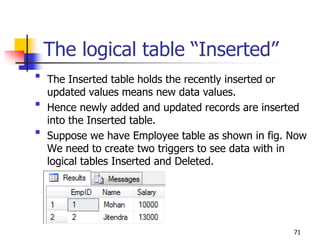
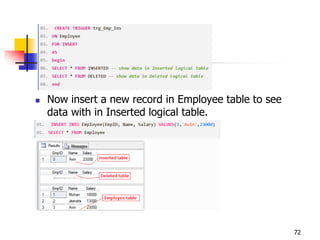
The logical table “Inserted”

The Inserted table holds the recently inserted or
updated values means new data values.

Hence newly added and updated records are inserted
into the Inserted table.

Suppose we have Employee table as shown in fig. Now
We need to create two triggers to see data with in
logical tables Inserted and Deleted.
71
 Now insert a new record in Employee table to see
data with in Inserted logical table.
72
The logical table “Deleted”
 The Deleted table holds the recently
deleted or updated values means old data
values.
 Hence old updated and deleted records are
inserted into the Deleted table
73
74
Summary
 Database objects such as Constraints, stored
procedures, and triggers can be used to increase
the performance of the database
 Their syntaxes depend on the DBMS
 For instance, instead of using INSERTED and DELETED
keywords, ORACLE uses :NEW and :OLD respectively.
 We still need to understand the logic behind the
usage of these database objects
 Students are encouraged to use SQL language
(not only rely on GUI facilities)
75

Unit 2 Chap 4 SQL DDL.pptx

  • 1.
    SQL Part 2: DataDefinition Language (DDL) Chapter 4: Managing database Objects
  • 2.
    DDL  Commands tocreate database objects as well as commands to define access rights to those database objects  Database objects:  Tables  Views  Stored procedures  Constraints  Triggers  Functions  … 2
  • 3.
  • 4.
    Introduction  Data inan DBMS are stored in tables.  Business rules defined by your business analysts are implemented through constraints  A saved selection of table(s) columns are saved in views  Instructions frequently executed are saved in stored procedures  Instructions which are automatically executed are saved in triggers  You can create and manipulate database (or schema) objects using SQL or through a GUI provided (SQL sever management studio, for instance) 4
  • 5.
    Objective  Create andmodify tables and constraints  Create and modify views  Create trigger  Create stored procedures NOTE: You have to create a database and name it EMPLOYEE for the practice of this class 5
  • 6.
    Database creation  Beforeyou can use a new RDBMS, you must complete two tasks:  first, create the database structure  second, create the tables that will hold the end-user data  To complete the first task, the RDBMS creates the physical files that will hold the database  When you create a new database, the RDBMS automatically creates the data dictionary tables to store the metadata and creates a default database administrator 6
  • 7.
    Database creation (cont’d) Creating the physical files that will hold the database means interacting with the operating system and the file systems supported by the operating system.  Therefore, creating the database structure is the one feature that tends to differ substantially from one RDBMS to another  The good news is that it is relatively easy to create a database structure, regardless of which RDBMS you use 7
  • 8.
    Database creation  DifferentDMBSs have different ways  in Oracle you first create a user and grant him privileges of creating object  The user created will be associated with what Oracle calls “SCHEMA” (normally called “database” in other DMBS)  All the database objects (tables, view,…) will be in that schema  In MS SQL Server you create the database  Check the coming slides 8
  • 9.
    Database creation (cont’d) CREATE DATABASE <DatabaseName>;  E.g.:  CREATE DATABASE EMPLOYEE; 9
  • 10.
    Table  Tables arethe basic unit of data storage in database.  They hold all user-accessible data.  A table is a logical entity that makes the reading and manipulation of data intuitive to users.  Physically we copy the database’s data file not the table itself  A table consists of columns and rows, and a table row corresponds to a single record. 10
  • 11.
    Table Creation  Whenyou create a table, you name it and define the set of columns that belong to it.  Each column has a name, and a specific data type (such as NVARCHAR or DATE).  Data types specify the category of values which will be hold in record’s cell  Data type depend on the DBMS you are using  They are in categories: numeric, characters, date, images,…  It is also possible to specify constraints when creating a table;  alternatively, constraints can be added later. 11
  • 12.
    Table Creation –syntax CREATETABLE tableName (column1 datatype [constraint],column2 datatype [constraint], column3 datatype [constraint]), PRIMARY KEY (column1), FOREIN KEY (column2) REFERENCES tableName [constraint]; 12
  • 13.
  • 14.
    Table Creation –example3 use employee --The concerned database is EMPLOYEE CREATE TABLE EMP (EMPNO numeric(4), ENAME NVARCHAR(10), HIREDATE DATE)  Adding columns after creation: Alter table emp add job_id numeric 16
  • 15.
    Viewing the structureof a table  SQL Server  EXEC SP_COLUMNS tablename  or use: SELECT * FROM INFORMATION_SCHEMA.COLUMNS WHERE TABLE_NAME = ‘tablename’  E.g.:  EXEC SP_COLUMNS EMP  SELECT * FROM INFORMATION_SCHEMA.COLUMNS WHERE TABLE_NAME = 'EMP'  ORACLE  DESCRIBE tablename  E.g.: DESCRIBE EMP 17
  • 16.
    Altering Table Definitionsafter Creation  Let’s first create a new table and name it EMPS  EMPS is a copy of EMP (for keeping the EMP data intact)  use Employee;  select * into EMPS from EMP; --MS SQL SERVER  Create table EMPS as select * from EMP; --ORACLE  Adding columns: ALTER TABLE emps ADD (job_id number);  Modifying columns: ALTER TABLE emps MODIFY (job_id number(4,2) default 0.05);  Dropping columns: ALTER TABLE emps DROP COLUMN job_id; 18
  • 17.
    Dropping and TruncatingTables  The TRUNCATE TABLE has the effect of removing every row from a table,  But leaves the table definition intact. TRUNCATE TABLE [schema.]tablename;  DROP TABLE is more drastic in that the table definition is removed as well. DROP TABLE [schema.]tablename ; 19
  • 18.
    Dropping and Truncating Tables-Examples use employee TRUNCATE TABLE emps  Data will be deleted but the structure will remain DROP table EMPS  data and structure are deleted i.e. the table EMPS no longer exists 20
  • 19.
    DDL effects  Aswith a TRUNCATE, SQL will not produce a warning before the table is dropped, and furthermore, as with any DDL command  A DROP is therefore absolutely nonreversible.  If any session (even your own) has a transaction in progress that includes a row in the table, DROP will fail,  it is also impossible to drop a table that is referred to in a foreign key constraint defined for a another table.  The referenced table (or the constraint) must be dropped first. 21
  • 20.
    Table Constraints  Toimpose restrictions on the input of column values:  Table constraints are a means by which the database can  enforce business rules, and  guarantee that the data conforms to the entity-relationship model that defines the application data structures. 22
  • 21.
    Business rules  Abusiness rule is a brief and precise description of a policy, procedure, or principle within a specific organization’s environment  Using simple language, business rules describe the main and distinguishing characteristics of the data as viewed by the company  Business rules, derived from a detailed description of an organization’s operations, help to create and enforce actions within that organization’s environment.  When business rules are written properly, they define entities, attributes, relationships, and constraints. 23
  • 22.
    Business rules- Examples A customer may make many payments on account.  Each payment on account is credited to only one customer.  A customer may generate many invoices.  Each invoice is generated by only one customer 24
  • 23.
    Constraint: Example  Thebusiness analysts of your organization may decide that 1. invoice must be uniquely identifiable by number,  creating primary-key constraints on the CUSTOMER_NUMBER 2. no invoices can be issued to a customer before that customer has been created, and  a foreign-key constraint on the INVOICES table referencing the CUSTOMERS table 25
  • 24.
    Constraint: Example (cont’d) Thebusiness analysts of your organization may decide that 3. Every invoice must have a valid date and a value greater than zero.  a not-null constraint on the DATE column of the INVOICES table  And a check constraint on the AMOUNT column on the INVOICES table 26
  • 25.
    The Types ofConstraints  UNIQUE  NOT NULL  PRIMARY KEY  FOREIGN KEY  CHECK 27
  • 26.
    The Types ofConstraints  NOT NULL: By default, all columns in a table allow null values.  Null means the absence of a value.  A NOT NULL constraint requires that a column of a table contains no null values.  For example, you can define a NOT NULL constraint to require that a value be input in the last_name column for every row of the employees table. 28
  • 27.
    Constraints (cont’d)  UNIQUEKey: requires that every value in a column or set of columns (key) be unique—that is, no two rows of a table have duplicate values in a specified column or set of columns.  For example, a UNIQUE key constraint is defined on the idCard column of the Emp table to disallow rows with duplicate IDs. 29
  • 28.
    Constraints (cont’d)  PRIMARYKEY: Each table in the database can have at most one PRIMARY KEY constraint.  The values in the group of one or more columns subject to this constraint constitute the unique identifier of the row.  In effect, each row is named by its primary key values.  Primary key columns do not allow nulls 30
  • 29.
    Constraints (cont’d)  Referentialintegrity constraints (or foreign key constraint):  requires that for each row of a table, the value in the foreign key matches a value in a parent key. 31
  • 30.
    Constraints (cont’d)  Checkconstraints: requires that a specified condition be true or unknown for every row of the table.  If a DML statement results in the condition of the CHECK constraint evaluating to false, then the statement is rolled back 32
  • 31.
    Constraints (cont’d)  When? Can be created during table creation or after  To apply constraints 1. Use SQL command 2. Using DBMS’s GUI  Right click the field name and set the constraint  More examples in coming slides 33
  • 32.
    Creating constraint duringthe table creation CREATE TABLE dept (deptno NUMERIC(2,0) CONSTRAINT dept_deptno_pk PRIMARY KEY CONSTRAINT dept_deptno_ck CHECK (deptno between 10 and 90), dname NVARCHAR(20) CONSTRAINT dept_dname_nn NOT NULL);  Try the following commands: insert into dept values(10,'New Department'); insert into dept values(91,’Special dpt'); 34
  • 33.
    Creating constraint after creatingthe table ALTER TABLE emp ADD CONSTRAINT dept_fk FOREIGN KEY (deptno) REFERENCES dept ON DELETE SET NULL;  Applied on one column ALTER TABLE emp ADD CONSTRAINT chk_JobEmpID CHECK (EMPNO BETWEEN 1 AND 100 AND JOB_ID BETWEEN 1 AND 10);  Applied on 2 columns (EMPNO and JOB_ID) 35
  • 34.
  • 35.
    Constraints- Assignment 2 Write constraints for  Preventing the user to recruit employees before 2004 and after the current day  Prevent the user to recruit employees who are below 18  To do not allow some terms to be considered as employee’s name.  E.g.: Hitler, Satan,… 37
  • 36.
  • 37.
    View (also calledQuery)  Views are customized representations of data in one or more tables or other views.  In order to show meaningful data  They can be thought of as stored queries  They are saved and used when needed  The query can contain columns, computed columns, aliases, and aggregate functions from one or more tables.  Views do not actually contain data, but instead they derive their data from the tables upon which they are based.  These tables are referred to as the base tables of the view.
  • 38.
    VIEW (cont’d)  Youcan use the name of a view anywhere a table name is expected in a SQL statement  Views are dynamically updated.  The view is re-created on demand each time it is invoked.  Views provide a level of security in the database because the view can restrict users to only specified columns and specified rows in a table.  For example, you can give the department mgrs a view of only certain attributes and for the employees that belong only to their respective departments  Views may also be used as the basis for reports 40
  • 39.
    VIEW (cont’d)  Youcan create a view by using the CREATE VIEW command:  Syntax:  CREATE VIEW viewname AS SELECT query  CREATE VIEW PRICEGT50 as SELECT P_DESCRIPT, P_QOH, P_PRICE FROM Product WHERE P_PRICE>50;  SELECT * FROM PRICEGT50; 41
  • 40.
    VIEW (cont’d)  Viewwith computed columns, aliases, and aggregate functions  Use Ch07_SaleCo;  CREATE VIEW PROD_STATS AS SELECT V_CODE, SUM(P_QOH*P_PRICE) AS TOTCOST, MAX (P_QOH) AS MAXQTY, MIN (P_QOH) AS MINQTY, AVG (P_QOH) AS AVGQTY FROM PRODUCT GROUP BY V_CODE; 42
  • 41.
  • 42.
  • 44.
    Views -Exercises 1. Createa view of vendors and their respective products excluding the vendor from the area coded 615 2. Create a view containing the customers (with their respective names,…) who bought from the company in March 2006 46
  • 45.
    Stored Procedures  Whenyou create an application with a DBMS, the Transact-SQL programming language is the primary programming interface between your applications and the database.  When you use Transact-SQL programs, two methods are available for storing and executing the programs. 1. You can store the programs locally and create applications that send the commands to SQL Server and process the results, or 2. you can store the programs as stored procedures in SQL Server and create applications that execute the stored procedures and process the results. 47
  • 46.
    Stored Procedures (cont’d) Stored procedures are similar to procedures in other programming languages.  i.e. they do:  Accept input parameters and return multiple values in the form of output parameters to the calling procedure or batch.  Contain programming statements that perform operations in the database, including calling other procedures.  Return a status value to a calling procedure or batch to indicate success or failure (and the reason for failure). 48
  • 47.
    Stored Procedures (cont’d) Stored Procedures are used to perform a specific action.  E.g.: calculating the total of all salary deductions,  The salary net will be the salary allowed minus the total of money took by the employee during the month. 49
  • 48.
    Stored Procedures (cont’d) Transfer values in and out through an argument list  Are called with the CALL command (even in applications [java, C#, Visual basic,…])  procedures can accept input values and perform conditional statements such as IF THEN, CASE, and LOOP. 50
  • 49.
    Procedures  Procedures aresets of codes used to perform a specific action.  Thus, you write a procedure once and you call it many times,  You don’t need to write the procedure’s codes again, they are saved in database  Depending to the situation, a procedure may have more than 100 hundreds lines  Procedures are called for their execution  They may receive parameters 51
  • 50.
    Example  Objectives:  Writea procedure  Call (execute) a procedure  Writing a procedure for inserting values into a table  Whenever we want to insert a record, we no longer need to type the same instructions for inserting values  The next slide explains the procedure and concerned tables 52
  • 51.
    53 Database concerned withthe procedure Name of the procedure Parameters Instructions
  • 52.
     You willfind the created procedure in the database objects. 54
  • 53.
    Calling a procedure In DBMS command editor (where you normally write INSERT, UPDATE,…)  You just type:  EXEC Procedure_name Values  (Check the example in the next slide)  In code (visual studio .net, for instance)  You execute the stored procedure as you do for DML 55
  • 54.
  • 55.
  • 56.
    Triggers  A triggeris a set of instructions executed automatically when a particular event happens in the database.  These events can be based on a table, such as when a row is inserted into the table.  They can also be database events, such as when a user logs in to the database.  There are many different events that can be used to fire a trigger.  Most can fire the trigger either before the event is allowed to occur or for the DML triggers (INSERT, UPDATE, DELETE), 58
  • 57.
    Specifying When aTrigger Fires  AFTER triggers fire after the triggering action (INSERT, UPDATE, or DELETE) and after any constraints are processed.  You can request AFTER triggers by specifying either the AFTER or FOR keywords.  Because the FOR keyword has the same effect as AFTER, triggers with the FOR keyword are also classified as AFTER triggers. 60
  • 58.
    Syntax CREATE TRIGGER [owner.] trigger_name ON [ owner.] table_name [WITH ENCRYPTION] AFTER {INSERT, UPDATE, DELETE} AS sql_statements 62
  • 59.
    Trigger example  Createtwo tables: PRODUCT and PRODUCT_DETAILS  The table PRODUCT contains the total number of each specific product while the PRODUCT_DETAILS records all purchases, made in different periods, of a product  Create a trigger that will automatically calculate the quantity of a specific product when it is purchased. 63
  • 60.
    Trigger example (cont’d) Table PRUDUCT 64 PRODUCTID PRODUCTNA ME TOTALQUANTITY PO1 Computer 10 P02 Printer 6 P03 Speakers 25
  • 61.
    Trigger example (cont’d) Table PRODUCT_DETAIL 65 ProdID QUANTITY P01 4 P01 6 P02 6 P03 25
  • 62.
  • 63.
    Example  The triggerhas been created successfully 67
  • 64.
    Checking the effectof trigger  Insert new values in table PRODUCT_DETAILS  Check the quantity of the inserted product 68 Records in product table before insert
  • 65.
     The quantityof printer has been increased to 10 69
  • 66.
    Logical tables inMSSQL  There are Inserted and Deleted logical tables in SQL Server.  These tables are automatically created and managed by SQL Server internally to hold recently inserted, deleted and updated values during DML operations (Insert, Update, Delete) on a database table.  Basically, logical tables are used by triggers for the following purpose:  To test data manipulation errors and take suitable actions based on the errors.  To find the difference between the state of a table before and after the data modification and take actions based on that difference. 70
  • 67.
    The logical table“Inserted”  The Inserted table holds the recently inserted or updated values means new data values.  Hence newly added and updated records are inserted into the Inserted table.  Suppose we have Employee table as shown in fig. Now We need to create two triggers to see data with in logical tables Inserted and Deleted. 71
  • 68.
     Now inserta new record in Employee table to see data with in Inserted logical table. 72
  • 69.
    The logical table“Deleted”  The Deleted table holds the recently deleted or updated values means old data values.  Hence old updated and deleted records are inserted into the Deleted table 73
  • 70.
  • 71.
    Summary  Database objectssuch as Constraints, stored procedures, and triggers can be used to increase the performance of the database  Their syntaxes depend on the DBMS  For instance, instead of using INSERTED and DELETED keywords, ORACLE uses :NEW and :OLD respectively.  We still need to understand the logic behind the usage of these database objects  Students are encouraged to use SQL language (not only rely on GUI facilities) 75

Editor's Notes

  • #38 To avoid the usage of some terms, we can use the NOT IN operator
  • #44 View’s columns are accessed in the same way we access table columns
  • #58 Draw the GUI of that table