Introduction to Computer
The term "computer" is derived from the Latin word
computare, which means "to calculate."
A computer is a machine capable of performing
calculations at very high speed.
It is an electronic device that can accept data from users
as input, process and manipulate it, store the data for
future use, and provide output as per the user's
requirements.
Essentially, a computer is a programmable computing
machine and cannot perform any tasks without
instructions.
3.
Characteristics of Computer
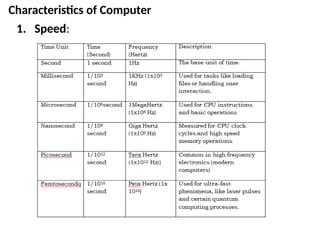
1.Speed:
- Speed is the amount of time taken by the computer to
complete a task or operation.
- Computers can process data in a fraction of a second,
whereas human would require significantly more time to
perform the same task.
- Modern computers perform a task in picoseconds (1/1012
second).
- The speed of a computer is measured in Hertz (Hz) such as
Hertz(Hz), Kilo Hertz (KHz), Mega Hertz (MHz), Giga Hertz
(GHz), Tera Hertz (THz), which represents the number of
the cycles or operations a processor can perform in one
second.
- A higher frequency (e.g., gigahertz or GHz) indicates a
faster processor, lead to improved performance.
Characteristics of Computer
2.Accuracy:
- Accuracy refers to the degree to which a computer’s
operations and outputs are correct and exact.
- Computers are designed to perform calculations with a
high degree of accuracy, but the level of accuracy can
depend on the hardware and the precision of the data.
- Computer is almost 100% accurate machine. Unlike
humans, computers do not make mistakes in their
calculations or processes as long as the input data and
instructions are correct.
- However, their accuracy can be affected by factors such as
wrong instructions, incorrect data, or hardware
malfunctions. The principle of GIGO (Garbage In, Garbage
Out) emphasizes that computers will only produce correct
results if the input data is accurate and meaningful.
6.
Characteristics of Computer
3.Dilligence:
- Diligence refers to the ability to perform tasks consistently
and without deviation over time.
- Computers can perform their task continuously without
being bored and tired.
- Unlike humans, who are subject to physical and mental
fatigue, computers are free from monotony and lack of
concentration. Humans may not be able to perform
repetitive task with the same speed, accuracy, and
enthusiasm over time.
- However, computers can perform tasks repeatedly with
same speed and accuracy, even while handling complex
operations over extended periods of time.
7.
Characteristics of Computer
4.Versatile:
- Computers are versatile in nature. They can perform wide
range of tasks, from simple mathematical calculations to
highly complex and logical evaluations.
- Computers can be applied in almost any area. They can be
used for entertainment, such as listening to music and
watching videos.
- They can also be used in schools and colleges to maintain
records of students and teachers. Hospitals can use
computers to store data about patients and medicine.
- They can also be applied in fields like science, technology,
business, finance, communication, and so on.
8.
Characteristics of Computer
5.Storage Capacity:
- Storage capacity refers to a computer’s ability to store
both data and programs, either temporarily or
permanently.
- Computer has vast storage capacities that can be retrieved
at any time and at very fast speed.
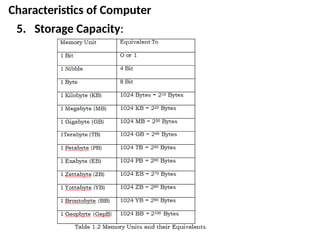
- Storage capacity is measured in units such as bytes,
kilobytes, megabytes, gigabytes, and so on. The smallest
storage unit is a bit (binary digit), which represents one of
two values: 0 or 1.
Characteristics of Computer
6.Wordlength:
- Word length refers to the number of bits (or binary
digits) that can be processed by the computer’s
processor in a single operation.
- It determines the size of the data that the CPU can
handle at once and is typically measured in bits (e.g.,
8 bit, 16-bit, 32-bit, 64-bit).
- A larger word length enhances the computer’s
processing power, enabling it to execute complex
instructions and calculations more efficiently,
enhancing its ability to process complex instructions
and calculations more efficiently, thereby increasing
the system's overall processing capability and larger
memory addressing capabilities.
11.
Characteristics of Computer
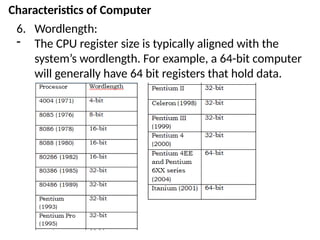
6.Wordlength:
- The CPU register size is typically aligned with the
system’s wordlength. For example, a 64-bit computer
will generally have 64 bit registers that hold data.
12.
Characteristics of Computer
7.Automation:
- Automation refers to the ability of a machine to
operate independently without human intervention.
- Computers are considered automatic machines
because, once given a task, they can execute it to
completion without further human intervention.
- However, since computers are machines, they cannot
initiate tasks or solve problems on their own. Instead,
they require instructions in the form of coded
commands that specify exactly how the computer
should carry out a particular job.
13.
Characteristics of Computer
8.No Intelligence:
- Computers do not possess intelligence on their own.
Unlike humans, computers cannot think, reason, or
evaluate situations.
- They are unable to distinguish between right and
wrong or assess the logical correctness of their
actions. Instead, they follow instructions step-by-step,
executing tasks exactly as directed, regardless of the
outcome or its implications.
14.
Application areas ofcomputer
1. Education
- Interactive learning through multimedia presentation,
virtual labs, and e-learning platforms
- During COVID-19 pandemic computer became
backbone of remote learning and digital classroom
ensuring continuity in education.
- With e-learning platfroms, students are able to learn at
their own pace and convinence
- Educational resources like e-books, videos and
interactive platform like Moodle and Google classroom
enhance delivery of assignments, feedback, and
collaborative learning.
- Computers also support administrative tasks like
tracking attendance, analyzing student performance
and managing schedules for classes, exams, events.
15.
Application areas ofcomputer
2. Health
- EHR (Electronic Health Records) systems is used to store
and manage patient data including medical history,
medications, allergies, test results and helps to improve
accuracy and accessibility of patient information and
better coordination among healthcare providers.
- Used in medical imaging technologies like x-ray, CT scans,
MRI’s and ultrasound and aid in diagnosis and treatment
planning.
- Telemedicine facilitated by video conferencing, remote
monitoring devices and electronic data exchange helps
remote consultations between patient and healthcare
provides and improve access to care fro remote and
underserved areas
16.
Application areas ofcomputer
3. Bank
- Computer enhanced operational efficiency, improving
customer service, and enabling innovative financial
services.
- With the help of computers banks can automate and
streamline routine banking operations such as account
management, loan processing and payrolls by reducing
costs, time and errors.
- Accessibility to banking services through online and
mobile banking where customers can perform
transactions, access account details and make
payment anytime without visiting a bank.
17.
Application areas ofcomputer
4. Agriculture
- Computer has transformed traditional farming practices
through automation, data analysis, and global
connectivity.
- With the help of automated system, now framers can
optimize water usage based on real-time soil moisture
data, prevent over or under watering, control pesticide
applications.
- Computer also assist in monitoring livestock health,
managing feeding schedules, tracking breeding program.
- Improve productivity by using data analysis tools to
identify problematic seeds or crops early, helps farmers to
prepare for natural disasters like droughts and floods.
18.
Application areas ofcomputer
5. Business
- Computer can be used in data management such as to
store, organize, manage vast amounts of information like
customer records, financial data, sales transactions.
- Business analytics tools empowers business to analyze
market trends, customer behavior, sales patterns,
facilitate informed decision making and strategic planning.
- It can be used for marketing and advertising by powering
digital campaigns social media strategies, email
marketing, search engine optimization,
- Helps to track stock levels, monitor sales, automate
restocking processes, minimizing errors and ensuring
better control over inventory.
19.
Application areas ofcomputer
Other areas:
6. Entertainment
7. Communication
8. Science and reasearch
20.
Types of Computer
Onthe basis of power and size
1. Super computer
- Super computers are the fastest, the most expensive and the
most powerful computers especially design to process complex
and time consuming calculations for scientific jobs and research.
- The speed of a supercomputer is generally measured in FLOPS
(Floating Point Operations Per Second). Some faster
supercomputers can perform trillions of calculations per second.
- It can process large amount of data. Super computers have large
memories with high processing speed. Super computers are built
by interconnecting thousands of processors that can work in
parallel.
- They can process trillions of operations per second.
- These computers have multiple central processing unit that can
process multiple instructions at a time.
- Examples: CRAY-XMP-14, CRAY-XT5, IBM Deep Blue, etc.
21.
Types of Computer
Onthe basis of power and size
1. Super computer
Application areas of super computer are:
- It can be used in weather forecasting and climate
research.
- It can be used in military system and defense.
- It can be used in analyzing geographical data (e.g. in
petro chemical purpose)
- It can be used in electronic design, nuclear energy
research
- It can be used in aircraft and spacecraft industry to
design and to stimulate airflow at different speed and
attitude.
22.
Types of Computer
Onthe basis of power and size
2. Mainframe computer
- Mainframe computers are multi-user (100 to 1000’s of users
can work at a time), multi programming and high performance
computers.
- They operate at a very high speed, have very large storage
capac ity and can handle the workload of many users.
- Mainframe computers are large and powerful systems
generally used in centralized databases.
- The user accesses the mainframe computer via a terminal that
may be a dumb terminal, an intelligent terminal or a PC.
- A dumb terminal cannot store data or do processing of its own.
It has the input and output device only.
- An intelligent terminal has the input and output device, can do
processing, but, cannot store data of its own.
- The dumb and the intelligent terminal use the processing
power and the storage facility of the mainframe computer.
23.
Types of Computer
Onthe basis of power and size
2. Mainframe computer
- Mainframe computers are used in organizations like banks or
companies, where many people require frequent access to the
same data.
- Some examples of mainframes are IBM 1401, ICL 39 series,
IBM 4300 series, CDC 6600 and IBM ES000 series.
24.
Types of Computer
Onthe basis of power and size
2. Mainframe computer
Applications areas of mainframe computer
- It can be used as a server in multinational companies to store
huge data and information of its branches from all over the
world.
- It can be used for communication purpose, telecoms use
mainframe computer to provide network services, television
channels use mainframe computer to broadcast it services and
for live broadcasting.
- This can also be used scientific research. Film industry can use
mainframe computer to give animations.
- It can be used in e-business and e-commerce to perform
business function and exchange money over the internet. It
can be used to process millions of customer orders, performs
financial transactions, pays employee at a very fast rate with
high storage.
25.
Types of Computer
Onthe basis of power and size
3. Minicomputer
- Minicomputer is a general purpose computer which is smaller
than mainframe computers.
- It has a slower operating speed, smaller backing storage, limited
hardware and lesser memory capacity compared to mainframe
computer.
- They do not require a strict environmental control as compared to
mainframe computers.
- They usually designed to support tens to hundreds of users to
operate this computer at a time depending on configuration and
usage. Examples: AS/400, AP-3, Prime series.
Application areas of mini-computer
- Mini-comptuers are used in medium sized organization for the
processing of payrolls, financial accounts, sales analysis,
production planning, etc. The organization like Nepal Rastra
Bank, National computer center, etc uses mini-computer.
26.
Types of Computer
Onthe basis of power and size
4. Microcomputer
- Microcomputers are small, low-cost and single-user digital
computer.
- They consist of CPU, input unit, output unit, storage unit and
the software.
- Although microcomputers are stand alone machines, they can
be connected together to create a network of computers that
can serve more than one user.
- IBM PC based on Pentium microprocessor and Apple
Macintosh are some examples of microcomputers.
- Microcomputers include desktop computers, note book
computers or laptop, tablet computer, handheld computer,
smart phones and notebook,
27.
Types of Computer
Onthe basis of working principle
1. Digital Computer
-Computers which work on discontinuous or discrete data is digital
computer
-This computer converts the data into binary format 0 and 1 where
0 denotes OFF and 1 denotes ON state which uses binary digits 0s
and 1s are called digital computer.
-They convert the data into binary digits (0s and 1s) and all
operations are carried out on these digits at extremely fast rate.
-Digital computers are much faster than analog computers and far
more accurate. Digital computers have high storage or memory.
-Digital computers are multipurpose and programmable and hence
used for general purpose( can be used in many different
application). Example: Digital Clock, personal computer (PC) etc.
28.
Types of Computer
Onthe basis of working principle
2. Analog Computer
- The computer which is used to measure physical
magnitudes(such as-voltage , temperature, current and
pressure) is called analog computer.
- Analog computers works with the natural or physical values. i.e.
these computers works with continuous data.
- The accuracy of analog computer is low and there is very low or
do not have storage or memory.
- Analog computer operates by measuring rather than counting.
Analog computers are mostly used in scientific and engineering
applications .E.g:- speedometer, voltmeter etc.
29.
Types of Computer
Onthe basis of brands
1. IBM PC
- IBM stands for International Business Machine Personal
Computer.
- It is the largest computers and other electronic equipments
manufacturing company.
- It was established in 1924 in USA by Herman Hollerith.
- It uses its own principle and components to manufacture the
computer. Since it uses its own components, it is a branded
computer.
- The processing speed of these computer is very high. IBM
computers are more reliable and durable than other
computers.
30.
Types of Computer
Onthe basis of brands
2. IBM Compatible
- IBM compatible computer are manufactured by other
computers manufacturing company by using the principle of
IBM.
- The internal architecture of IBM compatible is similar to IBM PC
so it can perform all the task that IBM PC does.
- These computers are less reliable and durable compared to IBM
PC.
- The processing speed is slower than IBM PC so it is cheaper
compared to IBM PC.
31.
Types of Computer
Onthe basis of brands
3. Apple/Macintosh:
- It is one of the largest computer manufacturing company of
USA.
- This company was established by Steve Jobs and his team in
1976.
- The internal architecture of these computers are totally
different from that of IBM PC.
- They have their own software. In 1984, Apple Company
manufactured a new brand of computer and named as
Macintosh which uses graphical user interface.
- Apple/Macintosh computers uses their own operating system
called MacOS.
32.
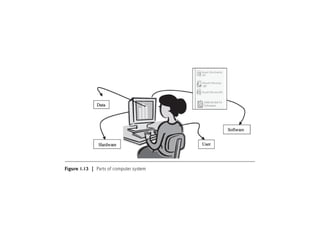
The computer System
-Computer is an electronic device that accepts data as input,
processes the input data by per forming mathematical and
logical operations on it, and gives the desired output.
- The computer system consists of four parts:
a. Hardware,
b. Software,
c. Data, and
d. Users.
33.
The computer System
a.Hardware: Hardware consists of the mechanical parts that
make up the computer as a machine. The hardware consists of
physical devices of the computer. The devices are required for
input, output, storage and processing of the data. Keyboard,
monitor, hard disk drive, floppy disk drive, printer, processor
and motherboard are some of the hardware devices.
b. Software: Software is a set of instructions that tells the
computer about the tasks to be performed and how these tasks
are to be performed. Program is a set of instructions, written in
a language understood by the computer, to perform a specific
task. A set of programs and documents are collectively called
software. The hardware of the computer system cannot
perform any task on its own. The hardware needs to be
instructed about the task to be performed. Software instructs
the computer about the task to be performed. The hardware
carries out these tasks. Different software can be loaded on the
same hard ware to perform different kinds of tasks.
34.
The computer System
c.Data: Data are isolated values or raw facts, which by
themselves have no much significance. For example, the data
like 29, January, and 1994 just represent values. The data is pro
vided as input to the computer, which is processed to generate
some meaningful information. For example, 29, January and
1994 are processed by the computer to give the date of birth of
a person.
d. Users: Users are people who write computer programs or
interact with the computer. They are also known as skinware,
liveware, humanware or peopleware. Programmers, data entry
operators, system analyst and computer hardware engineers
fall into this category.
36.
Computer architecture
- Computerarchitecture is the functional and conceptual design
of computer system that defines its structure, behavior and
capabilities. It specifies what the computer does, including
instruction set, data types, addressing modes, registers,
memory hierarchy.
- As a blueprint of the system, it provides the foundation for
hardware design and guides how software interacts with
hardware.
- It focuses on high level design aspects essential for system
performance, efficiency, and functionality.
-
37.
Computer Organization
- Computerorganization refers to the structural relationship and
physical implementation of a computer system.
- It describe how the physical components of a computer system
are arranged, connected, and interact with each other to
perform computational tasks.
- It is concerned with low level implementation of the system
defined by the architecture, specifying how components work
together to carry out operations effectively.
- It includes details like circuit designs, control signals, memory
types, data paths, peripheral devices.
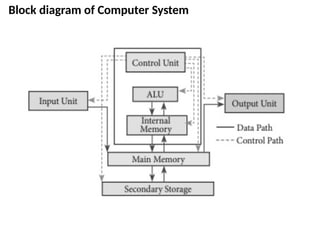
Input/Output Unit
- Theuser interacts with the computer via the I/O unit.
- The Input unit accepts data from the user and the Output unit
provides the processed data i.e. the information to the user.
- The Input unit converts the data that it accepts from the user,
into a form that is understandable by the computer.
- Similarly, the Output unit provides the output in a form that is
understandable by the user.
- The input is provided to the computer using input devices like
keyboard, trackball and mouse.
- Some of the commonly used output devices are monitor and
printer.
40.
Central Processing Unit
-Central Processing Unit (CPU) or the processor is also often called
the brain of computer.
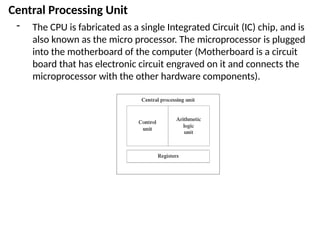
- CPU consists of Arithmetic Logic Unit (ALU) and Control Unit (CU).
- In addition, CPU also has a set of registers which are temporary
storage areas for holding data, and instructions.
- ALU performs the arithmetic and logic operations on the data that
is made available to it.
- CU is responsible for organizing the processing of data and
instructions. CU controls and coordinates the activity of the other
units of computer.
- CPU uses the registers to store the data, instructions during
processing.
- For processing, CPU gets data and instructions from the memory.
It interprets the program instructions and performs the arithmetic
and logic operations required for the processing of data. Then, it
sends the processed data or result to the memory.
- CPU also acts as an administrator and is responsible for
supervising operations of other parts of the computer.
41.
Central Processing Unit
-The CPU is fabricated as a single Integrated Circuit (IC) chip, and is
also known as the micro processor. The microprocessor is plugged
into the motherboard of the computer (Motherboard is a circuit
board that has electronic circuit engraved on it and connects the
microprocessor with the other hardware components).
42.
Arithmetic and LogicUnit
- The ALU is responsible for performing arithmetic operations (like
addition, subtraction, multiplication, division), logical operations
(like ANDing, ORing), and comparison (like greater than, less than,
equal to, not equal to between two operand).
- To perform these operations operands from main memory are
brought into the high speed storage elements called registers of
the process.
43.
Control Unit
- Controlunit co-ordinates and controls the activities amongst the
functional units. The basic function of control unit is to fetch
instructions stored in main memory, identify the oprations and the
devices involved in it and accordingly generate control signals to
execute the desiredd operations.
- CU uses control signals or timing signals to determine when a
given action is to take place.
- It controls I/O operations, data transfer between the processor,
memory and I/O devices using timing signals.
- CU tells when to fetch the data and instructions, what to do,
where to store the results, the sequencing of events during
processing, etc.
44.
Registers
- Registers arehigh speed storage areas within the CPU, but we
have the least storage capacity. Registers are not referenced by
their address, but are directly accessed and manipulated by the
CPU during instruction execution.
- Registers store data, instructions, addresses, and intermediate
results of processing. Registers are often referred to as CPU’s
working memory.
- The number of registers and the size of each registers in CPU helps
to determine the power and the speed of a CPU. The size of
register also called word size. The size of register may be 8, 16, 32,
64 bits.
45.
Memory Unit
- Memoryis a large array of words or bytes, each with its own
address. It is used to store programs and data.
- There are mainly two types of memory: primary memory and
secondary memory.
Primary Memory
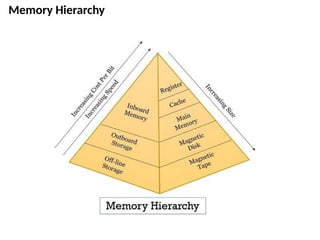
- Primary memory aka main memory is a fast memory used for
the storage of programs and data that is currently processed by
the CPU. It is also responsible for holding intermediate data
transferred between CPU and I/O devices.
- The main memory is a semiconduction memory.
- It is the only memory that is directly connected with CPU and
able to send and receive data and information directly from the
processor. RAM, ROM, cache memory, etc are the examples of
primary memory.
46.
Secondary Memory
- Thesecondary memory stores data and instructions permanently.
- The information can be stored in secondary memory for a long
time (years), and is generally permanent in nature unless erased
by the user.
- It is a non-volatile memory.
- It provides back-up storage for data and instructions.
- Hard disk drive, floppy drive and optical disk drives are some
examples of storage devices.
- The data and instructions that are currently not being used by
CPU, but may be required later for processing, are stored in
secondary memory.
- Secondary memory has a high storage capacity than the primary
memory.
- Secondary memory is also cheaper than the primary memory
- Secondary memory uses magnetic and optical technology for
storage, however, semiconductor technology has also been used.
#1 Introduction to computers,
Types of Computers
Applications of computer
Basic Computer Architecture
#2 Computers have become the digital backbone of our society, supporting everything from education and healthcare to finance and entertainment. Our lives are directly or indirectly affected by the computer. From the moment we wake up to the time we asleep, they shape our experiences, streamline our work and enrich our leisure activities, making them more engaging and fulfilling. This reliance on technology is driven by our dependence on the storage, flow and processing of vast amounts of data and information, which can only be possible with the help of computer. As users, it is essential to understand the main components of the computer, its functions, and how these components interconnect to operate smoothly. The purpose of this chapter is to introduce you to the computer, including its historical background, types, and different hardware components.
#3 As we have already discussed, computers have become an essential part of our lives, transforming the way we work, learn, and communicate. Their widespread use and undeniable impact result from distinctive characteristics. Let's explore some key characteristics/features that make computers such an essential tools in today's world.


![Topic 1 Using Computer Essential concept [29-8-2023].pdf](https://cdn.slidesharecdn.com/ss_thumbnails/topic1usingcomputeressentialconcept29-8-2023-231015035522-7d409e52-thumbnail.jpg?width=640&height=640&fit=bounds)


