Introduction to Web Technology (EIT-401)1
Prepared By: Abhishek kesharwani Lecturer, United College of Engineering and Research, Allahabad
Unit- I Introduction and Web Development Strategies
Lecture No. 1
1. World Wide Web:
The World Wide Web is a system of interlinked hypertext documents accessed
via the Internet. Web is a huge collection of pages of information linked to each
other around the globe.
History of WWW:
WWW is created by Sir Tim Berners Lee in 1989 at CERN in Geneva.
In 1990, the first text only browsers were setup and CERN scientist
could access hypertext files and other information at CERN. HTML was
based on a subset of the standard generalized markup language (SGML).
To transfer HTML document to remote sites a new protocol was devised
called HTTP (Hyper Text Transfer Protocol).
In the fall of 1991, conference goes around the world started hearing about
the promise but sparks still were not flying.
In 1993, there are only about 50 websites world wide. A browser that
allowed user to take advantage of the web’s graphical capabilities was
developed at the National center for Super Computing application
(NCSA). NCSA called the browser Mosaic.
2. Protocols Governing Web:
other.
Protocol: A protocol is a set of rules that is used to communicate applications to each
OR
A protocol is the interface required for communicating the different applications.
Introduction to Web Technology (EIT-401)2
Prepared By: Abhishek kesharwani Lecturer, United College of Engineering and Research, Allahabad
Classification:
a. HTTP
b. TCP/IP
c. FTP
d. E-MAIL
e. TELNET
A. HTTP: HTTP is the primary protocol used to distribute information on the web.
Initial HTTP 0.9 does not allow for content typing and does not have provisions for
supplying meta-information.
Content Typing: To identify the type of data being transferred.
Meta Information: It is supplemental data, such as environment variables that identify
the client’s computer
Current version is HTTP 1.0
B. TCP/IP: It is a set of rules that an application can use to package its information for
sending across the networks of networks.
C. FTP: It is used to transfer the files over networks.
FTP uses TCP to create a virtual connection for control information and then creates a
separate TCP connection for data transfers. The control connection uses an image of
the TELNET protocol to exchange commands and messages between hosts.
D. Simple Mail Transfer Protocol (SMTP) is an Internet standard for electronic
mail (e-mail) transmission across Internet Protocol (IP) networks.
E. Telnet: Telnet lets you remotely log into another system and browse files and directories
on that remote system.
Introduction to Web Technology (EIT-401)3
Prepared By: Abhishek kesharwani Lecturer, United College of Engineering and Research, Allahabad
Lecture No. 2
3. Website: A website is simply a collection of interlinked web pages.
Classification: A. Corporate Website B. Individual website
A. Corporate Website:
i. In this, there is certain no. of persons, who develop their website for a
particular organization.
ii. The corporate website are formed when group of people have common
interest and objective.
iii. The purpose of this website is to convey the information of organization to all
over the world.
B. Individual website: It is just like profile management system. In this type of website
an individual wants to develop website for h-projection, career growth etc.
4. Cyber Laws: Cyber law is a term used to describe the legal issues related to use of
communication technology, particularly “cyberspace” i.e. Internet.
Indian and International Cyber Law: Cyber Laws are formed by the government to
prevent the internet crime. These crimes could be hacking, threat on internet, denial of
services etc. Cyberspace includes computer, computer networks, internet data,
software etc.
i. Data Protection and Privacy Law: This is due to the nature of the internet and
amount of information that may be accessed through it, such legislation is critical
to protect the fundamental rights of privacy of an individual.
ii. Electronic and Digital Signature Law: This is required so that uniform and
standard procedures are established for authentication of electronics records,
EDI, E-Mail.
iii. Computer Crime Law: due to victim of internet threats.
Introduction to Web Technology (EIT-401)4
Prepared By: Abhishek kesharwani Lecturer, United College of Engineering and Research, Allahabad
iv. Telecommunication Law: Approve and supervise the application of fees and
rates charged for telecommunication services in accordance with the provision of
the applicable law.
v. Intellectual Property Law: This includes copyright law, trademark law,
semiconductor law and patent law in relation to computer hardware and
software.
IT Act 2000 (INDIA):
E-Governance
Authentication of E-Records
Digital Signatures
Controlled certifying authorities
Penalties for damage of computer and computer system.
Lecture No. 3
5. Web Applications:
Simple office software (word processors, online spreadsheets, and presentation
tools).
More advanced applications such as project management, computer-aided design,
video editing and point-of-sale.
6. Writing web Projects and Target Users:
A. Write a project mission statement: Write the specific mission statement that
you want to do.
B. Identify Objectives:
i. Specific
ii. Measurable
iii. Attainable
iv. Realistic
v. Time limited
Introduction to Web Technology (EIT-401)5
Prepared By: Abhishek kesharwani Lecturer, United College of Engineering and Research, Allahabad
C. Identify your target users: The matter of a website will be determined by the
users whom you want to visit the site. This is totally depend upon
i. Market research
ii. Focus group
iii. Understanding intranet audiences
D. Determine the scope: By supporting documents and client’s approval.
E. Budget:
i. Assumption for budgets.
ii. Budget categories.
iii. Determine hidden costs and tools.
F. Planning issues:
i. Discuss client’s existing information system.
ii. Project team and developing infrastructure.
iii. Where the website will place.
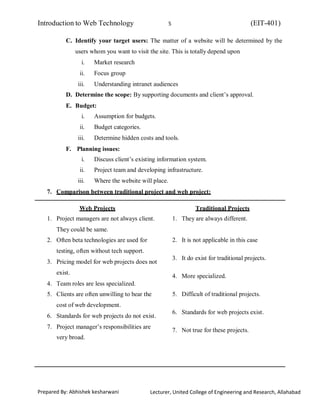
7. Comparison between traditional project and web project:
Web Projects
1. Project managers are not always client.
They could be same.
2. Often beta technologies are used for
testing, often without tech support.
3. Pricing model for web projects does not
exist.
4. Team roles are less specialized.
5. Clients are often unwilling to bear the
cost of web development.
6. Standards for web projects do not exist.
7. Project manager’s responsibilities are
very broad.
Traditional Projects
1. They are always different.
2. It is not applicable in this case
3. It do exist for traditional projects.
4. More specialized.
5. Difficult of traditional projects.
6. Standards for web projects exist.
7. Not true for these projects.
Introduction to Web Technology (EIT-401)6
Prepared By: Abhishek kesharwani Lecturer, United College of Engineering and Research, Allahabad
8. Identification of objects:
A. Object identification: All the components which are visible in website are
objects or in other words, we can say that all visible components in the web
browser are defined as objects. Ex. Text box, command button etc.
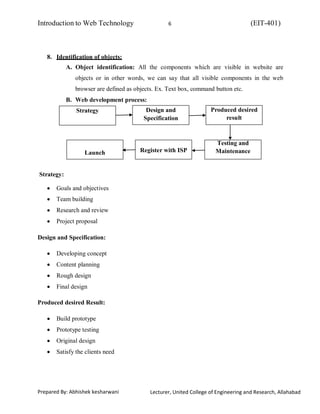
B. Web development process:
Strategy Design and
Specification
Produced desired
result
Launch Register with ISP
Testing and
Maintenance
Strategy:
Goals and objectives
Team building
Research and review
Project proposal
Design and Specification:
Developing concept
Content planning
Rough design
Final design
Produced desired Result:
Build prototype
Prototype testing
Original design
Satisfy the clients need
Introduction to Web Technology (EIT-401)7
Prepared By: Abhishek kesharwani Lecturer, United College of Engineering and Research, Allahabad
Testing and maintenance:
Test the code
Maintain the web server.
Register with ISP:
Register domain name
Get web space
Launch:
Connect domain name with web server
Finally host the web accordingly.
9. Web Team: Web team is a group of various technical experts in a developing site from
coding the page to maintain the web server.
Types:
A. Server Side: hired by a company to develop a website.
B. Client Side: part of the company putting together the website.
Assessment techniques used to comprise a web team:
a. Deciding roles and responsibilities: The composition of team varies to depend
on the audience, scope and complexity level of the web. There are key roles on
each virtual project. One should always decide for core, extended and special
team members in a web and shares responsibilities accordingly.
Introduction to Web Technology (EIT-401)8
Prepared By: Abhishek kesharwani Lecturer, United College of Engineering and Research, Allahabad
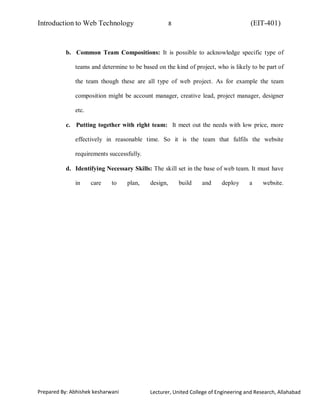
b. Common Team Compositions: It is possible to acknowledge specific type of
teams and determine to be based on the kind of project, who is likely to be part of
the team though these are all type of web project. As for example the team
composition might be account manager, creative lead, project manager, designer
etc.
c. Putting together with right team: It meet out the needs with low price, more
effectively in reasonable time. So it is the team that fulfils the website
requirements successfully.
d. Identifying Necessary Skills: The skill set in the base of web team. It must have
in care to plan, design, build and deploy a website.
Introduction to Web Technology (EIT-401)9
Prepared By: Abhishek kesharwani Lecturer, United College of Engineering and Research, Allahabad
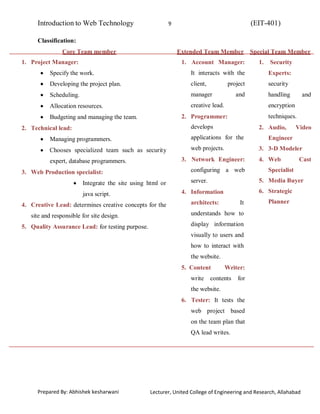
Classification:
Core Team member
1. Project Manager:
Specify the work.
Developing the project plan.
Scheduling.
Allocation resources.
Budgeting and managing the team.
2. Technical lead:
Managing programmers.
Chooses specialized team such as security
expert, database programmers.
3. Web Production specialist:
Integrate the site using html or
java script.
4. Creative Lead: determines creative concepts for the
site and responsible for site design.
5. Quality Assurance Lead: for testing purpose.
Extended Team Member
1. Account Manager:
It interacts with the
client, project
manager and
creative lead.
2. Programmer:
develops
applications for the
web projects.
3. Network Engineer:
configuring a web
server.
4. Information
architects: It
understands how to
display information
visually to users and
how to interact with
the website.
5. Content Writer:
write contents for
the website.
6. Tester: It tests the
web project based
on the team plan that
QA lead writes.
Special Team Member
1. Security
Experts:
security
handling and
encryption
techniques.
2. Audio, Video
Engineer
3. 3-D Modeler
4. Web Cast
Specialist
5. Media Buyer
6. Strategic
Planner
Introduction to Web Technology (EIT-401)10
Prepared By: Abhishek kesharwani Lecturer, United College of Engineering and Research, Allahabad
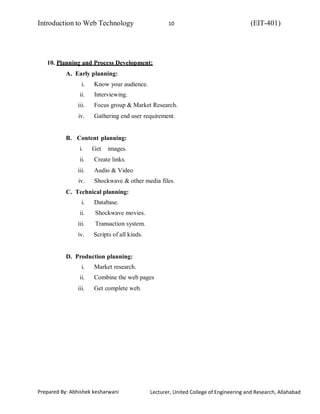
10. Planning and Process Development:
A. Early planning:
i. Know your audience.
ii. Interviewing.
iii. Focus group & Market Research.
iv. Gathering end user requirement.
B. Content planning:
i. Get images.
ii. Create links.
iii. Audio & Video
iv. Shockwave & other media files.
C. Technical planning:
i. Database.
ii. Shockwave movies.
iii. Transaction system.
iv. Scripts of all kinds.
D. Production planning:
i. Market research.
ii. Combine the web pages
iii. Get complete web.

Unit 1 Webtechnology

  • 1.
    Introduction to WebTechnology (EIT-401)1 Prepared By: Abhishek kesharwani Lecturer, United College of Engineering and Research, Allahabad Unit- I Introduction and Web Development Strategies Lecture No. 1 1. World Wide Web: The World Wide Web is a system of interlinked hypertext documents accessed via the Internet. Web is a huge collection of pages of information linked to each other around the globe. History of WWW: WWW is created by Sir Tim Berners Lee in 1989 at CERN in Geneva. In 1990, the first text only browsers were setup and CERN scientist could access hypertext files and other information at CERN. HTML was based on a subset of the standard generalized markup language (SGML). To transfer HTML document to remote sites a new protocol was devised called HTTP (Hyper Text Transfer Protocol). In the fall of 1991, conference goes around the world started hearing about the promise but sparks still were not flying. In 1993, there are only about 50 websites world wide. A browser that allowed user to take advantage of the web’s graphical capabilities was developed at the National center for Super Computing application (NCSA). NCSA called the browser Mosaic. 2. Protocols Governing Web: other. Protocol: A protocol is a set of rules that is used to communicate applications to each OR A protocol is the interface required for communicating the different applications.
  • 2.
    Introduction to WebTechnology (EIT-401)2 Prepared By: Abhishek kesharwani Lecturer, United College of Engineering and Research, Allahabad Classification: a. HTTP b. TCP/IP c. FTP d. E-MAIL e. TELNET A. HTTP: HTTP is the primary protocol used to distribute information on the web. Initial HTTP 0.9 does not allow for content typing and does not have provisions for supplying meta-information. Content Typing: To identify the type of data being transferred. Meta Information: It is supplemental data, such as environment variables that identify the client’s computer Current version is HTTP 1.0 B. TCP/IP: It is a set of rules that an application can use to package its information for sending across the networks of networks. C. FTP: It is used to transfer the files over networks. FTP uses TCP to create a virtual connection for control information and then creates a separate TCP connection for data transfers. The control connection uses an image of the TELNET protocol to exchange commands and messages between hosts. D. Simple Mail Transfer Protocol (SMTP) is an Internet standard for electronic mail (e-mail) transmission across Internet Protocol (IP) networks. E. Telnet: Telnet lets you remotely log into another system and browse files and directories on that remote system.
  • 3.
    Introduction to WebTechnology (EIT-401)3 Prepared By: Abhishek kesharwani Lecturer, United College of Engineering and Research, Allahabad Lecture No. 2 3. Website: A website is simply a collection of interlinked web pages. Classification: A. Corporate Website B. Individual website A. Corporate Website: i. In this, there is certain no. of persons, who develop their website for a particular organization. ii. The corporate website are formed when group of people have common interest and objective. iii. The purpose of this website is to convey the information of organization to all over the world. B. Individual website: It is just like profile management system. In this type of website an individual wants to develop website for h-projection, career growth etc. 4. Cyber Laws: Cyber law is a term used to describe the legal issues related to use of communication technology, particularly “cyberspace” i.e. Internet. Indian and International Cyber Law: Cyber Laws are formed by the government to prevent the internet crime. These crimes could be hacking, threat on internet, denial of services etc. Cyberspace includes computer, computer networks, internet data, software etc. i. Data Protection and Privacy Law: This is due to the nature of the internet and amount of information that may be accessed through it, such legislation is critical to protect the fundamental rights of privacy of an individual. ii. Electronic and Digital Signature Law: This is required so that uniform and standard procedures are established for authentication of electronics records, EDI, E-Mail. iii. Computer Crime Law: due to victim of internet threats.
  • 4.
    Introduction to WebTechnology (EIT-401)4 Prepared By: Abhishek kesharwani Lecturer, United College of Engineering and Research, Allahabad iv. Telecommunication Law: Approve and supervise the application of fees and rates charged for telecommunication services in accordance with the provision of the applicable law. v. Intellectual Property Law: This includes copyright law, trademark law, semiconductor law and patent law in relation to computer hardware and software. IT Act 2000 (INDIA): E-Governance Authentication of E-Records Digital Signatures Controlled certifying authorities Penalties for damage of computer and computer system. Lecture No. 3 5. Web Applications: Simple office software (word processors, online spreadsheets, and presentation tools). More advanced applications such as project management, computer-aided design, video editing and point-of-sale. 6. Writing web Projects and Target Users: A. Write a project mission statement: Write the specific mission statement that you want to do. B. Identify Objectives: i. Specific ii. Measurable iii. Attainable iv. Realistic v. Time limited
  • 5.
    Introduction to WebTechnology (EIT-401)5 Prepared By: Abhishek kesharwani Lecturer, United College of Engineering and Research, Allahabad C. Identify your target users: The matter of a website will be determined by the users whom you want to visit the site. This is totally depend upon i. Market research ii. Focus group iii. Understanding intranet audiences D. Determine the scope: By supporting documents and client’s approval. E. Budget: i. Assumption for budgets. ii. Budget categories. iii. Determine hidden costs and tools. F. Planning issues: i. Discuss client’s existing information system. ii. Project team and developing infrastructure. iii. Where the website will place. 7. Comparison between traditional project and web project: Web Projects 1. Project managers are not always client. They could be same. 2. Often beta technologies are used for testing, often without tech support. 3. Pricing model for web projects does not exist. 4. Team roles are less specialized. 5. Clients are often unwilling to bear the cost of web development. 6. Standards for web projects do not exist. 7. Project manager’s responsibilities are very broad. Traditional Projects 1. They are always different. 2. It is not applicable in this case 3. It do exist for traditional projects. 4. More specialized. 5. Difficult of traditional projects. 6. Standards for web projects exist. 7. Not true for these projects.
  • 6.
    Introduction to WebTechnology (EIT-401)6 Prepared By: Abhishek kesharwani Lecturer, United College of Engineering and Research, Allahabad 8. Identification of objects: A. Object identification: All the components which are visible in website are objects or in other words, we can say that all visible components in the web browser are defined as objects. Ex. Text box, command button etc. B. Web development process: Strategy Design and Specification Produced desired result Launch Register with ISP Testing and Maintenance Strategy: Goals and objectives Team building Research and review Project proposal Design and Specification: Developing concept Content planning Rough design Final design Produced desired Result: Build prototype Prototype testing Original design Satisfy the clients need
  • 7.
    Introduction to WebTechnology (EIT-401)7 Prepared By: Abhishek kesharwani Lecturer, United College of Engineering and Research, Allahabad Testing and maintenance: Test the code Maintain the web server. Register with ISP: Register domain name Get web space Launch: Connect domain name with web server Finally host the web accordingly. 9. Web Team: Web team is a group of various technical experts in a developing site from coding the page to maintain the web server. Types: A. Server Side: hired by a company to develop a website. B. Client Side: part of the company putting together the website. Assessment techniques used to comprise a web team: a. Deciding roles and responsibilities: The composition of team varies to depend on the audience, scope and complexity level of the web. There are key roles on each virtual project. One should always decide for core, extended and special team members in a web and shares responsibilities accordingly.
  • 8.
    Introduction to WebTechnology (EIT-401)8 Prepared By: Abhishek kesharwani Lecturer, United College of Engineering and Research, Allahabad b. Common Team Compositions: It is possible to acknowledge specific type of teams and determine to be based on the kind of project, who is likely to be part of the team though these are all type of web project. As for example the team composition might be account manager, creative lead, project manager, designer etc. c. Putting together with right team: It meet out the needs with low price, more effectively in reasonable time. So it is the team that fulfils the website requirements successfully. d. Identifying Necessary Skills: The skill set in the base of web team. It must have in care to plan, design, build and deploy a website.
  • 9.
    Introduction to WebTechnology (EIT-401)9 Prepared By: Abhishek kesharwani Lecturer, United College of Engineering and Research, Allahabad Classification: Core Team member 1. Project Manager: Specify the work. Developing the project plan. Scheduling. Allocation resources. Budgeting and managing the team. 2. Technical lead: Managing programmers. Chooses specialized team such as security expert, database programmers. 3. Web Production specialist: Integrate the site using html or java script. 4. Creative Lead: determines creative concepts for the site and responsible for site design. 5. Quality Assurance Lead: for testing purpose. Extended Team Member 1. Account Manager: It interacts with the client, project manager and creative lead. 2. Programmer: develops applications for the web projects. 3. Network Engineer: configuring a web server. 4. Information architects: It understands how to display information visually to users and how to interact with the website. 5. Content Writer: write contents for the website. 6. Tester: It tests the web project based on the team plan that QA lead writes. Special Team Member 1. Security Experts: security handling and encryption techniques. 2. Audio, Video Engineer 3. 3-D Modeler 4. Web Cast Specialist 5. Media Buyer 6. Strategic Planner
  • 10.
    Introduction to WebTechnology (EIT-401)10 Prepared By: Abhishek kesharwani Lecturer, United College of Engineering and Research, Allahabad 10. Planning and Process Development: A. Early planning: i. Know your audience. ii. Interviewing. iii. Focus group & Market Research. iv. Gathering end user requirement. B. Content planning: i. Get images. ii. Create links. iii. Audio & Video iv. Shockwave & other media files. C. Technical planning: i. Database. ii. Shockwave movies. iii. Transaction system. iv. Scripts of all kinds. D. Production planning: i. Market research. ii. Combine the web pages iii. Get complete web.