XP
1
C-PROGRAMMING
UNIT 1: PROBLEM SOLVING USING COMPUTER
Presented By:
Er.Ganesh Ram Suwal
BE | ME Computer Engineering
Email: suwalganesh@gmail.com
Lecturer
January 2015
XP
2
INTRODUCTION
 If any problem is solved by using computer, then that is called
Problem Solving using Computer.
Problem Solving Using Computer
1. Problem Definition, Problem Statement
2. Problem Analysis
3. Algorithm Development & Flowcharting
4. Coding
5. Compilation & Execution
6. Debugging & Testing
7. Program Documentation
XP
3
Problem Definition and Analysis
1. What is a Problem ?
 Problem is defined as the difference between an existing situation and a
desired situation.
 A problem is numerical situation and has complex form
 Solution is desired situation and has simplest form.
 First, you should know the behavior, nature or type of problem. In order to
get exact solution,
 you must analyze the problem.
XP
4
ALGORITHM
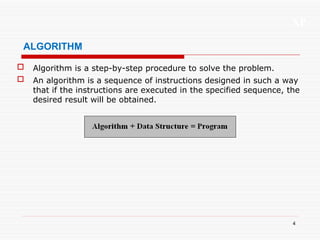
 Algorithm is a step-by-step procedure to solve the problem.
 An algorithm is a sequence of instructions designed in such a way
that if the instructions are executed in the specified sequence, the
desired result will be obtained.
XP
5
CHARACTERISTICS OF ALGORITHM
1. Each and every instruction should be precise and unambiguous.
2. Well defined inputs and well defined Outputs
3. Each instruction should be such that it can be performed in a finite
time.
4. Instructions should not be repeated infinitely. This ensures that the
algorithm will ultimately terminate.
5. After performing the instructions, that is after the algorithm
terminates, the desire for results must be obtained.
6. Programming Language Independent
7. Algorithm Should be Effectiveness and Feasible
(Summary: Inputs, Outputs, Definiteness, Correctness, Finiteness,
Effectiveness, Generality and Efficient)
XP
6
EXAMPLE OF ALGORITHM
Write an algorithm for checking odd and even. The number is entered
by a user.
Step1: Read a number from user
Step2: Divide the entered number by 2 and check the remainder
If the remainder is 0,
Print the given number is even
Else
Print the given number is odd
Step3: Stop
XP
7
FLOWCHART
 A flowchart is a pictorial representation of an algorithm that uses
different shapes to denote different types of instructions.
 The actual instructions are written within these boxes using clear
and concise statements. These boxes are connected by solid lines
having arrow marks to indicate the flow of operation, that is, the
exact sequence in which the instructions are to be executed.
 The flowchart is a roadmap to solve a problem.
XP
8
SYMBOLS USED IN FLOWCHART
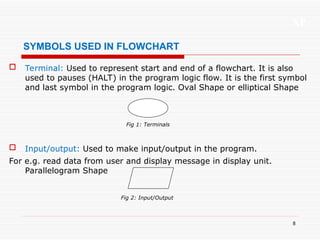
 Terminal: Used to represent start and end of a flowchart. It is also
used to pauses (HALT) in the program logic flow. It is the first symbol
and last symbol in the program logic. Oval Shape or elliptical Shape
 Input/output: Used to make input/output in the program.
For e.g. read data from user and display message in display unit.
Parallelogram Shape
Fig 1: Terminals
Fig 2: Input/Output
XP
9
SYMBOLS USED IN FLOWCHART
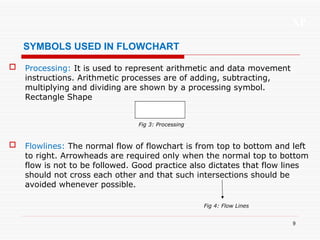
 Processing: It is used to represent arithmetic and data movement
instructions. Arithmetic processes are of adding, subtracting,
multiplying and dividing are shown by a processing symbol.
Rectangle Shape
 Flowlines: The normal flow of flowchart is from top to bottom and left
to right. Arrowheads are required only when the normal top to bottom
flow is not to be followed. Good practice also dictates that flow lines
should not cross each other and that such intersections should be
avoided whenever possible.
Fig 3: Processing
Fig 4: Flow Lines
XP
10
SYMBOLS USED IN FLOWCHART
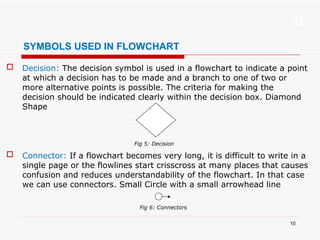
 Decision: The decision symbol is used in a flowchart to indicate a point
at which a decision has to be made and a branch to one of two or
more alternative points is possible. The criteria for making the
decision should be indicated clearly within the decision box. Diamond
Shape
 Connector: If a flowchart becomes very long, it is difficult to write in a
single page or the flowlines start crisscross at many places that causes
confusion and reduces understandability of the flowchart. In that case
we can use connectors. Small Circle with a small arrowhead line
Fig 5: Decision
Fig 6: Connectors
XP
11
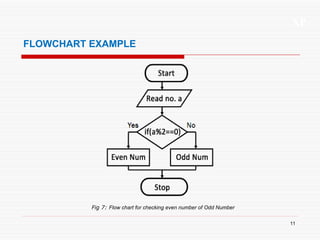
FLOWCHART EXAMPLE
Fig 7: Flow chart for checking even number of Odd Number
XP
12
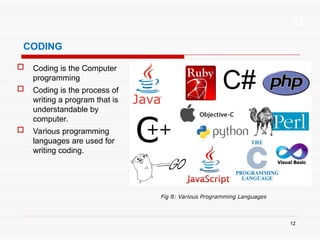
CODING
 Coding is the Computer
programming
 Coding is the process of
writing a program that is
understandable by
computer.
 Various programming
languages are used for
writing coding.
Fig 8: Various Programming Languages
XP
13
COMPILATION & EXECUTION
 Compilation is the process of converting the source codes (Program) of a
computer translated into machine codes.
 After compilation if everything is ok, the code is going under other process that
is known as execution.
 We can get the required output after execution process.
XP
14
DEBUGGING & TESTING
 The process of finding and removing errors (also sometimes called bugs) from a
program is known as debugging.
 Once the location of an error is identified and the error is corrected, the
debugging statements may be removed.
Types of errors
1. Syntax errors
2. Logic errors
3. Run-time errors
1. Syntax errors
Syntax errors are those errors which are arise on violate the rules of programming
language.
If there is syntax error in the program, then the program will not be executing.
XP
15
DEBUGGING & TESTING
2. Logic errors
Logic errors are those which arise when programmers proceed the logic process in
wrong way or miss some statements.
It is difficult to debug such errors because the computer does not display them.
3. Run-Time Errors
Run-time errors are those which occur when programmers attempt to run ambiguous
instructions.
They occur due to infinite loop of statement, device errors (system out of memory),
software errors, etc.
Runtime errors are:
1.Divide by zero
2.Null pointer assignment
3.Data over flow
XP
16
PROGRAM DOCUMENTATION
 Program Documentations are the brief explanatory note on the
programmer’s program segment while writing program.
 This explanatory note is called comment. It explains how the program
works and interacts with it.
 Thus, it helps other programmers to understand the program.
Two Types of documentation:
1. Internal documentation – Comments in the Program
2. External documentation – File of a Program
XP
17
PROGRAMMING LANGUAGE
 A language which is use to give command to the computer is
known as programming language.
 A computer software is made using computer programming
language.
JAVA, C# dot net, VB dot net, ASP dot net, PHP, C, C++ etc are
the programming language.
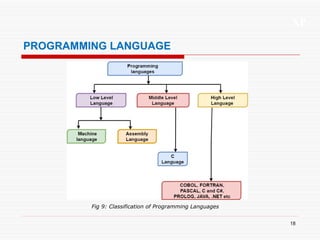
The Programming languages are classified as
1. High Level Programming Language
2. Middle Level Programming Language
3. Low Level or Machine Level Programming Language
XP
18
PROGRAMMING LANGUAGE
Fig 9: Classification of Programming Languages
XP
19
1. LOW LEVEL PROGRAMMING LANGUAGE
 Low Level Programming languages are directly
understandable by a computer
 It is also called Machine level language and specific to a
computer hardware. So it is machine dependent or machine
codes.
 The low-level language is binary language (written in 0’s and
1’s form).
 Only the computer programmer or computer specelist
understand low level language.
 All the program written in high level or middle level language
must be converted into low level language for execution.
XP
20
2. MIDDLE LEVEL PROGRAMMING LANGUAGE
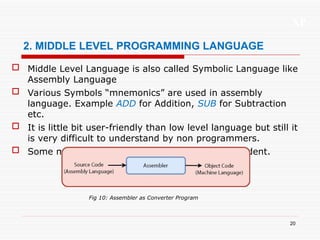
 Middle Level Language is also called Symbolic Language like
Assembly Language
 Various Symbols “mnemonics” are used in assembly
language. Example ADD for Addition, SUB for Subtraction
etc.
 It is little bit user-friendly than low level language but still it
is very difficult to understand by non programmers.
 Some middle level languages are machine dependent.
Fig 10: Assembler as Converter Program
XP
21
3. HIGH LEVEL PROGRAMMING LANGUAGE
 High Level language is very easy to understand by human
beings even by non programmers also.
 The popular high-level languages are FORTAN, COBOL,
BASIC, C, C++, JAVA etc.
 High level language uses English word like INPUT, OUTPUT,
PRINT etc.
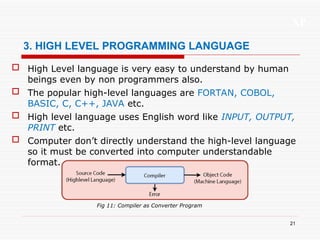
 Computer don’t directly understand the high-level language
so it must be converted into computer understandable
format.
Fig 11: Compiler as Converter Program
XP
22
CONVERTER PROGRAM
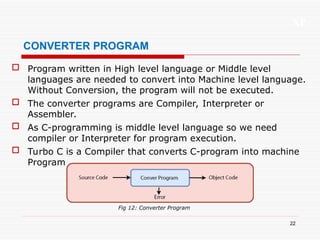
 Program written in High level language or Middle level
languages are needed to convert into Machine level language.
Without Conversion, the program will not be executed.
 The converter programs are Compiler, Interpreter or
Assembler.
 As C-programming is middle level language so we need
compiler or Interpreter for program execution.
 Turbo C is a Compiler that converts C-program into machine
Program.
Fig 12: Converter Program
XP
23
CONVERTER PROGRAM
1. Assembler
It is a conversion program that converts Assembly language into
its corresponding machine level language.
E.g. MASAM
2. Interpreters
Interpreters are used for conversion of High-level language into
low level language.
Interpreter convert the program code line by line.
If any errors occur immediately, it will show the error message.
XP
24
CONVERTER PROGRAM
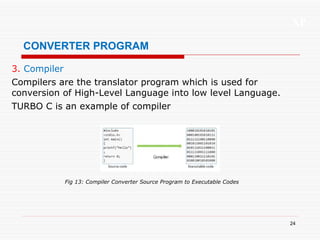
3. Compiler
Compilers are the translator program which is used for
conversion of High-Level Language into low level Language.
TURBO C is an example of compiler
Fig 13: Compiler Converter Source Program to Executable Codes
XP
25
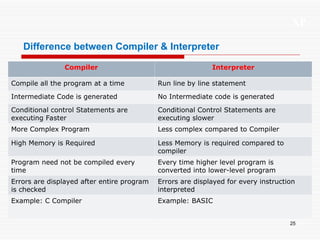
Difference between Compiler & Interpreter
Compiler Interpreter
Compile all the program at a time Run line by line statement
Intermediate Code is generated No Intermediate code is generated
Conditional control Statements are
executing Faster
Conditional Control Statements are
executing slower
More Complex Program Less complex compared to Compiler
High Memory is Required Less Memory is required compared to
compiler
Program need not be compiled every
time
Every time higher level program is
converted into lower-level program
Errors are displayed after entire program
is checked
Errors are displayed for every instruction
interpreted
Example: C Compiler Example: BASIC
XP
26
for more remaining chapters mail to:
suwalganesh@gmail.com
Thank You

UNIT 1: Problem Solving Using Computer

  • 1.
    XP 1 C-PROGRAMMING UNIT 1: PROBLEMSOLVING USING COMPUTER Presented By: Er.Ganesh Ram Suwal BE | ME Computer Engineering Email: suwalganesh@gmail.com Lecturer January 2015
  • 2.
    XP 2 INTRODUCTION  If anyproblem is solved by using computer, then that is called Problem Solving using Computer. Problem Solving Using Computer 1. Problem Definition, Problem Statement 2. Problem Analysis 3. Algorithm Development & Flowcharting 4. Coding 5. Compilation & Execution 6. Debugging & Testing 7. Program Documentation
  • 3.
    XP 3 Problem Definition andAnalysis 1. What is a Problem ?  Problem is defined as the difference between an existing situation and a desired situation.  A problem is numerical situation and has complex form  Solution is desired situation and has simplest form.  First, you should know the behavior, nature or type of problem. In order to get exact solution,  you must analyze the problem.
  • 4.
    XP 4 ALGORITHM  Algorithm isa step-by-step procedure to solve the problem.  An algorithm is a sequence of instructions designed in such a way that if the instructions are executed in the specified sequence, the desired result will be obtained.
  • 5.
    XP 5 CHARACTERISTICS OF ALGORITHM 1.Each and every instruction should be precise and unambiguous. 2. Well defined inputs and well defined Outputs 3. Each instruction should be such that it can be performed in a finite time. 4. Instructions should not be repeated infinitely. This ensures that the algorithm will ultimately terminate. 5. After performing the instructions, that is after the algorithm terminates, the desire for results must be obtained. 6. Programming Language Independent 7. Algorithm Should be Effectiveness and Feasible (Summary: Inputs, Outputs, Definiteness, Correctness, Finiteness, Effectiveness, Generality and Efficient)
  • 6.
    XP 6 EXAMPLE OF ALGORITHM Writean algorithm for checking odd and even. The number is entered by a user. Step1: Read a number from user Step2: Divide the entered number by 2 and check the remainder If the remainder is 0, Print the given number is even Else Print the given number is odd Step3: Stop
  • 7.
    XP 7 FLOWCHART  A flowchartis a pictorial representation of an algorithm that uses different shapes to denote different types of instructions.  The actual instructions are written within these boxes using clear and concise statements. These boxes are connected by solid lines having arrow marks to indicate the flow of operation, that is, the exact sequence in which the instructions are to be executed.  The flowchart is a roadmap to solve a problem.
  • 8.
    XP 8 SYMBOLS USED INFLOWCHART  Terminal: Used to represent start and end of a flowchart. It is also used to pauses (HALT) in the program logic flow. It is the first symbol and last symbol in the program logic. Oval Shape or elliptical Shape  Input/output: Used to make input/output in the program. For e.g. read data from user and display message in display unit. Parallelogram Shape Fig 1: Terminals Fig 2: Input/Output
  • 9.
    XP 9 SYMBOLS USED INFLOWCHART  Processing: It is used to represent arithmetic and data movement instructions. Arithmetic processes are of adding, subtracting, multiplying and dividing are shown by a processing symbol. Rectangle Shape  Flowlines: The normal flow of flowchart is from top to bottom and left to right. Arrowheads are required only when the normal top to bottom flow is not to be followed. Good practice also dictates that flow lines should not cross each other and that such intersections should be avoided whenever possible. Fig 3: Processing Fig 4: Flow Lines
  • 10.
    XP 10 SYMBOLS USED INFLOWCHART  Decision: The decision symbol is used in a flowchart to indicate a point at which a decision has to be made and a branch to one of two or more alternative points is possible. The criteria for making the decision should be indicated clearly within the decision box. Diamond Shape  Connector: If a flowchart becomes very long, it is difficult to write in a single page or the flowlines start crisscross at many places that causes confusion and reduces understandability of the flowchart. In that case we can use connectors. Small Circle with a small arrowhead line Fig 5: Decision Fig 6: Connectors
  • 11.
    XP 11 FLOWCHART EXAMPLE Fig 7:Flow chart for checking even number of Odd Number
  • 12.
    XP 12 CODING  Coding isthe Computer programming  Coding is the process of writing a program that is understandable by computer.  Various programming languages are used for writing coding. Fig 8: Various Programming Languages
  • 13.
    XP 13 COMPILATION & EXECUTION Compilation is the process of converting the source codes (Program) of a computer translated into machine codes.  After compilation if everything is ok, the code is going under other process that is known as execution.  We can get the required output after execution process.
  • 14.
    XP 14 DEBUGGING & TESTING The process of finding and removing errors (also sometimes called bugs) from a program is known as debugging.  Once the location of an error is identified and the error is corrected, the debugging statements may be removed. Types of errors 1. Syntax errors 2. Logic errors 3. Run-time errors 1. Syntax errors Syntax errors are those errors which are arise on violate the rules of programming language. If there is syntax error in the program, then the program will not be executing.
  • 15.
    XP 15 DEBUGGING & TESTING 2.Logic errors Logic errors are those which arise when programmers proceed the logic process in wrong way or miss some statements. It is difficult to debug such errors because the computer does not display them. 3. Run-Time Errors Run-time errors are those which occur when programmers attempt to run ambiguous instructions. They occur due to infinite loop of statement, device errors (system out of memory), software errors, etc. Runtime errors are: 1.Divide by zero 2.Null pointer assignment 3.Data over flow
  • 16.
    XP 16 PROGRAM DOCUMENTATION  ProgramDocumentations are the brief explanatory note on the programmer’s program segment while writing program.  This explanatory note is called comment. It explains how the program works and interacts with it.  Thus, it helps other programmers to understand the program. Two Types of documentation: 1. Internal documentation – Comments in the Program 2. External documentation – File of a Program
  • 17.
    XP 17 PROGRAMMING LANGUAGE  Alanguage which is use to give command to the computer is known as programming language.  A computer software is made using computer programming language. JAVA, C# dot net, VB dot net, ASP dot net, PHP, C, C++ etc are the programming language. The Programming languages are classified as 1. High Level Programming Language 2. Middle Level Programming Language 3. Low Level or Machine Level Programming Language
  • 18.
    XP 18 PROGRAMMING LANGUAGE Fig 9:Classification of Programming Languages
  • 19.
    XP 19 1. LOW LEVELPROGRAMMING LANGUAGE  Low Level Programming languages are directly understandable by a computer  It is also called Machine level language and specific to a computer hardware. So it is machine dependent or machine codes.  The low-level language is binary language (written in 0’s and 1’s form).  Only the computer programmer or computer specelist understand low level language.  All the program written in high level or middle level language must be converted into low level language for execution.
  • 20.
    XP 20 2. MIDDLE LEVELPROGRAMMING LANGUAGE  Middle Level Language is also called Symbolic Language like Assembly Language  Various Symbols “mnemonics” are used in assembly language. Example ADD for Addition, SUB for Subtraction etc.  It is little bit user-friendly than low level language but still it is very difficult to understand by non programmers.  Some middle level languages are machine dependent. Fig 10: Assembler as Converter Program
  • 21.
    XP 21 3. HIGH LEVELPROGRAMMING LANGUAGE  High Level language is very easy to understand by human beings even by non programmers also.  The popular high-level languages are FORTAN, COBOL, BASIC, C, C++, JAVA etc.  High level language uses English word like INPUT, OUTPUT, PRINT etc.  Computer don’t directly understand the high-level language so it must be converted into computer understandable format. Fig 11: Compiler as Converter Program
  • 22.
    XP 22 CONVERTER PROGRAM  Programwritten in High level language or Middle level languages are needed to convert into Machine level language. Without Conversion, the program will not be executed.  The converter programs are Compiler, Interpreter or Assembler.  As C-programming is middle level language so we need compiler or Interpreter for program execution.  Turbo C is a Compiler that converts C-program into machine Program. Fig 12: Converter Program
  • 23.
    XP 23 CONVERTER PROGRAM 1. Assembler Itis a conversion program that converts Assembly language into its corresponding machine level language. E.g. MASAM 2. Interpreters Interpreters are used for conversion of High-level language into low level language. Interpreter convert the program code line by line. If any errors occur immediately, it will show the error message.
  • 24.
    XP 24 CONVERTER PROGRAM 3. Compiler Compilersare the translator program which is used for conversion of High-Level Language into low level Language. TURBO C is an example of compiler Fig 13: Compiler Converter Source Program to Executable Codes
  • 25.
    XP 25 Difference between Compiler& Interpreter Compiler Interpreter Compile all the program at a time Run line by line statement Intermediate Code is generated No Intermediate code is generated Conditional control Statements are executing Faster Conditional Control Statements are executing slower More Complex Program Less complex compared to Compiler High Memory is Required Less Memory is required compared to compiler Program need not be compiled every time Every time higher level program is converted into lower-level program Errors are displayed after entire program is checked Errors are displayed for every instruction interpreted Example: C Compiler Example: BASIC
  • 26.
    XP 26 for more remainingchapters mail to: suwalganesh@gmail.com Thank You