Content
1. What isa computer network?
2. Types of computer networks
3. Personal Area Network
4. Local Area Network
5. Metropolitan Area Network
6. Wide Area Network
7. Networking Topologies
8. Physical Topologies
9. Physical Point to Point
10. Physical Bus Topology
11. Physical Ring Topology
12. Physical Star Topology
13. Physical Mesh Topology
14. Physical Tree Topology
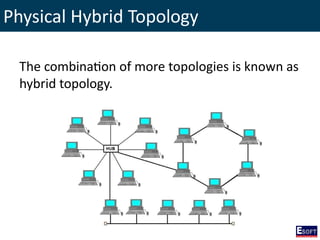
15. Physical Hybrid topology
16. Logical Topologies
17. Ethernet
18. Local Talk
19. Token Ring
20. FDDI
21. ATM
22. Transmission Media
23. Networking Cables
24. Coaxial Cables
25. Twisted Pair Cables
26. Fiber Optic Cables
27. Network Devices
28. NIC-Network interface card
29. Hub
30. Network Switch
31. Router
32. Bridge
33. IP Address
34. Activities
3.
What is acomputer network?
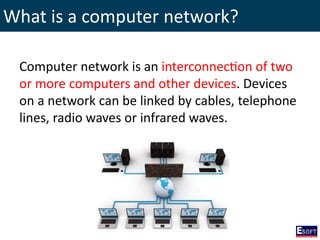
Computer network is an interconnection of two
or more computers and other devices. Devices
on a network can be linked by cables, telephone
lines, radio waves or infrared waves.
4.
Advantages of computernetworks
• Files sharing
• Devices sharing
• Communication
• Services sharing
5.
Disadvantages of computernetworks
• Virus attacks
• Hacker attacks
• Failures of a server may effect to the entire
network
6.
Types of computernetworks
Based on the network size, networks can be
categorized into several types
1. Personal Area Network (PAN)
2. Local Area Network (LAN)
3. Metropolitan Area Network (MAN)
4. Wide Area Network (WAN)
7.
Personal Area Network(PAN)
• PAN is wireless network connected with
mobile devices such as mobile phones, PDAs,
Bluetooth printers, Headsets, etc.
• The technology using in here is Bluetooth or
infrared.
8.
Local Area Network(LAN)
• Coverage is about within 1km.
• Ex: a company network within a building or
may be within two or more buildings.
9.
Metropolitan Area Network(MAN)
• Coverage is about more than 1km and less
than 10km.
• Ex: A network of a large town.
10.
Wide Area Network(WAN)
• Coverage is about more than 10km.
• Satellites may be use to expand this network.
• Ex: Internet.
11.
Networking Topologies
Topology isthe way that we connect computers
and other devices. In other words topology is
the map of the network.
Physical Topologies
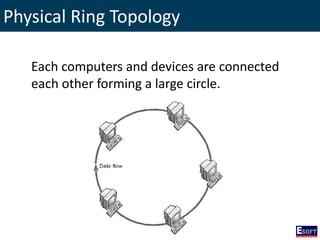
Physical arrangementof the network is known
as physical topology
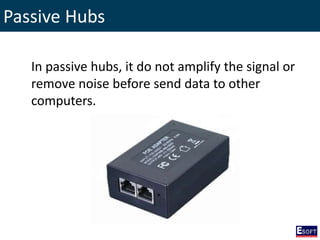
• Physical Point to Point Topology
• Physical Bus Topology
• Physical Ring Topology
• Physical Star Topology
• Physical Mesh Topology
• Physical Tree Topology
• Physical Hybrid Topology
14.
Physical Point toPoint Topology
This is the simplest topology that uses a
permanent link between two end devices. It also
known as peer to peer topology.
15.
Physical Point toPoint Topology
Characteristics
• Using twisted pair cables.
• Using RJ-45 connectors.
• Maximum segment length is 100m.
16.
Physical Point toPoint Topology
Advantages
• Low cost.
• No additional devices or servers needed.
• Easy to implement.
17.
Physical Point toPoint Topology
Disadvantages
• Maximum 2 computers can be connected.
• Cable breaks will affect to the whole network.
Physical Bus Topology
Characteristics
•Both thin net and thick net coaxial cables are
used.
• Segment length of thin net coaxial cable is
200m.
• Segment length of thick net coaxial cable is
500m.
• BNC Connectors are used.
• Maximum data transfer speed is 10mbps.
Physical Bus Topology
Disadvantages
•Maximum speed is 10mbps only.
• Number of PCs will affect to the performance
of the network.
• If backbone breaks, the entire network will be
failed.
• Not suitable for heavy traffic.
• Hard to find faults of the network.
Physical Ring Topology
Characteristics
•Using coaxial or twisted pair cables.
• Using BNC or RJ-45 connectors.
• Maximum data transfer speed is between 4 -
16mbps.
24.
Physical Ring Topology
Advantages
•No need of a server.
• Even the load of the network increases, it still
perform better than bus topology.
25.
Physical Ring Topology
Disadvantages
•If the cable breaks, entire network will be
failed.
• If one station goes down, it will be affected to
the entire network.
• Low speed.
26.
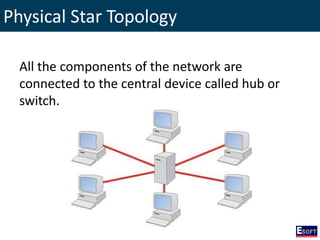
Physical Star Topology
Allthe components of the network are
connected to the central device called hub or
switch.
Physical Star Topology
Advantages
•Higher data transfer speed than previous
topologies. 100 - 1000mbps.
• Central device make it easy to manage the
network.
• Cable breaks will not affect to the entire
network.
• Easy to expand.
• More computers and devices can be
connected.
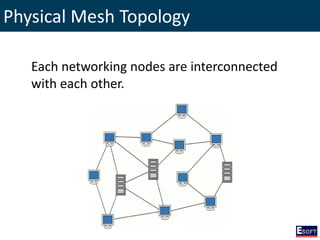
Physical Mesh Topology
Characteristics
•It allowing most transmissions to be
distributed, even one of the connections goes
down.
• Mesh topologies are either partially or fully
connected.
• Uses in the internet.
33.
Physical Mesh Topology
Advantages
•Supports for high traffic.
• Cable breaks will not affect to the
communication.
• Expansions and modifications can be done
without disrupting other devices.
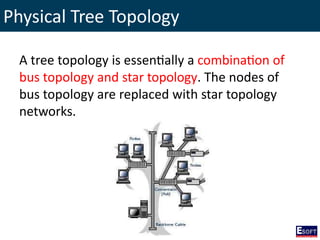
Physical Tree Topology
Atree topology is essentially a combination of
bus topology and star topology. The nodes of
bus topology are replaced with star topology
networks.
36.
Physical Tree Topology
Advantages
•Secondary nodes allow more devices to be
connected.
• Having different levels of the network makes it
more manageable.
Ethernet
• Ethernet isa local area network technology.
• Physical Bus Topology and Physical Star Topology
(Hub as central device) uses Ethernet.
• CSMA/CD (Carrier Sense Multiple Access /
Collision Detection) describes how the Ethernet
protocol regulates communication among nodes.
• The number of devices and segment length of
media affects the efficiency of Ethernet.
• Ethernet first standardized in 1983 as IEEE
802.3
• 100Base-T and Gigabit Ethernet are the newest
versions of Ethernet.
Ethernet
• Logical BusTopology implemented as physical
star topology is an Ethernet.
Hub
45.
Ethernet
• By usingsegmentation the network diameter
and the efficiency can be increased.
46.
Local Talk
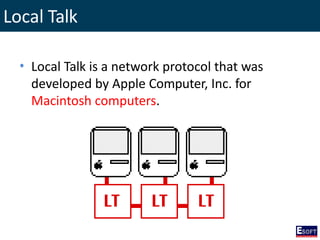
• LocalTalk is a network protocol that was
developed by Apple Computer, Inc. for
Macintosh computers.
47.
Local Talk
• Themethod used by Local Talk is called
CSMA/CA (Carrier Sense Multiple Access /
Collision Avoidance).
• Local Talk transmits data up to 230 kbps
only.
• Each Local Talk Mac or printer has its own
Local Talk adapter to connect each other as a
chain.
• Two Mac computers can use a serial port
instead of Local Talk adapters.
Token Ring
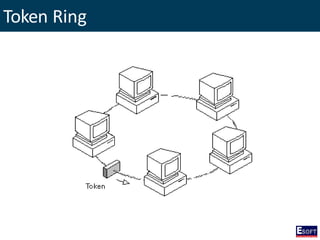
• TokenRing also a local area network
technology.
• Physical Ring Topology and Physical Star
Topology (MSAU as central device) uses Token
Ring.
• It uses a special three-byte frame called a
token that travels around the ring.
• No collisions occurred.
• It is standardized with protocol IEEE
802.5.
FDDI - FiberDistributed Data Interface
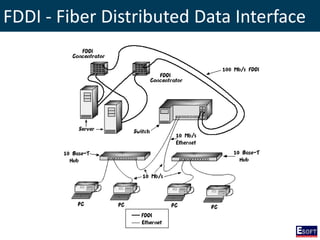
• FDDI uses a dual ring physical topology for
sending data over fiber optic cables.
• FDDI networks are token-passing networks,
and support data rates of up to 100 Mbps.
• FDDI can extend in range up to 200 km.
• FDDI uses two rings to achieve better results
and less chance of failure.
• FDDI is used mainly in mission critical and high
traffic networks.
ATM - AsynchronousTransfer Mode
• ATM supports to carry a complete range of
user traffic, including voice, data, and video
signals.
• ATM transmitting relatively small and fixed
data packets compared to units used with
other technologies.
• The data transfer rates on ATM are either 155
Mbps or 622 Mbps.
• ATM is a key component of broadband ISDN.
61.
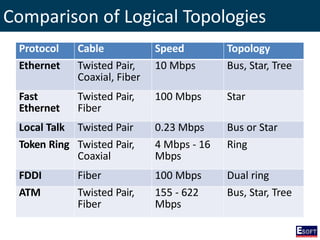
Comparison of LogicalTopologies
Protocol Cable Speed Topology
Ethernet Twisted Pair,
Coaxial, Fiber
10 Mbps Bus, Star, Tree
Fast
Ethernet
Twisted Pair,
Fiber
100 Mbps Star
Local Talk Twisted Pair 0.23 Mbps Bus or Star
Token Ring Twisted Pair,
Coaxial
4 Mbps - 16
Mbps
Ring
FDDI Fiber 100 Mbps Dual ring
ATM Twisted Pair,
Fiber
155 - 622
Mbps
Bus, Star, Tree
62.
Transmission Media
When choosingthe transmission media consider
the following
• Transmission speed
• Segment length
• Cost
• Resistance to environment conditions
63.
Networking Cables
There areseveral kind of networking cables
• Coaxial Cables
• Twisted Pair Cables
• Fiber Optic Cables
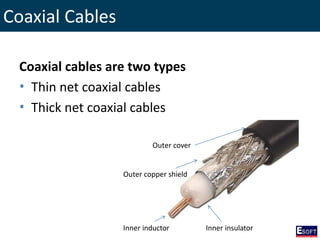
Coaxial Cables
Coaxial cablesare two types
• Thin net coaxial cables
• Thick net coaxial cables
Outer cover
Outer copper shield
Inner insulator
Inner inductor
66.
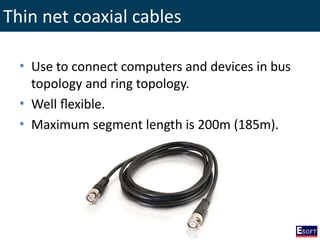
Thin net coaxialcables
• Use to connect computers and devices in bus
topology and ring topology.
• Well flexible.
• Maximum segment length is 200m (185m).
67.
Thick net coaxialcables
• Used as backbone cables and outdoor laying.
• Not well flexible.
• Maximum segment length is 500m (485m).
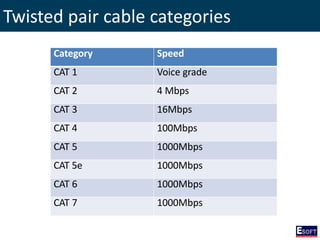
Twister Pair Cables
•Most popular network cable in networking.
• There are two types called:
1. Unshielded twisted pair cables.
2. Shielded twisted pair cables.
• Maximum segment length is 100m.
• Data transferring speed varied on cable
categories.
Fiber Optic Cables
•Fiber optic cables uses light pulses to send and
receive data.
• Have very higher data transfer speed. Ex:
10Gbps or 100Gbps.
• There are two types of fiber optic cables
mainly
– Single Mode Fiber (SMF)
– Multi Mode Fiber (MMF)
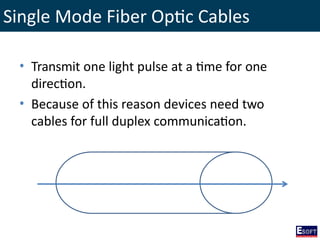
Single Mode FiberOptic Cables
• Transmit one light pulse at a time for one
direction.
• Because of this reason devices need two
cables for full duplex communication.
80.
Multi Mode FiberOptic Cables
• Transmit more than one light pulse.
• Because of that full duplex communication
can achieve using a single cable.
• These cables are not suitable for long distance
data transfer.
Network Devices
Devices ofa network can be classified as
• End user devices
Provide services to the user directly.
Computers, printers, scanners and other.
• Network devices
Connect end user devices together.
Network Interface Card(NIC)
• Every computer should have a network
interface card to connect to the network.
• There are several things to consider before
buying a NIC.
1. Network interface (connectors)
2. Internal interface (PCI, USB)
3. Network architecture
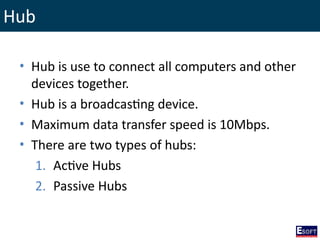
Hub
• Hub isuse to connect all computers and other
devices together.
• Hub is a broadcasting device.
• Maximum data transfer speed is 10Mbps.
• There are two types of hubs:
1. Active Hubs
2. Passive Hubs
90.
Active Hubs
When activehubs receive a signal in one port,
it boost the signal and remove the
electromagnetic noises before send that to
other devices.
91.
Passive Hubs
In passivehubs, it do not amplify the signal or
remove noise before send data to other
computers.
92.
Network Switch
Switches arealso use to connect computers in
physical star topology and these devices are
intelligent than hubs.
93.
How network switchworks?
1. Switches maintain a small table in there RAM to
identify computers that related with the port
numbers.
2. When switch receives a data packet, it reads the
packet header to identify destination address.
3. After that it will search the entire table to find
the related port for that address.
4. Then it can directly forward that data packet to
the related computer rather than broadcasting.
94.
Network Switch Types
•Layer 2 switches (unmanaged switches)
Using MAC addresses of connected devices.
• Layer 3 switches (managed switches)
Using IP addresses of connected devices.
Providing more features than layer 2 switches and
expensive.
Routers
• Routers areuse to connect networks together.
• Routers are more intelligent devices and it use
IP addresses to deal with the packet.
• Routers are responsible for:
Identify proper networks and sub networks.
Forward data packets using the best path.
Network Address Translation (NAT).
Destroying TTL data packets. Etc
97.
Bridge
Bridge can useto connect different topologies
together or can use to connect different cable
types together.
98.
IP Address (InternetProtocol)
• IP address is an unique address that use to
identify computers and devices.
• There are two IP versions called IPv4 and
IPv6
• IPv4 is the common version that used in most
networks.
• IPv4 is made up with 4 decimal numbers and
each are separated by dots. (###.###.###.###)
and each number can be in between 0 to 255.
• IP versions, rules and regulations are created and
maintain by IANA (Internet Assigned Number
Authority)
99.
IP Classes (IPv4)
•Class A
• Class B
• Class C
• Class D (reserved for multicasting
purposes)
• Class E (reserved for experimental
purposes)
Can use in our networks
100.
IP Address
IP Addressesare made up with two sections
1. Network Address (network portion)
2. Host Address (host portion)
N H H H N N H H N N N H
N N N H N N N H
Class A Class B Class C
Class D Class E
101.
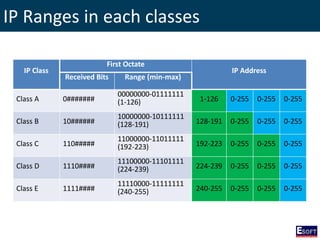
IP Ranges ineach classes
IP Class
First Octate
IP Address
Received Bits Range (min-max)
Class A 0#######
00000000-01111111
(1-126) 1-126 0-255 0-255 0-255
Class B 10######
10000000-10111111
(128-191) 128-191 0-255 0-255 0-255
Class C 110#####
11000000-11011111
(192-223) 192-223 0-255 0-255 0-255
Class D 1110####
11100000-11101111
(224-239) 224-239 0-255 0-255 0-255
Class E 1111####
11110000-11111111
(240-255) 240-255 0-255 0-255 0-255