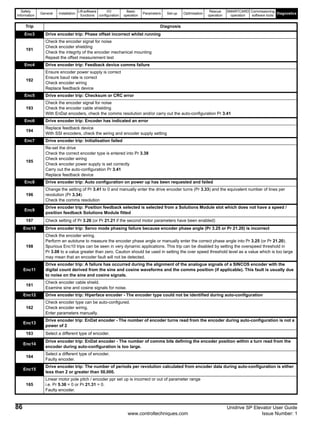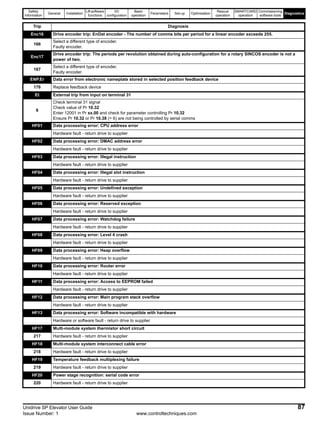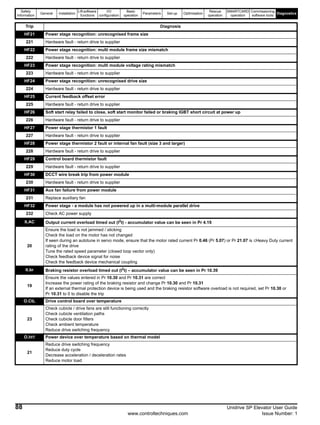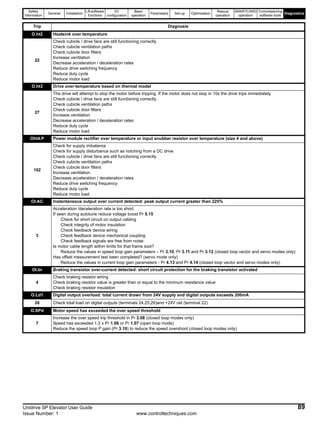
EFwww.controltechniques.com
User Guide
U
Elevator Solution
Universal Variable Speed AC
Drive for induction and servo
motors
Part Number: 0471-0073-01
Issue: 1
General Information
The manufacturer accepts no liability for any consequences resulting from inappropriate, negligent or incorrect
installation or adjustment of the optional operating parameters of the equipment or from mismatching the variable speed
drive with the motor.
The contents of this guide are believed to be correct at the time of printing. In the interests of a commitment to a policy
of continuous development and improvement, the manufacturer reserves the right to change the specification of the
product or its performance, or the contents of the guide, without notice.
All rights reserved. No parts of this guide may be reproduced or transmitted in any form or by any means, electrical or
mechanical including photocopying, recording or by an information storage or retrieval system, without permission in
writing from the publisher.
Drive software version
The software version of the drive can be checked by looking at Pr 11.29 (or Pr 0.50) and Pr 11.34. The software version
takes the form of zz.yy.xx, where Pr 11.29 displays zz.yy and Pr 11.34 displays xx, i.e. for software version 01.01.00,
Pr 11.29 would display 1.01 and Pr 11.34 would display 0.
If there is any doubt, contact a Control Techniques Drive Centre.
SM-ELV software version
The software version and identity number for the SM-ELV option module can be viewed in Pr 0.28 [1] (Pr 20.01) software
version and Pr 0.29 [1] (Pr 20.02) software identity number.
If there is any doubt, contact a Control Techniques Drive Centre.
Environmental statement
Control Techniques is committed to minimising the environmental impacts of its manufacturing operations and of its
products throughout their life cycle. To this end, we operate an Environmental Management System (EMS) which is
certified to the International Standard ISO 14001. Further information on the EMS, our Environmental Policy and other
relevant information is available on request, or can be found at www.greendrives.com.
The electronic variable-speed drives manufactured by Control Techniques have the potential to save energy and
(through increased machine/process efficiency) reduce raw material consumption and scrap throughout their long
working lifetime. In typical applications, these positive environmental effects far outweigh the negative impacts of product
manufacture and end-of-life disposal.
Nevertheless, when the products eventually reach the end of their useful life, they can very easily be dismantled into their
major component parts for efficient recycling. Many parts snap together and can be separated without the use of tools,
while other parts are secured with conventional screws. Virtually all parts of the product are suitable for recycling.
Product packaging is of good quality and can be re-used. Large products are packed in wooden crates, while smaller
products come in strong cardboard cartons which themselves have a high recycled fibre content. If not re-used, these
containers can be recycled. Polythene, used on the protective film and bags for wrapping product, can be recycled in the
same way. Control Techniques' packaging strategy favours easily-recyclable materials of low environmental impact, and
regular reviews identify opportunities for improvement.
When preparing to recycle or dispose of any product or packaging, please observe local legislation and best practice.
Copyright © August 2006 Control Techniques Drives Limited
Issue Number: 1
How to use this guide
This user guide provides detailed information on the SM-ELV, elevator solution software used with Unidrive SP and the
SM-Applications / SM-Applications Lite Solutions Module.
The information is in logical order, taking the user through the features of the software to set-up and optimisation.
There are specific safety warnings in Chapter 1 Safety Information . It is essential that the warnings are observed and
the information considered when working with or designing a system using the Unidrive SP.
This manual should be read in line with the Unidrive SP User Guide.
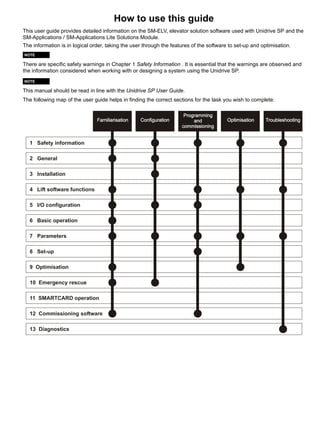
The following map of the user guide helps in finding the correct sections for the task you wish to complete:
NOTE
NOTE
1 Safety information
2 General
3 Installation
4 Lift software functions
5 I/O configuration
6 Basic operation
7 Parameters
8 Set-up
11 SMARTCARD operation
12 Commissioning software
13 Diagnostics
9 Optimisation
10 Emergency rescue
4 Unidrive SP Elevator User Guide
www.controltechniques.com Issue Number: 1
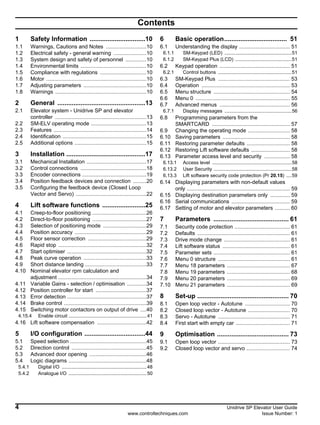
Contents
1 Safety Information ...............................10
1.1 Warnings, Cautions and Notes ...........................10
1.2 Electrical safety - general warning ......................10
1.3 System design and safety of personnel ..............10
1.4 Environmental limits ............................................10
1.5 Compliance with regulations ...............................10
1.6 Motor ...................................................................10
1.7 Adjusting parameters ..........................................10
1.8 Warnings .............................................................10
2 General .................................................13
2.1 Elevator system - Unidrive SP and elevator
controller .............................................................13
2.2 SM-ELV operating mode .....................................13
2.3 Features ..............................................................14
2.4 Identification ........................................................15
2.5 Additional options ................................................15
3 Installation ............................................17
3.1 Mechanical Installation ........................................17
3.2 Control connections ............................................18
3.3 Encoder connections ...........................................19
3.4 Position feedback devices and connection .........20
3.5 Configuring the feedback device (Closed Loop
Vector and Servo) ...............................................22
4 Lift software functions ........................25
4.1 Creep-to-floor positioning ....................................26
4.2 Direct-to-floor positioning ....................................27
4.3 Selection of positioning mode .............................29
4.4 Position accuracy ................................................29
4.5 Floor sensor correction .......................................29
4.6 Rapid stop ...........................................................32
4.7 Start optimiser .....................................................32
4.8 Peak curve operation ..........................................33
4.9 Short distance landing .........................................33
4.10 Nominal elevator rpm calculation and
adjustment ...........................................................34
4.11 Variable Gains - selection / optimisation .............34
4.12 Position controller for start ..................................37
4.13 Error detection .....................................................37
4.14 Brake control .......................................................39
4.15 Switching motor contactors on output of drive ....40
4.15.4 Enable circuit ..........................................................41
4.16 Lift software compensation .................................42
5 I/O configuration ..................................44
5.1 Speed selection ...................................................45
5.2 Direction control ..................................................45
5.3 Advanced door opening ......................................46
5.4 Logic diagrams ....................................................48
5.4.1 Digital I/O ...............................................................48
5.4.2 Analogue I/O ..........................................................50
6 Basic operation................................... 51
6.1 Understanding the display .................................. 51
6.1.1 SM-Keypad (LED) ..................................................51
6.1.2 SM-Keypad Plus (LCD) ..........................................51
6.2 Keypad operation ............................................... 51
6.2.1 Control buttons .......................................................51
6.3 SM-Keypad Plus ................................................ 53
6.4 Operation ........................................................... 53
6.5 Menu structure ................................................... 54
6.6 Menu 0 ............................................................... 55
6.7 Advanced menus ............................................... 56
6.7.1 Display messages ..................................................56
6.8 Programming parameters from the
SMARTCARD .................................................... 57
6.9 Changing the operating mode ............................ 58
6.10 Saving parameters ............................................. 58
6.11 Restoring parameter defaults ............................. 58
6.12 Restoring Lift software defaults .......................... 58
6.13 Parameter access level and security ................. 58
6.13.1 Access level ...........................................................58
6.13.2 User Security ..........................................................58
6.13.3 Lift software security code protection (Pr 20.15) ....59
6.14 Displaying parameters with non-default values
only ..................................................................... 59
6.15 Displaying destination parameters only ............. 59
6.16 Serial communications ....................................... 59
6.17 Setting of motor and elevator parameters .......... 60
7 Parameters .......................................... 61
7.1 Security code protection ..................................... 61
7.2 Defaults .............................................................. 61
7.3 Drive mode change ............................................ 61
7.4 Lift software status ............................................. 61
7.5 Parameter sets ................................................... 61
7.6 Menu 0 structure ................................................ 61
7.7 Menu 18 parameters .......................................... 67
7.8 Menu 19 parameters .......................................... 68
7.9 Menu 20 parameters .......................................... 69
7.10 Menu 21 parameters .......................................... 69
8 Set-up ................................................... 70
8.1 Open loop vector - Autotune .............................. 70
8.2 Closed loop vector - Autotune ............................ 70
8.3 Servo - Autotune ................................................ 71
8.4 First start with empty car .................................... 71
9 Optimisation ........................................ 73
9.1 Open loop vector ................................................ 73
9.2 Closed loop vector and servo ............................. 74
Unidrive SP Elevator User Guide 5
Issue Number: 1 www.controltechniques.com
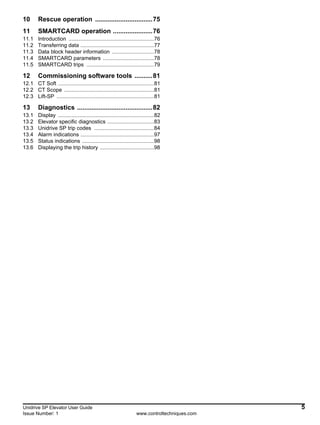
10 Rescue operation ................................75
11 SMARTCARD operation ......................76
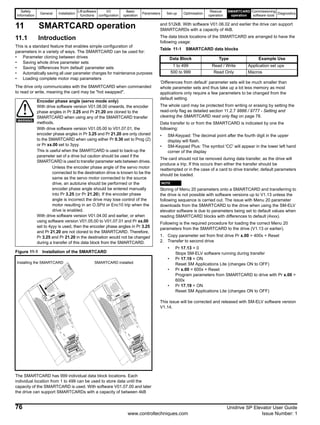
11.1 Introduction .........................................................76
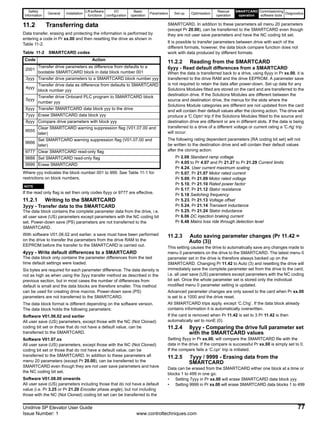
11.2 Transferring data .................................................77
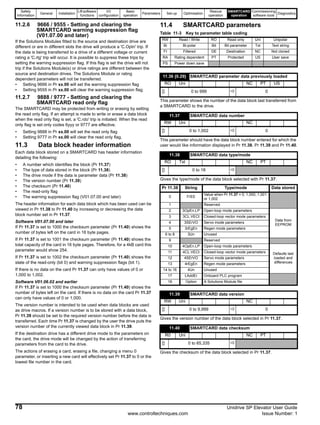
11.3 Data block header information ............................78
11.4 SMARTCARD parameters ..................................78
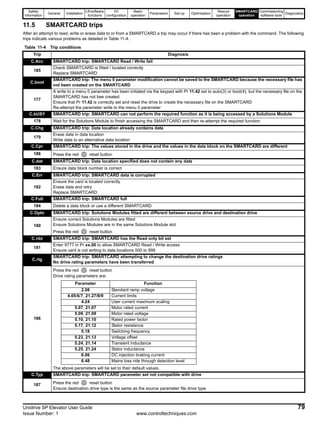
11.5 SMARTCARD trips .............................................79
12 Commissioning software tools ..........81
12.1 CT Soft ................................................................81
12.2 CT Scope ............................................................81
12.3 Lift-SP .................................................................81
13 Diagnostics ..........................................82
13.1 Display ................................................................82
13.2 Elevator specific diagnostics ...............................83
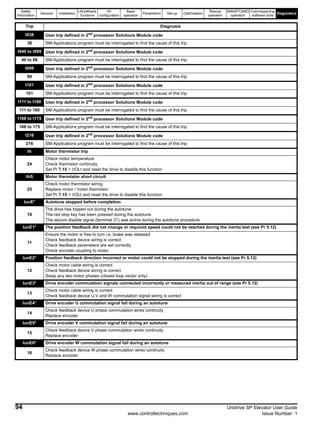
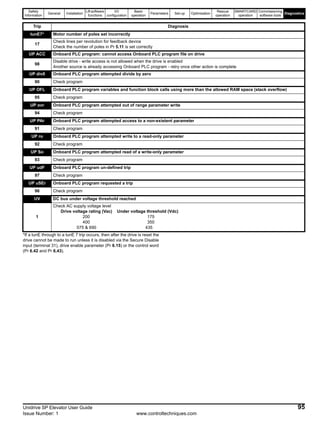
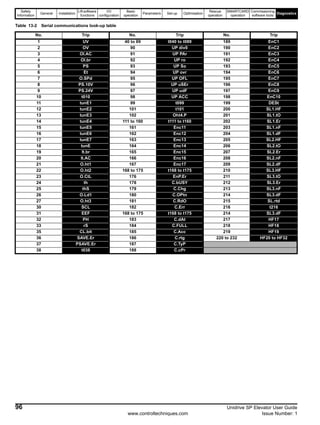
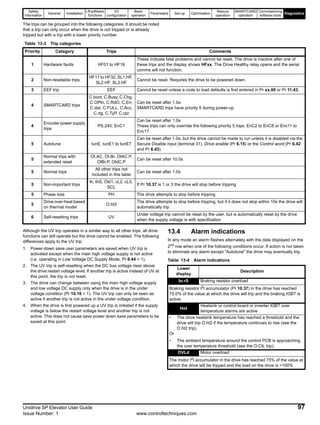
13.3 Unidrive SP trip codes ........................................84
13.4 Alarm indications .................................................97
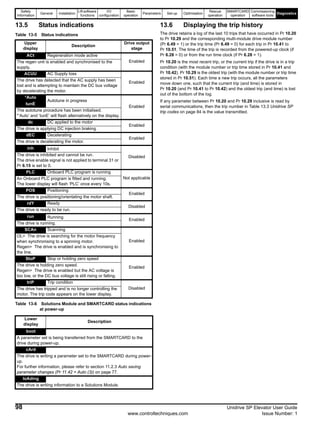
13.5 Status indications ................................................98
13.6 Displaying the trip history ....................................98
6 Unidrive SP Elevator User Guide
www.controltechniques.com Issue Number: 1
Declaration of Conformity (Size 1 to 3)
Control Techniques Ltd
The Gro
Newtown
Powys
UK
SY16 3BE
The AC variable speed drive products listed above have been designed
and manufactured in accordance with the following European
harmonised standards:
1
These products are for professional use, and power input exceeds
1kW for all models, so no limits apply.
These products comply with the Low Voltage Directive 73/23/EEC, the
Electromagnetic Compatibility (EMC) Directive 89/336/EEC and the CE
Marking Directive 93/68/EEC.
W. Drury
Executive Vice President, Technology
Newtown
Date: 22nd July 2004
These electronic drive products are intended to be used with
appropriate motors, controllers, electrical protection components
and other equipment to form complete end products or systems.
Compliance with safety and EMC regulations depends upon
installing and configuring drives correctly, including using the
specified input filters. The drives must be installed only by
professional assemblers who are familiar with requirements for
safety and EMC. The assembler is responsible for ensuring that the
end product or system complies with all the relevant laws in the
country where it is to be used. Refer to this User Guide. An EMC
Data Sheet is also available giving detailed EMC information.
SP1201 SP1202 SP1203 SP1204
SP2201 SP2202 SP2203
SP3201 SP3202
SP1401 SP1402 SP1403 SP1404 SP1405 SP1406
SP2401 SP2402 SP2403 SP2404
SP3401 SP3402 SP3403
SP3501 SP3502 SP3503 SP3504 SP3505 SP3506 SP3507
EN 50178 Electronic equipment for use in power installations
EN 61800-3
Adjustable speed electrical power drive systems.
EMC product standard including specific test
methods
EN 61000-6-2
Electromagnetic compatibility (EMC). Generic
standards. Immunity standard for industrial
environments
EN 61000-6-4
Electromagnetic compatibility (EMC). Generic
standards. Emission standard for industrial
environments
EN 50081-2
Electromagnetic compatibility. Generic emission
standard. Industrial environment
EN 50082-2
Electromagnetic compatibility. Generic immunity
standard. Industrial environment
EN 61000-3-21
Electromagnetic compatibility (EMC). Limits. Limits
for harmonic current emissions (equipment input
current up to and including 16 A per phase)
EN 61000-3-3
Electromagnetic compatibility (EMC). Limits.
Limitation of voltage fluctuations and flicker in low-
voltage supply systems for equipment with rated
current <= 16 A
Unidrive SP Elevator User Guide 7
Issue Number: 1 www.controltechniques.com
Declaration of Conformity (Size 4 and 5)
Control Techniques Ltd
The Gro
Newtown
Powys
UK
SY16 3BE
The AC variable speed drive products listed above have been designed
and manufactured in accordance with the following European
harmonised standards:
These products comply with the Low Voltage Directive 73/23/EEC, the
Electromagnetic Compatibility (EMC) Directive 89/336/EEC and the CE
Marking Directive 93/68/EEC.
Executive Vice President, Technology
Newtown
Date: 17th January 2005
These electronic drive products are intended to be used with
appropriate motors, controllers, electrical protection components
and other equipment to form complete end products or systems.
Compliance with safety and EMC regulations depends upon
installing and configuring drives correctly, including using the
specified input filters. The drives must be installed only by
professional assemblers who are familiar with requirements for
safety and EMC. The assembler is responsible for ensuring that the
end product or system complies with all the relevant laws in the
country where it is to be used. Refer to the User Guide. An EMC
Data Sheet is also available giving detailed EMC information.
SP4201 SP4202 SP4203
SP4401 SP4402 SP4403
SP5401 SP5402
SP4601 SP4602 SP4603 SP4604 SP4605 SP4606
SP5601 SP5602
EN 61800-5-1
Adjustable speed electrical power drive systems -
safety requirements - electrical, thermal and energy
EN 61800-3
Adjustable speed electrical power drive systems.
EMC product standard including specific test
methods
EN 61000-6-2
Electromagnetic compatibility (EMC). Generic
standards. Immunity standard for industrial
environments
EN 61000-6-4
Electromagnetic compatibility (EMC). Generic
standards. Emission standard for industrial
environments
8 Unidrive SP Elevator User Guide
www.controltechniques.com Issue Number: 1
Declaration of Conformity (Size 6)
Control Techniques Ltd
The Gro
Newtown
Powys
UK
SY16 3BE
The AC variable speed drive products listed above have been designed
and manufactured in accordance with the following European
harmonised standards:
These products comply with the Low Voltage Directive 73/23/EEC, the
Electromagnetic Compatibility (EMC) Directive 89/336/EEC and the CE
Marking Directive 93/68/EEC.
Executive Vice President, Technology
Newtown
Date: 17th January 2005
These electronic drive products are intended to be used with
appropriate motors, controllers, electrical protection components
and other equipment to form complete end products or systems.
Compliance with safety and EMC regulations depends upon
installing and configuring drives correctly, including using the
specified input filters. The drives must be installed only by
professional assemblers who are familiar with requirements for
safety and EMC. The assembler is responsible for ensuring that the
end product or system complies with all the relevant laws in the
country where it is to be used. Refer to the User Guide. An EMC
Data Sheet is also available giving detailed EMC information.
SP6401 SP6402
SP6601 SP6602
EN 61800-5-1
Adjustable speed electrical power drive systems -
safety requirements - electrical, thermal and energy
EN 61800-3
Adjustable speed electrical power drive systems.
EMC product standard including specific test
methods
EN 61000-6-2
Electromagnetic compatibility (EMC). Generic
standards. Immunity standard for industrial
environments
Unidrive SP Elevator User Guide 9
Issue Number: 1 www.controltechniques.com
Declaration of Conformity (Size 8 and 9)
Control Techniques Ltd
The Gro
Newtown
Powys
UK
SY16 3BE
The AC variable speed drive products listed above have been designed
and manufactured in accordance with the following European
harmonised standards:
*Clause 5.2.3.8 of EN 61800-5-1:2003 (breakdown of components test)
has been amended to eliminate the 30A ground (earth) fuse, in
accordance with the draft edition 2 of IEC 61800-5-1
These products comply with the Low Voltage Directive 73/23/EEC, the
Electromagnetic Compatibility (EMC) Directive 89/336/EEC and the CE
Marking Directive 93/68/EEC.
Executive Vice President, Technology
Newtown
Date: 11th October 2005
These electronic drive products are intended to be used with
appropriate motors, controllers, electrical protection components
and other equipment to form complete end products or systems.
Compliance with safety and EMC regulations depends upon
installing and configuring drives correctly, including using the
specified input filters. The drives must be installed only by
professional assemblers who are familiar with requirements for
safety and EMC. The assembler is responsible for ensuring that the
end product or system complies with all the relevant laws in the
country where it is to be used. Refer to the User Guide. An EMC
Data Sheet is also available giving detailed EMC information.
SP8411 SP8412 SP8413 SP8414
SP9411 SP9412 SP9413 SP9414 SP9415
EN 61800-5-1*
Adjustable speed electrical power drive systems -
safety requirements - electrical, thermal and energy
EN 61800-3
Adjustable speed electrical power drive systems.
EMC product standard including specific test methods
EN 61000-6-2
Electromagnetic compatibility (EMC). Generic
standards. Immunity standard for industrial
environments
Safety
Information
General Installation
Lift software
functions
I/O
configuration
Basic
operation
Parameters Set-up Optimisation
Rescue
operation
SMARTCARD
operation
Commissioning
software tools
Diagnostics
10 Unidrive SP Elevator User Guide
www.controltechniques.com Issue Number: 1
1 Safety Information
1.1 Warnings, Cautions and Notes
A Note contains information which helps to ensure correct operation of
the product.
1.2 Electrical safety - general warning
The voltages used in the drive can cause severe electrical shock and/or
burns, and could be lethal. Extreme care is necessary at all times when
working with or adjacent to the drive.
Specific warnings are given at the relevant places in this User Guide.
1.3 System design and safety of
personnel
The drive is intended as a component for professional incorporation into
complete equipment or a system. If installed incorrectly, the drive may
present a safety hazard.
The drive uses high voltages and currents, carries a high level of stored
electrical energy, and is used to control equipment which can cause
injury.
Close attention is required to the electrical installation and the system
design to avoid hazards either in normal operation or in the event of
equipment malfunction. System design, installation, commissioning and
maintenance must be carried out by personnel who have the necessary
training and experience. They must read this safety information and this
User Guide carefully.
The STOP and SECURE DISABLE functions of the drive do not isolate
dangerous voltages from the output of the drive or from any external
option unit. The supply must be disconnected by an approved electrical
isolation device before gaining access to the electrical connections.
With the sole exception of the SECURE DISABLE function, none of
the drive functions must be used to ensure safety of personnel, i.e.
they must not be used for safety-related functions.
Careful consideration must be given to the functions of the drive which
might result in a hazard, either through their intended behaviour or
through incorrect operation due to a fault. In any application where a
malfunction of the drive or its control system could lead to or allow
damage, loss or injury, a risk analysis must be carried out, and where
necessary, further measures taken to reduce the risk - for example, an
over-speed protection device in case of failure of the speed control, or a
fail-safe mechanical brake in case of loss of motor braking.
The SECURE DISABLE function has been approved1 as meeting the
requirements of EN954-1 category 3 for the prevention of unexpected
starting of the drive. It may be used in a safety-related application. The
system designer is responsible for ensuring that the complete
system is safe and designed correctly according to the relevant
safety standards.
1Independent approval by BGIA has been given.
1.4 Environmental limits
Instructions in this User Guide regarding transport, storage, installation
and use of the drive must be complied with, including the specified
environmental limits. Drives must not be subjected to excessive physical
force.
1.5 Compliance with regulations
The installer is responsible for complying with all relevant regulations,
such as national wiring regulations, accident prevention regulations and
electromagnetic compatibility (EMC) regulations. Particular attention
must be given to the cross-sectional areas of conductors, the selection
of fuses or other protection, and protective earth (ground) connections.
Within the European Union, all machinery in which this product is used
must comply with the following directives:
98/37/EC: Safety of machinery.
89/336/EEC: Electromagnetic Compatibility.
95/16/EC: Lifts Directive.
1.6 Motor
Ensure the motor is installed in accordance with the manufacturer’s
recommendations. Ensure the motor shaft is not exposed.
Standard squirrel cage induction motors are designed for single speed
operation. If it is intended to use the capability of the drive to run a motor
at speeds above its designed maximum, it is strongly recommended that
the manufacturer is consulted first.
Low speeds may cause the motor to overheat because the cooling fan
becomes less effective. The motor should be fitted with a protection
thermistor. If necessary, an electric forced vent fan should be used.
The values of the motor parameters set in the drive affect the protection
of the motor. The default values in the drive should not be relied upon.
It is essential that the correct value is entered in parameter 0.46 motor
rated current. This affects the thermal protection of the motor.
1.7 Adjusting parameters
Some parameters have a profound effect on the operation of the drive.
They must not be altered without careful consideration of the impact on
the controlled system. Measures must be taken to prevent unwanted
changes due to error or tampering.
1.8 Warnings
A Warning contains information which is essential for
avoiding a safety hazard.
A Caution contains information which is necessary for
avoiding a risk of damage to the product or other equipment.
WARNING
CAUTION
NOTE
Competence of the installer
The drive must be installed by professional assemblers who
are familiar with the requirements for safety and EMC. The
assembler is responsible for ensuring that the end product or
system complies with all the relevant laws in the country
where it is to be used.
Follow the instructions
The mechanical and electrical installation instructions
must be adhered to. Any questions or doubt should be
referred to the supplier of the equipment. It is the
responsibility of the owner or user to ensure that the
installation of the drive and any external option unit, and the
way in which they are operated and maintained, comply with
the requirements of the Health and Safety at Work Act in the
United Kingdom or applicable legislation and regulations and
codes of practice in the country in which the equipment is
used.
WARNING
WARNING
Safety
Information
General Installation
Lift software
functions
I/O
configuration
Basic
operation
Parameters Set-up Optimisation
Rescue
operation
SMARTCARD
operation
Commissioning
software tools
Diagnostics
Unidrive SP Elevator User Guide 11
Issue Number: 1 www.controltechniques.com
Fuses
The AC supply to the drive must be fitted with suitable
protection against overload and short-circuits. The Unidrive
SP User Guide shows recommended fuse ratings. Failure to
observe this requirement will cause risk of fire.
The ground loop impedance must conform to the
requirements of local safety regulations.
The drive must be grounded by a connection capable of
carrying the prospective fault current until the protective
device (fuse, etc.) disconnects the AC supply.
The ground connections must be inspected and tested at
appropriate intervals.
Only type B ELCB / RCD are suitable for use with 3 phase
inverter drives.
This is a product of the restricted distribution class according
to IEC 61800-3
In a domestic environment this product may cause radio
interference in which case the user may be required to take
adequate measures.
The second environment typically includes an industrial
low-voltage power supply network which does not supply
buildings used for domestic purposes. Operating the drive in
this environment without an external EMC filter may cause
interference to nearby electronic equipment whose sensitivity
has not been appreciated. The user must take remedial
measures if this situation arises. If the consequences of
unexpected disturbances are severe, it is recommended that
the guidelines in the Unidrive SP User Guide are adhered to.
A fuse or other over-current protection should be fitted to the
relay circuit.
Electric shock risk
The voltages present in the following locations can cause
severe electric shock and may be lethal:
• AC supply cables and connections
• DC and brake cables, and connections
• Output cables and connections
• Many internal parts of the drive, and external option units
Unless otherwise indicated, control terminals are single
insulated and must not be touched.
Stored charge
The drive contains capacitors that remain charged to a
potentially lethal voltage after the AC supply has been
disconnected. If the drive has been energised, the AC
supply must be isolated at least ten minutes before work
may continue.
Normally, the capacitors are discharged by an internal
resistor. Under certain, unusual fault conditions, it is possible
that the capacitors may fail to discharge, or be prevented
from being discharged by a voltage applied to the output
terminals. If the drive has failed in a manner that causes the
display to go blank immediately, it is possible the capacitors
will not be discharged. In this case, consult Control
Techniques or their authorised distributor.
WARNING
WARNING
WARNING
CAUTION
CAUTION
WARNING
WARNING
WARNING
Isolation device
The AC supply must be disconnected from the drive using
an approved isolation device before any cover is removed
from the drive or before any servicing work is performed.
Users must not attempt to repair a drive if it is faulty, nor
carry out fault diagnosis other than through the use of the
diagnostic features described in this chapter.
If a drive is faulty, it must be returned to an authorized
Control Techniques distributor for repair.
Do not change parameter values without careful
consideration; incorrect values may cause damage or a
safety hazard.
If the drive has been used at high load levels for a period of
time, the heatsink can reach temperatures in excess of
70°C (158°F). Human contact with the heatsink should be
prevented.
STOP function
The STOP function does not remove dangerous voltages
from the drive, the motor or any external option units.
Pr 0.46 Motor rated current must be set correctly to avoid a
risk of fire in the event of motor overload.
If the cable between the drive and the motor is to be
interrupted by a contactor or circuit breaker, ensure that
the drive is disabled before the contactor or circuit breaker is
opened or closed. Severe arcing may occur if this circuit is
interrupted with the motor running at high current and low
speed.
Permanent magnet motors
Permanent magnet motors generate electrical power if they
are rotated, even when the supply to the drive is
disconnected. If that happens then the drive will become
energised through its motor terminals.
If the motor load is capable of rotating the motor when the
supply is disconnected, then the motor must be isolated from
the drive before gaining access to any live parts.
Secure disable inhibits the operation of the drive, this
includes inhibiting braking. If the drive is required to
provide both braking and secure disable in the same
operation (e.g. for emergency stop) then a safety timer relay
or similar device must be used to ensure that the drive is
disabled a suitable time after braking. The braking function
in the drive is provided by an electronic circuit which is not
fail-safe. If braking is a safety requirement, it must be
supplemented by an independent fail-safe braking
mechanism.
A rotating autotune will cause the motor to accelerate up to
2
/3 base speed in the direction selected regardless of the
reference provided. Once complete the motor will coast to a
stop. The run signal must be removed before the drive can be
made to run at the required reference.
The drive can be stopped at any time by removing the run
signal or removing the drive enable.
WARNING
WARNING
WARNING
WARNING
WARNING
WARNING
WARNING
WARNING
WARNING
WARNING
Safety
Information
General Installation
Lift software
functions
I/O
configuration
Basic
operation
Parameters Set-up Optimisation
Rescue
operation
SMARTCARD
operation
Commissioning
software tools
Diagnostics
12 Unidrive SP Elevator User Guide
www.controltechniques.com Issue Number: 1
The short low speed and normal low speed autotune tests
will rotate the motor by up to 2 revolutions in the direction
selected, regardless of the reference provided. The minimal
movement test will move the motor through an angle defined
by Pr 5.38.
Once complete the motor will come to a standstill. The run
signal must be removed before the drive can be made to run at
the required reference.
The drive can be stopped at any time by removing the run signal
or removing the Drive Enable.
Encoder phase angle (servo mode only)
With drive software version V01.08.00 onwards, the encoder
phase angles in Pr 3.25 and Pr 21.20 are cloned to the
SMARTCARD when using any of the SMARTCARD transfer
methods.
With drive software version V01.05.00 to V01.07.01, the
encoder phase angles in Pr 3.25 and Pr 21.20 are only cloned
to the SMARTCARD when using either Pr 0.30 set to Prog (2)
or Pr xx.00 set to 3yyy.
This is useful when the SMARTCARD is used to back-up the
parameter set of a drive but caution should be used if the
SMARTCARD is used to transfer parameter sets between drives.
Unless the encoder phase angle of the servo motor connected
to the destination drive is known to be the same as the servo
motor connected to the source drive, an autotune should be
performed or the encoder phase angle should be entered
manually into Pr 3.25 (or Pr 21.20). If the encoder phase angle
is incorrect the drive may lose control of the motor resulting in
an O.SPd or Enc10 trip when the drive is enabled.
With drive software version V01.04.00 and earlier, or when
using software version V01.05.00 to V01.07.01 and Pr xx.00
set to 4yyy is used, then the encoder phase angles in Pr 3.25
and Pr 21.20 are not cloned to the SMARTCARD. Therefore,
Pr 3.25 and Pr 21.20 in the destination would not be changed
during a transfer of this data block from the SMARTCARD.
Power down the drive before fitting / removing the
Solutions Module. Failure to do so may result in damage to
the product.
SECURE DISABLE function
The SECURE DISABLE function does not remove
dangerous voltages from the drive, the motor or any external
option units.
The control circuits are isolated from the power circuits in
the drive by basic insulation (single insulation) only. The
installer must ensure that the external control circuits are
insulated from human contact by at least one layer of
insulation (supplementary insulation) rated for use at the AC
supply voltage.
If the control circuits are to be connected to other circuits
classified as Safety Extra Low Voltage (SELV) (e.g. to a
personal computer), an additional isolating barrier must be
included in order to maintain the SELV classification.
To avoid the risk of fire when the drive is surface mounted
with the braking resistor fitted, the back plate should be a
non-flammable material.
WARNING
WARNING
CAUTION
WARNING
WARNING
WARNING
WARNING
Overload protection
When an external braking resistor is used, it is essential that
an overload protection device is incorporated in the braking
resistor circuit; this is described in the Unidrive SP User
Guide.WARNING
Safety
Information
General Installation
Lift software
functions
I/O
configuration
Basic
operation
Parameters Set-up Optimisation
Rescue
operation
SMARTCARD
operation
Commissioning
software tools
Diagnostics
Unidrive SP Elevator User Guide 13
Issue Number: 1 www.controltechniques.com
2 General
The Unidrive SP is a high performance drive making it an excellent choice for elevator applications. Figure 2-1 following shows the Unidrive SP
incorporated into an elevator system using the SM-ELV and where required an SM-I/O Plus can also be added to increase the drive’s I/O capability. In
addition other Solutions Modules can be fitted to further increase the Unidrive SP capability (e.g. SM-Resolver etc.).
Figure 2-1 Elevator system
2.1 Elevator system - Unidrive SP and
elevator controller
The Unidrive SP elevator solution (SM-ELV) software incorporates a
travel profile calculator and special operating level designed for
elevators. This software has additional features allowing it to be used for
both geared and gearless elevators.
The elevator software is introduced through either the SM-Applications
or SM-Applications Lite Solutions Module and special software.
The SM-Applications would be used where additional features are
required, e.g. larger DPL programs, extended user memory, RS485, CT-
Net or extended I/O.
The Unidrive SP elevator drive is controlled by a digital interface from
the elevator controller as shown in Figure 2-1. The elevator controller
software interprets the calls and produces the speed and direction
signals for the Unidrive SP.
The elevator controller provides all the safety related functions in this
system configuration, including the optional brake control in place of the
Unidrive SP.
2.2 SM-ELV operating mode
The Unidrive SP plus SM-ELV software creates a velocity motion profile,
which includes elevator application specific functions. It can be used for
both geared and gearless elevators operating in either Open Loop,
Closed Loop Vector or Servo mode. Brushless synchronous motors with
encoders (Incremental or Absolute) / resolvers and induction motors with
or without encoders (Incremental or Absolute) / resolvers can be
controlled.
The following operating modes can be selected through the SM-ELV
elevator software installed in the SM-Applications or SM-Applications Lite:
1. Pr 0.16[3] (Pr 20.13) = 0 Direct-to-floor positioning disabled
(Creep-to-floor active)
ELEVATOR
SHAFT
ABSOLUTE
ENCODER
SHAFT
POSITION
CALLS
SERVO
MOTOR
INDUCTION
MOTOR
SPEED FEEDBACK
WITH OR WITHOUT
SPEED FEEDBACK
BRAKE
CONTROL
CONTROL
CAR
COUNTER
BALANCE
INTERFACE
Digital Inputs / Outputs
Analogue Inputs / Outputs
Relays
Additional I/O
Digital Interface
Speed Selection
Speed monitoring
Brake Control
Car calls
Landing calls
Door control
Safety Related Functions
Elevator Controller
Open Loop
Closed Loop Vector
Servo
SM-Resolver
FeedbackSM-ELV Elevator Solution
Brake Control
Motor contactor control
Pre Door opening
SM-ELV Profile+Control
Open Loop
Closed Loop Vector
Servo
ELEVATOR
CONTROLLER
Safety
Information
General Installation
Lift software
functions
I/O
configuration
Basic
operation
Parameters Set-up Optimisation
Rescue
operation
SMARTCARD
operation
Commissioning
software tools
Diagnostics
14 Unidrive SP Elevator User Guide
www.controltechniques.com Issue Number: 1
2. Pr 0.16[3] (Pr 20.13) = 1 Direct-to-floor positioning with Stop signal
via analogue input 1 (T.5)
3. Pr 0.16[3] (Pr 20.13) = 2 Direct-to-floor positioning with Stop signal
via analogue input 2 (T.7)
4. Pr 0.16[3] (Pr 20.13) = 3 Direct-to-floor positioning with Stop signal
via analogue input 3 (T. 8)
5. Pr 0.16[3] (Pr 20.13) = 4 Direct-to-floor positioning with disable the
speed signals (controlling)
2.3 Features
The following Elevator functions are provided within the SM-ELV (SM-
Applications, SM-Applications Lite and Elevator software). The SM-ELV
software provides positioning controls associated with elevators e.g.
creep-to-floor and direct-to-floor with complete positioning control,
multiple speed selection and brake control as listed in Table 2-1.
The external lift controller evaluates the elevator signals and elevator
calls, and from these generates travel commands to the Unidrive SP.
The SM-ELV generates and modifies the required profile for travel.
N
A number of settings are necessary in order to use this software. To
simplify this a default feature is included which allows standard settings
for the initial run. (Refer to Pr 18.50 Default settings.)
N
Positioning with creep-to-floor is used in most applications. Therefore
creep-to-floor has been selected as the default setting for the elevator
software Pr 0.16[3] (Pr 20.13) = 0. N
Direct-to-floor positioning mode is enabled through Pr 0.16[3] (Pr 20.13)
as detailed in section 2.2 SM-ELV operating mode on page 13.
N
The external lift controller handles all the specific functions related to the
safety aspects of the elevator.
To assist with the set-up and commissioning of the elevator there are
also various commissioning software tools as detailed :
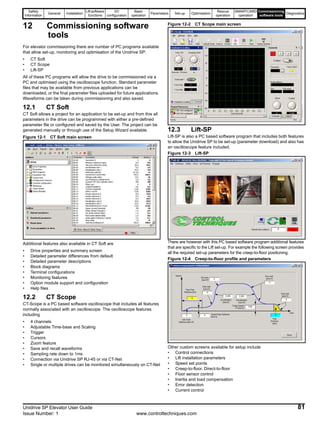
1. CT Soft - Allows parameter adjustment and upload / download
features.
2. CT Scope - Allows speed / current profiles to be monitored during
operation. Waveforms can be saved to file.
3. Lift - SP is designed specifically for lifts with various set-up features,
parameter adjustment upload / download, commissioning screens,
and oscilloscope features.
For more detailed information refer to Chapter 12 Commissioning
software tools .
Table 2-1 Features
NOTE
NOTE
NOTE
Elevator software features Advantages
Text display with elevator terms Commissioning without User Guide is possible
Dedicated Unidrive Menu 0 Simplified operation with reduced parameter sets
Conventional data input units (mm/s, mm/s2
,) No calculation required to set-up the elevator drive
10 speed binary selections
Flexible interface, with range of speed reference values to optimise elevator
performance
6 speed priority selections
7 speed priority selection with additional SM-I/O Plus option
module
2 speed thresholds Applicable for the functions like pre door opening or over speed monitoring
Creep-to-floor positioning Standard operation using creep to floor positioning (default)
Direct-to-floor positioning Opitmised operation for high speed elevators positioning direct to floor with no creep
Speed profile with separately adjustable jerk, acceleration
and deceleration
Separate optimisation for the start characteristic, travel, deceleration and positioning
(stop)
Variable speed loop gains for start, travel and positioning
(stop)
Optimisation of the load for the elevator during start, travel and positioning (stop)
Acceleration feed forward control and load measurement Movement quality optimisation of the load behaviour, and positioning accuracy
Deceleration and stopping distance calculation
If the speed or profile are changed then the deceleration or stop distance will change.
The elevator controller can compensate for these changes.
Floor sensor correction Reduction of necessary speeds to ensure correct floor level
Rapid stop Allows a separate rapid stop deceleration
Start optimiser
To overcome static friction or difficult starting problems a start optimiser function is
available
Position controller High ride comfort for start with gearless elevators
Short distance landing For short floor distance travel
Motor contactor control Output contactor control can be carried in the SM-ELV
Load direction - Rescue operation
Load direction is measured during each travel and is available for rescue operation to
determine the direction to travel with least load saved at each power down
Integrated brake control Simplified elevator brake control interface
Following error detection
Includes both speed error (Trip 70) and position error (Trip 71) detection.
Protection against motor and feedback cable break, loss of feedback, incorrect
parameter setting
Thermal protection
Thermal protection is introduced to prevent the Unidrive SP and SM-ELV operating
with temperatures below 0°C, with a Trip 73 being generated.
Motor fluxed detection
Protection provided to ensure motor is fully magnetised at start, Trip 76 generated if
not.
Motor phase loss detection
Protection provided to detect motor phase loss with Trip 77 generated where motor
phase loss is present.
Safety
Information
General Installation
Lift software
functions
I/O
configuration
Basic
operation
Parameters Set-up Optimisation
Rescue
operation
SMARTCARD
operation
Commissioning
software tools
Diagnostics
Unidrive SP Elevator User Guide 15
Issue Number: 1 www.controltechniques.com
2.4 Identification
The SM-ELV Solutions Module consists of either an SM-Applications or an SM-Applications Lite with the elevator software.
The elevator software version and identity number can be verified in the following parameters:
The software version is displayed in Pr 0.28 [1] (Pr 20.01) software Version in the form of xx.xx.
The software identity number is displayed in Pr 0.29 [1] (Pr 20.02) Software identity number in the form of xx.xx.
To verify the lift software is running, monitor Pr 0.29 [1] (Pr 20.02). This should toggle every 1s between 10614 and -10614.
2.5 Additional options
Figure 2-2 Options available with Unidrive SP
* A SMARTCARD is provided with the Unidrive SP as standard.
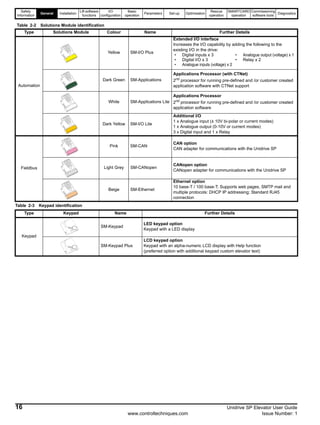
All Unidrive SP Solutions Modules are colour-coded in order to make identification easy. The following table shows the colour-code key and gives
further details on their function.
Keypad
Automation FieldbusFeedback
SMARTCARD*
CT Comms
cable
External
footprint /
bookcase
EMC filter
Table 2-2 Solutions Module identification
Type Solutions Module Colour Name Further Details
Feedback
Light Blue SM-Resolver
Resolver interface
Feedback interface for resolvers.
Simulated quadrature encoder outputs
N/A
15-way D-type
converter
Drive encoder input converter
Provides screw terminal interface for encoder wiring and spade
terminal for shield
Safety
Information
General Installation
Lift software
functions
I/O
configuration
Basic
operation
Parameters Set-up Optimisation
Rescue
operation
SMARTCARD
operation
Commissioning
software tools
Diagnostics
16 Unidrive SP Elevator User Guide
www.controltechniques.com Issue Number: 1
Table 2-3 Keypad identification
Automation
Yellow SM-I/O Plus
Extended I/O interface
Increases the I/O capability by adding the following to the
existing I/O in the drive:
Dark Green SM-Applications
Applications Processor (with CTNet)
2nd
processor for running pre-defined and /or customer created
application software with CTNet support
White SM-Applications Lite
Applications Processor
2nd
processor for running pre-defined and /or customer created
application software
Dark Yellow SM-I/O Lite
Additional I/O
1 x Analogue input (± 10V bi-polar or current modes)
1 x Analogue output (0-10V or current modes)
3 x Digital input and 1 x Relay
Fieldbus
Pink SM-CAN
CAN option
CAN adapter for communications with the Unidrive SP
Light Grey SM-CANopen
CANopen option
CANopen adapter for communications with the Unidrive SP
Beige SM-Ethernet
Ethernet option
10 base-T / 100 base-T; Supports web pages, SMTP mail and
multiple protocols: DHCP IP addressing; Standard RJ45
connection
Table 2-2 Solutions Module identification
Type Solutions Module Colour Name Further Details
• Digital inputs x 3 • Analogue output (voltage) x 1
• Digital I/O x 3 • Relay x 2
• Analogue inputs (voltage) x 2
Type Keypad Name Further Details
Keypad
SM-Keypad
LED keypad option
Keypad with a LED display
SM-Keypad Plus
LCD keypad option
Keypad with an alpha-numeric LCD display with Help function
(preferred option with additional keypad custom elevator text)
Safety
Information
General Installation
Lift software
functions
I/O
configuration
Basic
operation
Parameters Set-up Optimisation
Rescue
operation
SMARTCARD
operation
Commissioning
software tools
Diagnostics
Unidrive SP Elevator User Guide 17
Issue Number: 1 www.controltechniques.com
3 Installation
3.1 Mechanical Installation
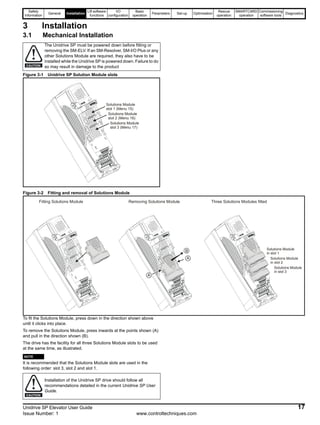
Figure 3-1 Unidrive SP Solution Module slots
Figure 3-2 Fitting and removal of Solutions Module
To fit the Solutions Module, press down in the direction shown above
until it clicks into place.
To remove the Solutions Module, press inwards at the points shown (A)
and pull in the direction shown (B).
The drive has the facility for all three Solutions Module slots to be used
at the same time, as illustrated.
N
It is recommended that the Solutions Module slots are used in the
following order: slot 3, slot 2 and slot 1.
The Unidrive SP must be powered down before fitting or
removing the SM-ELV. If an SM-Resolver, SM-I/O Plus or any
other Solutions Module are required, they also have to be
installed while the Unidrive SP is powered down. Failure to do
so may result in damage to the productCAUTION
Solutions Module
slot 1 (Menu 15)
Solutions Module
slot 2 (Menu 16)
Solutions Module
slot 3 (Menu 17)
A
B
A
Fitting Solutions Module Removing Solutions Module Three Solutions Modules fitted
Solutions Module
in slot 1
Solutions Module
in slot 2
Solutions Module
in slot 3
Installation of the Unidrive SP drive should follow all
recommendations detailed in the current Unidrive SP User
Guide.
NOTE
CAUTION
Safety
Information
General Installation
Lift software
functions
I/O
configuration
Basic
operation
Parameters Set-up Optimisation
Rescue
operation
SMARTCARD
operation
Commissioning
software tools
Diagnostics
18 Unidrive SP Elevator User Guide
www.controltechniques.com Issue Number: 1
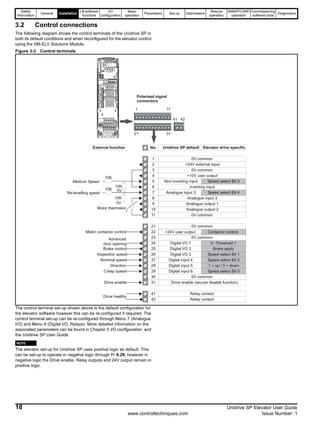
3.2 Control connections
The following diagram shows the control terminals of the Unidrive SP in
both its default conditions and when reconfigured for the elevator control
using the SM-ELV Solutions Module.
Figure 3-3 Control terminals
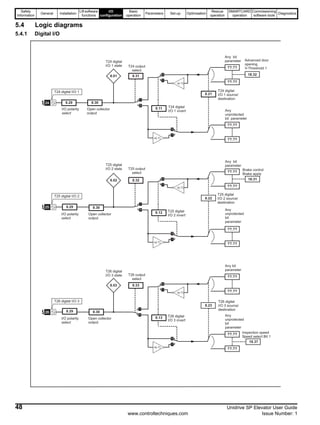
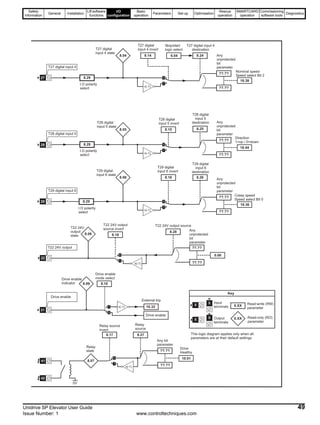
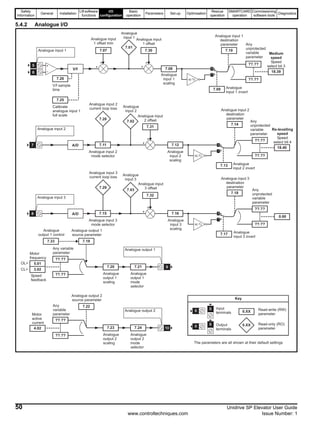
The control terminal set-up shown above is the default configuration for
the elevator software however this can be re-configured if required. The
control terminal set-up can be re-configured through Menu 7 (Analogue
I/O) and Menu 8 (Digital I/O, Relays). More detailed information on the
associated parameters can be found in Chapter 5 I/O configuration and
the Unidrive SP User Guide.
N
The elevator set-up for Unidrive SP uses positive logic as default. This
can be set-up to operate in negative logic through Pr 8.29, however in
negative logic the Drive enable, Relay outputs and 24V output remain in
positive logic.
1
2
3
4
5
6
7
8
9
10
11
21
22
23
24
25
26
27
28
29
30
31
41
42
0V common
+24V external input
+10V user output
0V common
0V common
0V common
0V common
0V common
Non-inverting input
Inverting input
Analogue input 2
Analogue input 3
Analogue output 1
Analogue output 2
Digital I/O 1
Digital I/O 2
Digital I/O 3
Digital input 4
Digital input 5
Digital input 6
Drive enable (secure disable function)
Relay contact
Relay contact
+24V user output
Speed select Bit 3
Speed select Bit 4
V- Threshold 1
Brake apply
Speed select Bit 1
Speed select Bit 2
1 = up / 0 = down
Speed select Bit 0
No. Unidrive SP default Elevator drive specific
Medium Speed
Re-levelling speed
Advanced
door opening
Brake control
Inspection speed
Nominal speed
Direction
Creep speed
Drive enable
Drive healthy
Motor thermistor
External function
10K
0V
10K
0V
10K
10K
Motor contactor control
1 11
Polarised signal
connectors
21 31
41 42
Contactor control
NOTE
Safety
Information
General Installation
Lift software
functions
I/O
configuration
Basic
operation
Parameters Set-up Optimisation
Rescue
operation
SMARTCARD
operation
Commissioning
software tools
Diagnostics
Unidrive SP Elevator User Guide 19
Issue Number: 1 www.controltechniques.com
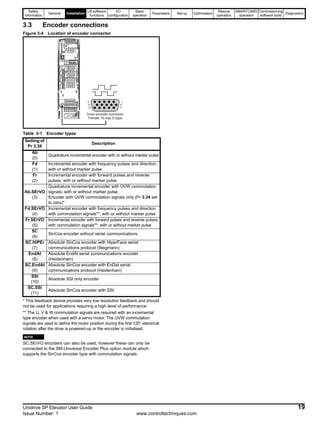
3.3 Encoder connections
Figure 3-4 Location of encoder connector
Table 3-1 Encoder types
* This feedback device provides very low resolution feedback and should
not be used for applications requiring a high level of performance
** The U, V & W commutation signals are required with an incremental
type encoder when used with a servo motor. The UVW commutation
signals are used to define the motor position during the first 120° electrical
rotation after the drive is powered-up or the encoder is initialised.
N
SC.SErVO encoders can also be used, however these can only be
connected to the SM-Universal Encoder Plus option module which
supports the SinCos encoder type with commutation signals.
Setting of
Pr 3.38
Description
Ab
(0)
Quadrature incremental encoder with or without marker pulse
Fd
(1)
Incremental encoder with frequency pulses and direction,
with or without marker pulse
Fr
(2)
Incremental encoder with forward pulses and reverse
pulses, with or without marker pulse
Ab.SErVO
(3)
Quadrature incremental encoder with UVW commutation
signals, with or without marker pulse
Encoder with UVW commutation signals only (Pr 3.34 set
to zero)*
Fd.SErVO
(4)
Incremental encoder with frequency pulses and direction
with commutation signals**, with or without marker pulse
Fr.SErVO
(5)
Incremental encoder with forward pulses and reverse pulses
with commutation signals**, with or without marker pulse
SC
(6)
SinCos encoder without serial communications
SC.HiPEr
(7)
Absolute SinCos encoder with HiperFace serial
communications protocol (Stegmann)
EndAt
(8)
Absolute EndAt serial communications encoder
(Heidenhain)
SC.EndAt
(9)
Absolute SinCos encoder with EnDat serial
communications protocol (Heidenhain)
SSI
(10)
Absolute SSI only encoder
SC.SSI
(11)
Absolute SinCos encoder with SSI
5
10
15
1
6
11
Drive encoder connector
Female 15-way D-type
NOTE
Safety
Information
General Installation
Lift software
functions
I/O
configuration
Basic
operation
Parameters Set-up Optimisation
Rescue
operation
SMARTCARD
operation
Commissioning
software tools
Diagnostics
20 Unidrive SP Elevator User Guide
www.controltechniques.com Issue Number: 1
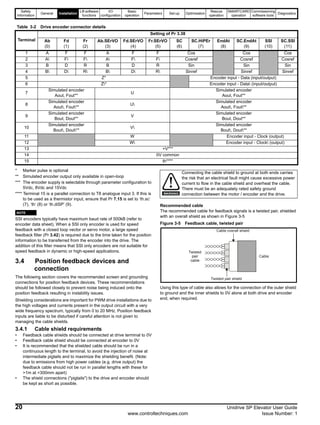
* Marker pulse is optional
** Simulated encoder output only available in open-loop
*** The encoder supply is selectable through parameter configuration to
5Vdc, 8Vdc and 15Vdc
**** Terminal 15 is a parallel connection to T8 analogue input 3. If this is
to be used as a thermistor input, ensure that Pr 7.15 is set to ‘th.sc’
(7), ‘th’ (8) or ‘th.diSP’ (9).
N
SSI encoders typically have maximum baud rate of 500kB (refer to
encoder data sheet). When a SSI only encoder is used for speed
feedback with a closed loop vector or servo motor, a large speed
feedback filter (Pr 3.42) is required due to the time taken for the position
information to be transferred from the encoder into the drive. The
addition of this filter means that SSI only encoders are not suitable for
speed feedback in dynamic or high-speed applications.
3.4 Position feedback devices and
connection
The following section covers the recommended screen and grounding
connections for position feedback devices. These recommendations
should be followed closely to prevent noise being induced onto the
position feedback resulting in instability issues.
Shielding considerations are important for PWM drive installations due to
the high voltages and currents present in the output circuit with a very
wide frequency spectrum, typically from 0 to 20 MHz. Position feedback
inputs are liable to be disturbed if careful attention is not given to
managing the cable shields.
3.4.1 Cable shield requirements
• Feedback cable shields should be connected at drive terminal to 0V
• Feedback cable shield should be connected at encoder to 0V
• It is recommended that the shielded cable should be run in a
continuous length to the terminal, to avoid the injection of noise at
intermediate pigtails and to maximize the shielding benefit. (Note:
due to emissions from high power cables (e.g. drive output) the
feedback cable should not be run in parallel lengths with these for
>1m at <300mm apart)
• The shield connections ("pigtails") to the drive and encoder should
be kept as short as possible.
Recommended cable
The recommended cable for feedback signals is a twisted pair, shielded
with an overall shield as shown in Figure 3-5
Figure 3-5 Feedback cable, twisted pair
Using this type of cable also allows for the connection of the outer shield
to ground and the inner shields to 0V alone at both drive and encoder
end, when required.
Table 3-2 Drive encoder connector details
Terminal
Setting of Pr 3.38
Ab
(0)
Fd
(1)
Fr
(2)
Ab.SErVO
(3)
Fd.SErVO
(4)
Fr.SErVO
(5)
SC
(6)
SC.HiPEr
(7)
EndAt
(8)
SC.EndAt
(9)
SSI
(10)
SC.SSI
(11)
1 A F F A F F Cos Cos Cos
2 A F F A F F Cosref Cosref Cosref
3 B D R B D R Sin Sin Sin
4 B D R B D R Sinref Sinref Sinref
5 Z* Encoder input - Data (input/output)
6 Z* Encoder input - Data (input/output)
7
Simulated encoder
Aout, Fout**
U
Simulated encoder
Aout, Fout**
8
Simulated encoder
Aout, Fout**
U
Simulated encoder
Aout, Fout**
9
Simulated encoder
Bout, Dout**
V
Simulated encoder
Bout, Dout**
10
Simulated encoder
Bout, Dout**
V
Simulated encoder
Bout, Dout**
11 W Encoder input - Clock (output)
12 W Encoder input - Clock (output)
13 +V***
14 0V common
15 th****
NOTE
Connecting the cable shield to ground at both ends carries
the risk that an electrical fault might cause excessive power
current to flow in the cable shield and overheat the cable.
There must be an adequately rated safety ground
connection between the motor / encoder and the drive.WARNING
Twisted
pair
cable
Twisted pair shield
Cable
Cable overall shield
Safety
Information
General Installation
Lift software
functions
I/O
configuration
Basic
operation
Parameters Set-up Optimisation
Rescue
operation
SMARTCARD
operation
Commissioning
software tools
Diagnostics
Unidrive SP Elevator User Guide 21
Issue Number: 1 www.controltechniques.com
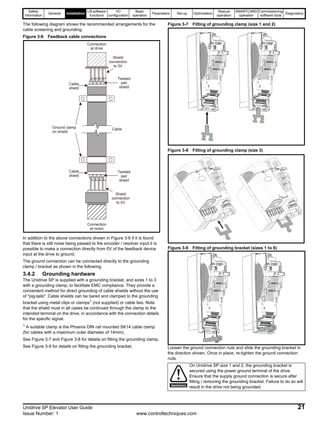
The following diagram shows the recommended arrangements for the
cable screening and grounding.
Figure 3-6 Feedback cable connections
In addition to the above connections shown in Figure 3-6 if it is found
that there is still noise being passed to the encoder / resolver input it is
possible to make a connection directly from 0V of the feedback device
input at the drive to ground.
The ground connection can be connected directly to the grounding
clamp / bracket as shown in the following.
3.4.2 Grounding hardware
The Unidrive SP is supplied with a grounding bracket, and sizes 1 to 3
with a grounding clamp, to facilitate EMC compliance. They provide a
convenient method for direct grounding of cable shields without the use
of "pig-tails". Cable shields can be bared and clamped to the grounding
bracket using metal clips or clamps1
(not supplied) or cable ties. Note
that the shield must in all cases be continued through the clamp to the
intended terminal on the drive, in accordance with the connection details
for the specific signal.
1
A suitable clamp is the Phoenix DIN rail mounted SK14 cable clamp
(for cables with a maximum outer diameter of 14mm).
See Figure 3-7 and Figure 3-8 for details on fitting the grounding clamp.
See Figure 3-9 for details on fitting the grounding bracket.
Figure 3-7 Fitting of grounding clamp (size 1 and 2)
Figure 3-8 Fitting of grounding clamp (size 3)
Figure 3-9 Fitting of grounding bracket (sizes 1 to 6)
Loosen the ground connection nuts and slide the grounding bracket in
the direction shown. Once in place, re-tighten the ground connection
nuts.
Cable
Cable
shield
Twisted
pair
shield
Cable
shield
Twisted
pair
shield
Connection
at motor
Connection
at drive
Ground clamp
on shield
Shield
connection
to 0V
Shield
connection
to 0V
On Unidrive SP size 1 and 2, the grounding bracket is
secured using the power ground terminal of the drive.
Ensure that the supply ground connection is secure after
fitting / removing the grounding bracket. Failure to do so will
result in the drive not being grounded.WARNING
Safety
Information
General Installation
Lift software
functions
I/O
configuration
Basic
operation
Parameters Set-up Optimisation
Rescue
operation
SMARTCARD
operation
Commissioning
software tools
Diagnostics
22 Unidrive SP Elevator User Guide
www.controltechniques.com Issue Number: 1
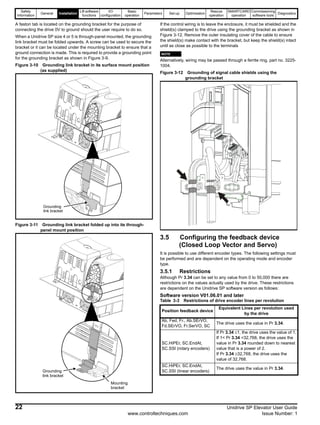
A faston tab is located on the grounding bracket for the purpose of
connecting the drive 0V to ground should the user require to do so.
When a Unidrive SP size 4 or 5 is through-panel mounted, the grounding
link bracket must be folded upwards. A screw can be used to secure the
bracket or it can be located under the mounting bracket to ensure that a
ground connection is made. This is required to provide a grounding point
for the grounding bracket as shown in Figure 3-9.
Figure 3-10 Grounding link bracket in its surface mount position
(as supplied)
Figure 3-11 Grounding link bracket folded up into its through-
panel mount position
If the control wiring is to leave the enclosure, it must be shielded and the
shield(s) clamped to the drive using the grounding bracket as shown in
Figure 3-12. Remove the outer insulating cover of the cable to ensure
the shield(s) make contact with the bracket, but keep the shield(s) intact
until as close as possible to the terminals
N
Alternatively, wiring may be passed through a ferrite ring, part no. 3225-
1004.
Figure 3-12 Grounding of signal cable shields using the
grounding bracket
3.5 Configuring the feedback device
(Closed Loop Vector and Servo)
It is possible to use different encoder types. The following settings must
be performed and are dependent on the operating mode and encoder
type.
3.5.1 Restrictions
Although Pr 3.34 can be set to any value from 0 to 50,000 there are
restrictions on the values actually used by the drive. These restrictions
are dependent on the Unidrive SP software version as follows:
Software version V01.06.01 and later
Table 3-3 Restrictions of drive encoder lines per revolution
Grounding
link bracket
Grounding
link bracket
Mounting
bracket
Position feedback device
Equivalent Lines per revolution used
by the drive
Ab, Fed, Fr., Ab.SErVO,
Fd.SErVO, Fr.SerVO, SC
The drive uses the value in Pr 3.34.
SC.HiPEr, SC.EndAt,
SC.SSI (rotary encoders)
If Pr 3.34 ≤1, the drive uses the value of 1.
If 1< Pr 3.34 <32,768, the drive uses the
value in Pr 3.34 rounded down to nearest
value that is a power of 2.
If Pr 3.34 ≥32,768, the drive uses the
value of 32,768.
SC.HiPEr, SC.EndAt,
SC.SSI (linear encoders)
The drive uses the value in Pr 3.34.
NOTE
Safety
Information
General Installation
Lift software
functions
I/O
configuration
Basic
operation
Parameters Set-up Optimisation
Rescue
operation
SMARTCARD
operation
Commissioning
software tools
Diagnostics
Unidrive SP Elevator User Guide 23
Issue Number: 1 www.controltechniques.com
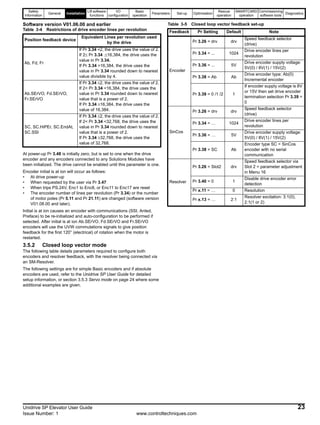
Software version V01.06.00 and earlier
Table 3-4 Restrictions of drive encoder lines per revolution
At power-up Pr 3.48 is initially zero, but is set to one when the drive
encoder and any encoders connected to any Solutions Modules have
been initialized. The drive cannot be enabled until this parameter is one.
Encoder initial is at ion will occur as follows:
• At drive power-up
• When requested by the user via Pr 3.47
• When trips PS.24V, Enc1 to Enc8, or Enc11 to Enc17 are reset
• The encoder number of lines per revolution (Pr 3.34) or the number
of motor poles (Pr 5.11 and Pr 21.11) are changed (software version
V01.08.00 and later).
Initial is at ion causes an encoder with communications (SSI, Anted,
Preface) to be re-initialized and auto-configuration to be performed if
selected. After initial is at ion Ab.SErVO, Fd.SErVO and Fr.SErVO
encoders will use the UVW commutations signals to give position
feedback for the first 120° (electrical) of rotation when the motor is
restarted.
3.5.2 Closed loop vector mode
The following table details parameters required to configure both
encoders and resolver feedback, with the resolver being connected via
an SM-Resolver.
The following settings are for simple Basic encoders and if absolute
encoders are used, refer to the Unidrive SP User Guide for detailed
setup information, or section 3.5.3 Servo mode on page 24 where some
additional examples are given.
Table 3-5 Closed loop vector feedback set-up
Position feedback device
Equivalent Lines per revolution used
by the drive
Ab, Fd, Fr
If Pr 3.34 <2, the drive uses the value of 2.
If 2≤ Pr 3.34 .≤16,384, the drive uses the
value in Pr 3.34.
If Pr 3.34 >16,384, the drive uses the
value in Pr 3.34 rounded down to nearest
value divisible by 4.
Ab.SErVO, Fd.SErVO,
Fr.SErVO
If Pr 3.34 ≤2, the drive uses the value of 2.
If 2< Pr 3.34 <16,384, the drive uses the
value in Pr 3.34 rounded down to nearest
value that is a power of 2.
If Pr 3.34 ≥16,384, the drive uses the
value of 16,384.
SC, SC.HiPEr, SC.EndAt,
SC.SSI
If Pr 3.34 ≤2, the drive uses the value of 2.
If 2< Pr 3.34 <32,768, the drive uses the
value in Pr 3.34 rounded down to nearest
value that is a power of 2.
If Pr 3.34 ≥32,768, the drive uses the
value of 32,768.
Feedback Pr Setting Default Note
Encoder
Pr 3.26 = drv drv
Speed feedback selector
(drive)
Pr 3.34 = ... 1024
Drive encoder lines per
revolution
Pr 3.36 = ... 5V
Drive encoder supply voltage:
5V(0) / 8V(1) / 15V(2)
Pr 3.38 = Ab Ab
Drive encoder type: Ab(0)
Incremental encoder
Pr 3.39 = 0 /1 /2 1
If encoder supply voltage is 8V
or 15V then set drive encoder
termination selection Pr 3.39 =
0
SinCos
Pr 3.26 = drv drv
Speed feedback selector
(drive)
Pr 3.34 = … 1024
Drive encoder lines per
revolution
Pr 3.36 = … 5V
Drive encoder supply voltage:
5V(0) / 8V(1) / 15V(2)
Pr 3.38 = SC Ab
Encoder type SC = SinCos
encoder with no serial
communication
Resolver
Pr 3.26 = Slot2 drv
Speed feedback selector via
Slot 2 = parameter adjustment
in Menu 16
Pr 3.40 = 0 1
Disable drive encoder error
detection
Pr x.11 = … 0 Resolution
Pr x.13 = … 2:1
Resolver excitation: 3:1(0),
2:1(1 or 2)
Safety
Information
General Installation
Lift software
functions
I/O
configuration
Basic
operation
Parameters Set-up Optimisation
Rescue
operation
SMARTCARD
operation
Commissioning
software tools
Diagnostics
24 Unidrive SP Elevator User Guide
www.controltechniques.com Issue Number: 1
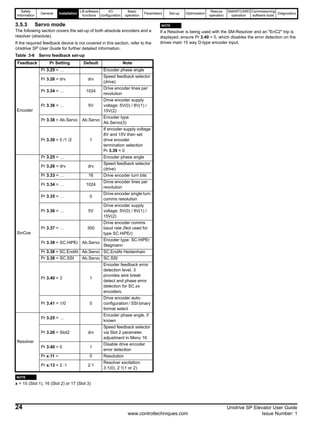
3.5.3 Servo mode
The following section covers the set-up of both absolute encoders and a
resolver (absolute).
If the required feedback device is not covered in this section, refer to the
Unidrive SP User Guide for further detailed information.
Table 3-6 Servo feedback set-up
N
x = 15 (Slot 1), 16 (Slot 2) or 17 (Slot 3)
N
If a Resolver is being used with the SM-Resolver and an "EnC2" trip is
displayed, ensure Pr 3.40 = 0, which disables the error detection on the
drives main 15 way D-type encoder input.
Feedback Pr Setting Default Note
Encoder
Pr 3.25 = … Encoder phase angle
Pr 3.26 = drv drv
Speed feedback selector
(drive)
Pr 3.34 = … 1024
Drive encoder lines per
revolution
Pr 3.36 = … 5V
Drive encoder supply
voltage: 5V(0) / 8V(1) /
15V(2)
Pr 3.38 = Ab.Servo Ab.Servo
Encoder type
Ab.Servo(3)
Pr 3.39 = 0 /1 /2 1
If encoder supply voltage
8V and 15V then set
drive encoder
termination selection
Pr 3.39 = 0
SinCos
Pr 3.25 = … Encoder phase angle
Pr 3.26 = drv drv
Speed feedback selector
(drive)
Pr 3.33 = … 16 Drive encoder turn bits
Pr 3.34 = … 1024
Drive encoder lines per
revolution
Pr 3.35 = … 0
Drive encoder single turn
comms resolution
Pr 3.36 = … 5V
Drive encoder supply
voltage: 5V(0) / 8V(1) /
15V(2)
Pr 3.37 = … 300
Drive encoder comms
baud rate (Not used for
type SC.HiPEr)
Pr 3.38 = SC.HiPEr Ab.Servo
Encoder type: SC.HiPEr
Stegmann
Pr 3.38 = SC.EndAt Ab.Servo SC.EndAt Heidenhain
Pr 3.38 = SC.SSI Ab.Servo SC.SSI
Pr 3.40 = 3 1
Encoder feedback error
detection level. 3
provides wire break
detect and phase error
detection for SC.xx
encoders.
Pr 3.41 = 1/0 0
Drive encoder auto-
configuration / SSI binary
format select
Resolver
Pr 3.25 = …
Encoder phase angle, if
known
Pr 3.26 = Slot2 drv
Speed feedback selector
via Slot 2 parameter
adjustment in Menu 16
Pr 3.40 = 0 1
Disable drive encoder
error detection
Pr x.11 = 0 Resolution
Pr x.13 = 2 :1 2:1
Resolver excitation:
3:1(0), 2:1(1 or 2)
NOTE
NOTE
Safety
Information
General Installation
Liftsoftware
functions
I/O
configuration
Basic
operation
Parameters Set-up Optimisation
Rescue
operation
SMARTCARD
operation
Commissioning
software tools
Diagnostics
Unidrive SP Elevator User Guide 25
Issue Number: 1 www.controltechniques.com
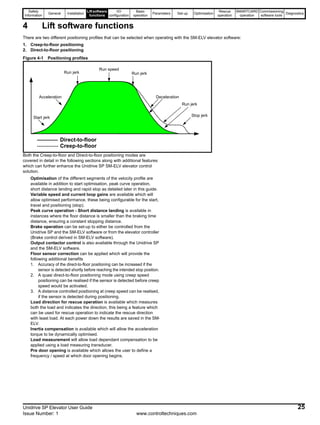
4 Lift software functions
There are two different positioning profiles that can be selected when operating with the SM-ELV elevator software:
1. Creep-to-floor positioning
2. Direct-to-floor positioning
Figure 4-1 Positioning profiles
Both the Creep-to-floor and Direct-to-floor positioning modes are
covered in detail in the following sections along with additional features
which can further enhance the Unidrive SP SM-ELV elevator control
solution.
Optimisation of the different segments of the velocity profile are
available in addition to start optimisation, peak curve operation,
short distance landing and rapid stop as detailed later in this guide.
Variable speed and current loop gains are available which will
allow optimised performance, these being configurable for the start,
travel and positioning (stop).
Peak curve operation - Short distance landing is available in
instances where the floor distance is smaller than the braking time
distance, ensuring a constant stopping distance.
Brake operation can be set-up to either be controlled from the
Unidrive SP and the SM-ELV software or from the elevator controller
(Brake control derived in SM-ELV software).
Output contactor control is also available through the Unidrive SP
and the SM-ELV software.
Floor sensor correction can be applied which will provide the
following additional benefits
1. Accuracy of the direct-to-floor positioning can be increased if the
sensor is detected shortly before reaching the intended stop position.
2. A quasi direct-to-floor positioning mode using creep speed
positioning can be realised if the sensor is detected before creep
speed would be activated.
3. A distance controlled positioning at creep speed can be realised,
if the sensor is detected during positioning.
Load direction for rescue operation is available which measures
both the load and indicates the direction, this being a feature which
can be used for rescue operation to indicate the rescue direction
with least load. At each power down the results are saved in the SM-
ELV.
Inertia compensation is available which will allow the acceleration
torque to be dynamically optimised.
Load measurement will allow load dependant compensation to be
applied using a load measuring transducer.
Pre door opening is available which allows the user to define a
frequency / speed at which door opening begins.
Creep-to-floor
Direct-to-floor
Run speed
Run jerkRun jerk
Acceleration Deceleration
Start jerk
Stop jerk
Run jerk
Safety
Information
General Installation
Lift software
functions
I/O
configuration
Basic
operation
Parameters Set-up Optimisation
Rescue
operation
SMARTCARD
operation
Commissioning
software tools
Diagnostics
26 Unidrive SP Elevator User Guide
www.controltechniques.com Issue Number: 1
4.1 Creep-to-floor positioning
Positioning with creep-to-floor is used in most applications and is
therefore selected as the default setting for the SM-ELV software
Pr 0.16[3] (Pr 20.13) = 0.
The speed is applied according to the selected floor distance, and the
elevator controller controls the start, travel, deceleration, switches to the
creep-to-floor speed and then positions (stops) at the floor.
The elevator controller selects speeds depending on the distance called
for by selecting the appropriate binary or priority speed configured in the
Unidrive SP and SM-ELV software.
Figure 4-2 Velocity profile with creep-to-floor positioning
For several segments of the velocity profile shown above there are
independent parameters available for example for the Acceleration and
Jerk with which the performance can be optimised.
In addition to controlling the velocity profile, the required deceleration
distance Pr 0.14[3] (Pr 19.08), dependent upon the speed and profile
settings, is calculated and displayed in mm for the activated speed in
Pr 0.14[3] (Pr 19.08).
The deceleration distance depends on the load, as it is not possible to
control the distance.
The measured deceleration distance is displayed after every travel in
Pr 0.15[3] (Pr 19.10) in mm.
N
From SM-ELV software version 1.12 onwards the deceleration distances
for all speeds are displayed in Pr 2.13 to Pr 2.18 and Pr 2.23 to Pr 2.25.
The real time demand on the elevator control system is low due to the
positioning with creep-to-floor. With a typical cycle time of the elevator
controller (5 ... 20 ms) and the elevator drive (8 ms) the minimal
positioning distance with creep speed is calculated as:
• The max creep speed distance is:
Positioning distance [m] ≥ VNominal [m/s] * 30 ms
• The stop accuracy is:
Accuracy [mm] ≤ Vcreep speed [m/s] * 30 ms
• The time required for creep speed is:
Time creep speed [s]= positioning distance [m] / Vcreep speed [m/s]
Speed signals
Creep speed
signal
Level sensor
Pr 0.23 [0] (Pr 19.14)
Pr 0.03 [0] (Pr 2.11)
Pr 0.24 [0] (Pr 19.15)
Pr 0.14 [3] (Pr 19.08)
Pr 0.22 [0] (Pr 19.13)
Pr 0.25 [0] (Pr 19.16)
Pr 0.15 [0] (Pr 18.11)
Pr 0.24 [0] (Pr 19.15)
Pr 0.04 [0] (Pr 2.21)
Calculated deceleration
distance
Pr 0.16 … Pr 0.21[0]
Pr 18.12 … Pr 18.17
V:
Start jerk
Acceleration
Run jerk
Operational speeds
Run jerk
Run jerk
Deceleration
Creep speed
Stop jerk
Stop deceleration
NOTE
Speed (mm/s) Pr 18.12 Pr 18.13 Pr 18.14 Pr 18.15 Pr 18.16 Pr 18.17 Pr 20.02 Pr 20.23 Pr 20.24
Deceleration distance (cm)
Pr 2.13
Pr 0.31 [3]
Pr 2.14
Pr 0.32 [3]
Pr 2.15
Pr 0.33 [3]
Pr 2.16
Pr 0.34 [3]
Pr 2.17
Pr 0.35 [3]
Pr 2.18
Pr 0.36 [3]
Pr 2.23
Pr 0.37 [3]
Pr 2.24
Pr 0.51 [3]
Pr 2.25
Pr 0.52 [3]
Safety
Information
General Installation
Liftsoftware
functions
I/O
configuration
Basic
operation
Parameters Set-up Optimisation
Rescue
operation
SMARTCARD
operation
Commissioning
software tools
Diagnostics
Unidrive SP Elevator User Guide 27
Issue Number: 1 www.controltechniques.com
Figure 4-3 Creep to floor
N
Pr 0.29[2] Pr 18.23 is used to adjust the magnetisation current threshold
level for both Open Loop and Closed Loop Vector operation, the Deflux
motor level is fixed at 200ms as shown above.
For servo operation Pr 0.29[2] Pr 18.23 the magnetisation current
threshold parameter is not required, this parameter can now be used to
define the time taken to deflux the synchronous motor.
4.2 Direct-to-floor positioning
For some applications, especially high-speed elevators and long travel
distance elevators direct-to-floor positioning control is often used with
this overcoming inherent delays normally associated with creep-to-floor
elevators.
With direct-to-floor positioning the speed is applied according to the
selected floor distance. As a function of the distance to the desired final
position, the elevator controller will disable the speed signal, and direct
deceleration to the target position will take place. Creep speed
positioning is not executed nor required. The following graph shows the
characteristics of this motion profile:
Direct to floor positioning should only be used on elevating up to 1m/s
due to the accuracy, above 1m/s floor sensor correction should be
enabled also.
Debouncecontactors(100ms)
FluxMotor=t>100ms
Brakereleasedelay
Pr0.24[1](Pr19.25)
Brakeapplydelay
Pr0.25[1]Pr18.24
DefluxMotor=200ms
t.0 t.1 t.2 t.3 t.5 t.6 t.7t.4
InterlockDelay=>50ms
t.8
Drive active
Direction
Main contactor
Enable
Creep Speed
Brake output
Pre door opening
Creep Speed
Pr 0.15[0] (Pr 18.11)
Pr 0.24[0] (Pr 19.15)
Pr 0.20[1] (Pr 19.17)
TimeforStartOptimiser
Pr0.19[1](Pr19.28)
Kp Position loop (Start)
Refer to section 4.11
Pr 0.22[0] (Pr 19.13)
Kd Position loop (Start)
Kp Speed loop
Ki Speed loop
Current Filter
Kp Current loop
Ki Current loop
MotorcontactordelayPr20.20
Magnetising-Threshold
Speeds
Loadmeasurement
timePr20.08
Pr 0.25 [0] (Pr 19.16)
Pr 0.24[0] (Pr 19.15) Pr 0.16 … Pr 0.24[0]
Pr 18.12 … Pr 18.16
Run jerkRun jerk Operational speeds
Acceleration Deceleration
Run jerk
Pr 0.24[0] (Pr 19.15)Pr 0.24[0] (Pr 19.15)
Start jerk
Pr 0.03[0] (Pr 2.11) Pr 0.04[0] (Pr 2.21)
Pr 0.18[1] (Pr 18.18)
Start optimser speed
Jerk optimser speed
Stop jerk (Creep-to-floor)
Magnetising Current
Stop deceleration (Creep-to-floor)
Pr 0.26[0] (Pr 18.21)
Pr 0.29[2] (Pr 18.23)
Pr 0.19[2] (Pr 19.20)
Refer to section 4.11
Pr 0.20[2] (Pr 19.12)
Refer to section 4.11
Terminal 24 (0.3 m/s)
Terminal 25
Terminal 29
Terminal 31
Terminal 28
V1 (T.26) V2 (T.27) V3 (T.5) Vn (T.7)
Pr 10.02
NOTE
Safety
Information
General Installation
Lift software
functions
I/O
configuration
Basic
operation
Parameters Set-up Optimisation
Rescue
operation
SMARTCARD
operation
Commissioning
software tools
Diagnostics
28 Unidrive SP Elevator User Guide
www.controltechniques.com Issue Number: 1
Figure 4-4 Velocity profile with direct-to-floor positioning
N
Direct to floor is enabled with Pr 20.13
For several of the positioning profile segments different parameters are
available for example Acceleration and their associated Jerks, with
which the performance of the direct-to-floor can be optimised. The
relevant parameters are as shown above.
To go directly to the target, the deceleration is dependent on the required
stopping distance. The maximum deceleration is limited by Pr 0.04[0]
(Pr 2.21) stop deceleration. If the correction of the deceleration rate is
not sufficient, it is possible that the car will stop too late and hence
overshoot the floor level.
The direct to floor positioning mode, uses as a reference the selected
speed and profile settings to calculate and display the deceleration
distance in Pr 0.14[3] (Pr 19.08) in mm, calculated deceleration distance.
The deceleration distance is controlled to this value independent of the
load. The actual distance moved is displayed in Pr 0.15[3] (Pr 19.10) in
mm.
Figure 4-5 Direct to floor
Speed signals
Stop signal**
Level sensor
Pr 0.23 [0] (Pr 19.14)
Pr 0.03 (Pr 2.11)
Pr 0.24 [0] (Pr 19.15)
Pr 0.14 [3] (Pr 19.08)
Pr 0.24 [0] (Pr 19.15)
Pr 0.04 (Pr 2.21)
Calculated deceleration
distance
Pr 0.16 … Pr 0.21[0]
Pr 18.12 … Pr 18.17
V:
** Only if direct-to-floor positioning with stop signal
Start jerk
Accelleration
Run jerk Run jerk
Run jerk
Deceleration
Operational speeds
NOTE
Debouncecontactors(100ms)
FluxMotor=t>100ms
Brakereleasedelay
Pr0.24[1](Pr19.25)
Brakeapplydelay
Pr0.25[1]Pr18.24
DefluxMotor=200ms
t.0 t.1 t.2 t.3 t.5 t.6 t.7t.4
InterlockDelay=>50ms
t.8
Drive active
Direction
Main contactor
Enable
Brake output
Pre door opening
Pr 0.24[0] (Pr 19.15)
Pr 0.20[1] (Pr 19.17)
TimeforStartOptimiser
Pr0.19[1](Pr19.28)
Kp Position loop (Start)
Refer to section 4.11
Kd Position loop (Start)
Kp Speed loop
Ki Speed loop
Current Filter
Kp Current loop
Ki Current loop
MotorcontactordelayPr20.20
Magnetising-Threshold
Speeds
Loadmeasurement
timePr20.08
Pr 0.24[0] (Pr 19.15) Pr 0.16 … Pr 0.24[0]
Pr 18.12 … Pr 18.16
Run jerkRun jerk Operational speeds
Acceleration Deceleration
Run jerk
Pr 0.24[0] (Pr 19.15)Pr 0.24[0] (Pr 19.15)
Start jerk
Pr 0.03[0] (Pr 2.11) Pr 0.04[0] (Pr 2.21)
Pr 0.18[1] (Pr 18.18)
Start optimser speed
Jerk optimser speed
Magnetising Current
Pr 0.26[0] (Pr 18.21)
Pr 0.29[2] (Pr 18.23)
Pr 0.19[2] (Pr 19.20)
Refer to section 4.11
Pr 0.20[2] (Pr 19.12)
Refer to section 4.11
Terminal 24 (0.3 m/s)
Terminal 25
Terminal 31
Terminal 28
V1 (T.26) V2 (T.27) V3 (T.5) Vn (T.7)
Pr 10.02
Safety
Information
General Installation
Liftsoftware
functions
I/O
configuration
Basic
operation
Parameters Set-up Optimisation
Rescue
operation
SMARTCARD
operation
Commissioning
software tools
Diagnostics
Unidrive SP Elevator User Guide 29
Issue Number: 1 www.controltechniques.com
N
Pr 0.29[2] Pr 18.23 is used to adjust the magnetisation current threshold
level for both Open Loop and Closed Loop Vector operation, the Deflux
motor level is fixed at 200ms as shown above.
For servo operation Pr 0.29[2] Pr 18.23 the magnetisation current
threshold parameter is not required, this parameter can now be used to
define the time taken to deflux the synchronous motor.
4.3 Selection of positioning mode
The direct-to-floor / creep-to-floor positioning modes are enabled with
parameter Pr 0.16[3] (Pr 20.13). The following settings can be selected:
Pr 0.16[3] (Pr 20.13) = 0 Direct-to-floor positioning disabled. Creep-to-
floor active
Pr 0.16[3] (Pr 20.13) = 1 Direct-to-floor positioning with Stop signal via
analogue input 1 (T.5)
Pr 0.16[3] (Pr 20.13) = 2 Direct-to-floor positioning with Stop signal via
analogue input 2 (T.7)
Pr 0.16[3] (Pr 20.13) = 3 Direct-to-floor positioning with Stop signal via
analogue input 3 (T. 8)
Pr 0.16[3] (Pr 20.13) = 4 Direct-to-floor positioning with disable the
speed signals (controlling)
4.4 Position accuracy
The deceleration distance is calculated from the activated speed. If the
speed signal is deactivated (Pr 0.16 [3], (Pr 20.13) = 4), or the stop
signal is activated (Pr 0.16 [3] (Pr 20.13) = 1...3) the calculated
deceleration distance will be controlled independent of the load level.
At higher travel speeds the actual position at which the car will stop is
highly dependent on the time when deceleration begins. For example, if
the I/O read cycle time of the drives inputs is 1ms, and if the cycle time of
the elevator controller is 1ms the position accuracy is:
Accuracy [mm] = Vnominal [m/s] * 2 mm.
Because of this, the usage of direct-to-floor positioning is limited to about
1m/s. At higher speeds, additional distance control for accurate stopping
should be used. (Additional floor sensor correction can be used to
control the final distance moved, see section 4.5 Floor sensor
correction on page 29).
N
From SM-ELV software version 1.12 onwards the deceleration distances
for all speeds are displayed in Pr 2.13 to Pr 2.18 and Pr 2.23 to Pr 2.25.
4.5 Floor sensor correction
Independent of the selected profile additional floor sensor correction can
be utilised. Improved accurate distance correction is possible if a floor
sensor can be detected in the range of 50-500mm before the flush or
level with floor target position.
Floor sensor correction should be used with direct-to-floor positioning
control on elevators with speeds in excess of 1m/s. This ensures
maximum accuracy.
To enable floor sensor correction, the following parameters should be set
up:
Pr 0.17[3] (Pr 19.42)
Pr 0.19[3] (Pr 20.14)
Pr 0.20[3] (Pr 18.19)
Given this:
• Rope slip can be compensated (as long as the normal stopping
distance is short without the additional compensation provided by
the direct-to-floor positioning mode).
• A quasi direct-to-floor positioning can be realised if the additional
sensor is detected before positioning at creep speed, (creep-to-floor
positioning mode).
• Floor sensor correction can be utilised if detected during the
positioning travel at creep speed, in the creep-to-floor positioning
mode.
N
The floor sensor correction or the distance controlled creep speed can
only be used in closed loop or servo mode. In open loop mode, a normal
deceleration with the programmed ramp can only be implemented.
N
If the floor sensor enable Pr 0.17[3] (Pr 19.42) = 0 all values concerning
floor sensors can be checked for correct operation. All measured values,
which are required for the floor sensor, for example the deceleration
distance, time from the floor sensor and the speed at floor sensor are
displayed and can be checked. This means, that all functions of the floor
sensor correction can be proofed, prior to being enabled.
The floor sensor correction uses as a reference, the floor sensor target
distance defined by the user in Pr 0.20[3] (Pr 18.19) in mm. The floor
sensor target distance is controlled independent of the load. The
remaining distance to the floor sensor in mm is displayed Pr 0.21[3]
(Pr 18.09). Additionally, Pr 0.23[3] (Pr 20.05) displays the time from floor
sensor active to the stop, and Pr 0.22[3] (Pr 19.09) displays the speed at
the floor sensor correction activation.
If the Stop distance is too low, or the floor sensor signal given at too high
a speed, it is possible that the car may not stop smoothly and a hard
stop will occur (Figure 4-6 - profile (3))
The floor sensor correction is activated based upon the settings of
Pr 0.19[3] (Pr 20.14) which is used to set-up the source for the external
floor sensor correction signal:
1. Pr 0.19[3] (Pr 20.14) = 0 Floor sensor correction disabled
2. Pr 0.19[3] (Pr 20.14) = 1 Floor sensor correction = Analogue input 1
3. Pr 0.19[3] (Pr 20.14) = 2 Floor sensor correction = Analogue input 2
4. Pr 0.19[3] (Pr 20.14) = 3 Floor sensor correction = Analogue input 3
5. Pr 0.19[3] (Pr 20.14) = 4 Distance controlled stopping distance
4.5.1 Floor sensor correction, Analogue input
Conditions 1, 2, or 3: (Pr 0.19[3] (Pr 20.14) = 1,2 or 3 (Figure 4-6 -
profile (2))
When the floor sensor correction signal is activated, the floor sensor
target distance is controlled independant of load. Because of direct
deceleration from a higher speed, the real time demand on the control
system is high and dependent upon the parameter settings and I/O
speed. For example, if the cycle time of the elevator controller is 1ms,
and the drives inputs are also 1ms the position accuracy is:
Accuracy [mm] = vspeed at floor sensor active (Pr 19.09) [m/s] * 2 mm
It should be noted that the floor sensor correction signal should be
activated instantaneously at that position which is Pr 0.20[3] (Pr 18.19)
floor sensor target distance away from the floor sensor in mm.
The stop signal can be used for all speeds. The creep speed signal can be
deactivated at any time after the floor sensor correction signal is activated.
N
If the creep speed signal is still active at standstill the motor will
accelerate to creep speed.
NOTE
NOTE
NOTE
NOTE
NOTE
Safety
Information
General Installation
Lift software
functions
I/O
configuration
Basic
operation
Parameters Set-up Optimisation
Rescue
operation
SMARTCARD
operation
Commissioning
software tools
Diagnostics
30 Unidrive SP Elevator User Guide
www.controltechniques.com Issue Number: 1
Figure 4-6 Floor sensor correction profiles
4.5.2 Distance controlled creep speed
Condition 4: (Pr 0.19[3] (Pr 20.14) = 4 (Figure 4-6 - profile (1))
If the creep speed signal is deactivated, the controlled stopping distance
in Pr 0.20[3] (Pr 18.19) will be active. The relevant profile parameters
are Pr 0.22[0] (Pr 19.13) deceleration, and Pr 0.25[0] (Pr 19.16) stop jerk
(creep-to-floor). In this case, because the deceleration is from creep
speed, the real time demand to the elevator controller is low. For
example if the cycle time of the elevator controller is 10ms and the
elevator drive 1ms, the accuracy can be calculated and the stop
accuracy would be:
Accuracy [mm] <= vcreep speed [m/s] * 11 mm
4.5.3 Deceleration and stopping distance
calculation
If the speed or profile parameters are changed then the deceleration and
stopping distances will change. The elevator controller can compensate
for these changes by recalculating the final deceleration to achieve the
floor sensor correction distance through a “learn” if this is possible.
However to reach the target distance, profile parameters are limited for
deceleration to 2 x Pr 0.04[0] (Pr 2.21) and the jerk to a maximum value
of Pr 0.25[0] (Pr 19.16). If the stop distance is too low or the floor sensor
signal was given at too high a speed the car may not be able to stop
smoothly and therefore a hard stop will be implemented. To change the
parameters in the elevator controller correctly, the drive calculates the
deceleration and stop distances and displays them in the following
parameters:
Table 4-1 Floor sensor correction parameters
The profile parameters and the creep speed setting are used for
calculating distances. At default settings, the creep speed in Pr 0.15[0]
(Pr 18.11) is used. This assignment can be changed through Pr 20.12
creep speed parameter.
N
At completion of the floor sensor correction, Pr 0.21[3] (Pr 18.09) = 0
(±1), Pr 18.10 the reference selector should be 1810 (no reference
selected).
N
The point at which the floor sensor signal (Analogue input 1 (T.5) input 2
(T.7) or input 3 (T.8) if Pr 0.19[3] (Pr 20.14) = 1, 2 or 3) becomes active is
usually between 50 and 500mm prior to the floor level (above 500mm
the accuracy at the floor level will be reduced).
N
If Pr 0.19[3] (Pr 20.14) = 4 then the distance controlled creep speed is
selected, here the floor sensor correction signal is activated during the
creep speed.
Speed signals
Floor sensor signal**
Creep speed
Floor sensor
** Only if floor sensor available
Pr 0.24[0] (Pr 19.15)
Pr 0.04[0] (Pr 2.21)
Pr 0.15[0] (Pr 18.11)
Pr 0.14 [3] (Pr 19.08)
Target correction distance
(1) (2) (3)
Pr 0.24[0] (Pr 19.15)
Creep speed
Run jerk
Deceleration
Run jerk
Floor sensor active
Parameter
Distance controlled
creep speed
Direct-to-floor
Pr 0.17[3]
(Pr 19.42)
Floor sensor correction enable = 1
Pr 0.19[3]
(Pr 20.14)
Source for floor sensor correction
Pr 0.22[3]
(Pr 19.09)
N/A
Speed at floor sensor
correction activation
in mm/s
Pr 0.20[3]
(Pr 18.19)
Floor sensor correction target distance
Pr 0.29[3]
(Pr 19.05)
Stopping distance (from
V1 to V = 0) in mm
Stopping distance in
mm
Pr 0.14[3]
(Pr 19.08)
Calculated deceleration
distance from Vset to V1
in mm
Calculated
deceleration distance
from Vset to 0 in mm
Pr 0.15[3]
(Pr 19.10)
Measured deceleration
distance from Vset to V1
Measured
deceleration distance
from Vset to 0 in mm
Pr 0.21[3]
(Pr 18.09)
Remaining floor sensor distance
Pr 0.23[3]
(Pr 20.05)
Time from floor sensor active
NOTE
NOTE
NOTE
Safety
Information
General Installation
Liftsoftware
functions
I/O
configuration
Basic
operation
Parameters Set-up Optimisation
Rescue
operation
SMARTCARD
operation
Commissioning
software tools
Diagnostics
Unidrive SP Elevator User Guide 31
Issue Number: 1 www.controltechniques.com
Figure 4-7 Distance controlled creep speed - floor sensor correction
Figure 4-8 Direct to floor - floor sensor correction
Brake output
Brake delay
Direction signal
Creep speed selection
Pr 0.24[0] (Pr 19.15)
Pr 0.04[0] (Pr 2.21)
Pr 0.20[3] (Pr 18.19)
Floor sensor target
correction distance
Run jerk
Deceleration
Pr 0.25[1] (Pr 18.24)
Pr 0.19[4] (Pr 18.31)
Drive enable Terminal 31
Terminal 28
Zero speed
Measured deceleration distance
Remaining floor sensor distance
Floor sensor active
Pr 10.03
Calculated deceleration distance
Pr 0.15[3] (Pr 19.10)
Pr 0.14[3] (Pr 19.08)
Pr 0.21[3] (Pr 18.09)
Floor sensor correction enable Pr 0.17[3] (Pr 19.42)
Pr 0.24[0] (Pr 19.15)
Run jerk
Pr 0.22[0] (Pr 19.13)
Stop deceleration
Floor sensor active
Brake output
Brake delay
Direction signal
Speed selection
Pr 0.24[0] (Pr 19.15)
Pr 0.04[0] (Pr 2.21)
Pr 0.20[3] (Pr 18.19)
Floor sensor target
correction distance
Run jerk
Deceleration
SM-ELV calculated jerk - from
distance to target and actual speed
Pr 0.25[1] (Pr 18.24)
Pr 0.19[4] (Pr 18.31)
Drive enable Terminal 31
Terminal 28
Zero speed
Measured deceleration distance
Remaining floor sensor distance
Floor sensor active
Pr 10.03
Calculated deceleration distance
Pr 0.15[3] (Pr 19.10)
Pr 0.14[3] (Pr 19.08)
Pr 0.21[3] (Pr 18.09)
Floor sensor correction enable Pr 0.17[3] (Pr 19.42)
Floor sensor
active
Safety
Information
General Installation
Lift software
functions
I/O
configuration
Basic
operation
Parameters Set-up Optimisation
Rescue
operation
SMARTCARD
operation
Commissioning
software tools
Diagnostics
32 Unidrive SP Elevator User Guide
www.controltechniques.com Issue Number: 1
4.6 Rapid stop
A rapid stop function has been introduced with software version 1.10
onwards which is enabled by setting Pr 19.49 = 1. The rapid stop feature
is available mainly for commissioning and inspection of the elevator,
providing the following features:
• Offers user defined Rapid stop profile
• Provides faster stopping, rather than following the standard
deceleration and jerks that may be too long during commissioning
and inspection.
• Can overcome hard stops and be less aggressive during short
movements during commissioning and installation.
If rapid stop is enabled, when selecting a speed with the value of 0 mm/s
for the deceleration, the deceleration rate in Pr 21.05 is selected which is
available for the rapid stop deceleration only (Closed Loop in m/s2 /Open
Loop in cm/s2). The deceleration jerk is set to 200 ms in order to run as
smoothly as possible.
Figure 4-9 Rapid stop
4.7 Start optimiser
To overcome static friction in the elevator arrangement or to overcome
starting difficulties a start optimiser function is available.
This function is activated by setting the start optimisation time in
Pr 0.19[1] (Pr 19.28) > 0. Also a target speed for the start optimiser must
be set in Pr 0.18[1] (Pr 18.18) > 0, along with the start optimiser jerk in
Pr 0.20[1] (Pr 19.17).
Table 4-2 Softstart parameters
Figure 4-10 Start profile optimisation
N
If the target speed set in Pr 0.18[1] (Pr 18.18) is not reached during the
time defined in Pr 0.19[1] (Pr 19.28) there will be a continuous transition
to the nominal acceleration.
Parameter Function Detail
Pr 0.18 [1]
(Pr 18.18)
Target speed in mm/s
for start optimisation
Setting between 2...5mm/s.
Pr 0.19 [1]
(Pr 19.28)
Time in ms for start
optimisation
Setting between 500 to 800ms.
Pr 0.20 [1]
(Pr 19.17)
Jerk in mm/s3
for
starting optimisation
Setting from 10 up to 20 (must
be less than the acceleration
jerk in Pr 0.22) smaller values
will provide smoother but slower
acceleration.
Inspection speed Rapid stop speed
Standard deceleration / stop
Rapid deceleration / stop
Pr 0.19 [1] (Pr 19.28)
Pr 0.20 [1] (Pr 19.17)
Pr 0.18 [1] (Pr 18.18)
Jerk for start optimiser
Time for start optimiser
Sped for start
optimiser
NOTE
Safety
Information
General Installation
Liftsoftware
functions
I/O
configuration
Basic
operation
Parameters Set-up Optimisation
Rescue
operation
SMARTCARD
operation
Commissioning
software tools
Diagnostics
Unidrive SP Elevator User Guide 33
Issue Number: 1 www.controltechniques.com
4.8 Peak curve operation
This function guarantees a constant stopping distance, independent of the
moment when the signal to stop occurs. This allows the use of a single
speed for different floor levelling distances. Peak curve operation modifies
the maximum operating speed to ensure that the required distance is
achieved and floor level is reached. The peak curve operation can be used
during both Creep-to-floor operation and Distance controlled creep speed
(Floor sensor correction mode).
The peak curve operation is enabled by setting Pr 0.27 [1] (Pr 18.47) = 1
(Default = 0).
Depending on the speed when the speed signal is disabled, 3 different
results can occur:
• If the final speed is achieved there is no influence on the speed profile.
• If there is increasing or constant acceleration, braking occurs with the
normal profile parameters in a calculated time.
• During deceleration and the transition to a stop, the profile
parameters are automatically adjusted.
Figure 4-11 Peak curve operation
The reference speed before and after speed reduction is used as the
calculation base for the controlled stopping distance.
The Set-point peak curve distance is calculated from the profile
parameters and displayed in Pr 0.27[3] (Pr 19.06). This value is
equivalent to the deceleration distance for the applied speed.
The deceleration distance is measured during peak curve operation and
displayed in Pr 0.28[3] (Pr 19.07).
4.9 Short distance landing
If the floor distance is smaller than the braking time distance from the
selected speed, then the peak curve operation cannot be used. This is
the case if the floor distance is less than 0.7 m for example. For such
small floor distance, the elevator software function provides the short
distance landing with real distance control. Short distance landing is
enabled with Pr 18.35 via an additional digital input.
The short distance is defined in Pr 18.20 and enabled with a digital input
from the elevator controller at the floor level (less then 0.7m)
The control signals for creep speed and short distance landing must be
applied simultaneously. The speed profile is internally calculated in order
that the creep speed is reached after the short distance Pr 0.26[3] (Pr
18.20). If the creep speed command is disabled, the elevator drive stops
the car with the set deceleration.
Figure 4-12 Short distance landing
Pr 0.14 [3]
(Pr 19.08)
V1 ... V3
Creep speed
Peak curve operation
Calculated
deceleration
distance
Pr 0.27[3]
(Pr 19.06)
Set-point
peak curve
distance
Standard operation
Pr 18.35 - Enable
Creep speed
Pr 0.26 [3] (Pr 18.20)
Short distance
landing
Safety
Information
General Installation
Lift software
functions
I/O
configuration
Basic
operation
Parameters Set-up Optimisation
Rescue
operation
SMARTCARD
operation
Commissioning
software tools
Diagnostics
34 Unidrive SP Elevator User Guide
www.controltechniques.com Issue Number: 1
4.10 Nominal elevator rpm calculation and
adjustment
The ratio of nominal elevator rpm Pr 0.13[0] (Pr 18.29) to nominal
elevator speed Pr 0.14[0] (Pr 18.30) is as follows. The nominal elevator
rpm Pr 0.13[0] (Pr 18.29) is defined by the mechanical conditions as
follows:
Pr 0.13[0] (Pr 18.29) [n Nominal] = Pr 0.14[0] (Pr 18.30) [v Nominal] * iG * Z
* 60 / (Ω * D * GZ)
Figure 4-13 Elevator parameters
Where:
After adjustment of the above parameters, the calculated nominal
elevator rpm is displayed in Pr 0.13[1] (Pr 18.03) in rpm. With software
version 01.10 onwards the value of Pr 0.13[0] (Pr 18.29) can be set up
automatically by setting Pr 19.31 = 1. The calculations are exact,
however manual adjustment is possible and can be achieved by
changing the value of Pr 0.13[0] (Pr 18.29) as follows:
If the speed of the elevator is too high, the nominal rpm Pr 0.13[0]
(Pr 18.29) should be reduced.
If the speed of the elevator is too low, the nominal rpm Pr 0.13[0]
(Pr 18.29) should be increased.
4.11 Variable Gains - selection /
optimisation
The following variable gains can be used for optimisation of the speed
loop (Kp and Ki) gains, current loop (Kp and Ki) gains and current loop
filter.
There are three settings for the variable gains, one being constant, one
having a user determined transition time and the third having a profile /
travel determined transition time, the options are determined by which
version of lift software you are operating with.
Constant (standard Unidrive SP) gains are available with all SM-ELV
software versions.
User determined transition time
variable speed loop gains for Start and Travel can be activated by
setting Pr 0.21[2] (Pr 18.48) = On as detailed following.
Profile / travel determined transition time = Software version V1.07
and later. These variable speed loop / current loop gains and current
loop filter are enabled by setting Pr 0.21[2] (Pr 18.48), Pr 19.48 = On
as detailed following.
The following sections cover in more detail the variable speed loop and
current loop gain settings along with a variable current loop filter. These
can be configured for the Start, Travel and Positioning (Stop) or just
start; dependant upon the mode being implemented and SM-ELV
software version, detailed as follows. The variable gains will operate in
either Direct-to-floor or Creep-to-floor
Table 4-3 Variable gains
n
Nominal elevator
speed rpm
Pr 0.13[0] (Pr 18.29) in min-1
V
Nominal elevator
speed mm/s
Pr 0.14[0] (Pr 18.30) in mm/s
Z Roping (1, 2, 3 or 4)
Pr 0.14[1] (Pr 20.10)
(1=1:1 / 2=2:1 / 3=3:1 / 4=4:1)
D Sheave Diameter Pr 0.15[1] (Pr 19.29) in mm
ig Gear Ratio Numerator Pr 0.16[1] (Pr 19.30)
GZ
Gear Ratio
Denominator
Pr 0.17[1] (Pr 19.27)
iG / Gz
D n nominal
elevator
speed rpm
Vnominal
elevator
speed mm/s
Mode Active SM-ELV S/W Transition mode
Constant Speed loop gains
Pr 18.48 = 0
Whole profile N/A
Separate Speed loop gains
Pr 18.48 = 1, Pr 19.48 = 0
Start, Travel Pr 19.11 > 0 transition time ms
Separate Speed loop, Current loop gains,
Current demand filter
Pr 18.48 = 1, Pr 19.48 =1
Start, Travel, Positioning (stop) V1.07 onwards Speed controlled transition time.
Separate Speed loop, Current loop gains,
Current demand filter
Pr 18.48 = 1, Pr 19.48 =1
Start, Travel, Positioning (stop) V1.13 onwards
Acceleration
Pr 19.11 = 0 Speed controlled transition time
Pr 19.11 > 0 = transition time ms
Deceleration
Pr 20.30 = 0 Speed controlled transition time
Pr 20.30 > 0 = transition time ms
Safety
Information
General Installation
Liftsoftware
functions
I/O
configuration
Basic
operation
Parameters Set-up Optimisation
Rescue
operation
SMARTCARD
operation
Commissioning
software tools
Diagnostics
Unidrive SP Elevator User Guide 35
Issue Number: 1 www.controltechniques.com
4.11.1 Constant gains
Pr 0.21[2] (Pr 18.48), Pr 19.48 = OFF
Following are the standard speed and current loop optimisation
parameters which are only destinations in the variable gain set-up and
written to from the SM-ELV software, Pr 0.21[2] (Pr 18.48), Pr 19.48 =
OFF.
If Pr 0.21[2] (Pr 18.48), Pr 19.48 = OFF constant gains are used and can
be adjusted in the parameters as shown in Table 4-4.
Table 4-4 Constant speed / current loop gains
Pr 0.21[2] (Pr 18.48), Pr 19.48 = OFF
N
The speed loop Kp and Ki gains in Pr 0.07 (Pr 3.10) and Pr 0.08
(Pr 3.11) are for display only when variable gains are selected with
Pr 0.21[2] (Pr 18.48) and Pr 19.48, and therefore cannot be modified.
The values in Pr 0.07 (Pr 3.10) and Pr 0.08 (Pr 3.11) show the active
speed loop gain. When the variable gains are inactive the values in
Pr 0.07 (Pr 3.10) and Pr 0.08 (Pr 3.11) can be modified as normal.
4.11.2 Seperate speed loop gains
Pr 0.21[2] (Pr 18.48) = On, Pr 19.48 = OFF
When using planetary gearboxes it is advisable to separate the speed
loop gains for Start and Travel. This can be activated by setting
Pr 0.21[2] (Pr 18.48) = On and offers various speed loop gain settings
for travel Pr 0.23[2] (Pr 18.25) / Pr 0.24[2] (Pr 18.26) and Start Pr 0.25[2]
(Pr 18.27) / Pr 0.26[2] (Pr 18.28), along with a programmable current
loop filter for start and travel as shown in Table 4-5 .
These parameters are switched depending on the transition time, set-up
by the user. Pr 0.22[2] (Pr 19.11) defines the transition time between
start and travel for the P and I speed loop gains and current loop filter.
The transition time should be set-up to avoid switching vibrations /
instability. For Start the speed loop gains can be up to 2 to 3 times the
setting required for the Travel, this equating to a reduction of the position
error at brake opening to between 1/4 and 1/9.
The following parameters are available for optimising the speed loop
gains, and current loop filter.
Table 4-5 Variable gains Pr 0.21[2] ,Pr 18.48 = On, Pr 19.48 = OFF
Parameter Detail
Speed loop
Pr 0.07
(Pr 3.10)
P- Gain
Higher values improve the
smooth running and the
stiffness. Values recommended
between 0.100 (Incremental
Encoder) and 0.500 (SinCos)
Pr 0.08
(Pr 3.11)
I - Gain
Higher values will decrease the
effect of the load with smaller
values reducing the overshoot
of the speed loop. Usually
adjust the value between 1.00
and 5.00
Pr 0.09
(Pr 3.12)
D - Gain
Operates as a feed forward
term in the speed loop.
Increased values will reduce
overshoot in the speed loop.
However this is normally not
used and set to 0
Pr 3.42
Speed
feedback
filter in ms
Used with high inertia loads and
high gains to smooth the torque
demand and prevent latch up
effects of the speed loop.
Current loop
(Pr 4.13) P - Gain
This value should be derived
from the stationary auto tune
and may require adjustment if
acoustic noise or current
instability is present: ± 50
(Pr 4.14) I - Gain
This value should be derived
from the stationary auto tune
and may require adjustment if
acoustic noise or current
instability is present: ± 100
Pr 0.14[2]
(Pr 4.12)
Torque
demand
filter in ms
Acts in the speed loop output,
reducing acoustic noise caused
by high-speed loop gains.
Typical values are between 0
and 5
NOTE
Parameter Function Detail
Pr 0.23[2]
(Pr 18.25)
Speed loop
P gain - Travel
Increasing value improves true running
and rigidity. Set values between 1000
(encoder) and 5000 (SinCos)
Pr 0.24[2]
(Pr 18.26)
Speed loop
I gain - Travel
Increasing value reduces deviation.
Reducing value reduces overshooting.
Approx. 10...40% of Pr 0.23[2]
(Pr 18.25)
Pr 0.25[2]
(Pr 18.27)
Speed loop
P gain - Start
Increasing value improves rigidity. Set
values between 2000 (encoder) and
10000 (SinCos)
Pr 0.26[2]
(Pr 18.28)
Speed loop
I gain - Start
Increasing value reduces angle
deviation and jolting at start. Approx. 30
– 80% of Pr 0.25[2] (Pr18.27)
Pr 0.22[2]
(Pr 19.11)
Gaintransition
time in ms
Changeover time for the speed loop
gains from start to travel setting,
beginning with the start
Pr 0.14[2]
(Pr 04.12)
Current filter
Travel
Current loop output filter. Reduces
control noise by fine adjustment of
torque demand.
Pr 0.13[2]
(Pr 04.23)
Current filter
Start
Reduces control noise at the start, only
if Pr 19.34 = 0, otherwise Pr 4.12
applies also for start.
Pr 0.15[2]
(Pr 19.34)
Current filter
Fixed
Activates fixed current filter for start and
travel
Pr 0.38[0]
(Pr 4.13)
Current loop P
gain
Fixed Kp gain
Pr 0.39[0]
(Pr 4.14)
Current loop I
gain
Fixed Ki gain
Safety
Information
General Installation
Lift software
functions
I/O
configuration
Basic
operation
Parameters Set-up Optimisation
Rescue
operation
SMARTCARD
operation
Commissioning
software tools
Diagnostics
36 Unidrive SP Elevator User Guide
www.controltechniques.com Issue Number: 1
Figure 4-14 Start to travel variable gains
4.11.3 Seperate speed loop and current loop gains and
current demand filter, SM-ELV V1.07 onwards
Pr 0.21[2] (Pr 18.48), Pr 19.48 = On
With this procedure each travel section can be allocated its own gain setting.
This procedure is used with critical lifts where the above procedure is not
sufficient or if gains are necessary for the positioning (stop) that are different
from those required for constant travel, and start.
The transfer between the gains is controlled either linearly with the speed or
using a user defined transition time in Pr 19.11 and Pr 20.30.
The transfer of the gains linearly with speed in enabled by setting both
Pr 19.11 and Pr 20.30 = 0 to enable user defined transition times enter
values in Pr 19.11 and Pr 20.30.
The following settings are used:
Table 4-6 Variable gains Pr 0.21[2] (Pr 18.48), Pr 19.48 = On
Also refer to Figure 4-15 which details all parameters associated to the
set-up and adjustment of the variable gains.
Kp Speed loop
Ki Speed loop
Current loop filter
Current loop filter
Pr 18.27
Pr 18.28
Pr 4.12
Pr 18.25
Pr 18.26
Pr 4.12Pr 4.23
(Pr 19.34 = 1)
(Pr 19.34 = 0)
Pr 19.11
Function Start Travel Positioning
Speed Loop P gain Pr 18.27 Pr 18.25 Pr 20.27
Speed Loop I gain Pr 18.28 Pr 18.26 Pr 20.28
Current Loop filter Pr 04.23 Pr 04.12 Pr 21.16
Current Loop P gain Pr 20.25 Pr 04.13 Pr 21.22
Current Loop I gain Pr 20.26 Pr 04.14 Pr 21.23
Transition time Start Pr 19.11 N/A N/A
Transition time Stop N/A N/A Pr 20.30
Safety
Information
General Installation
Liftsoftware
functions
I/O
configuration
Basic
operation
Parameters Set-up Optimisation
Rescue
operation
SMARTCARD
operation
Commissioning
software tools
Diagnostics
Unidrive SP Elevator User Guide 37
Issue Number: 1 www.controltechniques.com
Figure 4-15 Start, travel, positioning variable gains
4.12 Position controller for start
With both gearless lifts and planetary gears a position controller is
particularly suitable for the start, this prevents any movement of the
motor during brake opening. The position controller is made up of both a
Proportional and Derivative term.
This feature will attempt to hold the car in position during opening of the
brake and is only active whilst the brake is being opened. Once the
motor starts the position controller then becomes inactive.
This position controller has the same objective as the separate travel
and start variable gains but works independently of these. The two
procedures, Position controller for start and Variable gains can however
be used at the same time. However, under normal circumstances the
variable gains should be sufficient to eliminate any jerk during opening of
the brake.
When setting the P gain, Pr 0.19[2] (Pr 19.20) to > 0 the car is always
pulled back into position during opening the brake. The maximum
detectable position error is determined by the level of Pr 0.19[2]
(Pr 19.20). Settings from 3 up to 30 are recommended.
The D gain Pr 0.20[2] (Pr 19.12) counteracts a detectably quick change
of position. Settings from 10 up to 100 are recommended. This helps the
P position control and performs more minor compensation procedures
with slight deviations. The set values are limited by the stiffness of the
speed loop gains, which are determined essentially by the speed
feedback device being used (SinCos encoders being far superior (higher
resolution) to standard incremental encoders or resolvers).
N
The position controller for start only operates if a speed has been
selected (Pr 0.28[0] Pr 18.10 > 1810). The position controller is
operating when the display shows “run”, and a speed is selected
(Pr 0.28)[0] (Pr 18.10) >1810). If STOP is displayed, the position
controller is not operating as no speed is being selected.
4.13 Error detection
The following speed and distance error detection features are used to
protect against the following possible failure modes:
Table 4-7 Position controller parameters
• Errors in the motor connection and phase co-ordination
• Errors in the encoder connection and encoder functionality
• Errors in the motor model including feedback phase angle
(brushless synchronous motors)
Figure 4-16 Error detection
Pr 18.27
Pr 18.28
Pr 20.25
Pr 20.26
Pr 18.25
Pr 18.26
Pr 4.13
Pr 4.14
Pr 4.12
Pr 20.27
Pr 20.27
Pr 21.22
Pr 21.23
Pr 21.16
Pr 4.23
Kp Current loop
Ki Current loop
Current loop filter
Kp Speed loop
Ki Speed loop
Pr 19.11 Pr 20.30
NOTE
Parameter Function Detail
Pr 0.19[2]
(Pr 19.20)
Start P gain
Values > 0 cause the position to be held
when opening the brake. Greater values
reduce the jerk when transferring the load.
Recommended values are between 3 and
30.
Pr 0.20[2]
(Pr 19.12)
Start D gain
Values > 0 cause the position to change
quickly when opening the brake and thus
reduce the jerk when transferring the load.
Recommended values are between 10 and
100.
Pr 19.24 Speed Error Threshold
Pr 19.18 Distance Error Threshold
Distance Error
Speed Error
Pr 19.24 = 0 Speed Error Detection Disabled
Pr 19.18 = 0 Distance Error Detection Disabled
Safety
Information
General Installation
Lift software
functions
I/O
configuration
Basic
operation
Parameters Set-up Optimisation
Rescue
operation
SMARTCARD
operation
Commissioning
software tools
Diagnostics
38 Unidrive SP Elevator User Guide
www.controltechniques.com Issue Number: 1
4.13.1 Open loop
Speed Error Detection (Trip 70)
For open loop mode the error detection is activated once the drive
reaches current limit operation with the trip being generated after the
time defined in Pr 19.24 (2s default). Pr 19.24 is used to define the
allowable time to operate in current limit, high values will result in the
detection being disabled.
4.13.2 Closed loop
Speed Error Detection (Trip 70)
The speed error is calculated from the difference between the ramp
speed Pr 19.03 and to the actual speed of the motor in Pr 19.02.
The speed error is compared with the user setting of the allowable
threshold set in Pr 0.26[4] (Pr 19.24). If the threshold is exceeded for
more than 100msec a Trip 70 is generated by the SM-ELV elevator
software.
The speed error during one travel is displayed in Pr 0.25[4] (Pr 18.07)
independent of the activation of the speed error detection. The display is
reset to 0 at each start. The Speed error detection can be disabled by
setting Pr 0.26[4] (Pr 19.24) = 0.
Distance Error Detection (Trip 71)
The distance error is the integral of the difference between the ramp
speed Pr 19.03 and the actual speed of the motor Pr 19.02.
The distance error is compared with an allowable threshold set in
Pr 0.28[4] (Pr 19.18). If the distance error exceeds the user defined
threshold, a Trip 71 is generated.
The distance error during one travel is displayed in Pr 0.27[4] (Pr 18.06)
independent of the activation of the error detection. The display is reset
to 0 at each start.
The distance error detection can be disabled by setting Pr 0.28[4]
(Pr 19.18) = 0 (maximum distance error threshold).
4.13.3 Thermal
Temperature (Trip 73)
The SM-ELV software monitors the drive temperatures if these exceed
the lower limit set in Pr 70.81 (default 0°C, maximum -10°C) a Trip 73
will be generated. This trip is present to protect the drive when starting in
cold conditions.
Figure 4-17 Error detection
4.13.4 Motor error detection
In addition to the speed and distance error detection used to ensure
correct operation, there are an additional two error detection features
that are available for the motor connected to the elevator drive.
The two additional error detection features being (1) Motor Fluxed
Detection and (2) Motor Phase Loss Detection. As with the speed and
distance error detection there are trips associated,
Motor fluxed detection (Trip 76)
The motor fluxed error detection should be used to detect whether the
motor is sufficiently magnetised, and can also be used for example to
detect if there is a fault in the motor contactors at the output of the drive
(contactors not closing).
This feature is available for induction motors operating in either Open
loop or Closed loop vector.
The motor flux level can be viewed in Pr 20.07 Motor flux level, with the
error detection level being determined by Pr 0.29 [2] (Pr 18.23) the Motor
magnetised threshold. Once the threshold has been reached the motor
is then correctly magnetised and Pr 0.18 [4] (Pr 18.43) Motor
magnetised will change to ON.
If the motor magnetised threshold Pr 0.29 [2] (Pr 18.23) is not reached
2s after T.31 is closed (motor contactor) a Trip 76 will be generated.
Motor Phase Loss Detection (Trip 77)
This error detection is used to detect a motor phase loss at the output of
the drive to the motor.
The phase loss trip generated is a Trip 77 and will become active after
200ms of a motor phase loss.
The error detection is enabled with Pr 19.43 Phase Loss Detection
Enable.
Pr 18.30
Pr 18.29
Ratio
inverted
0
1
Pr 19.18
Trip 71
Pr 19.24
Trip 70
1 Second
Speed
error trip
Distance
error trip
Pr 18.06
Pr 18.07
Speed
error
Distance
error
Maximum
distance error
threshold
Maximum speed
error threshold
Pr 3.02
Pr 3.01
Speed reference
Speed feedback
Pr 18.30
100
Safety
Information
General Installation
Liftsoftware
functions
I/O
configuration
Basic
operation
Parameters Set-up Optimisation
Rescue
operation
SMARTCARD
operation
Commissioning
software tools
Diagnostics
Unidrive SP Elevator User Guide 39
Issue Number: 1 www.controltechniques.com
4.14 Brake control
4.14.1 Brake control provided by the SM-ELV
The Brake output signal generated from the SM-ELV software is
available from control terminal 25 on the Unidrive SP. The parameter
setup for this function is Pr 8.22 = Pr 18.31. The control and timing
sequence for the brake is shown in the following control diagrams
(Figure 4-18 on page 40, Figure 4-19 on page 40).
The brake apply delay can be adjusted in Pr 0.25[1] (Pr 18.24) and the
brake release delay in Pr 0.24[1] (Pr 19.25).
If the Unidrive SP trips at any stage the brake control becomes inactive
and the brake will be forced to close by the elevator controller.
Table 4-8 Unidrive SP brake control
4.14.2 Brake control provided by the elevator
controller
If the elevator controller is required to control the brake this has to be
configured through Pr 8.22 = Pr 18.43. This setting changes the function
of Terminal 25 output to now be "motor magnetised" indication. Only
once the motor is magnetised can the elevator controller release the
motor’s brake. The control sequence is as follows:
Table 4-9 Elevator controller brake control
N
It is recommended to set the brake release delay, Pr 0.24[1] (Pr 19.25)
to a non-zero minimum value (=100).
If the elevator controller removes the drive enable, the brake will be
applied at that point, and the motor contactor will also be opened shortly
afterwards.
No Sequence Terminal
1
The elevator controller applies both the
direction and speed signals.
T.28, 26, 27, 29
= 24V
2
The elevator controller closes the motor
contactor and enables the elevator drive.
T.31 = 24V
3
The SM-ELV software de-bounces the input
signals (100ms) and enables the inverter
output.
4
The Unidrive SP controls the magnetisation of
the motor and opens the brake.
T.25 = 24V
5
The Unidrive SP holds zero speed until both
the brake-release delay and load
measurement times have elapsed. The SM-
ELV then starts the profile.
6
The elevator controller removes the speed
signals.
T.28, 26,27,29
= 0V
7
After the motor has stopped the SM-ELV (or
elevator controller) applies the brake.
T.25 = 0V
8
After the brake-apply delay the motor is
demagnetised and the drive output is
disabled.
9
The elevator controller or SM-ELV removes
the drive enable and opens the motor
contactor(s)
T.31 = 0V
No Sequence Terminal
1
The elevator controller applies drive enable
without a speed command.
T.31 = 24V
2
The Unidrive SP magnetises the motor and
sets the digital output active when the motor is
fully magnetised.
T.25 = 24V
3
The elevator controller releases the brake and
waits for brake release delay.
4
After brake release delay the elevator controller
applies the direction and speed signals.
T.28, 26, 27, 29
= 24V
5
After the motor has stopped and the floor level
sensor is active the elevator controller deactivates
the direction and speed signals.
T.28, 26, 27, 29
= 0V
6 The elevator controller applies the brake.
7
After the brake apply delay the elevator
controller opens the motor contactor and
disables the Unidrive SP output.
T.31 = 0V
NOTE
Safety
Information
General Installation
Lift software
functions
I/O
configuration
Basic
operation
Parameters Set-up Optimisation
Rescue
operation
SMARTCARD
operation
Commissioning
software tools
Diagnostics
40 Unidrive SP Elevator User Guide
www.controltechniques.com Issue Number: 1
Figure 4-18 Creep to floor brake control
Figure 4-19 Direct to floor brake control
4.15 Switching motor contactors on
output of drive
A recommended motor contactor to be fitted between the drive and
motor for safety purposes can be a AC3 type.
Opening or closing of the contactor with the drive enabled will lead to:
1. OI.AC trips (which cannot be reset for 10 seconds)
2. High levels of radio frequency noise emission
3. Increased contactor wear and tear
The Drive Enable terminal (T31) when opened provides a SECURE
DISABLE (SD)function. This can in many cases replace one of the
standard two output contactors.
The SD function provides a means for preventing the drive from
generating torque in the motor, with a very high level of integrity. It is
suitable for incorporation into a safety system for a machine. It is also
suitable for use as a conventional drive enable input.
The SD function makes use of the special property of an inverter drive
with an induction motor, which is that torque cannot be generated
Debouncecontactors(100ms)
FluxMotor=t>100ms
Brakereleasedelay
Pr0.24[1](Pr19.25)
Brakeapplydelay
Pr0.25[1]Pr18.24
DefluxMotor=200ms
t.0 t.1 t.2 t.3 t.5 t.6 t.7t.4
InterlockDelay=>50ms
t.8
Drive active
Direction
Motor contactor
Enable
Creep Speed
Brake output
Creep Speed
Pr 0.15[0] (Pr 18.11)
Pr 0.20[1] (Pr 19.17)
TimeforStartOptimiser
Pr0.19[1](Pr19.28)
Pr 0.22[0] (Pr 19.13)
MotorcontactordelayPr20.20
Magnetising-Threshold
Speeds
Loadmeasurement
timePr20.08
Pr 0.25 [0] (Pr 19.16)Acceleration Deceleration
Run jerk
Pr 0.24[0] (Pr 19.15)Pr 0.24[0] (Pr 19.15)
Start jerk
Pr 0.03[0] (Pr 2.11) Pr 0.04[0] (Pr 2.21)
Pr 0.18[1] (Pr 18.18)
Start optimser speed
Jerk optimser speed
Stop jerk (Creep-to-floor)
Magnetising Current
Stop deceleration (Creep-to-floor)
Pr 0.29[2] (Pr 18.23)
Terminal 25
Terminal 29
Terminal 31
Terminal 28
V1 (T.26) V2 (T.27) V3 (T.5) Vn (T.7)
Pr 10.02
Debouncecontactors(100ms)
FluxMotor=t>100ms
Brakereleasedelay
Pr0.24[1](Pr19.25)
Brakeapplydelay
Pr0.25[1]Pr18.24
DefluxMotor=200ms
t.0 t.1 t.2 t.3 t.5 t.6 t.7t.4
InterlockDelay=>50ms
t.8
Drive active
Direction
Main contactor
Enable
Brake output
Pr 0.20[1] (Pr 19.17)
TimeforStartOptimiser
Pr0.19[1](Pr19.28)
MotorcontactordelayPr20.20Magnetising-Threshold
Speeds
Loadmeasurement
timePr20.08
Acceleration Deceleration
Run jerk
Pr 0.24[0] (Pr 19.15)Pr 0.24[0] (Pr 19.15)
Start jerk
Pr 0.03[0] (Pr 2.11) Pr 0.04[0] (Pr 2.21)
Pr 0.18[1] (Pr 18.18)
Start optimser speed
Jerk optimser speed
Magnetising Current
Pr 0.29[2] (Pr 18.23)
Terminal 25
Terminal 31
Terminal 28
V1 (T.26) V2 (T.27) V3 (T.5) Vn (T.7)
Pr 10.02
If the cable between the drive and the motor is to be
interrupted by a contactor or circuit breaker, ensure that the
drive is disabled before the contactor or circuit breaker is
opened or closed. Severe arcing may occur if this circuit is
interrupted with the motor running at high current and low
speed.
WARNING
Safety
Information
General Installation
Liftsoftware
functions
I/O
configuration
Basic
operation
Parameters Set-up Optimisation
Rescue
operation
SMARTCARD
operation
Commissioning
software tools
Diagnostics
Unidrive SP Elevator User Guide 41
Issue Number: 1 www.controltechniques.com
without the continuous correct active behavior of the inverter circuit. All
credible faults in the inverter power circuit cause a loss of torque
generation.
The SD function is fail-safe, so when the SD input is disconnected the
drive will not operate the motor, even if a combination of components
within the drive has failed. Most component failures are revealed by the
drive failing to operate. SD is also independent of the drive firmware.
This meets the requirements of EN954-1 category 3 for the prevention of
operation of the motor.1
1 Independent approval by BGIA has been given.
SD can be used to eliminate electro-mechanical contactors, including
special safety contactors, which would otherwise be required for safety
applications.
Switching the motor contactor(s) when the control unit output is released
may lead to high amounts of excess voltage because of the high level of
inductivity, especially with gearless lift motors. This may lead to the relay
contacts being destroyed, coil damage in the motor, false tripping in the
converter or interference to the speed feedback signals.
4.15.1 Contactor control
The software enable of the Unidrive SP is delayed by approximately
100ms after the drive enable at terminal T.31 to allow for debouncing the
motor contactor(s). This prevents any spurious trip during start due to
arcing of motor contactor(s).
When ending a normal travel, the controller output is also delayed
internally until the brake closing time has expired. The delay between
the internal controller and opening the motor contactor is shown in
Pr 0.26[1] (Pr 20.20) in ms. Negative values mean the motor contactor is
opened on enable, which must be prevented. With negative delays the
brake closing time Pr 0.25[1] (Pr 18.24) should be reduced by at least
the time displayed in Pr 0.26[1] (Pr 20.20). The ideal value for Pr 0.26[1]
(Pr 20.20) is 50 to 100ms. Then even with normal travel the motor
contactor will open without current present on the motor. If the motor
contactor is controlled by the drive there is no need to check Pr 0.26[1]
Pr 20.20.
If during an inspection the safety circuit and motor contactor are opened
by the controller (during travel), the safety circuit is open; therefore the
release circuit on T. 31 should be opened immediately. This should be
opened by an additional quick relay (finder) or other suitable measure
(descent delay < 4 ms) in order to prevent the controller output being
turned on when power is flowing. In addition the motor coil should also
be protected by suitable voltage limiters (varistors).
4.15.2 Contactor configuration
To ensure the motor contactor(s) are closed before the drive is enabled,
auxiliary contacts on the motor contactor(s) should be used. The
auxiliary contacts should be connected in series with the drives secure
disable (T.31) as shown following.
The following Figure 4-20 and Figure 4-21 show the two options for
connections of the auxiliary contacts when using either a single or dual
output motor contactors.
Figure 4-20 Dual output motor contactor configuration
Figure 4-21 Single output motor contactor configuration
4.15.3 Motor contactor control (from V1.09)
From V1.09 SM-ELV software the motor contactor can be controlled by
the relay on T.41 to T.42 of the Unidrive SP. To set up this function the
relay source Pr 8.27 should be configured to Pr 19.32. This is done in
such a way that it is triggered optionally, i.e. it does not have to be used.
A pre-requisite for the motor contactor to be controlled correctly is for the
auxiliary closing contact to be looped into the release circuit on the
converter that is connected to T.31. The subsequent processing control
is triggered as before by the release signal on terminal T.31.
The motor contactor is controlled in accordance with the following
principle:
1. Closing the motor contactor: If there has been a start command
(selection of a speed with a direction signal or selection of a direction
with two direction signals), and the relay answering signal is not yet
active.
2. Opening the motor contactor: If the power in the motor has reduced
and the converter is blocked.
4.15.4 Enable circuit
The software enable of the drives output is delayed by approximately
100ms (de-bouncing contactors) after the drive enable is applied to T.31.
Spurious trips (e.g. OI.AC) which could be caused due to "chatter" of the
motor contactor are prevented by this inherent delay.
The control of the motor contactor should be carried out with no current
flowing to the motor to prevent the above issues, arcing during opening
(too soon) or closing (too late) resulting in OI.AC trips.
Therefore the parallel controlled release for opening the drive's enable
should occur before the motor contactors open. The technical data from
the contactor manufacturer should be reviewed for the correct timing for
the contactor control. Normally with the very fast interlock of the drive’s
output (few microseconds), and the switching time of the main
contactors which could be a few milliseconds, the opening of the motor
contactor(s) should naturally be at zero current.
With this circuitry the safety chain can directly switch the motor
contactors. (Adherence to this circuit the motor contactor can be
controlled at inspection mode by the protective circuit.)
To maintain category 3 according to EN954-1 the drive must
be located inside an enclosure with degree of protection at
least IP54.
WARNING
Elevator
control
Enable
Motor contactor 1
Auxiliary contact 1
Motor contactor 2
Auxiliary contact 2
Unidrive SP
T.31 Secure
Disable
T.24 - T.29
Fast Disable
Fast relay
Fast disable available with Unidrive SP date
code >= P04 and drive software >=01.10.00
Elevator
control
Enable
Motor contactor 1
Auxiliary contact 1
Unidrive SP
T.31 Secure
Disable
T.24 - T.29
Fast Disable
Fast relay
Fast disable available with Unidrive SP date
code >= P04 and drive software >=01.10.00
Safety
Information
General Installation
Lift software
functions
I/O
configuration
Basic
operation
Parameters Set-up Optimisation
Rescue
operation
SMARTCARD
operation
Commissioning
software tools
Diagnostics
42 Unidrive SP Elevator User Guide
www.controltechniques.com Issue Number: 1
4.16 Lift software compensation
4.16.1 Load measurement for evacuation
The load difference between the car and the counterweight is measured
and displayed in Pr 20.19 as a % of the nominal torque (Mn) after the
brake release delay Pr 0.24[1] (Pr 19.25) and time for load measure
Pr 20.08 has elasped.
Figure 4-22 Load measurement
To disable load measurement set Pr 20.08 “time for load measurement”
to zero.
The measurement duration is user definable and is set in Pr 20.08 in ms.
This measurement duration is set at 200ms as default with this being
sufficient for determining the load direction. Measuring times of 500 ms
are however recommended for an accurate measurement. The
measurement duration if set to be longer will result in more accurate
results. This does result in a longer time required for the measurement
and therefore should be considered for when planning / setting up for the
application.
This load measurement can be used both for determining the preferred
direction for evacuation and also to generate an overload signal.
To start the evacuation the load measured when the brake was last
opened is saved so that it is safe if there is a power cut and its direction
is displayed in Pr 19.37 Load Direction. This signal should be sent to the
elevator controller using a programmable digital output (Pr 8.xx =
19.37).
N
A load cell is required from the lift shaft as an analogue signal to
Analogue Input 2 for the feature.
The elevator controller creates the direction for torque, which would
normally be done by the elevator drive in normal operation. For initial
torque compensation a slow speed should be applied.
The load measurement feature also allows load dependent torque
compensation to be applied using Pr 4.08. For this a load measuring
transducer can be used that provides a ±10V signal that is proportional
to load.
Overload display
The overload bit Pr 19.36 is created by comparing the measured load
value of Pr 20.19 with the overload threshold that is set in Pr 20.18 as a
% of nominal torque (Mn).
Pr 19.25 + Pr 20.08
Pr 0.20 [1]
(Pr 19.17 )
Pr 0.18 [1]
(Pr 18.18 )Speed
Current
Brake release
Pr 20.08Pr 19.25 Speed for
Start Optimiser
Jerk for
Start Optimiser
Brakerelease
delay
Timeforload
measurement
NOTE
Safety
Information
General Installation
Liftsoftware
functions
I/O
configuration
Basic
operation
Parameters Set-up Optimisation
Rescue
operation
SMARTCARD
operation
Commissioning
software tools
Diagnostics
Unidrive SP Elevator User Guide 43
Issue Number: 1 www.controltechniques.com
Figure 4-23 Load measurement - inertia compensation
4.16.2 Inertia compensation
Inertia compensation can be implemented to overcome system inertia
and high speed loop gains (required due to no inertia compensation)
resulting in motor noise. Implementing the inertia compensation can
allow speed loop gains to be reduced.
The inertia compensation feature allows the acceleration torque in
Pr 4.08 to be dynamically optimised. Adjustment of the inertia
compensation can be implemented through Pr 0.27[2] (Pr 19.19) with
this being adjusted with half load present in the elevator car.
The inertia compensation is applied through Pr 4.08 and after the feature
has been enabled with Pr 0.28[2] (Pr 18.49) = 1 (as shown in Figure 4-
23).
The setting of the inertia compensation scaling Pr 0.27[2] (Pr 19.19)
should be adjusted so that the speed controller output Pr 3.04 is nearly
constant after the brake has opened and also during both the starting
and stopping.
The inertia compensation scaling Pr 0.27[2] (Pr 19.19) can be calculated
from the mechanical data as follows:
Pr 0.27[2] (Pr 19.19) = 1000 * (JG * i) / ( MN * R)
Pr 7.02
Load
time constant
Pr 19.21
1000
Load scaling
Pr 4.09
Torque
offset
Load input
Analogue
input 2
Elevator software
Inertia compensation
Load offset
0
1
Enable
Torque
reference
Torque reference
Reference
acceleration
Pr 19.04
Pr 19.19
1000
Inertia
scaling
Pr 4.08
Pr 19.22
Pr 18.49
Torque
demand
Speed
loop output
Speed loop output
0
1
Pr 19.34 = 0
Pr 0.10 = 0
STOP
Pr 5.02
Pr 4.02
Current
demand filter
Pr 4.12
Enable current
demand filter
Active current
feedback
Motor voltage
Pr 4.05
Pr 4.06
Pr 4.07
Current limits
Pr 3.04
Pr 4.18
Overriding
current limit
Pr 4.03
Current
demand
Pr 4.04
Pr 11.32
Pr 5.07
Drive rated
continuous current
Motor rated
current
Overload detection
Pr 4.24
Percentage
torque current
User scaling
Pr 4.13 = Kp
Pr 4.14 = Ki
Current
loop gains
Pr 4.20
Pr 10.08 Pr 10.17Pr 4.19Pr 10.09 Pr 10.39
At 100%
load
indicator
Current
limit
active
Braking
energy
overload
indicator
Motor
overload
accumulator
Motor
overload
alarm
indicator
Pr 4.15 Pr 4.16 Pr 4.25
Motor thermal
time constant
Motor
protection
mode
Low speed
protection
mode
Pr 19.23
Pr 18.08
Torque for inertia
compensation
JG Inertia of the system in kgm2
apply to the motor shaft
MN Rated motor torque in Nm
R Radius of the sheave in m
i Gear ratio
Safety
Information
General Installation
Lift software
functions
I/O
configuration
Basic
operation
Parameters Set-up Optimisation
Rescue
operation
SMARTCARD
operation
Commissioning
software tools
Diagnostics
44 Unidrive SP Elevator User Guide
www.controltechniques.com Issue Number: 1
5 I/O configuration
The functions of all terminals of the Unidrive SP except terminal 31 are configurable with the elevator software. The following configurations and
parameters shown are at their default settings.
Table 5-1 Input / output settings
Source and destination parameters are used for configuration of I/O control terminals to specific functions. The status of each of the control terminals
can be monitored via parameters in the drive (helpful for diagnostics and troubleshooting), for further information refer to the latest Unidrive SP User
Guide.
Control terminals inputs can also be manipulated using additional parameters e.g. inverted with a dedicated bit parameter, as detailed following.
Terminals 24 to 26 are either digital inputs or outputs with these being configured via drive parameters (Menu 8).
Table 5-2 shows an overview of the I/O configuration parameters.
Table 5-2 Input / output configuration parameters
N
The elevator set-up for Unidrive SP uses positive logic as default.
This can be set-up to operate in negative logic through Pr 8.29, however
in negative logic the Drive enable, Relay outputs and 24V output remain
in positive logic.
N
If motor contactor control is required on T.22 as an output Pr 8.28 must
be set to Pr 19.32 motor contactor control output in the SM-ELV
software.
Terminal
I/O
I/O
Status
Associated parameters
Function No.
“DOWN” 28 Input Pr 18.44 Down direction input
“UP” Input Pr 19.44 Up (available with 2 direction signals, Pr 19.26 = 1)
Short distance Input Pr 18.35 Adjust distance in Pr 18.20
Speed select Bit 0 29 Input Pr 18.36 Adjust speed in Pr 0.15[0] (Pr 18.11)
Speed select Bit 1 26 Input Pr 18.37 Adjust speed in Pr 0.16[0] (Pr 18.12)
Speed select Bit 2 27 Input Pr 18.38 Adjust speed in Pr 0.17[0] (Pr 18.13)
Speed select Bit 3 5 Input Pr 18.39 Adjust speed in Pr 0.18[0] (Pr 18.14)
Speed select Bit 4 7 Input Pr 18.40 Adjust speed in Pr 0.19[0] (Pr 18.15)
Speed select Bit 5 Input Pr 18.41 Adjust speed in Pr 0.20[0] (Pr 18.16)
Speed select Bit 6 Input Pr 19.41 Adjust speed in Pr 0.21[0] (Pr 18.17)
Additional speed 2 Input Pr 20.22 Adjust speed in Pr 0.31[0] (Pr 20.22)
Additional speed 3 Input Pr 20.23 Adjust speed in Pr 0.32[0] (Pr 20.23)
Additional speed 4 Input Pr 20.24 Adjust speed in Pr 0.33[0] (Pr 20.24)
Brake 25 Output Pr 18.31
Apply time Pr 0.25[1] (Pr 18.24)
Release time Pr Pr 0.24[1] (Pr 19.25)
Threshold V1 24 Output Pr 18.32 Adjust threshold in Pr 0.26[0] (Pr 18.21)
Threshold V2 Output Pr 18.33 Adjust threshold in Pr 0.27[0] (Pr 18.22)
Motor magnetised Output Pr 18.43 Threshold for induction motors Pr 0.29[2] (Pr 18.23)
Terminal I/O
Source or
destination
Invert I/O Setup
Description No. Status Default Default Default
Digital I/O 1 24 Pr 8.01 Pr 8.21 Pr 18.32 Pr 8.11 OFF Pr 8.31 On = Output
Digital I/O 2 25 Pr 8.02 Pr 8.22 Pr 18.31 Pr 8.12 OFF Pr 8.32 On = Output
Digital I/O 3 26 Pr 8.03 Pr 8.23 Pr 18.37 Pr 8.13 OFF Pr 8.33 OFF = Input
Digital Input 4 27 Pr 8.04 Pr 8.24 Pr 18.38 Pr 8.14 OFF Only input
Digital Input 5 28 Pr 8.05 Pr 8.25 Pr 18.44 Pr 8.15 OFF Only input
Digital Input 6 29 Pr 8.06 Pr 8.26 Pr 18.36 Pr 8.16 OFF Only input
Analogue input 1 5 Pr 7.01 Pr 7.10 Pr 18.39 Pr 7.09 OFF Only input
Analogue input 2 7 Pr 7.02 Pr 7.14 Pr 18.40 Pr 7.13 OFF Only input
Analogue input 3 8 Pr 7.03 Pr 7.18 Pr 00.00 Pr 7.17 OFF Only input
Drive Relay 41, 42 Pr 8.07 Pr 8.27 Pr 10.01 Pr 8.17 OFF Relay output
24V User output 22 Pr 8.08 Pr 8.28 Pr 00.00 Pr 8.18 On Only output
Drive enable 31 Pr 8.09 Hardware input, not configurable Only input
NOTE
NOTE
Safety
Information
General Installation
Lift software
functions
I/O
configuration
Basic
operation
Parameters Set-up Optimisation
Rescue
operation
SMARTCARD
operation
Commissioning
software tools
Diagnostics
Unidrive SP Elevator User Guide 45
Issue Number: 1 www.controltechniques.com
5.1 Speed selection
The speed selection can be binary (up to 10 speeds) or priority (up to 6 speeds). The priority speeds can also be increased further by introducing an
SM-I/O Plus option module. The default setting for the speed selection is binary selection.
Binary selection allows a wider range of speeds to be selected, with selection of binary or priority speed selection being dependant on the lift
controller, and user requirements.
Table 5-3 Binary Speed Selection
To switch to priority speed selection (1 of n), set Pr 0.21[1] (Pr 18.42) = On.
Table 5-4 Priority Speed Selection ‘1 of n’
5.2 Direction control
The direction control can be configured for a single direction input allowing both Up and Down or dual direction inputs as detailed.
Table 5-5 Direction inputs
Terminal 27 in the Dual direction input control cannot be used as the
Nominal speed selection. If another input is to be configured for the
Nominal speed selection this must be programmed to operate Pr 18.38
(destination).
This change is only activated after a reset of the SM-ELV software.
(To reset the SM-ELV software, set Pr x.00 = 1070 and then press the
reset button on the keypad of the Unidrive SP.)
The applied direction is controlled during the travel. If there is a change
of the demanded direction, the elevator will be stopped and the brake
will be applied. If the demanded direction remains the same, the travel
can be continued at any time. The opposite direction will only be
accepted if the motor contactor has opened T.31 (Secure Disable), with
this disabling the drive.
Description
Binary Selection Preset speed Display
Bit 0 Bit 1 Bit 2 Bit 3
Setup parameter
Selected
= Pr 18.10T. 29 T. 26 T. 27 T. 5
Zero speed 0 0 0 0 - 1810
V1 (Creep Speed) 1 0 0 0 Pr 0.15[0] (Pr 18.11) 1811
V2 (Inspection) 0 1 0 0 Pr 0.16[0] (Pr 18.12) 1812
V3 (Nominal 1) 1 1 0 0 Pr 0.17[0] (Pr 18.13) 1813
V4 (Medium 1) 0 0 1 0 Pr 0.18[0] (Pr 18.14) 1814
V5 (Re-leveling) 1 0 1 0 Pr 0.19[0] (Pr 18.15) 1815
V6 (Medium 2) 0 1 1 0 Pr 0.20[0] (Pr 18.16) 1816
V7 (Additional 1) 1 1 1 0 Pr 0.21[0] (Pr 18.17) 1817
V8 (Additional 2) 0 0 0 1 Pr 0.31[0] (Pr 20.22) 2022
V9 (Additional 3) 1 0 0 1 Pr 0.32[0] (Pr 20.23) 2023
V10 (Additional 4) 0 1 0 1 Pr 0.33[0] (Pr 20.24) 2024
Description
Priority Selection ‘1 of n’ Preset Speed
Bit 0 Bit 1 Bit 2 Bit 3 Bit 4 Bit 5
Setup parameter
Selected =
Pr 18.10T. 29 T. 26 T. 27 T. 5 T. 7 T. 8
Zero Speed 0 0 0 0 0 0 - 1810
V1 (Creep Speed) 1 0 0 0 0 0 Pr 0.15[0] (Pr 18.11) 1811
V2 (Inspection) x 1 0 0 0 0 Pr 0.16[0] (Pr 18.12) 1812
V3 (Nominal 1) x x 1 0 0 0 Pr 0.17[0] (Pr 18.13) 1813
V4 (Medium 1) x x x 1 0 0 Pr 0.18[0] (Pr 18.14) 1814
V5 (Re-levelling) x x x x 1 0 Pr 0.19[0] (Pr 18.15) 1815
V6 (Medium 2) x x x x x 1 Pr 0.20[0] (Pr 18.16) 1816
Mode
Elevator
direction
Terminal
status
Invert
Pr 18.45
T.28 Function
Single direction
input
Pr 19.26 = 0
UP T.28 = ON
OFF
Pr 8.24 = Pr 18.38
Nominal speed selectDOWN T.28 = OFF
Dual direction input
Pr 19.26 = 1
DOWN T.27 = ON Pr 8.24 = Pr 19.44
Up directionUP T.28 = ON
NOTE
Safety
Information
General Installation
Lift software
functions
I/O
configuration
Basic
operation
Parameters Set-up Optimisation
Rescue
operation
SMARTCARD
operation
Commissioning
software tools
Diagnostics
46 Unidrive SP Elevator User Guide
www.controltechniques.com Issue Number: 1
5.3 Advanced door opening
From the default settings of the SM-ELV elevator software there is an
advanced door opening feature available. This is configured in the
software and output on T.24 (V-Threshold 1).
The advanced door opening is configured to allow the speed at which
the advanced door opening is active, this being adjustable through
Pr 0.26[0] (Pr 18.21). If required the output on T.24 can also be inverted
with Pr 8.11.
The status of the advanced door opening can be viewed in Pr 18.32.
Table 5-6 Advanced door opening parameters
Feature Parameter Default
Advanced door opening
speed
Pr 0.26[0]
(Pr 18.21)
± 32000 mm/s 800 mm/s
Advanced door opening
invert
Pr 8.11 OFF(0) or On(1) OFF(0)
Advanced door opening
status
Pr 18.32 OFF(0) or On(1) N/A
Safety
Information
General Installation
Lift software
functions
I/O
configuration
Basic
operation
Parameters Set-up Optimisation
Rescue
operation
SMARTCARD
operation
Commissioning
software tools
Diagnostics
Unidrive SP Elevator User Guide 47
Issue Number: 1 www.controltechniques.com
Safety
Information
General Installation
Lift software
functions
I/O
configuration
Basic
operation
Parameters Set-up Optimisation
Rescue
operation
SMARTCARD
operation
Commissioning
software tools
Diagnostics
48 Unidrive SP Elevator User Guide
www.controltechniques.com Issue Number: 1
5.4 Logic diagrams
5.4.1 Digital I/O
T25 digital I/O 2
8.32
??.??
Any
unprotected
bit
parameter
??.??
??.??
??.??
Any bit
parameter
8.22
x(-1)
x(-1)
8.12
8.02
T26 digital I/O 3
8.33
??.??
Any
unprotected
bit
parameter
??.??
??.??
Any bit
parameter
??.??
8.23
x(-1)
x(-1)
8.13
8.03
8.29
Open collector
output
8.30
8.29
Open collector
output
8.30
25
26
18.31
Brake control
Brake apply
18.37
Inspection speed
Speed select Bit 1
I/O polarity
select
I/O polarity
select
T24 digital I/O 1
T24 digital
I/O 1 state
8.31
T24 output
select
??.??
??.??
Any
unprotected
bit parameter
??.??
??.??
Any bit
parameter
8.21
T24 digital
I/O 1 source/
destination
x(-1)
x(-1)
8.11 T24 digital
I/O 1 invert
8.01
8.29
I/O polarity
select
Open collector
output
8.3024
18.32
Advanced door
opening
V-Threshold 1
T25 digital
I/O 2 state T25 output
select
T25 digital
I/O 2 source/
destination
T25 digital
I/O 2 invert
T26 digital
I/O 3 state T26 output
select
T26 digital
I/O 3 source/
destination
T26 digital
I/O 3 invert
Safety
Information
General Installation
Lift software
functions
I/O
configuration
Basic
operation
Parameters Set-up Optimisation
Rescue
operation
SMARTCARD
operation
Commissioning
software tools
Diagnostics
Unidrive SP Elevator User Guide 49
Issue Number: 1 www.controltechniques.com
T29 digital input 6
??.??
Any
unprotected
bit
parameter
??.??
8.26
T29 digital
input 6
destination
x(-1)
8.16
T29 digital
input 6 invertT29 digital
input 6 state
8.06
8.2929
18.36
Creep speed
Speed select Bit 0
I.O polarity
select
8.27
Relay
source
8.17
Relay source
invert
??.??
Any bit
parameter
??.??x(-1)
Relay
state
8.07
10.01
Drive
Healthy
41
42
0V
0.XX
0.XX
Key
Read-write (RW)
parameter
Read-only (RO)
parameter
Input
terminals
Output
terminals
XX
XX
This logic diagram applies only when all
parameters are at their default settings
8.25
T28 digital
input 5
destination
??.??
Any
unprotected
bit
parameter
??.??x(-1)
8.15
T28 digital
input 5 invertT28 digital
input 5 state
8.05
8.2928
18.44
Direction
1=up / 0=down
I.O polarity
select
T28 digital input 5
8.10
Drive enable
mode select
Drive enable
10.32
External trip
Drive enable
Drive enable
indicator 8.09
x(-1)
31
T22 24V output
Any
unprotected
bit
parameter
??.??
8.28
T22 24V output source
x(-1)
8.18
T22 24V output
source invertT22 24V
output
state 8.08
0.00
??.??
22
T27 digital input 4
??.??
Any
unprotected
bit
parameter
??.??
8.24
T27 digital input 4
destination
x(-1)
8.14
T27 digital
input 4 invertT27 digital
input 4 state
8.04
8.29
I.O polarity
select
27
18.38
Nominal speed
Speed select Bit 2
Stop/start
logic select
6.04
Safety
Information
General Installation
Lift software
functions
I/O
configuration
Basic
operation
Parameters Set-up Optimisation
Rescue
operation
SMARTCARD
operation
Commissioning
software tools
Diagnostics
50 Unidrive SP Elevator User Guide
www.controltechniques.com Issue Number: 1
5.4.2 Analogue I/O
Analogue input 2
A/D 7.11
Analogue input 2
mode selector
7.12
Analogue
input 2
scaling
??.??
Any
unprotected
variable
parameter
??.??
7.14
7.25
Calibrate
analogue input 1
full scale
7.26
V/f sample
time
7.07
Analogue input
1 offset trim
7.08
Analogue
input 1
scaling
??.??
Any
unprotected
variable
parameter
??.??
7.10
Analogue input 1
destination
parameter
V/f
x(-1)
Analogue input 1
Analogue input 3
A/D 7.15
Analogue input 3
mode selector
7.16
Analogue
input 3
scaling
??.??
Any
unprotected
variable
parameter
??.??
7.18
??.??
Any variable
parameter
??.??
7.19
Analogue output 1
source parameter
7.20
Analogue
output 1
scaling
7.21
Analogue
output 1
mode
selector
Analogue output 1
??.??
Any
variable
parameter
??.??
7.22
Analogue output 2
source parameter
7.23
Analogue
output 2
scaling
7.24
Analogue
output 2
mode
selector
7.09 Analogue
input 1 invert
x(-1)
7.01
Analogue
input 1
7.02
Analogue
input 2
x(-1)
7.17 Analogue
input 3 invert
7.13 Analogue
input 2 invert
Analogue output 2
5
6
7
8
18.39
Medium
speed
Speed
select bit 3
18.40
Re-levelling
speed
Speed
select bit 4
9
10
5.01
Motor
frequency
3.02
Speed
feedback
4.02
Motor
active
current
OL>
CL>
0.XX
0.XX
Key
Read-write (RW)
parameter
Read-only (RO)
parameter
Input
terminals
Output
terminals
XX
XX
The parameters are all shown at their default settings
+
+
+
+
7.30
Analogue input
1 offset
7.28
Analogue input 2
current loop loss
+
+
7.31
+
+
7.31
Analogue input
2 offset
+
+
7.31
+
+
7.32
Analogue input
3 offset7.29
Analogue input 3
current loop loss
7.33
Analogue
output 1 control
Analogue input 2
destination
parameter
Analogue input 3
destination
parameter
7.03
Analogue
input 3
0.00
Safety
Information
General Installation
Lift software
functions
I/O
configuration
Basic
operation
Parameters Set-up Optimisation
Rescue
operation
SMARTCARD
operation
Commissioning
software tools
Diagnostics
Unidrive SP Elevator User Guide 51
Issue Number: 1 www.controltechniques.com
6 Basic operation
6.1 Understanding the display
There are two keypads available for the Unidrive SP. The SM-Keypad has an LED display and the SM-Keypad Plus has an LCD display. Both
keypads can be fitted to the drive but the SM-Keypad Plus can also be remotely mounted on an enclosure door.
6.1.1 SM-Keypad (LED)
The display consists of two horizontal rows of 7 segment LED displays.
The upper display shows the drive status or the current menu and
parameter number being viewed.
The lower display shows the parameter value or the specific trip type.
6.1.2 SM-Keypad Plus (LCD)
The display consists of three lines of text.
The top line shows the drive status or the current menu and parameter
number being viewed on the left, and the parameter value or the specific
trip type on the right.
The lower two lines show the parameter name or the help text.
Figure 6-1 SM-Keypad Figure 6-2 SM-Keypad Plus
The red stop button is also used to reset the drive.
Both the SM-Keypad and the SM-Keypad Plus can indicate when a SMARTCARD access is taking place or when the second motor map is active
(menu 21). These are indicated on the displays as follows.
6.2 Keypad operation
6.2.1 Control buttons
The keypad consists of:
1. Joypad - used to navigate the parameter structure and change parameter values.
2. Mode button - used to change between the display modes – parameter view, parameter edit, status.
3. Three control buttons - used to control the drive if keypad mode is selected.
4. Help button (SM-Keypad Plus only) - displays text briefly describing the selected parameter.
The Help button toggles between other display modes and parameter help mode. The up and down functions on the joypad scroll the help text to
allow the whole string to be viewed. The right and left functions on the joypad have no function when help text is being viewed.
The display examples shown is for the SM-Keypad 7 segment LED display (this is the same for the SM-Keypad Plus except that the information
displayed on the lower row on the SM-Keypad is displayed on the right hand side of the top row on the SM-Keypad Plus).
Upper display
Lower display
Mode (black) button
JoypadFwd / Rev (blue) button
Stop/reset (red) button
Start (green) button
Control buttons
Mode (black) button
JoypadFwd / Rev (blue) button
Stop/reset (red) button
Start (green) button
Control buttons
Help button
NOTE
Table 6-1 Keypad, Keypad Plus indication
SM-Keypad SM-Keypad Plus
SMARTCARD access taking place
The decimal point after the fourth digit in the
upper display will flash.
The symbol ‘CC’ will appear in the lower left
hand corner of the display
Second motor map active
The decimal point after the third digit in the
upper display will flash.
The symbol ‘Mot2’ will appear in the lower left
hand corner of the display
Safety
Information
General Installation
Lift software
functions
I/O
configuration
Basic
operation
Parameters Set-up Optimisation
Rescue
operation
SMARTCARD
operation
Commissioning
software tools
Diagnostics
52 Unidrive SP Elevator User Guide
www.controltechniques.com Issue Number: 1
Figure 6-4 Mode examples
Figure 6-5 SM-Keypad
When changing the values of parameters, make a note of the new
values in case they need to be entered again.
For new parameter-values to apply after the AC supply to the drive is
interrupted, new values must be saved. Refer to section 7.7 Saving
parameters on page 48.
Figure 6-3 SM-Keypad display
* can only be used to move between menus if L2 access has been enabled (Pr 0.49). Refer to section 6.13 on page 58.
**Timeout defined by Pr 11.41 (default value = 240s).
Use * keys
to select parameter for editing
To enter Edit Mode,
press key
Status Mode
(Display not flashing)
Parameter Mode
(Upper display
flashing)
Edit Mode
(Character to be edited in lower line of display flashing)
Change parameter values using keys.
When returning
to Parameter
Mode use the
keys to select
another parameter
to change, if
required
To exit Edit Mode,
press key
To enter Parameter
Mode, press key or
*
Temporary Parameter
Mode
(Upper display flashing)
Timeout** Timeout**Timeout**
To return to
Status Mode,
press key
Pr value5.05
Menu 5. Parameter 5
Trip type (UU = undervolts)
Drive status = tripped
Trip StatusAlarm Status
Parameter
View Mode
Healthy Status
Status Mode
Do not change parameter values without careful
consideration; incorrect values may cause damage or a
safety hazard.
Status mode:
Drive status
Edit mode:
Parameter
Parameter
Value
WARNING
NOTE
NOTE
Safety
Information
General Installation
Lift software
functions
I/O
configuration
Basic
operation
Parameters Set-up Optimisation
Rescue
operation
SMARTCARD
operation
Commissioning
software tools
Diagnostics
Unidrive SP Elevator User Guide 53
Issue Number: 1 www.controltechniques.com
6.3 SM-Keypad Plus
The following information covers the SM-Keypad Plus with alpha
numeric LCD display and additional Help feature.
The following section details displaying and adjusting the elevator drive
parameters
6.3.1 SM-Keypad and SM-Keypad Plus function
details
Figure 6-6 SM-Keypad Plus
The SM Keypad Plus LCD display is recommended for use with the SM-
ELV software with this providing help text in addition to the parameter
descriptions.
When using the SM-Keypad Plus LCD display with the SM-ELV elevator
software it is recommended that the keypad custom elevator text is
programmed into the SM-Keypad Plus LCD display. The custom elevator
text will provide detailed information on specific lift parameters on the
display which would not normally be available with the standard keypad
software.
6.4 Operation
Figure 6-7 SM-Keypad Plus display at power up
Figure 6-8 Select parameter
Mode button
change between status
and edit mode
Status mode:
Select menu
Edit mode:
Scroll right and text
Help button
Status mode:
Scroll up and down in
the selected menu
Edit mode:
Change parameter value
Reset
Status mode:
Drive status
and value
Edit mode:
Parameter
and value
Parameter
text
or helptext
NOTE
NOTE
Status Display
Initialising
Only on first power up
Display
Operating mode
If the drive has tripped the display
is flashing. Refer to Chapter
13 Diagnostics
Initialising finished
Drive ready
Keypad Plus
Initialising
Ver: 01.00.00
Keypad Plus
READING DATABASE
Drive
Keypad Plus
PROGRAMMING FLASH
Drive
inh SErVO
Operating mode
trip Enc3
0.10 0.0
Motor speed
Status Mode
(Display not flashing)
Parameter Mode
(Upper display
flashing)
To enter Parameter
Mode, press key or
inh 0.0
Motor speed
0.14 800
[0] Nominal elevator
Speed in mm/s
Use * keys
to select parameter for editing
0.10 0.0
Motor speed
Safety
Information
General Installation
Lift software
functions
I/O
configuration
Basic
operation
Parameters Set-up Optimisation
Rescue
operation
SMARTCARD
operation
Commissioning
software tools
Diagnostics
54 Unidrive SP Elevator User Guide
www.controltechniques.com Issue Number: 1
Figure 6-9 Edit parameter Figure 6-10 Edit parameter in another Menu 0 level
6.5 Menu structure
The drive parameter structure consists of menus and parameters.
The drive initially powers up so that only menu 0 can be viewed. The up
and down arrow buttons are used to navigate between parameters and
once level 2 access (L2) has been enabled (see Pr 0.49) the left and
right buttons are used to navigate between menus. For further
information, refer to section 7.10 Parameter access level and security on
page 49.
To enter Edit Mode,
press key (Parameter
value is flashing)
To enter Edit Mode,
press key (Parameter
value is flashing)
To exit Edit Mode,
press key
To return to Status Mode
press key or after a delay
time of 240s the display returns
to Status Mode
0.14 900
[0] Nominal elevator
Speed in mm/s
Change parameter values
Using
Select a character with
key
key
0.14 800
[0] Nominal elevator
Speed in mm/s
0.14 900
[0] Nominal elevator
Speed in mm/s
0.14 900
[0] Nominal elevator
speed in mm/s
For Parameter Mode
press key or one
of the arrow keys
0.14 900
[0] Nominal elevator
Speed in mm/s
Select Pr with0.12
key
To enter Edit Mode,
press key (Parameter
value is flashing)
To enter Edit Mode,
press key (Parameter
value is flashing)
Change parameter values
Using key
0.14 900
[0] Nominal elevator
Speed in mm/s
0.14 900
[0] Nominal elevator
Speed in mm/s
0.12 1
Menu 0 Selector
0.12 0
Menu Selector
0.12 0
Menu Selector
0.14 900
[0] Nominal elevator
Speed in mm/s
To exit Edit Mode,
press key
Use * keys
to select parameter for editing
To enter Edit Mode,
press key (Parameter
value is flashing)
To enter Edit Mode,
press key (Parameter
value is flashing)
Change parameter values
Using
Select a character with
key
key
0.15 320
[1] Sheave
Diameter in mm
0.15 480
[1] Sheave
Diameter in mm
0.15 480
[1] Sheave
Diameter in mm
0.12 1
Menu 0 Selector
Safety
Information
General Installation
Lift software
functions
I/O
configuration
Basic
operation
Parameters Set-up Optimisation
Rescue
operation
SMARTCARD
operation
Commissioning
software tools
Diagnostics
Unidrive SP Elevator User Guide 55
Issue Number: 1 www.controltechniques.com
Figure 6-11 Parameter navigation
* can only be used to move between menus if L2 access has
been enabled (Pr 0.49). Refer to section 7.10 Parameter
access level and security on page 49.
The menus and parameters will roll over in both directions.
i.e. if the last parameter is displayed, a further press will cause the
display to rollover and show the first parameter.
When changing between menus the drive remembers which parameter
was last viewed in a particular menu and thus displays that parameter.
Figure 6-12 Menu structure
6.6 Menu 0
Menu 0 is used to bring together various commonly used parameters for
basic easy set up of the drive.
Appropriate parameters are cloned from the advanced menus into menu
0 and thus exist in both locations.
Figure 6-13 Menu 0 Cloning
* *
Menu 0
....XX.00....
0.50
0.49
0.48
0.47
0.46
0.01
0.02
0.03
0.04
0.05
Moves
between
parameters
Menu 21 Menu 1 Menu 2Menu 20
Moves between Menus
21.50
21.49
21.48
21.47
21.46
21.01
21.02
21.03
21.04
21.05
1.01
1.02
1.03
1.04
1.05
1.50
1.49
1.48
1.47
1.46
Menu 0
0.04
0.05
0.06
Menu 2
2.21
Menu 1
1.14
Menu 4
4.07
5
0
150
0
150
5
Safety
Information
General Installation
Lift software
functions
I/O
configuration
Basic
operation
Parameters Set-up Optimisation
Rescue
operation
SMARTCARD
operation
Commissioning
software tools
Diagnostics
56 Unidrive SP Elevator User Guide
www.controltechniques.com Issue Number: 1
6.7 Advanced menus
The advanced menus consist of groups or parameters appropriate to a
specific function or feature of the drive. Menus 0 to 22 can be viewed on
both keypads. Menus 40 and 41 are specific to the SM-Keypad Plus
(LCD). Menus 70 to 91 can be viewed with an SM-Keypad Plus (LCD)
only when an SM-Applications or SM-Applications Lite is fitted.
6.7.1 Display messages
The following tables indicate the various possible mnemonics which can
be displayed by the drive and their meaning.
Trip types are not listed here but can be found in Chapter
13 Diagnostics on page 82 if required.
Table 6-2 Alarm indications
Table 6-3 Status indications
Menu Description LED LCD
0
Commonly used basic set up parameters for quick
/ easy programming
1 Frequency / speed reference
2 Ramps
3
Slave frequency, speed feedback and speed
control
4 Torque and current control
5 Motor control
6 Sequencer and clock
7 Analogue I/O
8 Digital I/O
9
Programmable logic, motorised pot and binary
sum
10 Status and trips
11 General drive set-up
12 Threshold detectors and variable selectors
13 Position control
14 User PID controller
15,
16, 17
Solutions Module set-up
18 Application menu 1
19 Application menu 2
20 Application menu 3
21 Second motor parameters
22 Additional Menu 0 set-up
40 Keypad configuration menu X
41 User filter menu X
70 PLC registers X
71 PLC registers X
72 PLC registers X
73 PLC registers X
74 PLC registers X
75 PLC registers X
85 Timer function parameters X
86 Digital I/O parameters X
88 Status parameters X
90 General parameters X
91 Fast access parameters X
Lower
display
Description
br.rS Braking resistor overload
Braking resistor I2
t accumulator (Pr 10.37) in the drive has reached
75.0% of the value at which the drive will trip and the braking IGBT is
active.
Hot
Heatsink or control board or inverter IGBT over
temperature alarms are active
• The drive heatsink temperature has reached a threshold and the
drive will trip ‘Oh2’ if the temperature continues to rise (see the
‘Oh2’ trip).
or
• The ambient temperature around the control PCB is approaching
the over temperature threshold (see the ‘O.CtL’ trip).
OVLd Motor overload
The motor I2
t accumulator in the drive has reached 75% of the value at
which the drive will be tripped and the load on the drive is >100%
Upper
display
Description
Drive output
stage
ACUU AC Supply loss
Enabled
The drive has detected that the AC supply has been
lost and is attempting to maintain the DC bus voltage
by decelerating the motor.
*Auto
Autotune in progress
Enabled
tunE
The autotune procedure has been initialised.
*‘Auto’ and ‘tunE’ will flash alternatively on the display.
dEC Decelerating
Enabled
The drive is decelerating the motor.
inh Inhibit
DisabledThe drive is inhibited and cannot be run.
The drive enable signal is not applied to terminal 31 or
Pr 6.15 is set to 0.
rdY Ready
Disabled
The drive is ready to be run.
run Running
Enabled
The drive is running.
StoP Stop or holding zero speed
EnabledThe drive is holding zero speed.
Regen> The drive is enabled but the AC voltage is too
low, or the DC bus voltage is still rising or falling.
triP Trip condition
DisabledThe drive has tripped and is no longer controlling the
motor. The trip code appears on the lower display.
Safety
Information
General Installation
Lift software
functions
I/O
configuration
Basic
operation
Parameters Set-up Optimisation
Rescue
operation
SMARTCARD
operation
Commissioning
software tools
Diagnostics
Unidrive SP Elevator User Guide 57
Issue Number: 1 www.controltechniques.com
Table 6-4 Solutions Module and SMARTCARD status indications
on power-up
6.8 Programming parameters from the
SMARTCARD
The Unidrive SP and SM-ELV option module can be programmed with a
parameter set loaded to a SMARTCARD from an existing system
(Unidrive SP and SM-ELV option module). Or the parameter set for an
existing system can be saved to the SMARTCARD.
Programming the Unidrive SP and SM-ELV option module with a
parameter set from an existing system will configure system to operate
in the same mode as the system which the parameter set was copied
from, for further details on the parameters copied refer to Chapter
11 SMARTCARD operation on page 76.
6.8.1 SMARTCARD parameter setting
To program the drive with the SMARTCARD using the drive keypad
Programming the drive with a data block from the SMARTCARD will set the operation mode, motor and encoder feedback parameters along with the
basic parameters for the elevator drive. After the SMARTCARD parameter set has been programmed to the drive set up can continue directly to
section 8.4 First start with empty car , assuming all relevant elevator parameters and configuration have been set-up.
Lower
display
Description
boot
A parameter set is being transferred from the SMARTCARD to the
drive during power-up.
cArd
The drive is writing a parameter set to the SMARTCARD during power-up.
For further information, please refer to section 11.2.3 Auto saving
parameter changes (Pr 11.42 = Auto (3)) on page 66.
loAding
The drive is writing information to a Solutions Module.
1. Save drive parameters to the SMARTCARD data block:
• Erase data block x by Pr 0.00 = 700x (x = Number - 7001 for data block 1)
• Action / Reset by pressing the Reset-Button
• Save data block x by Pr 0.00 = 400x (x = Number - 4001 for data block 1)
• Action / Reset by pressing the Reset-Button
• If trip C.Chg (179) the Data Block is already used, carry out erase as
described above.
1. Pr 0.00 = 700x
2. Action / Reset-Button
3. Pr 0.00 = 400x
4. Action / Reset-Button
2. Program drive parameters from SMARTCARD data block
• Select data block x with Pr 0.00 = 600x (x = Number - 6001 for data block 1)
• Action / Reset by pressing the Reset-Button
• Save Parameters by setting Pr 0.00 = 1000
• Action / Reset by pressing the Reset-Button
• trip C.rtg (186) indicate, that the source data block was created from a
drive with a different power rating. Motor data and current limit will not be
programmed. Manual adjustment is required:
Pr 0.06: Current Limit 175...250
Pr 0.41: Switching Frequency 6 - 16 kHz
Pr 0.46: Motor current
1. Pr 0.00 = 600x
2. Action / Reset-Button
3. Pr 0.00 = 1000
4. Action / Reset-Button
Safety
Information
General Installation
Lift software
functions
I/O
configuration
Basic
operation
Parameters Set-up Optimisation
Rescue
operation
SMARTCARD
operation
Commissioning
software tools
Diagnostics
58 Unidrive SP Elevator User Guide
www.controltechniques.com Issue Number: 1
6.9 Changing the operating mode
Changing the operating mode returns all parameters to their default
value, including the motor parameters. (Pr 0.49 Security status and Pr
0.34 User security code are not affected by this procedure.)
Procedure
Use the following procedure only if a different operating mode is
required:
1. Ensure the drive is not enabled, i.e. terminal 31 is open or Pr 6.15 is
Off (0)
2. Enter either of the following values in Pr 0.00, as appropriate:
1253 (Europe, 50Hz AC supply frequency)
1254 (USA, 60Hz AC supply frequency)
3. Change the setting of Pr 0.48 as follows:
The figures in the second column apply when serial communications are
used.
4. Either:
• Press the red reset button
• Toggle the reset digital input
• Carry out a drive reset through serial communications by setting
Pr 10.38 to 100 (ensure that Pr. xx.00 returns to 0).
6.10 Saving parameters
When changing a parameter in Menu 0, the new value is saved when
pressing the Mode button to return to parameter view mode from
parameter edit mode.
If parameters have been changed in the advanced menus or menu 0[1],
menu 0[2], menu 0[3], menu 0[4], then the change will not be saved
automatically. A save function must be carried out.
Procedure
Enter 1000* in Pr. xx.00
Either:
• Press the red reset button
• Toggle the reset digital input
• Carry out a drive reset through serial communications by setting
Pr 10.38 to 100 (ensure that Pr. xx.00 returns to 0).
*If the drive is in the under voltage trip state or is being supplied from a
low voltage DC supply, a value of 1001 must be entered into Pr xx.00 to
perform a save function.
6.11 Restoring parameter defaults
Restoring parameter defaults by this method saves the default values in
the drive’s memory. (Pr 0.49 and Pr 0.34 are not affected by this
procedure.)
Procedure
1. Ensure the drive is not enabled, i.e. terminal 31 is open or Pr 6.15 is
Off (0)
2. Enter 1233 (EUR 50Hz settings) or 1244 (USA 60Hz settings) in
Pr xx.00.
3. Either:
• Press the red reset button
• Toggle the reset digital input
• Carry out a drive reset through serial communications by setting
Pr 10.38 to 100 (ensure that Pr. xx.00 returns to 0).
6.12 Restoring Lift software defaults
All parameters used for the Elevator software can be set back to the
default values at any stage by setting Pr 18.50 = Off.
This will automatically set the following parameters listed to their default
values and carry out a save, with all previous parameters adjustments
being over written.
6.13 Parameter access level and security
The parameter access level determines whether the user has access to
menu 0 only or to all the advanced menus (menus 1 to 21) in addition to
menu 0.
The User Security determines whether the access to the user is read
only or read write.
Both the User Security and Parameter Access Level can operate
independently of each other as shown in the table below:
RW = Read / write access RO = Read only access
The default settings of the drive are Parameter Access Level L1 and
user Security Open, i.e. read / write access to Menu 0 with the advanced
menus not visible.
6.13.1 Access level
The access level is set in Pr 0.49 and allows or prevents access to the
advanced menu parameters.
The Access Level can be changed through the keypad even if the User
Security has been set.
6.13.2 User Security
The User Security, when set, prevents write access to any of the
parameters (other than Pr. 0.49 and Pr 11.44 Access Level) in any
menu.
Setting User Security
Enter a value between 1 and 999 in Pr 0.34 and press the button;
the security code has now been set to this value. In order to activate the
security, the Access level must be set to Loc in Pr 0.49. When the drive
is reset, the security code will have been activated and the drive returns
to Access Level L1. The value of Pr 0.34 will return to 0 in order to hide
the security code. At this point, the only parameter that can be changed
by the user is the Access Level Pr 0.49.
Unlocking User Security
Select a read write parameter to be edited and press the button, the
upper display will now show CodE. Use the arrow buttons to set the
security code and press the button.
With the correct security code entered, the display will revert to the
parameter selected in edit mode.
If an incorrect security code is entered the display will revert to
parameter view mode.
To lock the User Security again, set Pr 0.49 to Loc and press the
reset button.
Disabling User Security
Unlock the previously set security code as detailed above. Set Pr 0.34 to
0 and press the button. The User Security has now been disabled,
0.48 setting Operating mode
1 Open-loop
2 Closed-loop Vector
3 Closed-loop Servo
4
Regen (See the Unidrive SP Regen
Installation Guide for more information
about operating in this mode)
Parameter
Access Level
User Security
Menu 0
status
Advanced
menus status
L1 Open RW Not visible
L1 Closed RO Not visible
L2 Open RW RW
L2 Closed RO RO
String Value Effect
L1 0 Access to menu 0 only
L2 1 Access to all menus (menu 0 to menu 21)
Safety
Information
General Installation
Lift software
functions
I/O
configuration
Basic
operation
Parameters Set-up Optimisation
Rescue
operation
SMARTCARD
operation
Commissioning
software tools
Diagnostics
Unidrive SP Elevator User Guide 59
Issue Number: 1 www.controltechniques.com
and will not have to be unlocked each time the drive is powered up to
allow read / write access to the parameters.
6.13.3 Lift software security code protection
(Pr 20.15)
Access to Menu 0 parameters (Pr 0.12 = 1 to 4) is only allowed:
a) If the security code in Pr 20.15 = 0, (default)
b) If the setting of Pr xx.00 corresponds to the drive security code.
By setting the security code in Pr 20.15 ≠ 0, it will lock the access to the
lift parameter sets available in Menu 0 (Pr 0.12 = 1 to 4). Only personnel
who know the security code will be able to access these.
6.14 Displaying parameters with non-
default values only
By entering 12000 in Pr xx.00, the only parameters that will be visible to
the user will be those containing a non-default value. This function does
not require a drive reset to become active. In order to deactivate this
function, return to Pr xx.00 and enter a value of 0.
Please note that this function can be affected by the access level
enabled, refer to section 6.13 Parameter access level and security for
further information regarding access level.
6.15 Displaying destination parameters
only
By entering 12001 in Pr xx.00, the only parameters that will be visible to
the user will be destination parameters. This function does not require a
drive reset to become active. In order to deactivate this function, return
to Pr xx.00 and enter a value of 0.
Please note that this function can be affected by the access level
enabled, refer to section 6.13 Parameter access level and security for
further information regarding access level.
6.16 Serial communications
6.16.1 Introduction
The Unidrive SP has a standard 2-wire EIA485 interface (serial
communications interface) which enables all drive set-up, operation and
monitoring to be carried out with a PC or PLC if required. Therefore, it is
possible to control the drive entirely by serial communications without
the need for a SM-keypad or other control cabling. The drive supports
two protocols selected by parameter configuration:
• Modbus RTU
• CT ANSI
Modbus RTU has been set as the default protocol, as it is used with the
PC-tools commissioning software as provided on the CD ROM.
The serial communications port of the drive is a RJ45 socket, which is
isolated from the power stage and the other control terminals.
The communications port applies a 2 unit load to the communications
network.
EIA232 to EIA485 Communications
An external EIA232 hardware interface such as a PC cannot be used
directly with the 2-wire EIA485 interface of the drive. Therefore a
suitable converter is required.
A suitable EIA232 to EIA485 converter is the Control Techniques
isolated CT Comms cable (CT Part No. 4500-0087)
When using the above converter or any other suitable converter with the
Unidrive SP, it is recommended that no terminating resistors be
connected on the network. It may be necessary to 'link out' the
terminating resistor within the converter depending on which type is
used. The information on how to link out the terminating resistor will
normally be contained in the user information supplied with the
converter.
6.16.2 Serial communications set-up parameters
The following parameters need to be set according to the system
requirements.
This parameter defines the communications protocol used by the 485
comms port on the drive. This parameter can be changed via the drive
keypad, via a Solutions Module or via the comms interface itself. If it is
changed via the comms interface, the response to the command uses
the original protocol. The master should wait at least 20ms before send a
new message using the new protocol. (Note: ANSI uses 7 data bits, 1
stop bit and even parity; Modbus RTU uses 8 data bits, 2 stops bits and
no parity.)
ANSIx3.28 protocol
Full details of the CT ANSI communications protocol are the Unidrive SP
Advanced User Guide.
Modbus RTU protocol
Full details of the CT implementation of Modbus RTU are given in the
Unidrive SP Advanced User Guide.
Modbus RTU protocol, but with an SM-Keypad Plus only
This setting is used for disabling communications access when the SM-
Keypad Plus is used as a hardware key. See the Unidrive SP Advanced
User Guide for more details.
* only applicable to Modbus RTU mode
This parameter can be changed via the drive keypad, via a Solutions
Module or via the comms interface itself. If it is changed via the comms
interface, the response to the command uses the original baud rate. The
master should wait at least 20ms before send a new message using the
new baud rate.
When using the CT Comms cable the available baud rate is limited to
19.2k baud.
Used to define the unique address for the drive for the serial interface.
The drive is always a slave.
Modbus RTU
When the Modbus RTU protocol is used addresses between 0 and 247
are permitted. Address 0 is used to globally address all slaves, and so
this address should not be set in this parameter
ANSI
When the ANSI protocol is used the first digit is the group and the
second digit is the address within a group. The maximum permitted
group number is 9 and the maximum permitted address within a group is
9. Therefore, Pr 0.37 is limited to 99 in this mode. The value 00 is used
to globally address all slaves on the system, and x0 is used to address
all slaves of group x, therefore these addresses should not be set in this
parameter.
0.35 {11.24} Serial mode
RW Txt US
AnSI (0)
rtU (1)
rtU (1)
Comms value String Communications mode
0 AnSI ANSI
1 rtU Modbus RTU protocol
2 Lcd
Modbus RTU protocol, but with an SM-
Keypad Plus only
0.36 {11.25} Serial communications baud rate
RW Txt US
300 (0), 600 (1), 1200 (2),
2400 (3), 4800 (4), 9600 (5),
19200 (6), 38400 (7),
57600 (8)*, 115200 (9)*
19200 (6)
0.37 {11.23} Serial communications address
RW Txt US
0 to 247 1
NOTE
Safety
Information
General Installation
Lift software
functions
I/O
configuration
Basic
operation
Parameters Set-up Optimisation
Rescue
operation
SMARTCARD
operation
Commissioning
software tools
Diagnostics
60 Unidrive SP Elevator User Guide
www.controltechniques.com Issue Number: 1
6.17 Setting of motor and elevator parameters
Before the initial start, the data for the winch motor and the elevator must be entered. Refer to the motor nameplate and elevator calculations.
Table 6-5 Menu 0 parameters
*The adjustment of the gear ratio and the sheave diameter is done with the nominal elevator rpm. It can be calculated as follows:
Pr 0.13[0] (Pr 18.29) [nNominal] = Pr 0.14[0] (Pr 18.30)[VNominalmm/s] * Gearing * Roping * 60 / (π * Dsheive[mm])
For Synchronous motors only the number of motor poles and the motor current is required. Do not enter the motor data that is greyed out.
For the initial test run, only the motor data and the elevator data that is listed in the examples must be adjusted. For winches with induction motors,
with or without encoders, the full motor map must be set.
Parameter Type Default
Units
Setting recommendation
Open LP Closed LP
Minimum rpm Pr 0.01 RW min-1
min-1
Maximum rpm Pr 0.02 RW ±32000 min-1 min-1
Acceleration rate Pr 0.03 RW 10.000 cm/s2
m/s2
Deceleration rate Pr 0.04 RW 10.000 cm/s2
m/s2
Current limit Pr 0.06 RW Imax / ln 0.1% ln 0.1% ln
Speed loop P-Gain Pr 0.07 RW 32000 0.1000
Speed loop I- Gain Pr 0.08 RW 32000 4.00
Motor active current Pr 0.11 RO ± Imax A A Torque producing current
Menu 0 selector Pr 0.12 RO 4 Ranges between [0], [1], [2], [3], [4]
Nominal elevator rpm * Pr 0.13 RW 4000 min-1
min-1 From Table 4.10 Nominal elevator rpm
calculation and adjustment
Nominal elevator speed Pr 0.14 RW 10000 mm/s mm/s
From Table 4.10 Nominal elevator rpm
calculation and adjustment
V1 (Creep speed) Pr 0.15 RW 10000 mm/s mm/s
V2 (Inspection) Pr 0.16 RW 10000 mm/s mm/s
V3 (Nominal 1) Pr 0.17 RW 10000 mm/s mm/s
V4 (Medium 1) Pr 0.18 RW 10000 mm/s mm/s
V5 (Re-levelling) Pr 0.19 RW 10000 mm/s mm/s
V6 (FAST speed) Pr 0.20 RW 10000 mm/s mm/s
V7 (Additional 1) Pr 0.21 RW 10000 mm/s mm/s
Stop- Deceleration Pr 0.22 RW 2000 mm/s2
mm/s2 Creep to floor only
Start- Jerk Pr 0.23 RW 10000 mm/s3
mm/s3
Run- Jerk Pr 0.24 RW 10000 mm/s3 mm/s3
Stop- Jerk Pr 0.25 RW 800 mm/s3
mm/s3 Creep to floor only
Threshold 1 Pr 0.26 RW 10000 mm/s mm/s Pr 18.32 - Setting in Pr 0.26[0] (Pr 18.21)
Threshold 2 Pr 0.27 RW 10000 mm/s mm/s Pr 18.33 - Setting in Pr 0.27[0] (Pr 18.22)
Speed selector Pr 0.28 RO 1818
Encoder lines Pr 0.29 RW 50000 PPR PPR Drive encoder input
SMARTCARD modes Pr 0.30 RW
V8 (Additional 2) Pr 0.31 RW 10000 mm/s mm/s
V9 (Additional 3) Pr 0.32 RW 10000 mm/s mm/s
V10 (Additional 4) Pr 0.33 RW 10000 mm/s mm/s
Actual speed Pr 0.34 RW ±32000 min-1
min-1
Serial comms mode Pr 0.35 RW ANSI, RTU ANSI, RTU
Serial comms baud rate Pr 0.36 RW Kb Kb
Serial address Pr 0.37 RW
Current loop P-Gain Pr 0.38 RW 32000
Current loop I- Gain Pr 0.39 RW 32000
Switching frequency Pr 0.41 RW kHz kHz
Motor poles Pr 0.42 RW 120
Power factor/
Encoder phase angle
Pr 0.43 RW
Motor voltage Pr 0.44 RW 480 V V
Nominal rpm / Thermal time
constant
Pr 0.45 RW min-1 min-1
Motor current Pr 0.46 RW ± Imax A A
Motor frequency Pr 0.47 RW 50 Hz Hz
Operating mode Pr 0.48 RW OL, VT, SV OL, VT, SV
Security status Pr 0.49 RW
L1(0), L2(1),
Loc(2)
L1(0), L2(1),
Loc(2)
Drive software version Pr 0.50 RO
Safety
Information
General Installation
Lift software
functions
I/O
configuration
Basic
operation
Parameters Set-up Optimisation
Rescue
operation
SMARTCARD
operation
Commissioning
software tools
Diagnostics
Unidrive SP Elevator User Guide 61
Issue Number: 1 www.controltechniques.com
7 Parameters
7.1 Security code protection
Access to Menu 0 parameters (Pr 0.12 = 1 to 4) is only allowed:
c) If the security code in Pr 20.15 = 0, (default)
d) If the setting of Pr xx.00 corresponds to the drive security code.
By setting the security code in Pr 20.15 ≠ 0, it will lock the access to the
lift parameter sets available in Menu 0 (Pr 0.12 = 1 to 4). Only personnel
who know the security code will be able to access these.
7.2 Defaults
All parameters used for the Elevator software can be set back to the
default values at any stage by setting Pr 18.50 = OFF (0).
This will automatically set the following parameters to their default
values and carry out a save, with all previous parameters adjustments
being over written.
7.3 Drive mode change
From SM-ELV software V1.10 the drive parameter settings can be saved
during a mode change from, for example; closed loop vector to open
loop, during a feedback fault.
The motor, interface and elevator parameters are stored in the non-
volatile ram in the SM-ELV module. The configuration can be completely
restored after a drive mode change provided the following procedure is
followed:
1. Pr 01.00 = 1255 (EUR) or 1256 (US) (change drive mode with
standard defaults excluding menus 15 through to 20)
2. Pr 00.48 = Set drive mode
3. Press the reset button -the drive mode change will then be executed
The following parameters are restored after drive mode change:
N
If the above sequence of setting Pr 01.00 = 1255 (EUR) or 1256 (US) is
not executed, the factory default settings will be restored to the drive
without saving the application parameter settings.
When the drive mode is changed from open loop to closed loop vector or
servo, the following parameters are restored:
Pr 4.12 = current demand filter 1
Pr 4.13 = current controller Kp gain
Pr 4.14 = current controller Ki gain
Pr xx.10 = encoder lines
Pr xx.15 = encoder type
Pr xx.13 = encoder supply voltage
Pr xx.16 = encoder termination
Pr 3.25 = encoder phase angle (only Servo mode)
Using this function the elevator can be operated without any additional
settings after a mode change back to closed loop vector or servo has
occurred.
7.4 Lift software status
To verify the Lift software is running, Pr 0.29 [0] (Pr 20.02). This should
toggle every 1s between 10614 and -10614.
7.5 Parameter sets
The following parameter sets Menu 0, 18,19, and 20 are used
specifically for the Lift software set-up, optimisation and diagnostics.
Additional parameter sets are used in the Unidrive SP to set up the
motor map, speed feedback and carrying out the auto tune, for details on
these refer to the Unidrive SP User Guide.
Menu zero can be set-up to display either the Basic parameters as
shown in Table 6-5 on page 60, or the following parameter sets can also
be displayed in Menu zero parameters (Pr 0.13 through to Pr 0.33),
Installation parameters (Pr 0.12=1), Control parameters (Pr 0.12=2),
Distance parameters (Pr 0.12=3), or Diagnostics Parameters
(Pr 0.12=4).
7.6 Menu 0 structure
Pr 0.00 to Pr 0.12 and Pr 0.38 to Pr 0.50 are fixed having a single
function.
Pr 0.13 to Pr 0.37 can have various functions / parameter sets these
being selected by the user.
Menu 0, Pr 0.12, is changed to select different parameter sets or groups
of elevator parameters. After power-up or the saving of parameters, the
standard configuration for Pr 0.13 to Pr 0.37 is loaded automatically. By
setting Pr 0.12 to the predefined code 1, 2, 3 or 4, other configurations of
Pr 0.13 to Pr 0.37 are selected as shown in the following. In this
documentation the value of Pr 0.12 is shown in square brackets after the
menu zero parameter to indicate which configuration is selected.
For example:
Pr 0.26[1] of the elevator parameters Pr 0.12 = 1:⇒ Pr 0.26 [1]
To select Pr 0.18 [2]⇒ set Pr 0.12 = 2 and select Pr 0.18
Pr 2.11 Pr 2.21 Pr 4.09 Pr 5.06 Pr 5.07 Pr 5.08 Pr 5.09
Pr 5.10 Pr 5.11 Pr 5.18 Pr 8.21 Pr 8.11 Pr 8.31 Pr 8.22
Pr 8.12 Pr 8.32 Pr 8.23 Pr 8.13 Pr 8.33 Pr 8.24 Pr 8.14
Pr 8.25 Pr 8.15 Pr 8.26 Pr 8.16 Pr 8.27 Pr 8.17 Pr 12.06
Pr 12.07 Pr 12.26 Pr 12.27 Pr 7.10 Pr 7.14 Pr 7.15 Pr 11.23
Pr 11.24 Pr 11.25 Pr 21.05 Pr 21.16 Pr 21.22 Pr 21.23 Pr 21.27
Pr 21.28 Pr 21.29 Pr 21.31
NOTE
Safety
Information
General Installation
Lift software
functions
I/O
configuration
Basic
operation
Parameters Set-up Optimisation
Rescue
operation
SMARTCARD
operation
Commissioning
software tools
Diagnostics
62 Unidrive SP Elevator User Guide
www.controltechniques.com Issue Number: 1
Figure 7-1 Menu 0 Structure
Figure 7-2 Logic overview - Menu 0
Menu 0 Selection
Pr 0.00
Fixed
Pr 0.00
Pr 0.11
Pr 0.13
Switched
Pr 0.14
Pr 0.37
Pr 0.38
Fixed
Pr 0.39
Pr 0.50
Basic Parameters
Pr 0.12 = 0
Installation
Parameters
Pr 0.12 = 1
Diagnostics
Parameters
Pr 0.12 = 4Pr 0.13 [0] = nB
Pr 0.14 [0] = VB
Pr 0.32 [0] = V10
Pr 0.13 [1] = VThreshold 1
Pr 0.14 [1] = VThreshold2
Pr 0.32 [1] = Ident
Pr 0.13 [2] = L1SIGMA
Pr 0.14 [2] = I-Filter
Pr 0.32 [2] = Enc.Volt
Control Parameters
Pr 0.12 = 2
Distance
Parameters
Pr 0.12 = 3
Pr 0.13 [4]
Pr 0.14 [4]
Pr 0.32 [4] = Act. rpm
Pr 0.13 [3]
Pr 0.14 [3]
Pr 0.32 [3] = D. Short L
UnidriveSP-Menu0-Structure
Menu 0 Selection
Pr 0.37
Pr 0.37
Pr 0.37
Pr 0.37
Pr 0.37
Motor magnetised
Brake release delay
Brake apply delay
7.02 7.01 8.04 8.03 8.06 Terminal state
0
0
0
0
0
1
0
0
0
0
1
x
0
0
0
1
x
x
0
0
1
x
x
x
0
1
x
x
x
x
v = 0
0.15 creep speed
0.16 inspection
0.17 Vnom 1
0.18 Vmed 1
0.19 Vrelevel
T.7 T.5 T.27 T.26 T.29
Terminal polarity
positive logic
Pr 8.29 = 1
Pr 0.13
Pr 0.14
Nominal
lift rpm
Nominal
lift speed
Pr 0.23
Pr 0.03
Pr 0.24
Pr 0.04
Pr 0.22
Deceleration
Stop jerk
Acceleration
Start jerk
Run jerk
Stop deceleration
Pr 3.03
Pr 0.10
+
_
Pr 0.07
Pr 0.08
Pr 0.09
P gain speed
I gain speed
D gain speed
Pr 0.06
Current
limit
Pr 4.12
Current
filter
Pr 0.11 Active
currentSpeed error threshold
Distance error threshold
Pr 0.29
Encoder
lines
Encoder
Motor
3 - phase
Pr 0.41
Pr 0.42
Pr 0.43
Switching kHz
Motor poles
Power factor
Pr 0.44
Pr 0.45
Pr 0.46
Motor volts
Motor rpm
Motor amps
Pr 0.47 Motor Hz
Pr 0.26
v - Threshold 1
T.24
Advanced
door
opening
T.25
Pr 0.25 [1]
Pr 0.24 [1]
Brake output
T.25 function
select Current
feedback
Pr 0.23 [1]
Pr 0.29[4]
Pr 0.26[4]
Variable Gains
Start
Travel
Positioning
Start
Travel
Pr 0.21[1] (Pr 18.48)
(Pr 19.48)
Trip 70
Trip 71
Trip 77
Motor phase loss
detection
Pr 0.24
Run jerk
Pr 0.24 Run jerk
Pr 0.24Run jerk
Pr 0.25
Trip 76
Motor magnetised
detection
Pr 0.19[4] (Pr 18.31)
Pr 0.18[4] (Pr 18.43)
Safety
Information
General Installation
Lift software
functions
I/O
configuration
Basic
operation
Parameters Set-up Optimisation
Rescue
operation
SMARTCARD
operation
Commissioning
software tools
Diagnostics
Unidrive SP Elevator User Guide 63
Issue Number: 1 www.controltechniques.com
7.6.1 Installation parameters - Pr 0.12 = 1
Parameter Description Type Range Default Units Notes
0.13 [1]
Calculated nominal
elevator rpm
RO 32000 1/min
Calculated in software (refer to section
4.10 Nominal elevator rpm calculation and
adjustment )
0.14 [1] Roping RW 4 1 1 : 1 (1), 2 : 1 (2), 3 : 1 (3)
0.15 [1] Sheave diameter RW 32767 480 mm
0.16 [1] Gear ratio numerator RW 32767 31
0.17 [1] Gear ratio denominator RW 32767 1
0.18 [1] Speed for start optimiser RW 10000 10 mm/s
Refer to section0.19 [1] Time for start optimiser RW 10000 300 ms
0.20 [1] Jerk for start optimiser RW 10000 10 mm/s3
0.21 [1] Reference selector type RW OFF (0) or On (1) OFF (0)
OFF (0) = Binary selection, On (1) = Priority
selection
0.22 [1] Invert direction RW OFF (0) or On (1) OFF (0)
0.23 [1] Function T. 25 RW 20.50 18.31 Pr 18.31: Brake / Pr 18.43: Motor flux
0.24 [1] Brake release delay RW 32000 1000 ms
0.25 [1] Brake apply delay RW 32000 1000 ms
0.26 [1] Motor contactor delay RO 32000 0 ms Short (reduce) / Long (increase)
0.27 [1] Enable peak curve RW Bit OFF (0) or On (1) OFF (0)
On (1): Peak curve enable, OFF (0): peak curve
disabled
0.28 [1] Software Version RO SM-ELV software version
0.29 [1] Identity number RO ±10614 Changes sign every 1 second “healthy”
0.30 [1]
SMARTCARD parameter
cloning
RW SMARTCARD operation
0.31 [1] Encoder slot RW Drive / Slot Drive Pr 3.26, configure for drive or Solutions Module
0.32 [1] Single turn comms bit RW 0 - 32 bits Pr 3.35, single turn encoder bits
0.33 [1] Encoder voltage RW 5, 8, 15 5 Vdc Pr 3.36, encoder supply voltage
0.34 [1] Encoder type RW Pr 3.38, encoder type
0.35 [1] Encoder error detection RO 0 - 7 1 Pr 3.40, error detection for drive encoder input
0.36 [1]
Auto configuration/ ssi
binary/gray
RO OFF (0) or On (1) OFF (0)
Pr 3.41, comms encoder auto-configuration or SSI
code
0.37 [1]
Automatic motor nominal
rpm
RW OFF (0) or On (1) OFF (0)
0.38 [1] Rapid stop RW OFF (0) or On (1) OFF (0) Pr 19.49, enable for rapid stop
0.39 [1] Rapid stop deceleration RW 10.000 2.000 m/s2 Pr 21.05, deceleration rate for rapid stop
Safety
Information
General Installation
Lift software
functions
I/O
configuration
Basic
operation
Parameters Set-up Optimisation
Rescue
operation
SMARTCARD
operation
Commissioning
software tools
Diagnostics
64 Unidrive SP Elevator User Guide
www.controltechniques.com Issue Number: 1
7.6.2 Control parameters - Pr 0.12 = 2
Parameter Description Type Range Default Units Notes
0.13 [2] Current demand filter 1 RW 250 0.0 ms Refer to section 4.11 Variable Gains - selection /
optimisation0.14 [2] Current demand filter 2 R/W 250 0.0 ms
0.15 [2] Current demand filter setup R/W OFF (0) or On (1) OFF (0) OFF (0) at start only, On (1) constant
0.16 [2] Current loop Kp- gain start R/W 32767
0.17 [2] Current loop Ki- gain start R/W 32767
0.18 [2] Optimise rated speed RW OFF (0) or On (1) On (1) Enable, Pr 5.16 in Unidrive SP
0.19 [2] P- gain start locking RW 1000 0 Refer to section 4.11 Variable Gains - selection /
optimisation0.20 [2] D- gain start locking RW 30000 0
0.21 [2]
Variable speed loop gain
enable
RW OFF (0) or On (1) OFF (0)
1: Separate speed controller gains for start and run
only (Refer to section 4.11 Variable Gains - selection
/ optimisation )
0.22 [2]
Speed loop gain transition
time
RW 32000 500 ms
Refer to section 4.11 Variable Gains - selection /
optimisation
0.23 [2] Speed loop Kp - gain run RW 32767 50
0.24 [2] Speed loop Ki - gain run RW 32767 80
0.25 [2] Speed loop Kp - gain start RW 32767 50
0.26 [2] Speed loop Ki - gain start RW 32767 80
0.27 [2]
Inertia compensation
scaling
RW 32767 1000
0.28 [2] Inertia compensation RW OFF (0) or On (1) OFF (0) Enable (refer to section 4.16.2)
0.29 [2]
Motor magnetised
threshold.
RW 990 200 0,1%
0.30 [2]
Encoder supply voltage /
resolver excitation
RW 0 - 2 0
0 = 5V , 1 = 8V, 2 = 15V
Resolver: 0 = 3:1 , 1 or 2 = 2:1
0.31 [2] Speed loop Kp RW 32767
Refer to section 4.11 Variable Gains - selection /
optimisation
0.32 [2] Speed loop Ki RW 32767
0.33 [2] Current loop filter RW 25.0 ms
0.34 [2] Current loop Kp RW 32767
0.35 [2] Current loop Ki RW 32767
0.36 [2]
0.37 [2]
Safety
Information
General Installation
Lift software
functions
I/O
configuration
Basic
operation
Parameters Set-up Optimisation
Rescue
operation
SMARTCARD
operation
Commissioning
software tools
Diagnostics
Unidrive SP Elevator User Guide 65
Issue Number: 1 www.controltechniques.com
7.6.3 Distance Parameters - Pr 0.12 = 3
Parameter Description Type Range Default Units Notes
0.13 [3] Creep distance measurement RO 32000 0 mm
0.14 [3]
Calculated deceleration
distance
RO 32000 266 mm
Calculated distance - actual speed to
V1 creep speed
0.15 [3] Measured deceleration distance RO 32000 0 mm
Measured distance - actual speed to V1
creep speed
0.16 [3] Direct-to-floor sensor source RW 4 0
1 – 3: Source = Analogue input 1 – 3 / 4
4: Controlling
0.17 [3] Enable Floor sensor correction RW OFF (0) or On (1) OFF (0)
1 = Floor sensor correction
0 = No floor sensor correction
0.18 [3] Not used
0.19 [3] Floor sensor correction source RW 4 0
1: T.5, 2: T.7, 3: T.8, 4: Controlled stop
distance
0.20 [3] Floor sensor target distance RW 10000 0 mm
0.21 [3] Remaining floor sensor distance RO 32000 0 mm
0.22 [3] Speed at floor sensor activation RO 10000 0 mm/s
0.23 [3]
Time from floor sensor activation
to stop
RO 32000 0 ms
0.24 [3] P-gain following error regulation RW 32767 0 Recommended values 2...10
0.25 [3]
Following error direct-to-floor
regulation
RO 30000 75 mm
0.26 [3] Short distance landing RW 10000 0 mm
0.27 [3] Set-point peak curve distance RO 32000 0 mm
0.28 [3] Measured peak curve distance RO 32000 0 mm
0.29 [3] Stopping distance RO 32000 0 mm
Deceleration distance - creep speed to
stop
0.30 [3] Not used
0.31 [3] Deceleration distance V2 RW 26.600 s / 1000 rpm
0.32 [3] Deceleration distance V3 RW 73.800 s / 1000 rpm
0.33 [3] Deceleration distance V4 RW 3.400 s / 1000 rpm
0.34 [3] Deceleration distance V5 RW 3.400 s / 1000 rpm
0.35 [3] Deceleration distance V6 RW 3.400 s / 1000 rpm
0.36 [3] Deceleration distance V7 RW 3.400 s / 1000 rpm
0.37 [3] Deceleration distance V8 RW 0.000 s / 1000 rpm
0.38 [3] Current controller Kp RW 75
0.39 [3] Current controller Ki RW 1000
0.51 [3] Deceleration distance V9 RW 0.000 s / 1000 rpm
0.52 [3] Deceleration distance V10 RW 0.000 s / 1000 rpm
Safety
Information
General Installation
Lift software
functions
I/O
configuration
Basic
operation
Parameters Set-up Optimisation
Rescue
operation
SMARTCARD
operation
Commissioning
software tools
Diagnostics
66 Unidrive SP Elevator User Guide
www.controltechniques.com Issue Number: 1
7.6.4 Diagnostic parameters - Pr 0.12 = 4
Parameter Description Type Range Default Units Notes
0.13 [4] Zero speed threshold RW 250 5 rpm
0.14 [4] Not used
0.15 [4] Motor voltage at output RO 800 0 V
0.16 [4] Final speed reference RO ± 32768 0.0 mm/s (Pr 3.01 in Unidrive SP)
0.17 [4] Maximum overload RO 400.0 %In
0.18 [4] Motor magnetised RO OFF (0) or On (1) OFF (0) 1: Motor magnetised
0.19 [4] Brake output RO OFF (0) or On (1) OFF (0) ON: Brake released / OFF: Brake applied
0.20 [4] Last trip RO
0.21 [4] Previous trip RO
0.22 [4] Speed controller output RO 400.0 0.0 %In
0.23 [4] Terminal status RO 11111 T. 24/ 25/ 41/ 28/ 31 (See section 13.2.4 )
0.24 [4] Terminal status RO 11111 T. 29/ 26/ 27/ 5/ 7 (See section 13.2.4 )
0.25 [4] Speed error RO 10000 0 mm/s As Unidrive SP (Pr 3.03)
0.26 [4]
Maximum speed error
threshold
RW 10000 200 mm/s Setting = 10 x Pr 0.25[4] > 200 (Trip 70)
0.27 [4] Distance error RO 10000 0 mm
0.28 [4]
Maximum distance error
threshold
RW 10000 200 mm Setting = 10 x Pr 0.27[4] > 200 (Trip 71)
0.29 [4] Speed error RO ± 32768 0.0 rpm Speed error (Pr 3.03)
0.30 [4]
Drive encoder speed
feedback
RO ± 32768 0.0 rpm Drive encoder speed feedback (Pr 3.27)
0.31 [4]
SMARTCARD data
previously loaded
RO
0.32 [4]
SMARTCARD data
number
RO
0.33 [4]
SMARTCARD data type
/ mode
RO
0.34 [4]
SMARTCARD data
checksum
RO 0
Safety
Information
General Installation
Lift software
functions
I/O
configuration
Basic
operation
Parameters Set-up Optimisation
Rescue
operation
SMARTCARD
operation
Commissioning
software tools
Diagnostics
Unidrive SP Elevator User Guide 67
Issue Number: 1 www.controltechniques.com
7.7 Menu 18 parameters
Parameter Description Type Range Default Units Notes
18.01 Not used
18.02 Deceleration distance
18.03 Calculated nominal elevator rpm RO 1/min
18.04 Terminal status RO 11111 T. 24/ 25/ 41/ 28/ 31 (See section 13.2.4 )
18.05 Terminal status RO 11111 T. 29/ 26/ 27/ 5/ 7 (See section 13.2.4 )
18.06 Maximum distance error RO mm Trip 71
18.07 Maximum speed error RO mm/s Trip 70
18.08 Torque for inertia compensation RO 0,1%Mn
18.09 Remaining floor sensor distance RO mm
18.10 Reference value selector RO mm.nn Reference parameter number
18.11 V1 (Creep speed) R/W 10000 50 mm/s
18.12 V2 (Inspection speed) R/W 10000 400 mm/s
18.13 V3 (Nominal speed) R/W 10000 800 mm/s
18.14 V4 (Medium speed) R/W 10000 100 mm/s
18.15 V5 (Re-levelling speed) R/W 10000 100 mm/s
18.16 V6 (Fast speed) R/W 10000 100 mm/s
18.17 V7 (Additional speed 1) R/W 10000 100 mm/s
18.18 Speed for start optimizer R/W 10000 10 mm/s
18.19 Floor sensor target distance R/W 10000 0 mm
18.20 Short distance R/W 10000 0 mm
18.21 v- threshold 1 R/W ±32768 300 mm/s Advanced door opening (default)
18.22 v- threshold 2 R/W ±32768 500 mm/s
18.23 Motor magnetised threshold. R/W 990 500 0,1%
18.24 Brake apply delay R/W 10000 1000 ms
18.25 P- Gain run R/W 32768 100
18.26 I- Gain run R/W 32768 100
Refer to section 4.11 Variable Gains -
selection / optimisation
18.27 P- Gain start R/W 32768 200
18.28 I- Gain start R/W 32768 200
18.29 Nominal elevator rpm R/W 4000 1000 1/min Closed loop / Servo (3000)
18.30 Nominal elevator speed R/W 10000 800 mm/s
18.31 Brake output RO OFF (0) or On (1) OFF (0)
On: Brake released
OFF: Brake applied
18.32 1: n < v- threshold 1 RO OFF (0) or On (1) On (1) Advanced door opening (default)
18.33 1: n < v- threshold 2 RO OFF (0) or On (1) On (1)
18.34 Standstill RO OFF (0) or On (1) On (1)
18.35 Start short distance landing R/W OFF (0) or On (1) OFF (0)
18.36 Reference Select Bit 1 R/W OFF (0) or On (1) OFF (0)
18.37 Reference Select Bit 2 R/W OFF (0) or On (1) OFF (0)
18.38 Reference Select Bit 3 R/W OFF (0) or On (1) OFF (0)
18.39 Reference Select Bit 4 R/W OFF (0) or On (1) OFF (0)
18.40 Reference Select Bit 5 R/W OFF (0) or On (1) OFF (0)
18.41 Reference Select Bit 6 R/W OFF (0) or On (1) OFF (0)
18.42 Reference selector type R/W OFF (0) or On (1) OFF (0) OFF: Binary / ON: Priority
18.43 Motor magnetised RO OFF (0) or On (1) OFF (0) On: Motor magnetised
18.44 CCW direction RO OFF (0) or On (1) OFF (0)
18.45 INVERT direction R/W OFF (0) or On (1) OFF (0)
18.46 Load measurement R/W OFF (0) or On (1) OFF (0) ON: Enable
18.47 Peak curve operation R/W OFF (0) or On (1) OFF (0) ON: Enable
18.48 Switch gain R/W OFF (0) or On (1) OFF (0) ON: Enable
18.49 Enable inertia compensation R/W OFF (0) or On (1) OFF (0) ON: Enable
18.50 Default setting R/W OFF (0) or On (1) On (1) ON: Default setting done
Safety
Information
General Installation
Lift software
functions
I/O
configuration
Basic
operation
Parameters Set-up Optimisation
Rescue
operation
SMARTCARD
operation
Commissioning
software tools
Diagnostics
68 Unidrive SP Elevator User Guide
www.controltechniques.com Issue Number: 1
7.8 Menu 19 parameters
Parameter Description Type Range Default Units Notes
19.01 Speed setpoint RO ±32000 mm/s
19.02 Actual speed RO ±32000 mm/s
19.03 Ramp speed RO ±32000 mm/s
19.04 Reference acceleration RO ±32000 mm/s2
19.05 Stopping distance RO ±32000 mm
19.06 Set-point peak curve distance RO ±32000 mm
19.07 Measured peak curve distance RO ±32000 mm
19.08 Calculated deceleration distance RO ±32000 mm
19.09 Speed at floor sensor active RO ±32000 mm/s
19.10 Measured deceleration distance RO ±32000 mm
19.11 Gain transition time R/W 32768 500 ms Start to travel gains only
19.12 D-Gain position controller (start) R/W 32768 0
19.13 Stop deceleration R/W 2000 1000 mm/s2 Creep to floor only
19.14 Start jerk R/W 10000 500 mm/s3
19.15 Run jerk R/W 10000 1000 mm/s3
19.16 Stop jerk R/W 10000 800 mm/s3 Creep to floor only
19.17 Jerk for start optimiser R/W 10000 10 mm/s3
19.18 Maximum distance error threshold R/W 10000 100 mm Trip 71
19.19 Feedforward acceleration scaling R/W 32768 1000 0,1%
19.20 P-Gain position controller (start) R/W 1000 0 Position controller for start
19.21 Load measurement scaling R/W ±32768 1000 0,1%
19.22 Offset load measurement R/W ±32768 0 0,3125 mV
19.23
Filter time constant. Load
measurement
R/W ±32768 100 ms
19.24 Maximum speed error threshold R/W 1000 100 mm/s Trip 70
19.25 Brake release delay R/W 10000 1000 ms Pr 0.24 [1]
19.26 Direction inputs R/W 1 0 1 = 2 direction inputs
19.27 Gear ratio denominator R/W 32768 1
19.28 Time for start optimiser R/W 10000 300 ms
19.29 Sheave Diameter R/W 32768 480 mm
19.30 Gear Ratio numerator R/W 32768 31
19.31 Automatic motor nominal rpm R/W OFF (0) or On (1) OFF (0)
19.32 Motor contactor output R/W OFF (0) or On (1) OFF (0)
19.34 Enable current filter (start) R/W OFF (0) or On (1) OFF (0)
Refer to section 4.11
Pr 4.12 = 0 / constant
19.35 Thermistor display RO OFF (0) or On (1) OFF (0)
19.36 Overload Output RO OFF (0) or On (1) OFF (0) 1 = Overload
19.37 Load direction (last measured) RO OFF (0) or On (1) On (1)
0 = Up
1 = Down
19.38 Emergency rescue status R/W OFF (0) or On (1) OFF (0)
19.39 Emergency rescue invert R/W OFF (0) or On (1) OFF (0)
19.41 Reference Select Bit 7 R/W OFF (0) or On (1) OFF (0)
19.42 Floor sensor correction enable R/W OFF (0) or On (1) OFF (0) Refer to section 4.5
19.43 Enable motor phase loss detection R/W OFF (0) or On (1) OFF (0)
19.44 CW direction R/W OFF (0) or On (1) OFF (0)
19.48 Enable multiple gains R/W OFF (0) or On (1) OFF (0) Refer to section 4.11
19.49 Enable fast stop R/W OFF (0) or On (1) OFF (0)
19.50 Global warning RO OFF (0) or On (1) OFF (0) Displays errors during travel
Safety
Information
General Installation
Lift software
functions
I/O
configuration
Basic
operation
Parameters Set-up Optimisation
Rescue
operation
SMARTCARD
operation
Commissioning
software tools
Diagnostics
Unidrive SP Elevator User Guide 69
Issue Number: 1 www.controltechniques.com
7.9 Menu 20 parameters
7.10 Menu 21 parameters
N
Pr 20.25 through to Pr 20.28 and Pr 21.16, Pr 21.22, Pr 21.23 these
parameters are RO until the variable gains are selected through
Pr 0.21[2] (Pr 18.48) and Pr 19.48 = On, only then do they become R/W
allowing the user to adjust.
Parameter Description Type Range Default Units Notes
20.01 SM-ELV software version RO
20.02 Software identity number RO ±10614 10614
20.03 Serial comms status word R/W ±10615 0
20.04 Serial comms control word R/W ±10616 0
20.05 Time from floor sensor active RO 0 ms
20.06 Motor Time Constant RO 0 ms
20.07 Motor Flux Level RO 0 0,1A
20.08 Time for Load measurement R/W ±10000 200 ms
20.09 Maximum overload RO 3 % Mn
20.10 Roping R/W 4 1 1 = 1:1, 2 = 2:1, 3 = 3:1, 4 = 4:1
20.11 Program status RO 0
20.12 Creep speed parameter number R/W ±32768 0
20.13 Direct-to-Floor Sensor Source R/W 0...4 0
1: Latching
2: Momentary.
20.14 Floor sensor correction source R/W 0...4 0
1: T.5 / 2: T.7 / 3: T.8 /
4: controlled stop distance
20.15 Menu 0 Access Code R/W ±32768 0
0 = No security code active
> 0 Access to Pr 0.00...Pr 0.50
20.16 Menu 0 Select R/W 0...4 0
Switch of configuration Pr 0.13 -
Pr 0.30 (See section 7.5)
20.17 P-Gain following error regulation R/W 32768 0
20.18 Overload Threshold R/W ±32768 120 %
Load in % of nominal torque (Mn)
20.19 Load measurement value RO 0 %
20.20 Motor contactor delay RO 0 ms Short (reduce), Long (increase)
20.21 Creep Distance RO 0 mm Measured every run
20.22 V8 (Additional speed 2) R/W 50 mm/s
20.23 V9 (Additional speed 3) R/W 400 mm/s
20.24 V10 (Additional speed 4) R/W 800 mm/s
20.25 Current loop Kp start R/W 30000 150
Refer to section 4.11
20.26 Current loop Ki start R/W 30000 2000
20.27 Speed loop Kp positioning (stop) R/W 30000 100
20.28 Speed loop Ki positioning (stop) R/W 30000 100
20.29
Variable gains speed threshold
deceleration
R/W 3000 100 mm/s
20.30 Variable gains deceleration time R/W 3000 0 ms
20.31 UPS maximum power R/W 3001 W
Parameter Description Type Range Default Units Notes
21.05 Rapid stop rate R/W 10.000 2.000 m/s2 Enabled with Pr 19.49 = 1
21.16 Current filter positioning (stop) R/W 25.0 0.0 ms
Refer to section 4.1121.22 Current loop Kp positioning (stop) R/W 30000 150
21.23 Current loop Ki positioning (stop) R/W 30000 2000
21.28 Evacuation current limit full load R/W 30000 80 %
Only if Pr 19.38 = On
21.29 Evacuation current limit no load R/W 30000 120 %
4.23 Current filter start R/W 25.0 0.0 ms Refer to section 4.11
NOTE
Safety
Information
General Installation
Lift software
functions
I/O
configuration
Basic
operation
Parameters Set-up Optimisation
Rescue
operation
SMARTCARD
operation
Commissioning
software tools
Diagnostics
70 Unidrive SP Elevator User Guide
www.controltechniques.com Issue Number: 1
8 Set-up
For set-up of the elevator, follow the next section and also refer to
Chapter 12 Commissioning software tools on page 81
Table 8-1 Initial set-up
For the initial set-up of an elevator adjustment of the control loops for the
motor control must be carried out. This is performed by the drive through
automatic self-tuning, Auto-tune. During the Auto-tune the elevator must
be operated manually, therefore the inspection command has to be
provided.
If inspection is active and the drive is not enabled or motor does not run,
please refer to Setting of terminal functions.
8.1 Open loop vector - Autotune
Measurement of motor stator parameters
For the Open Loop vector control mode it is necessary to measure the
stator resistance and voltage offset which can automatically be carried
out by the drive at the start of the motor through a Static Auto-tune
Pr 0.40 = 1
To measure the stator resistance and voltage offset
• Pr 0.40 = 1 - start Static Auto-tune.
• Wait until Pr 0.40 = 0 then stop inspection run.
• Save parameters.
8.2 Closed loop vector - Autotune
Static autotune
This measurement is very convenient, because it is performed at
standstill with the brake applied. For optimisation of the elevator the
drive measures both the stator resistance Pr 5.17 and the transient
inductance Pr 5.24.
• Pr 0.40 = 1 - start inspection speed.
• Wait until Pr 0.40 = 0 then stop inspection speed.
Note setting of Pr 5.17 / Pr 5.24
• Save parameters.
Automatic current controller autotune
This measurement is very convenient, because it is also performed at
standstill with the brake applied. Setting Pr 0.40 = 4 sets up both the
integral Pr 0.39 (Pr 4.14) and proportional Pr 0.38 (Pr 4.13) current loop
gains.
• Pr 0.40 = 4 - start static current controller gain set-up
• Pr 0.38, Pr 0.39 are changed at start -stop Inspection run
Autotune and motor characteristic measurement
For complete optimisation the drive can measure in addition to the
current loop gain setup and stator resistance and stator inductance the
motor characteristics.
During this test it is necessary to remove the ropes from the sheave due
to the motor having to run for several seconds.
• Pr 0.40 = 2 - start inspection speed
• Wait until Pr 0.40 = 0 then stop inspection speed
Autotune of rated motor speed
Additional optimisation of the drive and motor can be applied through the
rated speed Auto-tune which will setup the correct slip, this should be
done with greater then 5/8 load present and at a speed greater than
rated frequency/8
During this test it is necessary to remove the ropes from the sheave due
to the motor having to run for several seconds.
Activate automatic speed optimiser
Initial Configuration and Setup procedure
Before power up
Motor connections
Make motor connections and ensure these are correct
orientation for closed loop operation (Unidrive SP).
Brake connections & configuration
Connect brake control connections (Unidrive SP or Elevator
controller).
Motor contactor connections &
configuration
Connect motor contactor control connections (Unidrive SP or
Elevator controller).
Encoder feedback connections
Connect encoder feedback ensuring correct cable is used and
screening / earthing recommendations are followed (See
Chapter 3 Installation ).
Encoder output connections
Fit option module to provide simulated encoder output when
operating in closed loop mode.
Control connections
Make all connections from Elevator controller to Unidrive SP,
following control connections (See Chapter 3 Installation ).
Power up
Parameter configuration Control connections
Ensure all control connections required for elevator speed
selection are configured, along with brake control and motor
contactor control if required (See Chapter 5 I/O configuration ).
Motor Set-up all motor related parameter
Encoder feedback
Set-up encoder feedback connected to drive along with
simulated encoder output if required for Elevator controller.
Elevator parameters
Set-up elevator parameters for SM-ELV option module (See
section 4.10 Nominal elevator rpm calculation and adjustment ).
Auto-tune An auto-tune should be carried out to set-up the drive to the
motor (asynchronous [Open loop and Closed loop vector] or
synchronous [Servo])
• Voltage Offset [OL]
• Power Factor [OL CL]
• Stator Resistance [OL CL SV]
• Transient Inductance [OL CL SV]
• Stator Inductance [CL]
• Phase offset [SV]
Safety
Information
General Installation
Lift software
functions
I/O
configuration
Basic
operation
Parameters Set-up Optimisation
Rescue
operation
SMARTCARD
operation
Commissioning
software tools
Diagnostics
Unidrive SP Elevator User Guide 71
Issue Number: 1 www.controltechniques.com
• Pr 0.18[2] = 1 and Save parameters
Note setting of Pr 5.08
• Save parameters
8.3 Servo - Autotune
The phase angle of magnetic rotor flux relative to the rotor's feedback
device angular orientation must be measured, or if given on the motor's
nameplate information, must be entered into a drive parameter.
Manual setting of the phase angle parameter for
known winches
If the value is known and the connection of the motor phases is U - V - W
at the drive, proceed as follows:
• Setting the phase angle
• Set Pr 0.43 = Offset and save parameter
Automatic measurement of the phase angle
If the Offset is not known or the connection of the motor phases is not U
- V - W, the value can be measured automatically by the drive at low
speed. To get exact values it is necessary to have no load at the motor
shaft and remove the ropes from the sheave. If there is low friction it may
be sufficient to have a balanced load in the car.
• Activate phasing test
• Pr 0.40 = 2, start inspection speed and maintain
• The motor will turn slowly for about 30 seconds.
• Wait until Pr 0.40 = 0 then stop inspection speed
• If a trip ENC1 occurs
• Swap motor cables U with V at the drive
• Check the offset in Pr 0.43
• This must have changed, if not, check motor contactor
Autotune - Current Loop - Motor resistance /
inductance parameters
• This measurement is very convenient, because this is performed at
standstill with the brake applied. Setting Pr 0.40 will set up both the
integral Pr 0.39 (Pr 4.14) and proportional Pr 0.38 (Pr 4.13) current
loop gains and for optimal performance the elevator drive also
measures the stator resistance Pr 5.17 and the transient inductance
Pr 5.24.
• Starting measurement
• Pr 0.40 - start inspection speed and maintain.
• The motor will turn slowly for about 30 seconds
• Wait until Pr 0.40 = 0 then stop inspection speed
• Note setting of parameters
• Save parameters
8.4 First start with empty car
Activate the first start:
• Make sure, that Enable (Terminal 31) is connected and Active
current is displayed in Pr 0.11
• Start Inspection and check the Active current display and the shaft
rotation
• If status display doesn't change to "run"
• Check logic polarity, terminals and motor conductors
If the motor Active current Pr 0.11 = 0.00
• Check logic polarity, terminals and motor conductors
If following an error trip (Trip 70 or Trip 71)
• Check motor connections and phase angle
If the motor shaft does not turn
• Check setpoint selection Pr 0.28[0] (run command applied)
If Pr 0.28[0] = 1810 instead of 1812:
• Check terminal functions and terminal state
If Trip It.AC occurs
• Check load balance, phase angle and motor connection
If motor turns shortly / stops with current
• Check pole count Pr 0.42 and encoder lines Pr 0.29
If motor turns opposite direction
• Set: Pr 0.22[1] (Pr 18.45) = 1
For closed loop vector / servo and poor motor running
• Check encoder, cable connection and screening
Other trips
• See Chapter 13 Diagnostics
If no trip
• Continue with adjustment of speed loop gains
Adjustment of the speed loop (closed loop vector and servo
only)
With recommended gain values (→ 3) only a few adjustments will be
necessary
Adjustment of the speed loop P-Gain
• Increase Pr 0.07 in steps of 0.01 until noisy or unstable
If it produces continuous noise
• Increase current filter Pr 0.14[2] from 0 to 1...max. 3 (ms)
If unstable
• Reduce Pr 0.07 to 60% of the instability value
Adjustment of speed loop I- Gain
• Increase Pr 0.08 to 20...50% of 100 * Pr 0.07
Adjustment of slip compensation (open loop only)
Reduction of V2 Inspection to V1
• Set Pr 0.16 = Pr 0.15
Enable slip compensation
• Set Pr 5.27 = 1
Start inspection "UP" and "DOWN"
• Measure speed manually with tachometer
"UP" = "DOWN"
If speed "UP" > "DOWN"
• Reduce Pr 0.45 in steps of 1...10
If speed "UP" < "DOWN"
• Increase Pr 0.45 in steps of 1...10
Motor contactor delay adjustment
To prevent over voltages at the motor windings during motor conductor
opening, the drive output should be disabled after the brake apply time is
completed. The delay between the drive output disable and the opening
of the motor conductors is displayed in Pr 0.26[1] (Pr 20.20) in ms. A
negative value indicates that the motor contactor opened under current
flow, which should be prevented. In this case the brake apply time, Pr
18.24, must be increased, at least, to the value of Pr 0.26[1] (Pr 20.20).
• Start normal floor level runs
• Check the measured conductor delay in Pr 0.26[1] in ms
• Increase Pr 0.25[1] in ms if a negative values is in Pr 0.26[1]
• Positive values of 50...100 ms in Pr 0.26[1] are acceptable.
Adjust deceleration distances:
Check speed selection Pr 18.10 reference value selected
• If not correct, check connections
Check stopping distance V1 Pr 19.05
• Change V1 (creep speed) Pr 0.15(Pr 18.11) or stop jerk level Pr 0.25
(Pr 19.16)
Check deceleration distance Pr 19.08
• Select speed for deceleration distance via inputs
• Read selected speed in Pr 18.10
• Read calculated distance in Pr 19.08
• Change Speed, deceleration Pr 0.04 or Run / jerk Pr 0.24
Start normal floor levelling runs
• Check the creep distance in Pr 20.21 in mm
Safety
Information
General Installation
Lift software
functions
I/O
configuration
Basic
operation
Parameters Set-up Optimisation
Rescue
operation
SMARTCARD
operation
Commissioning
software tools
Diagnostics
72 Unidrive SP Elevator User Guide
www.controltechniques.com Issue Number: 1
Figure 8-1 Deceleration and stopping distances
Pr 0.14 [3] (Pr 19.08 )
Deceleration distance
Stopping distance
Pr 0.29 [2] (Pr 19.05 )
Pr 0.16 … Pr 0.21[0]
Pr 18.12 … Pr 18.17
Operational speeds
Pr 0.15 [0] (Pr 18.11 )
Creep speed
Safety
Information
General Installation
Lift software
functions
I/O
configuration
Basic
operation
Parameters Set-up Optimisation
Rescue
operation
SMARTCARD
operation
Commissioning
software tools
Diagnostics
Unidrive SP Elevator User Guide 73
Issue Number: 1 www.controltechniques.com
9 Optimisation
9.1 Open loop vector
Optimise start
Due to limitations with the open loop control, torque generated at zero
speed, the timing of the profile and the brake control are essential and
therefore have to be adjusted precisely. Furthermore the motor model has
to be optimally configured for stator resistance and slip compensation
(autotune should be carried out and all motor related parameters setup as
accurately as possible).
Jerk at start too high
• Reduce start jerk Pr 0.23 ...300 mm/s3
(softer)
and/ or
• Adjust brake release delay Pr 0.24[1] in ms (500)
• Adjust speed for start optimiser Pr 0.20[1] e.g.: 10 mm/s
• Adjust time for start optimiser Pr 0.19[1] in ms (1000)
• Adjust jerk for start optimiser Pr 0.20[1] e.g.: 50mm/s3
Jerk or backward rotation when brake releases
• Increase speed for start optimiser Pr 0.20[1] e.g 50mm/s3
• Correct the value of stator resistance Pr 5.17 in Ω
Optimise constant speed
Vibrations or overshoot present
• Reduce slip compensation by increasing Pr 5.08
• Disable Quasi-square-modulation with Pr 5.20 = 0
Optimise stop
High jerk as the elevator stops
• Reduce stop jerk Pr 0.25 ...500 mm/s3
(softer)
• Reduce zero speed threshold Pr 3.05 = 0,5 ... 2 Hz
Figure 9-1 Open loop vector profile optimisation
Brake
Pr 0.23 [0] (Pr 19.14)
Pr 0.03 [0] (Pr 2.11)
Pr 0.24 [0] (Pr 19.15)
Pr 0.22 [0] (Pr 19.13)
Pr 0.25 [0] (Pr 19.16)
Pr 0.15 [0] (Pr 18.11)
Pr 0.04 [0] (Pr 2.21)Pr 0.16 … Pr 0.21[0]
Pr 18.12 … Pr 18.17
V:
Pr 0.20 [1] (Pr 19.17)
Pr 0.19 [1] (Pr 19.28)
Pr 0.18 [1] (Pr 18.18)
Operational speeds
Creep speed
Run jerk
Stop jerk
Acceleration
Start jerk
Pr 0.24 [0] (Pr 19.15)
Run jerk
Deceleration
Pr 0.24 [0] (Pr 19.15)
Run jerk
Stop decelerationStart optimisation jerk
Time for start
optimisation
Speed for start
optimisation
Safety
Information
General Installation
Lift software
functions
I/O
configuration
Basic
operation
Parameters Set-up Optimisation
Rescue
operation
SMARTCARD
operation
Commissioning
software tools
Diagnostics
74 Unidrive SP Elevator User Guide
www.controltechniques.com Issue Number: 1
9.2 Closed loop vector and servo
During this step the elevator performance is optimised to ensure the
travel speed is correct and comfort level is achieved. The designed
speeds and accelerations have to be achieved. In addition to the
subjective test of the elevator performance.
It is advisable to use the oscilloscope function included in the PC based
software to achieve the best performance and to prevent any issues
being overlooked. This oscilloscope will allow all associated drives
parameters to be monitored.
Optimise start
If car lurches at start
• Increase brake release delay Pr 0.24[1] to 2500ms
If motor lurches or rotates uncontrolled
• Activate separate start speed controller Pr 0.21[2]
Brake release (Pr 18.48) = 1
• P-Gain start controller Pr 0.25[1] = 2 x Pr 0.23[1] (harder)
• I-Gain start controller Pr 0.26[1] =2 x Pr 0.24[1] (stiffer)
and / or
Enable P-gain position Control: Pr 0.19[2] (Pr 19.20) = 3 to 30
Enable D-gain position Control: Pr 0.20[2] (Pr 19.12) = 10 to 100
If jerk is to high at start of profile (ramp)
• Reduce start jerk Pr 0.23...300 mm/s3 (softer)
and / or
• Activate start optimiser by setting Pr 18.18 > 0
• Set Speed for start optimiser Pr 0.18[1] e.g.: 10 mm/s
• Set time for start optimiser Pr 0.19[1] e.g.: 800...1000 ms
• Set jerk for start optimiser Pr 0.20[1] e.g.: 10...20 mm/s3
Check elevator starts
• If OK, reduce brake release delay as follows
Adjustment of brake release delay
• Reduce Pr 0.24[1] to 300ms as long as no lurch at start
Optimise constant speed
Vibration of gearless motors
• Increase I- gain of the current controller Pr 0.38 (max. 10000)
• Increase P- gain of the current controller Pr 0.39 (max. 1000)
• Stop if regulation noise increases
If OIAC trip or instability occurs
• Reduce by 60% (for example) the chosen, P, I, values
Overshoot and undershoot during acceleration
• Reduce run jerk level Pr 0.24, e.g.: ...500 mm/s3
(softer)
• Consider increased deceleration distances
and / or
• Activate inertia compensation Pr 0.28[2] = 1
Display speed loop output Pr 0.22[4] PC based oscilloscope software
• Adjust Pr 0.27[2], so that Pr 0.22[4], nearly constant
Optimise positioning stop
Lurch at stop from creep speed
• Reduce stop jerk Pr 0.25 ...500 mm/s3 (softer)
• Reduce zero speed threshold Pr 3.05 = 2...4 rpm
Unwanted rotation at brake engage
• Increase brake apply delay Pr 0.25[1]
• Check motor contactor delay to Pr 0.26[1] > 0
Following error detection set up
Check speed error of travel Pr 0.25[4]
• Set max speed error Pr 0.26[4]= 10x Pr 0.25[4] (200 mm/s)
Check position error of travel Pr 0.27[4]
• Set max position error Pr 0.28[4]= 10x Pr 0.27[4] (200 mm)
Figure 9-2 Control sequence plus optimisation
Speed
Debouncecontactors(100ms)
FluxMotor(t>100ms)
BrakereleasedelayPr19.25
BrakeapplydelayPr18.24
DefluxMotor(200ms)
t.0 t.1 t.2 t.3 t.5 t.6 t.7
Current
t.4
InterlockDelay>50ms
t.0
Drive active
Direction T. 28
Main contactor
Enable T. 31
Creep Speed T.29
V1 (T.26), V2 (T.27), V3 (T.5), Vn (T.7)
Brake output T. 25
0,3 m/s T. 24
Pr 0.18
V3 Nom. Speed
Pr 0.16
V1 Speed 1
Pr 0.15
Ve Creep Speed
Pr 0.03 Pr 0.04
Pr 18.18
Pr 0.23
Pr 0.24 Pr 0.24
Pr 0.24
Pr 19.17
TimeforStartOptimiser
Pr19.28
Kp Position Control:
Pr 4.12
Pr 4.13
Pr 4.14
Pr 18.27 Pr 18.25
Pr 18.28 Pr 18.26
Pr 0.25
Pr 0.22
Pr 0.25
Pr 19.11
Pr 19.34: 0 / Pr 4.12
Kd Position Control
Kp Speed Control:
Ki Speed Control:
Current Filter
Kp Current Contol
Ki Current Control
Motorcontactordelay
measuredPr20.20
Pr 18.23 Magnetising-Threshold
Speeds
LoadmeasuringtimePr20.08
Pr 19.20
Pr 19.12
Safety
Information
General Installation
Lift software
functions
I/O
configuration
Basic
operation
Parameters Set-up Optimisation
Rescue
operation
SMARTCARD
operation
Commissioning
software tools
Diagnostics
Unidrive SP Elevator User Guide 75
Issue Number: 1 www.controltechniques.com
10 Rescue operation
The selection of an appropriate UPS will depend upon the power required for emergency rescue operation of the elevator. This is calculated from the
motor power and the other auxiliary electrical loads such as lights, door drives, switchgear etc).
For this calculation please contact your supplier:
Figure 10-1 Connections for Emergency Rescue (Evacuation)
Recommendations for control:
1. An auto transformer can be used, to increase the voltage up to
480Vac from a 230Vac power supply as shown above.
2. Q1 contactor is used to switch on the UPS power supply to the
elevator drive.
3. The start signal for the emergency rescue (evacuation) has to be
applied by the elevator controller, after the contactor Q2 has been
opened enabling the start-up circuit.
4. The contactor Q2 has to be closed 1 s after start of the emergency
rescue (evacuation).
N
For Unidrive SP there is also an option to operate with Low Voltage DC
(backup operation), this is carried out using an external DC power
supply or Batteries. For further detailed information on operation and
set-up refer to the Low Voltage DC Operation Installation Guide
available for Unidrive SP.
L1L2L3
Loaddirection
input
UPS
(Power rating
selected based
on Elevator)
Elevator
Controller
240Vac output to
Elevator
Controller
240Vac output
to Unidrive SP
Loaddirectionoutput
fromSM-ELVsoftware
Start
Start-up and
Discharge
circuit
UPS Power
Supply
N
Q1
Rescue
operation
contactor
Power supply
contactor to
Unidrive SP
Motor
contactors
(Safety)
Auto-transfomer
230Vac to 480Vac
Q2
> 40 ohm
> 1kJ
NOTE
Safety
Information
General Installation
Lift software
functions
I/O
configuration
Basic
operation
Parameters Set-up Optimisation
Rescue
operation
SMARTCARD
operation
Commissioning
software tools
Diagnostics
76 Unidrive SP Elevator User Guide
www.controltechniques.com Issue Number: 1
11 SMARTCARD operation
11.1 Introduction
This is a standard feature that enables simple configuration of
parameters in a variety of ways. The SMARTCARD can be used for:
• Parameter cloning between drives
• Saving whole drive parameter sets
• Saving ‘differences from default‘ parameter sets
• Automatically saving all user parameter changes for maintenance purposes
• Loading complete motor map parameters
The drive only communicates with the SMARTCARD when commanded
to read or write, meaning the card may be "hot swapped".
Figure 11-1 Installation of the SMARTCARD
The SMARTCARD has 999 individual data block locations. Each
individual location from 1 to 499 can be used to store data until the
capacity of the SMARTCARD is used. With software V01.07.00 and later
the drive can support SMARTCARDs with a capacity of between 4kB
and 512kB. With software V01.06.02 and earlier the drive can support
SMARTCARDs with a capacity of 4kB.
The data block locations of the SMARTCARD are arranged to have the
following usage:
Table 11-1 SMARTCARD data blocks
‘Differences from default‘ parameter sets will be much smaller than
whole parameter sets and thus take up a lot less memory as most
applications only require a few parameters to be changed from the
default setting.
The whole card may be protected from writing or erasing by setting the
read-only flag as detailed section 11.2.7 9888 / 9777 - Setting and
clearing the SMARTCARD read only flag on page 78.
Data transfer to or from the SMARTCARD is indicated by one the
following:
• SM-Keypad: The decimal point after the fourth digit in the upper
display will flash.
• SM-Keypad Plus: The symbol 'CC' will appear in the lower left hand
corner of the display
The card should not be removed during data transfer, as the drive will
produce a trip. If this occurs then either the transfer should be
reattempted or in the case of a card to drive transfer, default parameters
should be loaded.
N
Storing of Menu 20 parameters onto a SMARTCARD and transferring to
the drive is not possible with software versions up to V1.13 unless the
following sequence is carried out. The issue with Menu 20 parameter
downloads from the SMARTCARD to the drive when using the SM-ELV
elevator software is due to parameters being set to default values when
reading SMARTCARD blocks with differences to default (4xxx).
Following is the required procedure for loading the correct Menu 20
parameters from the SMARTCARD to the drive (V1.13 or earlier).
1. Copy parameter set from first drive Pr x.00 = 400x + Reset
2. Transfer to second drive
• Pr 17.13 = 0
Stops SM-ELV software running during transfer
• Pr 17.19 = ON
Reset SM Applications Lite (changes ON to OFF)
• Pr x.00 = 600x + Reset
Program parameters from SMARTCARD to drive with Pr x.00 =
600x
• Pr 17.19 = ON
Reset SM Applications Lite (changes ON to OFF)
This issue will be corrected and released with SM-ELV software version
V1.14.
Encoder phase angle (servo mode only)
With drive software version V01.08.00 onwards, the encoder
phase angles in Pr 3.25 and Pr 21.20 are cloned to the
SMARTCARD when using any of the SMARTCARD transfer
methods.
With drive software version V01.05.00 to V01.07.01, the
encoder phase angles in Pr 3.25 and Pr 21.20 are only cloned
to the SMARTCARD when using either Pr 0.30 set to Prog (2)
or Pr xx.00 set to 3yyy.
This is useful when the SMARTCARD is used to back-up the
parameter set of a drive but caution should be used if the
SMARTCARD is used to transfer parameter sets between drives.
Unless the encoder phase angle of the servo motor
connected to the destination drive is known to be the
same as the servo motor connected to the source
drive, an autotune should be performed or the
encoder phase angle should be entered manually
into Pr 3.25 (or Pr 21.20). If the encoder phase
angle is incorrect the drive may lose control of the
motor resulting in an O.SPd or Enc10 trip when the
drive is enabled.
With drive software version V01.04.00 and earlier, or when
using software version V01.05.00 to V01.07.01 and Pr xx.00
set to 4yyy is used, then the encoder phase angles in Pr 3.25
and Pr 21.20 are not cloned to the SMARTCARD. Therefore,
Pr 3.25 and Pr 21.20 in the destination would not be changed
during a transfer of this data block from the SMARTCARD.
WARNING
Installing the SMARTCARD SMARTCARD installed
Data Block Type Example Use
1 to 499 Read / Write Application set ups
500 to 999 Read Only Macros
NOTE
Safety
Information
General Installation
Lift software
functions
I/O
configuration
Basic
operation
Parameters Set-up Optimisation
Rescue
operation
SMARTCARD
operation
Commissioning
software tools
Diagnostics
Unidrive SP Elevator User Guide 77
Issue Number: 1 www.controltechniques.com
11.2 Transferring data
Data transfer, erasing and protecting the information is performed by
entering a code in Pr xx.00 and then resetting the drive as shown in
Table 11-2.
Table 11-2 SMARTCARD codes
Where yyy indicates the block number 001 to 999. See Table 11-1 for
restrictions on block numbers.
N
If the read only flag is set then only codes 6yyy or 9777 are effective.
11.2.1 Writing to the SMARTCARD
3yyy - Transfer data to the SMARTCARD
The data block contains the complete parameter data from the drive, i.e.
all user save (US) parameters except parameters with the NC coding bit
set. Power-down save (PS) parameters are not transferred to the
SMARTCARD.
With software V01.06.02 and earlier, a save must have been performed
on the drive to transfer the parameters from the drive RAM to the
EEPROM before the transfer to the SMARTCARD is carried out.
4yyy - Write default differences to a SMARTCARD
The data block only contains the parameter differences from the last
time default settings were loaded.
Six bytes are required for each parameter difference. The data density is
not as high as when using the 3yyy transfer method as described in the
previous section, but in most cases the number of differences from
default is small and the data blocks are therefore smaller. This method
can be used for creating drive macros. Power-down save (PS)
parameters are not transferred to the SMARTCARD.
The data block format is different depending on the software version.
The data block holds the following parameters:
Software V01.06.02 and earlier
All user save (US) parameters, except those with the NC (Not Cloned)
coding bit set or those that do not have a default value, can be
transferred to the SMARTCARD.
Software V01.07.xx
All user save (US) parameters, except those with the NC (Not Cloned)
coding bit set or those that do not have a default value, can be
transferred to the SMARTCARD. In addition to these parameters all
menu 20 parameters (except Pr 20.00), can be transferred to the
SMARTCARD even though they are not user save parameters and have
the NC coding bit set.
Software V01.08.00 onwards
All user save (US) parameters including those that do not have a default
value (i.e. Pr 3.25 or Pr 21.20 Encoder phase angle), but not including
those with the NC (Not Cloned) coding bit set can be transferred to the
SMARTCARD. In addition to these parameters all menu 20 parameters
(except Pr 20.00), can be transferred to the SMARTCARD even though
they are not user save parameters and have the NC coding bit set.
It is possible to transfer parameters between drive with each of the
different formats, however, the data block compare function does not
work with data produced by different formats.
11.2.2 Reading from the SMARTCARD
6yyy - Read default differences from a SMARTCARD
When the data is transferred back to a drive, using 6yyy in Pr xx.00, it is
transferred to the drive RAM and the drive EEPROM. A parameter save
is not required to retain the data after power-down. Set up data for any
Solutions Modules fitted are stored on the card and are transferred to the
destination drive. If the Solutions Modules are different between the
source and destination drive, the menus for the slots where the
Solutions Module categories are different are not updated from the card
and will contain their default values after the cloning action. The drive will
produce a 'C.Optn' trip if the Solutions Modules fitted to the source and
destination drive are different or are in different slots. If the data is being
transferred to a drive of a different voltage or current rating a 'C.rtg' trip
will occur.
The following rating dependent parameters (RA coding bit set) will not
be written to the destination drive and will contain their default values
after the cloning action:
Pr 2.08 Standard ramp voltage
Pr 4.05 to Pr 4.07 and Pr 21.27 to Pr 21.29 Current limits
Pr 4.24, User current maximum scaling
Pr 5.07, Pr 21.07 Motor rated current
Pr 5.09, Pr 21.09 Motor rated voltage
Pr 5.10, Pr 21.10 Rated power factor
Pr 5.17, Pr 21.12 Stator resistance
Pr 5.18 Switching frequency
Pr 5.23, Pr 21.13 Voltage offset
Pr 5.24, Pr 21.14 Transient inductance
Pr 5.25, Pr 21.24 Stator inductance
Pr 6.06 DC injection braking current
Pr 6.48 Mains loss ride through detection level
11.2.3 Auto saving parameter changes (Pr 11.42 =
Auto (3))
This setting causes the drive to automatically save any changes made to
menu 0 parameters on the drive to the SMARTCARD. The latest menu 0
parameter set in the drive is therefore always backed up on the
SMARTCARD. Changing Pr 11.42 to Auto (3) and resetting the drive will
immediately save the complete parameter set from the drive to the card,
i.e. all user save (US) parameters except parameters with the NC coding
bit set. Once the whole parameter set is stored only the individual
modified menu 0 parameter setting is updated.
Advanced parameter changes are only saved to the card when Pr xx.00
is set to a 1000 and the drive reset.
All SMARTCARD trips apply, except ‘C.Chg’. If the data block already
contains information it is automatically overwritten.
If the card is removed when Pr 11.42 is set to 3 Pr 11.42 is then
automatically set to nonE (0).
11.2.4 8yyy - Comparing the drive full parameter set
with the SMARTCARD values
Setting 8yyy in Pr xx.00, will compare the SMARTCARD file with the
data in the drive. If the compare is successful Pr xx.00 is simply set to 0.
If the compare fails a ‘C.cpr’ trip is initiated.
11.2.5 7yyy / 9999 - Erasing data from the
SMARTCARD
Data can be erased from the SMARTCARD either one block at a time or
blocks 1 to 499 in one go.
• Setting 7yyy in Pr xx.00 will erase SMARTCARD data block yyy.
• Setting 9999 in Pr xx.00 will erase SMARTCARD data blocks 1 to 499
Code Action
2001
Transfer drive parameters as difference from defaults to a
bootable SMARTCARD block in data block number 001
3yyy Transfer drive parameters to a SMARTCARD block number yyy
4yyy
Transfer drive data as difference from defaults to SMARTCARD
block number yyy
5yyy
Transfer drive Onboard PLC program to SMARTCARD block
number yyy
6yyy Transfer SMARTCARD data block yyy to the drive
7yyy Erase SMARTCARD data block yyy
8yyy Compare drive parameters with block yyy
9555
Clear SMARTCARD warning suppression flag (V01.07.00 and
later)
9666
Set SMARTCARD warning suppression flag (V01.07.00 and
later)
9777 Clear SMARTCARD read-only flag
9888 Set SMARTCARD read-only flag
9999 Erase SMARTCARD
NOTE
Safety
Information
General Installation
Lift software
functions
I/O
configuration
Basic
operation
Parameters Set-up Optimisation
Rescue
operation
SMARTCARD
operation
Commissioning
software tools
Diagnostics
78 Unidrive SP Elevator User Guide
www.controltechniques.com Issue Number: 1
11.2.6 9666 / 9555 - Setting and clearing the
SMARTCARD warning suppression flag
(V01.07.00 and later)
If the Solutions Modules fitted to the source and destination drive are
different or are in different slots the drive will produce a 'C.Optn' trip. If
the data is being transferred to a drive of a different voltage or current
rating a 'C.rtg' trip will occur. It is possible to suppress these trips by
setting the warning suppression flag. If this flag is set the drive will not
trip if the Solutions Module(s) or drive ratings are different between the
source and destination drives. The Solutions Module or rating
dependent parameters will not be transferred.
• Setting 9666 in Pr xx.00 will set the warning suppression flag
• Setting 9555 in Pr xx.00 will clear the warning suppression flag
11.2.7 9888 / 9777 - Setting and clearing the
SMARTCARD read only flag
The SMARTCARD may be protected from writing or erasing by setting
the read only flag. If an attempt is made to write or erase a data block
when the read only flag is set, a 'C.rdo' trip is initiated. When the read
only flag is set only codes 6yyy or 9777 are effective.
• Setting 9888 in Pr xx.00 will set the read only flag
• Setting 9777 in Pr xx.00 will clear the read only flag.
11.3 Data block header information
Each data block stored on a SMARTCARD has header information
detailing the following:
• A number which identifies the block (Pr 11.37)
• The type of data stored in the block (Pr 11.38)
• The drive mode if the data is parameter data (Pr 11.38)
• The version number (Pr 11.39)
• The checksum (Pr 11.40)
• The read-only flag
• The warning suppression flag (V01.07.00 and later)
The header information for each data block which has been used can be
viewed in Pr 11.38 to Pr 11.40 by increasing or decreasing the data
block number set in Pr 11.37.
Software V01.07.00 and later
If Pr 11.37 is set to 1000 the checksum parameter (Pr 11.40) shows the
number of bytes left on the card in 16 byte pages.
If Pr 11.37 is set to 1001 the checksum parameter (Pr 11.40) shows the
total capacity of the card in 16 byte pages. Therefore, for a 4kB card this
parameter would show 254.
If Pr 11.37 is set to 1002 the checksum parameter (Pr 11.40) shows the
state of the read-only (bit 0) and warning suppression flags (bit 1).
If there is no data on the card Pr 11.37 can only have values of 0 or
1,000 to 1,002.
Software V01.06.02 and earlier
If Pr 11.37 is set to 1000 the checksum parameter (Pr 11.40) shows the
number of bytes left on the card. If there is no data on the card Pr 11.37
can only have values of 0 or 1,000.
The version number is intended to be used when data blocks are used
as drive macros. If a version number is to be stored with a data block,
Pr 11.39 should be set to the required version number before the data is
transferred. Each time Pr 11.37 is changed by the user the drive puts the
version number of the currently viewed data block in Pr 11.39.
If the destination drive has a different drive mode to the parameters on
the card, the drive mode will be changed by the action of transferring
parameters from the card to the drive.
The actions of erasing a card, erasing a file, changing a menu 0
parameter, or inserting a new card will effectively set Pr 11.37 to 0 or the
lowest file number in the card.
11.4 SMARTCARD parameters
Table 11-3 Key to parameter table coding
This parameter shows the number of the data block last transferred from
a SMARTCARD to the drive.
This parameter should have the data block number entered for which the
user would like information displayed in Pr 11.38, Pr 11.39 and Pr 11.40.
Gives the type/mode of the data block selected with Pr 11.37:
Gives the version number of the data block selected in Pr 11.37.
Gives the checksum of the data block selected in Pr 11.37.
RW Read / Write RO Read only Uni Unipolar
Bi Bi-polar Bit Bit parameter Txt Text string
FI Filtered DE Destination NC Not cloned
RA Rating dependent PT Protected US User save
PS Power down save
11.36 {0.29} SMARTCARD parameter data previously loaded
RO Uni NC PT US
0 to 999 0
11.37 SMARTCARD data number
RW Uni NC
0 to 1,002 0
11.38 SMARTCARD data type/mode
RO Txt NC PT
0 to 18
Pr 11.38 String Type/mode Data stored
0 FrEE
Value when Pr 11.37 = 0, 1,000, 1,001
or 1,002
1 Reserved
2 3OpEn.LP Open-loop mode parameters
Data from
EEPROM
3 3CL.VECt Closed-loop vector mode parameters
4 3SErVO Servo mode parameters
5 3rEgEn Regen mode parameters
6 to 8 3Un Unused
9 Reserved
10 4OpEn.LP Open-loop mode parameters
Defaults last
loaded and
differences
11 4CL.VECt Closed-loop vector mode parameters
12 4SErVO Servo mode parameters
13 4rEgEn Regen mode parameters
14 to 16 4Un Unused
17 LAddEr Onboard PLC program
18 Option A Solutions Module file
11.39 SMARTCARD data version
RW Uni NC
0 to 9,999 0
11.40 SMARTCARD data checksum
R0 Uni NC PT
0 to 65,335
Safety
Information
General Installation
Lift software
functions
I/O
configuration
Basic
operation
Parameters Set-up Optimisation
Rescue
operation
SMARTCARD
operation
Commissioning
software tools
Diagnostics
Unidrive SP Elevator User Guide 79
Issue Number: 1 www.controltechniques.com
11.5 SMARTCARD trips
After an attempt to read, write or erase data to or from a SMARTCARD a trip may occur if there has been a problem with the command. The following
trips indicate various problems as detailed in Table 11-4.
Table 11-4 Trip conditions
Trip Diagnosis
C.Acc SMARTCARD trip: SMARTCARD Read / Write fail
185
Check SMARTCARD is fitted / located correctly
Replace SMARTCARD
C.boot
SMARTCARD trip: The menu 0 parameter modification cannot be saved to the SMARTCARD because the necessary file has
not been created on the SMARTCARD
177
A write to a menu 0 parameter has been initiated via the keypad with Pr 11.42 set to auto(3) or boot(4), but the necessary file on the
SMARTCARD has not bee created
Ensure that Pr 11.42 is correctly set and reset the drive to create the necessary file on the SMARTCARD
Re-attempt the parameter write to the menu 0 parameter
C.bUSY SMARTCARD trip: SMARTCARD can not perform the required function as it is being accessed by a Solutions Module
178 Wait for the Solutions Module to finish accessing the SMARTCARD and then re-attempt the required function
C.Chg SMARTCARD trip: Data location already contains data
179
Erase data in data location
Write data to an alternative data location
C.Cpr SMARTCARD trip: The values stored in the drive and the values in the data block on the SMARTCARD are different
188 Press the red reset button
C.dat SMARTCARD trip: Data location specified does not contain any data
183 Ensure data block number is correct
C.Err SMARTCARD trip: SMARTCARD data is corrupted
182
Ensure the card is located correctly
Erase data and retry
Replace SMARTCARD
C.Full SMARTCARD trip: SMARTCARD full
184 Delete a data block or use a different SMARTCARD
C.Optn SMARTCARD trip: Solutions Modules fitted are different between source drive and destination drive
180
Ensure correct Solutions Modules are fitted
Ensure Solutions Modules are in the same Solutions Module slot
Press the red reset button
C.rdo SMARTCARD trip: SMARTCARD has the Read only bit set
181
Enter 9777 in Pr xx.00 to allow SMARTCARD Read / Write access
Ensure card is not writing to data locations 500 to 999
C.rtg
SMARTCARD trip: SMARTCARD attempting to change the destination drive ratings
No drive rating parameters have been transferred
186
Press the red reset button
Drive rating parameters are:
The above parameters will be set to their default values.
C.Typ SMARTCARD trip: SMARTCARD parameter set not compatible with drive
187 Press the red reset button
Ensure destination drive type is the same as the source parameter file drive type
Parameter Function
2.08 Standard ramp voltage
4.05/6/7, 21.27/8/9 Current limits
4.24 User current maximum scaling
5.07, 21.07 Motor rated current
5.09, 21.09 Motor rated voltage
5.10, 21.10 Rated power factor
5.17, 21.12 Stator resistance
5.18 Switching frequency
5.23, 21.13 Voltage offset
5.24, 21.14 Transient inductance
5.25, 21.24 Stator inductance
6.06 DC injection braking current
6.48 Mains loss ride through detection level
Safety
Information
General Installation
Lift software
functions
I/O
configuration
Basic
operation
Parameters Set-up Optimisation
Rescue
operation
SMARTCARD
operation
Commissioning
software tools
Diagnostics
80 Unidrive SP Elevator User Guide
www.controltechniques.com Issue Number: 1
Table 11-5 SMARTCARD status indications
Lower display Description Lower display Description
boot A parameter set is being transferred from the
SMARTCARD to the drive during power-up.
cArd The drive is writing a parameter set to the SMARTCARD
during power-up.
For further information, please refer to section 11.2.3 Auto
saving parameter changes (Pr 11.42 = Auto (3)) .
Safety
Information
General Installation
Lift software
functions
I/O
configuration
Basic
operation
Parameters Set-up Optimisation
Rescue
operation
SMARTCARD
operation
Commissioning
software tools
Diagnostics
Unidrive SP Elevator User Guide 81
Issue Number: 1 www.controltechniques.com
12 Commissioning software
tools
For elevator commissioning there are number of PC programs available
that allow set-up, monitoring and optimisation of the Unidrive SP:
• CT Soft
• CT Scope
• Lift-SP
All of these PC programs will allow the drive to be commissioned via a
PC and optimised using the oscilloscope function. Standard parameter
files that may be available from previous applications can be
downloaded, or the final parameter files uploaded for future applications.
Waveforms can be taken during commissioning and also saved.
12.1 CT Soft
CT Soft allows a project for an application to be set-up and from this all
parameters in the drive can be programmed with either a pre-defined
parameter file or configured and saved by the User. The project can be
generated manually or through use of the Setup Wizard available.
Figure 12-1 CT Soft main screen
Additional features also available in CT Soft are
• Drive properties and summary screen
• Detailed parameter differences from default
• Detailed parameter descriptions
• Block diagrams
• Terminal configurations
• Monitoring features
• Option module support and configuration
• Help files
12.2 CT Scope
CT-Scope is a PC based software oscilloscope that includes all features
normally associated with an oscilloscope. The oscilloscope features
including
• 4 channels
• Adjustable Time-base and Scaling
• Trigger
• Cursors
• Zoom feature
• Save and recall waveforms
• Sampling rate down to 1ms
• Connection via Unidrive SP RJ-45 or via CT-Net
• Single or multiple drives can be monitored simultaneously on CT-Net
Figure 12-2 CT Scope main screen
12.3 Lift-SP
Lift-SP is also a PC based software program that includes both features
to allow the Unidrive SP to be set-up (parameter download) and also has
an oscilloscope feature included.
Figure 12-3 Lift-SP
There are however with this PC based software program additional features
that are specific to the Lift set-up. For example the following screen provides
all the required set-up parameters for the creep-to-floor positioning.
Figure 12-4 Creep-to-floor profile and parameters
Other custom screens available for setup include
• Control connections
• Lift installation parameters
• Speed set points
• Creep-to-floor, Direct-to-floor
• Floor sensor control
• Inertia and load compensation
• Error detection
• Current control
Safety
Information
General Installation
Lift software
functions
I/O
configuration
Basic
operation
Parameters Set-up Optimisation
Rescue
operation
SMARTCARD
operation
Commissioning
software tools
Diagnostics
82 Unidrive SP Elevator User Guide
www.controltechniques.com Issue Number: 1
13 Diagnostics
13.1 Display
The display on the drive gives various information about the status of the
drive. These fall into three categories:
• Trip indications
• Alarm indications
• Status indications
If the drive trips, the output of the drive is disabled so that the drive stops
controlling the motor. The lower display indicates that a trip has occurred
and the upper display shows the trip. If this is a multi-module drive and a
power module has indicated a trip, then the upper display will alternate
between the trip string and the module number.
Figure 13-1 Keypad status modes
Figure 13-2 Location of the status LED
Trips are listed alphabetically in Table 13-1 based on the trip indication
shown on the drive display. Refer to Figure 13-1.
If a display is not used, the drive LED Status indicator will flash if the
drive has tripped. Refer to Figure 13-2. The trip indication can be read in
Pr 10.20 providing a trip number. Trip numbers are listed in numerical
order in Table 13-2 so the trip indication can be cross referenced and
then diagnosed using Table 13-1.
Example:
1. Trip code 3 is read from Pr 10.20 via serial communications.
2. Checking Table 13-2 shows Trip 3 is an OI.AC trip.
Figure 13-3
3. Look up OI.AC in Table 13-1
4. Perform checks detailed under Diagnosis.
Users must not attempt to repair a drive if it is faulty, nor carry
out fault diagnosis other than through the use of the
diagnostic features described in this chapter. If a drive is
faulty, it must be returned to an authorised Control
Techniques distributor for repair.WARNING
Trip type (UU
= undervolts)
Drive status
= tripped
Trip StatusAlarm StatusHealthy Status
Status Mode
Status LED
Non flashing:
Normal status
Flashing:
Trip status
Keypad
display
Comms
code
No. Trip
3 OI.AC
Trip Diagnosis
OI.AC Instantaneous output over current detected: peak output current greater than 225%
3
Acceleration / deceleration rate is too short.
If seen during autotune reduce voltage boost Pr 5.15
Check for short circuit on output cabling
Check integrity of motor insulation
Check feedback device wiring
Check feedback device mechanical coupling
Check feedback signals are free from noise
Is motor cable length within limits for that frame size?
Reduce the values in speed loop gain parameters – Pr 3.10, Pr 3.11 and Pr 3.12 (closed loop vector and servo
modes only)
Has offset measurement test been completed? (servo mode only)
Reduce the values in current loop gain parameters - Pr 4.13 and Pr 4.14 (closed loop vector and servo modes only)
Safety
Information
General Installation
Lift software
functions
I/O
configuration
Basic
operation
Parameters Set-up Optimisation
Rescue
operation
SMARTCARD
operation
Commissioning
software tools
Diagnostics
Unidrive SP Elevator User Guide 83
Issue Number: 1 www.controltechniques.com
13.2 Elevator specific diagnostics
This section covers specific diagnostics related to the SM-ELV (SM-
Applications, SM-Applications Lite) which is required for the Unidrive SP
Elevator solution.
13.2.1 Diagnostic parameters - Pr 0.12 = 4
N
If Pr 17.18 = 1 (SM-Applications, SM-Applications Lite watchdog enable)
an SLX.tO trip, (Solutions Module watchdog timeout) is displayed after
the elevator drive trips. This trip must be reset separately either via the
keypad reset button or by setting Pr xx.00 to 1070.
13.2.2 Error detection
The SM-ELV with the elevator software has both speed and distance
error detection, Trip 70 and Trip 71 detailed as follows. If either of these
trips occur refer to the following corrective actions.
Table 13-1 Error detection
In addition to the speed and distance error detection there are also
temperature and motor error detection features in the SM-ELV software
as detailed above.
Parameter Description Type Range Default Units Notes
0.13 [4] Zero speed threshold RW 250 5 rpm
0.14 [4] Not used
0.15 [4] Motor voltage RO 800 - V
0.16 [4] Maximum speed error RO 32000 - mm/s
0.17 [4] Maximum overload run RO 400.0 - %In
0.18 [4] Motor magnetised RO Bit 1 - - 1: Motor magnetised
0.19 [4] Brake output RO Bit 1 - - ON: Brake released / OFF: Brake applied
0.20 [4] Last trip RO - - -
0.21 [4] Previous trip RO - - -
0.22 [4] Speed controller output RO 400.0 - %In
0.23 [4] Terminal status RO 11111 - - T. 24/ 25/ 41/ 28/ 31 (see section 13.2.4)
0.24 [4] Terminal status RO 11111 - - T. 29/ 26/ 27/ 5/ 7 (see section 13.2.4)
0.25 [4] Speed error RO 10000 - mm/s
0.26 [4] Maximum speed error RW 10000 200 mm/s Setting = 10 x Pr 0.25[4] > 200
0.27 [4] Distance error RO 10000 - mm
0.28 [4] Maximum distance error RW 10000 200 mm Setting = 10 x Pr 0.27[4] > 200
0.29 [4] Speed error RO ± Pr 0.02 - rpm Drive encoder feedback control in open loop operation
0.30 [4] Speed feedback RO ± Pr 0.02 - rpm Drive encoder feedback control in open loop operation
NOTE
Trip
Code
Description Cause Corrective actions
Trip 70
Speed error
detection
Encoder feedback
Motor connections
Gain setting
Check motor and encoder connections
Check gain settings and phase angle.
Increase Threshold Pr 0.29 if necessary.
Disable following error detection by setting
Pr 0.29 = 0.
Trip 71
Distance error
detection
Encoder feedback
Motor connections
Gain setting
Check motor and encoder connections
Check gain setting and phase angle.
Increase Threshold Pr 19.18 if necessary.
Disable following error detection by setting
Pr 19.18 = 0.
Trip 73
Temperature
monitoring
Drive temperature is below 0°C
(default Pr 70.81)
If drive temperature is below 0°C a pre
heater is required to ensure the minimum
temperature is above 0°C
Trip 76
Motor fluxed
detection
Motor contactor not closed
Incorrect motor map settings
Check timing of any output contactors
Ensure motor map is set up correctly
Trip 77 Motor phase loss
Motor phase loss due to
intermittent / broken connection
Check all motor connections are secure
Safety
Information
General Installation
Lift software
functions
I/O
configuration
Basic
operation
Parameters Set-up Optimisation
Rescue
operation
SMARTCARD
operation
Commissioning
software tools
Diagnostics
84 Unidrive SP Elevator User Guide
www.controltechniques.com Issue Number: 1
13.2.3 Control diagnostics
If the normal run command is applied and the Unidrive SP elevator
solution does not start or a trip is generated at this stage, then proceed
as follows:
Figure 13-4 Diagnostic control interface
13.2.4 Control terminal status
For analysing the status of the control terminals these are arranged in
groups and displayed as follows in Pr 0.23[4] and Pr 0.24[4].
Figure 13-5 Control terminal status
13.3 Unidrive SP trip codes
State
Dispay
state
Terminal 30
Pr 8.07
"inh" (disabled)
Speed
selected ?
Pr 18.10
"run"
(enabled)
Pr OR8.03
Pr OR8.04
Pr 8.06
Selected
speed
Pr 18.1x
= 1810
(no speed selected)
= 1
(active)
Check Logic
Polarity
Pr and8.27
Signal at
Terminal 30
= 0 (not active)
Check UD70
present and
program
running.
(Pr )18.01
> 1810
(Speed selected)
= 0
Check
external brake
control circuit
Adjust the
speed
selected
Brake
output
Pr 8.02
> 0
= 0
(active)
Motor
magnetised
Pr 18.43
= 1
Check state of
the motor
conductor
= 0
(not active)
Check Control
Signals at the
Terminals
= 0 (not active)
Ckeck
Terminal
function
programming
= 1
(active)
T. 29: Bit 0
T. 26: Bit 1
T. 27: Bit 2
Pr [4]0.23
T. 7: Bit 4
T. 5: Bit 3
T. 24: V > 0,3m/s
T. 25: Not Brake
T. 41/42: Drive Healthy
Pr [4]0.24
T. 31: Enable
T. 28: Up / Down
X0
X1
X2
X3
X4
X1
X3
X2
X4
X0
Trip Diagnosis
C.Acc SMARTCARD trip: SMARTCARD Read / Write fail
185
Check SMARTCARD is fitted / located correctly
Replace SMARTCARD
C.bUSY SMARTCARD trip: SMARTCARD can not perform the required function as it is being accessed by a Solutions Module
178 Wait for the Solutions Module to finish accessing the SMARTCARD and then re-attempt the required function
C.Chg SMARTCARD trip: Data location already contains data
179
Erase data in data location
Write data to an alternative data location
C.cPr SMARTCARD trip: The values stored in the drive and the values in the data block on the SMARTCARD are different
188 Press the red reset button
C.dAt SMARTCARD trip: Data location specified does not contain any data
183 Ensure data block number is correct
Safety
Information
General Installation
Lift software
functions
I/O
configuration
Basic
operation
Parameters Set-up Optimisation
Rescue
operation
SMARTCARD
operation
Commissioning
software tools
Diagnostics
Unidrive SP Elevator User Guide 85
Issue Number: 1 www.controltechniques.com
C.Err SMARTCARD trip: SMARTCARD data is corrupted
182
Ensure the card is located correctly
Erase data and retry
Replace SMARTCARD
C.Full SMARTCARD trip: SMARTCARD full
184 Delete a data block or use different SMARTCARD
CL.bit Trip initiated from the control word (Pr 6.42)
35 Disable the control word by setting Pr 6.43 to 0 or check setting of Pr 6.42
C.OPtn SMARTCARD trip: Solutions Modules fitted are different between source drive and destination drive
180
Ensure correct Solutions Modules are fitted
Ensure Solutions Modules are in the same Solutions Module slot
Press the red reset button
C.rdo SMARTCARD trip: SMARTCARD has the Read Only bit set
181
Enter 9777 in Pr xx.00 to allow SMARTCARD Read / Write access
Ensure card is not writing to data locations 500 to 999
C.rtg
SMARTCARD trip: SMARTCARD attempting to change the destination drive ratings
No drive rating parameters have been transferred
186
Press the red reset button
Drive rating parameters are:
The above parameters will be set to their default values.
C.TyP SMARTCARD trip: SMARTCARD parameter set not compatible with drive
187
Press the reset button
Ensure destination drive type is the same as the source parameter file drive type
dESt Two or more parameters are writing to the same destination parameter
199 Set Pr xx.00 = 12001 check all visible parameters in the menus for duplication
EEF
EEPROM data corrupted - Drive mode becomes open loop and serial comms will timeout with remote keypad on the drive
RS485 comms port.
31 This trip can only be cleared by loading default parameters and saving parameters
Enc1 Drive encoder trip: Encoder power supply overload
189
Check encoder power supply wiring and encoder current requirement
Maximum current = 200mA @ 15V, or 300mA @ 8V and 5V
Enc2 Drive encoder trip: Wire break (Drive encoder terminals 1 & 2, 3 & 4, 5 & 6)
190
Check cable continuity
Check wiring of feedback signals is correct
Check encoder power is set correctly
Replace feedback device
If wire break detection on the main drive encoder input is not required, set Pr 3.40 = 0 to disable the Enc2 trip
Trip Diagnosis
Parameter Function
2.08 Standard ramp voltage
4.05/6/7, 21.27/8/9 Current limits
4.24 User current maximum scaling
5.07, 21.07 Motor rated current
5.09, 21.09 Motor rated voltage
5.10, 21.10 Rated power factor
5.17, 21.12 Stator resistance
5.18 Switching frequency
5.23, 21.13 Voltage offset
5.24, 21.14 Transient inductance
5.25, 21.24 Stator inductance
6.06 DC injection braking current
6.48 Mains loss ride through detection level
Safety
Information
General Installation
Lift software
functions
I/O
configuration
Basic
operation
Parameters Set-up Optimisation
Rescue
operation
SMARTCARD
operation
Commissioning
software tools
Diagnostics
86 Unidrive SP Elevator User Guide
www.controltechniques.com Issue Number: 1
Enc3 Drive encoder trip: Phase offset incorrect whilst running
191
Check the encoder signal for noise
Check encoder shielding
Check the integrity of the encoder mechanical mounting
Repeat the offset measurement test
Enc4 Drive encoder trip: Feedback device comms failure
192
Ensure encoder power supply is correct
Ensure baud rate is correct
Check encoder wiring
Replace feedback device
Enc5 Drive encoder trip: Checksum or CRC error
193
Check the encoder signal for noise
Check the encoder cable shielding
With EnDat encoders, check the comms resolution and/or carry out the auto-configuration Pr 3.41
Enc6 Drive encoder trip: Encoder has indicated an error
194
Replace feedback device
With SSI encoders, check the wiring and encoder supply setting
Enc7 Drive encoder trip: Initialisation failed
195
Re-set the drive
Check the correct encoder type is entered into Pr 3.38
Check encoder wiring
Check encoder power supply is set correctly
Carry out the auto-configuration Pr 3.41
Replace feedback device
Enc8 Drive encoder trip: Auto configuration on power up has been requested and failed
196
Change the setting of Pr 3.41 to 0 and manually enter the drive encoder turns (Pr 3.33) and the equivalent number of lines per
revolution (Pr 3.34)
Check the comms resolution
Enc9
Drive encoder trip: Position feedback selected is selected from a Solutions Module slot which does not have a speed /
position feedback Solutions Module fitted
197 Check setting of Pr 3.26 (or Pr 21.21 if the second motor parameters have been enabled)
Enc10 Drive encoder trip: Servo mode phasing failure because encoder phase angle (Pr 3.25 or Pr 21.20) is incorrect
198
Check the encoder wiring.
Perform an autotune to measure the encoder phase angle or manually enter the correct phase angle into Pr 3.25 (or Pr 21.20).
Spurious Enc10 trips can be seen in very dynamic applications. This trip can be disabled by setting the overspeed threshold in
Pr 3.08 to a value greater than zero. Caution should be used in setting the over speed threshold level as a value which is too large
may mean that an encoder fault will not be detected.
Enc11
Drive encoder trip: A failure has occurred during the alignment of the analogue signals of a SINCOS encoder with the
digital count derived from the sine and cosine waveforms and the comms position (if applicable). This fault is usually due
to noise on the sine and cosine signals.
161
Check encoder cable shield.
Examine sine and cosine signals for noise.
Enc12 Drive encoder trip: Hiperface encoder - The encoder type could not be identified during auto-configuration
162
Check encoder type can be auto-configured.
Check encoder wiring.
Enter parameters manually.
Enc13
Drive encoder trip: EnDat encoder - The number of encoder turns read from the encoder during auto-configuration is not a
power of 2
163 Select a different type of encoder.
Enc14
Drive encoder trip: EnDat encoder - The number of comms bits defining the encoder position within a turn read from the
encoder during auto-configuration is too large.
164
Select a different type of encoder.
Faulty encoder.
Enc15
Drive encoder trip: The number of periods per revolution calculated from encoder data during auto-configuration is either
less than 2 or greater than 50,000.
165
Linear motor pole pitch / encoder ppr set up is incorrect or out of parameter range
i.e. Pr 5.36 = 0 or Pr 21.31 = 0.
Faulty encoder.
Trip Diagnosis
Safety
Information
General Installation
Lift software
functions
I/O
configuration
Basic
operation
Parameters Set-up Optimisation
Rescue
operation
SMARTCARD
operation
Commissioning
software tools
Diagnostics
Unidrive SP Elevator User Guide 87
Issue Number: 1 www.controltechniques.com
Enc16 Drive encoder trip: EnDat encoder - The number of comms bits per period for a linear encoder exceeds 255.
166
Select a different type of encoder.
Faulty encoder.
Enc17
Drive encoder trip: The periods per revolution obtained during auto-configuration for a rotary SINCOS encoder is not a
power of two.
167
Select a different type of encoder.
Faulty encoder.
ENP.Er Data error from electronic nameplate stored in selected position feedback device
176 Replace feedback device
Et External trip from input on terminal 31
6
Check terminal 31 signal
Check value of Pr 10.32
Enter 12001 in Pr xx.00 and check for parameter controlling Pr 10.32
Ensure Pr 10.32 or Pr 10.38 (= 6) are not being controlled by serial comms
HF01 Data processing error: CPU address error
Hardware fault - return drive to supplier
HF02 Data processing error: DMAC address error
Hardware fault - return drive to supplier
HF03 Data processing error: Illegal instruction
Hardware fault - return drive to supplier
HF04 Data processing error: Illegal slot instruction
Hardware fault - return drive to supplier
HF05 Data processing error: Undefined exception
Hardware fault - return drive to supplier
HF06 Data processing error: Reserved exception
Hardware fault - return drive to supplier
HF07 Data processing error: Watchdog failure
Hardware fault - return drive to supplier
HF08 Data processing error: Level 4 crash
Hardware fault - return drive to supplier
HF09 Data processing error: Heap overflow
Hardware fault - return drive to supplier
HF10 Data processing error: Router error
Hardware fault - return drive to supplier
HF11 Data processing error: Access to EEPROM failed
Hardware fault - return drive to supplier
HF12 Data processing error: Main program stack overflow
Hardware fault - return drive to supplier
HF13 Data processing error: Software incompatible with hardware
Hardware or software fault - return drive to supplier
HF17 Multi-module system thermistor short circuit
217 Hardware fault - return drive to supplier
HF18 Multi-module system interconnect cable error
218 Hardware fault - return drive to supplier
HF19 Temperature feedback multiplexing failure
219 Hardware fault - return drive to supplier
HF20 Power stage recognition: serial code error
220 Hardware fault - return drive to supplier
Trip Diagnosis
Safety
Information
General Installation
Lift software
functions
I/O
configuration
Basic
operation
Parameters Set-up Optimisation
Rescue
operation
SMARTCARD
operation
Commissioning
software tools
Diagnostics
88 Unidrive SP Elevator User Guide
www.controltechniques.com Issue Number: 1
HF21 Power stage recognition: unrecognised frame size
221 Hardware fault - return drive to supplier
HF22 Power stage recognition: multi module frame size mismatch
222 Hardware fault - return drive to supplier
HF23 Power stage recognition: multi module voltage rating mismatch
223 Hardware fault - return drive to supplier
HF24 Power stage recognition: unrecognised drive size
224 Hardware fault - return drive to supplier
HF25 Current feedback offset error
225 Hardware fault - return drive to supplier
HF26 Soft start relay failed to close, soft start monitor failed or braking IGBT short circuit at power up
226 Hardware fault - return drive to supplier
HF27 Power stage thermistor 1 fault
227 Hardware fault - return drive to supplier
HF28 Power stage thermistor 2 fault or internal fan fault (size 3 and larger)
228 Hardware fault - return drive to supplier
HF29 Control board thermistor fault
229 Hardware fault - return drive to supplier
HF30 DCCT wire break trip from power module
230 Hardware fault - return drive to supplier
HF31 Aux fan failure from power module
231 Replace auxiliary fan
HF32 Power stage - a module has not powered up in a multi-module parallel drive
232 Check AC power supply
It.AC Output current overload timed out (I2
t) - accumulator value can be seen in Pr 4.19
20
Ensure the load is not jammed / sticking
Check the load on the motor has not changed
If seen during an autotune in servo mode, ensure that the motor rated current Pr 0.46 (Pr 5.07) or Pr 21.07 is ≤Heavy Duty current
rating of the drive
Tune the rated speed parameter (closed loop vector only)
Check feedback device signal for noise
Check the feedback device mechanical coupling
It.br Braking resistor overload timed out (I2t) – accumulator value can be seen in Pr 10.39
19
Ensure the values entered in Pr 10.30 and Pr 10.31 are correct
Increase the power rating of the braking resistor and change Pr 10.30 and Pr 10.31
If an external thermal protection device is being used and the braking resistor software overload is not required, set Pr 10.30 or
Pr 10.31 to 0 to disable the trip
O.CtL Drive control board over temperature
23
Check cubicle / drive fans are still functioning correctly
Check cubicle ventilation paths
Check cubicle door filters
Check ambient temperature
Reduce drive switching frequency
O.ht1 Power device over temperature based on thermal model
21
Reduce drive switching frequency
Reduce duty cycle
Decrease acceleration / deceleration rates
Reduce motor load
Trip Diagnosis
Safety
Information
General Installation
Lift software
functions
I/O
configuration
Basic
operation
Parameters Set-up Optimisation
Rescue
operation
SMARTCARD
operation
Commissioning
software tools
Diagnostics
Unidrive SP Elevator User Guide 89
Issue Number: 1 www.controltechniques.com
O.ht2 Heatsink over temperature
22
Check cubicle / drive fans are still functioning correctly
Check cubicle ventilation paths
Check cubicle door filters
Increase ventilation
Decrease acceleration / deceleration rates
Reduce drive switching frequency
Reduce duty cycle
Reduce motor load
O.ht3 Drive over-temperature based on thermal model
27
The drive will attempt to stop the motor before tripping. If the motor does not stop in 10s the drive trips immediately.
Check cubicle / drive fans are still functioning correctly
Check cubicle ventilation paths
Check cubicle door filters
Increase ventilation
Decrease acceleration / deceleration rates
Reduce duty cycle
Reduce motor load
Oht4.P Power module rectifier over temperature or input snubber resistor over temperature (size 4 and above)
102
Check for supply imbalance
Check for supply disturbance such as notching from a DC drive
Check cubicle / drive fans are still functioning correctly
Check cubicle ventilation paths
Check cubicle door filters
Increase ventilation
Decrease acceleration / deceleration rates
Reduce drive switching frequency
Reduce duty cycle
Reduce motor load
OI.AC Instantaneous output over current detected: peak output current greater than 225%
3
Acceleration /deceleration rate is too short.
If seen during autotune reduce voltage boost Pr 5.15
Check for short circuit on output cabling
Check integrity of motor insulation
Check feedback device wiring
Check feedback device mechanical coupling
Check feedback signals are free from noise
Is motor cable length within limits for that frame size?
Reduce the values in speed loop gain parameters – Pr 3.10, Pr 3.11 and Pr 3.12 (closed loop vector and servo modes only)
Has offset measurement test been completed? (servo mode only)
Reduce the values in current loop gain parameters - Pr 4.13 and Pr 4.14 (closed loop vector and servo modes only)
OI.br Braking transistor over-current detected: short circuit protection for the braking transistor activated
4
Check braking resistor wiring
Check braking resistor value is greater than or equal to the minimum resistance value
Check braking resistor insulation
O.Ld1 Digital output overload: total current drawn from 24V supply and digital outputs exceeds 200mA
26 Check total load on digital outputs (terminals 24,25,26)and +24V rail (terminal 22)
O.SPd Motor speed has exceeded the over speed threshold
7
Increase the over speed trip threshold in Pr 3.08 (closed loop modes only)
Speed has exceeded 1.2 x Pr 1.06 or Pr 1.07 (open loop mode)
Reduce the speed loop P gain (Pr 3.10) to reduce the speed overshoot (closed loop modes only)
Trip Diagnosis
Safety
Information
General Installation
Lift software
functions
I/O
configuration
Basic
operation
Parameters Set-up Optimisation
Rescue
operation
SMARTCARD
operation
Commissioning
software tools
Diagnostics
90 Unidrive SP Elevator User Guide
www.controltechniques.com Issue Number: 1
OV DC bus voltage has exceeded the peak level or the maximum continuous level for 15 seconds
2
Increase deceleration ramp (Pr 0.04)
Decrease braking resistor value (staying above the minimum value)
Check nominal AC supply level
Check for supply disturbances which could cause the DC bus to rise – voltage overshoot after supply recovery from a notch induced
by DC drives.
Check motor insulation
Drive voltage rating Peak voltage Maximum continuous voltage level (15s)
200 415 410
400 830 815
575 990 970
690 1190 1175
If the drive is operating in low voltage DC mode the overvoltage trip level is 1.45 x Pr 6.46.
Ph AC voltage input phase loss or large supply imbalance detected
32
Ensure all three phases are present and balanced
Check input voltage levels are correct (at full load)
N
Load level must be between 50 and 100% for the drive to trip under phase loss conditions. The drive will attempt to stop the motor
before this trip is initiated.
PS Internal power supply fault
5
Remove any Solutions Modules and reset
Check integrity of interface ribbon cables and connections (size 4,5,6 only)
Hardware fault - return drive to supplier
PS.10V 10V user power supply current greater than 10mA
8
Check wiring to terminal 4
Reduce load on terminal 4
PS.24V 24V internal power supply overload
9
The total user load of the drive and Solutions Modules has exceeded the internal 24V power supply limit.
The user load consists of the drive’s digital outputs, the SM-I/O Plus digital outputs, the drive’s main encoder supply and the SM-
Universal Encoder Plus encoder supply.
• Reduce load and reset
• Provide an external 24V >50W power supply
• Remove any Solutions Modules and reset
PSAVE.Er Power down save parameters in the EEPROM are corrupt
37
Indicates that the power was removed when power down save parameters were being saved.
The drive will revert back to the power down parameter set that was last saved successfully.
Perform a user save (Pr xx.00 to 1000 or 1001 and reset the drive) or power down the drive normally to ensure this trip does or occur
the next time the drive is powered up.
rS Failure to measure resistance during autotune or when starting in open loop vector mode 0 or 3
33 Check motor power connection continuity
SAVE.Er User save parameters in the EEPROM are corrupt
36
Indicates that the power was removed when user parameters were being saved.
The drive will revert back to the user parameter set that was last saved successfully.
Perform a user save (Pr xx.00 to 1000 or 1001 and reset the drive) to ensure this trip does or occur the next time the drive is
powered up.
SCL Drive RS485 serial comms loss to remote keypad
30
Refit the cable between the drive and keypad
Check cable for damage
Replace cable
Replace keypad
SLX.dF Solutions Module slot X trip: Solutions Module type fitted in slot X changed
204,209,214 Save parameters and reset
Trip Diagnosis
NOTE
Safety
Information
General Installation
Lift software
functions
I/O
configuration
Basic
operation
Parameters Set-up Optimisation
Rescue
operation
SMARTCARD
operation
Commissioning
software tools
Diagnostics
Unidrive SP Elevator User Guide 91
Issue Number: 1 www.controltechniques.com
SLX.Er Solutions Module slot X trip: Solutions Module in slot X has detected a fault
202,207,212
Feedback module category
Check value in Pr 15/16/17.50. The following table lists the possible error codes for the SM-Universal Encoder Plus, SM-Encoder
Plus and SM-Resolver. See the Diagnostics section in the relevant Solutions Module User Guide for more information.
Trip Diagnosis
Error code Module Trip Description Diagnostic
0 All No trip No fault detected
1
SM-Universal
Encoder Plus
Encoder power supply overload
Check encoder power supply wiring and encoder current
requirement Maximum current = 200mA @ 15V, or 300mA
@ 8V and 5V
SM-Resolver Excitation output short circuit Check the excitation output wiring.
2
SM-Universal
Encoder Plus &
SM-Resolver
Wire break
Check cable continuity
Check wiring of feedback signals is correct
Check supply voltage or excitation output level
Replace feedback device
3
SM-Universal
Encoder Plus
Phase offset incorrect whilst
running
Check the encoder signal for noise
Check encoder shielding
Check the integrity of the encoder mechanical mounting
Repeat the offset measurement test
4
SM-Universal
Encoder Plus
Feedback device communications
failure
Ensure encoder power supply is correct
Ensure baud rate is correct
Check encoder wiring
Replace feedback device
5
SM-Universal
Encoder Plus
Checksum or CRC error
Check the encoder signal for noise
Check the encoder cable shielding
6
SM-Universal
Encoder Plus
Encoder has indicated an error Replace encoder
7
SM-Universal
Encoder Plus
Initialisation failed
Check the correct encoder type is entered into Pr 15/16/17.15
Check encoder wiring
Check supply voltage level
Replace feedback device
8
SM-Universal
Encoder Plus
Auto configuration on power up
has been requested and failed
Change the setting of Pr 15/16/17.18 and manually enter
the number of turns (Pr 15/16/17.09) and the equivalent
number of lines per revolution (Pr 15/16/17.10)
9
SM-Universal
Encoder Plus
Motor thermistor trip
Check motor temperature
Check thermistor continuity
10
SM-Universal
Encoder Plus
Motor thermistor short circuit
Check motor thermistor wiring
Replace motor / motor thermistor
11
SM-Universal
Encoder Plus
Failure of the sincos analogue
position alignment during encoder
initialisation
Check encoder cable shield.
Examine sine and cosine signals for noise.
SM-Resolver Poles not compatible with motor
Check that the correct number of resolver poles has been
set in Pr 15/16/17.15.
12
SM-Universal
Encoder Plus
Encoder type could not be
identified during auto-configuration
Check encoder type can be auto-configured.
Check encoder wiring.
Enter parameters manually.
13
SM-Universal
Encoder Plus
Number of encoder turns read from
the encoder during auto-
configuration is not a power of 2
Select a different type of encoder.
14
SM-Universal
Encoder Plus
Number of comms bits defining the
encoder position within a turn read
from the encoder during auto-
configuration is too large.
Select a different type of encoder.
Faulty encoder.
15
SM-Universal
Encoder Plus
The number of periods per
revolution calculated from encoder
data during auto-configuration is
either <2 or >50,000.
Linear motor pole pitch / encoder ppr set up is incorrect or
out of parameter range i.e. Pr 5.36 = 0 or Pr 21.31 = 0.
Faulty encoder.
16
SM-Universal
Encoder Plus
The number of comms bits per
period for a linear encoder
exceeds 255.
Select a different type of encoder.
Faulty encoder.
74 All Solutions Module has overheated
Check ambient temperature
Check cubicle ventilation
Safety
Information
General Installation
Lift software
functions
I/O
configuration
Basic
operation
Parameters Set-up Optimisation
Rescue
operation
SMARTCARD
operation
Commissioning
software tools
Diagnostics
92 Unidrive SP Elevator User Guide
www.controltechniques.com Issue Number: 1
SLX.Er Solutions Module slot X trip: Solutions Module in slot X has detected a fault
202,207,212
Automation (Applications) module category
Check value in Pr 15/16/17.50. The following table lists the possible error codes for the SM-Applications and SM-Applications Lite.
See the Diagnostics section in the relevant Solutions Module User Guide for more information.
Trip Diagnosis
Error Code Trip Description
39 User program stack overflow
40 Unknown error - please contact supplier
41 Parameter does not exist
42 Attempt to write to a read-only parameter
43 Attempt to read from a write-only parameter
44 Parameter value out of range
45 Invalid synchronisation modes
46 Unused
47 Synchronisation lost with CTSync Master
48 RS485 not in user mode
49 Invalid RS485 configuration
50 Maths error - divide by zero or overflow
51 Array index out of range
52 Control word user trip
53 DPL program incompatible with target
54 DPL task overrun
55 Unused
56 Invalid timer unit configuration
57 Function block does not exist
58 Flash PLC Storage corrupt
59 Drive rejected application module as Sync master
60 CTNet hardware failure. Please contact your supplier
61 CTNet invalid configuration
62 CTNet invalid baud-rate
63 CTNet invalid node ID
64 Digital Output overload
65 Invalid function block parameter(s)
66 User heap too large
67 RAM file does not exist or a non-RAM file id has been specified
68 The RAM file specified is not associated to an array
69 Failed to update drive parameter database cache in Flash memory
70 User program downloaded while drive enabled
71 Failed to change drive mode
72 Invalid CTNet buffer operation
73 Fast parameter initialisation failure
74 Over-temperature
75 Hardware unavailable
76 Module type cannot be resolved. Module is not recognised.
77 Inter-option module comms error with module in slot 1
78 Inter-option module comms error with module in slot 2
79 Inter-option module comms error with module in slot 3
80 Inter-option module comms error with module unknown slot
81 APC internal error
82 Communications to drive faulty
Safety
Information
General Installation
Lift software
functions
I/O
configuration
Basic
operation
Parameters Set-up Optimisation
Rescue
operation
SMARTCARD
operation
Commissioning
software tools
Diagnostics
Unidrive SP Elevator User Guide 93
Issue Number: 1 www.controltechniques.com
SLX.Er Solutions Module slot X trip: Solutions Module in slot X has detected a fault
202,207,212
Automation (I/O Expansion) module category
Check value in Pr 15/16/17.50. The following table lists the possible error codes for the SM-I/O Plus, SM-I/O Lite, SM-I/O Timer, SM-
PELV and SM-I/O 120V modules. See the Diagnostics section in the relevant Solutions Module User Guide for more information.
SLX.Er Solutions Module slot X trip: Solutions Module in slot X has detected a fault
202,207,212
Fieldbus module category
Check value in Pr 15/16/17.50. The following table lists the possible error codes for the Fieldbus modules. See the Diagnostics
section in the relevant Solutions Module User Guide for more information.
SLX.HF Solutions Module slot X trip: Solutions Module X hardware fault
200,205,210
Ensure Solutions Module is fitted correctly
Return Solutions Module to supplier
SLX.nF Solutions Module slot X trip: Solutions Module has been removed
203,208,213
Ensure Solutions Module is fitted correctly
Re-fit Solutions Module
Save parameters and reset drive
SL.rtd Solutions Module trip: Drive mode has changed and Solutions Module parameter routing is now incorrect
215
Press reset.
If the trip persists, contact the supplier of the drive.
SLX.tO Solutions Module slot X trip: Solutions Module watchdog timeout
201,206,211
Press reset.
If the trip persists, contact the supplier of the drive.
t010 User trip defined in 2nd
processor Solutions Module code
10 SM-Applications program must be interrogated to find the cause of this trip
Trip Diagnosis
Error code Module Reason for fault
0 SM-I/O Lite No errors
1 SM-I/O Lite Digital output overload
2 SM-I/O Lite Analogue input 1 current input too high (>22mA) or too low (<3mA)
74 SM-I/O Lite Module over temperature
Error code Module Trip Description
0 All No trip
52 SM-CANOpen User control word trip
61 SM-CANOpen Configuration error
65 SM-CANOpen Network loss
SM-CAN, SM-CANOpen Bus off error
69 SM-CAN No acknowledgement
70 All (except SM-Ethernet) Flash transfer error
SM-Ethernet No valid menu data available for the module from the drive
74 All Solutions Module over temperature
75 SM-Ethernet The drive is not responding
76 SM-Ethernet The Modbus connection has timed out
80 All Inter-option communications error
81 All Communications error to slot 1
82 All Communications error to slot 2
83 All Communications error to slot 3
84 SM-Ethernet Memory allocation error
85 SM-Ethernet File system error
86 SM-Ethernet Configuration file error
87 SM-Ethernet Language file error
98 All Internal watchdog error
99 All Internal software error
Safety
Information
General Installation
Lift software
functions
I/O
configuration
Basic
operation
Parameters Set-up Optimisation
Rescue
operation
SMARTCARD
operation
Commissioning
software tools
Diagnostics
94 Unidrive SP Elevator User Guide
www.controltechniques.com Issue Number: 1
t038 User trip defined in 2nd
processor Solutions Module code
38 SM-Applications program must be interrogated to find the cause of this trip
t040 to t089 User trip defined in 2nd
processor Solutions Module code
40 to 89 SM-Applications program must be interrogated to find the cause of this trip
t099 User trip defined in 2nd processor Solutions Module code
99 SM-Applications program must be interrogated to find the cause of this trip
t101 User trip defined in 2nd processor Solutions Module code
101 SM-Applications program must be interrogated to find the cause of this trip
t111 to t160 User trip defined in 2nd
processor Solutions Module code
111 to 160 SM-Applications program must be interrogated to find the cause of this trip
t168 to t175 User trip defined in 2nd
processor Solutions Module code
168 to 175 SM-Applications program must be interrogated to find the cause of this trip
t216 User trip defined in 2nd
processor Solutions Module code
216 SM-Applications program must be interrogated to find the cause of this trip
th Motor thermistor trip
24
Check motor temperature
Check thermistor continuity
Set Pr 7.15 = VOLt and reset the drive to disable this function
thS Motor thermistor short circuit
25
Check motor thermistor wiring
Replace motor / motor thermistor
Set Pr 7.15 = VOLt and reset the drive to disable this function
tunE* Autotune stopped before completion
18
The drive has tripped out during the autotune
The red stop key has been pressed during the autotune
The secure disable signal (terminal 31) was active during the autotune procedure
tunE1* The position feedback did not change or required speed could not be reached during the inertia test (see Pr 5.12)
11
Ensure the motor is free to turn i.e. brake was released
Check feedback device wiring is correct
Check feedback parameters are set correctly
Check encoder coupling to motor
tunE2* Position feedback direction incorrect or motor could not be stopped during the inertia test (see Pr 5.12)
12
Check motor cable wiring is correct
Check feedback device wiring is correct
Swap any two motor phases (closed loop vector only)
tunE3* Drive encoder commutation signals connected incorrectly or measured inertia out of range (see Pr 5.12)
13
Check motor cable wiring is correct
Check feedback device U,V and W commutation signal wiring is correct
tunE4* Drive encoder U commutation signal fail during an autotune
14
Check feedback device U phase commutation wires continuity
Replace encoder
tunE5* Drive encoder V commutation signal fail during an autotune
15
Check feedback device V phase commutation wires continuity
Replace encoder
tunE6* Drive encoder W commutation signal fail during an autotune
16
Check feedback device W phase commutation wires continuity
Replace encoder
Trip Diagnosis
Safety
Information
General Installation
Lift software
functions
I/O
configuration
Basic
operation
Parameters Set-up Optimisation
Rescue
operation
SMARTCARD
operation
Commissioning
software tools
Diagnostics
Unidrive SP Elevator User Guide 95
Issue Number: 1 www.controltechniques.com
*If a tunE through to a tunE 7 trip occurs, then after the drive is reset the
drive cannot be made to run unless it is disabled via the Secure Disable
input (terminal 31), drive enable parameter (Pr 6.15) or the control word
(Pr 6.42 and Pr 6.43).
tunE7* Motor number of poles set incorrectly
17
Check lines per revolution for feedback device
Check the number of poles in Pr 5.11 is set correctly
UP ACC Onboard PLC program: cannot access Onboard PLC program file on drive
98
Disable drive - write access is not allowed when the drive is enabled
Another source is already accessing Onboard PLC program - retry once other action is complete
UP div0 Onboard PLC program attempted divide by zero
90 Check program
UP OFL Onboard PLC program variables and function block calls using more than the allowed RAM space (stack overflow)
95 Check program
UP ovr Onboard PLC program attempted out of range parameter write
94 Check program
UP PAr Onboard PLC program attempted access to a non-existent parameter
91 Check program
UP ro Onboard PLC program attempted write to a read-only parameter
92 Check program
UP So Onboard PLC program attempted read of a write-only parameter
93 Check program
UP udF Onboard PLC program un-defined trip
97 Check program
UP uSEr Onboard PLC program requested a trip
96 Check program
UV DC bus under voltage threshold reached
1
Check AC supply voltage level
Drive voltage rating (Vac) Under voltage threshold (Vdc)
200 175
400 350
575 & 690 435
Trip Diagnosis
Safety
Information
General Installation
Lift software
functions
I/O
configuration
Basic
operation
Parameters Set-up Optimisation
Rescue
operation
SMARTCARD
operation
Commissioning
software tools
Diagnostics
96 Unidrive SP Elevator User Guide
www.controltechniques.com Issue Number: 1
Table 13-2 Serial communications look-up table
No. Trip No. Trip No. Trip
1 UV 40 to 89 t040 to t089 189 EnC1
2 OV 90 UP div0 190 EnC2
3 OI.AC 91 UP PAr 191 EnC3
4 OI.br 92 UP ro 192 EnC4
5 PS 93 UP So 193 EnC5
6 Et 94 UP ovr 194 EnC6
7 O.SPd 95 UP OFL 195 EnC7
8 PS.10V 96 UP uSEr 196 EnC8
9 PS.24V 97 UP udF 197 EnC9
10 t010 98 UP ACC 198 EnC10
11 tunE1 99 t099 199 DESt
12 tunE2 101 t101 200 SL1.HF
13 tunE3 102 Oht4.P 201 SL1.tO
14 tunE4 111 to 160 t111 to t160 202 SL1.Er
15 tunE5 161 Enc11 203 SL1.nF
16 tunE6 162 Enc12 204 SL1.dF
17 tunE7 163 Enc13 205 SL2.HF
18 tunE 164 Enc14 206 SL2.tO
19 It.br 165 Enc15 207 SL2.Er
20 It.AC 166 Enc16 208 SL2.nF
21 O.ht1 167 Enc17 209 SL2.dF
22 O.ht2 168 to 175 t168 to t175 210 SL3.HF
23 O.CtL 176 EnP.Er 211 SL3.tO
24 th 178 C.bUSY 212 SL3.Er
25 thS 179 C.Chg 213 SL3.nF
26 O.Ld1 180 C.OPtn 214 SL3.dF
27 O.ht3 181 C.RdO 215 SL.rtd
30 SCL 182 C.Err 216 t216
31 EEF 168 to 175 t168 to t175 214 SL3.dF
32 PH 183 C.dAt 217 HF17
33 rS 184 C.FULL 218 HF18
35 CL.bit 185 C.Acc 219 HF19
36 SAVE.Er 186 C.rtg 220 to 232 HF20 to HF32
37 PSAVE.Er 187 C.TyP
38 t038 188 C.cPr
Safety
Information
General Installation
Lift software
functions
I/O
configuration
Basic
operation
Parameters Set-up Optimisation
Rescue
operation
SMARTCARD
operation
Commissioning
software tools
Diagnostics
Unidrive SP Elevator User Guide 97
Issue Number: 1 www.controltechniques.com
The trips can be grouped into the following categories. It should be noted
that a trip can only occur when the drive is not tripped or is already
tripped but with a trip with a lower priority number.
Although the UV trip operates in a similar way to all other trips, all drive
functions can still operate but the drive cannot be enabled. The following
differences apply to the UV trip:
1. Power-down save user parameters are saved when UV trip is
activated except when the main high voltage supply is not active
(i.e. operating in Low Voltage DC Supply Mode, Pr 6.44 = 1).
2. The UV trip is self-resetting when the DC bus voltage rises above
the drive restart voltage level. If another trip is active instead of UV at
this point, the trip is not reset.
3. The drive can change between using the main high voltage supply
and low voltage DC supply only when the drive is in the under
voltage condition (Pr 10.16 = 1). The UV trip can only be seen as
active if another trip is not active in the under voltage condition.
4. When the drive is first powered up a UV trip is initiated if the supply
voltage is below the restart voltage level and another trip is not
active. This does not cause save power down save parameters to be
saved at this point.
13.4 Alarm indications
In any mode an alarm flashes alternately with the data displayed on the
2nd
row when one of the following conditions occur. If action is not taken
to eliminate any alarm except "Autotune" the drive may eventually trip.
Table 13-4 Alarm indications
Table 13-3 Trip categories
Priority Category Trips Comments
1 Hardware faults HF01 to HF16
These indicate fatal problems and cannot be reset. The drive is inactive after one of
these trips and the display shows HFxx. The Drive Healthy relay opens and the serial
comms will not function.
2 Non-resetable trips
HF17 to HF32, SL1.HF,
SL2.HF, SL3.HF
Cannot be reset. Requires the drive to be powered down.
3 EEF trip EEF Cannot be reset unless a code to load defaults is first entered in Pr xx.00 or Pr 11.43.
4 SMARTCARD trips
C.boot, C.Busy, C.Chg,
C.OPtn, C.RdO, C.Err,
C.dat, C.FULL, C.Acc,
C.rtg, C.TyP, C.cpr
Can be reset after 1.0s
SMARTCARD trips have priority 5 during power-up
4
Encoder power supply
trips
PS.24V, EnC1
Can be reset after 1.0s
These trips can only override the following priority 5 trips: EnC2 to EnC8 or Enc11 to
Enc17
5 Autotune tunE, tunE1 to tunE7
Can be reset after 1.0s, but the drive cannot be made to run unless it is disabled via the
Secure Disable input (terminal 31), Drive enable (Pr 6.15) or the Control word (Pr 6.42
and Pr 6.43).
5
Normal trips with
extended reset
OI.AC, OI.Br, OIAC.P,
OIBr.P, OIdC.P
Can be reset after 10.0s
5 Normal trips
All other trips not
included in this table
Can be reset after 1.0s
5 Non-important trips
th, thS, Old1, cL2, cL3,
SCL
If Pr 10.37 is 1 or 3 the drive will stop before tripping
5 Phase loss PH The drive attempts to stop before tripping
5
Drive over-heat based
on thermal model
O.ht3
The drive attempts to stop before tripping, but if it does not stop within 10s the drive will
automatically trip
6 Self-resetting trips UV
Under voltage trip cannot be reset by the user, but is automatically reset by the drive
when the supply voltage is with specification
Lower
display
Description
br.rS Braking resistor overload
Braking resistor I2t accumulator (Pr 10.37) in the drive has reached
75.0% of the value at which the drive will trip and the braking IGBT is
active.
Hot
Heatsink or control board or inverter IGBT over
temperature alarms are active
• The drive heatsink temperature has reached a threshold and the
drive will trip O.ht2 if the temperature continues to rise (see the
O.ht2 trip).
Or
• The ambient temperature around the control PCB is approaching
the over temperature threshold (see the O.CtL trip).
OVLd Motor overload
The motor I2t accumulator in the drive has reached 75% of the value at
which the drive will be tripped and the load on the drive is >100%
Safety
Information
General Installation
Lift software
functions
I/O
configuration
Basic
operation
Parameters Set-up Optimisation
Rescue
operation
SMARTCARD
operation
Commissioning
software tools
Diagnostics
98 Unidrive SP Elevator User Guide
www.controltechniques.com Issue Number: 1
13.5 Status indications
Table 13-5 Status indications
Table 13-6 Solutions Module and SMARTCARD status indications
at power-up
13.6 Displaying the trip history
The drive retains a log of the last 10 trips that have occurred in Pr 10.20
to Pr 10.29 and the corresponding multi-module drive module number
(Pr 6.49 = 1) or the trip time (Pr 6.49 = 0) for each trip in Pr 10.41 to
Pr 10.51. The time of the trip is recorded from the powered-up clock (if
Pr 6.28 = 0) or from the run time clock (if Pr 6.28 = 1).
Pr 10.20 is the most recent trip, or the current trip if the drive is in a trip
condition (with the module number or trip time stored in Pr 10.41 and
Pr 10.42). Pr 10.29 is the oldest trip (with the module number or trip time
stored in Pr 10.51). Each time a new trip occurs, all the parameters
move down one, such that the current trip (and time) is stored in
Pr 10.20 (and Pr 10.41 to Pr 10.42) and the oldest trip (and time) is lost
out of the bottom of the log.
If any parameter between Pr 10.20 and Pr 10.29 inclusive is read by
serial communications, then the trip number in Table 13.3 Unidrive SP
trip codes on page 84 is the value transmitted.
Upper
display
Description
Drive output
stage
ACt Regeneration mode active
EnabledThe regen unit is enabled and synchronised to the
supply.
ACUU AC Supply loss
EnabledThe drive has detected that the AC supply has been
lost and is attempting to maintain the DC bus voltage
by decelerating the motor.
*Auto
Autotune in progress
Enabled
tunE
The autotune procedure has been initialised.
*‘Auto’ and ‘tunE’ will flash alternatively on the display.
dc DC applied to the motor
Enabled
The drive is applying DC injection braking.
dEC Decelerating
Enabled
The drive is decelerating the motor.
inh Inhibit
DisabledThe drive is inhibited and cannot be run.
The drive enable signal is not applied to terminal 31 or
Pr 6.15 is set to 0.
PLC Onboard PLC program is running
Not applicableAn Onboard PLC program is fitted and running.
The lower display will flash ‘PLC’ once every 10s.
POS Positioning
Enabled
The drive is positioning/orientating the motor shaft.
rdY Ready
Disabled
The drive is ready to be run.
run Running
Enabled
The drive is running.
SCAn Scanning
Enabled
OL> The drive is searching for the motor frequency
when synchronising to a spinning motor.
Regen> The drive is enabled and is synchronising to
the line.
StoP Stop or holding zero speed
Enabled
The drive is holding zero speed.
Regen> The drive is enabled but the AC voltage is
too low, or the DC bus voltage is still rising or falling.
triP Trip condition
DisabledThe drive has tripped and is no longer controlling the
motor. The trip code appears on the lower display.
Lower
display
Description
boot
A parameter set is being transferred from the SMARTCARD to the
drive during power-up.
cArd
The drive is writing a parameter set to the SMARTCARD during power-
up.
For further information, please refer to section 11.2.3 Auto saving
parameter changes (Pr 11.42 = Auto (3)) on page 77.
loAding
The drive is writing information to a Solutions Module.
0471-0073-01

Uni sp elevator

  • 1.
    EFwww.controltechniques.com User Guide U Elevator Solution UniversalVariable Speed AC Drive for induction and servo motors Part Number: 0471-0073-01 Issue: 1
  • 2.
    General Information The manufactureraccepts no liability for any consequences resulting from inappropriate, negligent or incorrect installation or adjustment of the optional operating parameters of the equipment or from mismatching the variable speed drive with the motor. The contents of this guide are believed to be correct at the time of printing. In the interests of a commitment to a policy of continuous development and improvement, the manufacturer reserves the right to change the specification of the product or its performance, or the contents of the guide, without notice. All rights reserved. No parts of this guide may be reproduced or transmitted in any form or by any means, electrical or mechanical including photocopying, recording or by an information storage or retrieval system, without permission in writing from the publisher. Drive software version The software version of the drive can be checked by looking at Pr 11.29 (or Pr 0.50) and Pr 11.34. The software version takes the form of zz.yy.xx, where Pr 11.29 displays zz.yy and Pr 11.34 displays xx, i.e. for software version 01.01.00, Pr 11.29 would display 1.01 and Pr 11.34 would display 0. If there is any doubt, contact a Control Techniques Drive Centre. SM-ELV software version The software version and identity number for the SM-ELV option module can be viewed in Pr 0.28 [1] (Pr 20.01) software version and Pr 0.29 [1] (Pr 20.02) software identity number. If there is any doubt, contact a Control Techniques Drive Centre. Environmental statement Control Techniques is committed to minimising the environmental impacts of its manufacturing operations and of its products throughout their life cycle. To this end, we operate an Environmental Management System (EMS) which is certified to the International Standard ISO 14001. Further information on the EMS, our Environmental Policy and other relevant information is available on request, or can be found at www.greendrives.com. The electronic variable-speed drives manufactured by Control Techniques have the potential to save energy and (through increased machine/process efficiency) reduce raw material consumption and scrap throughout their long working lifetime. In typical applications, these positive environmental effects far outweigh the negative impacts of product manufacture and end-of-life disposal. Nevertheless, when the products eventually reach the end of their useful life, they can very easily be dismantled into their major component parts for efficient recycling. Many parts snap together and can be separated without the use of tools, while other parts are secured with conventional screws. Virtually all parts of the product are suitable for recycling. Product packaging is of good quality and can be re-used. Large products are packed in wooden crates, while smaller products come in strong cardboard cartons which themselves have a high recycled fibre content. If not re-used, these containers can be recycled. Polythene, used on the protective film and bags for wrapping product, can be recycled in the same way. Control Techniques' packaging strategy favours easily-recyclable materials of low environmental impact, and regular reviews identify opportunities for improvement. When preparing to recycle or dispose of any product or packaging, please observe local legislation and best practice. Copyright © August 2006 Control Techniques Drives Limited Issue Number: 1
  • 3.
    How to usethis guide This user guide provides detailed information on the SM-ELV, elevator solution software used with Unidrive SP and the SM-Applications / SM-Applications Lite Solutions Module. The information is in logical order, taking the user through the features of the software to set-up and optimisation. There are specific safety warnings in Chapter 1 Safety Information . It is essential that the warnings are observed and the information considered when working with or designing a system using the Unidrive SP. This manual should be read in line with the Unidrive SP User Guide. The following map of the user guide helps in finding the correct sections for the task you wish to complete: NOTE NOTE 1 Safety information 2 General 3 Installation 4 Lift software functions 5 I/O configuration 6 Basic operation 7 Parameters 8 Set-up 11 SMARTCARD operation 12 Commissioning software 13 Diagnostics 9 Optimisation 10 Emergency rescue
  • 4.
    4 Unidrive SPElevator User Guide www.controltechniques.com Issue Number: 1 Contents 1 Safety Information ...............................10 1.1 Warnings, Cautions and Notes ...........................10 1.2 Electrical safety - general warning ......................10 1.3 System design and safety of personnel ..............10 1.4 Environmental limits ............................................10 1.5 Compliance with regulations ...............................10 1.6 Motor ...................................................................10 1.7 Adjusting parameters ..........................................10 1.8 Warnings .............................................................10 2 General .................................................13 2.1 Elevator system - Unidrive SP and elevator controller .............................................................13 2.2 SM-ELV operating mode .....................................13 2.3 Features ..............................................................14 2.4 Identification ........................................................15 2.5 Additional options ................................................15 3 Installation ............................................17 3.1 Mechanical Installation ........................................17 3.2 Control connections ............................................18 3.3 Encoder connections ...........................................19 3.4 Position feedback devices and connection .........20 3.5 Configuring the feedback device (Closed Loop Vector and Servo) ...............................................22 4 Lift software functions ........................25 4.1 Creep-to-floor positioning ....................................26 4.2 Direct-to-floor positioning ....................................27 4.3 Selection of positioning mode .............................29 4.4 Position accuracy ................................................29 4.5 Floor sensor correction .......................................29 4.6 Rapid stop ...........................................................32 4.7 Start optimiser .....................................................32 4.8 Peak curve operation ..........................................33 4.9 Short distance landing .........................................33 4.10 Nominal elevator rpm calculation and adjustment ...........................................................34 4.11 Variable Gains - selection / optimisation .............34 4.12 Position controller for start ..................................37 4.13 Error detection .....................................................37 4.14 Brake control .......................................................39 4.15 Switching motor contactors on output of drive ....40 4.15.4 Enable circuit ..........................................................41 4.16 Lift software compensation .................................42 5 I/O configuration ..................................44 5.1 Speed selection ...................................................45 5.2 Direction control ..................................................45 5.3 Advanced door opening ......................................46 5.4 Logic diagrams ....................................................48 5.4.1 Digital I/O ...............................................................48 5.4.2 Analogue I/O ..........................................................50 6 Basic operation................................... 51 6.1 Understanding the display .................................. 51 6.1.1 SM-Keypad (LED) ..................................................51 6.1.2 SM-Keypad Plus (LCD) ..........................................51 6.2 Keypad operation ............................................... 51 6.2.1 Control buttons .......................................................51 6.3 SM-Keypad Plus ................................................ 53 6.4 Operation ........................................................... 53 6.5 Menu structure ................................................... 54 6.6 Menu 0 ............................................................... 55 6.7 Advanced menus ............................................... 56 6.7.1 Display messages ..................................................56 6.8 Programming parameters from the SMARTCARD .................................................... 57 6.9 Changing the operating mode ............................ 58 6.10 Saving parameters ............................................. 58 6.11 Restoring parameter defaults ............................. 58 6.12 Restoring Lift software defaults .......................... 58 6.13 Parameter access level and security ................. 58 6.13.1 Access level ...........................................................58 6.13.2 User Security ..........................................................58 6.13.3 Lift software security code protection (Pr 20.15) ....59 6.14 Displaying parameters with non-default values only ..................................................................... 59 6.15 Displaying destination parameters only ............. 59 6.16 Serial communications ....................................... 59 6.17 Setting of motor and elevator parameters .......... 60 7 Parameters .......................................... 61 7.1 Security code protection ..................................... 61 7.2 Defaults .............................................................. 61 7.3 Drive mode change ............................................ 61 7.4 Lift software status ............................................. 61 7.5 Parameter sets ................................................... 61 7.6 Menu 0 structure ................................................ 61 7.7 Menu 18 parameters .......................................... 67 7.8 Menu 19 parameters .......................................... 68 7.9 Menu 20 parameters .......................................... 69 7.10 Menu 21 parameters .......................................... 69 8 Set-up ................................................... 70 8.1 Open loop vector - Autotune .............................. 70 8.2 Closed loop vector - Autotune ............................ 70 8.3 Servo - Autotune ................................................ 71 8.4 First start with empty car .................................... 71 9 Optimisation ........................................ 73 9.1 Open loop vector ................................................ 73 9.2 Closed loop vector and servo ............................. 74
  • 5.
    Unidrive SP ElevatorUser Guide 5 Issue Number: 1 www.controltechniques.com 10 Rescue operation ................................75 11 SMARTCARD operation ......................76 11.1 Introduction .........................................................76 11.2 Transferring data .................................................77 11.3 Data block header information ............................78 11.4 SMARTCARD parameters ..................................78 11.5 SMARTCARD trips .............................................79 12 Commissioning software tools ..........81 12.1 CT Soft ................................................................81 12.2 CT Scope ............................................................81 12.3 Lift-SP .................................................................81 13 Diagnostics ..........................................82 13.1 Display ................................................................82 13.2 Elevator specific diagnostics ...............................83 13.3 Unidrive SP trip codes ........................................84 13.4 Alarm indications .................................................97 13.5 Status indications ................................................98 13.6 Displaying the trip history ....................................98
  • 6.
    6 Unidrive SPElevator User Guide www.controltechniques.com Issue Number: 1 Declaration of Conformity (Size 1 to 3) Control Techniques Ltd The Gro Newtown Powys UK SY16 3BE The AC variable speed drive products listed above have been designed and manufactured in accordance with the following European harmonised standards: 1 These products are for professional use, and power input exceeds 1kW for all models, so no limits apply. These products comply with the Low Voltage Directive 73/23/EEC, the Electromagnetic Compatibility (EMC) Directive 89/336/EEC and the CE Marking Directive 93/68/EEC. W. Drury Executive Vice President, Technology Newtown Date: 22nd July 2004 These electronic drive products are intended to be used with appropriate motors, controllers, electrical protection components and other equipment to form complete end products or systems. Compliance with safety and EMC regulations depends upon installing and configuring drives correctly, including using the specified input filters. The drives must be installed only by professional assemblers who are familiar with requirements for safety and EMC. The assembler is responsible for ensuring that the end product or system complies with all the relevant laws in the country where it is to be used. Refer to this User Guide. An EMC Data Sheet is also available giving detailed EMC information. SP1201 SP1202 SP1203 SP1204 SP2201 SP2202 SP2203 SP3201 SP3202 SP1401 SP1402 SP1403 SP1404 SP1405 SP1406 SP2401 SP2402 SP2403 SP2404 SP3401 SP3402 SP3403 SP3501 SP3502 SP3503 SP3504 SP3505 SP3506 SP3507 EN 50178 Electronic equipment for use in power installations EN 61800-3 Adjustable speed electrical power drive systems. EMC product standard including specific test methods EN 61000-6-2 Electromagnetic compatibility (EMC). Generic standards. Immunity standard for industrial environments EN 61000-6-4 Electromagnetic compatibility (EMC). Generic standards. Emission standard for industrial environments EN 50081-2 Electromagnetic compatibility. Generic emission standard. Industrial environment EN 50082-2 Electromagnetic compatibility. Generic immunity standard. Industrial environment EN 61000-3-21 Electromagnetic compatibility (EMC). Limits. Limits for harmonic current emissions (equipment input current up to and including 16 A per phase) EN 61000-3-3 Electromagnetic compatibility (EMC). Limits. Limitation of voltage fluctuations and flicker in low- voltage supply systems for equipment with rated current <= 16 A
  • 7.
    Unidrive SP ElevatorUser Guide 7 Issue Number: 1 www.controltechniques.com Declaration of Conformity (Size 4 and 5) Control Techniques Ltd The Gro Newtown Powys UK SY16 3BE The AC variable speed drive products listed above have been designed and manufactured in accordance with the following European harmonised standards: These products comply with the Low Voltage Directive 73/23/EEC, the Electromagnetic Compatibility (EMC) Directive 89/336/EEC and the CE Marking Directive 93/68/EEC. Executive Vice President, Technology Newtown Date: 17th January 2005 These electronic drive products are intended to be used with appropriate motors, controllers, electrical protection components and other equipment to form complete end products or systems. Compliance with safety and EMC regulations depends upon installing and configuring drives correctly, including using the specified input filters. The drives must be installed only by professional assemblers who are familiar with requirements for safety and EMC. The assembler is responsible for ensuring that the end product or system complies with all the relevant laws in the country where it is to be used. Refer to the User Guide. An EMC Data Sheet is also available giving detailed EMC information. SP4201 SP4202 SP4203 SP4401 SP4402 SP4403 SP5401 SP5402 SP4601 SP4602 SP4603 SP4604 SP4605 SP4606 SP5601 SP5602 EN 61800-5-1 Adjustable speed electrical power drive systems - safety requirements - electrical, thermal and energy EN 61800-3 Adjustable speed electrical power drive systems. EMC product standard including specific test methods EN 61000-6-2 Electromagnetic compatibility (EMC). Generic standards. Immunity standard for industrial environments EN 61000-6-4 Electromagnetic compatibility (EMC). Generic standards. Emission standard for industrial environments
  • 8.
    8 Unidrive SPElevator User Guide www.controltechniques.com Issue Number: 1 Declaration of Conformity (Size 6) Control Techniques Ltd The Gro Newtown Powys UK SY16 3BE The AC variable speed drive products listed above have been designed and manufactured in accordance with the following European harmonised standards: These products comply with the Low Voltage Directive 73/23/EEC, the Electromagnetic Compatibility (EMC) Directive 89/336/EEC and the CE Marking Directive 93/68/EEC. Executive Vice President, Technology Newtown Date: 17th January 2005 These electronic drive products are intended to be used with appropriate motors, controllers, electrical protection components and other equipment to form complete end products or systems. Compliance with safety and EMC regulations depends upon installing and configuring drives correctly, including using the specified input filters. The drives must be installed only by professional assemblers who are familiar with requirements for safety and EMC. The assembler is responsible for ensuring that the end product or system complies with all the relevant laws in the country where it is to be used. Refer to the User Guide. An EMC Data Sheet is also available giving detailed EMC information. SP6401 SP6402 SP6601 SP6602 EN 61800-5-1 Adjustable speed electrical power drive systems - safety requirements - electrical, thermal and energy EN 61800-3 Adjustable speed electrical power drive systems. EMC product standard including specific test methods EN 61000-6-2 Electromagnetic compatibility (EMC). Generic standards. Immunity standard for industrial environments
  • 9.
    Unidrive SP ElevatorUser Guide 9 Issue Number: 1 www.controltechniques.com Declaration of Conformity (Size 8 and 9) Control Techniques Ltd The Gro Newtown Powys UK SY16 3BE The AC variable speed drive products listed above have been designed and manufactured in accordance with the following European harmonised standards: *Clause 5.2.3.8 of EN 61800-5-1:2003 (breakdown of components test) has been amended to eliminate the 30A ground (earth) fuse, in accordance with the draft edition 2 of IEC 61800-5-1 These products comply with the Low Voltage Directive 73/23/EEC, the Electromagnetic Compatibility (EMC) Directive 89/336/EEC and the CE Marking Directive 93/68/EEC. Executive Vice President, Technology Newtown Date: 11th October 2005 These electronic drive products are intended to be used with appropriate motors, controllers, electrical protection components and other equipment to form complete end products or systems. Compliance with safety and EMC regulations depends upon installing and configuring drives correctly, including using the specified input filters. The drives must be installed only by professional assemblers who are familiar with requirements for safety and EMC. The assembler is responsible for ensuring that the end product or system complies with all the relevant laws in the country where it is to be used. Refer to the User Guide. An EMC Data Sheet is also available giving detailed EMC information. SP8411 SP8412 SP8413 SP8414 SP9411 SP9412 SP9413 SP9414 SP9415 EN 61800-5-1* Adjustable speed electrical power drive systems - safety requirements - electrical, thermal and energy EN 61800-3 Adjustable speed electrical power drive systems. EMC product standard including specific test methods EN 61000-6-2 Electromagnetic compatibility (EMC). Generic standards. Immunity standard for industrial environments
  • 10.
    Safety Information General Installation Lift software functions I/O configuration Basic operation ParametersSet-up Optimisation Rescue operation SMARTCARD operation Commissioning software tools Diagnostics 10 Unidrive SP Elevator User Guide www.controltechniques.com Issue Number: 1 1 Safety Information 1.1 Warnings, Cautions and Notes A Note contains information which helps to ensure correct operation of the product. 1.2 Electrical safety - general warning The voltages used in the drive can cause severe electrical shock and/or burns, and could be lethal. Extreme care is necessary at all times when working with or adjacent to the drive. Specific warnings are given at the relevant places in this User Guide. 1.3 System design and safety of personnel The drive is intended as a component for professional incorporation into complete equipment or a system. If installed incorrectly, the drive may present a safety hazard. The drive uses high voltages and currents, carries a high level of stored electrical energy, and is used to control equipment which can cause injury. Close attention is required to the electrical installation and the system design to avoid hazards either in normal operation or in the event of equipment malfunction. System design, installation, commissioning and maintenance must be carried out by personnel who have the necessary training and experience. They must read this safety information and this User Guide carefully. The STOP and SECURE DISABLE functions of the drive do not isolate dangerous voltages from the output of the drive or from any external option unit. The supply must be disconnected by an approved electrical isolation device before gaining access to the electrical connections. With the sole exception of the SECURE DISABLE function, none of the drive functions must be used to ensure safety of personnel, i.e. they must not be used for safety-related functions. Careful consideration must be given to the functions of the drive which might result in a hazard, either through their intended behaviour or through incorrect operation due to a fault. In any application where a malfunction of the drive or its control system could lead to or allow damage, loss or injury, a risk analysis must be carried out, and where necessary, further measures taken to reduce the risk - for example, an over-speed protection device in case of failure of the speed control, or a fail-safe mechanical brake in case of loss of motor braking. The SECURE DISABLE function has been approved1 as meeting the requirements of EN954-1 category 3 for the prevention of unexpected starting of the drive. It may be used in a safety-related application. The system designer is responsible for ensuring that the complete system is safe and designed correctly according to the relevant safety standards. 1Independent approval by BGIA has been given. 1.4 Environmental limits Instructions in this User Guide regarding transport, storage, installation and use of the drive must be complied with, including the specified environmental limits. Drives must not be subjected to excessive physical force. 1.5 Compliance with regulations The installer is responsible for complying with all relevant regulations, such as national wiring regulations, accident prevention regulations and electromagnetic compatibility (EMC) regulations. Particular attention must be given to the cross-sectional areas of conductors, the selection of fuses or other protection, and protective earth (ground) connections. Within the European Union, all machinery in which this product is used must comply with the following directives: 98/37/EC: Safety of machinery. 89/336/EEC: Electromagnetic Compatibility. 95/16/EC: Lifts Directive. 1.6 Motor Ensure the motor is installed in accordance with the manufacturer’s recommendations. Ensure the motor shaft is not exposed. Standard squirrel cage induction motors are designed for single speed operation. If it is intended to use the capability of the drive to run a motor at speeds above its designed maximum, it is strongly recommended that the manufacturer is consulted first. Low speeds may cause the motor to overheat because the cooling fan becomes less effective. The motor should be fitted with a protection thermistor. If necessary, an electric forced vent fan should be used. The values of the motor parameters set in the drive affect the protection of the motor. The default values in the drive should not be relied upon. It is essential that the correct value is entered in parameter 0.46 motor rated current. This affects the thermal protection of the motor. 1.7 Adjusting parameters Some parameters have a profound effect on the operation of the drive. They must not be altered without careful consideration of the impact on the controlled system. Measures must be taken to prevent unwanted changes due to error or tampering. 1.8 Warnings A Warning contains information which is essential for avoiding a safety hazard. A Caution contains information which is necessary for avoiding a risk of damage to the product or other equipment. WARNING CAUTION NOTE Competence of the installer The drive must be installed by professional assemblers who are familiar with the requirements for safety and EMC. The assembler is responsible for ensuring that the end product or system complies with all the relevant laws in the country where it is to be used. Follow the instructions The mechanical and electrical installation instructions must be adhered to. Any questions or doubt should be referred to the supplier of the equipment. It is the responsibility of the owner or user to ensure that the installation of the drive and any external option unit, and the way in which they are operated and maintained, comply with the requirements of the Health and Safety at Work Act in the United Kingdom or applicable legislation and regulations and codes of practice in the country in which the equipment is used. WARNING WARNING
  • 11.
    Safety Information General Installation Lift software functions I/O configuration Basic operation ParametersSet-up Optimisation Rescue operation SMARTCARD operation Commissioning software tools Diagnostics Unidrive SP Elevator User Guide 11 Issue Number: 1 www.controltechniques.com Fuses The AC supply to the drive must be fitted with suitable protection against overload and short-circuits. The Unidrive SP User Guide shows recommended fuse ratings. Failure to observe this requirement will cause risk of fire. The ground loop impedance must conform to the requirements of local safety regulations. The drive must be grounded by a connection capable of carrying the prospective fault current until the protective device (fuse, etc.) disconnects the AC supply. The ground connections must be inspected and tested at appropriate intervals. Only type B ELCB / RCD are suitable for use with 3 phase inverter drives. This is a product of the restricted distribution class according to IEC 61800-3 In a domestic environment this product may cause radio interference in which case the user may be required to take adequate measures. The second environment typically includes an industrial low-voltage power supply network which does not supply buildings used for domestic purposes. Operating the drive in this environment without an external EMC filter may cause interference to nearby electronic equipment whose sensitivity has not been appreciated. The user must take remedial measures if this situation arises. If the consequences of unexpected disturbances are severe, it is recommended that the guidelines in the Unidrive SP User Guide are adhered to. A fuse or other over-current protection should be fitted to the relay circuit. Electric shock risk The voltages present in the following locations can cause severe electric shock and may be lethal: • AC supply cables and connections • DC and brake cables, and connections • Output cables and connections • Many internal parts of the drive, and external option units Unless otherwise indicated, control terminals are single insulated and must not be touched. Stored charge The drive contains capacitors that remain charged to a potentially lethal voltage after the AC supply has been disconnected. If the drive has been energised, the AC supply must be isolated at least ten minutes before work may continue. Normally, the capacitors are discharged by an internal resistor. Under certain, unusual fault conditions, it is possible that the capacitors may fail to discharge, or be prevented from being discharged by a voltage applied to the output terminals. If the drive has failed in a manner that causes the display to go blank immediately, it is possible the capacitors will not be discharged. In this case, consult Control Techniques or their authorised distributor. WARNING WARNING WARNING CAUTION CAUTION WARNING WARNING WARNING Isolation device The AC supply must be disconnected from the drive using an approved isolation device before any cover is removed from the drive or before any servicing work is performed. Users must not attempt to repair a drive if it is faulty, nor carry out fault diagnosis other than through the use of the diagnostic features described in this chapter. If a drive is faulty, it must be returned to an authorized Control Techniques distributor for repair. Do not change parameter values without careful consideration; incorrect values may cause damage or a safety hazard. If the drive has been used at high load levels for a period of time, the heatsink can reach temperatures in excess of 70°C (158°F). Human contact with the heatsink should be prevented. STOP function The STOP function does not remove dangerous voltages from the drive, the motor or any external option units. Pr 0.46 Motor rated current must be set correctly to avoid a risk of fire in the event of motor overload. If the cable between the drive and the motor is to be interrupted by a contactor or circuit breaker, ensure that the drive is disabled before the contactor or circuit breaker is opened or closed. Severe arcing may occur if this circuit is interrupted with the motor running at high current and low speed. Permanent magnet motors Permanent magnet motors generate electrical power if they are rotated, even when the supply to the drive is disconnected. If that happens then the drive will become energised through its motor terminals. If the motor load is capable of rotating the motor when the supply is disconnected, then the motor must be isolated from the drive before gaining access to any live parts. Secure disable inhibits the operation of the drive, this includes inhibiting braking. If the drive is required to provide both braking and secure disable in the same operation (e.g. for emergency stop) then a safety timer relay or similar device must be used to ensure that the drive is disabled a suitable time after braking. The braking function in the drive is provided by an electronic circuit which is not fail-safe. If braking is a safety requirement, it must be supplemented by an independent fail-safe braking mechanism. A rotating autotune will cause the motor to accelerate up to 2 /3 base speed in the direction selected regardless of the reference provided. Once complete the motor will coast to a stop. The run signal must be removed before the drive can be made to run at the required reference. The drive can be stopped at any time by removing the run signal or removing the drive enable. WARNING WARNING WARNING WARNING WARNING WARNING WARNING WARNING WARNING WARNING
  • 12.
    Safety Information General Installation Lift software functions I/O configuration Basic operation ParametersSet-up Optimisation Rescue operation SMARTCARD operation Commissioning software tools Diagnostics 12 Unidrive SP Elevator User Guide www.controltechniques.com Issue Number: 1 The short low speed and normal low speed autotune tests will rotate the motor by up to 2 revolutions in the direction selected, regardless of the reference provided. The minimal movement test will move the motor through an angle defined by Pr 5.38. Once complete the motor will come to a standstill. The run signal must be removed before the drive can be made to run at the required reference. The drive can be stopped at any time by removing the run signal or removing the Drive Enable. Encoder phase angle (servo mode only) With drive software version V01.08.00 onwards, the encoder phase angles in Pr 3.25 and Pr 21.20 are cloned to the SMARTCARD when using any of the SMARTCARD transfer methods. With drive software version V01.05.00 to V01.07.01, the encoder phase angles in Pr 3.25 and Pr 21.20 are only cloned to the SMARTCARD when using either Pr 0.30 set to Prog (2) or Pr xx.00 set to 3yyy. This is useful when the SMARTCARD is used to back-up the parameter set of a drive but caution should be used if the SMARTCARD is used to transfer parameter sets between drives. Unless the encoder phase angle of the servo motor connected to the destination drive is known to be the same as the servo motor connected to the source drive, an autotune should be performed or the encoder phase angle should be entered manually into Pr 3.25 (or Pr 21.20). If the encoder phase angle is incorrect the drive may lose control of the motor resulting in an O.SPd or Enc10 trip when the drive is enabled. With drive software version V01.04.00 and earlier, or when using software version V01.05.00 to V01.07.01 and Pr xx.00 set to 4yyy is used, then the encoder phase angles in Pr 3.25 and Pr 21.20 are not cloned to the SMARTCARD. Therefore, Pr 3.25 and Pr 21.20 in the destination would not be changed during a transfer of this data block from the SMARTCARD. Power down the drive before fitting / removing the Solutions Module. Failure to do so may result in damage to the product. SECURE DISABLE function The SECURE DISABLE function does not remove dangerous voltages from the drive, the motor or any external option units. The control circuits are isolated from the power circuits in the drive by basic insulation (single insulation) only. The installer must ensure that the external control circuits are insulated from human contact by at least one layer of insulation (supplementary insulation) rated for use at the AC supply voltage. If the control circuits are to be connected to other circuits classified as Safety Extra Low Voltage (SELV) (e.g. to a personal computer), an additional isolating barrier must be included in order to maintain the SELV classification. To avoid the risk of fire when the drive is surface mounted with the braking resistor fitted, the back plate should be a non-flammable material. WARNING WARNING CAUTION WARNING WARNING WARNING WARNING Overload protection When an external braking resistor is used, it is essential that an overload protection device is incorporated in the braking resistor circuit; this is described in the Unidrive SP User Guide.WARNING
  • 13.
    Safety Information General Installation Lift software functions I/O configuration Basic operation ParametersSet-up Optimisation Rescue operation SMARTCARD operation Commissioning software tools Diagnostics Unidrive SP Elevator User Guide 13 Issue Number: 1 www.controltechniques.com 2 General The Unidrive SP is a high performance drive making it an excellent choice for elevator applications. Figure 2-1 following shows the Unidrive SP incorporated into an elevator system using the SM-ELV and where required an SM-I/O Plus can also be added to increase the drive’s I/O capability. In addition other Solutions Modules can be fitted to further increase the Unidrive SP capability (e.g. SM-Resolver etc.). Figure 2-1 Elevator system 2.1 Elevator system - Unidrive SP and elevator controller The Unidrive SP elevator solution (SM-ELV) software incorporates a travel profile calculator and special operating level designed for elevators. This software has additional features allowing it to be used for both geared and gearless elevators. The elevator software is introduced through either the SM-Applications or SM-Applications Lite Solutions Module and special software. The SM-Applications would be used where additional features are required, e.g. larger DPL programs, extended user memory, RS485, CT- Net or extended I/O. The Unidrive SP elevator drive is controlled by a digital interface from the elevator controller as shown in Figure 2-1. The elevator controller software interprets the calls and produces the speed and direction signals for the Unidrive SP. The elevator controller provides all the safety related functions in this system configuration, including the optional brake control in place of the Unidrive SP. 2.2 SM-ELV operating mode The Unidrive SP plus SM-ELV software creates a velocity motion profile, which includes elevator application specific functions. It can be used for both geared and gearless elevators operating in either Open Loop, Closed Loop Vector or Servo mode. Brushless synchronous motors with encoders (Incremental or Absolute) / resolvers and induction motors with or without encoders (Incremental or Absolute) / resolvers can be controlled. The following operating modes can be selected through the SM-ELV elevator software installed in the SM-Applications or SM-Applications Lite: 1. Pr 0.16[3] (Pr 20.13) = 0 Direct-to-floor positioning disabled (Creep-to-floor active) ELEVATOR SHAFT ABSOLUTE ENCODER SHAFT POSITION CALLS SERVO MOTOR INDUCTION MOTOR SPEED FEEDBACK WITH OR WITHOUT SPEED FEEDBACK BRAKE CONTROL CONTROL CAR COUNTER BALANCE INTERFACE Digital Inputs / Outputs Analogue Inputs / Outputs Relays Additional I/O Digital Interface Speed Selection Speed monitoring Brake Control Car calls Landing calls Door control Safety Related Functions Elevator Controller Open Loop Closed Loop Vector Servo SM-Resolver FeedbackSM-ELV Elevator Solution Brake Control Motor contactor control Pre Door opening SM-ELV Profile+Control Open Loop Closed Loop Vector Servo ELEVATOR CONTROLLER
  • 14.
    Safety Information General Installation Lift software functions I/O configuration Basic operation ParametersSet-up Optimisation Rescue operation SMARTCARD operation Commissioning software tools Diagnostics 14 Unidrive SP Elevator User Guide www.controltechniques.com Issue Number: 1 2. Pr 0.16[3] (Pr 20.13) = 1 Direct-to-floor positioning with Stop signal via analogue input 1 (T.5) 3. Pr 0.16[3] (Pr 20.13) = 2 Direct-to-floor positioning with Stop signal via analogue input 2 (T.7) 4. Pr 0.16[3] (Pr 20.13) = 3 Direct-to-floor positioning with Stop signal via analogue input 3 (T. 8) 5. Pr 0.16[3] (Pr 20.13) = 4 Direct-to-floor positioning with disable the speed signals (controlling) 2.3 Features The following Elevator functions are provided within the SM-ELV (SM- Applications, SM-Applications Lite and Elevator software). The SM-ELV software provides positioning controls associated with elevators e.g. creep-to-floor and direct-to-floor with complete positioning control, multiple speed selection and brake control as listed in Table 2-1. The external lift controller evaluates the elevator signals and elevator calls, and from these generates travel commands to the Unidrive SP. The SM-ELV generates and modifies the required profile for travel. N A number of settings are necessary in order to use this software. To simplify this a default feature is included which allows standard settings for the initial run. (Refer to Pr 18.50 Default settings.) N Positioning with creep-to-floor is used in most applications. Therefore creep-to-floor has been selected as the default setting for the elevator software Pr 0.16[3] (Pr 20.13) = 0. N Direct-to-floor positioning mode is enabled through Pr 0.16[3] (Pr 20.13) as detailed in section 2.2 SM-ELV operating mode on page 13. N The external lift controller handles all the specific functions related to the safety aspects of the elevator. To assist with the set-up and commissioning of the elevator there are also various commissioning software tools as detailed : 1. CT Soft - Allows parameter adjustment and upload / download features. 2. CT Scope - Allows speed / current profiles to be monitored during operation. Waveforms can be saved to file. 3. Lift - SP is designed specifically for lifts with various set-up features, parameter adjustment upload / download, commissioning screens, and oscilloscope features. For more detailed information refer to Chapter 12 Commissioning software tools . Table 2-1 Features NOTE NOTE NOTE Elevator software features Advantages Text display with elevator terms Commissioning without User Guide is possible Dedicated Unidrive Menu 0 Simplified operation with reduced parameter sets Conventional data input units (mm/s, mm/s2 ,) No calculation required to set-up the elevator drive 10 speed binary selections Flexible interface, with range of speed reference values to optimise elevator performance 6 speed priority selections 7 speed priority selection with additional SM-I/O Plus option module 2 speed thresholds Applicable for the functions like pre door opening or over speed monitoring Creep-to-floor positioning Standard operation using creep to floor positioning (default) Direct-to-floor positioning Opitmised operation for high speed elevators positioning direct to floor with no creep Speed profile with separately adjustable jerk, acceleration and deceleration Separate optimisation for the start characteristic, travel, deceleration and positioning (stop) Variable speed loop gains for start, travel and positioning (stop) Optimisation of the load for the elevator during start, travel and positioning (stop) Acceleration feed forward control and load measurement Movement quality optimisation of the load behaviour, and positioning accuracy Deceleration and stopping distance calculation If the speed or profile are changed then the deceleration or stop distance will change. The elevator controller can compensate for these changes. Floor sensor correction Reduction of necessary speeds to ensure correct floor level Rapid stop Allows a separate rapid stop deceleration Start optimiser To overcome static friction or difficult starting problems a start optimiser function is available Position controller High ride comfort for start with gearless elevators Short distance landing For short floor distance travel Motor contactor control Output contactor control can be carried in the SM-ELV Load direction - Rescue operation Load direction is measured during each travel and is available for rescue operation to determine the direction to travel with least load saved at each power down Integrated brake control Simplified elevator brake control interface Following error detection Includes both speed error (Trip 70) and position error (Trip 71) detection. Protection against motor and feedback cable break, loss of feedback, incorrect parameter setting Thermal protection Thermal protection is introduced to prevent the Unidrive SP and SM-ELV operating with temperatures below 0°C, with a Trip 73 being generated. Motor fluxed detection Protection provided to ensure motor is fully magnetised at start, Trip 76 generated if not. Motor phase loss detection Protection provided to detect motor phase loss with Trip 77 generated where motor phase loss is present.
  • 15.
    Safety Information General Installation Lift software functions I/O configuration Basic operation ParametersSet-up Optimisation Rescue operation SMARTCARD operation Commissioning software tools Diagnostics Unidrive SP Elevator User Guide 15 Issue Number: 1 www.controltechniques.com 2.4 Identification The SM-ELV Solutions Module consists of either an SM-Applications or an SM-Applications Lite with the elevator software. The elevator software version and identity number can be verified in the following parameters: The software version is displayed in Pr 0.28 [1] (Pr 20.01) software Version in the form of xx.xx. The software identity number is displayed in Pr 0.29 [1] (Pr 20.02) Software identity number in the form of xx.xx. To verify the lift software is running, monitor Pr 0.29 [1] (Pr 20.02). This should toggle every 1s between 10614 and -10614. 2.5 Additional options Figure 2-2 Options available with Unidrive SP * A SMARTCARD is provided with the Unidrive SP as standard. All Unidrive SP Solutions Modules are colour-coded in order to make identification easy. The following table shows the colour-code key and gives further details on their function. Keypad Automation FieldbusFeedback SMARTCARD* CT Comms cable External footprint / bookcase EMC filter Table 2-2 Solutions Module identification Type Solutions Module Colour Name Further Details Feedback Light Blue SM-Resolver Resolver interface Feedback interface for resolvers. Simulated quadrature encoder outputs N/A 15-way D-type converter Drive encoder input converter Provides screw terminal interface for encoder wiring and spade terminal for shield
  • 16.
    Safety Information General Installation Lift software functions I/O configuration Basic operation ParametersSet-up Optimisation Rescue operation SMARTCARD operation Commissioning software tools Diagnostics 16 Unidrive SP Elevator User Guide www.controltechniques.com Issue Number: 1 Table 2-3 Keypad identification Automation Yellow SM-I/O Plus Extended I/O interface Increases the I/O capability by adding the following to the existing I/O in the drive: Dark Green SM-Applications Applications Processor (with CTNet) 2nd processor for running pre-defined and /or customer created application software with CTNet support White SM-Applications Lite Applications Processor 2nd processor for running pre-defined and /or customer created application software Dark Yellow SM-I/O Lite Additional I/O 1 x Analogue input (± 10V bi-polar or current modes) 1 x Analogue output (0-10V or current modes) 3 x Digital input and 1 x Relay Fieldbus Pink SM-CAN CAN option CAN adapter for communications with the Unidrive SP Light Grey SM-CANopen CANopen option CANopen adapter for communications with the Unidrive SP Beige SM-Ethernet Ethernet option 10 base-T / 100 base-T; Supports web pages, SMTP mail and multiple protocols: DHCP IP addressing; Standard RJ45 connection Table 2-2 Solutions Module identification Type Solutions Module Colour Name Further Details • Digital inputs x 3 • Analogue output (voltage) x 1 • Digital I/O x 3 • Relay x 2 • Analogue inputs (voltage) x 2 Type Keypad Name Further Details Keypad SM-Keypad LED keypad option Keypad with a LED display SM-Keypad Plus LCD keypad option Keypad with an alpha-numeric LCD display with Help function (preferred option with additional keypad custom elevator text)
  • 17.
    Safety Information General Installation Lift software functions I/O configuration Basic operation ParametersSet-up Optimisation Rescue operation SMARTCARD operation Commissioning software tools Diagnostics Unidrive SP Elevator User Guide 17 Issue Number: 1 www.controltechniques.com 3 Installation 3.1 Mechanical Installation Figure 3-1 Unidrive SP Solution Module slots Figure 3-2 Fitting and removal of Solutions Module To fit the Solutions Module, press down in the direction shown above until it clicks into place. To remove the Solutions Module, press inwards at the points shown (A) and pull in the direction shown (B). The drive has the facility for all three Solutions Module slots to be used at the same time, as illustrated. N It is recommended that the Solutions Module slots are used in the following order: slot 3, slot 2 and slot 1. The Unidrive SP must be powered down before fitting or removing the SM-ELV. If an SM-Resolver, SM-I/O Plus or any other Solutions Module are required, they also have to be installed while the Unidrive SP is powered down. Failure to do so may result in damage to the productCAUTION Solutions Module slot 1 (Menu 15) Solutions Module slot 2 (Menu 16) Solutions Module slot 3 (Menu 17) A B A Fitting Solutions Module Removing Solutions Module Three Solutions Modules fitted Solutions Module in slot 1 Solutions Module in slot 2 Solutions Module in slot 3 Installation of the Unidrive SP drive should follow all recommendations detailed in the current Unidrive SP User Guide. NOTE CAUTION
  • 18.
    Safety Information General Installation Lift software functions I/O configuration Basic operation ParametersSet-up Optimisation Rescue operation SMARTCARD operation Commissioning software tools Diagnostics 18 Unidrive SP Elevator User Guide www.controltechniques.com Issue Number: 1 3.2 Control connections The following diagram shows the control terminals of the Unidrive SP in both its default conditions and when reconfigured for the elevator control using the SM-ELV Solutions Module. Figure 3-3 Control terminals The control terminal set-up shown above is the default configuration for the elevator software however this can be re-configured if required. The control terminal set-up can be re-configured through Menu 7 (Analogue I/O) and Menu 8 (Digital I/O, Relays). More detailed information on the associated parameters can be found in Chapter 5 I/O configuration and the Unidrive SP User Guide. N The elevator set-up for Unidrive SP uses positive logic as default. This can be set-up to operate in negative logic through Pr 8.29, however in negative logic the Drive enable, Relay outputs and 24V output remain in positive logic. 1 2 3 4 5 6 7 8 9 10 11 21 22 23 24 25 26 27 28 29 30 31 41 42 0V common +24V external input +10V user output 0V common 0V common 0V common 0V common 0V common Non-inverting input Inverting input Analogue input 2 Analogue input 3 Analogue output 1 Analogue output 2 Digital I/O 1 Digital I/O 2 Digital I/O 3 Digital input 4 Digital input 5 Digital input 6 Drive enable (secure disable function) Relay contact Relay contact +24V user output Speed select Bit 3 Speed select Bit 4 V- Threshold 1 Brake apply Speed select Bit 1 Speed select Bit 2 1 = up / 0 = down Speed select Bit 0 No. Unidrive SP default Elevator drive specific Medium Speed Re-levelling speed Advanced door opening Brake control Inspection speed Nominal speed Direction Creep speed Drive enable Drive healthy Motor thermistor External function 10K 0V 10K 0V 10K 10K Motor contactor control 1 11 Polarised signal connectors 21 31 41 42 Contactor control NOTE
  • 19.
    Safety Information General Installation Lift software functions I/O configuration Basic operation ParametersSet-up Optimisation Rescue operation SMARTCARD operation Commissioning software tools Diagnostics Unidrive SP Elevator User Guide 19 Issue Number: 1 www.controltechniques.com 3.3 Encoder connections Figure 3-4 Location of encoder connector Table 3-1 Encoder types * This feedback device provides very low resolution feedback and should not be used for applications requiring a high level of performance ** The U, V & W commutation signals are required with an incremental type encoder when used with a servo motor. The UVW commutation signals are used to define the motor position during the first 120° electrical rotation after the drive is powered-up or the encoder is initialised. N SC.SErVO encoders can also be used, however these can only be connected to the SM-Universal Encoder Plus option module which supports the SinCos encoder type with commutation signals. Setting of Pr 3.38 Description Ab (0) Quadrature incremental encoder with or without marker pulse Fd (1) Incremental encoder with frequency pulses and direction, with or without marker pulse Fr (2) Incremental encoder with forward pulses and reverse pulses, with or without marker pulse Ab.SErVO (3) Quadrature incremental encoder with UVW commutation signals, with or without marker pulse Encoder with UVW commutation signals only (Pr 3.34 set to zero)* Fd.SErVO (4) Incremental encoder with frequency pulses and direction with commutation signals**, with or without marker pulse Fr.SErVO (5) Incremental encoder with forward pulses and reverse pulses with commutation signals**, with or without marker pulse SC (6) SinCos encoder without serial communications SC.HiPEr (7) Absolute SinCos encoder with HiperFace serial communications protocol (Stegmann) EndAt (8) Absolute EndAt serial communications encoder (Heidenhain) SC.EndAt (9) Absolute SinCos encoder with EnDat serial communications protocol (Heidenhain) SSI (10) Absolute SSI only encoder SC.SSI (11) Absolute SinCos encoder with SSI 5 10 15 1 6 11 Drive encoder connector Female 15-way D-type NOTE
  • 20.
    Safety Information General Installation Lift software functions I/O configuration Basic operation ParametersSet-up Optimisation Rescue operation SMARTCARD operation Commissioning software tools Diagnostics 20 Unidrive SP Elevator User Guide www.controltechniques.com Issue Number: 1 * Marker pulse is optional ** Simulated encoder output only available in open-loop *** The encoder supply is selectable through parameter configuration to 5Vdc, 8Vdc and 15Vdc **** Terminal 15 is a parallel connection to T8 analogue input 3. If this is to be used as a thermistor input, ensure that Pr 7.15 is set to ‘th.sc’ (7), ‘th’ (8) or ‘th.diSP’ (9). N SSI encoders typically have maximum baud rate of 500kB (refer to encoder data sheet). When a SSI only encoder is used for speed feedback with a closed loop vector or servo motor, a large speed feedback filter (Pr 3.42) is required due to the time taken for the position information to be transferred from the encoder into the drive. The addition of this filter means that SSI only encoders are not suitable for speed feedback in dynamic or high-speed applications. 3.4 Position feedback devices and connection The following section covers the recommended screen and grounding connections for position feedback devices. These recommendations should be followed closely to prevent noise being induced onto the position feedback resulting in instability issues. Shielding considerations are important for PWM drive installations due to the high voltages and currents present in the output circuit with a very wide frequency spectrum, typically from 0 to 20 MHz. Position feedback inputs are liable to be disturbed if careful attention is not given to managing the cable shields. 3.4.1 Cable shield requirements • Feedback cable shields should be connected at drive terminal to 0V • Feedback cable shield should be connected at encoder to 0V • It is recommended that the shielded cable should be run in a continuous length to the terminal, to avoid the injection of noise at intermediate pigtails and to maximize the shielding benefit. (Note: due to emissions from high power cables (e.g. drive output) the feedback cable should not be run in parallel lengths with these for >1m at <300mm apart) • The shield connections ("pigtails") to the drive and encoder should be kept as short as possible. Recommended cable The recommended cable for feedback signals is a twisted pair, shielded with an overall shield as shown in Figure 3-5 Figure 3-5 Feedback cable, twisted pair Using this type of cable also allows for the connection of the outer shield to ground and the inner shields to 0V alone at both drive and encoder end, when required. Table 3-2 Drive encoder connector details Terminal Setting of Pr 3.38 Ab (0) Fd (1) Fr (2) Ab.SErVO (3) Fd.SErVO (4) Fr.SErVO (5) SC (6) SC.HiPEr (7) EndAt (8) SC.EndAt (9) SSI (10) SC.SSI (11) 1 A F F A F F Cos Cos Cos 2 A F F A F F Cosref Cosref Cosref 3 B D R B D R Sin Sin Sin 4 B D R B D R Sinref Sinref Sinref 5 Z* Encoder input - Data (input/output) 6 Z* Encoder input - Data (input/output) 7 Simulated encoder Aout, Fout** U Simulated encoder Aout, Fout** 8 Simulated encoder Aout, Fout** U Simulated encoder Aout, Fout** 9 Simulated encoder Bout, Dout** V Simulated encoder Bout, Dout** 10 Simulated encoder Bout, Dout** V Simulated encoder Bout, Dout** 11 W Encoder input - Clock (output) 12 W Encoder input - Clock (output) 13 +V*** 14 0V common 15 th**** NOTE Connecting the cable shield to ground at both ends carries the risk that an electrical fault might cause excessive power current to flow in the cable shield and overheat the cable. There must be an adequately rated safety ground connection between the motor / encoder and the drive.WARNING Twisted pair cable Twisted pair shield Cable Cable overall shield
  • 21.
    Safety Information General Installation Lift software functions I/O configuration Basic operation ParametersSet-up Optimisation Rescue operation SMARTCARD operation Commissioning software tools Diagnostics Unidrive SP Elevator User Guide 21 Issue Number: 1 www.controltechniques.com The following diagram shows the recommended arrangements for the cable screening and grounding. Figure 3-6 Feedback cable connections In addition to the above connections shown in Figure 3-6 if it is found that there is still noise being passed to the encoder / resolver input it is possible to make a connection directly from 0V of the feedback device input at the drive to ground. The ground connection can be connected directly to the grounding clamp / bracket as shown in the following. 3.4.2 Grounding hardware The Unidrive SP is supplied with a grounding bracket, and sizes 1 to 3 with a grounding clamp, to facilitate EMC compliance. They provide a convenient method for direct grounding of cable shields without the use of "pig-tails". Cable shields can be bared and clamped to the grounding bracket using metal clips or clamps1 (not supplied) or cable ties. Note that the shield must in all cases be continued through the clamp to the intended terminal on the drive, in accordance with the connection details for the specific signal. 1 A suitable clamp is the Phoenix DIN rail mounted SK14 cable clamp (for cables with a maximum outer diameter of 14mm). See Figure 3-7 and Figure 3-8 for details on fitting the grounding clamp. See Figure 3-9 for details on fitting the grounding bracket. Figure 3-7 Fitting of grounding clamp (size 1 and 2) Figure 3-8 Fitting of grounding clamp (size 3) Figure 3-9 Fitting of grounding bracket (sizes 1 to 6) Loosen the ground connection nuts and slide the grounding bracket in the direction shown. Once in place, re-tighten the ground connection nuts. Cable Cable shield Twisted pair shield Cable shield Twisted pair shield Connection at motor Connection at drive Ground clamp on shield Shield connection to 0V Shield connection to 0V On Unidrive SP size 1 and 2, the grounding bracket is secured using the power ground terminal of the drive. Ensure that the supply ground connection is secure after fitting / removing the grounding bracket. Failure to do so will result in the drive not being grounded.WARNING
  • 22.
    Safety Information General Installation Lift software functions I/O configuration Basic operation ParametersSet-up Optimisation Rescue operation SMARTCARD operation Commissioning software tools Diagnostics 22 Unidrive SP Elevator User Guide www.controltechniques.com Issue Number: 1 A faston tab is located on the grounding bracket for the purpose of connecting the drive 0V to ground should the user require to do so. When a Unidrive SP size 4 or 5 is through-panel mounted, the grounding link bracket must be folded upwards. A screw can be used to secure the bracket or it can be located under the mounting bracket to ensure that a ground connection is made. This is required to provide a grounding point for the grounding bracket as shown in Figure 3-9. Figure 3-10 Grounding link bracket in its surface mount position (as supplied) Figure 3-11 Grounding link bracket folded up into its through- panel mount position If the control wiring is to leave the enclosure, it must be shielded and the shield(s) clamped to the drive using the grounding bracket as shown in Figure 3-12. Remove the outer insulating cover of the cable to ensure the shield(s) make contact with the bracket, but keep the shield(s) intact until as close as possible to the terminals N Alternatively, wiring may be passed through a ferrite ring, part no. 3225- 1004. Figure 3-12 Grounding of signal cable shields using the grounding bracket 3.5 Configuring the feedback device (Closed Loop Vector and Servo) It is possible to use different encoder types. The following settings must be performed and are dependent on the operating mode and encoder type. 3.5.1 Restrictions Although Pr 3.34 can be set to any value from 0 to 50,000 there are restrictions on the values actually used by the drive. These restrictions are dependent on the Unidrive SP software version as follows: Software version V01.06.01 and later Table 3-3 Restrictions of drive encoder lines per revolution Grounding link bracket Grounding link bracket Mounting bracket Position feedback device Equivalent Lines per revolution used by the drive Ab, Fed, Fr., Ab.SErVO, Fd.SErVO, Fr.SerVO, SC The drive uses the value in Pr 3.34. SC.HiPEr, SC.EndAt, SC.SSI (rotary encoders) If Pr 3.34 ≤1, the drive uses the value of 1. If 1< Pr 3.34 <32,768, the drive uses the value in Pr 3.34 rounded down to nearest value that is a power of 2. If Pr 3.34 ≥32,768, the drive uses the value of 32,768. SC.HiPEr, SC.EndAt, SC.SSI (linear encoders) The drive uses the value in Pr 3.34. NOTE
  • 23.
    Safety Information General Installation Lift software functions I/O configuration Basic operation ParametersSet-up Optimisation Rescue operation SMARTCARD operation Commissioning software tools Diagnostics Unidrive SP Elevator User Guide 23 Issue Number: 1 www.controltechniques.com Software version V01.06.00 and earlier Table 3-4 Restrictions of drive encoder lines per revolution At power-up Pr 3.48 is initially zero, but is set to one when the drive encoder and any encoders connected to any Solutions Modules have been initialized. The drive cannot be enabled until this parameter is one. Encoder initial is at ion will occur as follows: • At drive power-up • When requested by the user via Pr 3.47 • When trips PS.24V, Enc1 to Enc8, or Enc11 to Enc17 are reset • The encoder number of lines per revolution (Pr 3.34) or the number of motor poles (Pr 5.11 and Pr 21.11) are changed (software version V01.08.00 and later). Initial is at ion causes an encoder with communications (SSI, Anted, Preface) to be re-initialized and auto-configuration to be performed if selected. After initial is at ion Ab.SErVO, Fd.SErVO and Fr.SErVO encoders will use the UVW commutations signals to give position feedback for the first 120° (electrical) of rotation when the motor is restarted. 3.5.2 Closed loop vector mode The following table details parameters required to configure both encoders and resolver feedback, with the resolver being connected via an SM-Resolver. The following settings are for simple Basic encoders and if absolute encoders are used, refer to the Unidrive SP User Guide for detailed setup information, or section 3.5.3 Servo mode on page 24 where some additional examples are given. Table 3-5 Closed loop vector feedback set-up Position feedback device Equivalent Lines per revolution used by the drive Ab, Fd, Fr If Pr 3.34 <2, the drive uses the value of 2. If 2≤ Pr 3.34 .≤16,384, the drive uses the value in Pr 3.34. If Pr 3.34 >16,384, the drive uses the value in Pr 3.34 rounded down to nearest value divisible by 4. Ab.SErVO, Fd.SErVO, Fr.SErVO If Pr 3.34 ≤2, the drive uses the value of 2. If 2< Pr 3.34 <16,384, the drive uses the value in Pr 3.34 rounded down to nearest value that is a power of 2. If Pr 3.34 ≥16,384, the drive uses the value of 16,384. SC, SC.HiPEr, SC.EndAt, SC.SSI If Pr 3.34 ≤2, the drive uses the value of 2. If 2< Pr 3.34 <32,768, the drive uses the value in Pr 3.34 rounded down to nearest value that is a power of 2. If Pr 3.34 ≥32,768, the drive uses the value of 32,768. Feedback Pr Setting Default Note Encoder Pr 3.26 = drv drv Speed feedback selector (drive) Pr 3.34 = ... 1024 Drive encoder lines per revolution Pr 3.36 = ... 5V Drive encoder supply voltage: 5V(0) / 8V(1) / 15V(2) Pr 3.38 = Ab Ab Drive encoder type: Ab(0) Incremental encoder Pr 3.39 = 0 /1 /2 1 If encoder supply voltage is 8V or 15V then set drive encoder termination selection Pr 3.39 = 0 SinCos Pr 3.26 = drv drv Speed feedback selector (drive) Pr 3.34 = … 1024 Drive encoder lines per revolution Pr 3.36 = … 5V Drive encoder supply voltage: 5V(0) / 8V(1) / 15V(2) Pr 3.38 = SC Ab Encoder type SC = SinCos encoder with no serial communication Resolver Pr 3.26 = Slot2 drv Speed feedback selector via Slot 2 = parameter adjustment in Menu 16 Pr 3.40 = 0 1 Disable drive encoder error detection Pr x.11 = … 0 Resolution Pr x.13 = … 2:1 Resolver excitation: 3:1(0), 2:1(1 or 2)
  • 24.
    Safety Information General Installation Lift software functions I/O configuration Basic operation ParametersSet-up Optimisation Rescue operation SMARTCARD operation Commissioning software tools Diagnostics 24 Unidrive SP Elevator User Guide www.controltechniques.com Issue Number: 1 3.5.3 Servo mode The following section covers the set-up of both absolute encoders and a resolver (absolute). If the required feedback device is not covered in this section, refer to the Unidrive SP User Guide for further detailed information. Table 3-6 Servo feedback set-up N x = 15 (Slot 1), 16 (Slot 2) or 17 (Slot 3) N If a Resolver is being used with the SM-Resolver and an "EnC2" trip is displayed, ensure Pr 3.40 = 0, which disables the error detection on the drives main 15 way D-type encoder input. Feedback Pr Setting Default Note Encoder Pr 3.25 = … Encoder phase angle Pr 3.26 = drv drv Speed feedback selector (drive) Pr 3.34 = … 1024 Drive encoder lines per revolution Pr 3.36 = … 5V Drive encoder supply voltage: 5V(0) / 8V(1) / 15V(2) Pr 3.38 = Ab.Servo Ab.Servo Encoder type Ab.Servo(3) Pr 3.39 = 0 /1 /2 1 If encoder supply voltage 8V and 15V then set drive encoder termination selection Pr 3.39 = 0 SinCos Pr 3.25 = … Encoder phase angle Pr 3.26 = drv drv Speed feedback selector (drive) Pr 3.33 = … 16 Drive encoder turn bits Pr 3.34 = … 1024 Drive encoder lines per revolution Pr 3.35 = … 0 Drive encoder single turn comms resolution Pr 3.36 = … 5V Drive encoder supply voltage: 5V(0) / 8V(1) / 15V(2) Pr 3.37 = … 300 Drive encoder comms baud rate (Not used for type SC.HiPEr) Pr 3.38 = SC.HiPEr Ab.Servo Encoder type: SC.HiPEr Stegmann Pr 3.38 = SC.EndAt Ab.Servo SC.EndAt Heidenhain Pr 3.38 = SC.SSI Ab.Servo SC.SSI Pr 3.40 = 3 1 Encoder feedback error detection level. 3 provides wire break detect and phase error detection for SC.xx encoders. Pr 3.41 = 1/0 0 Drive encoder auto- configuration / SSI binary format select Resolver Pr 3.25 = … Encoder phase angle, if known Pr 3.26 = Slot2 drv Speed feedback selector via Slot 2 parameter adjustment in Menu 16 Pr 3.40 = 0 1 Disable drive encoder error detection Pr x.11 = 0 Resolution Pr x.13 = 2 :1 2:1 Resolver excitation: 3:1(0), 2:1(1 or 2) NOTE NOTE
  • 25.
    Safety Information General Installation Liftsoftware functions I/O configuration Basic operation Parameters Set-upOptimisation Rescue operation SMARTCARD operation Commissioning software tools Diagnostics Unidrive SP Elevator User Guide 25 Issue Number: 1 www.controltechniques.com 4 Lift software functions There are two different positioning profiles that can be selected when operating with the SM-ELV elevator software: 1. Creep-to-floor positioning 2. Direct-to-floor positioning Figure 4-1 Positioning profiles Both the Creep-to-floor and Direct-to-floor positioning modes are covered in detail in the following sections along with additional features which can further enhance the Unidrive SP SM-ELV elevator control solution. Optimisation of the different segments of the velocity profile are available in addition to start optimisation, peak curve operation, short distance landing and rapid stop as detailed later in this guide. Variable speed and current loop gains are available which will allow optimised performance, these being configurable for the start, travel and positioning (stop). Peak curve operation - Short distance landing is available in instances where the floor distance is smaller than the braking time distance, ensuring a constant stopping distance. Brake operation can be set-up to either be controlled from the Unidrive SP and the SM-ELV software or from the elevator controller (Brake control derived in SM-ELV software). Output contactor control is also available through the Unidrive SP and the SM-ELV software. Floor sensor correction can be applied which will provide the following additional benefits 1. Accuracy of the direct-to-floor positioning can be increased if the sensor is detected shortly before reaching the intended stop position. 2. A quasi direct-to-floor positioning mode using creep speed positioning can be realised if the sensor is detected before creep speed would be activated. 3. A distance controlled positioning at creep speed can be realised, if the sensor is detected during positioning. Load direction for rescue operation is available which measures both the load and indicates the direction, this being a feature which can be used for rescue operation to indicate the rescue direction with least load. At each power down the results are saved in the SM- ELV. Inertia compensation is available which will allow the acceleration torque to be dynamically optimised. Load measurement will allow load dependant compensation to be applied using a load measuring transducer. Pre door opening is available which allows the user to define a frequency / speed at which door opening begins. Creep-to-floor Direct-to-floor Run speed Run jerkRun jerk Acceleration Deceleration Start jerk Stop jerk Run jerk
  • 26.
    Safety Information General Installation Lift software functions I/O configuration Basic operation ParametersSet-up Optimisation Rescue operation SMARTCARD operation Commissioning software tools Diagnostics 26 Unidrive SP Elevator User Guide www.controltechniques.com Issue Number: 1 4.1 Creep-to-floor positioning Positioning with creep-to-floor is used in most applications and is therefore selected as the default setting for the SM-ELV software Pr 0.16[3] (Pr 20.13) = 0. The speed is applied according to the selected floor distance, and the elevator controller controls the start, travel, deceleration, switches to the creep-to-floor speed and then positions (stops) at the floor. The elevator controller selects speeds depending on the distance called for by selecting the appropriate binary or priority speed configured in the Unidrive SP and SM-ELV software. Figure 4-2 Velocity profile with creep-to-floor positioning For several segments of the velocity profile shown above there are independent parameters available for example for the Acceleration and Jerk with which the performance can be optimised. In addition to controlling the velocity profile, the required deceleration distance Pr 0.14[3] (Pr 19.08), dependent upon the speed and profile settings, is calculated and displayed in mm for the activated speed in Pr 0.14[3] (Pr 19.08). The deceleration distance depends on the load, as it is not possible to control the distance. The measured deceleration distance is displayed after every travel in Pr 0.15[3] (Pr 19.10) in mm. N From SM-ELV software version 1.12 onwards the deceleration distances for all speeds are displayed in Pr 2.13 to Pr 2.18 and Pr 2.23 to Pr 2.25. The real time demand on the elevator control system is low due to the positioning with creep-to-floor. With a typical cycle time of the elevator controller (5 ... 20 ms) and the elevator drive (8 ms) the minimal positioning distance with creep speed is calculated as: • The max creep speed distance is: Positioning distance [m] ≥ VNominal [m/s] * 30 ms • The stop accuracy is: Accuracy [mm] ≤ Vcreep speed [m/s] * 30 ms • The time required for creep speed is: Time creep speed [s]= positioning distance [m] / Vcreep speed [m/s] Speed signals Creep speed signal Level sensor Pr 0.23 [0] (Pr 19.14) Pr 0.03 [0] (Pr 2.11) Pr 0.24 [0] (Pr 19.15) Pr 0.14 [3] (Pr 19.08) Pr 0.22 [0] (Pr 19.13) Pr 0.25 [0] (Pr 19.16) Pr 0.15 [0] (Pr 18.11) Pr 0.24 [0] (Pr 19.15) Pr 0.24 [0] (Pr 19.15) Pr 0.04 [0] (Pr 2.21) Calculated deceleration distance Pr 0.16 … Pr 0.21[0] Pr 18.12 … Pr 18.17 V: Start jerk Acceleration Run jerk Operational speeds Run jerk Run jerk Deceleration Creep speed Stop jerk Stop deceleration NOTE Speed (mm/s) Pr 18.12 Pr 18.13 Pr 18.14 Pr 18.15 Pr 18.16 Pr 18.17 Pr 20.02 Pr 20.23 Pr 20.24 Deceleration distance (cm) Pr 2.13 Pr 0.31 [3] Pr 2.14 Pr 0.32 [3] Pr 2.15 Pr 0.33 [3] Pr 2.16 Pr 0.34 [3] Pr 2.17 Pr 0.35 [3] Pr 2.18 Pr 0.36 [3] Pr 2.23 Pr 0.37 [3] Pr 2.24 Pr 0.51 [3] Pr 2.25 Pr 0.52 [3]
  • 27.
    Safety Information General Installation Liftsoftware functions I/O configuration Basic operation Parameters Set-upOptimisation Rescue operation SMARTCARD operation Commissioning software tools Diagnostics Unidrive SP Elevator User Guide 27 Issue Number: 1 www.controltechniques.com Figure 4-3 Creep to floor N Pr 0.29[2] Pr 18.23 is used to adjust the magnetisation current threshold level for both Open Loop and Closed Loop Vector operation, the Deflux motor level is fixed at 200ms as shown above. For servo operation Pr 0.29[2] Pr 18.23 the magnetisation current threshold parameter is not required, this parameter can now be used to define the time taken to deflux the synchronous motor. 4.2 Direct-to-floor positioning For some applications, especially high-speed elevators and long travel distance elevators direct-to-floor positioning control is often used with this overcoming inherent delays normally associated with creep-to-floor elevators. With direct-to-floor positioning the speed is applied according to the selected floor distance. As a function of the distance to the desired final position, the elevator controller will disable the speed signal, and direct deceleration to the target position will take place. Creep speed positioning is not executed nor required. The following graph shows the characteristics of this motion profile: Direct to floor positioning should only be used on elevating up to 1m/s due to the accuracy, above 1m/s floor sensor correction should be enabled also. Debouncecontactors(100ms) FluxMotor=t>100ms Brakereleasedelay Pr0.24[1](Pr19.25) Brakeapplydelay Pr0.25[1]Pr18.24 DefluxMotor=200ms t.0 t.1 t.2 t.3 t.5 t.6 t.7t.4 InterlockDelay=>50ms t.8 Drive active Direction Main contactor Enable Creep Speed Brake output Pre door opening Creep Speed Pr 0.15[0] (Pr 18.11) Pr 0.24[0] (Pr 19.15) Pr 0.20[1] (Pr 19.17) TimeforStartOptimiser Pr0.19[1](Pr19.28) Kp Position loop (Start) Refer to section 4.11 Pr 0.22[0] (Pr 19.13) Kd Position loop (Start) Kp Speed loop Ki Speed loop Current Filter Kp Current loop Ki Current loop MotorcontactordelayPr20.20 Magnetising-Threshold Speeds Loadmeasurement timePr20.08 Pr 0.25 [0] (Pr 19.16) Pr 0.24[0] (Pr 19.15) Pr 0.16 … Pr 0.24[0] Pr 18.12 … Pr 18.16 Run jerkRun jerk Operational speeds Acceleration Deceleration Run jerk Pr 0.24[0] (Pr 19.15)Pr 0.24[0] (Pr 19.15) Start jerk Pr 0.03[0] (Pr 2.11) Pr 0.04[0] (Pr 2.21) Pr 0.18[1] (Pr 18.18) Start optimser speed Jerk optimser speed Stop jerk (Creep-to-floor) Magnetising Current Stop deceleration (Creep-to-floor) Pr 0.26[0] (Pr 18.21) Pr 0.29[2] (Pr 18.23) Pr 0.19[2] (Pr 19.20) Refer to section 4.11 Refer to section 4.11 Pr 0.20[2] (Pr 19.12) Refer to section 4.11 Refer to section 4.11 Terminal 24 (0.3 m/s) Terminal 25 Terminal 29 Terminal 31 Terminal 28 V1 (T.26) V2 (T.27) V3 (T.5) Vn (T.7) Pr 10.02 NOTE
  • 28.
    Safety Information General Installation Lift software functions I/O configuration Basic operation ParametersSet-up Optimisation Rescue operation SMARTCARD operation Commissioning software tools Diagnostics 28 Unidrive SP Elevator User Guide www.controltechniques.com Issue Number: 1 Figure 4-4 Velocity profile with direct-to-floor positioning N Direct to floor is enabled with Pr 20.13 For several of the positioning profile segments different parameters are available for example Acceleration and their associated Jerks, with which the performance of the direct-to-floor can be optimised. The relevant parameters are as shown above. To go directly to the target, the deceleration is dependent on the required stopping distance. The maximum deceleration is limited by Pr 0.04[0] (Pr 2.21) stop deceleration. If the correction of the deceleration rate is not sufficient, it is possible that the car will stop too late and hence overshoot the floor level. The direct to floor positioning mode, uses as a reference the selected speed and profile settings to calculate and display the deceleration distance in Pr 0.14[3] (Pr 19.08) in mm, calculated deceleration distance. The deceleration distance is controlled to this value independent of the load. The actual distance moved is displayed in Pr 0.15[3] (Pr 19.10) in mm. Figure 4-5 Direct to floor Speed signals Stop signal** Level sensor Pr 0.23 [0] (Pr 19.14) Pr 0.03 (Pr 2.11) Pr 0.24 [0] (Pr 19.15) Pr 0.14 [3] (Pr 19.08) Pr 0.24 [0] (Pr 19.15) Pr 0.24 [0] (Pr 19.15) Pr 0.04 (Pr 2.21) Calculated deceleration distance Pr 0.16 … Pr 0.21[0] Pr 18.12 … Pr 18.17 V: ** Only if direct-to-floor positioning with stop signal Start jerk Accelleration Run jerk Run jerk Run jerk Deceleration Operational speeds NOTE Debouncecontactors(100ms) FluxMotor=t>100ms Brakereleasedelay Pr0.24[1](Pr19.25) Brakeapplydelay Pr0.25[1]Pr18.24 DefluxMotor=200ms t.0 t.1 t.2 t.3 t.5 t.6 t.7t.4 InterlockDelay=>50ms t.8 Drive active Direction Main contactor Enable Brake output Pre door opening Pr 0.24[0] (Pr 19.15) Pr 0.20[1] (Pr 19.17) TimeforStartOptimiser Pr0.19[1](Pr19.28) Kp Position loop (Start) Refer to section 4.11 Kd Position loop (Start) Kp Speed loop Ki Speed loop Current Filter Kp Current loop Ki Current loop MotorcontactordelayPr20.20 Magnetising-Threshold Speeds Loadmeasurement timePr20.08 Pr 0.24[0] (Pr 19.15) Pr 0.16 … Pr 0.24[0] Pr 18.12 … Pr 18.16 Run jerkRun jerk Operational speeds Acceleration Deceleration Run jerk Pr 0.24[0] (Pr 19.15)Pr 0.24[0] (Pr 19.15) Start jerk Pr 0.03[0] (Pr 2.11) Pr 0.04[0] (Pr 2.21) Pr 0.18[1] (Pr 18.18) Start optimser speed Jerk optimser speed Magnetising Current Pr 0.26[0] (Pr 18.21) Pr 0.29[2] (Pr 18.23) Pr 0.19[2] (Pr 19.20) Refer to section 4.11 Refer to section 4.11 Pr 0.20[2] (Pr 19.12) Refer to section 4.11 Refer to section 4.11 Terminal 24 (0.3 m/s) Terminal 25 Terminal 31 Terminal 28 V1 (T.26) V2 (T.27) V3 (T.5) Vn (T.7) Pr 10.02
  • 29.
    Safety Information General Installation Liftsoftware functions I/O configuration Basic operation Parameters Set-upOptimisation Rescue operation SMARTCARD operation Commissioning software tools Diagnostics Unidrive SP Elevator User Guide 29 Issue Number: 1 www.controltechniques.com N Pr 0.29[2] Pr 18.23 is used to adjust the magnetisation current threshold level for both Open Loop and Closed Loop Vector operation, the Deflux motor level is fixed at 200ms as shown above. For servo operation Pr 0.29[2] Pr 18.23 the magnetisation current threshold parameter is not required, this parameter can now be used to define the time taken to deflux the synchronous motor. 4.3 Selection of positioning mode The direct-to-floor / creep-to-floor positioning modes are enabled with parameter Pr 0.16[3] (Pr 20.13). The following settings can be selected: Pr 0.16[3] (Pr 20.13) = 0 Direct-to-floor positioning disabled. Creep-to- floor active Pr 0.16[3] (Pr 20.13) = 1 Direct-to-floor positioning with Stop signal via analogue input 1 (T.5) Pr 0.16[3] (Pr 20.13) = 2 Direct-to-floor positioning with Stop signal via analogue input 2 (T.7) Pr 0.16[3] (Pr 20.13) = 3 Direct-to-floor positioning with Stop signal via analogue input 3 (T. 8) Pr 0.16[3] (Pr 20.13) = 4 Direct-to-floor positioning with disable the speed signals (controlling) 4.4 Position accuracy The deceleration distance is calculated from the activated speed. If the speed signal is deactivated (Pr 0.16 [3], (Pr 20.13) = 4), or the stop signal is activated (Pr 0.16 [3] (Pr 20.13) = 1...3) the calculated deceleration distance will be controlled independent of the load level. At higher travel speeds the actual position at which the car will stop is highly dependent on the time when deceleration begins. For example, if the I/O read cycle time of the drives inputs is 1ms, and if the cycle time of the elevator controller is 1ms the position accuracy is: Accuracy [mm] = Vnominal [m/s] * 2 mm. Because of this, the usage of direct-to-floor positioning is limited to about 1m/s. At higher speeds, additional distance control for accurate stopping should be used. (Additional floor sensor correction can be used to control the final distance moved, see section 4.5 Floor sensor correction on page 29). N From SM-ELV software version 1.12 onwards the deceleration distances for all speeds are displayed in Pr 2.13 to Pr 2.18 and Pr 2.23 to Pr 2.25. 4.5 Floor sensor correction Independent of the selected profile additional floor sensor correction can be utilised. Improved accurate distance correction is possible if a floor sensor can be detected in the range of 50-500mm before the flush or level with floor target position. Floor sensor correction should be used with direct-to-floor positioning control on elevators with speeds in excess of 1m/s. This ensures maximum accuracy. To enable floor sensor correction, the following parameters should be set up: Pr 0.17[3] (Pr 19.42) Pr 0.19[3] (Pr 20.14) Pr 0.20[3] (Pr 18.19) Given this: • Rope slip can be compensated (as long as the normal stopping distance is short without the additional compensation provided by the direct-to-floor positioning mode). • A quasi direct-to-floor positioning can be realised if the additional sensor is detected before positioning at creep speed, (creep-to-floor positioning mode). • Floor sensor correction can be utilised if detected during the positioning travel at creep speed, in the creep-to-floor positioning mode. N The floor sensor correction or the distance controlled creep speed can only be used in closed loop or servo mode. In open loop mode, a normal deceleration with the programmed ramp can only be implemented. N If the floor sensor enable Pr 0.17[3] (Pr 19.42) = 0 all values concerning floor sensors can be checked for correct operation. All measured values, which are required for the floor sensor, for example the deceleration distance, time from the floor sensor and the speed at floor sensor are displayed and can be checked. This means, that all functions of the floor sensor correction can be proofed, prior to being enabled. The floor sensor correction uses as a reference, the floor sensor target distance defined by the user in Pr 0.20[3] (Pr 18.19) in mm. The floor sensor target distance is controlled independent of the load. The remaining distance to the floor sensor in mm is displayed Pr 0.21[3] (Pr 18.09). Additionally, Pr 0.23[3] (Pr 20.05) displays the time from floor sensor active to the stop, and Pr 0.22[3] (Pr 19.09) displays the speed at the floor sensor correction activation. If the Stop distance is too low, or the floor sensor signal given at too high a speed, it is possible that the car may not stop smoothly and a hard stop will occur (Figure 4-6 - profile (3)) The floor sensor correction is activated based upon the settings of Pr 0.19[3] (Pr 20.14) which is used to set-up the source for the external floor sensor correction signal: 1. Pr 0.19[3] (Pr 20.14) = 0 Floor sensor correction disabled 2. Pr 0.19[3] (Pr 20.14) = 1 Floor sensor correction = Analogue input 1 3. Pr 0.19[3] (Pr 20.14) = 2 Floor sensor correction = Analogue input 2 4. Pr 0.19[3] (Pr 20.14) = 3 Floor sensor correction = Analogue input 3 5. Pr 0.19[3] (Pr 20.14) = 4 Distance controlled stopping distance 4.5.1 Floor sensor correction, Analogue input Conditions 1, 2, or 3: (Pr 0.19[3] (Pr 20.14) = 1,2 or 3 (Figure 4-6 - profile (2)) When the floor sensor correction signal is activated, the floor sensor target distance is controlled independant of load. Because of direct deceleration from a higher speed, the real time demand on the control system is high and dependent upon the parameter settings and I/O speed. For example, if the cycle time of the elevator controller is 1ms, and the drives inputs are also 1ms the position accuracy is: Accuracy [mm] = vspeed at floor sensor active (Pr 19.09) [m/s] * 2 mm It should be noted that the floor sensor correction signal should be activated instantaneously at that position which is Pr 0.20[3] (Pr 18.19) floor sensor target distance away from the floor sensor in mm. The stop signal can be used for all speeds. The creep speed signal can be deactivated at any time after the floor sensor correction signal is activated. N If the creep speed signal is still active at standstill the motor will accelerate to creep speed. NOTE NOTE NOTE NOTE NOTE
  • 30.
    Safety Information General Installation Lift software functions I/O configuration Basic operation ParametersSet-up Optimisation Rescue operation SMARTCARD operation Commissioning software tools Diagnostics 30 Unidrive SP Elevator User Guide www.controltechniques.com Issue Number: 1 Figure 4-6 Floor sensor correction profiles 4.5.2 Distance controlled creep speed Condition 4: (Pr 0.19[3] (Pr 20.14) = 4 (Figure 4-6 - profile (1)) If the creep speed signal is deactivated, the controlled stopping distance in Pr 0.20[3] (Pr 18.19) will be active. The relevant profile parameters are Pr 0.22[0] (Pr 19.13) deceleration, and Pr 0.25[0] (Pr 19.16) stop jerk (creep-to-floor). In this case, because the deceleration is from creep speed, the real time demand to the elevator controller is low. For example if the cycle time of the elevator controller is 10ms and the elevator drive 1ms, the accuracy can be calculated and the stop accuracy would be: Accuracy [mm] <= vcreep speed [m/s] * 11 mm 4.5.3 Deceleration and stopping distance calculation If the speed or profile parameters are changed then the deceleration and stopping distances will change. The elevator controller can compensate for these changes by recalculating the final deceleration to achieve the floor sensor correction distance through a “learn” if this is possible. However to reach the target distance, profile parameters are limited for deceleration to 2 x Pr 0.04[0] (Pr 2.21) and the jerk to a maximum value of Pr 0.25[0] (Pr 19.16). If the stop distance is too low or the floor sensor signal was given at too high a speed the car may not be able to stop smoothly and therefore a hard stop will be implemented. To change the parameters in the elevator controller correctly, the drive calculates the deceleration and stop distances and displays them in the following parameters: Table 4-1 Floor sensor correction parameters The profile parameters and the creep speed setting are used for calculating distances. At default settings, the creep speed in Pr 0.15[0] (Pr 18.11) is used. This assignment can be changed through Pr 20.12 creep speed parameter. N At completion of the floor sensor correction, Pr 0.21[3] (Pr 18.09) = 0 (±1), Pr 18.10 the reference selector should be 1810 (no reference selected). N The point at which the floor sensor signal (Analogue input 1 (T.5) input 2 (T.7) or input 3 (T.8) if Pr 0.19[3] (Pr 20.14) = 1, 2 or 3) becomes active is usually between 50 and 500mm prior to the floor level (above 500mm the accuracy at the floor level will be reduced). N If Pr 0.19[3] (Pr 20.14) = 4 then the distance controlled creep speed is selected, here the floor sensor correction signal is activated during the creep speed. Speed signals Floor sensor signal** Creep speed Floor sensor ** Only if floor sensor available Pr 0.24[0] (Pr 19.15) Pr 0.04[0] (Pr 2.21) Pr 0.15[0] (Pr 18.11) Pr 0.14 [3] (Pr 19.08) Target correction distance (1) (2) (3) Pr 0.24[0] (Pr 19.15) Creep speed Run jerk Deceleration Run jerk Floor sensor active Parameter Distance controlled creep speed Direct-to-floor Pr 0.17[3] (Pr 19.42) Floor sensor correction enable = 1 Pr 0.19[3] (Pr 20.14) Source for floor sensor correction Pr 0.22[3] (Pr 19.09) N/A Speed at floor sensor correction activation in mm/s Pr 0.20[3] (Pr 18.19) Floor sensor correction target distance Pr 0.29[3] (Pr 19.05) Stopping distance (from V1 to V = 0) in mm Stopping distance in mm Pr 0.14[3] (Pr 19.08) Calculated deceleration distance from Vset to V1 in mm Calculated deceleration distance from Vset to 0 in mm Pr 0.15[3] (Pr 19.10) Measured deceleration distance from Vset to V1 Measured deceleration distance from Vset to 0 in mm Pr 0.21[3] (Pr 18.09) Remaining floor sensor distance Pr 0.23[3] (Pr 20.05) Time from floor sensor active NOTE NOTE NOTE
  • 31.
    Safety Information General Installation Liftsoftware functions I/O configuration Basic operation Parameters Set-upOptimisation Rescue operation SMARTCARD operation Commissioning software tools Diagnostics Unidrive SP Elevator User Guide 31 Issue Number: 1 www.controltechniques.com Figure 4-7 Distance controlled creep speed - floor sensor correction Figure 4-8 Direct to floor - floor sensor correction Brake output Brake delay Direction signal Creep speed selection Pr 0.24[0] (Pr 19.15) Pr 0.04[0] (Pr 2.21) Pr 0.20[3] (Pr 18.19) Floor sensor target correction distance Run jerk Deceleration Pr 0.25[1] (Pr 18.24) Pr 0.19[4] (Pr 18.31) Drive enable Terminal 31 Terminal 28 Zero speed Measured deceleration distance Remaining floor sensor distance Floor sensor active Pr 10.03 Calculated deceleration distance Pr 0.15[3] (Pr 19.10) Pr 0.14[3] (Pr 19.08) Pr 0.21[3] (Pr 18.09) Floor sensor correction enable Pr 0.17[3] (Pr 19.42) Pr 0.24[0] (Pr 19.15) Run jerk Pr 0.22[0] (Pr 19.13) Stop deceleration Floor sensor active Brake output Brake delay Direction signal Speed selection Pr 0.24[0] (Pr 19.15) Pr 0.04[0] (Pr 2.21) Pr 0.20[3] (Pr 18.19) Floor sensor target correction distance Run jerk Deceleration SM-ELV calculated jerk - from distance to target and actual speed Pr 0.25[1] (Pr 18.24) Pr 0.19[4] (Pr 18.31) Drive enable Terminal 31 Terminal 28 Zero speed Measured deceleration distance Remaining floor sensor distance Floor sensor active Pr 10.03 Calculated deceleration distance Pr 0.15[3] (Pr 19.10) Pr 0.14[3] (Pr 19.08) Pr 0.21[3] (Pr 18.09) Floor sensor correction enable Pr 0.17[3] (Pr 19.42) Floor sensor active
  • 32.
    Safety Information General Installation Lift software functions I/O configuration Basic operation ParametersSet-up Optimisation Rescue operation SMARTCARD operation Commissioning software tools Diagnostics 32 Unidrive SP Elevator User Guide www.controltechniques.com Issue Number: 1 4.6 Rapid stop A rapid stop function has been introduced with software version 1.10 onwards which is enabled by setting Pr 19.49 = 1. The rapid stop feature is available mainly for commissioning and inspection of the elevator, providing the following features: • Offers user defined Rapid stop profile • Provides faster stopping, rather than following the standard deceleration and jerks that may be too long during commissioning and inspection. • Can overcome hard stops and be less aggressive during short movements during commissioning and installation. If rapid stop is enabled, when selecting a speed with the value of 0 mm/s for the deceleration, the deceleration rate in Pr 21.05 is selected which is available for the rapid stop deceleration only (Closed Loop in m/s2 /Open Loop in cm/s2). The deceleration jerk is set to 200 ms in order to run as smoothly as possible. Figure 4-9 Rapid stop 4.7 Start optimiser To overcome static friction in the elevator arrangement or to overcome starting difficulties a start optimiser function is available. This function is activated by setting the start optimisation time in Pr 0.19[1] (Pr 19.28) > 0. Also a target speed for the start optimiser must be set in Pr 0.18[1] (Pr 18.18) > 0, along with the start optimiser jerk in Pr 0.20[1] (Pr 19.17). Table 4-2 Softstart parameters Figure 4-10 Start profile optimisation N If the target speed set in Pr 0.18[1] (Pr 18.18) is not reached during the time defined in Pr 0.19[1] (Pr 19.28) there will be a continuous transition to the nominal acceleration. Parameter Function Detail Pr 0.18 [1] (Pr 18.18) Target speed in mm/s for start optimisation Setting between 2...5mm/s. Pr 0.19 [1] (Pr 19.28) Time in ms for start optimisation Setting between 500 to 800ms. Pr 0.20 [1] (Pr 19.17) Jerk in mm/s3 for starting optimisation Setting from 10 up to 20 (must be less than the acceleration jerk in Pr 0.22) smaller values will provide smoother but slower acceleration. Inspection speed Rapid stop speed Standard deceleration / stop Rapid deceleration / stop Pr 0.19 [1] (Pr 19.28) Pr 0.20 [1] (Pr 19.17) Pr 0.18 [1] (Pr 18.18) Jerk for start optimiser Time for start optimiser Sped for start optimiser NOTE
  • 33.
    Safety Information General Installation Liftsoftware functions I/O configuration Basic operation Parameters Set-upOptimisation Rescue operation SMARTCARD operation Commissioning software tools Diagnostics Unidrive SP Elevator User Guide 33 Issue Number: 1 www.controltechniques.com 4.8 Peak curve operation This function guarantees a constant stopping distance, independent of the moment when the signal to stop occurs. This allows the use of a single speed for different floor levelling distances. Peak curve operation modifies the maximum operating speed to ensure that the required distance is achieved and floor level is reached. The peak curve operation can be used during both Creep-to-floor operation and Distance controlled creep speed (Floor sensor correction mode). The peak curve operation is enabled by setting Pr 0.27 [1] (Pr 18.47) = 1 (Default = 0). Depending on the speed when the speed signal is disabled, 3 different results can occur: • If the final speed is achieved there is no influence on the speed profile. • If there is increasing or constant acceleration, braking occurs with the normal profile parameters in a calculated time. • During deceleration and the transition to a stop, the profile parameters are automatically adjusted. Figure 4-11 Peak curve operation The reference speed before and after speed reduction is used as the calculation base for the controlled stopping distance. The Set-point peak curve distance is calculated from the profile parameters and displayed in Pr 0.27[3] (Pr 19.06). This value is equivalent to the deceleration distance for the applied speed. The deceleration distance is measured during peak curve operation and displayed in Pr 0.28[3] (Pr 19.07). 4.9 Short distance landing If the floor distance is smaller than the braking time distance from the selected speed, then the peak curve operation cannot be used. This is the case if the floor distance is less than 0.7 m for example. For such small floor distance, the elevator software function provides the short distance landing with real distance control. Short distance landing is enabled with Pr 18.35 via an additional digital input. The short distance is defined in Pr 18.20 and enabled with a digital input from the elevator controller at the floor level (less then 0.7m) The control signals for creep speed and short distance landing must be applied simultaneously. The speed profile is internally calculated in order that the creep speed is reached after the short distance Pr 0.26[3] (Pr 18.20). If the creep speed command is disabled, the elevator drive stops the car with the set deceleration. Figure 4-12 Short distance landing Pr 0.14 [3] (Pr 19.08) V1 ... V3 Creep speed Peak curve operation Calculated deceleration distance Pr 0.27[3] (Pr 19.06) Set-point peak curve distance Standard operation Pr 18.35 - Enable Creep speed Pr 0.26 [3] (Pr 18.20) Short distance landing
  • 34.
    Safety Information General Installation Lift software functions I/O configuration Basic operation ParametersSet-up Optimisation Rescue operation SMARTCARD operation Commissioning software tools Diagnostics 34 Unidrive SP Elevator User Guide www.controltechniques.com Issue Number: 1 4.10 Nominal elevator rpm calculation and adjustment The ratio of nominal elevator rpm Pr 0.13[0] (Pr 18.29) to nominal elevator speed Pr 0.14[0] (Pr 18.30) is as follows. The nominal elevator rpm Pr 0.13[0] (Pr 18.29) is defined by the mechanical conditions as follows: Pr 0.13[0] (Pr 18.29) [n Nominal] = Pr 0.14[0] (Pr 18.30) [v Nominal] * iG * Z * 60 / (Ω * D * GZ) Figure 4-13 Elevator parameters Where: After adjustment of the above parameters, the calculated nominal elevator rpm is displayed in Pr 0.13[1] (Pr 18.03) in rpm. With software version 01.10 onwards the value of Pr 0.13[0] (Pr 18.29) can be set up automatically by setting Pr 19.31 = 1. The calculations are exact, however manual adjustment is possible and can be achieved by changing the value of Pr 0.13[0] (Pr 18.29) as follows: If the speed of the elevator is too high, the nominal rpm Pr 0.13[0] (Pr 18.29) should be reduced. If the speed of the elevator is too low, the nominal rpm Pr 0.13[0] (Pr 18.29) should be increased. 4.11 Variable Gains - selection / optimisation The following variable gains can be used for optimisation of the speed loop (Kp and Ki) gains, current loop (Kp and Ki) gains and current loop filter. There are three settings for the variable gains, one being constant, one having a user determined transition time and the third having a profile / travel determined transition time, the options are determined by which version of lift software you are operating with. Constant (standard Unidrive SP) gains are available with all SM-ELV software versions. User determined transition time variable speed loop gains for Start and Travel can be activated by setting Pr 0.21[2] (Pr 18.48) = On as detailed following. Profile / travel determined transition time = Software version V1.07 and later. These variable speed loop / current loop gains and current loop filter are enabled by setting Pr 0.21[2] (Pr 18.48), Pr 19.48 = On as detailed following. The following sections cover in more detail the variable speed loop and current loop gain settings along with a variable current loop filter. These can be configured for the Start, Travel and Positioning (Stop) or just start; dependant upon the mode being implemented and SM-ELV software version, detailed as follows. The variable gains will operate in either Direct-to-floor or Creep-to-floor Table 4-3 Variable gains n Nominal elevator speed rpm Pr 0.13[0] (Pr 18.29) in min-1 V Nominal elevator speed mm/s Pr 0.14[0] (Pr 18.30) in mm/s Z Roping (1, 2, 3 or 4) Pr 0.14[1] (Pr 20.10) (1=1:1 / 2=2:1 / 3=3:1 / 4=4:1) D Sheave Diameter Pr 0.15[1] (Pr 19.29) in mm ig Gear Ratio Numerator Pr 0.16[1] (Pr 19.30) GZ Gear Ratio Denominator Pr 0.17[1] (Pr 19.27) iG / Gz D n nominal elevator speed rpm Vnominal elevator speed mm/s Mode Active SM-ELV S/W Transition mode Constant Speed loop gains Pr 18.48 = 0 Whole profile N/A Separate Speed loop gains Pr 18.48 = 1, Pr 19.48 = 0 Start, Travel Pr 19.11 > 0 transition time ms Separate Speed loop, Current loop gains, Current demand filter Pr 18.48 = 1, Pr 19.48 =1 Start, Travel, Positioning (stop) V1.07 onwards Speed controlled transition time. Separate Speed loop, Current loop gains, Current demand filter Pr 18.48 = 1, Pr 19.48 =1 Start, Travel, Positioning (stop) V1.13 onwards Acceleration Pr 19.11 = 0 Speed controlled transition time Pr 19.11 > 0 = transition time ms Deceleration Pr 20.30 = 0 Speed controlled transition time Pr 20.30 > 0 = transition time ms
  • 35.
    Safety Information General Installation Liftsoftware functions I/O configuration Basic operation Parameters Set-upOptimisation Rescue operation SMARTCARD operation Commissioning software tools Diagnostics Unidrive SP Elevator User Guide 35 Issue Number: 1 www.controltechniques.com 4.11.1 Constant gains Pr 0.21[2] (Pr 18.48), Pr 19.48 = OFF Following are the standard speed and current loop optimisation parameters which are only destinations in the variable gain set-up and written to from the SM-ELV software, Pr 0.21[2] (Pr 18.48), Pr 19.48 = OFF. If Pr 0.21[2] (Pr 18.48), Pr 19.48 = OFF constant gains are used and can be adjusted in the parameters as shown in Table 4-4. Table 4-4 Constant speed / current loop gains Pr 0.21[2] (Pr 18.48), Pr 19.48 = OFF N The speed loop Kp and Ki gains in Pr 0.07 (Pr 3.10) and Pr 0.08 (Pr 3.11) are for display only when variable gains are selected with Pr 0.21[2] (Pr 18.48) and Pr 19.48, and therefore cannot be modified. The values in Pr 0.07 (Pr 3.10) and Pr 0.08 (Pr 3.11) show the active speed loop gain. When the variable gains are inactive the values in Pr 0.07 (Pr 3.10) and Pr 0.08 (Pr 3.11) can be modified as normal. 4.11.2 Seperate speed loop gains Pr 0.21[2] (Pr 18.48) = On, Pr 19.48 = OFF When using planetary gearboxes it is advisable to separate the speed loop gains for Start and Travel. This can be activated by setting Pr 0.21[2] (Pr 18.48) = On and offers various speed loop gain settings for travel Pr 0.23[2] (Pr 18.25) / Pr 0.24[2] (Pr 18.26) and Start Pr 0.25[2] (Pr 18.27) / Pr 0.26[2] (Pr 18.28), along with a programmable current loop filter for start and travel as shown in Table 4-5 . These parameters are switched depending on the transition time, set-up by the user. Pr 0.22[2] (Pr 19.11) defines the transition time between start and travel for the P and I speed loop gains and current loop filter. The transition time should be set-up to avoid switching vibrations / instability. For Start the speed loop gains can be up to 2 to 3 times the setting required for the Travel, this equating to a reduction of the position error at brake opening to between 1/4 and 1/9. The following parameters are available for optimising the speed loop gains, and current loop filter. Table 4-5 Variable gains Pr 0.21[2] ,Pr 18.48 = On, Pr 19.48 = OFF Parameter Detail Speed loop Pr 0.07 (Pr 3.10) P- Gain Higher values improve the smooth running and the stiffness. Values recommended between 0.100 (Incremental Encoder) and 0.500 (SinCos) Pr 0.08 (Pr 3.11) I - Gain Higher values will decrease the effect of the load with smaller values reducing the overshoot of the speed loop. Usually adjust the value between 1.00 and 5.00 Pr 0.09 (Pr 3.12) D - Gain Operates as a feed forward term in the speed loop. Increased values will reduce overshoot in the speed loop. However this is normally not used and set to 0 Pr 3.42 Speed feedback filter in ms Used with high inertia loads and high gains to smooth the torque demand and prevent latch up effects of the speed loop. Current loop (Pr 4.13) P - Gain This value should be derived from the stationary auto tune and may require adjustment if acoustic noise or current instability is present: ± 50 (Pr 4.14) I - Gain This value should be derived from the stationary auto tune and may require adjustment if acoustic noise or current instability is present: ± 100 Pr 0.14[2] (Pr 4.12) Torque demand filter in ms Acts in the speed loop output, reducing acoustic noise caused by high-speed loop gains. Typical values are between 0 and 5 NOTE Parameter Function Detail Pr 0.23[2] (Pr 18.25) Speed loop P gain - Travel Increasing value improves true running and rigidity. Set values between 1000 (encoder) and 5000 (SinCos) Pr 0.24[2] (Pr 18.26) Speed loop I gain - Travel Increasing value reduces deviation. Reducing value reduces overshooting. Approx. 10...40% of Pr 0.23[2] (Pr 18.25) Pr 0.25[2] (Pr 18.27) Speed loop P gain - Start Increasing value improves rigidity. Set values between 2000 (encoder) and 10000 (SinCos) Pr 0.26[2] (Pr 18.28) Speed loop I gain - Start Increasing value reduces angle deviation and jolting at start. Approx. 30 – 80% of Pr 0.25[2] (Pr18.27) Pr 0.22[2] (Pr 19.11) Gaintransition time in ms Changeover time for the speed loop gains from start to travel setting, beginning with the start Pr 0.14[2] (Pr 04.12) Current filter Travel Current loop output filter. Reduces control noise by fine adjustment of torque demand. Pr 0.13[2] (Pr 04.23) Current filter Start Reduces control noise at the start, only if Pr 19.34 = 0, otherwise Pr 4.12 applies also for start. Pr 0.15[2] (Pr 19.34) Current filter Fixed Activates fixed current filter for start and travel Pr 0.38[0] (Pr 4.13) Current loop P gain Fixed Kp gain Pr 0.39[0] (Pr 4.14) Current loop I gain Fixed Ki gain
  • 36.
    Safety Information General Installation Lift software functions I/O configuration Basic operation ParametersSet-up Optimisation Rescue operation SMARTCARD operation Commissioning software tools Diagnostics 36 Unidrive SP Elevator User Guide www.controltechniques.com Issue Number: 1 Figure 4-14 Start to travel variable gains 4.11.3 Seperate speed loop and current loop gains and current demand filter, SM-ELV V1.07 onwards Pr 0.21[2] (Pr 18.48), Pr 19.48 = On With this procedure each travel section can be allocated its own gain setting. This procedure is used with critical lifts where the above procedure is not sufficient or if gains are necessary for the positioning (stop) that are different from those required for constant travel, and start. The transfer between the gains is controlled either linearly with the speed or using a user defined transition time in Pr 19.11 and Pr 20.30. The transfer of the gains linearly with speed in enabled by setting both Pr 19.11 and Pr 20.30 = 0 to enable user defined transition times enter values in Pr 19.11 and Pr 20.30. The following settings are used: Table 4-6 Variable gains Pr 0.21[2] (Pr 18.48), Pr 19.48 = On Also refer to Figure 4-15 which details all parameters associated to the set-up and adjustment of the variable gains. Kp Speed loop Ki Speed loop Current loop filter Current loop filter Pr 18.27 Pr 18.28 Pr 4.12 Pr 18.25 Pr 18.26 Pr 4.12Pr 4.23 (Pr 19.34 = 1) (Pr 19.34 = 0) Pr 19.11 Function Start Travel Positioning Speed Loop P gain Pr 18.27 Pr 18.25 Pr 20.27 Speed Loop I gain Pr 18.28 Pr 18.26 Pr 20.28 Current Loop filter Pr 04.23 Pr 04.12 Pr 21.16 Current Loop P gain Pr 20.25 Pr 04.13 Pr 21.22 Current Loop I gain Pr 20.26 Pr 04.14 Pr 21.23 Transition time Start Pr 19.11 N/A N/A Transition time Stop N/A N/A Pr 20.30
  • 37.
    Safety Information General Installation Liftsoftware functions I/O configuration Basic operation Parameters Set-upOptimisation Rescue operation SMARTCARD operation Commissioning software tools Diagnostics Unidrive SP Elevator User Guide 37 Issue Number: 1 www.controltechniques.com Figure 4-15 Start, travel, positioning variable gains 4.12 Position controller for start With both gearless lifts and planetary gears a position controller is particularly suitable for the start, this prevents any movement of the motor during brake opening. The position controller is made up of both a Proportional and Derivative term. This feature will attempt to hold the car in position during opening of the brake and is only active whilst the brake is being opened. Once the motor starts the position controller then becomes inactive. This position controller has the same objective as the separate travel and start variable gains but works independently of these. The two procedures, Position controller for start and Variable gains can however be used at the same time. However, under normal circumstances the variable gains should be sufficient to eliminate any jerk during opening of the brake. When setting the P gain, Pr 0.19[2] (Pr 19.20) to > 0 the car is always pulled back into position during opening the brake. The maximum detectable position error is determined by the level of Pr 0.19[2] (Pr 19.20). Settings from 3 up to 30 are recommended. The D gain Pr 0.20[2] (Pr 19.12) counteracts a detectably quick change of position. Settings from 10 up to 100 are recommended. This helps the P position control and performs more minor compensation procedures with slight deviations. The set values are limited by the stiffness of the speed loop gains, which are determined essentially by the speed feedback device being used (SinCos encoders being far superior (higher resolution) to standard incremental encoders or resolvers). N The position controller for start only operates if a speed has been selected (Pr 0.28[0] Pr 18.10 > 1810). The position controller is operating when the display shows “run”, and a speed is selected (Pr 0.28)[0] (Pr 18.10) >1810). If STOP is displayed, the position controller is not operating as no speed is being selected. 4.13 Error detection The following speed and distance error detection features are used to protect against the following possible failure modes: Table 4-7 Position controller parameters • Errors in the motor connection and phase co-ordination • Errors in the encoder connection and encoder functionality • Errors in the motor model including feedback phase angle (brushless synchronous motors) Figure 4-16 Error detection Pr 18.27 Pr 18.28 Pr 20.25 Pr 20.26 Pr 18.25 Pr 18.26 Pr 4.13 Pr 4.14 Pr 4.12 Pr 20.27 Pr 20.27 Pr 21.22 Pr 21.23 Pr 21.16 Pr 4.23 Kp Current loop Ki Current loop Current loop filter Kp Speed loop Ki Speed loop Pr 19.11 Pr 20.30 NOTE Parameter Function Detail Pr 0.19[2] (Pr 19.20) Start P gain Values > 0 cause the position to be held when opening the brake. Greater values reduce the jerk when transferring the load. Recommended values are between 3 and 30. Pr 0.20[2] (Pr 19.12) Start D gain Values > 0 cause the position to change quickly when opening the brake and thus reduce the jerk when transferring the load. Recommended values are between 10 and 100. Pr 19.24 Speed Error Threshold Pr 19.18 Distance Error Threshold Distance Error Speed Error Pr 19.24 = 0 Speed Error Detection Disabled Pr 19.18 = 0 Distance Error Detection Disabled
  • 38.
    Safety Information General Installation Lift software functions I/O configuration Basic operation ParametersSet-up Optimisation Rescue operation SMARTCARD operation Commissioning software tools Diagnostics 38 Unidrive SP Elevator User Guide www.controltechniques.com Issue Number: 1 4.13.1 Open loop Speed Error Detection (Trip 70) For open loop mode the error detection is activated once the drive reaches current limit operation with the trip being generated after the time defined in Pr 19.24 (2s default). Pr 19.24 is used to define the allowable time to operate in current limit, high values will result in the detection being disabled. 4.13.2 Closed loop Speed Error Detection (Trip 70) The speed error is calculated from the difference between the ramp speed Pr 19.03 and to the actual speed of the motor in Pr 19.02. The speed error is compared with the user setting of the allowable threshold set in Pr 0.26[4] (Pr 19.24). If the threshold is exceeded for more than 100msec a Trip 70 is generated by the SM-ELV elevator software. The speed error during one travel is displayed in Pr 0.25[4] (Pr 18.07) independent of the activation of the speed error detection. The display is reset to 0 at each start. The Speed error detection can be disabled by setting Pr 0.26[4] (Pr 19.24) = 0. Distance Error Detection (Trip 71) The distance error is the integral of the difference between the ramp speed Pr 19.03 and the actual speed of the motor Pr 19.02. The distance error is compared with an allowable threshold set in Pr 0.28[4] (Pr 19.18). If the distance error exceeds the user defined threshold, a Trip 71 is generated. The distance error during one travel is displayed in Pr 0.27[4] (Pr 18.06) independent of the activation of the error detection. The display is reset to 0 at each start. The distance error detection can be disabled by setting Pr 0.28[4] (Pr 19.18) = 0 (maximum distance error threshold). 4.13.3 Thermal Temperature (Trip 73) The SM-ELV software monitors the drive temperatures if these exceed the lower limit set in Pr 70.81 (default 0°C, maximum -10°C) a Trip 73 will be generated. This trip is present to protect the drive when starting in cold conditions. Figure 4-17 Error detection 4.13.4 Motor error detection In addition to the speed and distance error detection used to ensure correct operation, there are an additional two error detection features that are available for the motor connected to the elevator drive. The two additional error detection features being (1) Motor Fluxed Detection and (2) Motor Phase Loss Detection. As with the speed and distance error detection there are trips associated, Motor fluxed detection (Trip 76) The motor fluxed error detection should be used to detect whether the motor is sufficiently magnetised, and can also be used for example to detect if there is a fault in the motor contactors at the output of the drive (contactors not closing). This feature is available for induction motors operating in either Open loop or Closed loop vector. The motor flux level can be viewed in Pr 20.07 Motor flux level, with the error detection level being determined by Pr 0.29 [2] (Pr 18.23) the Motor magnetised threshold. Once the threshold has been reached the motor is then correctly magnetised and Pr 0.18 [4] (Pr 18.43) Motor magnetised will change to ON. If the motor magnetised threshold Pr 0.29 [2] (Pr 18.23) is not reached 2s after T.31 is closed (motor contactor) a Trip 76 will be generated. Motor Phase Loss Detection (Trip 77) This error detection is used to detect a motor phase loss at the output of the drive to the motor. The phase loss trip generated is a Trip 77 and will become active after 200ms of a motor phase loss. The error detection is enabled with Pr 19.43 Phase Loss Detection Enable. Pr 18.30 Pr 18.29 Ratio inverted 0 1 Pr 19.18 Trip 71 Pr 19.24 Trip 70 1 Second Speed error trip Distance error trip Pr 18.06 Pr 18.07 Speed error Distance error Maximum distance error threshold Maximum speed error threshold Pr 3.02 Pr 3.01 Speed reference Speed feedback Pr 18.30 100
  • 39.
    Safety Information General Installation Liftsoftware functions I/O configuration Basic operation Parameters Set-upOptimisation Rescue operation SMARTCARD operation Commissioning software tools Diagnostics Unidrive SP Elevator User Guide 39 Issue Number: 1 www.controltechniques.com 4.14 Brake control 4.14.1 Brake control provided by the SM-ELV The Brake output signal generated from the SM-ELV software is available from control terminal 25 on the Unidrive SP. The parameter setup for this function is Pr 8.22 = Pr 18.31. The control and timing sequence for the brake is shown in the following control diagrams (Figure 4-18 on page 40, Figure 4-19 on page 40). The brake apply delay can be adjusted in Pr 0.25[1] (Pr 18.24) and the brake release delay in Pr 0.24[1] (Pr 19.25). If the Unidrive SP trips at any stage the brake control becomes inactive and the brake will be forced to close by the elevator controller. Table 4-8 Unidrive SP brake control 4.14.2 Brake control provided by the elevator controller If the elevator controller is required to control the brake this has to be configured through Pr 8.22 = Pr 18.43. This setting changes the function of Terminal 25 output to now be "motor magnetised" indication. Only once the motor is magnetised can the elevator controller release the motor’s brake. The control sequence is as follows: Table 4-9 Elevator controller brake control N It is recommended to set the brake release delay, Pr 0.24[1] (Pr 19.25) to a non-zero minimum value (=100). If the elevator controller removes the drive enable, the brake will be applied at that point, and the motor contactor will also be opened shortly afterwards. No Sequence Terminal 1 The elevator controller applies both the direction and speed signals. T.28, 26, 27, 29 = 24V 2 The elevator controller closes the motor contactor and enables the elevator drive. T.31 = 24V 3 The SM-ELV software de-bounces the input signals (100ms) and enables the inverter output. 4 The Unidrive SP controls the magnetisation of the motor and opens the brake. T.25 = 24V 5 The Unidrive SP holds zero speed until both the brake-release delay and load measurement times have elapsed. The SM- ELV then starts the profile. 6 The elevator controller removes the speed signals. T.28, 26,27,29 = 0V 7 After the motor has stopped the SM-ELV (or elevator controller) applies the brake. T.25 = 0V 8 After the brake-apply delay the motor is demagnetised and the drive output is disabled. 9 The elevator controller or SM-ELV removes the drive enable and opens the motor contactor(s) T.31 = 0V No Sequence Terminal 1 The elevator controller applies drive enable without a speed command. T.31 = 24V 2 The Unidrive SP magnetises the motor and sets the digital output active when the motor is fully magnetised. T.25 = 24V 3 The elevator controller releases the brake and waits for brake release delay. 4 After brake release delay the elevator controller applies the direction and speed signals. T.28, 26, 27, 29 = 24V 5 After the motor has stopped and the floor level sensor is active the elevator controller deactivates the direction and speed signals. T.28, 26, 27, 29 = 0V 6 The elevator controller applies the brake. 7 After the brake apply delay the elevator controller opens the motor contactor and disables the Unidrive SP output. T.31 = 0V NOTE
  • 40.
    Safety Information General Installation Lift software functions I/O configuration Basic operation ParametersSet-up Optimisation Rescue operation SMARTCARD operation Commissioning software tools Diagnostics 40 Unidrive SP Elevator User Guide www.controltechniques.com Issue Number: 1 Figure 4-18 Creep to floor brake control Figure 4-19 Direct to floor brake control 4.15 Switching motor contactors on output of drive A recommended motor contactor to be fitted between the drive and motor for safety purposes can be a AC3 type. Opening or closing of the contactor with the drive enabled will lead to: 1. OI.AC trips (which cannot be reset for 10 seconds) 2. High levels of radio frequency noise emission 3. Increased contactor wear and tear The Drive Enable terminal (T31) when opened provides a SECURE DISABLE (SD)function. This can in many cases replace one of the standard two output contactors. The SD function provides a means for preventing the drive from generating torque in the motor, with a very high level of integrity. It is suitable for incorporation into a safety system for a machine. It is also suitable for use as a conventional drive enable input. The SD function makes use of the special property of an inverter drive with an induction motor, which is that torque cannot be generated Debouncecontactors(100ms) FluxMotor=t>100ms Brakereleasedelay Pr0.24[1](Pr19.25) Brakeapplydelay Pr0.25[1]Pr18.24 DefluxMotor=200ms t.0 t.1 t.2 t.3 t.5 t.6 t.7t.4 InterlockDelay=>50ms t.8 Drive active Direction Motor contactor Enable Creep Speed Brake output Creep Speed Pr 0.15[0] (Pr 18.11) Pr 0.20[1] (Pr 19.17) TimeforStartOptimiser Pr0.19[1](Pr19.28) Pr 0.22[0] (Pr 19.13) MotorcontactordelayPr20.20 Magnetising-Threshold Speeds Loadmeasurement timePr20.08 Pr 0.25 [0] (Pr 19.16)Acceleration Deceleration Run jerk Pr 0.24[0] (Pr 19.15)Pr 0.24[0] (Pr 19.15) Start jerk Pr 0.03[0] (Pr 2.11) Pr 0.04[0] (Pr 2.21) Pr 0.18[1] (Pr 18.18) Start optimser speed Jerk optimser speed Stop jerk (Creep-to-floor) Magnetising Current Stop deceleration (Creep-to-floor) Pr 0.29[2] (Pr 18.23) Terminal 25 Terminal 29 Terminal 31 Terminal 28 V1 (T.26) V2 (T.27) V3 (T.5) Vn (T.7) Pr 10.02 Debouncecontactors(100ms) FluxMotor=t>100ms Brakereleasedelay Pr0.24[1](Pr19.25) Brakeapplydelay Pr0.25[1]Pr18.24 DefluxMotor=200ms t.0 t.1 t.2 t.3 t.5 t.6 t.7t.4 InterlockDelay=>50ms t.8 Drive active Direction Main contactor Enable Brake output Pr 0.20[1] (Pr 19.17) TimeforStartOptimiser Pr0.19[1](Pr19.28) MotorcontactordelayPr20.20Magnetising-Threshold Speeds Loadmeasurement timePr20.08 Acceleration Deceleration Run jerk Pr 0.24[0] (Pr 19.15)Pr 0.24[0] (Pr 19.15) Start jerk Pr 0.03[0] (Pr 2.11) Pr 0.04[0] (Pr 2.21) Pr 0.18[1] (Pr 18.18) Start optimser speed Jerk optimser speed Magnetising Current Pr 0.29[2] (Pr 18.23) Terminal 25 Terminal 31 Terminal 28 V1 (T.26) V2 (T.27) V3 (T.5) Vn (T.7) Pr 10.02 If the cable between the drive and the motor is to be interrupted by a contactor or circuit breaker, ensure that the drive is disabled before the contactor or circuit breaker is opened or closed. Severe arcing may occur if this circuit is interrupted with the motor running at high current and low speed. WARNING
  • 41.
    Safety Information General Installation Liftsoftware functions I/O configuration Basic operation Parameters Set-upOptimisation Rescue operation SMARTCARD operation Commissioning software tools Diagnostics Unidrive SP Elevator User Guide 41 Issue Number: 1 www.controltechniques.com without the continuous correct active behavior of the inverter circuit. All credible faults in the inverter power circuit cause a loss of torque generation. The SD function is fail-safe, so when the SD input is disconnected the drive will not operate the motor, even if a combination of components within the drive has failed. Most component failures are revealed by the drive failing to operate. SD is also independent of the drive firmware. This meets the requirements of EN954-1 category 3 for the prevention of operation of the motor.1 1 Independent approval by BGIA has been given. SD can be used to eliminate electro-mechanical contactors, including special safety contactors, which would otherwise be required for safety applications. Switching the motor contactor(s) when the control unit output is released may lead to high amounts of excess voltage because of the high level of inductivity, especially with gearless lift motors. This may lead to the relay contacts being destroyed, coil damage in the motor, false tripping in the converter or interference to the speed feedback signals. 4.15.1 Contactor control The software enable of the Unidrive SP is delayed by approximately 100ms after the drive enable at terminal T.31 to allow for debouncing the motor contactor(s). This prevents any spurious trip during start due to arcing of motor contactor(s). When ending a normal travel, the controller output is also delayed internally until the brake closing time has expired. The delay between the internal controller and opening the motor contactor is shown in Pr 0.26[1] (Pr 20.20) in ms. Negative values mean the motor contactor is opened on enable, which must be prevented. With negative delays the brake closing time Pr 0.25[1] (Pr 18.24) should be reduced by at least the time displayed in Pr 0.26[1] (Pr 20.20). The ideal value for Pr 0.26[1] (Pr 20.20) is 50 to 100ms. Then even with normal travel the motor contactor will open without current present on the motor. If the motor contactor is controlled by the drive there is no need to check Pr 0.26[1] Pr 20.20. If during an inspection the safety circuit and motor contactor are opened by the controller (during travel), the safety circuit is open; therefore the release circuit on T. 31 should be opened immediately. This should be opened by an additional quick relay (finder) or other suitable measure (descent delay < 4 ms) in order to prevent the controller output being turned on when power is flowing. In addition the motor coil should also be protected by suitable voltage limiters (varistors). 4.15.2 Contactor configuration To ensure the motor contactor(s) are closed before the drive is enabled, auxiliary contacts on the motor contactor(s) should be used. The auxiliary contacts should be connected in series with the drives secure disable (T.31) as shown following. The following Figure 4-20 and Figure 4-21 show the two options for connections of the auxiliary contacts when using either a single or dual output motor contactors. Figure 4-20 Dual output motor contactor configuration Figure 4-21 Single output motor contactor configuration 4.15.3 Motor contactor control (from V1.09) From V1.09 SM-ELV software the motor contactor can be controlled by the relay on T.41 to T.42 of the Unidrive SP. To set up this function the relay source Pr 8.27 should be configured to Pr 19.32. This is done in such a way that it is triggered optionally, i.e. it does not have to be used. A pre-requisite for the motor contactor to be controlled correctly is for the auxiliary closing contact to be looped into the release circuit on the converter that is connected to T.31. The subsequent processing control is triggered as before by the release signal on terminal T.31. The motor contactor is controlled in accordance with the following principle: 1. Closing the motor contactor: If there has been a start command (selection of a speed with a direction signal or selection of a direction with two direction signals), and the relay answering signal is not yet active. 2. Opening the motor contactor: If the power in the motor has reduced and the converter is blocked. 4.15.4 Enable circuit The software enable of the drives output is delayed by approximately 100ms (de-bouncing contactors) after the drive enable is applied to T.31. Spurious trips (e.g. OI.AC) which could be caused due to "chatter" of the motor contactor are prevented by this inherent delay. The control of the motor contactor should be carried out with no current flowing to the motor to prevent the above issues, arcing during opening (too soon) or closing (too late) resulting in OI.AC trips. Therefore the parallel controlled release for opening the drive's enable should occur before the motor contactors open. The technical data from the contactor manufacturer should be reviewed for the correct timing for the contactor control. Normally with the very fast interlock of the drive’s output (few microseconds), and the switching time of the main contactors which could be a few milliseconds, the opening of the motor contactor(s) should naturally be at zero current. With this circuitry the safety chain can directly switch the motor contactors. (Adherence to this circuit the motor contactor can be controlled at inspection mode by the protective circuit.) To maintain category 3 according to EN954-1 the drive must be located inside an enclosure with degree of protection at least IP54. WARNING Elevator control Enable Motor contactor 1 Auxiliary contact 1 Motor contactor 2 Auxiliary contact 2 Unidrive SP T.31 Secure Disable T.24 - T.29 Fast Disable Fast relay Fast disable available with Unidrive SP date code >= P04 and drive software >=01.10.00 Elevator control Enable Motor contactor 1 Auxiliary contact 1 Unidrive SP T.31 Secure Disable T.24 - T.29 Fast Disable Fast relay Fast disable available with Unidrive SP date code >= P04 and drive software >=01.10.00
  • 42.
    Safety Information General Installation Lift software functions I/O configuration Basic operation ParametersSet-up Optimisation Rescue operation SMARTCARD operation Commissioning software tools Diagnostics 42 Unidrive SP Elevator User Guide www.controltechniques.com Issue Number: 1 4.16 Lift software compensation 4.16.1 Load measurement for evacuation The load difference between the car and the counterweight is measured and displayed in Pr 20.19 as a % of the nominal torque (Mn) after the brake release delay Pr 0.24[1] (Pr 19.25) and time for load measure Pr 20.08 has elasped. Figure 4-22 Load measurement To disable load measurement set Pr 20.08 “time for load measurement” to zero. The measurement duration is user definable and is set in Pr 20.08 in ms. This measurement duration is set at 200ms as default with this being sufficient for determining the load direction. Measuring times of 500 ms are however recommended for an accurate measurement. The measurement duration if set to be longer will result in more accurate results. This does result in a longer time required for the measurement and therefore should be considered for when planning / setting up for the application. This load measurement can be used both for determining the preferred direction for evacuation and also to generate an overload signal. To start the evacuation the load measured when the brake was last opened is saved so that it is safe if there is a power cut and its direction is displayed in Pr 19.37 Load Direction. This signal should be sent to the elevator controller using a programmable digital output (Pr 8.xx = 19.37). N A load cell is required from the lift shaft as an analogue signal to Analogue Input 2 for the feature. The elevator controller creates the direction for torque, which would normally be done by the elevator drive in normal operation. For initial torque compensation a slow speed should be applied. The load measurement feature also allows load dependent torque compensation to be applied using Pr 4.08. For this a load measuring transducer can be used that provides a ±10V signal that is proportional to load. Overload display The overload bit Pr 19.36 is created by comparing the measured load value of Pr 20.19 with the overload threshold that is set in Pr 20.18 as a % of nominal torque (Mn). Pr 19.25 + Pr 20.08 Pr 0.20 [1] (Pr 19.17 ) Pr 0.18 [1] (Pr 18.18 )Speed Current Brake release Pr 20.08Pr 19.25 Speed for Start Optimiser Jerk for Start Optimiser Brakerelease delay Timeforload measurement NOTE
  • 43.
    Safety Information General Installation Liftsoftware functions I/O configuration Basic operation Parameters Set-upOptimisation Rescue operation SMARTCARD operation Commissioning software tools Diagnostics Unidrive SP Elevator User Guide 43 Issue Number: 1 www.controltechniques.com Figure 4-23 Load measurement - inertia compensation 4.16.2 Inertia compensation Inertia compensation can be implemented to overcome system inertia and high speed loop gains (required due to no inertia compensation) resulting in motor noise. Implementing the inertia compensation can allow speed loop gains to be reduced. The inertia compensation feature allows the acceleration torque in Pr 4.08 to be dynamically optimised. Adjustment of the inertia compensation can be implemented through Pr 0.27[2] (Pr 19.19) with this being adjusted with half load present in the elevator car. The inertia compensation is applied through Pr 4.08 and after the feature has been enabled with Pr 0.28[2] (Pr 18.49) = 1 (as shown in Figure 4- 23). The setting of the inertia compensation scaling Pr 0.27[2] (Pr 19.19) should be adjusted so that the speed controller output Pr 3.04 is nearly constant after the brake has opened and also during both the starting and stopping. The inertia compensation scaling Pr 0.27[2] (Pr 19.19) can be calculated from the mechanical data as follows: Pr 0.27[2] (Pr 19.19) = 1000 * (JG * i) / ( MN * R) Pr 7.02 Load time constant Pr 19.21 1000 Load scaling Pr 4.09 Torque offset Load input Analogue input 2 Elevator software Inertia compensation Load offset 0 1 Enable Torque reference Torque reference Reference acceleration Pr 19.04 Pr 19.19 1000 Inertia scaling Pr 4.08 Pr 19.22 Pr 18.49 Torque demand Speed loop output Speed loop output 0 1 Pr 19.34 = 0 Pr 0.10 = 0 STOP Pr 5.02 Pr 4.02 Current demand filter Pr 4.12 Enable current demand filter Active current feedback Motor voltage Pr 4.05 Pr 4.06 Pr 4.07 Current limits Pr 3.04 Pr 4.18 Overriding current limit Pr 4.03 Current demand Pr 4.04 Pr 11.32 Pr 5.07 Drive rated continuous current Motor rated current Overload detection Pr 4.24 Percentage torque current User scaling Pr 4.13 = Kp Pr 4.14 = Ki Current loop gains Pr 4.20 Pr 10.08 Pr 10.17Pr 4.19Pr 10.09 Pr 10.39 At 100% load indicator Current limit active Braking energy overload indicator Motor overload accumulator Motor overload alarm indicator Pr 4.15 Pr 4.16 Pr 4.25 Motor thermal time constant Motor protection mode Low speed protection mode Pr 19.23 Pr 18.08 Torque for inertia compensation JG Inertia of the system in kgm2 apply to the motor shaft MN Rated motor torque in Nm R Radius of the sheave in m i Gear ratio
  • 44.
    Safety Information General Installation Lift software functions I/O configuration Basic operation ParametersSet-up Optimisation Rescue operation SMARTCARD operation Commissioning software tools Diagnostics 44 Unidrive SP Elevator User Guide www.controltechniques.com Issue Number: 1 5 I/O configuration The functions of all terminals of the Unidrive SP except terminal 31 are configurable with the elevator software. The following configurations and parameters shown are at their default settings. Table 5-1 Input / output settings Source and destination parameters are used for configuration of I/O control terminals to specific functions. The status of each of the control terminals can be monitored via parameters in the drive (helpful for diagnostics and troubleshooting), for further information refer to the latest Unidrive SP User Guide. Control terminals inputs can also be manipulated using additional parameters e.g. inverted with a dedicated bit parameter, as detailed following. Terminals 24 to 26 are either digital inputs or outputs with these being configured via drive parameters (Menu 8). Table 5-2 shows an overview of the I/O configuration parameters. Table 5-2 Input / output configuration parameters N The elevator set-up for Unidrive SP uses positive logic as default. This can be set-up to operate in negative logic through Pr 8.29, however in negative logic the Drive enable, Relay outputs and 24V output remain in positive logic. N If motor contactor control is required on T.22 as an output Pr 8.28 must be set to Pr 19.32 motor contactor control output in the SM-ELV software. Terminal I/O I/O Status Associated parameters Function No. “DOWN” 28 Input Pr 18.44 Down direction input “UP” Input Pr 19.44 Up (available with 2 direction signals, Pr 19.26 = 1) Short distance Input Pr 18.35 Adjust distance in Pr 18.20 Speed select Bit 0 29 Input Pr 18.36 Adjust speed in Pr 0.15[0] (Pr 18.11) Speed select Bit 1 26 Input Pr 18.37 Adjust speed in Pr 0.16[0] (Pr 18.12) Speed select Bit 2 27 Input Pr 18.38 Adjust speed in Pr 0.17[0] (Pr 18.13) Speed select Bit 3 5 Input Pr 18.39 Adjust speed in Pr 0.18[0] (Pr 18.14) Speed select Bit 4 7 Input Pr 18.40 Adjust speed in Pr 0.19[0] (Pr 18.15) Speed select Bit 5 Input Pr 18.41 Adjust speed in Pr 0.20[0] (Pr 18.16) Speed select Bit 6 Input Pr 19.41 Adjust speed in Pr 0.21[0] (Pr 18.17) Additional speed 2 Input Pr 20.22 Adjust speed in Pr 0.31[0] (Pr 20.22) Additional speed 3 Input Pr 20.23 Adjust speed in Pr 0.32[0] (Pr 20.23) Additional speed 4 Input Pr 20.24 Adjust speed in Pr 0.33[0] (Pr 20.24) Brake 25 Output Pr 18.31 Apply time Pr 0.25[1] (Pr 18.24) Release time Pr Pr 0.24[1] (Pr 19.25) Threshold V1 24 Output Pr 18.32 Adjust threshold in Pr 0.26[0] (Pr 18.21) Threshold V2 Output Pr 18.33 Adjust threshold in Pr 0.27[0] (Pr 18.22) Motor magnetised Output Pr 18.43 Threshold for induction motors Pr 0.29[2] (Pr 18.23) Terminal I/O Source or destination Invert I/O Setup Description No. Status Default Default Default Digital I/O 1 24 Pr 8.01 Pr 8.21 Pr 18.32 Pr 8.11 OFF Pr 8.31 On = Output Digital I/O 2 25 Pr 8.02 Pr 8.22 Pr 18.31 Pr 8.12 OFF Pr 8.32 On = Output Digital I/O 3 26 Pr 8.03 Pr 8.23 Pr 18.37 Pr 8.13 OFF Pr 8.33 OFF = Input Digital Input 4 27 Pr 8.04 Pr 8.24 Pr 18.38 Pr 8.14 OFF Only input Digital Input 5 28 Pr 8.05 Pr 8.25 Pr 18.44 Pr 8.15 OFF Only input Digital Input 6 29 Pr 8.06 Pr 8.26 Pr 18.36 Pr 8.16 OFF Only input Analogue input 1 5 Pr 7.01 Pr 7.10 Pr 18.39 Pr 7.09 OFF Only input Analogue input 2 7 Pr 7.02 Pr 7.14 Pr 18.40 Pr 7.13 OFF Only input Analogue input 3 8 Pr 7.03 Pr 7.18 Pr 00.00 Pr 7.17 OFF Only input Drive Relay 41, 42 Pr 8.07 Pr 8.27 Pr 10.01 Pr 8.17 OFF Relay output 24V User output 22 Pr 8.08 Pr 8.28 Pr 00.00 Pr 8.18 On Only output Drive enable 31 Pr 8.09 Hardware input, not configurable Only input NOTE NOTE
  • 45.
    Safety Information General Installation Lift software functions I/O configuration Basic operation ParametersSet-up Optimisation Rescue operation SMARTCARD operation Commissioning software tools Diagnostics Unidrive SP Elevator User Guide 45 Issue Number: 1 www.controltechniques.com 5.1 Speed selection The speed selection can be binary (up to 10 speeds) or priority (up to 6 speeds). The priority speeds can also be increased further by introducing an SM-I/O Plus option module. The default setting for the speed selection is binary selection. Binary selection allows a wider range of speeds to be selected, with selection of binary or priority speed selection being dependant on the lift controller, and user requirements. Table 5-3 Binary Speed Selection To switch to priority speed selection (1 of n), set Pr 0.21[1] (Pr 18.42) = On. Table 5-4 Priority Speed Selection ‘1 of n’ 5.2 Direction control The direction control can be configured for a single direction input allowing both Up and Down or dual direction inputs as detailed. Table 5-5 Direction inputs Terminal 27 in the Dual direction input control cannot be used as the Nominal speed selection. If another input is to be configured for the Nominal speed selection this must be programmed to operate Pr 18.38 (destination). This change is only activated after a reset of the SM-ELV software. (To reset the SM-ELV software, set Pr x.00 = 1070 and then press the reset button on the keypad of the Unidrive SP.) The applied direction is controlled during the travel. If there is a change of the demanded direction, the elevator will be stopped and the brake will be applied. If the demanded direction remains the same, the travel can be continued at any time. The opposite direction will only be accepted if the motor contactor has opened T.31 (Secure Disable), with this disabling the drive. Description Binary Selection Preset speed Display Bit 0 Bit 1 Bit 2 Bit 3 Setup parameter Selected = Pr 18.10T. 29 T. 26 T. 27 T. 5 Zero speed 0 0 0 0 - 1810 V1 (Creep Speed) 1 0 0 0 Pr 0.15[0] (Pr 18.11) 1811 V2 (Inspection) 0 1 0 0 Pr 0.16[0] (Pr 18.12) 1812 V3 (Nominal 1) 1 1 0 0 Pr 0.17[0] (Pr 18.13) 1813 V4 (Medium 1) 0 0 1 0 Pr 0.18[0] (Pr 18.14) 1814 V5 (Re-leveling) 1 0 1 0 Pr 0.19[0] (Pr 18.15) 1815 V6 (Medium 2) 0 1 1 0 Pr 0.20[0] (Pr 18.16) 1816 V7 (Additional 1) 1 1 1 0 Pr 0.21[0] (Pr 18.17) 1817 V8 (Additional 2) 0 0 0 1 Pr 0.31[0] (Pr 20.22) 2022 V9 (Additional 3) 1 0 0 1 Pr 0.32[0] (Pr 20.23) 2023 V10 (Additional 4) 0 1 0 1 Pr 0.33[0] (Pr 20.24) 2024 Description Priority Selection ‘1 of n’ Preset Speed Bit 0 Bit 1 Bit 2 Bit 3 Bit 4 Bit 5 Setup parameter Selected = Pr 18.10T. 29 T. 26 T. 27 T. 5 T. 7 T. 8 Zero Speed 0 0 0 0 0 0 - 1810 V1 (Creep Speed) 1 0 0 0 0 0 Pr 0.15[0] (Pr 18.11) 1811 V2 (Inspection) x 1 0 0 0 0 Pr 0.16[0] (Pr 18.12) 1812 V3 (Nominal 1) x x 1 0 0 0 Pr 0.17[0] (Pr 18.13) 1813 V4 (Medium 1) x x x 1 0 0 Pr 0.18[0] (Pr 18.14) 1814 V5 (Re-levelling) x x x x 1 0 Pr 0.19[0] (Pr 18.15) 1815 V6 (Medium 2) x x x x x 1 Pr 0.20[0] (Pr 18.16) 1816 Mode Elevator direction Terminal status Invert Pr 18.45 T.28 Function Single direction input Pr 19.26 = 0 UP T.28 = ON OFF Pr 8.24 = Pr 18.38 Nominal speed selectDOWN T.28 = OFF Dual direction input Pr 19.26 = 1 DOWN T.27 = ON Pr 8.24 = Pr 19.44 Up directionUP T.28 = ON NOTE
  • 46.
    Safety Information General Installation Lift software functions I/O configuration Basic operation ParametersSet-up Optimisation Rescue operation SMARTCARD operation Commissioning software tools Diagnostics 46 Unidrive SP Elevator User Guide www.controltechniques.com Issue Number: 1 5.3 Advanced door opening From the default settings of the SM-ELV elevator software there is an advanced door opening feature available. This is configured in the software and output on T.24 (V-Threshold 1). The advanced door opening is configured to allow the speed at which the advanced door opening is active, this being adjustable through Pr 0.26[0] (Pr 18.21). If required the output on T.24 can also be inverted with Pr 8.11. The status of the advanced door opening can be viewed in Pr 18.32. Table 5-6 Advanced door opening parameters Feature Parameter Default Advanced door opening speed Pr 0.26[0] (Pr 18.21) ± 32000 mm/s 800 mm/s Advanced door opening invert Pr 8.11 OFF(0) or On(1) OFF(0) Advanced door opening status Pr 18.32 OFF(0) or On(1) N/A
  • 47.
    Safety Information General Installation Lift software functions I/O configuration Basic operation ParametersSet-up Optimisation Rescue operation SMARTCARD operation Commissioning software tools Diagnostics Unidrive SP Elevator User Guide 47 Issue Number: 1 www.controltechniques.com
  • 48.
    Safety Information General Installation Lift software functions I/O configuration Basic operation ParametersSet-up Optimisation Rescue operation SMARTCARD operation Commissioning software tools Diagnostics 48 Unidrive SP Elevator User Guide www.controltechniques.com Issue Number: 1 5.4 Logic diagrams 5.4.1 Digital I/O T25 digital I/O 2 8.32 ??.?? Any unprotected bit parameter ??.?? ??.?? ??.?? Any bit parameter 8.22 x(-1) x(-1) 8.12 8.02 T26 digital I/O 3 8.33 ??.?? Any unprotected bit parameter ??.?? ??.?? Any bit parameter ??.?? 8.23 x(-1) x(-1) 8.13 8.03 8.29 Open collector output 8.30 8.29 Open collector output 8.30 25 26 18.31 Brake control Brake apply 18.37 Inspection speed Speed select Bit 1 I/O polarity select I/O polarity select T24 digital I/O 1 T24 digital I/O 1 state 8.31 T24 output select ??.?? ??.?? Any unprotected bit parameter ??.?? ??.?? Any bit parameter 8.21 T24 digital I/O 1 source/ destination x(-1) x(-1) 8.11 T24 digital I/O 1 invert 8.01 8.29 I/O polarity select Open collector output 8.3024 18.32 Advanced door opening V-Threshold 1 T25 digital I/O 2 state T25 output select T25 digital I/O 2 source/ destination T25 digital I/O 2 invert T26 digital I/O 3 state T26 output select T26 digital I/O 3 source/ destination T26 digital I/O 3 invert
  • 49.
    Safety Information General Installation Lift software functions I/O configuration Basic operation ParametersSet-up Optimisation Rescue operation SMARTCARD operation Commissioning software tools Diagnostics Unidrive SP Elevator User Guide 49 Issue Number: 1 www.controltechniques.com T29 digital input 6 ??.?? Any unprotected bit parameter ??.?? 8.26 T29 digital input 6 destination x(-1) 8.16 T29 digital input 6 invertT29 digital input 6 state 8.06 8.2929 18.36 Creep speed Speed select Bit 0 I.O polarity select 8.27 Relay source 8.17 Relay source invert ??.?? Any bit parameter ??.??x(-1) Relay state 8.07 10.01 Drive Healthy 41 42 0V 0.XX 0.XX Key Read-write (RW) parameter Read-only (RO) parameter Input terminals Output terminals XX XX This logic diagram applies only when all parameters are at their default settings 8.25 T28 digital input 5 destination ??.?? Any unprotected bit parameter ??.??x(-1) 8.15 T28 digital input 5 invertT28 digital input 5 state 8.05 8.2928 18.44 Direction 1=up / 0=down I.O polarity select T28 digital input 5 8.10 Drive enable mode select Drive enable 10.32 External trip Drive enable Drive enable indicator 8.09 x(-1) 31 T22 24V output Any unprotected bit parameter ??.?? 8.28 T22 24V output source x(-1) 8.18 T22 24V output source invertT22 24V output state 8.08 0.00 ??.?? 22 T27 digital input 4 ??.?? Any unprotected bit parameter ??.?? 8.24 T27 digital input 4 destination x(-1) 8.14 T27 digital input 4 invertT27 digital input 4 state 8.04 8.29 I.O polarity select 27 18.38 Nominal speed Speed select Bit 2 Stop/start logic select 6.04
  • 50.
    Safety Information General Installation Lift software functions I/O configuration Basic operation ParametersSet-up Optimisation Rescue operation SMARTCARD operation Commissioning software tools Diagnostics 50 Unidrive SP Elevator User Guide www.controltechniques.com Issue Number: 1 5.4.2 Analogue I/O Analogue input 2 A/D 7.11 Analogue input 2 mode selector 7.12 Analogue input 2 scaling ??.?? Any unprotected variable parameter ??.?? 7.14 7.25 Calibrate analogue input 1 full scale 7.26 V/f sample time 7.07 Analogue input 1 offset trim 7.08 Analogue input 1 scaling ??.?? Any unprotected variable parameter ??.?? 7.10 Analogue input 1 destination parameter V/f x(-1) Analogue input 1 Analogue input 3 A/D 7.15 Analogue input 3 mode selector 7.16 Analogue input 3 scaling ??.?? Any unprotected variable parameter ??.?? 7.18 ??.?? Any variable parameter ??.?? 7.19 Analogue output 1 source parameter 7.20 Analogue output 1 scaling 7.21 Analogue output 1 mode selector Analogue output 1 ??.?? Any variable parameter ??.?? 7.22 Analogue output 2 source parameter 7.23 Analogue output 2 scaling 7.24 Analogue output 2 mode selector 7.09 Analogue input 1 invert x(-1) 7.01 Analogue input 1 7.02 Analogue input 2 x(-1) 7.17 Analogue input 3 invert 7.13 Analogue input 2 invert Analogue output 2 5 6 7 8 18.39 Medium speed Speed select bit 3 18.40 Re-levelling speed Speed select bit 4 9 10 5.01 Motor frequency 3.02 Speed feedback 4.02 Motor active current OL> CL> 0.XX 0.XX Key Read-write (RW) parameter Read-only (RO) parameter Input terminals Output terminals XX XX The parameters are all shown at their default settings + + + + 7.30 Analogue input 1 offset 7.28 Analogue input 2 current loop loss + + 7.31 + + 7.31 Analogue input 2 offset + + 7.31 + + 7.32 Analogue input 3 offset7.29 Analogue input 3 current loop loss 7.33 Analogue output 1 control Analogue input 2 destination parameter Analogue input 3 destination parameter 7.03 Analogue input 3 0.00
  • 51.
    Safety Information General Installation Lift software functions I/O configuration Basic operation ParametersSet-up Optimisation Rescue operation SMARTCARD operation Commissioning software tools Diagnostics Unidrive SP Elevator User Guide 51 Issue Number: 1 www.controltechniques.com 6 Basic operation 6.1 Understanding the display There are two keypads available for the Unidrive SP. The SM-Keypad has an LED display and the SM-Keypad Plus has an LCD display. Both keypads can be fitted to the drive but the SM-Keypad Plus can also be remotely mounted on an enclosure door. 6.1.1 SM-Keypad (LED) The display consists of two horizontal rows of 7 segment LED displays. The upper display shows the drive status or the current menu and parameter number being viewed. The lower display shows the parameter value or the specific trip type. 6.1.2 SM-Keypad Plus (LCD) The display consists of three lines of text. The top line shows the drive status or the current menu and parameter number being viewed on the left, and the parameter value or the specific trip type on the right. The lower two lines show the parameter name or the help text. Figure 6-1 SM-Keypad Figure 6-2 SM-Keypad Plus The red stop button is also used to reset the drive. Both the SM-Keypad and the SM-Keypad Plus can indicate when a SMARTCARD access is taking place or when the second motor map is active (menu 21). These are indicated on the displays as follows. 6.2 Keypad operation 6.2.1 Control buttons The keypad consists of: 1. Joypad - used to navigate the parameter structure and change parameter values. 2. Mode button - used to change between the display modes – parameter view, parameter edit, status. 3. Three control buttons - used to control the drive if keypad mode is selected. 4. Help button (SM-Keypad Plus only) - displays text briefly describing the selected parameter. The Help button toggles between other display modes and parameter help mode. The up and down functions on the joypad scroll the help text to allow the whole string to be viewed. The right and left functions on the joypad have no function when help text is being viewed. The display examples shown is for the SM-Keypad 7 segment LED display (this is the same for the SM-Keypad Plus except that the information displayed on the lower row on the SM-Keypad is displayed on the right hand side of the top row on the SM-Keypad Plus). Upper display Lower display Mode (black) button JoypadFwd / Rev (blue) button Stop/reset (red) button Start (green) button Control buttons Mode (black) button JoypadFwd / Rev (blue) button Stop/reset (red) button Start (green) button Control buttons Help button NOTE Table 6-1 Keypad, Keypad Plus indication SM-Keypad SM-Keypad Plus SMARTCARD access taking place The decimal point after the fourth digit in the upper display will flash. The symbol ‘CC’ will appear in the lower left hand corner of the display Second motor map active The decimal point after the third digit in the upper display will flash. The symbol ‘Mot2’ will appear in the lower left hand corner of the display
  • 52.
    Safety Information General Installation Lift software functions I/O configuration Basic operation ParametersSet-up Optimisation Rescue operation SMARTCARD operation Commissioning software tools Diagnostics 52 Unidrive SP Elevator User Guide www.controltechniques.com Issue Number: 1 Figure 6-4 Mode examples Figure 6-5 SM-Keypad When changing the values of parameters, make a note of the new values in case they need to be entered again. For new parameter-values to apply after the AC supply to the drive is interrupted, new values must be saved. Refer to section 7.7 Saving parameters on page 48. Figure 6-3 SM-Keypad display * can only be used to move between menus if L2 access has been enabled (Pr 0.49). Refer to section 6.13 on page 58. **Timeout defined by Pr 11.41 (default value = 240s). Use * keys to select parameter for editing To enter Edit Mode, press key Status Mode (Display not flashing) Parameter Mode (Upper display flashing) Edit Mode (Character to be edited in lower line of display flashing) Change parameter values using keys. When returning to Parameter Mode use the keys to select another parameter to change, if required To exit Edit Mode, press key To enter Parameter Mode, press key or * Temporary Parameter Mode (Upper display flashing) Timeout** Timeout**Timeout** To return to Status Mode, press key Pr value5.05 Menu 5. Parameter 5 Trip type (UU = undervolts) Drive status = tripped Trip StatusAlarm Status Parameter View Mode Healthy Status Status Mode Do not change parameter values without careful consideration; incorrect values may cause damage or a safety hazard. Status mode: Drive status Edit mode: Parameter Parameter Value WARNING NOTE NOTE
  • 53.
    Safety Information General Installation Lift software functions I/O configuration Basic operation ParametersSet-up Optimisation Rescue operation SMARTCARD operation Commissioning software tools Diagnostics Unidrive SP Elevator User Guide 53 Issue Number: 1 www.controltechniques.com 6.3 SM-Keypad Plus The following information covers the SM-Keypad Plus with alpha numeric LCD display and additional Help feature. The following section details displaying and adjusting the elevator drive parameters 6.3.1 SM-Keypad and SM-Keypad Plus function details Figure 6-6 SM-Keypad Plus The SM Keypad Plus LCD display is recommended for use with the SM- ELV software with this providing help text in addition to the parameter descriptions. When using the SM-Keypad Plus LCD display with the SM-ELV elevator software it is recommended that the keypad custom elevator text is programmed into the SM-Keypad Plus LCD display. The custom elevator text will provide detailed information on specific lift parameters on the display which would not normally be available with the standard keypad software. 6.4 Operation Figure 6-7 SM-Keypad Plus display at power up Figure 6-8 Select parameter Mode button change between status and edit mode Status mode: Select menu Edit mode: Scroll right and text Help button Status mode: Scroll up and down in the selected menu Edit mode: Change parameter value Reset Status mode: Drive status and value Edit mode: Parameter and value Parameter text or helptext NOTE NOTE Status Display Initialising Only on first power up Only on first power up Display Operating mode If the drive has tripped the display is flashing. Refer to Chapter 13 Diagnostics Initialising finished Drive ready Keypad Plus Initialising Ver: 01.00.00 Keypad Plus READING DATABASE Drive Keypad Plus PROGRAMMING FLASH Drive inh SErVO Operating mode trip Enc3 0.10 0.0 Motor speed Status Mode (Display not flashing) Parameter Mode (Upper display flashing) To enter Parameter Mode, press key or inh 0.0 Motor speed 0.14 800 [0] Nominal elevator Speed in mm/s Use * keys to select parameter for editing 0.10 0.0 Motor speed
  • 54.
    Safety Information General Installation Lift software functions I/O configuration Basic operation ParametersSet-up Optimisation Rescue operation SMARTCARD operation Commissioning software tools Diagnostics 54 Unidrive SP Elevator User Guide www.controltechniques.com Issue Number: 1 Figure 6-9 Edit parameter Figure 6-10 Edit parameter in another Menu 0 level 6.5 Menu structure The drive parameter structure consists of menus and parameters. The drive initially powers up so that only menu 0 can be viewed. The up and down arrow buttons are used to navigate between parameters and once level 2 access (L2) has been enabled (see Pr 0.49) the left and right buttons are used to navigate between menus. For further information, refer to section 7.10 Parameter access level and security on page 49. To enter Edit Mode, press key (Parameter value is flashing) To enter Edit Mode, press key (Parameter value is flashing) To exit Edit Mode, press key To return to Status Mode press key or after a delay time of 240s the display returns to Status Mode 0.14 900 [0] Nominal elevator Speed in mm/s Change parameter values Using Select a character with key key 0.14 800 [0] Nominal elevator Speed in mm/s 0.14 900 [0] Nominal elevator Speed in mm/s 0.14 900 [0] Nominal elevator speed in mm/s For Parameter Mode press key or one of the arrow keys 0.14 900 [0] Nominal elevator Speed in mm/s Select Pr with0.12 key To enter Edit Mode, press key (Parameter value is flashing) To enter Edit Mode, press key (Parameter value is flashing) Change parameter values Using key 0.14 900 [0] Nominal elevator Speed in mm/s 0.14 900 [0] Nominal elevator Speed in mm/s 0.12 1 Menu 0 Selector 0.12 0 Menu Selector 0.12 0 Menu Selector 0.14 900 [0] Nominal elevator Speed in mm/s To exit Edit Mode, press key Use * keys to select parameter for editing To enter Edit Mode, press key (Parameter value is flashing) To enter Edit Mode, press key (Parameter value is flashing) Change parameter values Using Select a character with key key 0.15 320 [1] Sheave Diameter in mm 0.15 480 [1] Sheave Diameter in mm 0.15 480 [1] Sheave Diameter in mm 0.12 1 Menu 0 Selector
  • 55.
    Safety Information General Installation Lift software functions I/O configuration Basic operation ParametersSet-up Optimisation Rescue operation SMARTCARD operation Commissioning software tools Diagnostics Unidrive SP Elevator User Guide 55 Issue Number: 1 www.controltechniques.com Figure 6-11 Parameter navigation * can only be used to move between menus if L2 access has been enabled (Pr 0.49). Refer to section 7.10 Parameter access level and security on page 49. The menus and parameters will roll over in both directions. i.e. if the last parameter is displayed, a further press will cause the display to rollover and show the first parameter. When changing between menus the drive remembers which parameter was last viewed in a particular menu and thus displays that parameter. Figure 6-12 Menu structure 6.6 Menu 0 Menu 0 is used to bring together various commonly used parameters for basic easy set up of the drive. Appropriate parameters are cloned from the advanced menus into menu 0 and thus exist in both locations. Figure 6-13 Menu 0 Cloning * * Menu 0 ....XX.00.... 0.50 0.49 0.48 0.47 0.46 0.01 0.02 0.03 0.04 0.05 Moves between parameters Menu 21 Menu 1 Menu 2Menu 20 Moves between Menus 21.50 21.49 21.48 21.47 21.46 21.01 21.02 21.03 21.04 21.05 1.01 1.02 1.03 1.04 1.05 1.50 1.49 1.48 1.47 1.46 Menu 0 0.04 0.05 0.06 Menu 2 2.21 Menu 1 1.14 Menu 4 4.07 5 0 150 0 150 5
  • 56.
    Safety Information General Installation Lift software functions I/O configuration Basic operation ParametersSet-up Optimisation Rescue operation SMARTCARD operation Commissioning software tools Diagnostics 56 Unidrive SP Elevator User Guide www.controltechniques.com Issue Number: 1 6.7 Advanced menus The advanced menus consist of groups or parameters appropriate to a specific function or feature of the drive. Menus 0 to 22 can be viewed on both keypads. Menus 40 and 41 are specific to the SM-Keypad Plus (LCD). Menus 70 to 91 can be viewed with an SM-Keypad Plus (LCD) only when an SM-Applications or SM-Applications Lite is fitted. 6.7.1 Display messages The following tables indicate the various possible mnemonics which can be displayed by the drive and their meaning. Trip types are not listed here but can be found in Chapter 13 Diagnostics on page 82 if required. Table 6-2 Alarm indications Table 6-3 Status indications Menu Description LED LCD 0 Commonly used basic set up parameters for quick / easy programming 1 Frequency / speed reference 2 Ramps 3 Slave frequency, speed feedback and speed control 4 Torque and current control 5 Motor control 6 Sequencer and clock 7 Analogue I/O 8 Digital I/O 9 Programmable logic, motorised pot and binary sum 10 Status and trips 11 General drive set-up 12 Threshold detectors and variable selectors 13 Position control 14 User PID controller 15, 16, 17 Solutions Module set-up 18 Application menu 1 19 Application menu 2 20 Application menu 3 21 Second motor parameters 22 Additional Menu 0 set-up 40 Keypad configuration menu X 41 User filter menu X 70 PLC registers X 71 PLC registers X 72 PLC registers X 73 PLC registers X 74 PLC registers X 75 PLC registers X 85 Timer function parameters X 86 Digital I/O parameters X 88 Status parameters X 90 General parameters X 91 Fast access parameters X Lower display Description br.rS Braking resistor overload Braking resistor I2 t accumulator (Pr 10.37) in the drive has reached 75.0% of the value at which the drive will trip and the braking IGBT is active. Hot Heatsink or control board or inverter IGBT over temperature alarms are active • The drive heatsink temperature has reached a threshold and the drive will trip ‘Oh2’ if the temperature continues to rise (see the ‘Oh2’ trip). or • The ambient temperature around the control PCB is approaching the over temperature threshold (see the ‘O.CtL’ trip). OVLd Motor overload The motor I2 t accumulator in the drive has reached 75% of the value at which the drive will be tripped and the load on the drive is >100% Upper display Description Drive output stage ACUU AC Supply loss Enabled The drive has detected that the AC supply has been lost and is attempting to maintain the DC bus voltage by decelerating the motor. *Auto Autotune in progress Enabled tunE The autotune procedure has been initialised. *‘Auto’ and ‘tunE’ will flash alternatively on the display. dEC Decelerating Enabled The drive is decelerating the motor. inh Inhibit DisabledThe drive is inhibited and cannot be run. The drive enable signal is not applied to terminal 31 or Pr 6.15 is set to 0. rdY Ready Disabled The drive is ready to be run. run Running Enabled The drive is running. StoP Stop or holding zero speed EnabledThe drive is holding zero speed. Regen> The drive is enabled but the AC voltage is too low, or the DC bus voltage is still rising or falling. triP Trip condition DisabledThe drive has tripped and is no longer controlling the motor. The trip code appears on the lower display.
  • 57.
    Safety Information General Installation Lift software functions I/O configuration Basic operation ParametersSet-up Optimisation Rescue operation SMARTCARD operation Commissioning software tools Diagnostics Unidrive SP Elevator User Guide 57 Issue Number: 1 www.controltechniques.com Table 6-4 Solutions Module and SMARTCARD status indications on power-up 6.8 Programming parameters from the SMARTCARD The Unidrive SP and SM-ELV option module can be programmed with a parameter set loaded to a SMARTCARD from an existing system (Unidrive SP and SM-ELV option module). Or the parameter set for an existing system can be saved to the SMARTCARD. Programming the Unidrive SP and SM-ELV option module with a parameter set from an existing system will configure system to operate in the same mode as the system which the parameter set was copied from, for further details on the parameters copied refer to Chapter 11 SMARTCARD operation on page 76. 6.8.1 SMARTCARD parameter setting To program the drive with the SMARTCARD using the drive keypad Programming the drive with a data block from the SMARTCARD will set the operation mode, motor and encoder feedback parameters along with the basic parameters for the elevator drive. After the SMARTCARD parameter set has been programmed to the drive set up can continue directly to section 8.4 First start with empty car , assuming all relevant elevator parameters and configuration have been set-up. Lower display Description boot A parameter set is being transferred from the SMARTCARD to the drive during power-up. cArd The drive is writing a parameter set to the SMARTCARD during power-up. For further information, please refer to section 11.2.3 Auto saving parameter changes (Pr 11.42 = Auto (3)) on page 66. loAding The drive is writing information to a Solutions Module. 1. Save drive parameters to the SMARTCARD data block: • Erase data block x by Pr 0.00 = 700x (x = Number - 7001 for data block 1) • Action / Reset by pressing the Reset-Button • Save data block x by Pr 0.00 = 400x (x = Number - 4001 for data block 1) • Action / Reset by pressing the Reset-Button • If trip C.Chg (179) the Data Block is already used, carry out erase as described above. 1. Pr 0.00 = 700x 2. Action / Reset-Button 3. Pr 0.00 = 400x 4. Action / Reset-Button 2. Program drive parameters from SMARTCARD data block • Select data block x with Pr 0.00 = 600x (x = Number - 6001 for data block 1) • Action / Reset by pressing the Reset-Button • Save Parameters by setting Pr 0.00 = 1000 • Action / Reset by pressing the Reset-Button • trip C.rtg (186) indicate, that the source data block was created from a drive with a different power rating. Motor data and current limit will not be programmed. Manual adjustment is required: Pr 0.06: Current Limit 175...250 Pr 0.41: Switching Frequency 6 - 16 kHz Pr 0.46: Motor current 1. Pr 0.00 = 600x 2. Action / Reset-Button 3. Pr 0.00 = 1000 4. Action / Reset-Button
  • 58.
    Safety Information General Installation Lift software functions I/O configuration Basic operation ParametersSet-up Optimisation Rescue operation SMARTCARD operation Commissioning software tools Diagnostics 58 Unidrive SP Elevator User Guide www.controltechniques.com Issue Number: 1 6.9 Changing the operating mode Changing the operating mode returns all parameters to their default value, including the motor parameters. (Pr 0.49 Security status and Pr 0.34 User security code are not affected by this procedure.) Procedure Use the following procedure only if a different operating mode is required: 1. Ensure the drive is not enabled, i.e. terminal 31 is open or Pr 6.15 is Off (0) 2. Enter either of the following values in Pr 0.00, as appropriate: 1253 (Europe, 50Hz AC supply frequency) 1254 (USA, 60Hz AC supply frequency) 3. Change the setting of Pr 0.48 as follows: The figures in the second column apply when serial communications are used. 4. Either: • Press the red reset button • Toggle the reset digital input • Carry out a drive reset through serial communications by setting Pr 10.38 to 100 (ensure that Pr. xx.00 returns to 0). 6.10 Saving parameters When changing a parameter in Menu 0, the new value is saved when pressing the Mode button to return to parameter view mode from parameter edit mode. If parameters have been changed in the advanced menus or menu 0[1], menu 0[2], menu 0[3], menu 0[4], then the change will not be saved automatically. A save function must be carried out. Procedure Enter 1000* in Pr. xx.00 Either: • Press the red reset button • Toggle the reset digital input • Carry out a drive reset through serial communications by setting Pr 10.38 to 100 (ensure that Pr. xx.00 returns to 0). *If the drive is in the under voltage trip state or is being supplied from a low voltage DC supply, a value of 1001 must be entered into Pr xx.00 to perform a save function. 6.11 Restoring parameter defaults Restoring parameter defaults by this method saves the default values in the drive’s memory. (Pr 0.49 and Pr 0.34 are not affected by this procedure.) Procedure 1. Ensure the drive is not enabled, i.e. terminal 31 is open or Pr 6.15 is Off (0) 2. Enter 1233 (EUR 50Hz settings) or 1244 (USA 60Hz settings) in Pr xx.00. 3. Either: • Press the red reset button • Toggle the reset digital input • Carry out a drive reset through serial communications by setting Pr 10.38 to 100 (ensure that Pr. xx.00 returns to 0). 6.12 Restoring Lift software defaults All parameters used for the Elevator software can be set back to the default values at any stage by setting Pr 18.50 = Off. This will automatically set the following parameters listed to their default values and carry out a save, with all previous parameters adjustments being over written. 6.13 Parameter access level and security The parameter access level determines whether the user has access to menu 0 only or to all the advanced menus (menus 1 to 21) in addition to menu 0. The User Security determines whether the access to the user is read only or read write. Both the User Security and Parameter Access Level can operate independently of each other as shown in the table below: RW = Read / write access RO = Read only access The default settings of the drive are Parameter Access Level L1 and user Security Open, i.e. read / write access to Menu 0 with the advanced menus not visible. 6.13.1 Access level The access level is set in Pr 0.49 and allows or prevents access to the advanced menu parameters. The Access Level can be changed through the keypad even if the User Security has been set. 6.13.2 User Security The User Security, when set, prevents write access to any of the parameters (other than Pr. 0.49 and Pr 11.44 Access Level) in any menu. Setting User Security Enter a value between 1 and 999 in Pr 0.34 and press the button; the security code has now been set to this value. In order to activate the security, the Access level must be set to Loc in Pr 0.49. When the drive is reset, the security code will have been activated and the drive returns to Access Level L1. The value of Pr 0.34 will return to 0 in order to hide the security code. At this point, the only parameter that can be changed by the user is the Access Level Pr 0.49. Unlocking User Security Select a read write parameter to be edited and press the button, the upper display will now show CodE. Use the arrow buttons to set the security code and press the button. With the correct security code entered, the display will revert to the parameter selected in edit mode. If an incorrect security code is entered the display will revert to parameter view mode. To lock the User Security again, set Pr 0.49 to Loc and press the reset button. Disabling User Security Unlock the previously set security code as detailed above. Set Pr 0.34 to 0 and press the button. The User Security has now been disabled, 0.48 setting Operating mode 1 Open-loop 2 Closed-loop Vector 3 Closed-loop Servo 4 Regen (See the Unidrive SP Regen Installation Guide for more information about operating in this mode) Parameter Access Level User Security Menu 0 status Advanced menus status L1 Open RW Not visible L1 Closed RO Not visible L2 Open RW RW L2 Closed RO RO String Value Effect L1 0 Access to menu 0 only L2 1 Access to all menus (menu 0 to menu 21)
  • 59.
    Safety Information General Installation Lift software functions I/O configuration Basic operation ParametersSet-up Optimisation Rescue operation SMARTCARD operation Commissioning software tools Diagnostics Unidrive SP Elevator User Guide 59 Issue Number: 1 www.controltechniques.com and will not have to be unlocked each time the drive is powered up to allow read / write access to the parameters. 6.13.3 Lift software security code protection (Pr 20.15) Access to Menu 0 parameters (Pr 0.12 = 1 to 4) is only allowed: a) If the security code in Pr 20.15 = 0, (default) b) If the setting of Pr xx.00 corresponds to the drive security code. By setting the security code in Pr 20.15 ≠ 0, it will lock the access to the lift parameter sets available in Menu 0 (Pr 0.12 = 1 to 4). Only personnel who know the security code will be able to access these. 6.14 Displaying parameters with non- default values only By entering 12000 in Pr xx.00, the only parameters that will be visible to the user will be those containing a non-default value. This function does not require a drive reset to become active. In order to deactivate this function, return to Pr xx.00 and enter a value of 0. Please note that this function can be affected by the access level enabled, refer to section 6.13 Parameter access level and security for further information regarding access level. 6.15 Displaying destination parameters only By entering 12001 in Pr xx.00, the only parameters that will be visible to the user will be destination parameters. This function does not require a drive reset to become active. In order to deactivate this function, return to Pr xx.00 and enter a value of 0. Please note that this function can be affected by the access level enabled, refer to section 6.13 Parameter access level and security for further information regarding access level. 6.16 Serial communications 6.16.1 Introduction The Unidrive SP has a standard 2-wire EIA485 interface (serial communications interface) which enables all drive set-up, operation and monitoring to be carried out with a PC or PLC if required. Therefore, it is possible to control the drive entirely by serial communications without the need for a SM-keypad or other control cabling. The drive supports two protocols selected by parameter configuration: • Modbus RTU • CT ANSI Modbus RTU has been set as the default protocol, as it is used with the PC-tools commissioning software as provided on the CD ROM. The serial communications port of the drive is a RJ45 socket, which is isolated from the power stage and the other control terminals. The communications port applies a 2 unit load to the communications network. EIA232 to EIA485 Communications An external EIA232 hardware interface such as a PC cannot be used directly with the 2-wire EIA485 interface of the drive. Therefore a suitable converter is required. A suitable EIA232 to EIA485 converter is the Control Techniques isolated CT Comms cable (CT Part No. 4500-0087) When using the above converter or any other suitable converter with the Unidrive SP, it is recommended that no terminating resistors be connected on the network. It may be necessary to 'link out' the terminating resistor within the converter depending on which type is used. The information on how to link out the terminating resistor will normally be contained in the user information supplied with the converter. 6.16.2 Serial communications set-up parameters The following parameters need to be set according to the system requirements. This parameter defines the communications protocol used by the 485 comms port on the drive. This parameter can be changed via the drive keypad, via a Solutions Module or via the comms interface itself. If it is changed via the comms interface, the response to the command uses the original protocol. The master should wait at least 20ms before send a new message using the new protocol. (Note: ANSI uses 7 data bits, 1 stop bit and even parity; Modbus RTU uses 8 data bits, 2 stops bits and no parity.) ANSIx3.28 protocol Full details of the CT ANSI communications protocol are the Unidrive SP Advanced User Guide. Modbus RTU protocol Full details of the CT implementation of Modbus RTU are given in the Unidrive SP Advanced User Guide. Modbus RTU protocol, but with an SM-Keypad Plus only This setting is used for disabling communications access when the SM- Keypad Plus is used as a hardware key. See the Unidrive SP Advanced User Guide for more details. * only applicable to Modbus RTU mode This parameter can be changed via the drive keypad, via a Solutions Module or via the comms interface itself. If it is changed via the comms interface, the response to the command uses the original baud rate. The master should wait at least 20ms before send a new message using the new baud rate. When using the CT Comms cable the available baud rate is limited to 19.2k baud. Used to define the unique address for the drive for the serial interface. The drive is always a slave. Modbus RTU When the Modbus RTU protocol is used addresses between 0 and 247 are permitted. Address 0 is used to globally address all slaves, and so this address should not be set in this parameter ANSI When the ANSI protocol is used the first digit is the group and the second digit is the address within a group. The maximum permitted group number is 9 and the maximum permitted address within a group is 9. Therefore, Pr 0.37 is limited to 99 in this mode. The value 00 is used to globally address all slaves on the system, and x0 is used to address all slaves of group x, therefore these addresses should not be set in this parameter. 0.35 {11.24} Serial mode RW Txt US AnSI (0) rtU (1) rtU (1) Comms value String Communications mode 0 AnSI ANSI 1 rtU Modbus RTU protocol 2 Lcd Modbus RTU protocol, but with an SM- Keypad Plus only 0.36 {11.25} Serial communications baud rate RW Txt US 300 (0), 600 (1), 1200 (2), 2400 (3), 4800 (4), 9600 (5), 19200 (6), 38400 (7), 57600 (8)*, 115200 (9)* 19200 (6) 0.37 {11.23} Serial communications address RW Txt US 0 to 247 1 NOTE
  • 60.
    Safety Information General Installation Lift software functions I/O configuration Basic operation ParametersSet-up Optimisation Rescue operation SMARTCARD operation Commissioning software tools Diagnostics 60 Unidrive SP Elevator User Guide www.controltechniques.com Issue Number: 1 6.17 Setting of motor and elevator parameters Before the initial start, the data for the winch motor and the elevator must be entered. Refer to the motor nameplate and elevator calculations. Table 6-5 Menu 0 parameters *The adjustment of the gear ratio and the sheave diameter is done with the nominal elevator rpm. It can be calculated as follows: Pr 0.13[0] (Pr 18.29) [nNominal] = Pr 0.14[0] (Pr 18.30)[VNominalmm/s] * Gearing * Roping * 60 / (π * Dsheive[mm]) For Synchronous motors only the number of motor poles and the motor current is required. Do not enter the motor data that is greyed out. For the initial test run, only the motor data and the elevator data that is listed in the examples must be adjusted. For winches with induction motors, with or without encoders, the full motor map must be set. Parameter Type Default Units Setting recommendation Open LP Closed LP Minimum rpm Pr 0.01 RW min-1 min-1 Maximum rpm Pr 0.02 RW ±32000 min-1 min-1 Acceleration rate Pr 0.03 RW 10.000 cm/s2 m/s2 Deceleration rate Pr 0.04 RW 10.000 cm/s2 m/s2 Current limit Pr 0.06 RW Imax / ln 0.1% ln 0.1% ln Speed loop P-Gain Pr 0.07 RW 32000 0.1000 Speed loop I- Gain Pr 0.08 RW 32000 4.00 Motor active current Pr 0.11 RO ± Imax A A Torque producing current Menu 0 selector Pr 0.12 RO 4 Ranges between [0], [1], [2], [3], [4] Nominal elevator rpm * Pr 0.13 RW 4000 min-1 min-1 From Table 4.10 Nominal elevator rpm calculation and adjustment Nominal elevator speed Pr 0.14 RW 10000 mm/s mm/s From Table 4.10 Nominal elevator rpm calculation and adjustment V1 (Creep speed) Pr 0.15 RW 10000 mm/s mm/s V2 (Inspection) Pr 0.16 RW 10000 mm/s mm/s V3 (Nominal 1) Pr 0.17 RW 10000 mm/s mm/s V4 (Medium 1) Pr 0.18 RW 10000 mm/s mm/s V5 (Re-levelling) Pr 0.19 RW 10000 mm/s mm/s V6 (FAST speed) Pr 0.20 RW 10000 mm/s mm/s V7 (Additional 1) Pr 0.21 RW 10000 mm/s mm/s Stop- Deceleration Pr 0.22 RW 2000 mm/s2 mm/s2 Creep to floor only Start- Jerk Pr 0.23 RW 10000 mm/s3 mm/s3 Run- Jerk Pr 0.24 RW 10000 mm/s3 mm/s3 Stop- Jerk Pr 0.25 RW 800 mm/s3 mm/s3 Creep to floor only Threshold 1 Pr 0.26 RW 10000 mm/s mm/s Pr 18.32 - Setting in Pr 0.26[0] (Pr 18.21) Threshold 2 Pr 0.27 RW 10000 mm/s mm/s Pr 18.33 - Setting in Pr 0.27[0] (Pr 18.22) Speed selector Pr 0.28 RO 1818 Encoder lines Pr 0.29 RW 50000 PPR PPR Drive encoder input SMARTCARD modes Pr 0.30 RW V8 (Additional 2) Pr 0.31 RW 10000 mm/s mm/s V9 (Additional 3) Pr 0.32 RW 10000 mm/s mm/s V10 (Additional 4) Pr 0.33 RW 10000 mm/s mm/s Actual speed Pr 0.34 RW ±32000 min-1 min-1 Serial comms mode Pr 0.35 RW ANSI, RTU ANSI, RTU Serial comms baud rate Pr 0.36 RW Kb Kb Serial address Pr 0.37 RW Current loop P-Gain Pr 0.38 RW 32000 Current loop I- Gain Pr 0.39 RW 32000 Switching frequency Pr 0.41 RW kHz kHz Motor poles Pr 0.42 RW 120 Power factor/ Encoder phase angle Pr 0.43 RW Motor voltage Pr 0.44 RW 480 V V Nominal rpm / Thermal time constant Pr 0.45 RW min-1 min-1 Motor current Pr 0.46 RW ± Imax A A Motor frequency Pr 0.47 RW 50 Hz Hz Operating mode Pr 0.48 RW OL, VT, SV OL, VT, SV Security status Pr 0.49 RW L1(0), L2(1), Loc(2) L1(0), L2(1), Loc(2) Drive software version Pr 0.50 RO
  • 61.
    Safety Information General Installation Lift software functions I/O configuration Basic operation ParametersSet-up Optimisation Rescue operation SMARTCARD operation Commissioning software tools Diagnostics Unidrive SP Elevator User Guide 61 Issue Number: 1 www.controltechniques.com 7 Parameters 7.1 Security code protection Access to Menu 0 parameters (Pr 0.12 = 1 to 4) is only allowed: c) If the security code in Pr 20.15 = 0, (default) d) If the setting of Pr xx.00 corresponds to the drive security code. By setting the security code in Pr 20.15 ≠ 0, it will lock the access to the lift parameter sets available in Menu 0 (Pr 0.12 = 1 to 4). Only personnel who know the security code will be able to access these. 7.2 Defaults All parameters used for the Elevator software can be set back to the default values at any stage by setting Pr 18.50 = OFF (0). This will automatically set the following parameters to their default values and carry out a save, with all previous parameters adjustments being over written. 7.3 Drive mode change From SM-ELV software V1.10 the drive parameter settings can be saved during a mode change from, for example; closed loop vector to open loop, during a feedback fault. The motor, interface and elevator parameters are stored in the non- volatile ram in the SM-ELV module. The configuration can be completely restored after a drive mode change provided the following procedure is followed: 1. Pr 01.00 = 1255 (EUR) or 1256 (US) (change drive mode with standard defaults excluding menus 15 through to 20) 2. Pr 00.48 = Set drive mode 3. Press the reset button -the drive mode change will then be executed The following parameters are restored after drive mode change: N If the above sequence of setting Pr 01.00 = 1255 (EUR) or 1256 (US) is not executed, the factory default settings will be restored to the drive without saving the application parameter settings. When the drive mode is changed from open loop to closed loop vector or servo, the following parameters are restored: Pr 4.12 = current demand filter 1 Pr 4.13 = current controller Kp gain Pr 4.14 = current controller Ki gain Pr xx.10 = encoder lines Pr xx.15 = encoder type Pr xx.13 = encoder supply voltage Pr xx.16 = encoder termination Pr 3.25 = encoder phase angle (only Servo mode) Using this function the elevator can be operated without any additional settings after a mode change back to closed loop vector or servo has occurred. 7.4 Lift software status To verify the Lift software is running, Pr 0.29 [0] (Pr 20.02). This should toggle every 1s between 10614 and -10614. 7.5 Parameter sets The following parameter sets Menu 0, 18,19, and 20 are used specifically for the Lift software set-up, optimisation and diagnostics. Additional parameter sets are used in the Unidrive SP to set up the motor map, speed feedback and carrying out the auto tune, for details on these refer to the Unidrive SP User Guide. Menu zero can be set-up to display either the Basic parameters as shown in Table 6-5 on page 60, or the following parameter sets can also be displayed in Menu zero parameters (Pr 0.13 through to Pr 0.33), Installation parameters (Pr 0.12=1), Control parameters (Pr 0.12=2), Distance parameters (Pr 0.12=3), or Diagnostics Parameters (Pr 0.12=4). 7.6 Menu 0 structure Pr 0.00 to Pr 0.12 and Pr 0.38 to Pr 0.50 are fixed having a single function. Pr 0.13 to Pr 0.37 can have various functions / parameter sets these being selected by the user. Menu 0, Pr 0.12, is changed to select different parameter sets or groups of elevator parameters. After power-up or the saving of parameters, the standard configuration for Pr 0.13 to Pr 0.37 is loaded automatically. By setting Pr 0.12 to the predefined code 1, 2, 3 or 4, other configurations of Pr 0.13 to Pr 0.37 are selected as shown in the following. In this documentation the value of Pr 0.12 is shown in square brackets after the menu zero parameter to indicate which configuration is selected. For example: Pr 0.26[1] of the elevator parameters Pr 0.12 = 1:⇒ Pr 0.26 [1] To select Pr 0.18 [2]⇒ set Pr 0.12 = 2 and select Pr 0.18 Pr 2.11 Pr 2.21 Pr 4.09 Pr 5.06 Pr 5.07 Pr 5.08 Pr 5.09 Pr 5.10 Pr 5.11 Pr 5.18 Pr 8.21 Pr 8.11 Pr 8.31 Pr 8.22 Pr 8.12 Pr 8.32 Pr 8.23 Pr 8.13 Pr 8.33 Pr 8.24 Pr 8.14 Pr 8.25 Pr 8.15 Pr 8.26 Pr 8.16 Pr 8.27 Pr 8.17 Pr 12.06 Pr 12.07 Pr 12.26 Pr 12.27 Pr 7.10 Pr 7.14 Pr 7.15 Pr 11.23 Pr 11.24 Pr 11.25 Pr 21.05 Pr 21.16 Pr 21.22 Pr 21.23 Pr 21.27 Pr 21.28 Pr 21.29 Pr 21.31 NOTE
  • 62.
    Safety Information General Installation Lift software functions I/O configuration Basic operation ParametersSet-up Optimisation Rescue operation SMARTCARD operation Commissioning software tools Diagnostics 62 Unidrive SP Elevator User Guide www.controltechniques.com Issue Number: 1 Figure 7-1 Menu 0 Structure Figure 7-2 Logic overview - Menu 0 Menu 0 Selection Pr 0.00 Fixed Pr 0.00 Pr 0.11 Pr 0.13 Switched Pr 0.14 Pr 0.37 Pr 0.38 Fixed Pr 0.39 Pr 0.50 Basic Parameters Pr 0.12 = 0 Installation Parameters Pr 0.12 = 1 Diagnostics Parameters Pr 0.12 = 4Pr 0.13 [0] = nB Pr 0.14 [0] = VB Pr 0.32 [0] = V10 Pr 0.13 [1] = VThreshold 1 Pr 0.14 [1] = VThreshold2 Pr 0.32 [1] = Ident Pr 0.13 [2] = L1SIGMA Pr 0.14 [2] = I-Filter Pr 0.32 [2] = Enc.Volt Control Parameters Pr 0.12 = 2 Distance Parameters Pr 0.12 = 3 Pr 0.13 [4] Pr 0.14 [4] Pr 0.32 [4] = Act. rpm Pr 0.13 [3] Pr 0.14 [3] Pr 0.32 [3] = D. Short L UnidriveSP-Menu0-Structure Menu 0 Selection Pr 0.37 Pr 0.37 Pr 0.37 Pr 0.37 Pr 0.37 Motor magnetised Brake release delay Brake apply delay 7.02 7.01 8.04 8.03 8.06 Terminal state 0 0 0 0 0 1 0 0 0 0 1 x 0 0 0 1 x x 0 0 1 x x x 0 1 x x x x v = 0 0.15 creep speed 0.16 inspection 0.17 Vnom 1 0.18 Vmed 1 0.19 Vrelevel T.7 T.5 T.27 T.26 T.29 Terminal polarity positive logic Pr 8.29 = 1 Pr 0.13 Pr 0.14 Nominal lift rpm Nominal lift speed Pr 0.23 Pr 0.03 Pr 0.24 Pr 0.04 Pr 0.22 Deceleration Stop jerk Acceleration Start jerk Run jerk Stop deceleration Pr 3.03 Pr 0.10 + _ Pr 0.07 Pr 0.08 Pr 0.09 P gain speed I gain speed D gain speed Pr 0.06 Current limit Pr 4.12 Current filter Pr 0.11 Active currentSpeed error threshold Distance error threshold Pr 0.29 Encoder lines Encoder Motor 3 - phase Pr 0.41 Pr 0.42 Pr 0.43 Switching kHz Motor poles Power factor Pr 0.44 Pr 0.45 Pr 0.46 Motor volts Motor rpm Motor amps Pr 0.47 Motor Hz Pr 0.26 v - Threshold 1 T.24 Advanced door opening T.25 Pr 0.25 [1] Pr 0.24 [1] Brake output T.25 function select Current feedback Pr 0.23 [1] Pr 0.29[4] Pr 0.26[4] Variable Gains Start Travel Positioning Start Travel Pr 0.21[1] (Pr 18.48) (Pr 19.48) Trip 70 Trip 71 Trip 77 Motor phase loss detection Pr 0.24 Run jerk Pr 0.24 Run jerk Pr 0.24Run jerk Pr 0.25 Trip 76 Motor magnetised detection Pr 0.19[4] (Pr 18.31) Pr 0.18[4] (Pr 18.43)
  • 63.
    Safety Information General Installation Lift software functions I/O configuration Basic operation ParametersSet-up Optimisation Rescue operation SMARTCARD operation Commissioning software tools Diagnostics Unidrive SP Elevator User Guide 63 Issue Number: 1 www.controltechniques.com 7.6.1 Installation parameters - Pr 0.12 = 1 Parameter Description Type Range Default Units Notes 0.13 [1] Calculated nominal elevator rpm RO 32000 1/min Calculated in software (refer to section 4.10 Nominal elevator rpm calculation and adjustment ) 0.14 [1] Roping RW 4 1 1 : 1 (1), 2 : 1 (2), 3 : 1 (3) 0.15 [1] Sheave diameter RW 32767 480 mm 0.16 [1] Gear ratio numerator RW 32767 31 0.17 [1] Gear ratio denominator RW 32767 1 0.18 [1] Speed for start optimiser RW 10000 10 mm/s Refer to section0.19 [1] Time for start optimiser RW 10000 300 ms 0.20 [1] Jerk for start optimiser RW 10000 10 mm/s3 0.21 [1] Reference selector type RW OFF (0) or On (1) OFF (0) OFF (0) = Binary selection, On (1) = Priority selection 0.22 [1] Invert direction RW OFF (0) or On (1) OFF (0) 0.23 [1] Function T. 25 RW 20.50 18.31 Pr 18.31: Brake / Pr 18.43: Motor flux 0.24 [1] Brake release delay RW 32000 1000 ms 0.25 [1] Brake apply delay RW 32000 1000 ms 0.26 [1] Motor contactor delay RO 32000 0 ms Short (reduce) / Long (increase) 0.27 [1] Enable peak curve RW Bit OFF (0) or On (1) OFF (0) On (1): Peak curve enable, OFF (0): peak curve disabled 0.28 [1] Software Version RO SM-ELV software version 0.29 [1] Identity number RO ±10614 Changes sign every 1 second “healthy” 0.30 [1] SMARTCARD parameter cloning RW SMARTCARD operation 0.31 [1] Encoder slot RW Drive / Slot Drive Pr 3.26, configure for drive or Solutions Module 0.32 [1] Single turn comms bit RW 0 - 32 bits Pr 3.35, single turn encoder bits 0.33 [1] Encoder voltage RW 5, 8, 15 5 Vdc Pr 3.36, encoder supply voltage 0.34 [1] Encoder type RW Pr 3.38, encoder type 0.35 [1] Encoder error detection RO 0 - 7 1 Pr 3.40, error detection for drive encoder input 0.36 [1] Auto configuration/ ssi binary/gray RO OFF (0) or On (1) OFF (0) Pr 3.41, comms encoder auto-configuration or SSI code 0.37 [1] Automatic motor nominal rpm RW OFF (0) or On (1) OFF (0) 0.38 [1] Rapid stop RW OFF (0) or On (1) OFF (0) Pr 19.49, enable for rapid stop 0.39 [1] Rapid stop deceleration RW 10.000 2.000 m/s2 Pr 21.05, deceleration rate for rapid stop
  • 64.
    Safety Information General Installation Lift software functions I/O configuration Basic operation ParametersSet-up Optimisation Rescue operation SMARTCARD operation Commissioning software tools Diagnostics 64 Unidrive SP Elevator User Guide www.controltechniques.com Issue Number: 1 7.6.2 Control parameters - Pr 0.12 = 2 Parameter Description Type Range Default Units Notes 0.13 [2] Current demand filter 1 RW 250 0.0 ms Refer to section 4.11 Variable Gains - selection / optimisation0.14 [2] Current demand filter 2 R/W 250 0.0 ms 0.15 [2] Current demand filter setup R/W OFF (0) or On (1) OFF (0) OFF (0) at start only, On (1) constant 0.16 [2] Current loop Kp- gain start R/W 32767 0.17 [2] Current loop Ki- gain start R/W 32767 0.18 [2] Optimise rated speed RW OFF (0) or On (1) On (1) Enable, Pr 5.16 in Unidrive SP 0.19 [2] P- gain start locking RW 1000 0 Refer to section 4.11 Variable Gains - selection / optimisation0.20 [2] D- gain start locking RW 30000 0 0.21 [2] Variable speed loop gain enable RW OFF (0) or On (1) OFF (0) 1: Separate speed controller gains for start and run only (Refer to section 4.11 Variable Gains - selection / optimisation ) 0.22 [2] Speed loop gain transition time RW 32000 500 ms Refer to section 4.11 Variable Gains - selection / optimisation 0.23 [2] Speed loop Kp - gain run RW 32767 50 0.24 [2] Speed loop Ki - gain run RW 32767 80 0.25 [2] Speed loop Kp - gain start RW 32767 50 0.26 [2] Speed loop Ki - gain start RW 32767 80 0.27 [2] Inertia compensation scaling RW 32767 1000 0.28 [2] Inertia compensation RW OFF (0) or On (1) OFF (0) Enable (refer to section 4.16.2) 0.29 [2] Motor magnetised threshold. RW 990 200 0,1% 0.30 [2] Encoder supply voltage / resolver excitation RW 0 - 2 0 0 = 5V , 1 = 8V, 2 = 15V Resolver: 0 = 3:1 , 1 or 2 = 2:1 0.31 [2] Speed loop Kp RW 32767 Refer to section 4.11 Variable Gains - selection / optimisation 0.32 [2] Speed loop Ki RW 32767 0.33 [2] Current loop filter RW 25.0 ms 0.34 [2] Current loop Kp RW 32767 0.35 [2] Current loop Ki RW 32767 0.36 [2] 0.37 [2]
  • 65.
    Safety Information General Installation Lift software functions I/O configuration Basic operation ParametersSet-up Optimisation Rescue operation SMARTCARD operation Commissioning software tools Diagnostics Unidrive SP Elevator User Guide 65 Issue Number: 1 www.controltechniques.com 7.6.3 Distance Parameters - Pr 0.12 = 3 Parameter Description Type Range Default Units Notes 0.13 [3] Creep distance measurement RO 32000 0 mm 0.14 [3] Calculated deceleration distance RO 32000 266 mm Calculated distance - actual speed to V1 creep speed 0.15 [3] Measured deceleration distance RO 32000 0 mm Measured distance - actual speed to V1 creep speed 0.16 [3] Direct-to-floor sensor source RW 4 0 1 – 3: Source = Analogue input 1 – 3 / 4 4: Controlling 0.17 [3] Enable Floor sensor correction RW OFF (0) or On (1) OFF (0) 1 = Floor sensor correction 0 = No floor sensor correction 0.18 [3] Not used 0.19 [3] Floor sensor correction source RW 4 0 1: T.5, 2: T.7, 3: T.8, 4: Controlled stop distance 0.20 [3] Floor sensor target distance RW 10000 0 mm 0.21 [3] Remaining floor sensor distance RO 32000 0 mm 0.22 [3] Speed at floor sensor activation RO 10000 0 mm/s 0.23 [3] Time from floor sensor activation to stop RO 32000 0 ms 0.24 [3] P-gain following error regulation RW 32767 0 Recommended values 2...10 0.25 [3] Following error direct-to-floor regulation RO 30000 75 mm 0.26 [3] Short distance landing RW 10000 0 mm 0.27 [3] Set-point peak curve distance RO 32000 0 mm 0.28 [3] Measured peak curve distance RO 32000 0 mm 0.29 [3] Stopping distance RO 32000 0 mm Deceleration distance - creep speed to stop 0.30 [3] Not used 0.31 [3] Deceleration distance V2 RW 26.600 s / 1000 rpm 0.32 [3] Deceleration distance V3 RW 73.800 s / 1000 rpm 0.33 [3] Deceleration distance V4 RW 3.400 s / 1000 rpm 0.34 [3] Deceleration distance V5 RW 3.400 s / 1000 rpm 0.35 [3] Deceleration distance V6 RW 3.400 s / 1000 rpm 0.36 [3] Deceleration distance V7 RW 3.400 s / 1000 rpm 0.37 [3] Deceleration distance V8 RW 0.000 s / 1000 rpm 0.38 [3] Current controller Kp RW 75 0.39 [3] Current controller Ki RW 1000 0.51 [3] Deceleration distance V9 RW 0.000 s / 1000 rpm 0.52 [3] Deceleration distance V10 RW 0.000 s / 1000 rpm
  • 66.
    Safety Information General Installation Lift software functions I/O configuration Basic operation ParametersSet-up Optimisation Rescue operation SMARTCARD operation Commissioning software tools Diagnostics 66 Unidrive SP Elevator User Guide www.controltechniques.com Issue Number: 1 7.6.4 Diagnostic parameters - Pr 0.12 = 4 Parameter Description Type Range Default Units Notes 0.13 [4] Zero speed threshold RW 250 5 rpm 0.14 [4] Not used 0.15 [4] Motor voltage at output RO 800 0 V 0.16 [4] Final speed reference RO ± 32768 0.0 mm/s (Pr 3.01 in Unidrive SP) 0.17 [4] Maximum overload RO 400.0 %In 0.18 [4] Motor magnetised RO OFF (0) or On (1) OFF (0) 1: Motor magnetised 0.19 [4] Brake output RO OFF (0) or On (1) OFF (0) ON: Brake released / OFF: Brake applied 0.20 [4] Last trip RO 0.21 [4] Previous trip RO 0.22 [4] Speed controller output RO 400.0 0.0 %In 0.23 [4] Terminal status RO 11111 T. 24/ 25/ 41/ 28/ 31 (See section 13.2.4 ) 0.24 [4] Terminal status RO 11111 T. 29/ 26/ 27/ 5/ 7 (See section 13.2.4 ) 0.25 [4] Speed error RO 10000 0 mm/s As Unidrive SP (Pr 3.03) 0.26 [4] Maximum speed error threshold RW 10000 200 mm/s Setting = 10 x Pr 0.25[4] > 200 (Trip 70) 0.27 [4] Distance error RO 10000 0 mm 0.28 [4] Maximum distance error threshold RW 10000 200 mm Setting = 10 x Pr 0.27[4] > 200 (Trip 71) 0.29 [4] Speed error RO ± 32768 0.0 rpm Speed error (Pr 3.03) 0.30 [4] Drive encoder speed feedback RO ± 32768 0.0 rpm Drive encoder speed feedback (Pr 3.27) 0.31 [4] SMARTCARD data previously loaded RO 0.32 [4] SMARTCARD data number RO 0.33 [4] SMARTCARD data type / mode RO 0.34 [4] SMARTCARD data checksum RO 0
  • 67.
    Safety Information General Installation Lift software functions I/O configuration Basic operation ParametersSet-up Optimisation Rescue operation SMARTCARD operation Commissioning software tools Diagnostics Unidrive SP Elevator User Guide 67 Issue Number: 1 www.controltechniques.com 7.7 Menu 18 parameters Parameter Description Type Range Default Units Notes 18.01 Not used 18.02 Deceleration distance 18.03 Calculated nominal elevator rpm RO 1/min 18.04 Terminal status RO 11111 T. 24/ 25/ 41/ 28/ 31 (See section 13.2.4 ) 18.05 Terminal status RO 11111 T. 29/ 26/ 27/ 5/ 7 (See section 13.2.4 ) 18.06 Maximum distance error RO mm Trip 71 18.07 Maximum speed error RO mm/s Trip 70 18.08 Torque for inertia compensation RO 0,1%Mn 18.09 Remaining floor sensor distance RO mm 18.10 Reference value selector RO mm.nn Reference parameter number 18.11 V1 (Creep speed) R/W 10000 50 mm/s 18.12 V2 (Inspection speed) R/W 10000 400 mm/s 18.13 V3 (Nominal speed) R/W 10000 800 mm/s 18.14 V4 (Medium speed) R/W 10000 100 mm/s 18.15 V5 (Re-levelling speed) R/W 10000 100 mm/s 18.16 V6 (Fast speed) R/W 10000 100 mm/s 18.17 V7 (Additional speed 1) R/W 10000 100 mm/s 18.18 Speed for start optimizer R/W 10000 10 mm/s 18.19 Floor sensor target distance R/W 10000 0 mm 18.20 Short distance R/W 10000 0 mm 18.21 v- threshold 1 R/W ±32768 300 mm/s Advanced door opening (default) 18.22 v- threshold 2 R/W ±32768 500 mm/s 18.23 Motor magnetised threshold. R/W 990 500 0,1% 18.24 Brake apply delay R/W 10000 1000 ms 18.25 P- Gain run R/W 32768 100 18.26 I- Gain run R/W 32768 100 Refer to section 4.11 Variable Gains - selection / optimisation 18.27 P- Gain start R/W 32768 200 18.28 I- Gain start R/W 32768 200 18.29 Nominal elevator rpm R/W 4000 1000 1/min Closed loop / Servo (3000) 18.30 Nominal elevator speed R/W 10000 800 mm/s 18.31 Brake output RO OFF (0) or On (1) OFF (0) On: Brake released OFF: Brake applied 18.32 1: n < v- threshold 1 RO OFF (0) or On (1) On (1) Advanced door opening (default) 18.33 1: n < v- threshold 2 RO OFF (0) or On (1) On (1) 18.34 Standstill RO OFF (0) or On (1) On (1) 18.35 Start short distance landing R/W OFF (0) or On (1) OFF (0) 18.36 Reference Select Bit 1 R/W OFF (0) or On (1) OFF (0) 18.37 Reference Select Bit 2 R/W OFF (0) or On (1) OFF (0) 18.38 Reference Select Bit 3 R/W OFF (0) or On (1) OFF (0) 18.39 Reference Select Bit 4 R/W OFF (0) or On (1) OFF (0) 18.40 Reference Select Bit 5 R/W OFF (0) or On (1) OFF (0) 18.41 Reference Select Bit 6 R/W OFF (0) or On (1) OFF (0) 18.42 Reference selector type R/W OFF (0) or On (1) OFF (0) OFF: Binary / ON: Priority 18.43 Motor magnetised RO OFF (0) or On (1) OFF (0) On: Motor magnetised 18.44 CCW direction RO OFF (0) or On (1) OFF (0) 18.45 INVERT direction R/W OFF (0) or On (1) OFF (0) 18.46 Load measurement R/W OFF (0) or On (1) OFF (0) ON: Enable 18.47 Peak curve operation R/W OFF (0) or On (1) OFF (0) ON: Enable 18.48 Switch gain R/W OFF (0) or On (1) OFF (0) ON: Enable 18.49 Enable inertia compensation R/W OFF (0) or On (1) OFF (0) ON: Enable 18.50 Default setting R/W OFF (0) or On (1) On (1) ON: Default setting done
  • 68.
    Safety Information General Installation Lift software functions I/O configuration Basic operation ParametersSet-up Optimisation Rescue operation SMARTCARD operation Commissioning software tools Diagnostics 68 Unidrive SP Elevator User Guide www.controltechniques.com Issue Number: 1 7.8 Menu 19 parameters Parameter Description Type Range Default Units Notes 19.01 Speed setpoint RO ±32000 mm/s 19.02 Actual speed RO ±32000 mm/s 19.03 Ramp speed RO ±32000 mm/s 19.04 Reference acceleration RO ±32000 mm/s2 19.05 Stopping distance RO ±32000 mm 19.06 Set-point peak curve distance RO ±32000 mm 19.07 Measured peak curve distance RO ±32000 mm 19.08 Calculated deceleration distance RO ±32000 mm 19.09 Speed at floor sensor active RO ±32000 mm/s 19.10 Measured deceleration distance RO ±32000 mm 19.11 Gain transition time R/W 32768 500 ms Start to travel gains only 19.12 D-Gain position controller (start) R/W 32768 0 19.13 Stop deceleration R/W 2000 1000 mm/s2 Creep to floor only 19.14 Start jerk R/W 10000 500 mm/s3 19.15 Run jerk R/W 10000 1000 mm/s3 19.16 Stop jerk R/W 10000 800 mm/s3 Creep to floor only 19.17 Jerk for start optimiser R/W 10000 10 mm/s3 19.18 Maximum distance error threshold R/W 10000 100 mm Trip 71 19.19 Feedforward acceleration scaling R/W 32768 1000 0,1% 19.20 P-Gain position controller (start) R/W 1000 0 Position controller for start 19.21 Load measurement scaling R/W ±32768 1000 0,1% 19.22 Offset load measurement R/W ±32768 0 0,3125 mV 19.23 Filter time constant. Load measurement R/W ±32768 100 ms 19.24 Maximum speed error threshold R/W 1000 100 mm/s Trip 70 19.25 Brake release delay R/W 10000 1000 ms Pr 0.24 [1] 19.26 Direction inputs R/W 1 0 1 = 2 direction inputs 19.27 Gear ratio denominator R/W 32768 1 19.28 Time for start optimiser R/W 10000 300 ms 19.29 Sheave Diameter R/W 32768 480 mm 19.30 Gear Ratio numerator R/W 32768 31 19.31 Automatic motor nominal rpm R/W OFF (0) or On (1) OFF (0) 19.32 Motor contactor output R/W OFF (0) or On (1) OFF (0) 19.34 Enable current filter (start) R/W OFF (0) or On (1) OFF (0) Refer to section 4.11 Pr 4.12 = 0 / constant 19.35 Thermistor display RO OFF (0) or On (1) OFF (0) 19.36 Overload Output RO OFF (0) or On (1) OFF (0) 1 = Overload 19.37 Load direction (last measured) RO OFF (0) or On (1) On (1) 0 = Up 1 = Down 19.38 Emergency rescue status R/W OFF (0) or On (1) OFF (0) 19.39 Emergency rescue invert R/W OFF (0) or On (1) OFF (0) 19.41 Reference Select Bit 7 R/W OFF (0) or On (1) OFF (0) 19.42 Floor sensor correction enable R/W OFF (0) or On (1) OFF (0) Refer to section 4.5 19.43 Enable motor phase loss detection R/W OFF (0) or On (1) OFF (0) 19.44 CW direction R/W OFF (0) or On (1) OFF (0) 19.48 Enable multiple gains R/W OFF (0) or On (1) OFF (0) Refer to section 4.11 19.49 Enable fast stop R/W OFF (0) or On (1) OFF (0) 19.50 Global warning RO OFF (0) or On (1) OFF (0) Displays errors during travel
  • 69.
    Safety Information General Installation Lift software functions I/O configuration Basic operation ParametersSet-up Optimisation Rescue operation SMARTCARD operation Commissioning software tools Diagnostics Unidrive SP Elevator User Guide 69 Issue Number: 1 www.controltechniques.com 7.9 Menu 20 parameters 7.10 Menu 21 parameters N Pr 20.25 through to Pr 20.28 and Pr 21.16, Pr 21.22, Pr 21.23 these parameters are RO until the variable gains are selected through Pr 0.21[2] (Pr 18.48) and Pr 19.48 = On, only then do they become R/W allowing the user to adjust. Parameter Description Type Range Default Units Notes 20.01 SM-ELV software version RO 20.02 Software identity number RO ±10614 10614 20.03 Serial comms status word R/W ±10615 0 20.04 Serial comms control word R/W ±10616 0 20.05 Time from floor sensor active RO 0 ms 20.06 Motor Time Constant RO 0 ms 20.07 Motor Flux Level RO 0 0,1A 20.08 Time for Load measurement R/W ±10000 200 ms 20.09 Maximum overload RO 3 % Mn 20.10 Roping R/W 4 1 1 = 1:1, 2 = 2:1, 3 = 3:1, 4 = 4:1 20.11 Program status RO 0 20.12 Creep speed parameter number R/W ±32768 0 20.13 Direct-to-Floor Sensor Source R/W 0...4 0 1: Latching 2: Momentary. 20.14 Floor sensor correction source R/W 0...4 0 1: T.5 / 2: T.7 / 3: T.8 / 4: controlled stop distance 20.15 Menu 0 Access Code R/W ±32768 0 0 = No security code active > 0 Access to Pr 0.00...Pr 0.50 20.16 Menu 0 Select R/W 0...4 0 Switch of configuration Pr 0.13 - Pr 0.30 (See section 7.5) 20.17 P-Gain following error regulation R/W 32768 0 20.18 Overload Threshold R/W ±32768 120 % Load in % of nominal torque (Mn) 20.19 Load measurement value RO 0 % 20.20 Motor contactor delay RO 0 ms Short (reduce), Long (increase) 20.21 Creep Distance RO 0 mm Measured every run 20.22 V8 (Additional speed 2) R/W 50 mm/s 20.23 V9 (Additional speed 3) R/W 400 mm/s 20.24 V10 (Additional speed 4) R/W 800 mm/s 20.25 Current loop Kp start R/W 30000 150 Refer to section 4.11 20.26 Current loop Ki start R/W 30000 2000 20.27 Speed loop Kp positioning (stop) R/W 30000 100 20.28 Speed loop Ki positioning (stop) R/W 30000 100 20.29 Variable gains speed threshold deceleration R/W 3000 100 mm/s 20.30 Variable gains deceleration time R/W 3000 0 ms 20.31 UPS maximum power R/W 3001 W Parameter Description Type Range Default Units Notes 21.05 Rapid stop rate R/W 10.000 2.000 m/s2 Enabled with Pr 19.49 = 1 21.16 Current filter positioning (stop) R/W 25.0 0.0 ms Refer to section 4.1121.22 Current loop Kp positioning (stop) R/W 30000 150 21.23 Current loop Ki positioning (stop) R/W 30000 2000 21.28 Evacuation current limit full load R/W 30000 80 % Only if Pr 19.38 = On 21.29 Evacuation current limit no load R/W 30000 120 % 4.23 Current filter start R/W 25.0 0.0 ms Refer to section 4.11 NOTE
  • 70.
    Safety Information General Installation Lift software functions I/O configuration Basic operation ParametersSet-up Optimisation Rescue operation SMARTCARD operation Commissioning software tools Diagnostics 70 Unidrive SP Elevator User Guide www.controltechniques.com Issue Number: 1 8 Set-up For set-up of the elevator, follow the next section and also refer to Chapter 12 Commissioning software tools on page 81 Table 8-1 Initial set-up For the initial set-up of an elevator adjustment of the control loops for the motor control must be carried out. This is performed by the drive through automatic self-tuning, Auto-tune. During the Auto-tune the elevator must be operated manually, therefore the inspection command has to be provided. If inspection is active and the drive is not enabled or motor does not run, please refer to Setting of terminal functions. 8.1 Open loop vector - Autotune Measurement of motor stator parameters For the Open Loop vector control mode it is necessary to measure the stator resistance and voltage offset which can automatically be carried out by the drive at the start of the motor through a Static Auto-tune Pr 0.40 = 1 To measure the stator resistance and voltage offset • Pr 0.40 = 1 - start Static Auto-tune. • Wait until Pr 0.40 = 0 then stop inspection run. • Save parameters. 8.2 Closed loop vector - Autotune Static autotune This measurement is very convenient, because it is performed at standstill with the brake applied. For optimisation of the elevator the drive measures both the stator resistance Pr 5.17 and the transient inductance Pr 5.24. • Pr 0.40 = 1 - start inspection speed. • Wait until Pr 0.40 = 0 then stop inspection speed. Note setting of Pr 5.17 / Pr 5.24 • Save parameters. Automatic current controller autotune This measurement is very convenient, because it is also performed at standstill with the brake applied. Setting Pr 0.40 = 4 sets up both the integral Pr 0.39 (Pr 4.14) and proportional Pr 0.38 (Pr 4.13) current loop gains. • Pr 0.40 = 4 - start static current controller gain set-up • Pr 0.38, Pr 0.39 are changed at start -stop Inspection run Autotune and motor characteristic measurement For complete optimisation the drive can measure in addition to the current loop gain setup and stator resistance and stator inductance the motor characteristics. During this test it is necessary to remove the ropes from the sheave due to the motor having to run for several seconds. • Pr 0.40 = 2 - start inspection speed • Wait until Pr 0.40 = 0 then stop inspection speed Autotune of rated motor speed Additional optimisation of the drive and motor can be applied through the rated speed Auto-tune which will setup the correct slip, this should be done with greater then 5/8 load present and at a speed greater than rated frequency/8 During this test it is necessary to remove the ropes from the sheave due to the motor having to run for several seconds. Activate automatic speed optimiser Initial Configuration and Setup procedure Before power up Motor connections Make motor connections and ensure these are correct orientation for closed loop operation (Unidrive SP). Brake connections & configuration Connect brake control connections (Unidrive SP or Elevator controller). Motor contactor connections & configuration Connect motor contactor control connections (Unidrive SP or Elevator controller). Encoder feedback connections Connect encoder feedback ensuring correct cable is used and screening / earthing recommendations are followed (See Chapter 3 Installation ). Encoder output connections Fit option module to provide simulated encoder output when operating in closed loop mode. Control connections Make all connections from Elevator controller to Unidrive SP, following control connections (See Chapter 3 Installation ). Power up Parameter configuration Control connections Ensure all control connections required for elevator speed selection are configured, along with brake control and motor contactor control if required (See Chapter 5 I/O configuration ). Motor Set-up all motor related parameter Encoder feedback Set-up encoder feedback connected to drive along with simulated encoder output if required for Elevator controller. Elevator parameters Set-up elevator parameters for SM-ELV option module (See section 4.10 Nominal elevator rpm calculation and adjustment ). Auto-tune An auto-tune should be carried out to set-up the drive to the motor (asynchronous [Open loop and Closed loop vector] or synchronous [Servo]) • Voltage Offset [OL] • Power Factor [OL CL] • Stator Resistance [OL CL SV] • Transient Inductance [OL CL SV] • Stator Inductance [CL] • Phase offset [SV]
  • 71.
    Safety Information General Installation Lift software functions I/O configuration Basic operation ParametersSet-up Optimisation Rescue operation SMARTCARD operation Commissioning software tools Diagnostics Unidrive SP Elevator User Guide 71 Issue Number: 1 www.controltechniques.com • Pr 0.18[2] = 1 and Save parameters Note setting of Pr 5.08 • Save parameters 8.3 Servo - Autotune The phase angle of magnetic rotor flux relative to the rotor's feedback device angular orientation must be measured, or if given on the motor's nameplate information, must be entered into a drive parameter. Manual setting of the phase angle parameter for known winches If the value is known and the connection of the motor phases is U - V - W at the drive, proceed as follows: • Setting the phase angle • Set Pr 0.43 = Offset and save parameter Automatic measurement of the phase angle If the Offset is not known or the connection of the motor phases is not U - V - W, the value can be measured automatically by the drive at low speed. To get exact values it is necessary to have no load at the motor shaft and remove the ropes from the sheave. If there is low friction it may be sufficient to have a balanced load in the car. • Activate phasing test • Pr 0.40 = 2, start inspection speed and maintain • The motor will turn slowly for about 30 seconds. • Wait until Pr 0.40 = 0 then stop inspection speed • If a trip ENC1 occurs • Swap motor cables U with V at the drive • Check the offset in Pr 0.43 • This must have changed, if not, check motor contactor Autotune - Current Loop - Motor resistance / inductance parameters • This measurement is very convenient, because this is performed at standstill with the brake applied. Setting Pr 0.40 will set up both the integral Pr 0.39 (Pr 4.14) and proportional Pr 0.38 (Pr 4.13) current loop gains and for optimal performance the elevator drive also measures the stator resistance Pr 5.17 and the transient inductance Pr 5.24. • Starting measurement • Pr 0.40 - start inspection speed and maintain. • The motor will turn slowly for about 30 seconds • Wait until Pr 0.40 = 0 then stop inspection speed • Note setting of parameters • Save parameters 8.4 First start with empty car Activate the first start: • Make sure, that Enable (Terminal 31) is connected and Active current is displayed in Pr 0.11 • Start Inspection and check the Active current display and the shaft rotation • If status display doesn't change to "run" • Check logic polarity, terminals and motor conductors If the motor Active current Pr 0.11 = 0.00 • Check logic polarity, terminals and motor conductors If following an error trip (Trip 70 or Trip 71) • Check motor connections and phase angle If the motor shaft does not turn • Check setpoint selection Pr 0.28[0] (run command applied) If Pr 0.28[0] = 1810 instead of 1812: • Check terminal functions and terminal state If Trip It.AC occurs • Check load balance, phase angle and motor connection If motor turns shortly / stops with current • Check pole count Pr 0.42 and encoder lines Pr 0.29 If motor turns opposite direction • Set: Pr 0.22[1] (Pr 18.45) = 1 For closed loop vector / servo and poor motor running • Check encoder, cable connection and screening Other trips • See Chapter 13 Diagnostics If no trip • Continue with adjustment of speed loop gains Adjustment of the speed loop (closed loop vector and servo only) With recommended gain values (→ 3) only a few adjustments will be necessary Adjustment of the speed loop P-Gain • Increase Pr 0.07 in steps of 0.01 until noisy or unstable If it produces continuous noise • Increase current filter Pr 0.14[2] from 0 to 1...max. 3 (ms) If unstable • Reduce Pr 0.07 to 60% of the instability value Adjustment of speed loop I- Gain • Increase Pr 0.08 to 20...50% of 100 * Pr 0.07 Adjustment of slip compensation (open loop only) Reduction of V2 Inspection to V1 • Set Pr 0.16 = Pr 0.15 Enable slip compensation • Set Pr 5.27 = 1 Start inspection "UP" and "DOWN" • Measure speed manually with tachometer "UP" = "DOWN" If speed "UP" > "DOWN" • Reduce Pr 0.45 in steps of 1...10 If speed "UP" < "DOWN" • Increase Pr 0.45 in steps of 1...10 Motor contactor delay adjustment To prevent over voltages at the motor windings during motor conductor opening, the drive output should be disabled after the brake apply time is completed. The delay between the drive output disable and the opening of the motor conductors is displayed in Pr 0.26[1] (Pr 20.20) in ms. A negative value indicates that the motor contactor opened under current flow, which should be prevented. In this case the brake apply time, Pr 18.24, must be increased, at least, to the value of Pr 0.26[1] (Pr 20.20). • Start normal floor level runs • Check the measured conductor delay in Pr 0.26[1] in ms • Increase Pr 0.25[1] in ms if a negative values is in Pr 0.26[1] • Positive values of 50...100 ms in Pr 0.26[1] are acceptable. Adjust deceleration distances: Check speed selection Pr 18.10 reference value selected • If not correct, check connections Check stopping distance V1 Pr 19.05 • Change V1 (creep speed) Pr 0.15(Pr 18.11) or stop jerk level Pr 0.25 (Pr 19.16) Check deceleration distance Pr 19.08 • Select speed for deceleration distance via inputs • Read selected speed in Pr 18.10 • Read calculated distance in Pr 19.08 • Change Speed, deceleration Pr 0.04 or Run / jerk Pr 0.24 Start normal floor levelling runs • Check the creep distance in Pr 20.21 in mm
  • 72.
    Safety Information General Installation Lift software functions I/O configuration Basic operation ParametersSet-up Optimisation Rescue operation SMARTCARD operation Commissioning software tools Diagnostics 72 Unidrive SP Elevator User Guide www.controltechniques.com Issue Number: 1 Figure 8-1 Deceleration and stopping distances Pr 0.14 [3] (Pr 19.08 ) Deceleration distance Stopping distance Pr 0.29 [2] (Pr 19.05 ) Pr 0.16 … Pr 0.21[0] Pr 18.12 … Pr 18.17 Operational speeds Pr 0.15 [0] (Pr 18.11 ) Creep speed
  • 73.
    Safety Information General Installation Lift software functions I/O configuration Basic operation ParametersSet-up Optimisation Rescue operation SMARTCARD operation Commissioning software tools Diagnostics Unidrive SP Elevator User Guide 73 Issue Number: 1 www.controltechniques.com 9 Optimisation 9.1 Open loop vector Optimise start Due to limitations with the open loop control, torque generated at zero speed, the timing of the profile and the brake control are essential and therefore have to be adjusted precisely. Furthermore the motor model has to be optimally configured for stator resistance and slip compensation (autotune should be carried out and all motor related parameters setup as accurately as possible). Jerk at start too high • Reduce start jerk Pr 0.23 ...300 mm/s3 (softer) and/ or • Adjust brake release delay Pr 0.24[1] in ms (500) • Adjust speed for start optimiser Pr 0.20[1] e.g.: 10 mm/s • Adjust time for start optimiser Pr 0.19[1] in ms (1000) • Adjust jerk for start optimiser Pr 0.20[1] e.g.: 50mm/s3 Jerk or backward rotation when brake releases • Increase speed for start optimiser Pr 0.20[1] e.g 50mm/s3 • Correct the value of stator resistance Pr 5.17 in Ω Optimise constant speed Vibrations or overshoot present • Reduce slip compensation by increasing Pr 5.08 • Disable Quasi-square-modulation with Pr 5.20 = 0 Optimise stop High jerk as the elevator stops • Reduce stop jerk Pr 0.25 ...500 mm/s3 (softer) • Reduce zero speed threshold Pr 3.05 = 0,5 ... 2 Hz Figure 9-1 Open loop vector profile optimisation Brake Pr 0.23 [0] (Pr 19.14) Pr 0.03 [0] (Pr 2.11) Pr 0.24 [0] (Pr 19.15) Pr 0.22 [0] (Pr 19.13) Pr 0.25 [0] (Pr 19.16) Pr 0.15 [0] (Pr 18.11) Pr 0.04 [0] (Pr 2.21)Pr 0.16 … Pr 0.21[0] Pr 18.12 … Pr 18.17 V: Pr 0.20 [1] (Pr 19.17) Pr 0.19 [1] (Pr 19.28) Pr 0.18 [1] (Pr 18.18) Operational speeds Creep speed Run jerk Stop jerk Acceleration Start jerk Pr 0.24 [0] (Pr 19.15) Run jerk Deceleration Pr 0.24 [0] (Pr 19.15) Run jerk Stop decelerationStart optimisation jerk Time for start optimisation Speed for start optimisation
  • 74.
    Safety Information General Installation Lift software functions I/O configuration Basic operation ParametersSet-up Optimisation Rescue operation SMARTCARD operation Commissioning software tools Diagnostics 74 Unidrive SP Elevator User Guide www.controltechniques.com Issue Number: 1 9.2 Closed loop vector and servo During this step the elevator performance is optimised to ensure the travel speed is correct and comfort level is achieved. The designed speeds and accelerations have to be achieved. In addition to the subjective test of the elevator performance. It is advisable to use the oscilloscope function included in the PC based software to achieve the best performance and to prevent any issues being overlooked. This oscilloscope will allow all associated drives parameters to be monitored. Optimise start If car lurches at start • Increase brake release delay Pr 0.24[1] to 2500ms If motor lurches or rotates uncontrolled • Activate separate start speed controller Pr 0.21[2] Brake release (Pr 18.48) = 1 • P-Gain start controller Pr 0.25[1] = 2 x Pr 0.23[1] (harder) • I-Gain start controller Pr 0.26[1] =2 x Pr 0.24[1] (stiffer) and / or Enable P-gain position Control: Pr 0.19[2] (Pr 19.20) = 3 to 30 Enable D-gain position Control: Pr 0.20[2] (Pr 19.12) = 10 to 100 If jerk is to high at start of profile (ramp) • Reduce start jerk Pr 0.23...300 mm/s3 (softer) and / or • Activate start optimiser by setting Pr 18.18 > 0 • Set Speed for start optimiser Pr 0.18[1] e.g.: 10 mm/s • Set time for start optimiser Pr 0.19[1] e.g.: 800...1000 ms • Set jerk for start optimiser Pr 0.20[1] e.g.: 10...20 mm/s3 Check elevator starts • If OK, reduce brake release delay as follows Adjustment of brake release delay • Reduce Pr 0.24[1] to 300ms as long as no lurch at start Optimise constant speed Vibration of gearless motors • Increase I- gain of the current controller Pr 0.38 (max. 10000) • Increase P- gain of the current controller Pr 0.39 (max. 1000) • Stop if regulation noise increases If OIAC trip or instability occurs • Reduce by 60% (for example) the chosen, P, I, values Overshoot and undershoot during acceleration • Reduce run jerk level Pr 0.24, e.g.: ...500 mm/s3 (softer) • Consider increased deceleration distances and / or • Activate inertia compensation Pr 0.28[2] = 1 Display speed loop output Pr 0.22[4] PC based oscilloscope software • Adjust Pr 0.27[2], so that Pr 0.22[4], nearly constant Optimise positioning stop Lurch at stop from creep speed • Reduce stop jerk Pr 0.25 ...500 mm/s3 (softer) • Reduce zero speed threshold Pr 3.05 = 2...4 rpm Unwanted rotation at brake engage • Increase brake apply delay Pr 0.25[1] • Check motor contactor delay to Pr 0.26[1] > 0 Following error detection set up Check speed error of travel Pr 0.25[4] • Set max speed error Pr 0.26[4]= 10x Pr 0.25[4] (200 mm/s) Check position error of travel Pr 0.27[4] • Set max position error Pr 0.28[4]= 10x Pr 0.27[4] (200 mm) Figure 9-2 Control sequence plus optimisation Speed Debouncecontactors(100ms) FluxMotor(t>100ms) BrakereleasedelayPr19.25 BrakeapplydelayPr18.24 DefluxMotor(200ms) t.0 t.1 t.2 t.3 t.5 t.6 t.7 Current t.4 InterlockDelay>50ms t.0 Drive active Direction T. 28 Main contactor Enable T. 31 Creep Speed T.29 V1 (T.26), V2 (T.27), V3 (T.5), Vn (T.7) Brake output T. 25 0,3 m/s T. 24 Pr 0.18 V3 Nom. Speed Pr 0.16 V1 Speed 1 Pr 0.15 Ve Creep Speed Pr 0.03 Pr 0.04 Pr 18.18 Pr 0.23 Pr 0.24 Pr 0.24 Pr 0.24 Pr 19.17 TimeforStartOptimiser Pr19.28 Kp Position Control: Pr 4.12 Pr 4.13 Pr 4.14 Pr 18.27 Pr 18.25 Pr 18.28 Pr 18.26 Pr 0.25 Pr 0.22 Pr 0.25 Pr 19.11 Pr 19.34: 0 / Pr 4.12 Kd Position Control Kp Speed Control: Ki Speed Control: Current Filter Kp Current Contol Ki Current Control Motorcontactordelay measuredPr20.20 Pr 18.23 Magnetising-Threshold Speeds LoadmeasuringtimePr20.08 Pr 19.20 Pr 19.12
  • 75.
    Safety Information General Installation Lift software functions I/O configuration Basic operation ParametersSet-up Optimisation Rescue operation SMARTCARD operation Commissioning software tools Diagnostics Unidrive SP Elevator User Guide 75 Issue Number: 1 www.controltechniques.com 10 Rescue operation The selection of an appropriate UPS will depend upon the power required for emergency rescue operation of the elevator. This is calculated from the motor power and the other auxiliary electrical loads such as lights, door drives, switchgear etc). For this calculation please contact your supplier: Figure 10-1 Connections for Emergency Rescue (Evacuation) Recommendations for control: 1. An auto transformer can be used, to increase the voltage up to 480Vac from a 230Vac power supply as shown above. 2. Q1 contactor is used to switch on the UPS power supply to the elevator drive. 3. The start signal for the emergency rescue (evacuation) has to be applied by the elevator controller, after the contactor Q2 has been opened enabling the start-up circuit. 4. The contactor Q2 has to be closed 1 s after start of the emergency rescue (evacuation). N For Unidrive SP there is also an option to operate with Low Voltage DC (backup operation), this is carried out using an external DC power supply or Batteries. For further detailed information on operation and set-up refer to the Low Voltage DC Operation Installation Guide available for Unidrive SP. L1L2L3 Loaddirection input UPS (Power rating selected based on Elevator) Elevator Controller 240Vac output to Elevator Controller 240Vac output to Unidrive SP Loaddirectionoutput fromSM-ELVsoftware Start Start-up and Discharge circuit UPS Power Supply N Q1 Rescue operation contactor Power supply contactor to Unidrive SP Motor contactors (Safety) Auto-transfomer 230Vac to 480Vac Q2 > 40 ohm > 1kJ NOTE
  • 76.
    Safety Information General Installation Lift software functions I/O configuration Basic operation ParametersSet-up Optimisation Rescue operation SMARTCARD operation Commissioning software tools Diagnostics 76 Unidrive SP Elevator User Guide www.controltechniques.com Issue Number: 1 11 SMARTCARD operation 11.1 Introduction This is a standard feature that enables simple configuration of parameters in a variety of ways. The SMARTCARD can be used for: • Parameter cloning between drives • Saving whole drive parameter sets • Saving ‘differences from default‘ parameter sets • Automatically saving all user parameter changes for maintenance purposes • Loading complete motor map parameters The drive only communicates with the SMARTCARD when commanded to read or write, meaning the card may be "hot swapped". Figure 11-1 Installation of the SMARTCARD The SMARTCARD has 999 individual data block locations. Each individual location from 1 to 499 can be used to store data until the capacity of the SMARTCARD is used. With software V01.07.00 and later the drive can support SMARTCARDs with a capacity of between 4kB and 512kB. With software V01.06.02 and earlier the drive can support SMARTCARDs with a capacity of 4kB. The data block locations of the SMARTCARD are arranged to have the following usage: Table 11-1 SMARTCARD data blocks ‘Differences from default‘ parameter sets will be much smaller than whole parameter sets and thus take up a lot less memory as most applications only require a few parameters to be changed from the default setting. The whole card may be protected from writing or erasing by setting the read-only flag as detailed section 11.2.7 9888 / 9777 - Setting and clearing the SMARTCARD read only flag on page 78. Data transfer to or from the SMARTCARD is indicated by one the following: • SM-Keypad: The decimal point after the fourth digit in the upper display will flash. • SM-Keypad Plus: The symbol 'CC' will appear in the lower left hand corner of the display The card should not be removed during data transfer, as the drive will produce a trip. If this occurs then either the transfer should be reattempted or in the case of a card to drive transfer, default parameters should be loaded. N Storing of Menu 20 parameters onto a SMARTCARD and transferring to the drive is not possible with software versions up to V1.13 unless the following sequence is carried out. The issue with Menu 20 parameter downloads from the SMARTCARD to the drive when using the SM-ELV elevator software is due to parameters being set to default values when reading SMARTCARD blocks with differences to default (4xxx). Following is the required procedure for loading the correct Menu 20 parameters from the SMARTCARD to the drive (V1.13 or earlier). 1. Copy parameter set from first drive Pr x.00 = 400x + Reset 2. Transfer to second drive • Pr 17.13 = 0 Stops SM-ELV software running during transfer • Pr 17.19 = ON Reset SM Applications Lite (changes ON to OFF) • Pr x.00 = 600x + Reset Program parameters from SMARTCARD to drive with Pr x.00 = 600x • Pr 17.19 = ON Reset SM Applications Lite (changes ON to OFF) This issue will be corrected and released with SM-ELV software version V1.14. Encoder phase angle (servo mode only) With drive software version V01.08.00 onwards, the encoder phase angles in Pr 3.25 and Pr 21.20 are cloned to the SMARTCARD when using any of the SMARTCARD transfer methods. With drive software version V01.05.00 to V01.07.01, the encoder phase angles in Pr 3.25 and Pr 21.20 are only cloned to the SMARTCARD when using either Pr 0.30 set to Prog (2) or Pr xx.00 set to 3yyy. This is useful when the SMARTCARD is used to back-up the parameter set of a drive but caution should be used if the SMARTCARD is used to transfer parameter sets between drives. Unless the encoder phase angle of the servo motor connected to the destination drive is known to be the same as the servo motor connected to the source drive, an autotune should be performed or the encoder phase angle should be entered manually into Pr 3.25 (or Pr 21.20). If the encoder phase angle is incorrect the drive may lose control of the motor resulting in an O.SPd or Enc10 trip when the drive is enabled. With drive software version V01.04.00 and earlier, or when using software version V01.05.00 to V01.07.01 and Pr xx.00 set to 4yyy is used, then the encoder phase angles in Pr 3.25 and Pr 21.20 are not cloned to the SMARTCARD. Therefore, Pr 3.25 and Pr 21.20 in the destination would not be changed during a transfer of this data block from the SMARTCARD. WARNING Installing the SMARTCARD SMARTCARD installed Data Block Type Example Use 1 to 499 Read / Write Application set ups 500 to 999 Read Only Macros NOTE
  • 77.
    Safety Information General Installation Lift software functions I/O configuration Basic operation ParametersSet-up Optimisation Rescue operation SMARTCARD operation Commissioning software tools Diagnostics Unidrive SP Elevator User Guide 77 Issue Number: 1 www.controltechniques.com 11.2 Transferring data Data transfer, erasing and protecting the information is performed by entering a code in Pr xx.00 and then resetting the drive as shown in Table 11-2. Table 11-2 SMARTCARD codes Where yyy indicates the block number 001 to 999. See Table 11-1 for restrictions on block numbers. N If the read only flag is set then only codes 6yyy or 9777 are effective. 11.2.1 Writing to the SMARTCARD 3yyy - Transfer data to the SMARTCARD The data block contains the complete parameter data from the drive, i.e. all user save (US) parameters except parameters with the NC coding bit set. Power-down save (PS) parameters are not transferred to the SMARTCARD. With software V01.06.02 and earlier, a save must have been performed on the drive to transfer the parameters from the drive RAM to the EEPROM before the transfer to the SMARTCARD is carried out. 4yyy - Write default differences to a SMARTCARD The data block only contains the parameter differences from the last time default settings were loaded. Six bytes are required for each parameter difference. The data density is not as high as when using the 3yyy transfer method as described in the previous section, but in most cases the number of differences from default is small and the data blocks are therefore smaller. This method can be used for creating drive macros. Power-down save (PS) parameters are not transferred to the SMARTCARD. The data block format is different depending on the software version. The data block holds the following parameters: Software V01.06.02 and earlier All user save (US) parameters, except those with the NC (Not Cloned) coding bit set or those that do not have a default value, can be transferred to the SMARTCARD. Software V01.07.xx All user save (US) parameters, except those with the NC (Not Cloned) coding bit set or those that do not have a default value, can be transferred to the SMARTCARD. In addition to these parameters all menu 20 parameters (except Pr 20.00), can be transferred to the SMARTCARD even though they are not user save parameters and have the NC coding bit set. Software V01.08.00 onwards All user save (US) parameters including those that do not have a default value (i.e. Pr 3.25 or Pr 21.20 Encoder phase angle), but not including those with the NC (Not Cloned) coding bit set can be transferred to the SMARTCARD. In addition to these parameters all menu 20 parameters (except Pr 20.00), can be transferred to the SMARTCARD even though they are not user save parameters and have the NC coding bit set. It is possible to transfer parameters between drive with each of the different formats, however, the data block compare function does not work with data produced by different formats. 11.2.2 Reading from the SMARTCARD 6yyy - Read default differences from a SMARTCARD When the data is transferred back to a drive, using 6yyy in Pr xx.00, it is transferred to the drive RAM and the drive EEPROM. A parameter save is not required to retain the data after power-down. Set up data for any Solutions Modules fitted are stored on the card and are transferred to the destination drive. If the Solutions Modules are different between the source and destination drive, the menus for the slots where the Solutions Module categories are different are not updated from the card and will contain their default values after the cloning action. The drive will produce a 'C.Optn' trip if the Solutions Modules fitted to the source and destination drive are different or are in different slots. If the data is being transferred to a drive of a different voltage or current rating a 'C.rtg' trip will occur. The following rating dependent parameters (RA coding bit set) will not be written to the destination drive and will contain their default values after the cloning action: Pr 2.08 Standard ramp voltage Pr 4.05 to Pr 4.07 and Pr 21.27 to Pr 21.29 Current limits Pr 4.24, User current maximum scaling Pr 5.07, Pr 21.07 Motor rated current Pr 5.09, Pr 21.09 Motor rated voltage Pr 5.10, Pr 21.10 Rated power factor Pr 5.17, Pr 21.12 Stator resistance Pr 5.18 Switching frequency Pr 5.23, Pr 21.13 Voltage offset Pr 5.24, Pr 21.14 Transient inductance Pr 5.25, Pr 21.24 Stator inductance Pr 6.06 DC injection braking current Pr 6.48 Mains loss ride through detection level 11.2.3 Auto saving parameter changes (Pr 11.42 = Auto (3)) This setting causes the drive to automatically save any changes made to menu 0 parameters on the drive to the SMARTCARD. The latest menu 0 parameter set in the drive is therefore always backed up on the SMARTCARD. Changing Pr 11.42 to Auto (3) and resetting the drive will immediately save the complete parameter set from the drive to the card, i.e. all user save (US) parameters except parameters with the NC coding bit set. Once the whole parameter set is stored only the individual modified menu 0 parameter setting is updated. Advanced parameter changes are only saved to the card when Pr xx.00 is set to a 1000 and the drive reset. All SMARTCARD trips apply, except ‘C.Chg’. If the data block already contains information it is automatically overwritten. If the card is removed when Pr 11.42 is set to 3 Pr 11.42 is then automatically set to nonE (0). 11.2.4 8yyy - Comparing the drive full parameter set with the SMARTCARD values Setting 8yyy in Pr xx.00, will compare the SMARTCARD file with the data in the drive. If the compare is successful Pr xx.00 is simply set to 0. If the compare fails a ‘C.cpr’ trip is initiated. 11.2.5 7yyy / 9999 - Erasing data from the SMARTCARD Data can be erased from the SMARTCARD either one block at a time or blocks 1 to 499 in one go. • Setting 7yyy in Pr xx.00 will erase SMARTCARD data block yyy. • Setting 9999 in Pr xx.00 will erase SMARTCARD data blocks 1 to 499 Code Action 2001 Transfer drive parameters as difference from defaults to a bootable SMARTCARD block in data block number 001 3yyy Transfer drive parameters to a SMARTCARD block number yyy 4yyy Transfer drive data as difference from defaults to SMARTCARD block number yyy 5yyy Transfer drive Onboard PLC program to SMARTCARD block number yyy 6yyy Transfer SMARTCARD data block yyy to the drive 7yyy Erase SMARTCARD data block yyy 8yyy Compare drive parameters with block yyy 9555 Clear SMARTCARD warning suppression flag (V01.07.00 and later) 9666 Set SMARTCARD warning suppression flag (V01.07.00 and later) 9777 Clear SMARTCARD read-only flag 9888 Set SMARTCARD read-only flag 9999 Erase SMARTCARD NOTE
  • 78.
    Safety Information General Installation Lift software functions I/O configuration Basic operation ParametersSet-up Optimisation Rescue operation SMARTCARD operation Commissioning software tools Diagnostics 78 Unidrive SP Elevator User Guide www.controltechniques.com Issue Number: 1 11.2.6 9666 / 9555 - Setting and clearing the SMARTCARD warning suppression flag (V01.07.00 and later) If the Solutions Modules fitted to the source and destination drive are different or are in different slots the drive will produce a 'C.Optn' trip. If the data is being transferred to a drive of a different voltage or current rating a 'C.rtg' trip will occur. It is possible to suppress these trips by setting the warning suppression flag. If this flag is set the drive will not trip if the Solutions Module(s) or drive ratings are different between the source and destination drives. The Solutions Module or rating dependent parameters will not be transferred. • Setting 9666 in Pr xx.00 will set the warning suppression flag • Setting 9555 in Pr xx.00 will clear the warning suppression flag 11.2.7 9888 / 9777 - Setting and clearing the SMARTCARD read only flag The SMARTCARD may be protected from writing or erasing by setting the read only flag. If an attempt is made to write or erase a data block when the read only flag is set, a 'C.rdo' trip is initiated. When the read only flag is set only codes 6yyy or 9777 are effective. • Setting 9888 in Pr xx.00 will set the read only flag • Setting 9777 in Pr xx.00 will clear the read only flag. 11.3 Data block header information Each data block stored on a SMARTCARD has header information detailing the following: • A number which identifies the block (Pr 11.37) • The type of data stored in the block (Pr 11.38) • The drive mode if the data is parameter data (Pr 11.38) • The version number (Pr 11.39) • The checksum (Pr 11.40) • The read-only flag • The warning suppression flag (V01.07.00 and later) The header information for each data block which has been used can be viewed in Pr 11.38 to Pr 11.40 by increasing or decreasing the data block number set in Pr 11.37. Software V01.07.00 and later If Pr 11.37 is set to 1000 the checksum parameter (Pr 11.40) shows the number of bytes left on the card in 16 byte pages. If Pr 11.37 is set to 1001 the checksum parameter (Pr 11.40) shows the total capacity of the card in 16 byte pages. Therefore, for a 4kB card this parameter would show 254. If Pr 11.37 is set to 1002 the checksum parameter (Pr 11.40) shows the state of the read-only (bit 0) and warning suppression flags (bit 1). If there is no data on the card Pr 11.37 can only have values of 0 or 1,000 to 1,002. Software V01.06.02 and earlier If Pr 11.37 is set to 1000 the checksum parameter (Pr 11.40) shows the number of bytes left on the card. If there is no data on the card Pr 11.37 can only have values of 0 or 1,000. The version number is intended to be used when data blocks are used as drive macros. If a version number is to be stored with a data block, Pr 11.39 should be set to the required version number before the data is transferred. Each time Pr 11.37 is changed by the user the drive puts the version number of the currently viewed data block in Pr 11.39. If the destination drive has a different drive mode to the parameters on the card, the drive mode will be changed by the action of transferring parameters from the card to the drive. The actions of erasing a card, erasing a file, changing a menu 0 parameter, or inserting a new card will effectively set Pr 11.37 to 0 or the lowest file number in the card. 11.4 SMARTCARD parameters Table 11-3 Key to parameter table coding This parameter shows the number of the data block last transferred from a SMARTCARD to the drive. This parameter should have the data block number entered for which the user would like information displayed in Pr 11.38, Pr 11.39 and Pr 11.40. Gives the type/mode of the data block selected with Pr 11.37: Gives the version number of the data block selected in Pr 11.37. Gives the checksum of the data block selected in Pr 11.37. RW Read / Write RO Read only Uni Unipolar Bi Bi-polar Bit Bit parameter Txt Text string FI Filtered DE Destination NC Not cloned RA Rating dependent PT Protected US User save PS Power down save 11.36 {0.29} SMARTCARD parameter data previously loaded RO Uni NC PT US 0 to 999 0 11.37 SMARTCARD data number RW Uni NC 0 to 1,002 0 11.38 SMARTCARD data type/mode RO Txt NC PT 0 to 18 Pr 11.38 String Type/mode Data stored 0 FrEE Value when Pr 11.37 = 0, 1,000, 1,001 or 1,002 1 Reserved 2 3OpEn.LP Open-loop mode parameters Data from EEPROM 3 3CL.VECt Closed-loop vector mode parameters 4 3SErVO Servo mode parameters 5 3rEgEn Regen mode parameters 6 to 8 3Un Unused 9 Reserved 10 4OpEn.LP Open-loop mode parameters Defaults last loaded and differences 11 4CL.VECt Closed-loop vector mode parameters 12 4SErVO Servo mode parameters 13 4rEgEn Regen mode parameters 14 to 16 4Un Unused 17 LAddEr Onboard PLC program 18 Option A Solutions Module file 11.39 SMARTCARD data version RW Uni NC 0 to 9,999 0 11.40 SMARTCARD data checksum R0 Uni NC PT 0 to 65,335
  • 79.
    Safety Information General Installation Lift software functions I/O configuration Basic operation ParametersSet-up Optimisation Rescue operation SMARTCARD operation Commissioning software tools Diagnostics Unidrive SP Elevator User Guide 79 Issue Number: 1 www.controltechniques.com 11.5 SMARTCARD trips After an attempt to read, write or erase data to or from a SMARTCARD a trip may occur if there has been a problem with the command. The following trips indicate various problems as detailed in Table 11-4. Table 11-4 Trip conditions Trip Diagnosis C.Acc SMARTCARD trip: SMARTCARD Read / Write fail 185 Check SMARTCARD is fitted / located correctly Replace SMARTCARD C.boot SMARTCARD trip: The menu 0 parameter modification cannot be saved to the SMARTCARD because the necessary file has not been created on the SMARTCARD 177 A write to a menu 0 parameter has been initiated via the keypad with Pr 11.42 set to auto(3) or boot(4), but the necessary file on the SMARTCARD has not bee created Ensure that Pr 11.42 is correctly set and reset the drive to create the necessary file on the SMARTCARD Re-attempt the parameter write to the menu 0 parameter C.bUSY SMARTCARD trip: SMARTCARD can not perform the required function as it is being accessed by a Solutions Module 178 Wait for the Solutions Module to finish accessing the SMARTCARD and then re-attempt the required function C.Chg SMARTCARD trip: Data location already contains data 179 Erase data in data location Write data to an alternative data location C.Cpr SMARTCARD trip: The values stored in the drive and the values in the data block on the SMARTCARD are different 188 Press the red reset button C.dat SMARTCARD trip: Data location specified does not contain any data 183 Ensure data block number is correct C.Err SMARTCARD trip: SMARTCARD data is corrupted 182 Ensure the card is located correctly Erase data and retry Replace SMARTCARD C.Full SMARTCARD trip: SMARTCARD full 184 Delete a data block or use a different SMARTCARD C.Optn SMARTCARD trip: Solutions Modules fitted are different between source drive and destination drive 180 Ensure correct Solutions Modules are fitted Ensure Solutions Modules are in the same Solutions Module slot Press the red reset button C.rdo SMARTCARD trip: SMARTCARD has the Read only bit set 181 Enter 9777 in Pr xx.00 to allow SMARTCARD Read / Write access Ensure card is not writing to data locations 500 to 999 C.rtg SMARTCARD trip: SMARTCARD attempting to change the destination drive ratings No drive rating parameters have been transferred 186 Press the red reset button Drive rating parameters are: The above parameters will be set to their default values. C.Typ SMARTCARD trip: SMARTCARD parameter set not compatible with drive 187 Press the red reset button Ensure destination drive type is the same as the source parameter file drive type Parameter Function 2.08 Standard ramp voltage 4.05/6/7, 21.27/8/9 Current limits 4.24 User current maximum scaling 5.07, 21.07 Motor rated current 5.09, 21.09 Motor rated voltage 5.10, 21.10 Rated power factor 5.17, 21.12 Stator resistance 5.18 Switching frequency 5.23, 21.13 Voltage offset 5.24, 21.14 Transient inductance 5.25, 21.24 Stator inductance 6.06 DC injection braking current 6.48 Mains loss ride through detection level
  • 80.
    Safety Information General Installation Lift software functions I/O configuration Basic operation ParametersSet-up Optimisation Rescue operation SMARTCARD operation Commissioning software tools Diagnostics 80 Unidrive SP Elevator User Guide www.controltechniques.com Issue Number: 1 Table 11-5 SMARTCARD status indications Lower display Description Lower display Description boot A parameter set is being transferred from the SMARTCARD to the drive during power-up. cArd The drive is writing a parameter set to the SMARTCARD during power-up. For further information, please refer to section 11.2.3 Auto saving parameter changes (Pr 11.42 = Auto (3)) .
  • 81.
    Safety Information General Installation Lift software functions I/O configuration Basic operation ParametersSet-up Optimisation Rescue operation SMARTCARD operation Commissioning software tools Diagnostics Unidrive SP Elevator User Guide 81 Issue Number: 1 www.controltechniques.com 12 Commissioning software tools For elevator commissioning there are number of PC programs available that allow set-up, monitoring and optimisation of the Unidrive SP: • CT Soft • CT Scope • Lift-SP All of these PC programs will allow the drive to be commissioned via a PC and optimised using the oscilloscope function. Standard parameter files that may be available from previous applications can be downloaded, or the final parameter files uploaded for future applications. Waveforms can be taken during commissioning and also saved. 12.1 CT Soft CT Soft allows a project for an application to be set-up and from this all parameters in the drive can be programmed with either a pre-defined parameter file or configured and saved by the User. The project can be generated manually or through use of the Setup Wizard available. Figure 12-1 CT Soft main screen Additional features also available in CT Soft are • Drive properties and summary screen • Detailed parameter differences from default • Detailed parameter descriptions • Block diagrams • Terminal configurations • Monitoring features • Option module support and configuration • Help files 12.2 CT Scope CT-Scope is a PC based software oscilloscope that includes all features normally associated with an oscilloscope. The oscilloscope features including • 4 channels • Adjustable Time-base and Scaling • Trigger • Cursors • Zoom feature • Save and recall waveforms • Sampling rate down to 1ms • Connection via Unidrive SP RJ-45 or via CT-Net • Single or multiple drives can be monitored simultaneously on CT-Net Figure 12-2 CT Scope main screen 12.3 Lift-SP Lift-SP is also a PC based software program that includes both features to allow the Unidrive SP to be set-up (parameter download) and also has an oscilloscope feature included. Figure 12-3 Lift-SP There are however with this PC based software program additional features that are specific to the Lift set-up. For example the following screen provides all the required set-up parameters for the creep-to-floor positioning. Figure 12-4 Creep-to-floor profile and parameters Other custom screens available for setup include • Control connections • Lift installation parameters • Speed set points • Creep-to-floor, Direct-to-floor • Floor sensor control • Inertia and load compensation • Error detection • Current control
  • 82.
    Safety Information General Installation Lift software functions I/O configuration Basic operation ParametersSet-up Optimisation Rescue operation SMARTCARD operation Commissioning software tools Diagnostics 82 Unidrive SP Elevator User Guide www.controltechniques.com Issue Number: 1 13 Diagnostics 13.1 Display The display on the drive gives various information about the status of the drive. These fall into three categories: • Trip indications • Alarm indications • Status indications If the drive trips, the output of the drive is disabled so that the drive stops controlling the motor. The lower display indicates that a trip has occurred and the upper display shows the trip. If this is a multi-module drive and a power module has indicated a trip, then the upper display will alternate between the trip string and the module number. Figure 13-1 Keypad status modes Figure 13-2 Location of the status LED Trips are listed alphabetically in Table 13-1 based on the trip indication shown on the drive display. Refer to Figure 13-1. If a display is not used, the drive LED Status indicator will flash if the drive has tripped. Refer to Figure 13-2. The trip indication can be read in Pr 10.20 providing a trip number. Trip numbers are listed in numerical order in Table 13-2 so the trip indication can be cross referenced and then diagnosed using Table 13-1. Example: 1. Trip code 3 is read from Pr 10.20 via serial communications. 2. Checking Table 13-2 shows Trip 3 is an OI.AC trip. Figure 13-3 3. Look up OI.AC in Table 13-1 4. Perform checks detailed under Diagnosis. Users must not attempt to repair a drive if it is faulty, nor carry out fault diagnosis other than through the use of the diagnostic features described in this chapter. If a drive is faulty, it must be returned to an authorised Control Techniques distributor for repair.WARNING Trip type (UU = undervolts) Drive status = tripped Trip StatusAlarm StatusHealthy Status Status Mode Status LED Non flashing: Normal status Flashing: Trip status Keypad display Comms code No. Trip 3 OI.AC Trip Diagnosis OI.AC Instantaneous output over current detected: peak output current greater than 225% 3 Acceleration / deceleration rate is too short. If seen during autotune reduce voltage boost Pr 5.15 Check for short circuit on output cabling Check integrity of motor insulation Check feedback device wiring Check feedback device mechanical coupling Check feedback signals are free from noise Is motor cable length within limits for that frame size? Reduce the values in speed loop gain parameters – Pr 3.10, Pr 3.11 and Pr 3.12 (closed loop vector and servo modes only) Has offset measurement test been completed? (servo mode only) Reduce the values in current loop gain parameters - Pr 4.13 and Pr 4.14 (closed loop vector and servo modes only)
  • 83.
    Safety Information General Installation Lift software functions I/O configuration Basic operation ParametersSet-up Optimisation Rescue operation SMARTCARD operation Commissioning software tools Diagnostics Unidrive SP Elevator User Guide 83 Issue Number: 1 www.controltechniques.com 13.2 Elevator specific diagnostics This section covers specific diagnostics related to the SM-ELV (SM- Applications, SM-Applications Lite) which is required for the Unidrive SP Elevator solution. 13.2.1 Diagnostic parameters - Pr 0.12 = 4 N If Pr 17.18 = 1 (SM-Applications, SM-Applications Lite watchdog enable) an SLX.tO trip, (Solutions Module watchdog timeout) is displayed after the elevator drive trips. This trip must be reset separately either via the keypad reset button or by setting Pr xx.00 to 1070. 13.2.2 Error detection The SM-ELV with the elevator software has both speed and distance error detection, Trip 70 and Trip 71 detailed as follows. If either of these trips occur refer to the following corrective actions. Table 13-1 Error detection In addition to the speed and distance error detection there are also temperature and motor error detection features in the SM-ELV software as detailed above. Parameter Description Type Range Default Units Notes 0.13 [4] Zero speed threshold RW 250 5 rpm 0.14 [4] Not used 0.15 [4] Motor voltage RO 800 - V 0.16 [4] Maximum speed error RO 32000 - mm/s 0.17 [4] Maximum overload run RO 400.0 - %In 0.18 [4] Motor magnetised RO Bit 1 - - 1: Motor magnetised 0.19 [4] Brake output RO Bit 1 - - ON: Brake released / OFF: Brake applied 0.20 [4] Last trip RO - - - 0.21 [4] Previous trip RO - - - 0.22 [4] Speed controller output RO 400.0 - %In 0.23 [4] Terminal status RO 11111 - - T. 24/ 25/ 41/ 28/ 31 (see section 13.2.4) 0.24 [4] Terminal status RO 11111 - - T. 29/ 26/ 27/ 5/ 7 (see section 13.2.4) 0.25 [4] Speed error RO 10000 - mm/s 0.26 [4] Maximum speed error RW 10000 200 mm/s Setting = 10 x Pr 0.25[4] > 200 0.27 [4] Distance error RO 10000 - mm 0.28 [4] Maximum distance error RW 10000 200 mm Setting = 10 x Pr 0.27[4] > 200 0.29 [4] Speed error RO ± Pr 0.02 - rpm Drive encoder feedback control in open loop operation 0.30 [4] Speed feedback RO ± Pr 0.02 - rpm Drive encoder feedback control in open loop operation NOTE Trip Code Description Cause Corrective actions Trip 70 Speed error detection Encoder feedback Motor connections Gain setting Check motor and encoder connections Check gain settings and phase angle. Increase Threshold Pr 0.29 if necessary. Disable following error detection by setting Pr 0.29 = 0. Trip 71 Distance error detection Encoder feedback Motor connections Gain setting Check motor and encoder connections Check gain setting and phase angle. Increase Threshold Pr 19.18 if necessary. Disable following error detection by setting Pr 19.18 = 0. Trip 73 Temperature monitoring Drive temperature is below 0°C (default Pr 70.81) If drive temperature is below 0°C a pre heater is required to ensure the minimum temperature is above 0°C Trip 76 Motor fluxed detection Motor contactor not closed Incorrect motor map settings Check timing of any output contactors Ensure motor map is set up correctly Trip 77 Motor phase loss Motor phase loss due to intermittent / broken connection Check all motor connections are secure
  • 84.
    Safety Information General Installation Lift software functions I/O configuration Basic operation ParametersSet-up Optimisation Rescue operation SMARTCARD operation Commissioning software tools Diagnostics 84 Unidrive SP Elevator User Guide www.controltechniques.com Issue Number: 1 13.2.3 Control diagnostics If the normal run command is applied and the Unidrive SP elevator solution does not start or a trip is generated at this stage, then proceed as follows: Figure 13-4 Diagnostic control interface 13.2.4 Control terminal status For analysing the status of the control terminals these are arranged in groups and displayed as follows in Pr 0.23[4] and Pr 0.24[4]. Figure 13-5 Control terminal status 13.3 Unidrive SP trip codes State Dispay state Terminal 30 Pr 8.07 "inh" (disabled) Speed selected ? Pr 18.10 "run" (enabled) Pr OR8.03 Pr OR8.04 Pr 8.06 Selected speed Pr 18.1x = 1810 (no speed selected) = 1 (active) Check Logic Polarity Pr and8.27 Signal at Terminal 30 = 0 (not active) Check UD70 present and program running. (Pr )18.01 > 1810 (Speed selected) = 0 Check external brake control circuit Adjust the speed selected Brake output Pr 8.02 > 0 = 0 (active) Motor magnetised Pr 18.43 = 1 Check state of the motor conductor = 0 (not active) Check Control Signals at the Terminals = 0 (not active) Ckeck Terminal function programming = 1 (active) T. 29: Bit 0 T. 26: Bit 1 T. 27: Bit 2 Pr [4]0.23 T. 7: Bit 4 T. 5: Bit 3 T. 24: V > 0,3m/s T. 25: Not Brake T. 41/42: Drive Healthy Pr [4]0.24 T. 31: Enable T. 28: Up / Down X0 X1 X2 X3 X4 X1 X3 X2 X4 X0 Trip Diagnosis C.Acc SMARTCARD trip: SMARTCARD Read / Write fail 185 Check SMARTCARD is fitted / located correctly Replace SMARTCARD C.bUSY SMARTCARD trip: SMARTCARD can not perform the required function as it is being accessed by a Solutions Module 178 Wait for the Solutions Module to finish accessing the SMARTCARD and then re-attempt the required function C.Chg SMARTCARD trip: Data location already contains data 179 Erase data in data location Write data to an alternative data location C.cPr SMARTCARD trip: The values stored in the drive and the values in the data block on the SMARTCARD are different 188 Press the red reset button C.dAt SMARTCARD trip: Data location specified does not contain any data 183 Ensure data block number is correct
  • 85.
    Safety Information General Installation Lift software functions I/O configuration Basic operation ParametersSet-up Optimisation Rescue operation SMARTCARD operation Commissioning software tools Diagnostics Unidrive SP Elevator User Guide 85 Issue Number: 1 www.controltechniques.com C.Err SMARTCARD trip: SMARTCARD data is corrupted 182 Ensure the card is located correctly Erase data and retry Replace SMARTCARD C.Full SMARTCARD trip: SMARTCARD full 184 Delete a data block or use different SMARTCARD CL.bit Trip initiated from the control word (Pr 6.42) 35 Disable the control word by setting Pr 6.43 to 0 or check setting of Pr 6.42 C.OPtn SMARTCARD trip: Solutions Modules fitted are different between source drive and destination drive 180 Ensure correct Solutions Modules are fitted Ensure Solutions Modules are in the same Solutions Module slot Press the red reset button C.rdo SMARTCARD trip: SMARTCARD has the Read Only bit set 181 Enter 9777 in Pr xx.00 to allow SMARTCARD Read / Write access Ensure card is not writing to data locations 500 to 999 C.rtg SMARTCARD trip: SMARTCARD attempting to change the destination drive ratings No drive rating parameters have been transferred 186 Press the red reset button Drive rating parameters are: The above parameters will be set to their default values. C.TyP SMARTCARD trip: SMARTCARD parameter set not compatible with drive 187 Press the reset button Ensure destination drive type is the same as the source parameter file drive type dESt Two or more parameters are writing to the same destination parameter 199 Set Pr xx.00 = 12001 check all visible parameters in the menus for duplication EEF EEPROM data corrupted - Drive mode becomes open loop and serial comms will timeout with remote keypad on the drive RS485 comms port. 31 This trip can only be cleared by loading default parameters and saving parameters Enc1 Drive encoder trip: Encoder power supply overload 189 Check encoder power supply wiring and encoder current requirement Maximum current = 200mA @ 15V, or 300mA @ 8V and 5V Enc2 Drive encoder trip: Wire break (Drive encoder terminals 1 & 2, 3 & 4, 5 & 6) 190 Check cable continuity Check wiring of feedback signals is correct Check encoder power is set correctly Replace feedback device If wire break detection on the main drive encoder input is not required, set Pr 3.40 = 0 to disable the Enc2 trip Trip Diagnosis Parameter Function 2.08 Standard ramp voltage 4.05/6/7, 21.27/8/9 Current limits 4.24 User current maximum scaling 5.07, 21.07 Motor rated current 5.09, 21.09 Motor rated voltage 5.10, 21.10 Rated power factor 5.17, 21.12 Stator resistance 5.18 Switching frequency 5.23, 21.13 Voltage offset 5.24, 21.14 Transient inductance 5.25, 21.24 Stator inductance 6.06 DC injection braking current 6.48 Mains loss ride through detection level
  • 86.
    Safety Information General Installation Lift software functions I/O configuration Basic operation ParametersSet-up Optimisation Rescue operation SMARTCARD operation Commissioning software tools Diagnostics 86 Unidrive SP Elevator User Guide www.controltechniques.com Issue Number: 1 Enc3 Drive encoder trip: Phase offset incorrect whilst running 191 Check the encoder signal for noise Check encoder shielding Check the integrity of the encoder mechanical mounting Repeat the offset measurement test Enc4 Drive encoder trip: Feedback device comms failure 192 Ensure encoder power supply is correct Ensure baud rate is correct Check encoder wiring Replace feedback device Enc5 Drive encoder trip: Checksum or CRC error 193 Check the encoder signal for noise Check the encoder cable shielding With EnDat encoders, check the comms resolution and/or carry out the auto-configuration Pr 3.41 Enc6 Drive encoder trip: Encoder has indicated an error 194 Replace feedback device With SSI encoders, check the wiring and encoder supply setting Enc7 Drive encoder trip: Initialisation failed 195 Re-set the drive Check the correct encoder type is entered into Pr 3.38 Check encoder wiring Check encoder power supply is set correctly Carry out the auto-configuration Pr 3.41 Replace feedback device Enc8 Drive encoder trip: Auto configuration on power up has been requested and failed 196 Change the setting of Pr 3.41 to 0 and manually enter the drive encoder turns (Pr 3.33) and the equivalent number of lines per revolution (Pr 3.34) Check the comms resolution Enc9 Drive encoder trip: Position feedback selected is selected from a Solutions Module slot which does not have a speed / position feedback Solutions Module fitted 197 Check setting of Pr 3.26 (or Pr 21.21 if the second motor parameters have been enabled) Enc10 Drive encoder trip: Servo mode phasing failure because encoder phase angle (Pr 3.25 or Pr 21.20) is incorrect 198 Check the encoder wiring. Perform an autotune to measure the encoder phase angle or manually enter the correct phase angle into Pr 3.25 (or Pr 21.20). Spurious Enc10 trips can be seen in very dynamic applications. This trip can be disabled by setting the overspeed threshold in Pr 3.08 to a value greater than zero. Caution should be used in setting the over speed threshold level as a value which is too large may mean that an encoder fault will not be detected. Enc11 Drive encoder trip: A failure has occurred during the alignment of the analogue signals of a SINCOS encoder with the digital count derived from the sine and cosine waveforms and the comms position (if applicable). This fault is usually due to noise on the sine and cosine signals. 161 Check encoder cable shield. Examine sine and cosine signals for noise. Enc12 Drive encoder trip: Hiperface encoder - The encoder type could not be identified during auto-configuration 162 Check encoder type can be auto-configured. Check encoder wiring. Enter parameters manually. Enc13 Drive encoder trip: EnDat encoder - The number of encoder turns read from the encoder during auto-configuration is not a power of 2 163 Select a different type of encoder. Enc14 Drive encoder trip: EnDat encoder - The number of comms bits defining the encoder position within a turn read from the encoder during auto-configuration is too large. 164 Select a different type of encoder. Faulty encoder. Enc15 Drive encoder trip: The number of periods per revolution calculated from encoder data during auto-configuration is either less than 2 or greater than 50,000. 165 Linear motor pole pitch / encoder ppr set up is incorrect or out of parameter range i.e. Pr 5.36 = 0 or Pr 21.31 = 0. Faulty encoder. Trip Diagnosis
  • 87.
    Safety Information General Installation Lift software functions I/O configuration Basic operation ParametersSet-up Optimisation Rescue operation SMARTCARD operation Commissioning software tools Diagnostics Unidrive SP Elevator User Guide 87 Issue Number: 1 www.controltechniques.com Enc16 Drive encoder trip: EnDat encoder - The number of comms bits per period for a linear encoder exceeds 255. 166 Select a different type of encoder. Faulty encoder. Enc17 Drive encoder trip: The periods per revolution obtained during auto-configuration for a rotary SINCOS encoder is not a power of two. 167 Select a different type of encoder. Faulty encoder. ENP.Er Data error from electronic nameplate stored in selected position feedback device 176 Replace feedback device Et External trip from input on terminal 31 6 Check terminal 31 signal Check value of Pr 10.32 Enter 12001 in Pr xx.00 and check for parameter controlling Pr 10.32 Ensure Pr 10.32 or Pr 10.38 (= 6) are not being controlled by serial comms HF01 Data processing error: CPU address error Hardware fault - return drive to supplier HF02 Data processing error: DMAC address error Hardware fault - return drive to supplier HF03 Data processing error: Illegal instruction Hardware fault - return drive to supplier HF04 Data processing error: Illegal slot instruction Hardware fault - return drive to supplier HF05 Data processing error: Undefined exception Hardware fault - return drive to supplier HF06 Data processing error: Reserved exception Hardware fault - return drive to supplier HF07 Data processing error: Watchdog failure Hardware fault - return drive to supplier HF08 Data processing error: Level 4 crash Hardware fault - return drive to supplier HF09 Data processing error: Heap overflow Hardware fault - return drive to supplier HF10 Data processing error: Router error Hardware fault - return drive to supplier HF11 Data processing error: Access to EEPROM failed Hardware fault - return drive to supplier HF12 Data processing error: Main program stack overflow Hardware fault - return drive to supplier HF13 Data processing error: Software incompatible with hardware Hardware or software fault - return drive to supplier HF17 Multi-module system thermistor short circuit 217 Hardware fault - return drive to supplier HF18 Multi-module system interconnect cable error 218 Hardware fault - return drive to supplier HF19 Temperature feedback multiplexing failure 219 Hardware fault - return drive to supplier HF20 Power stage recognition: serial code error 220 Hardware fault - return drive to supplier Trip Diagnosis
  • 88.
    Safety Information General Installation Lift software functions I/O configuration Basic operation ParametersSet-up Optimisation Rescue operation SMARTCARD operation Commissioning software tools Diagnostics 88 Unidrive SP Elevator User Guide www.controltechniques.com Issue Number: 1 HF21 Power stage recognition: unrecognised frame size 221 Hardware fault - return drive to supplier HF22 Power stage recognition: multi module frame size mismatch 222 Hardware fault - return drive to supplier HF23 Power stage recognition: multi module voltage rating mismatch 223 Hardware fault - return drive to supplier HF24 Power stage recognition: unrecognised drive size 224 Hardware fault - return drive to supplier HF25 Current feedback offset error 225 Hardware fault - return drive to supplier HF26 Soft start relay failed to close, soft start monitor failed or braking IGBT short circuit at power up 226 Hardware fault - return drive to supplier HF27 Power stage thermistor 1 fault 227 Hardware fault - return drive to supplier HF28 Power stage thermistor 2 fault or internal fan fault (size 3 and larger) 228 Hardware fault - return drive to supplier HF29 Control board thermistor fault 229 Hardware fault - return drive to supplier HF30 DCCT wire break trip from power module 230 Hardware fault - return drive to supplier HF31 Aux fan failure from power module 231 Replace auxiliary fan HF32 Power stage - a module has not powered up in a multi-module parallel drive 232 Check AC power supply It.AC Output current overload timed out (I2 t) - accumulator value can be seen in Pr 4.19 20 Ensure the load is not jammed / sticking Check the load on the motor has not changed If seen during an autotune in servo mode, ensure that the motor rated current Pr 0.46 (Pr 5.07) or Pr 21.07 is ≤Heavy Duty current rating of the drive Tune the rated speed parameter (closed loop vector only) Check feedback device signal for noise Check the feedback device mechanical coupling It.br Braking resistor overload timed out (I2t) – accumulator value can be seen in Pr 10.39 19 Ensure the values entered in Pr 10.30 and Pr 10.31 are correct Increase the power rating of the braking resistor and change Pr 10.30 and Pr 10.31 If an external thermal protection device is being used and the braking resistor software overload is not required, set Pr 10.30 or Pr 10.31 to 0 to disable the trip O.CtL Drive control board over temperature 23 Check cubicle / drive fans are still functioning correctly Check cubicle ventilation paths Check cubicle door filters Check ambient temperature Reduce drive switching frequency O.ht1 Power device over temperature based on thermal model 21 Reduce drive switching frequency Reduce duty cycle Decrease acceleration / deceleration rates Reduce motor load Trip Diagnosis
  • 89.
    Safety Information General Installation Lift software functions I/O configuration Basic operation ParametersSet-up Optimisation Rescue operation SMARTCARD operation Commissioning software tools Diagnostics Unidrive SP Elevator User Guide 89 Issue Number: 1 www.controltechniques.com O.ht2 Heatsink over temperature 22 Check cubicle / drive fans are still functioning correctly Check cubicle ventilation paths Check cubicle door filters Increase ventilation Decrease acceleration / deceleration rates Reduce drive switching frequency Reduce duty cycle Reduce motor load O.ht3 Drive over-temperature based on thermal model 27 The drive will attempt to stop the motor before tripping. If the motor does not stop in 10s the drive trips immediately. Check cubicle / drive fans are still functioning correctly Check cubicle ventilation paths Check cubicle door filters Increase ventilation Decrease acceleration / deceleration rates Reduce duty cycle Reduce motor load Oht4.P Power module rectifier over temperature or input snubber resistor over temperature (size 4 and above) 102 Check for supply imbalance Check for supply disturbance such as notching from a DC drive Check cubicle / drive fans are still functioning correctly Check cubicle ventilation paths Check cubicle door filters Increase ventilation Decrease acceleration / deceleration rates Reduce drive switching frequency Reduce duty cycle Reduce motor load OI.AC Instantaneous output over current detected: peak output current greater than 225% 3 Acceleration /deceleration rate is too short. If seen during autotune reduce voltage boost Pr 5.15 Check for short circuit on output cabling Check integrity of motor insulation Check feedback device wiring Check feedback device mechanical coupling Check feedback signals are free from noise Is motor cable length within limits for that frame size? Reduce the values in speed loop gain parameters – Pr 3.10, Pr 3.11 and Pr 3.12 (closed loop vector and servo modes only) Has offset measurement test been completed? (servo mode only) Reduce the values in current loop gain parameters - Pr 4.13 and Pr 4.14 (closed loop vector and servo modes only) OI.br Braking transistor over-current detected: short circuit protection for the braking transistor activated 4 Check braking resistor wiring Check braking resistor value is greater than or equal to the minimum resistance value Check braking resistor insulation O.Ld1 Digital output overload: total current drawn from 24V supply and digital outputs exceeds 200mA 26 Check total load on digital outputs (terminals 24,25,26)and +24V rail (terminal 22) O.SPd Motor speed has exceeded the over speed threshold 7 Increase the over speed trip threshold in Pr 3.08 (closed loop modes only) Speed has exceeded 1.2 x Pr 1.06 or Pr 1.07 (open loop mode) Reduce the speed loop P gain (Pr 3.10) to reduce the speed overshoot (closed loop modes only) Trip Diagnosis
  • 90.
    Safety Information General Installation Lift software functions I/O configuration Basic operation ParametersSet-up Optimisation Rescue operation SMARTCARD operation Commissioning software tools Diagnostics 90 Unidrive SP Elevator User Guide www.controltechniques.com Issue Number: 1 OV DC bus voltage has exceeded the peak level or the maximum continuous level for 15 seconds 2 Increase deceleration ramp (Pr 0.04) Decrease braking resistor value (staying above the minimum value) Check nominal AC supply level Check for supply disturbances which could cause the DC bus to rise – voltage overshoot after supply recovery from a notch induced by DC drives. Check motor insulation Drive voltage rating Peak voltage Maximum continuous voltage level (15s) 200 415 410 400 830 815 575 990 970 690 1190 1175 If the drive is operating in low voltage DC mode the overvoltage trip level is 1.45 x Pr 6.46. Ph AC voltage input phase loss or large supply imbalance detected 32 Ensure all three phases are present and balanced Check input voltage levels are correct (at full load) N Load level must be between 50 and 100% for the drive to trip under phase loss conditions. The drive will attempt to stop the motor before this trip is initiated. PS Internal power supply fault 5 Remove any Solutions Modules and reset Check integrity of interface ribbon cables and connections (size 4,5,6 only) Hardware fault - return drive to supplier PS.10V 10V user power supply current greater than 10mA 8 Check wiring to terminal 4 Reduce load on terminal 4 PS.24V 24V internal power supply overload 9 The total user load of the drive and Solutions Modules has exceeded the internal 24V power supply limit. The user load consists of the drive’s digital outputs, the SM-I/O Plus digital outputs, the drive’s main encoder supply and the SM- Universal Encoder Plus encoder supply. • Reduce load and reset • Provide an external 24V >50W power supply • Remove any Solutions Modules and reset PSAVE.Er Power down save parameters in the EEPROM are corrupt 37 Indicates that the power was removed when power down save parameters were being saved. The drive will revert back to the power down parameter set that was last saved successfully. Perform a user save (Pr xx.00 to 1000 or 1001 and reset the drive) or power down the drive normally to ensure this trip does or occur the next time the drive is powered up. rS Failure to measure resistance during autotune or when starting in open loop vector mode 0 or 3 33 Check motor power connection continuity SAVE.Er User save parameters in the EEPROM are corrupt 36 Indicates that the power was removed when user parameters were being saved. The drive will revert back to the user parameter set that was last saved successfully. Perform a user save (Pr xx.00 to 1000 or 1001 and reset the drive) to ensure this trip does or occur the next time the drive is powered up. SCL Drive RS485 serial comms loss to remote keypad 30 Refit the cable between the drive and keypad Check cable for damage Replace cable Replace keypad SLX.dF Solutions Module slot X trip: Solutions Module type fitted in slot X changed 204,209,214 Save parameters and reset Trip Diagnosis NOTE
  • 91.
    Safety Information General Installation Lift software functions I/O configuration Basic operation ParametersSet-up Optimisation Rescue operation SMARTCARD operation Commissioning software tools Diagnostics Unidrive SP Elevator User Guide 91 Issue Number: 1 www.controltechniques.com SLX.Er Solutions Module slot X trip: Solutions Module in slot X has detected a fault 202,207,212 Feedback module category Check value in Pr 15/16/17.50. The following table lists the possible error codes for the SM-Universal Encoder Plus, SM-Encoder Plus and SM-Resolver. See the Diagnostics section in the relevant Solutions Module User Guide for more information. Trip Diagnosis Error code Module Trip Description Diagnostic 0 All No trip No fault detected 1 SM-Universal Encoder Plus Encoder power supply overload Check encoder power supply wiring and encoder current requirement Maximum current = 200mA @ 15V, or 300mA @ 8V and 5V SM-Resolver Excitation output short circuit Check the excitation output wiring. 2 SM-Universal Encoder Plus & SM-Resolver Wire break Check cable continuity Check wiring of feedback signals is correct Check supply voltage or excitation output level Replace feedback device 3 SM-Universal Encoder Plus Phase offset incorrect whilst running Check the encoder signal for noise Check encoder shielding Check the integrity of the encoder mechanical mounting Repeat the offset measurement test 4 SM-Universal Encoder Plus Feedback device communications failure Ensure encoder power supply is correct Ensure baud rate is correct Check encoder wiring Replace feedback device 5 SM-Universal Encoder Plus Checksum or CRC error Check the encoder signal for noise Check the encoder cable shielding 6 SM-Universal Encoder Plus Encoder has indicated an error Replace encoder 7 SM-Universal Encoder Plus Initialisation failed Check the correct encoder type is entered into Pr 15/16/17.15 Check encoder wiring Check supply voltage level Replace feedback device 8 SM-Universal Encoder Plus Auto configuration on power up has been requested and failed Change the setting of Pr 15/16/17.18 and manually enter the number of turns (Pr 15/16/17.09) and the equivalent number of lines per revolution (Pr 15/16/17.10) 9 SM-Universal Encoder Plus Motor thermistor trip Check motor temperature Check thermistor continuity 10 SM-Universal Encoder Plus Motor thermistor short circuit Check motor thermistor wiring Replace motor / motor thermistor 11 SM-Universal Encoder Plus Failure of the sincos analogue position alignment during encoder initialisation Check encoder cable shield. Examine sine and cosine signals for noise. SM-Resolver Poles not compatible with motor Check that the correct number of resolver poles has been set in Pr 15/16/17.15. 12 SM-Universal Encoder Plus Encoder type could not be identified during auto-configuration Check encoder type can be auto-configured. Check encoder wiring. Enter parameters manually. 13 SM-Universal Encoder Plus Number of encoder turns read from the encoder during auto- configuration is not a power of 2 Select a different type of encoder. 14 SM-Universal Encoder Plus Number of comms bits defining the encoder position within a turn read from the encoder during auto- configuration is too large. Select a different type of encoder. Faulty encoder. 15 SM-Universal Encoder Plus The number of periods per revolution calculated from encoder data during auto-configuration is either <2 or >50,000. Linear motor pole pitch / encoder ppr set up is incorrect or out of parameter range i.e. Pr 5.36 = 0 or Pr 21.31 = 0. Faulty encoder. 16 SM-Universal Encoder Plus The number of comms bits per period for a linear encoder exceeds 255. Select a different type of encoder. Faulty encoder. 74 All Solutions Module has overheated Check ambient temperature Check cubicle ventilation
  • 92.
    Safety Information General Installation Lift software functions I/O configuration Basic operation ParametersSet-up Optimisation Rescue operation SMARTCARD operation Commissioning software tools Diagnostics 92 Unidrive SP Elevator User Guide www.controltechniques.com Issue Number: 1 SLX.Er Solutions Module slot X trip: Solutions Module in slot X has detected a fault 202,207,212 Automation (Applications) module category Check value in Pr 15/16/17.50. The following table lists the possible error codes for the SM-Applications and SM-Applications Lite. See the Diagnostics section in the relevant Solutions Module User Guide for more information. Trip Diagnosis Error Code Trip Description 39 User program stack overflow 40 Unknown error - please contact supplier 41 Parameter does not exist 42 Attempt to write to a read-only parameter 43 Attempt to read from a write-only parameter 44 Parameter value out of range 45 Invalid synchronisation modes 46 Unused 47 Synchronisation lost with CTSync Master 48 RS485 not in user mode 49 Invalid RS485 configuration 50 Maths error - divide by zero or overflow 51 Array index out of range 52 Control word user trip 53 DPL program incompatible with target 54 DPL task overrun 55 Unused 56 Invalid timer unit configuration 57 Function block does not exist 58 Flash PLC Storage corrupt 59 Drive rejected application module as Sync master 60 CTNet hardware failure. Please contact your supplier 61 CTNet invalid configuration 62 CTNet invalid baud-rate 63 CTNet invalid node ID 64 Digital Output overload 65 Invalid function block parameter(s) 66 User heap too large 67 RAM file does not exist or a non-RAM file id has been specified 68 The RAM file specified is not associated to an array 69 Failed to update drive parameter database cache in Flash memory 70 User program downloaded while drive enabled 71 Failed to change drive mode 72 Invalid CTNet buffer operation 73 Fast parameter initialisation failure 74 Over-temperature 75 Hardware unavailable 76 Module type cannot be resolved. Module is not recognised. 77 Inter-option module comms error with module in slot 1 78 Inter-option module comms error with module in slot 2 79 Inter-option module comms error with module in slot 3 80 Inter-option module comms error with module unknown slot 81 APC internal error 82 Communications to drive faulty
  • 93.
    Safety Information General Installation Lift software functions I/O configuration Basic operation ParametersSet-up Optimisation Rescue operation SMARTCARD operation Commissioning software tools Diagnostics Unidrive SP Elevator User Guide 93 Issue Number: 1 www.controltechniques.com SLX.Er Solutions Module slot X trip: Solutions Module in slot X has detected a fault 202,207,212 Automation (I/O Expansion) module category Check value in Pr 15/16/17.50. The following table lists the possible error codes for the SM-I/O Plus, SM-I/O Lite, SM-I/O Timer, SM- PELV and SM-I/O 120V modules. See the Diagnostics section in the relevant Solutions Module User Guide for more information. SLX.Er Solutions Module slot X trip: Solutions Module in slot X has detected a fault 202,207,212 Fieldbus module category Check value in Pr 15/16/17.50. The following table lists the possible error codes for the Fieldbus modules. See the Diagnostics section in the relevant Solutions Module User Guide for more information. SLX.HF Solutions Module slot X trip: Solutions Module X hardware fault 200,205,210 Ensure Solutions Module is fitted correctly Return Solutions Module to supplier SLX.nF Solutions Module slot X trip: Solutions Module has been removed 203,208,213 Ensure Solutions Module is fitted correctly Re-fit Solutions Module Save parameters and reset drive SL.rtd Solutions Module trip: Drive mode has changed and Solutions Module parameter routing is now incorrect 215 Press reset. If the trip persists, contact the supplier of the drive. SLX.tO Solutions Module slot X trip: Solutions Module watchdog timeout 201,206,211 Press reset. If the trip persists, contact the supplier of the drive. t010 User trip defined in 2nd processor Solutions Module code 10 SM-Applications program must be interrogated to find the cause of this trip Trip Diagnosis Error code Module Reason for fault 0 SM-I/O Lite No errors 1 SM-I/O Lite Digital output overload 2 SM-I/O Lite Analogue input 1 current input too high (>22mA) or too low (<3mA) 74 SM-I/O Lite Module over temperature Error code Module Trip Description 0 All No trip 52 SM-CANOpen User control word trip 61 SM-CANOpen Configuration error 65 SM-CANOpen Network loss SM-CAN, SM-CANOpen Bus off error 69 SM-CAN No acknowledgement 70 All (except SM-Ethernet) Flash transfer error SM-Ethernet No valid menu data available for the module from the drive 74 All Solutions Module over temperature 75 SM-Ethernet The drive is not responding 76 SM-Ethernet The Modbus connection has timed out 80 All Inter-option communications error 81 All Communications error to slot 1 82 All Communications error to slot 2 83 All Communications error to slot 3 84 SM-Ethernet Memory allocation error 85 SM-Ethernet File system error 86 SM-Ethernet Configuration file error 87 SM-Ethernet Language file error 98 All Internal watchdog error 99 All Internal software error
  • 94.
    Safety Information General Installation Lift software functions I/O configuration Basic operation ParametersSet-up Optimisation Rescue operation SMARTCARD operation Commissioning software tools Diagnostics 94 Unidrive SP Elevator User Guide www.controltechniques.com Issue Number: 1 t038 User trip defined in 2nd processor Solutions Module code 38 SM-Applications program must be interrogated to find the cause of this trip t040 to t089 User trip defined in 2nd processor Solutions Module code 40 to 89 SM-Applications program must be interrogated to find the cause of this trip t099 User trip defined in 2nd processor Solutions Module code 99 SM-Applications program must be interrogated to find the cause of this trip t101 User trip defined in 2nd processor Solutions Module code 101 SM-Applications program must be interrogated to find the cause of this trip t111 to t160 User trip defined in 2nd processor Solutions Module code 111 to 160 SM-Applications program must be interrogated to find the cause of this trip t168 to t175 User trip defined in 2nd processor Solutions Module code 168 to 175 SM-Applications program must be interrogated to find the cause of this trip t216 User trip defined in 2nd processor Solutions Module code 216 SM-Applications program must be interrogated to find the cause of this trip th Motor thermistor trip 24 Check motor temperature Check thermistor continuity Set Pr 7.15 = VOLt and reset the drive to disable this function thS Motor thermistor short circuit 25 Check motor thermistor wiring Replace motor / motor thermistor Set Pr 7.15 = VOLt and reset the drive to disable this function tunE* Autotune stopped before completion 18 The drive has tripped out during the autotune The red stop key has been pressed during the autotune The secure disable signal (terminal 31) was active during the autotune procedure tunE1* The position feedback did not change or required speed could not be reached during the inertia test (see Pr 5.12) 11 Ensure the motor is free to turn i.e. brake was released Check feedback device wiring is correct Check feedback parameters are set correctly Check encoder coupling to motor tunE2* Position feedback direction incorrect or motor could not be stopped during the inertia test (see Pr 5.12) 12 Check motor cable wiring is correct Check feedback device wiring is correct Swap any two motor phases (closed loop vector only) tunE3* Drive encoder commutation signals connected incorrectly or measured inertia out of range (see Pr 5.12) 13 Check motor cable wiring is correct Check feedback device U,V and W commutation signal wiring is correct tunE4* Drive encoder U commutation signal fail during an autotune 14 Check feedback device U phase commutation wires continuity Replace encoder tunE5* Drive encoder V commutation signal fail during an autotune 15 Check feedback device V phase commutation wires continuity Replace encoder tunE6* Drive encoder W commutation signal fail during an autotune 16 Check feedback device W phase commutation wires continuity Replace encoder Trip Diagnosis
  • 95.
    Safety Information General Installation Lift software functions I/O configuration Basic operation ParametersSet-up Optimisation Rescue operation SMARTCARD operation Commissioning software tools Diagnostics Unidrive SP Elevator User Guide 95 Issue Number: 1 www.controltechniques.com *If a tunE through to a tunE 7 trip occurs, then after the drive is reset the drive cannot be made to run unless it is disabled via the Secure Disable input (terminal 31), drive enable parameter (Pr 6.15) or the control word (Pr 6.42 and Pr 6.43). tunE7* Motor number of poles set incorrectly 17 Check lines per revolution for feedback device Check the number of poles in Pr 5.11 is set correctly UP ACC Onboard PLC program: cannot access Onboard PLC program file on drive 98 Disable drive - write access is not allowed when the drive is enabled Another source is already accessing Onboard PLC program - retry once other action is complete UP div0 Onboard PLC program attempted divide by zero 90 Check program UP OFL Onboard PLC program variables and function block calls using more than the allowed RAM space (stack overflow) 95 Check program UP ovr Onboard PLC program attempted out of range parameter write 94 Check program UP PAr Onboard PLC program attempted access to a non-existent parameter 91 Check program UP ro Onboard PLC program attempted write to a read-only parameter 92 Check program UP So Onboard PLC program attempted read of a write-only parameter 93 Check program UP udF Onboard PLC program un-defined trip 97 Check program UP uSEr Onboard PLC program requested a trip 96 Check program UV DC bus under voltage threshold reached 1 Check AC supply voltage level Drive voltage rating (Vac) Under voltage threshold (Vdc) 200 175 400 350 575 & 690 435 Trip Diagnosis
  • 96.
    Safety Information General Installation Lift software functions I/O configuration Basic operation ParametersSet-up Optimisation Rescue operation SMARTCARD operation Commissioning software tools Diagnostics 96 Unidrive SP Elevator User Guide www.controltechniques.com Issue Number: 1 Table 13-2 Serial communications look-up table No. Trip No. Trip No. Trip 1 UV 40 to 89 t040 to t089 189 EnC1 2 OV 90 UP div0 190 EnC2 3 OI.AC 91 UP PAr 191 EnC3 4 OI.br 92 UP ro 192 EnC4 5 PS 93 UP So 193 EnC5 6 Et 94 UP ovr 194 EnC6 7 O.SPd 95 UP OFL 195 EnC7 8 PS.10V 96 UP uSEr 196 EnC8 9 PS.24V 97 UP udF 197 EnC9 10 t010 98 UP ACC 198 EnC10 11 tunE1 99 t099 199 DESt 12 tunE2 101 t101 200 SL1.HF 13 tunE3 102 Oht4.P 201 SL1.tO 14 tunE4 111 to 160 t111 to t160 202 SL1.Er 15 tunE5 161 Enc11 203 SL1.nF 16 tunE6 162 Enc12 204 SL1.dF 17 tunE7 163 Enc13 205 SL2.HF 18 tunE 164 Enc14 206 SL2.tO 19 It.br 165 Enc15 207 SL2.Er 20 It.AC 166 Enc16 208 SL2.nF 21 O.ht1 167 Enc17 209 SL2.dF 22 O.ht2 168 to 175 t168 to t175 210 SL3.HF 23 O.CtL 176 EnP.Er 211 SL3.tO 24 th 178 C.bUSY 212 SL3.Er 25 thS 179 C.Chg 213 SL3.nF 26 O.Ld1 180 C.OPtn 214 SL3.dF 27 O.ht3 181 C.RdO 215 SL.rtd 30 SCL 182 C.Err 216 t216 31 EEF 168 to 175 t168 to t175 214 SL3.dF 32 PH 183 C.dAt 217 HF17 33 rS 184 C.FULL 218 HF18 35 CL.bit 185 C.Acc 219 HF19 36 SAVE.Er 186 C.rtg 220 to 232 HF20 to HF32 37 PSAVE.Er 187 C.TyP 38 t038 188 C.cPr
  • 97.
    Safety Information General Installation Lift software functions I/O configuration Basic operation ParametersSet-up Optimisation Rescue operation SMARTCARD operation Commissioning software tools Diagnostics Unidrive SP Elevator User Guide 97 Issue Number: 1 www.controltechniques.com The trips can be grouped into the following categories. It should be noted that a trip can only occur when the drive is not tripped or is already tripped but with a trip with a lower priority number. Although the UV trip operates in a similar way to all other trips, all drive functions can still operate but the drive cannot be enabled. The following differences apply to the UV trip: 1. Power-down save user parameters are saved when UV trip is activated except when the main high voltage supply is not active (i.e. operating in Low Voltage DC Supply Mode, Pr 6.44 = 1). 2. The UV trip is self-resetting when the DC bus voltage rises above the drive restart voltage level. If another trip is active instead of UV at this point, the trip is not reset. 3. The drive can change between using the main high voltage supply and low voltage DC supply only when the drive is in the under voltage condition (Pr 10.16 = 1). The UV trip can only be seen as active if another trip is not active in the under voltage condition. 4. When the drive is first powered up a UV trip is initiated if the supply voltage is below the restart voltage level and another trip is not active. This does not cause save power down save parameters to be saved at this point. 13.4 Alarm indications In any mode an alarm flashes alternately with the data displayed on the 2nd row when one of the following conditions occur. If action is not taken to eliminate any alarm except "Autotune" the drive may eventually trip. Table 13-4 Alarm indications Table 13-3 Trip categories Priority Category Trips Comments 1 Hardware faults HF01 to HF16 These indicate fatal problems and cannot be reset. The drive is inactive after one of these trips and the display shows HFxx. The Drive Healthy relay opens and the serial comms will not function. 2 Non-resetable trips HF17 to HF32, SL1.HF, SL2.HF, SL3.HF Cannot be reset. Requires the drive to be powered down. 3 EEF trip EEF Cannot be reset unless a code to load defaults is first entered in Pr xx.00 or Pr 11.43. 4 SMARTCARD trips C.boot, C.Busy, C.Chg, C.OPtn, C.RdO, C.Err, C.dat, C.FULL, C.Acc, C.rtg, C.TyP, C.cpr Can be reset after 1.0s SMARTCARD trips have priority 5 during power-up 4 Encoder power supply trips PS.24V, EnC1 Can be reset after 1.0s These trips can only override the following priority 5 trips: EnC2 to EnC8 or Enc11 to Enc17 5 Autotune tunE, tunE1 to tunE7 Can be reset after 1.0s, but the drive cannot be made to run unless it is disabled via the Secure Disable input (terminal 31), Drive enable (Pr 6.15) or the Control word (Pr 6.42 and Pr 6.43). 5 Normal trips with extended reset OI.AC, OI.Br, OIAC.P, OIBr.P, OIdC.P Can be reset after 10.0s 5 Normal trips All other trips not included in this table Can be reset after 1.0s 5 Non-important trips th, thS, Old1, cL2, cL3, SCL If Pr 10.37 is 1 or 3 the drive will stop before tripping 5 Phase loss PH The drive attempts to stop before tripping 5 Drive over-heat based on thermal model O.ht3 The drive attempts to stop before tripping, but if it does not stop within 10s the drive will automatically trip 6 Self-resetting trips UV Under voltage trip cannot be reset by the user, but is automatically reset by the drive when the supply voltage is with specification Lower display Description br.rS Braking resistor overload Braking resistor I2t accumulator (Pr 10.37) in the drive has reached 75.0% of the value at which the drive will trip and the braking IGBT is active. Hot Heatsink or control board or inverter IGBT over temperature alarms are active • The drive heatsink temperature has reached a threshold and the drive will trip O.ht2 if the temperature continues to rise (see the O.ht2 trip). Or • The ambient temperature around the control PCB is approaching the over temperature threshold (see the O.CtL trip). OVLd Motor overload The motor I2t accumulator in the drive has reached 75% of the value at which the drive will be tripped and the load on the drive is >100%
  • 98.
    Safety Information General Installation Lift software functions I/O configuration Basic operation ParametersSet-up Optimisation Rescue operation SMARTCARD operation Commissioning software tools Diagnostics 98 Unidrive SP Elevator User Guide www.controltechniques.com Issue Number: 1 13.5 Status indications Table 13-5 Status indications Table 13-6 Solutions Module and SMARTCARD status indications at power-up 13.6 Displaying the trip history The drive retains a log of the last 10 trips that have occurred in Pr 10.20 to Pr 10.29 and the corresponding multi-module drive module number (Pr 6.49 = 1) or the trip time (Pr 6.49 = 0) for each trip in Pr 10.41 to Pr 10.51. The time of the trip is recorded from the powered-up clock (if Pr 6.28 = 0) or from the run time clock (if Pr 6.28 = 1). Pr 10.20 is the most recent trip, or the current trip if the drive is in a trip condition (with the module number or trip time stored in Pr 10.41 and Pr 10.42). Pr 10.29 is the oldest trip (with the module number or trip time stored in Pr 10.51). Each time a new trip occurs, all the parameters move down one, such that the current trip (and time) is stored in Pr 10.20 (and Pr 10.41 to Pr 10.42) and the oldest trip (and time) is lost out of the bottom of the log. If any parameter between Pr 10.20 and Pr 10.29 inclusive is read by serial communications, then the trip number in Table 13.3 Unidrive SP trip codes on page 84 is the value transmitted. Upper display Description Drive output stage ACt Regeneration mode active EnabledThe regen unit is enabled and synchronised to the supply. ACUU AC Supply loss EnabledThe drive has detected that the AC supply has been lost and is attempting to maintain the DC bus voltage by decelerating the motor. *Auto Autotune in progress Enabled tunE The autotune procedure has been initialised. *‘Auto’ and ‘tunE’ will flash alternatively on the display. dc DC applied to the motor Enabled The drive is applying DC injection braking. dEC Decelerating Enabled The drive is decelerating the motor. inh Inhibit DisabledThe drive is inhibited and cannot be run. The drive enable signal is not applied to terminal 31 or Pr 6.15 is set to 0. PLC Onboard PLC program is running Not applicableAn Onboard PLC program is fitted and running. The lower display will flash ‘PLC’ once every 10s. POS Positioning Enabled The drive is positioning/orientating the motor shaft. rdY Ready Disabled The drive is ready to be run. run Running Enabled The drive is running. SCAn Scanning Enabled OL> The drive is searching for the motor frequency when synchronising to a spinning motor. Regen> The drive is enabled and is synchronising to the line. StoP Stop or holding zero speed Enabled The drive is holding zero speed. Regen> The drive is enabled but the AC voltage is too low, or the DC bus voltage is still rising or falling. triP Trip condition DisabledThe drive has tripped and is no longer controlling the motor. The trip code appears on the lower display. Lower display Description boot A parameter set is being transferred from the SMARTCARD to the drive during power-up. cArd The drive is writing a parameter set to the SMARTCARD during power- up. For further information, please refer to section 11.2.3 Auto saving parameter changes (Pr 11.42 = Auto (3)) on page 77. loAding The drive is writing information to a Solutions Module.
  • 100.