Understanding SELinux for the Win
Brian Bouterse
Principle Software Engineer, Red Hat.
2
Introduction
●
Disabling SELinux since 2002 – 2015
●
Love Free and Open Source
●
Principle Software Engineer with Red Hat since 2015
●
Work on Pulp ( http://pulpproject.org/ )
● In 2015 I started working with SELinux
●
Wrote three SELinux policies for Pulp
●
Contribute to several Open Source projects (Kombu, Celery)
3
Agenda
● Why do we care about SELinux?
● How SELinux Works
● What is an SELinux Policy
● SELinux Tooling
● CIL Language
● Troubleshooting SELinux
4
Motivation
What is the most common query that has the
term “SELinux”?
5
Motivation
What is the most common query that has the
term “SELinux”?
“Disabling SELinux”
https://trends.google.com/trends/explore?q=selinux
6
Unix Permissions
● User / Group Models
● Permissions Mask (rwxs)
● Discretionary Access Control (DAC)
● Kernel enforces DAC
● All powerful root user
https://www.slideshare.net/gottsc_r/how-to-not-disable-selinux
7
Linux Kernel Permissions
● Lots of fine-grained permissions
● CAP_SYS_BOOT – allows reboot
● CAP_DAC_READ_SEARCH – bypass file permissions
https://www.slideshare.net/gottsc_r/how-to-not-disable-selinux
8
What is wrong with root?
● You have to trust root
● root bypasses file/user/group security controls
● Multi-user systems have no privacy guarantee
● All-or-nothing security model
● No granularity to leverage kernel permissions
● Improved some with find-grained sudo controls
9
Problem: Application Trust Issues
● Trust apps are secure
●
CVEs happen, 0-days happen
● Trust apps are configured correctly
● Gartner reports 75% of mobile data breaches are configuration problems[0]
● Trust apps aren’t malware or nefarious
● SELinux does not address this
● Open source FTW
● Signed packages
● Reproducible Builds are important
● Open build systems
[0] http://www.gartner.com/newsroom/id/2753017?nicam=prsm13
10
When Applications get Compromised
● Steal/Expose/Modify/Corrupt application data
● CVE-2011-1717: chmod 666 all Skype application data
● Privilege Escalation (Kernel exploits)
● CVE-2010-EASY: Drops into a shell as root
● Install backdoor
● Make network connections (DDoS slave)
● If your app is root, game over
11
Public Service Announcement
12
Don’t run apps as root
Public Service Announcement
13
SECURITY ENHANCED LINUX IS A SECURITY MECHANISM
BRINGING PROACTIVE SECURITY FOR YOUR SYSTEM
http://lvrabec-selinux.rhcloud.com/wp-content/uploads/2017/01/selinux-workshop.html#/0/4
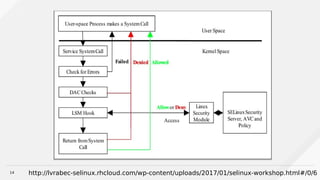
14 http://lvrabec-selinux.rhcloud.com/wp-content/uploads/2017/01/selinux-workshop.html#/0/6
15
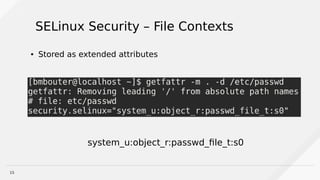
SELinux Security – File Contexts
● Stored as extended attributes
system_u:object_r:passwd_file_t:s0
16
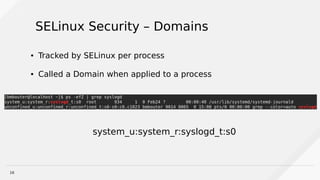
SELinux Security – Domains
● Tracked by SELinux per process
● Called a Domain when applied to a process
system_u:system_r:syslogd_t:s0
17
SELinux Security Context Anatomy
http://lvrabec-selinux.rhcloud.com/wp-content/uploads/2017/01/selinux-workshop.html#/0/11
system_u:object_r:passwd_file_t:s0
SELinux User
SELinux Role
SELinux Type
[sensitivity]
18
SELinux “Targeted” Rule Anatomy
allow user_t bin_t:file read;
Action
Process Label
Filesystem Type
Permission
19
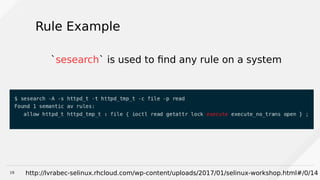
Rule Example
`sesearch` is used to find any rule on a system
http://lvrabec-selinux.rhcloud.com/wp-content/uploads/2017/01/selinux-workshop.html#/0/14
20
Where do rules come from?
● SELinux module defines rules
● SELinux modules are compiled
● OS brings a lot of system modules
● Some applications bring modules too
● SELinux policy is the collection of all modules
21
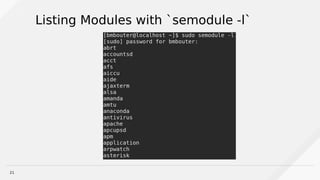
Listing Modules with `semodule -l`
22
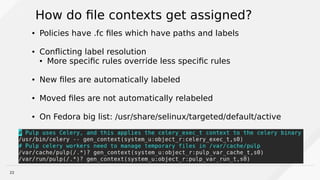
How do file contexts get assigned?
● Policies have .fc files which have paths and labels
● Conflicting label resolution
● More specific rules override less specific rules
● New files are automatically labeled
● Moved files are not automatically relabeled
● On Fedora big list: /usr/share/selinux/targeted/default/active
23
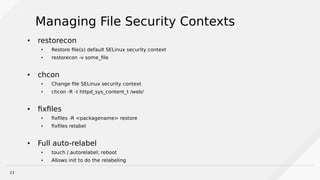
Managing File Security Contexts
●
restorecon
● Restore file(s) default SELinux security context
● restorecon -v some_file
● chcon
● Change file SELinux security context
● chcon -R -t httpd_sys_content_t /web/
● fixfiles
● fixfiles -R <packagename> restore
● fixfiles relabel
● Full auto-relabel
● touch /.autorelabel; reboot
● Allows init to do the relabeling
24
SELinux Enforcement
● Enforcing – SELinux policy is enforced
● setenforce 1
● Permissive – Not enforcing but denials are logged
● setenforce 0
● `getenforce` - reports on if SELinux is enforcing,
permissive, or disabled
25
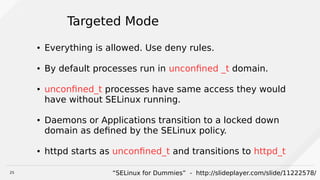
Targeted Mode
● Everything is allowed. Use deny rules.
● By default processes run in unconfined _t domain.
● unconfined_t processes have same access they would
have without SELinux running.
● Daemons or Applications transition to a locked down
domain as defined by the SELinux policy.
● httpd starts as unconfined_t and transitions to httpd_t
“SELinux for Dummies” - http://slideplayer.com/slide/11222578/
26
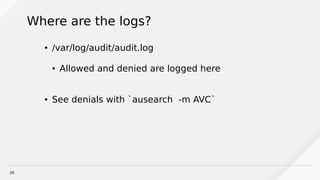
Where are the logs?
● /var/log/audit/audit.log
● Allowed and denied are logged here
● See denials with `ausearch -m AVC`
27
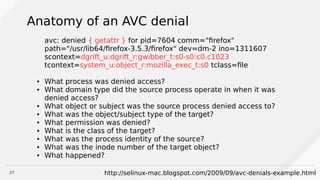
Anatomy of an AVC denial
avc: denied { getattr } for pid=7604 comm="firefox"
path="/usr/lib64/firefox-3.5.3/firefox" dev=dm-2 ino=1311607
scontext=dgrift_u:dgrift_r:gwibber_t:s0-s0:c0.c1023
tcontext=system_u:object_r:mozilla_exec_t:s0 tclass=file
● What process was denied access?
● What domain type did the source process operate in when it was
denied access?
● What object or subject was the source process denied access to?
● What was the object/subject type of the target?
● What permission was denied?
● What is the class of the target?
● What was the process identity of the source?
● What was the inode number of the target object?
● What happened?
http://selinux-mac.blogspot.com/2009/09/avc-denials-example.html
28
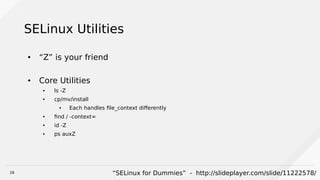
SELinux Utilities
● “Z” is your friend
● Core Utilities
● ls -Z
● cp/mv/install
● Each handles file_context differently
● find / -context=
● id -Z
● ps auxZ
“SELinux for Dummies” - http://slideplayer.com/slide/11222578/
29
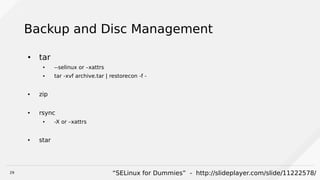
Backup and Disc Management
● tar
● --selinux or –xattrs
● tar -xvf archive.tar | restorecon -f -
● zip
● rsync
● -X or –xattrs
● star
“SELinux for Dummies” - http://slideplayer.com/slide/11222578/
30
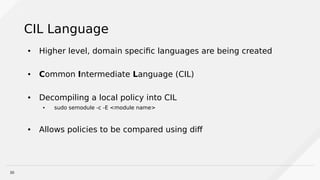
CIL Language
● Higher level, domain specific languages are being created
● Common Intermediate Language (CIL)
● Decompiling a local policy into CIL
● sudo semodule -c -E <module name>
● Allows policies to be compared using diff
31
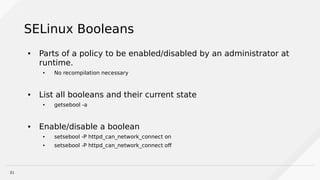
SELinux Booleans
● Parts of a policy to be enabled/disabled by an administrator at
runtime.
● No recompilation necessary
● List all booleans and their current state
● getsebool -a
● Enable/disable a boolean
● setsebool -P httpd_can_network_connect on
● setsebool -P httpd_can_network_connect off
32
Troubleshooting
● Check the booleans for the application. Maybe one needs to be
enabled.
● Look using CIL
● Temporarily turn it into Permissive mode
● Check three things:
● Verify the expected policy is installed using `sudo semodule -l`
● Verify the process is running in the expected domain (ps -eafZ | <your_app>)
● Verify the file contexts are correctly set (use CIL)
33
App fails with no AVC denials
● Setting setenforce 0 causes an app to work
● donaudit rules
● Dontaudits ignore specific AVC denials
● Not logged by default
● You can see them with `sudo semodule --disable_dontaudit --build`
“SELinux for Dummies” - http://slideplayer.com/slide/11222578/
34
Working Around Problems
● Report issues upstream to your project
● Helps resolve if an issue is environmental, a code defect, or a policy defect
● If it’s a legit incompatibility with the application and its own
policy you should apply a workaround
1. Cause a selinux reload using `sudo semodule -R`
2. Set into permissive mode and restart application
3. Trigger AVC denial again
4. Use `audit2allow -al` to show you the rules you are missing
35
audit2allow
~]# audit2allow -a
#============= certwatch_t ==============
allow certwatch_t var_t:dir write;
https://access.redhat.com/documentation/en-US/Red_Hat_Enterprise_Linux/6/html/Security-Enhanced_Linux/sect-Security-
Enhanced_Linux-Fixing_Problems-Allowing_Access_audit2allow.html
36
Applying audit2allow Recommendations
~]# audit2allow -a -M mycertwatch
******************** IMPORTANT ***********************
To make this policy package active, execute:
semodule -i mycertwatch.pp
~]# ls
mycertwatch.pp mycertwatch.te
https://access.redhat.com/documentation/en-US/Red_Hat_Enterprise_Linux/6/html/Security-Enhanced_Linux/sect-Security-
Enhanced_Linux-Fixing_Problems-Allowing_Access_audit2allow.html
37
What about if AVC denials from 2+ processes
~]# grep certwatch /var/log/audit/audit.log | audit2allow -M
mycertwatch2
******************** IMPORTANT ***********************
To make this policy package active, execute:
~]# semodule -i mycertwatch2.pp
https://access.redhat.com/documentation/en-US/Red_Hat_Enterprise_Linux/6/html/Security-Enhanced_Linux/sect-Security-
Enhanced_Linux-Fixing_Problems-Allowing_Access_audit2allow.html
38
Applying using CIL
● Extract the .pp file from the running system
● sudo semodule -H -E
● Convert to a CIL file
● sudo /usr/libexec/selinux/hll/pp /root/example.pp > /tmp/root-example.cil
● Edit the CIL file as necessary
● semodule -i /tmp/root-example.cil
https://plautrba.fedorapeople.org/blok/How-to-compare-two-SELinux-modules.html
39
Slides ->
Brian Bouterse
@bmbouter
bmbouter on freenode
http://www.slideshare.net/bmbouter/

Understanding SELinux For the Win

  • 1.
    Understanding SELinux forthe Win Brian Bouterse Principle Software Engineer, Red Hat.
  • 2.
    2 Introduction ● Disabling SELinux since2002 – 2015 ● Love Free and Open Source ● Principle Software Engineer with Red Hat since 2015 ● Work on Pulp ( http://pulpproject.org/ ) ● In 2015 I started working with SELinux ● Wrote three SELinux policies for Pulp ● Contribute to several Open Source projects (Kombu, Celery)
  • 3.
    3 Agenda ● Why dowe care about SELinux? ● How SELinux Works ● What is an SELinux Policy ● SELinux Tooling ● CIL Language ● Troubleshooting SELinux
  • 4.
    4 Motivation What is themost common query that has the term “SELinux”?
  • 5.
    5 Motivation What is themost common query that has the term “SELinux”? “Disabling SELinux” https://trends.google.com/trends/explore?q=selinux
  • 6.
    6 Unix Permissions ● User/ Group Models ● Permissions Mask (rwxs) ● Discretionary Access Control (DAC) ● Kernel enforces DAC ● All powerful root user https://www.slideshare.net/gottsc_r/how-to-not-disable-selinux
  • 7.
    7 Linux Kernel Permissions ●Lots of fine-grained permissions ● CAP_SYS_BOOT – allows reboot ● CAP_DAC_READ_SEARCH – bypass file permissions https://www.slideshare.net/gottsc_r/how-to-not-disable-selinux
  • 8.
    8 What is wrongwith root? ● You have to trust root ● root bypasses file/user/group security controls ● Multi-user systems have no privacy guarantee ● All-or-nothing security model ● No granularity to leverage kernel permissions ● Improved some with find-grained sudo controls
  • 9.
    9 Problem: Application TrustIssues ● Trust apps are secure ● CVEs happen, 0-days happen ● Trust apps are configured correctly ● Gartner reports 75% of mobile data breaches are configuration problems[0] ● Trust apps aren’t malware or nefarious ● SELinux does not address this ● Open source FTW ● Signed packages ● Reproducible Builds are important ● Open build systems [0] http://www.gartner.com/newsroom/id/2753017?nicam=prsm13
  • 10.
    10 When Applications getCompromised ● Steal/Expose/Modify/Corrupt application data ● CVE-2011-1717: chmod 666 all Skype application data ● Privilege Escalation (Kernel exploits) ● CVE-2010-EASY: Drops into a shell as root ● Install backdoor ● Make network connections (DDoS slave) ● If your app is root, game over
  • 11.
  • 12.
    12 Don’t run appsas root Public Service Announcement
  • 13.
    13 SECURITY ENHANCED LINUXIS A SECURITY MECHANISM BRINGING PROACTIVE SECURITY FOR YOUR SYSTEM http://lvrabec-selinux.rhcloud.com/wp-content/uploads/2017/01/selinux-workshop.html#/0/4
  • 14.
  • 15.
    15 SELinux Security –File Contexts ● Stored as extended attributes system_u:object_r:passwd_file_t:s0
  • 16.
    16 SELinux Security –Domains ● Tracked by SELinux per process ● Called a Domain when applied to a process system_u:system_r:syslogd_t:s0
  • 17.
    17 SELinux Security ContextAnatomy http://lvrabec-selinux.rhcloud.com/wp-content/uploads/2017/01/selinux-workshop.html#/0/11 system_u:object_r:passwd_file_t:s0 SELinux User SELinux Role SELinux Type [sensitivity]
  • 18.
    18 SELinux “Targeted” RuleAnatomy allow user_t bin_t:file read; Action Process Label Filesystem Type Permission
  • 19.
    19 Rule Example `sesearch` isused to find any rule on a system http://lvrabec-selinux.rhcloud.com/wp-content/uploads/2017/01/selinux-workshop.html#/0/14
  • 20.
    20 Where do rulescome from? ● SELinux module defines rules ● SELinux modules are compiled ● OS brings a lot of system modules ● Some applications bring modules too ● SELinux policy is the collection of all modules
  • 21.
  • 22.
    22 How do filecontexts get assigned? ● Policies have .fc files which have paths and labels ● Conflicting label resolution ● More specific rules override less specific rules ● New files are automatically labeled ● Moved files are not automatically relabeled ● On Fedora big list: /usr/share/selinux/targeted/default/active
  • 23.
    23 Managing File SecurityContexts ● restorecon ● Restore file(s) default SELinux security context ● restorecon -v some_file ● chcon ● Change file SELinux security context ● chcon -R -t httpd_sys_content_t /web/ ● fixfiles ● fixfiles -R <packagename> restore ● fixfiles relabel ● Full auto-relabel ● touch /.autorelabel; reboot ● Allows init to do the relabeling
  • 24.
    24 SELinux Enforcement ● Enforcing– SELinux policy is enforced ● setenforce 1 ● Permissive – Not enforcing but denials are logged ● setenforce 0 ● `getenforce` - reports on if SELinux is enforcing, permissive, or disabled
  • 25.
    25 Targeted Mode ● Everythingis allowed. Use deny rules. ● By default processes run in unconfined _t domain. ● unconfined_t processes have same access they would have without SELinux running. ● Daemons or Applications transition to a locked down domain as defined by the SELinux policy. ● httpd starts as unconfined_t and transitions to httpd_t “SELinux for Dummies” - http://slideplayer.com/slide/11222578/
  • 26.
    26 Where are thelogs? ● /var/log/audit/audit.log ● Allowed and denied are logged here ● See denials with `ausearch -m AVC`
  • 27.
    27 Anatomy of anAVC denial avc: denied { getattr } for pid=7604 comm="firefox" path="/usr/lib64/firefox-3.5.3/firefox" dev=dm-2 ino=1311607 scontext=dgrift_u:dgrift_r:gwibber_t:s0-s0:c0.c1023 tcontext=system_u:object_r:mozilla_exec_t:s0 tclass=file ● What process was denied access? ● What domain type did the source process operate in when it was denied access? ● What object or subject was the source process denied access to? ● What was the object/subject type of the target? ● What permission was denied? ● What is the class of the target? ● What was the process identity of the source? ● What was the inode number of the target object? ● What happened? http://selinux-mac.blogspot.com/2009/09/avc-denials-example.html
  • 28.
    28 SELinux Utilities ● “Z”is your friend ● Core Utilities ● ls -Z ● cp/mv/install ● Each handles file_context differently ● find / -context= ● id -Z ● ps auxZ “SELinux for Dummies” - http://slideplayer.com/slide/11222578/
  • 29.
    29 Backup and DiscManagement ● tar ● --selinux or –xattrs ● tar -xvf archive.tar | restorecon -f - ● zip ● rsync ● -X or –xattrs ● star “SELinux for Dummies” - http://slideplayer.com/slide/11222578/
  • 30.
    30 CIL Language ● Higherlevel, domain specific languages are being created ● Common Intermediate Language (CIL) ● Decompiling a local policy into CIL ● sudo semodule -c -E <module name> ● Allows policies to be compared using diff
  • 31.
    31 SELinux Booleans ● Partsof a policy to be enabled/disabled by an administrator at runtime. ● No recompilation necessary ● List all booleans and their current state ● getsebool -a ● Enable/disable a boolean ● setsebool -P httpd_can_network_connect on ● setsebool -P httpd_can_network_connect off
  • 32.
    32 Troubleshooting ● Check thebooleans for the application. Maybe one needs to be enabled. ● Look using CIL ● Temporarily turn it into Permissive mode ● Check three things: ● Verify the expected policy is installed using `sudo semodule -l` ● Verify the process is running in the expected domain (ps -eafZ | <your_app>) ● Verify the file contexts are correctly set (use CIL)
  • 33.
    33 App fails withno AVC denials ● Setting setenforce 0 causes an app to work ● donaudit rules ● Dontaudits ignore specific AVC denials ● Not logged by default ● You can see them with `sudo semodule --disable_dontaudit --build` “SELinux for Dummies” - http://slideplayer.com/slide/11222578/
  • 34.
    34 Working Around Problems ●Report issues upstream to your project ● Helps resolve if an issue is environmental, a code defect, or a policy defect ● If it’s a legit incompatibility with the application and its own policy you should apply a workaround 1. Cause a selinux reload using `sudo semodule -R` 2. Set into permissive mode and restart application 3. Trigger AVC denial again 4. Use `audit2allow -al` to show you the rules you are missing
  • 35.
    35 audit2allow ~]# audit2allow -a #=============certwatch_t ============== allow certwatch_t var_t:dir write; https://access.redhat.com/documentation/en-US/Red_Hat_Enterprise_Linux/6/html/Security-Enhanced_Linux/sect-Security- Enhanced_Linux-Fixing_Problems-Allowing_Access_audit2allow.html
  • 36.
    36 Applying audit2allow Recommendations ~]#audit2allow -a -M mycertwatch ******************** IMPORTANT *********************** To make this policy package active, execute: semodule -i mycertwatch.pp ~]# ls mycertwatch.pp mycertwatch.te https://access.redhat.com/documentation/en-US/Red_Hat_Enterprise_Linux/6/html/Security-Enhanced_Linux/sect-Security- Enhanced_Linux-Fixing_Problems-Allowing_Access_audit2allow.html
  • 37.
    37 What about ifAVC denials from 2+ processes ~]# grep certwatch /var/log/audit/audit.log | audit2allow -M mycertwatch2 ******************** IMPORTANT *********************** To make this policy package active, execute: ~]# semodule -i mycertwatch2.pp https://access.redhat.com/documentation/en-US/Red_Hat_Enterprise_Linux/6/html/Security-Enhanced_Linux/sect-Security- Enhanced_Linux-Fixing_Problems-Allowing_Access_audit2allow.html
  • 38.
    38 Applying using CIL ●Extract the .pp file from the running system ● sudo semodule -H -E ● Convert to a CIL file ● sudo /usr/libexec/selinux/hll/pp /root/example.pp > /tmp/root-example.cil ● Edit the CIL file as necessary ● semodule -i /tmp/root-example.cil https://plautrba.fedorapeople.org/blok/How-to-compare-two-SELinux-modules.html
  • 39.
    39 Slides -> Brian Bouterse @bmbouter bmbouteron freenode http://www.slideshare.net/bmbouter/