
AWR and ASH Deep Dive with 
Enterprise Manager 12c and 
Beyond 
Kellyn Pot’Vin 
Consulting Member of Enterprise Manager Technical Team 
Strategic Customer Program 
December, 2014 
Copyright © 2014 Oracle and/or its affiliates. All rights reserved. | 
Oracle Confidential
Copyright © 2014 Oracle and/or its affiliates. All rights reserved. |
Safe Harbor Statement 
The following is intended to outline our general product direction. It is intended for 
information purposes only, and may not be incorporated into any contract. It is not a 
commitment to deliver any material, code, or functionality, and should not be relied upon 
in making purchasing decisions. The development, release, and timing of any features or 
functionality described for Oracle’s products remains at the sole discretion of Oracle. 
Copyright © 2014 Oracle and/or its affiliates. All rights reserved. | 
Oracle Confidential 4
Copyright © 2014 Oracle and/or its affiliates. All rights reserved. | 
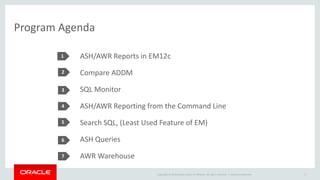
Program Agenda 
1 
2 
3 
4 
5 
ASH/AWR Reports in EM12c 
Compare ADDM 
SQL Monitor 
ASH/AWR Reporting from the Command Line 
Search SQL, (Least Used Feature of EM) 
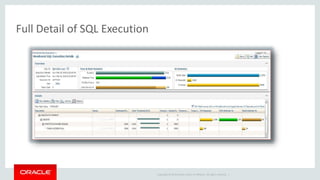
ASH Queries 
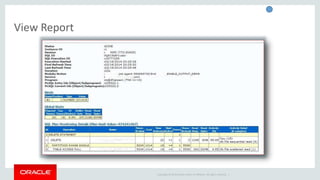
AWR Warehouse 
Oracle Confidential 5 
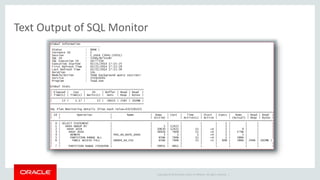
6 
7
When Someone Does’t Use AWR and ASH 
Copyright © 2014 Oracle and/or its affiliates. All rights reserved. | 
Oracle Confidential 6
Brief History 
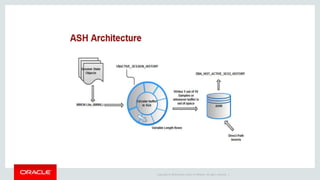
• ASH= Active Session History 
• AWR= Automatic Workload Repository 
• Introduced in Oracle 10g 
• Evolution to statspack, requests for performance reporting improvements. 
• “Always on” approach to performance metrics with requirement of non-locking 
Copyright © 2014 Oracle and/or its affiliates. All rights reserved. | 
collection process. 
• Requires Tuning Management Pack License from Oracle.
Copyright © 2014 Oracle and/or its affiliates. All rights reserved. |
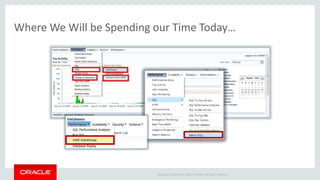
Where We Will be Spending our Time Today… 
Copyright © 2014 Oracle and/or its affiliates. All rights reserved. |
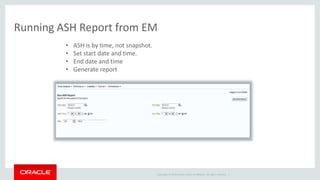
Running ASH Report from EM 
Copyright © 2014 Oracle and/or its affiliates. All rights reserved. | 
• ASH is by time, not snapshot. 
• Set start date and time. 
• End date and time 
• Generate report
Copyright © 2014 Oracle and/or its affiliates. All rights reserved. | 
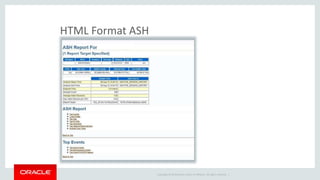
HTML Format ASH
Copyright © 2014 Oracle and/or its affiliates. All rights reserved. | 
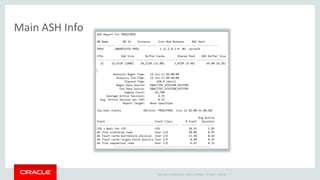
Main ASH Info
Copyright © 2014 Oracle and/or its affiliates. All rights reserved. | 
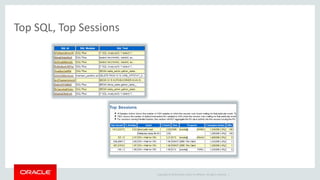
Top SQL, Top Sessions
Copyright © 2014 Oracle and/or its affiliates. All rights reserved. | 
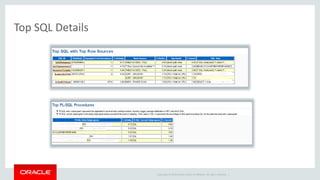
Top SQL Details
Copyright © 2014 Oracle and/or its affiliates. All rights reserved. | 
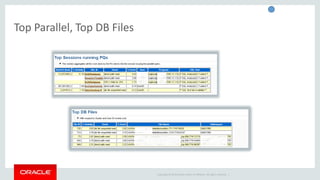
Top Parallel, Top DB Files
How Often Are We Asked, “What Changed?” 
• It ran fine last week, now it doesn’t! 
• ETL loads have changed, but no one has released any new code! 
• The DBA says there hasn’t been any parameter changes to this database, 
but I’m sure there have been. 
• Compare ADDM Comparison Resolution 
Copyright © 2014 Oracle and/or its affiliates. All rights reserved. |
What is in an ADDM Compare? 
• Report Includes Following: 
– Clear Demonstration of impact of change. 
– Recommendations to address issue. 
– Identifies causes behind change, (with limitations.) 
– Lists Regressed SQL, too! 
– Tip: If Installing to database for first time, (simple installation, nothing to concern 
about, just pkg to fulfill views) you must have preferred credentials SET of install will 
fail! 
Copyright © 2014 Oracle and/or its affiliates. All rights reserved. |
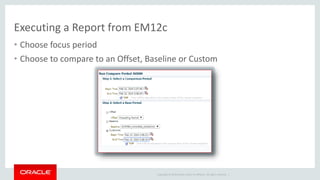
Executing a Report from EM12c 
• Choose focus period 
• Choose to compare to an Offset, Baseline or Custom 
Copyright © 2014 Oracle and/or its affiliates. All rights reserved. |
A Comparison ADDM Report… 
• Report Includes Following: 
• Clear Demonstration of impact of change. 
• Recommendations to address issue. 
• Identifies causes behind change, (with limitations.) 
• Lists Regressed SQL, too! 
Tip: If Installing to database for first time, (simple installation, nothing to 
concern about, just pkg to fulfill views) you must have preferred credentials 
SET of install will fail! 
Copyright © 2014 Oracle and/or its affiliates. All rights reserved. | 
Oracle Confidential 19
Copyright © 2014 Oracle and/or its affiliates. All rights reserved. | 
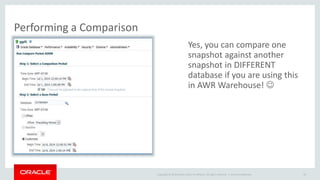
Performing a Comparison 
Yes, you can compare one 
snapshot against another 
snapshot in DIFFERENT 
database if you are using this 
in AWR Warehouse!  
Oracle Confidential 20
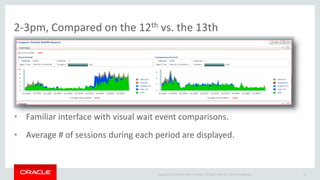
2-3pm, Compared on the 12th vs. the 13th 
• Familiar interface with visual wait event comparisons. 
• Average # of sessions during each period are displayed. 
Copyright © 2014 Oracle and/or its affiliates. All rights reserved. | 
Oracle Confidential 21
Copyright © 2014 Oracle and/or its affiliates. All rights reserved. | 
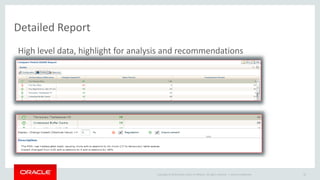
Detailed Report 
High level data, highlight for analysis and recommendations 
Oracle Confidential 22
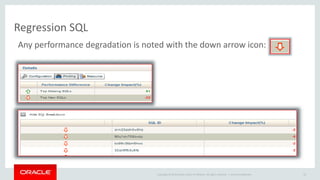
Regression SQL 
Any performance degradation is noted with the down arrow icon: 
Copyright © 2014 Oracle and/or its affiliates. All rights reserved. | 
Oracle Confidential 23
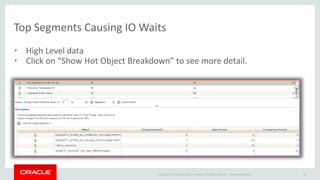
Top Segments Causing IO Waits 
• High Level data 
• Click on “Show Hot Object Breakdown” to see more detail. 
Copyright © 2014 Oracle and/or its affiliates. All rights reserved. | 
Oracle Confidential 24
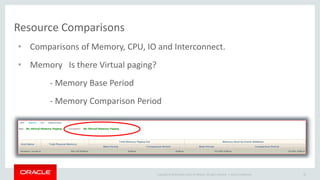
Resource Comparisons 
• Comparisons of Memory, CPU, IO and Interconnect. 
Copyright © 2014 Oracle and/or its affiliates. All rights reserved. | 
• Memory Is there Virtual paging? 
- Memory Base Period 
- Memory Comparison Period 
Oracle Confidential 25
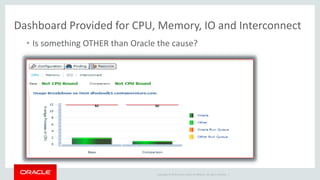
Dashboard Provided for CPU, Memory, IO and Interconnect 
• Is something OTHER than Oracle the cause? 
Copyright © 2014 Oracle and/or its affiliates. All rights reserved. |
Copyright © 2014 Oracle and/or its affiliates. All rights reserved. | 
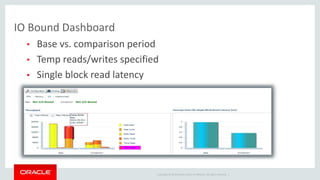
IO Bound Dashboard 
• Base vs. comparison period 
• Temp reads/writes specified 
• Single block read latency
Copyright © 2014 Oracle and/or its affiliates. All rights reserved. | 
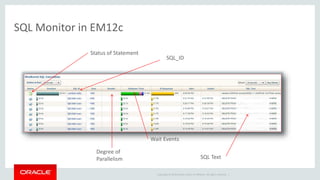
SQL Monitor in EM12c 
Status of Statement 
Wait Events 
Degree of 
Parallelism 
SQL_ID 
SQL Text
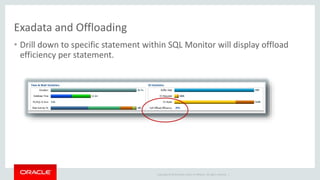
Exadata and Offloading 
• Drill down to specific statement within SQL Monitor will display offload 
efficiency per statement. 
Copyright © 2014 Oracle and/or its affiliates. All rights reserved. |
Copyright © 2014 Oracle and/or its affiliates. All rights reserved. | 
Full Detail of SQL Execution
Copyright © 2014 Oracle and/or its affiliates. All rights reserved. | 
View Report
Copyright © 2014 Oracle and/or its affiliates. All rights reserved. | 
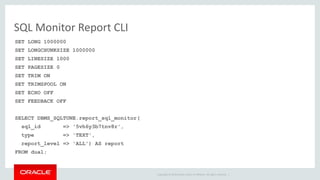
SQL Monitor Report CLI 
SET LONG 1000000 
SET LONGCHUNKSIZE 1000000 
SET LINESIZE 1000 
SET PAGESIZE 0 
SET TRIM ON 
SET TRIMSPOOL ON 
SET ECHO OFF 
SET FEEDBACK OFF 
SELECT DBMS_SQLTUNE.report_sql_monitor( 
sql_id => '5vh6y3b7tnv8r', 
type => 'TEXT', 
report_level => 'ALL') AS report 
FROM dual;
Copyright © 2014 Oracle and/or its affiliates. All rights reserved. | 
Text Output of SQL Monitor
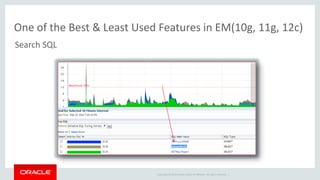
One of the Best & Least Used Features in EM(10g, 11g, 12c) 
Search SQL 
Problem Query 
Copyright © 2014 Oracle and/or its affiliates. All rights reserved. |
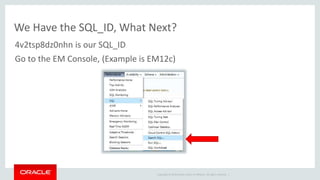
We Have the SQL_ID, What Next? 
4v2tsp8dz0nhn is our SQL_ID 
Go to the EM Console, (Example is EM12c) 
Copyright © 2014 Oracle and/or its affiliates. All rights reserved. |
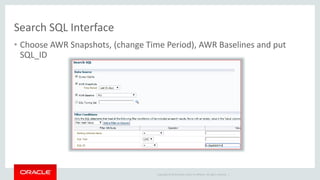
Search SQL Interface 
• Choose AWR Snapshots, (change Time Period), AWR Baselines and put 
SQL_ID 
Copyright © 2014 Oracle and/or its affiliates. All rights reserved. |
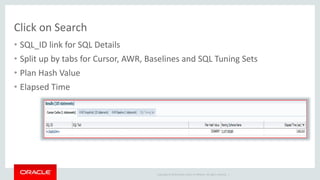
Click on Search 
• SQL_ID link for SQL Details 
• Split up by tabs for Cursor, AWR, Baselines and SQL Tuning Sets 
• Plan Hash Value 
• Elapsed Time 
Copyright © 2014 Oracle and/or its affiliates. All rights reserved. |
Copyright © 2014 Oracle and/or its affiliates. All rights reserved. | 
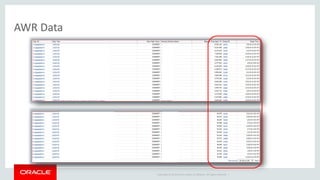
AWR Data
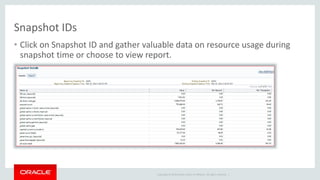
Snapshot IDs 
• Click on Snapshot ID and gather valuable data on resource usage during 
snapshot time or choose to view report. 
Copyright © 2014 Oracle and/or its affiliates. All rights reserved. |
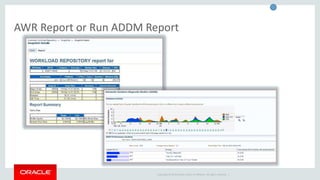
AWR Report or Run ADDM Report 
Copyright © 2014 Oracle and/or its affiliates. All rights reserved. |
Copyright © 2014 Oracle and/or its affiliates. All rights reserved. | 
AWR and ASH from the CLI 
All DBAs should know how to do this, 
(plus, Thor commands it!)
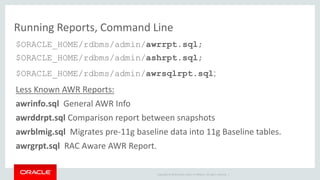
Running Reports, Command Line 
$ORACLE_HOME/rdbms/admin/awrrpt.sql; 
$ORACLE_HOME/rdbms/admin/ashrpt.sql; 
$ORACLE_HOME/rdbms/admin/awrsqlrpt.sql; 
Less Known AWR Reports: 
awrinfo.sql General AWR Info 
awrddrpt.sql Comparison report between snapshots 
awrblmig.sql Migrates pre-11g baseline data into 11g Baseline tables. 
awrgrpt.sql RAC Aware AWR Report. 
Copyright © 2014 Oracle and/or its affiliates. All rights reserved. |
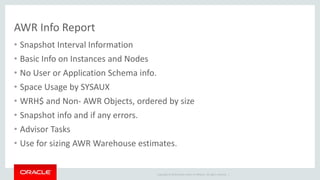
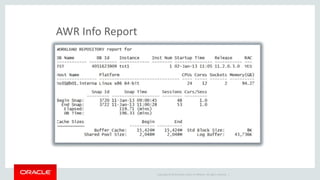
AWR Info Report 
• Snapshot Interval Information 
• Basic Info on Instances and Nodes 
• No User or Application Schema info. 
• Space Usage by SYSAUX 
• WRH$ and Non- AWR Objects, ordered by size 
• Snapshot info and if any errors. 
• Advisor Tasks 
• Use for sizing AWR Warehouse estimates. 
Copyright © 2014 Oracle and/or its affiliates. All rights reserved. |
Copyright © 2014 Oracle and/or its affiliates. All rights reserved. | 
AWR Info Report
Copyright © 2014 Oracle and/or its affiliates. All rights reserved. | 
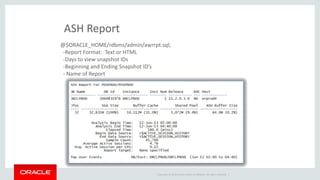
ASH Report 
@$ORACLE_HOME/rdbms/admin/awrrpt.sql; 
-Report Format: Text or HTML 
-Days to view snapshot IDs 
-Beginning and Ending Snapshot ID’s 
- Name of Report
Copyright © 2014 Oracle and/or its affiliates. All rights reserved. | 
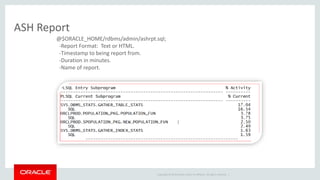
ASH Report 
@$ORACLE_HOME/rdbms/admin/ashrpt.sql; 
-Report Format: Text or HTML. 
-Timestamp to being report from. 
-Duration in minutes. 
-Name of report.
Copyright © 2014 Oracle and/or its affiliates. All rights reserved. | 
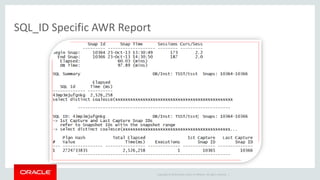
SQL_ID Specific AWR Report
Copyright © 2014 Oracle and/or its affiliates. All rights reserved. | 
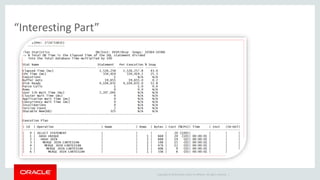
“Interesting Part”
Copyright © 2014 Oracle and/or its affiliates. All rights reserved. | 
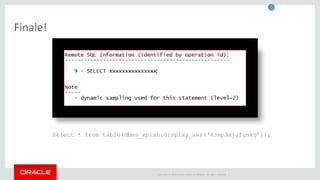
Finale! 
Select * from table(dbms_xplan.display_awr(‘43mp3mjufgnkg’));
Copyright © 2014 Oracle and/or its affiliates. All rights reserved. | 
Querying ASH Data Directly 
• More defined reporting 
• No need to pull full report 
• Detail on waits that are of interest 
• Join to non-AWR objects 
• Examples and Ideas…
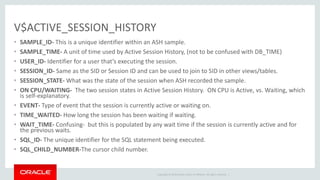
V$ACTIVE_SESSION_HISTORY 
• SAMPLE_ID- This is a unique identifier within an ASH sample. 
• SAMPLE_TIME- A unit of time used by Active Session History, (not to be confused with DB_TIME) 
• USER_ID- Identifier for a user that’s executing the session. 
• SESSION_ID- Same as the SID or Session ID and can be used to join to SID in other views/tables. 
• SESSION_STATE- What was the state of the session when ASH recorded the sample. 
• ON CPU/WAITING- The two session states in Active Session History. ON CPU is Active, vs. Waiting, which 
is self-explanatory. 
• EVENT- Type of event that the session is currently active or waiting on. 
• TIME_WAITED- How long the session has been waiting if waiting. 
• WAIT_TIME- Confusing- but this is populated by any wait time if the session is currently active and for 
the previous waits. 
• SQL_ID- The unique identifier for the SQL statement being executed. 
• SQL_CHILD_NUMBER-The cursor child number. 
Copyright © 2014 Oracle and/or its affiliates. All rights reserved. |
Copyright © 2014 Oracle and/or its affiliates. All rights reserved. | 
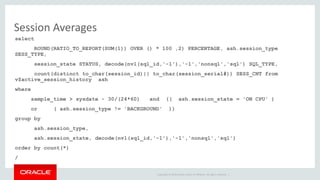
Session Averages 
select 
ROUND(RATIO_TO_REPORT(SUM(1)) OVER () * 100 ,2) PERCENTAGE, ash.session_type 
SESS_TYPE, 
session_state STATUS, decode(nvl(sql_id,'-1'),'-1','nonsql','sql') SQL_TYPE, 
count(distinct to_char(session_id)|| to_char(session_serial#)) SESS_CNT from 
v$active_session_history ash 
where 
sample_time > sysdate - 30/(24*60) and (( ash.session_state = 'ON CPU' ) 
or ( ash.session_type != 'BACKGROUND' )) 
group by 
ash.session_type, 
ash.session_state, decode(nvl(sql_id,'-1'),'-1','nonsql','sql') 
order by count(*) 
/
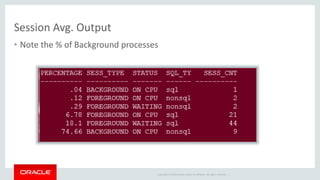
Session Avg. Output 
• Note the % of Background processes 
Copyright © 2014 Oracle and/or its affiliates. All rights reserved. |
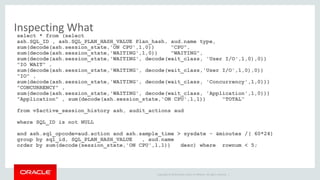
Inspecting What 
select * from (select 
ash.SQL_ID , ash.SQL_PLAN_HASH_VALUE Plan_hash, aud.name type, 
sum(decode(ash.session_state,'ON CPU',1,0)) "CPU", 
sum(decode(ash.session_state,'WAITING',1,0)) "WAITING", 
sum(decode(ash.session_state,'WAITING', decode(wait_class, 'User I/O',1,0),0)) 
"IO WAIT" , 
sum(decode(ash.session_state,'WAITING', decode(wait_class,'User I/O',1,0),0)) 
"IO" , 
sum(decode(ash.session_state,'WAITING', decode(wait_class, 'Concurrency',1,0))) 
"CONCURRENCY" , 
sum(decode(ash.session_state,'WAITING', decode(wait_class, 'Application',1,0))) 
"Application" , sum(decode(ash.session_state,'ON CPU',1,1)) "TOTAL“ 
from v$active_session_history ash, audit_actions aud 
Copyright © 2014 Oracle and/or its affiliates. All rights reserved. | 
where SQL_ID is not NULL 
and ash.sql_opcode=aud.action and ash.sample_time > sysdate - &minutes /( 60*24) 
group by sql_id, SQL_PLAN_HASH_VALUE , aud.name 
order by sum(decode(session_state,'ON CPU',1,1)) desc) where rownum < 5;
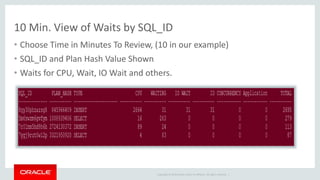
10 Min. View of Waits by SQL_ID 
• Choose Time in Minutes To Review, (10 in our example) 
• SQL_ID and Plan Hash Value Shown 
• Waits for CPU, Wait, IO Wait and others. 
Copyright © 2014 Oracle and/or its affiliates. All rights reserved. |
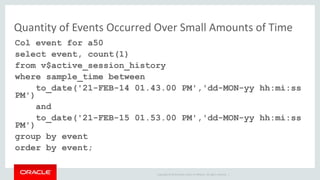
Quantity of Events Occurred Over Small Amounts of Time 
Col event for a50 
select event, count(1) 
from v$active_session_history 
where sample_time between 
to_date('21-FEB-14 01.43.00 PM','dd-MON-yy hh:mi:ss 
Copyright © 2014 Oracle and/or its affiliates. All rights reserved. | 
PM') 
and 
to_date('21-FEB-15 01.53.00 PM','dd-MON-yy hh:mi:ss 
PM') 
group by event 
order by event;
Copyright © 2014 Oracle and/or its affiliates. All rights reserved. | 
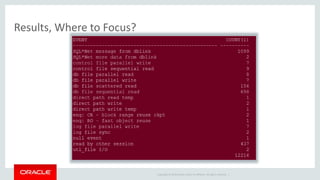
Results, Where to Focus?
Copyright © 2014 Oracle and/or its affiliates. All rights reserved. | 
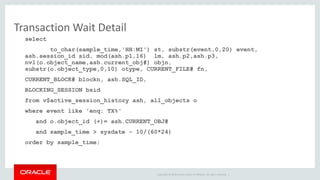
Transaction Wait Detail 
select 
to_char(sample_time,'HH:MI') st, substr(event,0,20) event, 
ash.session_id sid, mod(ash.p1,16) lm, ash.p2,ash.p3, 
nvl(o.object_name,ash.current_obj#) objn, 
substr(o.object_type,0,10) otype, CURRENT_FILE# fn, 
CURRENT_BLOCK# blockn, ash.SQL_ID, 
BLOCKING_SESSION bsid 
from v$active_session_history ash, all_objects o 
where event like 'enq: TX%' 
and o.object_id (+)= ash.CURRENT_OBJ# 
and sample_time > sysdate - 10/(60*24) 
order by sample_time;
Copyright © 2014 Oracle and/or its affiliates. All rights reserved. | 
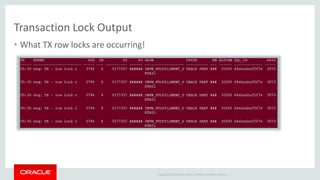
Transaction Lock Output 
• What TX row locks are occurring!
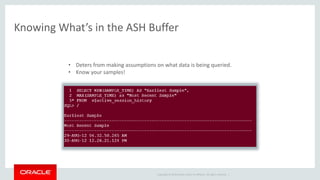
Knowing What’s in the ASH Buffer 
• Deters from making assumptions on what data is being queried. 
• Know your samples! 
Copyright © 2014 Oracle and/or its affiliates. All rights reserved. |
Copyright © 2014 Oracle and/or its affiliates. All rights reserved. | 
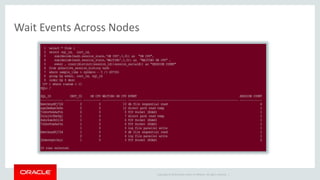
Wait Events Across Nodes
Copyright © 2014 Oracle and/or its affiliates. All rights reserved. | 
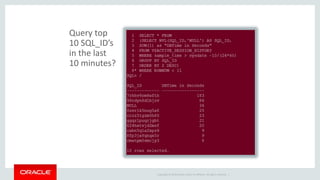
Query top 
10 SQL_ID’s 
in the last 
10 minutes?
Copyright © 2014 Oracle and/or its affiliates. All rights reserved. | 
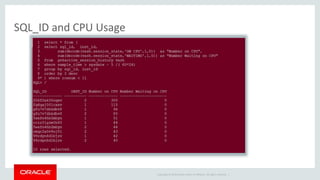
SQL_ID and CPU Usage
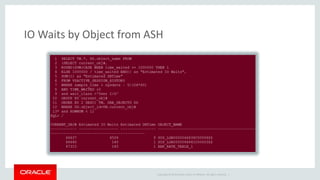
IO Waits by Object from ASH 
Copyright © 2014 Oracle and/or its affiliates. All rights reserved. |
Copyright © 2014 Oracle and/or its affiliates. All rights reserved. | 
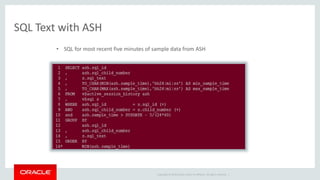
SQL Text with ASH 
• SQL for most recent five minutes of sample data from ASH
Copyright © 2014 Oracle and/or its affiliates. All rights reserved. | 
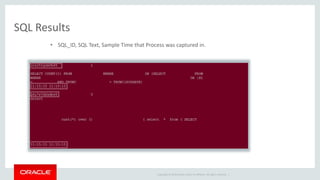
SQL Results 
• SQL_ID, SQL Text, Sample Time that Process was captured in.
Copyright © 2014 Oracle and/or its affiliates. All rights reserved. | 
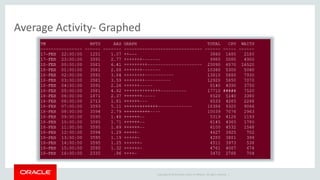
Average Activity- Graphed
Copyright © 2014 Oracle and/or its affiliates. All rights reserved. | 
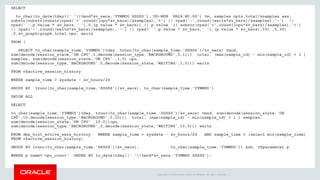
SELECT 
to_char(to_date(tday||' '||tmod*&v_secs,'YYMMDD SSSSS'),'DD-MON HH24:MI:SS') tm, samples npts,total/&samples aas, 
substr(substr(substr(rpad('+',round((cpu*&v_bars)/&samples),'+') || rpad('-',round((waits*&v_bars)/&samples),'-') || 
rpad(' ',p.value * &v_bars,' '),0,(p.value * &v_bars)) || p.value || substr(rpad('+',round((cpu*&v_bars)/&samples),'+') 
|| rpad('-',round((waits*&v_bars)/&samples),'-') || rpad(' ',p.value * &v_bars,' '),(p.value * &v_bars),10) ,0,30) 
,0,&v_graph)graph,total,cpu, waits 
FROM ( 
SELECT to_char(sample_time,'YYMMDD')tday, trunc(to_char(sample_time,'SSSSS')/&v_secs) tmod, 
sum(decode(session_state,'ON CPU',1,decode(session_type,'BACKGROUND',0,1))) total, (max(sample_id) - min(sample_id) + 1 ) 
samples, sum(decode(session_state,'ON CPU' ,1,0) cpu, 
sum(decode(session_type,'BACKGROUND',0,decode(session_state,'WAITING',1,0))) waits 
FROM v$active_session_history 
WHERE sample_time > sysdate - &v_hours/24 
GROUP BY trunc(to_char(sample_time,'SSSSS')/&v_secs), to_char(sample_time,'YYMMDD') 
UNION ALL 
SELECT 
to_char(sample_time,'YYMMDD')tday, trunc(to_char(sample_time,'SSSSS')/&v_secs) tmod, sum(decode(session_state,'ON 
CPU',10,decode(session_type,'BACKGROUND',0,10))) total, (max(sample_id) - min(sample_id) + 1 ) samples, 
sum(decode(session_state,'ON CPU' ,10,0))cpu, 
sum(decode(session_type,'BACKGROUND',0,decode(session_state,'WAITING',10,0))) waits 
FROM dba_hist_active_sess_history WHERE sample_time > sysdate - &v_hours/24 AND sample_time < (select min(sample_time) 
FROM v$active_session_history) 
GROUP BY trunc(to_char(sample_time,'SSSSS')/&v_secs), to_char(sample_time,'YYMMDD')) ash, v$parameter p 
WHERE p.name='cpu_count‘ ORDER BY to_date(tday||' '||tmod*&v_secs,'YYMMDD SSSSS');
Copyright © 2014 Oracle and/or its affiliates. All rights reserved. | 
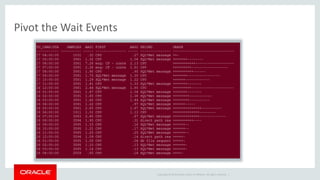
Pivot the Wait Events
Copyright © 2014 Oracle and/or its affiliates. All rights reserved. | 
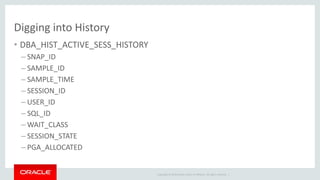
Digging into History 
• DBA_HIST_ACTIVE_SESS_HISTORY 
– SNAP_ID 
– SAMPLE_ID 
– SAMPLE_TIME 
– SESSION_ID 
– USER_ID 
– SQL_ID 
–WAIT_CLASS 
– SESSION_STATE 
– PGA_ALLOCATED
Copyright © 2014 Oracle and/or its affiliates. All rights reserved. | 
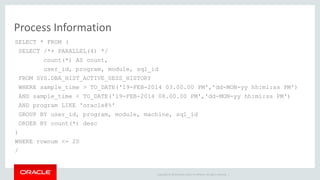
Process Information 
SELECT * FROM ( 
SELECT /*+ PARALLEL(4) */ 
count(*) AS count, 
user_id, program, module, sql_id 
FROM SYS.DBA_HIST_ACTIVE_SESS_HISTORY 
WHERE sample_time > TO_DATE('19-FEB-2014 03.00.00 PM','dd-MON-yy hh:mi:ss PM') 
AND sample_time < TO_DATE('19-FEB-2014 08.00.00 PM','dd-MON-yy hh:mi:ss PM') 
AND program LIKE 'oracle@%' 
GROUP BY user_id, program, module, machine, sql_id 
ORDER BY count(*) desc 
) 
WHERE rownum <= 20 
/
Copyright © 2014 Oracle and/or its affiliates. All rights reserved. | 
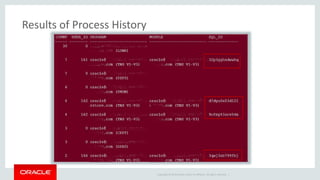
Results of Process History
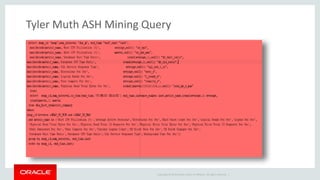
Tyler Muth ASH Mining Query 
Copyright © 2014 Oracle and/or its affiliates. All rights reserved. |
Copyright © 2014 Oracle and/or its affiliates. All rights reserved. | 
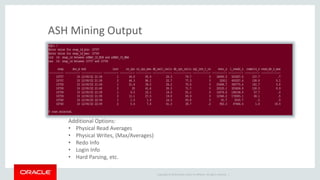
ASH Mining Output 
Additional Options: 
• Physical Read Averages 
• Physical Writes, (Max/Averages) 
• Redo Info 
• Login Info 
• Hard Parsing, etc.
Best Practice When Querying ASH Data 
• Keep it Simple and don’t reinvent the wheel. 
• Samples are an alias for time, not for counts. 
• Understand what is valuable and compare to packaged reports. 
• Be aware on RAC of node specific data. 
• Take care when querying Obj#, File# and Block#, (still issues in different 
versions…) 
• Check the time that is available in buffer, don’t assume! 
Copyright © 2014 Oracle and/or its affiliates. All rights reserved. |
AWR/ASH Links/Blogs 
• Tyler Muth: http://tylermuth.wordpress.com/ 
• Kyle Hailey, John Beresniewicz, Graham Wood: http://ashmasters.com/ 
• Mine- “For the Love of ASH and AWR” http://dbakevlar.com/2011/02/for-the- 
Copyright © 2014 Oracle and/or its affiliates. All rights reserved. | 
love-of-awr-and-ash/ 
• Karl Arao- http://karlarao.tiddlyspot.com/ 
• Guy Harrison- http://guyharrison.squarespace.com/opsgsamples/
Copyright © 2014 Oracle and/or its affiliates. All rights reserved. | 
Why an AWR Warehouse? 
1. Centralized location offers space savings to retain AWR data in local 
SYSAUX tablespace. 
2. Ability to offload resource demands when doing deep analysis and 
historical trending of AWR data on source database. 
3. Centralizing the data, identified by Database identifier, host, allows 
analysis on more than one database without database links. 
Oracle Confidential 77
Copyright © 2014 Oracle and/or its affiliates. All rights reserved. | 
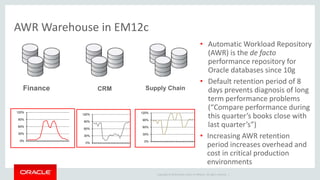
AWR Warehouse in EM12c 
• Automatic Workload Repository 
(AWR) is the de facto 
performance repository for 
Oracle databases since 10g 
• Default retention period of 8 
days prevents diagnosis of long 
term performance problems 
(“Compare performance during 
this quarter’s books close with 
last quarter’s”) 
• Increasing AWR retention 
period increases overhead and 
cost in critical production 
environments 
Finance CRM Supply Chain 
120% 
90% 
60% 
30% 
0% 
120% 
90% 
60% 
30% 
0% 
120% 
90% 
60% 
30% 
0%
Copyright © 2014 Oracle and/or its affiliates. All rights reserved. | 
Requirements 
• AWR Warehouse Repository -11.2.0.4 or higher. 
• Preferred Credentials set up for all targets involved. 
• Discover the database you will use for your repository in the EM12c 
• Pre-discover any source database before able to add. 
• For a RAC target or AWR Warehouse, ensure you’ve set up a shared 
location for the ETL load files. 
Oracle Confidential 79
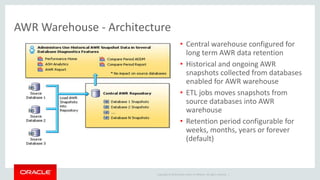
AWR Warehouse - Architecture 
• Central warehouse configured for 
long term AWR data retention 
• Historical and ongoing AWR 
snapshots collected from databases 
enabled for AWR warehouse 
• ETL jobs moves snapshots from 
source databases into AWR 
warehouse 
• Retention period configurable for 
weeks, months, years or forever 
(default) 
Copyright © 2014 Oracle and/or its affiliates. All rights reserved. |
Requirements 
• AWR Warehouse Repository database must be 11.2.0.4 with patch or 
12.1.0.2 with patch. 
• Will support source databases 10.2.0.4  12.1.0.x 
• EM12c 12.1.0.4 with 
• Requires diagnostic and tuning pack. With these, limited EE license for use 
of AWR Warehouse Repository database. 
• As long as no additional, (RAC, Dataguard, etc.) on AWR Warehouse 
repository database, the limited EE license will support. 
Copyright © 2014 Oracle and/or its affiliates. All rights reserved. | 
Oracle Confidential 81
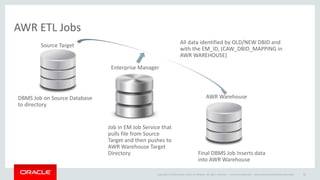
All data identified by OLD/NEW DBID and 
with the EM_ID, (CAW_DBID_MAPPING in 
AWR WAREHOUSE) 
Copyright © 2014 Oracle and/or its affiliates. All rights reserved. | 
AWR ETL Jobs 
Oracle Confidential – Internal/Restricted/Highly Restricted 82 
DBMS Job on Source Database 
to directory 
Job in EM Job Service that 
pulls file from Source 
Target and then pushes to 
AWR Warehouse Target 
Directory Final DBMS Job Inserts data 
into AWR Warehouse 
Source Target 
Enterprise Manager 
AWR Warehouse
Copyright © 2014 Oracle and/or its affiliates. All rights reserved. | 
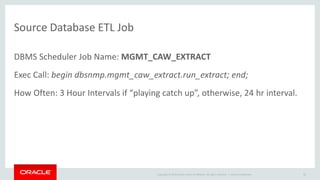
Source Database ETL Job 
DBMS Scheduler Job Name: MGMT_CAW_EXTRACT 
Exec Call: begin dbsnmp.mgmt_caw_extract.run_extract; end; 
How Often: 3 Hour Intervals if “playing catch up”, otherwise, 24 hr interval. 
Oracle Confidential 83
Copyright © 2014 Oracle and/or its affiliates. All rights reserved. | 
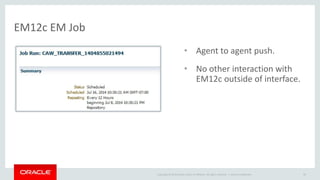
EM12c EM Job 
• Agent to agent push. 
• No other interaction with 
EM12c outside of interface. 
Oracle Confidential 84
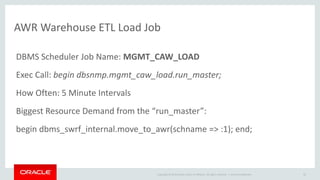
AWR Warehouse ETL Load Job 
DBMS Scheduler Job Name: MGMT_CAW_LOAD 
Exec Call: begin dbsnmp.mgmt_caw_load.run_master; 
How Often: 5 Minute Intervals 
Biggest Resource Demand from the “run_master”: 
begin dbms_swrf_internal.move_to_awr(schname => :1); end; 
Copyright © 2014 Oracle and/or its affiliates. All rights reserved. | 
Oracle Confidential 85
Copyright © 2014 Oracle and/or its affiliates. All rights reserved. | 
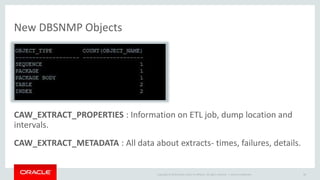
New DBSNMP Objects 
CAW_EXTRACT_PROPERTIES : Information on ETL job, dump location and 
intervals. 
CAW_EXTRACT_METADATA : All data about extracts- times, failures, details. 
Oracle Confidential 86
Copyright © 2014 Oracle and/or its affiliates. All rights reserved. | 
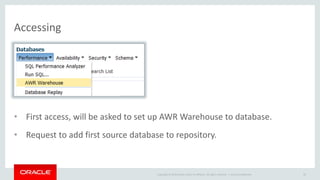
Accessing 
• First access, will be asked to set up AWR Warehouse to database. 
• Request to add first source database to repository. 
Oracle Confidential 87
Copyright © 2014 Oracle and/or its affiliates. All rights reserved. | 
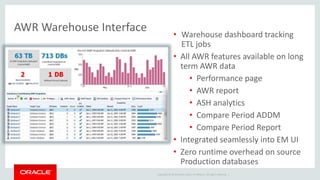
AWR Warehouse Interface 
• Warehouse dashboard tracking 
ETL jobs 
• All AWR features available on long 
term AWR data 
• Performance page 
• AWR report 
• ASH analytics 
• Compare Period ADDM 
• Compare Period Report 
• Integrated seamlessly into EM UI 
• Zero runtime overhead on source 
Production databases
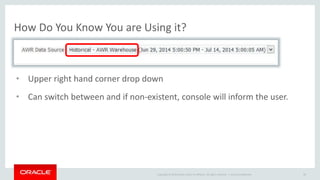
How Do You Know You are Using it? 
• Upper right hand corner drop down 
• Can switch between and if non-existent, console will inform the user. 
Copyright © 2014 Oracle and/or its affiliates. All rights reserved. | 
Oracle Confidential 89
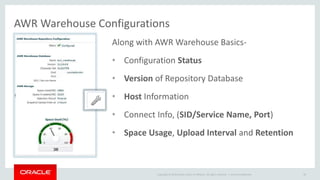
AWR Warehouse Configurations 
Along with AWR Warehouse Basics- 
• Configuration Status 
• Version of Repository Database 
• Host Information 
• Connect Info, (SID/Service Name, Port) 
• Space Usage, Upload Interval and Retention 
Copyright © 2014 Oracle and/or its affiliates. All rights reserved. | 
Oracle Confidential 90
Copyright © 2014 Oracle and/or its affiliates. All rights reserved. | 
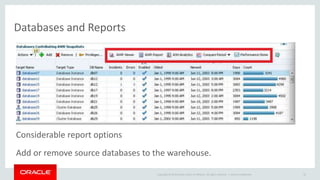
Databases and Reports 
Considerable report options 
Add or remove source databases to the warehouse. 
Oracle Confidential 91
Copyright © 2014 Oracle and/or its affiliates. All rights reserved. | 
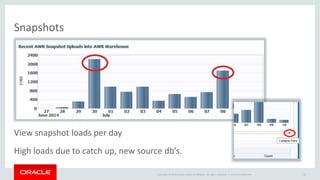
Snapshots 
View snapshot loads per day 
High loads due to catch up, new source db’s. 
Oracle Confidential 92
Copyright © 2014 Oracle and/or its affiliates. All rights reserved. | 
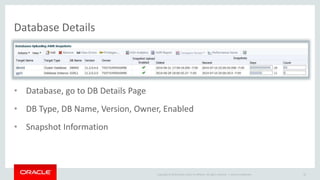
Database Details 
• Database, go to DB Details Page 
• DB Type, DB Name, Version, Owner, Enabled 
• Snapshot Information 
Oracle Confidential 93
Copyright © 2014 Oracle and/or its affiliates. All rights reserved. | 
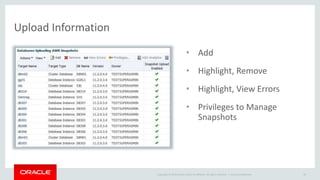
Upload Information 
• Add 
• Highlight, Remove 
• Highlight, View Errors 
• Privileges to Manage 
Snapshots 
Oracle Confidential 94
Copyright © 2014 Oracle and/or its affiliates. All rights reserved. | 
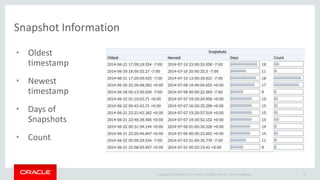
Snapshot Information 
• Oldest 
timestamp 
• Newest 
timestamp 
• Days of 
Snapshots 
• Count 
Oracle Confidential 95
Copyright © 2014 Oracle and/or its affiliates. All rights reserved. | 
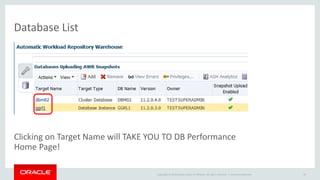
Database List 
Clicking on Target Name will TAKE YOU TO DB Performance 
Home Page! 
Oracle Confidential 96
Copyright © 2014 Oracle and/or its affiliates. All rights reserved. | 
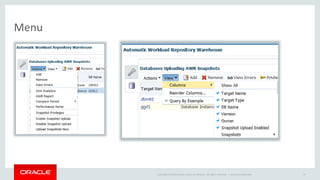
Menu 
Oracle Confidential 97
Copyright © 2014 Oracle and/or its affiliates. All rights reserved. | 
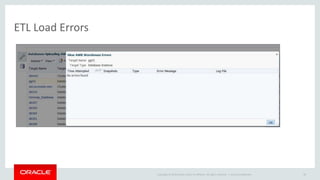
ETL Load Errors 
Oracle Confidential 98
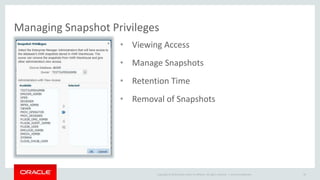
Managing Snapshot Privileges 
• Viewing Access 
• Manage Snapshots 
• Retention Time 
• Removal of Snapshots 
Copyright © 2014 Oracle and/or its affiliates. All rights reserved. | 
Oracle Confidential 99
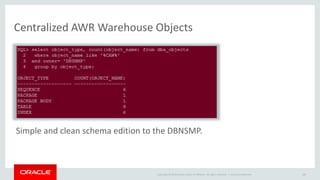
Centralized AWR Warehouse Objects 
Simple and clean schema edition to the DBNSMP. 
Copyright © 2014 Oracle and/or its affiliates. All rights reserved. | 
Oracle Confidential 100
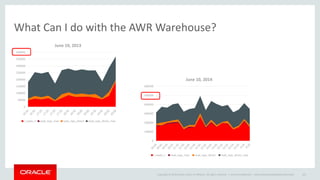
What Can I do with the AWR Warehouse? 
Copyright © 2014 Oracle and/or its affiliates. All rights reserved. | 
Oracle Confidential – Internal/Restricted/Highly Restricted 101 
400000 
350000 
300000 
250000 
200000 
150000 
100000 
50000 
0 
June 10, 2013 
l_reads_s read_iops_max read_iops_direct read_iops_direct_max 
600000 
500000 
400000 
300000 
200000 
100000 
0 
June 10, 2014 
l_reads_s read_iops_max read_iops_direct read_iops_direct_max
Copyright © 2014 Oracle and/or its affiliates. All rights reserved. | 
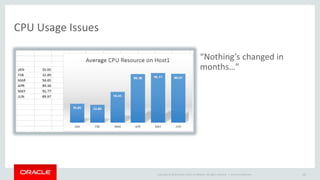
CPU Usage Issues 
“Nothing’s changed in 
months…” 
Oracle Confidential 102
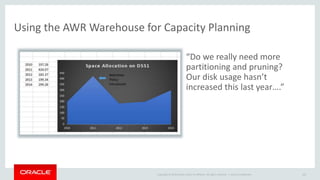
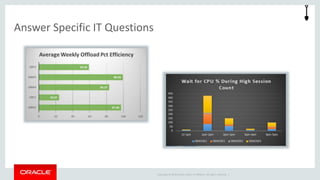
Using the AWR Warehouse for Capacity Planning 
“Do we really need more 
partitioning and pruning? 
Our disk usage hasn’t 
increased this last year….” 
Copyright © 2014 Oracle and/or its affiliates. All rights reserved. | 
Oracle Confidential 103
Copyright © 2014 Oracle and/or its affiliates. All rights reserved. | 
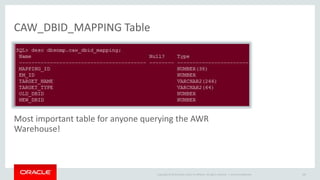
CAW_DBID_MAPPING Table 
Most important table for anyone querying the AWR 
Warehouse! 
Oracle Confidential 104
Querying the AWR Warehouse Tips 
Update Scripts with DBID identified to filter. 
Join: 
• CAW_DBID_MAPPING on OLD_DBID/NEW_DBID=DBID 
• CAW_DBID_MAPPING on TARGET_NAME=TARGET_NAME 
Copyright © 2014 Oracle and/or its affiliates. All rights reserved. | 
Oracle Confidential 105
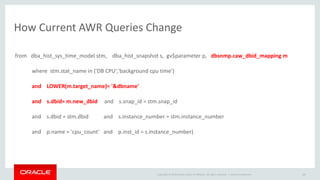
How Current AWR Queries Change 
from dba_hist_sys_time_model stm, dba_hist_snapshot s, gv$parameter p, dbsnmp.caw_dbid_mapping m 
where stm.stat_name in ('DB CPU','background cpu time') 
Copyright © 2014 Oracle and/or its affiliates. All rights reserved. | 
and LOWER(m.target_name)= '&dbname' 
and s.dbid= m.new_dbid and s.snap_id = stm.snap_id 
and s.dbid = stm.dbid and s.instance_number = stm.instance_number 
and p.name = 'cpu_count' and p.inst_id = s.instance_number) 
Oracle Confidential 106
Copyright © 2014 Oracle and/or its affiliates. All rights reserved. | 
Answer Specific IT Questions
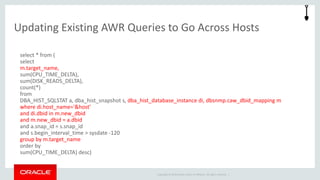
Updating Existing AWR Queries to Go Across Hosts 
select * from ( 
select 
m.target_name, 
sum(CPU_TIME_DELTA), 
sum(DISK_READS_DELTA), 
count(*) 
from 
DBA_HIST_SQLSTAT a, dba_hist_snapshot s, dba_hist_database_instance di, dbsnmp.caw_dbid_mapping m 
where di.host_name='&host' 
and di.dbid in m.new_dbid 
and m.new_dbid = a.dbid 
and a.snap_id = s.snap_id 
and s.begin_interval_time > sysdate -120 
group by m.target_name 
order by 
sum(CPU_TIME_DELTA) desc) 
Copyright © 2014 Oracle and/or its affiliates. All rights reserved. |
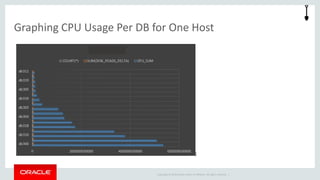
Graphing CPU Usage Per DB for One Host 
Copyright © 2014 Oracle and/or its affiliates. All rights reserved. |
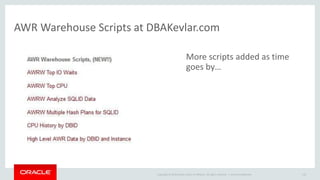
AWR Warehouse Scripts at DBAKevlar.com 
More scripts added as time 
goes by… 
Copyright © 2014 Oracle and/or its affiliates. All rights reserved. | 
Oracle Confidential 110
Copyright © 2014 Oracle and/or its affiliates. All rights reserved. | 
Want to Learn More? 
Oracle Screenwatch: https://www.youtube.com/watch?v=StydMitHtuI 
DBAKevlar Blog Posts: 
http://dbakevlar.com/2014/06/awr-warehouse-in-em12c-rel-4/ 
http://dbakevlar.com/2014/06/awr-warehouse-in-em12c-rel-4-part-ii/ 
Scripts: http://dbakevlar.com/scripts/ 
Oracle Confidential 111
Connect with me via Social Media: 
Copyright © 2014 Oracle and/or its affiliates. All rights reserved. | Oracle Confidential 112
UKOUG

UKOUG

  • 2.
    AWR and ASHDeep Dive with Enterprise Manager 12c and Beyond Kellyn Pot’Vin Consulting Member of Enterprise Manager Technical Team Strategic Customer Program December, 2014 Copyright © 2014 Oracle and/or its affiliates. All rights reserved. | Oracle Confidential
  • 3.
    Copyright © 2014Oracle and/or its affiliates. All rights reserved. |
  • 4.
    Safe Harbor Statement The following is intended to outline our general product direction. It is intended for information purposes only, and may not be incorporated into any contract. It is not a commitment to deliver any material, code, or functionality, and should not be relied upon in making purchasing decisions. The development, release, and timing of any features or functionality described for Oracle’s products remains at the sole discretion of Oracle. Copyright © 2014 Oracle and/or its affiliates. All rights reserved. | Oracle Confidential 4
  • 5.
    Copyright © 2014Oracle and/or its affiliates. All rights reserved. | Program Agenda 1 2 3 4 5 ASH/AWR Reports in EM12c Compare ADDM SQL Monitor ASH/AWR Reporting from the Command Line Search SQL, (Least Used Feature of EM) ASH Queries AWR Warehouse Oracle Confidential 5 6 7
  • 6.
    When Someone Does’tUse AWR and ASH Copyright © 2014 Oracle and/or its affiliates. All rights reserved. | Oracle Confidential 6
  • 7.
    Brief History •ASH= Active Session History • AWR= Automatic Workload Repository • Introduced in Oracle 10g • Evolution to statspack, requests for performance reporting improvements. • “Always on” approach to performance metrics with requirement of non-locking Copyright © 2014 Oracle and/or its affiliates. All rights reserved. | collection process. • Requires Tuning Management Pack License from Oracle.
  • 8.
    Copyright © 2014Oracle and/or its affiliates. All rights reserved. |
  • 9.
    Where We Willbe Spending our Time Today… Copyright © 2014 Oracle and/or its affiliates. All rights reserved. |
  • 10.
    Running ASH Reportfrom EM Copyright © 2014 Oracle and/or its affiliates. All rights reserved. | • ASH is by time, not snapshot. • Set start date and time. • End date and time • Generate report
  • 11.
    Copyright © 2014Oracle and/or its affiliates. All rights reserved. | HTML Format ASH
  • 12.
    Copyright © 2014Oracle and/or its affiliates. All rights reserved. | Main ASH Info
  • 13.
    Copyright © 2014Oracle and/or its affiliates. All rights reserved. | Top SQL, Top Sessions
  • 14.
    Copyright © 2014Oracle and/or its affiliates. All rights reserved. | Top SQL Details
  • 15.
    Copyright © 2014Oracle and/or its affiliates. All rights reserved. | Top Parallel, Top DB Files
  • 16.
    How Often AreWe Asked, “What Changed?” • It ran fine last week, now it doesn’t! • ETL loads have changed, but no one has released any new code! • The DBA says there hasn’t been any parameter changes to this database, but I’m sure there have been. • Compare ADDM Comparison Resolution Copyright © 2014 Oracle and/or its affiliates. All rights reserved. |
  • 17.
    What is inan ADDM Compare? • Report Includes Following: – Clear Demonstration of impact of change. – Recommendations to address issue. – Identifies causes behind change, (with limitations.) – Lists Regressed SQL, too! – Tip: If Installing to database for first time, (simple installation, nothing to concern about, just pkg to fulfill views) you must have preferred credentials SET of install will fail! Copyright © 2014 Oracle and/or its affiliates. All rights reserved. |
  • 18.
    Executing a Reportfrom EM12c • Choose focus period • Choose to compare to an Offset, Baseline or Custom Copyright © 2014 Oracle and/or its affiliates. All rights reserved. |
  • 19.
    A Comparison ADDMReport… • Report Includes Following: • Clear Demonstration of impact of change. • Recommendations to address issue. • Identifies causes behind change, (with limitations.) • Lists Regressed SQL, too! Tip: If Installing to database for first time, (simple installation, nothing to concern about, just pkg to fulfill views) you must have preferred credentials SET of install will fail! Copyright © 2014 Oracle and/or its affiliates. All rights reserved. | Oracle Confidential 19
  • 20.
    Copyright © 2014Oracle and/or its affiliates. All rights reserved. | Performing a Comparison Yes, you can compare one snapshot against another snapshot in DIFFERENT database if you are using this in AWR Warehouse!  Oracle Confidential 20
  • 21.
    2-3pm, Compared onthe 12th vs. the 13th • Familiar interface with visual wait event comparisons. • Average # of sessions during each period are displayed. Copyright © 2014 Oracle and/or its affiliates. All rights reserved. | Oracle Confidential 21
  • 22.
    Copyright © 2014Oracle and/or its affiliates. All rights reserved. | Detailed Report High level data, highlight for analysis and recommendations Oracle Confidential 22
  • 23.
    Regression SQL Anyperformance degradation is noted with the down arrow icon: Copyright © 2014 Oracle and/or its affiliates. All rights reserved. | Oracle Confidential 23
  • 24.
    Top Segments CausingIO Waits • High Level data • Click on “Show Hot Object Breakdown” to see more detail. Copyright © 2014 Oracle and/or its affiliates. All rights reserved. | Oracle Confidential 24
  • 25.
    Resource Comparisons •Comparisons of Memory, CPU, IO and Interconnect. Copyright © 2014 Oracle and/or its affiliates. All rights reserved. | • Memory Is there Virtual paging? - Memory Base Period - Memory Comparison Period Oracle Confidential 25
  • 26.
    Dashboard Provided forCPU, Memory, IO and Interconnect • Is something OTHER than Oracle the cause? Copyright © 2014 Oracle and/or its affiliates. All rights reserved. |
  • 27.
    Copyright © 2014Oracle and/or its affiliates. All rights reserved. | IO Bound Dashboard • Base vs. comparison period • Temp reads/writes specified • Single block read latency
  • 28.
    Copyright © 2014Oracle and/or its affiliates. All rights reserved. | SQL Monitor in EM12c Status of Statement Wait Events Degree of Parallelism SQL_ID SQL Text
  • 29.
    Exadata and Offloading • Drill down to specific statement within SQL Monitor will display offload efficiency per statement. Copyright © 2014 Oracle and/or its affiliates. All rights reserved. |
  • 30.
    Copyright © 2014Oracle and/or its affiliates. All rights reserved. | Full Detail of SQL Execution
  • 31.
    Copyright © 2014Oracle and/or its affiliates. All rights reserved. | View Report
  • 32.
    Copyright © 2014Oracle and/or its affiliates. All rights reserved. | SQL Monitor Report CLI SET LONG 1000000 SET LONGCHUNKSIZE 1000000 SET LINESIZE 1000 SET PAGESIZE 0 SET TRIM ON SET TRIMSPOOL ON SET ECHO OFF SET FEEDBACK OFF SELECT DBMS_SQLTUNE.report_sql_monitor( sql_id => '5vh6y3b7tnv8r', type => 'TEXT', report_level => 'ALL') AS report FROM dual;
  • 33.
    Copyright © 2014Oracle and/or its affiliates. All rights reserved. | Text Output of SQL Monitor
  • 34.
    One of theBest & Least Used Features in EM(10g, 11g, 12c) Search SQL Problem Query Copyright © 2014 Oracle and/or its affiliates. All rights reserved. |
  • 35.
    We Have theSQL_ID, What Next? 4v2tsp8dz0nhn is our SQL_ID Go to the EM Console, (Example is EM12c) Copyright © 2014 Oracle and/or its affiliates. All rights reserved. |
  • 36.
    Search SQL Interface • Choose AWR Snapshots, (change Time Period), AWR Baselines and put SQL_ID Copyright © 2014 Oracle and/or its affiliates. All rights reserved. |
  • 37.
    Click on Search • SQL_ID link for SQL Details • Split up by tabs for Cursor, AWR, Baselines and SQL Tuning Sets • Plan Hash Value • Elapsed Time Copyright © 2014 Oracle and/or its affiliates. All rights reserved. |
  • 38.
    Copyright © 2014Oracle and/or its affiliates. All rights reserved. | AWR Data
  • 39.
    Snapshot IDs •Click on Snapshot ID and gather valuable data on resource usage during snapshot time or choose to view report. Copyright © 2014 Oracle and/or its affiliates. All rights reserved. |
  • 40.
    AWR Report orRun ADDM Report Copyright © 2014 Oracle and/or its affiliates. All rights reserved. |
  • 41.
    Copyright © 2014Oracle and/or its affiliates. All rights reserved. | AWR and ASH from the CLI All DBAs should know how to do this, (plus, Thor commands it!)
  • 42.
    Running Reports, CommandLine $ORACLE_HOME/rdbms/admin/awrrpt.sql; $ORACLE_HOME/rdbms/admin/ashrpt.sql; $ORACLE_HOME/rdbms/admin/awrsqlrpt.sql; Less Known AWR Reports: awrinfo.sql General AWR Info awrddrpt.sql Comparison report between snapshots awrblmig.sql Migrates pre-11g baseline data into 11g Baseline tables. awrgrpt.sql RAC Aware AWR Report. Copyright © 2014 Oracle and/or its affiliates. All rights reserved. |
  • 43.
    AWR Info Report • Snapshot Interval Information • Basic Info on Instances and Nodes • No User or Application Schema info. • Space Usage by SYSAUX • WRH$ and Non- AWR Objects, ordered by size • Snapshot info and if any errors. • Advisor Tasks • Use for sizing AWR Warehouse estimates. Copyright © 2014 Oracle and/or its affiliates. All rights reserved. |
  • 44.
    Copyright © 2014Oracle and/or its affiliates. All rights reserved. | AWR Info Report
  • 45.
    Copyright © 2014Oracle and/or its affiliates. All rights reserved. | ASH Report @$ORACLE_HOME/rdbms/admin/awrrpt.sql; -Report Format: Text or HTML -Days to view snapshot IDs -Beginning and Ending Snapshot ID’s - Name of Report
  • 46.
    Copyright © 2014Oracle and/or its affiliates. All rights reserved. | ASH Report @$ORACLE_HOME/rdbms/admin/ashrpt.sql; -Report Format: Text or HTML. -Timestamp to being report from. -Duration in minutes. -Name of report.
  • 47.
    Copyright © 2014Oracle and/or its affiliates. All rights reserved. | SQL_ID Specific AWR Report
  • 48.
    Copyright © 2014Oracle and/or its affiliates. All rights reserved. | “Interesting Part”
  • 49.
    Copyright © 2014Oracle and/or its affiliates. All rights reserved. | Finale! Select * from table(dbms_xplan.display_awr(‘43mp3mjufgnkg’));
  • 50.
    Copyright © 2014Oracle and/or its affiliates. All rights reserved. | Querying ASH Data Directly • More defined reporting • No need to pull full report • Detail on waits that are of interest • Join to non-AWR objects • Examples and Ideas…
  • 51.
    V$ACTIVE_SESSION_HISTORY • SAMPLE_ID-This is a unique identifier within an ASH sample. • SAMPLE_TIME- A unit of time used by Active Session History, (not to be confused with DB_TIME) • USER_ID- Identifier for a user that’s executing the session. • SESSION_ID- Same as the SID or Session ID and can be used to join to SID in other views/tables. • SESSION_STATE- What was the state of the session when ASH recorded the sample. • ON CPU/WAITING- The two session states in Active Session History. ON CPU is Active, vs. Waiting, which is self-explanatory. • EVENT- Type of event that the session is currently active or waiting on. • TIME_WAITED- How long the session has been waiting if waiting. • WAIT_TIME- Confusing- but this is populated by any wait time if the session is currently active and for the previous waits. • SQL_ID- The unique identifier for the SQL statement being executed. • SQL_CHILD_NUMBER-The cursor child number. Copyright © 2014 Oracle and/or its affiliates. All rights reserved. |
  • 52.
    Copyright © 2014Oracle and/or its affiliates. All rights reserved. | Session Averages select ROUND(RATIO_TO_REPORT(SUM(1)) OVER () * 100 ,2) PERCENTAGE, ash.session_type SESS_TYPE, session_state STATUS, decode(nvl(sql_id,'-1'),'-1','nonsql','sql') SQL_TYPE, count(distinct to_char(session_id)|| to_char(session_serial#)) SESS_CNT from v$active_session_history ash where sample_time > sysdate - 30/(24*60) and (( ash.session_state = 'ON CPU' ) or ( ash.session_type != 'BACKGROUND' )) group by ash.session_type, ash.session_state, decode(nvl(sql_id,'-1'),'-1','nonsql','sql') order by count(*) /
  • 53.
    Session Avg. Output • Note the % of Background processes Copyright © 2014 Oracle and/or its affiliates. All rights reserved. |
  • 54.
    Inspecting What select* from (select ash.SQL_ID , ash.SQL_PLAN_HASH_VALUE Plan_hash, aud.name type, sum(decode(ash.session_state,'ON CPU',1,0)) "CPU", sum(decode(ash.session_state,'WAITING',1,0)) "WAITING", sum(decode(ash.session_state,'WAITING', decode(wait_class, 'User I/O',1,0),0)) "IO WAIT" , sum(decode(ash.session_state,'WAITING', decode(wait_class,'User I/O',1,0),0)) "IO" , sum(decode(ash.session_state,'WAITING', decode(wait_class, 'Concurrency',1,0))) "CONCURRENCY" , sum(decode(ash.session_state,'WAITING', decode(wait_class, 'Application',1,0))) "Application" , sum(decode(ash.session_state,'ON CPU',1,1)) "TOTAL“ from v$active_session_history ash, audit_actions aud Copyright © 2014 Oracle and/or its affiliates. All rights reserved. | where SQL_ID is not NULL and ash.sql_opcode=aud.action and ash.sample_time > sysdate - &minutes /( 60*24) group by sql_id, SQL_PLAN_HASH_VALUE , aud.name order by sum(decode(session_state,'ON CPU',1,1)) desc) where rownum < 5;
  • 55.
    10 Min. Viewof Waits by SQL_ID • Choose Time in Minutes To Review, (10 in our example) • SQL_ID and Plan Hash Value Shown • Waits for CPU, Wait, IO Wait and others. Copyright © 2014 Oracle and/or its affiliates. All rights reserved. |
  • 56.
    Quantity of EventsOccurred Over Small Amounts of Time Col event for a50 select event, count(1) from v$active_session_history where sample_time between to_date('21-FEB-14 01.43.00 PM','dd-MON-yy hh:mi:ss Copyright © 2014 Oracle and/or its affiliates. All rights reserved. | PM') and to_date('21-FEB-15 01.53.00 PM','dd-MON-yy hh:mi:ss PM') group by event order by event;
  • 57.
    Copyright © 2014Oracle and/or its affiliates. All rights reserved. | Results, Where to Focus?
  • 58.
    Copyright © 2014Oracle and/or its affiliates. All rights reserved. | Transaction Wait Detail select to_char(sample_time,'HH:MI') st, substr(event,0,20) event, ash.session_id sid, mod(ash.p1,16) lm, ash.p2,ash.p3, nvl(o.object_name,ash.current_obj#) objn, substr(o.object_type,0,10) otype, CURRENT_FILE# fn, CURRENT_BLOCK# blockn, ash.SQL_ID, BLOCKING_SESSION bsid from v$active_session_history ash, all_objects o where event like 'enq: TX%' and o.object_id (+)= ash.CURRENT_OBJ# and sample_time > sysdate - 10/(60*24) order by sample_time;
  • 59.
    Copyright © 2014Oracle and/or its affiliates. All rights reserved. | Transaction Lock Output • What TX row locks are occurring!
  • 60.
    Knowing What’s inthe ASH Buffer • Deters from making assumptions on what data is being queried. • Know your samples! Copyright © 2014 Oracle and/or its affiliates. All rights reserved. |
  • 61.
    Copyright © 2014Oracle and/or its affiliates. All rights reserved. | Wait Events Across Nodes
  • 62.
    Copyright © 2014Oracle and/or its affiliates. All rights reserved. | Query top 10 SQL_ID’s in the last 10 minutes?
  • 63.
    Copyright © 2014Oracle and/or its affiliates. All rights reserved. | SQL_ID and CPU Usage
  • 64.
    IO Waits byObject from ASH Copyright © 2014 Oracle and/or its affiliates. All rights reserved. |
  • 65.
    Copyright © 2014Oracle and/or its affiliates. All rights reserved. | SQL Text with ASH • SQL for most recent five minutes of sample data from ASH
  • 66.
    Copyright © 2014Oracle and/or its affiliates. All rights reserved. | SQL Results • SQL_ID, SQL Text, Sample Time that Process was captured in.
  • 67.
    Copyright © 2014Oracle and/or its affiliates. All rights reserved. | Average Activity- Graphed
  • 68.
    Copyright © 2014Oracle and/or its affiliates. All rights reserved. | SELECT to_char(to_date(tday||' '||tmod*&v_secs,'YYMMDD SSSSS'),'DD-MON HH24:MI:SS') tm, samples npts,total/&samples aas, substr(substr(substr(rpad('+',round((cpu*&v_bars)/&samples),'+') || rpad('-',round((waits*&v_bars)/&samples),'-') || rpad(' ',p.value * &v_bars,' '),0,(p.value * &v_bars)) || p.value || substr(rpad('+',round((cpu*&v_bars)/&samples),'+') || rpad('-',round((waits*&v_bars)/&samples),'-') || rpad(' ',p.value * &v_bars,' '),(p.value * &v_bars),10) ,0,30) ,0,&v_graph)graph,total,cpu, waits FROM ( SELECT to_char(sample_time,'YYMMDD')tday, trunc(to_char(sample_time,'SSSSS')/&v_secs) tmod, sum(decode(session_state,'ON CPU',1,decode(session_type,'BACKGROUND',0,1))) total, (max(sample_id) - min(sample_id) + 1 ) samples, sum(decode(session_state,'ON CPU' ,1,0) cpu, sum(decode(session_type,'BACKGROUND',0,decode(session_state,'WAITING',1,0))) waits FROM v$active_session_history WHERE sample_time > sysdate - &v_hours/24 GROUP BY trunc(to_char(sample_time,'SSSSS')/&v_secs), to_char(sample_time,'YYMMDD') UNION ALL SELECT to_char(sample_time,'YYMMDD')tday, trunc(to_char(sample_time,'SSSSS')/&v_secs) tmod, sum(decode(session_state,'ON CPU',10,decode(session_type,'BACKGROUND',0,10))) total, (max(sample_id) - min(sample_id) + 1 ) samples, sum(decode(session_state,'ON CPU' ,10,0))cpu, sum(decode(session_type,'BACKGROUND',0,decode(session_state,'WAITING',10,0))) waits FROM dba_hist_active_sess_history WHERE sample_time > sysdate - &v_hours/24 AND sample_time < (select min(sample_time) FROM v$active_session_history) GROUP BY trunc(to_char(sample_time,'SSSSS')/&v_secs), to_char(sample_time,'YYMMDD')) ash, v$parameter p WHERE p.name='cpu_count‘ ORDER BY to_date(tday||' '||tmod*&v_secs,'YYMMDD SSSSS');
  • 69.
    Copyright © 2014Oracle and/or its affiliates. All rights reserved. | Pivot the Wait Events
  • 70.
    Copyright © 2014Oracle and/or its affiliates. All rights reserved. | Digging into History • DBA_HIST_ACTIVE_SESS_HISTORY – SNAP_ID – SAMPLE_ID – SAMPLE_TIME – SESSION_ID – USER_ID – SQL_ID –WAIT_CLASS – SESSION_STATE – PGA_ALLOCATED
  • 71.
    Copyright © 2014Oracle and/or its affiliates. All rights reserved. | Process Information SELECT * FROM ( SELECT /*+ PARALLEL(4) */ count(*) AS count, user_id, program, module, sql_id FROM SYS.DBA_HIST_ACTIVE_SESS_HISTORY WHERE sample_time > TO_DATE('19-FEB-2014 03.00.00 PM','dd-MON-yy hh:mi:ss PM') AND sample_time < TO_DATE('19-FEB-2014 08.00.00 PM','dd-MON-yy hh:mi:ss PM') AND program LIKE 'oracle@%' GROUP BY user_id, program, module, machine, sql_id ORDER BY count(*) desc ) WHERE rownum <= 20 /
  • 72.
    Copyright © 2014Oracle and/or its affiliates. All rights reserved. | Results of Process History
  • 73.
    Tyler Muth ASHMining Query Copyright © 2014 Oracle and/or its affiliates. All rights reserved. |
  • 74.
    Copyright © 2014Oracle and/or its affiliates. All rights reserved. | ASH Mining Output Additional Options: • Physical Read Averages • Physical Writes, (Max/Averages) • Redo Info • Login Info • Hard Parsing, etc.
  • 75.
    Best Practice WhenQuerying ASH Data • Keep it Simple and don’t reinvent the wheel. • Samples are an alias for time, not for counts. • Understand what is valuable and compare to packaged reports. • Be aware on RAC of node specific data. • Take care when querying Obj#, File# and Block#, (still issues in different versions…) • Check the time that is available in buffer, don’t assume! Copyright © 2014 Oracle and/or its affiliates. All rights reserved. |
  • 76.
    AWR/ASH Links/Blogs •Tyler Muth: http://tylermuth.wordpress.com/ • Kyle Hailey, John Beresniewicz, Graham Wood: http://ashmasters.com/ • Mine- “For the Love of ASH and AWR” http://dbakevlar.com/2011/02/for-the- Copyright © 2014 Oracle and/or its affiliates. All rights reserved. | love-of-awr-and-ash/ • Karl Arao- http://karlarao.tiddlyspot.com/ • Guy Harrison- http://guyharrison.squarespace.com/opsgsamples/
  • 77.
    Copyright © 2014Oracle and/or its affiliates. All rights reserved. | Why an AWR Warehouse? 1. Centralized location offers space savings to retain AWR data in local SYSAUX tablespace. 2. Ability to offload resource demands when doing deep analysis and historical trending of AWR data on source database. 3. Centralizing the data, identified by Database identifier, host, allows analysis on more than one database without database links. Oracle Confidential 77
  • 78.
    Copyright © 2014Oracle and/or its affiliates. All rights reserved. | AWR Warehouse in EM12c • Automatic Workload Repository (AWR) is the de facto performance repository for Oracle databases since 10g • Default retention period of 8 days prevents diagnosis of long term performance problems (“Compare performance during this quarter’s books close with last quarter’s”) • Increasing AWR retention period increases overhead and cost in critical production environments Finance CRM Supply Chain 120% 90% 60% 30% 0% 120% 90% 60% 30% 0% 120% 90% 60% 30% 0%
  • 79.
    Copyright © 2014Oracle and/or its affiliates. All rights reserved. | Requirements • AWR Warehouse Repository -11.2.0.4 or higher. • Preferred Credentials set up for all targets involved. • Discover the database you will use for your repository in the EM12c • Pre-discover any source database before able to add. • For a RAC target or AWR Warehouse, ensure you’ve set up a shared location for the ETL load files. Oracle Confidential 79
  • 80.
    AWR Warehouse -Architecture • Central warehouse configured for long term AWR data retention • Historical and ongoing AWR snapshots collected from databases enabled for AWR warehouse • ETL jobs moves snapshots from source databases into AWR warehouse • Retention period configurable for weeks, months, years or forever (default) Copyright © 2014 Oracle and/or its affiliates. All rights reserved. |
  • 81.
    Requirements • AWRWarehouse Repository database must be 11.2.0.4 with patch or 12.1.0.2 with patch. • Will support source databases 10.2.0.4  12.1.0.x • EM12c 12.1.0.4 with • Requires diagnostic and tuning pack. With these, limited EE license for use of AWR Warehouse Repository database. • As long as no additional, (RAC, Dataguard, etc.) on AWR Warehouse repository database, the limited EE license will support. Copyright © 2014 Oracle and/or its affiliates. All rights reserved. | Oracle Confidential 81
  • 82.
    All data identifiedby OLD/NEW DBID and with the EM_ID, (CAW_DBID_MAPPING in AWR WAREHOUSE) Copyright © 2014 Oracle and/or its affiliates. All rights reserved. | AWR ETL Jobs Oracle Confidential – Internal/Restricted/Highly Restricted 82 DBMS Job on Source Database to directory Job in EM Job Service that pulls file from Source Target and then pushes to AWR Warehouse Target Directory Final DBMS Job Inserts data into AWR Warehouse Source Target Enterprise Manager AWR Warehouse
  • 83.
    Copyright © 2014Oracle and/or its affiliates. All rights reserved. | Source Database ETL Job DBMS Scheduler Job Name: MGMT_CAW_EXTRACT Exec Call: begin dbsnmp.mgmt_caw_extract.run_extract; end; How Often: 3 Hour Intervals if “playing catch up”, otherwise, 24 hr interval. Oracle Confidential 83
  • 84.
    Copyright © 2014Oracle and/or its affiliates. All rights reserved. | EM12c EM Job • Agent to agent push. • No other interaction with EM12c outside of interface. Oracle Confidential 84
  • 85.
    AWR Warehouse ETLLoad Job DBMS Scheduler Job Name: MGMT_CAW_LOAD Exec Call: begin dbsnmp.mgmt_caw_load.run_master; How Often: 5 Minute Intervals Biggest Resource Demand from the “run_master”: begin dbms_swrf_internal.move_to_awr(schname => :1); end; Copyright © 2014 Oracle and/or its affiliates. All rights reserved. | Oracle Confidential 85
  • 86.
    Copyright © 2014Oracle and/or its affiliates. All rights reserved. | New DBSNMP Objects CAW_EXTRACT_PROPERTIES : Information on ETL job, dump location and intervals. CAW_EXTRACT_METADATA : All data about extracts- times, failures, details. Oracle Confidential 86
  • 87.
    Copyright © 2014Oracle and/or its affiliates. All rights reserved. | Accessing • First access, will be asked to set up AWR Warehouse to database. • Request to add first source database to repository. Oracle Confidential 87
  • 88.
    Copyright © 2014Oracle and/or its affiliates. All rights reserved. | AWR Warehouse Interface • Warehouse dashboard tracking ETL jobs • All AWR features available on long term AWR data • Performance page • AWR report • ASH analytics • Compare Period ADDM • Compare Period Report • Integrated seamlessly into EM UI • Zero runtime overhead on source Production databases
  • 89.
    How Do YouKnow You are Using it? • Upper right hand corner drop down • Can switch between and if non-existent, console will inform the user. Copyright © 2014 Oracle and/or its affiliates. All rights reserved. | Oracle Confidential 89
  • 90.
    AWR Warehouse Configurations Along with AWR Warehouse Basics- • Configuration Status • Version of Repository Database • Host Information • Connect Info, (SID/Service Name, Port) • Space Usage, Upload Interval and Retention Copyright © 2014 Oracle and/or its affiliates. All rights reserved. | Oracle Confidential 90
  • 91.
    Copyright © 2014Oracle and/or its affiliates. All rights reserved. | Databases and Reports Considerable report options Add or remove source databases to the warehouse. Oracle Confidential 91
  • 92.
    Copyright © 2014Oracle and/or its affiliates. All rights reserved. | Snapshots View snapshot loads per day High loads due to catch up, new source db’s. Oracle Confidential 92
  • 93.
    Copyright © 2014Oracle and/or its affiliates. All rights reserved. | Database Details • Database, go to DB Details Page • DB Type, DB Name, Version, Owner, Enabled • Snapshot Information Oracle Confidential 93
  • 94.
    Copyright © 2014Oracle and/or its affiliates. All rights reserved. | Upload Information • Add • Highlight, Remove • Highlight, View Errors • Privileges to Manage Snapshots Oracle Confidential 94
  • 95.
    Copyright © 2014Oracle and/or its affiliates. All rights reserved. | Snapshot Information • Oldest timestamp • Newest timestamp • Days of Snapshots • Count Oracle Confidential 95
  • 96.
    Copyright © 2014Oracle and/or its affiliates. All rights reserved. | Database List Clicking on Target Name will TAKE YOU TO DB Performance Home Page! Oracle Confidential 96
  • 97.
    Copyright © 2014Oracle and/or its affiliates. All rights reserved. | Menu Oracle Confidential 97
  • 98.
    Copyright © 2014Oracle and/or its affiliates. All rights reserved. | ETL Load Errors Oracle Confidential 98
  • 99.
    Managing Snapshot Privileges • Viewing Access • Manage Snapshots • Retention Time • Removal of Snapshots Copyright © 2014 Oracle and/or its affiliates. All rights reserved. | Oracle Confidential 99
  • 100.
    Centralized AWR WarehouseObjects Simple and clean schema edition to the DBNSMP. Copyright © 2014 Oracle and/or its affiliates. All rights reserved. | Oracle Confidential 100
  • 101.
    What Can Ido with the AWR Warehouse? Copyright © 2014 Oracle and/or its affiliates. All rights reserved. | Oracle Confidential – Internal/Restricted/Highly Restricted 101 400000 350000 300000 250000 200000 150000 100000 50000 0 June 10, 2013 l_reads_s read_iops_max read_iops_direct read_iops_direct_max 600000 500000 400000 300000 200000 100000 0 June 10, 2014 l_reads_s read_iops_max read_iops_direct read_iops_direct_max
  • 102.
    Copyright © 2014Oracle and/or its affiliates. All rights reserved. | CPU Usage Issues “Nothing’s changed in months…” Oracle Confidential 102
  • 103.
    Using the AWRWarehouse for Capacity Planning “Do we really need more partitioning and pruning? Our disk usage hasn’t increased this last year….” Copyright © 2014 Oracle and/or its affiliates. All rights reserved. | Oracle Confidential 103
  • 104.
    Copyright © 2014Oracle and/or its affiliates. All rights reserved. | CAW_DBID_MAPPING Table Most important table for anyone querying the AWR Warehouse! Oracle Confidential 104
  • 105.
    Querying the AWRWarehouse Tips Update Scripts with DBID identified to filter. Join: • CAW_DBID_MAPPING on OLD_DBID/NEW_DBID=DBID • CAW_DBID_MAPPING on TARGET_NAME=TARGET_NAME Copyright © 2014 Oracle and/or its affiliates. All rights reserved. | Oracle Confidential 105
  • 106.
    How Current AWRQueries Change from dba_hist_sys_time_model stm, dba_hist_snapshot s, gv$parameter p, dbsnmp.caw_dbid_mapping m where stm.stat_name in ('DB CPU','background cpu time') Copyright © 2014 Oracle and/or its affiliates. All rights reserved. | and LOWER(m.target_name)= '&dbname' and s.dbid= m.new_dbid and s.snap_id = stm.snap_id and s.dbid = stm.dbid and s.instance_number = stm.instance_number and p.name = 'cpu_count' and p.inst_id = s.instance_number) Oracle Confidential 106
  • 107.
    Copyright © 2014Oracle and/or its affiliates. All rights reserved. | Answer Specific IT Questions
  • 108.
    Updating Existing AWRQueries to Go Across Hosts select * from ( select m.target_name, sum(CPU_TIME_DELTA), sum(DISK_READS_DELTA), count(*) from DBA_HIST_SQLSTAT a, dba_hist_snapshot s, dba_hist_database_instance di, dbsnmp.caw_dbid_mapping m where di.host_name='&host' and di.dbid in m.new_dbid and m.new_dbid = a.dbid and a.snap_id = s.snap_id and s.begin_interval_time > sysdate -120 group by m.target_name order by sum(CPU_TIME_DELTA) desc) Copyright © 2014 Oracle and/or its affiliates. All rights reserved. |
  • 109.
    Graphing CPU UsagePer DB for One Host Copyright © 2014 Oracle and/or its affiliates. All rights reserved. |
  • 110.
    AWR Warehouse Scriptsat DBAKevlar.com More scripts added as time goes by… Copyright © 2014 Oracle and/or its affiliates. All rights reserved. | Oracle Confidential 110
  • 111.
    Copyright © 2014Oracle and/or its affiliates. All rights reserved. | Want to Learn More? Oracle Screenwatch: https://www.youtube.com/watch?v=StydMitHtuI DBAKevlar Blog Posts: http://dbakevlar.com/2014/06/awr-warehouse-in-em12c-rel-4/ http://dbakevlar.com/2014/06/awr-warehouse-in-em12c-rel-4-part-ii/ Scripts: http://dbakevlar.com/scripts/ Oracle Confidential 111
  • 112.
    Connect with mevia Social Media: Copyright © 2014 Oracle and/or its affiliates. All rights reserved. | Oracle Confidential 112

Editor's Notes

  • #3 This is a Title Slide with Picture slide ideal for including a picture with a brief title, subtitle and presenter information. To customize this slide with your own picture: Right-click the slide area and choose Format Background from the pop-up menu. From the Fill menu, click Picture and texture fill. Under Insert from: click File. Locate your new picture and click Insert.
  • #5 This is a Safe Harbor Front slide, one of two Safe Harbor Statement slides included in this template. One of the Safe Harbor slides must be used if your presentation covers material affected by Oracle’s Revenue Recognition Policy To learn more about this policy, e-mail: Revrec-americasiebc_us@oracle.com For internal communication, Safe Harbor Statements are not required. However, there is an applicable disclaimer (Exhibit E) that should be used, found in the Oracle Revenue Recognition Policy for Future Product Communications. Copy and paste this link into a web browser, to find out more information.   http://my.oracle.com/site/fin/gfo/GlobalProcesses/cnt452504.pdf For all external communications such as press release, roadmaps, PowerPoint presentations, Safe Harbor Statements are required. You can refer to the link mentioned above to find out additional information/disclaimers required depending on your audience.
  • #79 Maintaining Enterprise Security standards consistently across all systems : prod/test/dev
  • #81 Maintaining Enterprise Security standards consistently across all systems : prod/test/dev
  • #89 Maintaining Enterprise Security standards consistently across all systems : prod/test/dev