Copyright © 2014 Oracle and/or its affiliates. All rights reserved. |
Oracle SQL Developer:
Three Things You Should be Using
But Probably Aren’t
Jeff Smith
Senior Principal Product Manager
Jeff.d.smith@oracle.com
@thatjeffsmith
Copyright © 2014 Oracle and/or its affiliates. All rights reserved. |
Oracle SQL Developer
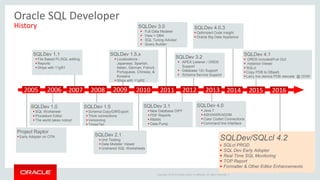
History
Project Raptor
 Early Adopter on OTN
2005
SQLDev 1.1
 File Based PL/SQL editing
 Reports
 Ships with 11gR1
SQLDev 1.5.x
 Localizations -
Japanese, Spanish,
Italian, German, French,
Portuguese, Chinese, &
Koreans
 Ships with 11gR2
SQLDev 1.0
 SQL Worksheet
 Procedure Editor
 The world takes notice!
SQLDev 1.5
 Schema Copy/Diff/Export
 Thick connections
 Versioning
 TimesTen
SQLDev 2.1
 Unit Testing
 Data Modeler Viewer
 Unshared SQL Worksheets
2007 201020092006
SQLDev 3.0
 Full Data Modeler
 View > DBA
 SQL Tuning Advisor
 Query Builder
2008 2011 2012
SQLDev 3.1
 New Database DIFF
 PDF Reports
 RMAN
 Data Pump
2013
SQLDev 3.2
 APEX Listener / ORDS
Support
 Database 12c Support
 Schema Service Support
SQLDev 4.0
 Java 7
 ASH/AWR/ADDM
 Color Coded Connections
 Command line Interface
SQLDev 4.0.3
 Optimized Code Insight
 Oracle Big Data Appliance
2014 2015 2016
SQLDev 4.1
 ORDS Included/Full GUI
 instance Viewer
 SQLcl
 Copy PDB to DBaaS
 Larry live demos PDB relocate @ OOW
SQLDev/SQLcl 4.2
 SQLcl PROD
 SQL Dev Early Adopter
 Real Time SQL Monitoring
 TOP Report
 Formatter & Other Edtior Enhancements
Copyright © 2014 Oracle and/or its affiliates. All rights reserved. |
Thing #1: REPORTS
Copyright © 2014 Oracle and/or its affiliates. All rights reserved. |
That Panel You Look at But Never Click On?
 Routinely ask the same
questions, run the same queries?
 Everyone, right? Yet only about
15-20% of users take advantage
of the reporting feature
Copyright © 2014 Oracle and/or its affiliates. All rights reserved. |
What is a Report?
 1+ queries which back grids,
output panels, or charts
 Defined & ran via SQLDev
A Parent/Child report – the ‘top’ record drives the ‘bottom’ report(s)
Copyright © 2014 Oracle and/or its affiliates. All rights reserved. |
Basic Report Features
 Define report once, run against any connection
 Grid output can be sorted, filtered, exported – just like a query
 Optionally prompt user for values/binds
 Optionally drill down into other reports
 Render HTML (basic, 3.0 standard only)
 Export to PDF
 Also available via Command Line Interface > HTML
Copyright © 2014 Oracle and/or its affiliates. All rights reserved. |
Canned Reports
 Oracle provided
reports
 You can’t edit them,
but you can copy them
to a User Defined
Report
Copyright © 2014 Oracle and/or its affiliates. All rights reserved. |
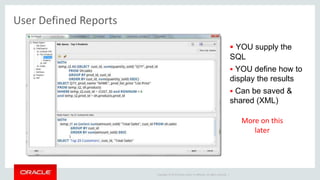
User Defined Reports
 YOU supply the
SQL
 YOU define how to
display the results
 Can be saved &
shared (XML)
More on this
later
Copyright © 2014 Oracle and/or its affiliates. All rights reserved. |
Parent/Child - Binds
1. Define Master Report
2. Add Child Report
3. To LINK data from
master to child, :BIND
the data
Copyright © 2014 Oracle and/or its affiliates. All rights reserved. |
Visual Aids
Copyright © 2014 Oracle and/or its affiliates. All rights reserved. |
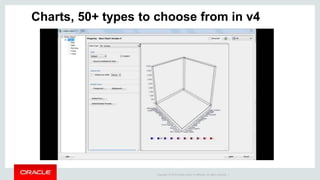
Charts, 50+ types to choose from in v4
Copyright © 2014 Oracle and/or its affiliates. All rights reserved. |
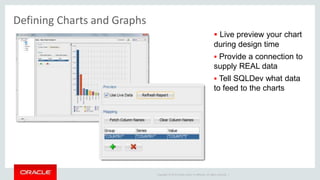
Defining Charts and Graphs
 Live preview your chart
during design time
 Provide a connection to
supply REAL data
 Tell SQLDev what data
to feed to the charts
Copyright © 2014 Oracle and/or its affiliates. All rights reserved. |
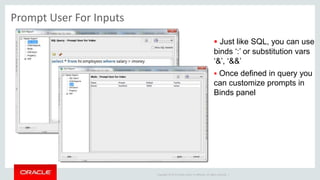
Prompt User For Inputs
 Just like SQL, you can use
binds ‘:’ or substitution vars
‘&’, ‘&&’
 Once defined in query you
can customize prompts in
Binds panel
Copyright © 2014 Oracle and/or its affiliates. All rights reserved. |
Report with Prompt(s)
Copyright © 2014 Oracle and/or its affiliates. All rights reserved. |
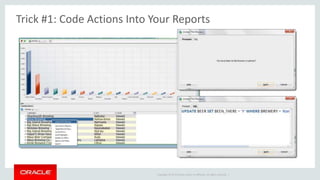
Trick #1: Code Actions Into Your Reports
Copyright © 2014 Oracle and/or its affiliates. All rights reserved. |
Trick #1: Edit the XML – Add Some Code
Copyright © 2014 Oracle and/or its affiliates. All rights reserved. |
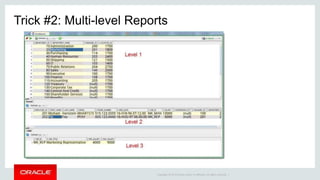
Trick #2: Multi-level Reports
Copyright © 2014 Oracle and/or its affiliates. All rights reserved. |
Smarter People Than Me Have Built Some Cool
Reports
Get this report from @ba6dotus
Copyright © 2014 Oracle and/or its affiliates. All rights reserved. |
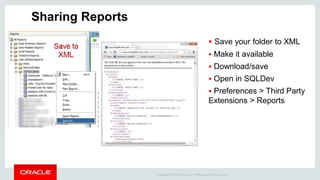
Sharing Reports
 Save your folder to XML
 Make it available
 Download/save
 Open in SQLDev
 Preferences > Third Party
Extensions > Reports
Copyright © 2014 Oracle and/or its affiliates. All rights reserved. |
Reports + Command Line Interface = HTML
Copyright © 2014 Oracle and/or its affiliates. All rights reserved. |
Thing #2: PL/Scope
Copyright © 2014 Oracle and/or its affiliates. All rights reserved. |
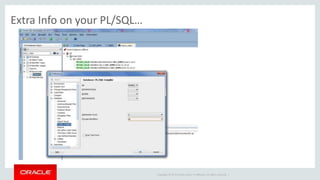
Extra Info on your PL/SQL…
Copyright © 2014 Oracle and/or its affiliates. All rights reserved. |
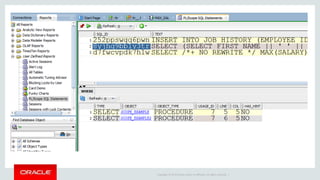
Extra Info on your PL/SQL…
Copyright © 2014 Oracle and/or its affiliates. All rights reserved. |
Starting with Oracle Database 12c Release 2 (12.2.0.1), a new view,
DBA_STATEMENTS, reports on the occurrences of static SQL in PL/SQL
units. It provides information about the SQL_ID, the canonical statement
text, the statement type, useful statement usage attributes, its
signature, and location in the PL/SQL code. Each row represents a SQL
statement instance in the PL/SQL code
Copyright © 2014 Oracle and/or its affiliates. All rights reserved. |
Thing #3..4..5: Connection Folders, Extensions, Templates
Copyright © 2014 Oracle and/or its affiliates. All rights reserved. |
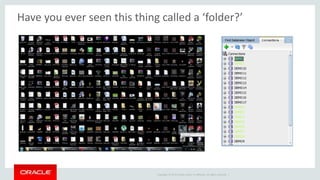
Have you ever seen this thing called a ‘folder?’
Copyright © 2014 Oracle and/or its affiliates. All rights reserved. |
 Select connection(s)
 Right – Click
 Add to Folder
Copyright © 2014 Oracle and/or its affiliates. All rights reserved. |
GitHub Examples
Extend the UI with Just XML or Java
Copyright © 2014 Oracle and/or its affiliates. All rights reserved. |
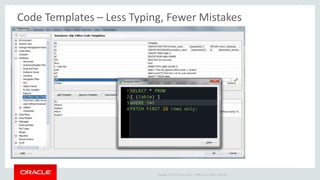
Code Templates – Less Typing, Fewer Mistakes
Copyright © 2014 Oracle and/or its affiliates. All rights reserved. |
Thanks!

Oracle SQL Developer: 3 Features You're Not Using But Should Be

  • 1.
    Copyright © 2014Oracle and/or its affiliates. All rights reserved. | Oracle SQL Developer: Three Things You Should be Using But Probably Aren’t Jeff Smith Senior Principal Product Manager Jeff.d.smith@oracle.com @thatjeffsmith
  • 2.
    Copyright © 2014Oracle and/or its affiliates. All rights reserved. |
  • 3.
    Copyright © 2014Oracle and/or its affiliates. All rights reserved. | Oracle SQL Developer History Project Raptor  Early Adopter on OTN 2005 SQLDev 1.1  File Based PL/SQL editing  Reports  Ships with 11gR1 SQLDev 1.5.x  Localizations - Japanese, Spanish, Italian, German, French, Portuguese, Chinese, & Koreans  Ships with 11gR2 SQLDev 1.0  SQL Worksheet  Procedure Editor  The world takes notice! SQLDev 1.5  Schema Copy/Diff/Export  Thick connections  Versioning  TimesTen SQLDev 2.1  Unit Testing  Data Modeler Viewer  Unshared SQL Worksheets 2007 201020092006 SQLDev 3.0  Full Data Modeler  View > DBA  SQL Tuning Advisor  Query Builder 2008 2011 2012 SQLDev 3.1  New Database DIFF  PDF Reports  RMAN  Data Pump 2013 SQLDev 3.2  APEX Listener / ORDS Support  Database 12c Support  Schema Service Support SQLDev 4.0  Java 7  ASH/AWR/ADDM  Color Coded Connections  Command line Interface SQLDev 4.0.3  Optimized Code Insight  Oracle Big Data Appliance 2014 2015 2016 SQLDev 4.1  ORDS Included/Full GUI  instance Viewer  SQLcl  Copy PDB to DBaaS  Larry live demos PDB relocate @ OOW SQLDev/SQLcl 4.2  SQLcl PROD  SQL Dev Early Adopter  Real Time SQL Monitoring  TOP Report  Formatter & Other Edtior Enhancements
  • 4.
    Copyright © 2014Oracle and/or its affiliates. All rights reserved. | Thing #1: REPORTS
  • 5.
    Copyright © 2014Oracle and/or its affiliates. All rights reserved. | That Panel You Look at But Never Click On?  Routinely ask the same questions, run the same queries?  Everyone, right? Yet only about 15-20% of users take advantage of the reporting feature
  • 6.
    Copyright © 2014Oracle and/or its affiliates. All rights reserved. | What is a Report?  1+ queries which back grids, output panels, or charts  Defined & ran via SQLDev A Parent/Child report – the ‘top’ record drives the ‘bottom’ report(s)
  • 7.
    Copyright © 2014Oracle and/or its affiliates. All rights reserved. | Basic Report Features  Define report once, run against any connection  Grid output can be sorted, filtered, exported – just like a query  Optionally prompt user for values/binds  Optionally drill down into other reports  Render HTML (basic, 3.0 standard only)  Export to PDF  Also available via Command Line Interface > HTML
  • 8.
    Copyright © 2014Oracle and/or its affiliates. All rights reserved. | Canned Reports  Oracle provided reports  You can’t edit them, but you can copy them to a User Defined Report
  • 9.
    Copyright © 2014Oracle and/or its affiliates. All rights reserved. | User Defined Reports  YOU supply the SQL  YOU define how to display the results  Can be saved & shared (XML) More on this later
  • 10.
    Copyright © 2014Oracle and/or its affiliates. All rights reserved. | Parent/Child - Binds 1. Define Master Report 2. Add Child Report 3. To LINK data from master to child, :BIND the data
  • 11.
    Copyright © 2014Oracle and/or its affiliates. All rights reserved. | Visual Aids
  • 12.
    Copyright © 2014Oracle and/or its affiliates. All rights reserved. | Charts, 50+ types to choose from in v4
  • 13.
    Copyright © 2014Oracle and/or its affiliates. All rights reserved. | Defining Charts and Graphs  Live preview your chart during design time  Provide a connection to supply REAL data  Tell SQLDev what data to feed to the charts
  • 14.
    Copyright © 2014Oracle and/or its affiliates. All rights reserved. | Prompt User For Inputs  Just like SQL, you can use binds ‘:’ or substitution vars ‘&’, ‘&&’  Once defined in query you can customize prompts in Binds panel
  • 15.
    Copyright © 2014Oracle and/or its affiliates. All rights reserved. | Report with Prompt(s)
  • 16.
    Copyright © 2014Oracle and/or its affiliates. All rights reserved. | Trick #1: Code Actions Into Your Reports
  • 17.
    Copyright © 2014Oracle and/or its affiliates. All rights reserved. | Trick #1: Edit the XML – Add Some Code
  • 18.
    Copyright © 2014Oracle and/or its affiliates. All rights reserved. | Trick #2: Multi-level Reports
  • 19.
    Copyright © 2014Oracle and/or its affiliates. All rights reserved. | Smarter People Than Me Have Built Some Cool Reports Get this report from @ba6dotus
  • 20.
    Copyright © 2014Oracle and/or its affiliates. All rights reserved. | Sharing Reports  Save your folder to XML  Make it available  Download/save  Open in SQLDev  Preferences > Third Party Extensions > Reports
  • 21.
    Copyright © 2014Oracle and/or its affiliates. All rights reserved. | Reports + Command Line Interface = HTML
  • 22.
    Copyright © 2014Oracle and/or its affiliates. All rights reserved. | Thing #2: PL/Scope
  • 23.
    Copyright © 2014Oracle and/or its affiliates. All rights reserved. | Extra Info on your PL/SQL…
  • 24.
    Copyright © 2014Oracle and/or its affiliates. All rights reserved. | Extra Info on your PL/SQL…
  • 25.
    Copyright © 2014Oracle and/or its affiliates. All rights reserved. | Starting with Oracle Database 12c Release 2 (12.2.0.1), a new view, DBA_STATEMENTS, reports on the occurrences of static SQL in PL/SQL units. It provides information about the SQL_ID, the canonical statement text, the statement type, useful statement usage attributes, its signature, and location in the PL/SQL code. Each row represents a SQL statement instance in the PL/SQL code
  • 26.
    Copyright © 2014Oracle and/or its affiliates. All rights reserved. |
  • 27.
    Copyright © 2014Oracle and/or its affiliates. All rights reserved. | Thing #3..4..5: Connection Folders, Extensions, Templates
  • 28.
    Copyright © 2014Oracle and/or its affiliates. All rights reserved. | Have you ever seen this thing called a ‘folder?’
  • 29.
    Copyright © 2014Oracle and/or its affiliates. All rights reserved. |  Select connection(s)  Right – Click  Add to Folder
  • 30.
    Copyright © 2014Oracle and/or its affiliates. All rights reserved. | GitHub Examples Extend the UI with Just XML or Java
  • 31.
    Copyright © 2014Oracle and/or its affiliates. All rights reserved. | Code Templates – Less Typing, Fewer Mistakes
  • 32.
    Copyright © 2014Oracle and/or its affiliates. All rights reserved. | Thanks!