Operationalization of a solution to automate web
forms insertions in the Office for Quality
Assessment of the Sport Sciences School of Rio
Maior

Pedro Sobreiro, Teresa Bento & Rita Santos-Rocha @ESDRM
Santarém, 06-02-2014
Agenda
•
•
•
•
•
•

Why this project
Approach adopted for development
Components used
Examples
Results
Conclusions
Why this project?
• Lack of resources and the need of inserting
data in web forms of A3ES for all the teachers
and curricular units of the ESDRM;
• Lack of time to insert and rigid time stamp to
develop the tasks;
• Repetitive human tasks and prone to human
errors;
• Information related to curricular units and
teachers already inserted in databases;
A3ES - Agência de avaliação e acreditação do ensino superior
Why this project?
• Solution develop with support and positive
feedback of top management of ESDRM;
• The head of the Office for Quality Assessment
give the conditions for the solution
development and supported the initiative;
• The internal support and confidence was
fundamental for the development of the
solution and for commitment to get work
done;
Approach adopted
• No money to buy a solution leaded to the
adoption of open source solution and the
exclusion of other options;
• Initially was tested iMacros, a free solution for
basic features, but with the development of
the project was needed additional features;
• Selenium as open source became the only
option to develop the solution to automate;
Methods
• The solution was develop using Selenium as
an interface to Firefox Web Browser;
• Database adopted for warehousing the data
was H2 (Hibernate) interfaced using the driver
manager jdbc on the client side;
• The plug-ins used were: (1) selenium IDE
1.9.0; (2) selenium IDE: Java Formatters 1.9.0;
Browser Automation
• The automation was implemented using
several Firefox plug-ins as interface to the
application developed in Java:
• Selenium plug-ins: Selenium IDE 1.9.0 and
Selenium IDE Java Formatters;
Browser Automation
• Additionally were installed third part plug-ins to
facilitate the web pages analysis;
• The automation of the interaction was supported
with a mixed identification, using TAGS and ID’s;
• Firebug was used for monitoring in real time the
web page elements;
• Firepath for editing XPATH and CSS3 expressions,
facilitating the tests with web page elements;
Selenium components
• IDE interface for saving macros and testing the
initial interaction.
• IDE gives a ground base and facilitates the
development of the application to interact
with the web form;
• Webdriver gives access to the web browser as
remote control, and permits “driving” the
browser;
Selenium IDE
• The comands for automating have two basic
elements: command and target;
• Basic commands: open url; type;
verifyElementPresent; click; clickAndWait;
@driver.get(@base_url + "/si/iportal.php/auth/login/lang/pt/")
@driver.find_element(:id, "portal_username").clear
@driver.find_element(:id, "portal_username").send_keys "username"
@driver.find_element(:id, "portal_password").clear
@driver.find_element(:id, "portal_password").send_keys "password"
@driver.find_element(:id, "ext-gen23").click
# Terminou a autenticação
@driver.find_element(:id, "ext-gen531").click
@driver.find_element(:xpath, "//ul[@id='ext-gen571']/div/li[3]/div/img").click
WebDriver
• Simulate access to the browser as an end user;
• The development enviroment used:
• Programming IDE: IDEA Intellij
• JUnit to drive the tests and asserts during the
tests;
• Selenium WebDriver;
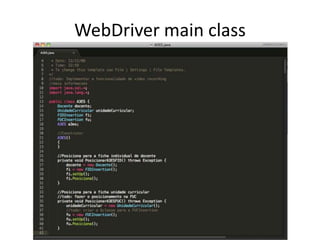
WebDriver main class
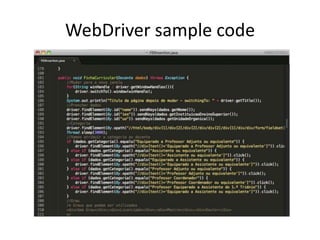
WebDriver sample code
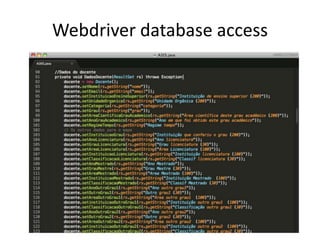
Webdriver database access
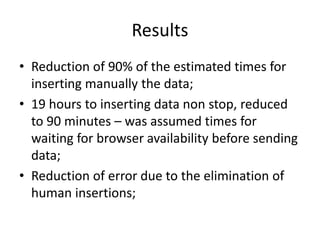
Results
• Reduction of 90% of the estimated times for
inserting manually the data;
• 19 hours to inserting data non stop, reduced
to 90 minutes – was assumed times for
waiting for browser availability before sending
data;
• Reduction of error due to the elimination of
human insertions;
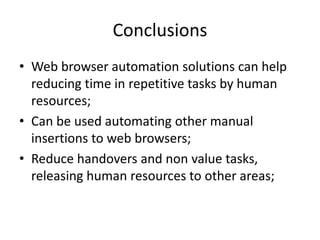
Conclusions
• Web browser automation solutions can help
reducing time in repetitive tasks by human
resources;
• Can be used automating other manual
insertions to web browsers;
• Reduce handovers and non value tasks,
releasing human resources to other areas;
References
• Selenium Project. (2012). Selenium Documentation.
Retrieved from
http://seleniumhq.org/docs/book/Selenium_Documentatio
n.pdf
• Burns, D. (2012). Selenium 2 Testing Tools Beginners Guide :
Learn to use Selenium testing tools from scratch.
Birmingham; Mumbai: Packt Publisihing Ltd
• Gundecha, U. (2012). Selenium Testing Tools Cookbook.
Birmingham: Packt Pub.
• Niemeyer, P. (2005). Learning Java (3rd ed.). Sebastopol, CA:
O’Reilly.
• Bauer, C., & King, G. (2006). Java Persistence with Hibernate
(Revised.). Manning Publications.

Operationalization of a solution to automate web forms insertions in the Office for Quality Assessment of the Sport Sciences School of Rio Maior

  • 1.
    Operationalization of asolution to automate web forms insertions in the Office for Quality Assessment of the Sport Sciences School of Rio Maior Pedro Sobreiro, Teresa Bento & Rita Santos-Rocha @ESDRM Santarém, 06-02-2014
  • 2.
    Agenda • • • • • • Why this project Approachadopted for development Components used Examples Results Conclusions
  • 3.
    Why this project? •Lack of resources and the need of inserting data in web forms of A3ES for all the teachers and curricular units of the ESDRM; • Lack of time to insert and rigid time stamp to develop the tasks; • Repetitive human tasks and prone to human errors; • Information related to curricular units and teachers already inserted in databases; A3ES - Agência de avaliação e acreditação do ensino superior
  • 4.
    Why this project? •Solution develop with support and positive feedback of top management of ESDRM; • The head of the Office for Quality Assessment give the conditions for the solution development and supported the initiative; • The internal support and confidence was fundamental for the development of the solution and for commitment to get work done;
  • 5.
    Approach adopted • Nomoney to buy a solution leaded to the adoption of open source solution and the exclusion of other options; • Initially was tested iMacros, a free solution for basic features, but with the development of the project was needed additional features; • Selenium as open source became the only option to develop the solution to automate;
  • 6.
    Methods • The solutionwas develop using Selenium as an interface to Firefox Web Browser; • Database adopted for warehousing the data was H2 (Hibernate) interfaced using the driver manager jdbc on the client side; • The plug-ins used were: (1) selenium IDE 1.9.0; (2) selenium IDE: Java Formatters 1.9.0;
  • 7.
    Browser Automation • Theautomation was implemented using several Firefox plug-ins as interface to the application developed in Java: • Selenium plug-ins: Selenium IDE 1.9.0 and Selenium IDE Java Formatters;
  • 8.
    Browser Automation • Additionallywere installed third part plug-ins to facilitate the web pages analysis; • The automation of the interaction was supported with a mixed identification, using TAGS and ID’s; • Firebug was used for monitoring in real time the web page elements; • Firepath for editing XPATH and CSS3 expressions, facilitating the tests with web page elements;
  • 9.
    Selenium components • IDEinterface for saving macros and testing the initial interaction. • IDE gives a ground base and facilitates the development of the application to interact with the web form; • Webdriver gives access to the web browser as remote control, and permits “driving” the browser;
  • 10.
    Selenium IDE • Thecomands for automating have two basic elements: command and target; • Basic commands: open url; type; verifyElementPresent; click; clickAndWait; @driver.get(@base_url + "/si/iportal.php/auth/login/lang/pt/") @driver.find_element(:id, "portal_username").clear @driver.find_element(:id, "portal_username").send_keys "username" @driver.find_element(:id, "portal_password").clear @driver.find_element(:id, "portal_password").send_keys "password" @driver.find_element(:id, "ext-gen23").click # Terminou a autenticação @driver.find_element(:id, "ext-gen531").click @driver.find_element(:xpath, "//ul[@id='ext-gen571']/div/li[3]/div/img").click
  • 11.
    WebDriver • Simulate accessto the browser as an end user; • The development enviroment used: • Programming IDE: IDEA Intellij • JUnit to drive the tests and asserts during the tests; • Selenium WebDriver;
  • 12.
  • 13.
  • 14.
  • 15.
    Results • Reduction of90% of the estimated times for inserting manually the data; • 19 hours to inserting data non stop, reduced to 90 minutes – was assumed times for waiting for browser availability before sending data; • Reduction of error due to the elimination of human insertions;
  • 16.
    Conclusions • Web browserautomation solutions can help reducing time in repetitive tasks by human resources; • Can be used automating other manual insertions to web browsers; • Reduce handovers and non value tasks, releasing human resources to other areas;
  • 17.
    References • Selenium Project.(2012). Selenium Documentation. Retrieved from http://seleniumhq.org/docs/book/Selenium_Documentatio n.pdf • Burns, D. (2012). Selenium 2 Testing Tools Beginners Guide : Learn to use Selenium testing tools from scratch. Birmingham; Mumbai: Packt Publisihing Ltd • Gundecha, U. (2012). Selenium Testing Tools Cookbook. Birmingham: Packt Pub. • Niemeyer, P. (2005). Learning Java (3rd ed.). Sebastopol, CA: O’Reilly. • Bauer, C., & King, G. (2006). Java Persistence with Hibernate (Revised.). Manning Publications.