Usability & User-Centred DesignPaper & UI Prototyping Practical (pm)Cramond/Swanston RoomUsability & faceted searchFaceted Search Technology Hacking (pm)StudyPodUser-Centred Design & faceted Search User InterfaceBoon LowThe University of Edinburgh17th May 2011
OutlineUser experience, usability, user-centred designFaceted search user interfaceHighlights from the JISC UX2 Project: Usability and Contemporary User Experience in Digital Libraries
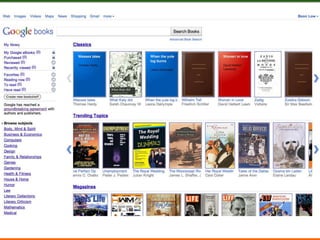
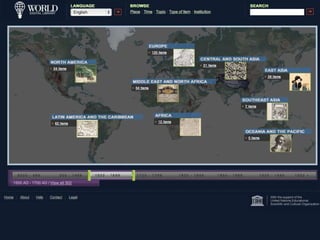
Digital Library - ExamplesWorld Digital Library12/2/09Usability and Contemporary User Experience in Digital Libraries
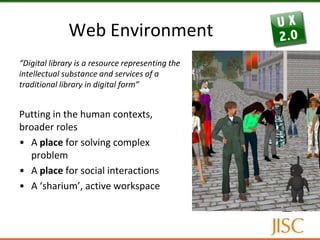
Web Environment“Digital library is a resource representing the intellectual substance and services of a traditional library in digital form”Putting in the human contexts, broader rolesA place for solving complex problemA place for social interactionsA ‘sharium’, active workspace
Contemporary User ExperienceWeb 2.0 - new ways providing user interface/experienceUser-centric, social networking, e.g. folksonomyNew technologies, UI interactions: AJAX and rich application UIVirtual (2D/3D) environmentUser experience – a broad termSum of all user interactionsGoes beyond giving users what they say they wantObjective (e.g. functional, usability) and subjective aspects (e.g. psychology)How a user feels about a system including overall perceptionsUsability and Contemporary User Experience in Digital Libraries17/05/11
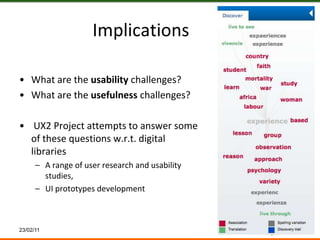
ImplicationsWhat are the usability challenges? What are the usefulness challenges? UX2 Project attempts to answer some of these questions w.r.t. digital librariesA range of user research and usability studies, UI prototypes development23/02/11
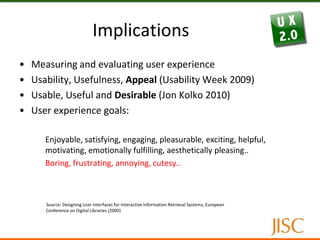
ImplicationsMeasuring and evaluating user experience
Usability, Usefulness, Appeal (Usability Week 2009)
Usable, Useful and Desirable (Jon Kolko 2010)
User experience goals:	Enjoyable, satisfying, engaging, pleasurable, exciting, helpful, motivating, emotionally fulfilling, aesthetically pleasing..	Boring, frustrating, annoying, cutesy..Source: Designing User Interfaces for Interactive Information Retrieval Systems, European Conference on Digital Libraries (2009)
User-Centred Design (UCD)A design process in which “the real users and their goals, not just technology, is the driving force of product development” (Rogers, Sharp, Preece)Characteristics:User research conducted early, throughout the product cycleEmpirical measurementIterative designUser research and empirical measurement: personas, usability testing, prototype testing, contextual inquiry, survey, interviews, focus groups
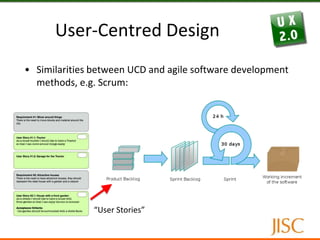
User-Centred DesignSimilarities between UCD and agile software development methods, e.g. Scrum:“User Stories”
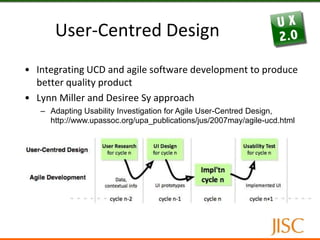
User-Centred DesignIntegrating UCD and agile software development to produce better quality productLynn Miller and Desiree Sy approachAdapting Usability Investigation for Agile User-Centred Design, http://www.upassoc.org/upa_publications/jus/2007may/agile-ucd.html
User-Centred DesignThe key concepts of the Miller-Sy method:Chunking of UCD tasks (research, design, usability testing), base them around an agile implementation Progressive: low-fi to hi-fi usability testing and contextual inquiry.The Miller-Sy approach is resource intensive in terms of planning and managementTwo tracks -> two teams
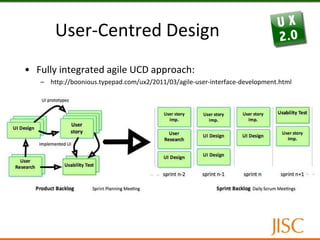
User-Centred DesignFully integrated agile UCD approach:http://boonious.typepad.com/ux2/2011/03/agile-user-interface-development.html
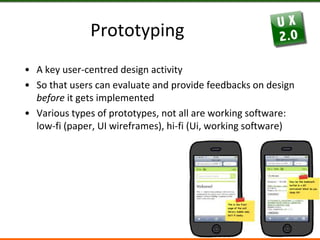
PrototypingA key user-centred design activitySo that users can evaluate and provide feedbacks on design before it gets implementedVarious types of prototypes, not all are working software: low-fi (paper, UI wireframes), hi-fi (Ui, working software)
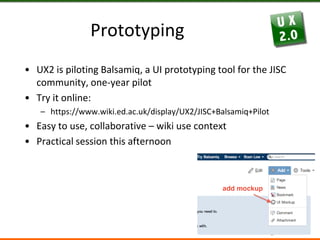
PrototypingUX2 is piloting Balsamiq, a UI prototyping tool for the JISC community, one-year pilotTry it online: https://www.wiki.ed.ac.uk/display/UX2/JISC+Balsamiq+PilotEasy to use, collaborative – wiki use contextPractical session this afternoon
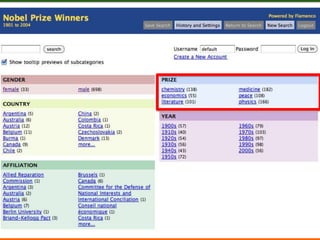
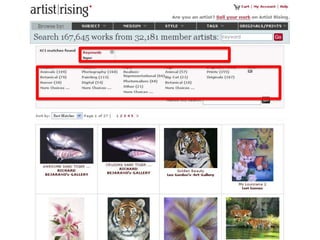
Faceted SearchA better technique for refining, narrowing (expanding) search compared to traditional methodsIntegrating searching and browsing seamlesslyalso faceted browsing, faceted navigation, guided navigation
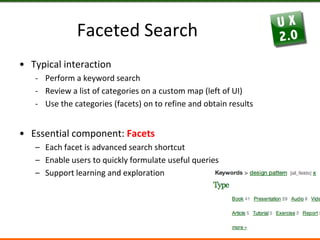
Faceted SearchTypical interactionPerform a keyword search
Review a list of categories on a custom map (left of UI)
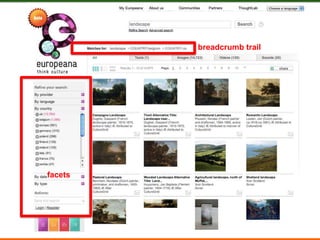
Use the categories (facets) on to refine and obtain resultsEssential component: FacetsEach facet is advanced search shortcutEnable users to quickly formulate useful queries Support learning and exploration
Digital Library - Examplesbreadcrumb trailEuropeanafacets
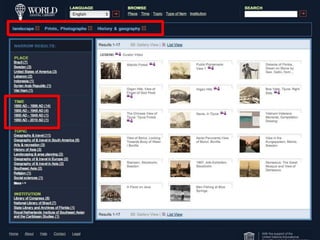
Digital Library - ExamplesWDL12/2/09Usability and Contemporary User Experience in Digital Libraries
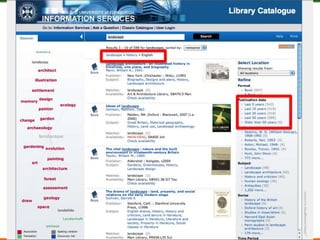
Digital Library - ExamplesAquaBrowser12/2/09Usability and Contemporary User Experience in Digital Libraries
12/2/09Usability and Contemporary User Experience in Digital Libraries
Facet Analysis & DesignFacet design and analysis is a key requirement of faceted search provisionDetermine what facets are appropriate Facet terms can be mapped from metadata, e.g. library book catalogue
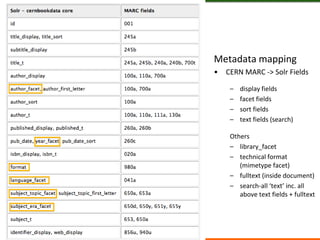
Metadata mappingCERN MARC -> Solr Fieldsdisplay fieldsfacet fieldssort fieldstext fields (search)Others library_facettechnical format (mimetype facet)fulltext (inside document)search-all ‘text’ inc. all above text fields + fulltext23/02/11
Facet Analysis & DesignSome sites require research efforts to derive terms (metadata not readily available)Standard user/content research methods: interviews, taxonomies and controlled vocabularies, content analysis, card sortingTypes of facet:Hierarchy: continent & country, subject headingsList: authorsBinary: female|male; colour|black & whiteRange: date (last 10 years), price ($1-$10), rating (1 to 5)
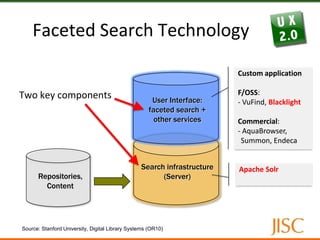
Faceted Search TechnologyTwo key componentsCustom applicationF/OSS:- VuFind, BlacklightCommercial: - AquaBrowser, Summon, EndecaUser Interface: faceted search + other servicesSearch infrastructure(Server)Apache SolrRepositories,ContentSource: Stanford University, Digital Library Systems (OR10)
Introducing BlacklightBlacklight is a discovery interface for library catalogue, digital repository front-end, single-search interface Front-end for Apache Solr (similar to VuFind)UVA + Solr = UVA radiation = Blacklight!
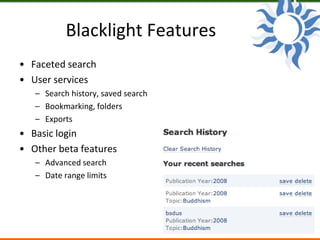
Blacklight FeaturesFaceted searchUser servicesSearch history, saved searchBookmarking, foldersExportsBasic loginOther beta featuresAdvanced searchDate range limits

Usability & User-Centred Design

  • 1.
    Usability & User-CentredDesignPaper & UI Prototyping Practical (pm)Cramond/Swanston RoomUsability & faceted searchFaceted Search Technology Hacking (pm)StudyPodUser-Centred Design & faceted Search User InterfaceBoon LowThe University of Edinburgh17th May 2011
  • 2.
    OutlineUser experience, usability,user-centred designFaceted search user interfaceHighlights from the JISC UX2 Project: Usability and Contemporary User Experience in Digital Libraries
  • 5.
    Digital Library -ExamplesWorld Digital Library12/2/09Usability and Contemporary User Experience in Digital Libraries
  • 6.
    Web Environment“Digital libraryis a resource representing the intellectual substance and services of a traditional library in digital form”Putting in the human contexts, broader rolesA place for solving complex problemA place for social interactionsA ‘sharium’, active workspace
  • 7.
    Contemporary User ExperienceWeb2.0 - new ways providing user interface/experienceUser-centric, social networking, e.g. folksonomyNew technologies, UI interactions: AJAX and rich application UIVirtual (2D/3D) environmentUser experience – a broad termSum of all user interactionsGoes beyond giving users what they say they wantObjective (e.g. functional, usability) and subjective aspects (e.g. psychology)How a user feels about a system including overall perceptionsUsability and Contemporary User Experience in Digital Libraries17/05/11
  • 8.
    ImplicationsWhat are theusability challenges? What are the usefulness challenges? UX2 Project attempts to answer some of these questions w.r.t. digital librariesA range of user research and usability studies, UI prototypes development23/02/11
  • 9.
  • 10.
    Usability, Usefulness, Appeal(Usability Week 2009)
  • 11.
    Usable, Useful andDesirable (Jon Kolko 2010)
  • 12.
    User experience goals: Enjoyable,satisfying, engaging, pleasurable, exciting, helpful, motivating, emotionally fulfilling, aesthetically pleasing.. Boring, frustrating, annoying, cutesy..Source: Designing User Interfaces for Interactive Information Retrieval Systems, European Conference on Digital Libraries (2009)
  • 13.
    User-Centred Design (UCD)Adesign process in which “the real users and their goals, not just technology, is the driving force of product development” (Rogers, Sharp, Preece)Characteristics:User research conducted early, throughout the product cycleEmpirical measurementIterative designUser research and empirical measurement: personas, usability testing, prototype testing, contextual inquiry, survey, interviews, focus groups
  • 14.
    User-Centred DesignSimilarities betweenUCD and agile software development methods, e.g. Scrum:“User Stories”
  • 15.
    User-Centred DesignIntegrating UCDand agile software development to produce better quality productLynn Miller and Desiree Sy approachAdapting Usability Investigation for Agile User-Centred Design, http://www.upassoc.org/upa_publications/jus/2007may/agile-ucd.html
  • 16.
    User-Centred DesignThe keyconcepts of the Miller-Sy method:Chunking of UCD tasks (research, design, usability testing), base them around an agile implementation Progressive: low-fi to hi-fi usability testing and contextual inquiry.The Miller-Sy approach is resource intensive in terms of planning and managementTwo tracks -> two teams
  • 17.
    User-Centred DesignFully integratedagile UCD approach:http://boonious.typepad.com/ux2/2011/03/agile-user-interface-development.html
  • 18.
    PrototypingA key user-centreddesign activitySo that users can evaluate and provide feedbacks on design before it gets implementedVarious types of prototypes, not all are working software: low-fi (paper, UI wireframes), hi-fi (Ui, working software)
  • 19.
    PrototypingUX2 is pilotingBalsamiq, a UI prototyping tool for the JISC community, one-year pilotTry it online: https://www.wiki.ed.ac.uk/display/UX2/JISC+Balsamiq+PilotEasy to use, collaborative – wiki use contextPractical session this afternoon
  • 20.
    Faceted SearchA bettertechnique for refining, narrowing (expanding) search compared to traditional methodsIntegrating searching and browsing seamlesslyalso faceted browsing, faceted navigation, guided navigation
  • 21.
  • 22.
    Review a listof categories on a custom map (left of UI)
  • 23.
    Use the categories(facets) on to refine and obtain resultsEssential component: FacetsEach facet is advanced search shortcutEnable users to quickly formulate useful queries Support learning and exploration
  • 25.
    Digital Library -Examplesbreadcrumb trailEuropeanafacets
  • 26.
    Digital Library -ExamplesWDL12/2/09Usability and Contemporary User Experience in Digital Libraries
  • 27.
    Digital Library -ExamplesAquaBrowser12/2/09Usability and Contemporary User Experience in Digital Libraries
  • 28.
    12/2/09Usability and ContemporaryUser Experience in Digital Libraries
  • 29.
    Facet Analysis &DesignFacet design and analysis is a key requirement of faceted search provisionDetermine what facets are appropriate Facet terms can be mapped from metadata, e.g. library book catalogue
  • 30.
    Metadata mappingCERN MARC-> Solr Fieldsdisplay fieldsfacet fieldssort fieldstext fields (search)Others library_facettechnical format (mimetype facet)fulltext (inside document)search-all ‘text’ inc. all above text fields + fulltext23/02/11
  • 31.
    Facet Analysis &DesignSome sites require research efforts to derive terms (metadata not readily available)Standard user/content research methods: interviews, taxonomies and controlled vocabularies, content analysis, card sortingTypes of facet:Hierarchy: continent & country, subject headingsList: authorsBinary: female|male; colour|black & whiteRange: date (last 10 years), price ($1-$10), rating (1 to 5)
  • 32.
    Faceted Search TechnologyTwokey componentsCustom applicationF/OSS:- VuFind, BlacklightCommercial: - AquaBrowser, Summon, EndecaUser Interface: faceted search + other servicesSearch infrastructure(Server)Apache SolrRepositories,ContentSource: Stanford University, Digital Library Systems (OR10)
  • 33.
    Introducing BlacklightBlacklight isa discovery interface for library catalogue, digital repository front-end, single-search interface Front-end for Apache Solr (similar to VuFind)UVA + Solr = UVA radiation = Blacklight!
  • 34.
    Blacklight FeaturesFaceted searchUserservicesSearch history, saved searchBookmarking, foldersExportsBasic loginOther beta featuresAdvanced searchDate range limits