• Starting from a given image, the goal of the
  true compression is to minimize the length of
  the sequence of bits needed to represent it,
  while preserving information of acceptable
  quality. Wavelets contribute to effective
  solutions for this problem.
• In this section, you'll learn to
• Compress using global thresholding and
  Huffman encoding
• Uncompress
• Compress using progressive methods
• Handle truecolor images
• Compression by Global Thresholding and
  Huffman Encoding

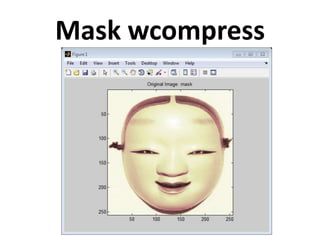
•   First load and display the grayscale image mask.
•   load mask;
•   image(X) axis square;
•    colormap(pink(255))
•    title('Original Image: mask')
wcompress
•   %--------------------------------------------------------------
•    % Compression and uncompression of a truecolor image
•    % and computed MSE and PSNR error values.
•    % Compression parameters are the same as those used for example 3,
•    % but using the 'spiht_3d' method give better performance yet.
•    %--------------------------------------------------------------
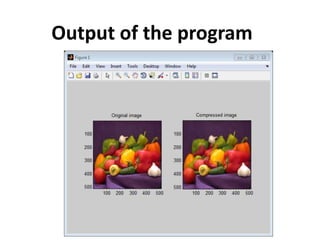
•    X = imread('wpeppers.jpg');
•    [cr,bpp] = wcompress('c',X,'wpeppers.wtc','spiht','maxloop',12)
•    Xc = wcompress('u','wpeppers.wtc');
•    delete('wpeppers.wtc')
•    D = abs(double(X)-double(Xc)).^2;
•    mse = sum(D(:))/numel(X)
•    psnr = 10*log10(255*255/mse)
•    % Display the original and the compressed image
•    subplot(1,2,1); image(X); title('Original image'); axis square
•    subplot(1,2,2); image(Xc); title('Compressed image'); axis square
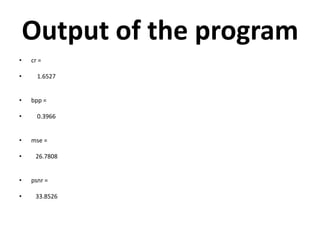
Output of the program
•   cr =

•     1.6527


•   bpp =

•     0.3966


•   mse =

•    26.7808


•   psnr =

•    33.8526
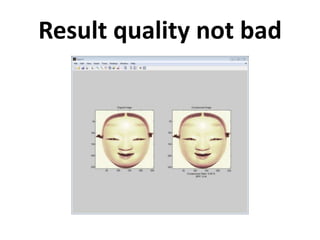
Mask wcompress
• The achieved Bit-Per-Pixel ratio is actually
  about 0.53 (closed to the desired one) for a
  compression ratio of 6.7%.
Compression code
•   load mask;
•   image(X)
•   axis square;
•   colormap(pink(255))
•   title('Original Image: mask')
•   meth = 'gbl_mmc_h'; % Method name
•   option = 'c';     % 'c' stands for compression
•   [CR,BPP] =
    wcompress(option,X,'mask.wtc',meth,'bpp',0.5)
Uncompression code
•   %%%%here is the uncompression part
•
•
•   option = 'u'; % 'u' stands for uncompression
•   Xc = wcompress(option,'mask.wtc');
•   colormap(pink(255))
•   subplot(1,2,1); image(X);
•   axis square;
•   title('Original Image')
•   subplot(1,2,2); image(Xc);
•   axis square;
•   title('Compressed Image')
•   xlabel({['Compression Ratio: ' num2str(CR,'%1.2f %%')],
    ...
•           ['BPP: ' num2str(BPP,'%3.2f')]})
Result quality not bad
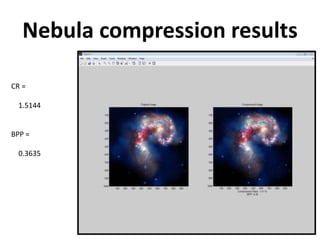
Nebula compression results

CR =

  1.5144


BPP =

  0.3635
Two dimensional true wavelet compression

Two dimensional true wavelet compression

  • 2.
    • Starting froma given image, the goal of the true compression is to minimize the length of the sequence of bits needed to represent it, while preserving information of acceptable quality. Wavelets contribute to effective solutions for this problem.
  • 3.
    • In thissection, you'll learn to • Compress using global thresholding and Huffman encoding • Uncompress • Compress using progressive methods • Handle truecolor images
  • 4.
    • Compression byGlobal Thresholding and Huffman Encoding • First load and display the grayscale image mask. • load mask; • image(X) axis square; • colormap(pink(255)) • title('Original Image: mask')
  • 5.
    wcompress • %-------------------------------------------------------------- • % Compression and uncompression of a truecolor image • % and computed MSE and PSNR error values. • % Compression parameters are the same as those used for example 3, • % but using the 'spiht_3d' method give better performance yet. • %-------------------------------------------------------------- • X = imread('wpeppers.jpg'); • [cr,bpp] = wcompress('c',X,'wpeppers.wtc','spiht','maxloop',12) • Xc = wcompress('u','wpeppers.wtc'); • delete('wpeppers.wtc') • D = abs(double(X)-double(Xc)).^2; • mse = sum(D(:))/numel(X) • psnr = 10*log10(255*255/mse) • % Display the original and the compressed image • subplot(1,2,1); image(X); title('Original image'); axis square • subplot(1,2,2); image(Xc); title('Compressed image'); axis square
  • 6.
  • 7.
    Output of theprogram • cr = • 1.6527 • bpp = • 0.3966 • mse = • 26.7808 • psnr = • 33.8526
  • 8.
  • 9.
    • The achievedBit-Per-Pixel ratio is actually about 0.53 (closed to the desired one) for a compression ratio of 6.7%.
  • 10.
    Compression code • load mask; • image(X) • axis square; • colormap(pink(255)) • title('Original Image: mask') • meth = 'gbl_mmc_h'; % Method name • option = 'c'; % 'c' stands for compression • [CR,BPP] = wcompress(option,X,'mask.wtc',meth,'bpp',0.5)
  • 11.
    Uncompression code • %%%%here is the uncompression part • • • option = 'u'; % 'u' stands for uncompression • Xc = wcompress(option,'mask.wtc'); • colormap(pink(255)) • subplot(1,2,1); image(X); • axis square; • title('Original Image') • subplot(1,2,2); image(Xc); • axis square; • title('Compressed Image') • xlabel({['Compression Ratio: ' num2str(CR,'%1.2f %%')], ... • ['BPP: ' num2str(BPP,'%3.2f')]})
  • 12.
  • 13.
    Nebula compression results CR= 1.5144 BPP = 0.3635